Taylor C708 Users Manual
C708 to the manual b85e6d9b-0ccb-4274-9d38-d32b4d49f85a
2015-02-02
: Taylor Taylor-C708-Users-Manual-449389 taylor-c708-users-manual-449389 taylor pdf
Open the PDF directly: View PDF  .
.
Page Count: 1

Models C708 & C716
Heat Treatment
Soft Serve Freezer
Operating Instructions
059061--M

Complete this page for quick reference when service is required:
Taylor Distributor:
Address:
Phone:
Service:
Parts:
Date of Installation:
Information found on the data label:
Model Number:
Serial Number:
Electrical Specs: Voltage Cycle
Phase
Maximum Fuse Size: A
Minimum Wire Ampacity: A
EDecember, 2004 Taylor
All rights reserved.
059061--M
Taylor Company
750 N. Blackhawk Blvd.
Rockton, IL 61072
The word Taylor and the Crown design
are registered trademarks in the United States
of America and certain other countries.

Models C708 & C716 Table of Contents
Table of Contents
Section 1 To the Installer 1............................................
Water Connections (Water Cooled Units Only) 1............................
Air Cooled Units 1.......................................................
Electrical Connections 1.................................................
Section 2 To the Operator 2...........................................
Compressor Warranty Disclaimer 2.......................................
Section 3 Safety 3....................................................
Section 4 Operator Parts Identification 4...............................
Model C708 4..........................................................
Model C716 5..........................................................
Model C708 Single Spout Door and Beater Assembly 6......................
Model C716 Door and Beater Assembly 7..................................
X57029-XX Pump A. - Mix Simplified (Model C708) 8........................
X57029-XX Pump A. - Mix Simplified (Model C716) 9........................
Accessories 10..........................................................
Brush Kit Assembly X44127 11............................................
Section 5 Important: To the Operator 12.................................
Symbol Definitions 13....................................................
Operating Screen Descriptions 14..........................................
Manager’s Menu 18......................................................
Section 6 Operating Procedures 26.....................................
Freezing Cylinder Assembly 26............................................
Freezer Door Assembly 28................................................
Mix Pump Assembly 31...................................................
Sanitizing 34............................................................
Priming 36..............................................................
Daily Closing Procedures 37..............................................
Daily Opening Procedures 38..............................................
Manual Brush Cleaning 39................................................
Draining Product From The Freezing Cylinder 39............................
Rinsing 40..............................................................
Hopper Cleaning 40......................................................
Disassembly 41..........................................................
Brush Cleaning 42.......................................................

Table of Contents Models C708 & C716
Table of Contents - Page 2
Section 7 Important: Operator Checklist 43..............................
During Cleaning and Sanitizing 43.........................................
Troubleshooting Bacterial Count 43........................................
Regular Maintenance Checks 43...........................................
Winter Storage 44........................................................
Section 8 Troubleshooting Guide 45....................................
Section 9 Parts Replacement Schedule 49...............................
Section 10 Parts List 50.................................................
Wiring Diagrams 63......................................................
Note: Continuing research results in steady improvements; therefore, information
in this manual is subject to change without notice.

1
Models C708 & C716 To the Installer
2Models C708 & C716To the Operator
050816
Section 2 To the Operator
Your freezers have been carefully engineered and
manufactured to give you dependable operation.
These units, when properly operated and cared for,
will produce a consistent quality product. Like all
mechanical products, they will require cleaning and
maintenance. A minimum amount of care and
attention is necessary if the operating procedures
outlined in this manual are followed closely.
This Operator’s Manual should be read before
operating or performing any maintenance on your
equipment.
Your Taylor freezer will NOT eventually compensate
for and correct any errors during the set-up or filling
operations. Thus, the initial assembly and priming
procedures are of extreme importance. It is strongly
recommended that personnel responsible for the
equipment’s operation, both assembly and
disassembly, go through these procedures together
in order to be properly trained and to make sure that
no confusion exists.
In the event you should require technical assistance,
please contact your local authorized Taylor
Distributor.
If the crossed out wheeled bin symbol is
affixed to this product, it signifies that this product is
compliant with the EU Directive as well as other
similar legislation in effect after August 13, 2005.
Therefore, it must be collected separately after its
use is completed, and cannot be disposed as
unsorted municipal waste.
The user is responsible for returning the product to
the appropriate collection facility, as specified by
your local code.
For additional information regarding applicable local
laws, please contact the municipal facility and/or
local distributor.
Compressor Warranty Disclaimer
The refrigeration compressors on this machine are
warranted for the term indicated on the warranty
card accompanying this machine. However, due to
the Montreal Protocol and the U.S. Clean Air Act
Amendments of 1990, many new refrigerants are
being tested and developed, thus seeking their way
into the service industry. Some of these new
refrigerants are being advertised as drop-in
replacements for numerous applications. It should
be noted that, in the event of ordinary service to this
machine’s refrigeration system, only the refrigerant
specified on the affixed data label should be
used. The unauthorized use of alternate refrigerants
will void your compressor warranty. It will be the
owner’s responsibility to make this fact known to any
technician he employs.
It should also be noted that Taylor does not warrant
the refrigerant used in its equipment. For example, if
the refrigerant is lost during the course of ordinary
service to this machine, Taylor has no obligation to
either supply or provide its replacement either at
billable or unbillable terms. Taylor does have the
obligation to recommend a suitable replacement if
the original refrigerant is banned, obsoleted, or no
longer available during the five year warranty of the
compressor.
The Taylor Company will continue to monitor the
industry and test new alternates as they are being
developed. Should a new alternate prove, through
our testing, that it would be accepted as a drop-in
replacement, then the above disclaimer would
become null and void. To find out the current status
of an alternate refrigerant as it relates to your
compressor warranty, call the local Taylor Distributor
or the Taylor Factory. Be prepared to provide the
Model/Serial Number of the unit in question.
3
Models C708 & C716 Safety
Section 3 Safety
We at Taylor Company are concerned about the
safety of the operator when he or she comes in
contact with the freezer and its parts. Taylor has
gone to extreme efforts to design and manufacture
built-in safety features to protect both you and the
service technician. As an example, warning labels
have been attached to the freezer to further point
out safety precautions to the operator.
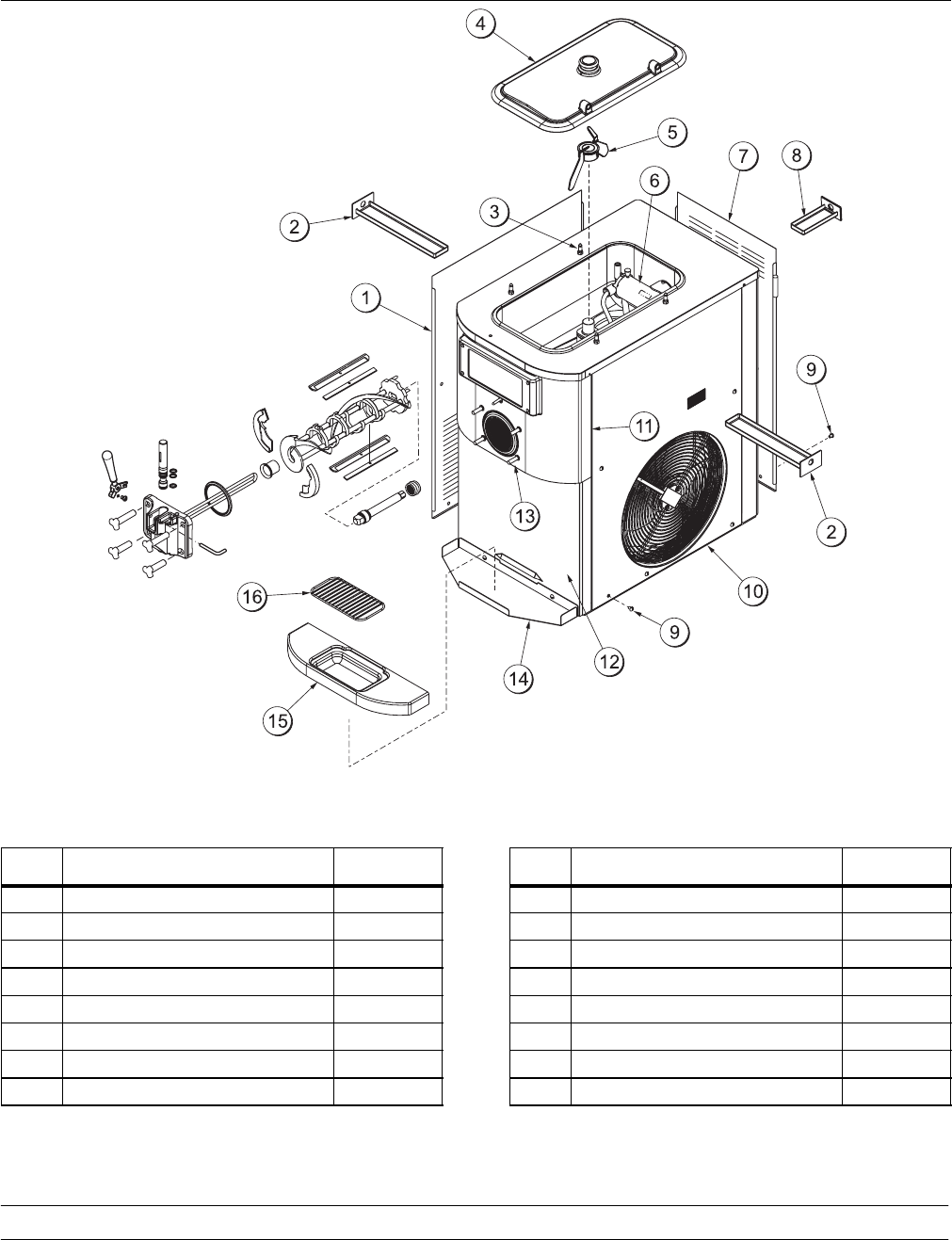
IMPORTANT - Failure to adhere to the
following safety precautions may result in
severe personal injury. Failure to comply with
these warnings may also damage the machine and
its components. Component damage will result in
part replacement expense and service repair
expense.
To Operate Safely:
DO NOT operate the freezer without reading
this operator’s manual. Failure to follow this
instruction may result in equipment damage, poor
freezer performance, health hazards, or personal
injury.
SDO NOT operate the freezer unless it is
properly grounded.
SDO NOT operate the freezer with larger
fuses than specified on the freezer data
label.
SDO NOT attempt any repairs unless the
main power supply to the freezer has been
disconnected.
Failure to follow these instructions may result in
electrocution or damage to the machine. Consult
your electrician.
DO NOT use a water jet to clean or rinse the
freezer. Failure to follow this instruction may result in
serious electrical shock.
SDO NOT allow untrained personnel to
operate this machine.
SDO NOT operate the freezer unless all
service panels and access doors are
restrained with screws.
SDO NOT remove the door, beater and
blades, or drive shaft unless the control
switch is in the OFF position.
SDO NOT put objects or fingers in door
spout.
Failure to follow these instructions may result in
contaminated product or personal injury from
hazardous moving parts.
The freezer must be placed on a level
surface. Failure to comply may result in personal
injury or equipment damage.
USE EXTREME CAUTION when removing
the beater assembly. The scraper blades are very
sharp and may cause injury.
DO NOT obstruct air intake and discharge openings:
C708: A minimum of 6” (152 mm) air space is
required on both sides and 0” on the rear.
C716: A minimum of 3” (76 mm) air space is
required on all sides.
Failure to follow these instructions may cause poor
freezer performance and damage to the machines.
These freezers are designed to operate indoors,
under normal ambient temperatures of 70°-75°F
(21°-24°C). The freezers have successfully
performed in high ambient temperatures of 104°F
(40°C) at reduced capacities.
NOISE LEVEL: Airborne noise emission does not
exceed 78 dB(A) when measured at a distance of
1.0 meter from the surface of the machine and at a
height of 1.6 meters from the floor.
4Models C708 & C716Operator Parts Identification
Section 4 Operator Parts Identification
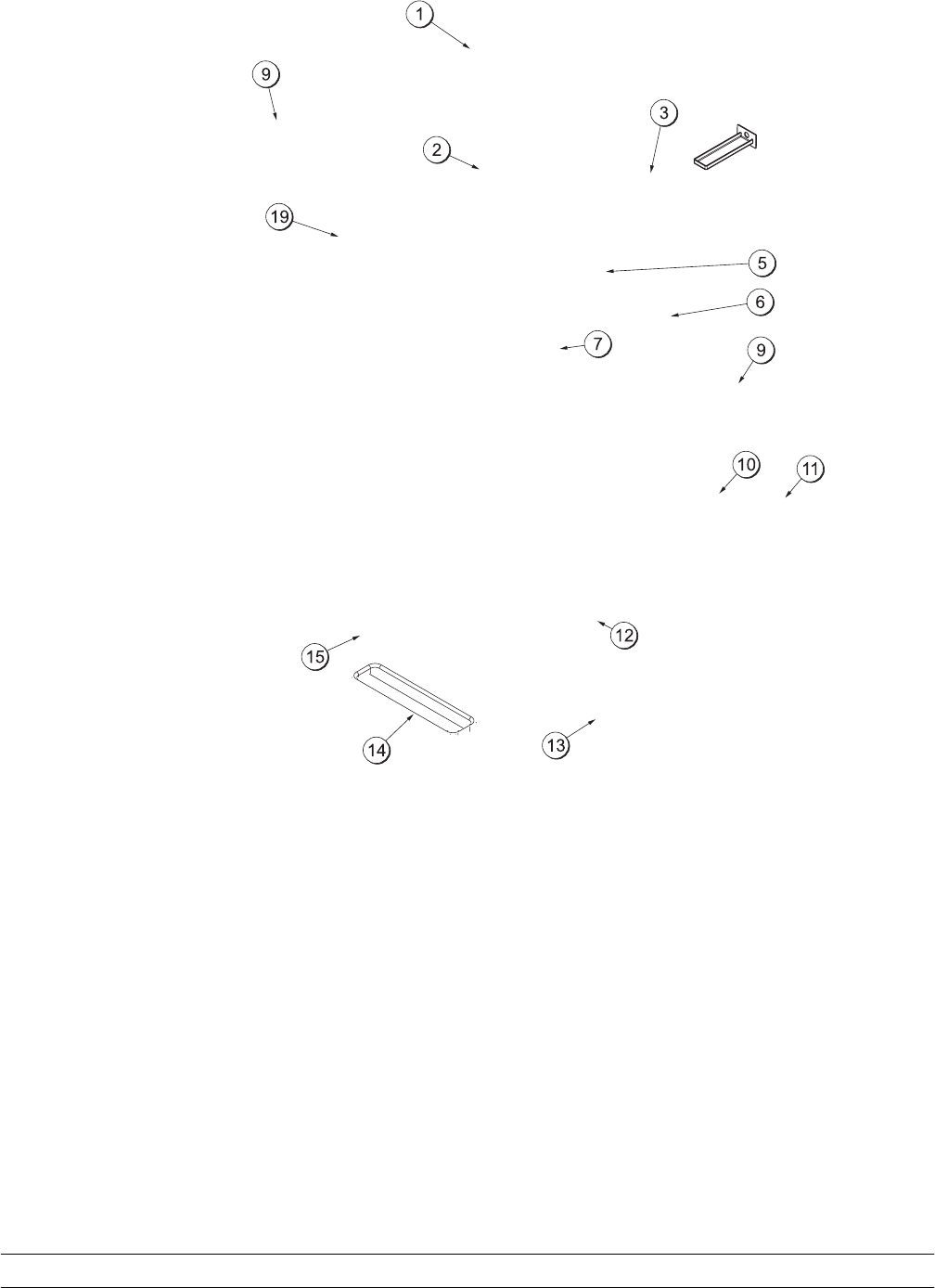
Model C708
Figure 1
ITEM DESCRIPTION PART NO.
1PANEL-SIDE-LEFT 056963
2PAN-DRIP 11-5/8 LONG 027503
3PIN-RETAINING-HOPPER CVR 043934
4COVER-HOPPER *BLACK 053809-1
5BLADE A.-AGITATOR X56591
6PUMP A.-MIX SIMPLIFIED S.S. X57029-14
7PANEL-REAR 056077
8PAN A.-DRIP 5 1/2” LONG X56074
ITEM DESCRIPTION PART NO.
9SCREW-1/4-20X3/8 RHM-STNLS 011694
10 PANEL A-SIDE-RIGHT X57871
11 PANEL A.-FRONT-UPPER X59423
12 PANEL A.-FRONT-LOWER X58955
13 STUD-NOSE CONE 055987
14 SHELF-TRAY-DRIP 056076
15 TRAY-DRIP 056858
16 SHIELD-SPLASH 049203
5
Models C708 & C716 Operator Parts Identification
6Models C708 & C716Operator Parts Identification
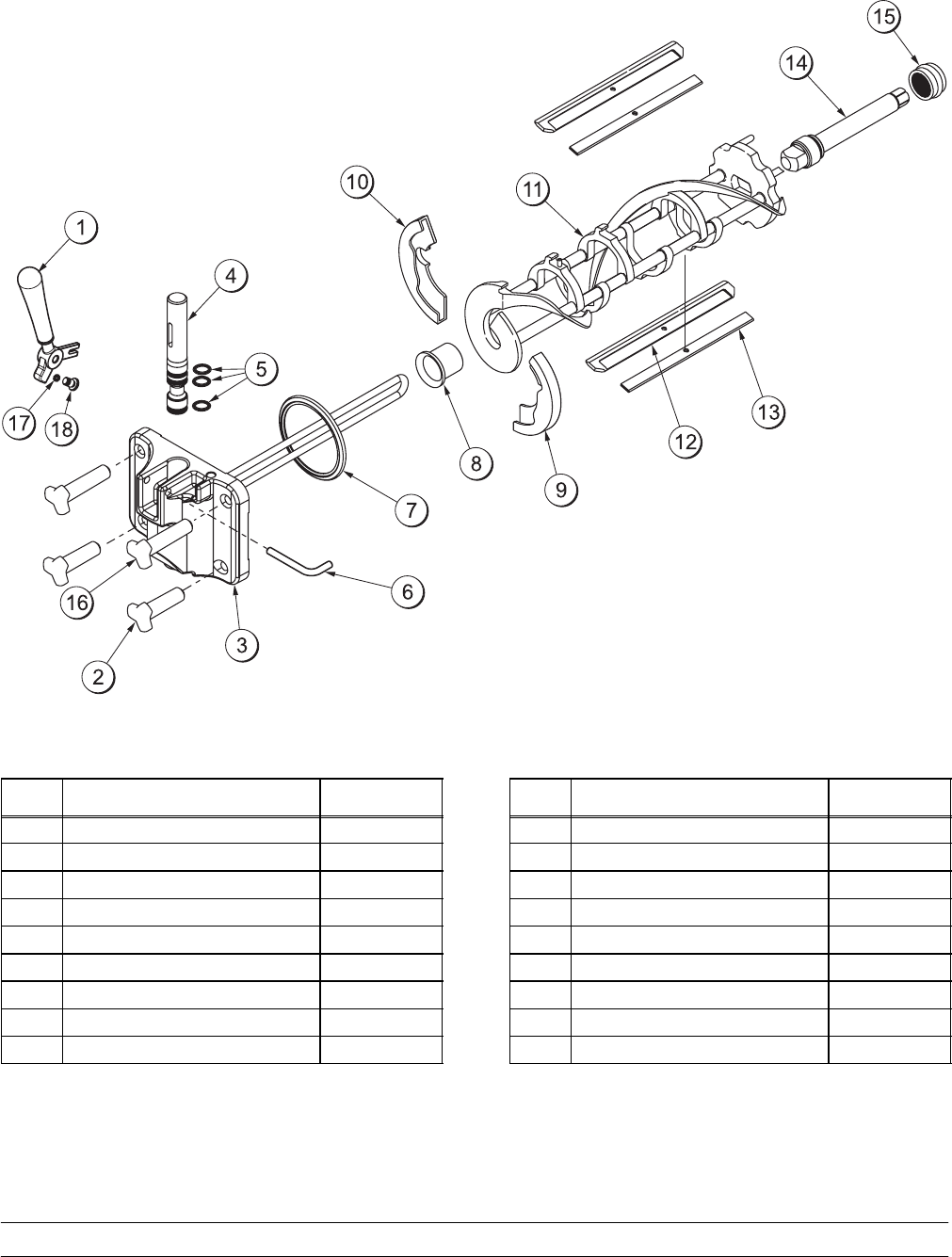
Model C708 Single Spout Door and Beater Assembly
Figure 3
ITEM DESCRIPTION PART NO.
1HANDLE A.-DRAW-WELDED X56246
2NUT-STUD-BLACK 2.563“ 058764
3DOOR A.-W/BAFFLE X57332-SER
4VALVE A.-DRAW X55820
5O-RING-DRAW VALVE-S.S. 014402
6PIN-HANDLE-SS 055819
7GASKET-DOOR HT 4”-DBL 048926
8BEARING-FRONT-SHOE 050348
9SHOE-FRONT HELIX *REAR* 050346
ITEM DESCRIPTION PART NO.
10 SHOE-FRONT HELIX *FRONT* 050347
11 BEATER A.-3.4QT-1 PIN X46231
12 BLADE-SCRAPER-PLASTIC 046235
13 CLIP-SCRAPER BLADE 7.00 046236
14 SHAFT-BEATER 056078
15 SEAL-DRIVE SHAFT 032560
16 NUT-STUD-BLACK 3.250” 058765
17 O-RING-1/4 OD X .070W 50 015872
18 SCREW-ADJUSTMT-5/16-24 056332
7
Models C708 & C716 Operator Parts Identification
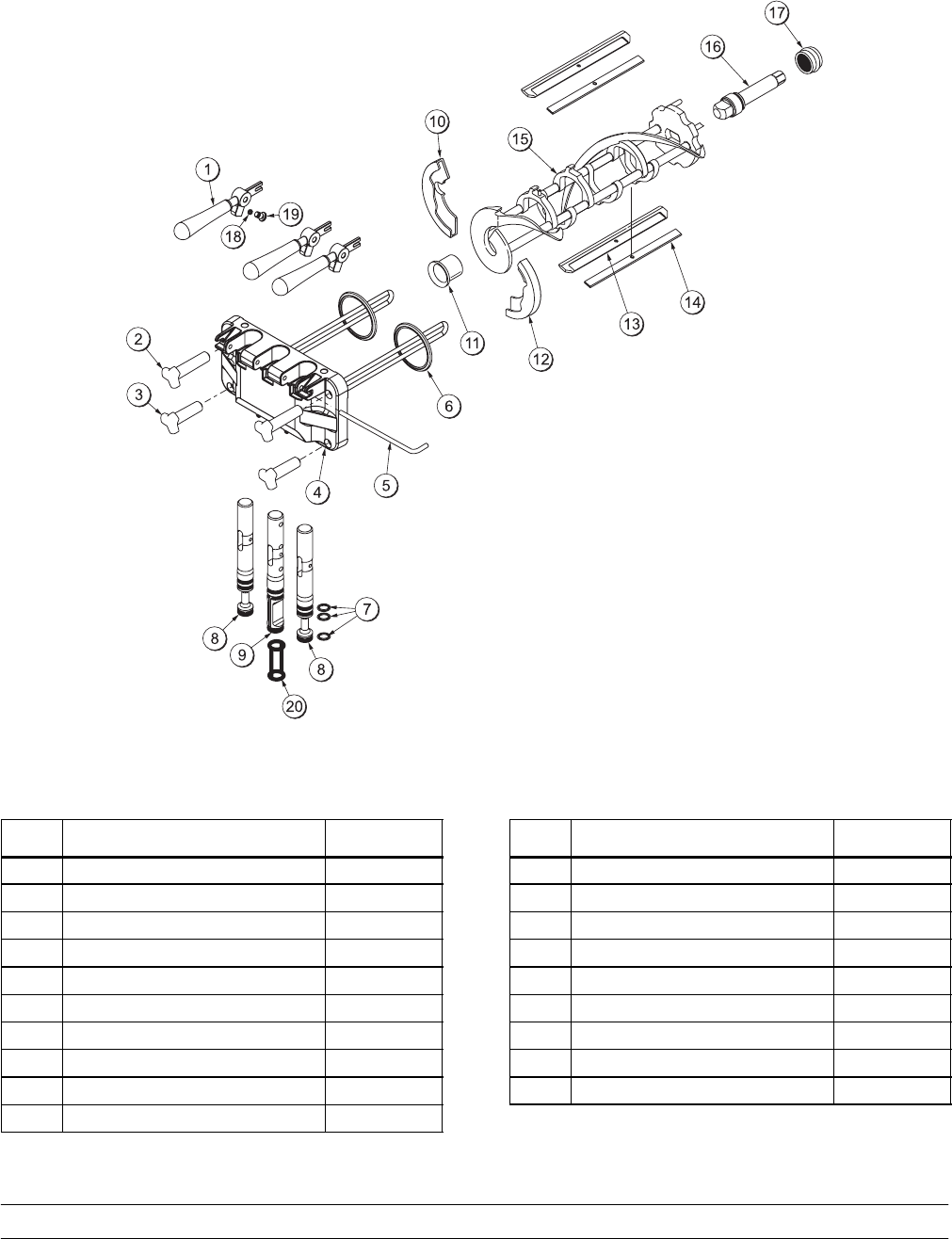
Model C716 Door and Beater Assembly
Figure 4
ITEM DESCRIPTION PART NO.
1HANDLE A.-DRAW-WELDED X56421-1
2NUT-STUD-BLACK 3.250 LONG 058765
3NUT-STUD*BLACK 2.563 LONG 058764
4DOOR A.-3SPT*HT*LG BAF X59923-SER
5PIN-HANDLE-TWIN 059894
6GASKET-DOOR HT 4”-DOUBLE 048926
7O-RING--7/8 OD X .103W 014402
8VALVE A.-DRAW X59888
9VALVE A.-DRAW*CENTER X59890
10 SHOE-FRONT HELIX *FRONT* 050347
ITEM DESCRIPTION PART NO.
11 BEARING-FRONT-SHOE 050348
12 SHOE-FRONT HELIX *REAR* 050346
13 BLADE-SCRAPER-PLAS 8-1/8L 046235
14 CLIP-SCRAPER BLADE 7.00” 046236
15 BEATER A.-3.4QT-1 PIN X46231
16 SHAFT-BEATER 032564
17 SEAL-DRIVE SHAFT 032560
18 O-RING-1/4 OD X .070W 50 015872
19 SCREW-ADJUSTMENT-5/16-24 056332
8Models C708 & C716Operator Parts Identification
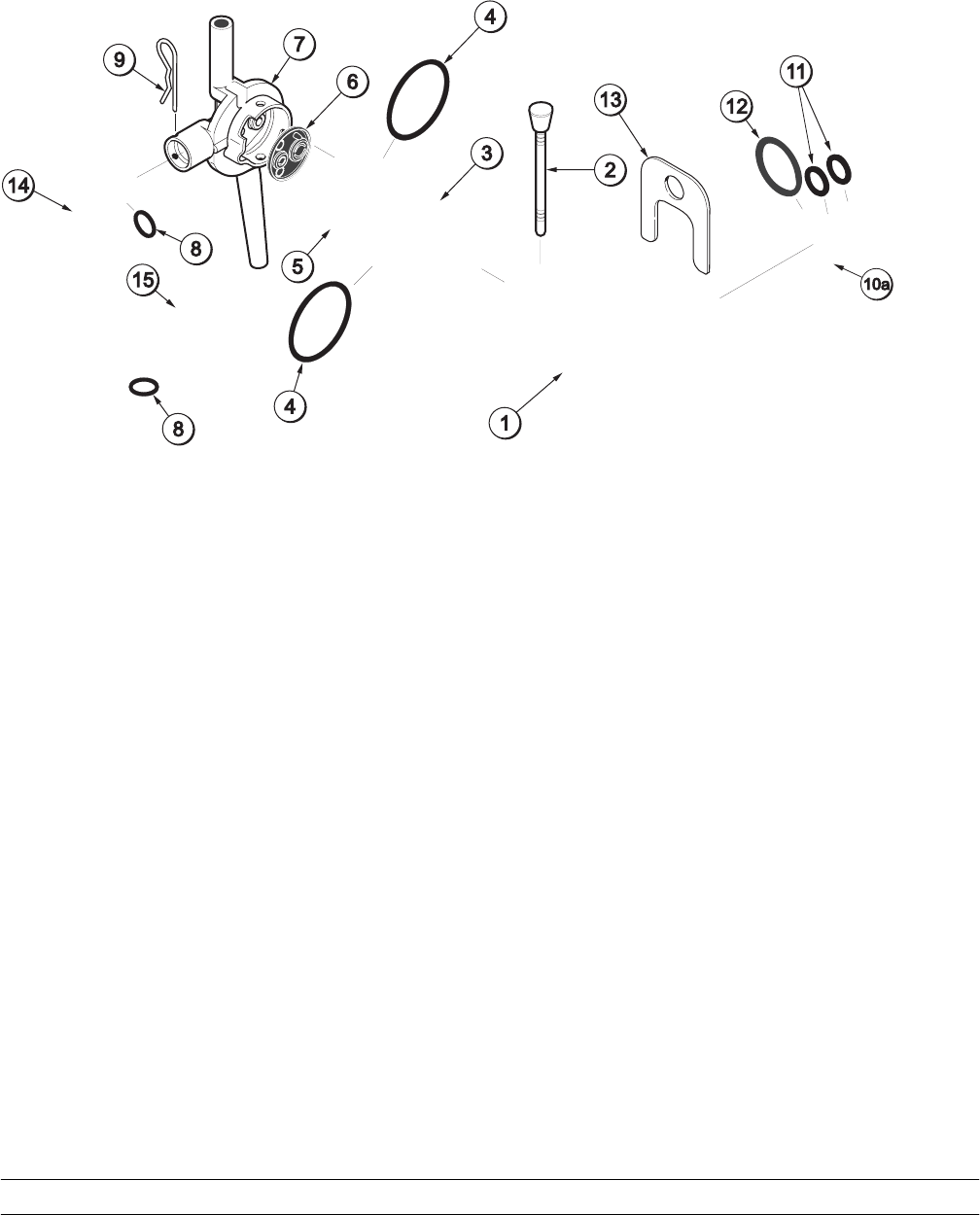
X57029-XX Pump A. - Mix Simplified (Model C708)
9
Models C708 & C716 Operator Parts Identification
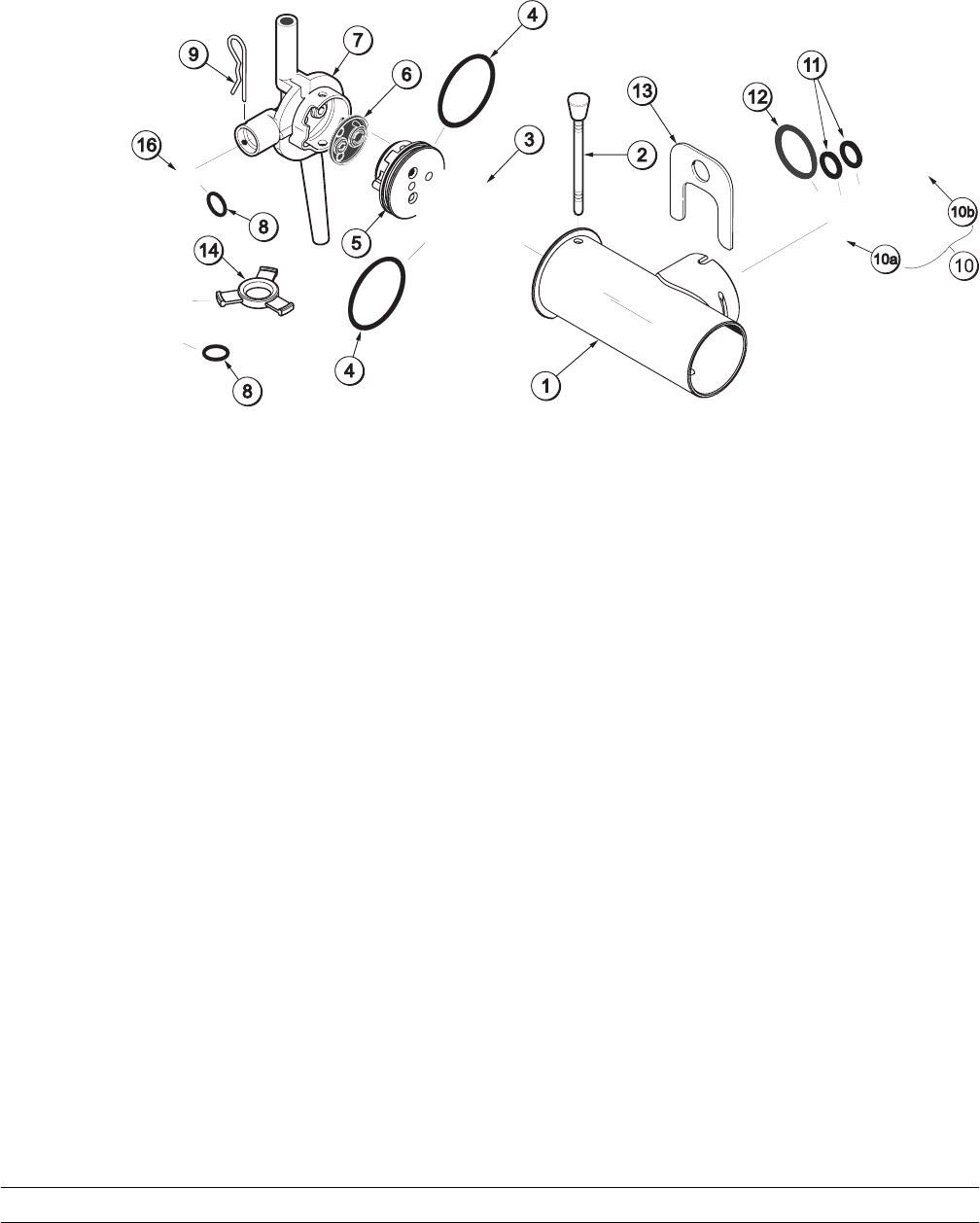
X57029-XX Pump A. - Mix Simplified (Model C716)
10 Models C708 & C716Operator Parts Identification
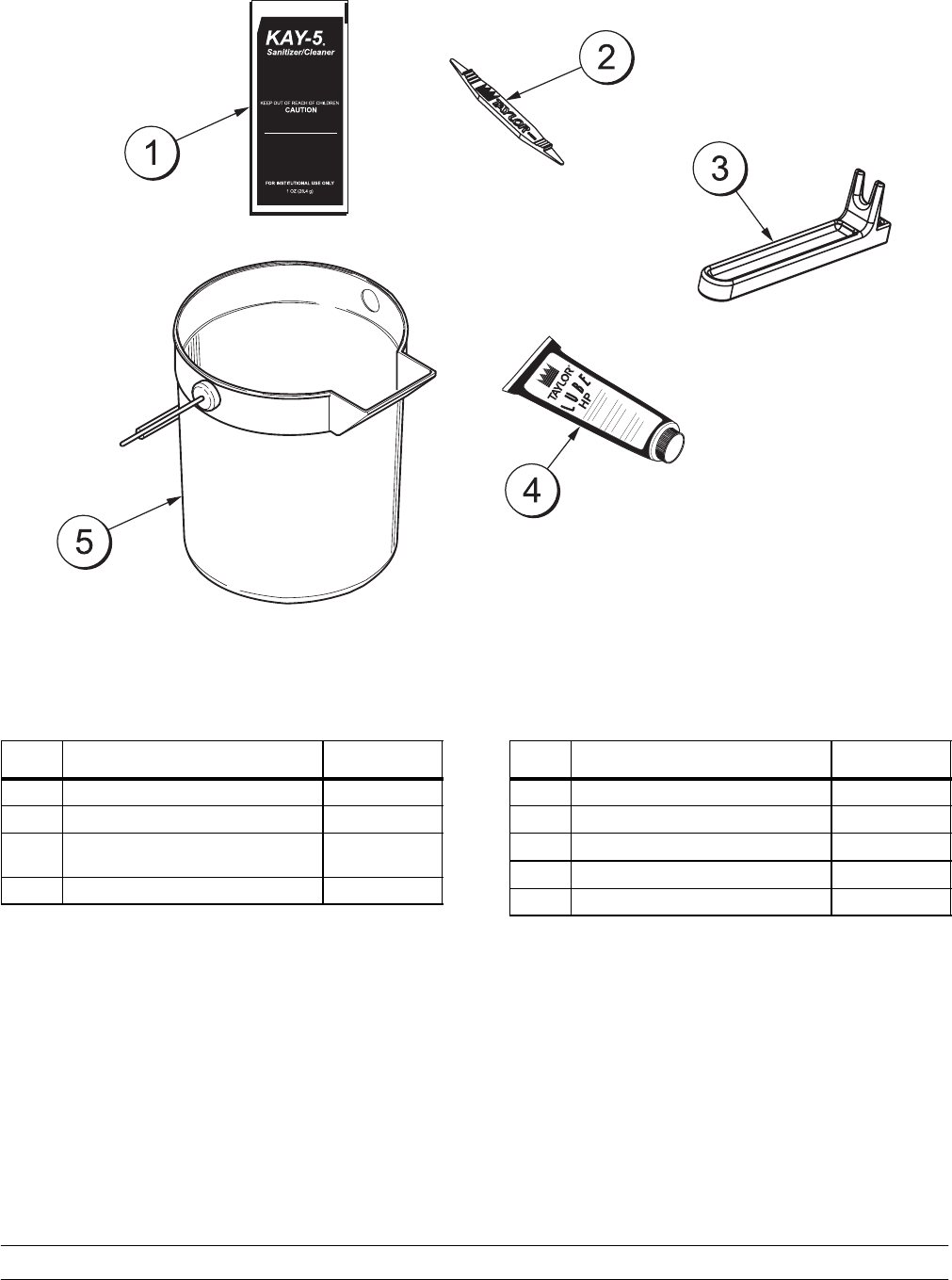
Accessories
Figure 7
ITEM DESCRIPTION PART NO.
1SANITIZER-KAY 5 CASE 125 041082
2TOOL-O-RING REMOVAL 048260-WHT
3TOOL-SHAFT-DRIVE-PUMP-
HOPPER 0457167
4LUBRICANT-TAYLOR HI-PERF 048232
ITEM DESCRIPTION PART NO.
5PAIL-MIX 10 QT. 013163
*KIT A.-TUNE-UP (C708) X56085
*KIT A.-TUNE-UP (C716) X49463-82
*KIT A.-PARTS TRAY (C708) X57797
*KIT A.-PARTS TRAY (C716) X58449
*NOT SHOWN
11
Models C708 & C716 Operator Parts Identification
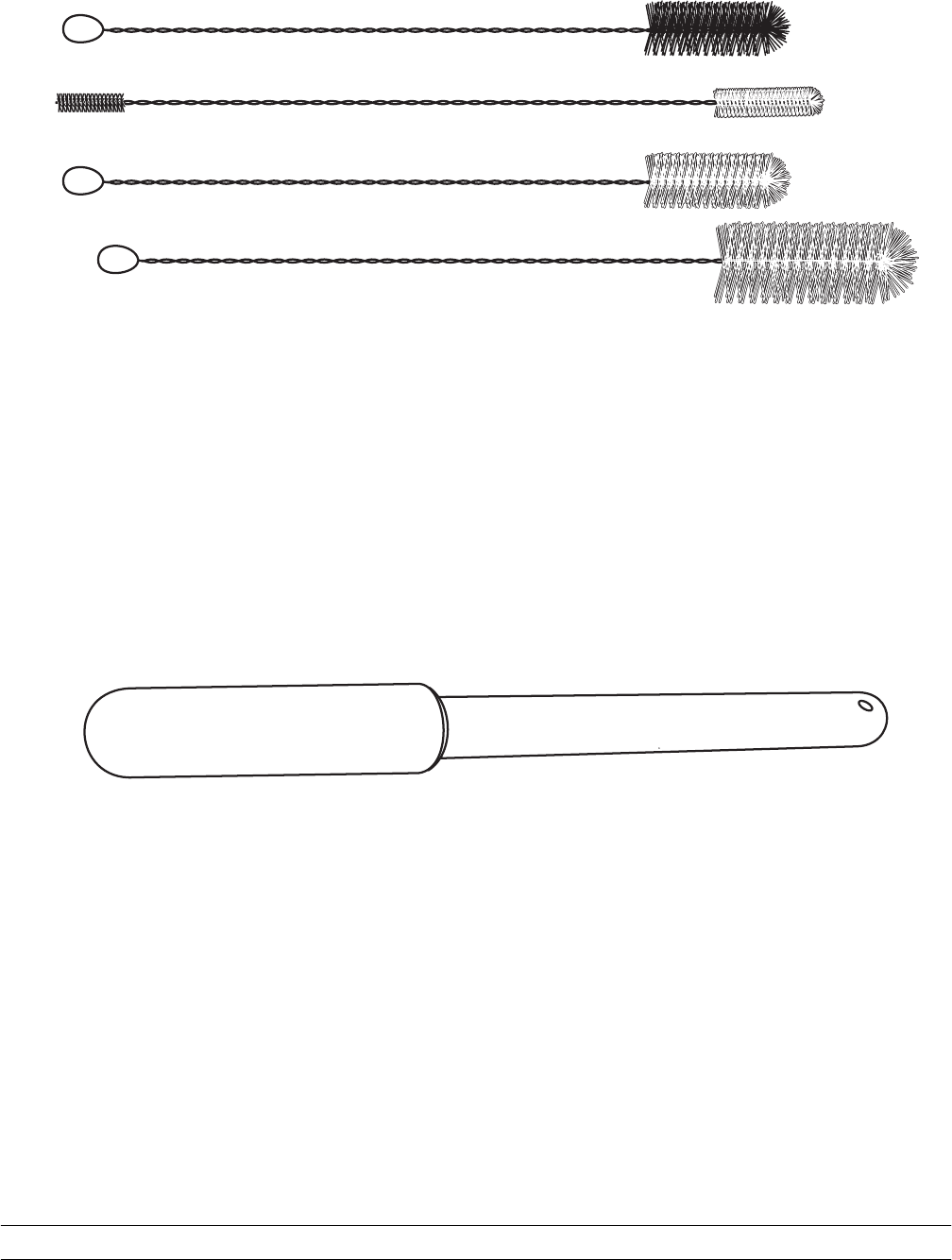
Brush Kit Assembly X44127
12 Models C708 & C716Important: To the Operator
Section 5 Important: To the Operator
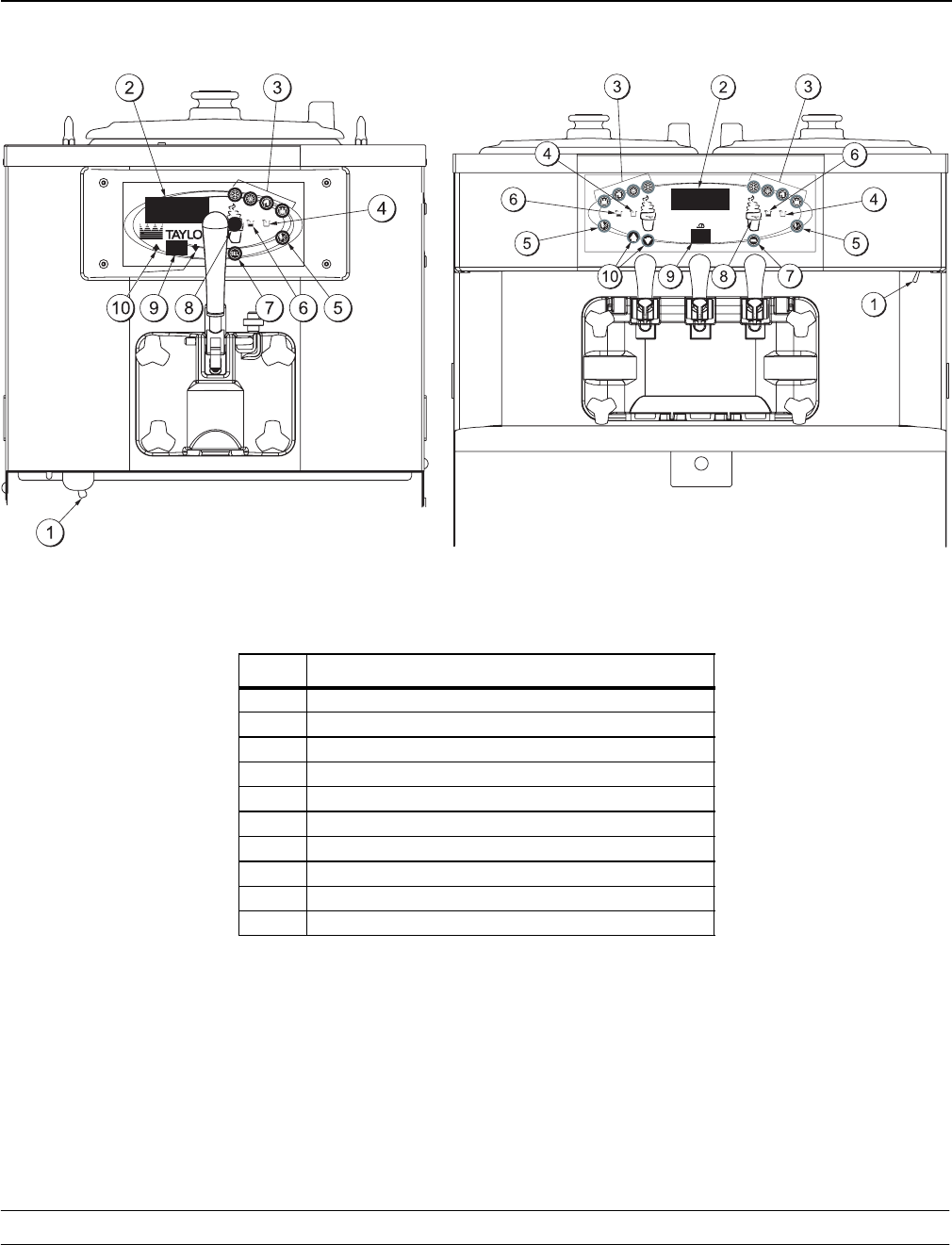
C708 C716
Figure 9
ITEM DESCRIPTION
1POWER SWITCH
2LIQUID CRYSTAL DISPLAY
3KEYPADS
4MIX OUT INDICATOR
5STANDBY INDICATOR
6MIX LOW INDICATOR
7SELECT KEY
8SERVICE MENU KEY
9BRUSH CLEAN COUNTER
10 ARROW KEY(S)
13
Models C708 & C716 Important: To the Operator
050628
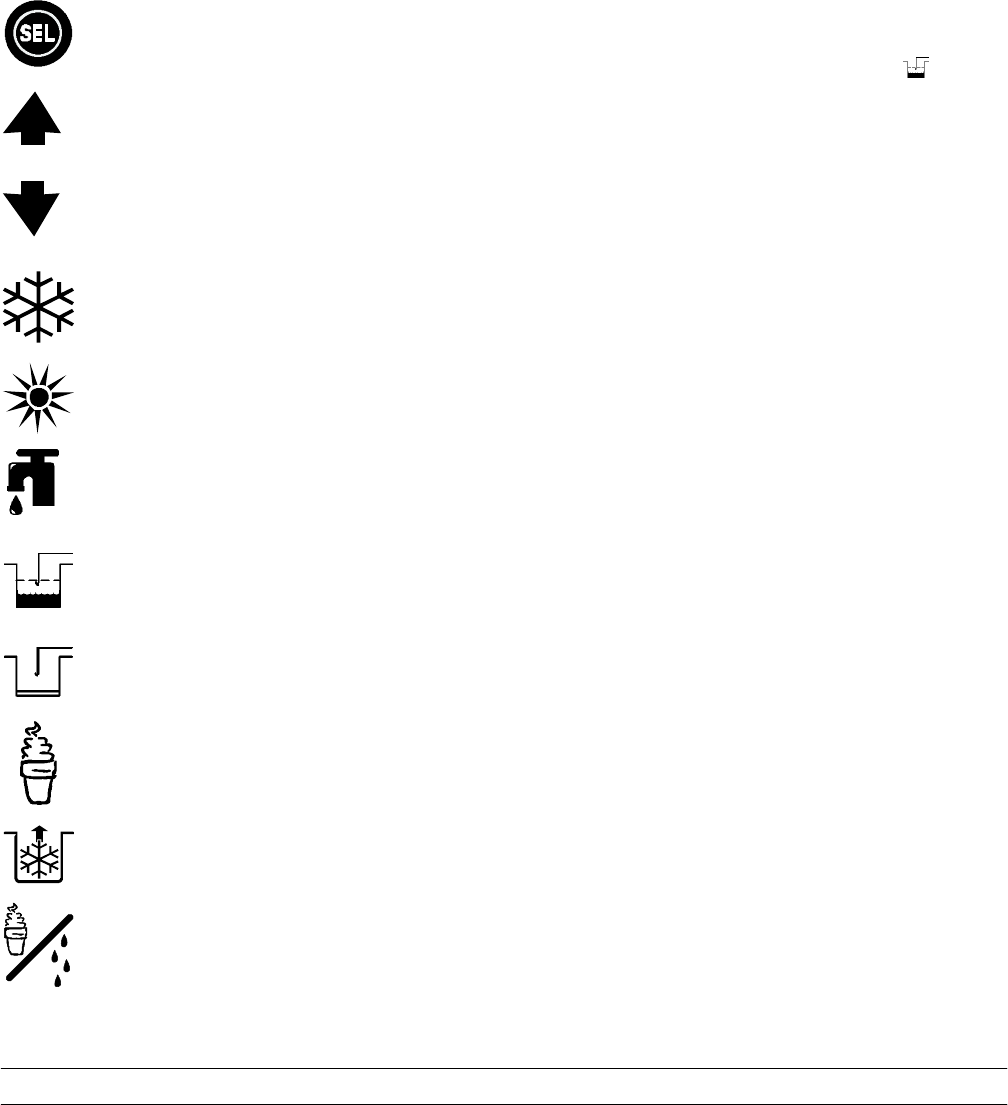
Symbol Definitions
To better communicate in the International arena,
symbols have replaced words on many of our
operator switches, function, and fault indicators.
Your Taylor equipment is designed with these
International symbols.
The following chart identifies the symbol definitions.
= SELECT
= UP ARROW
= DOWN ARROW
=AUTO
= HEAT CYCLE
= WASH
=MIXLOW
= MIX OUT
= MENU DISPLAY
=MIXPUMP
= STANDBY
Power Switch
When placed in the ON position, the power switch
allows control panel operation.
Fluorescent Display
The fluorescent display is located on the front
control panel. During normal operation the display is
blank. The display is used to show menu options
and notifies the operator if a fault is detected. On
International models, the display will indicate the
temperature of the mix in the hopper.
Indicator Lights
MIX LOW - When the MIX LOW symbol is
14 Models C708 & C716Important: To the Operator
050628
If the beater motor is turning properly, touch the
WASH symbol to cancel the cycle. Touch the
AUTO symbol to resume normal operation. If the
freezer shuts down again, contact your authorized
service technician.
Air/Mix Pump Reset Mechanism
This reset button protects the pump from an
overload condition. Should an overload occur, the
reset mechanism will trip. To reset the pump, press
the reset button firmly.
WARNING: Do not use metal objects to
press the reset button. Failure to comply may
result in severe personal injury or death.
Adjustable Draw Handle
These units feature an adjustable draw handle(s) to
provide the best portion control, giving a better,
consistent quality to your product and controlling
costs. The draw handle(s) should be adjusted to
provide a flow rate of 5 to 7-1/2 oz. (142 to 213 g.)
of product by weight per 10 seconds. To INCREASE
the flow rate, turn the screw CLOCKWISE. To
DECREASE the flow rate, turn the screw
COUNTERCLOCKWISE . (See Figure 10.)
+-
10354
Figure 10
Operating Screen Descriptions
The fluorescent display located in the center of the
control panel is normally blank during the daily
operation of the machine. The display is activated
when the SEL symbol or the Manager’s Menu is
selected. The display screen will also alert the
operator of specific faults detected by the control.
Note: The displays illustrated in this section are
those seen on the Models C708/C709. The Model
C716/C717 versions may vary slightly.
Power Up Memory (Initializing)
The seven segment display should display “00”
during the initializing sequence.
When the machine is powered, the control system
will initialize to perform a system check. The screen
will display “INITIALIZING”. There will be four types
of data the system will check: LANGUAGE,
SYSTEM DATA, CONFIG DATA, and LOCKOUT
DATA.
Language Initialization
The UVC platform supports multiple languages by
keeping specific strings in battery backed RAM.
After power-up or a CPU reset, the strings are
tested to see if the language strings are present and
not corrupted. If the strings are present and not
corrupted, initialization continues. Otherwise, the
operator is prompted to select a language. While
language strings are being checked for integrity, the
following screen is displayed.
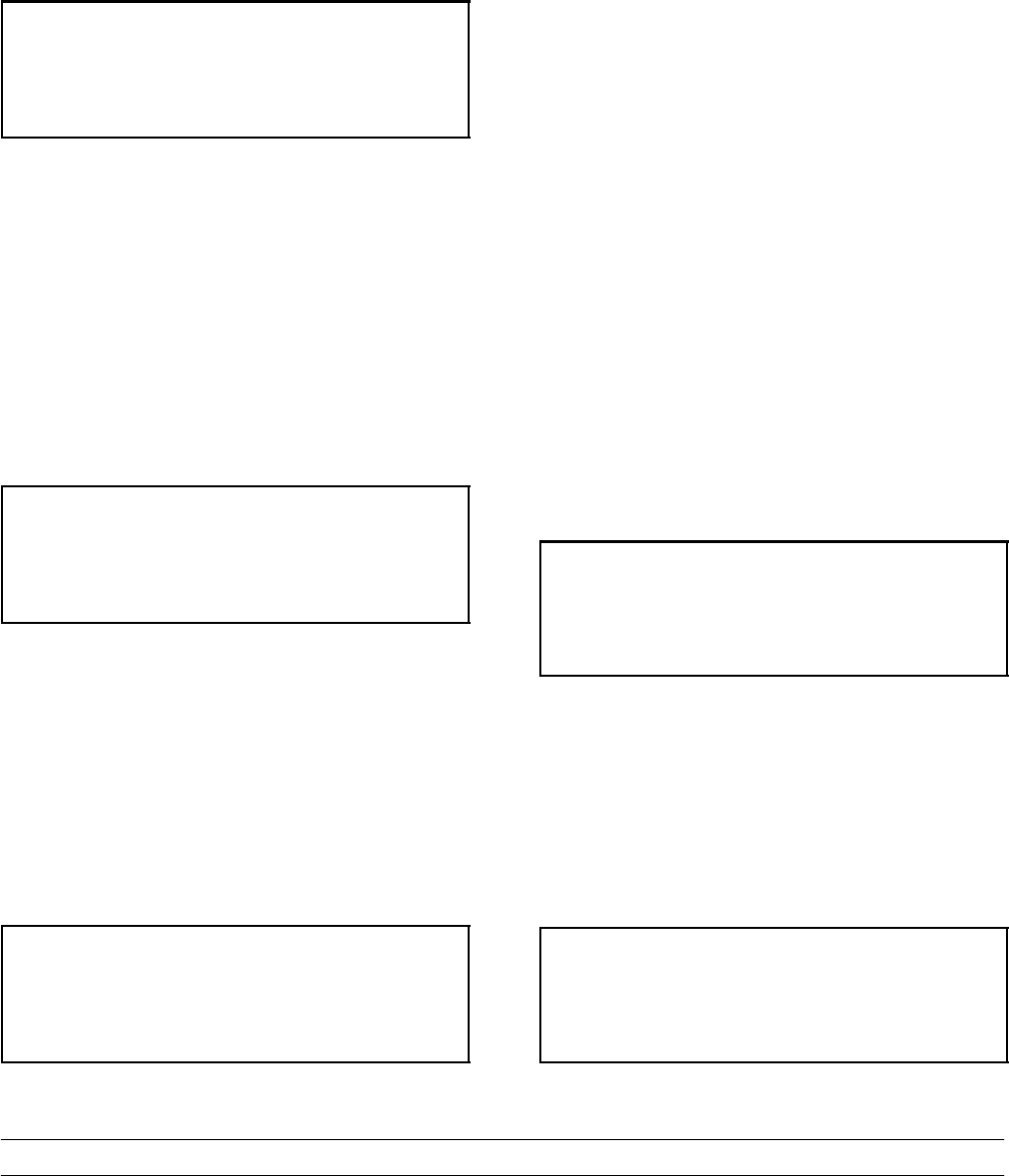
Initializing
Language
Note: If there is a language initialization fault, the
machine will force a language selection prior to the
initializing sequence. The standard menu LED’s
should light, as if it were in a menu. If a language
has been selected, the unit is powered down, the
machine should not ask for a language unless there
is another language initialization fault. English is the
factory default setting.
15
Models C708 & C716 Important: To the Operator
050628
System Data
System data is protected separately from the rest of
the data in memory. System data includes variables
that change frequently such as the mode the
machine is in, lockout status, serving counters, fault
codes, and others. While System Data is being
checked the following screen is displayed.
Initializing
System Data
If the System Data is corrupted, the machine is set
to OFF, the serving counters are set to zero, and the
faults are cleared. A “SYSTEM CRC ERR” fault is
set and displayed on the VFD. An acknowledgement
(SEL key) is required.
Configuration Data
Configuration data is separate from the rest of the
data in the memory. Configuration data is
information entered through operator and service
menus. While Configuration Data is being checked
the following screen is displayed.
Initializing
Config Data
If Configuration data is corrupted, all user and
service settings are set to defaults. A “CONFIG
CRC ERR” fault is set and displayed on the VFD.
The system will continue to operate in its previous
mode but according to default settings.
Lockout Data
Lockout data is protected separately from the rest of
the data in the memory. While the Lockout Data is
being checked, the following screen is displayed.
Initializing
Lockout Data
If Lockout Data is corrupted, all lockout history data
is cleared. A “LOCKOUT CRC ERR” fault is
displayed.
After the memory integrity has been tested, the
Safety Timeout screen will be displayed.
Heat Cycle Data
Heat cycle data is checked separately from the rest
of the data in memory. Each individual Heat Cycle
Data record is monitored for corruption individually.
At the start of a heat cycle, the next Heat Cycle data
record is cleared and data for the heat cycle is
writtentoit.ThecurrentHeatCycleDatais
displayed as the first heat cycle record in the HEAT
CYCLE DATA menu option.
The heat cycle data records are checked for integrity
when the record is accessed, presently only through
the HEAT CYCLE DATA menu option. (For
additional Heat Cycle Data information,
see page 24.)
Once the system has initialized, the number of days
until brush cleaning is required is indicated on the
control panel. The SAFETY TIMEOUT screen will
be displayed with the alarm on for 60 seconds or
until any control symbol is touched.
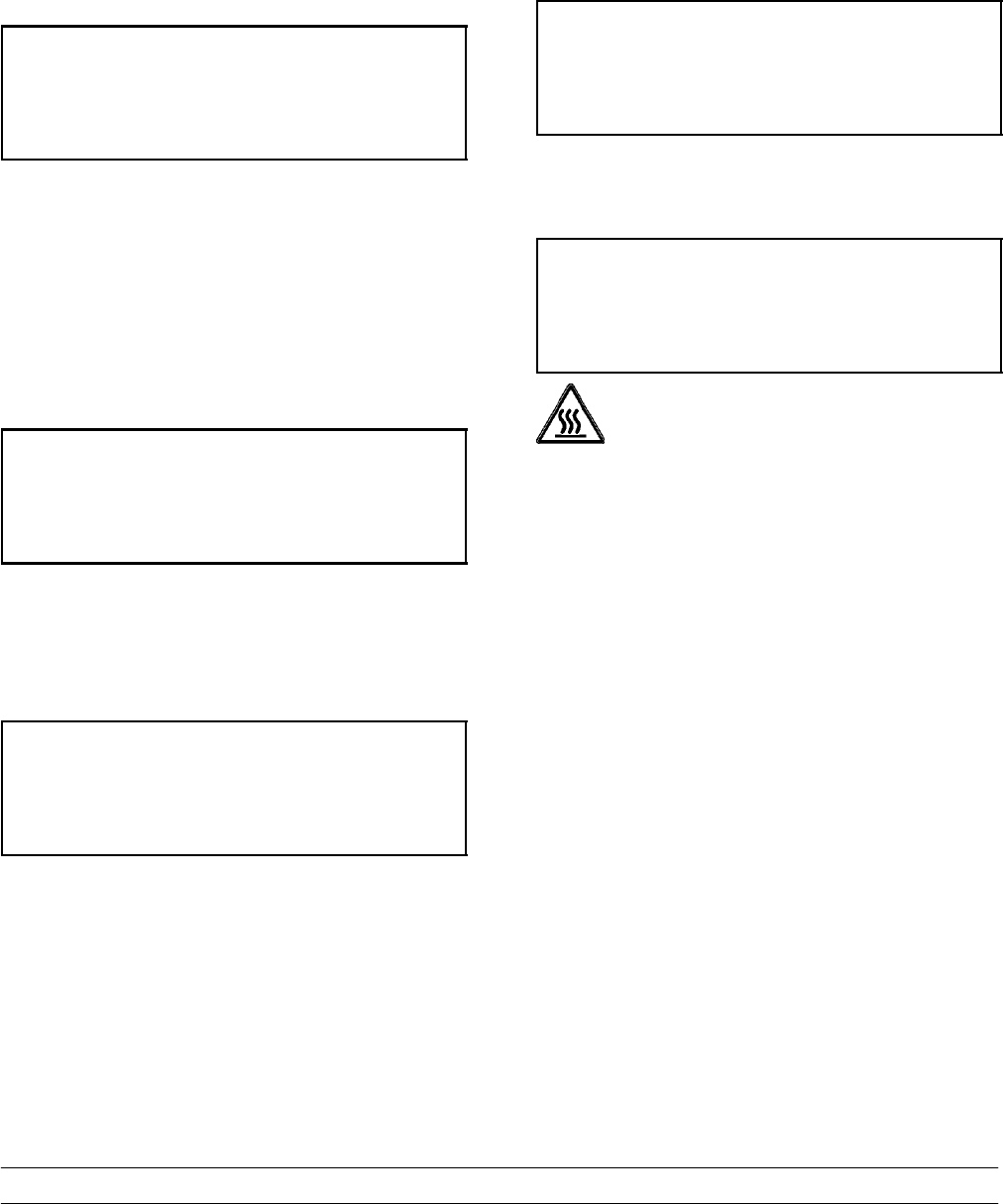
SAFETY TIMEOUT
ANY KEY ABORTS
Power Switch OFF
After the safety timeout has been completed and the
power switch is OFF, the following screen is
displayed.
POWER SWITCH OFF
-=-=-=-=-=-
UNIT CLEANED
16 Models C708 & C716Important: To the Operator
050628
Power Switch ON
When the power switch is placed in the ON position,
the control panel touch keys become operative. The
fluorescent display will be either blank or indicate
that the unit has been cleaned.
UNIT CLEANED
International Models Only:
Some International models will continuously display
the temperature of the mix hopper when the power
switch is in the ON position.
HOPPER 21.0
UNIT CLEANED
If the control is set for international configuration, the
following screen will appear when the heat symbol is
touched.
ARE YOU SURE
>Yes
No
Use the up or down arrow symbol to move the
cursor to “YES”. Touch the SEL symbol to
immediately start a heat cycle.
Note: The machine must be in AUTO or STANDBY
and have sufficient mix in the hopper before the
machine can successfully enter the HEAT mode of
operation.
Heat Cycle
The HEAT symbol on the control panel is illuminated
throughout the heat treatment cycle. Two warning
messages will be displayed on the screen. “DO NOT
DRAW” will be displayed when the mix temperature
is below 130°F (54.4°C).
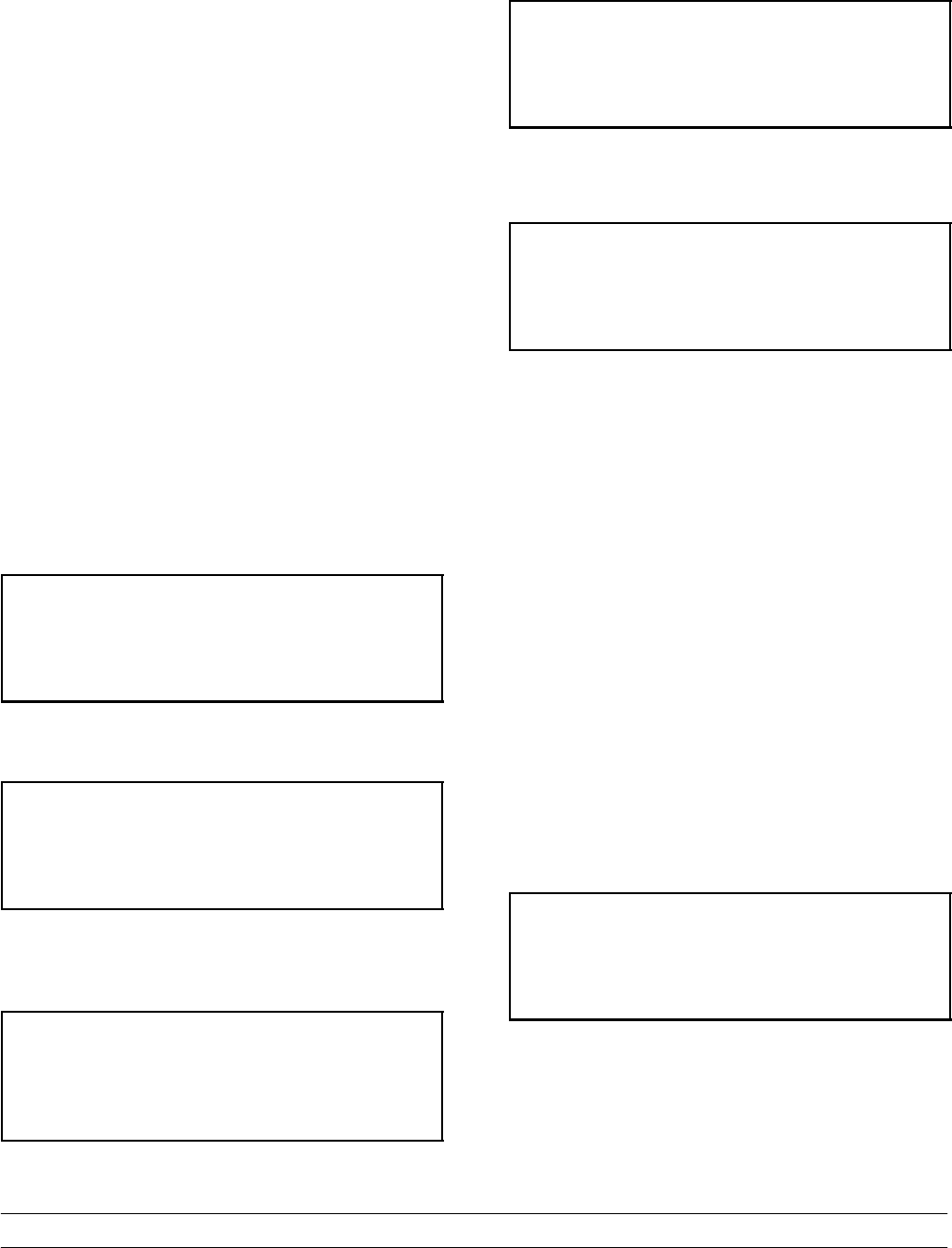
DO NOT DRAW
When the temperature of the mix is above 130°F
(54.4°C) the screen will display a message
indicating that HOT PRODUCT is in the machine.
HOT PRODUCT
DO NOT attempt to draw product or
disassemble the unit during the HEAT cycle. The
product is hot and under extreme pressure.
In the HEAT cycle, the mix temperature in the
hopper and freezing cylinder must be raised to
151°F (66.1°C) within 90 minutes.
When the heating phase is complete, the freezer
goes into the holding phase of the cycle. The holding
phase will keep the temperature above 151°F
(66.1°C) for a minimum of 35 minutes.
The final phase of the heat treatment cycle is the
cooling phase. The freezer must cool the mix below
41°F (5°C) within 90 minutes.
When the entire heat cycle has been completed, the
HEAT symbol will no longer be illuminated. The
machine will enter the STANDBY mode (STANDBY
symbol illuminates). The machine can be placed in
AUTO or left in STANDBY.
To comply with health codes, heat treatment system
freezers must complete a heat treatment cycle
daily, and must be disassembled and brush cleaned
a minimum of every 14 days. Brush cleaning is the
normal disassembly and cleaning procedure found in
the Operator Manual. Failure to follow these
guidelines will cause the control to lock the freezer
out of the AUTO mode.
17
Models C708 & C716 Important: To the Operator
050628
If the Heat Treatment Cycle fails, the screen will
display a failure message and return the freezer to
the STANDBY mode.
Always comply with local guidelines for the
maximum number of days allowed between brush
clean cycles. (See the Manager’s Menu for setting
the Brush Clean interval.)
Freezer Locks
There are two types of freezer lock conditions that
can occur: Hard Lock or Soft Lock. A Hard Lock
requires the machine be disassembled and brush
cleaned. A Soft Lock can be corrected by either
disassembling and brush cleaning the machine, or
by starting another heat treatment cycle.
Hardlock
There are two causes of a hard lock failure. The
freezer will hardlock if either the Brush Clean Timer
has elapsed or if a Thermistor Failure (Freezing
Cylinder or Hopper) occurred during a Heat cycle.
1. The following screen will be displayed if a Brush
Clean Cycle Time has occurred.
BRUSH CLEAN TIMEOUT
FREEZER LOCKED
CLEANING REQ’D
> BRUSH CLEAN
Touching the SEL symbol will display the following
screen.
FREEZER LOCKED
2. The following screen will display if there has
been a thermistor failure (freezing cylinder or
hopper) during the heat treatment process.
SYSTEM FAULT
FREEZER LOCKED
SERVICE REQ’D
> BRUSH CLEAN
Touching the SEL symbol will indicate which
thermistor caused the Hard Lock.
HOPPER THERM BAD
FREEZER LOCKED
If the machine has hard locked and an attempt is
made to enter AUTO, the machine will enter the
STANDBY mode and display the following message.
FREEZER LOCKED
To restore the message that identified the reason for
the hard lock, turn the power switch OFF for five
seconds and then return the power switch to the ON
position. The original message with the reason for
the Hard Lock will be displayed.
The FREEZER LOCKED message will remain on
the display until the brush clean requirements are
fulfilled. The freezer must be disassembled in order
to activate the five minute timer on the display
screen. Once the timer counts down to zero, the
lockout is cleared.
Soft Lock
If a heat treatment cycle has not been initiated within
the last 24 hours, a soft lock failure will occur. A soft
lock allows the operator to correct the cause of the
soft lock. The operator has the option of either
starting another heat cycle or brush cleaning the
machine. When a soft lock occurs, the machine will
go into the STANDBY mode. The following message
is displayed on the screen. The reason for the soft
lock is indicated on the second line.
NO HEAT CYCLE START
REASON
> HEAT CYCLE
BRUSH CLEAN
If the reason for the soft lock has been corrected,
selecting HEAT CYCLE initiates a Heat Cycle
immediately. Selecting BRUSH CLEAN when the
previous message is displayed will hard lock the
machine and brush cleaning will be necessary.
18 Models C708 & C716Important: To the Operator
050628
Following are the variable messages for soft lock
failures that appear on the second line of the screen.
POWER SWITCH OFF Power switch was in the
OFF position.
MIX OUT PRESENT There was a mix out
condition present.
AUTO OR STANDBY
OFF The machine was not in
the AUTO or STANDBY
mode.
NO HEAT CYCLE
TRIED A heat treatment cycle
was not attempted in
the last 24 hours.
(AUTO HEAT TIME
was advanced or a pow-
er loss was experienced
at the time the cycle
was to occur.)
If the following screen appears, a soft lock has
occurred during the heat treatment cycle.
HEAT TREAT FAILURE
FREEZER LOCKED
> HEAT CYCLE
BRUSH CLEAN
A soft lock can also occur any time during operation
when the hopper or freezing cylinder temperature
rises above 59°F (15°C), the temperature rises and
remains above 45°F(7°C) for more than one hour, or
the temperature rises and remains above 41°F(5°C)
for more than four hours.
If a PRODUCT OVER TEMPERATURE condition
occurs during operation, the following screen will
appear.
PRODUCT OVER TEMP
> HEAT CYCLE
BRUSH CLEAN
When one of these messages appears, automatic
freezer operation cannot take place until the freezer
is disassembled and brush cleaned, or has
completed a heat treatment cycle.
Once the freezer is unlocked by starting a heat
treatment cycle the HEAT symbol will illuminate and
the following message will be displayed on the
screen.
DO NOT DRAW
If BRUSH CLEAN is selected to clear the lockout by
brush cleaning the machine, the FREEZER
LOCKED message will remain on the display until
the brush clean requirements are fulfilled. The
freezer must be disassembled in order to activate
the five minute timer on the display screen. Once
the timer counts down to zero, the lockout is
cleared.
FREEZER LOCKED
To restore the message that identified the reason for
the soft lock, turn the power switch OFF for five
seconds, and then return the power switch to the
ON position. The original message with the reason
for the soft lock will be displayed.
19
Models C708 & C716 Important: To the Operator
050628
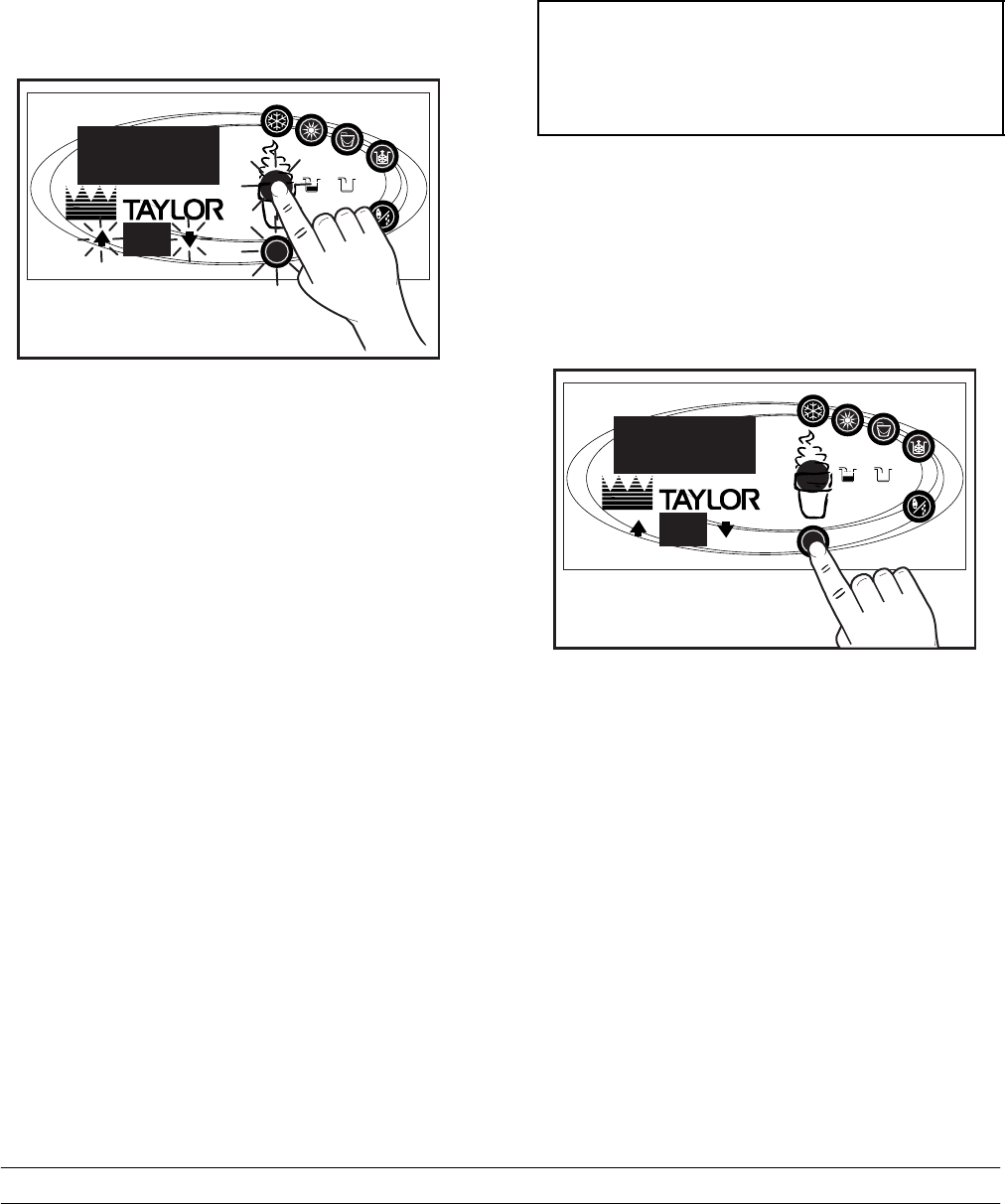
Manager’s Menu
The Manager’s Menu is used to enter the operator
function displays. To access the Menu, touch the
center of the CONE symbol on the control panel.
The arrow symbols, the SEL symbol and the CONE
symbol will be lit when the ACCESS CODE screen
is displayed.
13201
SEL
®
Figure 11
In the Menu program, the arrow symbols and the
SEL symbol will function as menu keys.
UP ARROW - increases the value above the cursor
and is used to scroll upward in text displays.
DOWN ARROW - decreases the value above the
cursor and is used to scroll downward in text
displays.
SEL - advances the cursor position to the right and
is used to select menu options.
There is a two minute time-out in effect during the
Manager’s Menu. While in the Manager’s Menu, if
no activity occurs within a two minute period, the
display will exit to the Main Menu. There is one
exception to this time-out, and that is the Current
Conditions Display.
Note: The machine will continue operation in the
mode it was in when the Menu was selected.
However, the control keys will not be lit and are
non-functional when the Manager’s Menu is
displayed. The control keys are functional in the
Manager’s Menu when the CURRENT
CONDITIONS screen is displayed. (See CURRENT
CONDITIONS on page 25.)
Entering Access Code
With the ACCESS CODE screen on the display, use
the SEL symbol to set the first code number in the
cursor position. When the correct number is
selected, touch the SEL symbol to move the cursor
to the next number position.
ENTER ACCESS CODE
83 0 9
__
Continue to enter the proper access code numbers
(8309) until all four numbers are displayed, then
touch the SEL symbol. The Manager’s Menu list will
display on the screen, provided the correct access
code is entered.
If an incorrect number is entered for the access
code, the display will exit the Menu program when
the SEL symbol is touched.
13202
SEL
®
Figure 12
Manager Menu Options
Touch the ARROW symbols to move up or down
through the Menu. Select a Menu option by touching
the SEL symbol. Exit the Menu program by selecting
EXIT FROM MENU or touch the CONE symbol.
The following menu options are listed in the
Manager’s Menu.
EXIT FROM MENU
RESET DRAW COUNTER
SET CLOCK
AUTO HEAT TIME
20 Models C708 & C716Important: To the Operator
050628
AUTO START TIME
STANDBY MODE
BRUSH CLEAN CYCLE
MIX LEVEL AUDIBLE
FAULT DESCRIPTION
LOCKOUT HISTORY
HEAT CYCLE SUMMARY
HEAT CYCLE DATA
SYSTEM INFORMATION
CURRENT CONDITIONS
Selecting “EXIT FROM MENU” will exit the
Manager’s Menu and the return the control panel
symbols to normal operation.
The SERVING COUNTER screen is used to check
or reset the number of servings dispensed from the
machine. The SERVING COUNTER will
automatically reset to zero when the machine is
brush cleaned.
SERVINGS COUNTER
0
> Next
Reset the SERVING COUNTER by touching the
SEL symbol to advance to the next screen. Touch
the UP arrow symbol to move the arrow (>) to YES
and touch the SEL symbol. The servings counter will
reset to zero and exit back to the Manager’s Menu.
RESET DRAW COUNTER
Yes
>No
The SET CLOCK option allows the Manager to
adjust the control clock date and time. The date and
time may only be changed after the freezer has
been manually cleaned but before it has been
placed in the AUTO or STANDBY mode. The
following message will be displayed if the SET
CLOCK option is selected when the machine is not
in a brush clean state.
SET CLOCK
12:01 2/21/2004
NO CHANGES ALLOWED
Press Any Key
To change the date or time, select the SET CLOCK
option in the menu. Touch the UP arrow symbol to
advance the arrow from Exit to Change, then touch
the SEL symbol to select the Change option.
SET CLOCK
12:01 2/21/2004
Change
>Exit
Change the time by touching the UP arrow with the
cursor under the hour position. Move the cursor to
the minutes position by touching the SEL symbol.
Once the correct minutes are entered, touch the
SEL symbol to advance the cursor to the month.
SET CLOCK
12:01 2/21/2004
>Exit
Enter the correct month, day, and year. Then touch
the SEL symbol to advance to the DAYLIGHT
SAVING TIME screen.
DAYLIGHT SAVING TIME
ENABLED
> Enable
Disable
The Daylight Saving feature, when enabled, will
automatically adjust the control clock for daylight
saving time. To disable the Daylight Saving Time
feature, touch the DOWN arrow to move the arrow
to “Disable”. Then touch the SEL symbol to save the
new setting.
21
Models C708 & C716 Important: To the Operator
050628
The AUTO HEAT TIME screen allows the Manager
to set the time of day in which the heat treatment
cycle will start.
AUTO HEAT TIME
00:00
Change
>Exit
To set the AUTO HEAT TIME, touch the UP arrow
symbol to move the arrow to “Change”. Then touch
the SEL symbol. The screen will display the time
with the cursor under the hour position.
AUTO HEAT TIME
00:00
Touch the arrow symbols to increase or decrease
the hour to the desired setting. Then move the
cursor to the minutes position by touching the SEL
symbol. Adjust the setting for minutes. Then touch
the SEL symbol to save the setting and return to the
AUTO HEAT TIME screen. Touch the SEL symbol
to exit the screen and return to the Menu.
The AUTO START TIME option allows the Manager
to set the time of day at which the machine
automatically enters the AUTO mode from the
STANDBY mode. The machine must be in the
STANDBY mode without a freezer lock condition in
order to AUTO start at the programmable time. The
AUTO START TIME can also be Disabled and
require starting the AUTO mode manually.
AUTO START TIME
DISABLED
Enable
> Disable
Enable the AUTO START TIME by touching the UP
arrow symbol to move the arrow up to Enable.
Touch the SEL symbol to advance to the next
screen.
AUTO START TIME
00:00
Change
>Exit
Program the AUTO START TIME by touching the
UP arrow symbol to move the arrow to “Change”.
Touch the SEL symbol to advance to the next
screen.
AUTO START TIME
00:00
Use the arrow symbols to program the AUTO
START TIME by increasing or decreasing the hour
setting above the cursor. Touch the SEL symbol to
advance the cursor and program the minutes
setting. Touch the SEL symbol to return to the
previous screen with the new time setting displayed.
Touch the SEL symbol to exit the screen and return
to the Menu.
The STANDBY option is used to manually place the
machine in the standby mode during long, no draw
periods. Select the STANDBY screen from the
Manager’s Menu. Touch the SEL symbol to activate
Standby. Standby may also be entered by touching
the STANDBY key when not in the Manager’s Menu.
Discontinue Standby operation by exiting the
Manager’s Menu and select the AUTO mode.
STANDBY MODE
> EXIT
The BRUSH CLEAN CYCLE option allows the
Manager to select the maximum number of days
between brush cleaning the machine. The brush
clean cycle may only be changed after the freezer
has been manually cleaned but before it has been
placed in the AUTO or STANDBY mode.
22 Models C708 & C716Important: To the Operator
050628
The following message will be displayed if the
BRUSH CLEAN CYCLE option is selected when the
machine is not in a brush clean state.
BRUSH CLEAN CYCLE
No Changes Allowed
Press any Key
Change the number of days between brush clean
intervals by using the arrow symbols. Touch the SEL
symbol to save the setting and exit back to the
Menu. The number of days displayed on the brush
clean counter will change to the new setting.
BRUSH CLEAN CYCLE
TIME 14 DAYS
Always comply with local guidelines on the number
of days allowed between brush clean cycles.
The MIX LEVEL AUDIBLE option, when enabled,
will alert the operator with an audible tone when
there is Mix Low or Mix Out condition. The following
screen is displayed upon selecting this option.
MIX LEVEL AUDIBLE
> Enable
Disable
Disable the audible tone feature by touching the
DOWN arrow symbol to move the arrow to
“Disable”. Touch the SEL symbol to save the new
setting and return to the Menu. The control panel
icons for Mix Low and Mix Out will illuminate as the
mix level drops in the hopper, but the audible tone
will be disabled.
The FAULT DESCRIPTION display will indicate if
there is a fault with the freezer and where the fault
occurred. When no faults are detected, the following
screen will be displayed.
FAULT DESCRIPTION
NO FAULT FOUND
Touch the SEL symbol to display the next fault
found or return to the Menu if no other faults exist.
Touching the SEL symbol any time faults are
displayed will clear the faults, if corrected, upon
returning to the Menu screen.
Listed below are the variable messages which will
appear, along with an explanation for the corrective
action.
NO FAULT FOUND - There was no fault found in
the freezer. Nothing will appear on the screen after
this variable message appears.
BEATER OVERLOAD - Place the power switch in
the OFF position. Press the beater reset button
firmly. Place the power switch in the ON position
and restart in AUTO.
HPCO COMPRESSOR - Place the power switch in
the OFF position. Wait 5 minutes for the machine to
cool. Place the power switch in the ON position and
restart in AUTO.
HOPPER THERMISTOR BAD* - Place the power
switch in the OFF position. Replace the hopper
thermistor probe.
BARREL THERMISTOR BAD* - Place the power
switch in the OFF position. Replace the barrel
thermistor probe.
*Note: Three codes have been set up to assist in
diagnosing bad thermistor probes. If a probe has
shorted (resistance less than 1 ohm), “SHRT” will be
displayed on the screen for its respective machine
location. If the probe is open (resistance above 1
megohm), “OPEN” will be displayed. If the actual
probe environment exceeds 200 °F (93°C), the
respective screen display location will read “OVER”
indicating the temperature is “out of range”.
COMP ON TOO LONG - The compressor run time
exceeded the 11 minute timer.

23
Models C708 & C716 Important: To the Operator
050628
The LOCKOUT HISTORY screen displays a history
of the last 40 soft locks, hard locks, brush clean
dates, or aborted heat cycles. Page numbers are
indicated in the upper right hand corner. Page 1
always contains the most recent failure.
LOCKOUT HISTORY 1
00/00/00 00:00
Reason
>Exit
The second line of the screen displays the date and
time a failure occurs. The third line indicates the
reason for a failure, or will indicate if a successful
brush cleaning has occurred. Some failures occur
with multiple reasons. When this occurs, a page will
be generated for each reason.
Use the arrow symbols to advance forward or move
backward to view each screen. Listed below are the
variable messages that may appear.
Faults Occurring Entering a Heat
Treatment Cycle
POWER SWITCH OFF - The power switch is OFF.
AUTO OR STBY OFF - The control was not in the
AUTO or STANDBY mode.
MIX OUT FAILURE - A Mix Out condition was
present.
NO HEAT CYCLE TRIED - The Auto Heat Time
was set to attempt a heat cycle more than 24 hours
after the last successful heat cycle.
Faults Occurring While in Heat Mode
HEAT MODE FAILURE - The maximum allowable
heat mode time exceeded 90 minutes.
COOL MODE FAILURE - The maximum allowable
cool mode time exceeded 90 minutes.
TOTAL TIME FAILURE - The maximum allowable
total heat treatment time exceeded 4 hours.
BRUSH CLEAN TIMEOUT - The total days in
operation exceeded the brush clean cycle setting.
POWER SWITCH OFF - The power switch was
turned OFF during the heat cycle.
POWERFAILINH/C-A power failure occurred
during the heat treatment cycle.
MIX LOW FAILURE - The mix level in the hopper is
too low for a successful heat cycle.
BEATER OVLD H/C - The overload tripped for the
beater motor.
BRL THERM FAIL - The thermistor sensor for the
freezing cylinder failed.
HOPPER THERM FAIL - The thermistor sensor for
the hopper failed.
HPCO H/C - The high pressure switch opened
during the heat treatment cycle.
Faults Occurring While in AUTO Mode
(L/R) HPR>41F (5C) AFTER 4 HR - The mix
temperature in the hopper was above 41°F (5°C)
more than four hours.
(L/R) BRL>41F (5C) AFTER 4 HR - The mix
temperature in the freezing cylinder was above 41°F
(5°C) more than four hours.
(L/R) HPR>41F (5C) AFTER PF - The mix
temperature in the hopper was above 41°F (5°C)
more than four hours following a power failure.
(L/R) BRL>41F (5C) AFTER PF - The mix
temperature in the freezing cylinder was above 41°F
(5°C) more than four hours following a power failure.
(L/R) HPR>45F (7C) AFTER 1 HR - The mix
temperature in the left or right hopper was above
45_F(7_C) more than one hour.
(L/R) BRL>45F (7C) AFTER 1 HR - The mix
temperature in the left or right barrel was above
45_F(7_C) more than one hour.
(L/R) HPR>59F (15C) - The mix temperature in the
hopper exceeded 59°F (15°C).
(L/R) BRL>59F (15C) - The mix temperature in the
hopper exceeded 59°F (15°C).
24 Models C708 & C716Important: To the Operator
050628
The HEAT CYCLE SUMMARY screen displays the
hours since the last heat cycle, the hours since the
product temperature was above 150_F (65.6_C),
and the number of heat cycles completed since the
last brush clean date.
HEAT CYCLE SUMMARY
HRS SINCE HC 0
HRS SINCE 150 0
HC SINCE BC 0
The HEAT CYCLE DATA screen contains a record
of up to 366 heat treatment cycles. The most recent
heat cycle data will be shown first.
Each heat cycle record has three screens. The first
screen displays the month and day of the heat cycle,
the start time and end time, and the fault description.
The bottom line displays the record number and
indicates if a power failure occurred during the heat
cycle (POWER FAILURE IN HC).
HEAT TREAT CYCLE
01/01 02:00 05:14
NO FAULT FOUND 1
Touch the UP arrow symbol to advance forward
through the data pages. Touch the DOWN arrow
symbol to reverse the page direction.
Hopper and barrel temperature records for each side
of the freezer are displayed in the second and third
screens. The second screen shows the left side (L)
side of the freezer.
The third screen shows the right side (R) of the
freezer.
The top line of these screens shows the hopper (H)
and barrel (B) temperatures recorded at the end of
the Heat Treat Cycle and indicates the side (L or R)
of the freezer.
The remaining lines indicate the following:
HEAT = Total time for the hopper (h) and barrel (b)
to reach 150.9°F (66.1°C).
OVER = Total time the hopper (h) and barrel (b)
temperature was above 150°F (65.6°C).
COOL = Total time the hopper (h) and barrel (b)
temperature was above 41°F (5°C) during the COOL
phase.
PEAK = Highest temperature reading for the hopper
(h) and barrel (b) during the Heat Treatment Cycle.
H: 40.9 B:26.3 L
HEAT OVER COOL PEAK
1:12 0:49 h 1:19 161.0
0:46 1:11 b 0:15 169.7
H: 38.0 B:23.7 R
HEAT OVER COOL PEAK
1:09 0:52 h 1:11 161.2
0:66 1:00 b 0:11 169.9
The HEAT time indicates the amount of time taken
in each zone to reach 150.9°F (66.1°C). Each zone
must remain above 150°F (65.6°C) for a minimum of
35 minutes.
Touch the UP arrow symbol to advance to the next
page or the DOWN arrow symbol to view the
previous page. A Heat Cycle Failure message will
display on the first screen if a failure occurred.
Listed below are variable failure code messages
which could appear on line 2.
HT HEAT TIME FAILURE
Mix temperature did not rise above 151_F
(66.1_C) in less than 90 minutes.
CL COOL MODE FAILURE
Mix temperature in the hopper and freezing
cylinder did not fall below 41_F(5_C) in less
than 90 minutes.
TT TOTAL TIME FAILURE
The heat treatment cycle must be completed
in no more than 4 hours.
ML MIX LOW FAILURE
The Heat Phase or Cool Phase time was
exceeded and a mix low condition was pres-
ent.
MO MIX OUT FAILURE
A mix out condition was detected at the start
or during the heat cycle.
BO BEATER OLVD IN HC
A beater overload occurred during the heat
cycle.
HO HPCO IN HEAT CYCLE
A high pressure cut-out condition occurred
during the heat cycle.
25
Models C708 & C716 Important: To the Operator
050628
PF POWER FAILURE IN HC
A power failure caused the Heat Phase,
Cool Phase, or Total Cycle Time to exceed
the maximum allowed time. If a power failure
occurs, but the heat treatment cycle does
not fail, an asterisk(*) will appear on the third
line of the display.
OP OPERATOR INTERRUPT
Indicates the heat cycle was aborted in the
OPERATOR INTERRUPT option in the Ser-
vice Menu.
PS POWER SWITCH OFF
The power switch was placed into the OFF
position during the heat cycle.
TH THERMISTOR FAILURE
A thermistor probe has failed.
PD PRODUCT DOOR OFF
A product door is not in place or is loose.
The SYSTEM INFORMATION is displayed on three
separate screens. The first screen contains the
control and software version installed in the
machine.
SOFTWARE VERSION
C708 CONTROL UVC3
VERSION 1.06
> Next
Touch the SEL symbol to advance to the next
system information screen containing the software
language version.
Language
V2.00 English 621
> Next
Touch the SEL symbol to advance to the third
system information screen containing the model bill
of material and machine serial number. Touching the
SEL symbol again will return to the Menu list.
B.O.M. C70827C000
S/N K0000000
> Next
The CURRENT CONDITIONS screen provides the
viscosity readings for the product when the machine
is running, and the hopper and the freezing cylinder
temperatures for the machine.
VISC 0.0
HOPPER 41.0
CURRENT CONDITIONS is the only Menu screen
that will return the control panel keys to normal
operation. The Menu symbols will not be lit when
this option is selected but the panel touch keys are
fully functional. Exit the CURRENT CONDITIONS
screen and return to the Menu by touching the SEL
symbol.
26 Models C708 & C716Operating Procedures
Section 6 Operating Procedures
The C708 stores mix in a hopper and has a 3.4
quart (3.2 liter) capacity freezing cylinder with a
single spout door. The C716 stores mix in two
hoppers and has two 3.4 quart (3.2 liter) capacity
freezing cylinders with a three spout door.
The Model C708 has been selected to illustrate the
step-by-step operating procedures. Duplicate the
procedures, where they apply, for the second
freezing cylinder on the Model C716.
We begin our instructions at the point where we
enter the store in the morning and find the parts
disassembled and laid out to air dry from the
previous night’s cleaning.
These opening procedures will show you how to
assemble these parts into the freezer, sanitize them,
and prime the freezer with fresh mix in preparation
to serve your first portion.
If you are disassembling the machine for the first
time or need information to get to this starting point
in our instructions, turn to page 41, “Disassembly”,
and start there.
Freezing Cylinder Assembly
Note: When lubricating parts, use an approved food
grade lubricant (example: Taylor Lube).
MAKE SURE THE POWER SWITCH IS IN
THE “OFF” POSITION! Failure to follow this
instruction may result in severe personal injury from
hazardous moving parts.
Step 1
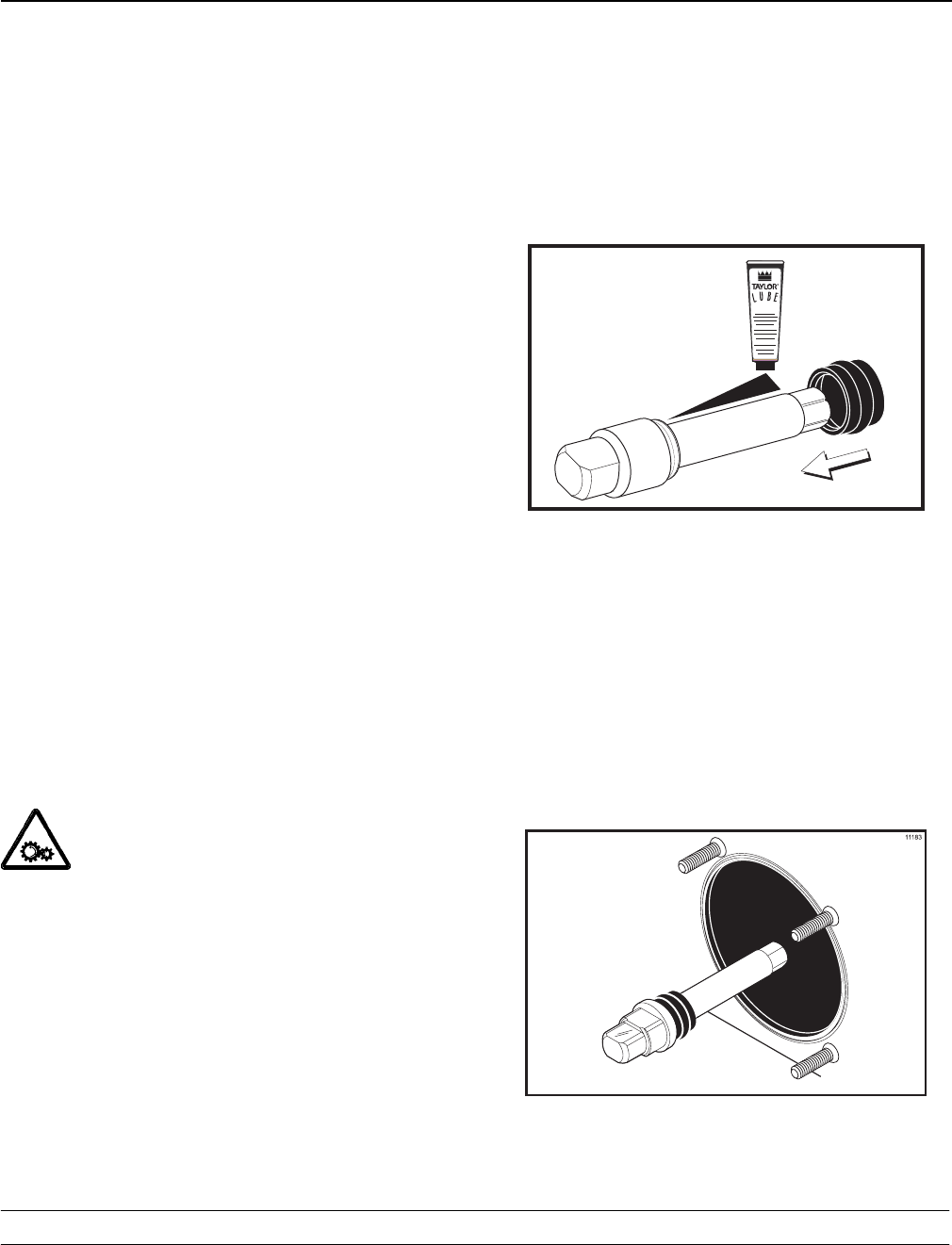
Before installing the beater drive shaft, lubricate the
groove on the beater drive shaft.
Step 2
Slide the beater drive shaft boot seal over the small
end of the beater drive shaft and engage into the
groove on the shaft.
Step 3
Heavily lubricate the inside portion of the boot seal
and also lubricate the flat end of the boot seal that
comes in contact with the rear shell bearing.
Step 4
Apply an even coat of lubricant to the shaft. DO
NOT lubricate the hex end. (See Figure 13.)
R
11269
Figure 13
Note: To ensure the mix does not leak out of the
back of the freezing cylinder, the middle section of
the boot seal should be convex or extend out from
the seal. If the middle section of the boot seal is
concave or extending into the middle of the seal,
turn the seal inside out.
Step 5
Insert the beater drive shaft through the rear shell
bearing in the freezing cylinder and engage the hex
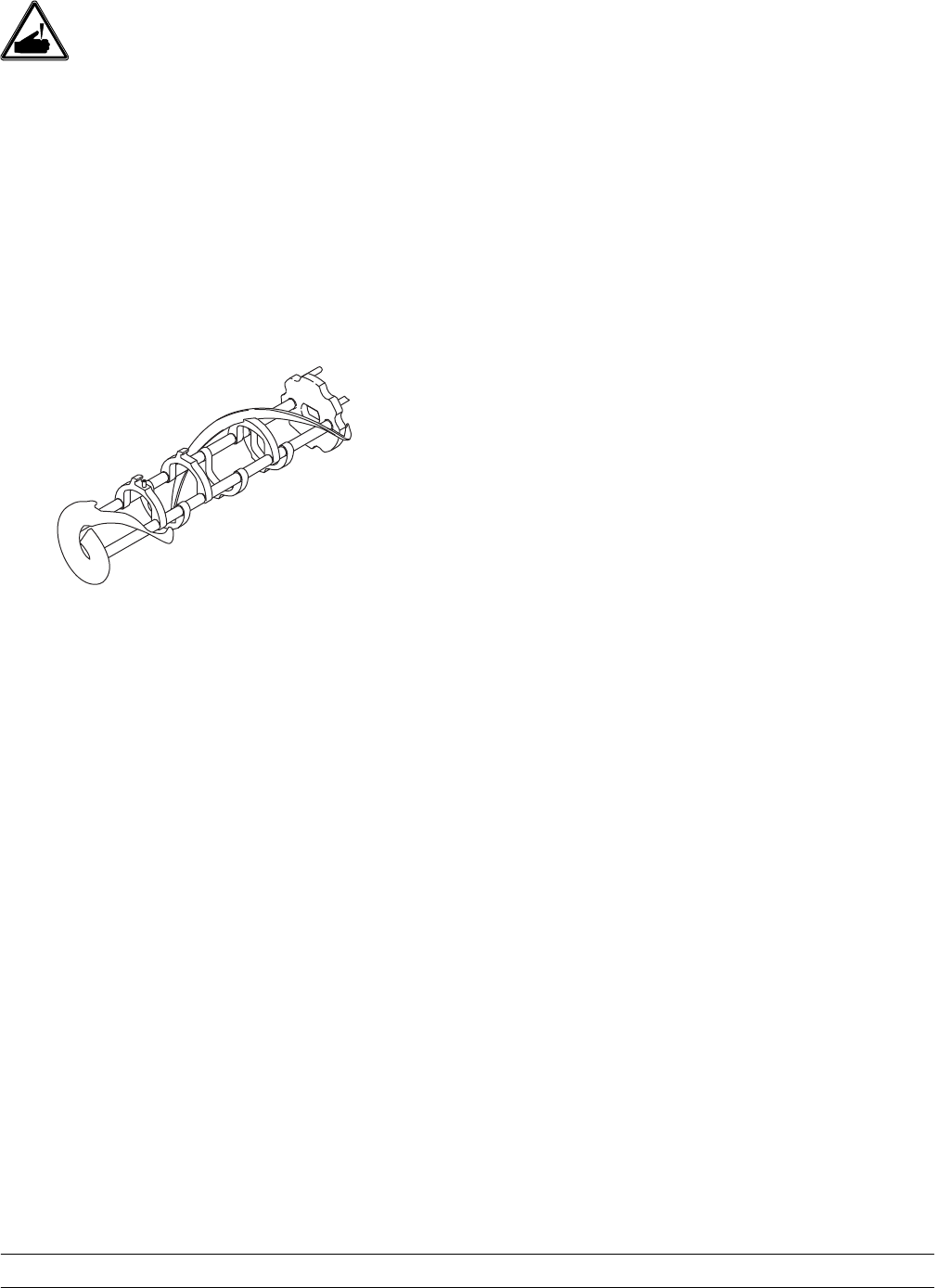
end firmly into the drive coupling. (See Figure 14.)
Figure 14
27
Models C708 & C716 Operating Procedures
USE EXTREME CAUTION when handling
the beater assembly. The scraper blades are very
sharp and may cause injury.
Step 6
Before installing the beater assembly, check the
scraper blades for any nicks or signs of wear. If any
nicks are present, or if the blades are worn, replace
both blades.
If the blades are in good condition, install the
scraper blade clips over the scraper blades. Place
the rear scraper blade over the rear holding pin on
the beater. (See Figure 15.)

28 Models C708 & C716Operating Procedures
Freezer Door Assembly
The assembly of the C708 freezer door is different
from the C716 freezer door. Please follow the
appropriate instructions for your machine.
Model C708 Freezer Door Assembly
Step 1
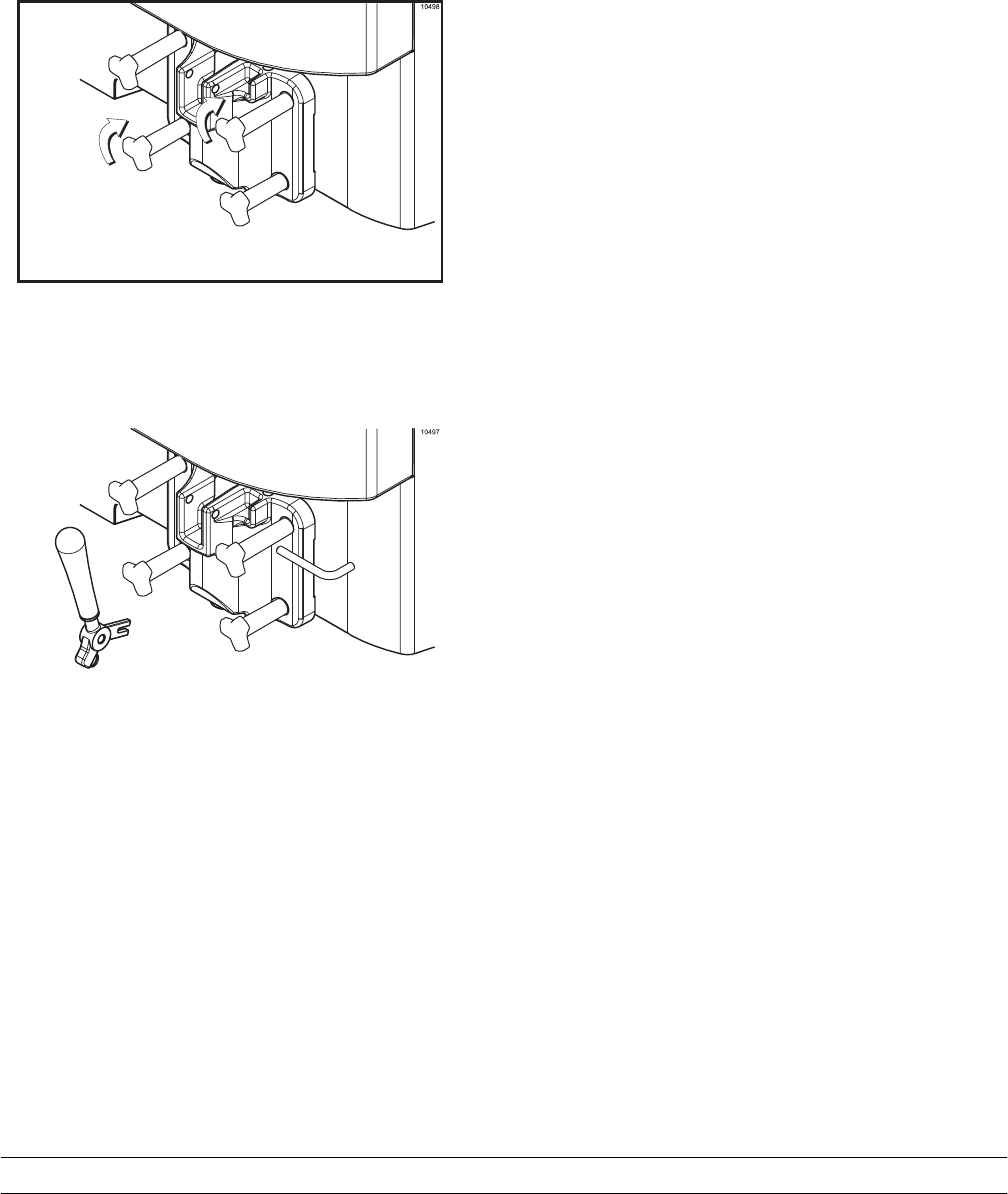
Place the door gasket into the groove on the back of
the freezer door. Slide the front bearing over the
baffle rod so the flanged edge is against the door.
DO NOT lubricate the gasket or bearing.
(See Figure 19.)
29
Models C708 & C716 Operating Procedures
Model C708 Freezer Door Assembly (Cont’d.)
Step 5
Insert the baffle rod through the beater in the
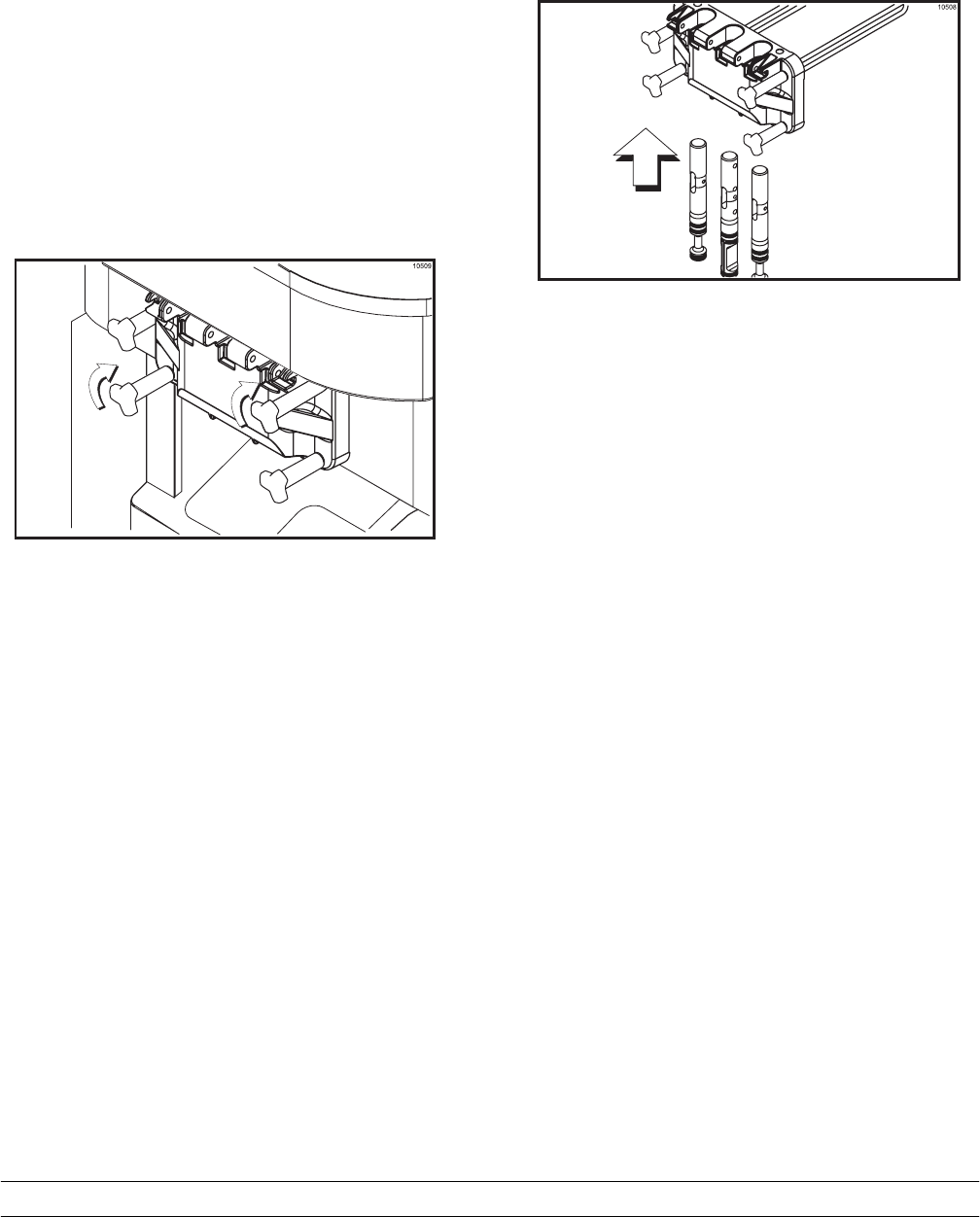
freezing cylinder. With the door seated on the
freezer studs, install the handscrews, with the longer
ones on top. Tighten equally in a criss-cross pattern
to insure the door is snug. (See Figure 23.)
Figure 23
Step 6
Slide the fork of the draw handle into the slot of the
draw valve. Secure with pivot pin. (See Figure 24.)
30 Models C708 & C716Operating Procedures
Model C716 Freezer Door Assembly
Step 1
Place the door gaskets into the grooves on the back
of the freezer door.
Step 2
Slide the front bearings over the baffle rods. The
flanged edges should be against the door. DO NOT
lubricate the gaskets or bearings.
Step 3
Insert the baffle rods through the beaters in the
freezing cylinders. With the door seated on the
freezer studs, install the handscrews, with the longer
ones on top. Tighten equally in a criss-cross pattern
to insure the door is snug.
Figure 27
Step 4
Slide the three o-rings into the grooves of each
standard draw valve. Slide the H-ring and o-ring into
the grooves of the center draw valve. Lubricate the
H-ring and o-rings.
Step 5
Lubricate the inside of the freezer door spouts, top
and bottom.
Step 6
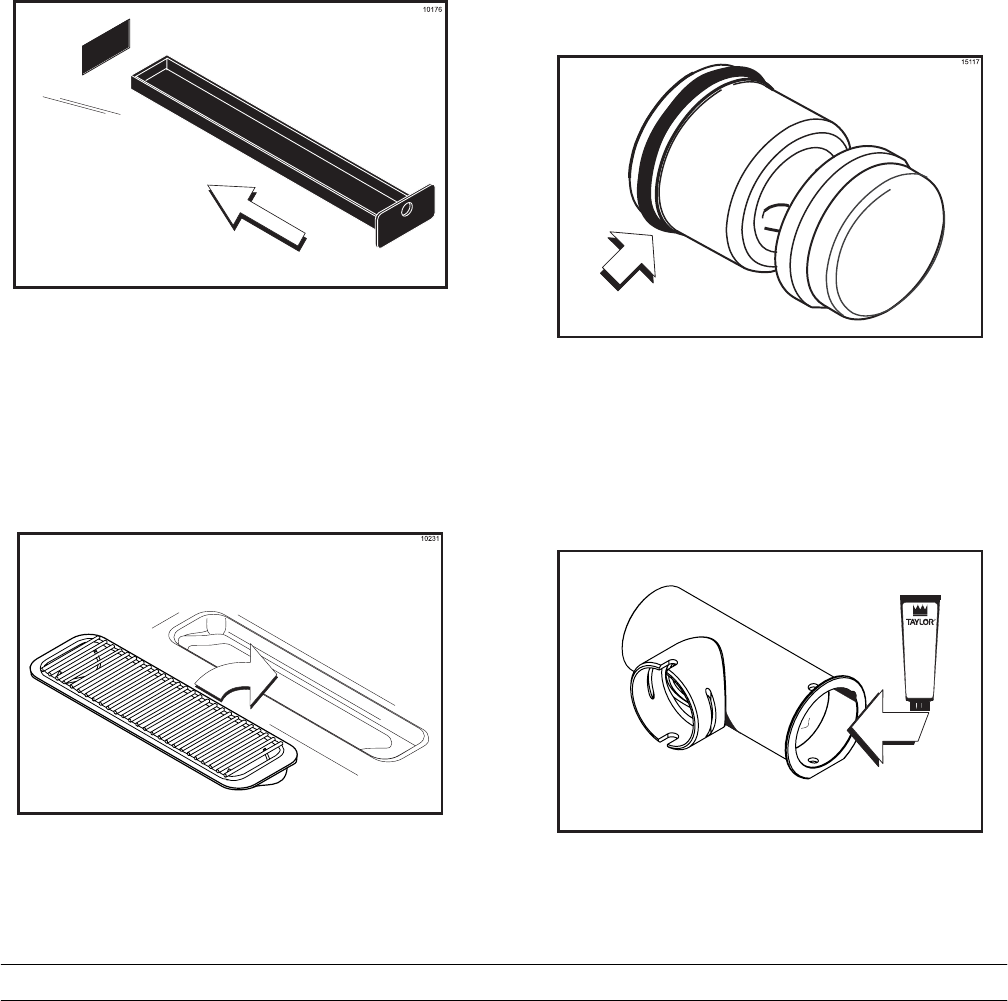
Insert the draw valves from the bottom until the slot
in each draw valve comes into view.
Figure 28
Step 7
Position each draw handle with the adjustment
screw facing down. Slide the fork of each draw
handle into the slot of each draw valve, starting from
the right.
Step 8
Slide the pivot pin through the draw handles as the
handles are inserted into the draw valves
Note: This freezer features adjustable draw handles
to provide portion control, giving a better consistent
quality to your product and controlling costs. The
draw handles should be adjusted to provide a flow
rate of 5 to 7-1/2 oz. (142 g. to 213 g.) of product by
weight per 10 seconds.
31
Models C708 & C716 Operating Procedures
To INCREASE the flow rate, turn the adjustment
screw CLOCKWISE. To DECREASE the flow rate,
turn the adjustment screw COUNTER-
CLOCKWISE.
Step 9
Snap the design caps over the bottom of the door
spouts.
Step 10
Slide the two rear drip trays into the holes in the
back panel. Slide the two drip pans into the holes in
the side panels. (See Figure 29.)
Figure 29
Step 11
Install the front drip tray and splash shield under the
door spouts. (See Figure 30.)
Figure 30
Mix Pump Assembly
Step 1
Inspect the rubber pump parts. O-rings and gasket
must be in 100% good condition for the pump and
entire machine to operate properly. The o-rings and
gasket cannot properly serve their intended function
if nicks, cuts, or holes in the material are present.
Replace any defective parts immediately and
discard the old.
Step 2
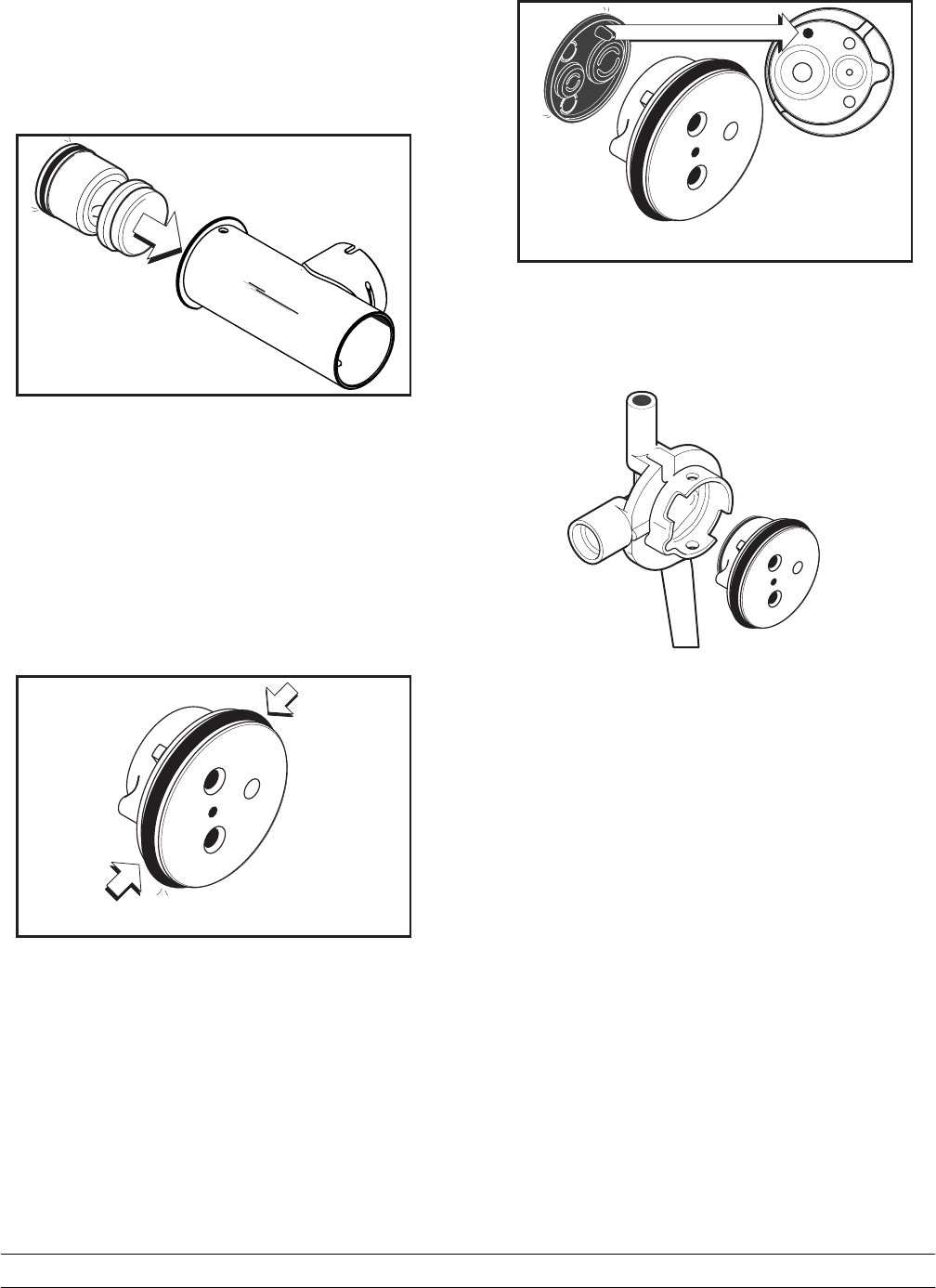
Assemblethepiston.Slidetheredo-ringintothe
groove of the piston. DO NOT lubricate the o-ring.
(See Figure 31.)
Figure 31
Step 3
Apply a thin layer of lubricant to the inside of the
pump cylinder at the retaining pin hole end. (See
Figure 32.)
15130
L
U
B
E
R
Figure 32
32 Models C708 & C716Operating Procedures
Step 4
Insert the piston into the retaining pin hole end of the
pump cylinder. (See Figure 33.)
15123
Figure 33
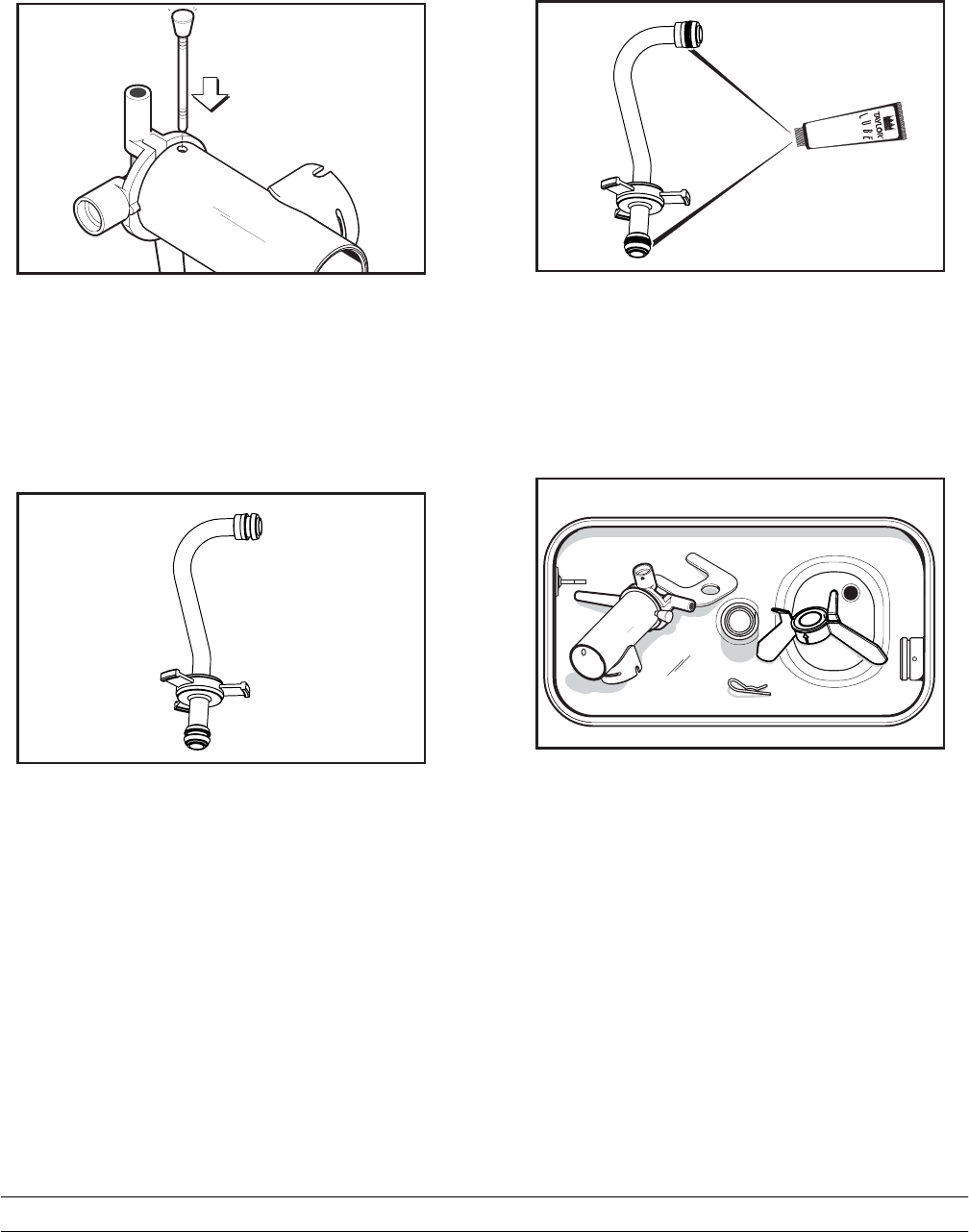
Step 5
Assemble the valve cap. Slide the o-ring into the
groove of the valve cap. DO NOT lubricate the
o-ring. (See Figure 34.)
15109
Figure 34
Step 6
Slide the pump valve gasket into the holes on the
cap. DO NOT lubricate the gasket. (See Figure 35.)
15110
Figure 35
Step 7
Insert the valve body cap into the hole in the mix
inlet adapter. (See Figure 36.)
33
Models C708 & C716 Operating Procedures
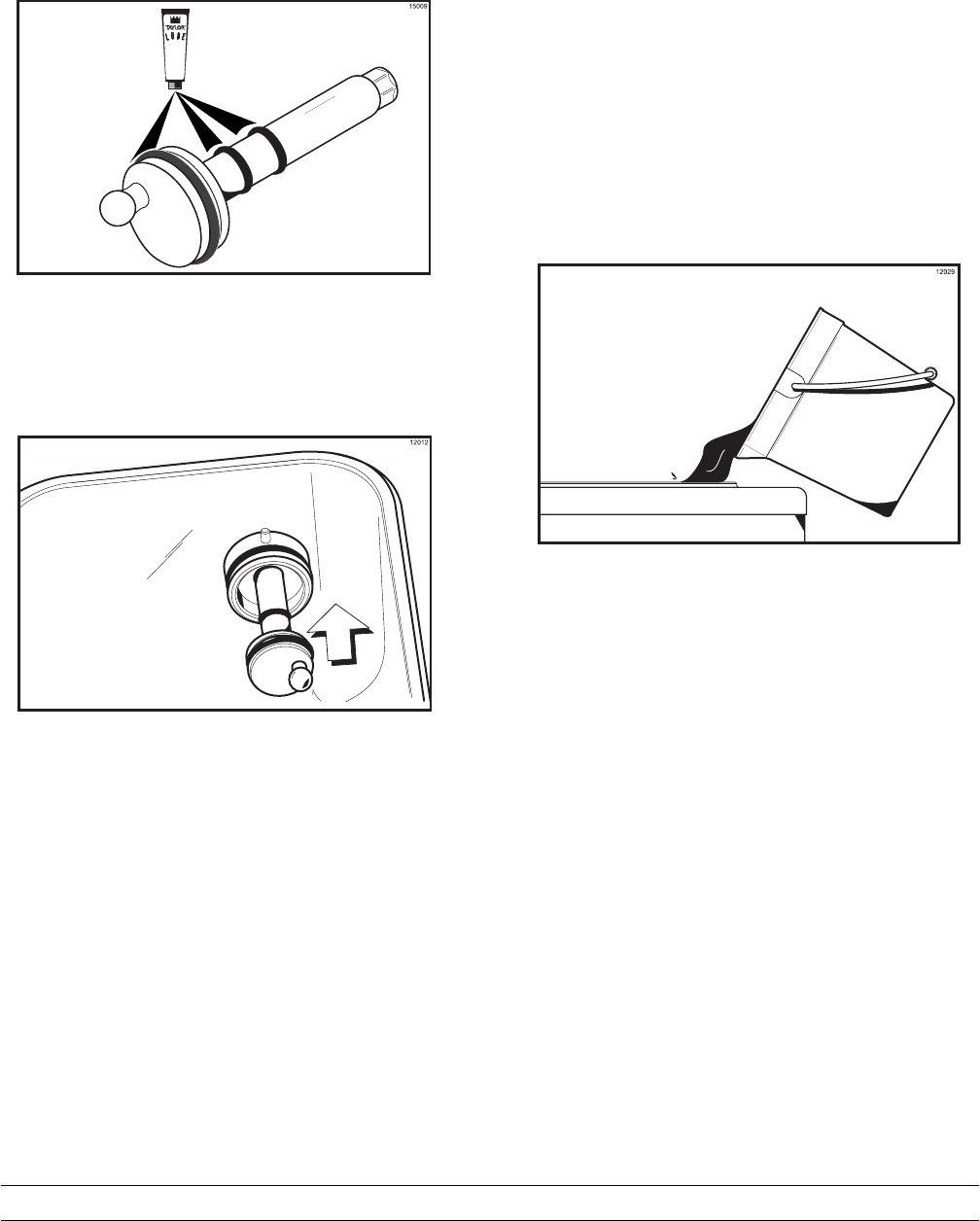
Step 9
Secure the pump parts in position by sliding the
retaining pin through the cross holes located at one
end of the pump cylinder. (See Figure 38.)
15113
Figure 38
Note: The head of the retaining pin should located
at the top of the pump when installed.
Step 10
Assemble the feed tube assembly. Slide the check
ring into the groove of the feed tube.
(See Figure 39.)
15133
Figure 39
Step 11
Install one red o-ring on each end of the mix feed
tube, and thoroughly lubricate. (See Figure 40.)
15132
Figure 40
Step 12
Lay the pump assembly, pump clip, cotter pin and
agitator in the bottom of the mix hopper for
sanitizing. (See Figure 41.)
12166
Figure 41
34 Models C708 & C716Operating Procedures
Step 13
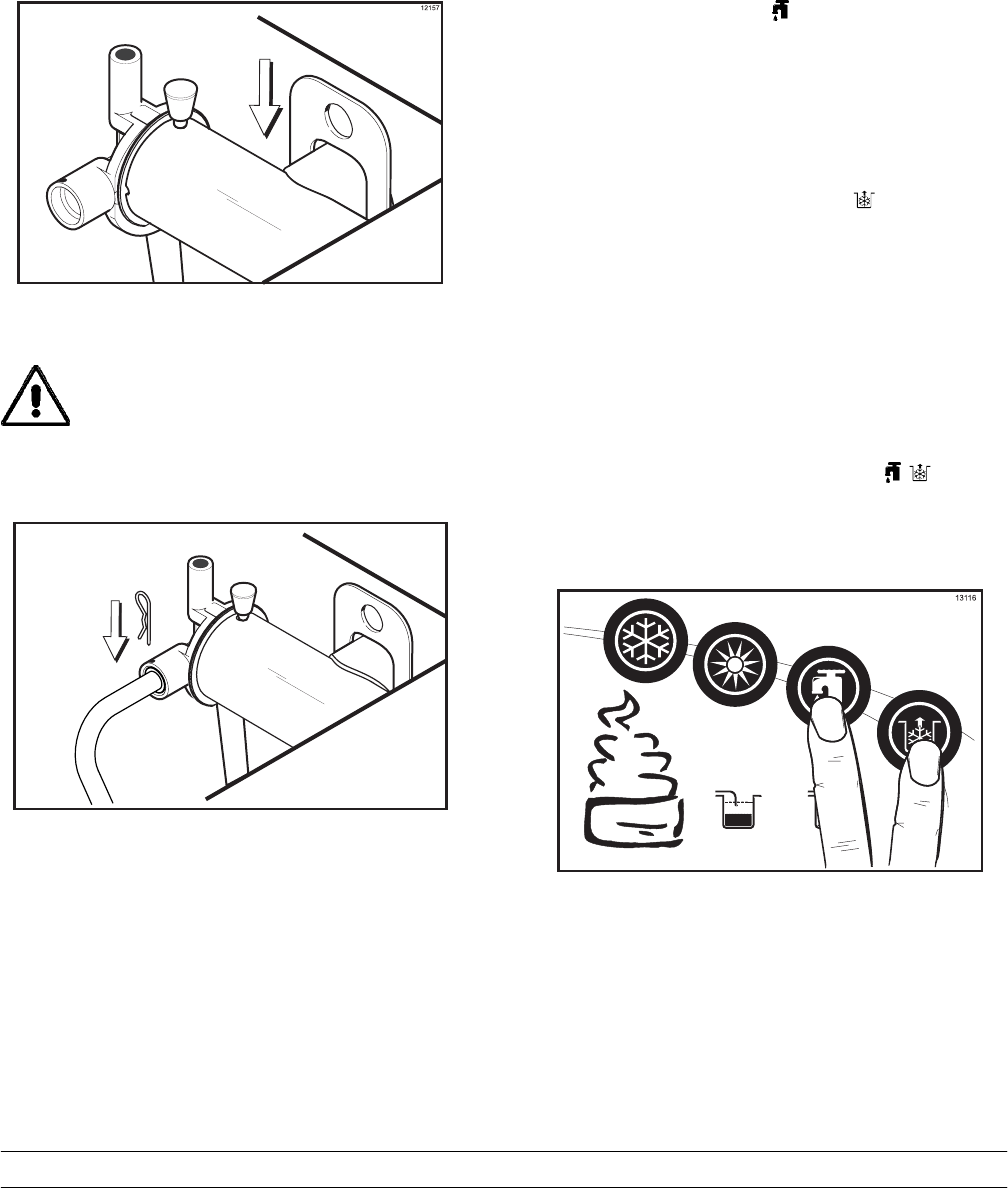
Slide the large black o-ring and the two smaller
black o-rings into the grooves on the drive shaft.
Thoroughly lubricate the o-rings and shaft. DO NOT
lubricate the hex end of the shaft. (See Figure 42.)
Figure 42
Step 14
Install the hex end of the drive shaft into the drive
hub at the rear wall of the mix hopper.
(See Figure 43.)
Figure 43
Note: For ease in installing the pump, position the
ball crank of the drive shaft in the 3 o’clock position.
Repeat these steps for the other side of the
Model C716.
Sanitizing
Step 1
Prepare two gallons (7.6 liters) of an approved 100
PPM sanitizing solution (example: Kay-5r). USE
WARM WATER AND FOLLOW THE MANUFAC-
TURER’S SPECIFICATIONS.
Step 2
Pour the two gallons (7.6 liters) of sanitizing solution
over all the parts in the bottom of the mix hopper
and allow it to flow into the freezing cylinder.
(See Figure 44.)
Figure 44
Note: You have just sanitized the mix hopper and
parts; therefore, be sure your hands are clean and
sanitized before going on in these instructions.
Step 3
While the solution is flowing into the freezing
cylinder, take particular care to brush-clean the mix
level sensing probe on the bottom of the hopper, the
mix hopper, the mix inlet hole, the air/mix pump, the
pump clip, the mix feed tube, and the locking clip.
35
Models C708 & C716 Operating Procedures
Step 4
Install the pump assembly at the rear of the mix
hopper. To position the pump on the drive hub, align
the drive hole in the piston with the drive crank of
the drive shaft. Secure the pump in place by slipping
the pump clip over the collar of the pump, making
sure the clip fits into the grooves in the collar.
(See Figure 45.)
Figure 45
Step 5
Install the pump end of the mix feed
tube and secure with the cotter pin. Failure to
follow this instruction could result in sanitizer
spraying on the operator. (See Figure 46.)
12185
Figure 46
Step 6
Prepare another two gallons (7.6 liters) of an ap-
proved 100 PPM sanitizing solution (example:
Kay-5r). USE WARM WATER AND FOLLOW THE
MANUFACTURER’S SPECIFICATIONS.
Step 7
Pour the sanitizing solution into the mix hopper.
Step 8
Brush the exposed sides of the hopper.
Step 9
Place the power switch in the ON position.
Step 10
Touch the WASH symbol . This will cause the
sanitizing solution in the freezing cylinder to be
agitated. Wait at least 5 minutes before proceeding
with these instructions.
Step 11
With a pail beneath the door spout(s), open the draw
valve and touch the PUMP symbol . Open and
close the draw valve 6 times.
Note: Momentarily open the center draw valve to
sanitize the center door spout (C716 only).
Draw off the remaining sanitizing solution.
Step 12
Touch the WASH and PUMP symbols and
close the draw valve. (See Figure 47.)
Figure 47
Note: Be sure your hands are clean and
sanitized before going on in these instructions.
36 Models C708 & C716Operating Procedures
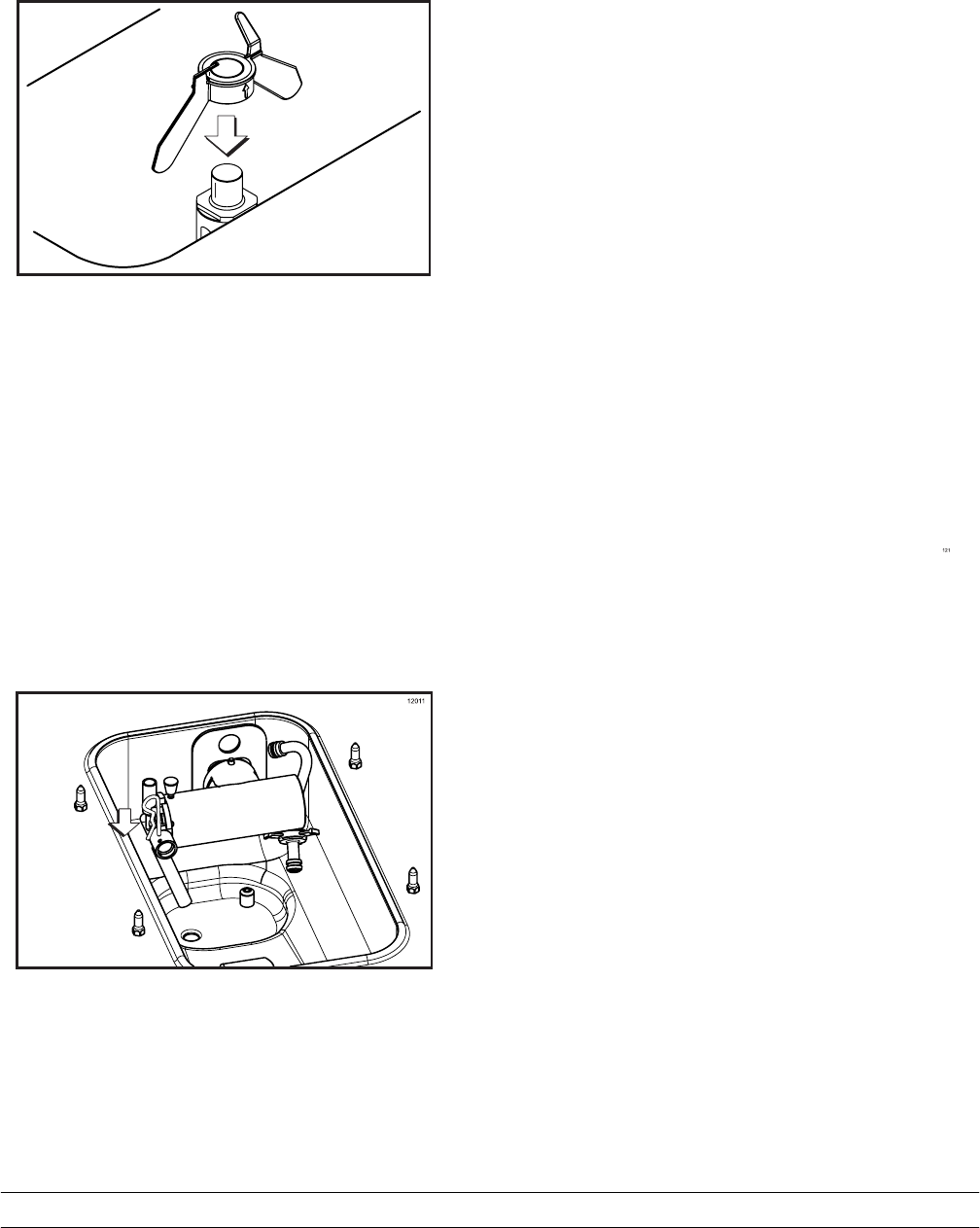
Step 13
Place the agitator on the agitator drive shaft
housing. (See Figure 48.)
12182
Figure 48
Note: If agitator should stop turning during normal
operation, with sanitized hands, remove agitator
from agitator drive shaft housing and brush clean
with sanitizing solution. Install the agitator back onto
the agitator drive shaft housing.
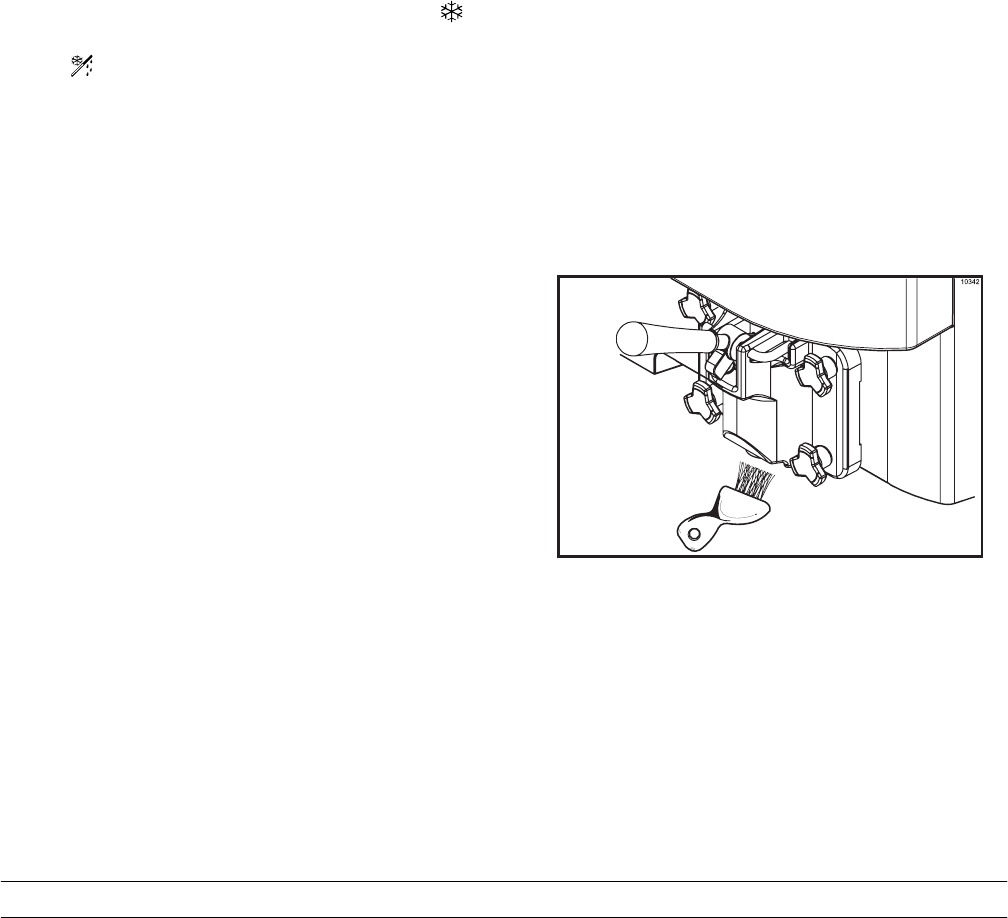
Step 14
Remove the cotter pin from the pump. Install the top
end of the feed tube into the pump assembly. Place
the cotter pin in position on the outlet fitting of the
pump assembly. (See Figure 49.)
Figure 49
Repeat these steps for the other side of the
Model C716.
Priming
Note: Use only FRESH MIX when priming the
freezer.
Step 1
Place an empty mix pail beneath the door spout(s).
Pour 2-1/2 gallons (9.5 liters) of FRESH mix into the
mix hopper and allow it to flow into the freezing
cylinder.
Step 2
Open the draw valve to remove all sanitizing
solution. When only fresh mix is flowing, close the
draw valve.
Note: Momentarily open the center draw valve to
remove sanitizer from the center door spout (C716
only).
Step 3
When mix stops bubbling down into the freezing
cylinder, remove the cotter pin from the outlet fitting
of the mix pump. Insert the outlet end of the mix
feed tube into the mix inlet hole in the mix hopper.
Place the inlet end of the mix feed tube into the
outlet fitting of the mix pump. Secure with cotter pin.
37
Models C708 & C716 Operating Procedures
Daily Closing Procedures
This procedure must be performed once
daily!
The function of the Heat Treatment Cycle is to
destroy bacteria by raising the temperature of the
mix in the freezing cylinder and the hopper to a
specified temperature for a specified period of time,
and then bringing the temperature back down low
enough to retard spoilage.
The Heat Treatment Cycle will start at the time
designated in the Auto Heat Time.
IMPORTANT: The level of mix in the mix
hoppers must be above the mix low probe(s).
(The mix low light must not be ON.) Note: If the
BRUSH CLEAN COUNTER display has counted
down to one day, do not add mix. The machine must
be disassembled and brush cleaned within 24 hours.
The freezer must be in the AUTO (AUTO symbol
illuminated) or in the STANDBY mode (STANDBY
symbol illuminated) before the HEAT cycle may
be started.
Step 1
Remove the hopper cover(s).
MAKE SURE YOUR HANDS ARE CLEAN AND
SANITIZED BEFORE PERFORMING THESE NEXT
STEPS.
Step 2
Remove the agitator(s) from the mix hopper(s).
Step 3
Remove the design caps (C716 only).
Step 4
Take the agitator(s), hopper cover(s) and design
cap(s) to the sink for further cleaning and sanitizing.
Step 5
Rinse these parts in cool, clean water.
Step 6
Prepare a small amount of an approved 100 PPM
cleaning/sanitizing solution (example: Kay-5r). USE
WARM WATER AND FOLLOW THE MANUFAC-
TURER’S SPECIFICATIONS. Brush clean the agita-
tor(s) and the hopper cover(s).
Step 7
Prepare a small amount of an approved 100 PPM
cleaning/sanitizing solution (example: Kay-5r). USE
WARM WATER AND FOLLOW THE MANUFAC-
TURER’S SPECIFICATIONS. Sanitize the agita-
tor(s) and hopper cover(s).
Step 8
Install the agitator(s) back onto the agitator drive
shaft housing(s). Replace the hopper cover(s).
IMPORTANT: If you do not install the agitator(s)
correctly, the machine will fail the heat cycle and
lock out in the morning.
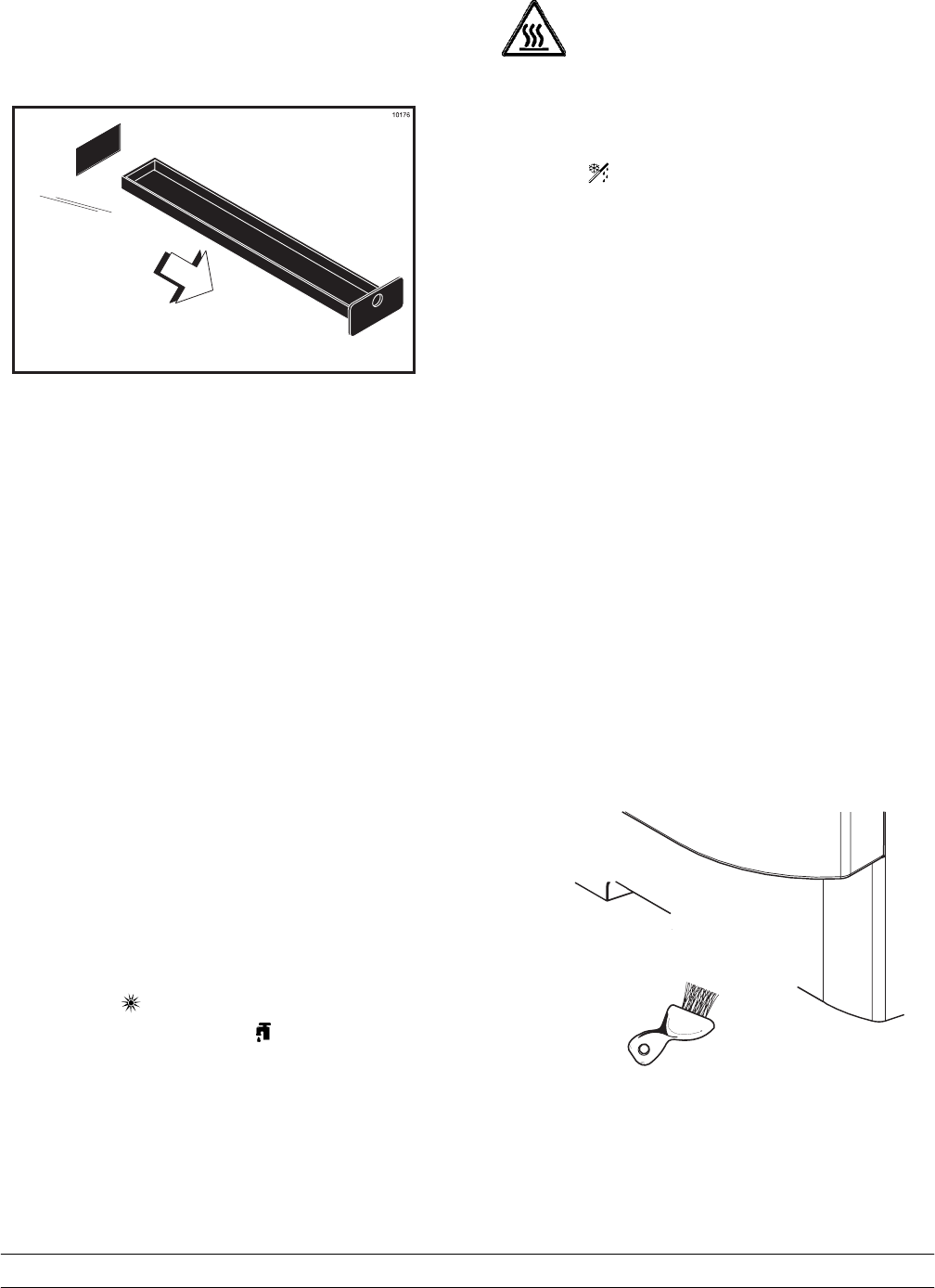
Step 9
Return to the freezer with a small amount of
cleaning solution. Dip the door spout brush into the
cleaning solution and brush clean the door spout(s)
and bottom of the draw valve(s).
Note: To assure sanitary conditions are maintained,
brush each item for a total of 60 seconds, repeatedly
dipping the brush in cleaning solution.
(See Figure 51.)
Figure 51
38 Models C708 & C716Operating Procedures
Step 10
Remove, clean and reinstall all drip pans.
(See Figure 52.)
Figure 52
Step 11
Using a clean, sanitized towel, wipe down the
freezer door, front panel, the area around the bottom
of the freezer door, and any other areas that
demonstrate a build-up of either moisture or food
substance.
The heat cycle will start when the clock on the
machine reaches the AUTO HEAT TIME set in the
Manager’s Menu (See page 21).
There are 3 phases of the heat cycle: Heating,
Holding and Cooling. Each phase has a time limit. If
any one of the three phases fail to reach the proper
temperatures within the time limit, the cycle will
automatically abort and return to the STANDBY
mode.
A failure message will appear on the fluorescent
display to inform the operator that the machine did
not successfully complete the heat treatment cycle.
The product may not be safe to serve. The freezer
will be locked out (softlock) of the AUTO mode. The
operator will be given the option of selecting the
HEAT symbol which will begin a new heat cycle,
or touching the WASH symbol which will place
the freezer into the OFF mode to allow a brush
clean of the machine.
Note: Once the heating cycle has started, it cannot
be interrupted. The heating cycle will take a
maximum of 4 hours to complete with full hoppers.
DO NOT attempt to draw product or
disassemble the machine during the HEAT cycle.
The product is hot and under extreme pressure.
When the heating cycle is complete, the control will
return to the STANDBY mode. The STANDBY
symbol(s) will be illuminated.
Daily Opening Procedures
Before performing the opening procedures, check
the display panel for any error messages. Normally
the display is blank unless an operational fault has
occurred. If a fault has been detected, investigate
the cause and follow the instructions on the display
before proceeding with the opening procedures.
(See Failure Messages, starting on page 23.)
Set-Up - Complete The Following
Make sure your hands are clean and sanitized
before performing these next steps.
Step 1
Prepare a small amount of an approved 100 PPM
sanitizing solution (example: Kay-5r). USE WARM
WATER AND FOLLOW THE MANUFACTURER’S
SPECIFICATIONS.
Step 2
Return to the freezer with a small amount of
sanitizing solution. Dip the door spout brush into the
sanitizing solution and brush clean the door spout(s)
and bottom of the draw valve(s). (See Figure 53.)
39
Models C708 & C716 Operating Procedures
Step 3
Using a clean, sanitized towel, wipe down the
freezer door, front panel, the area around the bottom
of the freezer door, and any other areas that
demonstrate a build-up of either moisture or food
substance. Install the front drip tray and splash
shield.
Note: Install the design caps (C716 only).
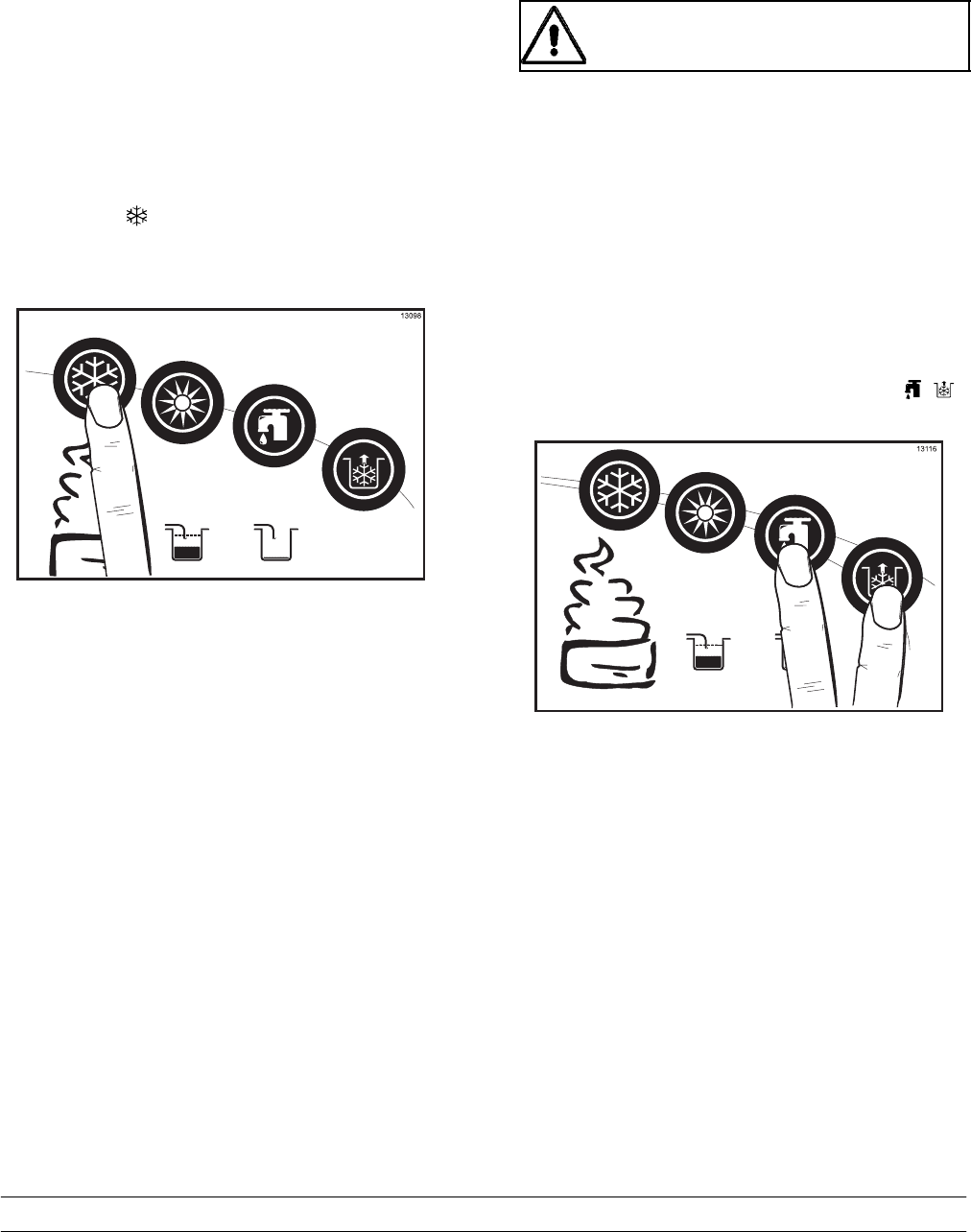
Step 4
When ready to resume normal operation, touch the
AUTO symbol . (See Figure 54.)
Figure 54
The control has a feature in the Manager’s Menu to
enable or disable the AUTO START feature. When
AUTO START in enabled, the machine will
automatically exit the STANDBY mode and start the
machine in the AUTO mode at a designated time
each day. (See page 21.)
Note: This procedure should be performed 15
minutes prior to serving product.
Manual Brush Cleaning
This Procedure Must Be Completed Every Two
Weeks!
ALWAYS FOLLOW LOCAL HEALTH CODES.
To disassemble these machines, the following items
will be needed:
STwo cleaning and sanitizing pails
SSanitizer/Cleaner
SNecessary brushes (provided with freezer)
SSingle service towels
Draining Product From The
Freezing Cylinder
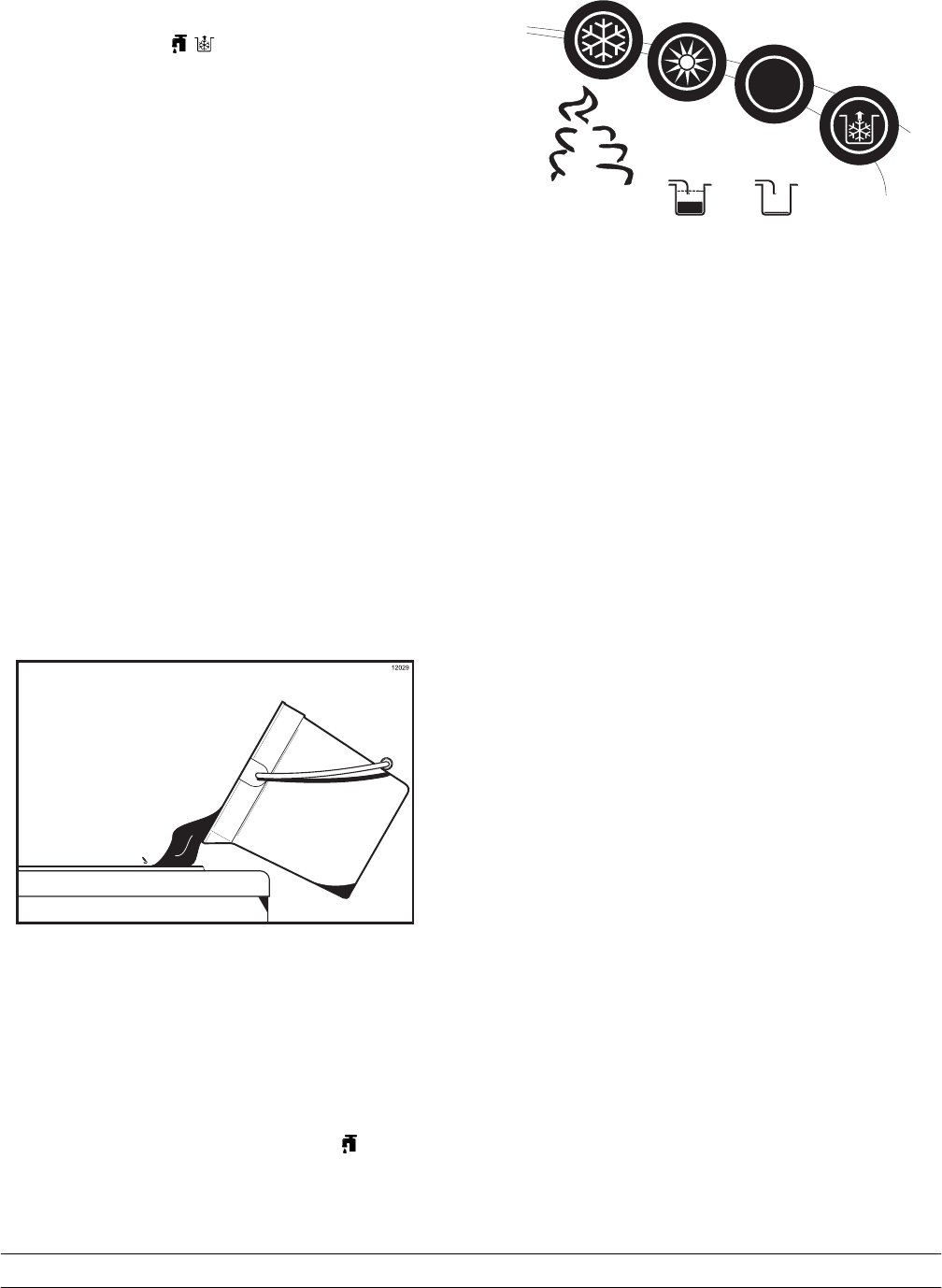
Step 1
With a pail beneath the door spout(s), open the draw
valve. Touch the WASH and PUMP symbols .
(See Figure 55.)
Figure 55
Note: Do not allow the pump to keep running
when the draw valve is closed. Excessive
pressure will build up, causing product to spurt
out when the draw valve is opened.
Step 2
Drain the product from the freezing cylinder and the
mix hopper.
40 Models C708 & C716Operating Procedures
Step 3
When the flow of product stops, touch the WASH
and PUMP symbols , cancelling the WASH
and PUMP modes. Close the draw valve.
Step 4
Remove the locking clip, mix feed tube, pump clip
and the assembled air/mix pump.
Repeat these steps for the other side of the
Model C716.
Rinsing
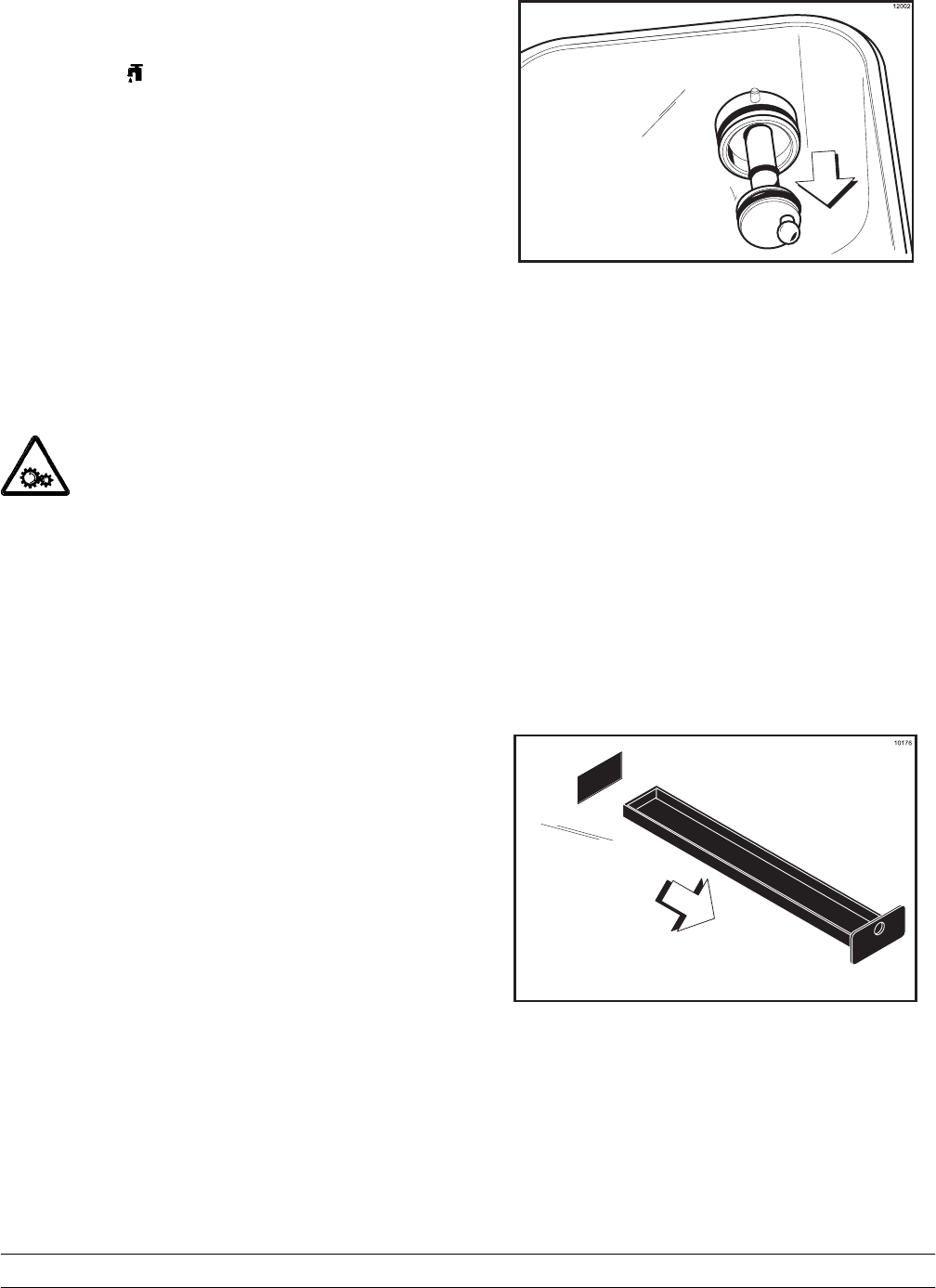
Step 1
Pour two gallons (7.6 liters) of cool, clean water into
the mix hopper. With the white hopper brush, scrub
the mix hopper, mix level sensing probe and the
outside of the agitator drive shaft housing. Using the
double ended brush, brush clean the mix inlet hole.
(See Figure 56.)
Figure 56
Note: Do not brush clean the mix inlet hole while
the machine is in the WASH mode.
Step 2
With a mix pail beneath the door spout,(s) open the
draw valve and touch the WASH symbol .
(See Figure 57.)
41
Models C708 & C716 Operating Procedures
Step 7
Once the cleaning solution stops flowing from the
door spout, close the draw valve and touch the
WASH symbol , cancelling the WASH mode.
Repeat these steps on the other side of the
Model C716.
Disassembly
Note: Failure to remove the parts specified below
for brush cleaning and lubrication will result in
damage to the machine. These parts must be
removed every 14 days or the machine will lock out
and will not operate.
MAKE SURE THE POWER SWITCH IS IN
THE “OFF” POSITION! Failure to follow this
instruction may result in severe personal injury from
hazardous moving parts.
Step 1
Remove the handscrews, freezer door, beater and
scraper blades, and drive shaft with drive shaft seal
from the freezing cylinder.
Step 2
Remove the scraper blade clips from the scraper
blades.
Step 3
Remove the drive shaft seal from the drive shaft.
Step 4
From the pump cylinder, remove the retaining pin,
mix inlet adaptor, valve cap, pump gasket, and the
piston. Remove the o-ring from the piston and valve
cap.
Step 5
Remove the freezer door gasket, front bearing, pivot
pin, draw handle, and draw valve. Remove the three
o-rings from the draw valve.
Note: Remove the design caps (C716 only).
Step 6
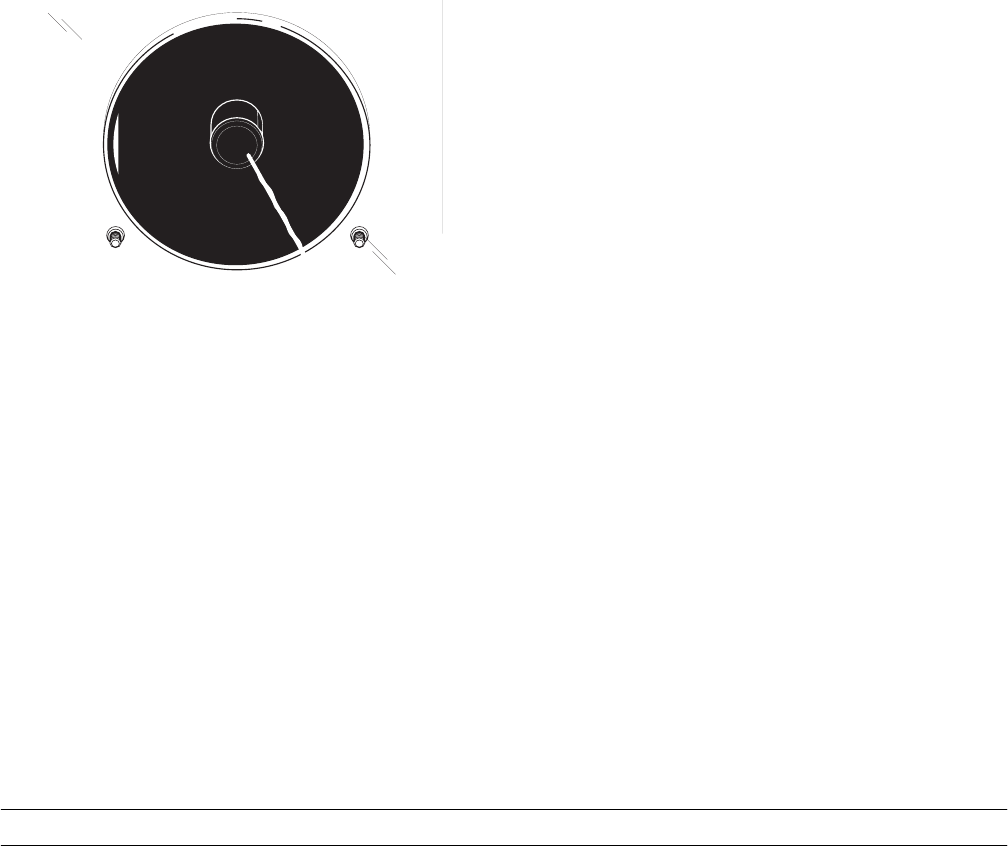
Remove the pump drive shaft from the drive hub in
the rear wall of the mix hopper. (See Figure 58.)
Figure 58
Step 7
Remove the two small o-rings and one large o-ring
from the pump drive shaft.
Repeat these steps on the other side of the
Model C716.
Step 8
Remove the front drip tray and splash shield.
Step 9
Remove all drip pans. Take them to the sink for
cleaning. (See Figure 59.)
Figure 59
Note: If the drip pans are filled with an excessive
amount of mix, it is an indication that the drive shaft
seal(s), or o-ring(s) should be replaced or properly
lubricated.
42 Models C708 & C716Operating Procedures
Brush Cleaning
Step 1
Prepare two gallons (7.6 liters) of an approved 100
PPM cleaning/sanitizing solution (example: Kay-5r).
USE WARM WATER AND FOLLOW THE
MANUFACTURER’S SPECIFICATIONS. Make sure
all brushes provided with the freezer are available
for brush cleaning.
Step 2
Thoroughly brush clean all disassembled parts in the
cleaning solution, making sure all lubricant and mix
film is removed. Be sure to brush all surfaces and
holes, especially the holes in the pump components
and the draw valve hole in the freezer door.
Rinse all parts with clean, warm water. Place the
parts on a clean, dry surface to air dry overnight.
Step 3
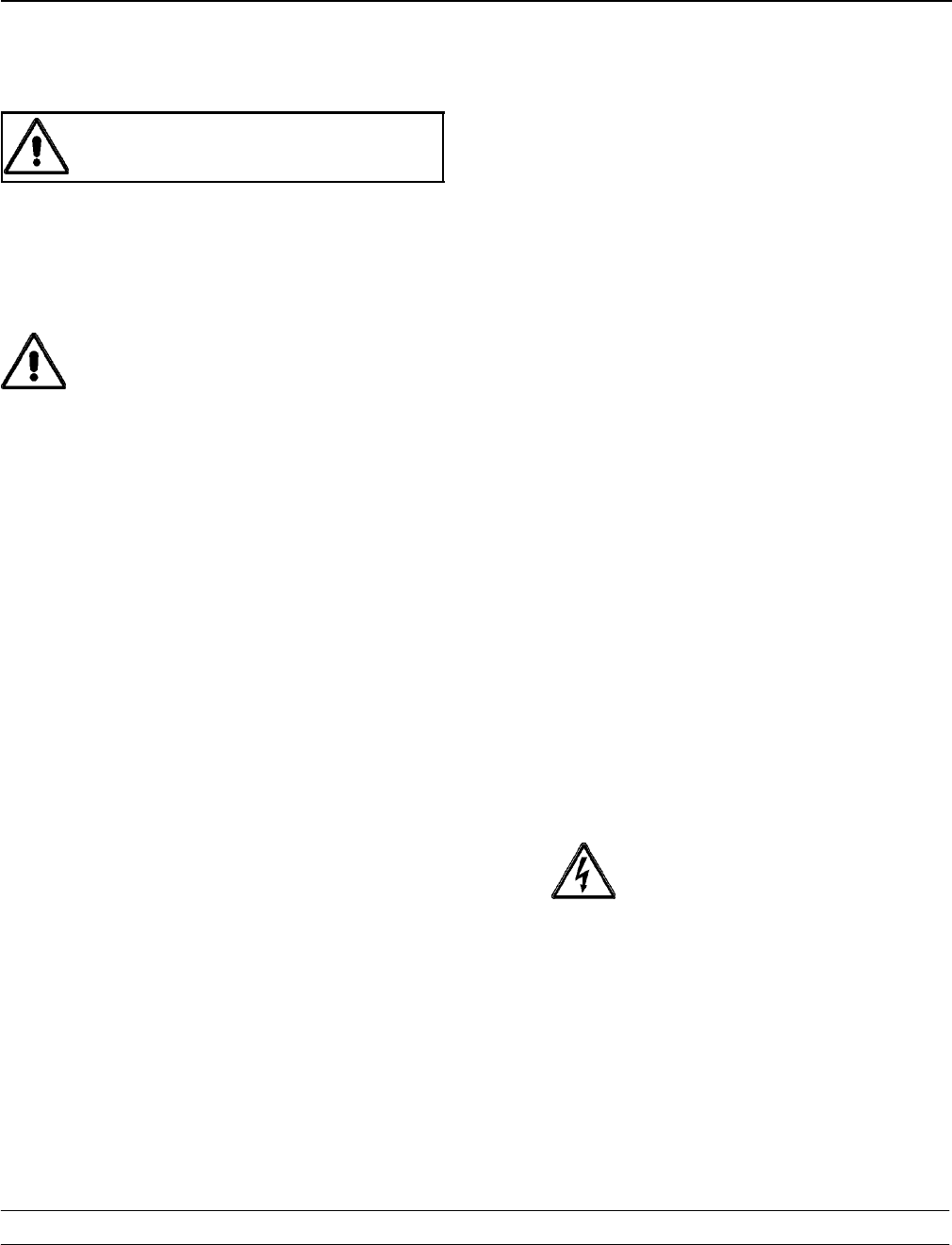
Return to the freezer with a small amount of
cleaning solution. Using the black brush, clean the
rear shell bearing at the back of the freezing
cylinder. (See Figure 60.)
43
Models C708 & C716 Important: Operator Checklist
050808
Section 7 Important: Operator Checklist
During Cleaning and Sanitizing
ALWAYS FOLLOW LOCAL HEALTH CODES.
Cleaning and sanitizing schedules are governed
by your State or local regulatory agencies and
must be followed accordingly. The following
check points should be stressed during the
cleaning and sanitizing operations.
CLEANING AND SANITIZING MUST BE
PERFORMED EVERY TWO WEEKS.
Troubleshooting Bacterial Count
j1. Thoroughly clean and sanitize the machine
regularly, including complete disassembly and
brush cleaning.
j2. Use all brushes supplied for thorough
cleaning. The brushes are specially designed
to reach all mix passageways.
j3. Use the white bristle brush to clean the mix
inlet hole which extends from the mix hopper
down to the rear of the freezing cylinder.
j4. Use the black bristle brush to thoroughly
clean the rear shell bearing located at the rear
of the freezing cylinder and the drive hub
opening in the rear wall of the mix hopper. Be
sure there is a generous amount of cleaning
solution on the brush.
j5. Properly prepare the cleaning and sanitizing
solutions. Read and follow the label directions
carefully. Too strong of a solution may
damage the parts and too weak of a solution
will not do an adequate job of cleaning or
sanitizing.
j6. The temperature of the mix in the mix hopper
and walk-in cooler should be below 40_F
(4.4_C).
j7. Discard remaining mix from the freezer during
“Cleaning Procedures”.
Regular Maintenance Checks
j1. Replace scraper blades that are nicked or
damaged. Before installing the beater
assembly, be certain that scraper blades are
properly attached to the helix.
j2. Check the rear shell bearing for signs of wear
(excessive mix leakage in rear drip pan) and
be certain it is properly cleaned.
j3. Using a screwdriver and cloth towel, keep the
rear shell bearing and the female hex drive
socket clean and free of lubricant and mix
deposits.
j4. Dispose of o-rings and seals if they are worn,
torn, or fit too loosely, and replace with new
ones.
j5. Follow all lubricating procedures as outlined in
“Assembly”.
j6. If your machine is air cooled, check the
condensers for accumulation of dirt and lint.
Dirty condensers will reduce the efficiency
and capacity of the machine. Condensers
should be cleaned monthly with a soft brush.
Never use screwdrivers or other metal probes
to clean between the fins.
Note: For machines equipped with an air
filter, it will be necessary to vacuum clean the
filters on a monthly schedule.
Caution: Always disconnect
electrical power prior to cleaning the
condenser. Failure to follow this instruction
may result in electrocution.
j7. If your machine is water cooled, check the
water lines for kinks or leaks. Kinks can occur
when the machine is moved back and forth for
cleaning or maintenance purposes.
Deteriorated or cracked water lines should be
replaced only by an authorized Taylor
distributor.

44 Models C708 & C716Important: Operator Checklist
Winter Storage
If the place of business is to be closed during the
winter months, it is important to protect the freezer
by following certain precautions, particularly if the
building is subject to freezing conditions.
Disconnect the freezer from the main power source
to prevent possible electrical damage.
On water cooled freezers, disconnect the water
supply. Relieve pressure on the spring in the water
valve. Use air pressure on the outlet side to blow out
any water remaining in the condenser, and then add
a liberal amount of permanent type auto anti-freeze.
This is extremely important. Failure to follow this
procedure may cause severe and costly damage to
the refrigeration system.
Your local Taylor Distributor can perform this winter
storage service for you.
Wrap detachable parts of the freezer such as
beater, blades, drive shaft, and freezer door, and
place them in a protected dry place. Rubber trim
parts and gaskets can be protected by wrapping
them with moisture-proof paper. All parts should be
thoroughly cleaned of dried mix or lubrication which
attract mice and other vermin.
It is recommended that an authorized service
technician perform winter storage draining, to insure
all water has been removed. This will guard against
freezing and rupturing of the components.
45
Models C708 & C716 Important: Operator Checklist
Section 8 Troubleshooting Guide
PROBLEM PROBABLE CAUSE REMEDY PAGE
REF.
1. Soft lock message
appears on display. a. More than 24 hours since
the last HEAT cycle. a. The freezer must go
through a HEAT cycle
every 24 hours. The
freezer must now be
disassembled and brush
cleaned or placed in a
heat cycle.
17
b. The power switch is in the
OFF position. b. The power switch must be
in the ON position. The
freezer must now be
disassembled and brush
cleaned or placed in a
heat cycle.
18
c. The freezer was not in the
AUTO or STANDBY mode
when the heat cycle was
programmed to start.
c. The freezer must be in the
AUTO or STANDBY
mode. The freezer must
now be disassembled and
brush cleaned or placed in
a heat cycle.
18
d. Mix out or mix low
condition. d. The level of mix in the mix
hopper must be above the
mix low probe. The
freezer must now be
disassembled and brush
cleaned or placed in a
heat cycle.
18
e. The agitator is not
installed. e. The agitator must be
cleaned and installed
before starting the HEAT
cycle. The freezer must
now be disassembled and
brush cleaned or placed in
a heat cycle.
37
f. There was a power failure. f. Check fault messages and
product temperature.
Disassemble and brush
clean, or initiate a heat
treatment cycle.
23
46 Models C708 & C716Important: Operator Checklist
PROBLEM PROBABLE CAUSE REMEDY PAGE
REF.
2. Hard lock message
appears on display. a. Brush clean interval
exceeded. (Programmable
from 2 - 14 days.)
a. The freezer must be
disassembled and brush
cleaned within 24 hours
when the counter
indicates one day
remaining.
17
b. A barrel or hopper
thermistor is faulty. b. Call an authorized service
technician. ---
3. No control panel functions
i
t
h
p
o
e
r
s
i
t
c
h
O
N
a. Machine is unplugged. a. Plug into wall receptacle. ---
with powe
r
switch ON. b. Circuit breaker OFF or
blown fuse. b. Turn the breaker ON or
replace the fuse. ---
4. Machine makes a
squealing noise. a. Starved barrel. a. Remove ,clean and
reinstall the pump. 31, 34, 41
5. No product is being
dispensed. a. Low on mix. The MIX
OUT light is on. a. Add mix to the hopper.
Return to AUTO mode. 36
b. The power switch is in the
OFF position. b. Place the power switch to
ON and select AUTO. 35
c. Machine not in AUTO
mode. c. Select AUTO and allow
machine to cycle off
before drawing product.
36
d. Beater motor is out on
reset. The BEATER
OVERLOAD message
displayed.
d. Turn the machine off.
Press the reset button.
Restart the machine in
AUTO.
---
e. The pump motor is not
running in the AUTO
mode.
e. Push the pump reset
button. Check pump motor
is operating when the
draw valve is raised.
14
f. Freeze-up in mix inlet
hole. f. Call an authorized service
technician. ---
g. The mix pump ball crank
is broken. g. Call an authorized service
technician. ---
h. Feed tube or check ring
not properly installed. h. Make sure feed tube and
rubber check ring are
properly installed.
33, 36
47
Models C708 & C716 Important: Operator Checklist
PROBLEM PROBABLE CAUSE REMEDY PAGE
REF.
6. The product is too soft. a. Draw rate is set too fast. a. Adjust draw rate of 5 to 7
1/2 oz. (142 g. to 213 g.)
of product by weight in 10
seconds.
14
7. The product is too thick. a. Freezing cylinder not
primed correctly. a. Drain the freezing cylinder
and reprime the machine. 36
b. Air/mix pump incorrectly
assembled. b. Follow assembly
procedures carefully. 31
c. The viscosity control is set
too cold. c. Call an authorized service
technician. ---
d. Freeze-up in mix inlet
hole. d. Call an authorized service
technician. ---
e. Butterfat is in the pump. e. Disassemble , clean and
reinstall the pump. 31, 34, 41
8. The mix in the hopper is
too warm. a. Hopper cover is not in
position. a. Clean and sanitize hopper
cover and place in
position.
37
b. The agitator is not
installed. b. Clean and sanitize the
agitator and install. 37
c. The hopper temperature is
out of adjustment. c. Call an authorized service
technician. ---
9. The mix in the hopper is
too cold. a. The hopper temperature is
out of adjustment. a. Call an authorized service
technician. ---
10. Mix Low and Mix Out
probes are not
functioning.
a. Milkstone build-up in the
hopper. a. Clean hoppers thoroughly. 42
11. Product is collecting on
top of the freezer door. a. The top o-ring on draw
valve is improperly
lubricated or worn.
a. Lubricate properly or
replace the o-ring. 30
12. Excessive mix leakage
from the bottom of door
spout.
a.Bottomo-ringondraw
valve is improperly
lubricated or worn.
a. Lubricate properly or
replace the o-ring. 30
48 Models C708 & C716Important: Operator Checklist
PROBLEM PROBABLE CAUSE REMEDY PAGE
REF.
13. Excessive mix leakage
into the long drip pan. a. The seal on drive shaft is
improperly lubricated or
worn.
a. Lubricate properly or
replace the seal. 26
b. The seal is installed
inside-out on the drive
shaft.
b. Install correctly. 26
c. Inadequate lubrication of
the drive shaft. c. Lubricate properly. 26
d. The drive shaft and beater
assembly work forward. d. Call an authorized service
technician. ---
e. Worn rear shell bearing. e. Call an authorized service
technician. ---
f. Gear box out of alignment. f. Call an authorized service
technician. ---
14. The drive shaft is stuck in
the drive coupling. a. Mix and lubricant collected
in drive coupling. a. Brush clean the rear shell
bearing area regularly. 42
b. Rounded corners of drive
shaft, drive coupling, or
both.
b. Call an authorized service
technician. ---
c. Gear box is out of
alignment. c. Call an authorized service
technician. ---
15. The freezing cylinder
walls are scored. a. Missing or worn front
bearing and beater shoes. a. Install or replace the front
bearing and beater shoes. 27, 30
b. Broken freezer door baffle
rod. b. Replace freezer door. 30
c. Broken beater pins. c. Replace beater assembly. 27
d. Beater assembly is bent. d. Replace beater assembly. 27
e. Gear box is out of
alignment. e. Call an authorized service
technician. ---
16. The product makes a
popping sound when
drawn.
a. Draw rate is set too fast. a. Adjust draw rate of 5 to 7
1/2 oz. (142 g. to 213 g.)
of product by weight in 10
seconds.
14
b. Pump assembled
incorrectly. b. Assemble and lubricate
according to instructions
in this manual.
31
c. Freezing cylinder not
primed correctly. c. Drain the freezing cylinder
and reprime the machine. 36
49
Models C708 & C716 Parts Replacement Schedule
Section 9 Parts Replacement Schedule
PART DESCRIPTION EVERY 3 MONTHS EVERY 6 MONTHS ANNUALLY
Scraper Blade X
Drive Shaft Seal X
Freezer Door Gasket X
Front Bearing X
Front Beater Shoes X
Draw Valve O-Ring X
Mix Feed Tube O-Ring X
Pump O-Ring X
Pump Valve Gasket X
Mix Feed Tube Check Ring X
Pump Drive Shaft O-Ring X
White Bristle Brush, 3” x 7” Inspect & Replace
if Necessary Minimum
White Bristle Brush, 3” x 1/2” Inspect & Replace
if Necessary Minimum
White Bristle Brush, 1-1/2” x 3” Inspect & Replace
if Necessary Minimum
White Bristle Brush, 1” x 2” Inspect & Replace
if Necessary Minimum
Black Bristle Brush, 1” x 2” Inspect & Replace
if Necessary Minimum
Double-Ended Brush Inspect & Replace
if Necessary Minimum
Yellow Bristle Brush Inspect & Replace
if Necessary Minimum
Brush Set (3) Inspect & Replace
if Necessary Minimum

Section 10 Parts List
50
Parts List Models C708 & C716
DESCRIPTION PART
NUMBER C708
QTY. C716
QTY. WARR.
CLASS REMARKS PARTS
UPDATE
ACTUATOR A.-DRAW SWITCH X62401 1103
ADATOR-MIX INLET-SS-RED 054825 1 2 103
BEARING-FRONT-SHOE 050348 1 2 000
+SHOE-FRONT HELIX *FRONT* 050347 1 2 000
+SHOE-FRONT HELIX *REAR* 050346 1 2 000
BEARING-REAR SHELL-NICKEL 031324 1 2 000
+GUIDE-DRIP SEAL 028992 1 2 000
+NUT-BRASS BEARING 028991 1 2 000
+WASHER-BEARING LOCK 012864 1 2 000
BEATER A.-3.4QT-1 PIN-SUPPORT X46231 1 2 103
+BLADE-SCRAPER-PLASTIC 8-1/8L 046235 2 4 000
+CLIP-SCRAPER BLADE 7.00 INCH 046236 2 4 103
BELT-AX39 023874 2000 208-230V 60HZ 1PH
BELT-AX40 023875 2000 220-240V 50HZ 1PH
BELT-AX32 032769 4000
BELT-AX33 024396 4000 380-415V 50HZ 3N~ (4WIRE)
BLADE A.-AGITATOR *C708* X56591 1 2 103
BLOCK-TERMINAL 2P .25 SPADE 051644 1103
BLOCK-TERMINAL 2P .2 SCREWTYPE 040321-002 2103
BLOCK-TERMINAL 2P-L1,N 039421 1103 220-240V 50HZ 1PH
BLOCK-TERMINAL 2P-L1,L2 039422 1 2 103 208-230V 60HZ 1PH
BLOCK-TERMINAL 3P-L1,L2,L3 039423 1 2 103 208-230V 60HZ 3PH
BLOCK-TERMINAL 3P 20A, 300V 051331 1103 208-230V 60HZ 1PH
BLOCK-TERMINAL 7P GREEN 024156 1103 220-240V 50HZ 1PH
BLOWER-HIGH OUTPUT-HTGS 059750-27 1103
BOOT-VALVE-EXPANSION 050900 1 2 000
BOTTLE-WASH-PLASTIC 044818 1000
BRUSH A.-PACKAGE-HT X44127 1 1 000
BRUSH-REAR BRG 1”D X 2”LG X 013071 1 1 000
BRUSH-DBL END-PUMP & FEED TUBE 013072 1 1 000

51
Models C708 & C716 Parts List
DESCRIPTION PARTS
UPDATE
REMARKSWARR.
CLASS
C716
QTY.
C708
QTY.
PART
NUMBER
BRUSH-DRAW VALVE 1”OD X 2”X17” 013073 1 1 000
BRUSH-DRAW VALVE 1-1/2”OD X 14” 014753 1 1 000
BRUSH-MIXPUMPBODY-3”X7”WH 023316 1 1 000
BRUSH-1/2” DIA 033059 1 1 000
BRUSH-END-DOOR-SPOUT-SS-HT 039719 1 1 000
BRUSH-SET LVB 050103 1 1 000
BRUSH-PUMP SPOUT *MC13* 054068 1 1 000
BRUSH-SET LVB 050103 1 1 000
CABLE-RIBBON-14C-14”L SIP/SIP 040040-015 1103 PCB TOUCH PAD DISPLAY
CABLE-RIBBON-20C-14”L-DIL/DIL 040040-040 1 2 103 J2C TO J12IF
CABLE-RIBBON-20C-17”L-DIL/DILR 040040-013 1103
CABLE-RIBBON-20C-18”L-DIL/DILR 040040-042 1103 J7C TO J9IF
CABLE-RIBBON-50C-10”L-DIL/DIL 040040-058 1103
CABLE-RIBBON-50C-20”L-DIL/DIL 040040-011 1103 J10C TO J2IF
CABLE-RIBBON-50C-25”L.DIL/DIL 040040-025 1103
CABLE-USB 056785 1 1 103 PCB TOUCH PAD DISPLAY
CAP-DESIGN 1.010”ID-6 POINT 014218 3000
CAP-VALVE BODY SS 056874-12 1103
CAP-VALVE BODY SS 056874-16 1103
CAPACITOR-MOTOR-AGITATOR 057525 1 2 103
CAPACITOR-RUN 440VAC 50/60HZ 059789 1 1 103
CAPACITOR-START 47-56UF/220TO 037251-34 1 2 103
CAPACITOR-RUN 40MF/440V 036049 2103 220-240V 50HZ 1PH ---716-40
CAPACITOR-START 216-259UF/33 048908 2103 220-240V 50HZ 1PH ---716-40
CASTER-4” SWV 3/4-10 STM 044106 4103
COMPRESSOR CS20K6E-PFV-238 057011-27 1 2 512 208-230V 60HZ 1PH
+CAPACITOR-RUN 40MF/440V 036049 1 2 103 ”
+CAPACITOR-START 189-227UF/330V 033044-1 1 2 103 ”
+RELAY-START-COMPRESSOR 052401-27 1 2 103 ”
COMPRESSOR CS20K6E-TF5-238 057011-33 1 2 512 208-230V 60HZ 3PH/220-240V 50HZ 3PH
COMPRESSOR CS20K6E-PFZ-238 057011-40 1 2 512 220-240V 50HZ 1PH

52
Parts List Models C708 & C716
DESCRIPTION PARTS
UPDATE
REMARKSWARR.
CLASS
C716
QTY.
C708
QTY.
PART
NUMBER
+CAPACITOR-RUN 40MF/440V 036049 1103 ”
+CAPACITOR-START 216-259UF/330V 048908 1103 ”
+RELAY-START-COMPRESSOR 051957-40 1103 ”
COMPRESSOR CS20K6E-TFD-238 057011-58 1 2 512 380-415V 50HZ 3N~ (4WIRE)
CONDENSER-AC 12LX18HX3.12T-5RW 055813-1 1103 LEFT
CONDENSER-AC 12LX18HX3.12T-5RW 055813-2 1103 RIGHT
CONDENSER-AC 16X16 3ROW 14FPI 056944 1103
COUPLING-DRIVE 3/4 HEX X 1-7/8 012721 1 2 103
COUPLING-3/8FS X 1/4FS 031791 2103 LINE A. DISCHARGE
COVER-HOPPER *BLACK* 053809-1 1 2 103
+PIN-RETAINING-HOPPER COVER 043934 4 2 103
DECAL-TROUBLESHOOT 038374 1 1 000
DEFLECTOR-BLOWER-EXHAUST 059929 1103
DIAGRAM-WIRING *C708/C709* 057010-27 1000 208-230V 60HZ 1PH
DIAGRAM-WIRING *C708/C709* 057010-33 1000 208-230V 60HZ 3PH
DIAGRAM-WIRING *C708/C709 057010-35 1000 220-240V 50HZ 3PH
DIAGRAM-WIRING *C708/C709* 057010-40 1000 220-240V 50HZ 1PH
DIAGRAM-WIRING *C708/C709 057010-58 1000 C70858C000 380-415V 50HZ 3N~
DIAGRAM-WIRING *C716* 059900-27 1000 208-230V 60HZ 1PH
DIAGRAM-WIRING *C716* 059900-33 1000 208-230V 60HZ 3PH - 3 WIRE
DIAGRAM-WIRING *C716* 059900-40 1000 220-240V 50HZ 1PH
DIAGRAM-WIRING *C716* 059900-58 1000 380-415V 50HZ 3N~ (4WIRE)
DOOR A.-W/BAFFLE X57332-SER 1103
+GASKET-DOOR HT 4”-DOUBLE 048926 1000
+HANDLE A.-DRAW-WELDED *C708* X56742 1103
+O-RING-1/4 OD X .070W 50 DURO 015872 1103
+O-RING-7/8 OD X .103W 014402 3000
+PIN-HANDLE-SS *C602* 055819 1103
+SCREW-ADJUSTMENT-5/16-24 *602* 056332 1103
+VALVE A.-DRAW *C602* X55820 1000
DOOR A.-3SPT*HT*LG BAF*W/O PRG X59923-SER 1103

53
Models C708 & C716 Parts List
DESCRIPTION PARTS
UPDATE
REMARKSWARR.
CLASS
C716
QTY.
C708
QTY.
PART
NUMBER
+BEARING-FRONT-SHOE 050348 2000
+DECAL-DOOR-3 SPOUT-TWIN TWIST 062239 1000
+GASKET-DOOR HT 4”-DOUBLE 048926 2000
+HANDLE A.-DRAW-WELDED *C602* X56421-1 3103
+O-RING-1/4 OD X .070W 50 DURO 015872 3000
+O-RING-7/8 OD X .103W 014402 8000
+PIN-HANDLE-TWIN *C712/C717* 059894 1103
+SCREW-ADJUSTMENT-5/16-24 *602* 056332 3103
+SEAL-DRAW VALVE 034698 1000
+VALVE A.-DRAW-CENTER *C716/717 X59890 1103
+VALVE A.-DRAW-L & R *C716/717 X59888 2103
DRYER-FILTER-HP62-3/8 X 1/4S 048901 1000
DRYER-FILTER 3/8 X 3/8SOL HP 049154 2000
EYELET-RESET BUTTON 013739 2 6 103
FASTENER-DOOR LATCH 030787 2 2 000
FASTENER-DOOR STRIKE 030788 2 2 000
FILTER-AIR-21.688X15.813HX.70W 052779-9 1 2 000
FILTER-AIR-POLY-FLO 052779-11 2000
FILTER-CORCOM 6EH1 040140-001 1 1 103
GASKET-BASE PAN *C708* 056934 1000
GEAR A.*REDUCER 4.21:1 021286-SER 1 2 212
GUARD-POWER SWITCH 034830 1 1 103
GUIDE A.-DRIP PAN X28863 1103
GUIDE A.-DRIP PAN-PUMP *C706* X56326 1103 MIX PUMP BOX ASSY
GUIDE A.-DRIP PAN-MIX PUMP X48228 2103
GUIDE A.-DRIP PAN-LEFT X59910 1103
GUIDE A.-DRIP PAN-RIGHT X59911 1103
GUIDE A.-DRIP PAN-CENTER X59913 1103
HOUSING A.-AGITATOR *C708* X56586-03 1 2 103
BODY-AGITATOR HOUSING *C708* 056588 1 2 103
CAP-AGITATOR HOUSING *C708* 056589 1 2 103

54
Parts List Models C708 & C716
DESCRIPTION PARTS
UPDATE
REMARKSWARR.
CLASS
C716
QTY.
C708
QTY.
PART
NUMBER
NUT-AGITATOR BELT HOUSING *H 043574 1 2 103
MAGNET A.-AGITATOR*C708* X57341 1 2 103
MAGNET A.-AGITATOR-INNER X41733 1 2 103
SCREW-8-32X3/16 ALLEN SET 006812 1 2 000
BUSHING-AGITATOR MAGNET *C708* 057342 1 2 NNN
MOTOR-AGITATOR-24VAC 50/60 HZ 050535-03 1 2 103
O-RING-1-3/8 OD X .070W 017395 1 2 000
PLATE-HOLDING-AGITATOR *C708* 056587 1 2 103
SCREW-8-32X3/16 ALLEN SET 006812 1 2 000
SCREW-4-40X1/4 SOC SS 600165 2 4 000
JACK A.-FLAVORBURST *C706* X56353 1 2 103
KIT A.-TUNE UP*C706* X56085 1000
KIT A.-PUMP-SIMPLIFIED SS/SHK X56200-10 1000
GASKET-SIMPLIFIED PUMP VALVE 053527 1000
O-RING 1/2 ID X .139W 048632 2000 PUMP DRIVE SHAFT
O-RING-11/16ODX.103W-RED 016132 2000 PUMP FEED TUBE
O-RING-1-3/4 OD X .139W 008904 1000 DRIVE CRANK
O-RING-2-1/8 OD X .139W-#225 020051 2000 VALVE CAP
RING-CHECK-FEED-TUBE 056524 1000 FEED TUBE
O-RING-1/4 OD X .070W 50 DURO 015872 1000 DRAW HANDLE
O-RING-3/8 OD X .070W 016137 2000 ORIFICE
O-RING-7/8 OD X .103W 014402 3000 DRAW VALVE
SEAL-DRIVE SHAFT 032560 1000 DRIVE SHAFT
SHOE-FRONT HELIX *FRONT* 050347 1000 BEATER
SHOE-FRONT HELIX *REAR* 050346 1000 BEATER
TOOL-O-RING REMOVAL-FREEZER 048260-WHT 1000
KIT A.-TUNE C716 SIMPL PUMP X49463-82 1000
KIT A.-PUMP-SIMPLIFIED SS/SHK X56200-10 2000
O-RING-1-3/4 OD X .139W 008904 2000
O-RING-11/16ODX.103W-RED 016132 4000
O-RING-2-1/8 OD X .139W-#225 020051 4000

55
Models C708 & C716 Parts List
DESCRIPTION PARTS
UPDATE
REMARKSWARR.
CLASS
C716
QTY.
C708
QTY.
PART
NUMBER
O-RING 1/2 ID X .139W 048632 4000
GASKET-SIMPLIFIED PUMP VALVE 053527 2000
RING-CHECK-FEED-TUBE 056524 2000
KIT A.-DRAW VALVE C716 X56200-18 1000
CAP-DESIGN 1.010”ID-6 POINT 014218 3000
O-RING-7/8 OD X .103W 014402 8000
SEAL-DRAW VALVE 034698 1000
KIT A.-BARREL *TWIN SS*8784* X56200-6 1000
SEAL-DRIVE SHAFT 032560 2000
GASKET-DOOR HT 4”-DOUBLE 048926 2000
SHOE-FRONT HELIX *REAR* 050346 2000
SHOE-FRONT HELIX *FRONT* 050347 2000
BEARING-FRONT-SHOE 050348 2000
TOOL-O-RING REMOVAL-FREEZER 048260-WHT 1000
LABEL-CAUTION-GRD-PERM-ENG/SP 032164 1 1 000
LABEL-DOOR-MOVE PART 032749 1 1 000
LABEL-RESET-MIX PMP 044452 1 2 000
LABEL-SW-POWER-OFF/ON-SYMBOLS 052632 1 1 000
LABEL-WARN-COVER 051433 4 9 000
LIP-DRIP-NOSE CONE 036435 1000
LIP-DRIP-NOSE CONE-TWIN 036434 1000
LUBRICANT-TAYLOR HI PERF-4 OZ 048232 1 1 000
MAN-OPER C708/C716 059061-M 1 1 000
MANIFOLD-1/2S THRU-1/4S OUT- 046688 1 2 103 LINE A.-DISCHARGE
MOTOR-1.5 HP CAPS@8&10 O’CLOCK 056865-27 1212 208-230V 60HZ 1PH
MOTOR-1.5 HP CAPS@8&10 O’CLOCK 056865-34 1212 220-240V 50HZ 1PH
MOTOR-1.5 HP 021522-27 1212 208-230V 60HZ 3PH
MOTOR-1.5 HP 021522-33 1 2 212 208-230V 60HZ 3PH - 3 WIRE
MOTOR-1.5 HP CAPS@10&2 O’CLOCK 021522-34 2212 220-240V 50HZ 1PH ---716-40
MOTOR-1.5 HP 021522-35 1212 220-240V 50HZ 3PH - 380-415V 50HZ 3N~
MOTOR A.-AGITATOR SEE HOUSING A.-AGITATOR

56
Parts List Models C708 & C716
DESCRIPTION PARTS
UPDATE
REMARKSWARR.
CLASS
C716
QTY.
C708
QTY.
PART
NUMBER
MOTOR A.-AGITATOR X56586-03 1103
CAP-AGITATOR HOUSING *C708 056589 1103
BODY-AGITATOR HOUSING *C708 056588 1103
MAGNET A.-AGITATOR*C708* X57341 1103
MOTOR-AGITATOR-24VAC 50/60 050535-03 1103
O-RING-1-3/8 OD X .070W 017395 1000
PLATE-HOLDING-AGITATOR *C708 056587 1103
SCREW-8-32X3/16 ALLEN SET 006812 1000
SCREW-4-40X1/4 SOC SS 600165 4000
+CAPACITOR-MOTOR-AGITATOR 057525 1103
MOTOR-FAN W/4 BLADE 185W 500303-27 1103
+CAPACITOR-RUN 4.0UF/400V 500311 1103
+GUARD-FAN 500304 1103
MOTOR-REDUCER 32 RPM-HPR PUMPM 036955-34 1 2 212
+CAPACITOR-START 47-56UF/220TO 037251-34 1 2 103
+RELAY-MTR START TI#4CR-1-625 039725-27 1 2 103
+OVERLOAD-TI #2BM-20V9R-KK20-71 044464 1 2 103
+NUT-OVERLOAD RESET 045026 1 2 000
NUT-STUD-BLACK 2.563 LONG 058764 2 2 103 K3060000/UP
NUT-STUD-BLACK 3.250 LONG 058765 2 2 103 K3060000/UP
PAIL-MIX 10 QT. 013163 1 1 000
PAN-DRIP 11-5/8 LONG 027503 1103
PAN A.-DRIP 5 1/2” LONG *C70 X56074 1103
PAN-DRIP 12.5 059736 2NNN
PAN-DRIP 19-1/2 LONG 035034 1103
PAN-DRIP 7.875 059737 2103
PANEL A.-FRONT-LOWER *C708* X58955 1103 9/21/04 & UP
PANEL A.-FRONT-UPPER *C708* X59423 1103 9/21/04 & UP
PANEL A.-FRONT-LOWER *C708* X56954 1103 6/27/02 To 9/20/04
PANEL A.-FRONT-UPPER *C708* X57017 1103 6/27/02 To 9/20/04
PANEL A-SIDE-RIGHT *C707* X57871 1103

57
Models C708 & C716 Parts List
DESCRIPTION PARTS
UPDATE
REMARKSWARR.
CLASS
C716
QTY.
C708
QTY.
PART
NUMBER
PANEL-REAR *C706* 056077 1103 5/24/2004 & UP
PANEL-REAR *C708* 056966 1103 6/27/02 To 5/28/04
PANEL-SIDE-LEFT *C708* 056963 1103
PANEL A.-FILTER-LOUVERED X59928 2103
PANEL A.-FRONT *C712/C717* X59920 1103
PANEL A.-FRONT *C712-C717* X59836 1103
PANEL A.-FRONT LOWER X59854 1103
PANEL-FRONT-INNER *C712/C717* 059882 1103 5/21/04 To 5/10/05
PANEL-REAR *C712/C716* 059916 1103
PANEL-SIDE-LEFT *C712/C717* 059906 1103
PANEL-SIDE-RIGHT *C712/C717* 059907 1103
PCB A.-CONTROL *C708* UVC3SM X59209-SER 1212 K3092309/UP
CHIP-SOFTWARE C708 UVC3SM X40828 1103
CONTROL-UVC3 SURFACE MOUNT 059189-SER 1212
PCB A.-CONTROL *C708* UVC3 X58692-SER 1212 K3092309/PRIOR
CHIP-SOFTWARE *C708* CONTROL X40825 1103
PCB A.-UVC3 X55835-SER 1212
CHIP-SOFTWARE *C602* CS X40820 1103
CHIP-SOFTWARE UVC2 U10 ENGLISH X40875 1103
CHIP-SOFTWARE UVC2 U11 X40876 1103
PCB A.-INTERFACE-HT-SS-C708 X58505-SER 1212
PCB A.-PERSONALITY-HT-SS X46904-SER 1212
PCB A.-HT INTERFACE BASE-C708 X58482-SER 1212
CHIP-SOFTWARE MIX LEVEL X40799 1103
PCB A.-INTERFACE *C708* X57177-SER 1212 INCLUDES TOUCH PAD DISPLAY
CHIP-SOFTWARE *C602* FP X40821 1103
PCB A.-CONTROL *C716* UVC3 SM X62292-SER 1212
+CHIP-SOFTWARE C716 UVC3SM X40890 1103
+CONTROL-UVC3 SURFACE MOUNT 059189-SER 1212
PCB A.-INTERFACE *C712-C717* X62101 1212
+CHIP-SOFTWARE *C602* FP X40821 1103

58
Parts List Models C708 & C716
DESCRIPTION PARTS
UPDATE
REMARKSWARR.
CLASS
C716
QTY.
C708
QTY.
PART
NUMBER
+CONNECTOR-PROGRAMING SHUNT 040084-001 1103
PCB A.-INTERFACE-HOT GAS-C602 X59485 2212
+CHIP-SOFTWARE MIX LEVEL X40799 2103
PIN-RETAINING-HOPPER COVER 043934 4 2 103
PLATE-DEC *C708* 056958 1103
+GASKET-DEC PLATE *C708* 056991 1000
+INSULATOR-PCB-INTERFACE 057798 1000
PLATE-DEC *C716* SYRUP RAIL 062123 1103
+INSULATOR-PCB-INTERFACE *C60 057168 1000
PLUG-DRIP TRAY HOLE 029595 1103
PROBE A.-MIX X56912 1103 MIX LOW
PROBE-MIX OUT *C708* 056908 1103 MIX OUT
+O-RING-1-3/8 OD X .070W 017395 3000
PULLEY-2AK22 X .625-.6265 016403 1 2 103
PULLEY-2AK74-5/8 027822 1 2 103 208-230V 60HZ 1 PH GEAR
PULLEY-2AK27 X .625-.6265 011545 2103 50HZ 1PH - 50HZ 3 PH -
PUMP A.-MIX SIMPLIFIED S.S. X57029-14 1 2 103
ADAPTOR-MIX INLET*SOFT/SER*RED 054825 1 2 103
CAP-VALVE BODY SS 056874-14 1 2 103
+CLIP-RETAINER-MIX PUMP 044641 1 2 103
CYLINDER A.-PUMP-HOPPER-S.S. X57025 1103
GASKET-SIMPLIFIED PUMP VALVE 053527 1 2 000
O-RING-2-1/8 OD X .139W-#225 020051 2 4 000
PIN A.-RETAINING X55450 1 2 103
+PIN-COTTER-HAIRPIN-1/8DIA 044731 1 2 103
PISTON 053526 1 2 103
RECEIVER A.-REFRIG.AC*C708/709 X59351 1103
RELAY-3 POLE-20A-208/240 50/60 012725-33 1 2 103
RELAY-DPDT 100UA TO 7A 1/8HP 052111-03 1 2 103 BEATER INTERLOCK
RELAY-DPDT-24VAC-30A@277V 054703-03 2103 HOT GAS SOLENOIDS
RELAY-MTR START TI#4CR-1-625 039725-27 1 2 103

59
Models C708 & C716 Parts List
DESCRIPTION PARTS
UPDATE
REMARKSWARR.
CLASS
C716
QTY.
C708
QTY.
PART
NUMBER
SANITIZER KAY-5 125 PACKETS 041082 1 1 000
SHAFT A.-DRIVE-MIX PUMP-HOPPER X41947 1 2 103
O-RING-1-3/4 OD X .139W 008904 1 2 000
CRANK-DRIVE-HOPPER MIX PUMP 039235 1 2 103
SHAFT-DRIVE-MIX PUMP-HOPPER 041948 1 2 103
O-RING 1/2 ID X .139W 048632 2 4 000
SHAFT-BEATER *C706/C707* 056078 1103
+SEAL-DRIVE SHAFT 032560 1000
SHAFT-BEATER 032564 2103
+SEAL-DRIVE SHAFT 032560 2000
SHELF-TRAY-DRIP *C706* 056076 1103
SHELL A.-INSULATED *C708/C709 X56969 1512
+STUD-NOSE CONE *C602* 055987 4103
SHELL A.-INSULATED *C716* X59820 1512
+STUD-NOSE CONE *C602* 055987 4103
SHIELD-SPLASH *RD30* 049203 1103
SHIELD-SPLASH-WIRE-19-3/4 L 033813 1103
SHROUD A.-CONDENSER *C708/C709 X56922 1103
SLEEVE A.-MIX PUMP *HT*MCD X44761 1 2 103
+NUT-PUMP SLEEVE *8751*HT* 036933 1 2 000
STARTER-1 PHASE-4.5 TO 7 A 041950-27K 1 2 103 208-230V 60HZ 1PH
STARTER-3 PHASE-3 TO 5 AMP 041950-33J 1 2 103 208-230V 60HZ 3PH - 3 WIRE
STARTER-3 PHASE-2.0 TO 3. 041950-33H 1103 380-415V 50HZ 3N~
STRAINER-CONE MESH-1/4 ODF 062298 2 4 000
SWITCH A.-DRAW *C706* X56147 1103
ARM A.-DRAW *C706* X56253 1103
E-RING 3/16 .335 O.D. 049178 1000
INSULATOR-SWITCH 1/64 ARMITE 029099 2000
NUT-4-40 HEX -PLATED- 038623 2000
PIN-PIVOT 015478 1103
SCREW-4-40X1RDHDSTEEL-ZP 028890 2000

60
Parts List Models C708 & C716
DESCRIPTION PARTS
UPDATE
REMARKSWARR.
CLASS
C716
QTY.
C708
QTY.
PART
NUMBER
SPRING-RETURN-LEFT-SELF CLOSE 041660 1103
SPRING-RETURN-RIGHT-SELF CLOSE 041661 1103
SWITCH-LEVER-SPDT-10A-125-250V 028889 2103
SWITCH A.-DUAL LEVER X62400 1103 12/18/04 SEE SWITCH
LEVER/ACTUATOR
SWITCH-LEVER-SPDT-10A-125-25 028889 4103
SCREW-4-40X1” TAPTITE PAN HD 045141 4000
BRACKET-SWITCH*C712* 062394 2103
ACTUATOR-TANDEM LEAF 062408 1103
SWITCH A.-DRAW *SELF CLOSING* X59905 1103 5/21/04 To 12/17/04
ARM-SWITCH-DRAW-L 038649 1103
ARM-SWITCH-DRAW-R 038650 1103
E-RING 1/4 032190 4000
PIN-PIVOT-DRAW SWITCH 038484 1103
ROD-SPRING RETAINER 038254 1103
SCREW-4-40X1/2”TAPTITE PAN HD 042604 4000
SPRING-EXTENSION.375X.045X1.00 038922 2103
SPRING-RETURN-LEFT-TWIN TWIST 038923 1103
SPRING-RETURN-RIGHT-TWIN TWIST 038924 1103
SWITCH-LEVER-SPDT-11A-125-277V 039252 2103
SWITCH-PRESSURE 440 PSI-SOLDER 048230 1 2 103 LINE A.-DISCHARGE
SWITCH-REED *DOOR INTERLOCK* 056249 1 1 103 BEATER INTERLOCK
SWITCH-TOGGLE-DPDT*ON-NONE-ON 024295 1103
TOOL-O-RING REMOVAL-FREEZER 048260-WHT 1000
TOOL-SHAFT-DRIVE-PUMP-HOPPER 057167 1 1 000
TOOL-SHAFT-DRIVE-PUMP HOPR/LVB 047919 1000
TRANS.-120/208/240V PRI 24VSEC 051660 1103 SOLENOIDS
TRANS.-CONT.-32VA 120/200/240V 054834 1103 INTERFACE BOARD
TRAY-DRIP *C706/C707*BLACK 056858 1103
TRAY-DRIP *C712/C717* 059892 1103
TRAY-DRIP-19-5/8 L X 4-7/8 033812 1103

61
Models C708 & C716 Parts List
DESCRIPTION PARTS
UPDATE
REMARKSWARR.
CLASS
C716
QTY.
C708
QTY.
PART
NUMBER
TRAY-PARTS-BARREL-3.4 QT TWIST 045755 1103
TRAY-PARTS-BARREL-3.4 QT-17”HT 045756 1000
TRAY-PARTS-PUMP-SIMPLIFIED SS 056525 1 2 000
TRIM-CORNER-REAR-LEFT *C708* 056964 1103
TRIM-CORNER-REAR-RIGHT *C708* 056965 1103
TRIM-CORNER-REAR-L 059896 1103
TRIM-CORNER-REAR-R 059897 1103
TUBE A.-FEED-HOPPER S.S. X56521 1103 MIX PUMP
+RING-CHECK-FEED-TUBE 056524 1000
+O-RING-11/16ODX.103W-RED 016132 2000
TUBE A.-FEED-LEFT *C712/C717* X59808 1103
+O-RING-11/16ODX.103W-RED 016132 2000
+RING-CHECK-FEED-TUBE 056524 1000
TUBE A.-FEED-RIGHT *C712/C717* X59809 1103
+O-RING-11/16ODX.103W-RED 016132 016132 2000
+RING-CHECK-FEED-TUBE 056524 1000
VALVE-ACCESS-1/4MFL X 3/8ODSDR 053565 2 4 103 LINE A.-DISCHARGE
VALVE-EPR 057009 1 2 103
VALVE-EXP-AUTO-1/4S X1/4 FPT 046365 2 4 103
VALVE-OPR 057008 1 2 103 CRANK CASE PRESSURE REG
VALVE-SOL 1/8ORF 1/4INX3/8OUT 053511-27 1 2 103
VALVE-SOLENOID 7/16 ORF 5/8ODF 048626-27 1 2 103
VALVE-SOLENOID 7/64ORF X 1/4S 043449-27 4 8 103
VALVE-THERMOSTATIC 057002 1 2 103 HOPPER
VALVE-TREV 3/8X3/8 220 *161* 055378 1 2 103 HOPPER
VIDEO-TRAIN C708/C709/C716/717 062069-V 1 1 000
VIDEO-TRVIDEO-TRAIN C708/C709/C716/717 062069-PAL 000 PAL = INTERNATIONAL FORMAT
WATER COOLED
BLOWER A. C712/C717 X62380-27G 1
BRACKET A.-MOUNTING CONDENSER X58931 1
BRACKET-VALVE-W/C *C708* / 058440 1

62
Parts List Models C708 & C716
DESCRIPTION PARTS
UPDATE
REMARKSWARR.
CLASS
C716
QTY.
C708
QTY.
PART
NUMBER
BRACKET-VALVE-W/C *C708* 058440 1NNN
CONDENSER-WC-COAX 047540-1 1103
CONDENSER-WC-COAX 047540 1103
GUARD-BLOWER 022505 1103
FAN-5 BLADE 7 ” PUSH 30D 016289 1103
HOSE-RUBBER 1/2”ID X 7/8”/ R50200 510 000
MANIFOLD-1/2S THRU-1/4S OUT- 046688 1103
MOTOR A.-FAN *C708* WC X59307-27 1NNN
MOTOR-FAN 9 WATT 1550RPM-CW 012768-27 1103
TERMINAL-MAL.SP.INS.18-22.25 026962 1000
BRACKET-FAN *453/750* 038641 1103
SCREW-8-36X3/8 SLOT HEX WASH 046137 5000
ADAPTOR-3/8MP X 1/2 BARB- 011021 2103
OUTLET A.-TEE X25900 1103
PLATE-CONDENSER W/C 062043 1
PLATE A.-MOUNTING-COUPLIN X58935 1
PLATE A.-MOUNTING-COUPLING X58935 1
PLATE-CONDENSER W/C 062043 1103
SWITCH-PRESSURE 350 PSI-SOLD 048231 1 2 103
TEE-3/8” PIPE WATER VALVE 032953 1103
VALVE-WATER 3/8 REG/HEAD 046686 1 2 103
TOP AIR DISCHARGE
PANEL A.-SIDE-RIGHT *C708 X57869-SER 1103

Model C708
057010-27
Rev. 1/05

Model C708
057010-33
Rev. 1/05
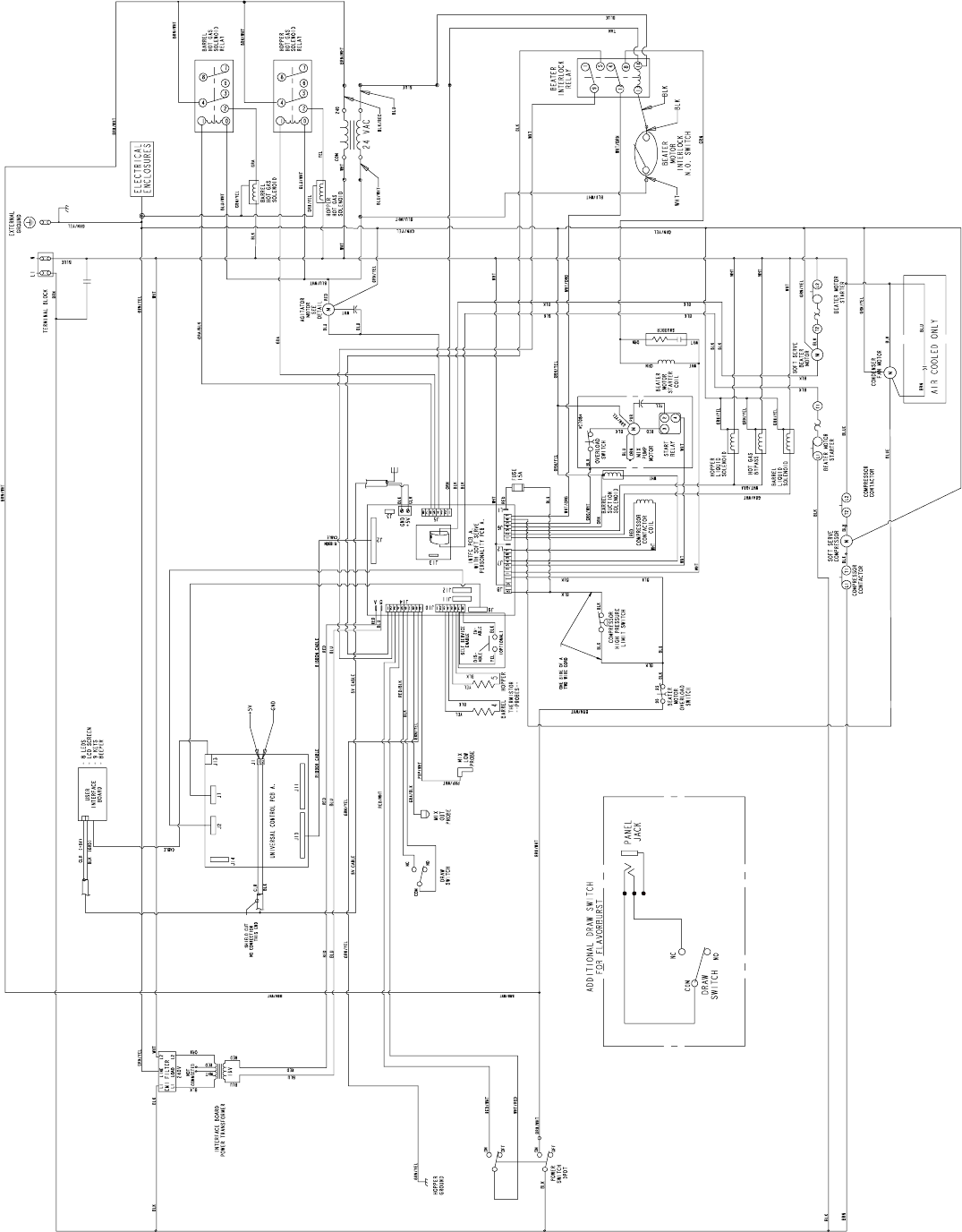
Model C708
057010-40
Rev. 1/05
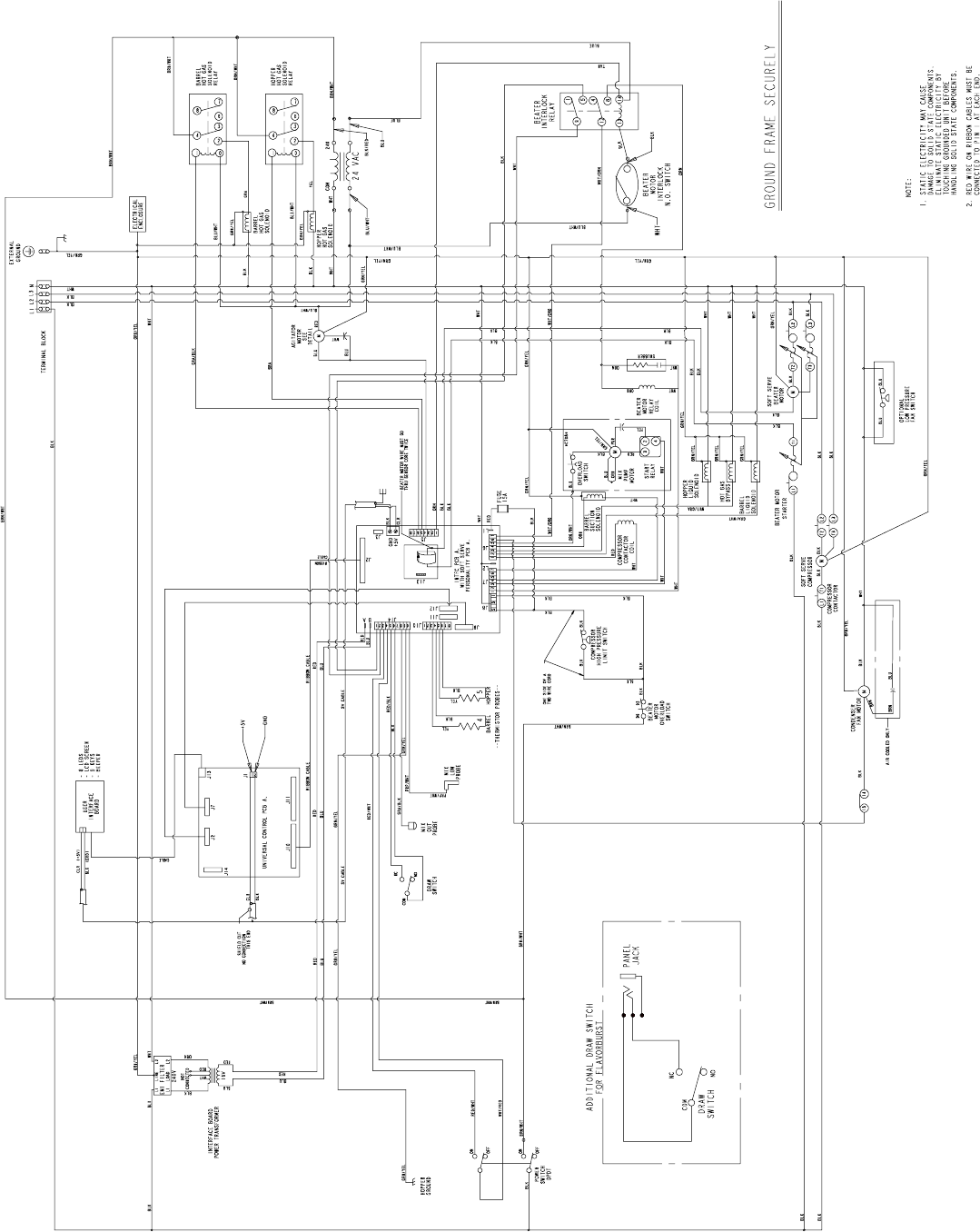
Model C708
057010-58
Rev. 1/05
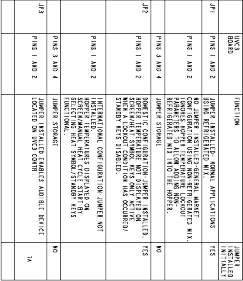
Model C716
059900-27
Rev. 6/05
Model C716
059900-33
Rev. 6/05
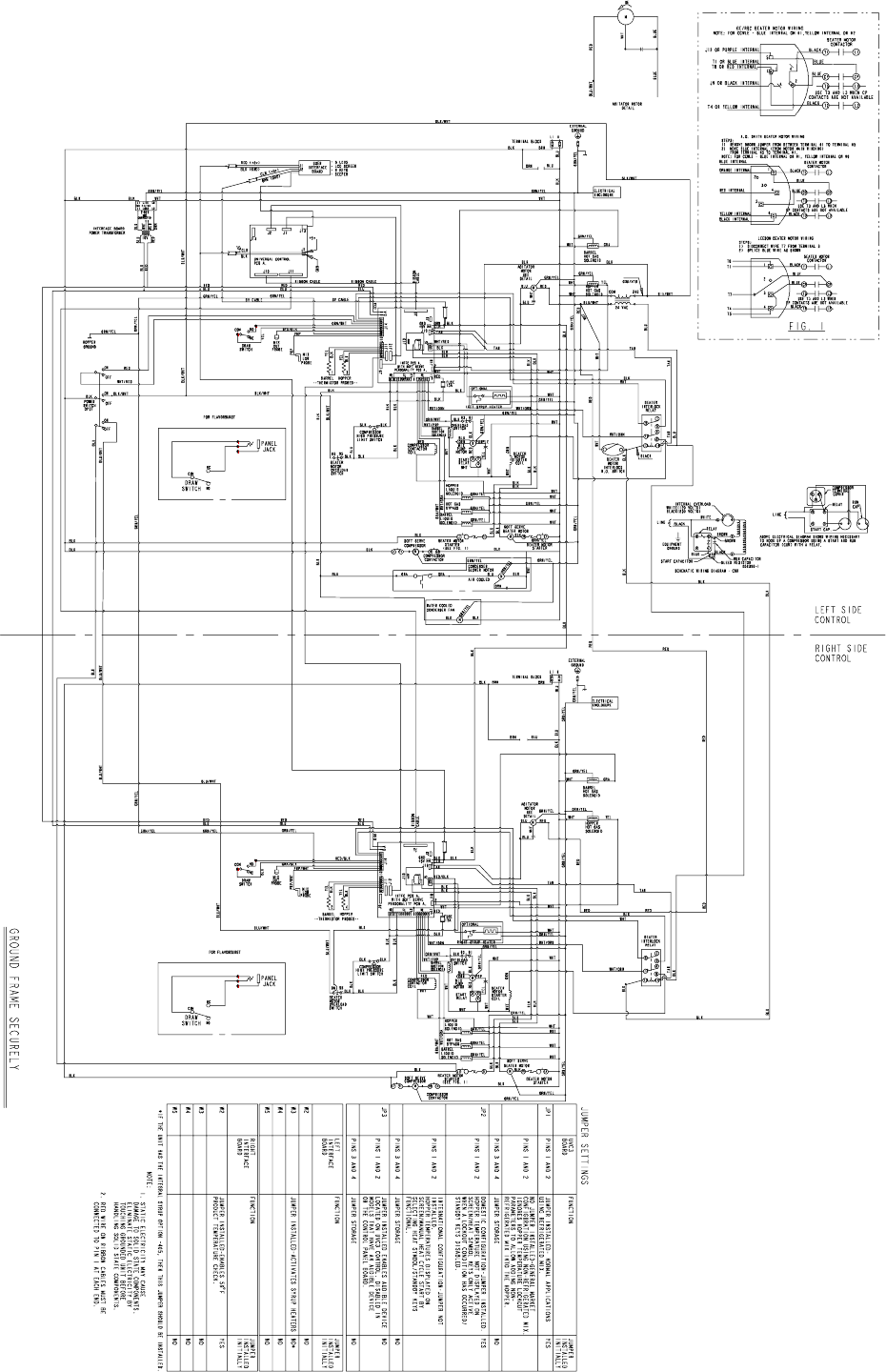
Model C716
059900-40
Rev. 6/05
Model C716
059900-58
Rev. 6/05
