Tech Life TL35BM-00 Speaker with Bluetooth User Manual

Tech-Life, Inc. Speaker with Bluetooth

user manual

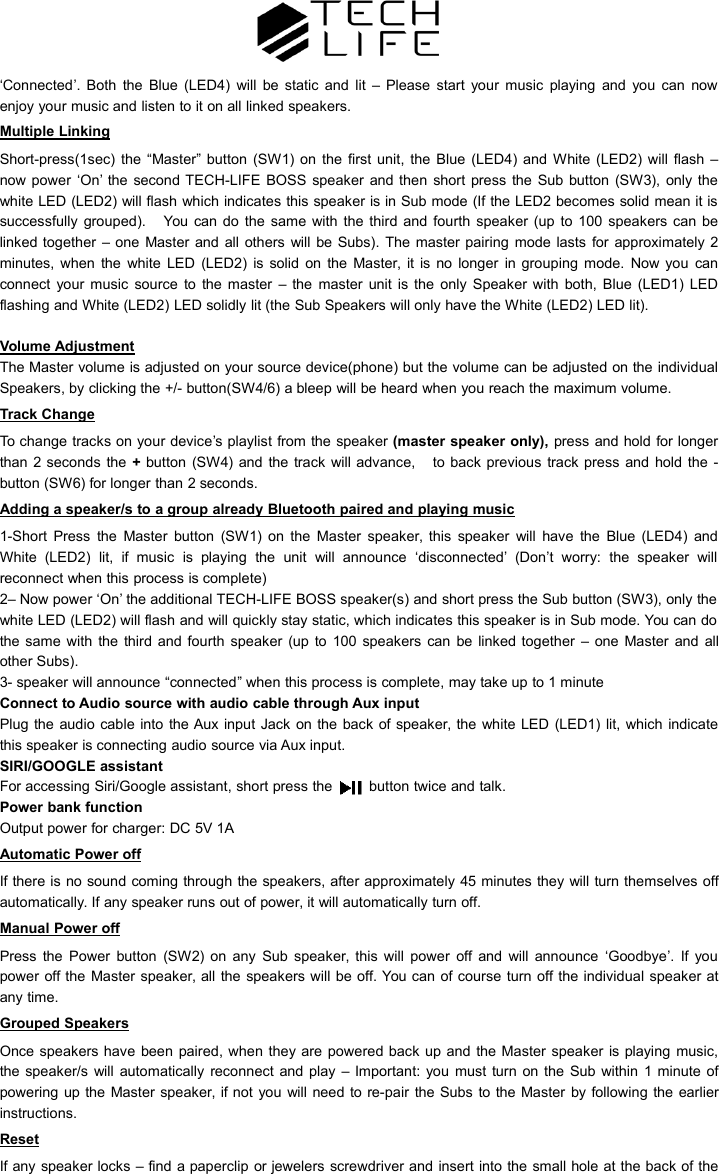
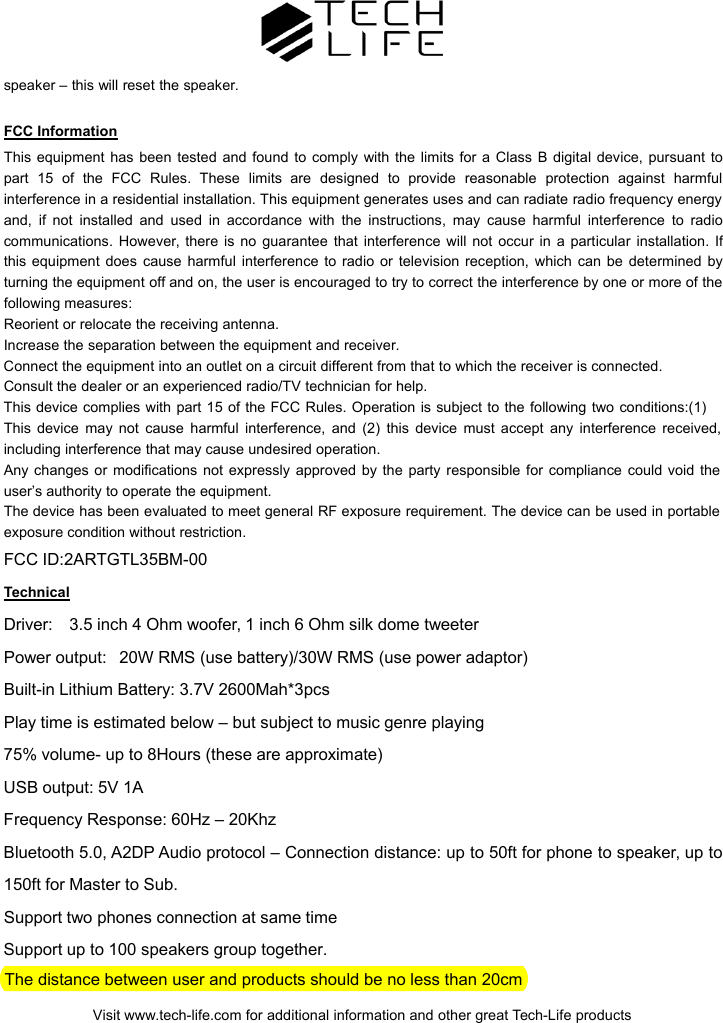
"TECH-LIFE BOSS" OPERATING INSTRUCTIONSYou can share your music wirelessly by linking several TECH-LIFE BOSS speakers to create a bigger sound stage environment or a simple multi-room speaker system. The operating range from Master to the phone or media device is approximately 30-50 ft, the Subordinate(sub) speakers can then be up to 150ft from the Master speaker. Each TECH-LIFE BOSS can be a Master or Sub. Additional speakers are available to purchase individually.What’s in your box:1 x Speaker with carrying strap1 x Power adapter (AC100V-240V/DC18V 2A)1 x Instructions1 x Aux cableGetting StartedWhen you unpack the speakers there should be some power in the battery, however we recommend youcharge them for at least 6 hours to ensure best battery life. When charging, the RED charging LED (LED3) willbe lit, this will be off when fully charged.Power ‘On’ the TECH-LIFE BOSS speaker by pressing and holding button (SW2) for 2 seconds – the BlueLED (LED4) will Flash and the unit will say ‘Hello’ and announce the battery charge level Full/Medium/Low.Bluetooth PairingOn the Master Speaker - press and hold the button (SW5) for 2 seconds, the Speaker will announce‘Bluetooth Pairing’ – now check your Bluetooth source (Phone /Tablet or other device) has Bluetooth enabled –you will see the Bluetooth name of "TECH-LIFE BOSS", when your device is connected the unit will announce
‘Connected’. Both the Blue (LED4) will be static and lit – Please start your music playing and you can nowenjoy your music and listen to it on all linked speakers.Multiple LinkingShort-press(1sec) the “Master” button (SW1) on the first unit, the Blue (LED4) and White (LED2) will flash –now power ‘On’ the second TECH-LIFE BOSS speaker and then short press the Sub button (SW3), only thewhite LED (LED2) will flash which indicates this speaker is in Sub mode (If the LED2 becomes solid mean it issuccessfully grouped). You can do the same with the third and fourth speaker (up to 100 speakers can belinked together – one Master and all others will be Subs). The master pairing mode lasts for approximately 2minutes, when the white LED (LED2) is solid on the Master, it is no longer in grouping mode. Now you canconnect your music source to the master – the master unit is the only Speaker with both, Blue (LED1) LEDflashing and White (LED2) LED solidly lit (the Sub Speakers will only have the White (LED2) LED lit).Volume AdjustmentThe Master volume is adjusted on your source device(phone) but the volume can be adjusted on the individualSpeakers, by clicking the +/- button(SW4/6) a bleep will be heard when you reach the maximum volume.Track ChangeTo change tracks on your device’s playlist from the speaker (master speaker only), press and hold for longerthan 2 seconds the +button (SW4) and the track will advance, to back previous track press and hold the -button (SW6) for longer than 2 seconds.Adding a speaker/s to a group already Bluetooth paired and playing music1-Short Press the Master button (SW1) on the Master speaker, this speaker will have the Blue (LED4) andWhite (LED2) lit, if music is playing the unit will announce ‘disconnected’ (Don’t worry: the speaker willreconnect when this process is complete)2– Now power ‘On’ the additional TECH-LIFE BOSS speaker(s) and short press the Sub button (SW3), only thewhite LED (LED2) will flash and will quickly stay static, which indicates this speaker is in Sub mode. You can dothe same with the third and fourth speaker (up to 100 speakers can be linked together – one Master and allother Subs).3- speaker will announce “connected” when this process is complete, may take up to 1 minuteConnect to Audio source with audio cable through Aux inputPlug the audio cable into the Aux input Jack on the back of speaker, the white LED (LED1) lit, which indicatethis speaker is connecting audio source via Aux input.SIRI/GOOGLE assistantFor accessing Siri/Google assistant, short press the button twice and talk.Power bank functionOutput power for charger: DC 5V 1AAutomatic Power offIf there is no sound coming through the speakers, after approximately 45 minutes they will turn themselves offautomatically. If any speaker runs out of power, it will automatically turn off.Manual Power offPress the Power button (SW2) on any Sub speaker, this will power off and will announce ‘Goodbye’. If youpower off the Master speaker, all the speakers will be off. You can of course turn off the individual speaker atany time.Grouped SpeakersOnce speakers have been paired, when they are powered back up and the Master speaker is playing music,the speaker/s will automatically reconnect and play – Important: you must turn on the Sub within 1 minute ofpowering up the Master speaker, if not you will need to re-pair the Subs to the Master by following the earlierinstructions.ResetIf any speaker locks – find a paperclip or jewelers screwdriver and insert into the small hole at the back of the
speaker – this will reset the speaker.FCC InformationThis equipment has been tested and found to comply with the limits for a Class B digital device, pursuant to part 15 of the FCC Rules. These limits are designed to provide reasonable protection against harmful interference in a residential installation. This equipment generates uses and can radiate radio frequency energy and, if not installed and used in accordance with the instructions, may cause harmful interference to radio communications. However, there is no guarantee that interference will not occur in a particular installation. If this equipment does cause harmful interference to radio or television reception, which can be determined by turning the equipment off and on, the user is encouraged to try to correct the interference by one or more of the following measures:Reorient or relocate the receiving antenna.Increase the separation between the equipment and receiver.Connect the equipment into an outlet on a circuit different from that to which the receiver is connected. Consult the dealer or an experienced radio/TV technician for help.This device complies with part 15 of the FCC Rules. Operation is subject to the following two conditions:(1) This device may not cause harmful interference, and (2) this device must accept any interference received, including interference that may cause undesired operation.Any changes or modifications not expressly approved by the party responsible for compliance could void the user’s authority to operate the equipment.The device has been evaluated to meet general RF exposure requirement. The device can be used in portable exposure condition without restriction.FCC ID:2ARTGTL35BM-00TechnicalDriver: 3.5 inch 4 Ohm woofer, 1 inch 6 Ohm silk dome tweeterPower output: 20W RMS (use battery)/30W RMS (use power adaptor)Built-in Lithium Battery: 3.7V 2600Mah*3pcsPlay time is estimated below – but subject to music genre playing75% volume- up to 8Hours (these are approximate)USB output: 5V 1AFrequency Response: 60Hz – 20KhzBluetooth 5.0, A2DP Audio protocol – Connection distance: up to 50ft for phone to speaker, up to150ft for Master to Sub.Support two phones connection at same timeSupport up to 100 speakers group together.The distance between user and products should be no less than 20cmVisit www.tech-life.com for additional information and other great Tech-Life products

Navigation menu