Teledyne Work Light T100H Users Manual API Addendum To T100 Operation
t100h to the manual 40b0b965-6cac-4598-8f3a-b97a248787fa
2015-02-03
: Teledyne Teledyne-Work-Light-T100H-Users-Manual-464588 teledyne-work-light-t100h-users-manual-464588 teledyne pdf
Open the PDF directly: View PDF  .
.
Page Count: 70
- 1. INTRODUCTION
- 2. SPECIFICATIONS, APPROVALS & WARRANTY
- 3. GETTING STARTED
- 4. FREQUENTLY ASKED QUESTIONS (FAQs)
- 5. OPTIONAL HARDWARE AND SOFTWARE
- 6. OPERATING INSTRUCTIONS
- 7. CALIBRATION AND CALIBRATION CHECK PROCEDURES
- 8. INSTRUMENT MAINTENANCE
- 9. THEORY OF OPERATION
- 10. TROUBLESHOOTING & REPAIR
- T100H_AppxB-assembled.pdf
- 05029D - APPX C_T100H-M100EH.pdf

MODEL T100H
UV FLUORESCENCE SO2 ANALYZER
Addendum to T100 Operation Manual, PN 06807
© TELEDYNE ADVANCED POLLUTION INSTRUMENTATION
9480 CARROLL PARK DRIVE
SAN DIEGO, CA 92121-5201
USA
Toll-free Phone:
800-324-5190
Phone:
858-657-9800
Fax:
858-657-9816
Email:
api-sales@teledyne.com
Website:
http://www.teledyne-api.com/
Copyright 2011 PN 07265A DCN6038
Teledyne Advanced Pollution Instrumentation 25 March 2011
iii
SAFETY MESSAGES
Important safety messages are provided throughout this manual for the purpose of avoiding
personal injury or instrument damage. Please read these messages carefully. Each safety
message is associated with a safety alert symbol, and are placed throughout this manual;
the safety symbols are also located inside the instrument. It is imperative that you pay
close attention to these messages, the descriptions of which are as follows:
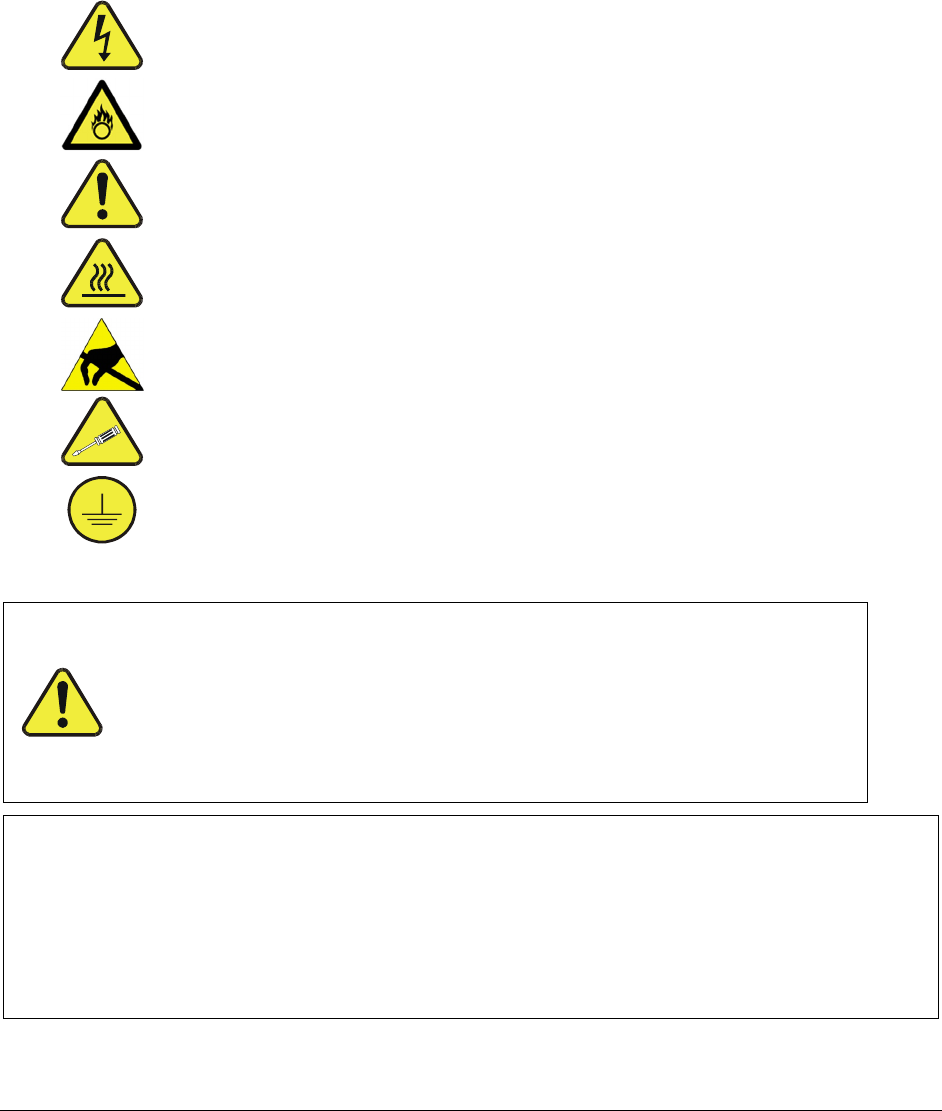
WARNING: Electrical Shock Hazard
HAZARD: Strong oxidizer
GENERAL WARNING/CAUTION: Read the accompanying
message for specific information.
CAUTION: Hot Surface Warning
Do Not Touch: Touching some parts of the instrument
without protection or proper tools could result in damage to the
part(s) and/or the instrument.
Technician Symbol: All operations marked with this symbol
are to be performed by qualified maintenance personnel only.
Electrical Ground: This symbol inside the instrument marks
the central safety grounding point for the instrument.
CAUTION
This instrument should only be used for the purpose and in the
manner described in this manual. If you use this instrument in
a manner other than that for which it was intended,
unpredictable behavior could ensue with possible hazardous
consequences.
NEVER use any gas analyzer to sample combustible gas(es)!
Note
For Technical Assistance regarding the use and maintenance of this instrument or any other
Teledyne API product, contact Teledyne API’s Customer Service Department:
Telephone: 800-324-5190
Email: api-customerservice@teledyne.com
or access any of the service options on our website at http://www.teledyne-api.com/
07265A DCN6038
Teledyne API - T100H Addendum to T100 Operation Manual
iv
CONSIGNES DE SÉCURITÉ
Des consignes de sécurité importantes sont fournies tout au long du présent manuel dans le but d’éviter
des blessures corporelles ou d’endommager les instruments. Veuillez lire attentivement ces consignes.
Chaque consigne de sécurité est représentée par un pictogramme d’alerte de sécurité; ces pictogrammes
se retrouvent dans ce manuel et à l’intérieur des instruments. Les symboles correspondent aux
consignes suivantes :
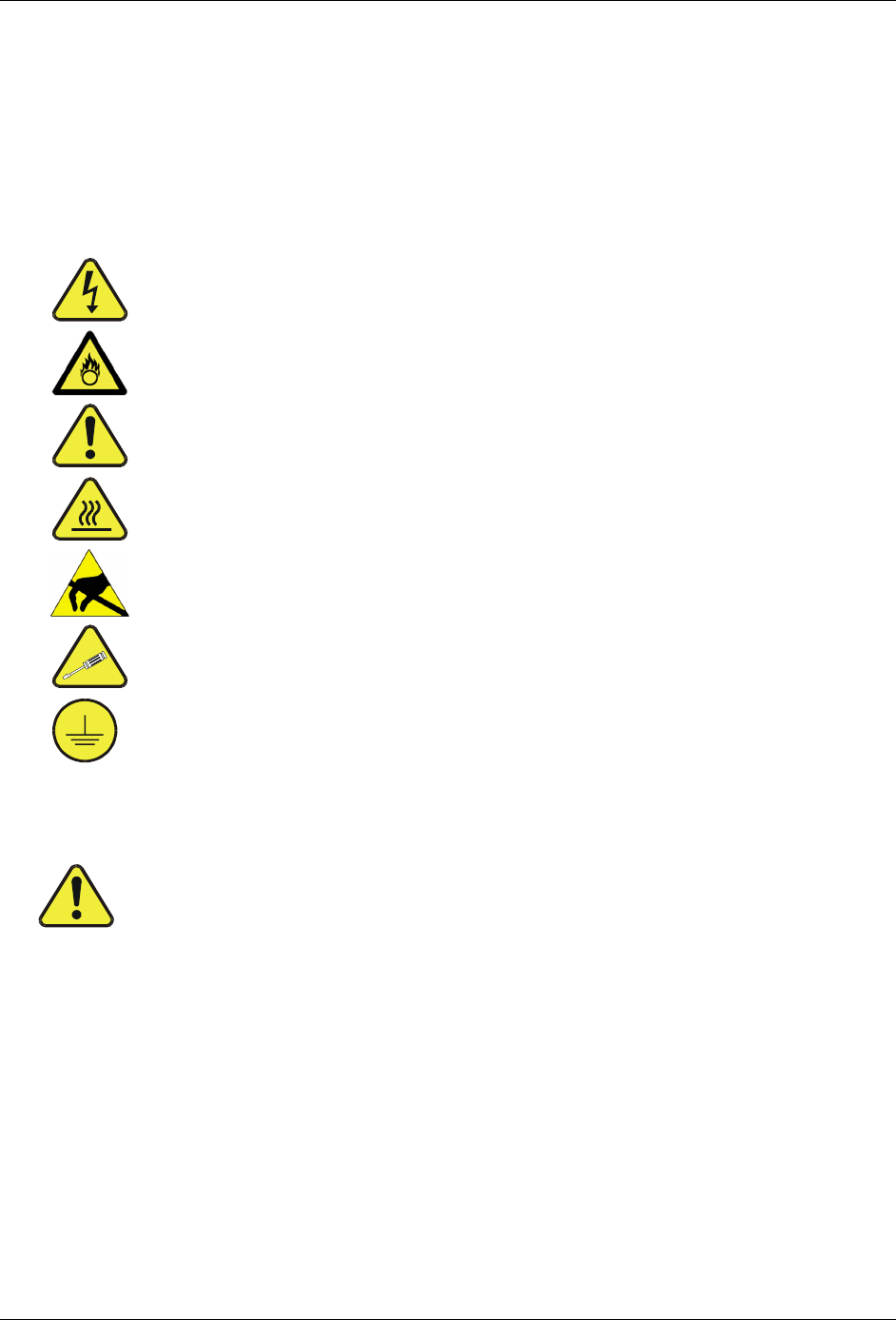
AVERTISSEMENT : Risque de choc électrique
DANGER : Oxydant puissant
AVERTISSEMENT GÉNÉRAL / MISE EN GARDE : Lire la consigne
complémentaire pour des renseignements spécifiques
MISE EN GARDE : Surface chaude
Ne pas toucher : Toucher à certaines parties de l’instrument sans protection ou
sans les outils appropriés pourrait entraîner des dommages aux pièces ou à
l’instrument.
Pictogramme « technicien » : Toutes les opérations portant ce symbole doivent
être effectuées uniquement par du personnel de maintenance qualifié.
Mise à la terre : Ce symbole à l’intérieur de l’instrument détermine le point central
de la mise à la terre sécuritaire de l’instrument.
MISE EN GARDE
Cet instrument doit être utilisé aux fins décrites et de la manière décrite dans
ce manuel. Si vous utilisez cet instrument d’une autre manière que celle pour
laquelle il a été prévu, l’instrument pourrait se comporter de façon imprévisible
et entraîner des conséquences dangereuses.
NE JAMAIS utiliser un analyseur de gaz pour échantillonner des gaz
combustibles!
07265A DCN6038

v
WARRANTY
WARRANTY POLICY (02024D)
Prior to shipment, T-API equipment is thoroughly inspected and tested. Should equipment failure occur,
T-API assures its customers that prompt service and support will be available.
COVERAGE
After the warranty period and throughout the equipment lifetime, T-API stands ready to provide on-site or
in-plant service at reasonable rates similar to those of other manufacturers in the industry. All
maintenance and the first level of field troubleshooting are to be performed by the customer.
NON-API MANUFACTURED EQUIPMENT
Equipment provided but not manufactured by T-API is warranted and will be repaired to the extent and
according to the current terms and conditions of the respective equipment manufacturer’s warranty.
GENERAL
During the warranty period, T-API warrants each Product manufactured by T-API to be free from defects
in material and workmanship under normal use and service. Expendable parts are excluded.
If a Product fails to conform to its specifications within the warranty period, API shall correct such defect
by, in API's discretion, repairing or replacing such defective Product or refunding the purchase price of
such Product.
The warranties set forth in this section shall be of no force or effect with respect to any Product: (i) that
has been altered or subjected to misuse, negligence or accident, or (ii) that has been used in any manner
other than in accordance with the instruction provided by T-API, or (iii) not properly maintained.
THE WARRANTIES SET FORTH IN THIS SECTION AND THE REMEDIES THEREFORE ARE
EXCLUSIVE AND IN LIEU OF ANY IMPLIED WARRANTIES OF MERCHANTABILITY, FITNESS FOR
PARTICULAR PURPOSE OR OTHER WARRANTY OF QUALITY, WHETHER EXPRESSED OR
IMPLIED. THE REMEDIES SET FORTH IN THIS SECTION ARE THE EXCLUSIVE REMEDIES FOR
BREACH OF ANY WARRANTY CONTAINED HEREIN. API SHALL NOT BE LIABLE FOR ANY
INCIDENTAL OR CONSEQUENTIAL DAMAGES ARISING OUT OF OR RELATED TO THIS
AGREEMENT OF T-API'S PERFORMANCE HEREUNDER, WHETHER FOR BREACH OF WARRANTY
OR OTHERWISE.
TERMS AND CONDITIONS
All units or components returned to Teledyne API should be properly packed for handling and returned
freight prepaid to the nearest designated Service Center. After the repair, the equipment will be returned,
freight prepaid.
CAUTION – Avoid Warranty Invalidation
Failure to comply with proper anti-Electro-Static Discharge (ESD) handling and packing
instructions and Return Merchandise Authorization (RMA) procedures when returning
parts for repair or calibration may void your warranty. For anti-ESD handling and packing
instructions please refer to “Packing Components for Return to Teledyne API’s Customer
Service” in the Primer on Electro-Static Discharge section of this manual, and for RMA
procedures please refer to our Website at http://www.teledyne-api.com under Customer
Support > Return Authorization.
07265A DCN6038

Teledyne API - T100H Addendum to T100 Operation Manual
vi
This page intentionally left blank.
07265A DCN6038
vii
ABOUT THIS ADDENDUM
This T100H addendum, PN 07265, is to be used in conjunction with the T100 manual, PN 06807; it is
comprised of multiple documents, in PDF format, as listed below.
Part
No.
Rev Name/Description
07265 A T100H Addendum to T100 Manual
05244 B
Appendix A Menu Trees (Refer to Appendix A of the T100 manual for
related software documentation).
06928 2011Mar24 Spare parts List (in Appendix B, this Addendum)
04527 2011Mar24 Recommended Spares Stocking Levels (in Appendix B, this Addendum)
04357 A Expendables (in Appendix B, this Addendum)
05029 D Appendix C Repair Questionnaire
Note: for schematics, please see Appendix D of the T100 manual, PN 06807)
NOTE
Please read in its entirety before making any attempt made to operate the instrument.
REVISION HISTORY
2011 March 25, T100H Addendum, PN07265 Rev A, DCN6038 Initial Release
Document PN Rev
DCN Change Summary
00000 •
•
•
2010, T100H Manual, PN0 Rev A, DCN
Document PN Rev DCN
Change Summary
Xxxx Manual 0xxxx X xxxx Initial Release
For the purpose of capturing this manual’s construct at its initial release, the following list
documents the current Rev of each part comprising Rev A of this manual. Any future changes
to this manual will be recorded in this Revision History section, most recent changes at the
top. Their new Rev letters will be updated in the preceding About This Manual section:
07265A DCN6038

viii
This page intentionally left blank.
07265A DCN6038

ix
TABLE OF CONTENTS
1. INTRODUCTION...............................................................................................................................11
1.1. T100H Documentation ............................................................................................................11
1.2. Using This Manual Addendum .......................................................................................................11
2. SPECIFICATIONS, APPROVALS & WARRANTY ......................................................................................13
2.1. Specifications...........................................................................................................................13
2.2. CE Mark Compliance.................................................................................................................. 14
3. GETTING STARTED..........................................................................................................................15
3.1. Unpacking and Initial Setup ..........................................................................................................15
3.1.1. Electrical Connections:..........................................................................................................16
3.1.1.1. External Pump.............................................................................................................. 16
3.2. Pneumatic Connections...............................................................................................................17
3.2.1.1. Pneumatic Connections to T100H Basic Configuration:.............................................................. 17
3.2.1.2. Connections with Internal Valve Options Installed ....................................................................18
3.2.2. T100H Layout ....................................................................................................................19
3.3. Initial Operation ........................................................................................................................21
3.3.1. Warning Messages ..............................................................................................................21
3.3.2. Test Functions.................................................................................................................... 21
3.3.3. Interferents for SO2 Measurements ........................................................................................... 22
4. FREQUENTLY ASKED QUESTIONS (FAQS) ...........................................................................................23
5. OPTIONAL HARDWARE AND SOFTWARE.............................................................................................25
5.1. Ambient Zero/Ambient Span Valves (Option 50A) ................................................................................25
5.2. Ambient Zero / Two Ambient Span Valve Option (OPT 50C) ................................................................... 26
5.3. Hydrocarbon Kicker Option (OPT 86D).............................................................................................27
6. OPERATING INSTRUCTIONS..............................................................................................................29
6.1. Warning Messages .................................................................................................................... 29
6.2. Test Functions .........................................................................................................................29
6.2.1. Test Channel Output ............................................................................................................29
6.2.2. Range Units ......................................................................................................................30
6.2.3. Using the T100H with a Hessen Protocol Network.......................................................................... 30
6.2.4. Default DAS Channels ..........................................................................................................31
6.2.5. Remote Operation Using the External Digital I/O ........................................................................... 31
6.2.5.1. Status Outputs .............................................................................................................31
6.2.5.2. Control Inputs............................................................................................................... 32
7. CALIBRATION AND CALIBRATION CHECK PROCEDURES ......................................................................33
7.1. Manual Calibration with Zero and Two Span Valve (OPT 52)................................................................... 33
7.2. Manual Calibration Check with Ambient Zero and Two Ambient Span Valve Option (OPT 50C) Installed ............... 35
8. INSTRUMENT MAINTENANCE ............................................................................................................37
8.1. Maintenance Schedule................................................................................................................ 37
8.2. Predictive Diagnostics................................................................................................................. 37
9. THEORY OF OPERATION ..................................................................................................................39
9.1. The UV Light Path .....................................................................................................................39
9.1.1. The Reference Detector ........................................................................................................ 40
9.1.2. Direct Measurement Interferents ..............................................................................................40
9.2. Pneumatic Operation.................................................................................................................. 40
9.2.1. Sample Gas Flow ................................................................................................................40
9.2.2. Pneumatic Sensors..............................................................................................................41
9.2.2.1. Sample Pressure Sensor .................................................................................................41
9.2.2.2. Vacuum Pressure Sensor ................................................................................................41
9.2.2.3. Sample Flow Calculation .................................................................................................42
9.3. Electronic Operation................................................................................................................... 43
10. TROUBLESHOOTING & REPAIR ........................................................................................................45
10.1.1. Fault Diagnosis with Warning Messages ................................................................................... 45
10.1.2. Fault Diagnosis with Test Functions ......................................................................................... 45
10.2. Subsystem Checkout ................................................................................................................45
10.2.1. Pneumatic Sensor Assembly .................................................................................................45
10.3. Repair Procedures ...................................................................................................................46
10.3.1. Repairing the Sample Gas Flow Control Assembly ....................................................................... 46
07265A DCN6038

TABLE OF CONTENTS Teledyne API - T100H Addendum to T100 Operation Manual
x
10.3.2. Sensor Module Repair & Cleaning...........................................................................................47
10.3.2.1. Adjusting the UV Lamp (Peaking the Lamp) ......................................................................... 48
10.3.2.2. PMT Hardware Calibration (FACTORY CAL)........................................................................ 50
10.4. Technical Assistance ................................................................................................................52
LIST OF FIGURES
Figure 3-1: Example of Pneumatic Connections to T100H External Pump .......................................... 17
Figure 3-2: Pneumatic Connections to T100H with Zero and Two Span Point Valve Option ..................... 18
Figure 3-3: Internal Pneumatic flow for T100H in Basic Configuration............................................... 19
Figure 3-4: T100H Layout (Basic Unit – No Valve Options)............................................................ 20
Figure 5-1: Pneumatic Diagram of the T100H With Z/S Option Installed............................................. 25
Figure 5-2: Pneumatic Diagram of the T100H with Option 50C Installed ............................................ 26
Figure 5-3: Hydrocarbon Scrubber (Kicker) – OPT 86D ................................................................ 27
Figure 5-4: T100H Internal Pneumatic Diagram with Hydrocarbon Scrubber Installed ............................ 28
Figure 6-1: Control Input Connector ....................................................................................... 32
Figure 9-1: UV Light Path ................................................................................................... 39
Figure 9-2: Pneumatic Diagram of the T100H – Base Configuration ................................................. 41
Figure 9-3: T100H Electronic Block Diagram ............................................................................ 43
Figure 9-4: T100H Power Distribution Block Diagram .................................................................. 44
Figure 10-1: Flow Control Assembly ........................................................................................ 46
Figure 10-2: Sensor Module Wiring and Pneumatic Fittings............................................................. 47
Figure 10-3: Shutter Assembly - Exploded View .......................................................................... 48
Figure 10-4: Location of UV Reference Detector Potentiometer ........................................................ 49
Figure 10-5: Pre-Amplifier Board Layout ................................................................................... 50
LIST OF TABLES
Table 2-1: Model T100H Basic Unit Specifications...................................................................... 13
Table 3-1: Inlet / Outlet Connector Descriptions ......................................................................... 17
Table 2-1: Possible Warning Messages at Start-Up .................................................................... 21
Table 5-1: Two-Point Span Valve Operating States..................................................................... 27
Table 6-1: Additional T100H Warning Messages........................................................................ 29
Table 6-2: Additional T100H Test Functions ............................................................................. 29
Table 6-3: Additional T100H Test Parameters Available for Analog Output A3..................................... 29
Table 6-4: T100H Default Hessen Status Bit Assignments ............................................................ 30
Table 6-5: Status Output Signals .......................................................................................... 31
Table 6-6: Control Input Signals ........................................................................................... 32
Table 8-1: Predictive Uses for Test Functions ........................................................................... 37
Table 10-1: Warning Messages - Indicated Failures ..................................................................... 45
Table 10-2: Test Functions - Possible Causes for Out-Of-Range Values ............................................. 45
Table 10-3: Example of HVPS Power Supply Outputs ................................................................... 49
LIST OF APPENDICES
APPENDIX A – MENU TREES AND SOFTWARE DOCUMENTATION
APPENDIX B - PARE PARTS LIST
APPENDIX C - REPAIR QUESTIONNAIRE
07265A DCN6038
11
1. INTRODUCTION
This addendum is based on the Model T100 Operators Manual (P/N 06807). In most ways the T100H analyzer
is identical to the T100 in design and operation, therefore most of the basic set up information,
operating instructions as well as calibration, maintenance, troubleshooting and repair methods are
found in that manual. This addendum documents only those areas where the T100H is different
in design or operating method from the T100.
1.1. T100H Documentation
NOTE
Throughout this addendum, words printed in capital, bold letters, such as SETUP or ENTR represent
messages as they appear on the analyzer’s front panel display
NOTE
The menu flowcharts in this addendum contain typical representations of the analyzer’s display during
the various operations being described. These representations are not intended to be exact and may
differ slightly from the actual display of your instrument.
1.2. Using This Manual Addendum
This manual addendum has the same overall structure as that of the T100 operator’s manual, to simplify
referring between the two. The manual has the following sections:
Table of Contents:
Outlines the contents of the addendum in the order the information is presented. This is a good overview of the
topics covered in the manual. There is also a list of tables, a list of figures and a list of appendices.
Specifications and Warranty
This section contains a list of the analyzer’s performance specifications, a description of the conditions and
configuration under which EPA equivalency was approved and Teledyne Instrument’s warranty statement.
Getting Started:
A concise set of instructions for setting up, installing and running your analyzer for the first time.
FAQ:
Answers to the most frequently asked questions about operating the analyzer.
Optional Hardware & Software
A description of optional equipment to add functionality to your analyzer.
07265A DCN6038

Introduction Teledyne API - T100H Addendum to T100 Operation Manual)
12
Operation Instructions
This section includes step by step instructions for operating the analyzer and using its various features and
functions.
Calibration Procedures
General information and step by step instructions for calibrating your analyzer.
Instrument Maintenance
Description of preventative maintenance procedures that should be regularly performed on you instrument to
assure good operating condition.
Theory of Operation
This section describes the aspects of T100H operation that differ from the T100 manual.
Maintenance & Troubleshooting Section:
This section includes pointers and instructions for diagnosing problems that are specific to the T100H. The T100
manual has a more complete troubleshooting section, most of which also applies to the T100H.
Appendices:
For easier access and better updating, some information has been separated out of the manual and placed in a
series of appendices at the end of this addendum. These include: software menu trees, warning messages,
definitions of DAS & serial I/O variables (Appendix A), spare parts and other lists (Appendix B), repair
questionnaire (Appendix C).
07265A DCN6038

13
2. SPECIFICATIONS, APPROVALS & WARRANTY
2.1. Specifications
Table 2-1: Model T100H Basic Unit Specifications
Min/Max Range
(Physical Analog Output)
Min: 0-10 ppm Full scale
Max: 0-5,000 ppm Full scale (selectable, dual ranges and auto ranging supported)
Measurement Units ppm, mg/m3 (user selectable)
Zero Noise 1 0.1 ppm (RMS)
Span Noise 1 < 1% of reading (RMS) above 10 ppm
Lower Detectable Limit 2 0.2 ppm
Zero Drift (24 hours) < 1 ppm
Span Drift (24 hours) < 0.5% fo full scale
Linearity 1% of full scale
Precision 0.5% of reading above 10 ppm
Voltage Coefficient < 0.05% per V
Lag Time1 5 seconds
Rise/Fall Time1 < 30 sec to 95%
Sample Flow Rate 700 cm3/min ±10%
AC Power Rating 100V-120V, 220V-240V, 50/60 Hz
Recorder Offset ±10%
Analog Output Ranges mV, 1 V, 5 V, 10V, 5V, 1V, 0.1V (selectable)
Analog Output Resolution 1 part in 4096 of selected full-scale voltage
Included I/O 1 Ethernet: 10/100Base-T
2 RS232 (300-115,200 baud)
2 USB device ports
8 opto-isolated digital status outputs
6 opto-isolated digital control inputs
4 analog outputs
Optional I/O 1 USB com port
1 RS485
8 analog inputs (0-10V, 12-bit)
4 digital alarm outputs
Multidrop RS232
3 4-20mA current outputs
Temperature Range 5-40oC
Temperature Coefficient < 0.1% per oC
Humidity Range 0 - 95% RH, non-condensing
Environmental Installation category (over-voltage category) II; Pollution degree 2
Dimensions H x W x D 7" x 17" x 23.5" (178 mm x 432 mm x 597 mm)
Weight Analyzer: 31 lbs (16 kg); External pump: 15 lbs (7kg)
Certifications EN61326 (1997 w/A1: 98) Class A, FCC Part 15 Subpart B Section 15.107 Class
A, ICES-003 Class A (ANSI C63.4 1992) & AS/NZS 3548 (w/A1 & A2; 97) Class A.
IEC 61010-1:90 + A1:92 + A2:95,
1 As defined by the USEPA.
2 Defined as twice the zero noise level by the USEPA.
07265A DCN6038

Specifications, Approvals & Warranty Teledyne API - T100H Addendum to T100 Operation Manual)
14
2.2. CE Mark Compliance
Emissions Compliance
The Teledyne Advanced Pollution Instrumentation UV Fluorescence SO2 Analyzer was tested and found to be
fully compliant with:
EN61326 (1997 w/A1: 98) Class A, FCC Part 15 Subpart B Section 15.107 Class A, ICES-003 Class A (ANSI
C63.4 1992) & AS/NZS 3548 (w/A1 & A2; 97) Class A.
Safety Compliance
The Teledyne-Advanced Pollution Instrumentation UV Fluorescence SO2 Analyzer was tested and found to be
fully compliant with:
IEC 61010-1:90 + A1:92 + A2:95,
07265A DCN6038
15
3. GETTING STARTED
3.1. Unpacking and Initial Setup
CAUTION
To avoid personal injury, always use two persons to lift and carry the Model T100H.
1. Inspect the received packages for external shipping damage. If damaged, please advise the shipper first,
then TAPI.
2. Included with your analyzer is a printed record (Form number 04989) of the final performance
characterization performed on your instrument at the factory. This record is an important quality assurance
and calibration record for this instrument. It should be placed in the quality records file for this instrument.
3. Carefully remove the top cover of the analyzer and check for internal shipping damage.
Remove the set screw located in the top, center of the rear panel
Remove the screws fastening the top cover to the unit (four per side).
Lift the cover straight up.
4. Inspect the interior of the instrument to make sure all circuit boards and other components are in good
shape and properly seated.
5. Check the connectors of the various internal wiring harnesses and pneumatic hoses to make sure they are
firmly and properly seated.
6. Verify that all of the optional hardware ordered with the unit has been installed. These are checked on the
paperwork (Form 04989) accompanying the analyzer.
WARNING
Ensure that the power source voltage and frequency match those of the instrument
specs on the rear panel model label. Never disconnect electronic circuit boards, wiring
harnesses or electronic subassemblies while the unit is under power.
CAUTION – Avoid Warranty Invalidation
Printed circuit assemblies (PCAs) are sensitive to electro-static discharges too small to
be felt by the human nervous system. Damage resulting from failure to use ESD
protection when working with electronic assemblies will void the instrument warranty.
See A Primer on Electro-Static Discharge in the main manual for more information on
preventing ESD damage.
07265A DCN6038
Getting Started Teledyne API - T100H Addendum to T100 Operation Manual)
16
3.1.1. Electrical Connections:
For full details on the electrical connections of the T100H, please refer to the T100 user’s manual (#06807),
Electrical Connections section.
3.1.1.1. External Pump
The T100H is equipped with an external pneumatic pump. This pump is powered separately from the instrument
via it’s own power cord. The pump has no ON/OFF switch and should begin operating as soon as it is plugged
into a live power supply.
WARNING
Check the voltage / frequency label on the rear panel of the instrument and on
the external pump for compatibility with the local power. Do not plug in either
the analyzer or the pump unless the voltages or frequencies are correct.
Power connection must have a functioning ground connection. Do not defeat
the ground wire on power plug.
Turn off analyzer power before disconnecting or
connecting eletrical subassemblies.
Do not operate with cover off.
07265A DCN6038
Teledyne API - T100H Addendum to T100 Operation Manual Getting Started
17
3.2. Pneumatic Connections
NOTE
To prevent dust from getting into the analyzer, it was shipped with small plugs inserted into each of the
pneumatic fittings on the rear panel. Make sure that all dust plugs are removed before attaching exhaust
and supply gas lines. Store for future use.
Table 3-1: Inlet / Outlet Connector Descriptions
REAR PANEL
LABEL FUNCTION
Sample Connects the sample gas to the analyzer. When operating the analyzer without zero
span option, this is also the inlet for any calibration gases.
Exhaust Connect an exhaust gas line to this port to the inlet of the external pump.
Zero Air On Units with zero/span valve option installed, this port connects the zero air gas or the
zero air cartridge to the analyzer.
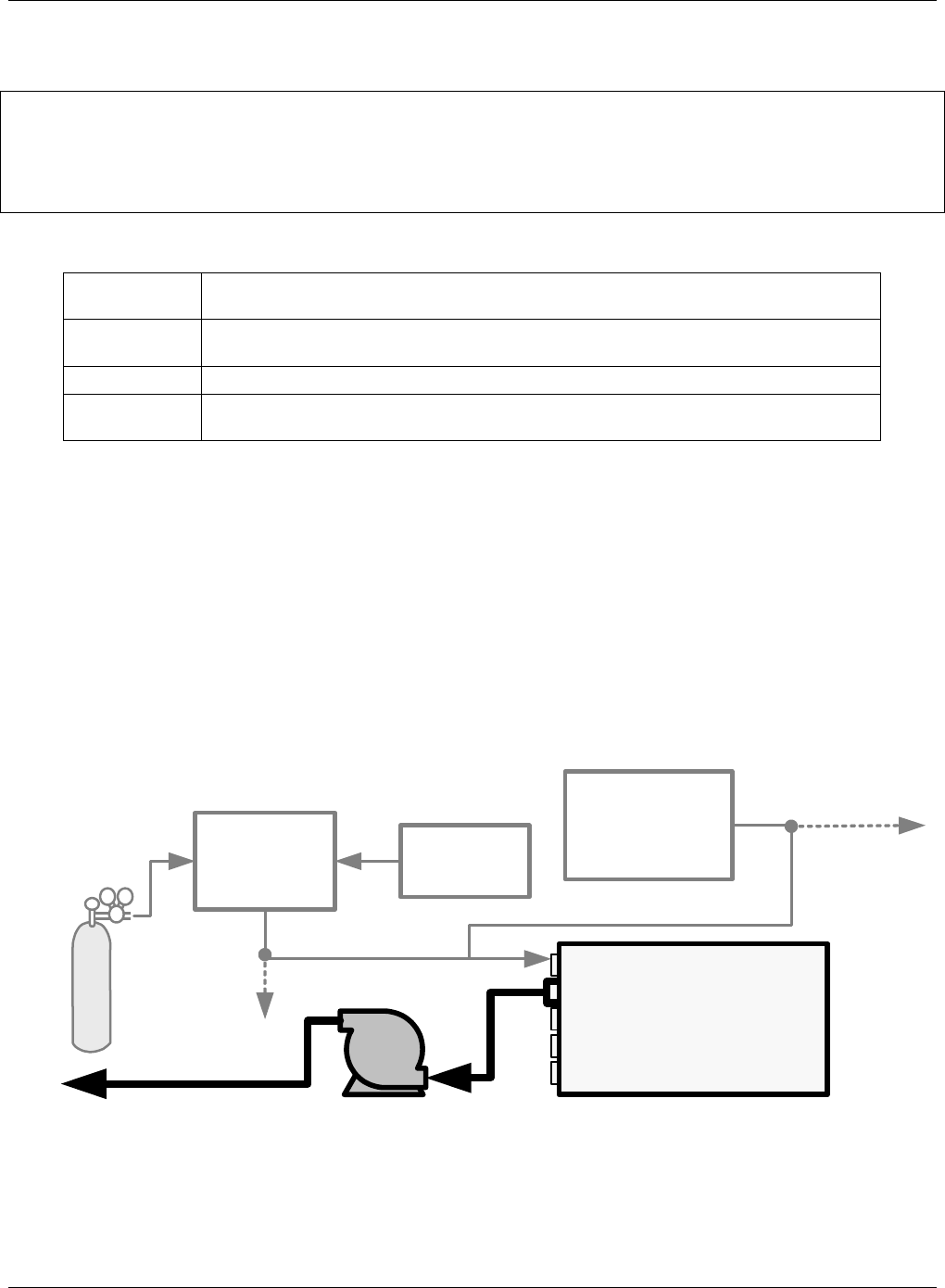
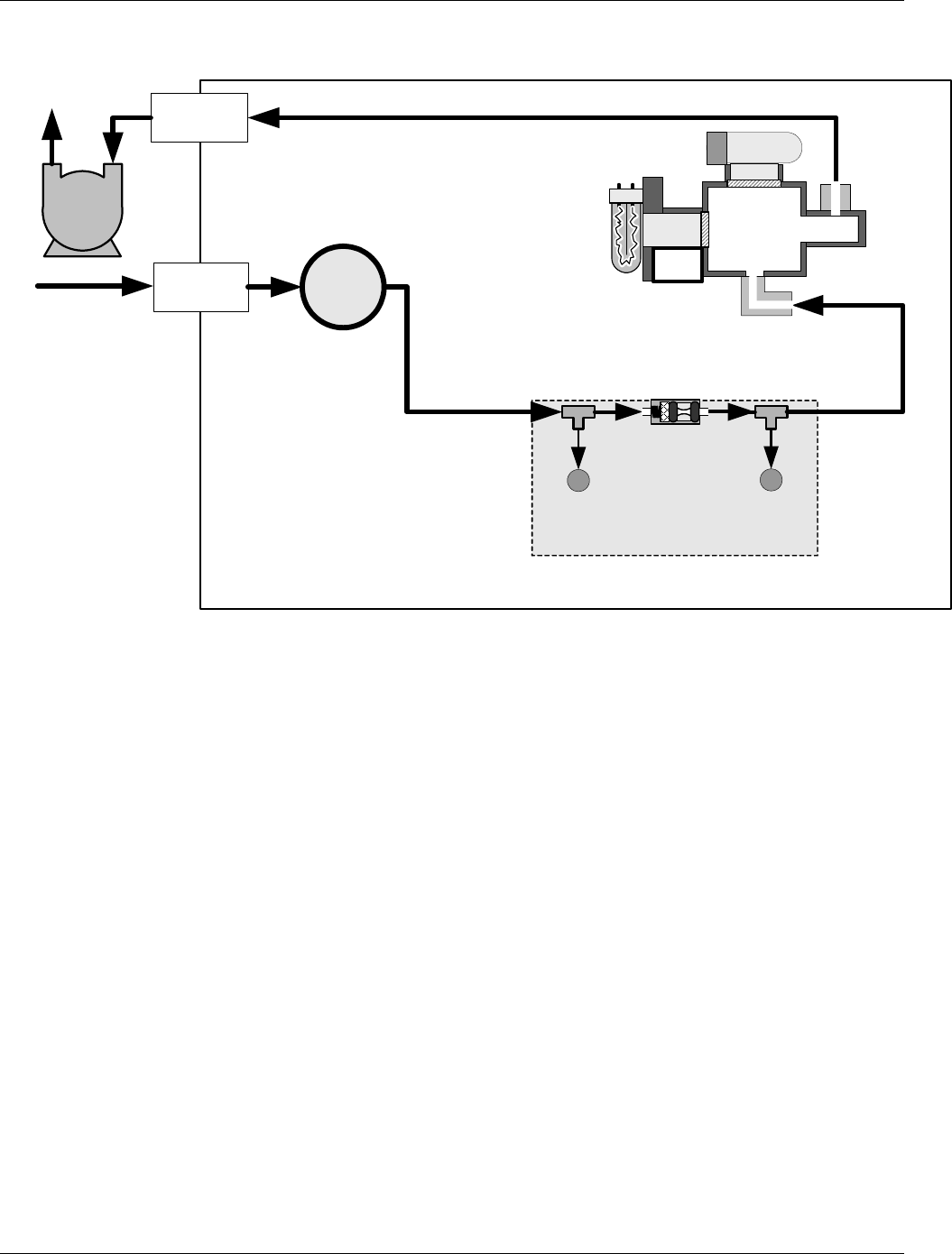
Figure 3-5 of the T100 Manual (P/N 06807) shows the internal pneumatic flow of the T100 in its standard
configuration. For a diagram of the internal pneumatic flow of the T100H, see Figure 3-2 of this addendum.
3.2.1.1. Pneumatic Connections to T100H Basic Configuration:
The pneumatic connections for the T100H analyzer in its basic configuration are nearly identical to those
described the T100 Manual (P/N 06807) Section 3.5 except that the T100H has an external pump. Therefore:
A pneumatic line of ¼” PTEF must be attached between the analyzer’s exhaust port and the inlet port of
the pump.
The exhaust from must be vented outside the shelter or immediate area surrounding the instrument
using a maximum of 10 meters of 1/4” PTFE tubing.
Source of
SAMPLE Gas
Removed
during
Calibration
MODEL 701
Zero Air
Generator
MODEL T700
Gas Dilution
Calibrator
PUMP
vented outside immediate area
(VENT if not
venting at
calibrator)
VENT here
if sample gas is
supplied under
pressure
Chassis
Sample
EXHAUST
Span
Zero Air
Calibrated SO2
at HIGH
Concentration
Figure 3-1: Example of Pneumatic Connections to T100H External Pump
This change is true for all configurations and variations of the T100H.
07265A DCN6038
Getting Started Teledyne API - T100H Addendum to T100 Operation Manual)
18
3.2.1.2. Connections with Internal Valve Options Installed
There is no IZS option available for the T100H .
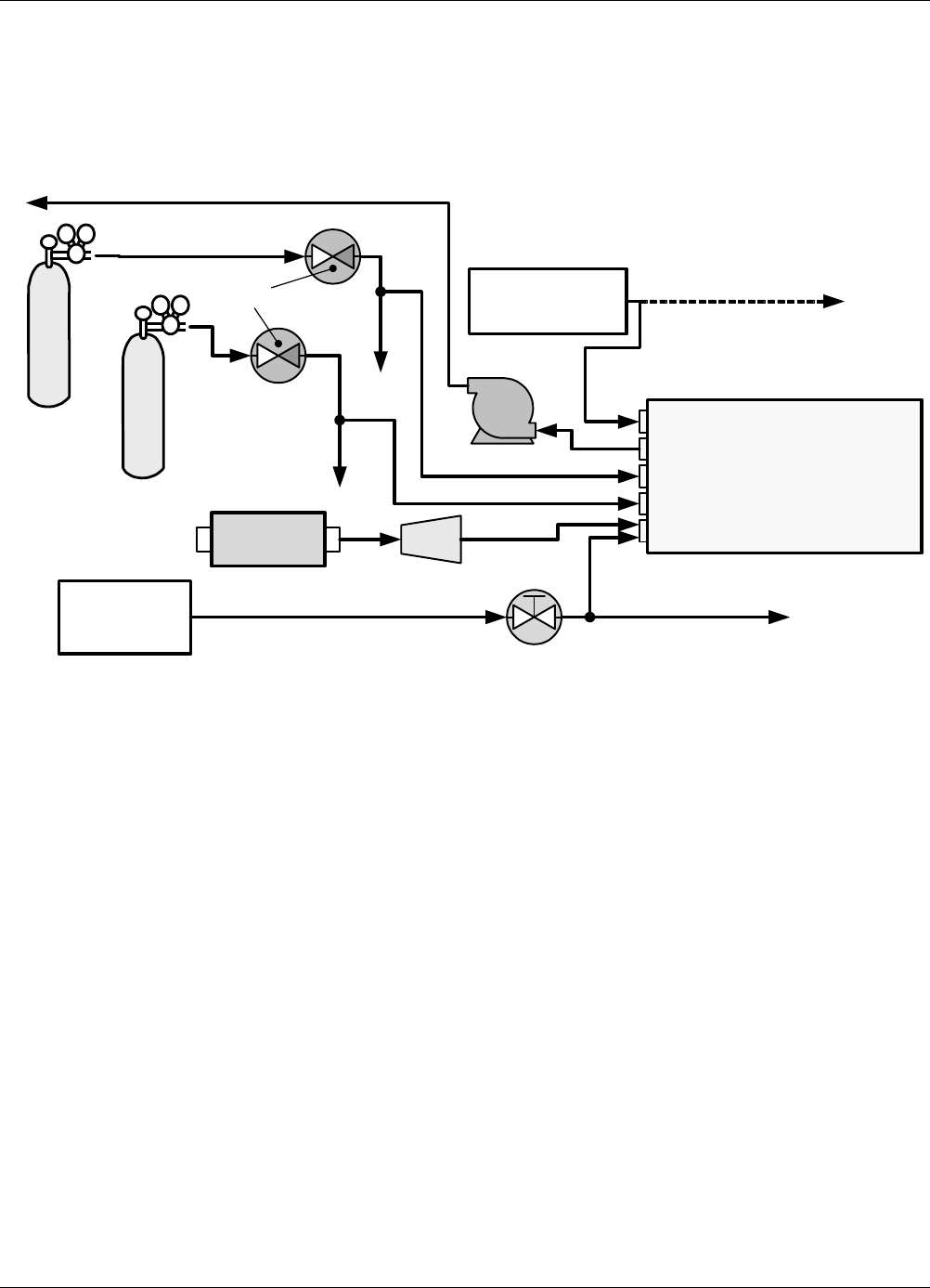
An additional valve option (Option 50C - Zero & Two Span Points) is available on the T100H. The
pneumatic set up for this option is:
VENT here if input
is pressurized
Source of
SAMPLE Gas
MODEL 701
Zero Air
Generator
PUMP
VENT
Chassis
Sample
Exhaust
High Span Point
Low Span Point
Zero Air
Calibrated SO2
at HIGH Span
Concentration
Calibrated SO2
at LOW Span
Concentration
Filter
External Zero
Air Scrubber
VENT
VENT
Control
Valve
On/Off
Valves
Figure 3-2: Pneumatic Connections to T100H with Zero and Two Span Point Valve Option
07265A DCN6038
Teledyne API - T100H Addendum to T100 Operation Manual Getting Started
19
3.2.2. T100H Layout
FLOW CONTROL &
PRESSURE SENSOR
VACUUM
PRESSURE
SENSOR
SAMPLE
PRESSURE
SENSOR
CRITICAL
FLOW ORIFICE
700 cm3/min
@ 7 In-Hg-A
Particulate
Filter
PUMP
EXHAUST
GAS OUTLET
SAMPLE
GAS INLET
INSTRUMENT CHASSIS
UV
LAMP
PMT
REACTION
CELL
UV
Detector
Figure 3-3: Internal Pneumatic flow for T100H in Basic Configuration
07265A DCN6038
Getting Started Teledyne API - T100H Addendum to T100 Operation Manual)
20
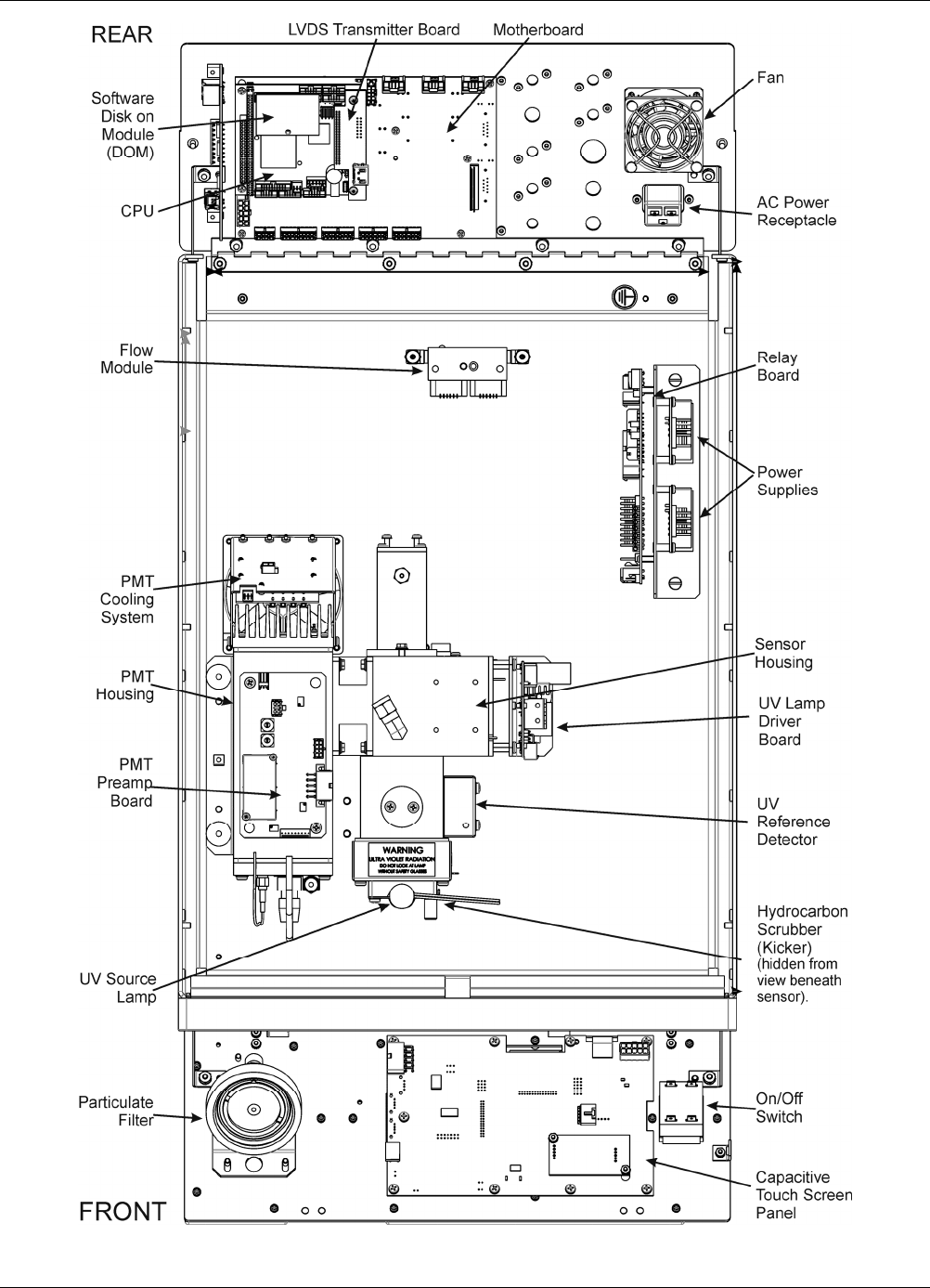
Figure 3-4: T100H Layout (Basic Unit – No Valve Options)
07265A DCN6038
Teledyne API - T100H Addendum to T100 Operation Manual Getting Started
21
3.3. Initial Operation
With the following exceptions, the operation of the T100H is nearly identical to that of the T100. Please refer to
the T100 User’s Manual, Section 3, for details on initial operation, including common warning messages,
functional check, and initial calibration and common interferents for the T100H.
3.3.1. Warning Messages
Please refer to the T100 User’s Manual (06807), Section 3, for a complete listing of warnings for the T100H.
The following table lists warnings that differ in the T100H from those described in the T100 manual.
Table 2-1: Possible Warning Messages at Start-Up
MESSAGE MEANING
Vacuum Pressure Warning The vacuum pressure reading is out of its allowed range. The pump may
have failed, or the instrument may have a leak or obstruction in the flow
path.
3.3.2. Test Functions
Check to make sure that the analyzer is functioning within allowable operating parameters as described in the
T100 Manual (P/N 06807). The available test functions for the T100H are:
SAMPLE RANGE = 50.000 PPM SO2=X.XXX
< TST TST > CAL SETUP
Toggle <TST TST> buttons to
scroll through list of functions
RANGE
STABIL
VAC
PRES
SAMP FL
PMT
NORM PMT
UV LAMP
LAMP RATIO
STR. LGT
DARK PMT
DARK LAMP
SLOPE
OFFSET
HVPS
RCELL TEMP
BOX TEMP
PMT TEMP
TEST1
TIME
1Only appears if analog output
A3 is actively reporting a test
function
07265A DCN6038

Getting Started Teledyne API - T100H Addendum to T100 Operation Manual)
22
3.3.3. Interferents for SO2 Measurements
Hydrocarbons are a significant interferent for UV fluorescent SO2 measurements, however, the typical T100H
application does not have hydrocarbons in the sample stream. Therefore, in order to reduce cost to the
customer, the T100H in its standard configuration does not include a hydrocarbon kicker/scrubber.
If your application includes hydrocarbons in the sample gas stream, it is very important that they be removed
from the sample gas prior to the it entering the analyzer’s sample chamber. A hydrocarbon Kicker Option (OPT
65) package (see Section 5 of this manual) is available for this purpose.
07265A DCN6038

23
4. FREQUENTLY ASKED QUESTIONS (FAQs)
More FAQs are included in the T100 manual, which also includes a glossary of terms.
Q: How long does the sample pump last?
A: The sample pump should last about one year and the pump diaphragms should to be replaced annually or
when necessary.
To determine if the diaphragm on a T100H needs replacing check the VAC test function (instead of the
PRES function as described in the T100 Manual - P/N 06807). If the VAC value is > 10 in-Hg-A, the
diaphragm should be replaced.
07265A DCN6038

Frequently Asked Questions (FAQs) Teledyne API - T100H Addendum to T100 Operation Manual)
24
This page intentionally left blank.
07265A DCN6038
25
5. OPTIONAL HARDWARE AND SOFTWARE
With the following additions, changes and exceptions, the options listed in Table 1-1 of the T100 Manual (P/N
06807) are also available for the T100H.
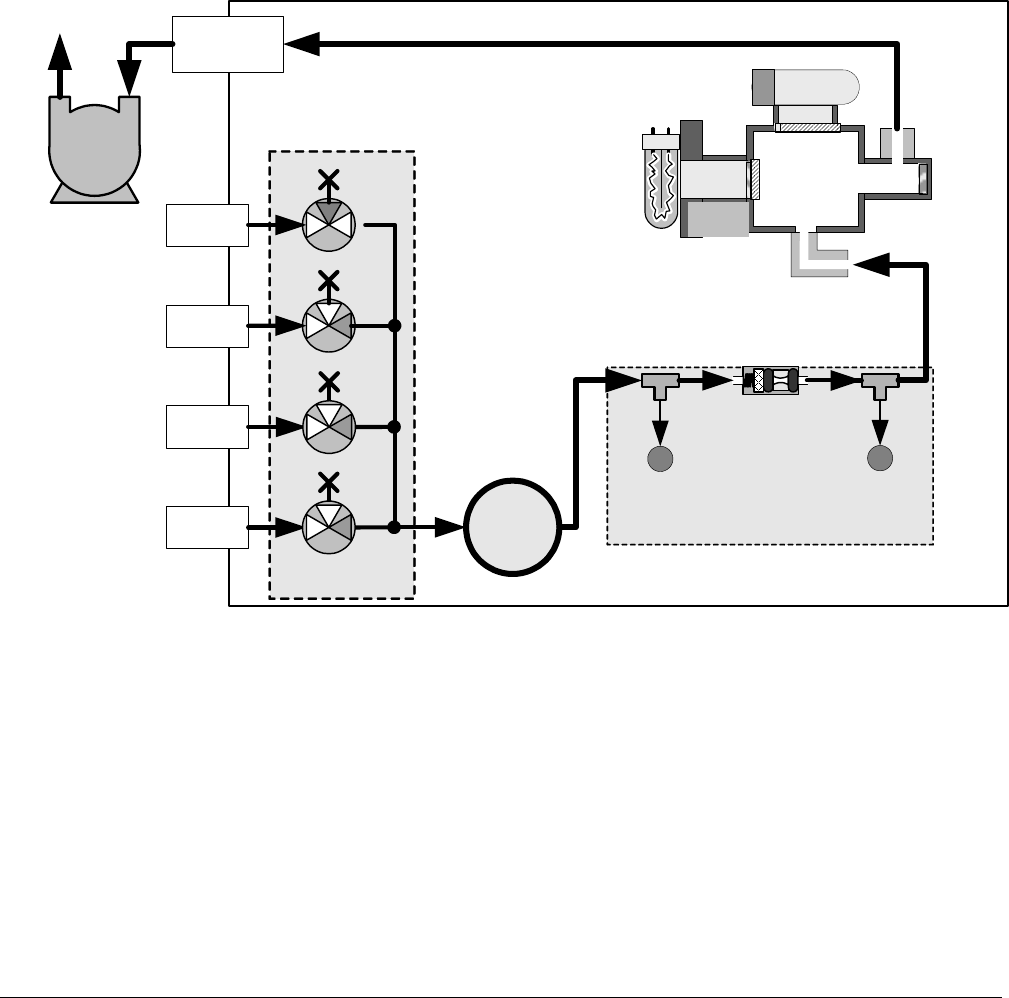
5.1. Ambient Zero/Ambient Span Valves (Option 50A)
The T100H zero/span valve option is identical to that of the T100 in respect to operation and valve states (see
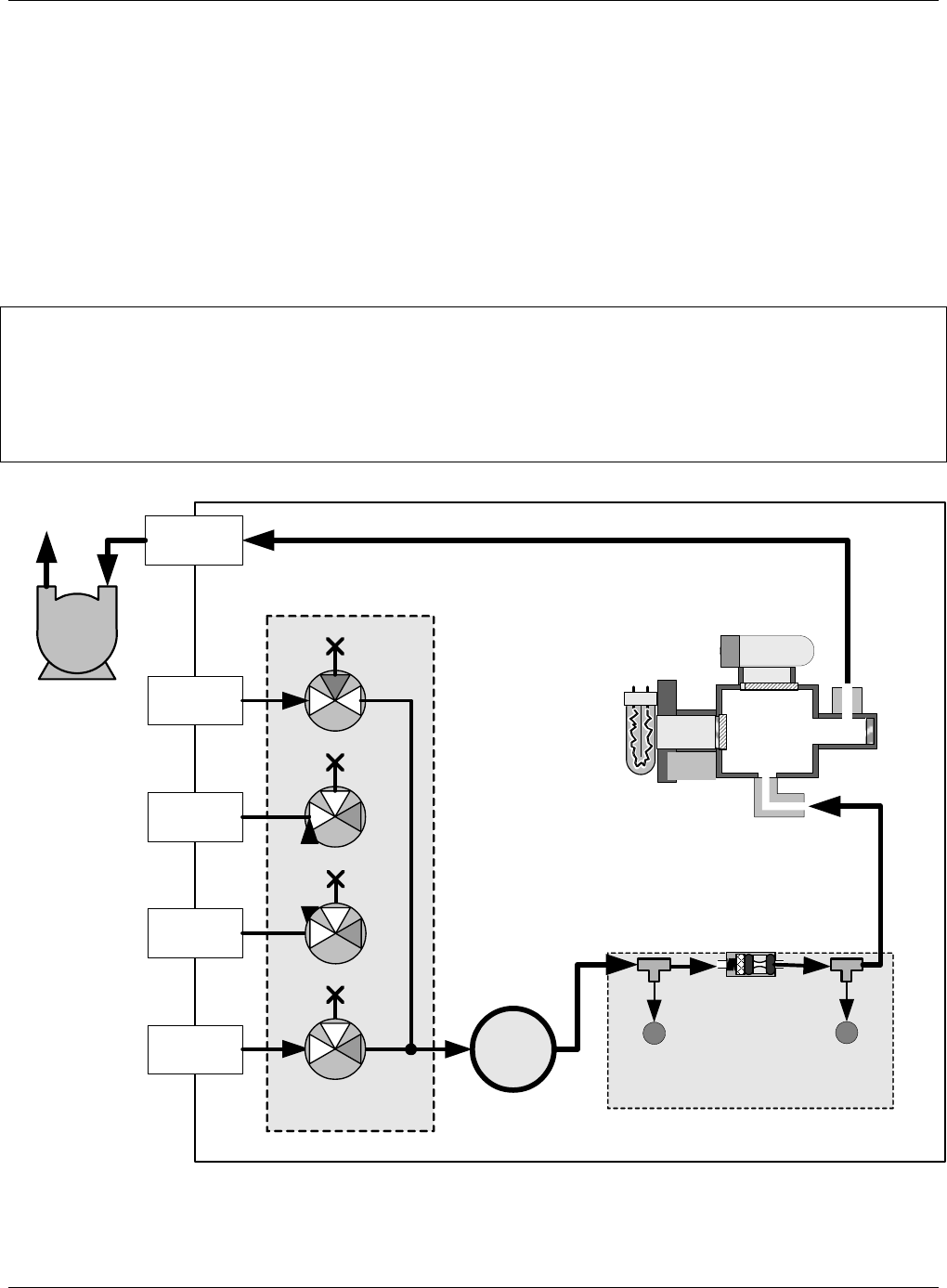
Table 3-10 of the T100 Manual). The internal pneumatic connections are slightly different.
FLOW CONTROL &
PRESSURE SENSOR
VACUUM
PRESSURE
SENSOR
SAMPLE
PRESSURE
SENSOR
CRITICAL
FLOW ORIFICE
700 cm3/min
@ 7 In-Hg-A
UV
LAMP
PMT
REACTION
CELL
Particulate
Filter
PUMP
EXHAUST
GAS OUTLET
INSTRUMENT CHASSIS
UV
Detector
GAS INPUT
MANIFOLD
Span/Cal
Valve
SAMPLE
GAS
INLET
ZERO AIR
INLET
HIGH
SPAN AIR
INLET
Zero
Gas
Valve
LOW
SPAN AIR
INLET
Low
Span
Valve
High
Span
Valve
Figure 5-1: Pneumatic Diagram of the T100H With Z/S Option Installed.
07265A DCN6038
Optional Hardware and Software Teledyne API - T100H Addendum to T100 Operation Manual)
26
5.2. Ambient Zero / Two Ambient Span Valve Option (OPT 50C)
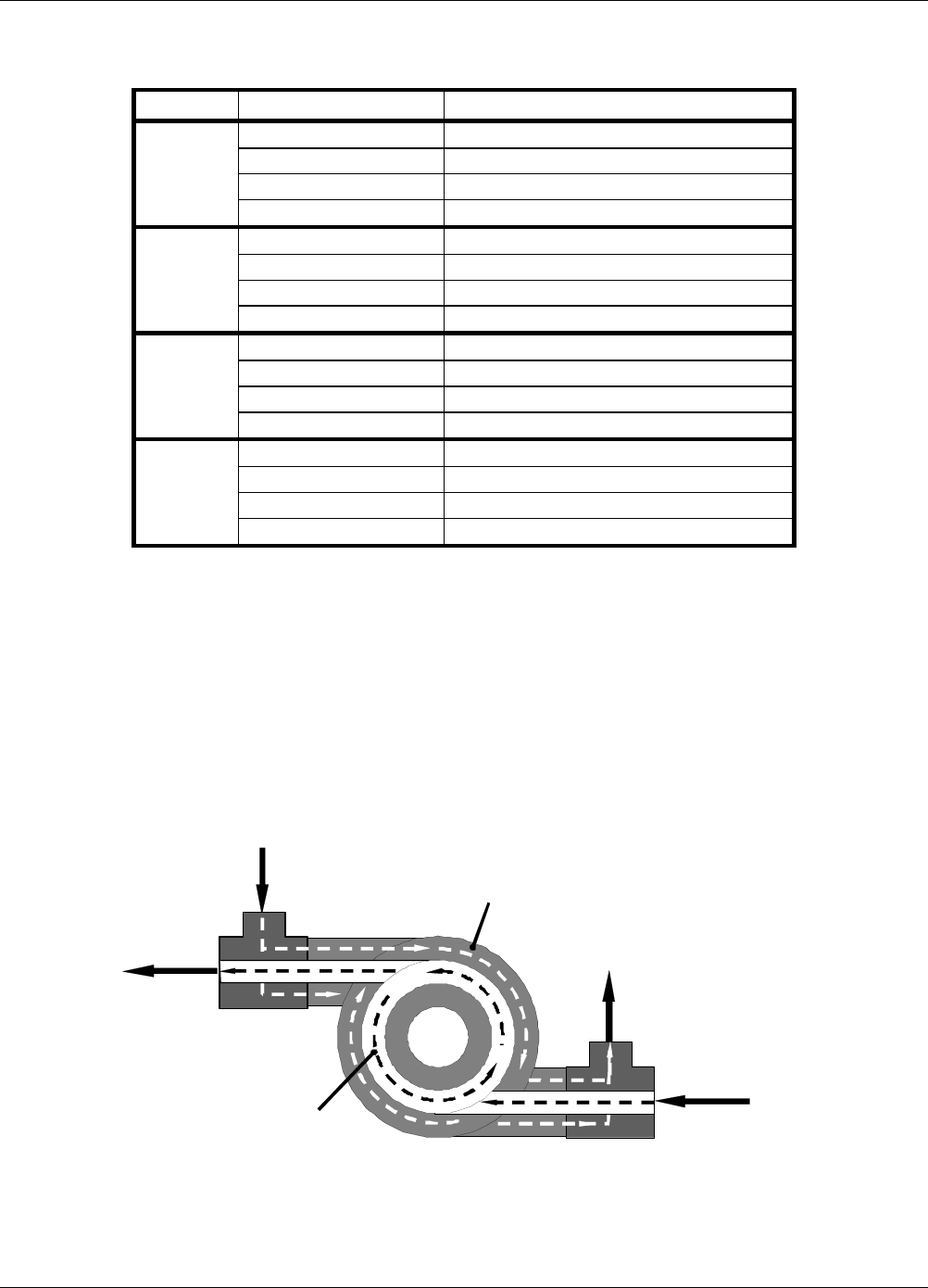
This option includes a special set of valves that allows two separate SO2 mixtures to enter the analyzer from two
independent sources. Typically these two gas mixtures will come from two, separate, pressurized bottles of
certified calibration gas: one mixed to produce a SO2 concentration equal to the expected span calibration value
for the application and the other mixed to produce a concentration at or near the midpoint of the intended
measurement range. Individual gas inlets, labeled HIGH SPAN and LOW SPAN are provided at the back on the
analyzer.
The valves allow the user to switch between the two sources via keys on the front panel or from a remote
location by way of either the analyzer’s digital control inputs or by sending commands over it’s serial I/O port(s).
NOTE
The analyzer’s software only allows the SLOPE and OFFSET to be calculated when sample is being
routed through the HIGH SPAN inlet.
The LOW SPAN gas is for midpoint reference checks only.
GAS INPUT
MANIFOLD
Span/Cal
Valve
FLOW CONTROL &
PRESSURE SENSOR
VACUUM
PRESSURE
SENSOR
SAMPLE
PRESSURE
SENSOR
CRITICAL
FLOW ORIFICE
700 cm3/min
@ 7 In-Hg-A
Particulate
Filter
PUMP
EXHAUST
GAS OUTLET
SAMPLE
GAS INLET
INSTRUMENT CHASSIS
ZERO AIR
INLET
HIGH SPAN
AIR INLET
Zero Gas
Valve
LOW SPAN
AIR INLET
Low Span
Valve
High Span
Valve
UV
LAMP
PMT
REACTION
CELL
UV
Detector
Figure 5-2: Pneumatic Diagram of the T100H with Option 50C Installed
07265A DCN6038
Teledyne API - T100H Addendum to T100 Operation Manual Optional Hardware and Software
27
Table 5-1 describes the state of each valve during the analyzer’s various operational modes.
Table 5-1: Two-Point Span Valve Operating States
MODE VALVE CONDITION
Sample/Cal Open to SAMPLE inlet
Zero Gas Valve Closed to ZERO AIR inlet
High Span Valve Closed to HIGH SPAN inlet
SAMPLE
Low Span Valve Closed to LOW SPAN inlet
Sample/Cal Closed to SAMPLE inlet
Zero Gas Valve Open to ZERO AIR inlet
High Span Valve Closed to HIGH SPAN inlet
ZERO
CAL
Low Span Valve Closed to LOW SPAN inlet
Sample/Cal Closed to SAMPLE inlet
Zero Gas Valve Closed to ZERO AIR inlet
High Span Valve Open to HIGH SPAN inlet
HIGH
SPAN
CAL
Low Span Valve Closed to LOW SPAN inlet
Sample/Cal Closed to SAMPLE inlet
Zero Gas Valve Closed to ZERO AIR inlet
High Span Valve Closed to HIGH SPAN inlet
Low Span
Check
Low Span Valve Open to LOW SPAN inlet
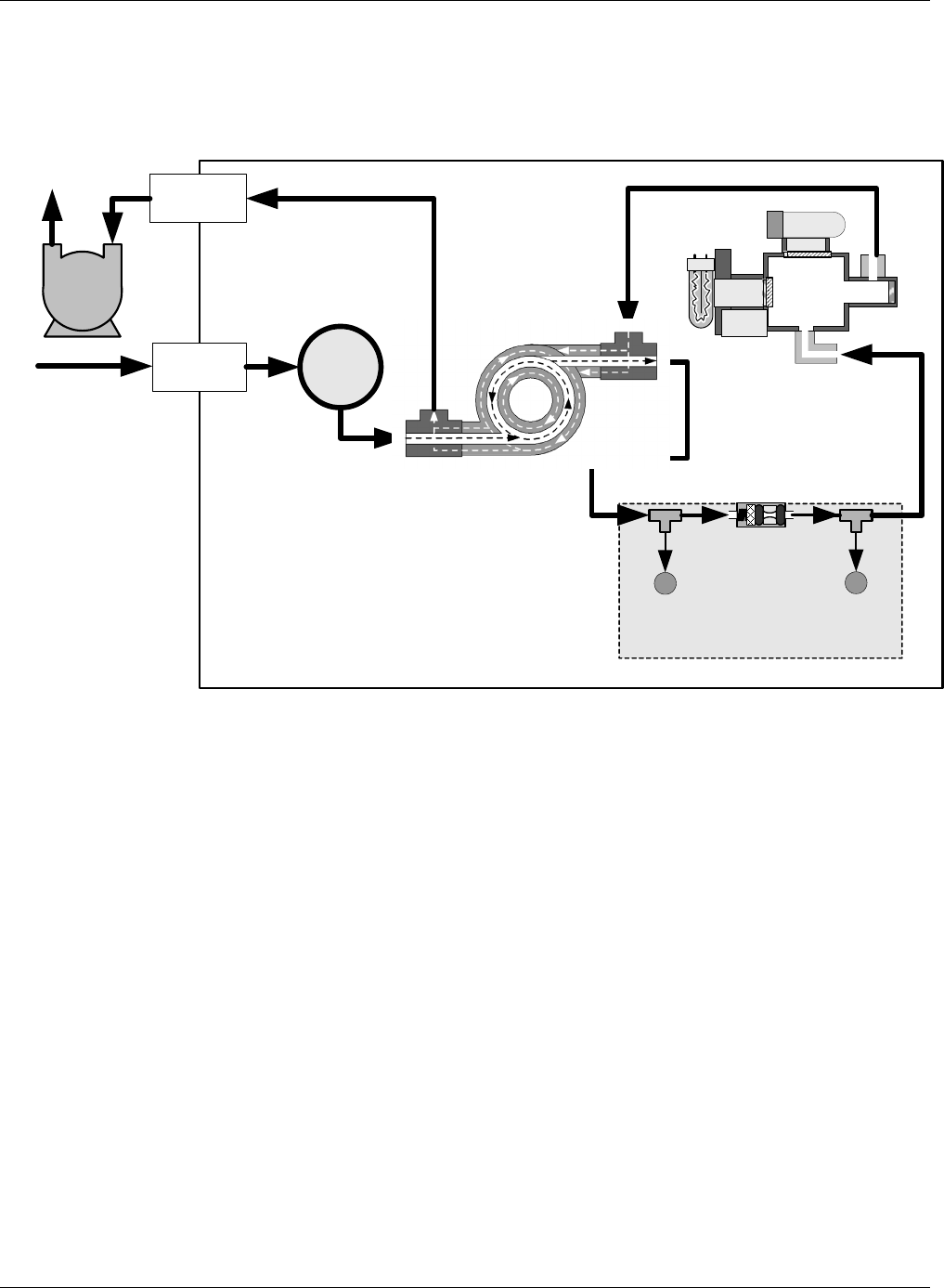
5.3. Hydrocarbon Kicker Option (OPT 86D)
This option is specifically designed for those applications where hydrocarbons are present in the sample gas
stream. It includes an internal, scrubber consisting of a tube of a specialized plastic that absorbs hydrocarbons
very well located within an outer flexible plastic tube shell.
As gas flows through the inner tube, hydrocarbons are absorbed into the membrane walls. and transported
through the membrane wall and into the hydrocarbon free, purge gas flowing through the outer tube (see Figure
5-3). This process is driven by the hydrocarbon concentration gradient between the inner and outer of the tubes.
INNER
TUBE
(Ambient Air)
OUTER TUBE
(Clean Air)
SAMP LE AI
R
FROM
PARTICULATE FILTER
CLEANED
SAMPLE AIR
TO
FLOW
PRESSURE ASSY
CLEAN
PURGE AIR
FROM
SAMPLE CELL
USED PURGE AIR
TO
EXHAUST PORT
AND PUMP
Figure 5-3: Hydrocarbon Scrubber (Kicker) – OPT 86D
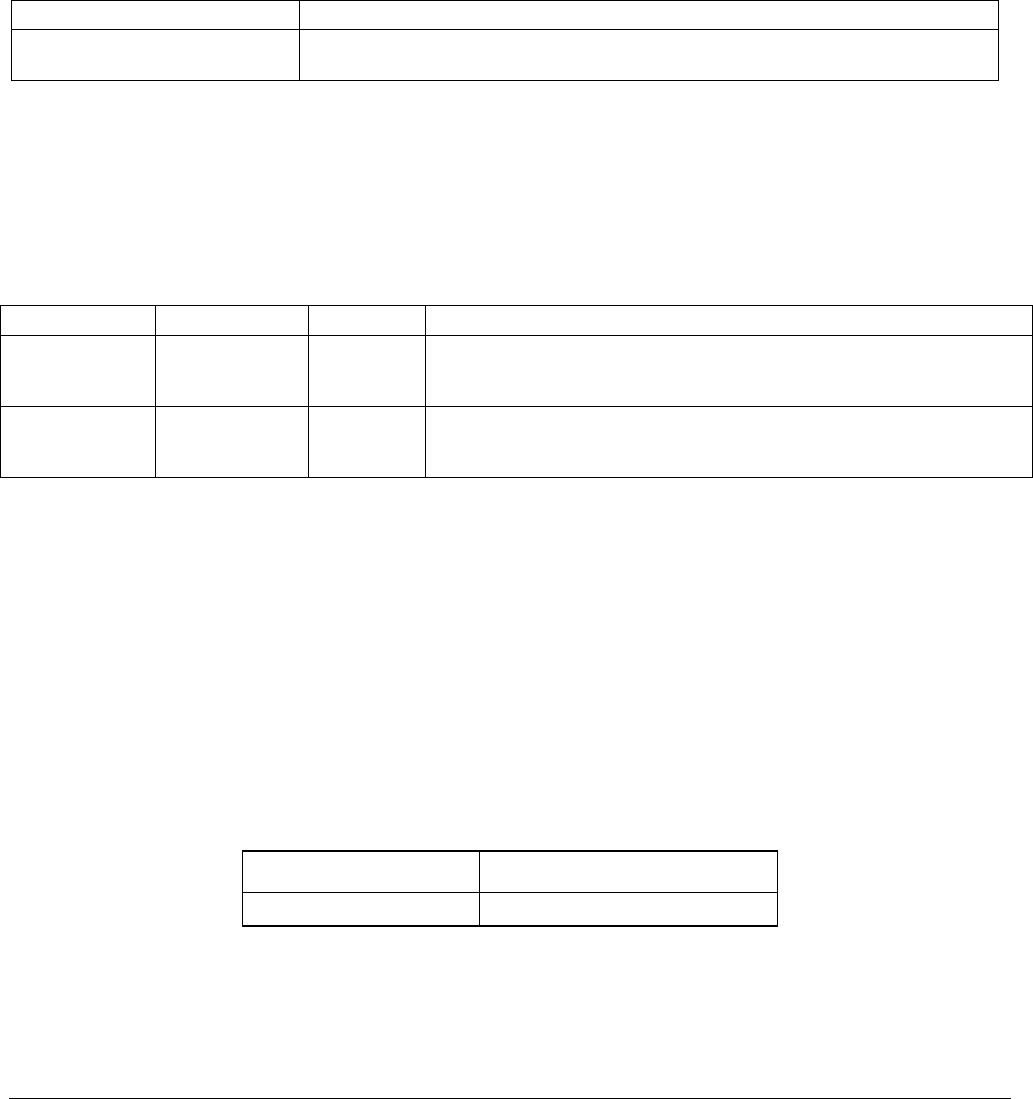
The scrubbed air from the inner tube is returned to be used as the purge gas in the outer tube after it passes
through the analyzers reaction cell. This means that when the analyzer is first started, the concentration gradient
07265A DCN6038
Optional Hardware and Software Teledyne API - T100H Addendum to T100 Operation Manual)
28
between the inner and outer tubes is small and the scrubber’s efficiency is relatively low. When the instrument is
turned on after having been off for more than 30 minutes, it takes a certain amount of time for the gradient to
become large enough for the scrubber to adequately remove hydrocarbons from the sample air.
UV
LAMP
PMT
REACTION
CELL
Particulate Filter
PUMP
EXHAUST
GAS OUTLET
SAMPLE GAS
INLET
HYDROCARBON
SCRUBBER
(Kicker)
FLOW CONTROL &
PRESSURE SENSOR
VACUUM
PRESSURE
SENSOR
SAMPLE
PRESSURE
SENSOR
CRITICAL
FLOW ORIFICE
700 cm3/min
@ 7 In-Hg-A
UV
Detector
Figure 5-4: T100H Internal Pneumatic Diagram with Hydrocarbon Scrubber Installed
07265A DCN6038
29
6. OPERATING INSTRUCTIONS
6.1. Warning Messages
Please refer to the T100 User’s Manual (06807), Section 4.2.2, for a list of warnings for the T100H. The
following table list describes an additional warning in the T100H.
Table 6-1: Additional T100H Warning Messages
MESSAGE MEANING
Vacuum Pressure Warning The vacuum pressure reading is out of its allowed range. The pump may have
failed, or the instrument may have a leak or obstruction in the flow path.
6.2. Test Functions
Please refer to the T100 Manual (06807), Section 4.2.1, for a list of test functions for the T100H. The following
table lists test functions that are in addition to or differ from those listed there.
Table 6-2: Additional T100H Test Functions
DISPLAY PARAMETER UNITS DESCRIPTION
VAC Vacuum
Pressure In-Hg-A
The actual pressure measured on the vacuum side of the T100H’s critical
flow orifice. This is the pressure of the gas in the instrument’s sample
chamber.
PRES Sample GAS
Pressure in-Hg-A
The current pressure of the sample gas as it enters the sample inlet at
the back of the analyzer, but upstream of the critical flow orifice and
before the gas enters the reaction cell.
6.2.1. Test Channel Output
When activated, output channel A3 can be used to report one of the test functions viewable from the SAMPLE
mode display. To activate the A3 channel and select a test function, follow instructions in Section 6.9.10 of the
T100 Manual (P/N 06807).
The following table lists test functions that are in addition to or differ from those listed in Table 6-14 of the T100
Manual.
Table 6-3: Additional T100H Test Parameters Available for Analog Output A3
TEST CHANNEL TEST PARAMETER RANGE
VACUUM PRESSURE 0-40 in-Hg-A
07265A DCN6038

Operating Instructions Teledyne API - T100H Addendum to T100 Operation Manual)
30
6.2.2. Range Units
The T100H only displays concentrations in parts per million (106 mols per mol, PPM) or milligrams per cubic
meter (mg/m3, MGM).
NOT AVAILABLE: Parts per billion (109 mols per mol, PPB) and micrograms per cubic meter (µg/m3,
UGM).
To change the concentration units of the T100H follow the instructions found in Section 6.7.7 of the T100
Manual.
6.2.3. Using the T100H with a Hessen Protocol Network
The set up and use of the T100H in Hessen protocol networks is the sane as described in Section 6.12.4 of the
T100 Manual (P/N 06807) except that there are minor differences in the status flags. The following table
supercedes Table 6-27 of the T100 Manual.
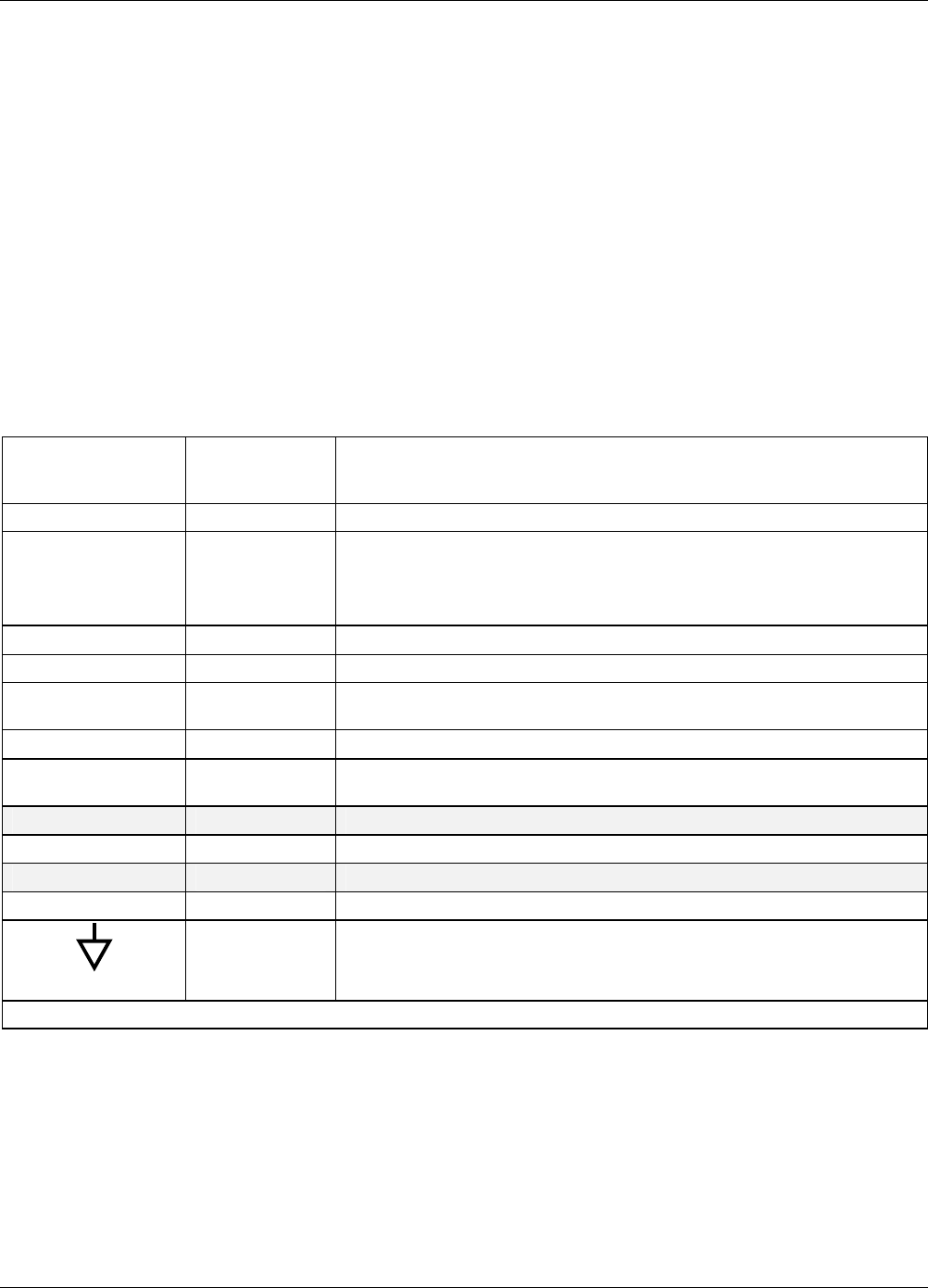
Table 6-4: T100H Default Hessen Status Bit Assignments
STATUS FLAG NAME DEFAULT BIT ASSIGNMENT
WARNING FLAGS
SAMPLE FLOW WARNING 0001
PMT DET WARNING 0002
UV LAMP WARNING 0002
HVPS WARNING 0004
DARK CAL WARNING 0008
RCELL TEMP WARNING 0010
PMT TEMP WARNING 0040
INVALID CONC 0080
OPERATIONAL FLAGS
In Manual Calibration Mode 0200
In Zero Calibration Mode 0400
In Low Span Calibration Mode 0800
In Span Calibration Mode 0800
UNITS OF MEASURE FLAGS
UGM1 0000
MGM 2000
PPB1 4000
PPM 6000
SPARE/UNUSED BITS 0020, 0100, 8000
UNASSIGNED FLAGS
Box Temp Warning System Reset
Sample Press Warning Front Panel Warning
Vacuum Press Warning Analog Cal Warning
Rear Board Not Detected Cannot Dyn Zero
Relay Board Warning Cannot Dyn Span
1 Although assigned flags, these units are not available on the T100H
07265A DCN6038
Teledyne API - T100H Addendum to T100 Operation Manual Operating Instructions
31
6.2.4. Default DAS Channels
The default Data Channels included in the T100H analyzer’s software include the CONC, PNUMT & CALDAT
channels. The FAST & DETAIL preset channels are not included.
6.2.5. Remote Operation Using the External Digital I/O
6.2.5.1. Status Outputs
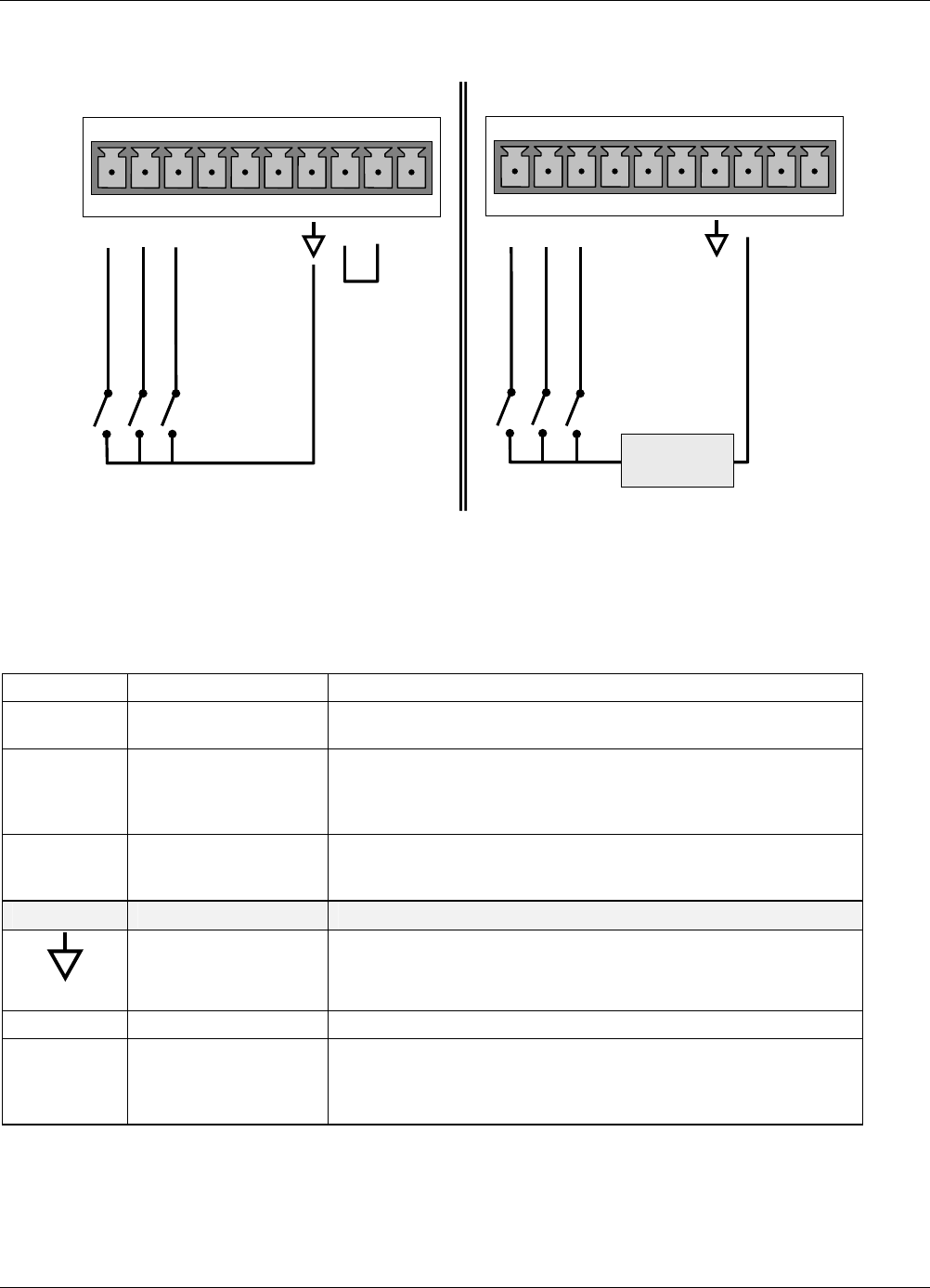
The function and pin assignment5s for the T100H digital status outputs are:.
Table 6-5: Status Output Signals
SATUS
CONNECTOR
PIN NUMBER1
STATUS
DEFINITION CONDITION
1 SYSTEM OK ON if no faults are present.
2 CONC VALID
OFF any time the HOLD OFF feature is active, such as during calibration or
when other faults exist possibly invalidating the current concentration
measurement (example: sample flow rate is outside of acceptable limits).
ON if concentration measurement is valid.
3 HIGH RANGE ON if unit is in high range of the AUTO Range Mode
4 ZERO CAL ON whenever the instrument’s ZERO point is being calibrated.
5 HIGH SPAN
CAL
ON whenever the instrument is set for DUAL or AUTO reporting range
mode an it’s high range span point is being calibrated .
6 DIAG MODE ON whenever the instrument is in DIAGNOSTIC mode
7 LOW SPAN CAL ON whenever the instrument is set for DUAL or AUTO reporting range
mode an it’s lows range span point is being calibrated .
8 SPARE
D EMITTER BUS The emitters of the transistors on pins 1-8 are bussed together.
SPARE
+ DC POWER + 5 VDC, 300 mA source (combined rating with Control Output, if used).
Digital Ground The ground level from the analyzer’s internal DC power supplies
1 Located on Rear Panel
07265A DCN6038
Operating Instructions Teledyne API - T100H Addendum to T100 Operation Manual)
32
6.2.5.2. Control Inputs
ZERO CAL
HI SPAN CAL
ZERO CAL
CONTROL IN
A B C D E F U +
HI SPAN CAL
CONTROL IN
A B C D E F U +
-
+
Local Power Connections
External Power Connections
5 VDC Power
Supply
LOW SPAN CAL
LOW SPAN CAL
Figure 6-1: Control Input Connector
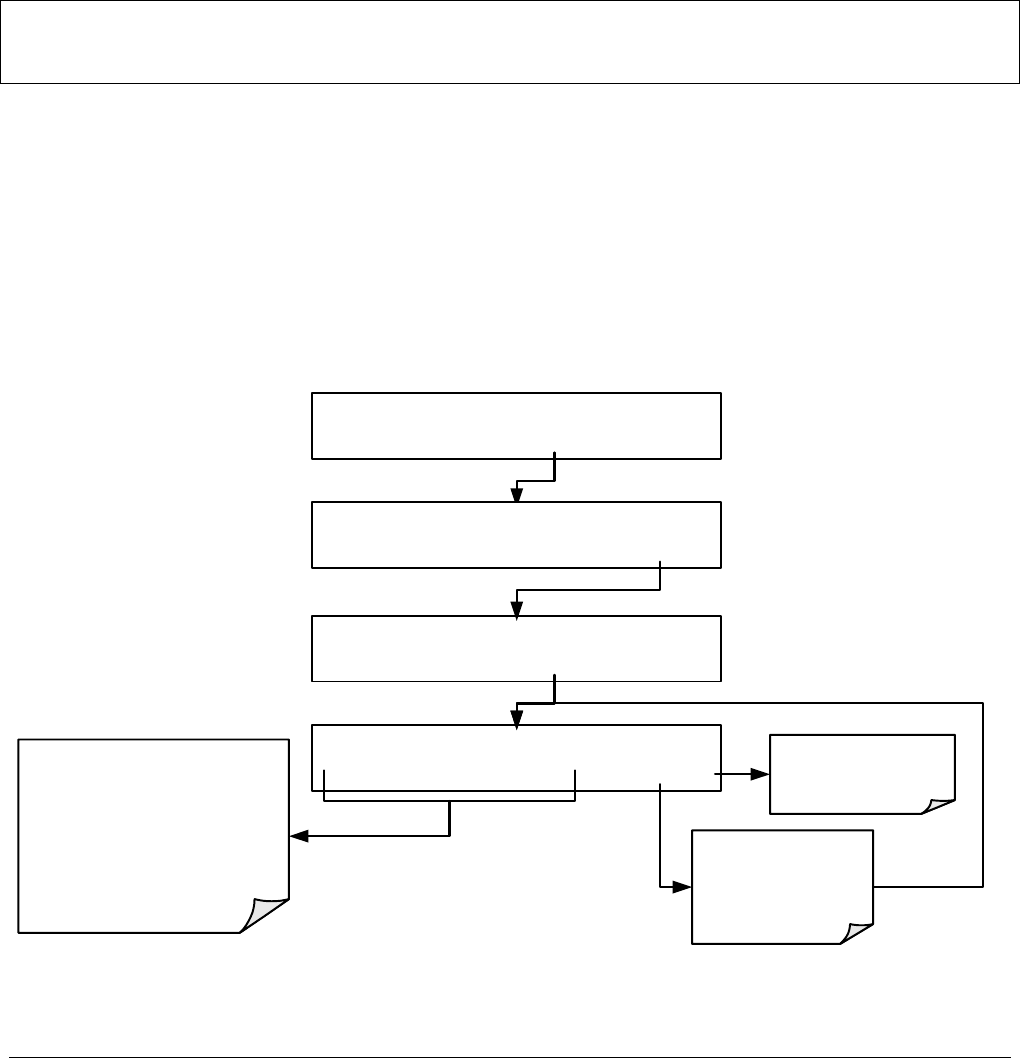
Table 6-6: Control Input Signals
INPUT # STATUS DEFINITION ON CONDITION
A REMOTE ZERO CAL The analyzer is placed in Zero Calibration mode. The mode field of
the display will read ZERO CAL R.
B
REMOTE
HIGH SPAN CAL
If the instrument is set for DUAL or AUTO reporting rang mode,
activating this input causes the analyzer to enter high range span
calibration mode. The mode field of the display will read SPAN CAL
R.
C REMOTE
LO SPAN CAL
The analyzer is placed in low span calibration mode as part of
performing a low span (midpoint) calibration. The mode field of the
display will read LO CAL R.
D, E & F SPARE
Digital Ground The ground level from the analyzer’s internal DC power supplies
(same as chassis ground)
U External Power input Input pin for +5 VDC required to activate pins A – F.
+
5 VDC output
Internally generated 5V DC power. To activate inputs A – F, place a
jumper between this pin and the “U” pin. The maximum amperage
through this port is 300 mA (combined with the analog output supply,
if used).
07265A DCN6038
33
7. CALIBRATION AND CALIBRATION CHECK
PROCEDURES
Calibration procedures for the T100H are the same as those for the T100. One exception to this statement is
that the T100H has a special valve option, Zero and Two Span Point Valve Option - OPT 52 (See Section 5.1),
that allows a mid-span point be checked.
7.1. Manual Calibration with Zero and Two Span Valve (OPT 52)
NOTE
It is only possible to calibrate to the high span gas. The low span gas is only used for calibration checks.
Zero and Span calibrations using the Zero and two Span Valve option are similar to that described in Section
7.2, except that:
Zero air and both span gas is supplied to the analyzer through the zero gas and span gas inlets rather
than through the sample inlet.
The zero and cal operations are initiated directly and independently with dedicated keys (CALZ &
CALS)
STEP ONE: Connect the sources of zero air and span gas to the respective ports on the rear panel (see Figure
3-2 of this addendum).
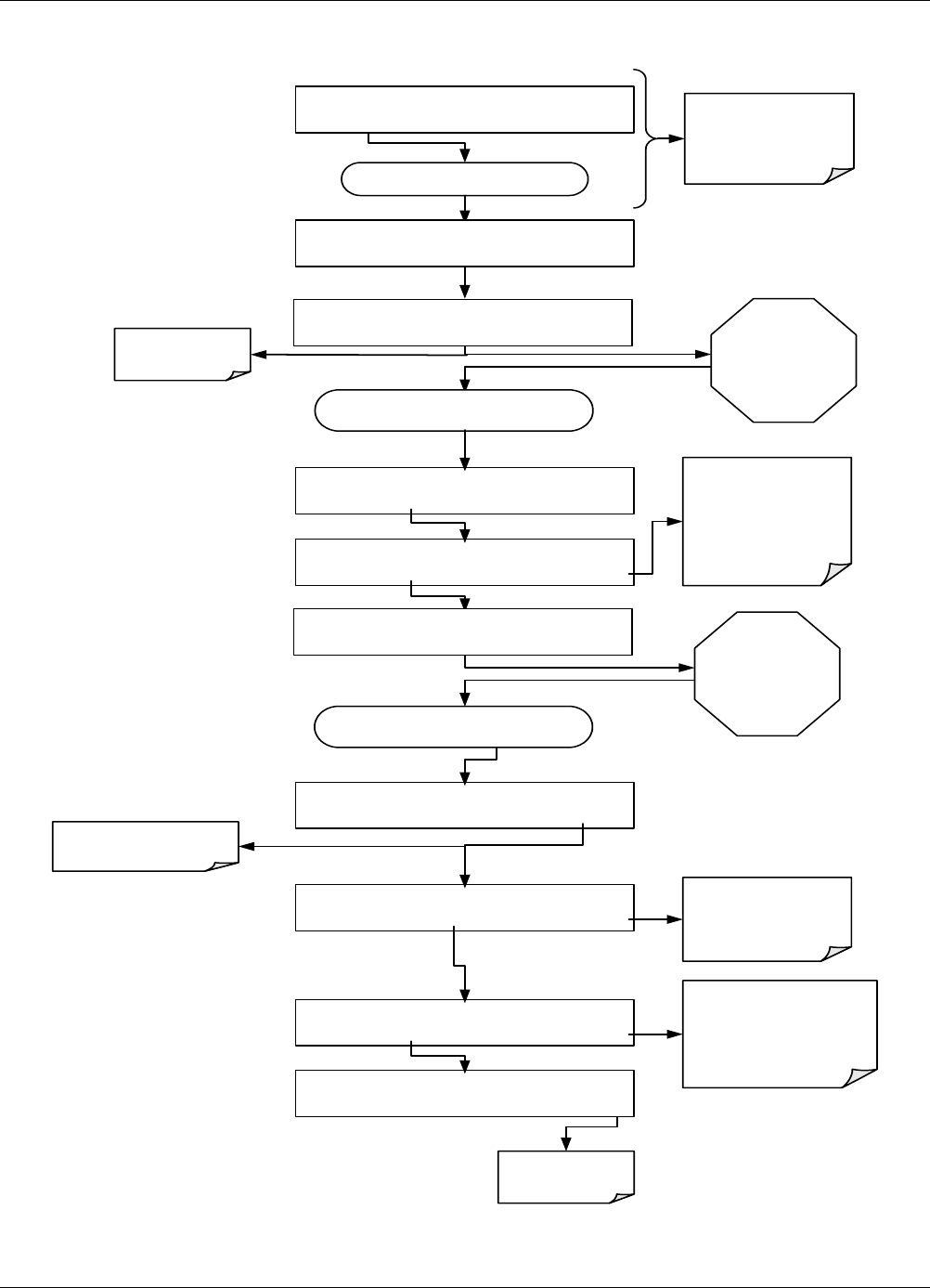
STEP TWO: Set the expected SO2 high span gas value:
SAMPLE RANGE = 5000.0 PPM SO2 =XXX.X
< TST TST > CAL CALZ CALS SETUP
M-P CAL RANGE = 5000.0 PPM SO2 =XXX.X
<TST TST> SPAN CONC EXIT
SAMPLE SPAN TO CAL:LOW
LOW HIGH ENTR EXIT
M-P CAL SO2 SPAN CONC:80.0 Conc
04000.0 ENTREXIT
The SO2 span concentration value
automatically defaults to
4000.0 Conc.
If this is not the the concentration of
the span gas being used, toggle
these buttons to set the correct
concentration of the
calibration gase.
EXIT ignores the new
setting and returns to
the previous display.
ENTR accepts the new
setting and returns to
the
CONCENTRATION
MENU.
07265A DCN6038
Calibration and Calibration Check Procedures Teledyne API - T100H Addendum to T100 Operation Manual)
34
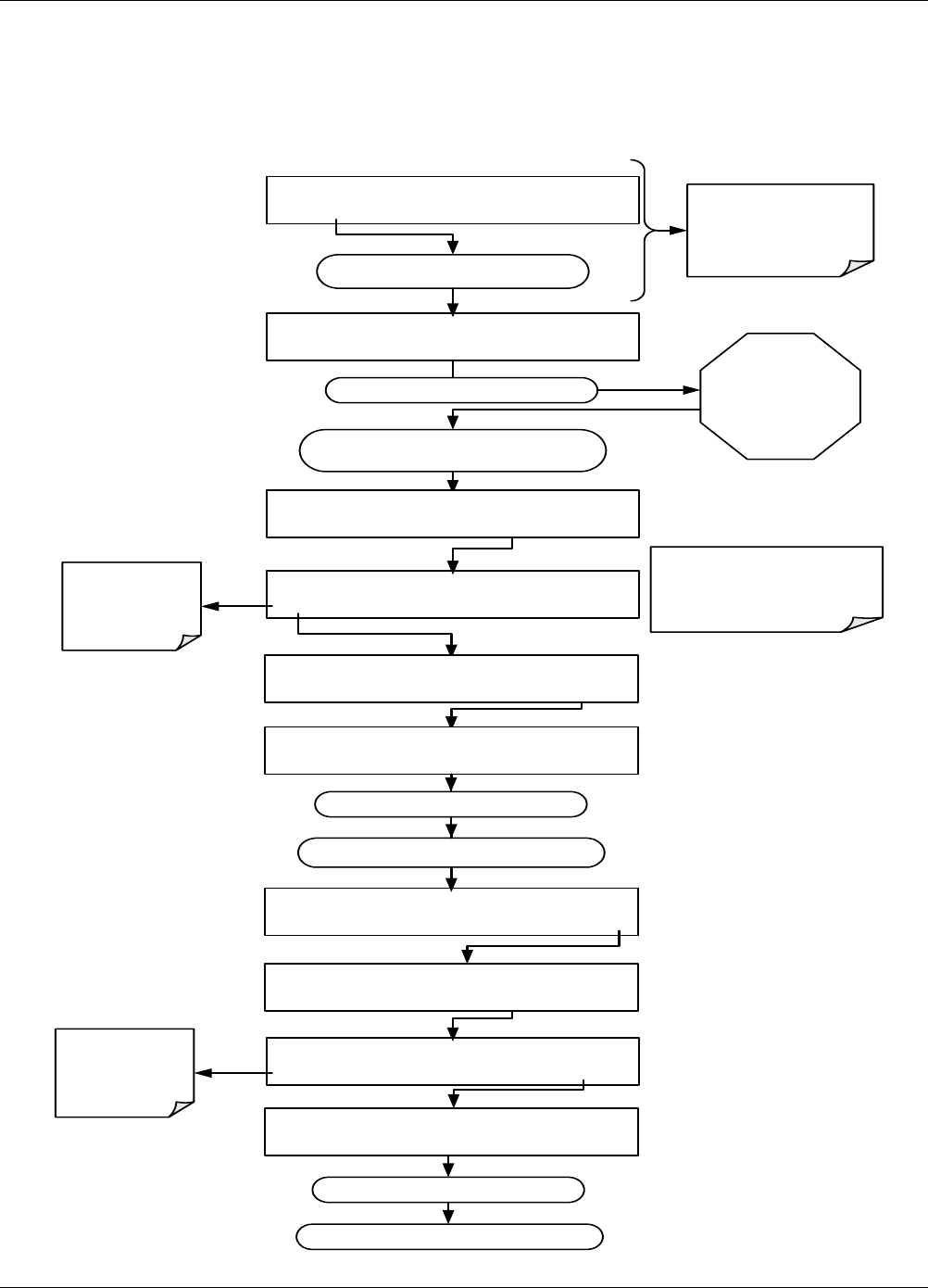
STEP THREE: Perform the calibration according to the following flow chart:
Analyzer enters SPAN cal
mode and the SPAN key
appears.
The SPAN and CONC
buttons only appear when
the HIGH span gas is
selected in the previous
step
Press ENTR to changes
the OFFSET & SLOPE
values for the SO2
measurement.
Press EXIT to leave the
calibration unchanged and
return to the previous
menu.
ZERO CAL M STABIL= XXX.X PPM SO2=XXX.X
<TST TST> ZERO CONC EXIT
EXIT at this point
returns to the
SAMPLE menu.
Press ENTR to changes the
OFFSET & SLOPE values for
the SO2 measurement.
Press EXIT to leave the
calibration unchanged and
return to the previous menu.
Set the Display to show
the STABIL test function.
This function calculates
the stability of the SO2
measurement
Toggle TST> button until ...
W ait until STABIL falls
below 0.5 ppm.
This may take several
minutes.
ZERO CAL M STABIL= XXX.X PPM SO2=XXX.X
<TST TST> ENTR CONC EXIT
SPAN CAL M STABIL= XXX.X PPM SO2=X.XXX
<TST TST> SPAN CONC EXIT
SAMPLE SPAN TO CAL:HIGH
LOW HIGH ENTR EXIT
W ait until STABIL falls
below 0.5 ppm.
This may take several
minutes.
SPAN CAL M STABIL= XXX.X PPM SO2=X.XXX
<TST TST> ENTR CONC EXIT
SPAN CAL M STABIL= XXX.X PPM SO2=X.XXX
<TST TST> ENTR CONC EXIT
SAMPLE RANGE = 5000.0 PPM SO2 =XXX.X
< TST TST > CAL CALZ CALS SETUP
Analyzers enters
ZERO cal
mode.
SAMPLE STABIL= XXX.X PPM SO2=XXX.X
< TST TST > CAL CALZ CALS SETUP
Allow zero gas to enter the zero port
at the rear of the analyzer.
SAMPLE STABIL= XXX.X PPM SO2=XXX.X
< TST TST > CAL CALZ CALS SETUP
Allow span gas to enter the high span port
at the rear of the analyzer.
SAMPLE STABIL= XXX.X PPM SO2=XXX.X
< TST TST > CAL CALZ CALS SETUP
07265A DCN6038
Teledyne API - T100H Addendum to T100 Operation Manual Calibration and Calibration Check Procedures
35
7.2. Manual Calibration Check with Ambient Zero and Two
Ambient Span Valve Option (OPT 50C) Installed
Set up is identical to that shown in STEP ONE of the preceding section. To perform the zero/span check:
Record SO2 LOW span point reading
SA M P LE STABIL= XXX.X PPM SO2=XXX.X
< TST TS T > C AL SE TUP
The ZERO, CONC and/or SPAN
buttons may appear at various
points of this process.
Do not press them this calibration
check procedure.
SAMPLE RANGE = 5000.0 PPM SO2 =XXX.X
< TST TST > C A L C A LZ C A LS S ETUP
Set the display to show
the STABIL test function.
This function calculates
the stability of the SO 2
measurement
Toggle TST> button until ...
W ait until STABIL falls
below 0.5 ppm.
This m ay take several
minutes.
Record SO2 zero point reading
SAMPLE SPAN TO CAL:HIGH
LOW HIGH E N TR EXIT
SAMPLE STABIL= XXX.X PPM SO2=XXX.X
< TS T T S T > C AL C A LZ CALS SE TUP
Sets the analyzer’s
intern al valves to
accept span gas
from the LOW
SPAN inlet.
SPAN CAL M STABIL= XXX.X PPM SO2=X.XXX
<TST TST> EXIT
SPAN CAL M STABIL= XXX.X PPM SO 2=X.X X X
<TST TST> EXIT
SAMPLE STABIL= XXX.X PPM SO 2=XXX.X
< TS T T S T > C AL C A LZ CALS SETUP
Record SO2 HIGH span point reading
SAMPLE SPAN TO CAL:HIGH
LOW HIGH ENTR EXIT
SPAN CAL M STABIL= XXX.X PPM SO 2=X.X X X
<TST TST> EXIT
Sets the analyzer’s
internal valves to
accept span gas
from the HIGH
SPAN inlet.
SAMPLE SPAN TO CAL:LOW
LOW HIGH E N TR EXIT
Input Zero gas
Flow Span Gas into Low Span Port
Flow Span Gas into Low Span Port
07265A DCN6038

Calibration and Calibration Check Procedures Teledyne API - T100H Addendum to T100 Operation Manual)
36
This page intentionally left blank.
07265A DCN6038
37
8. INSTRUMENT MAINTENANCE
8.1. Maintenance Schedule
There is no Internal IZS offered for the T100H.
8.2. Predictive Diagnostics
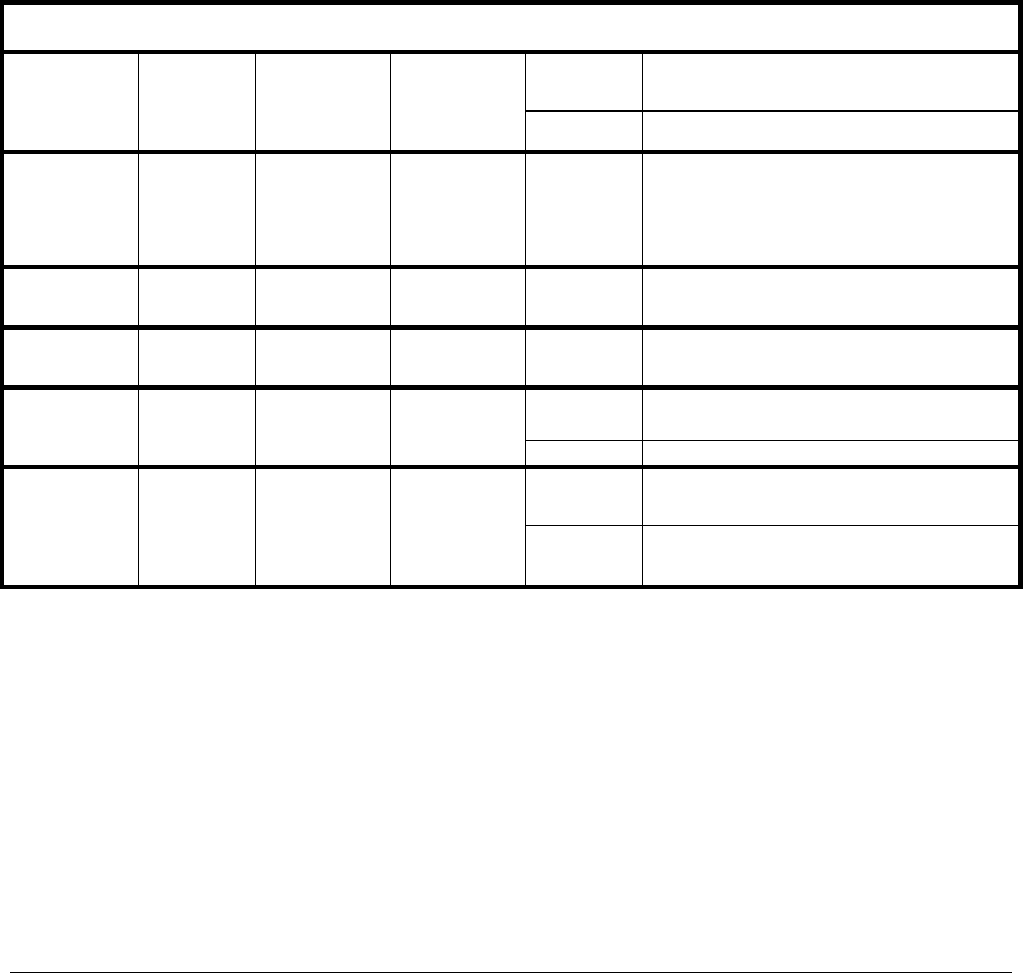
Because the T100H’s internal pneumatics are monitored in a different manner than those of the T100 there are
some differences in how the instrument’s test functions are used as predictive diagnostics. Table 8-1 of this
addendum supersedes Table 9-2 of the T100 Manual
Table 8-1: Predictive Uses for Test Functions
BEHAVIOR TEST
FUNCTION
DAS
FUNCTION CONDITION
EXPECTED ACTUAL INTERPRETATION
Slowly
increasing
Flow path is clogging up.
- Check critical flow orifice & sintered filter.
- Replace particulate filter
PRES SMPPRS
Sample gas
pressure
upstream of the
critical flow
orifice.
Constant within
atmospheric
changes Slowly
decreasing
Developing leak in pneumatic system to vacuum
(developing valve failure)
VAC VACUUM
Gas pressure
downstream of
the critical flow
orifice (e.g.
inside reaction
cell.
Constant within
atmospheric
changes
Fluctuating Developing leak in pneumatic system
SAMP FL SMPFLW Standard
Operation Stable Slowly
Decreasing
Flow path is clogging up.
- Check critical flow orifice & sintered filter.
- Replace particulate filter
DRK PMT DRKPMT
PMT output
when UV Lamp
pulses off
Constant within
±20 of check-
out value
Significantly
increasing PMT cooler failure
Decreasing
over time
Drift of instrument response; UV Lamp output is
excessively low.
SO2
Concentration CONC1
Standard
configuration at
span
stable for
constant
concentration Fluctuating Leak in gas flow path.
Fluctuating
or Slowly
increasing
UV detector wearing out
UV source Filter developing pin holes
LAMP RATIO LAMPR Standard
Operation
Stable and near
100% Slowly
deceasing
UV detector wearing out
Opaque oxides building up on UV source Filter
UV lamp aging
07265A DCN6038

Instrument Maintenance Teledyne API - T100H Addendum to T100 Operation Manual)
38
This page intentionally left blank.
07265A DCN6038
39
9. THEORY OF OPERATION
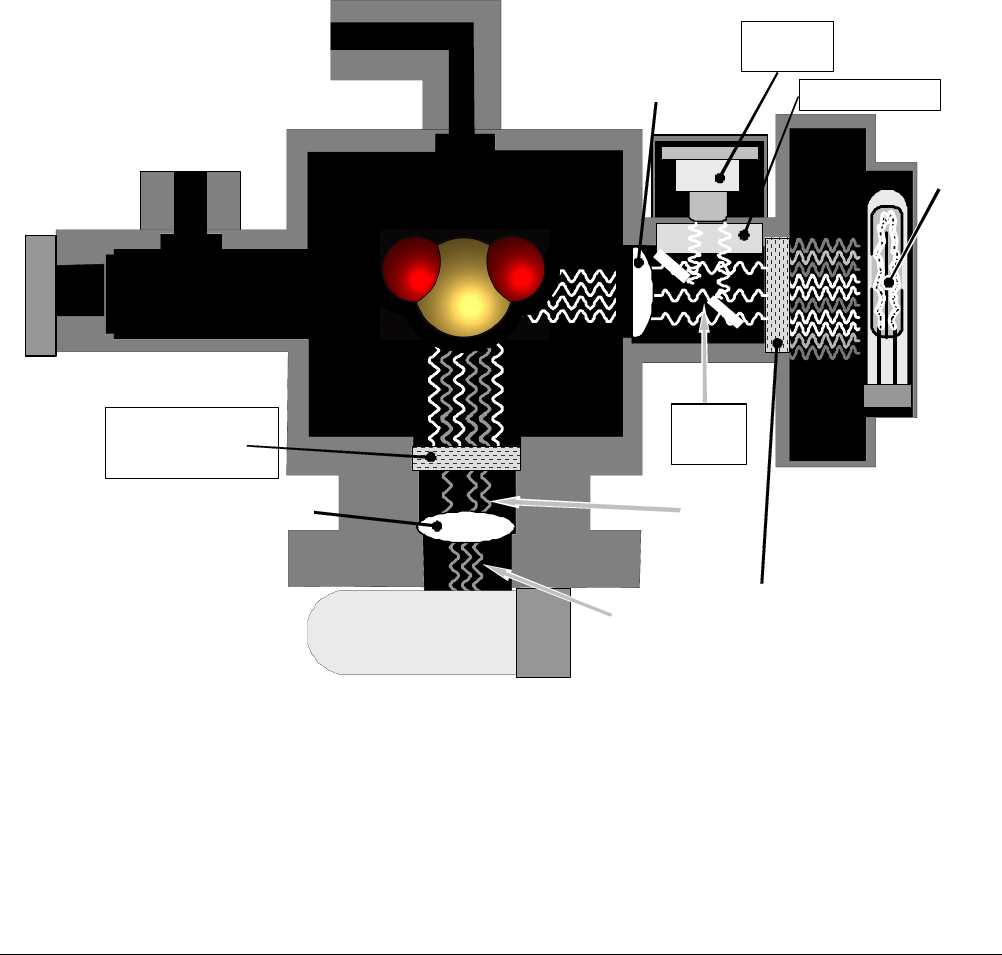
9.1. The UV Light Path
The UV light path of the T100H is similar to that of the T100 (see Section 10.2 of the T100 Manual). The main
differences between the T100H and the T100 are:
The location of the reference detector (See Section 9.1.1 of this addendum).
The methods used to reject for certain measurement interferents is different (see Section 9.1.2 of this
addendum).
UV
Lamp
PMT
UV Source
Optical Filter
(214 nm)
Fluorescent UV
Optical Filter
(360 nm)
UV Source
Lens
PMT Lens
Reference
Detector
Window Seal
Sa
m
p
l
e
Gas
IN
Sample Gas OUT
Broadban d
UV F rom
Lamp
Fluorescent
UV
Only
Focused
Fluorescent
UV
Collimated
Excitation UV
Reflected
Excitation UV
and
Fluorescent UV
SO2
Beam
Splitter
Figure 9-1: UV Light Path
07265A DCN6038

Theory Of Operation Teledyne API - T100H Addendum to T100 Operation Manual)
40
9.1.1. The Reference Detector
A vacuum diode UV detector that converts UV light to a DC current is used to measure the intensity of the
excitation UV source lamp. The location of the T100H reference detector differs from that of the T100.
On the T100 this detector is located directly across the reaction cell from the lamp where it can measure
the output of the lamp directly. Because the T100 is designed to measure relatively low concentrations
of SO2, enough of the lamp’s 214 nm source light makes it through the reaction cell to get a reliable
reading.
On the T100H the detector is located between the UV lamp and the reaction cell and to the side. A
beam splitter reflects a portion of the lamp output 90 degrees, through a window and onto the detector.
This arrangement is required because nearly all of 214 nm UV source light entering the reaction cell is
absorbed by the higher concentrations of SO2 typically measured by the T100H.
A window transparent to UV light provides an air-proof seal that prevents ambient gas from contaminating the
sample chamber.
9.1.2. Direct Measurement Interferents
The most common source of interference when measuring SO2 is from other gases that fluoresce in a similar
fashion to SO2 when exposed to UV Light. The most significant of these are:
A class of hydrocarbons called poly-nuclear aromatics (PNA) of which xylene and naphthalene are two
prominent examples.
Nitric oxide (NO), which fluoresces in the a spectral range near to SO2. For critical applications where
high levels of NO are expected an optional 360 nm optical filter is available that improves the rejection of
NO (contact customer service for more information).
The methods by which the Model T100H rejects interference for these substances differs from the T100 as
follows.
Since the typical application for which the T100H rarely includes the presences of hydrocarbons or
PNA’s, no hydrocarbon scrubber (kicker) is included in the T100H’s base configuration. An optional
scrubber (see Section 5.3of this addendum) is available.
On the other hand the typical T100H application often includes much higher concentrations of Nitric
Oxide (NO), which fluoresces in a spectral range near that of SO2. Therefore a 360 nm filter replaces
the 330nm UV filter located between the PMT and the reaction cell in order to more efficiently reject for
interference due to the higher concentrations of NO.
9.2. Pneumatic Operation
9.2.1. Sample Gas Flow
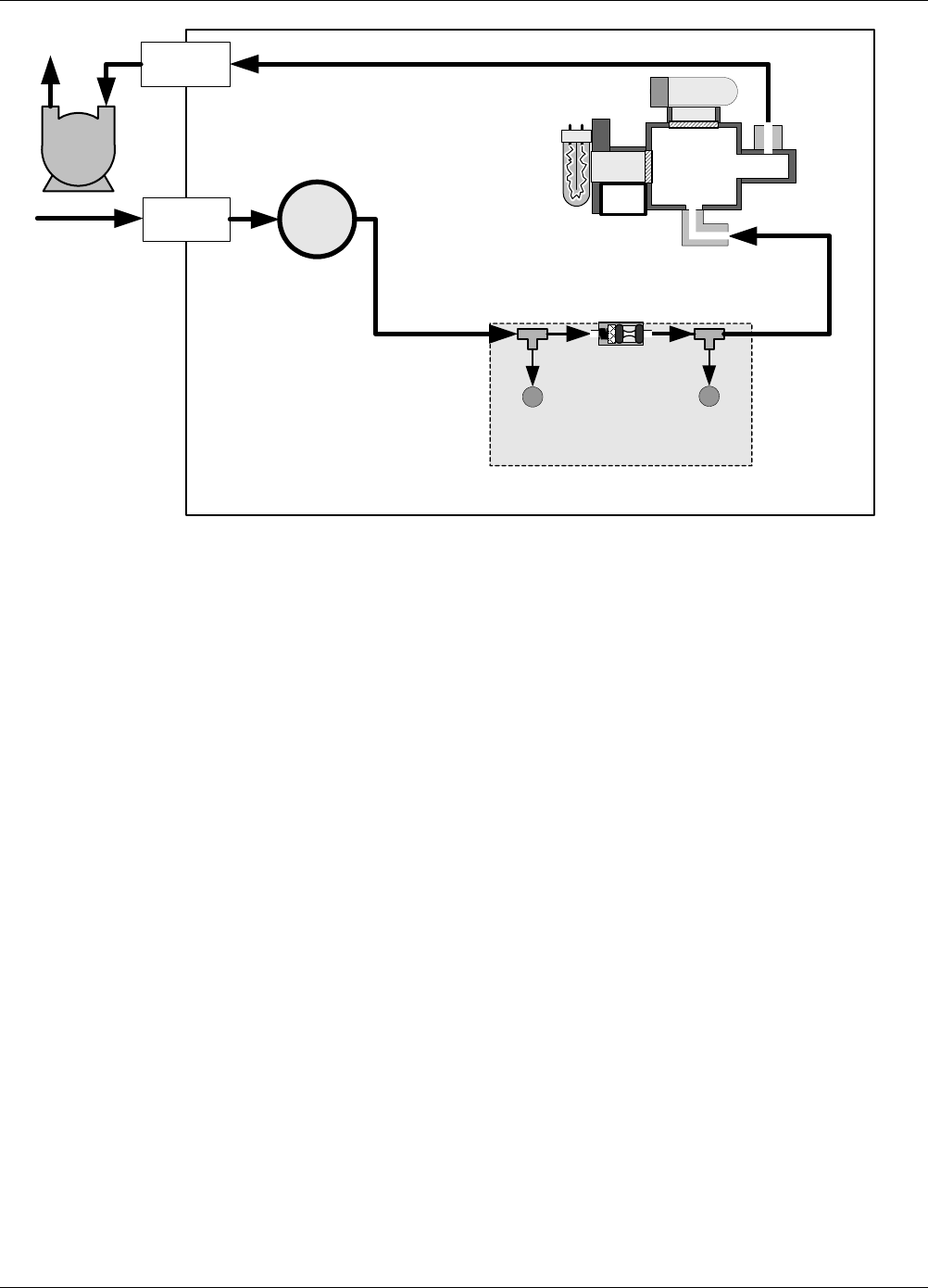
The flow of gas through the T100H UV Fluorescence SO2 Analyzer is created by a small external pump that
pulls air through the instrument. The T100H has no kicker to scrub hydrocarbons from the sample stream.
Typical applications for the T100H do not have hydrocarbons in the sample stream.
07265A DCN6038
Teledyne API - T100H Addendum to T100 Operation Manual Theory Of Operation
41
FLOW CONTROL &
PRESSURE SENSOR
VACUUM
PRESSURE
SENSOR
SAMPLE
PRESSURE
SENSOR
CRITICAL
FLOW ORIFICE
700 cm3/min
@ 7 In-Hg-A
Particulate
Filter
PUMP
EXHAUST
GAS OUTLET
SAMPLE
GAS INLET
INSTRUMENT CHASSIS
UV
LAMP
PMT
REACTION
CELL
UV
Detector
Figure 9-2: Pneumatic Diagram of the T100H – Base Configuration
9.2.2. Pneumatic Sensors
The T100H uses two pneumatic sensors to verify gas flow. These sensors are located on a printed circuit
assembly, called the pneumatic pressure/flow sensor board. This PCA is attached to a manifold containing the
critical flow orifice that sets the instrument flow rate.
9.2.2.1. Sample Pressure Sensor
An absolute pressure transducer plumbed to the input of the analyzer’s sample chamber is used to measure the
pressure of the sample gas before it passes through the critical flow orifice. This is used to validate the critical
flow condition (2:1 pressure ratio) through the instrument’s critical flow orifice.
The actual sample gas pressure measurement is viewable through the analyzer’s front panel display as the test
function PRES
9.2.2.2. Vacuum Pressure Sensor
An absolute pressure transducer measures the pressure on the vacuum side of the critical flow orifice and is
used to measure the sample gas pressure in the reaction cell. If the vacuum pressure is not in the correct
range, a warning will be displayed by the software. Also, if the temperature/pressure compensation (TPC)
feature is turned on, the output of this sensor is also used to supply pressure data for that calculation.
The actual pressure of the gas downstream from the critical flow orifice (including the gas inside the reaction
cell) viewable through the analyzer’s front panel display as the test function VAC
07265A DCN6038

Theory Of Operation Teledyne API - T100H Addendum to T100 Operation Manual)
42
9.2.2.3. Sample Flow Calculation
Unlike the T100, which uses a thermal-mass flow sensor to directly measure the gas flow though the instrument,
the T100H calculates the gas as follows.
The ratio of the two pressures is measured and used to validate critical flow. If the ratio is not correct (<
2:1) the SAMPLE FLOW WARN message is activated. Also, the value of the SAMP FL test function is
set to XXXX.
If the pressure ratio between the two sensors is valid ( 2:1), the instrument calculates the flow based on sample
gas pressure level (PRES) and is viewable via the front panel as the SAMP FL test function.
07265A DCN6038
Teledyne API - T100H Addendum to T100 Operation Manual Theory Of Operation
43
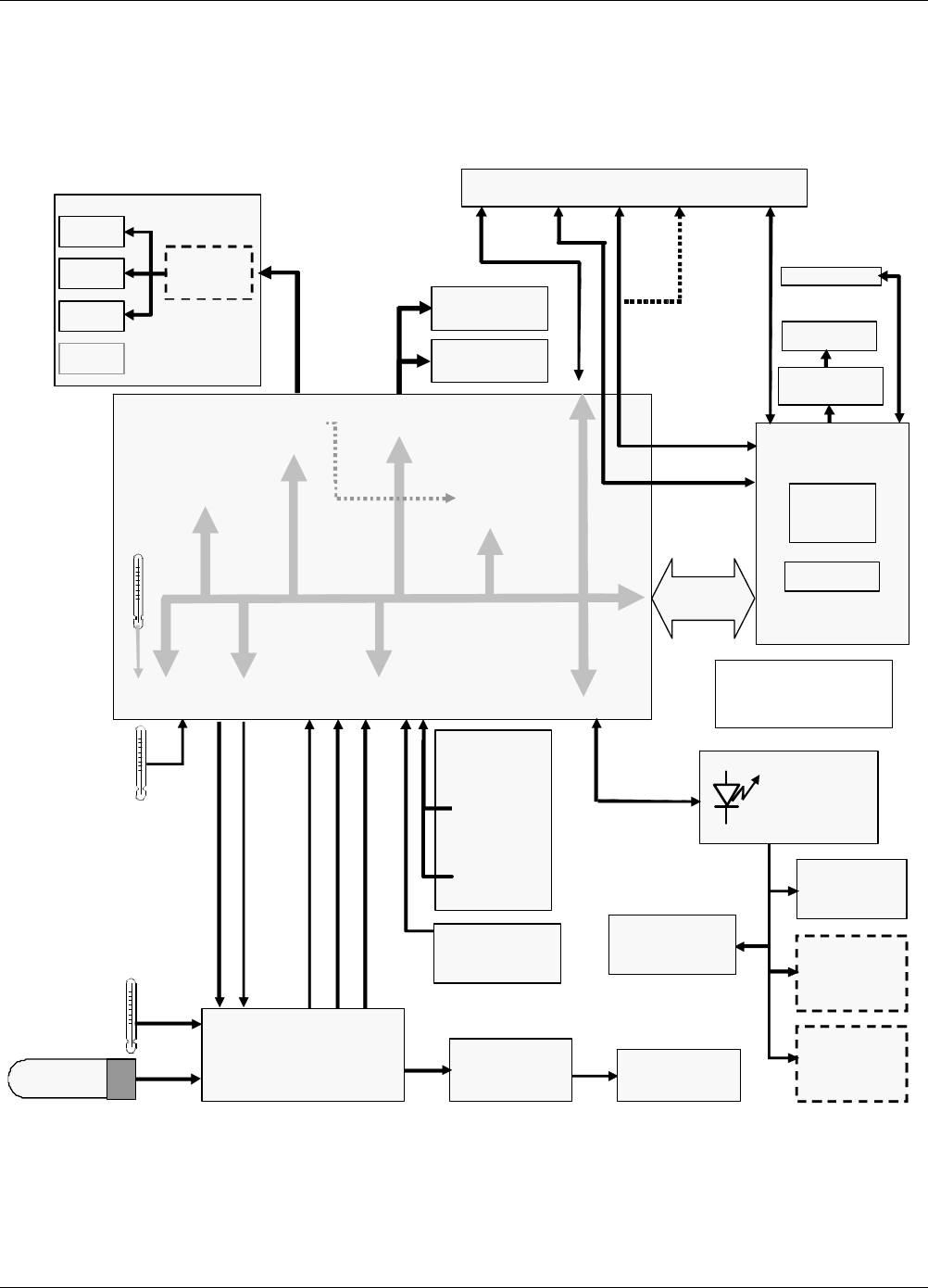
9.3. Electronic Operation
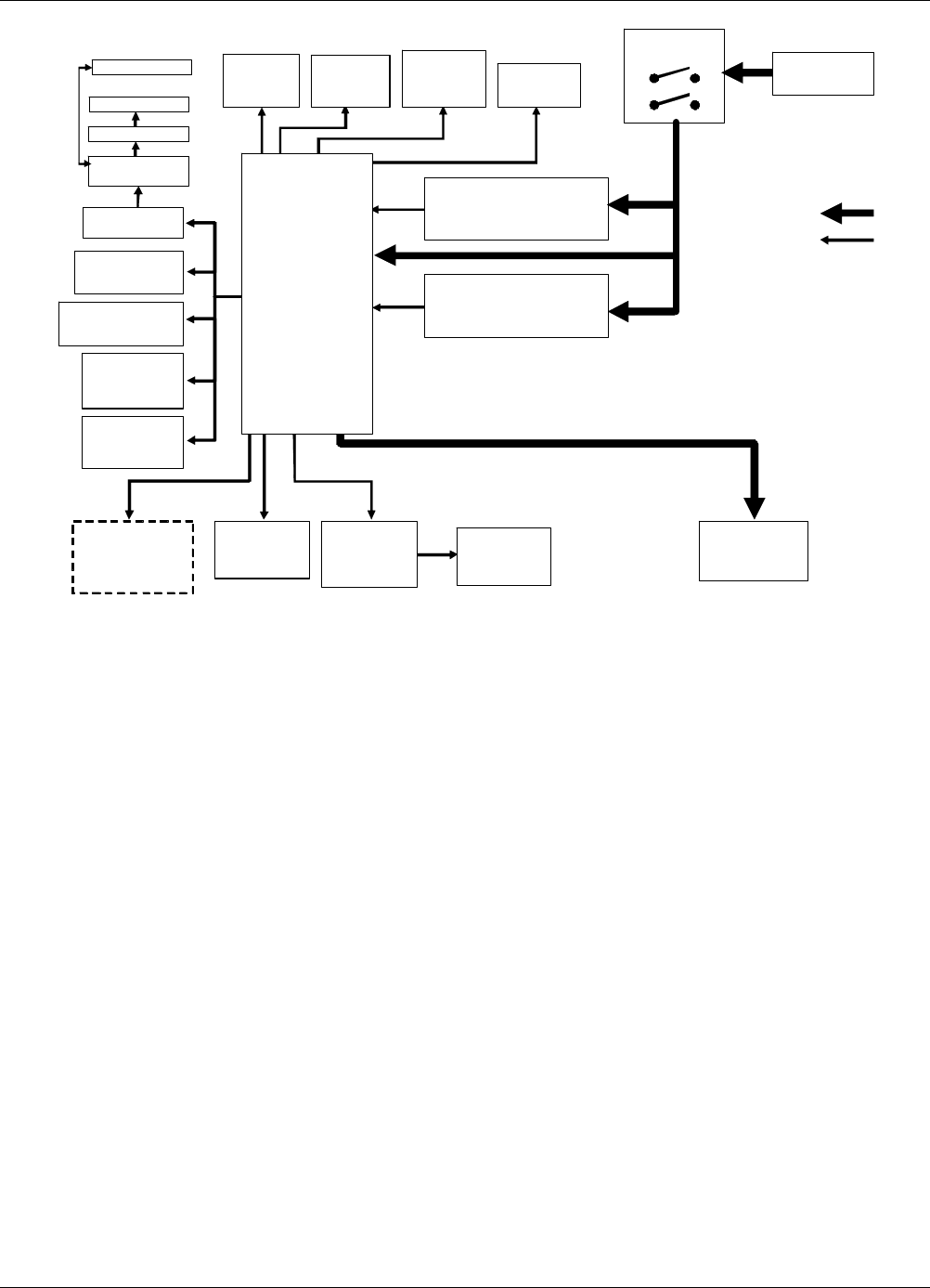
The following figures replace Figures 10-10 & 10-19 of the T100 Manual (P/N 06807). There is no IZS option, a
vacuum pressure sensor replaces the T100’s thermal-mass flow sensor and provision is made for the two
ambient span valve option.
Pneumatic
Sensor
Board
Sample Gas
Pressur e
Sensor
Vacuum
Pressur e
Sensor
Analog Outputs
Status Outputs:
1 – 8
Control Inputs:
1 – 6
PC 104
CPU Card
Disk On
Module
Flash Chip
Power-Up
Circuit
I2C Bus
Analog
Sensor Inputs
Box
Temp
Thermistor
Interface
SAMPLE
CHAMBER
TEMPERATURE
PMT
Temperature
Sensor
A1
A
2
A3
Optional
4-20 mA
MOTHER
BOARD
A/D
Converter
(V/F)
PC 104
Bus
External
Digital I/O)
Analog
Outputs
(D/A)
RELAY
BOARD
I2C Status LED
PUMP
(Externally Powered)
A4
Shutter
control
Sample Cal
Valve
Option
2 Span Pt.
Valve
Option
Reaction Cell
Heater
PMT TEC
PMT
TEC Drive
PCA
Internal
Digital I/O
ELECTRIC TEST CONTROL
OPTIC TEST CONTROL
PMT OUTPUT (PMT DET)
HIGH VOLTAGE POWER SUPPLY LEVEL
PMT TEMPERATURE
PMT
PREAMP PCA
UV Reference
Detector
COM1 (RS–232 ONLY)
COM2 (RS
–
232 or RS
–
485)
Display
Touchscreen
LVDS
transmit ter board
Analog RS232 COM2 USB Ethernet
IN Male Female COM port
USB
or USB
(I2C Bus)
CPU
Status
LE D
Figure 9-3: T100H Electronic Block Diagram
07265A DCN6038
Theory Of Operation Teledyne API - T100H Addendum to T100 Operation Manual)
44
AC POWER
ENTRANCE
ON/OFF
SWITCH
Sample Gas
Pressure
Sensor
Motherboard
CPU
PS 1 (+5 VDC; ±15 VDC)
PS 2 (+12 VDC)
LVDS
Chassis
Cooling
Fan
PMT High
Voltage Supply
Temperature
Sensors
Vacuum
Pressure
Sensor
Sample
Chamber
Heaters
Sample/Cal
for Z/S and 2
Span Point
Valve Options
KEY
AC POWER
DC POWER
UV Source
Lamp
Power
Supply
PMT
Cooling
Fan
PMT
Preamp
UV Source
Lamp
Shutter
RELAY
BOARD
TEC
Control
PCA
UV Source
Lamp
Shutter
Dis
p
la
y
Touchscreen
USB
Figure 9-4: T100H Power Distribution Block Diagram
07265A DCN6038
45
10. TROUBLESHOOTING & REPAIR
For the most part the information contained in Section 11 of the T100 Manual (P/N 06807) is also applicable to
the T100H. There are a few exceptions however.
10.1.1. Fault Diagnosis with Warning Messages
Table 10-1: Warning Messages - Indicated Failures
WARNING
MESSAGE FAULT CONDITION POSSIBLE CAUSES
VACUUM
PRESS
WARN
Gas pressure inside the
reaction cell outside of
warning limits.
If sample pressure is > 10 in-Hg:
o Pneumatic Leak
o Bad Pump Rebuild Pump
o Failed pressure sensor/circuitry
10.1.2. Fault Diagnosis with Test Functions
Table 10-2: Test Functions - Possible Causes for Out-Of-Range Values
TEST
FUNCTION
NOMINAL
VALUE(S) POSSIBLE CAUSE(S)
VAC <9.1 IN-HG-A Incorrect sample gas pressure could be due to: pneumatic leak; malfunctioning valve;
malfunctioning pump; clogged flow orifices; sample inlet overpressure; faulty pressure
sensor
10.2. Subsystem Checkout
10.2.1. Pneumatic Sensor Assembly
The pneumatic sensor assembly of the T100H differs from that of the T100 in that there is no flow sensor.
Instead the assembly includes two pressure sensors located on either side of a critical flow orifice. The T100H
software infers the gas flow rate by mathematically comparing the two pressure readings.
If you suspect that one of the two pressure sensors is failing:
1. Cap the sample inlet.
2. After a few seconds, check the VAC and PRES test functions and verify that:
The VAC value matches the PRES value to within 1 In-Hg-A, and;
Both are less than 10 in-Hg-A (i.e. under vacuum).
3. Uncap the sample inlet and unplug the pump.
4. After a few minutes, the value VAC and PRES should match within 1 In-Hg-A, and read atmospheric
pressure.
If the two sensors do not match or are significantly different from ambient atmospheric pressure, call
Teledyne Instruments customer service.
07265A DCN6038
TROUBLESHOOTING & REPAIR Teledyne API - T100H Addendum to T100 Operation Manual)
46
10.3. Repair Procedures
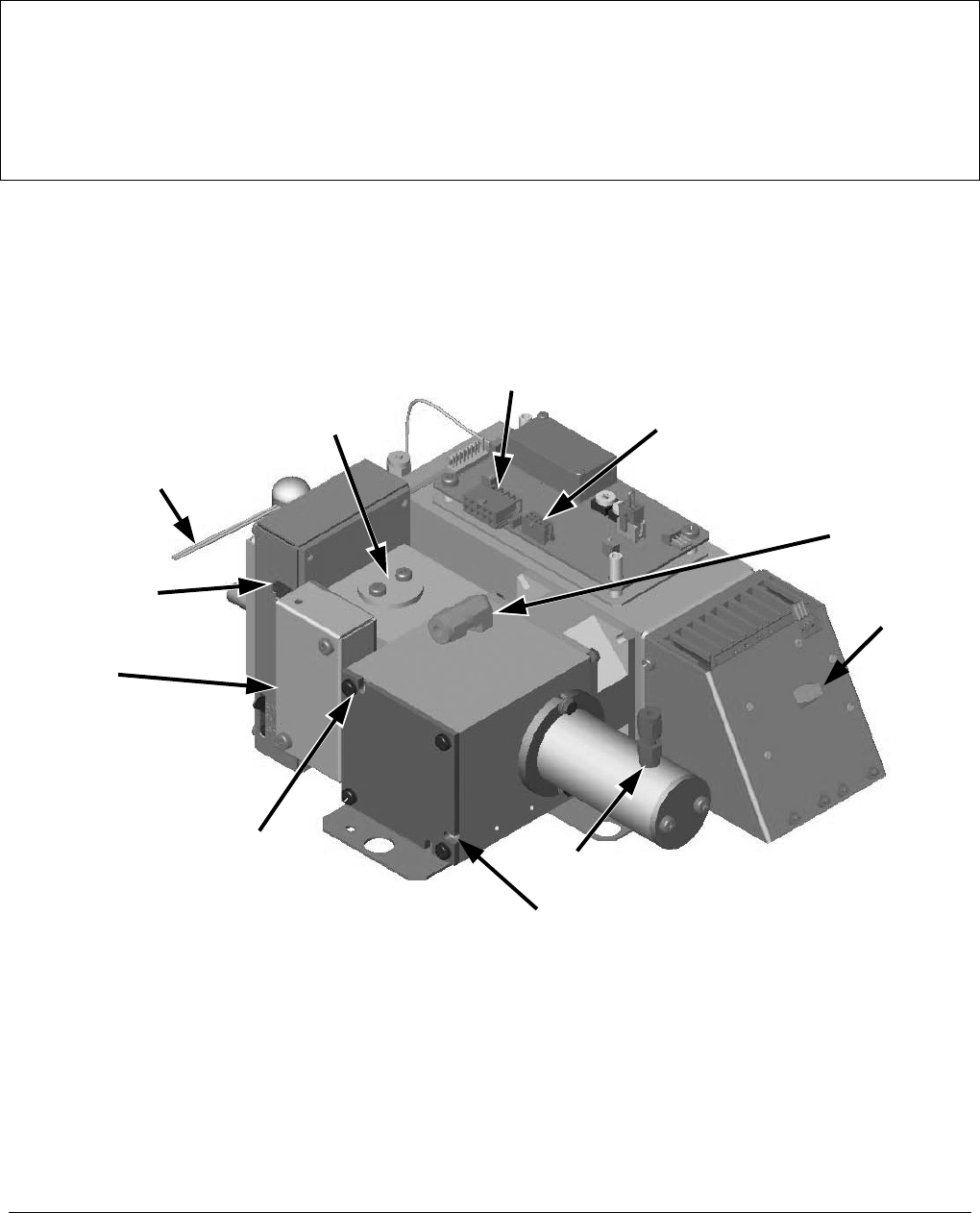
10.3.1. Repairing the Sample Gas Flow Control Assembly
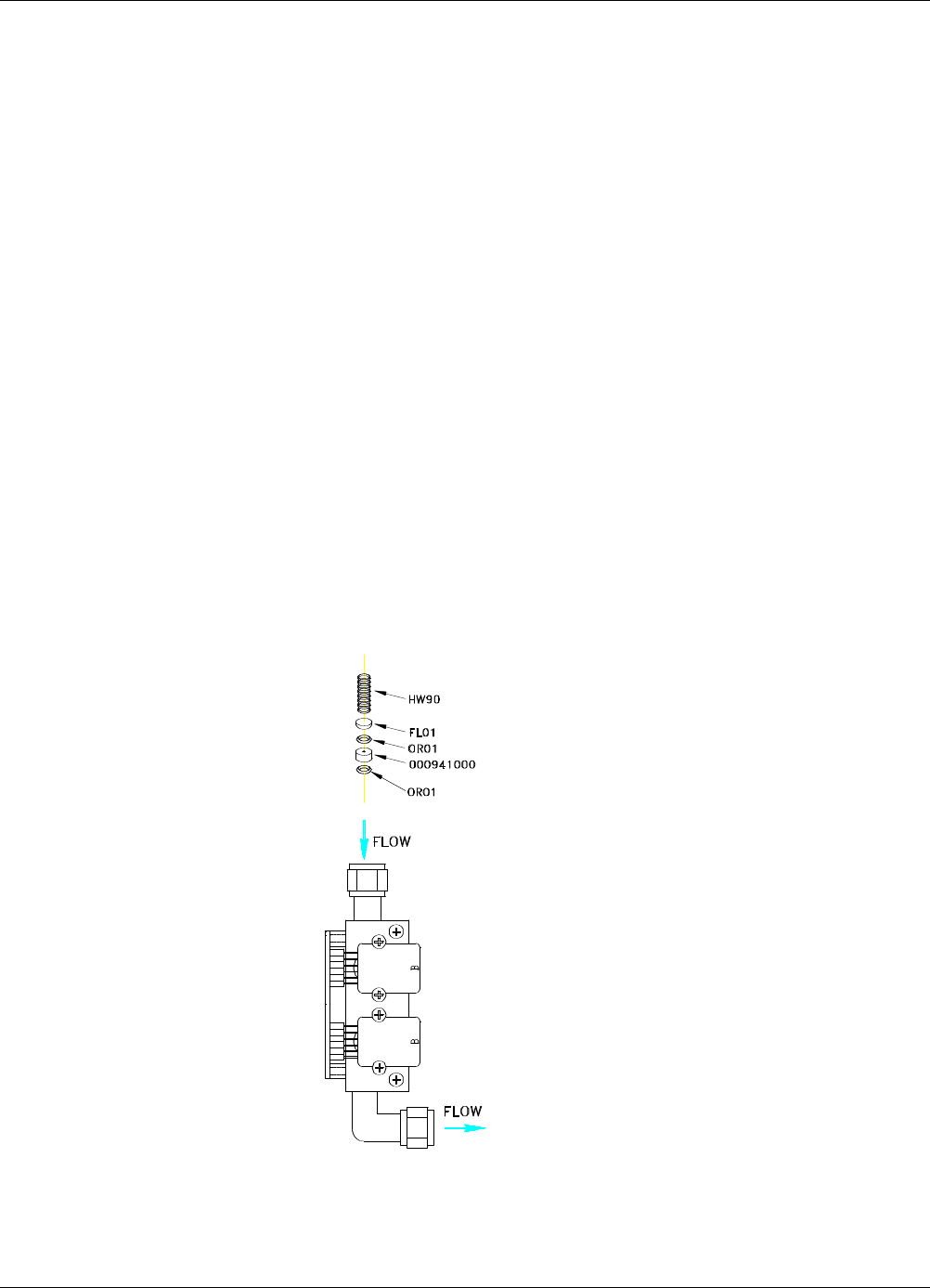
The Critical Flow Orifice is part of the pressure sensor and flow control assembly. The jewel orifice is protected
by a sintered filter, so it is unusual for the orifice to need replacing, but it is possible for the sintered filter and o-
rings to need replacing. See the Spare Parts list in Appendix B for part numbers and kits.
To replace the filter and/or orifice
1. Turn off Power to the analyzer.
2. Locate the pressure sensor / flow control assembly.
3. Disconnect the signal cable and pneumatic fittings.
4. Remove the assembly from the optical bench by removing the 2 screws at each end of the assembly.
5. The inlet end of the assembly is located at the end with the straight pneumatic fitting. Remove the fitting and
the components as shown in the exploded view.
6. Replace the o-rings (p/n:OR01) and the sintered filter (p/n:FL01).
7. if you are replacing the Critical Flow Orifice itself (p/n:00094100), make sure that the side with the colored
window (usually RED) is facing upstream to the flow gas flow.
8. Re-assemble in reverse order. See the Spares List in Appendix B for part numbers.
9. After re-connecting the power and pneumatic lines, flow check the instrument as described in the Section
1.5.2 of the T100 Operator’s Manual.
Figure 10-1: Flow Control Assembly
07265A DCN6038
47
10.3.2. Sensor Module Repair & Cleaning
NOTE:
After any repair or service has been performed on the sensor module, the T100H should be allowed to
warm up for 60 minutes.
Always perform a perform a leak check (See Section 11.5.1) and calibrate the analyzer (see Section 7)
before placing it back in service.
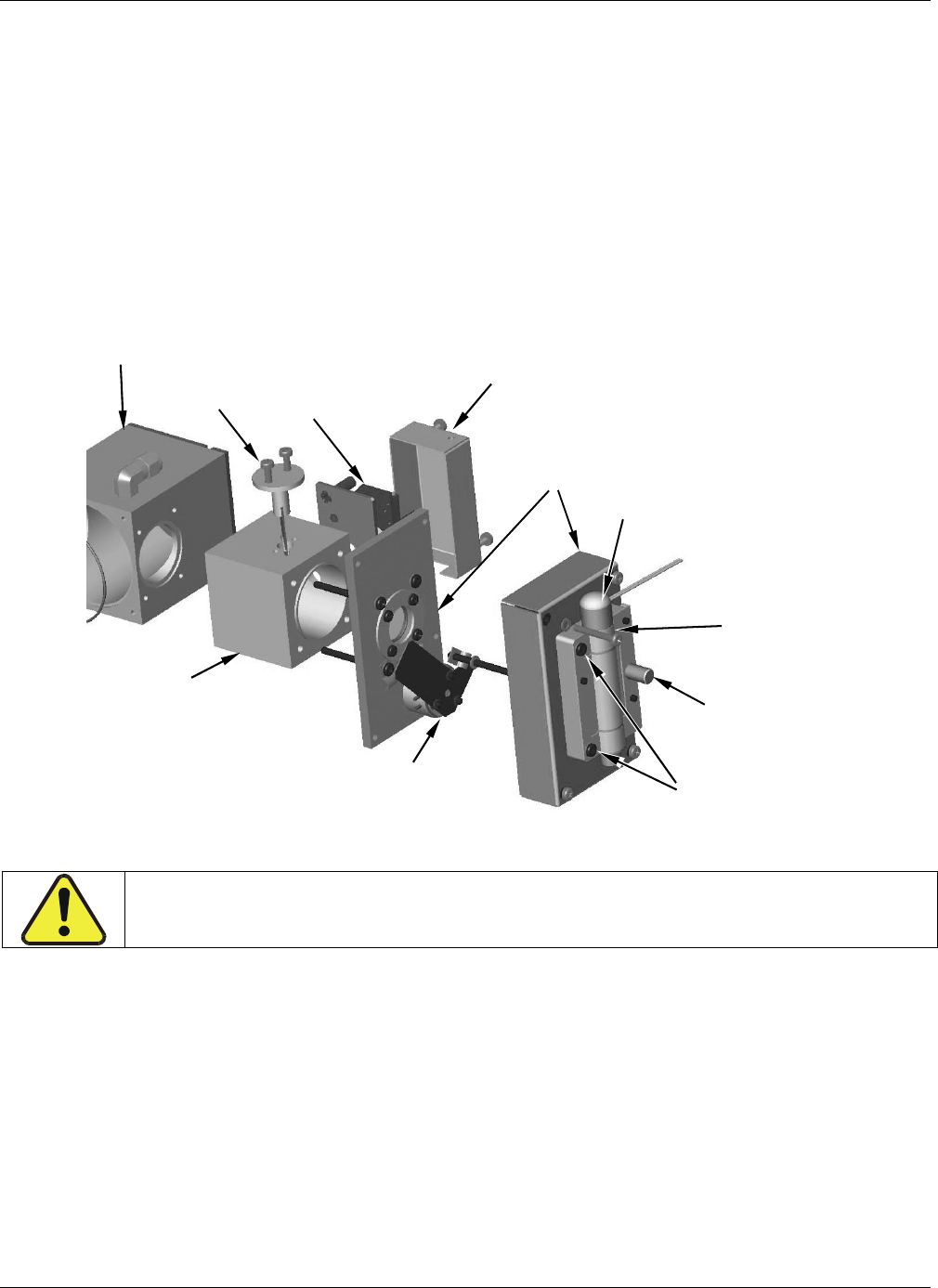
The most significant difference between the T100 sensor module and the T100H sensor module is the location
of the reference detector. Therefore most of the procedures described in Section 11.6.3 apply to the T100H as
well.
Exceptions are noted below:
Gas Inlet
fitting
TEC Power
Cable
Connector
UV Detector
Housing
Shutter Cabling
Exits here
UV Lamp Power
Suppl
y
Wirin
g
UV Beam
Splitter
Thermistor
Wiring exits here
Heater Wiring
exits here
J5
J6
Gas Outlet
fitting
Figure 10-2: Sensor Module Wiring and Pneumatic Fittings
07265A DCN6038
TROUBLESHOOTING & REPAIR Teledyne API - T100H Addendum to T100 Operation Manual)
48
10.3.2.1. Adjusting the UV Lamp (Peaking the Lamp)
There are two ways in which ambient conditions can effect the UV Lamp output and therefore the accuracy of the
SO2 concentration measurement: Lamp Aging and Lamp Positioning.
Lamp Aging - Over a period of months, the UV energy will show a downward trend, usually 30% in the first 90
days, and then a slower rate, until the end of useful life of the lamp. Periodically running the UV lamp calibration
routine (see Section 6.9.7) will compensate for this until the lamp output becomes too low to function at all.
Lamp Positioning – The UV output level of the lamp is not even across the entire length of the lamp. Some
portions of the lamp shine slightly more brightly than others. At the factory the position of the UV lamp is
adjusted to optimize the amount of UV light shining through the UV filter/lens and into the reaction cell. Changes
to the physical alignment of the lamp can affect the analyzers ability to accurately measure SO2.
UV Lamp Bracket
Mounting Screws
Shutter
Housing
Shutter Assy
UV Filter Retainer
& Lens Housing
UV Lamp Power
Supply Wires
Thumb
Screw
DO NOT
use Lamp Cap to
adjust Lamp
position
Reaction
Cell
Adjust Lamp
Position by
grasping lamp
body ONLY
Beam
Splitter
Reference
Detector
Housing
Reference
Detector
PCA
Figure 10-3: Shutter Assembly - Exploded View
CAUTION:
ALWAYS wear UV-Protective, Safety Glasses when working with the UV Lamp Assembly
1. Set the analyzer display to show the signal I/O function, UVLAMP_SIGNAL (see Section 11.1.3).
UVLAMP_SIGNAL is function 33.
2. Slightly loosen the large brass thumbscrew located on the shutter housing (see Figure 10-3) so that the
lamp can be moved.
3. While watching the UVLAMP_SIGNAL reading, slowly rotate the lamp or move it back and forth vertically
until the UVLAMP_SIGNAL reading is at its maximum.
DO NOT grasp the UV lamp by its cap when changing its position (see Figure 10-3).
Always grasp the main body of the lamp.
4. Compare the UVLAMP_SIGNAL reading to the information in Table 10-3 and follow the instructions there.
07265A DCN6038
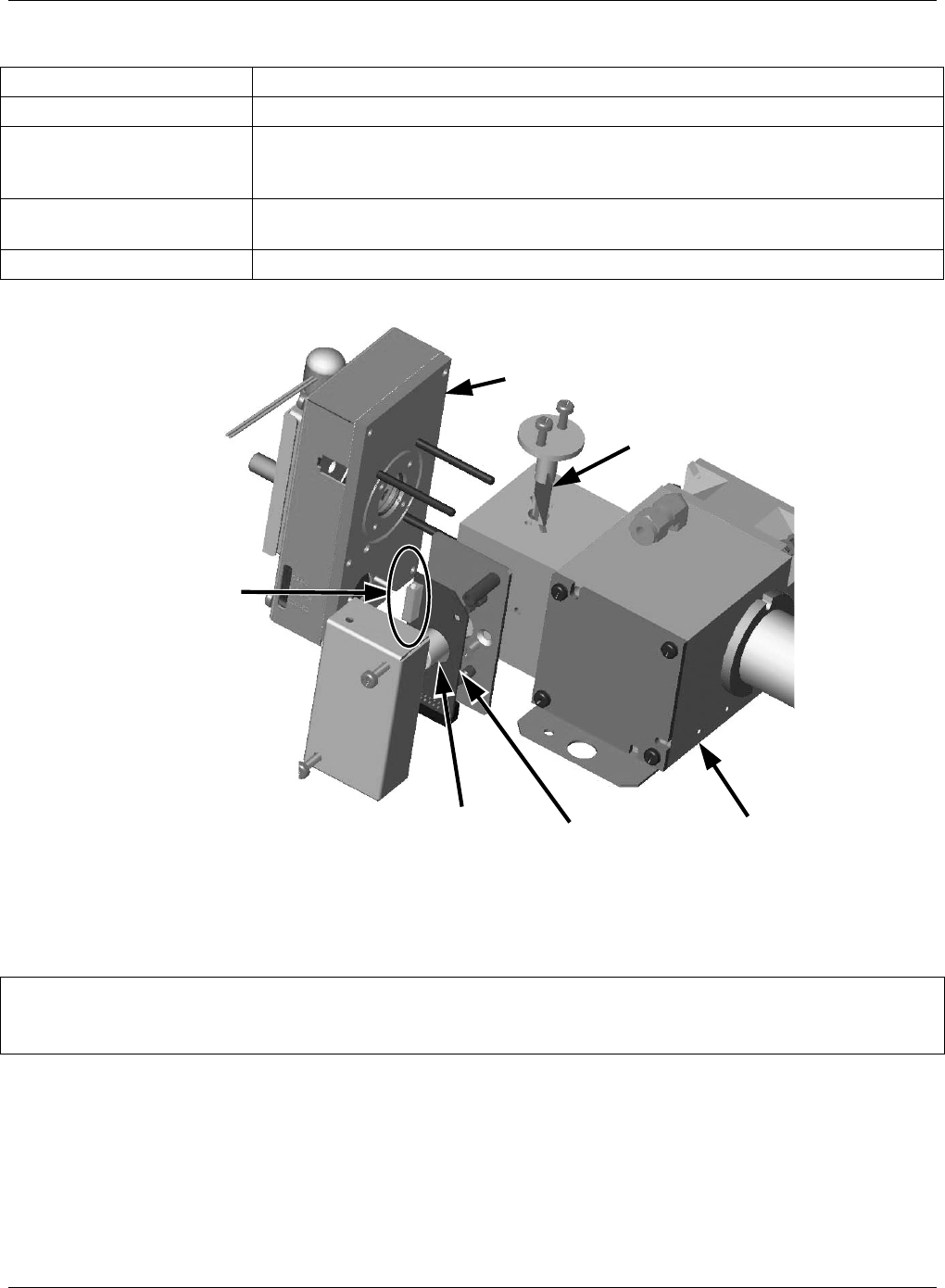
Teledyne API - T100H Addendum to T100 Operation Manual TROUBLESHOOTING & REPAIR
49
Table 10-3: Example of HVPS Power Supply Outputs
UVLAMP_SIGNAL ACTION TO BE TAKEN
3500mV±200mV. No Action Required
> 4900mV at any time.
Adjust the UV reference detector potentiometer (see Figure 10-4) until
UVLAMP_SIGNAL reads approximately 3600mV before continuing to adjust the
lamp position.
>4500mV or < 1000mV Adjust the UV reference detector potentiometer (see Figure 10-4) until
UVLAMP_SIGNAL reads as close to 3500mV as possible.
.< 600mV Replace the lamp.
UV Reference
Detector
Adjustment
Pot
UV
Reference
Detector
PCA
Beam
Splitter
Reaction
Cell
Shutter
Housing
UV
Reference
Detector
Figure 10-4: Location of UV Reference Detector Potentiometer
5. Finger tighten the thumbscrew.
NOTE:
DO NOT over-tighten the thumbscrew.
07265A DCN6038
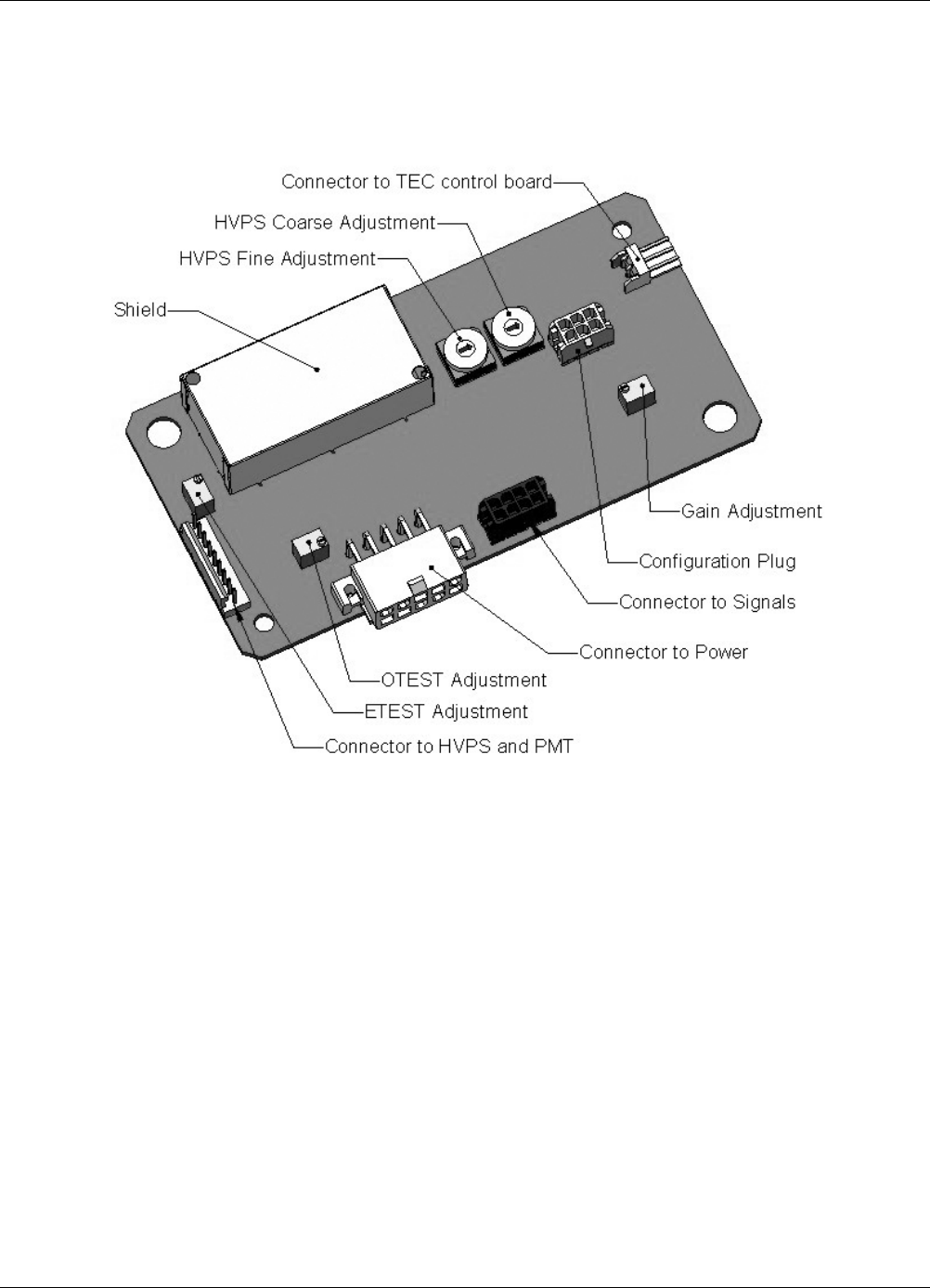
TROUBLESHOOTING & REPAIR Teledyne API - T100H Addendum to T100 Operation Manual)
50
10.3.2.2. PMT Hardware Calibration (FACTORY CAL)
The sensor module hardware calibration adjusts the slope of the PMT output when the instrument’s slope and
offset values are outside of the acceptable range and all other more obvious causes for this problem have been
eliminated.
Figure 10-5: Pre-Amplifier Board Layout
1. Set the instrument reporting range type to SNGL (see Section 6.7.4 of the T100 Manual)
2. Perform a zero–point calibration using zero air (see Section 7 of the T100 Manual).
3. Let the instrument stabilize by allowing it to run for one hour.
4. Adjust the UV Lamp. (See Section 10.3.2.1 of this addendum)
5. Perform a LAMP CALIBRATION procedure (see Section 6.9.7 of the T100 Manual).
6. Locate the Preamp board (see Figure 3-4 of this addendum).
7. Locate the Following Components On the Preamp board (see Figure 10-5 of this addendum):
HVPS coarse adjustment switch (Range 0-9, then A-F)
HVPS fine adjustment switch (Range 0-9, then A-F)
Gain adjustment potentiometer (Full scale is 10 to 12 turns).
07265A DCN6038
Teledyne API - T100H Addendum to T100 Operation Manual TROUBLESHOOTING & REPAIR
51
8. Set the HVPS coarse adjustment to its minimum setting (0).
9. Set the HVPS fine adjustment switch to its maximum setting (F).
10. Turn the gain adjustment potentiometer clockwise to its maximum setting.
11. Set the front panel display to show STABIL (see Section 6.2.1 of the T100 Manual)
12. Feed span gas into the analyzer.
13. Wait until the STABIL value is below 0.5 ppm,
NOTE
Use a span gas equal to 80% of the reporting range.
Example: for a reporting range of 200 ppm, use a span gas of 160 ppm.
14. Scroll to the OFFSET function and record the value.
15. Scroll to the NORM PMT value.
NOTE
Do not overload the PMT by accidentally setting both adjustment switches to their maximum setting.
This can cause permanent damage to the PMT.
16. Determine the target NORM PMT value according to the following formulas.
If the reporting range is set for 500 ppm (the instrument will be using the 500 ppm physical range):
Target NORM PMT = (8 x span gas concentration) + OFFSET
If the reporting range is set for 5,001 PPB (the instrument will be using the 5,500 ppm physical range):
Target NORM PMT = (0.8 x span gas concentration) + OFFSET
EXAMPLE: If the OFFSET is 33 mV, the Reporting Range is 1000 ppm, the span gas should be 800
ppm SO2 and the calculation would be:
Target NORM PMT = (0.8 x 800) + 33 mV
Target NORM PMT =
640 + 33 mV
Target NORM PMT =
673 mV
17. Set the HVPS coarse adjustment switch to the lowest setting that will give you more than the
target NORM PMT signal from Step 16.
The coarse adjustment typically increments the NORM PMT signal in 100-300 mV steps.
18. Adjust the HVPS fine adjustment such that the NORM PMT value is at or just above the target NORM PMT
signal from Step 16.
19. Continue adjusting the both the coarse and fine switches until NORM PMT is as close to (but not below) the
target NORM PMT value from Step 16.
07265A DCN6038

TROUBLESHOOTING & REPAIR Teledyne API - T100H Addendum to T100 Operation Manual)
52
20. Adjust gain adjustment potentiometer until the NORM PMT value is ±10 mV of the target level from Step 16.
21. Perform span calibration (see Section 7 of the T100 Manual)
22. Scroll to the SLOPE function and record the value.
23. If the value of the SLOPE is between 0.900 and 1.100 the PMT Hardware calibration is complete.
24. If the value of the SLOPE is less than 0.900 or greater than 1.100:
1. Multiply the slope value from step 22 by the norm PMT value from step 19.
2. Repeat steps 17 through 24 using this new value for NORM PMT.
10.4. Technical Assistance
If this manual and its trouble-shooting / repair sections do not solve your problems, technical assistance may be
obtained from Teledyne Instruments, Customer Service, 9480 Carroll Park Drive, San Diego, CA 92121. Phone:
+1 858 657 9800 or 1-800 324 5190. Fax: +1 858 657 9816. Email: api-customerservice@teledyne.com.
Before you contact customer service, fill out the problem report form in Appendix C, which is also available
online for electronic submission at http://www.teledyne-api.com/forms/index.asp.
07265A DCN6038

Models T100H, 100EH Addendum APPENDIX A - Version Specific Software Documentation (05244B DCN6038)
A-1
APPENDIX A - Version Specific Software Documentation
APPENDIX A-1: Models T100H, 100EH Software Menu Trees
NOTE
As the menu tree structure for the T100H and 100EH menu tree structure varies from
that of the T100 and M100E, they are included in this appendix. Please refer to
Appendix A of the “parent” manual (either the T100 or the 100EH) for all other software
documentation.
07265A DCN6038

APPENDIX A - Version Specific Software Documentation(05244B DCN6038) Model 100EH Instruction Manual
A-2
07265A DCN6038
Models T100H, 100EH Addendum APPENDIX A - Version Specific Software Documentation (05244B DCN6038)
A-3
APPENDIX A-1: Software Menu Trees, Rev C.0
ZERO
SPAN
CONC
SAMPLE
<TST TST>
RANGE
STABIL
VAC
PRES
SAMP FL
PMT
NORM PMT
UV LAMP
LAMP RATIO
STR. LGT
DARK PMT
DARK LMP
SLOPE
OFFSET
HVPS
RCELL TEMP
BOX TEMP
PMT TEMP
TEST
TIME
Only appear if
reporting range
is set for
AUTO range
mode.
LOW
HIGH
CAL
MSG1,2
TEST1
CLR1,3
TEST FUNCTIONS
Viewable by user while
instrument is in
SAMPLE Mode
1 Only appears when warning messages are activated
2 Press this key to cycle through list of active warning
messages.
3 Press this key to clear/erase the warning message
currently displayed
COMM
DIAG
SETUP
CFG
DAS RANG
PASS
CLK
MORE
VARS
(Secondary Setup Menu)
(Primary Setup Menu)
ENTER SETUP PASS: 818
Figure A-1: Basic Sample Display Menu
07265A DCN6038
APPENDIX A - Version Specific Software Documentation (05244B DCN6038) Model 100EH Instruction Manual
A-4
LOW
HIGH
ZERO
SPAN
CONC
SAMPLE
<TST TST>
SETUP
COMM
DIAG
VARS
(Secondary Setup Menu)
CFG DAS
RANG
PASS
CLK
MORE
(Primary Setup Menu)
Only appear if
reporting range
is set for
AUTO range
mode.
LOW
HIGH
ZERO
LOW HIGH
SPAN CONC
MSG1,2
CLR1,3
CAL
CALZ
CALS
TEST1
1 Only appears when warning messages are activated
2 Press this key to cycle through list of active warning
messages.
3 Press this key to clear/erase the warning message
currently displayed
RANGE
STABIL
VAC
PRES
SAMP FL
PMT
NORM PMT
UV LAMP
LAMP RATIO
STR. LGT
DRK PMT
DRK LMP
SLOPE
OFFSET
HVPS
RCELL TEMP
BOX TEMP
PMT TEMP
TEST
TIME TEST FUNCTIONS
Viewable by user while
instrument is in SAMPLE Mode
ENTER SETUP PASS: 818
Figure A-2: Sample Display Menu - Z/S Valve Option installed
07265A DCN6038
Models T100H, 100EH Addendum APPENDIX A - Version Specific Software Documentation (05244B DCN6038)
A-5
CFG
MODEL NAME
SERIAL NUMBER
SOFTWARE
REVISION
LIBRARY REVISION
iCHIP SOFTWARE
REVISION1
HESSEN PROTOCOL
REVISION1
ACTIVE SPECIAL
SOFTWARE
OPTIONS1
CPU TYPE
DATE FACTORY
CONFIGURATION
SAVED
PREV NEXT
1 Only appears if a applicable
option/feature is installed and
activated.
2 Only appears whenever the
currently displayed sequence
is not set for DISABLED.
3 Only appears when reporting
range is set to AUTO range
mode.
CLK
PASS
MORE
TIME
DATE
ON
OFF
SNGL
IND AUTO
MODE SET
UNIT
RNGE
DAS
Go To iDAS
MENU TREE
(Fig. A-8)
Go To
SECONDARY SETUP MENU
(Fig. A-5)
<SET
SET>
ACAL1
PREV
NEXT
SEQ 1)
SEQ 2)
SEQ 3)
PREV
NEXT
DISABLED
ZERO
Z
ERO/SPA
N
SPA
N
TIMER ENABL
E
STARTING DATE
STARTING TIME
DELTA DAYS
DELTA TIME
DURATION
CALIBRATE
RANGE TO CAL3
MODE
ENTR
SET2
ENTR
EDIT
LOW3
HIGH3
PPM
UGM
SETUP
ENTER SETUP PASS: 818
Figure A-3: Primary Setup Menu (Except iDAS)
07265A DCN6038
APPENDIX A - Version Specific Software Documentation (05244B DCN6038) Model 100EH Instruction Manual
A-6
NAME
EVENT
PARAMETERS
REPORT PERIOD
NUMBER OF RECORDS
RS-232 REPORT
CHANNEL ENABLE
CAL. HOLD
CFG ACAL1
1 Only appears if Z/S valve is installed.
SAMPLE
CLK
PASS
MORE
RNGE
DAS
VIEW EDIT
CONC
PNUMTC
CALDAT
VIEW
DEL
EDIT
PRNT
INS
SET>
EDIT
PRNT
<SET
Cycles through
available trigger
events.
Cycles through
lists of
parameters
chosen for this
iDAS channel
Selects data point to view.
PREV
NEXT
NX10
PV10
<PRM PRM>
DEL
EDIT
PRNT INS
Cycles through
already active
parameters.
SET>
EDIT PRNT
<SET
SAMPLE MODE
PRECISION
Cycles through available/active
p
arameters.
AVG MIN
MAX
INST
OFF
ON
Creates/changes name.
Selects max
no. of records
for this channel
PREV NEXT
PREV NEXT
PREV NEXT
PREV NEXT
PREV NEXT
PARAMETER
YES NO
YES NO
YES NO
YES NO
Sets the
amount of time
between each
report.
ENTER SETUP PASS: 818
CONC
PNUMTC
CALDAT
Figure A-4: Primary Setup Menu (iDAS)
07265A DCN6038
Models T100H, 100EH Addendum APPENDIX A - Version Specific Software Documentation (05244B DCN6038)
A-7
QUIET
COMPUTER
SECURITY
HESSEN PROTOCOL
E, 7, 1
RS-485
MULTIDROP PROTOCOL
ENABLE MODEM
ERROR CHECKING2
XON/XOFF HANDSHAKE2
HARDWARE HANDSHAKE
HARDWARE FIFO2
COMMAND PROMPT
CFG ACAL1
SAMPLE
CLK
PASS
RNGE
DAS
MORE
COMM
VARS
DIAG
Go To
DIAG MENU TREE
(Fig A-8)
1 Only appears if Z/S valve option is installed.
2 Only appears when the ENABLE INTERNET mode is
enabled for either COM1 or COM2.
INET3
2
GTWY
IP SNET START STOP
COM1
COM2
BAUD RATE
PREV NEXT
MODE
<SET SET>
EDIT
OFF
ON
PREV NEXT
300
1200
2400
4800
9600
19200
38400
57760
115200
TEST
TEST PORT
Password required
PREV
NEXT JUMP
EDIT
PRINT
DAS_HOLD_OFF
TPC_ENABLE
RCELL_SET
DYN_ZERO
DYN_SPAN
CONC_PRECISION
CLOCK_ADJ
ID
ENTER SETUP PASS: 818
Figure A-5: Secondary Setup Menu (COMM & VARS)
07265A DCN6038
APPENDIX A - Version Specific Software Documentation (05244B DCN6038) Model 100EH Instruction Manual
A-8
INSTRUMENT IP5
GATEWAY IP5
SUBNET MASK5
TCP PORT3
DHCP
INSTRUMENT IP
GATEWAY IP
SUBNET MASK
TCP PORT3
HOSTNAME4
CFG ACAL1
SETUP
CLK
PASS
RNGE
DAS
MORE
COMM
VARS
DIAG
Go To
DIAG MENU TREE
(Fig A-8)
1 Only appears if a valve option is installed.
2 Only appears when the Ethernet card (option 63) is installed.
3 Although TCP PORT is editable regardless of the DHCP state, do not change the setting for this property unless
instructed to by Teledyne Instruments Customer Service personnel.
4 HOST NAME is only editable when DHCP is ON.
5 INSTRUMENT IP, GATEWAY IP & SUBNET MASK are only editable when DHCP is OFF.
COM1
PREV
NEXT JUMP
EDIT
PRINT
DAS_HOLD_OFF
TPC_ENABLE
RCELL_SET
DYN_ZERO
DYN_SPAN
CONC_PRECISION
CLOCK_ADJ
ID
ENTER SETUP PASS: 818
<SET SET>
INET2
COMM - VARS
MENU TREE
(Fig A-5)
EDIT
ON
OFF
EDIT
Figure A-6: Secondary Setup Menu (COMM Menu with Ethernet Card)
07265A DCN6038
Models T100H, 100EH Addendum APPENDIX A - Version Specific Software Documentation (05244B DCN6038)
A-9
.
YES NO
PMT DET WARNING
UV LAMP WARNING
DARK CAL WARNING
IZS TEMP WARNING
BOX TEMP WARNING
PMT TEMP WARNING
RCELL TEMP WARNING
SAMPLE FLOW WARNING
SAMPLE PRESS WARNING
VACUUM PRES WARNING
HVPS WARNING
SYSTEN RESET
REAR BOARD NOT DET
RELAY BOARD
FRONT PANEL
ANALOG CAL WARNING
CANNOT DYN ZERO
CANNOT DYN SPAN
INVALID CONC
ZERO CAL
LOW SPAN CAL
SPAN CAL
MANUAL MODE
PPB
PPM
UGM
MGM
TYPE 1
TYPE 2
CFG ACAL1
SETUP
CLK
PASS
RNGE
DAS
MORE
COMM
VARS
See
Fi
g
A-8
1 Only appears if a valve is installed.
2 Only appears when the HESSEN mode is enabled for
either COM1 or COM2.
COM1
COM2
See Table 6-27 for
Flag Assignments
See
Fi
g
A-5
ID
<SET SET>
HESN2
RESPONSE MODE
GAS LIST
STATUS FLAGS VARIATION
EDIT
BCC TEXT
CMD
DEL
EDIT
PRNT
INS PREV NEXT
SO2, 110, REPORTED
DIAG
ENTER SETUP PASS: 818
See
Fi
g
A-5
GAS TYPE
GAS ID
REPORTED
Select from list of
available gases
(see Section 6.12.4.6).
ON
OFF
Set Hessen ID number for
selected gas type
(see Section 6.12.4.6).
Figure A-7: Secondary Setup Menu - HESSEN Submenu
07265A DCN6038
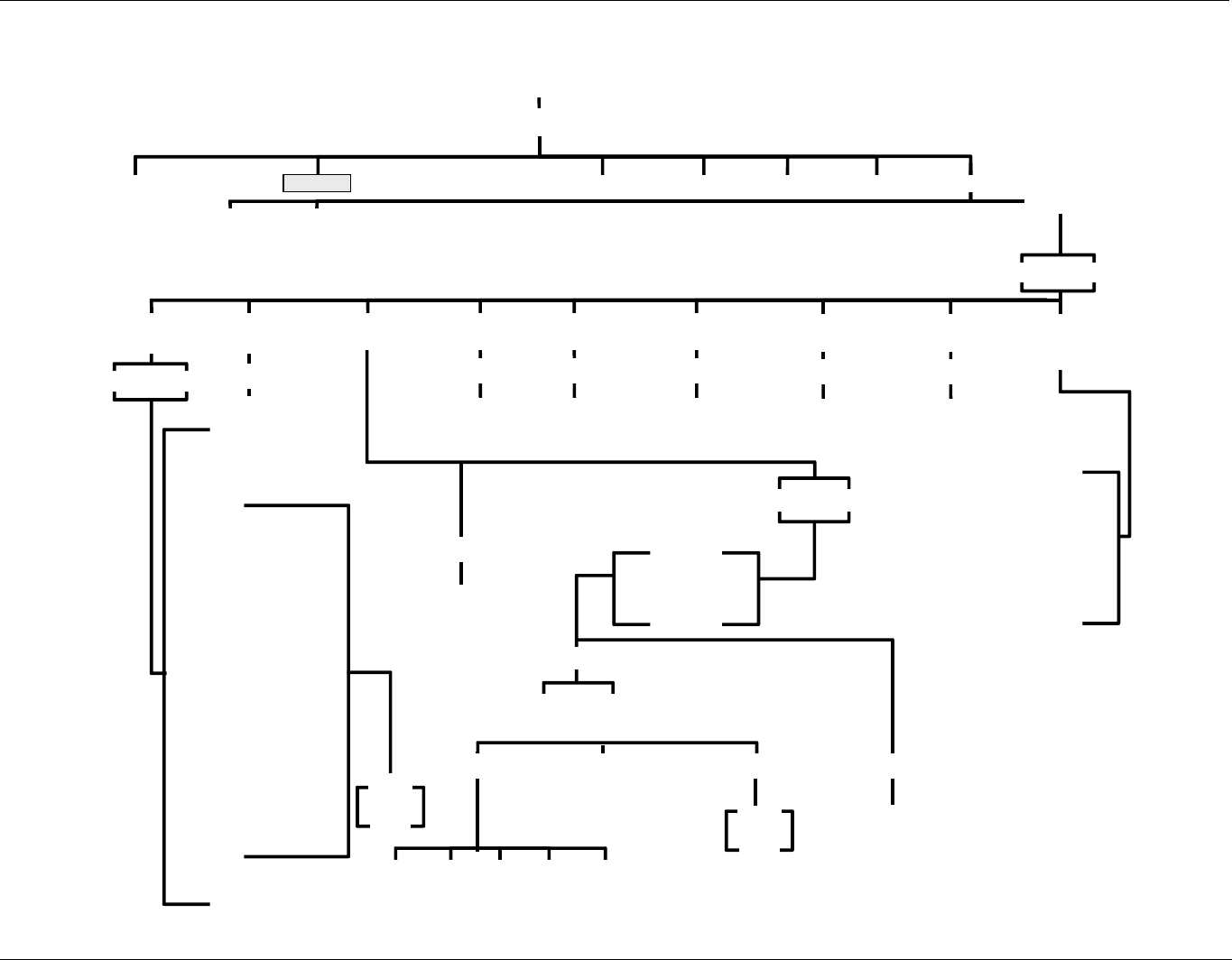
APPENDIX A - Version Specific Software Documentation (05244B DCN6038) Model 100EH Instruction Manual
A-10
5) SAMPLE LED
6) CAL LED
7) FAULT LED
8) AUDIBLE BEEPER
9) ELEC TEST
10) OPTIC TEST
11) PREAMP RANGE HIGH
12) ST SYSTEM OK
13) ST CONC VALID
14) ST HIGH RANGE
15) ST ZERO CAL
16) ST SPAN CAL
17) ST DIAG MODE
18) ST LOW SPAN CAL
19) ST LAMP ALARM
20) ST DARK CAL ALARM
21) ST FLOW ALARM
22) ST PRESS ALARM
23) SR TEMP ALARM
24) ST HVPS ALARM
25) ST SYSTEM OK2
26) RELAY WATCHDOG
27) RCELL HEATER
28) CAL VALVE
29) SPAN VALVE
30) LOW SPAN VALVE
31) ZERO VALVE
32) DARK SHUTTER
33 INTERNAL ANALOG
VOLTAGE SIGNALS
54 (see Appendix A)
CFG ACAL1 CL
K
PASS
RNGE
DAS
MORE
COMM VARS
ANALOG
OUTPUT LAMP
CALIBRATION
0) EXT ZERO CAL
1) EXT SPAN CAL
2) EXT LOW SPAN CAL
3) MAINT MODE
4) LANG2 SELECT
SIGNAL
I/O
OFF
ON
ENT
R
Start step Test
SAMPLE
DIAG
PREV NEXT
NONE
PMT READING
UV READING
VACUUM PRESSURE
SAMPLE PRESSURE
SAMPLE FLOW
RCELL TEMP
CHASSIS TEMP
PMT TEMP
HVPS VOLTAGE
PREV NEXT ENT
R
ENT
R
OPTIC
TEST ELECTRICAL
TEST
Starts Test
Starts Test
AOUTS CALIBRATED
CONC OUT 1
CONC OUT 2
TEST OUTPUT
CAL
RANGE
REC OFFSET
AUTO CAL
CALIBRATED
0.1V
1V
5V
10V
CURR
SET>
EDIT
CAL
OFF
ON
SET>
<SET
<SET
ANALOG I/O
CONFIGURATION
ENT
R
Starts Test
PRESSURE
CALIBRATION
ENT
R
Starts Test
ENT
R
Starts Test
TEST
CHANNEL
OUTPUT
FLOW
CALIBRATION
ENTER SETUP PASS: 818
Figure A-8: Secondary Setup Menu (DIA
07265A DCN6038
APPENDIX B - Spare Parts
Note
Use of replacement parts other than those supplied by Teledyne Advanced
Pollution Instrumentation (TAPI) may result in non-compliance with European
standard EN 61010-1.
Note
Due to the dynamic nature of part numbers, please refer to the TAPI Website at
http://www.teledyne-api.com or call Customer Service at 800-324-5190 for more
recent updates to part numbers.
07265A DCN6038
B-1
This page intentionally left blank.
B-2
07265A DCN6038
069280000 LIST, SPARE PARTS, T100H 3/24/2011 11:04:39 AM
PARTNUMBER DESCRIPTION
000940400 CD, ORIFICE, .004 BLUE
000940800 CD, ORIFICE, .012 (NO PAINT)
002690000 CD, LENS, PL-CON (KB)
002700000 CD, LENS, BI-CON (KB)
002740000 CD FILTER, PMT 360NM(KB)
005960000 AKIT, EXP, 6LBS ACT CHARCOAL (2 BT=1)
006900000 RETAINER PAD CHARCOAL, SMALL, 1-3/4"
009690000 AKIT, TFE FLTR ELEM (FL6 100=1) 47mm
009690100 AKIT, TFE FLTR ELEM (FL6, 30=1) 47mm
013140000 ASSY, COOLER FAN (NOX/SOX)
013400000 CD, PMT, SO2, (KB)
013420000 ASSY, ROTARY SOLENOID
013570000 THERMISTOR HOUSING ASSY SOX/NOX(KB)
014080100 ASSY, HVPS, SOX/NOX
014750000 AKIT, EXP KIT, IZS
016290000 WINDOW, SAMPLE FILTER, 47MM (KB)
016300700 ASSY, SAMPLE FILTER, 47MM, ANG BKT
018080000 AKIT, DESSICANT BAGGIES, (12)
023410000 ASSY, FLOW MODULE, M100AH/EH
036850000 PLUG, SEALING, M700 INLET MAN
037860000 ORING, TEFLON, RETAINING RING, 47MM (KB)
040010000 ASSY, FAN REAR PANEL
041620200 ASSY, SO2 SENSOR, M100EH (B/F)
041800400 PCA, PMT PREAMP, VR
043570100 AKIT, EXPENDABLES, M100EH
045230200 PCA, RELAY CARD
045870100 PCA, REF DETECTOR PREAMP, W/ADJ, M100EH
046250000 ASSY, RXCELL HEATER/FUSE
046260000 ASSY, THERMISTOR, RXCELL (KB)
048190100 ASSY, RELAY/PS, M100E/M200E/M400E
049310100 PCA,TEC DRIVER,PMT,(KB)
050610100 OPTION, 100-120V/60Hz (KB)
050610200 OPTION, 100-120V/50Hz (KB)
050610300 OPTION, 220-240V/50Hz, (KB)
050610400 OPTION, 220-240V/60Hz (KB)
050610500 OPTION, 100V/50Hz, (OBS)
050610600 OPTION, 100V/60Hz (OBS)
051990000 ASSY, SCRUBBER, INLINE EXHAUST, DISPOS
053020100 ASSY, INLET MANIFOLD VALVE, VA23
053020200 ASSY, INLET MANIFOLD VALVE, VA24
058021100 PCA, MOTHERBD, GEN 5-ICOP
061930000 PCA, UV LAMP DRIVER, GEN-2 43mA *
066970000 PCA, INTRF. LCD TOUCH SCRN, F/P
067240000 CPU, PC-104, VSX-6154E, ICOP *(KB)
067300000 PCA, AUX-I/O BD, ETHERNET, ANALOG & USB
067300100 PCA, AUX-I/O BOARD, ETHERNET
067300200 PCA, AUX-I/O BOARD, ETHERNET & USB
067900000 LCD MODULE, W/TOUCHSCREEN(KB)
07265A DCN6038
B-3
068810000 PCA, LVDS TRANSMITTER BOARD
069340100 DOM, w/SOFTWARE, STD, T100H *
069500000 PCA, SERIAL & VIDEO INTERFACE BOARD
072150000 ASSY. TOUCHSCREEN CONTROL MODULE
072780000 KIT, T100H MANUAL
CN0000073 POWER ENTRY, 120/60 (KB)
CN0000458 PLUG, 12, MC 1.5/12-ST-3.81 (KB)
CN0000520 PLUG, 10, MC 1.5/10-ST-3.81 (KB)
FL0000001 FILTER, SS (KB)
FL0000003 FILTER, DFU (KB)
HW0000005 FOOT
HW0000036 TFE TAPE, 1/4" (48 FT/ROLL)
HW0000090 SPRING, SS, LONG
HW0000093 SPRING
HW0000101 ISOLATOR
HW0000149 SEALING WASHER, #10
HW0000453 SUPPORT, CIRCUIT BD, 3/16" ICOP
HW0000685 LATCH, MAGNETIC, FRONT PANEL
KIT000093 AKIT, REPLCMNT(3187)214NM FLTR (BF)
KIT000095 AKIT, REPLACEMENT COOLER
KIT000207 KIT, RELAY RETROFIT
KIT000219 AKIT, 4-20MA CURRENT OUTPUT
KIT000236 KIT, UV LAMP, w/ADAPTER (BIR)
KIT000253 ASSY & TEST, SPARE PS37
KIT000254 ASSY & TEST, SPARE PS38
OR0000001 ORING, 2-006VT *(KB)
OR0000004 ORING, 2-029V
OR0000006 ORING, 2-038V
OR0000007 ORING, 2-039V
OR0000015 ORING, 2-117V
OR0000016 ORING, 2-120V
OR0000025 ORING, 2-133V
OR0000027 ORING, 2-042V
OR0000048 ORING, 2-112S
OR0000050 ORING, 2-014V
OR0000051 ORING, 2-008V
OR0000060 ORING, 2-005S
OR0000083 ORING, 105M, 1MM W X 5 MM ID, VITON
OR0000084 ORING, 2-020V
OR0000094 ORING, 2-228V, 50 DURO VITON(KB)
PU0000005 PUMP, THOMAS 607, 115V/60HZ (KB)
PU0000006 PUMP, THOMAS 607, 220V/50HZ (KB)
PU0000011 REBUILD KIT, THOMAS 607(KB)
PU0000054 PUMP, THOMAS 688, 100V, 50/60HZ
PU0000064 REBUILD KIT, 688 SERIES, SINGLE HEAD *
RL0000015 RELAY, DPDT, (KB)
SW0000025 SWITCH, POWER, CIRC BREAK, VDE/CE *(KB)
SW0000059 PRESSURE SENSOR, 0-15 PSIA, ALL SEN
WR0000008 POWER CORD, 10A(KB)
B-4
07265A DCN6038
Recommended Spare Parts Stocking Levels
(Reference 04527 24Mar2011)
Part Number Description 1 2-5 6-10 11-20 21-30 UNITS
000940800 CD, ORIFICE, .012 (NO PAINT) 1 2 4 4
002740000 CD FILTER, PMT 360NM(KB) 12
013400000 CD, PMT, SO2, (KB) 11
014080100 ASSY, HVPS, SOX/NOX 1
014610000 KIT, REPLACMENT COOLER ASSY 1
023400000 BEAM SPLITTER, M100AH/EH 12
023410000 ASSY, FLOW MODULE, M100AH/EH 12 3
040010000 ASSY, FAN REAR PANEL 11 2 4 4
041800400 PCA, PMT PREAMP, VR 12 4 4
042410200 42410200: For 240V operation, use 055100200 11
042580000 PCA, KEYBOARD, W/V-DETECT(KB) (E-Series) 1
045230200 PCA, RELAY CARD 11
045870100 PCA, REF DETECTOR PREAMP, W/ADJ, M100EH 11 2
055100200 ASSY, OPTION, PUMP, 240V * 12
055560000 ASSY, VALVE, VA59 W/DIODE, 5" LEADS 12 4 4
058021100 PCA, MOTHERBD, GEN 5-ICOP 11
With IZS,
ZS Option
061930000 PCA, UV LAMP DRIVER, GEN-2 43mA * 11 2 2
062870000 CPU, PC-104, VSX-6150E, ICOP (KB)* 12 2 4
DS0000025 DISPLAY(KB) (E-Series) 11
FM0000004 FLOWMETER (KB) 12
KIT000236 KIT, UV LAMP, w/ADAPTER (BIR) 11
OP0000030 OXYGEN TRANSDUCER, PARAMAGNETIC 11
SW0000059 PRESSURE SENSOR, 0-15 PSIA, ALL SEN 1
1
07265A DCN6038
B-5
Part Numbe
r
Description Quantit
y
009690100 KIT, TFE FILTER ELEMENTS, 47MM, 5UM (30) 1
018080000 AKIT, DESSICANT BAGGIES (12) 1
FL0000001 FILTER, SS 2
HW0000020 SPRING 2
NOTE01-23 SERVICE NOTE, HOW TO REBUILD THE KNF PUMP 1
OR0000001 ORING, SAMPLE FLOW 4
PU0000022 REBUILD KIT, FOR PU20 & 04084 1
B-6
07265A DCN6038
Appendix C
Warranty/Repair Questionnaire
Models T100H, 100EH
(05029D DCN 6038)
TELEDYNE API CUSTOMER SERVICE
EMAIL: api-customerservice@teledyne.com
PHONE: (858) 657-9800 TOLL FREE: (800) 324-5190 FAX: (858) 657-9816
C-1
CUSTOMER: ____________________________________ PHONE: ___________________________________________
CONTACT NAME: _______________________________ FAX NO. ___________________________________________
SITE ADDRESS: ______________________________________________________________________________________
MODEL 100EH SERIAL NO.: ________________________FIRMWARE REVISION: _______________________________
1. ARE THERE ANY FAILURE MESSAGES? ____________________________________________________________
_____________________________________________________________________________________________________
_____________________________________________________________________________________________________
PLEASE COMPLETE THE FOLLOWING TABLE: (NOTE: DEPENDING ON OPTIONS INSTALLED, NOT ALL TEST
PARAMETERS SHOWN BELOW WILL BE AVAILABLE IN YOUR INSTRUMENT)
Parameter Displayed As Observed Value Units Nominal Range
Range RANGE PPM
UG/M3
1-5000 PPM Standard
Stability STABIL PPM
UG/M3
<.1 PPM with Zero Air
Vacuum VAC In-Hg-A 4 – 10 “Hg
Sample Pressure PRES In-Hg-A 24 – 29
Sample Flow SAMP FL CC/MIN 700 ±10%
PMT Signal PMT MV 0 ± 100 with Zero Air
Normalized PMT Signal NORM PMT MV 0 ± 100 with Zero Air
UV Lamp UV LAMP MV 1000 – 4800
UV Lamp Ratio LAMP
RATIO
% 35 – 120%
Stray Light STR. LGT PPM -50 to +100
Dark PMT DRK PMT MV <200
Dark Lamp DRK LMP MV -30 to 50
Slope SLOPE - 1.0 ± 0.3
Offset OFFSET MV <200
High Voltage Power Supply HVPS V 400 – 750*
Reaction Cell Temperature RCELL
TEMP
°C 50 ± 1
Box Temperature BOX TEMP °C Ambient + (3-7)
PMT Temperature PMT TEMP °C 7 ± 2
Time of Day TIME HH:MM:SS
07265A DCN6038
Appendix C
Warranty/Repair Questionnaire
Models T100H, 100EH
(05029D DCN 6038)
TELEDYNE API CUSTOMER SERVICE
EMAIL: api-customerservice@teledyne.com
PHONE: (858) 657-9800 TOLL FREE: (800) 324-5190 FAX: (858) 657-9816
C-2
Test Settings
Test Value Observed Value Acceptable Value
ETEST PMT Reading 2000 ± 1000MV
OTEST PMT Reading 2000 ± 20 MV
2. HAVE YOU PERFORMED A LEAK CHECK AND FLOW CHECK? ______________________________________
3. WHAT ARE THE FAILURE SYMPTOMS? ___________________________________________________________
___________________________________________________________________________________________________
___________________________________________________________________________________________________
4. WHAT TEST HAVE YOU DONE TRYING TO SOLVE THE PROBLEM? __________________________________
___________________________________________________________________________________________________
___________________________________________________________________________________________________
___________________________________________________________________________________________________
___________________________________________________________________________________________________
___________________________________________________________________________________________________
5. IF POSSIBLE, PLEASE INCLUDE A PORTION OF A STRIP CHART PERTAINING TO THE PROBLEM. CIRCLE
PERTINENT DATA.
6. THANK YOU FOR PROVIDING THIS INFORMATION. YOUR ASSISTANCE ENABLES TELEDYNE API TO RESPOND
FASTER TO THE PROBLEM THAT YOU ARE ENCOUNTERING.
07265A DCN6038
