TelergyHD THD601DC0002 RF Remote Control User Manual
TelergyHD BV RF Remote Control
User Manual

TelergyHD
BV.
PRODUCT
~PECIFICATION
MODEl
NAM
E:
THD.AIRl
VER~ION
Ill
~TO
盯
Change!
Dmription
Date
Prepare~
~
Checke~
助
Approve~
助
础
Gtc
14
,1~1J
TelergyHD
BV.
INDEX
1
、C;
over---------------------------------------------------------------------------------1
2
、
Index---------------------------------------------------------------------------------2
3
、
ID
Drawing---
一
-------------------------------------------------------------------3
4
、
Butlon
Introducti
on
---
-------------------------------------
--
--------------------
--
5
5
、
Wire1es
Range
---------------- --------------------------------------------------- 8
6
、
R
C;
Pairing-------------------------------------------------------------------------8
7
、
Air-mouse
------------------------------------------------------------------------9
8
、
Full
Key
Board-
--------------------------------------------------------
--
---------9
9
、
Butlon
C;
ode--
-------------------------------------------------------------------
-1
0
10
、
FCC
Statement
---
----------------------------------------------------------------11
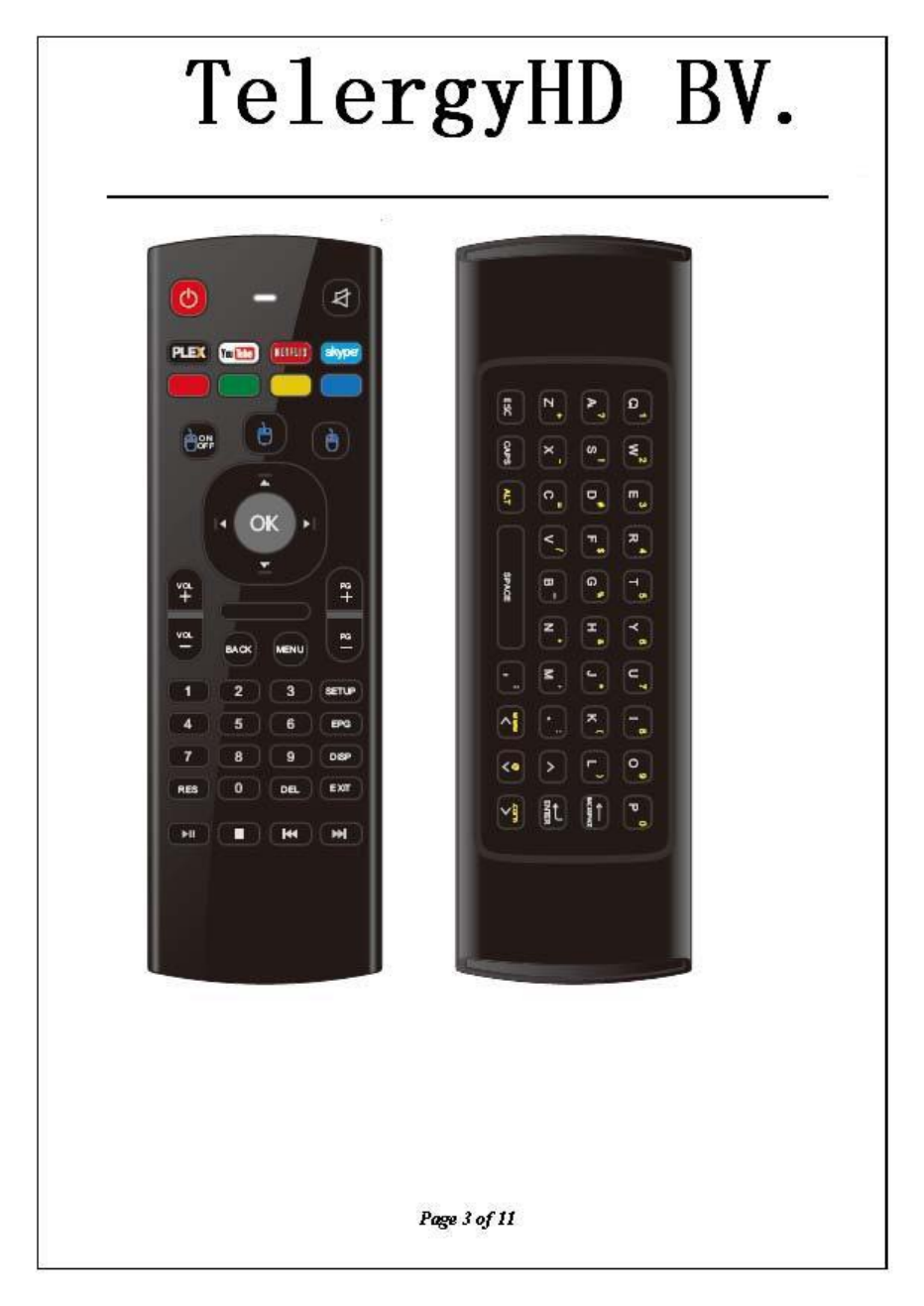
3
、
ID
Drawing
Page20f11
TelergyHD
BV.
。2
~
"'Q-
阳
LJ
二主
F
,
1>
+
~
自
2
'
隘 叭
,
s • "
"
衡
"
。
他
~
•
阳
叫
P
申
30f11
TelergyHD
BV.
Page"
0111
TelergyHD
BV.
4
、
Remote
Control
Button
introduction:
T
,。阳
144
buttons
Item Butlons Type Funclion Descriplion
01
Power
IR
Power
on/off
the
target
device
02
Mute
IR
Switch
remote
to
send M
ute
command
to
the
target
03
Play/Pause
IR
Play
/ pause
program
04
Slop
IR
Stop
program
05
Fasl Forward
IR
Fast
go
to
next
program
06
Fasl Backward
IR
Fast
go
to
last
program
07
PLEX
IR
customize
08
You
Tube
IR
customize
09
NETF
Ll
X
IR
customize
10
Skype
IR
customize
11
Mouse on/off
RF
turn
on/off
the
mouse
function
12
Mouse
Left
RF
Mouse's
left
butlon
function
13
Mouse
Righl
RF
Mouse
‘s
right
butlon
function
14
OK
IR
Confirms
the
current selection/mouse
left
15
Up
IR
Move
to
up
16
Down
IR
Move
to
down
17
Left
IR
Move
to
left
18
Righl
IR
Move
to
right
19
Vol
+
IR
Increases
the
volume
of
the
device
20
Vol
-
IR
Decreases
the
volume
of
the
device
21
PG+
IR
Last
page
22
PG-
IR
next
program
Page 5
0f11
TelergyHD
BV.
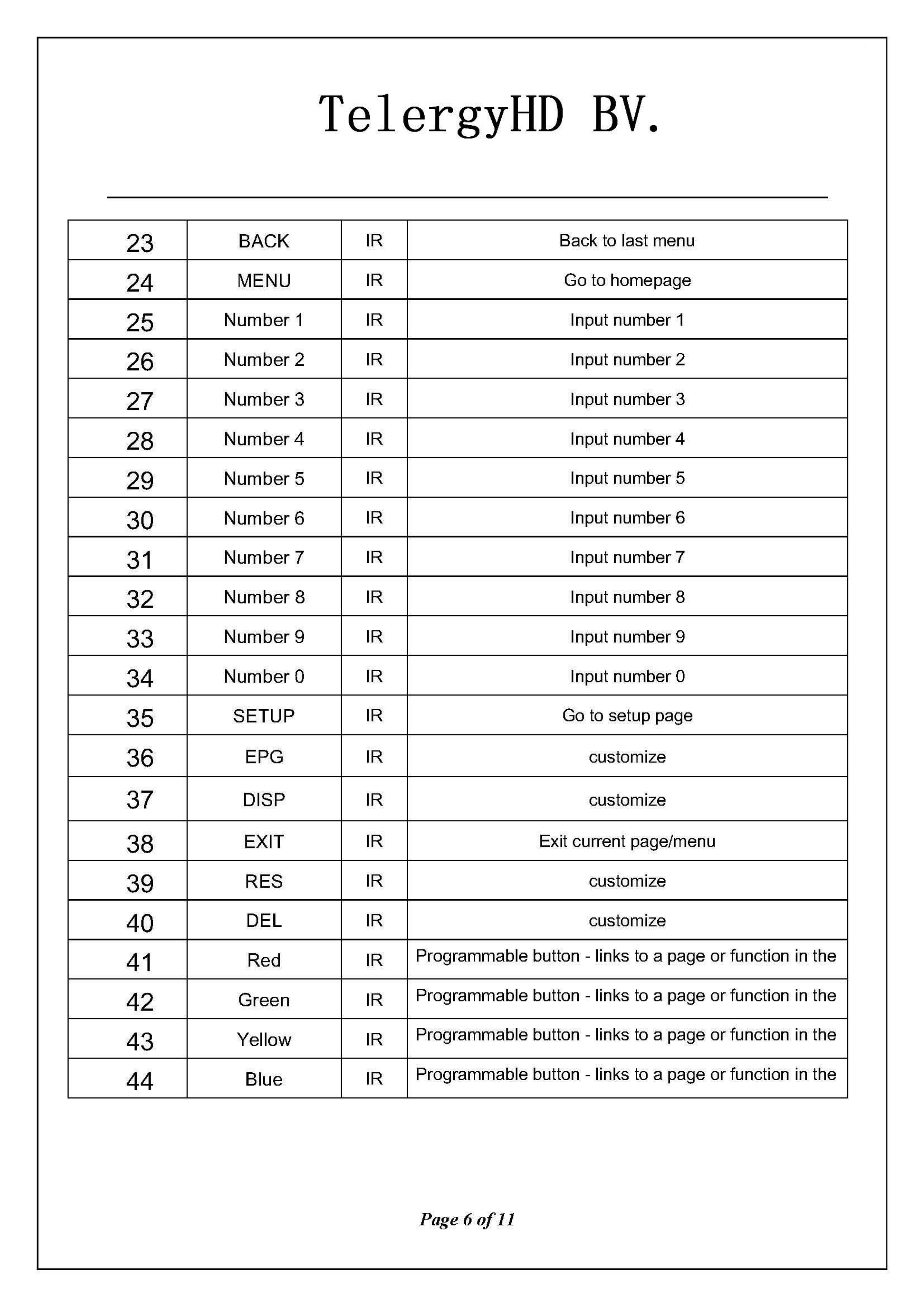
23
BACK
IR
Back
to
last
menu
24
MENU
IR
Go
to
homepage
25
Number 1
IR
Input
number 1
26
Number 2
IR
Input
number 2
27
Number 3
IR
Input
number 3
28
Number4
IR
Input
number 4
29
Number 5
IR
Input
number 5
30
Number 6
IR
Input
number 6
31
Number 7
IR
Input
number 7
32
Number 8
IR
Input
number 8
33
Number 9
IR
Input
number 9
34
Number 0
IR
Input
number 0
35
SETUP
IR
Go
to
setup page
36
EPG
IR
customize
37
DISP
IR
customize
38
EXIT
IR
Exit
current page/menu
39
RES
IR
customize
40
DEL
IR
customize
41
Red
IR
Programmable
butlon
-
links
to
a page
or
function
in
the
42
Green
IR
Programmable
butlon
-
links
to
a page
or
function
in
the
43
Yeliow
IR
Programmable
butlon
-
links
to
a page
or
function
in
the
44
Blue
IR
Programmable
butlon
-
links
to
a page
or
function
in
the
Page
60f11
白
雪主
二
[
ZOZZ
4
1
白
,
E
E
雪
二
2
主
s.
;+
Ol
0
6
z
三
二
2
q
~
.g
罢了
豆豆
Ef
s
∞
口p
g
罢
吕
ι
『
ι
ι
<
3
r
E
R
C
口
吕
ι
TelergyHD
BV.
7
、
Air-mouse
Mode
7.1
、
Air-mouse
lntroduction
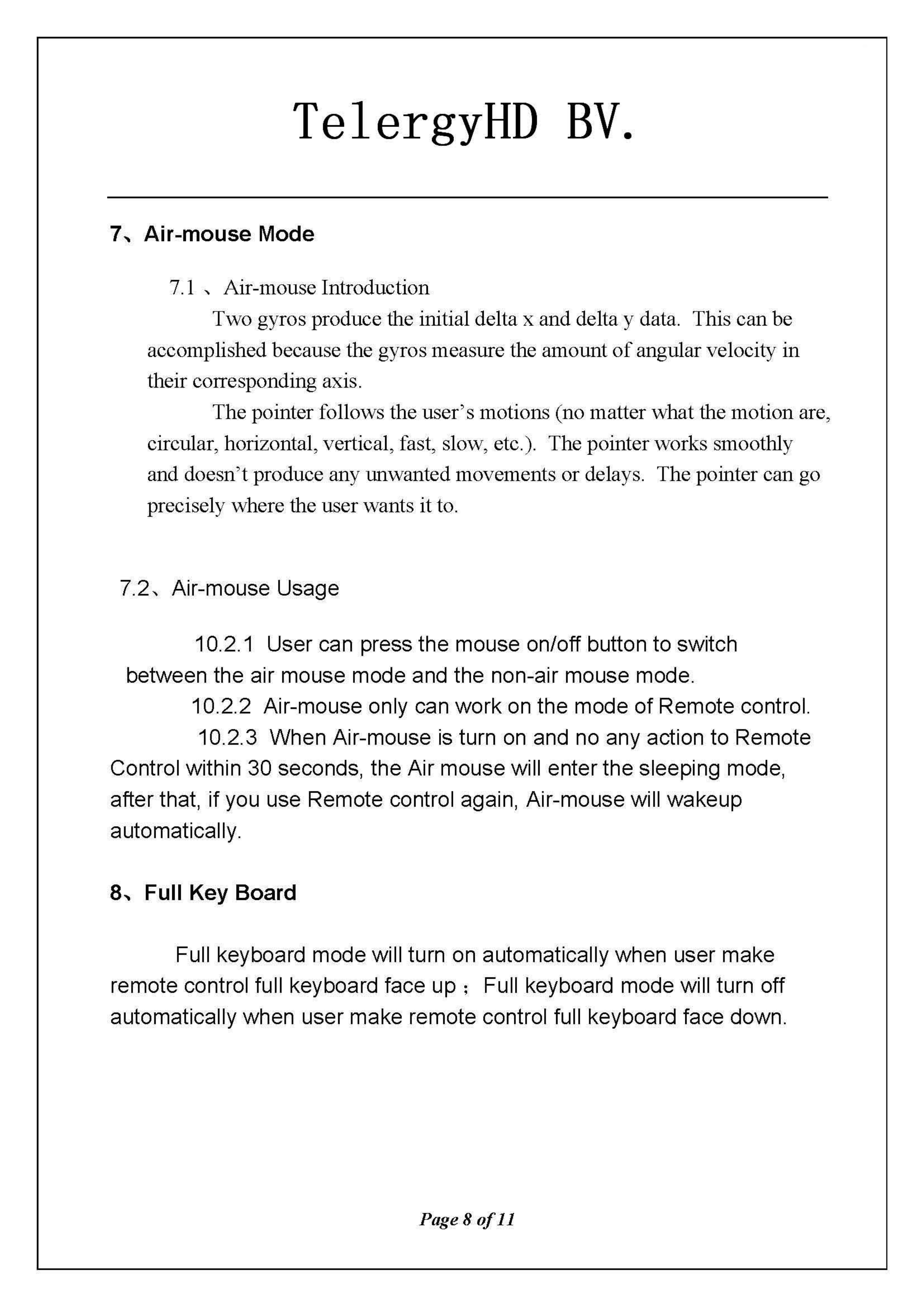
Two
gyros produce the
initial
de
1t
a x
and
de
1t
a y
data.
This can
be
accomplished
because
the gyros measure the amount
of
angular velocity
in
their corresponding axis
The pointer follows the user's motions (no matter what
th
巳
mohon
are
,
巳
ircular
,
horizontal, vertical, fast,
slow
,巳
tc.).
The pointer works smoothly
and
doesn't produce any unwanted
movem
巳
nts
or delays. The pointer
can
go
precisely where the user wants
it
to
7.2
、
Air-mouse
Usage
10.2.1
User
can press
the
mouse
on/off
button
to
switch
between
the
air
mouse
mode
and
the
non-air
mouse
mode
10.2.2
Air-mouse
only can
work
on
the
mode
of
Remote
control
10.2.3
When
Air-mouse
is turn on and no
any
action
to
Remote
Control within
30
seconds
,
the
Air
mouse
will
enter
the
sleeping
mode
,
after
that
,
if
you use
Remote
control again,
Air-mouse
will
wakeup
automatically
8
、
Full
Key
Board
Full keyboard
mode
will turn on
automatically
when
user
make
remote
control full keyboard face
up;
Full keyboard
mode
will turn
off
automatically
when
user
make
remote
control full keyboard face
down
Page80f11
TelergyHD
BV.
9
、
Button
Code
9.1
Remote control Button Code
。
口
导
川
.."
酬
.
阳也曰
I
I
UJ
UI
曲田
E
。恼
w
"
"'-;
"R
•
[.~
'
í!
'们
+
0"
同
U
岖阳
1 2 3
.'f"
.
ø:~
" 5 6
E
陆
7 8 9
I
.
~'~
睦
S
。
。在 t
,
~
LJ
P
咽
'e
9
0/"
11
TelergyHD
BV.
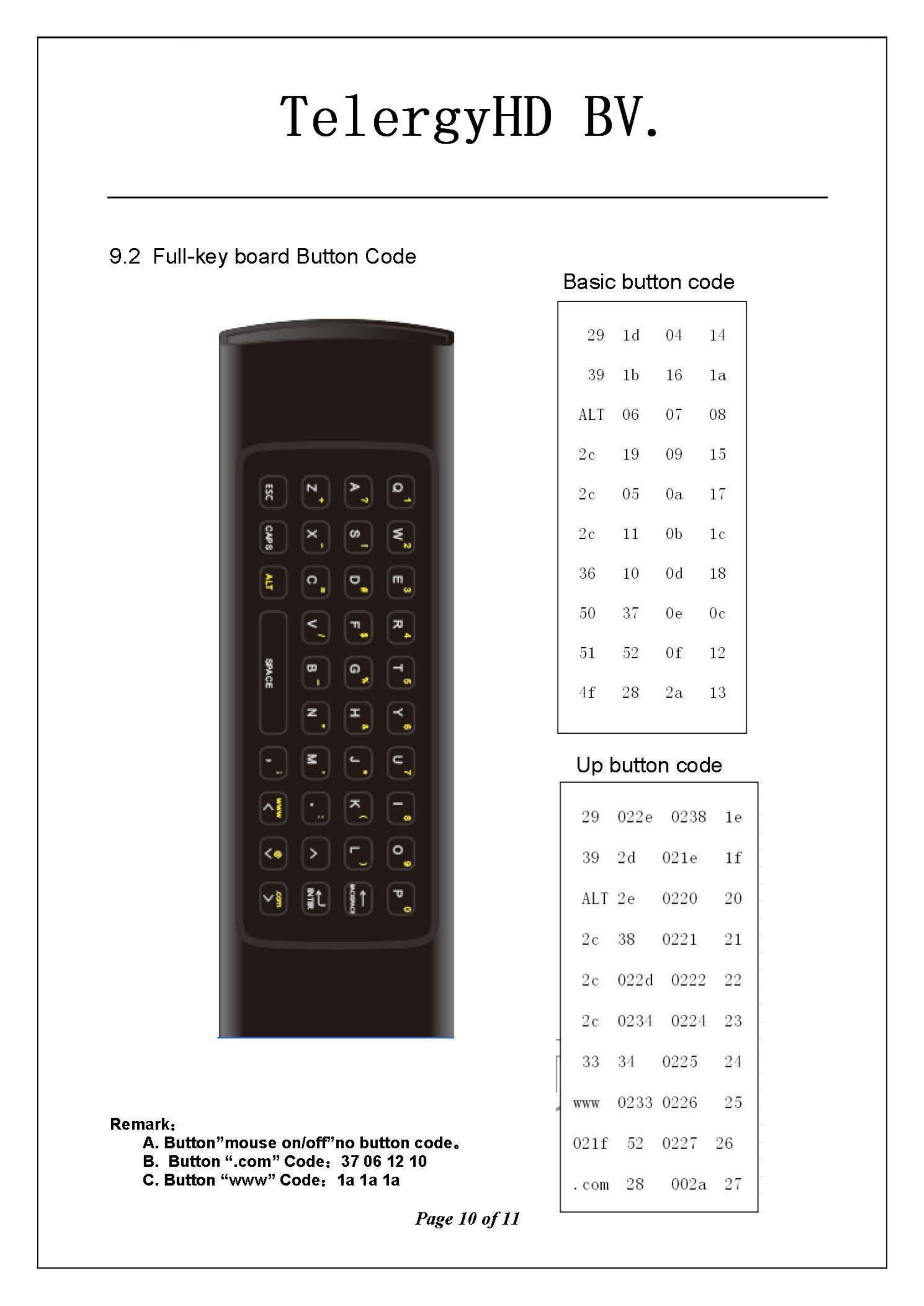
9.2 Full-key board Button Code
Basic button code
29
ld
0'1 1'1
39
lb
16 l a
ALT
06 07 08
2c 19
09
15
2c
05
Oa
l í
2c
11
Ob l c
36
10 Od 18
50
37
0.
Oc
51
52
Of 12
Llf
28
2a 13
Up button code
29
022.
0238 1.
39 2d
02
1.
lf
ALT
2.
0220 20
2c 38 022 1 21
2c 022d 0222
22
2c
023~
022-1 23
33 3'1 0225 2'1
飞
VW
\!,'
0233 0226 25
Remark
,
A.Butlon
吁
nouse
on/o
tF
'no
button
code.
02
lf
52
022 ï 26
B.
Butlon
".com"
Code
,
37061210
c.
Button
"www"
Code:
1a
1a
1a
CO
ll1
28 002a 2ï
Page
100fll
TelergyHD
BV.
10
、
FCC
STATEMENT
1.
This device complies with Part 15
of
the FCC Rules
Operation is subject
to
the following two conditions
(1) This device may not cause harmful interference, and
(2) This device must accept any interference received , including interference
that may cause undesired operation
2.
Changes or modifications not expressly approved by the
pa
叫
y
responsible for
t
comp
川Ii旧
ance
could void the user's
authori
毗
l
忧
ty
to
oper
阳
at
怡
e
the
equ
山
Ipmen
川
Page 11
of11