Teleway DCA234 ICRUZ AUDIO HANDSFREE KIT FOR IPHONE 4/IPHONE 3GS/IPHONE 3G-FM FUNCTION User Manual dca234
Teleway Industrial Ltd ICRUZ AUDIO HANDSFREE KIT FOR IPHONE 4/IPHONE 3GS/IPHONE 3G-FM FUNCTION dca234
Teleway >
Users Manual
foriPhone4/iPhone3GS/iPhone3G
ICruzAudioHandsfreeKit
Model#DCA234
deximisatrademarkofiPhoneisatrademarkofAppleInc.,
registeredintheU.S.andothercountries. “MadeforiPhone”meansthatanelectronicaccessory
hasbeendesignedtoconnectspecificallytoiPhoneandhasbeencertifiedbythedeveloper
tomeetAppleperformancestandards.Appleisnotresponsiblefortheoperationofthisdevice
oritscompliancewithsafetyandregulatorystandards.Pleasenotethattheuseofthis
accessorywithiPhonemayaffectwirelessperformance.Allotherregisteredandunregistered
trademarksarethepropertyoftheirrespectiveowners.Visitor
callformoreinformation.
SantomLimited.
www.dexim.net
(1)888-445-5655
--2--3
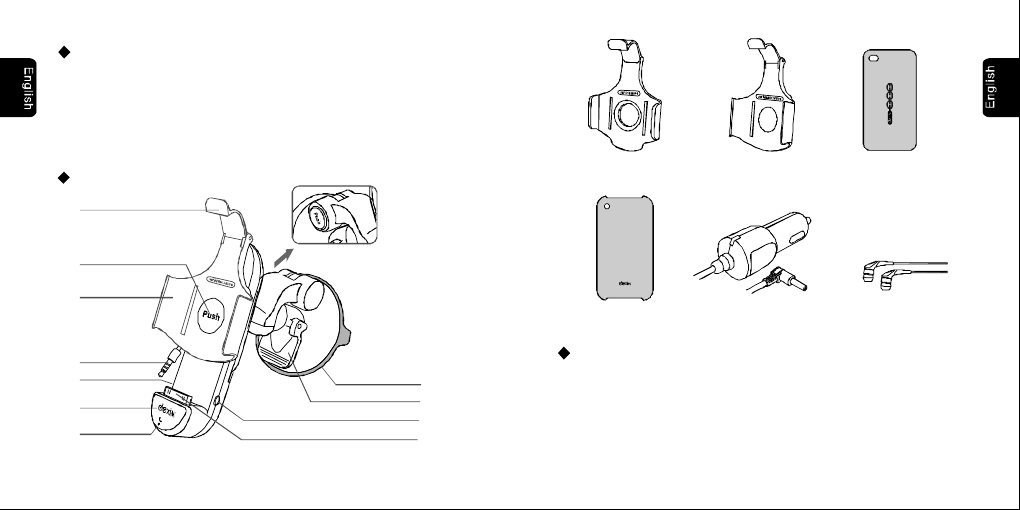
Apple30pinconnector
Line-out
Audiocable
Adjustmentknob
Flipbutton
Suctioncup
Thumbtab
Baselever
Audiocarmountchargingholder
Contents:
1×Audiocarmountchargingholder
1×3.5DCcarcharger
1×CradleforiPhone4
1×CradleforiPhone3GS/3G
1×BraceletTPUCaseforiPhone4
1×PCCaseforiPhone3GS/3G
1×Earphone
ProductLayout:
Flipcradle
3.5DCchargeport
Earphone
PCCasefor
iPhone3GS/3G
CradleforiPhone4
3.5DCcarcharger
Specifications:
Compatibility: iPhone4,iPhone3GS,iPhone3G
Carmountholderinput:5VDC1000mA,
Output:5VDC1000mA,
CarChargerinput:10.5V-26V,DC
Output:5VDC,1000mA
CradleforiPhone3GS/3G BraceletTPUCase
foriPhone4
Microphone
Answer/End
--4--5
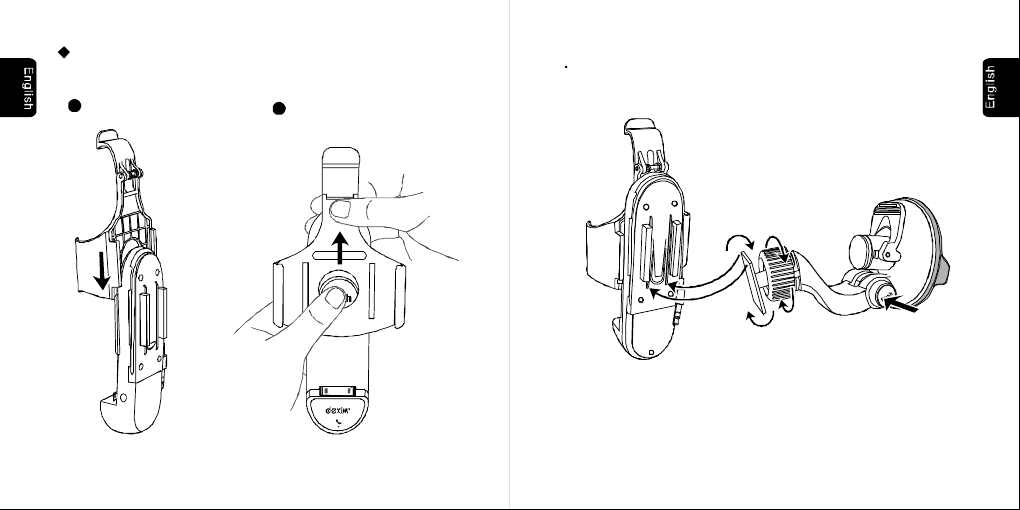
Instruction:
1.Choosethecradlefitforyourdevice
foriPhone3GS/3G
2Pushout
1Slidein
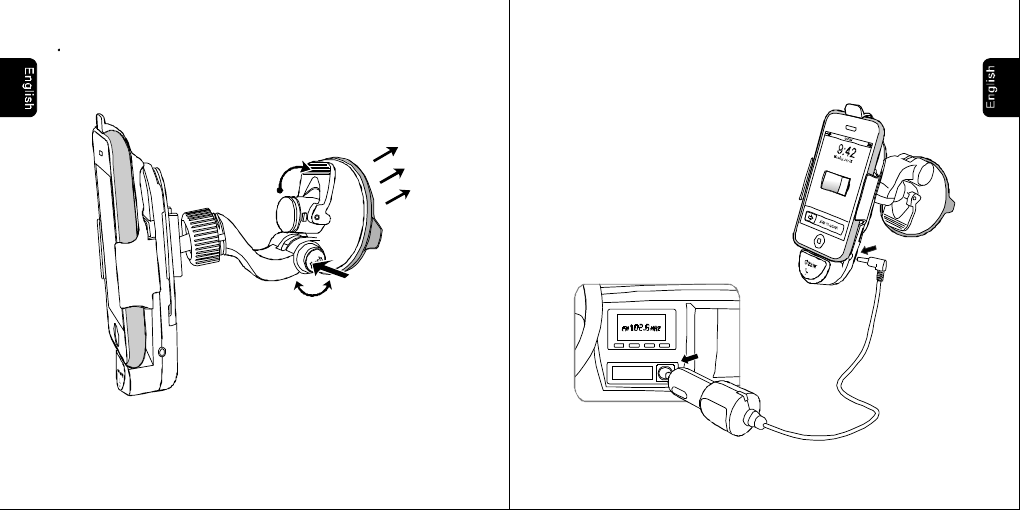
2.CarMountHolderInstallation
ConnectthepedestaltotheFlipHolder.Adjusttheangleandrotationof
thedashswivelmountbypressingtheadjustmentknob.
--6--7
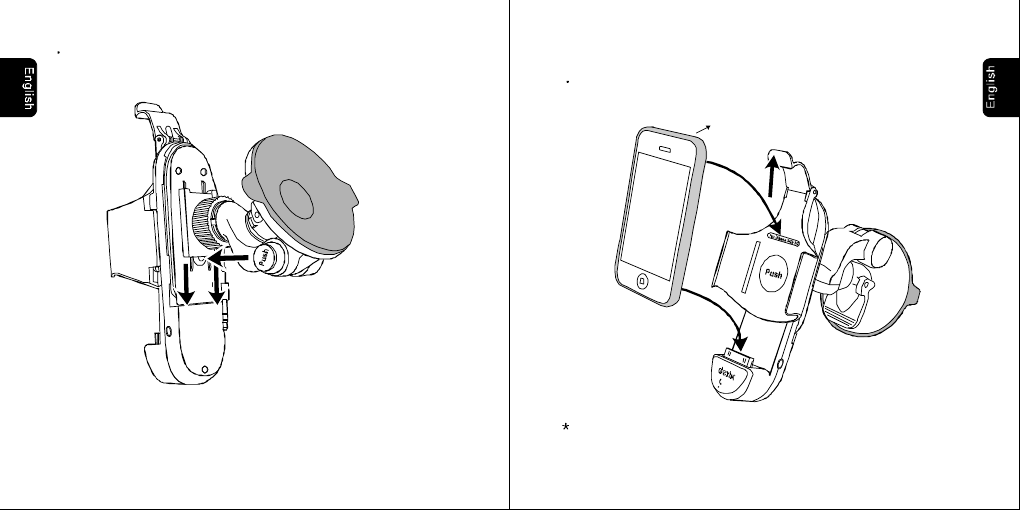
Howtoslidedownthepedestal. 3.ChargeiPhone
A.iPhoneInsertion
LiftandholdtheupperthumbtabandgentlyinsertiPhoneintotheholder.
MakesurethatiPhoneisfullydockedintotheconnector.
(iPhone3GSwithincludedprotectivecase)
CradleforiPhone4isfitforiPhone4withAppleBumpercase.
--9--8
Findasafelocationontheinteriorofthevehicletomountthepedestal.
Firmlypushthesuctioncupagainsttheplaceandflipthebaselever
downtothelockedposition.Seeillustrationbelow.
B.ConnecttoCarChargerforCharging
Insertthecarchargerintothecigarettelightersocketandconnectitto
carmountholder.Chargingwillbeginautomaticallyonceyouinsert
youriPhone.
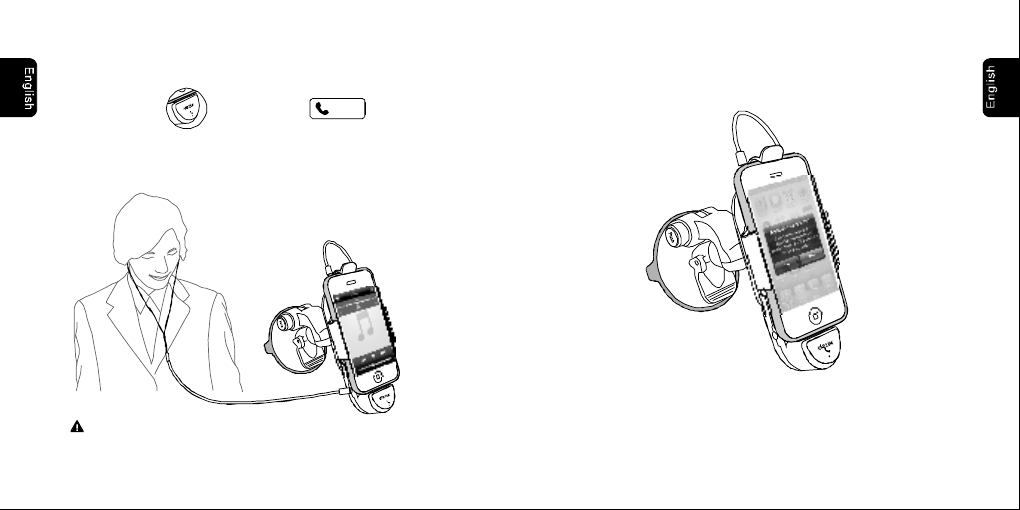
4.AnswerPhoneCalls
--10
A.PlugtheaudiocableofcarmountholderintoiPhone’searphonejack
B.PressthebuttonoranswerbuttononiPhone’s
screentoanswerthephone
Answer
C.Earphoneprovidedforprivateconservation.
--11
5.iCruzApp
A.WheniPhoneisdockedintocarmountholder,“ApplicationNotInstalled”
messagewillbedisplayoniPhone’sscreen,presstodowanload
iCruzapp. Yes
B.PressiCruzicontoenterandfindaclearfrequencysameasthecarFM
radio.ThenativeiPhonemusicwillbeplayedthroughcarstereo.
PressoniPhonetocontrolthevolume.+-
Caution:Pulltheaudiocableoutfirstly
removeiPhonefromcarmountholder.when
SafetyPrecautions
Donotinstalldeximcarmountholderinornearanairbagdeployment
zoneorwhereitwillobstructviewoftheroad.deximassumesno
responsibilityofliabilityforinjuryordeathasaresultofcarcrashes
and/orairbagdeployment.
deximisnotresponsiblefordamagearisingfromfailuretofollow
instructionsrelatingtotheproduct'suse.
--13
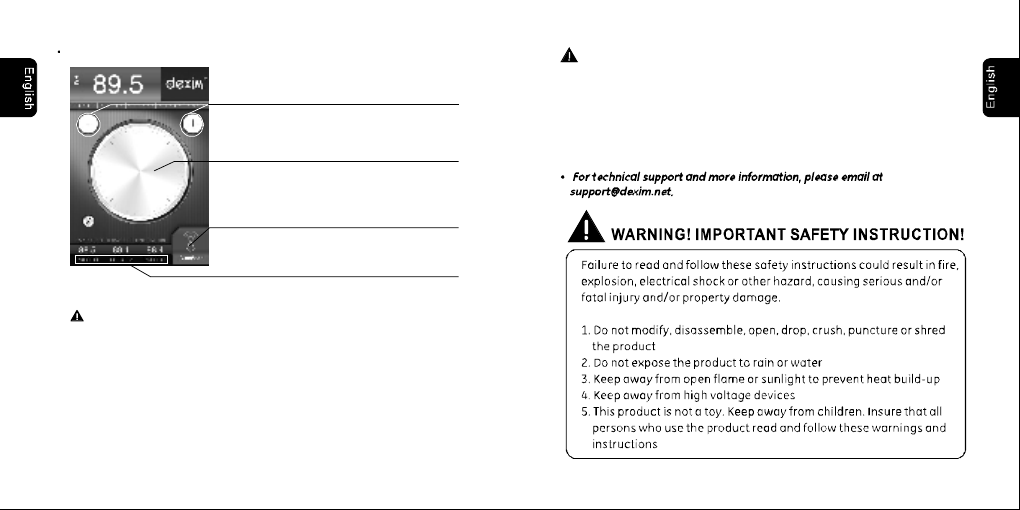
iCruzQuickGuide
--12
Tap+-tosearchclearfrequenciesonebyone
UsethewheeloniPhone’sscreentoquick
search,scanforclearfrequencies
PresstheAutoScantofind
theclearestfrequency
Threeuser-programmablePRESETSenableyou
recallclearfrequencieswithatapofthescreen.
Caution:Pulltheaudiocableoutfirstly
removeiPhonefromcarmountholder.when
This device complies with part 15 of the FCC rules. Operation is subject to the
following two conditions: (1) this device may not cause harmful interference,
and (2) this device must accept any interference received, including
interference that may cause undesired operation.
NOTE: The manufacturer is not responsible for any radio or TV interference
caused by unauthorized changes and modifications to this equipment. Such
changes and modifications could void the user’s authority to operate the equipment.
NOTE: This equipment has been tested and found to comply with the limits for
a Class B digital device, pursuant to part 15 of the FCC Rules. These limits
are designed to provide reasonable protection against harmful interference in
a residential installation. This equipment generates uses and can radiate
radio frequency energy and, if not installed and used in accordance with the
instructions, may cause harmful interference to radio communications.
However, there is no guarantee that interference will not occur in a particular
installation.
If this equipment does cause harmful interference to radio or television
reception, which can be determined by turning the equipment off and on, the
user is encouraged to try to correct the interference by one or more of the
following measures:
- Reorient or relocate the receiving antenna.
- Increase the separation between the equipment and receiver.
-Connect the equipment into an outlet on a circuit different from that to which
the receiver is connected.
-Consult the dealer or an experienced radio/TV technician for help.