Teleway DEA057 WIRELESS SPEAKER User Manual
Teleway Industrial Ltd WIRELESS SPEAKER Users Manual
Teleway >
User Manual
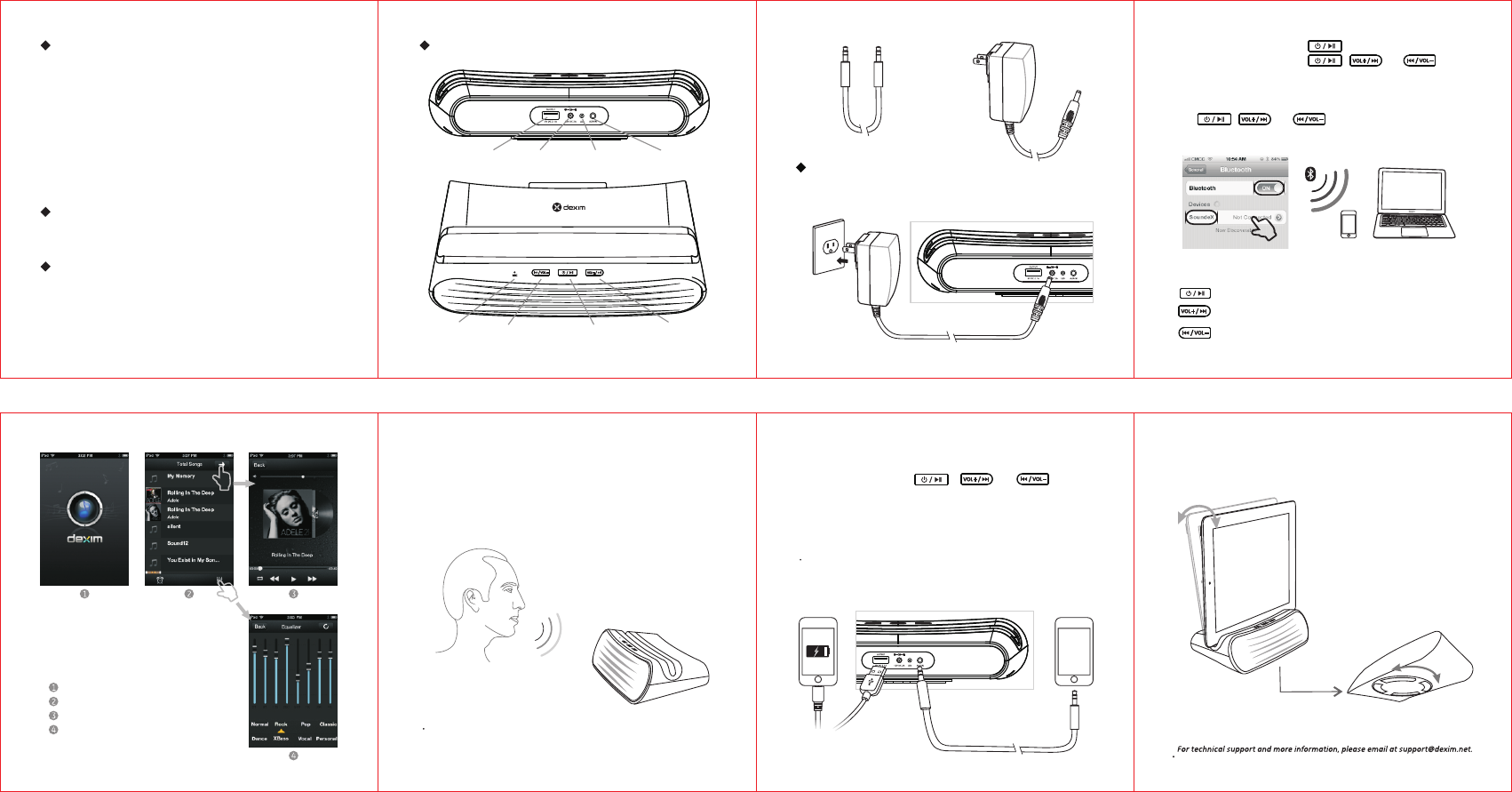
1. Attach AC adaptor cable to DC jack on back of the SoundeX speaker and plug
the other end into a wall socket. Then the LED light will illuminate GREEN.
2. To power on, press and hold the button for 3 seconds. Speaker
will prompt with a tone and the , and buttons
will flash BLUE quickly. The unit will enter Auto-pairing mode and begin
searching for a device to pair with.
3. Activate Bluetooth on your device, you will find SoundeX in your device and
and click to link to SoundeX speaker. Speaker will prompt with a tone and
the , and buttons will flash BLUE slowly.
b. SoundeX will auto link with the last linked device when that device is in range.
Once your device and the SoundeX are linked you can start to play
Bluetooth music through the SoudeX.
“SoudeX” APPis a specific music player and
equalizer to adjust the sound efficacy of music.
Download the free “SoundeX” app from the
App Store.
Launch the “SoundeX” APP on your device
Listening to other portable audio devices
You can play an MP3 player or other portable audio device through the
SoundeX via the Aux-in Jack.
a. Plug one end of an audio patch cord into the line-out jack on your device
and the other end of the patch cord into the SoundeX Aux-in Jack, located
on the back of the unit . The , and buttons
illuminate GREEN.
will
Device charging function
You can charge your device via USB output port . Note that devices will
continue to charge when the SoundeX is turned off as long as the AC
adaptor is plugged in
“
rotate 360-degrees for multiple viewing angles.
Lazy Susan” base design allows the speaker to
Contents:
Technical specifications
Features:
Output power: 5W*2
Speaker unit: 4Ω5W
Frequency response: 45Hz-20KHz
Power input: 12V/2A
Bluetooth connected distance: ≤10m
Audio input port: Bluetooth and standard 3.5mm audio socket
·Super high quality Bluetooth stereo speaker with excellent sound
quality
·The metallic shell offers an unique, clean, sleek design
·Delivers high-quality wireless streaming from your laptop, mobile
phone or other Bluetooth-enabled device.
·Cradle securely holds smartphones and tablets in place while
providing multiple viewing angles.
·“Lazy Susan” base design allows the speaker to rotate 360-degrees
·Built-in Mic for hands-free call function
·More portable and applicable, allow you to take your music any
where you go
·Specific APP “SoudeX” supports adjusting sound efficacy
1 × SoundeX Speaker
1 × 3.5mm audio cable
1 × AC adapter
Speaker Layout:
Mic Volume down/
Previous song
Pairing/Power/Pause
button
Volume up/
Next song
USB port DC jack LED Iight Audio Input
Instruction
·Bluetooth wireless connection and operation
3.5mm Audio Cable AC Adapter
a. If SoundeX is not connected within 10 minutes, it will power off automatically.
4. Music playing
Click the pairing button to pause/ play music
Press and hold vol+ button to turn up volume,
click vol+ button to play next song
Press and hold vol- button to turn down volume,
click vol- button to play previous song
All Bluetooth Audio device
Enter the music playing interface
Click to Equalizer to adjust the sound
efficacy of music
5. “SoudeX” APP
You can see your own song list on your device
6. Phone Calling function
a. SoundeX Speaker supports Mic function, you can answer the phone
directly with speaker.
b. When phone has an incoming call, press the pairing button to answer
the phone and press again to hang up. After the call ends, Speaker will
switch back to music playing automatically.
b. If speaker connects with Bluetooth and plug audio cable into speaker
Audio socket simultaneously, speaker will play music via Audio cable
automatically. When pulling out the audio cable, speaker will switch to
play music via Bluetooth.
·Convenient Rotatable Cradle and base design
Cradle can rotate allowing the user to adjust the tilt angle by grabbing the
top of the smartphones and tablets and pushing or pulling it .
-1-
-5-
-2-
-6-
-3-
-7-
-4-
-8-
FCC Warning
This device complies with Part 15 of the FCC Rules. Operation is subject to the following two
conditions:
(1) this device may not cause harmful interference, and (2) this device must accept any
interference received, including interference that may cause undesired operation.
NOTE 1: Any changes or modifications to this unit not expressly approved by the party
responsible for compliance could void the user's authority to operate the equipment.