Teleway DFA003 FM Transmitter User Manual DFA00 ok

Teleway Industrial Ltd FM Transmitter DFA00 ok

Users Manual

Dock FM Transmitter for iPhoneMode# DFA003
EN Touch Screeen FM Transmitter2814202632FR Touch Screeen FM TransmitterDE Touch Screeen FM TransmitterES Touch Screeen FM TransmitterNL Touch Screeen FM TransmitterIT Touch Screeen FM Transmitter3844505662PT Touch Screeen FM TransmitterRU Touch Screeen FM TransmitterAR Touch Screeen FM TransmitterJP Touch Screeen FM TransmitterCN Touch Screeen FM TransmitterWaste electrical products /batteries should not bedisposed of with household waste. Separate disposalfacilities exist, for your nearest facilities.Important Information Required By the FCC The Manufacturer is not responsible for any radio or TV interferencecaused by unauthorized modifications to this equipment. Such modificationscould void the user's authority to operate  the equipment Important Information Required By the FCC The Manufacturer is not responsible for any radio or TV interferencecaused by unauthorized modifications to this equipment. Such modificationscould void the user's authority to operate  the equipment Important Information Required By the FCC The Manufacturer is not responsible for any radio or TV interference caused by unauthorized modifications to this equipment. Such modifications could void the user's authority to operate  the equipment
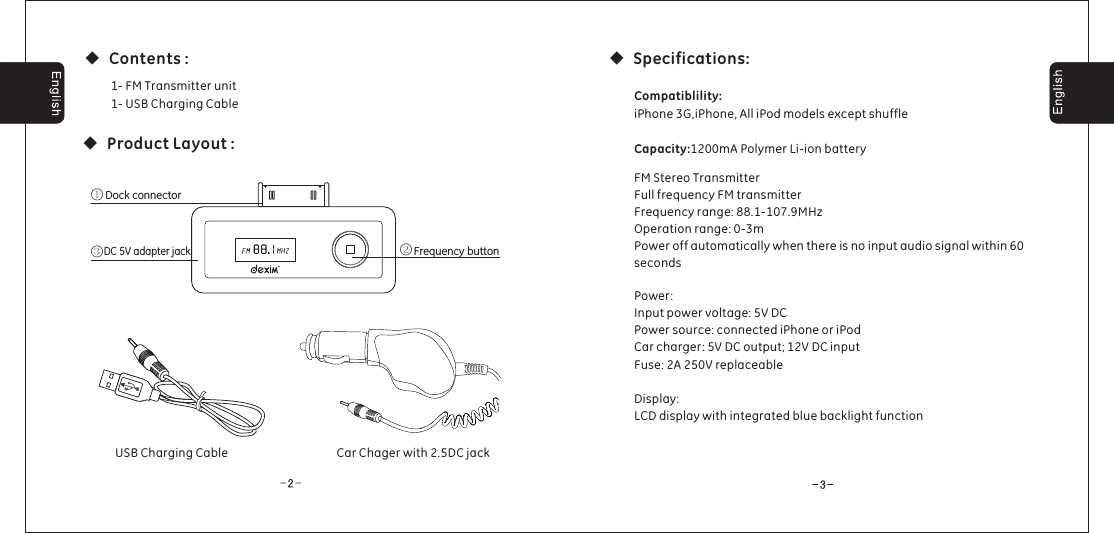
◆Product Layout :◆Specifications:◆Contents :Dock connectorFrequency buttonDC 5V adapter jack③①②USB Charging Cable1- FM Transmitter unit1- USB Charging CablePower:Input power voltage: 5V DCPower source: connected iPhone or iPodCar charger: 5V DC output; 12V DC inputFuse: 2A 250V replaceableDisplay:LCD display with integrated blue backlight functionCompatiblility:Capacity:iPhone 3G,iPhone, All iPod models except shuffle1200mA Polymer Li-ion batteryFM Stereo TransmitterFull frequency FM transmitterFrequency range: 88.1-107.9MHzOperation range: 0-3mPower off automatically when there is no input audio signal within 60secondsCar Chager with 2.5DC jack
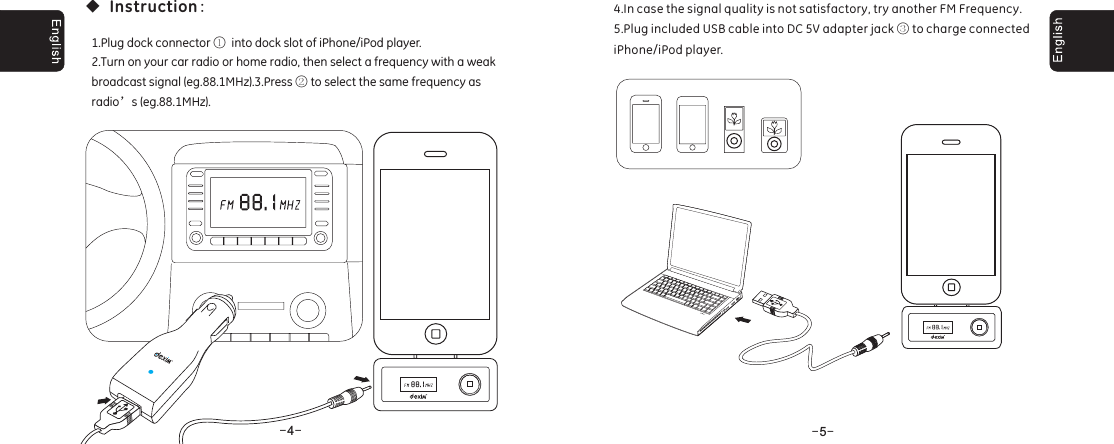
--4--5◆:Instruction1.Plug dock connector into dock slot of iPhone/iPod player.2.Turn on your car radio or home radio, then select a frequency with a weakbroadcast signal (eg.88.1MHz).3.Press to select the same frequency asradio s (eg.88.1MHz).①②’4.In case the signal quality is not satisfactory, try another FM Frequency.5.Plug included USB cable into DC 5V adapter jack to charge connectediPhone/iPod player.③
FrançaisFrançais--6--7

Navigation menu