Teleway I707 FM Transmitter with Car Adapter for iPod User Manual i707 Users Manual
Teleway Industrial Ltd FM Transmitter with Car Adapter for iPod i707 Users Manual
Teleway >
Users Manual
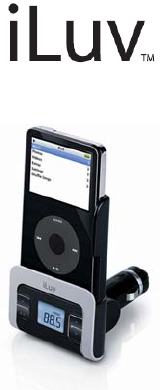
Car Charger & FM Transmitter
Instruction Manual
i707
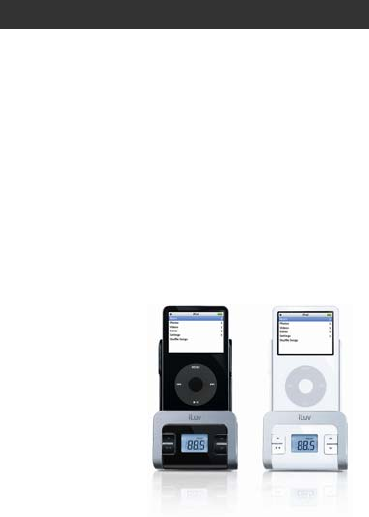
GETTING STARTED
Thank you for purchasing the i707. Unpack the unit and make
sure all the accessories are put aside so they will not be lost.
Be Free from Headphones and Share Your
Music with Your Friends.
• Transmit your favorite songs on your iPod® to a nearby FM
radio
• Supports the wide frequency range (88.1MHz to 107.9MHz)
with the step size of 0.1MHz
• Enjoy easy digital FM tuning with PLL technology
• Preset memory for up to 2 FM stations
• LCD screen with the white backlight
• Compact and easy-to-use design
• Car adapter charges your iPod
What’s Included?
• FM transmitter
• Extension tube
• Dock adapters
• Instruction manual
• Warranty card
1.
4.
2.
3.
5.
6.
GETTING STARTED
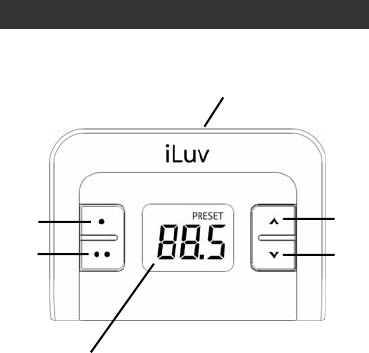
Location of Controls
1. λ (Preset 1) button
2. ∧(Frequency up) button
3. 30-pin connector
4. λλ (Preset 2) button
5. ∨(Frequency down) button
6. LCD screen
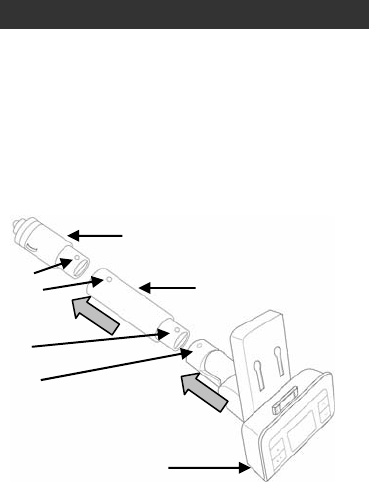
Car adapter
Extension tube
Display board and dock
Pin
Hole
Pin
Hole
OPERATING INSTRUCTIONS
Connecting the extension tubes
There are 2 pcs tubes included with the i707. The longer one is
the extension tube which can be used as needed. One end of
the extension is smaller and has pins while the other is wider and
has an opening with two holes on either side. To connect the
extension tube with the car adapter and the display board and
dock, find the pins and holes on each part. Align the pins on
each tube with the holes on the connecting end and insert. The
tubes will “click” together when a successful connection has
been made.
180°
35°
OPERATING INSTRUCTIONS
Adjusting the angle of FM transmitter
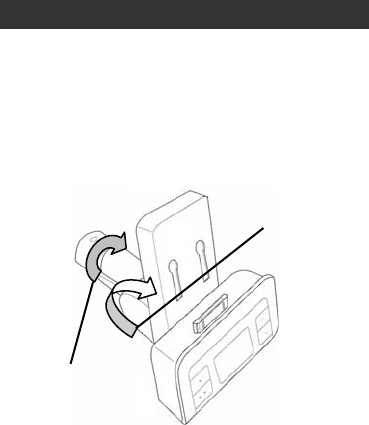
The display board and dock can be adjusted up or down 180
degrees. The connector, which connects the display board and
the extension tube, can adjust 35 degrees to the left or right
allowing you to adjust the i707 for easy operation while driving.
OPERATING INSTRUCTIONS
Inserting the Dock Adapter
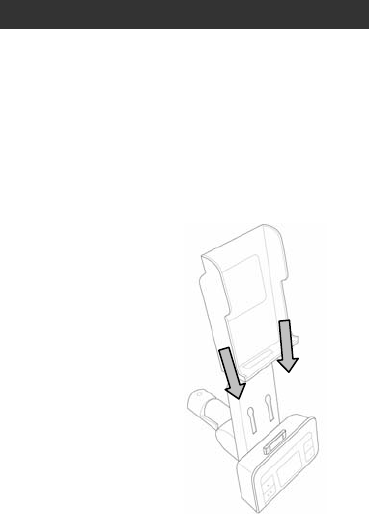
The i707 comes with dock adapters for your iPod. There are also
dock adapters included with your iPod. Choose the correct
adapter and follow the instructions below.
1. Align the hooks in the back of the dock adapter with the holes
on the dock above the display board.
2. Carefully lower the dock adapter until it rests securely in the
dock with the 30 pin connector fitting through the opening at
the bottom of the adapter.

OPERATING INSTRUCTIONS
Turning on / off the FM Transmitter
This unit is designed to charge your iPod as it plays. When
connected to your iPod and plugged into the cigarette lighter
outlet in your car, it automatically turns on. When disconnected,
it turns off. If there is no audio input signal for more than 1 minute
after connected to your iPod, this unit enters the standby mode.
In the standby mode, transmission stops and the LCD turns off.
When there is an audio signal, it automatically “wakes up” to
start transmitting music.
Setting up the Preset Memory
You can store two FM frequencies in the preset memoy and
easily call them up by pressing one of the preset buttons. The
default frequency for Preset 1 is 90.1MHz, and 98.1MHz for
Preset 2. To change the default-preset frequencies with other
frequencies, follow the instructions below:
1. Connect the FM transmitter to your iPod and plug into the
cigarette lighter in your car. The LCD screen turns on.
2. Turn on the radio in your car and find an unused frequency
on the FM dial.
3. Select a frequency using the “∧” (Frequency Up) and
“∧”(Frequency Down) buttons.
4. Press and hold “λ” (Preset 1) button until the selected
frequency display blinks.
5. Select a frequency using the “∧” (Frequency Up) and “∨”
(Frequency Down) buttons.
6. Press and hold “λλ” (Preset 2) button until the selected
frequency display blinks.

OPERATING INSTRUCTIONS
Transmitting Your Favorite Songs to a
Nearby FM Radio
1. Connect the FM transmitter to your iPod.
2. Play songs from your iPod.
3. Press one of the preset buttons.
4. Turn on your car radio.
5. Tune your FM radio to a FM frequency stored on the
selected preset memory, and listen to your favorite music.
Warning: Do not listen to music with high volume while driving.
Warning horn sounds may not be heard which could result in a
traffic accident.
Helpful Tips on Obtaining Clear Sound
• An FM transmitter employs frequency modulation to
transmit songs to an FM radio, which can be disturbed by a
strong FM signal nearby. Thus, before transmitting songs
with this unit, it is very important to select a clear FM station,
one which has no other broadcasting and renders only
static noise.
• The sound quality of an FM transmitter also depends on the
direction of its built-in antenna and its surroundings. If you
hear static noises while listening to music using the FM
transmitter, rotate or move the FM transmitter around until
you get a clearer sound.
• If a battery is low, the sound quality may also be poor. In
this case, charge your iPod first and try it again.

TROUBLESHOOTING GUIDE
No sound
• Your iPod is not inserted into the dock properly. Insert into
the dock again.
• Connection to car adapter is not secure. Check connections.
• Your car radio is not turned on. Turn on your car radio.
• Your iPod is not turned on. Turn on your iPod.
• The i707 is not turned on. Turn on i707.
Poor radio reception or interference
• The i707 is tuned to a frequency that is used by a local
radio station. Find a frequency with no interference and
reset the memory.
• The antenna on your car is not extended. Extend your car
antenna.
Car adapter does not fit into cigarette lighter
• The lighter coil has not been removed. Remove the
cigarette lighter coil and plug in car adapter.
• The cigarette lighter is not standard size. The car adapter is
designed to fit into the cigarette lighters of most makes and
models of car. However, there may be some models with
different sized cigarette lighters.

SPECIFICATIONS
• Modulation: FM Stereo
• Tuning Type: PLL (Phase-Lock Loop)
• Frequency Range: 88.1MHz – 107.9MHz (Step: 0.1MHz)
• Frequency Response (Audio): 80Hz – 15kHz
• Audio Input Level: 800mV
• Total Harmonic Distortion: 2.0%
• Transmitting Power: ≤ 50 nW
• Transmitting Range: ≤ 33ft
• Power for iPod
o Operating Voltage: 2.7V – 3.5V
o Operating Current: 35mA (Max)
• Power Consumption: ≤ 100mW
• Operating Temperature: -4°F to 122°F (-20°C to 50°C)
• Storage Temperature: 14°F to 113°F (-10°C to 45°C)
• Unit Dimension (W x H x D)
o 67.35mmX226.5mmX52.7mm
o 2.65”X8.92”X2.07”
• Unit Weight: 122.5±3g
FCC Statement
1. This device complies with Part 15 of the FCC Rules.
Operation is subject to the following two conditions:
(1) This device may not cause harmful interference, and
(2) This device must accept any interference received,
including interference that may cause undesired
operation.
2. Changes or modifications not expressly approved by the
party responsible for compliance could void the user’s
authority to operate the equipment.