The Art of Utility D205 Bluetooth Speaker User Manual
The Art of Utility AB Bluetooth Speaker Users Manual
Users Manual
Instruction Manual-Travel
Thank you for choosing DeFunc Travel Bluetooth Speakers.Please read this guide
carefully and follow the instructions to get you started.Don’t forgot to read the safety
instructions.Keep this guide for future reference.For additional information visit
www.defunc.com/troubleshooting.The Bluetooth word mark and logos are registered
trademarks owned by Bluetooth SIG,Inc.
What’s inside this box?
1. 1*DeFunc Travel Bluetooth Speaker
2. 1*Micro USB charging cable
3. 1*AUX cable
4. Warranty
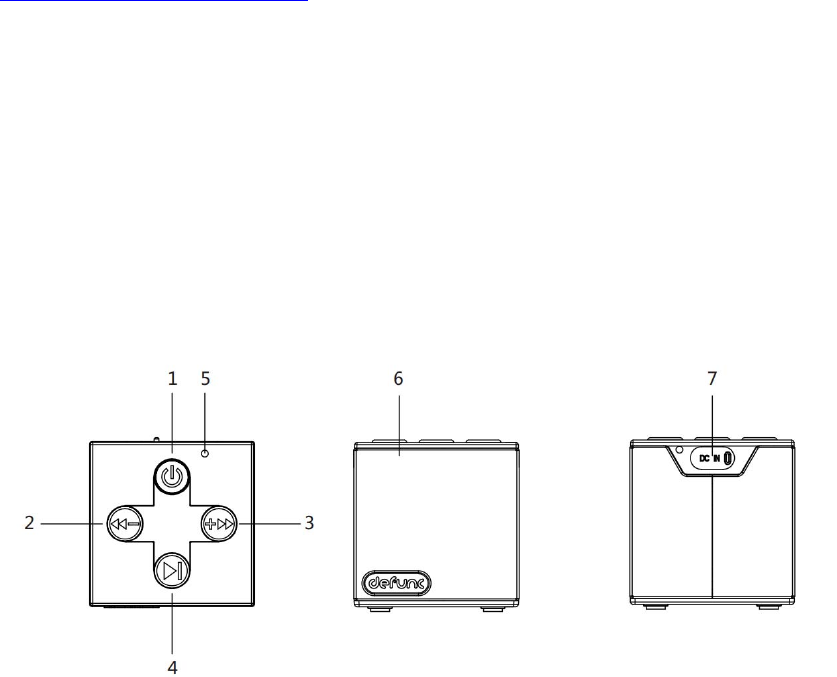
Description:
1. ON/OFF
2. Previous/Volume –
3. Next/Volume +
4. Play/Pause/Phone button
5. MIC
6. Micro USB Charging Port / AUX in Port
7. Blue LED(Bluetooth) / Red LED(Charging)
Specifications:
Supported Profiles: A2DPV1.2,AVRCPV1.0,HFPV1.5,GAVDP1.2
Bluetooth Version: 4.1
Bluetooth Range:33ft (10m)
Dimensions: 70*70*70mm
Battery: Li-Ion 3.7V, 1000 mAh
Charging: DC 5V @ 500 mA
Weight: 222g
Operation:
Powering On
Press and Hold " " button 2 seconds to power ON, the Blue LED will start to rapid
blink .
If an Aux cable is connected to the unit, the Blue LED will slow blink, the unit is in Aux-In
mode.
Powering Off
Paired mode:Press and Hold " " button 2 seconds to disconnect the Bluetooth,
then Press and Hold " "button again to power off .
Pairing/AUX mode:Press and Hold " " button 2seconds to power off
Bluetooth Mode
Pairing
The unit will automatically go into “Pairing Mode” when it is powered on.Go into your
Bluetooth device settings menu and look for“DeFunc Travel”.
After the unit has paired and connected, it will re-connect automatically when the unit is
powered on and the device is in range.
Note: Bluetooth Timeout :10 minutes
Begin Streaming Music
Press ” ” to start playing music
Press and Hold ” ” 2 seconds to play the next track
Press and Hold ” ” 2 seconds to play previous track

Press either ” ” or ” ” for volume control.
Aux-In Mode
Plug in the supplied 3.5 mm cable into the unit. The other end is connected to your device.
the Blue LED will slow blink when in“Aux”mode.
Please note music and volume can be controlled by your device.
Making and Receiving Phone Calls
When the unit is connected and paired to your device,the unit allows you to make or
receive phone calls with its built-in microphone.
Charging
Attach the USB cable to the unit, and plug into any USB charger. If the unit is completely
discharged, it will take approximately 3 hours to fully charge.
The Red LED will illuminate during charging, when it has completed, the Red LED will turn
off.
Note: There will be a beep when the battery is low and needs to be recharged.
LED Status
Blue LED rapid blink & Blue
LED solid Bluetooth Mode
Blue LED Slow blink AUX Mode
Red LED Charging
WARNING: The batteries (battery pack or batteries installed) shall not be exposed to
excessive heat such as sunshine, fire or the like.
WARNING:To reduce the risk of fire or electric shock, do not expose this apparatus to
rain or moisture. The apparatus shall not be exposed to dripping or splashing and that
objects filled with liquids, such as vases, shall not be placed on apparatus.
No naked flame sources, such as lighted candles, should be placed on the apparatus.
Attention should be drawn to environmental aspects of battery disposal.

The product is designed to use in moderate climates
Correct Disposal of this product. This marking indicates that this product should not be
disposed with other household wastes throughout the EU. To prevent possible harm to the
environment or human health from uncontrolled waste disposal, recycle it responsibly to
promote the sustainable reuse of material resources. To return your used device, please
use the return and collection systems or contact the retailer where the product was
purchased. They can take this product for environmental safe recycling
WARNING:changes or modifications not expressly approved by the party responsible for
compliance could void the user’s authority to operate the equipment.
This equipment has been tested and found to comply with the limits for a Class B digital
device, pursuant to Part 15 of the FCC Rules. These limits are designed to provide
reasonable protection against harmful interference in a residential installation. This
equipment generates, uses and can radiate radio frequency energy and, if not installed
and used in accordance with the instructions, may cause harmful interference to radio
communications. However, there is no guarantee that interference will not occur in a
particular installation.
If this equipment does cause harmful interference to radio or television reception, which
can be determined by turning the equipment off and on, the user is encouraged to try to
correct the interference by one or more of the following measures:
-- Reorient or relocate the receiving antenna.
-- Increase the separation between the equipment and receiver.
-- Connect the equipment into an outlet on a circuit different from that to which the receiver
is connected.
-- Consult the dealer or an experienced radio/TV technician for help.