TiVo Solutions d b a TiVo C00240 Remote Control, Qwerty keyboard with Bluetooth User Manual Qbert rectangle Outside Final
TiVo Inc. Remote Control, Qwerty keyboard with Bluetooth Qbert rectangle Outside Final
User Manual
TiVo, TiVo Central, and the TiVo logo are registered trademarks of TiVo Inc. or its subsidiaries worldwide. U.S. Patent
D424,577. © 2010 TiVo Inc. All rights reserved. SDOC-00121-000 Rev A1
Slide Remote
C
M
Y
CM
MY
CY
CMY
K
Qbert_rectangle_Outside-Final.pdf 1 5/24/2010 11:18:55 AM
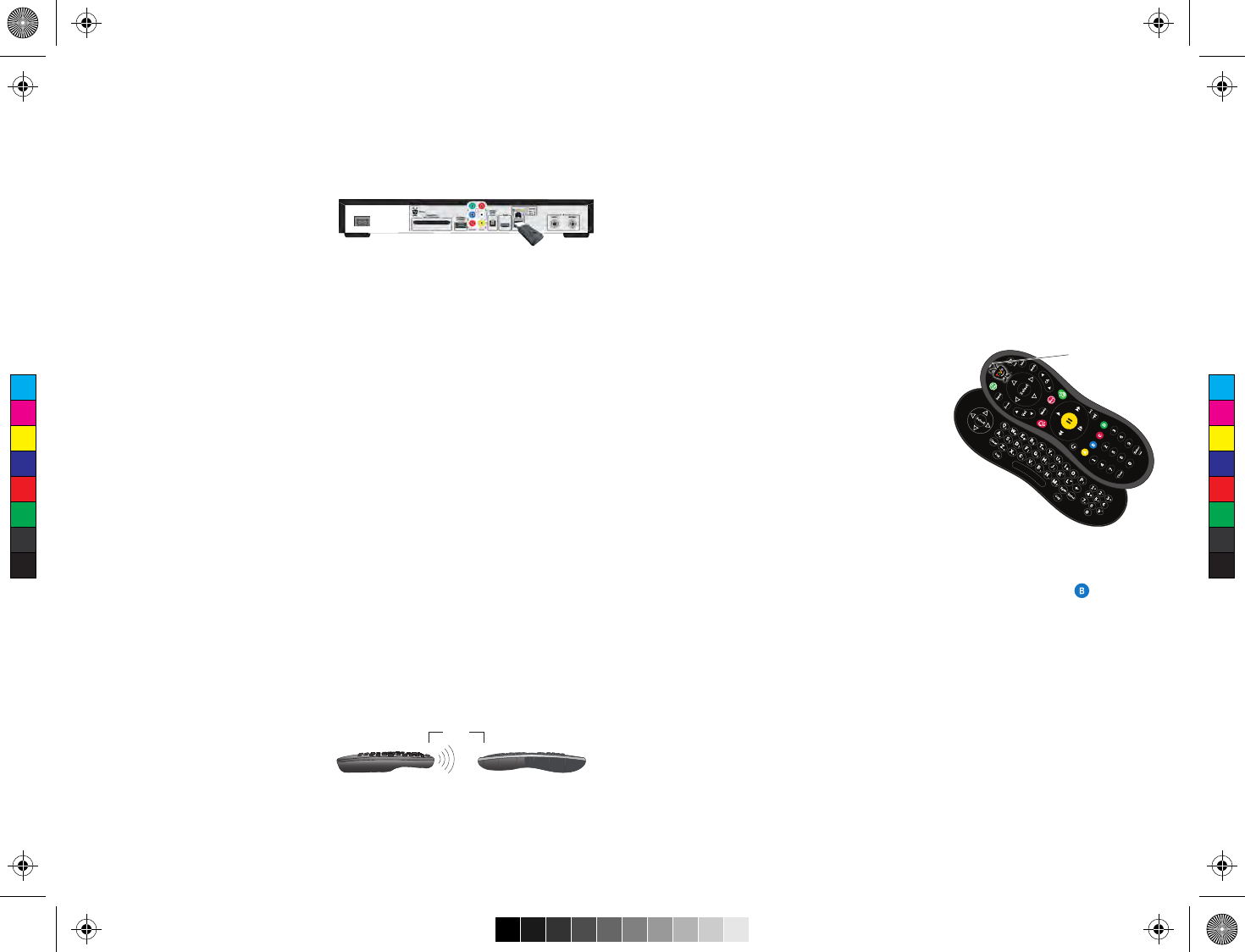
Bluetooth®-ready
Your TiVo Slide remote is Bluetooth-
enabled. Just plug the supplied USB
receiver into the USB port on the back of
your TiVo box, and your remote is ready
to control your TiVo box via Bluetooth. In Bluetooth mode, the activity indicator light
on the remote control flashes blue with each button press.
When your remote is not in Bluetooth mode (e.g., if the USB receiver is not plugged
into your TiVo box), it will still function as a typical TiVo remote using only infrared
signals; however, you will not be able to use the slide-out keyboard. In infrared-only
mode, the remote’s activity indicator light flashes amber with each button press.
Get to know your TiVo® Slide remote
Programmable remote
You can control your TV’s power, input, volume, and mute functions with the TiVo
Slide remote. Press the TiVo button on your remote control to go to the TiVo Central®
screen. Select ‘Messages & Settings,’ then ‘Settings,’ then ‘Remote, CableCARD, &
Devices,’ then ‘Remote Control Settings’ and follow the on-screen instructions.
The TiVo Slide remote is also a “learning remote.” It can learn certain functions from
other remotes. If you are unable to find a code that works using the on-screen
programming procedure, try this method:
1. Press the TiVo button and the SELECT button simultaneously, and hold them for
three seconds, until the amber activity indicator light remains lit. The remote is
now in “learning mode.”
2. On the TiVo remote, press and release the button you want it to learn (for
example, TV PWR). The activity indicator light will flash once to acknowledge the
button press, then remain lit.
3. Point the remotes directly at each
other, no more than 4 inches apart.
4. Press the corresponding button on the TV or A/V receiver remote (e.g., Power).
5. If learning is successful, the activity indicator light will flash 4 times. If it is not
successful, the light will blink 10 times very quickly.
TV or A/V receiver remote TiVo Slide remote
4” max.
6. Repeat steps 2-5 for any additional buttons. NOTE: In learning mode, VOL UP and
VOL DOWN are separate buttons.
7. When done, press the TiVo button to exit learning mode and return the remote to
normal operation.
Tips and tricks
• To use the integrated QWERTY keyboard, you must be in Bluetooth mode.
• To enter symbols on the keyboard (like *, &,
or \), press the SYM key and then the desired
symbol.
• You can tell if your remote is in Bluetooth or
infrared mode by looking at the color of
activity indicator light at the top of the
remote. When you press a button, this light
flashes blue in Bluetooth mode or amber in
infrared-only mode.
• In rare instances, you may find your remote in infrared-only mode even though the
USB receiver is plugged into the TiVo box. In this case, you will need to enable
Bluetooth manually. Simply press and hold the TiVo button and the button
simultaneously until the remote’s activity indicator light starts blinking blue. Then
press and hold the button on the USB receiver until its LED starts blinking. When
pairing is successful, the remote’s activity indicator light will blink rapidly five
times and then go off.
• The TiVo Slide remote lights up in darkened rooms. To turn this feature off, press
and hold the TiVo and THUMBS DOWN buttons until the activity light blinks three
times. To turn the feature on again, press and hold the TiVo and THUMBS UP
buttons until the activity indicator light blinks three times.
• If you use a wireless adapter to connect to the TiVo service, leave at least 12” of
space between the adapter and the TiVo Slide remote’s USB receiver for optimal
performance.
For more remote control tips, go to www.tivo.com/support.
Activity indicator
light
C
M
Y
CM
MY
CY
CMY
K
Qbert_rectangle_Inside-Final.pdf 1 5/24/2010 11:19:26 AM
®
WHO IS COVERED?
You must have proof of purchase to receive warranty service. A sales receipt or other document showing that you
purchased the product is considered proof of purchase.
WHAT IS COVERED?
TiVo warrants that the remote (including the dongle or USB thumb stick, if any, provided with the remote) will be
free from defects in materials and workmanship during the limited warranty period described herein. The limited
warranty coverage begins the day you purchase the product. For 90 days from the purchase date, the remote will be
replaced with a repaired, renewed or comparable product (at TiVo’s discretion) if it becomes defective or inoperable.
This exchange is done without charge to you for parts and labor (except applicable taxes, if any). You will be
responsible for the cost of shipping. Contact Customer Support at 1-877-367-8486 for exchange. All products,
including replacement products, are covered only for the original warranty period. When the warranty on the original
product expires, the warranty on the replacement product also expires.
WHAT IS EXCLUDED?
Your warranty does not cover:
• Any taxes imposed on TiVo for units replaced or repaired under this warranty.
• Product replacement because of misuse, accident, unauthorized repair, or other cause not within TiVo’s control.
• Incidental or consequential damages resulting from the use of the product. (Some states do not allow the
exclusion of incidental or consequential damages, so the above exclusion may not apply to you.)
• A product that has been modified or adapted to enable it to operate in any country other than the country for
which it was designed.
• A product used for commercial or institutional purposes.
MAKE SURE YOU KEEP...
Please keep your sales receipt or other document showing proof of purchase. Also keep the original box and
packing material in case you need to return your product.
TO GET WARRANTY SERVICE...
If you believe the product is defective, contact Customer Support at 1-877-367-8486. A representative will go
through a diagnostic checklist with you. If it is determined that the product needs to be exchanged, the
representative will give you complete shipping details. All implied warranties, including implied warranties of
merchantability and fitness for a particular purpose, are limited in duration to the duration of this express warranty.
Some states do not allow limitations on how long an implied warranty lasts, so the above limitation may not apply to
you.
This warranty gives you specific legal rights. You may have other rights which vary from state to state (or
jurisdiction to jurisdiction). TIVO’S RESPONSIBILITY FOR MALFUNCTIONS AND DEFECTS IN REMOTE CONTROLS IS
LIMITED TO REPAIR AND REPLACEMENT AS SET FORTH IN THIS LIMITED WARRANTY. ALL EXPRESS AND IMPLIED
WARRANTIES FOR THE REMOTE CONTROL, INCLUDING BUT NOT LIMITED TO ANY IMPLIED WARRANTIES OF AND
ALL CONDITIONS OF MERCHANTABILITY AND FITNESS FOR A PARTICULAR PURPOSE, ARE LIMITED IN DURATION TO
THE LIMITED WARRANTY PERIOD SET FORTH ABOVE AND NO WARRANTIES, WHETHER EXPRESS OR IMPLIED, WILL
APPLY AFTER SUCH PERIOD. Some states do not allow limitations on how long an implied warranty lasts, so the
above exclusion may not apply to you.
TIVO DOES NOT ACCEPT LIABILITY BEYOND THE REMEDIES SET FORTH IN THIS LIMITED WARRANTY OR LIABILITY
FOR INCIDENTAL OR CONSEQUENTIAL DAMAGES, INCLUDING WITHOUT LIMITATION ANY LIABILITY FOR PRODUCTS
NOT BEING AVAILABLE FOR USE OR FOR LOST DATA. Some states do not allow the exclusion of incidental or
consequential damages, so the above exclusion may not apply to you.
TiVo® Slide Remote Limited Warranty
90 Days Free Parts and Labor
Qbert_WarrantyRegulatory_Front_A1.pdf 1 5/28/2010 3:58:45 PM
FCC Statement
This equipment has been tested and found to comply with the limits for a Class B digital device, pursuant to Part 15
of the FCC Rules. These limits are designed to provide reasonable protection against harmful interference in a
residential installation. This equipment generates, uses and can radiate radio frequency energy and, if not installed
and used in accordance with the instructions, may cause harmful interference to radio communications. However,
there is no guarantee that interference will not occur in a particular installation. If this equipment does cause
harmful interference to radio or television reception. Consult the dealer or an experienced radio/TV technician for
help.
FCC Caution: Any changes or modifications not expressly approved by the party responsible for compliance could
void the user’s authority to operate this equipment.
This device complies with Part 15 of the FCC Rules. Operation is subject to the following two conditions: (1) This
device may not cause harmful interference, and (2) this device must accept any interference received, including
interference that may cause undesired operation.
Safety Notices
Do not use this product near water, for example, in a wet basement or near a swimming pool.
Do not disassemble this product or expose it to liquid, humidity, or moisture.
Model number: C00240
FCC ID: TGN-C00240 (remote); TGN-C00240A (USB dongle)
Industry Canada Conformity
This device has been tested and found to comply with the limits specified in RSS-210. Operation is subject to the
following two conditions: (1) This device may not cause interference, and (2) This device must accept any
interference, including interference that may cause undesired operation of the device.
This Class [B] digital apparatus complies with Canadian ICES-003.
TiVo and the TiVo logo are registered trademarks of TiVo Inc. or its subsidiaries worldwide. © 2010 TiVo Inc.
All rights reserved. SDOC-00122-000 Rev A2
®
TiVo® Slide Remote
Regulatory Information
Qbert_WarrantyRegulatory_Back_A2.pdf 6/3/2010 3:16:11 PM