Tianjin Empecs Medical Device MM1000BT Blood Glucose Monitoring System User Manual MM1100 BT S

Tianjin Empecs Medical Device Co., Ltd. Blood Glucose Monitoring System MM1100 BT S

User Manual

Read this User Manual carefully before you start the test and do a qualitycontrol test. If you have any questions about the control test consult with yourhealthcare professional. Confirm the measuring unit on the display is correctwith ever test result.Call Customer Service Toll-Free24 hours a day, 7 days a week1-888-885-6677or visit our website Manufactured by:Tianjin Empecs Medical Device Co.,Ltd.No.35 and 37, Yingcheng Street, Hangu,Binhai New Area, 300480 Tianjin Chinawww.empecs.comMedisign  MM1100 BTBlood Glucose Monitoring SystemUser Manual
I iiSign of TroubleIf you are experiencing any of the issues below, call customer service at1-888-885-6677.lThe meter doesn't power on when the new test strip is inserted into the meter.lThe meter doesn't power on when you replace the batteries.lThe meter doesn't show the test result after the test is completed.lThe LCD does not display correctly or is distorted after changing the batteries.If you encounter any issues including the ones mentioned above, callcustomer service at 1-888-885-6677.Important Safety InstructionlBlood glucose meters are at high risk of contamination with blood-borne pathogens such as Hepatitis B Virus (HBV), Hepatitis C Virus (HCV), and Human Immunodeficiency Virus (HIV).Transmission of these viruses from user to user has been documented due to contaminated blood glucose devices. Accordingly, cleaning and disinfecting meters between users can prevent the transmission of these viruses through indirect contact.lThe meter and lancing device are for single patient use. Do not share them with anyone including other family members. Do not use on multiple patients.lAll parts of the kit are considered as biohazards. The system may transmit infectious diseases, even after it has been cleaned or disinfected.lIf the meter is being operated by a second person who is providing testing assistance to the user, the meter and lancing device should be disinfected prior to use by the second person.lReferences1. FDA Public Health Notification: Use of Fingerstick Devices on More than One Person Poses Risk for Transmitting Blood Pathogens:Initial Communication (2010) http://www.fda.gov/MedicalDevices/Safety/AlertsandNotices/ucm224025.htm2. CDC Clinical Reminder: Use of Fingerstick Devices on More than One Person Poses a Risk for Transmitting Blood-borne Pathogens (2010)      http://www.cdc.gov/injectionsafety/Fingerstick-DevicesBGM.html
ContentsnAbout Your New SystemWelcome  Intended Use  Application  Test Principle  Special Features  Usage and storage  Important Information System Components nTesting Your Blood GlucoseDisinfection Before testPerforming a Blood Glucose Test Flagging Test Results  Handling the Used Test Strips          Alternate Site Testing (AST) nMeter Setup, Memory and DownloadingSetting up Your Meter 0101020203040509131422232428Reviewing Test ResultsDownloading Test Results to a PCnPairing Your MeterHow to Pair Your MeternControl TestPerforming a Control Test          Understanding Control Test ResultsnMaintenance and TroubleshootingCleaning and DisinfectingReplacing the BatteriesScreen MessagesTroubleshootingnTechnical Information and WarrantySpecificationsWarrantyDisposing of your MeterAdditional Supplies Available......................................................................................................... ................................................................................................... .....................................................................................................  ...................................................................................................  .............................................................................................  ...................................................................................................................................................................................................................................................................................................................................................................................................................................................................................................................................................................................................................................................................................................................................................  ......................................................................................................................................................  ..................................................................................................................................................................           ...............................................................  ............................................................................. .................................................................................. ............................................................................................ ...............................................................................................  .................................................................................................. ...........................................................................................................   ................................................................................. ........................................................................28   343740444550525658606163
0201About Your New SystemWelcomeThank you for selecting the Medisign MM1100 BT Blood Glucose Monitoring System. This user manual is designed to provide you with information on how to use the Medisign MM1100 BT Glucose Monitoring System. Follow the instructions carefully that are detailed in this manual. Before using your monitoring system for the first time, please read this manual carefully and  If you have any questions, contact Customer Service at 1-888-885-6677, anytime-24 hours a day. You can also obtain information at www.empecs.com.Intended UseMedisign MM1100 BT Blood Glucose Monitoring System is intended for the quantitative measurement of the glucose in fresh capillary whole blood drawn from fingertip, palm, and forearm by a single patient (lay user) as an aid in the management of diabetes. It is intended for self testing by persons at home, for single patient use only, and should not be shared. It is intended for use outside the body (in-vitro diagnostic use only) and not for the diagnosis of or screening of diabetes or for neonatal use.The alternative site testing (palm and forearm) should be done only during steady state times (when glucose in not changing rapidly).ApplicationMedisign MM1100 Blood Glucose Test Strips are for in-vitro diagnostic use and for self testing only. The Medisign MM1100 BT Blood Glucose Meter is not a substitute for your physician or Healthcare Professional. Use the Medisign MM1100 BT Blood Glucose Meter in conjunction with your Healthcare Program.Test PrincipleGlucose in the blood sample reacts with glucose oxidase on the test strip and a harmless electrical current is produced. The strength of these currents change with the amount of glucose in the blood sample and the Medisign MM1100 BT Blood Glucose Meter automatically interprets this reaction.
03 04Glucose measurements are reported as plasma equivalents. This system uses plasma equivalent methodology. Results that use a plasma equivalent method are approximately 11% higher than those obtained with whole-blood equivalent test strips.Special FeatureslAccurate result in 5 seconds using only 0.5㎕ blood sample.lThe Medisign MM1100 BT Glucose Meter identifies the test strip codeautomatically.lStores up to 300 test results.lBlood glucose measurement units are pre-set in mg/dL.Usage and StoragelBefore using your monitoring system, please place it in the environment of the system's normal operating temperature range of 50-104 ℉ for about         twenty (20) minutes.lDo not allow dirt or dust into the test strip port in order to avoid affecting the monitoring system's accuracy.lDo not attempt to repair or alter your monitoring system.lDo not put the monitoring system near any electromagnetic field. (e.g. TV, microwave oven, mobile phone)lHandle your monitoring system with care.lKeep away from direct sunlight and humid conditions.lPlease use a soft cotton cloth to wipe the system.lDo not use a corrosive product (e.g. Benzene, Acetone) to clean your monitoring system.
05 06Important InformationlMake sure to use your test strip immediately after retrieving it from the vial, be sure to keep the test strip vial closed tightly at all times. lFor the most accurate results, make sure your hands are clean and dry before removing the test strips from their vial.lDo not touch test strip slit.lDo not use test strips that have expired, using expired test strips may cause inaccurate test results.lNever reuse a test strip that has had either blood or control solution applied. The Medisign MM1100 Test Strip is for single use only.lThis product is not recommended for pregnant women, newborns or if you are severely dehydrated.lBefore the test you must make sure that the code number displayed on the meter matches the code number on the test strip vial.lKeep your Medisign MM1100 BT Blood Glucose Meter, lancing device, lancets and control solutions out of reach of children or pets.lBe sure to check the glucose measurement unit on the meter before the test.     - This meter is preset to mg/dL.     - mg/dL is the unit of measurement used in the US.lMake sure you close the test strip vial is closed tightly and store at indoor area between 39 ~ 86℉,10~90%RH. Do not freeze.lKeep test strips away from direct sunlight and heat.lUse this system only for blood glucose test.l℉Before using the Medisign MM1100 BT Blood Glucose Monitoring System, please read this manual carefully.lThe meter and test strips should be handled at the same temperature.lFor accurate test results, keep the Medisign MM1100 BT Blood Glucose Monitoring System operating temperature at a range between 50-104  for more than twenty (20) minutes before testing.
07 08lDo not use any anticoagulants or preservatives other than heparin when collecting capillary blood into test tubes.lBe sure to clean and disinfect your Medisign MM1100 BT Blood Glucose Meter regularly.lDo not reuse the test strips, test strips are single use only.lYou may use this system at altitude up to 10,000 feet.lClean and disinfect your Medisign MM1100 BT Blood Glucose Meter at least once per week.Inaccurate results may occur for individuals or patient in shock.Inaccurate results may occur for individuals experiencing a hyperglycemic-hypersmolar state with or without ketosis.  Critically ill patients should not be tested with this blood glucose meter.Interferences: Acetaminophen, salicylates, uric acid, ascorbic acid (vitamin C) and other interferent substances in normal blood or normal therapeutic concentrations do not significantly affect results, however abnormally high concentrations in blood may cause inaccurate results.lThe Medisign MM1100 BT Blood Glucose Monitoring System is for testing outside of the body (in-vitro diagnostic use).lllCAUTION: Use only Medisign MM1100 Test Strips with your Medisign MM1100 and Medisign MM1100 BT Blood Glucose Meters.l  Testing under out of the specification range may cause inaccurate results.  l  Patients undergoing oxygen therapy may yield false low results.l  Lipemic samples (triglycerides) in excess of 1,500 mg/dL may produce elevated results.l  Hematocrit is the percentage of red blood cells in the blood. HCT levels of 30-55% do not affect glucose measurements with this meter. If you do not know your hematocrit level, consult with your healthcare professional.l  This test strip is not for use with arterial, venous, neonatal, serum or plasma samples.l   Testing out of HCT level range of (30~55%) and recommended storage   conditions may cause inaccurate results.lDispose of used test strips and lancets according to instructions from your healthcare provider.
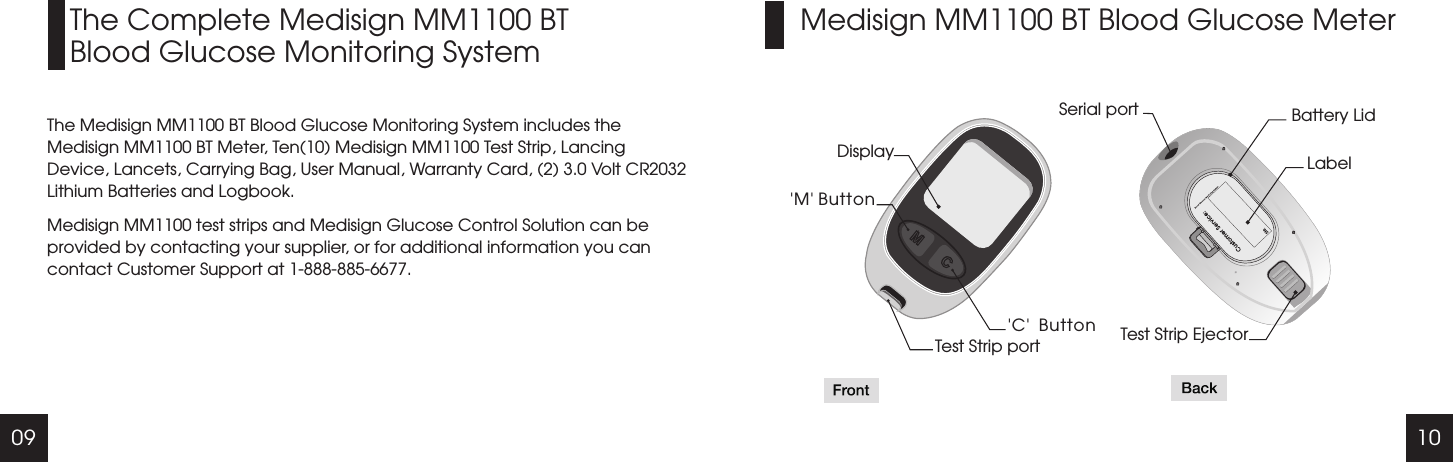
09 10Medisign MM1100 BT Blood Glucose MeterThe Complete Medisign MM1100 BTBlood Glucose Monitoring SystemThe Medisign MM1100 BT Blood Glucose Monitoring System includes the Medisign MM1100 BT Meter, Ten(10) Medisign MM1100 Test Strip, Lancing Device, Lancets, Carrying Bag, User Manual, Warranty Card, (2) 3.0 Volt CR2032 Lithium Batteries and Logbook.Medisign MM1100 test strips and Medisign Glucose Control Solution can be provided by contacting your supplier, or for additional information you can contact Customer Support at 1-888-885-6677.Display'M' Button 'C'  ButtonTest Strip portSerial port Battery LidLabelTest Strip Ejector
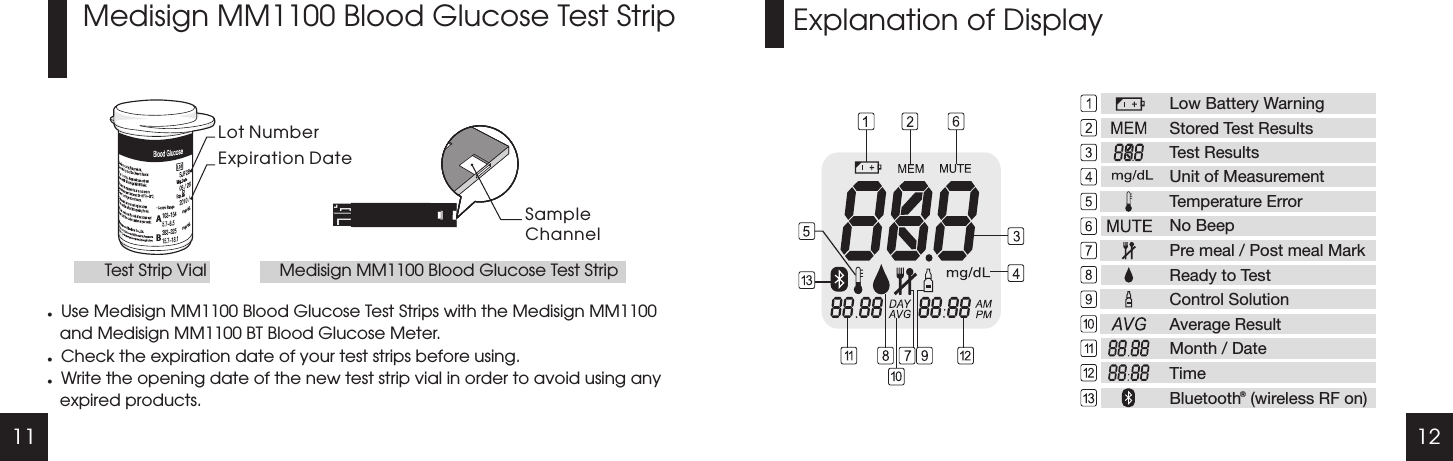
11 12Explanation of DisplayMedisign MM1100 Blood Glucose Test StriplUse Medisign MM1100 Blood Glucose Test Strips with the Medisign MM1100 and Medisign MM1100 BT Blood Glucose Meter.lCheck the expiration date of your test strips before using.lWrite the opening date of the new test strip vial in order to avoid using any expired products.Lot NumberExpiration DateSampleChannelTest Strip Vial Medisign MM1100 Blood Glucose Test StripABLow Battery WarningStored Test ResultsTest ResultsUnit of MeasurementTemperature ErrorNo BeepPre meal / Post meal MarkReady to TestControl SolutionAverage ResultMonth / DateTimeBluetooth  (wireless RF on)b
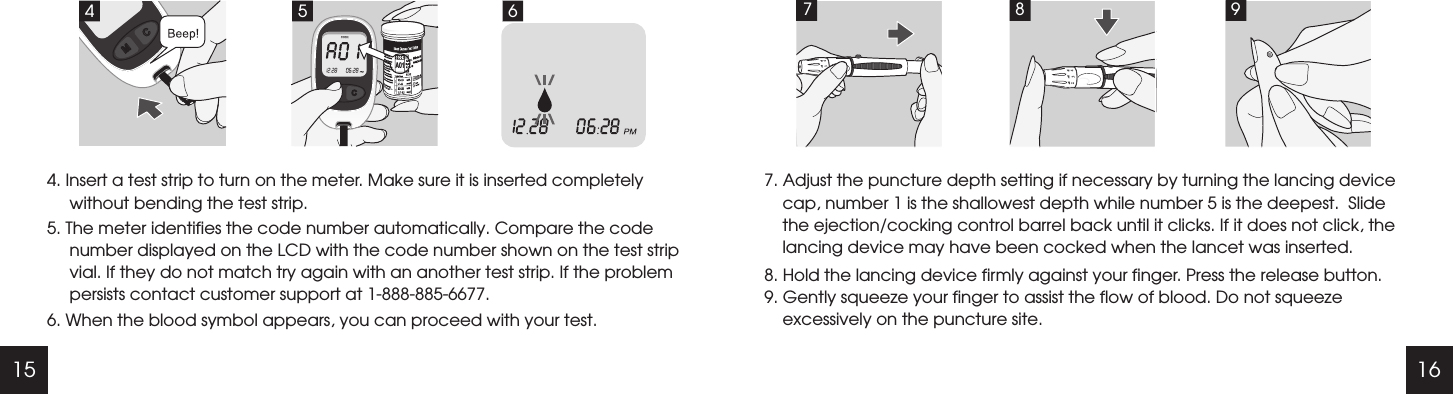
15 167. Adjust the puncture depth setting if necessary by turning the lancing device cap, number 1 is the shallowest depth while number 5 is the deepest.  Slide the ejection/cocking control barrel back until it clicks. If it does not click, the lancing device may have been cocked when the lancet was inserted.8. Hold the lancing device firmly against your finger. Press the release button.9. Gently squeeze your finger to assist the flow of blood. Do not squeeze excessively on the puncture site.7894. Insert a test strip to turn on the meter. Make sure it is inserted completely without bending the test strip.5. The meter identifies the code number automatically. Compare the code number displayed on the LCD with the code number shown on the test strip vial. If they do not match try again with an another test strip. If the problem persists contact customer support at 1-888-885-6677.6. When the blood symbol appears, you can proceed with your test.64 5A01
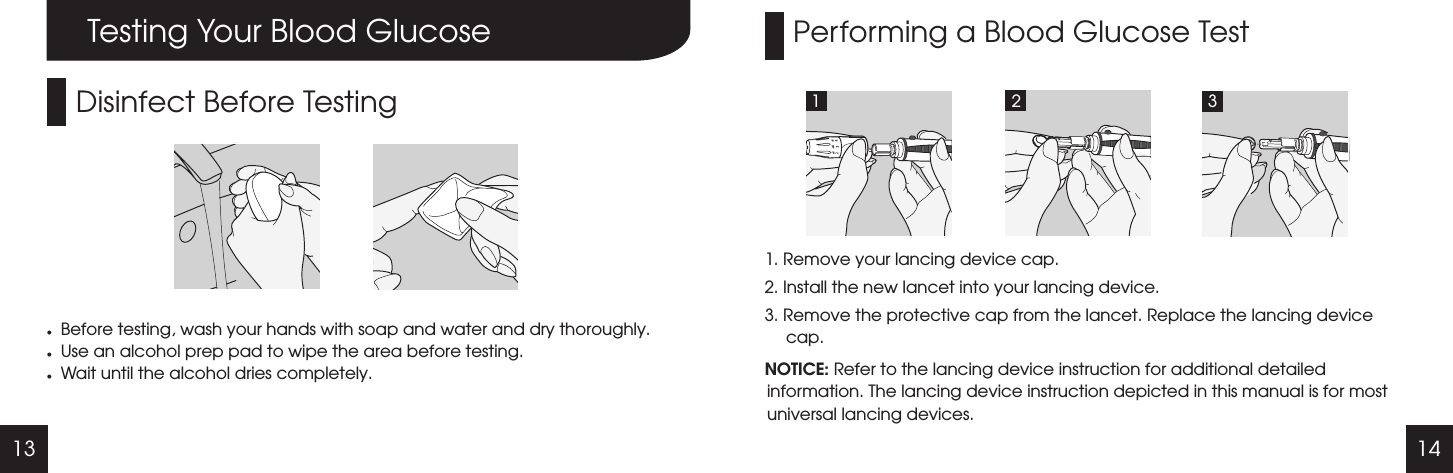
13 14Performing a Blood Glucose Test1. Remove your lancing device cap.2. Install the new lancet into your lancing device. 3. Remove the protective cap from the lancet. Replace the lancing device cap.NOTICE: Refer to the lancing device instruction for additional detailed information. The lancing device instruction depicted in this manual is for most universal lancing devices.1 2 3Testing Your Blood GlucoseDisinfect Before TestinglBefore testing, wash your hands with soap and water and dry thoroughly.lUse an alcohol prep pad to wipe the area before testing.lWait until the alcohol dries completely.
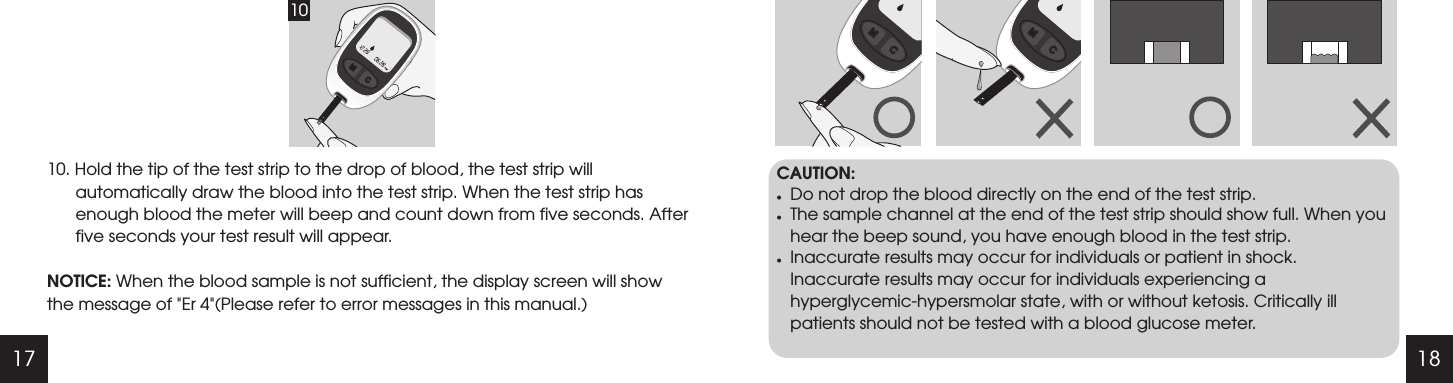
17 1810. Hold the tip of the test strip to the drop of blood, the test strip will automatically draw the blood into the test strip. When the test strip has enough blood the meter will beep and count down from five seconds. After five seconds your test result will appear. NOTICE: When the blood sample is not sufficient, the display screen will show the message of "Er 4"(Please refer to error messages in this manual.)CAUTION:lDo not drop the blood directly on the end of the test strip.lThe sample channel at the end of the test strip should show full. When you hear the beep sound, you have enough blood in the test strip.lInaccurate results may occur for individuals or patient in shock. Inaccurate results may occur for individuals experiencing a hyperglycemic-hypersmolar state, with or without ketosis. Critically ill patients should not be tested with a blood glucose meter.10
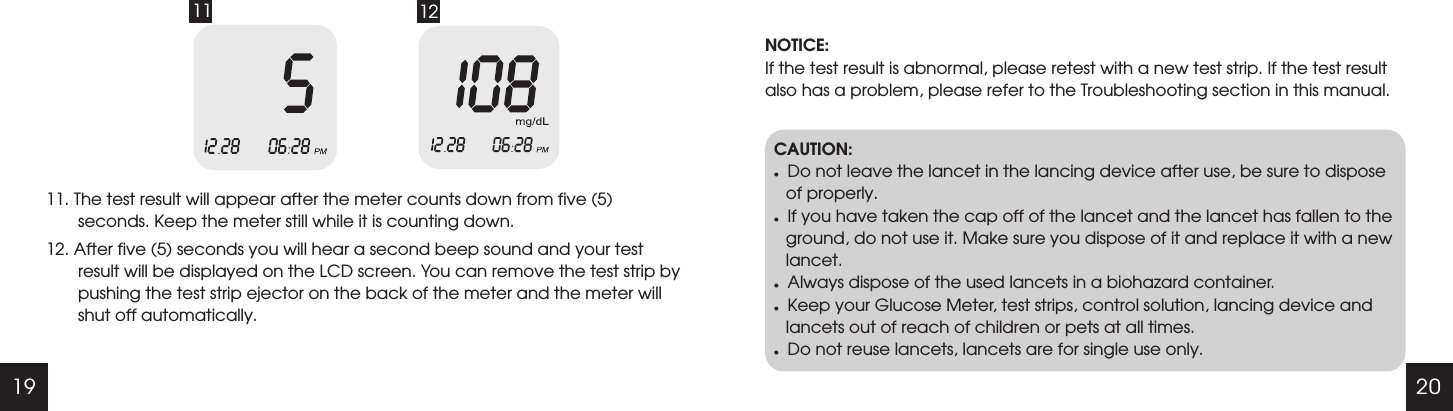
19 2011 1211. The test result will appear after the meter counts down from five (5) seconds. Keep the meter still while it is counting down. 12. After five (5) seconds you will hear a second beep sound and your test result will be displayed on the LCD screen. You can remove the test strip by pushing the test strip ejector on the back of the meter and the meter will shut off automatically. NOTICE:If the test result is abnormal, please retest with a new test strip. If the test result also has a problem, please refer to the Troubleshooting section in this manual.CAUTION:lDo not leave the lancet in the lancing device after use, be sure to dispose of properly.lIf you have taken the cap off of the lancet and the lancet has fallen to the ground, do not use it. Make sure you dispose of it and replace it with a new lancet. lAlways dispose of the used lancets in a biohazard container.lKeep your Glucose Meter, test strips, control solution, lancing device and lancets out of reach of children or pets at all times.lDo not reuse lancets, lancets are for single use only.
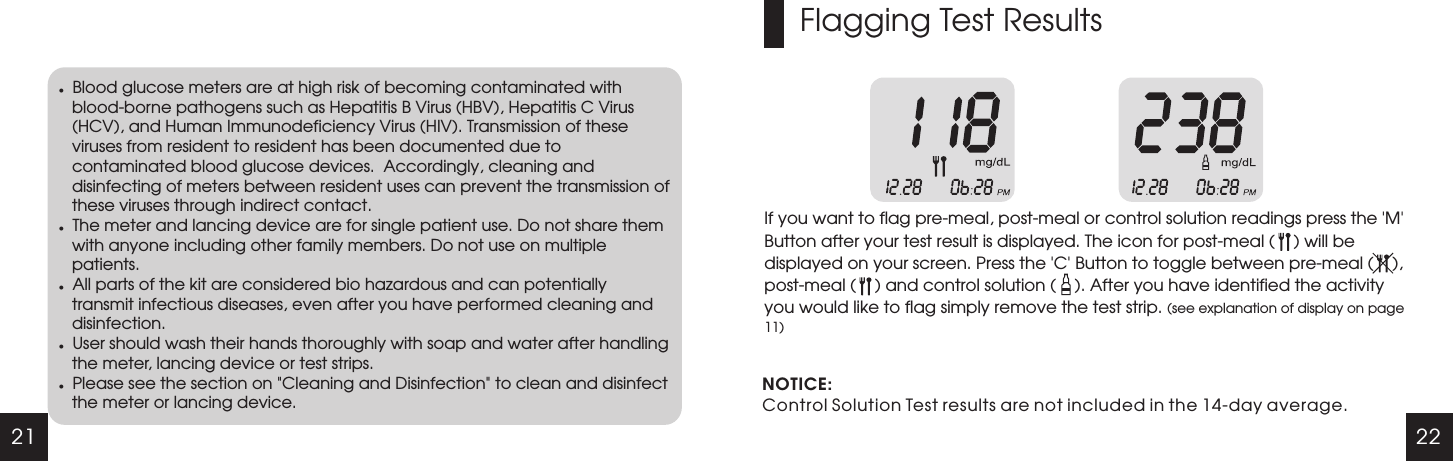
21 22lBlood glucose meters are at high risk of becoming contaminated with blood-borne pathogens such as Hepatitis B Virus (HBV), Hepatitis C Virus (HCV), and Human Immunodeficiency Virus (HIV). Transmission of these viruses from resident to resident has been documented due to contaminated blood glucose devices.  Accordingly, cleaning and disinfecting of meters between resident uses can prevent the transmission of these viruses through indirect contact. lThe meter and lancing device are for single patient use. Do not share them with anyone including other family members. Do not use on multiple patients.lAll parts of the kit are considered bio hazardous and can potentially transmit infectious diseases, even after you have performed cleaning and disinfection.lUser should wash their hands thoroughly with soap and water after handling the meter, lancing device or test strips.lPlease see the section on "Cleaning and Disinfection" to clean and disinfect the meter or lancing device.Flagging Test ResultsIf you want to flag pre-meal, post-meal or control solution readings press the   Button after your test result is displayed. The icon for post-meal (    ) will be displayed on your screen. Press the   Button to toggle between pre-meal (    ), post-meal (    ) and control solution (    ). After you have identified the activity you would like to flag simply remove the test strip. (see explanation of display on page 11)'M''C'NOTICE:Control Solution Test results are not included in the 14-day average.
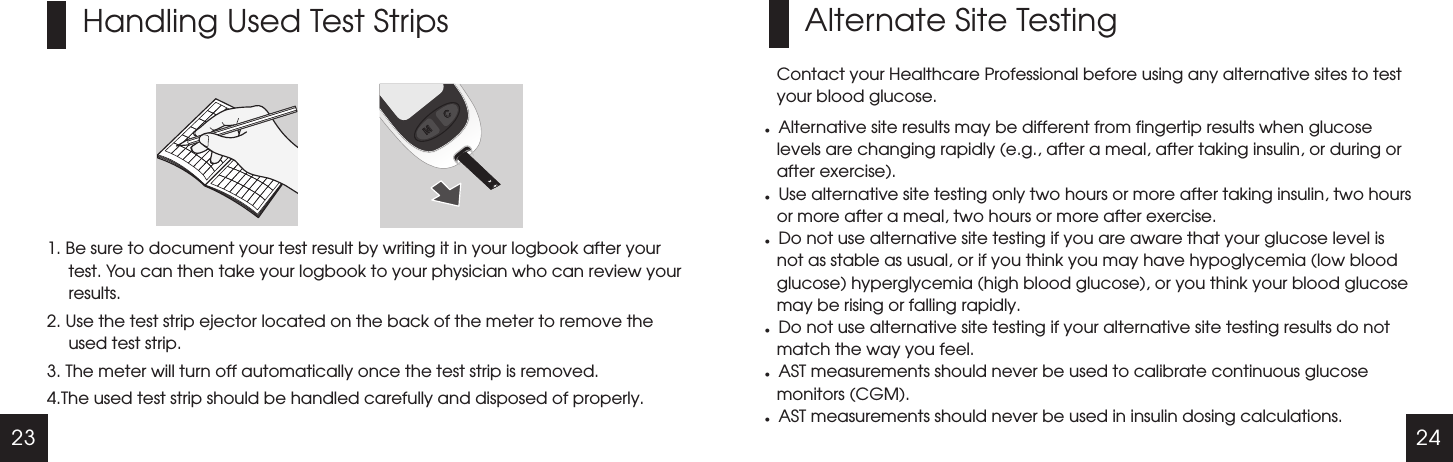
23 24Handling Used Test Strips1. Be sure to document your test result by writing it in your logbook after your test. You can then take your logbook to your physician who can review your results. 2. Use the test strip ejector located on the back of the meter to remove the used test strip.3. The meter will turn off automatically once the test strip is removed.4.The used test strip should be handled carefully and disposed of properly. Alternate Site TestingContact your Healthcare Professional before using any alternative sites to test your blood glucose.lAlternative site results may be different from fingertip results when glucose levels are changing rapidly (e.g., after a meal, after taking insulin, or during or after exercise).lUse alternative site testing only two hours or more after taking insulin, two hours or more after a meal, two hours or more after exercise.lDo not use alternative site testing if you are aware that your glucose level is not as stable as usual, or if you think you may have hypoglycemia (low blood glucose) hyperglycemia (high blood glucose), or you think your blood glucose may be rising or falling rapidly.lDo not use alternative site testing if your alternative site testing results do not match the way you feel.lAST measurements should never be used to calibrate continuous glucose monitors (CGM).lAST measurements should never be used in insulin dosing calculations.
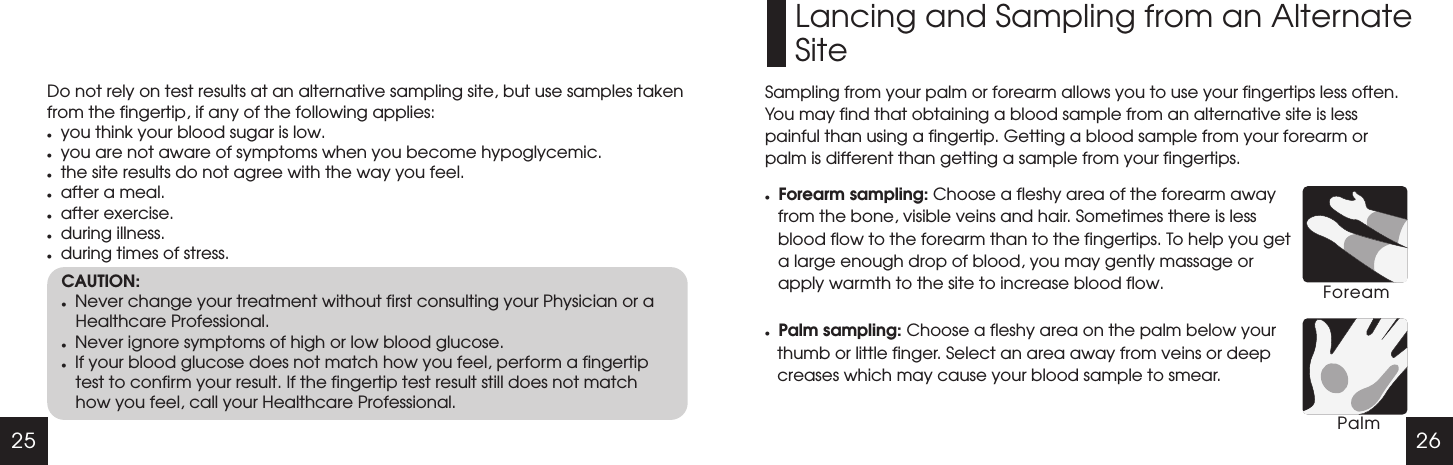
25 26Do not rely on test results at an alternative sampling site, but use samples taken from the fingertip, if any of the following applies:lyou think your blood sugar is low.lyou are not aware of symptoms when you become hypoglycemic.lthe site results do not agree with the way you feel.lafter a meal.lafter exercise.lduring illness.lduring times of stress.CAUTION:lNever change your treatment without first consulting your Physician or a Healthcare Professional.lNever ignore symptoms of high or low blood glucose.lIf your blood glucose does not match how you feel, perform a fingertip test to confirm your result. If the fingertip test result still does not match how you feel, call your Healthcare Professional.Lancing and Sampling from an AlternateSiteSampling from your palm or forearm allows you to use your fingertips less often. You may find that obtaining a blood sample from an alternative site is less painful than using a fingertip. Getting a blood sample from your forearm or palm is different than getting a sample from your fingertips.lForearm sampling: Choose a fleshy area of the forearm away from the bone, visible veins and hair. Sometimes there is less blood flow to the forearm than to the fingertips. To help you get a large enough drop of blood, you may gently massage or apply warmth to the site to increase blood flow.lPalm sampling: Choose a fleshy area on the palm below your thumb or little finger. Select an area away from veins or deep creases which may cause your blood sample to smear.ForeamPalm
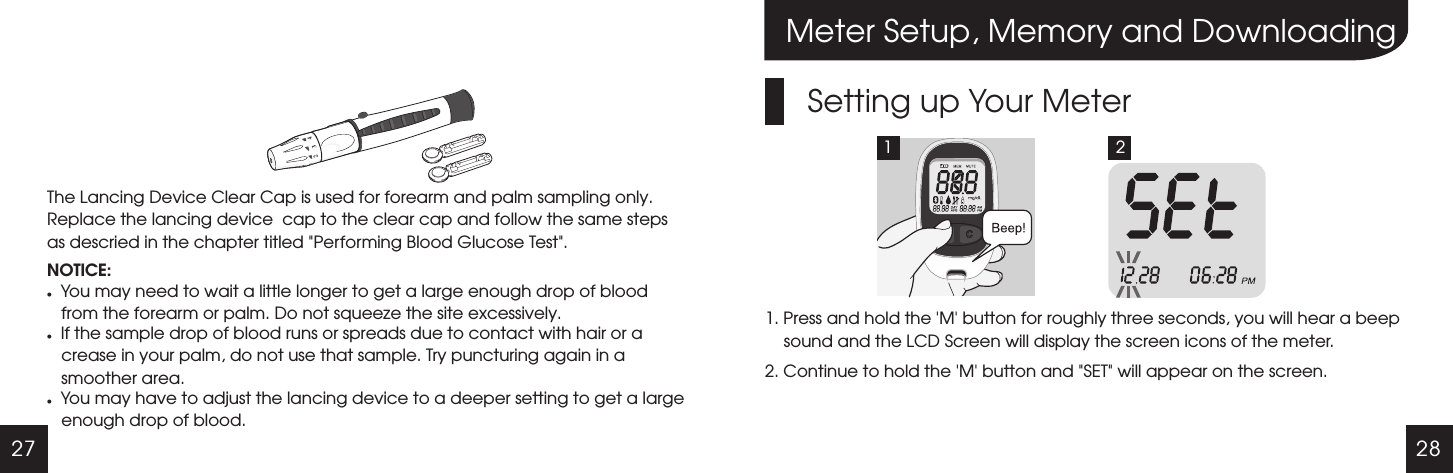
27 28The Lancing Device Clear Cap is used for forearm and palm sampling only. Replace the lancing device  cap to the clear cap and follow the same steps as descried in the chapter titled "Performing Blood Glucose Test".NOTICE:lYou may need to wait a little longer to get a large enough drop of blood from the forearm or palm. Do not squeeze the site excessively.lIf the sample drop of blood runs or spreads due to contact with hair or a crease in your palm, do not use that sample. Try puncturing again in a smoother area.lYou may have to adjust the lancing device to a deeper setting to get a large enough drop of blood.Meter Setup, Memory and DownloadingSetting up Your Meter1. Press and hold the   button for roughly three seconds, you will hear a beep sound and the LCD Screen will display the screen icons of the meter.2. Continue to hold the   button and "SET" will appear on the screen.'M''M'1 2
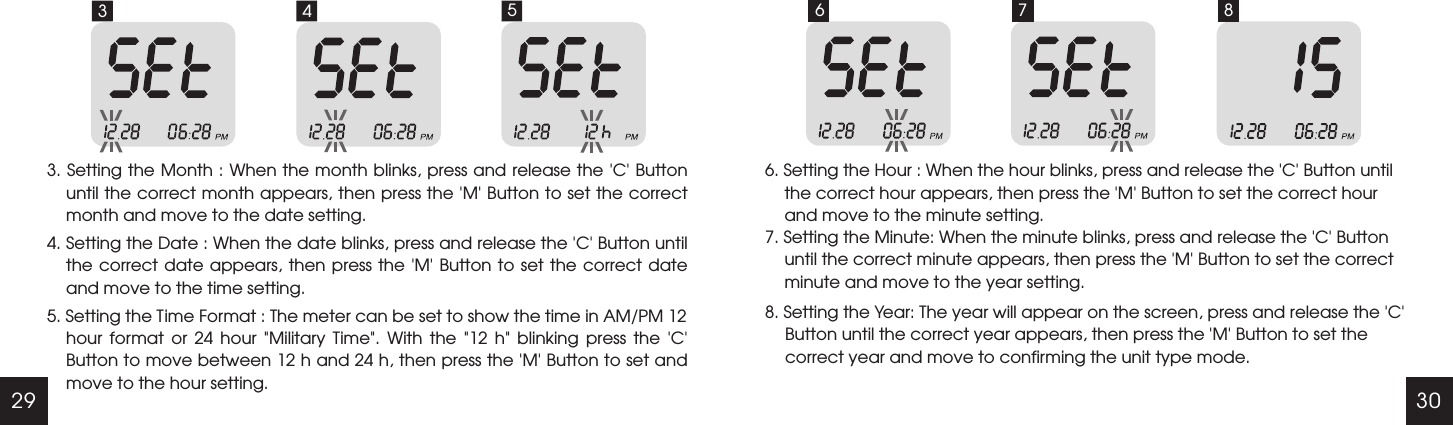
29 303 43. Setting the Month : When the month blinks, press and release the 'C' Button until the correct month appears, then press the   Button to set the correct month and move to the date setting. 4. Setting the Date : When the date blinks, press and release the   Button until the correct date  appears,  then  press  the   Button to set the correct date and move to the time setting.'M''C''M'5. Setting the Time Format : The meter can be set to show the time in AM/PM 12 hour  format  or  24  hour  "Military  Time".  With  the  "12  h"  blinking  press  the  'C' Button to move between 12 h and 24 h, then press the 'M' Button to set and move to the hour setting.5 66. Setting the Hour : When the hour blinks, press and release the   Button until the correct hour appears, then press the   Button to set the correct hour and move to the minute setting.'C''M'7. Setting the Minute: When the minute blinks, press and release the 'C' Button until the correct minute appears, then press the 'M' Button to set the correct minute and move to the year setting.8. Setting the Year: The year will appear on the screen, press and release the 'C' Button until the correct year appears, then press the 'M' Button to set the correct year and move to confirming the unit type mode.7 8
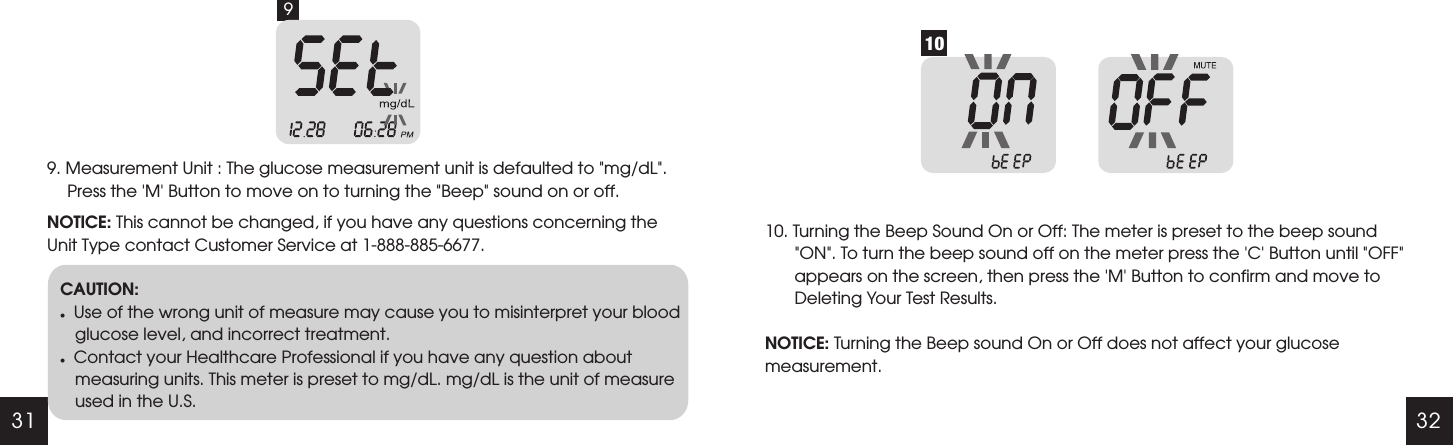
31 329. Measurement Unit : The glucose measurement unit is defaulted to "mg/dL". Press the 'M' Button to move on to turning the "Beep" sound on or off.NOTICE: This cannot be changed, if you have any questions concerning the Unit Type contact Customer Service at 1-888-885-6677.9CAUTION:lUse of the wrong unit of measure may cause you to misinterpret your blood glucose level, and incorrect treatment.lContact your Healthcare Professional if you have any question about measuring units. This meter is preset to mg/dL. mg/dL is the unit of measure used in the U.S.1010. Turning the Beep Sound On or Off: NOTICE: Turning the Beep sound On or Off does not affect your glucose measurement.The meter is preset to the beep sound "ON". To turn the beep sound off on the meter press the 'C' Button until "OFF"  appears on the screen, then press the 'M' Button to confirm and move to Deleting Your Test Results.
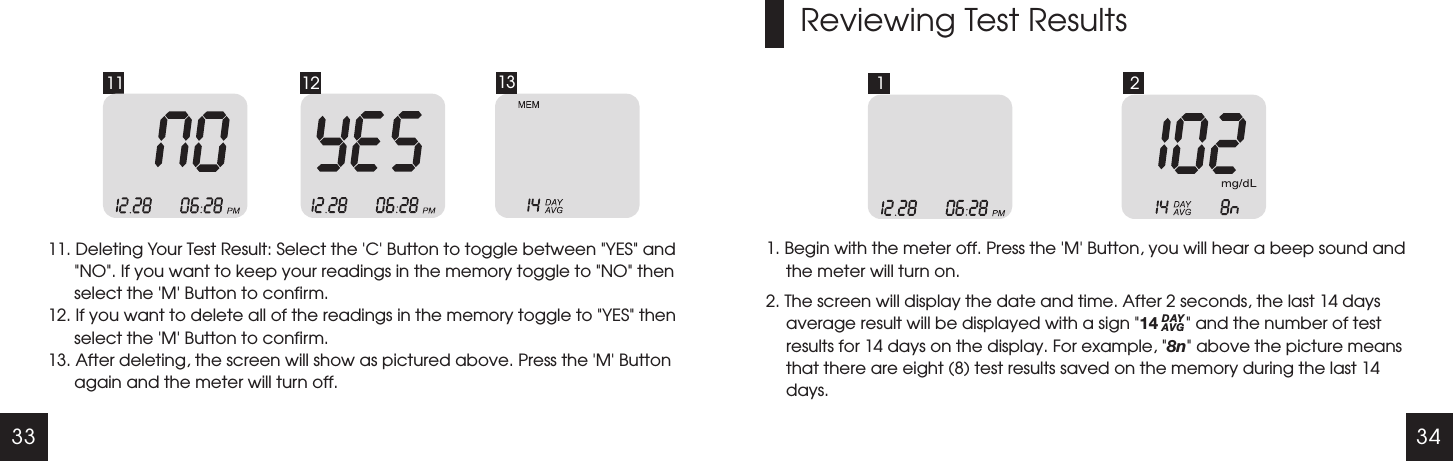
33 3411 12 1311. Deleting Your Test Result: Select the   Button to toggle between  YES  and NO . If you want to keep your readings in the memory toggle to  NO  then select the   Button to confirm.12. If you want to delete all of the readings in the memory toggle to  YES  then select the   Button to confirm.13. After deleting, the screen will show as pictured above. Press the   Button again and the meter will turn off.'C' " "" " " "'M'" "'M''M'Reviewing Test Results1 21. Begin with the meter off. Press the   Button, you will hear a beep sound and the meter will turn on.2. 'M'" "" "The screen will display the date and time. After 2 seconds, the last 14 days average result will be displayed with a sign  14        and the number of test results for 14 days on the display. For example,  8n  above the picture means that there are eight (8) test results saved on the memory during the last 14 days.DAYAVG
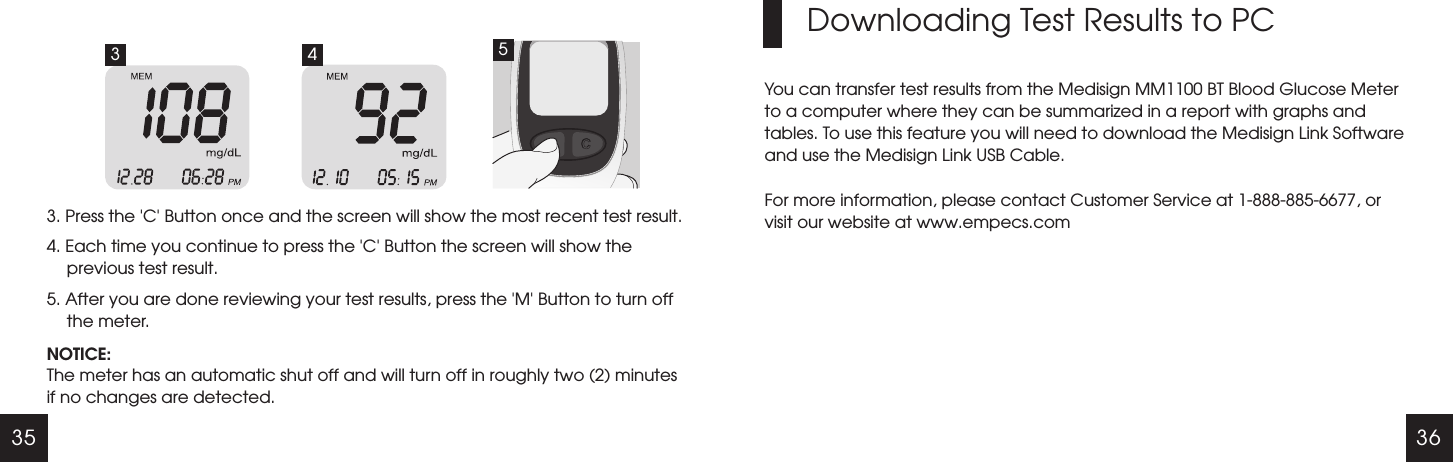
35 363. Press the   Button once and the screen will show the most recent test result.4. Each time you continue to press the   Button the screen will show the previous test result.5. After you are done reviewing your test results, press the   Button to turn off the meter.'C''C''M'NOTICE:The meter has an automatic shut off and will turn off in roughly two (2) minutes if no changes are detected. Downloading Test Results to PCYou can transfer test results from the Medisign MM1100 BT Blood Glucose Meter to a computer where they can be summarized in a report with graphs and tables. To use this feature you will need to download the Medisign Link Software and use the Medisign Link USB Cable.For more information, please contact Customer Service at 1-888-885-6677, or visit our website at www.empecs.com3 4 5
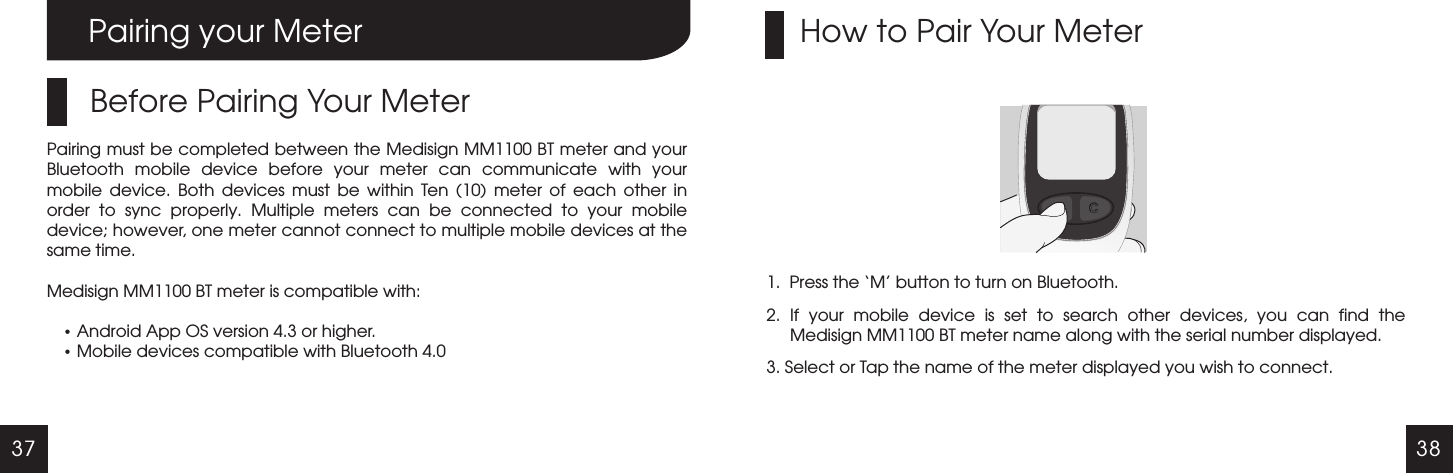
37 38Pairing your MeterBefore Pairing Your MeterPairing must be completed between the Medisign MM1100 BT meter and your Bluetooth  mobile  device  before  your  meter  can  communicate  with  your mobile  device.  Both  devices  must  be  within  Ten  (10)  meter  of  each  other  in order  to  sync  properly.  Multiple  meters  can  be  connected  to  your  mobile device; however, one meter cannot connect to multiple mobile devices at the same time.Medisign MM1100 BT meter is compatible with:  Android App OS version 4.3 or higher. Mobile devices compatible with Bluetooth 4.01.  Press the ‘M’ button to turn on Bluetooth.2.  If  your  mobile  device  is  set  to  search  other  devices,  you  can  find  the Medisign MM1100 BT meter name along with the serial number displayed.3. Select or Tap the name of the meter displayed you wish to connect.How to Pair Your Meter
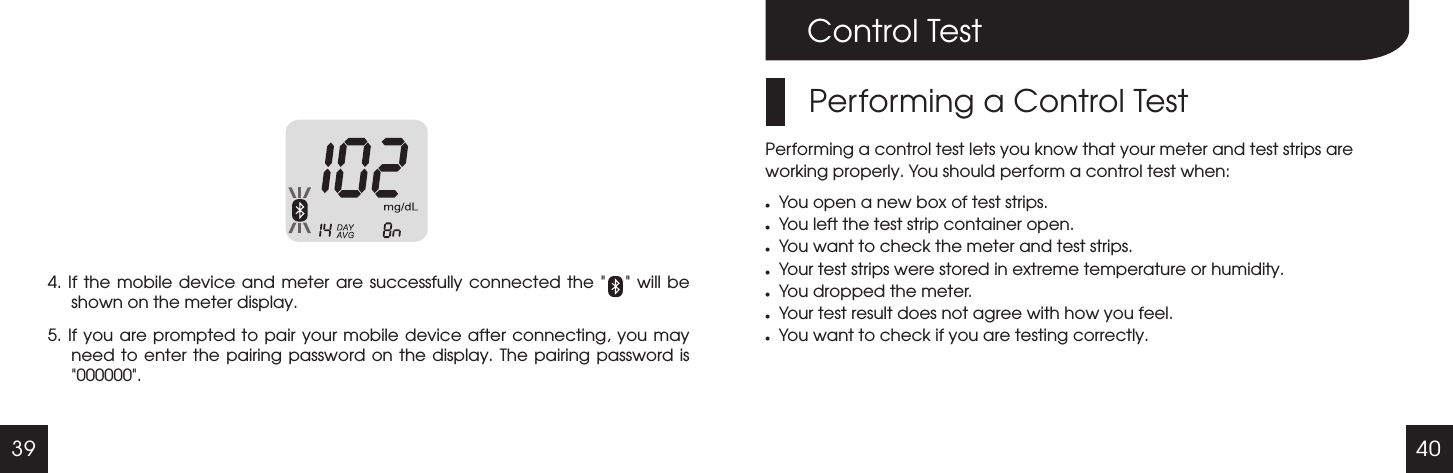
39 40Control TestPerforming a Control TestPerforming a control test lets you know that your meter and test strips are working properly. You should perform a control test when:lYou open a new box of test strips.lYou left the test strip container open.lYou want to check the meter and test strips.lYour test strips were stored in extreme temperature or humidity.lYou dropped the meter.lYour test result does not agree with how you feel.lYou want to check if you are testing correctly.4. If  the  mobile device  and meter  are successfully  connected the       will be shown on the meter display.5. If you are prompted to  pair  your mobile device after connecting, you may need to enter  the  pairing password on  the  display.  The pairing  password  is 000000 ." " " "
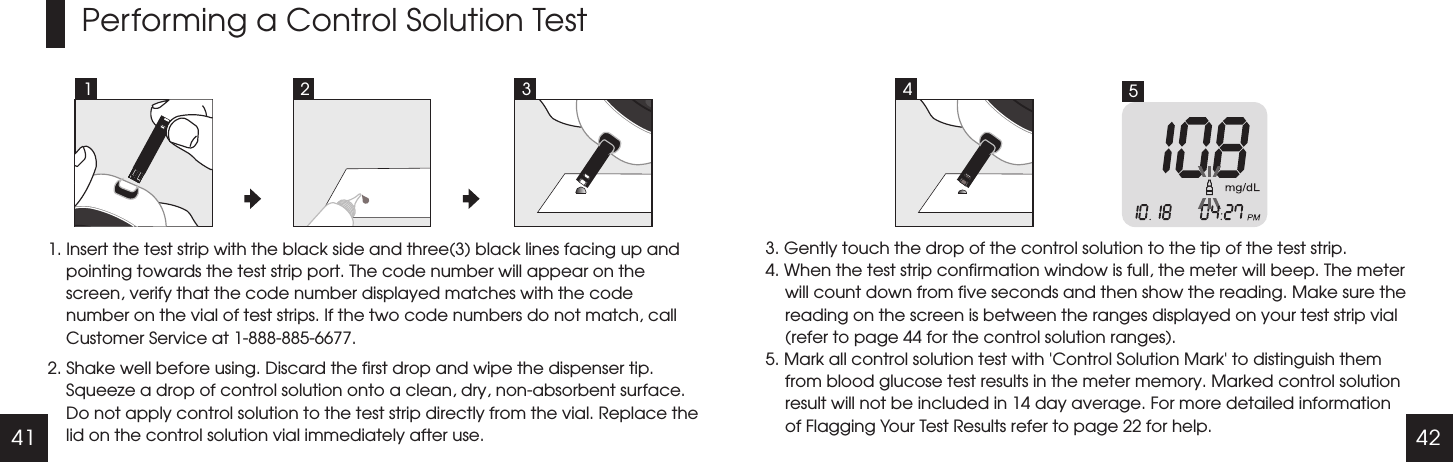
41 42Performing a Control Solution Test1. Insert the test strip with the black side and three(3) black lines facing up and pointing towards the test strip port. The code number will appear on the screen, verify that the code number displayed matches with the code number on the vial of test strips. If the two code numbers do not match, call Customer Service at 1-888-885-6677.2. Shake well before using. Discard the first drop and wipe the dispenser tip. Squeeze a drop of control solution onto a clean, dry, non-absorbent surface. Do not apply control solution to the test strip directly from the vial. Replace the lid on the control solution vial immediately after use.3. Gently touch the drop of the control solution to the tip of the test strip. 4. When the test strip confirmation window is full, the meter will beep. The meter will count down from five seconds and then show the reading. Make sure the reading on the screen is between the ranges displayed on your test strip vial (refer to page 44 for the control solution ranges).5. Mark all control solution test with 'Control Solution Mark' to distinguish them from blood glucose test results in the meter memory. Marked control solution result will not be included in 14 day average. For more detailed information of Flagging Your Test Results refer to page 22 for help.1 2 53 4
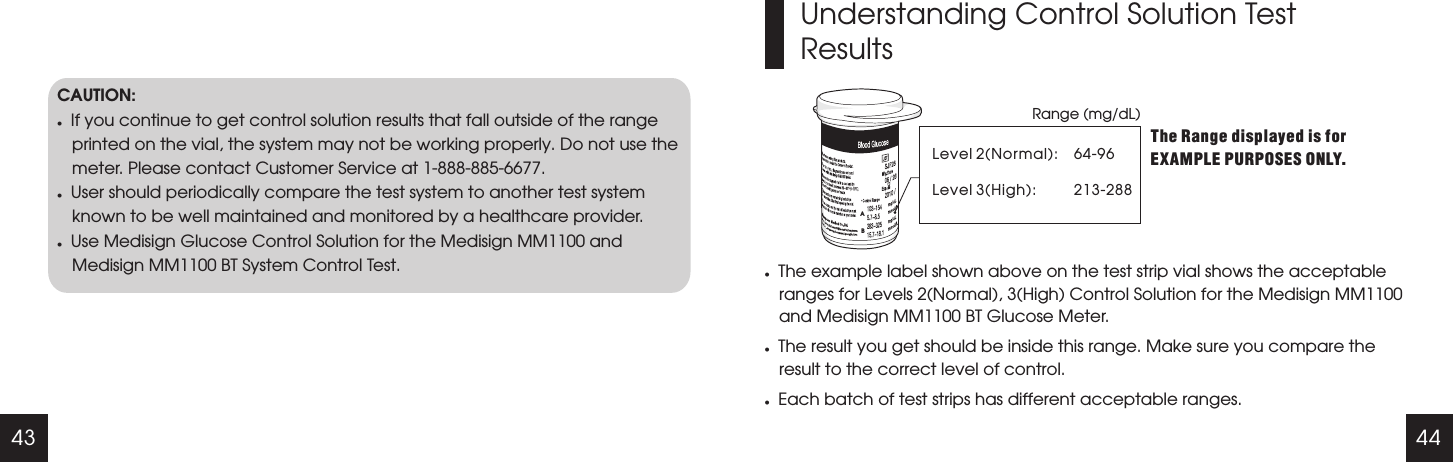
43 44CAUTION:lIf you continue to get control solution results that fall outside of the range printed on the vial, the system may not be working properly. Do not use the meter. Please contact Customer Service at 1-888-885-6677.lUser should periodically compare the test system to another test system known to be well maintained and monitored by a healthcare provider.lUse Medisign Glucose Control Solution for the Medisign MM1100 and Medisign MM1100 BT System Control Test.Understanding Control Solution Test ResultsRange (mg/dL)Level 2Level 3(High):(Normal):The Range displayed is for EXAMPLE PURPOSES ONLY.lThe example label shown above on the test strip vial shows the acceptable ranges for Levels 2(Normal), 3(High) Control Solution for the Medisign MM1100 and Medisign MM1100 BT Glucose Meter.lThe result you get should be inside this range. Make sure you compare the result to the correct level of control.lEach batch of test strips has different acceptable ranges.64-96213-288 AB
45 46Maintenance and TroubleshootingCleaning and DisinfectingThe meter should be cleaned and disinfected to prevent the transmission of blood-borne pathogens. Cleaning is done to remove germs, dirt and impurities from your Glucose Meter. Disinfection is done to kill the germs on the surface of your Glucose Meter.Prepare a EPA-registered disinfectant, CaviWipes to clean and disinfect the outside of the meter. The towelette is available for purchase through Medex Supply Company, you can call them at 1-888-433-2300 or visit their website at www.medexsupply.com. This product can also be found through large online retail distribution sites such as www.amazon.com, www.ebay.com, etc.Cleaning Instructions : Use the CaviWipes Towelettes for a cleaner and disinfectant. Whenever your Glucose Meter is dirty, clean the outside of the meter with a new CaviWipes Towelette.CAUTION:Do not use other cleaners or disinfectants as they may damage the meter.Disinfection Instructions: Your Glucose Meter should be disinfected once per week or as needed, and be cleaned prior to disinfecting. Use a second towelette to thoroughly wipe the entire pre-cleaned Glucose Meter and allow it to remain wet for two (2) minutes at 68  per manufacture instructions. Allow to air dry when done.℉
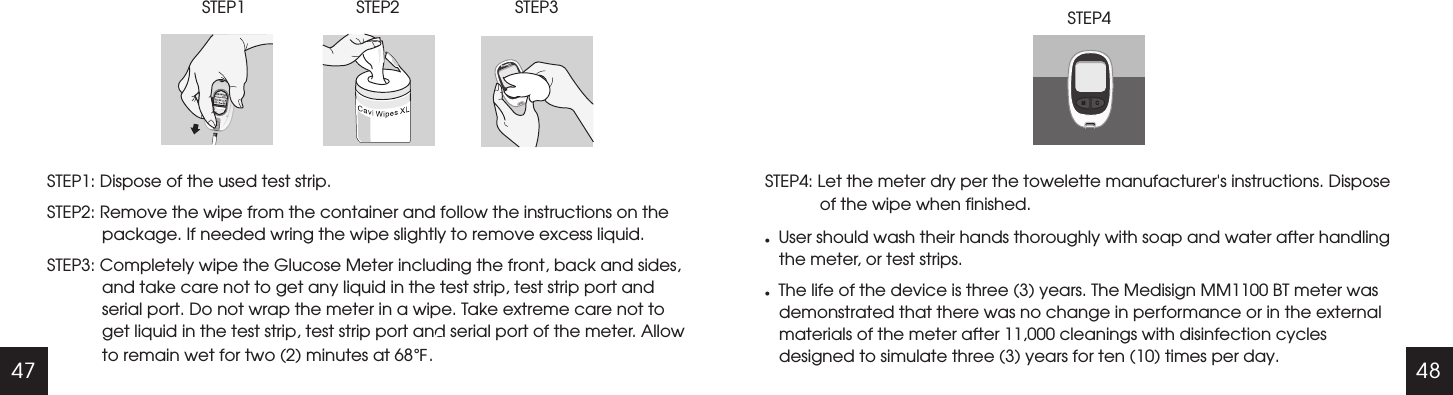
47 48ElementSTEP1: Dispose of the used test strip.STEP2: Remove the wipe from the container and follow the instructions on the package. If needed wring the wipe slightly to remove excess liquid. STEP3: Completely wipe the Glucose Meter including the front, back and sides, and take care not to get any liquid in the test strip, test strip port and serial port. Do not wrap the meter in a wipe. Take extreme care not to get liquid in the test strip, test strip port and serial port of the meter. Allow to remain wet for two (2) minutes at 68 .℉STEP1                        STEP2                         STEP3                                    STEP4: Let the meter dry per the towelette manufacturer's instructions. Dispose of the wipe when finished.lUser should wash their hands thoroughly with soap and water after handling the meter, or test strips.lThe life of the device is three (3) years. The Medisign MM1100 BT meter was demonstrated that there was no change in performance or in the external materials of the meter after 11,000 cleanings with disinfection cycles designed to simulate three (3) years for ten (10) times per day.                                                                            STEP4
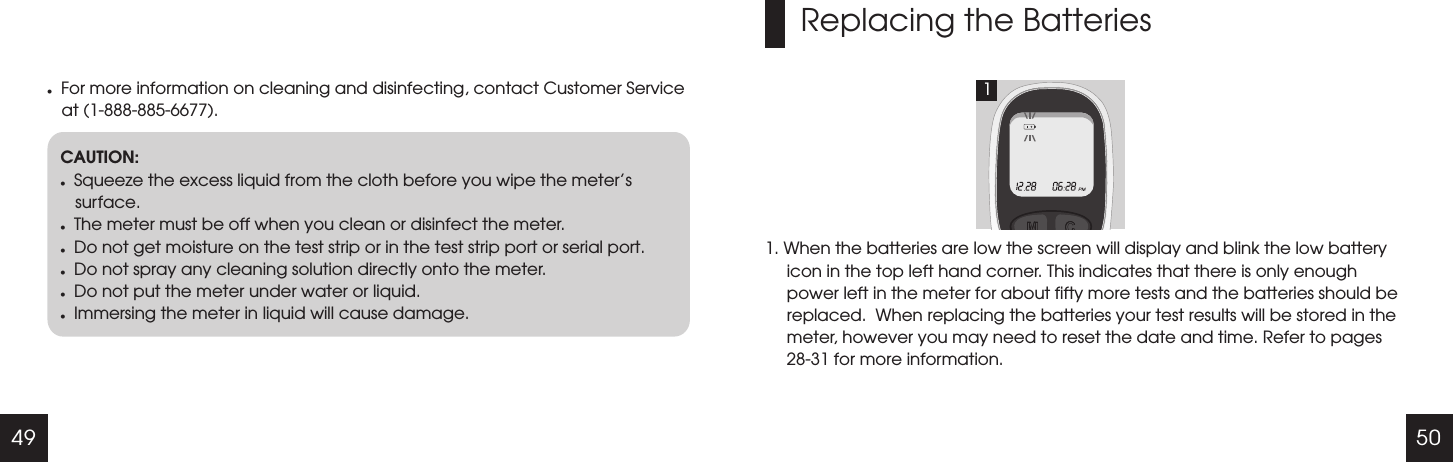
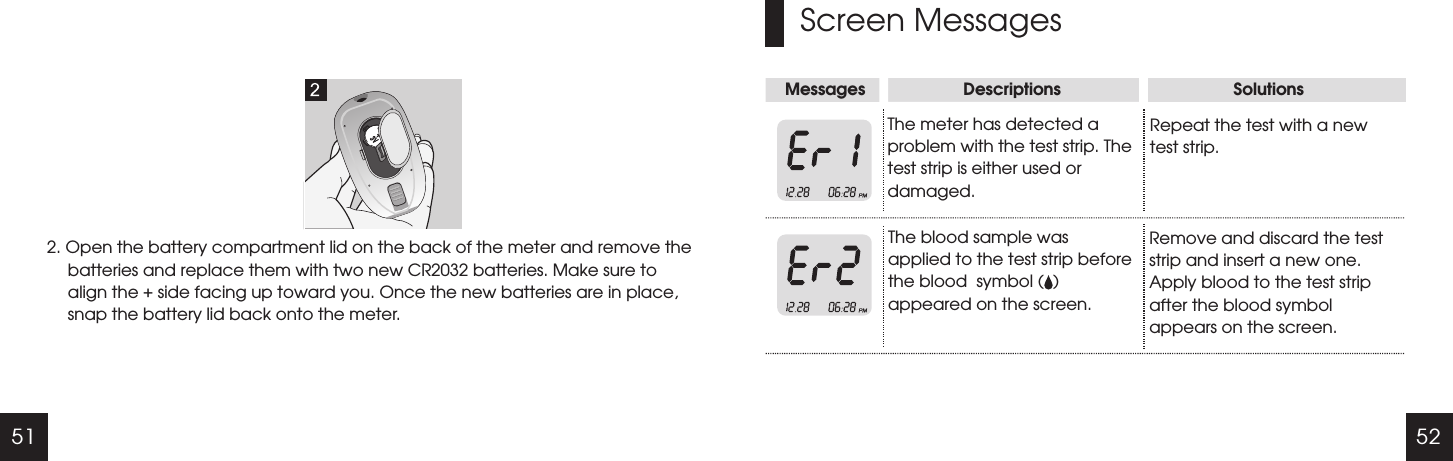
49 50lFor more information on cleaning and disinfecting, contact Customer Service at (1-888-885-6677).CAUTION:lSqueeze the excess liquid from the cloth before you wipe the meter’s surface.lThe meter must be off when you clean or disinfect the meter.lDo not get moisture on the test strip or in the test strip port or serial port.lDo not spray any cleaning solution directly onto the meter.lDo not put the meter under water or liquid.lImmersing the meter in liquid will cause damage.Replacing the Batteries1. When the batteries are low the screen will display and blink the low battery icon in the top left hand corner. This indicates that there is only enough power left in the meter for about fifty more tests and the batteries should be replaced.  When replacing the batteries your test results will be stored in the meter, however you may need to reset the date and time. Refer to pages 28-31 for more information.1
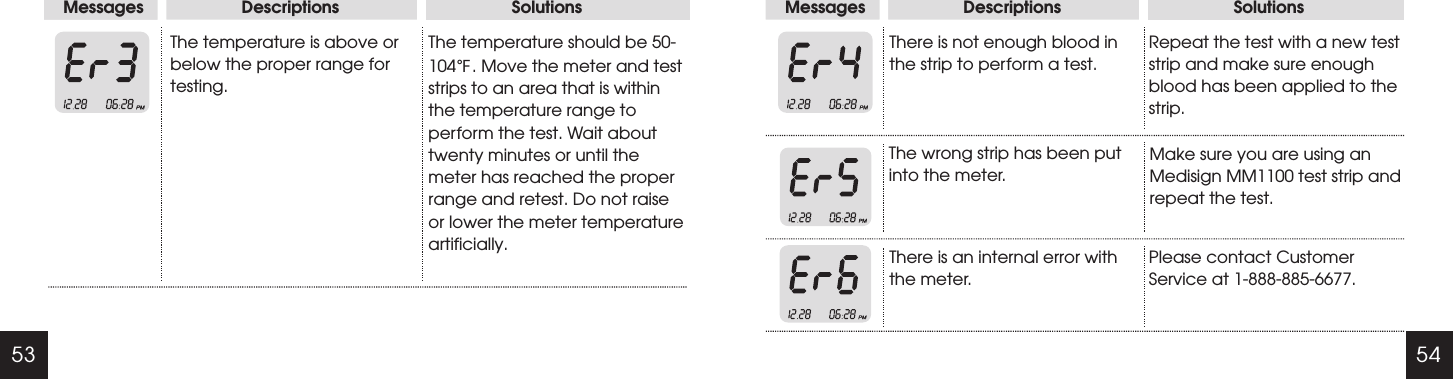
51 52Screen MessagesMessages                     Descriptions                                     SolutionsThe meter has detected a problem with the test strip. The test strip is either used or damaged.The blood sample was applied to the test strip before the blood  symbol (  ) appeared on the screen.Repeat the test with a new test strip.Remove and discard the test strip and insert a new one. Apply blood to the test strip after the blood symbol appears on the screen.2. Open the battery compartment lid on the back of the meter and remove the batteries and replace them with two new CR2032 batteries. Make sure to align the + side facing up toward you. Once the new batteries are in place, snap the battery lid back onto the meter.
53 54Messages                     Descriptions                                     SolutionsThe temperature is above or below the proper range for testing.The temperature should be 50-104 . Move the meter and test strips to an area that is within the temperature range to perform the test. Wait about twenty minutes or until the meter has reached the proper range and retest. Do not raise or lower the meter temperature artificially.  ℉Messages                     Descriptions                                     SolutionsThere is not enough blood in the strip to perform a test.Repeat the test with a new test strip and make sure enough blood has been applied to the strip.The wrong strip has been put into the meter.Make sure you are using an Medisign MM1100 test strip and repeat the test.There is an internal error with the meter.Please contact Customer Service at 1-888-885-6677.
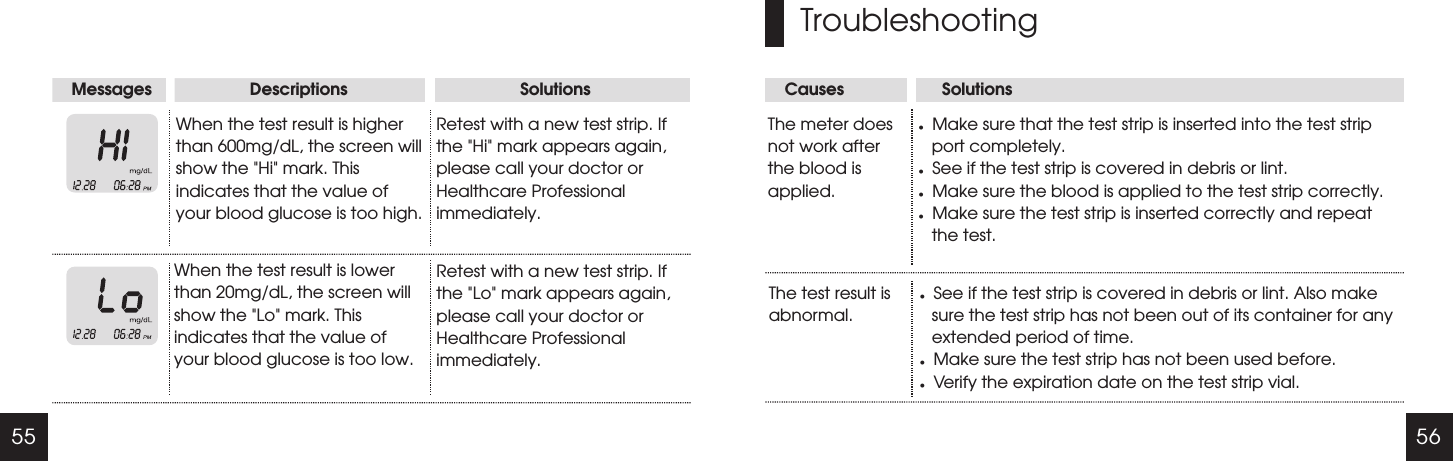
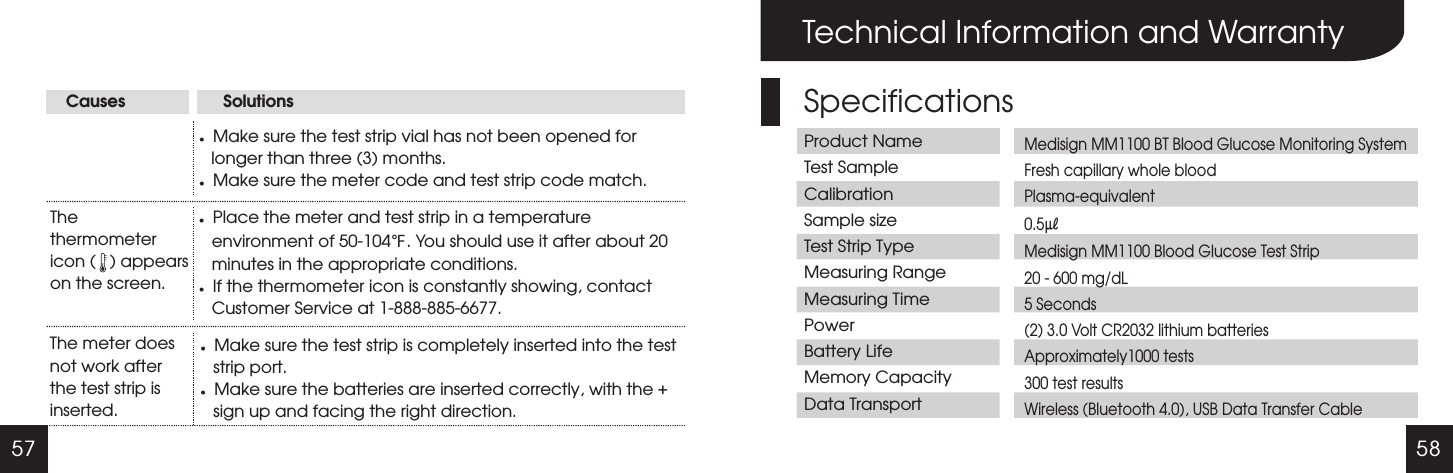
55 56Causes                     SolutionsMessages                     Descriptions                                     SolutionsWhen the test result is higher than 600mg/dL, the screen will show the "Hi" mark. This indicates that the value of your blood glucose is too high.Retest with a new test strip. If the "Hi" mark appears again, please call your doctor or Healthcare Professional immediately.When the test result is lower than 20mg/dL, the screen will show the "Lo" mark. This indicates that the value of your blood glucose is too low.Retest with a new test strip. If the "Lo" mark appears again, please call your doctor or Healthcare Professional immediately.TroubleshootingThe meter does not work after the blood is applied.lMake sure that the test strip is inserted into the test strip port completely.lSee if the test strip is covered in debris or lint.lMake sure the blood is applied to the test strip correctly.lMake sure the test strip is inserted correctly and repeat the test.The test result is abnormal.lSee if the test strip is covered in debris or lint. Also make sure the test strip has not been out of its container for any extended period of time.lMake sure the test strip has not been used before.lVerify the expiration date on the test strip vial.
57 58Causes                     SolutionslMake sure the test strip vial has not been opened for longer than three (3) months. lMake sure the meter code and test strip code match.The thermometer icon (   ) appears on the screen.lPlace the meter and test strip in a temperature environment of 50-104 . You should use it after about 20 minutes in the appropriate conditions. lIf the thermometer icon is constantly showing, contact Customer Service at 1-888-885-6677.℉The meter does not work after the test strip is inserted.lMake sure the test strip is completely inserted into the test strip port.lMake sure the batteries are inserted correctly, with the + sign up and facing the right direction.Technical Information and WarrantySpecificationsProduct NameTest SampleCalibrationSample sizeTest Strip TypeMeasuring RangeMeasuring TimePowerBattery LifeMemory CapacityData TransportMedisign MM1100 BT Blood Glucose Monitoring SystemFresh capillary whole bloodPlasma-equivalent0.5㎕Medisign MM1100 Blood Glucose Test Strip20 - 600 mg/dL5 Seconds(2) 3.0 Volt CR2032 lithium batteriesApproximately1000 tests300 test results Wireless (Bluetooth 4.0), USB Data Transfer Cable
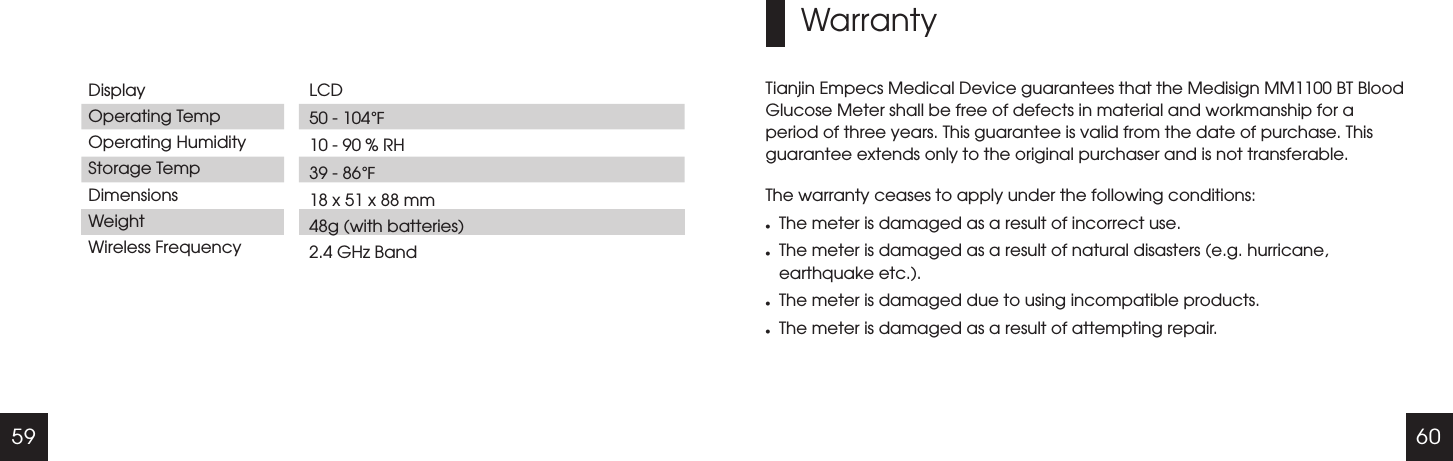
59 60DisplayOperating TempOperating HumidityStorage TempDimensionsWeightWireless FrequencyLCD 50 - 104   10 - 90 % RH39 - 86  18 x 51 x 88 mm48g (with batteries)2.4 GHz Band℉℉WarrantyTianjin Empecs Medical Device guarantees that the Medisign MM1100 BT Blood Glucose Meter shall be free of defects in material and workmanship for a period of three years. This guarantee is valid from the date of purchase. This guarantee extends only to the original purchaser and is not transferable.The warranty ceases to apply under the following conditions:lThe meter is damaged as a result of incorrect use.lThe meter is damaged as a result of natural disasters (e.g. hurricane, earthquake etc.).lThe meter is damaged due to using incompatible products.lThe meter is damaged as a result of attempting repair.
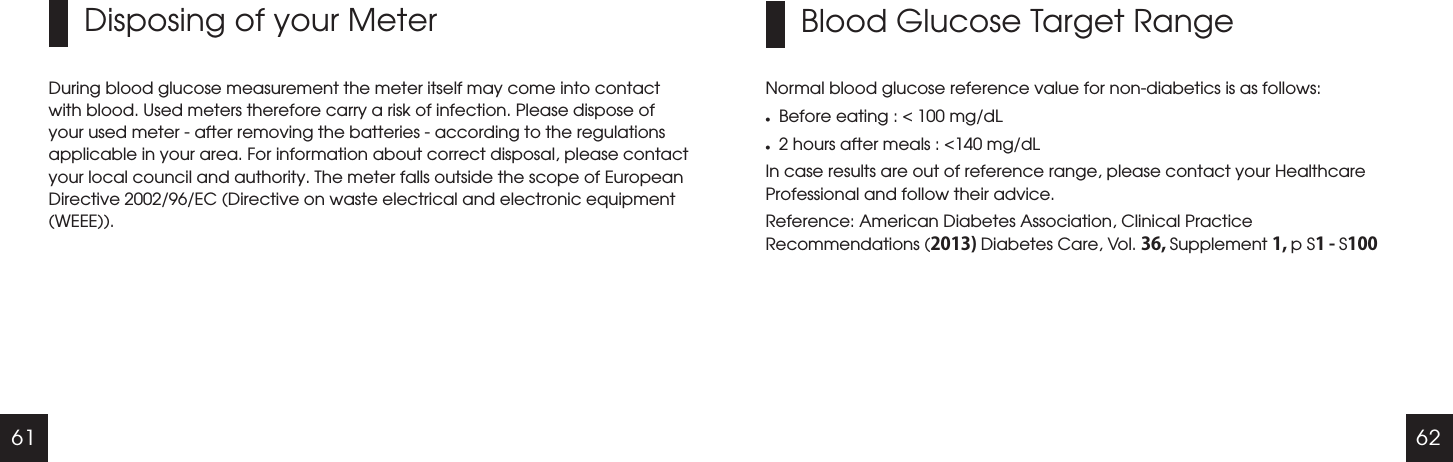
61 62Disposing of your MeterDuring blood glucose measurement the meter itself may come into contact with blood. Used meters therefore carry a risk of infection. Please dispose of your used meter - after removing the batteries - according to the regulations applicable in your area. For information about correct disposal, please contact your local council and authority. The meter falls outside the scope of European Directive 2002/96/EC (Directive on waste electrical and electronic equipment (WEEE)).Blood Glucose Target RangeNormal blood glucose reference value for non-diabetics is as follows:lBefore eating : < 100 mg/dLl2 hours after meals : <140 mg/dLIn case results are out of reference range, please contact your Healthcare Professional and follow their advice.Reference: American Diabetes Association, Clinical Practice Recommendations (2013) Diabetes Care, Vol. 36, Supplement 1, p S1 - S100
63Additional Supplies AvailableThe following supplies and accessories are available from your supplier, for more information contact Customer Service at 1-888-885-6677.Medisign Link Cable Link Software Test StripsMedisign Glucose Control SolutionMedisignMedisign MM1100
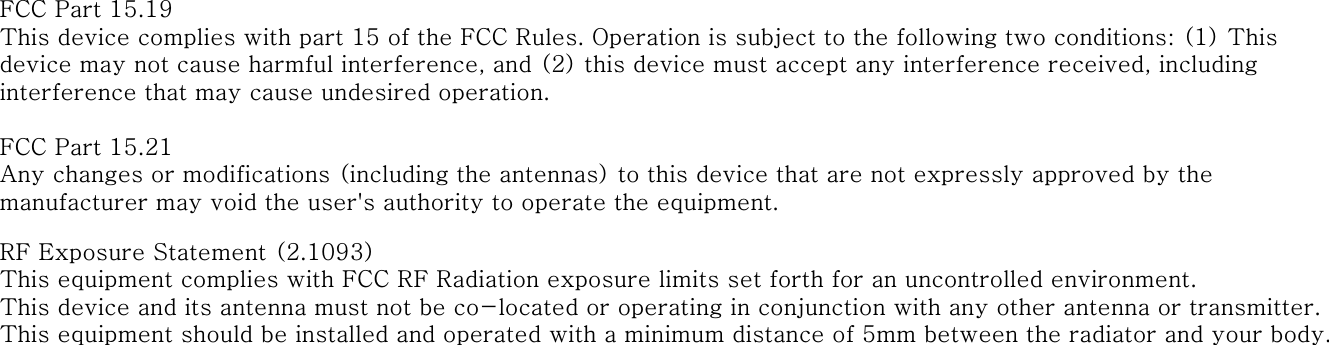
FCC Part 15.19This device complies with part 15 of the FCC Rules. Operation is subject to the following two conditions: (1) This device may not cause harmful interference, and (2) this device must accept any interference received, including interference that may cause undesired operation.FCC Part 15.21Any changes or modifications (including the antennas) to this device that are not expressly approved by the manufacturer may void the user's authority to operate the equipment.RF Exposure Statement (2.1093)This equipment complies with FCC RF Radiation exposure limits set forth for an uncontrolled environment. This device and its antenna must not be co-located or operating in conjunction with any other antenna or transmitter.This equipment should be installed and operated with a minimum distance of 5mm between the radiator and your body.
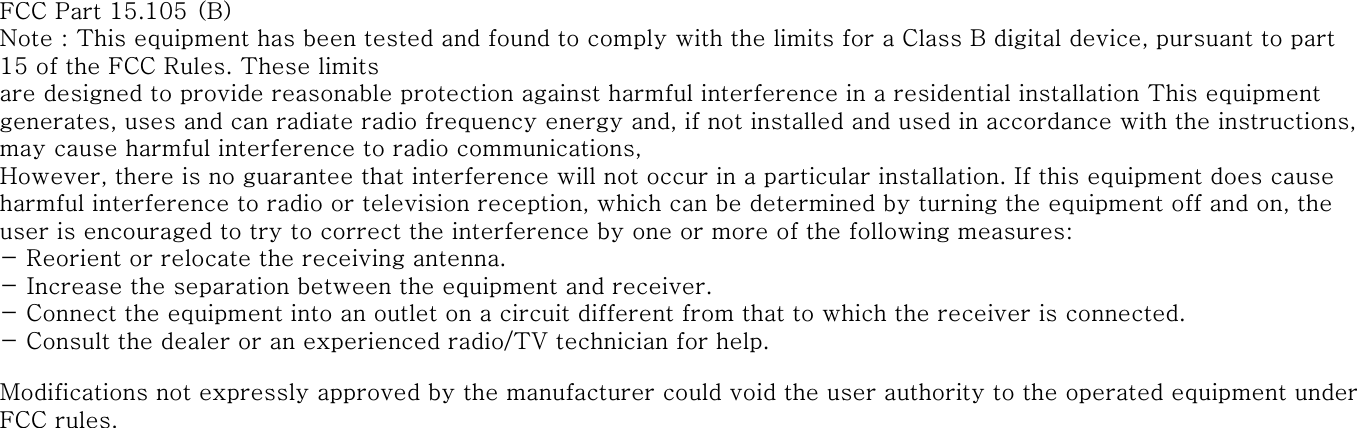
FCC Part 15.105 (B)Note : This equipment has been tested and found to comply with the limits for a Class B digital device, pursuant to part 15 of the FCC Rules. These limitsare designed to provide reasonable protection against harmful interference in a residential installation This equipment generates, uses and can radiate radio frequency energy and, if not installed and used in accordance with the instructions, may cause harmful interference to radio communications,However, there is no guarantee that interference will not occur in a particular installation. If this equipment does cause harmful interference to radio or television reception, which can be determined by turning the equipment off and on, the user is encouraged to try to correct the interference by one or more of the following measures:- Reorient or relocate the receiving antenna.- Increase the separation between the equipment and receiver.- Connect the equipment into an outlet on a circuit different from that to which the receiver is connected. - Consult the dealer or an experienced radio/TV technician for help.Modifications not expressly approved by the manufacturer could void the user authority to the operated equipment under FCC rules.

Navigation menu