Tianjin RoamWiFi Technology ROAMWIFIR9 LTE Wireless Data Terminal User Manual 15 RoamWiFi R9 UserMan

Tianjin RoamWiFi Technology Co., Ltd. LTE Wireless Data Terminal 15 RoamWiFi R9 UserMan

15_RoamWiFi R9 UserMan.pdf

  User Manual     LTE Wireless Data Terminal  Model: RoamWiFi R9           Tianjin RoamWiFi Technology Co., Ltd.
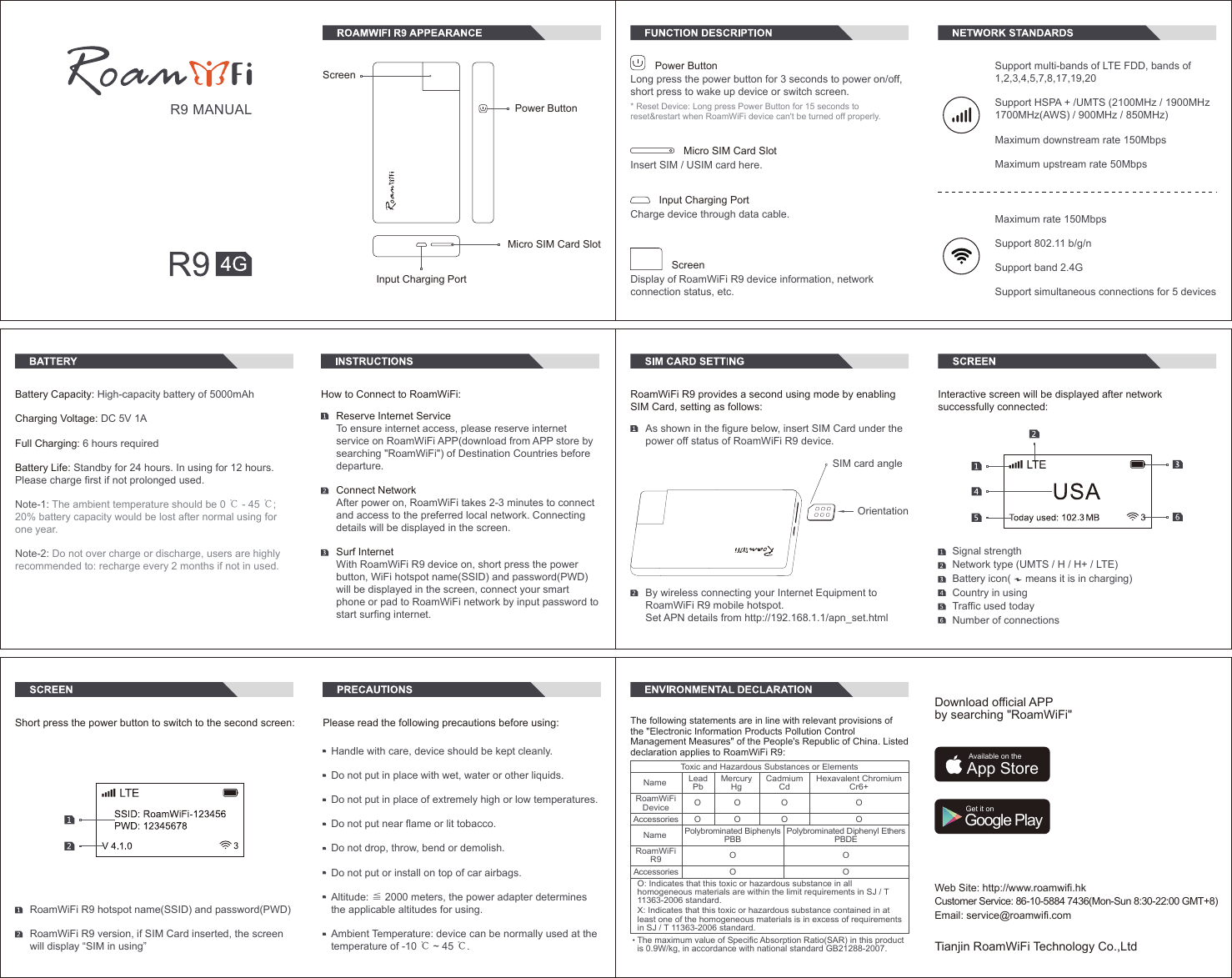
Maximum rate 150MbpsSupport 802.11 b/g/nSupport band 2.4GSupport simultaneous connections for 5 devicesSupport multi-bands of LTE FDD, bands of 1,2,3,4,5,7,8,17,19,20Support HSPA + /UMTS (2100MHz / 1900MHz 1700MHz(AWS) / 900MHz / 850MHz)Maximum downstream rate 150MbpsMaximum upstream rate 50MbpsLong press the power button for 3 seconds to power on/off, short press to wake up device or switch screen.Power ButtonMicro SIM Card SlotInsert SIM / USIM card here.Input Charging Port Charge device through data cable.* Reset Device: Long press Power Button for 15 seconds to reset&restart when RoamWiFi device can't be turned off properly.ScreenDisplay of RoamWiFi R9 device information, network connection status, etc.ScreenPower ButtonInput Charging PortMicro SIM Card SlotR9 MANUALBattery Capacity: High-capacity battery of 5000mAh  Charging Voltage: DC 5V 1AFull Charging: 6 hours requiredBattery Life: Standby for 24 hours. In using for 12 hours. Please charge first if not prolonged used.Note-1: The ambient temperature should be 0 ℃ - 45 ℃; 20% battery capacity would be lost after normal using for one year.Note-2: Do not over charge or discharge, users are highly recommended to: recharge every 2 months if not in used.Reserve Internet ServiceTo ensure internet access, please reserve internet service on RoamWiFi APP(download from APP store by searching "RoamWiFi") of Destination Countries before departure. Connect NetworkAfter power on, RoamWiFi takes 2-3 minutes to connect and access to the preferred local network. Connecting details will be displayed in the screen. Surf InternetWith RoamWiFi R9 device on, short press the power button, WiFi hotspot name(SSID) and password(PWD) will be displayed in the screen, connect your smart phone or pad to RoamWiFi network by input password to start surfing internet. How to Connect to RoamWiFi:Signal strengthNetwork type (UMTS / H / H+ / LTE)Battery icon(     means it is in charging)Country in usingTraffic used todayNumber of connectionsInteractive screen will be displayed after network successfully connected:RoamWiFi R9 provides a second using mode by enabling SIM Card, setting as follows:As shown in the figure below, insert SIM Card under the power off status of RoamWiFi R9 device.  OrientationSIM card angleBy wireless connecting your Internet Equipment to RoamWiFi R9 mobile hotspot.Set APN details from http://192.168.1.1/apn_set.htmlPlease read the following precautions before using:Handle with care, device should be kept cleanly.Do not put in place with wet, water or other liquids.Do not put in place of extremely high or low temperatures.Do not put near flame or lit tobacco.Do not drop, throw, bend or demolish.Do not put or install on top of car airbags.Altitude: ≦ 2000 meters, the power adapter determines the applicable altitudes for using.Ambient Temperature: device can be normally used at the temperature of -10 ℃ ~ 45 ℃.Short press the power button to switch to the second screen:RoamWiFi R9 hotspot name(SSID) and password(PWD)RoamWiFi R9 version, if SIM Card inserted, the screen will display “SIM in using”Web Site: http://www.roamwifi.hkCustomer Service: 86-10-5884 7436(Mon-Sun 8:30-22:00 GMT+8)Email: service@roamwifi.comTianjin RoamWiFi Technology Co.,LtdDownload official APP by searching "RoamWiFi"Available on theApp StoreGet it onGoogle PlayThe following statements are in line with relevant provisions of the "Electronic Information Products Pollution Control Management Measures" of the People's Republic of China. Listed declaration applies to RoamWiFi R9:O O O OOO OO OO O OO: Indicates that this toxic or hazardous substance in all homogeneous materials are within the limit requirements in SJ / T 11363-2006 standard.X: Indicates that this toxic or hazardous substance contained in at least one of the homogeneous materials is in excess of requirements in SJ / T 11363-2006 standard.Toxic and Hazardous Substances or ElementsNameRoamWiFiR9LeadPbMercuryHgCadmiumCdHexavalent ChromiumCr6+Polybrominated BiphenylsPBBPolybrominated Diphenyl EthersPBDEAccessoriesNameRoamWiFiDeviceAccessoriesThe maximum value of Specific Absorption Ratio(SAR) in this productis 0.9W/kg, in accordance with national standard GB21288-2007.
 FCC RF EXPOSURE INFORMATION: WARNING!! Read this information before using your phone In August 1986 the Federal Communications Commission (FCC) of the United States with its action in Report and Outer FCC 96-326 adopted an updated safety standard for human exposure to radio frequency (RF) electromagnetic energy emitted by FCC regulated transmitters. Those guidelines are consistent with the safety standard previously set by both U.S. and international standards bodies. The design of this phone complies with the FCC guidelines and these international standards. Use only the supplied or an approved antenna. Unauthorized antennas modifications, or attachments could impair call quality, damage the phone, or result in violation of FCC regulations. Do not use the phone with a damaged antenna. If a damaged antenna comes into contact with the skin, a minor burn may result. Please contact your local dealer for replacement antenna.  BODY-WORN OPERATION: This device was tested for typical body-worn operations with the back/front of the phone kept 0.5cm from the body. To comply with FCC RF exposure requirements, a minimum separation distance of 0.5cm must be maintained between the user's body and the back/front of the phone, including the antenna. Third-party belt-clips, holsters and similar accessories containing metallic components shall not be used. Body-worn accessories that cannot maintain 0.5cm separation distance between the user’s body and the back/front of the phone, and have not been tested for typical body-worn operations may not comply with FCC RF exposure limits and should be avoided. For more information about RF exposure, please visit the FCC website at www.fcc.gov  Your wireless handheld portable telephone is a low power radio transmitter and receiver. When it is ON, it receives and also sends out radio frequency (RF) signals. In August, 1996, the Federal Communications Commissions (FCC) adopted RF exposure guidelines with safety levels for hand-held wireless phones. Those guidelines are consistent with the safety standards previously set by both U.S. and international standards bodies:  <ANSIC95.1> (1992) / <NCRP Report 86> (1986) / <ICNIRP> (1999)  Those standards were based on comprehensive and periodic evaluations of the relevant scientific literature. For example, over 120 scientists, engineers, and physicians from universities, government health agencies, and industry reviewed the available body of research to develop the ANSI Standard (C95.1). Nevertheless, we recommend that you use a hands-free kit with your phone (such as an earpiece or headset) to avoid potential exposure to RF energy. The design of your phone complies with the FCC guidelines (and those standards).  Use only the supplied or an approved replacement antenna. Unauthorized antennas, modifications, or attachments could damage the phone and may violate FCC regulations.   NORMAL POSITION:  Hold the phone as you would any other telephone with the antenna pointed up and over your shoulder.  RF Exposure Information: This product is compliance to FCC RF Exposure requirements and refers to FCC website https://apps.fcc.gov/oetcf/eas/reports/GenericSearch.cfm  search for FCC ID: 2ADUB-ROAMWIFIR9 to gain further information include SAR Values.    This device complies with part 15 of the FCC rules. Operation is subject to the following two conditions: (1) this device may not cause harmful interference, and
 (2) this device must accept any interference received, including interference that may cause undesired operation.   NOTE: The manufacturer is not responsible for any radio or TV interference caused by unauthorized modifications to this equipment. Such modifications could void the user’s authority to operate the equipment. NOTE: This equipment has been tested and found to comply with the limits for a Class B digital device, pursuant to part 15 of the FCC Rules. These limits are designed to provide reasonable protection against harmful interference in a residential installation. This equipment generates uses and can radiate radio frequency energy and, if not installed and used in accordance with the instructions, may cause harmful interference to radio communications. However, there is no guarantee that interference will not occur in a particular installation. If this equipment does cause harmful interference to radio or television reception, which can be determined by turning the equipment off and on, the user is encouraged to try to correct the interference by one or more of the following measures:   - Reorient or relocate the receiving antenna. - Increase the separation between the equipment and receiver. -Connect the equipment into an outlet on a circuit different from that to which the receiver is connected. -Consult the dealer or an experienced radio/TV technician for help      Do not use the device with the environment which below minimum -10℃ or over maximum 50℃, the device may not work.        Changes or modifications to this unit not expressly approved by the party responsible for compliance could void the user’s authority to operate the equipment.  Ad Hoc function is supported but not able to operate on non-US frequencies.

Navigation menu