Tilv Technology TYV-1658 VR Bluetooth Controller User Manual
Shenzhen Tilv Technology Co., Ltd. VR Bluetooth Controller
User Manual
GETTING STARTED
USER MANUAL
@ + D Mouse Mode (One Handed)
360° Rocker = Mouse Movement
C/D = Volume Up/Down
L1 = Select (Screen Press)
Apple IOS Instructions:
1. The switch on the side of the remote should be
switched to IOS.
2. The device mode can be changed based on the
function of the remote.
To change mode, press
and hold @ then press any key (A/B/C).
@ + A Music & Video Mode
Down = Next Track (Flick)/Scan Forward (Hold)
A = Play/Pause
B = Home Button
C/D = Volume Up/Down
R1 = Home Button
L1 = Play/Pause
@ + B Game Mode
Controls app dependent
@ + C VR Mode
A/L1 = Mute
B/R1 = Home Button
C/D = Volume Up/Down
3.
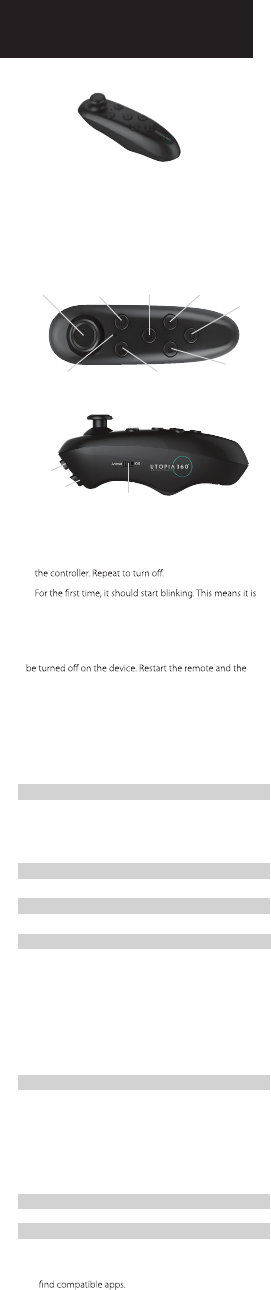
360°
Rocker
Power
Button
C
Button
A
Button
Indicator
Light
Function
Key
B
Button
D
Button
L1
R1
Android/iOS
Switch
(Controller included with ETVRC & EUVRC
model only)
Visit www. myretrak.com/vr for a list of recommended
apps.
Key Description
1.
AAA batteries (not included).
2. Hold down the power button for 3 seconds to turn on
3.
from your device and choose
“Utopia 360
Remote
”
. The
LED will stop blinking once paired.
Note: To connect the remote to a new device, the old
device should be out of range or the Bluetooth should
remote will go into pairing mode after 5 seconds.
Android Instructions:
1. The switch on the side of the remote should be
switched to Android.
2. The device mode can be changed based on the func-
tion of the remote. To change mode, press and hold
@ then press any key (A/B/C/D).
@ + A Music & Video Mode (One Handed)
Up/Down = Volume Up/Down
Left/Right = Next Track/Previous Track
C/D = Volume Up/Down
A = Play/Pause
R1 = Back
@ + B Horizontal Game Mode (Two Handed)
Controls app dependent
@ + C Vertical Game Mode (One Handed)
Controls app dependent
This device complies with Part 15 of the FCC Rules. Operation is subject to the following two
conditions: (1) this device may not cause harmful interference, and (2) this device must accept any
interference received, including interference that may cause undesired operation.
Changes or modifications not expressly approved by the party responsible for compliance could
void the user's authority to operate the equipment.
NOTE: This equipment has been tested and found to comply with the limits for a Class B digital
device, pursuant to Part 15 of the FCC Rules. These limits are designed to provide reasonable
protection against harmful interference in a residential installation. This equipment generates, uses
instructions, may cause harmful interference to radio communications. However, there is no
guarantee that interference will not occur in a particular installation. If this equipment does cause
harmful interference to radio or television reception, which can be determined by turning the
equipment off and on, the user is encouraged to try to correct the interference by one or more of
the following measures:
-- Reorient or relocate the receiving antenna.
-- Increase the separation between the equipment and receiver.
-- Connect the equipment into an outlet on a circuit different from that to which the receiver is
connected.
-- Consult the dealer or an experienced radio/TV technician for help.