Timex Marathon Gps User Guide
M434 to the manual 4e4c4aad-ffce-4ed4-8946-327e3b7ffa5d
2015-05-12
: Timex Timex-Marathon-Gps-User-Guide-716116 timex-marathon-gps-user-guide-716116 timex pdf
Open the PDF directly: View PDF  .
.
Page Count: 13

MARATHON®
MANUAL
GPS
SPEED+
DISTANCE
WATCH

TABLE OF CONTENTS
Introducing Your Watch ..........................................................................................................3
Features ....................................................................................................................................3
Charging the Watch ................................................................................................................... 3
Basic Operation .........................................................................................................................3
Icon Descriptions .......................................................................................................................4
Getting Started ......................................................................................................................................4
Setting the Time.........................................................................................................................4
Setting Display Units .................................................................................................................4
Setting Up the User Prole ........................................................................................................ 5
Turning on the GPS ................................................................................................................... 5
Using Run Mode ......................................................................................................................5
Starting, Stopping, and Saving a Workout .................................................................................5
Taking Splits ..............................................................................................................................6
Using Chrono Mode ................................................................................................................6
Starting, Stopping, and Saving a Chrono Workout .................................................................... 6
Reviewing Workouts ...............................................................................................................7
Choosing a Workout to View .....................................................................................................7
Viewing Workout Data ...............................................................................................................7
Deleting Workouts .....................................................................................................................8
Setting Alarms .........................................................................................................................8
Choosing an Alarm ....................................................................................................................8
Setting the Alarm Time ..............................................................................................................8
Turning an Alarm On or Off........................................................................................................8
Conguring Settings ...............................................................................................................9
Setting Up Automatic Laps ........................................................................................................9
Setting the Time Manually .........................................................................................................9
Turning on Night-Mode® Feature ...............................................................................................9
Adjusting Contrast .....................................................................................................................9
Turning Button Beep On and Off .............................................................................................10
Resetting the Watch ................................................................................................................10
Troubleshooting ....................................................................................................................10
Problems with the GPS ...........................................................................................................10
Problems with the Battery........................................................................................................10
Safety ......................................................................................................................................10
Water Resistance ...................................................................................................................10
Cleaning and Storage ............................................................................................................10
Time Zones ............................................................................................................................. 11
Warranty and Service ............................................................................................................ 12
Declaration of Conformity ....................................................................................................13
3
INTRODUCING YOUR WATCH
Congratulations on your purchase of the Timex® Marathon® GPS watch. As a serious road runner, you’ll
appreciate the accurate speed, pace, and other data the watch provides you. The watch’s GPS technology
finds satellites from almost anywhere in the world so you have the information you need to train efficiently.
FEATURES
• GPS–Obtainxesonsatellitestoprovideworkoutdata.Yourspeed,distance,andpacearedetermined
basedonhowyourpositionchangesrelativetothesatellites.SetthetimezoneusingtheGPS.
• Runmode–Trackdataduringworkouts.Viewyourworkoutdatawhileaworkoutisinprogress,andsave
dataforlaterreview.FreelyswitchbetweenRunandChronomodeswhilethetimerisrunning.
• Chronomode–Takesplitsduringworkouts,andsavelapdataforlaterreview.
• Workoutreview–Saveworkoutstomemoryforreviewwhenthetimerisreset.Storemorethan20hours
ofworkoutdata.Viewalldatatrackedfortheentireworkout,aswellasdataforindividuallaps.
• Hands-freeauto-lap–Automaticallytakeasplitwhenyoureachoneof6selectabledistances.
• Alarm–Setupto5alarmsthatwillsoundatyourspeciedtimeeachday.
• Indiglo®night-lightwithNight-Mode®feature–Pressabuttontolightthewatchfacefor10seconds.
CHARGING THE WATCH
Beforeyouusethewatchforthersttime,chargethebatteryforatleast4hours.
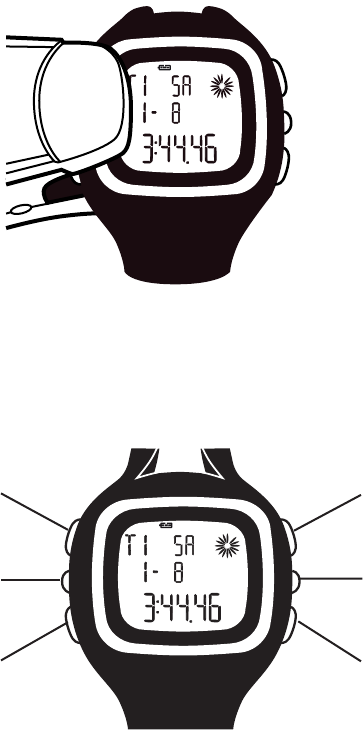
PlugthelargeendoftheUSBcableintoapoweredUSBportonyourcomputer,andattachthechargingclipto
thewatchsothatthe2pinsonthecliptouchthe2outermostmetalcontactsonthebackofthewatch.
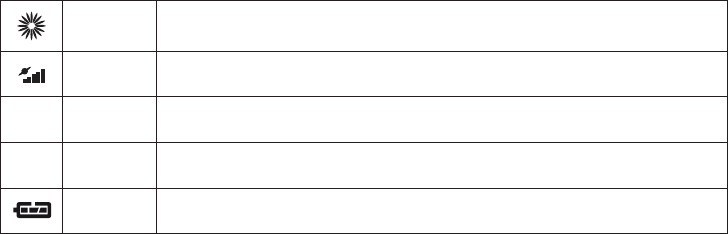
BASIC OPERATION
INDIGLO® BUTTON
GPS ON/OFF
MODE
START/SPLIT/+
VIEW/OK
STOP/SAVE/-
4
INDIGLO® NIGHT-LIGHT BUTTON
Presstoturnonthenight-lightfor10seconds.
GPS ON/OFF
PresstoturnontheGPS.HoldtoturnofftheGPS.
MODE
Presstocyclethrougheachmode.Insettingsscreens,presstomovetothenextitem.
START/SPLIT/+
InTimemode,presstogotoRunmode.InRunandChronomodeswiththetimerstopped,presstostartthe
timer.InRunandChronomodeswiththetimerrunning,presstotakeasplit.Insettingsscreens,pressto
increase values or move to the previous item in a list.
VIEW/OK
InRunorChronomodes,presstochangethedisplayview.Insettingsscreens,presstoconrmtheashing
option.InTimemode,presstoviewthesecondtimezone,orholdtomakethesecondarytimezoneprimary.
STOP/SAVE/-
Whentimerisrunning,presstostop.Whentimerisstopped,holdtoresetandsavetheworkout.Insettings
screens, press to decrease values or choose the next item in a list.
ICON DESCRIPTIONS
These icons indicate the watch status.
GPS search Solid: GPS has a satellite fix.
Flashing:GPSisseekingasatellitex.
Connection
strength Morebarsindicateastrongersatellitex.
GButton
beep Indicatesbuttonsoundsareon.
qAlarm An alarm is set and will sound at the specified time.
Battery Indicatestheremainingbatterypower.Moredarksegmentsindicateahighercharge.
GETTING STARTED
SETTING THE TIME
Youcansettimefortwotimezones.ThetimeissetbytheGPS,butyouchoosethetimezone(GMToffset),
daylightsaving(ONorOFF),timeformat(12-or24-hour),anddateformat(month-dayorday-month).
NOTE:TheGMToffsetisthenumberofhoursdifferencebetweenyourtimezoneandGreenwichMeanTime.
EachGMToffsetislistedwiththeabbreviatednameofamajorcityinthattimezone(forexample,Londonis
displayedasLON).IfyoudonotknowyourGMToffset,ndyourcityoranearbyoneinTime Zones.
1. PressMODEuntilSETdisplays.
2. Press-or+toselectTIME,thenpressOK.
3. Press+or-toselectthetimezonetoset(TIME1orTIME2),thenpressOK.
4. Press+or-toselectAUTO(toallowtheGPStosetthetime),thenpressOK.
5.Press+or-toselectyourtimezone,thenpressOK.
6. Repeatstep5forDST(daylightsaving),timeformat,anddateformat.
7. PressMODEtoexit.
NOTE: Youcanalsosetthetimemanually,preventingtheGPSfromsettingthetime.SeeSetting the Time
Manually for more information.
SETTING DISPLAY UNITS
YoucandisplayunitsinEnglish(miles,feet,inches,pounds)ormetric(kilometers,meters,centimeters,
kilograms)measurements.
1. PressMODEuntilSETdisplays.
2. Press-or+toselectUNIT,thenpressOK.
3. Press+or-toselectMIforEnglish,orKMformetric,thenpressOK.
4. PressMODEtoexit.

5
SETTING UP THE USER PROFILE
Enter your gender, age, weight, and height to ensure accurate calorie calculations.
1. PressMODEuntilSETdisplays.
2. Press+or-toselectUSER,thenpressOK.
3. Press+or-toselectgender,thenpressOK.
4. Repeatstep3forage,weight,andheight.
5. PressMODEtoexit.
TURNING ON THE GPS
Before you can use the watch to collect speed, pace, and distance data, you must turn on the GPS and acquire
a satellite fix.
1. Takethewatchoutsideandawayfrombuildingsandtalltrees.
2. Makesurethewatchisfacingthesky;donotblocktheGPSantennainthebottompartofthewatchface.
3. Stand still.
4. PressGPSON/OFF.
The and iconsashwhentheGPSissearchingforsatellites.Theyturnsolidwhenthexisachieved,
andmore“bars”inthe icon indicate a stronger fix.
NOTE:Heavycloudcoverorrainmaymakeitdifculttoacquireasatellitex.
USING RUN MODE
UseRunmodewhenyouneedtobeabletoviewspeed,distance,pace,orcaloriedatawhileaworkoutis
inprogress.Youmightwanttoviewthisdatatohelpyoubuildenduranceataspecicspeed,ortofocuson
completinga5kracewithinaparticulargoaltime.YoucannotviewdataforyourcurrentlapfromRunmode.
RunmodeandChronomodesharethetimer,soyoucanswitchfreelybetweenthetwomodeswhilethe
workoutisrunningbypressingMODE.SwitchtoChronomodeifyouwanttoviewlapdata.
NOTE:YoucantakesplitsinRunmode,butyoucanviewindividuallapdataonlyinChronomode.
Whenthetimerisrunning,severaltypesofinformationabouttheworkoutaredisplayed:
• Workouttime • Speed
• Distance • Caloriesburned
• Pace • Currenttime
NOTE: For the most accurate speed, distance, and pace calculations, use the watch in clear weather.
STARTING, STOPPING, AND SAVING A WORKOUT
Starting a Workout
1. PressMODEuntilRUNdisplays.
2. Press+or-toselectGPS(tousetheGPStorecordworkoutdata)orINDOOR(torecordtimedataonly),
thenpressOK.
Abatterylifemessageappears.PressOKtoacknowledgeit.Ifthebatterylifeistoolow,chargethewatch
asdescribedinChargingtheWatch.
Amemoryremainingmessageappears.PressOKtoacknowledgeit.Ifthereisnotenoughestimated
memoryremainingtorecordyourintendedworkout,deletesomeworkoutstofreememoryspaceas
describedinDeletingWorkouts.
3. PressSTART.
Changing the diSplay vieW
Whileaworkoutisinprogress,youcancyclethroughseveralviewscreensthateachdisplaydifferentdata
aboutyourworkout.
TherearefourdisplaysinRunmode.Allofthedisplaysshowtheelapsedtimeandthetotaldistancetraveled,
butdatainthethirdlineofthedisplayisdifferentforeach.Therstshowscurrentpace,thesecondshows
currentspeed,thethirdshowscaloriesburned,andthefourthshowstheprimarytimezone.
Usethedisplaystoknowhowtochangeyourworkouttoachieveyourgoals.Forexample,ifyourpaceistoo
fast,youmaygettiredbeforeyourruniscomplete.Slowdowntomakeyourtimegoalandstillnishtherun.
• PressVIEWtocyclethroughthedisplayviews.
6
Stopping a Workout
1. Whilethetimerisrunning,pressSTOPtopausethetimer.
2. Ifthetimerisstopped,buthasnotbeenreset,pressSTARTtoresumetiming.
Saving and reSetting a Workout
Whenyouresetaworkout,theworkoutdataissavedinmemorysoyoucanreviewitlater.
1. Whilethetimerispaused,holdSAVEtosavetheworkoutandresetthetimer.
All collected data is saved. See ReviewingWorkoutsfor instructions on viewing saved data.
TAKING SPLITS
What are lap and Split timeS?
Laptimeisthelengthofanindividualsegmentofyourworkout.Splittimeisthetimeelapsedfromthe
beginningofyourworkoutthroughthecurrentsegment.
Whenyou“takeasplit”,youhavecompletedtimingonesegment(suchasonelap)andarenowtimingthe
next segment.
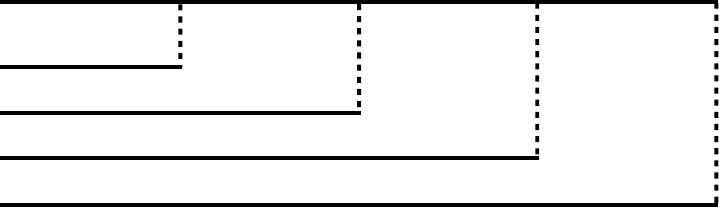
Thegraphbelowrepresentsthelapandsplittimesforaworkoutinwhich4lapsweretaken.
LAP 1
7:11 MIN 7:50 MIN
15:01 MIN
SPLIT 2
SPLIT 3
SPLIT 4
7:08 MIN
22:09 MIN
7:30 MIN
29:39 MIN
7:11 MIN
SPLIT 1
LAP 2 LAP 3 LAP 4
taking a Split
• Whilethetimerisrunning,pressSPLITtotakeasplit.
Thelapandsplittimeforthelapyoucompletedisdisplayed,andthewatchbeginstimingthenewlap.
Individuallapdataissavedwhenyousaveandresettheworkout.SeeViewingWorkoutData for instructions
on viewing saved lap data.
YoucanpressVIEWwhileinChronomodetoviewdataforalapinprogress.SeeChangingtheDisplayView
for instructions on changing Chrono mode display screens.
USING CHRONO MODE
UseChronomodewhenyouneedtobeabletoviewtimeanddistancedataonlyforthelapinprogress.For
example,youmightusethisdatatomeasureconsistencyoftimesamong1-milelegsofthesamerun.
AlldatatrackedinRunmodeisstilltrackedwhenyouareinChronomode,butthedatayoucanviewin
Chronomodeismorelimited;youcanonlyviewdataaboutthecurrentlapinChronomode.
ChronomodeandRunmodesharethetimer,andyoucanpressMODEtoswitchbetweenthetwomodes.
SwitchtoRunmodeifyouwanttoviewspeed,distance,pace,orcaloriedatafortheentireworkout.
NOTE: For the most accurate speed, distance, and pace calculations, use the watch in clear weather.
STARTING, STOPPING, AND SAVING A CHRONO WORKOUT
Starting a Workout
1. PressMODEuntilCHROdisplays.
2. Press+or-toselectGPS(tousetheGPStorecordworkoutdata)orINDOOR(torecordtimedataonly),
thenpressOK.
Abatterylifemessageappears.PressOKtoacknowledgeit.Ifthebatterylifeistoolow,chargethewatch
asdescribedinChargingtheWatch.
Amemoryremainingmessageappears.PressOKtoacknowledgeit.Ifthereisnotenoughestimated
memoryremainingtorecordyourintendedworkout,deletesomeworkoutstofreememoryspaceas
describedinDeletingWorkouts.
3. PressSTART.
7
Changing the diSplay vieW
Whilealapisinprogress,youcanswitchbetweentwoviewscreensthateachdisplaydifferentdataabout
the lap.
Bothdisplaysshowthelapandsplittimes,butonedisplayshowsthelapnumberwhiletheothershowsthe
distance traveled during the lap.
• PressVIEWtoswitchthedisplayviews.
taking SplitS, Stopping, and Saving a Chrono Workout
Takesplits,stopthetimer,andsaveandresettheworkoutasdescribedinUsingRunMode.
REVIEWING WORKOUTS
EverytimeyouresetthetimerinRunorChronomodes,theworkoutissaved.YoucanviewitfromtheRun
Datascreens.Comparethesesavedworkoutsagainstoneanothertotrackyourprogressanddecidehowto
train next time.
YoucanviewthefollowingfromtheRunDatascreens:
Data Description Data Description
ST start time AVSPEED averagemilesperhouroverentireworkout
END end time CAL caloriesburnedduringtheworkout
DIST total distance travelled Laptime elapsed time for this lap only
CHRONO total time Lapdistance distance traveled during this lap
AVPACE averageminutespermileoverentireworkout
CHOOSING A WORKOUT TO VIEW
Beforeyoucanviewthedetailsofaworkout,selecttheworkoutyouwanttoview.Informationinthelistof
savedworkoutshelpsyouselectaworkout.
1. PressMODEuntilRUNDATAdisplays.
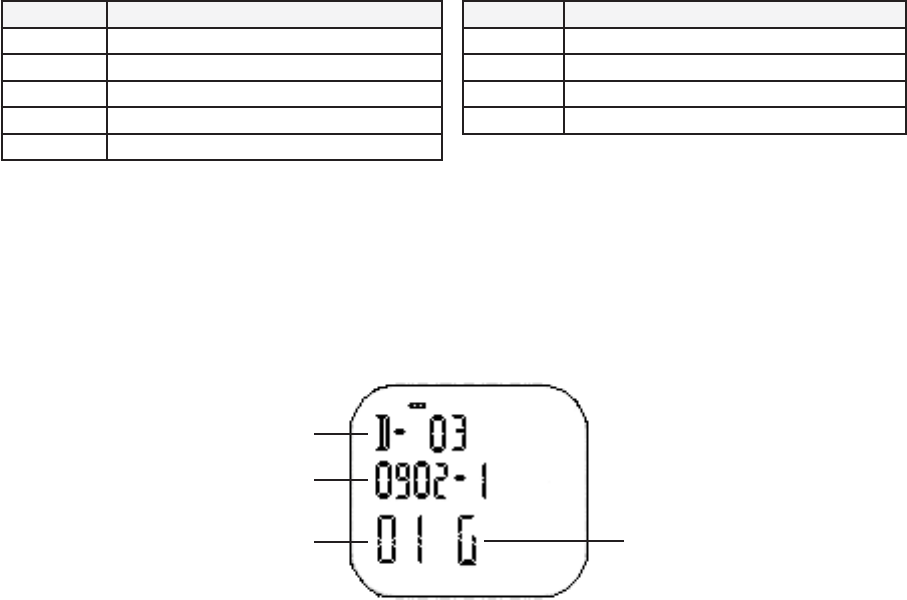
Themostrecententryinthelistofworkoutsdisplays.Thisdiagramdescribesthefeaturesofasavedentry:
2. Press+or-toscrollthroughthelistofworkouts.
3. PressVIEW.
Therstpageofdataforthatworkoutdisplays.
VIEWING WORKOUT DATA
• PressVIEWtocyclethrougheachscreentoviewdetaileddataforthatworkout.
Theworkoutdatascreensdisplayinthisorder:
• Workoutstartandendtimes,anddistance
• Elapsedtime,distance,andaveragepace
• Averagespeedandtotalcaloriesburned
• Elapsedtimeanddistanceofeachlap
File number
Workout date
Workout number by day G: GPS workout
H: Indoor workout
8
DELETING WORKOUTS
Tofreeupmemoryonthewatch,youcandeleteoneormoreworkouts.
deleting one Workout
1. PressMODEuntilRUNDATAdisplays.
2. Press+or-toselectaworkouttodelete,thenpressVIEW.
3. PressVIEWuntilVIEW/dEL/ALLdisplays.
4. Press+or-toselectdEL,thenpressOK.
Theworkoutisremovedfrommemory.
NOTE:Thereisnoconrmationwhendeletingaworkout;theworkoutisdeletedimmediatelywhenyou
pressOK.
deleting all WorkoutS
1. PressMODEuntilRUNDATAdisplays.
2. Press+or-toselectanyworkout,thenpressVIEW.
3. PressVIEWuntilVIEW/dEL/ALLdisplays.
4. Press+or-toselectALL,thenpressOK.
Theworkoutsareremovedfrommemory.
NOTE:Thereisnoconrmation;allworkoutsaredeletedimmediatelywhenyoupressOK.
SETTING ALARMS
Youcansetupto5alarmsonthewatch.Eachofthesealarmscanbesettosoundatadifferenttime.
Whenyousetthealarm,youchooseonwhichofthetimezones(T1orT2)thealarmwillbetimed;thealarm
willsoundatthespeciedtimeinthattimezoneeachday.
Allalarmswillsoundregardlessofwhichtimezoneisprimary,butwillsoundatthetimespeciedaccording
tothetimezoneyouselected.
CHOOSING AN ALARM
1. PressMODEuntilSETdisplays.
2. Press+or-toselectALARM,thenpressOK.
3. Press+or-toselectthealarmtoset,thenpressOK.
SETTING THE ALARM TIME
1. Fromthealarmsettingscreen,press+or-tochangehours,thenpressOK.
2. Press+or-tochangeminutes,thenpressOK.
3. Press+or-toselectthetimezoneonwhichtotimethealarm(T1orT2),thenpressOK.
4. Press+or-toturnthealarmON,thenpressOK.
5.Press+or-toturntheKEYTONE(buttonbeep)ONorOFF,thenpressOK.
NOTE:EvenifyousetKEYTONEtoOFF,thealarmwillstillsoundatthespeciedtime;thissettingaffects
onlywhetherthewatchbeepswhenyoupressabutton.
6. PressMODEtoexit.
TURNING AN ALARM ON OR OFF
YoucanturnanalarmonorofffromALARMmode.
1. PressMODEuntilALARMdisplays.
2. Press-toselectthealarmtoturnonoroff.
3. Press+toswitchbetweenONandOFF.
4. PressMODEtoexit.
WhenanyalarmisON,theq icon appears in the lower right of the display.
9
CONFIGURING SETTINGS
Thesettingschangesdescribedinthissectionarenotrequired,butyoucanusethesesettingstogetthemost
out of the watch.
SETTING UP AUTOMATIC LAPS
Youcansetthewatchtotakeasplitautomaticallyduringworkouts.AutomaticlapsworkinbothRunand
Chronomodeswhenthetimerisrunning.Youchooseoneofthepresetdistances,andthewatchtakesasplit
foryousoyoudon’thavetobreakstrideortakeyoureyesofftheroad.
1. PressMODEuntilSETdisplays.
2. Press+or-toselectAUTOLAP,thenpressOK.
3. Press+or-toselectthedistanceatwhichthewatchwilltakeasplit,thenpressOK.
Youonlyselectthenumberofunitsatwhichyouwanttotakeasplit.Thewatchappliestheunitsof
measurement you selected when you set up the watch in the Getting Started section.
Forexample,ifyouchoseMIwhenyousetupthewatch,andchose1instep2ofthisprocedure,the
watchtakesaspliteverymileyoutravel.
4. Press+or-tosetALERTtoON(thewatchwillbeepwhenasplitistaken)orOFF(thewatchwillnotbeep),
thenpressOK.
5. PressMODEtoexit.
SETTING THE TIME MANUALLY
WhileitiseasiesttoallowtheGPStosetthetimeforyoubasedonselectedtimezones,youcanseteither
timezonemanually.
1. PressMODEuntilSETdisplays.
2. Press-or+toselectTIME,thenpressOK.
3. Press+or-toselectthetimezone(TIME1orTIME2)toset,thenpressOK.
4. Press+or-toselectMANUAL,thenpressOK.
5. Press+or-tochangehours,thenpressOKtomovetothenexteld.
6. Repeatstep5forminutes,seconds,year,month,day,timeformat,anddateformat.
7. PressMODEtoexit.
SeleCting the time diSplay
Youcansettwotimezonesonthewatchtokeeptimeindifferenttimezones.Bydefault,TIME1isthepri-
marytimezonethatdisplaysinTimemode,butyoucanviewTIME2ormakeittheprimarytimezone.
• InTimemode,pressVIEWtoseethetimeinyoursecondarytimezone.
• InTimemode,holdVIEWtomakethesecondarytimezoneprimary.
TURNING ON NIGHT-MODE® FEATURE
Normally,youmustpressINDIGLO®buttontoturnonthenight-light.WhentheNightMode® feature is active,
anybuttonpressbetweenthehoursof6p.m.and7a.m.intheprimarytimezoneturnsonthenight-light.
1. PressMODEuntilSETdisplays.
2. Press+or-toselectNIGHT,thenpressOK.
3. Press+or-toselectON,thenpressOK.
4. PressMODEtoexit.
ADJUSTING CONTRAST
Contrastsettingsdeterminehowdarkthetextonthewatchscreenappears.Raisethecontrastsettingfor
darkertext,andlowerthesettingforlightertext.
1. PressMODEuntilSETdisplays.
2. Press+or-toselectCONTRAST,thenpressOK.
3. Press+or-toselectthecontrastvalue,thepressOK.
4. PressMODEtoexit.

10
TURNING BUTTON BEEP ON AND OFF
Selectwhetherornotthewatchemitsabeepwhenanybuttonispressed.
1. PressMODEuntilSETdisplays.
2. Press+or-toselectKEYTONE,thenpressOK.
3. Press+or-toselectONorOFF,thepressOK.
4. PressMODEtoexit.
WhenKEYTONEisON,theG icon displays in the lower right of the display.
Youcanalsosetthebuttonbeepwhensettingthealarm.SeeSetting the Alarm Time for more information.
RESETTING THE WATCH
Youcanreturnallsettingstotheirfactorydefaults.Youruserproleandworkoutdataarepreserved.
• PressINDIGLO®,MODE,START/SPLIT/+andSTOP/SAVE/-simultaneouslyandhold.
TROUBLESHOOTING
Followthesestepstosolveproblemsthatmayarisewhenusingthewatch.
PROBLEMS WITH THE GPS
hoW do i turn off the gpS?
Ifthetimerisnotrunningfor15minutes,theGPSwillturnoffautomatically.
Toconservebatterylife,youmayturnofftheGPSmanually.
• HoldGPSON/OFFtoturnofftheGPS.
Why Can’t i get a Satellite fix?
Toobtainagoodsatellitex,theGPSneedsaclearline-of-sighttothesatellites.
• Gooutsideandmoveawayfrombuildingsortalltrees.
• Remainstationary.
• Pointthebottomofthewatchfacetowardthesky.
PROBLEMS WITH THE BATTERY
the battery indiCator doeS not matCh the aCtual Charge
IfthedisplayappearstoolightortheGPSshutsoffunexpectedly,butthebatteryindicatorappearsfull:
1. Allowthebatterytorundowncompletelysothatthewatchshutsoffautomatically.
2. Fullychargethewatchwithoutinterruption.
NOTE:Evenwhenthewatchisnotinuse,fullychargethewatchevery1or2monthstopreservebatterylife.
SAFETY
CAUTION:Donotwearthiswatchwhileswimming.Prolongedsubmersioninwatercancauseelectrical
shortingwhichmaycauseskinirritationandminorburns.
WATER RESISTANCE
Thewatchiswaterresistantto30meters.
Water-ResistanceDepth p.s.i.a.*WaterPressureBelowSurface
30m/98ft 60
*poundspersquareinchabsolute
Ifthewatchissubmerged,beforeusingorcharging,wipethewatchdryandallowtoairdrycompletely.
CLEANING AND STORAGE
Youcancleanthewatchwithadampclothandamilddetergent.Wipedrycompletelybeforeusingor
charging.
NOTE:Donotuseanychemicalcleanersorsolventsthatmaydamageplasticcomponents.
To avoid permanent damage to the watch, do not store the watch in extreme high or low temperature
environments for extended periods.
11
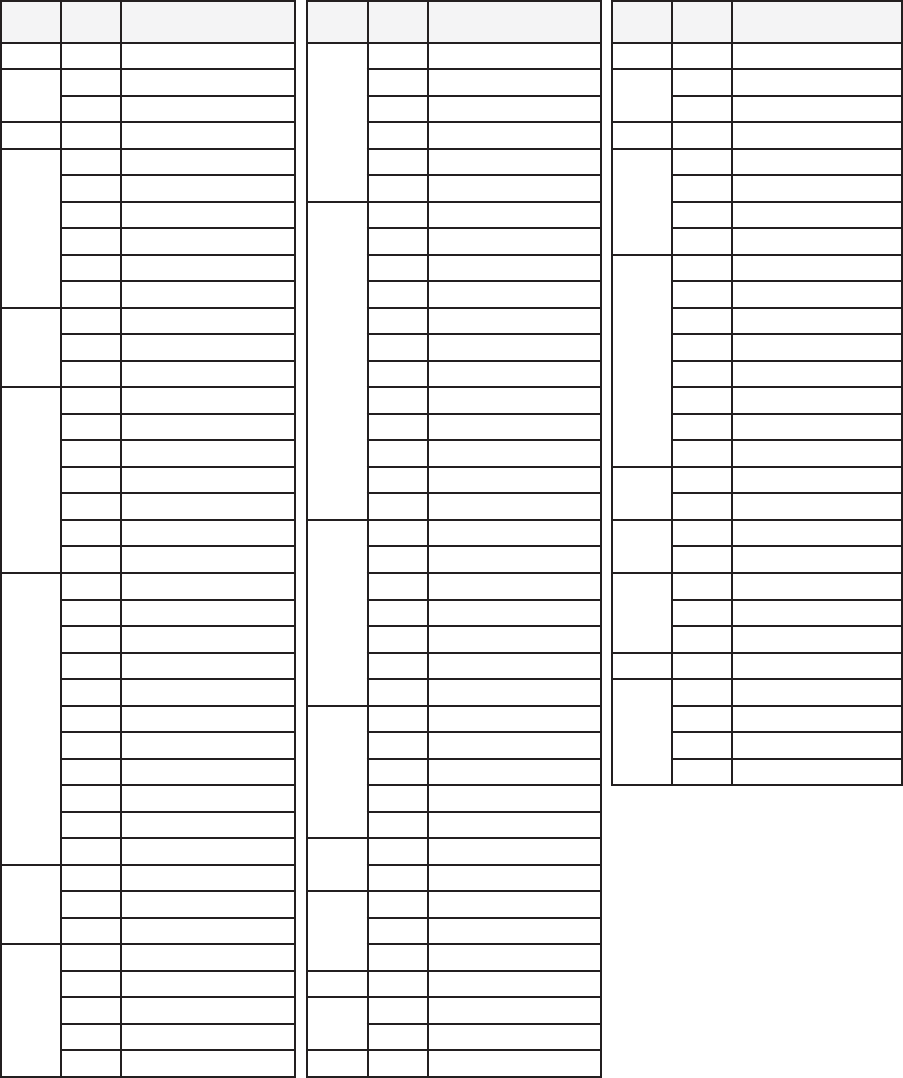
TIME ZONES
Consultthischartforguidanceinsettingyourtimezones.Ifyourcityisnotlisted,andyoudonotknowyour
GMT offset, select the city that is nearest to you.
GMT
Offset
City
Code
City GMT
Offset
City
Code
City GMT
Offset
City
Code
City
-11 PPG Pago Pago
0
LON London +5.5 BOM Mumbai
-10 HNL Honolulu DUB Dublin +6 DAC Dhaka
PPT Papeete LIS Lisbon CMB Colombo
-9 ANC Anchorage CAS Casablanca +6.5 RGN Yangon
-8
YVR Vancouver DKR Dakar
+7
BKK Bangkok
SFO San Francisco ABJ Abidjan JKT Jakarta
LAX LosAngeles
+1
PAR Paris PNH Phnom Penh
LAS LasVegas MIL Milan HAN Hanoi
SEA Seattle ROM Rome
+8
SIN Singapore
US-P Pacific Standard Time BER Berlin HKG HongKong
-7
DEN Denver MAD Madrid KUL KualaLumpur
ELP El Paso FRA Frankfurt TPE Taipei
US-M Mountain Standard Time AMS Amsterdam PER Perth
-6
MEX Mexico City VIE Vienna PEK Beijing
CHI Chicago ALG Algiers MNL Manila
HOU Houston STO Stockholm SHA Shanghai
DFW Dallas/FortWorth HAM Hamburg +9 SEL Seoul
MSY NewOrleans ZRH Zurich TYO Tokyo
YWG Winnipeg
+2
IST Istanbul +9.5 ADL Adelaide
US-C Central Standard Time CAI Cairo DRW Darwin
-5
MIA Miami JRS Jerusalem
+10
GUM Guam
NYC NewYork ATH Athens SYD Sydney
YUL Montreal HEL Helsinki MEL Melbourne
DTW Detroit DAM Damascus +11 NOU Noumea
BOS Boston CPT Cape Town
+12
WLG Wellington
PTY Panama City
+3
JED Jeddah CHC Christchurch
HAV Havana MOW Moscow NAN Nadi
ATL Atlanta KWI Kuwait AKL Auckland
YYZ Toronto ADD AddisAbaba
WAS Washington NBO Nairobi
US-E Eastern Standard Time +3.5 THR Tehran
-4
CCS Caracas SYZ Shiraz
LPB LaPaz
+4
DXB Dubai
SCL Santiago AUH AbuDhabi
-3
RIO RiodeJaneiro MCT Muscat
GRU Sao Paulo +4.5 KBL Kabul
BUE Buenos Aires +5 KHI Karachi
BSB Brasilia MLE Male
MVD Montevideo +5.5 DEL Delhi

12
WARRANTY AND SERVICE
Timex International Warranty (U.S. Limited Warranty)
YourTimex®GPSwatchiswarrantedagainstmanufacturingdefectsbyTimexforaperiodofONEYEARfrom
theoriginalpurchasedate.TimexGroupUSA,Inc.anditsworldwideafliateswillhonorthisInternational
Warranty.
Please note that Timex may, at its option, repair your Timex®productbyinstallingneworthoroughly
reconditioned and inspected components or replace it with an identical or similar model.
IMPORTANT:PLEASENOTETHATTHISWARRANTYDOESNOTCOVERDEFECTSORDAMAGESTO
YOURPRODUCT:
1. afterthewarrantyperiodexpires;
2.iftheproductwasnotoriginallypurchasedfromanauthorizedTimexretailer;
3.fromrepairservicesnotperformedbyTimex;
4. fromaccidents,tamperingorabuse;and
5. lensorcrystal,straporband,sensorcase,attachmentsorbattery.Timexmaychargeyouforreplacingany
of these parts.
THISWARRANTYANDTHEREMEDIESCONTAINEDHEREINAREEXCLUSIVEANDINLIEUOFALLOTHERWARRAN-
TIES,EXPRESSORIMPLIED,INCLUDINGANYIMPLIEDWARRANTYOFMERCHANTABILITYORFITNESSFORPAR-
TICULARPURPOSE.
TIMEXISNOTLIABLEFORANYSPECIAL,INCIDENTALORCONSEQUENTIALDAMAGES.Somecountriesand
states do not allow limitations on implied warranties and do not allow exclusions or limitations on damages,
so these limitations may not apply to you. This warranty gives you specific legal rights and you may also have
other rights which vary from country to country and state to state.
Toobtainwarrantyservice,pleasereturnyourGPSwatchtoTimex,oneofitsafliatesortheTimexretailer
wheretheGPSwatchwaspurchased,togetherwithacompletedoriginalRepairCouponor,intheU.S.and
Canadaonly,thecompletedoriginalRepairCouponorawrittenstatementidentifyingyourname,address,
telephonenumberanddateandplaceofpurchase.PleaseincludethefollowingwithyourGPSwatchtocover
postageandhandling(thisisnotarepaircharge):aUS$8.00checkormoneyorderintheU.S.;
aCAN$7.00chequeormoneyorderinCanada;andaUK£2.50chequeormoneyorderintheU.K.Inother
countries,Timexwillchargeyouforpostageandhandling.NEVERINCLUDEANYARTICLEOFPERSONALVALUE
INYOURSHIPMENT.
FortheU.S.,pleasecall1-800-328-2677foradditionalwarrantyinformation.ForCanada,call1-800-263-0981.
ForBrazil,call+55(11)55729733.ForMexico,call01-800-01-060-00.ForCentralAmerica,theCaribbean,
BermudaandtheBahamas,call(501)370-5775(U.S.).ForAsia,call852-2815-0091.FortheU.K.,call44208687
9620.ForPortugal,call351212946017.ForFrance,call33381634200.Germany/Austria:+4366288921
30.FortheMiddleEastandAfrica,call971-4-310850.Forotherareas,pleasecontactyourlocalTimexretailer
orTimexdistributorforwarrantyinformation.InCanada,theU.S.andincertainotherlocations,participating
Timexretailerscanprovideyouwithapostage-paid,RepairMailerforyourconvenienceinobtainingfactory
service.
TIMEX INTERNATIONAL WARRANTY REPAIR COUPON
Original Purchase Date: ________________________________________________
(attach a copy of sales receipt, if available)
Purchased by: ______________________________________________________
(name, address, telephone number)
Place of Purchase: ___________________________________________________
(name and address)
Reason for Return: ___________________________________________________
__________________________________________________________________

13
DECLARATION OF CONFORMITY
Manufacturers Name: TimexGroupUSA,Inc.
Manufacturers Address: 555ChristianRoad
Middlebury,CT06762
United States of America
declaresthattheproduct:
Product Name: Timex® Marathon®GPSWatch
Model Numbers: M434
conformstothefollowingspecications:
R&TTE: 1999/05/EC
Standards: ETSIEN300440-2V1.4.1(2010-08)
ETSIEN301489-1V1.8.1(2008-04)
ETSIEN301489-3V1.4.1(2002-08)
ICES-003Issue4February,2004
Digital Device Emissions
Standards: FCC Part 15, Subpart B, Class B
Agent:
Sam Everett
QualityRegulatoryEngineer
Date:19January,2012;Middlebury,Connecticut,U.S.A.
©2012TimexGroupUSA,Inc.TIMEX,MARATHON,INDIGLOandNIGHT-MODEaretrademarksofTimexGroupB.V.anditssubsidiaries.
