Toyota 2010 Avalon Reference Guide QRG
2015-10-24
: Toyota Toyota-2010-Toyota-Avalon-Reference-Guide-819758 toyota-2010-toyota-avalon-reference-guide-819758 toyota pdf
Open the PDF directly: View PDF  .
.
Page Count: 26
CUSTOMER EXPERIENCE CENTER
1- 8 00 - 331- 4 331
10%
Cert no. SGS-COC-005612 00505-QRG10-AVA
Printed in U.S.A. 7/09
08-TCS-03068
413635M1.indd 2 7/20/09 12:44:52 PM
QUICK REFERENCE
GUIDE
AVALON
2010
413635M1.indd 1 7/20/09 12:44:47 PM
2010
Avalon
!Awordaboutsafevehicleoperations
This Quick Reference Guide is a summary of basic vehicle
operations. It contains brief descriptions of fundamental
operations so you can locate and use the vehicle’s main
equipment quickly and easily.
The Quick Reference Guide is not intended as a substitute for
the Owner’s Manual located in your vehicle’s glove box. We
strongly encourage you to review the Owner’s Manual and
supplementary manuals so you will have a better understanding
of your vehicle’s capabilities and limitations.
Your dealership and the entire staff of Toyota Motor Sales,
U.S.A., Inc. wish you many years of satisfied driving in your
new Avalon.
This Quick Reference Guide is not a full description of Avalon
operations. Every Avalon owner should review the Owner’s
Manual that accompanies this vehicle.
Pay special attention to the boxed information highlighted in
color throughout the Owner’s Manual. Each box contains safe
operatinginstructionstohelpyouavoidinjuryorequipment
malfunction.
All information in this Quick Reference Guide is current at
the time of printing. Toyota reserves the right to make
changes at any time without notice.
25
OVERVIEW FEATURES/OPERATIONS SAFETY AND EMERGENCY FEATURES
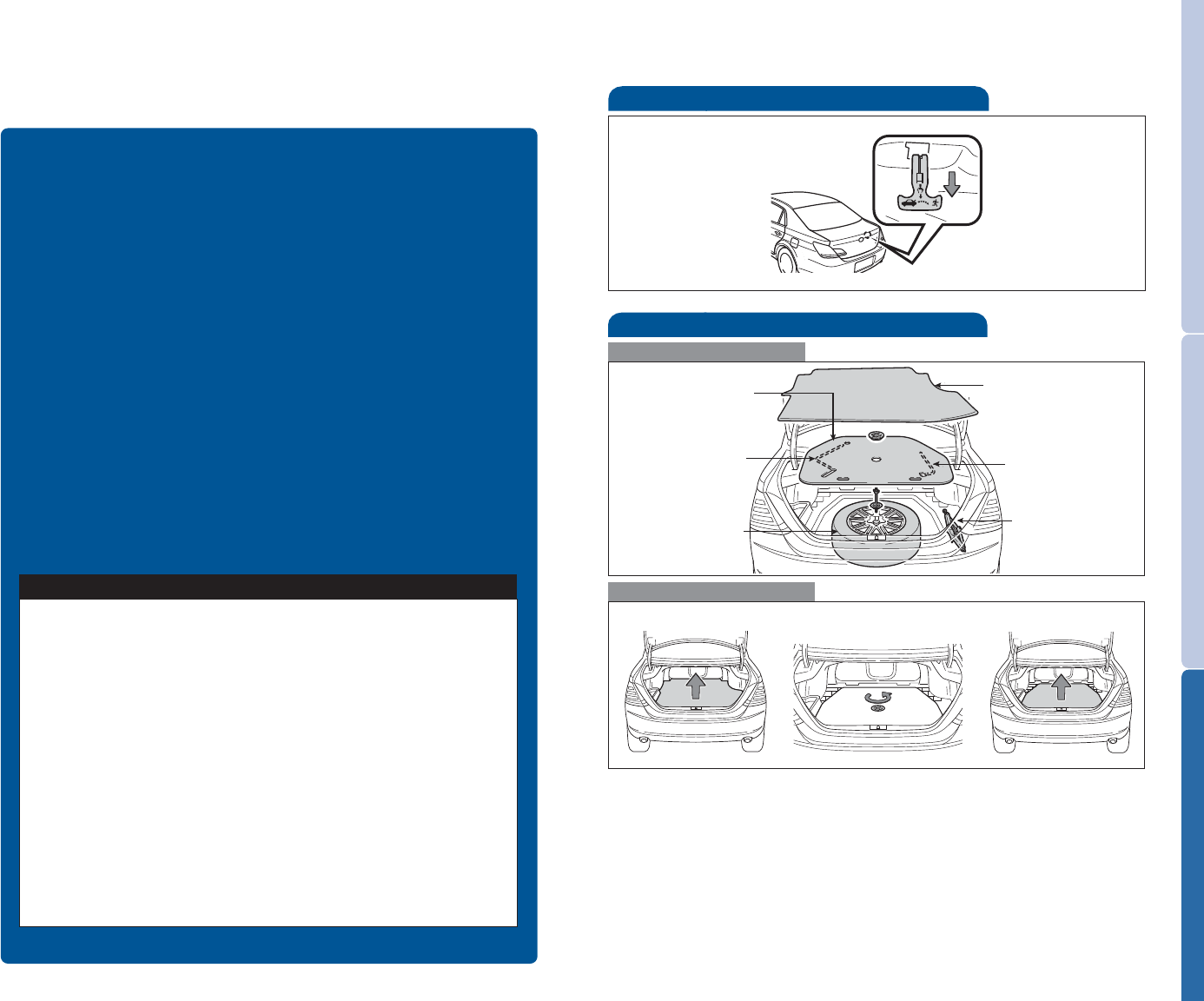
Spare tire & tools
To o l l o c a t i o n
Removing the spare tire
(1) Remove the luggage cover.
(2) Loosen and remove the center fastener.
(3) Remove the spare tire cover.
Refer to the Owner’s Manual for tire changing and jack positioning
procedures.
Spare tire
Jack handle
Luggage floor cover
Jack
Spare tire cover
Wheel nut wrench
Trunk-Internal release
Pull
(1) (2) (3)

1
OVERVIEW FEATURES/OPERATIONS SAFETY AND EMERGENCY FEATURES
INDEX
Engine maintenance 9
Fuel tank door release and cap 8
Hood release 9
Indicator symbols 4-5
Instrument cluster 4
Instrument panel 2-3
Keyless entry16
Light control-Instrument panel 8
Smart Key system27
Trunk release 8
Air Conditioning/Heating 20
Audio 18
Auto lock functions210
Automatic Transmission 10
Center display 19
Clock 22
Cruise control 16
Cup holders 22
Door locks 21
Dynamic Laser Cruise Control 17
Garage door opener (HomeLink®)316
Lights1& turn signals 13
Moonroof 14
Parking brake 11
Power outlets 22
Seat adjustments-Front 12
Seat adjustments-Rear 12
Seat ventilators/Heaters 21
Seats-Head restraints 11
Steering lock release 10
Steering wheel switches 19
Sunshade-Rear114
Telephone controls (Bluetooth®)15
Tilt and telescopic steering wheel 11
Windows-Power 14
Windshield wipers & washers112
Doors-Child safety locks 23
Seatbelt comfort guide 24
Seatbelts 23
Seatbelts-Shoulder belt anchor 23
Spare tire & tools 25
Tire Pressure Monitoring (warning) System 24
Trunk-Internal release 25
OVERVIEW
FEATURES/OPERATIONS
SAFETY AND
EMERGENCY FEATURES
1Visit your Toyota dealer for information on customizing this feature.
2Programmable by customer. Refer to the Owner’s Manual for instructions and
more information.
3HomeLink®is a registered trademark of Johnson Controls, Inc.
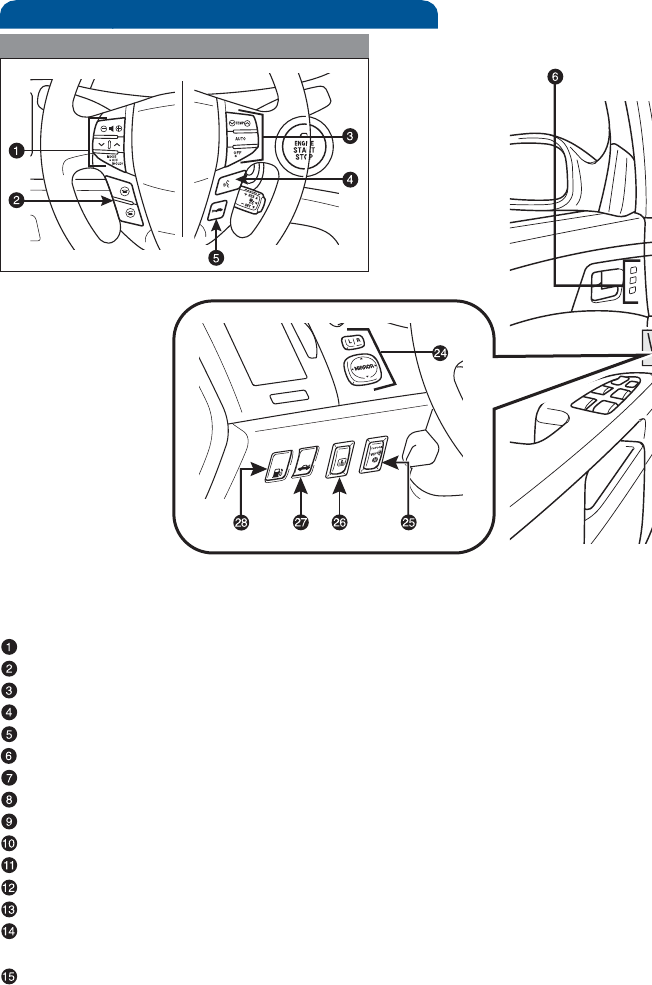
Steering wheel controls
2
OVERVIEW
Instrument panel
Steering wheel audio controls
Telephone controls1
Steering wheel climate controls
Voice command button1,2
Distance button1
Driving position memory switches1
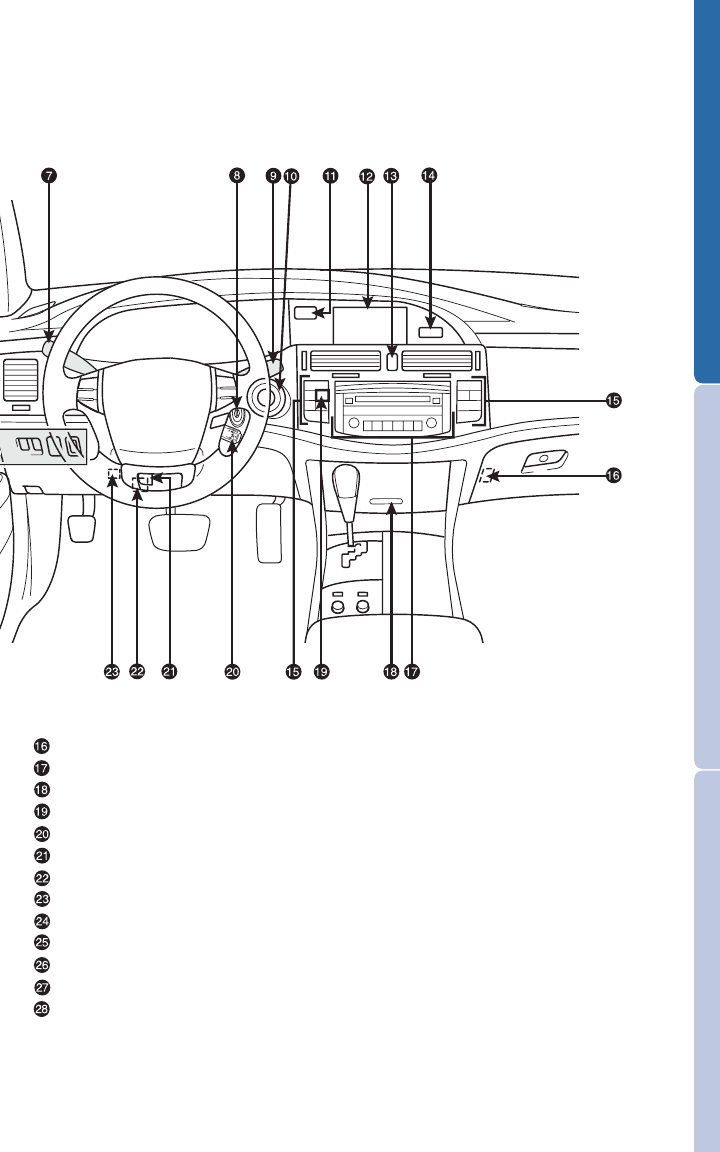
Headlight, turn signal and front fog light1controls
Ignition switch (standard key)1
Wiper and washer controls
“ENGINE START STOP” button (Smart Key)1
Clock
Center display1/Navigation system1,2
Emergency flasher button
“AIR BAG ON” and “AIR BAG OFF” indicator and front passenger
seatbelt reminder lights
Air Conditioning controls
3
OVERVIEW FEATURES/OPERATIONS SAFETY AND EMERGENCY FEATURES
Trunkopenermainswitch
Audio system
Storage compartment1/Navigation system switches1,2
Outside rearview mirror1/Rear window defogger button
Cruise control
Tilt lock release lever
Tire Pressure Monitoring (warning) System reset
Telescopic lock release
Power rearview mirror control
Glass breakage sensor1
Rear sunshade switch1
Tru n k op e ne r
Fuel filler door opener
1If equipped
2For vehicles with a navigation system, refer to the “Navigation System
Owner’s Manual.”
4
OVERVIEW
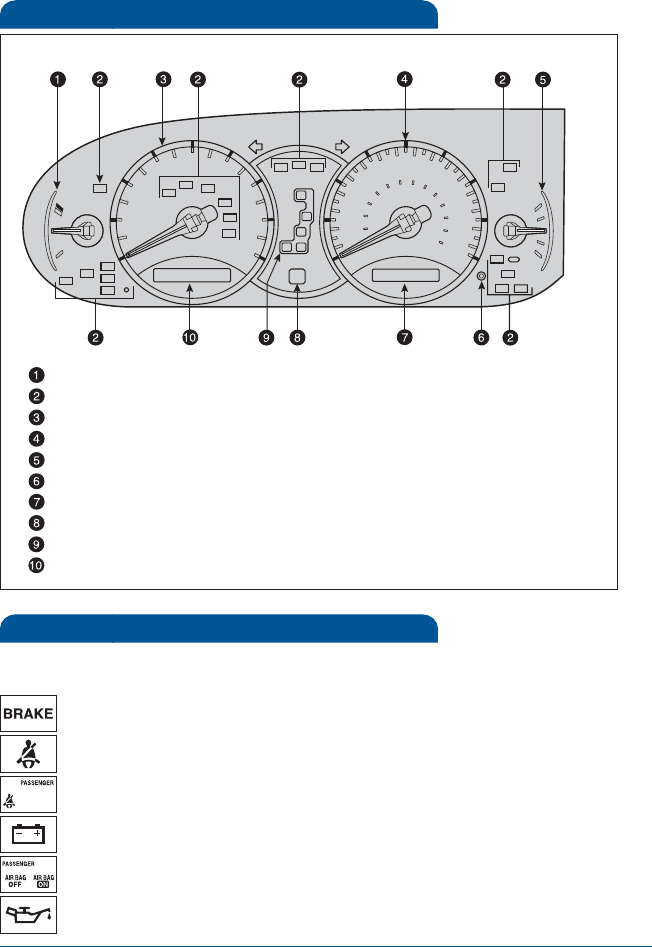
Indicator symbols
Instrument cluster
Engine coolant temperature
Service indicator and reminder
Tachometer
Speedometer
Fuel gauge
Odometer/Trip meter and trip meter reset button
Odometer/Trip meter display
Automatic Transmission shift range display
Automatic Transmission shift position indicator
Dynamic laser cruise control display
Charging system warning1
Brake system warning1
1If indicator does not turn off within a few seconds of starting engine, there may
be a malfunction. Have vehicle inspected by your Toyota dealer.
Driver seatbelt reminder
(alarm will sound if speed is over 9 mph)
Front passenger seatbelt reminder
(alarm will sound if speed is over 9 mph)
Low engine oil pressure warning1
Front passenger occupant classification indicator/
Front passenger airbag ON/OFF indicator1
For details, refer to “Indicators and warning lights,” Section 2-2, 2010
Owner’s Manual.
5
OVERVIEW FEATURES/OPERATIONS SAFETY AND EMERGENCY FEATURES
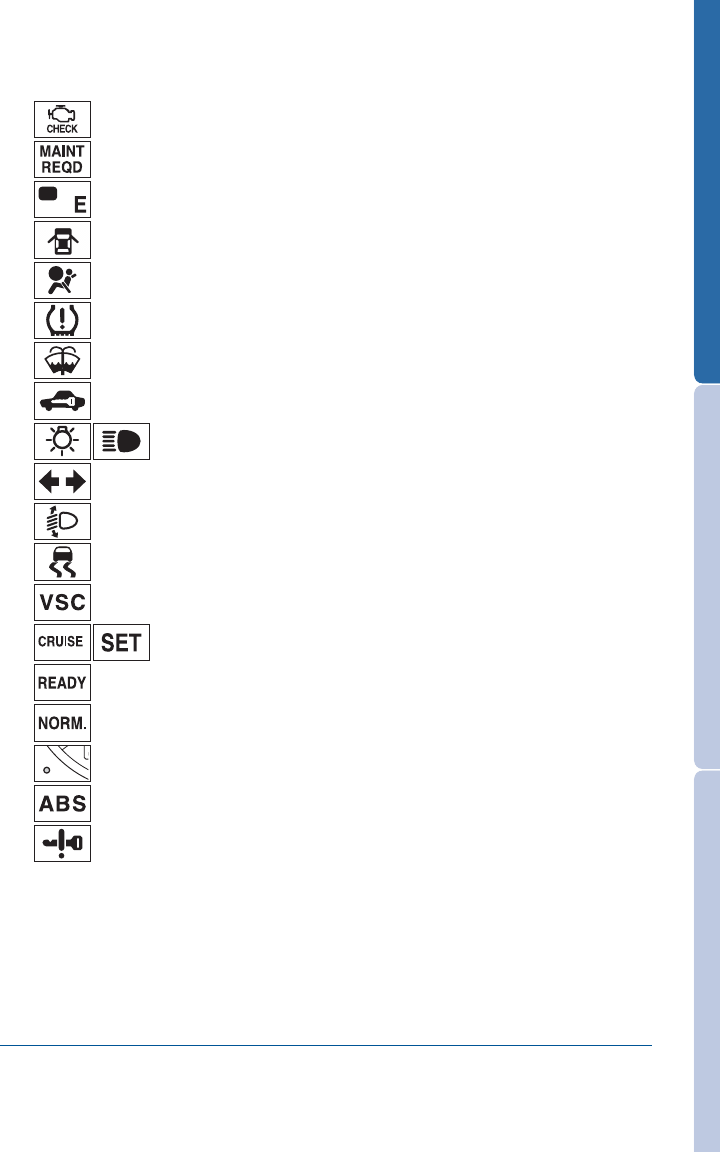
Anti-lock Brake System warning1
Headlight low/high beam indicator
Turn signal indicator
Slip indicator
Vehicle Stability Control system warning1
Cruise control indicator2
Tire Pressure Warning1
Security indicator
Open door warning
Airbag SRS warning1
Low windshield washer fluid level warning1
Malfunction/Check Engine indicator1
Engine oil replacement reminder1
Low fuel level warning
Automatic headlight leveling system warning1
Dynamic Laser Cruise Control master warning light1
Ready mode indicator1
Conventional cruise
Smart Key system warning1
2If this light flashes, refer to “Cruise control,” Section 2-4, 2010 Owner’s Manual.
6
OVERVIEW
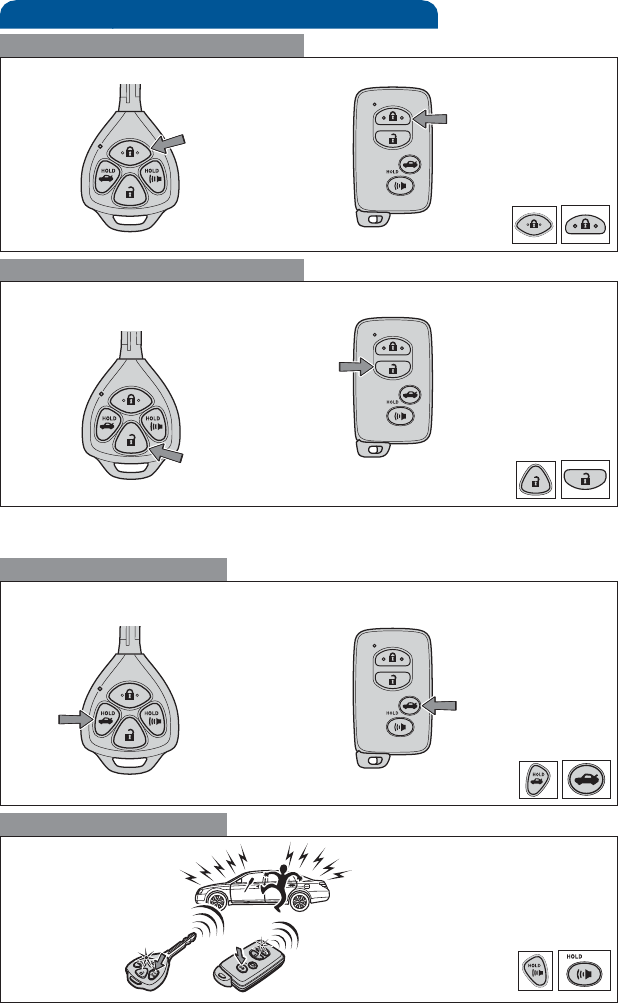
Keyless entry
Push
Push ONCE: Driver door
TWICE: All doors
Locking operation
Unlocking operation
Without Smart Key system With Smart Key system
Without Smart Key system With Smart Key system
Trunk lid operation
Panic button
Push and hold
Push and hold
NOTE: If a door is not opened within 60 seconds of unlocking, all doors will
relock for safety.
Without Smart Key system With Smart Key system
7
OVERVIEW FEATURES/OPERATIONS SAFETY AND EMERGENCY FEATURES
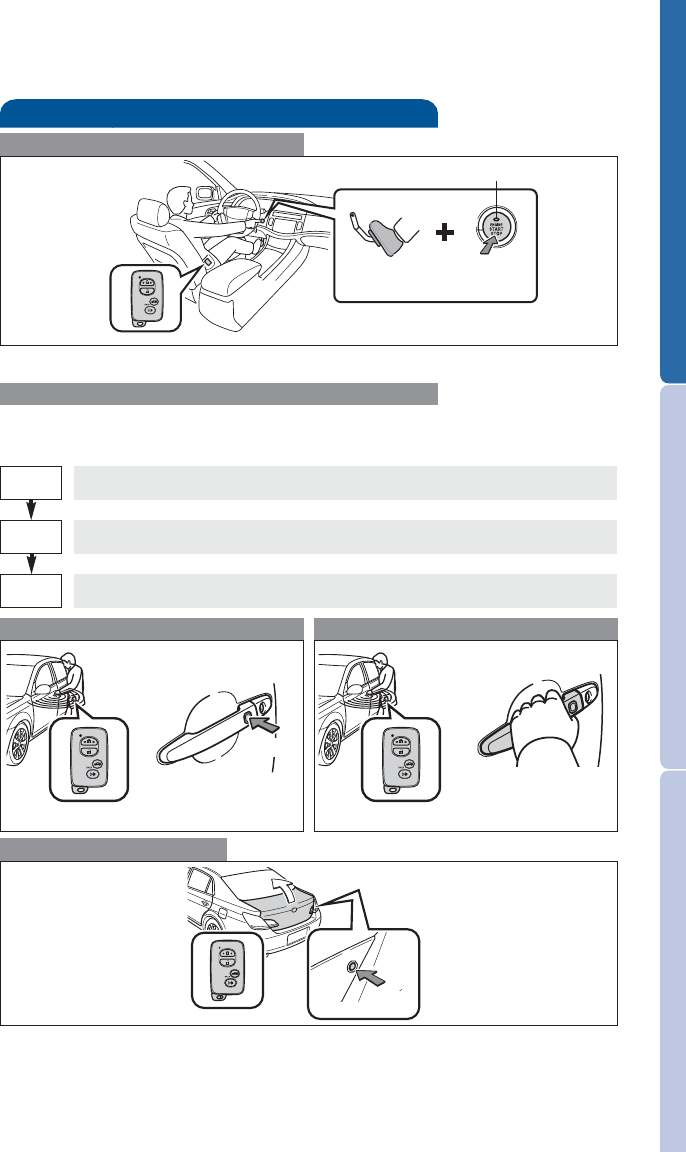
Smart Key system (if equipped)
Start function
NOTE: Gear shift lever must be in Park and brake pedal depressed.
Push
Depress
brake pedal
Carrying
Green indicator ON
Without depressing the brake pedal, pressing the “ENGINE START STOP”
switch will change the operation mode in succession from:
Power (without starting engine)
* Driver door unlocking function can be programmed to unlock driver door
only, or all doors. Grasping passenger door handle will unlock all doors.
NOTE: Doors may also be locked/unlocked using remote.
Accessories such as the radio will operate.
Power ON; the engine not running.
All systems OFF.
ACC
ON
OFF
Trunk access
Opening trunk
Locking operation Unlocking operation
Carry remote to lock/unlock Carry remote to lock/unlock
Front door lock Front door unlock*
Push
Grasp
Push
Carry remote
to lock/unlock
8
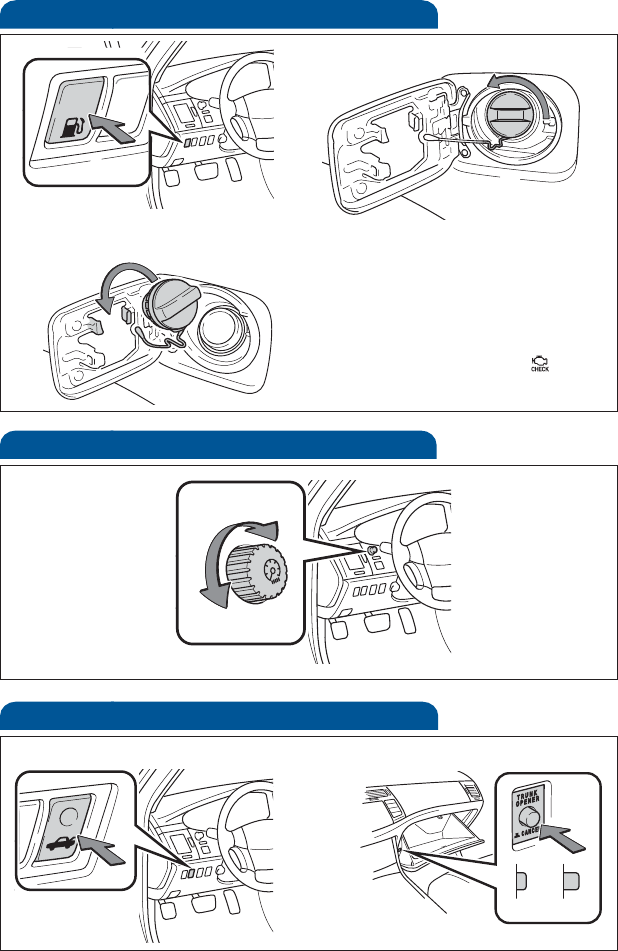
Fuel tank door release and cap
NOTE: Tighten until one click is
heard. If the cap is not tightened
enough, Check Engine “ ”
indicator may illuminate.
Push
Tu r n
Store
Light control-Instrument panel
Brightness
control
-
+
Trunk releas e
ON
Push
Trunk opener Main switch
OFF
OVERVIEW
9
OVERVIEW FEATURES/OPERATIONS SAFETY AND EMERGENCY FEATURES
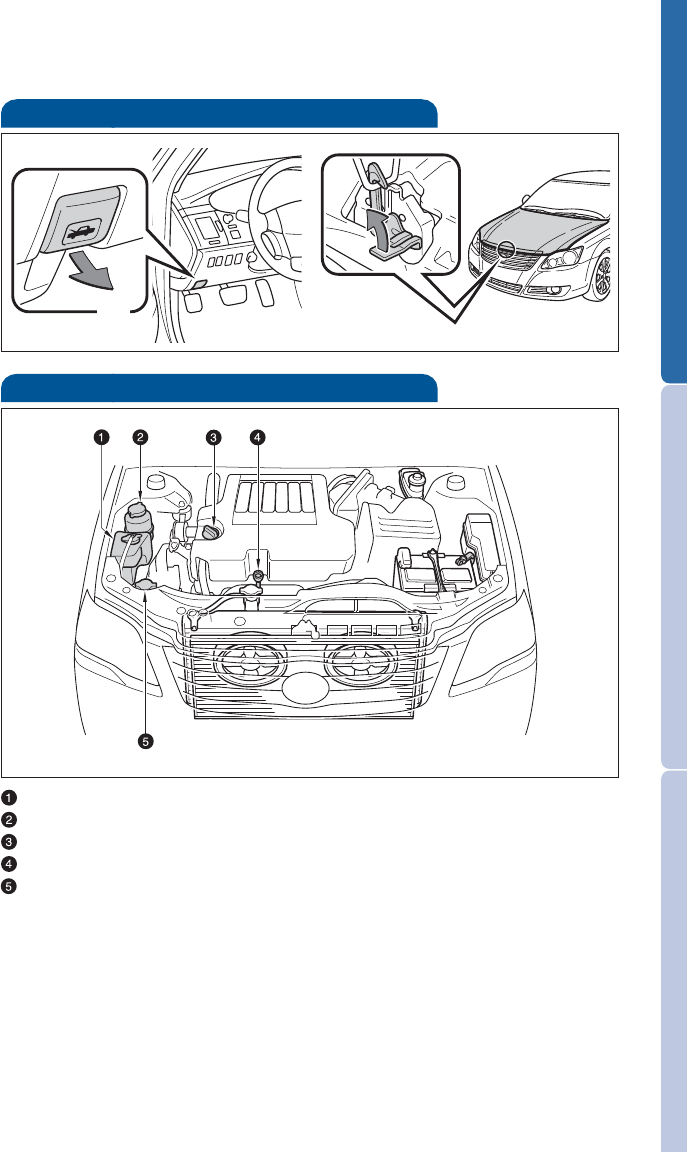
Hood release
Pull up latch and
raise hood
Pull
Engine coolant reservoir
Power steering fluid reservoir
Engine oil filler cap
Engine oil level dipstick
Windshield washer fluid tank
NOTE: Regularly scheduled maintenance, including oil changes, will
help extend the life of your vehicle and maintain performance.
Please refer to the “Warranty Maintenance Guide.”
Engine maintenance
10
FEATURES/OPERATIONS
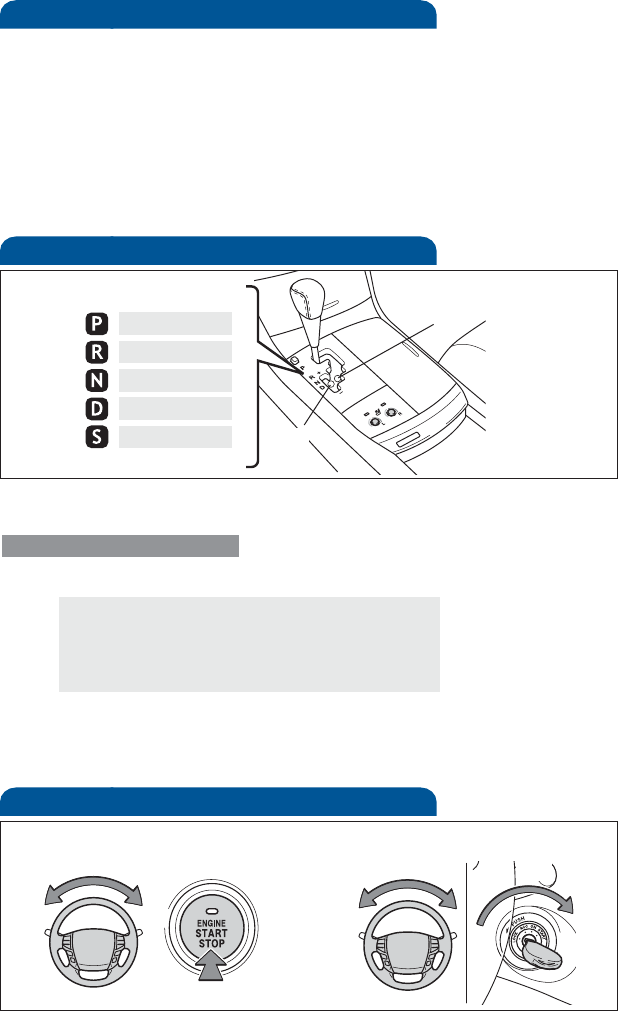
Automatic Transmission
* The “ENGINE START STOP” switch/engine must be “ON” and the brake
pedal depressed to shift from Park.
Downshifting increases power going uphill, or provides engine braking
downhill. For best fuel economy during normal driving conditions, always
drive with the shift lever in the “D” position.
Floor shift type:
+: Upshift (push and release)
-: Downshift (pull and release)
“S” (Sequential) mode
Shift the shift lever to “S” position from “D” position.
Park*
Reverse
Neutral
Drive
“S” mode “S”
“D”
Steering lock release
Tu r n
Tu r n
Smart Key system Without Smart Key system
Push
Tu r n
Auto lock functions
Automatic door locks can be programmed to operate in two different
modes, or turned OFF.
1. Doors lock: when shifting from Park.
Doors unlock: when shifting into Park.
2. Doors lock: when the vehicle speed goes above 12 mph.
Doors unlock: when the driver’s door is opened within 10 seconds after
turning the “ENGINE START STOP” switch or the engine switch OFF.
Refer to the Owner’s Manual for more details.
11
OVERVIEW FEATURES/OPERATIONS SAFETY AND EMERGENCY FEATURES
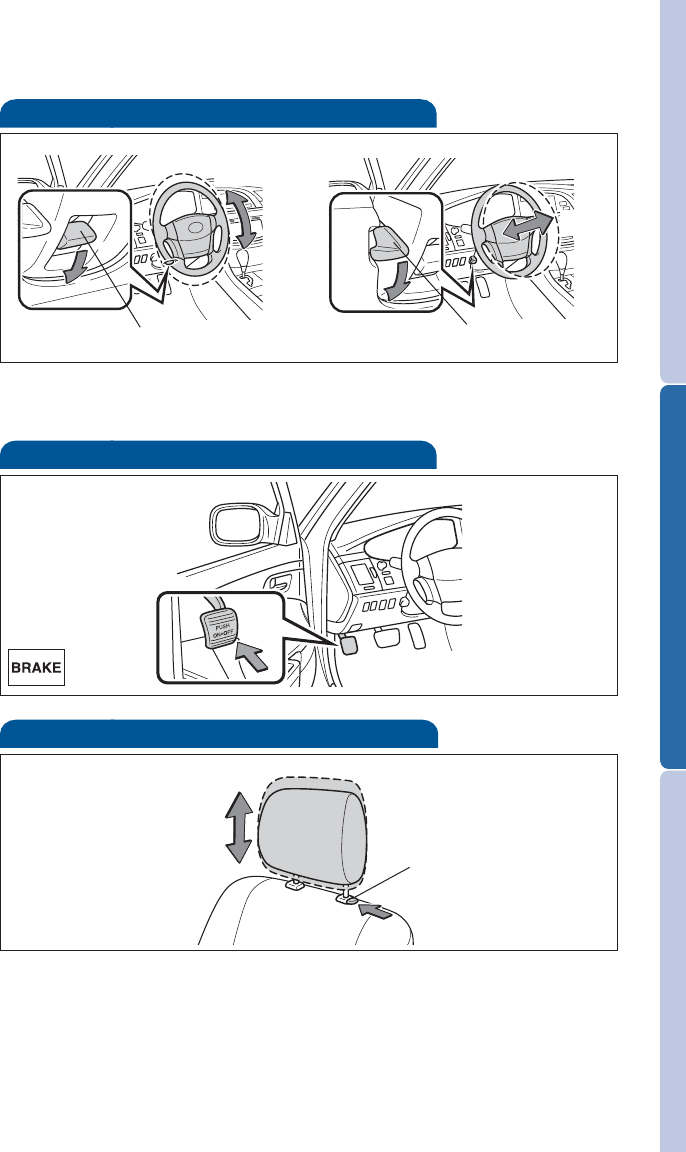
Parking brake
Set: Depress
Release: Depress again
Hold wheel, push lever down, set angle and length, and return lever.
NOTE: Do not attempt to adjust while the vehicle is in motion.
Tilt and telescopic steering wheel
Angle
Length
Lock release lever
Lock release lever
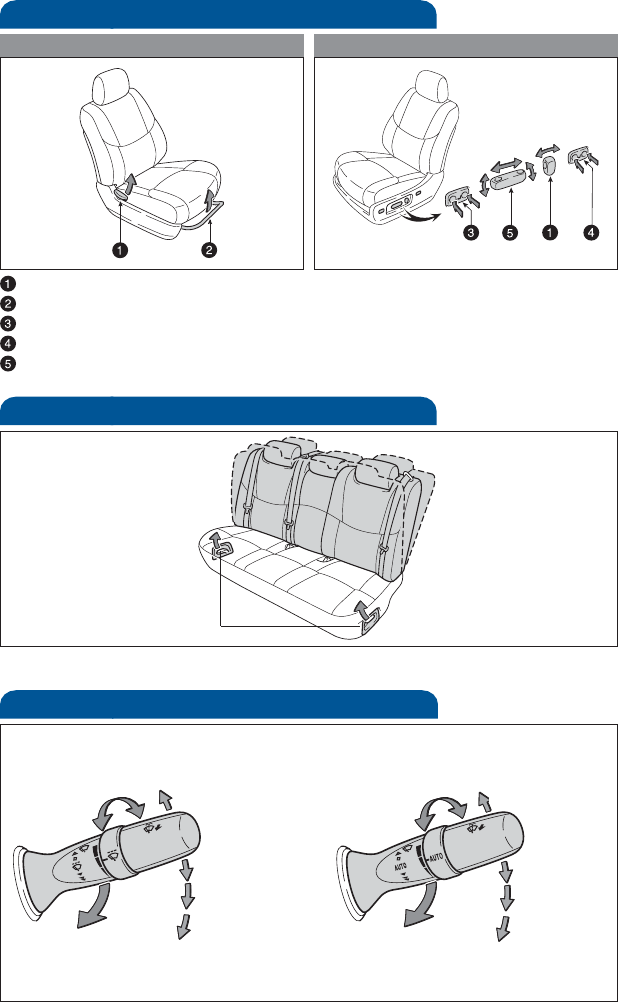
Seats-Head restraints
Lock release button
12
FEATURES/OPERATIONS
Seat adjustments-Rear
Refer to the Owner’s Manual for more details.
Seat adjustments-Front
Seatback angle
Seat position (forward/backward)
Leg support (if equipped)
Lumbar support (if equipped)
Position, cushion angle (if equipped) and height (if equipped)
Manual seat Power seat
Seatback angle lever
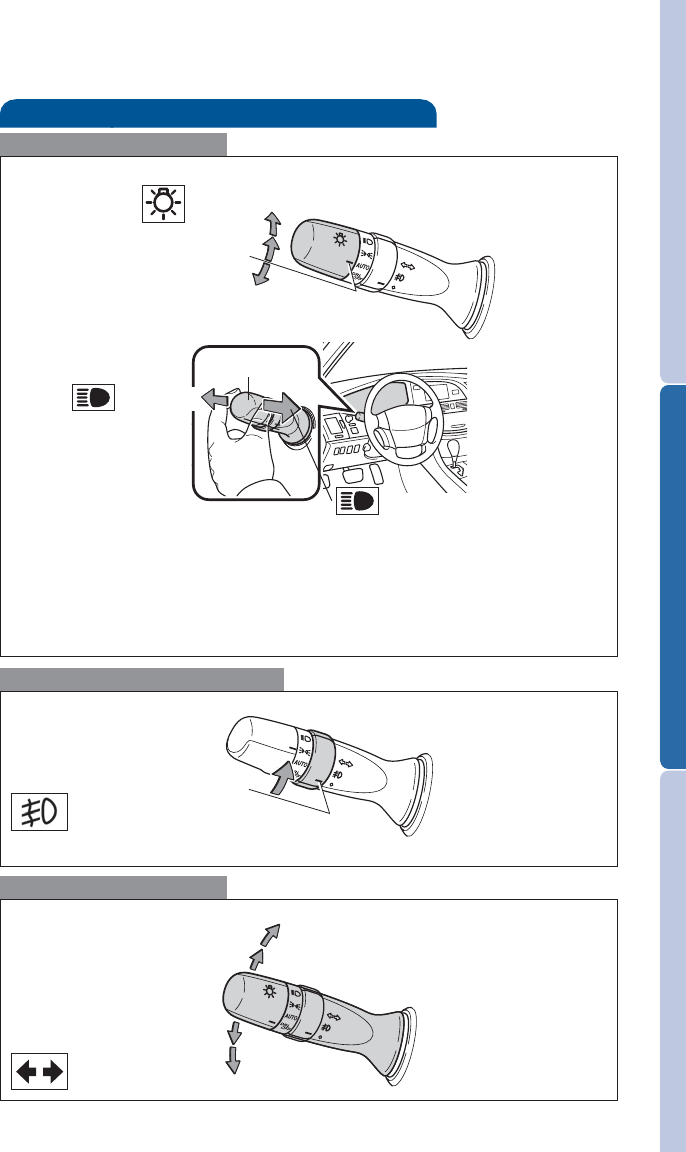
Windshield wipers & washers
Interval wipe
Single wipe
Slow
Fast Pull to wash and wipe
Adjust frequency*
Pull to wash and wipe
Auto wipe
Single wipe
Slow
Fast
Adjust sensor
sensitivity
With interval wiper With AUTO rain-sensing wiper
* Intermittent windshield wiper frequency adjustment
Rotate to increase/decrease wipe frequency.
13
OVERVIEW FEATURES/OPERATIONS SAFETY AND EMERGENCY FEATURES
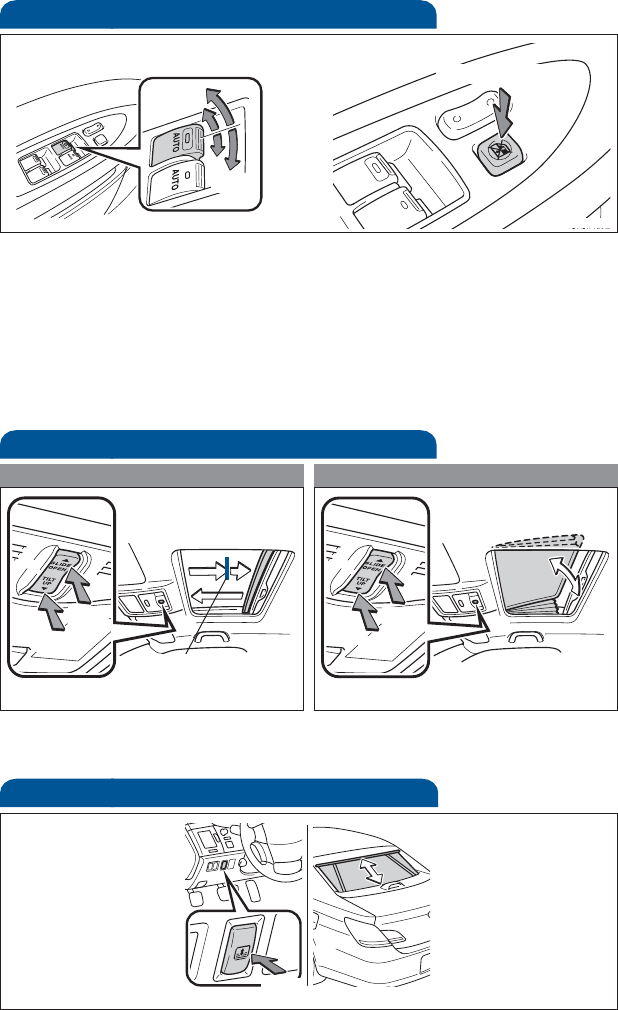
Lights&turnsignals
Turn signals
Headlights
High beam flasher
Low beam
Front fog lights (if equipped)
Headlights
-Daytime Running Light system (DRL) Automatically turns on the
headlights at a reduced intensity.
-Automatic light cut off system Automatically turns lights off after a
delay of 30 seconds, or the lock switch on remote may be pushed after
locking.
Front fog lights come on only when the headlights are on low beam.
Parking lights
Right turn
Lane change
Lane change
Left turn
High beam
Auto
DRL OFF
Tu r n
14
FEATURES/OPERATIONS
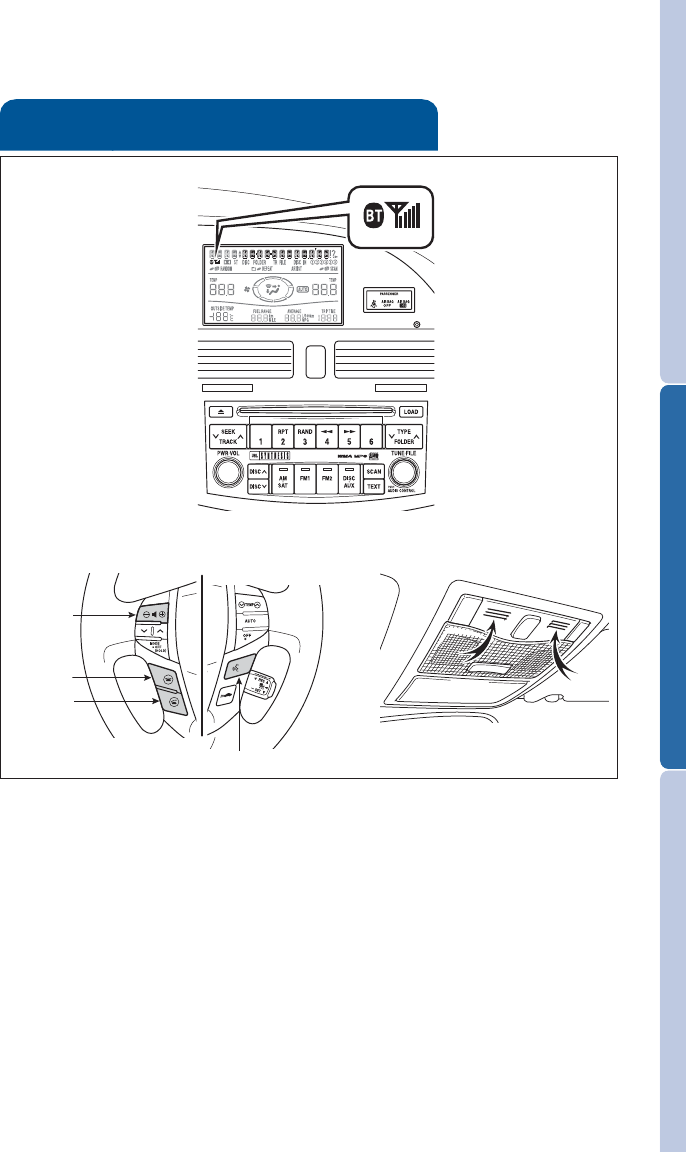
Windows-Power
Window lock switch
Automatic operation Push the switch completely down or pull it
completely up and release to fully open or close. To stop window midway,
lightly push the switch in the opposite direction.
Window lock switch Deactivates all passenger windows. Driver’s window
remains operable.
NOTE: If battery is disconnected, the window needs to be reinitialized.
RefertotheOwner’s Manual for more details.
Up
Down
Driver side
Moonroof (if equipped)
Sliding operation Tilting operation
Open
Tilt
Close
Close
Recommended driving
position to minimize
wind noise.
NOTE: If battery is disconnected, the moonroof needs to be reinitialized.
Refer to the Owner’s Manual for more details.
Sunshade-Rear (if equipped)
Push
When shifting to
reverse, sunshade
retracts automatically,
and then rises again
when driving forward.
Push once to open
partway; again to
open completely.
15
OVERVIEW FEATURES/OPERATIONS SAFETY AND EMERGENCY FEATURES
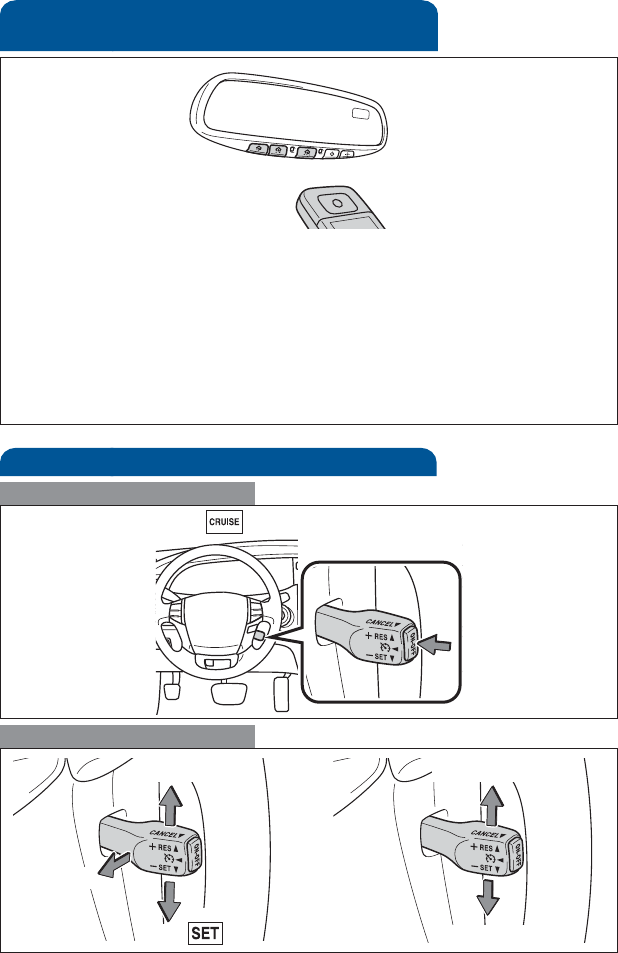
Bluetooth®technology allows dialing or receipt of calls without taking
hands from the steering wheel or using a cable to connect the compatible
telephone and the system.
Refer to “Hands-free system (for cellular phone),” Section 3-3 in the
Owner’s Manual for more details, or go to Toyota.com and enter
“Bluetooth” in the keyword search.
Telephone controls (Bluetooth®)
(if equipped)
Microphone
Audio unit
Steering wheel telephone switches
Volume
Start call
End call
Voice command button
16
FEATURES/OPERATIONS
Garage door opener (HomeLink®)*
(if equipped)
Garage door openers manufactured under license from HomeLink®*can
be programmed to operate garage doors, estate gates, security lighting, etc.
Refer to “Garage door opener,” Section 3-6 in the Owner’s Manual for
more details.
For programming assistance, contact HomeLink®at 1-800-355-3515, or
visit http://www.homelink.com.
* HomeLink®is a registered trademark of Johnson Controls, Inc.
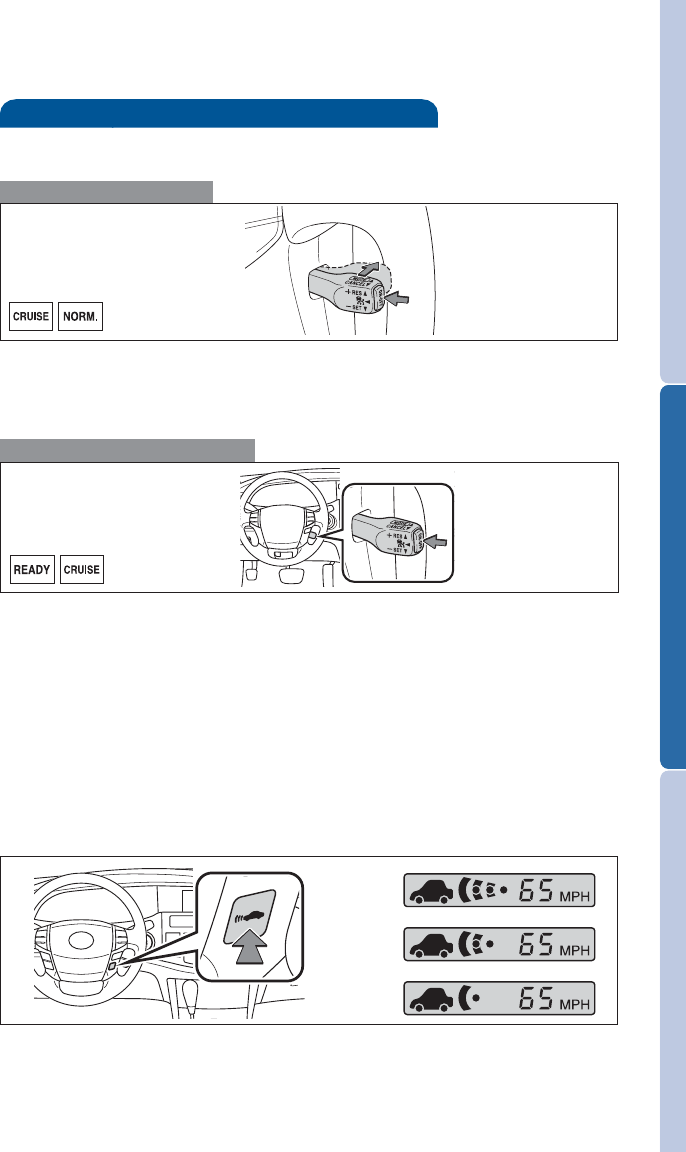
Cruise control
1The set speed may also be cancelled by depressing the brake pedal.
2The set speed may be resumed once vehicle speed exceeds 25 mph.
Turning system ON/OFF
Functions
System ON/OFF
Increase speed
Decrease speed
Cancel1
Resume2
Set
17
OVERVIEW FEATURES/OPERATIONS SAFETY AND EMERGENCY FEATURES
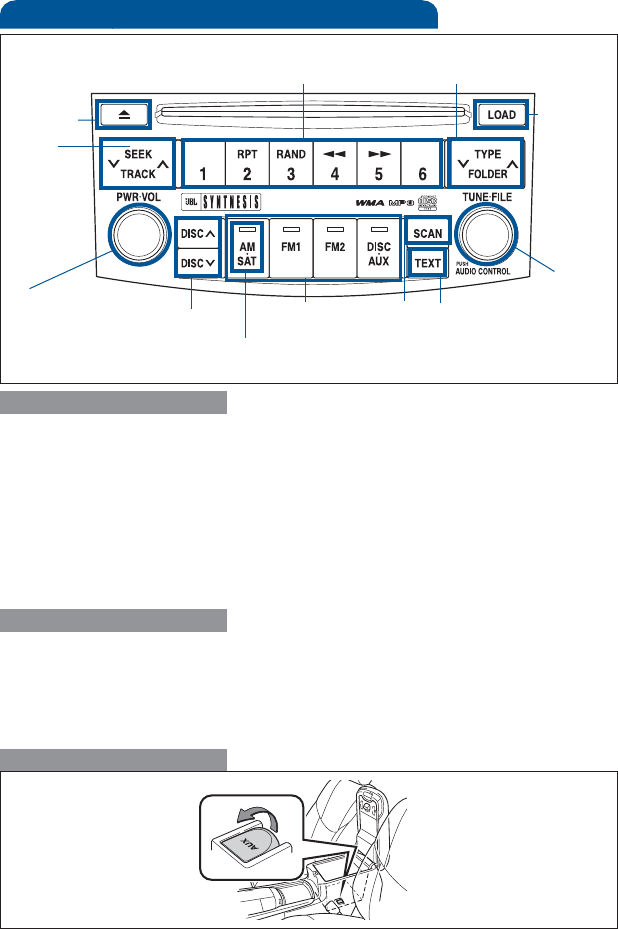
Distance control mode will cruise at a set speed, decelerate to maintain
selected distance from a slower vehicle traveling in front of you, and
accelerate back up to the selected speed if the vehicle in front of you
changes lanes or speeds up.
(1) To select distance control mode Push the ON-OFF button. The
“READY” and “CRUISE” indicator will come on.
(2) To set, cancel and resume a speed Refer to instructions for Cruise
Control on the previous page.
NOTE: Once vehicle speed is set, pushing lever up toward “+ RES” will
increase speed to the nearest 5 mph, and then in 5 mph increments.
Pushing lever down toward “- SET” will reduce speed in the same way.
(3) To change the vehicle-to-vehicle distance
Push the distance button to cycle through the settings, which will
change progressively from LONG to MIDDLE to SHORT.
Dynamic Laser Cruise Control (if equipped)
(1) To select conventional/fixed speed control Push the ON-OFF button.
Push the lever forward and hold until the “NORM.” indicator appears.
(2) To set, cancel and resume a speed Refer to instructions for Cruise
Control on the previous page.
Fixed speed mode
Refer to the Owner’s Manual for more details and complete safety
precautions before attempting to use “Dynamic Laser Cruise Control.”
Distance control mode
LONG
MIDDLE
SHORT
18
FEATURES/OPERATIONS
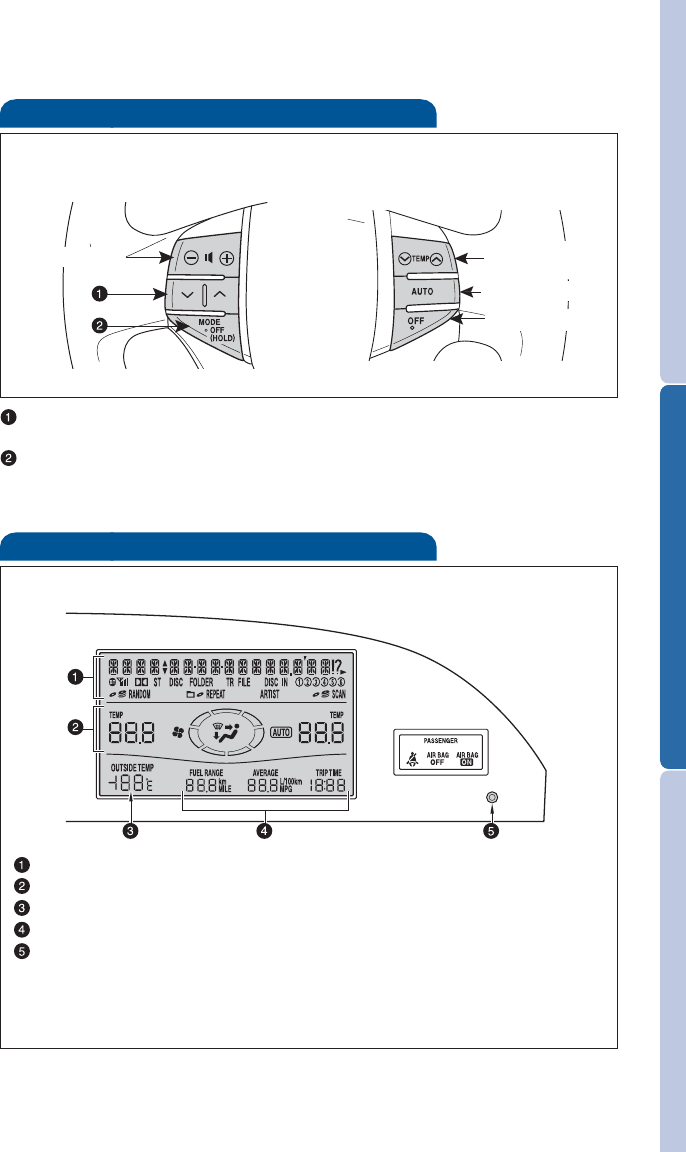
Audio
Eject CD
Push to turn
ON/OFF View CD
text
Seek
station/
CD track
select
AM/Satellite
Radio
Mode
Preset buttons - functions in other
modes indicated above number Push to skip up/down folder
and radio category type
RADIO
To preset stations Tune in the desired station and hold down a preset
button (1-6) until you hear a beep. Push desired preset button (1-6) to
select.
To scan stations Push and hold “SCAN” to scan preset stations. Push again
to hold selection.
CD PLAYER
To scan tracks on a disc Push “SCAN.” Push again to hold selection.
CD changer
-To load one disc Push “LOAD” and insert one disc.
-To load multiple discs Push and hold “LOAD” until you hear a beep.
Insert one disc. Shutter will close and then re-open for next disc.
ToselectaCDPush “DISC ” or “DISC .”
Toselectafile(MP3/WMAonly)Tu r n “ T U N E .FILE.”
To select a folder (MP3/WMA only) Push either side of “FOLDER.”
Push to
adjust tone
& balance
Load CD(s)
By inserting a mini plug into the AUX audio jack, you can listen to music
from a portable audio device through the vehicle’s speaker system while
in AUX mode.
AUX audio jack
Select CD Station/CD
track scan
v
v
19
OVERVIEW FEATURES/OPERATIONS SAFETY AND EMERGENCY FEATURES
Center display
Without navigation system
Audio display
Air Conditioning display
Outside temperature
Trip information display
Pattern selector knob
Display item can be switched by pushing the knob: (1) Entire display
(2) Audio display and Air Conditioning display (3) OFF
With navigation system Refer to the “Navigation System Owner’s Manual.”
Steering wheel switches
Audio control Climate control
v
v
Volume control Temperature
selector
Auto A/C ON
System OFF
“”
Use to search within the selected audio medium (radio, CD, iPod, etc.).
“MODE”
Push to turn audio ON and select an audio mode. Push and hold to turn
audiosystemOFF.
20
FEATURES/OPERATIONS
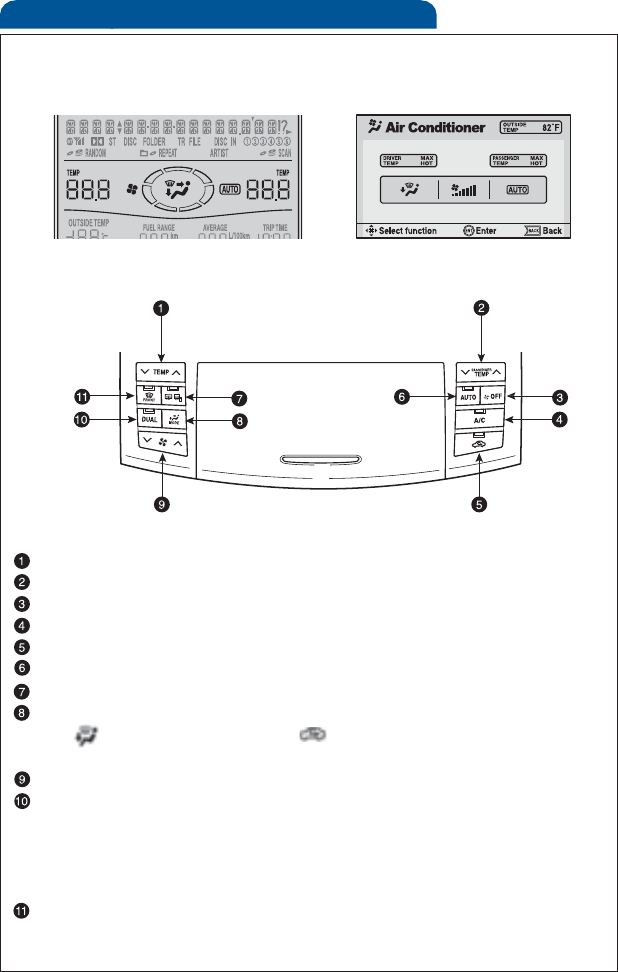
Air Conditioning/Heating
Temperature selector (driver side)
Temperature selector (passenger side)
Climate control OFF
Air Conditioning ON/OFF
Fresh or recirculated cabin air
Automatic climate control ON
Outside rearview mirror*/Rear defogger
Airflow vent
In “ ” mode, use fresh air (“ ” indicator OFF) to reduce
window fogging.
Fan speed
“DUAL” button
Indicator ON: Separate temperature settings for driver and
passenger.
Indicator OFF: Synchronize temperature settings for driver and
passenger.
Windshield defogger
*Ifequipped
Display
Control
Without navigation system With navigation system
21
OVERVIEW FEATURES/OPERATIONS SAFETY AND EMERGENCY FEATURES
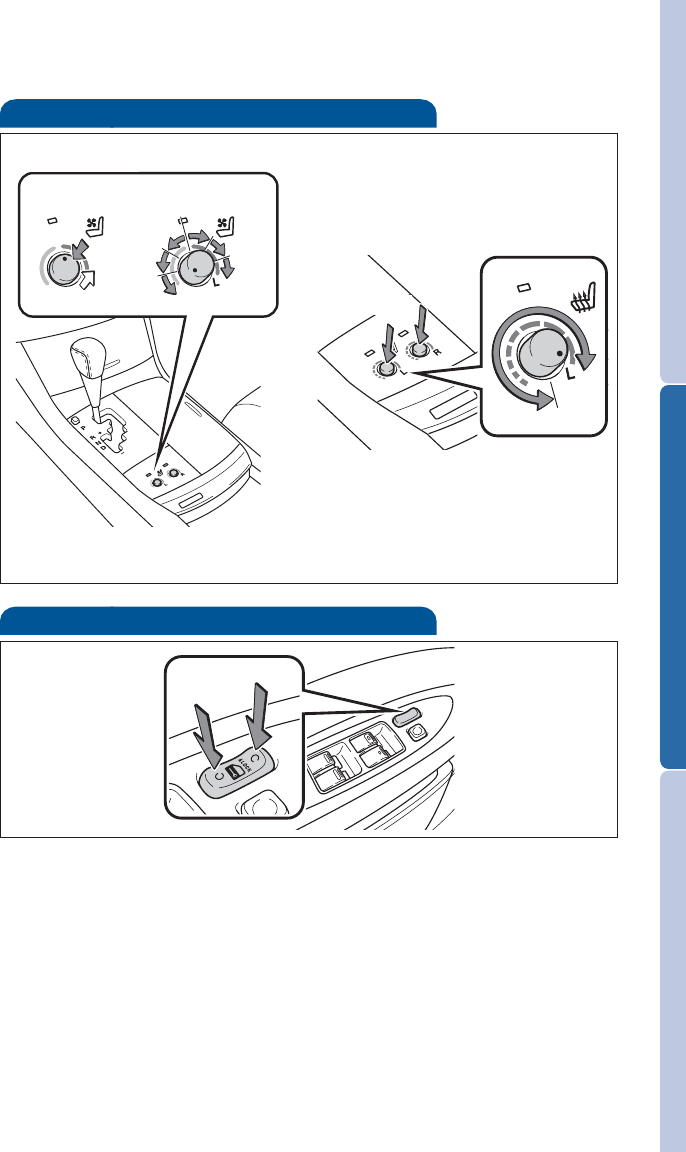
Door locks
Lock
Unlock
Seat ventilators/Heaters (if equipped)
Push knob to pop the controller out. Turn clockwise for heater,
counter-clockwise for ventilator.
Push Turn
With ventilator Heater only
Push
Tu r n
Heater
OFF
Ventilator
22
FEATURES/OPERATIONS
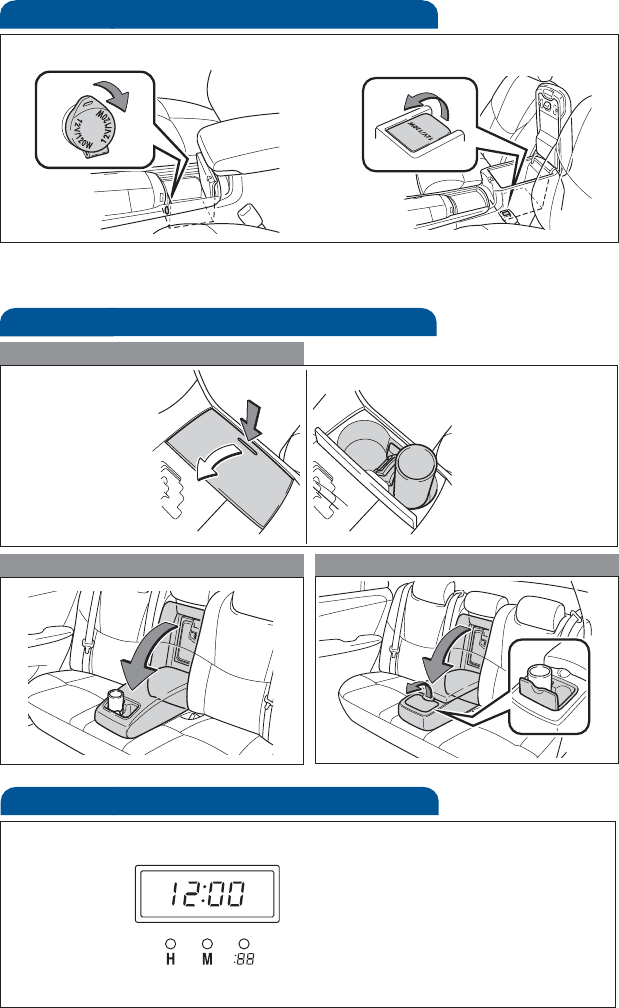
Cup holders
Rear (type B)
Front
Rear (type A)
Power outlets
Auxiliary box Console box
The “ENGINE START STOP” switch/engine switch must be in the “ACC” or
“ON” position to be used.
Clock
H-Hour set
M-Minute set
:00-Round off minutes
Without navigation system
With navigation system Refer to the “Navigation System Owner’s Manual.”
23
OVERVIEW FEATURES/OPERATIONS SAFETY AND EMERGENCY FEATURES
SAFETY AND EMERGENCY FEATURES
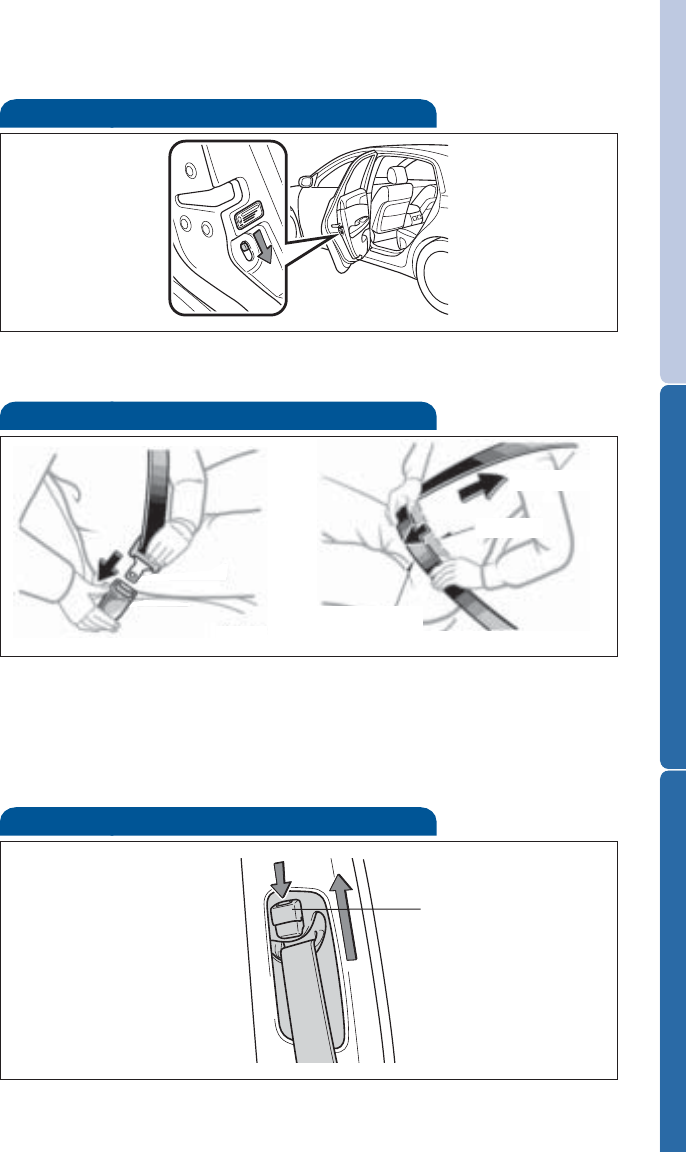
Moving the lever to “LOCK” will allow the door to be opened only from
the outside.
Rear door
Doors-Child safety locks
If belt is fully extended, then retracted even slightly, it cannot be
re-extended beyond that point, unless fully retracted again. This feature
is used to help hold child restraint systems securely.
To find more information about seatbelts, and how to install a child
restraint system, refer to the Owner's Manual.
Keep as low on
hips as possible
Take up slack
To o h i g h
Seatbelts
Push up, or squeeze
lock release to lower
Seatbelts-Shoulder belt anchor
24
SAFETY AND EMERGENCY FEATURES
System reset initialization
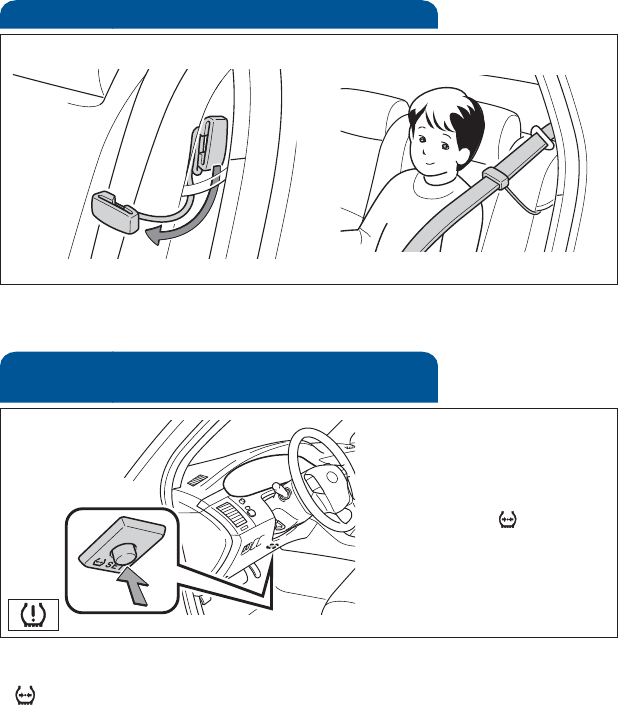
1. Push and hold “ SET” button
until the indicator blinks
three times.
2. Wait a few minutes to allow
initialization to complete.
Seatbelt comfort guide
Rear seat outside position guides provide added comfort for children who
have outgrown child restraints.
After adjusting tire pressures, or after tires have been rotated or
replaced, turn the ignition switch to “ON” and press and hold the
“ SET” button until indicator blinks three times. Let the vehicle sit for a
few minutes to allow initialization to complete.
Refer to the load label on the door jamb or the Owner’s Manual for tire
inflation specifications.
If the tire pressure indicator flashes for more than 60 seconds and then
remains on, take the vehicle to your local Toyota dealer.
NOTE: The warning light may come on due to temperature changes or
changes in tire pressure from natural air leakage. If the system has not
been initialized recently, setting the tire pressures to factory
specifications should turn off the light.
Tire Pressure Monitoring (warning)
System
