Archer T2UH(US) V1 Quick Installation Guide 1481273297928f
Archer T2Uh(Eu) V1 Quick Installation Guide 1481273262564N Archer_T2UH(EU)_V1_Quick_Installation_Guide_1481273262564n Archer_T2UH(EU)_V1_Quick_Installation_Guide_1481273262564n static.tp-link.com 3:
Archer T2Uh(Us) V1 Qig 1474619423133T Archer_T2UH(US)_V1_QIG_1474619423133t Archer_T2UH(US)_V1_QIG_1474619423133t static.tp-link.com 3:
Archer T2Uh(Us) V1 Qig 1474250898840J Archer_T2UH(US)_V1_QIG_1474250898840j Archer_T2UH(US)_V1_QIG_1474250898840j static.tp-link.com 3:
Archer T2Uh(Eu) V1 Qig 1474619394966I Archer_T2UH(EU)_V1_QIG_1474619394966i Archer_T2UH(EU)_V1_QIG_1474619394966i static.tp-link.com 3:
Archer T2Uh(Eu) V1 Qig 1474250875253H Archer_T2UH(EU)_V1_QIG_1474250875253h Archer_T2UH(EU)_V1_QIG_1474250875253h static.tp-link.com 3:
2016-12-09
: Tp-Link Archer T2Uh(Us) V1 Quick Installation Guide 1481273297928F Archer_T2UH(US)_V1_Quick_Installation_Guide_1481273297928f
Open the PDF directly: View PDF  .
.
Page Count: 2

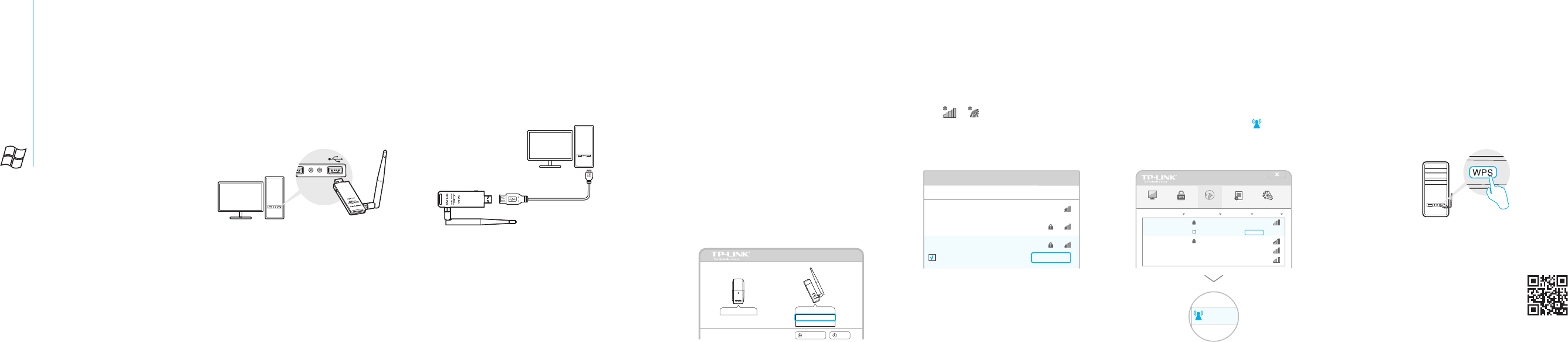
Option 1: Directly Option 2: Via the USB Extension Cable
Connect to a Computer
12Install Driver and Utility 3Join a Wireless Network
Option 1: Via TP-LINK Utility
b. Browse the CD, go to Archer T2U_T2UH >
Mac OS X Driver, unzip the
TP-LINK_Installer.dmg file and run the
Installer.
c. Follow the wizard to complete the installation.
a. Insert the CD.
For Mac OS X
AC600 High Gain Wireless Dual Band USB Adapter
MODEL NO. Archer T2UH
7106506630 REV3.1.0
Quick
Installation
Guide
This USB Adapter can be powered only by computers that comply with Limited
Power Source (LPS).
Note:
You can also download the driver at www.tp-link.com.
a. Select the Site Survey tab of the pop-up
utility window.
b. Select your Wi-Fi network and click
CONNECT. The connection status can be
viewed on the Link Status screen.
Option 2: Via Wi-Fi Protected Setup (WPS)
a. Press the WPS button on your router.
b. Within 2 minutes, press and hold the WPS button
on the adapter until the WPS progress indicator
bar appears.
When you are prompted “PBC-Get PBC profile
successfully”, it is complete.
c.
uninstall.commandInstaller.pkg
SHELL
Wireless Utility
Prole Link Status Site Survey Statistics WPS About
AP List
Disconnected ! ! RESCAN CONNECT ADD PROFILE
SSID BSSID Encr…
Authe…
Channel Network Type
Signal
TP-LINK_XXXX 72 - 10 -18 - 01 - 00 - 03
TP-LINK_0903
TP-LINK_0001
TP-LINK_0306 00 - 10 -18 - A9 - 5D - 8D
00 - 51 - E1 - 02 - 20 - 44
02 - 10 -18 - 01 - 00 - 02
56 WPA2- PS AES Infrastructure
Infrastructure
Infrastructure
Infrastructure
AES
NONE
NONE
WPA2- PS
Open
Open
36
11
529
7
2
Connect to a Computer
Option 1: Directly Option 2: Via the USB Extension Cable
1 2 Install Driver and Utility
a. Insert the CD and run the Autorun.exe from
the pop-up Autoplay window.
b. Select Archer T2UH and click Install Driver,
then follow the InstallShield Wizard to
complete the installation.
3Join a Wireless Network
Click or (Network icon) on the task bar,
select your Wi-Fi network, and click Connect.
Option 1: Via Windows Wireless Utility
For Windows
Option 3: Via Wi-Fi Protected Setup (WPS)
a. Press the WPS button on your router.
b. Within 2 minutes, press and hold the WPS button on
the adapter until the configuring screen appears.
Notes:
1. You can also download the driver at www.tp-link.com.
2. In some operating systems, the CD screen will pop up
automatically. Otherwise, run the CD manually.
Note:
During the installation, select TP-LINK Wireless
Configuration Utility and Driver if you want to use
TP-LINK Utility and WPS function.
Option 2: Via TP-LINK Utility
Select your Wi-Fi network from the utility window
and click
Connect
. The symbol indicates a
successful connection.
Network Name(SSID)
Channel
Signal
Security
36 (5G)
5 (2.4G)
11 (2.4G)
None
WPA/WPA2-Personal
None
TP-LINK_0903
TP-LINK_0001
TP-LINK_0306
6 (2.4G)
TP-LINK_XXXX
Connect automatically
WPA/WPA2-Personal
Status WPS Profile AdvancedNetwork
Connect
TP-LINK_0001
Network Na
TP-LINK_XXXX
When you are prompted “Successfully connected to
the network by WPS!”, click OK.
For more information, please visit our website
www.tp-link.com
©2016 TP-LINK
c.
Networks
Connect automatically Connect
√
Wi-Fi
TP-LINK_XXXX
TP-LINK_0001
TP-LINK_0903
Notes:
1. In Windows XP, a Found New Hardware Wizard window will appear when the adapter is detected. Please click Cancel.
2. In Windows 8.1 and Windows 10, the adapter is able to search for Wi-Fi networks after being inserted, but it will not
function normally until you install the driver and utility.
Setup Wizard
Browse CD EXIT
Archer T2UH
Install Driver
User Guide
Archer T2U
Note:
In Windows XP, if you have installed TP-LINK Utility, you
need to switch to Windows wireless configuration tool first.
