Trainertec Electronic DT1200V Remote dog training collar User Manual TABLE OF CONTENTS
Shenzhen Trainertec Electronic Co., Ltd Remote dog training collar TABLE OF CONTENTS
DT-1200V Manual-F
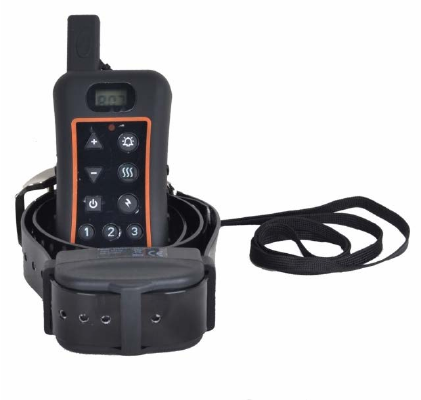
Remote Dog Training Collar
Shenzhen Trainertec Electronic Co., Ltd
Http://www.trainertec.com

Remote Dog Trainer Operation Guide
Thank you for choosing Trainertec, the best electronic
training collar in China. We want to ensure your pet’s
safety by providing you with the tools and techniques
to successfully train your pet.
If you have any questions, please contact us by email
sales@trainertec.com or
vis it our website at www.trainertec.com.
Please read the operation guide carefully before start to
train your pets .
This instruction is suitable for Remote dog training
collar DT1200V.
- 1 -
Table of Contents
Components…………………………….…….....3
How the system works…………………………..3
Main Features……………………….…..……….4
Transmitter……………………………...….........6
Receive Collar……………………...………........9
Setting Up Multi-dog System……….………….10
Charging ……………………………..……........14
Training Guide ………………………............…16
Troubleshooting Guide……………...…...…..…17
- 2 -
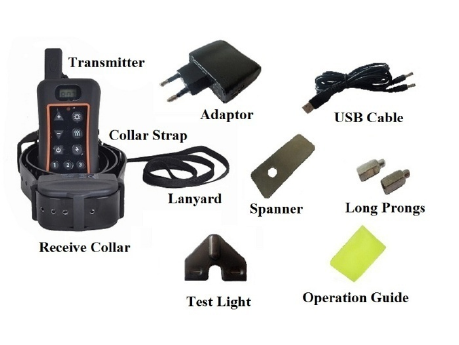
Components
How the System Works
The Remote Dog Trainer has been proven safe,
comfortable, and effective for all pets over 10 pounds.
This system assists you in controlling your pet without
a leash in a long distance range . At the push of a
button, the Remote Transmitter sends a signal,
- 3 -
activating the Receiver Collar. Using the Remote
Trainer consistently and correctly, many misbehaviors
that your pet exhibits can be corrected or any basic
obedience commands can be taught
Important: The Remote Trainer actual distance
de pe nding on the way you hold the Remote
Transmitter, the range may vary. Hold the Remote
Transmitter in a horizontal position away from your
body to achieve optimum range. Terrain, weather,
vegetation , Ve hicle , Building, transmission from
other radio devices, and other factors will affect the
range of your Remote Trainer.
Main Features
1. Range in open fie ld is up to 1200 meters,
2. Train up to 3 dogs from the same transmitter
3. 10 levels of static shock
4. 10 levels of vibration
5. “Buzz” sound activated with a separate button
- 4 -
6. Two buttons “+” and “-” allow you to set your
shock and vibration intensity
7. Dog Selection Button allow you to select your dog
8. Lcd digita l display for 10 shock & vibration levels
and dog ID
9. Memorize shock & vibrate level in transmitter for
different dogs
10. Easy to operation with rubber button
11. Waterproof transmitter and receiver. Dog can swim
freely.
12. Rechargeable 3.7V Li-ion battery for transmitter
and receiver
13. Strong TPU Collar Strap
14. Led low power indication, red light will flash when
battery level is low.
15. Full functiona l multi-dog training system
16. Around 8 seconds safe static shock protection
17. 2-year warranty
- 5 -
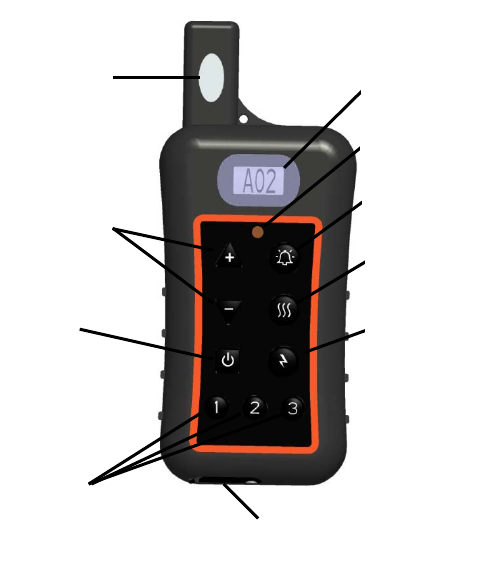
Transmitter
Antenn
Stimulation
Le vel
Bu tton
On/Off
Bu tton
Dog
Selection
Bu tton
Le d Light
LC D dis play
Buzz Button
Vi bration
Bu tton
Stati c
Shock
Bu tton
DC Jack Cover
- 6 -
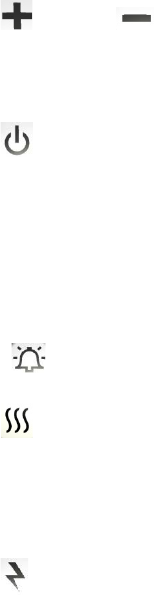
“ ” and “ “ buttons: press these buttons to
adjust the shock intensity and Vibration intensity from
1 to 10 level
“ ” button: it is the power switch; hold this button
for 4 seconds to switch on power, then LCD will
display the default “A01”. You may change Dog ID by
press the relative buttons. If you want to switch off the
power, hold this button for 4 seconds to switch off
power.
“ ” button: no-stimulation warning buzz
“ ” button: Emit vibration stimulation. Press 1
time , vibrate 1 time . Press and hold on , emit
continuous vibration, and will stop automatically after
8 seconds
“ ” button: Emit shock stimulation. Press 1 time ,
emit 1 shock . Press and hold on , emit continuous
- 7 -
shock, and will stop automatically after 8 seconds
“1,2,3 ” buttons: Dog Selection Button , default is “1” .
Your transmitter is capable of training up to three dogs
with optional receive collars. You select 1 dog, LCD
display dog ID “A XX”. If you want to train 2 dog,
press “2” button , LCD will display “BXX” If you want
to train 3 dog, press “3” button again, LCD will display
“C XX”. “XX” is for showing the shock & vibration
level .
The transmitter has the memory functions to keep up
the suitable shock & vibration levels for different dogs.
10 levels of shock stimulation, 10 levels of vibration
stimulation. One tone
NOTE: The red Led light will flash when the
battery is low power. Recharge the battery at once.
- 8 -
Receive Collar
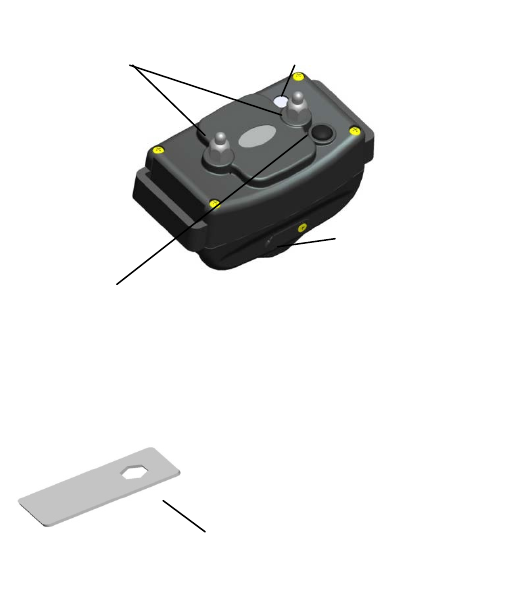
NOTE: CHARGE RECEIVER BEFORE FIRST USE
On/Of f B utton
Press and hold on 4 seconds to turn the collar on. Two
confirming tones will sound and the collar green Led
light will flash 1 time per 5 seconds.
P
ress and hold on 4 seconds to turn the collar off. One
long tone will sound and the green Led light will stop
flashing and off .
Turn the
collar off when not in use to conserve battery
Contact Prong
Choose short or long prong to match
the dog’s coat type
Spanner
Change the Contact Prong basing on the pet’s
coat type .
Notes: If the Contact Prong is tight ,
Continue to turn the spanner clockwise ,
The Contact Prong will be broken . Never
turn the contact prong too tightly .
LED Light
Indicate the working status,
Low battery ,Charging status
DC Jack Cover
Open the Rubber Cover
and insert the adaptor
plug into DC Jack to
charge .
- 9 -
Setting Up Multi-dog System
You can expand your one-dog Remote Trainer into
multi-dog Remote Trainer by yourself. Simply purchase
extra receive collar and add them to your system.
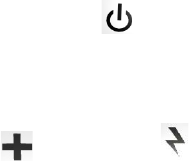
1. Match a Receive collar To add a Receive collar to
your remote dog training system, following the
below steps:.
Ste p 1 : Take out 1 Pcs unmatched receive collar .
Press and hold “ON/OFF” button .after two
“beep” sound ,then release , receiver is power
on ,Green Led flash frequently .(Note : never
open 2 or more unmatched receivers .)
Ste p 2 : Take out the transmitter that you want to match
receiver . Press and hold on “ ” button until
LCD display occur then release , Transmitter is
power on .
Ste p 3 : Press and hold “ ” button and “ ”button
at the same time ,until the digital number on the
- 10 -
LCD display change automatically ,then release.
Enter match receiver mode . The number
changes like “08,09,10,11……”, increasing
automatically .
Ste p 4 : Take the transmitter to close the unmatched
receiver 50~100mm .
Ste p 5 : Press and hold on the Dog selection button .If
you match “1” dog, Press “1” button ; If you
match “2” Dog , Press “2” button ; If you
match “3” dog , Press “3” button .After listen
to 3 “beep” sound from receiver and see green
Led flash slow down , Then release .
Spe cial note : Yo u mus t confirm that listen
to 3 sound “bee p” from unmatched receiver
and see gree n Led flash slow down first ,
then release dog selection button . If you
match receiver failure , you need to cancel
the failure matched receiver first, then
re-match again. .
- 11 -

Ste p 6 : Press and hold “ ” button and “ ” button
at the same time again ,until the digital number
on the LCD display no change ,then release .
Ste p 7 : Test matched Receiver---Chose dog first, then
press “ ” button , you can hear the “beep”
sound from the matched receiver .
Congratulate you , match receiver
successfully .
Note: After matched receive collar , the
dog selection button will return to “1”
default . Before test the matched collar ,
Please chose dog first .
2. Cancel a matched Receiver Follow up the below
steps one by one to cancel the matched Receiver:
Ste p 1 : Take out 1 Pcs matched receiver . Press and
hold “ON/OFF” button .after two “beep”
sound , receiver is power on ,Green Led flash
1 time per 5 second .
- 12 -
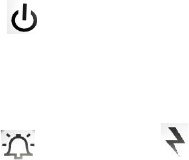
Ste p 2 : Press and hold “ ” button until LCD
display occur then release , Transmitter is
power on .
Ste p 3: Press and hold “ ” button and “ ” button
at the same time ,until the digital number on
the LCD display change automatically ,then
release. Enter cancel matched receiver mode .
The number changes like “08,09,10,11……”,
increasing automatically
Ste p 4 : Close the Receive Collar 50~100mm, Press the
Dog Selection Button one time ( You can
press “1” or “2” or “3” freely, It is same). You
can listen to 2 “beep” sound from receiver.
Ste p 5 : The green Led light of Receiver flash
frequently . Congratulate You cancel the
matched Receiver successfully .
- 13 -

Ste p 6 : Press and hold “ ” button and “ ” button
at the same time again ,until the digital number
on the LCD display no change ,then
release .Exit the cancel matched receiver
mode .
Charging
The transmitter and receiver charge rapidly – about 2
hours are needed.
The transmitter and receive collar can be charged at
same time
Common adaptor for transmitter and receiver charging
To recharge, Open the Rubber Cover first . Plug the
Adaptor Contact Pin into household AC power outlet
and insert the Adaptor Plug into Receiver DC Jack .
The Transmitter and Receive Collar can be charged by
connecting USB Cable and other 5V DC power
supply ,such as Cell phone Adaptor , Notebook ,
Computer .
- 14 -
Do not charge batteries in especially hot areas , far
away from a fire.
1. Receive Collar Charging
The red Led light is on when charging .
The green Led light is on and the red Led light is off
when the receive collar is full charged
The Receiver red Led light will flash when the battery
is low power. Recharge the battery at once.
2. Transmitter Charging
The LCD display is “CHA” when charging.
The LCD display is “FUL” when the transmitter is full
charged
The transmitter red light flashes if the battery is low.
Charge it promptly
Important : When stock the products for 4~5 weeks ,
Please give a full charge for Transmitter and rece ive
collar.
- 15 -
Training Guide
1. Fitting Collar on the Dog
Place the collar strap in the middle of the dog’s neck.
The receiver should be on the underside of his neck
although on some dog’s necks the receiver will
naturally seek a slightly off-center position. The Rubber
Cover should face backwards( toward the dog’s chest).
Tighten the buckle by holding it with two fingers as
you pull the strap snug. Remote training collars must be
put on a dog quite snugly to ensure consistent contact
and reliable stimulation.
Do not put any fingers under the strap as you tighten it.
2. Stimulation
Your Remote Trainer has 10 levels of intensity . So you
can find the best level for your dog’s temperament and
the type of training your dog. You may also select
either shock or vibrate stimulation, depending on your
dog’s temperament and your training purpose.
- 16 -

You may press “+” or “-“ button to select suitable
shock level, then press and hold on the “ ” button
for around 8 seconds continuous stimulation ; press one
time , emit one static shock
You may press “+” or “-“ button to select suitable
vibration level, then press and hold on the “ ”
button for around 8 seconds continuous vibrate ; press
one time , emit one vibrate .
Troubleshooting Guide
Problem#1: No stimulation when a transmitter
button is pressed.
The receiver has not been activated. The receiver must
be turned on otherwise it won’t work at all.
The receiver has not been set to your transmitter.
Follow the instruction to match.
Problem#2: The Beeper of Receiver doesn’t make
any sound when the Receiver is turned on.
Press dog selection button to choose correct Dog ID
- 17 -
before press transmitter buzz control button.
The Beeper component is loose , send to service center
to repair .
Problem#3: The stimulation seems too high, not
high enough or no feeling at all
The collar strap is not tight enough. Make sure the
contacts points connect the dog’s skin well.
The intensity level is not correct. Change the shock
leve l.
The batteries are dead. Recharge as needed.
Problem#4: The receiver light changes color to
indicate low batte ry very quickly
The unit has been left turned on between training
session.
Make sure the receiver is turned off after use.
You are training in very cold weather.
Proble m#5: The Remote Trainer doesn’t have range
or the range is significantly reduced.
Either you or the dog is shielded by a metal structure.
Operate it far away from these structure.
The receiver is on backwards. For best range, position
- 18 -

the receiver so that the light face toward the dog’s nose.
Radio Interference. Wait a short while then try again, or
move to another area.
Proble m#6: The receiver seems can’t receive any
signal or can not work at all
Check the receiver on/off button, make sure the
receiver is turned on.
Check the transmitter , If it is low battery, charge
transmitter first .
Cancel the receiver match , then re-match it with
transmitter . If receiver can not work
too, send back to service center to repair or replace .
Warning:
Changes or modifications not expressly approved by
the party responsible for compliance could void the
user’s authority to operate the equipment.
- 19 -

This equipment has been tested and found to comply
with the limits for a Class B digital device, pursuant to
Part 15 of the FCC Rules. These limits are designed to
provide reasonable protection against harmful
interference in a residential installation. This equipment
generates, uses and can radiate radio frequency energy
and, if not installed and used in accordance with the
instructions, may cause harmful interference to radio
communications. However, there is no guarantee that
interference will not occur in a particular installation.
If this equipment does cause harmful interference to
radio or television reception, which can be determined
by turning the equipment off and on, the user is
encouraged to try to correct the interference by one or
more of the following measures:
-- Reorient or relocate the receiving antenna.
-- Increase the separation between the equipment and
receiver.
-- Connect the equipment into an outlet on a circuit
different from that to which the receiver is connected.
- 20 -
-- Consult the dealer or an experienced radio/TV
technician for help.
This device complies with Part 15 of the FCC Rules.
Operation is subject to the following two conditions: (1)
this device may not cause harmful interference, and (2)
this device must accept any interference received,
including interference that may cause undesired
operation.
Shenzhen Trainertec Electronic Co., Ltd
Http://www.trainertec.com
- 21 -