Trinus Systems SA366PBWC Body Worn Camera System User Manual CAUTION

Trinus Systems Inc. Body Worn Camera System CAUTION

User Manual

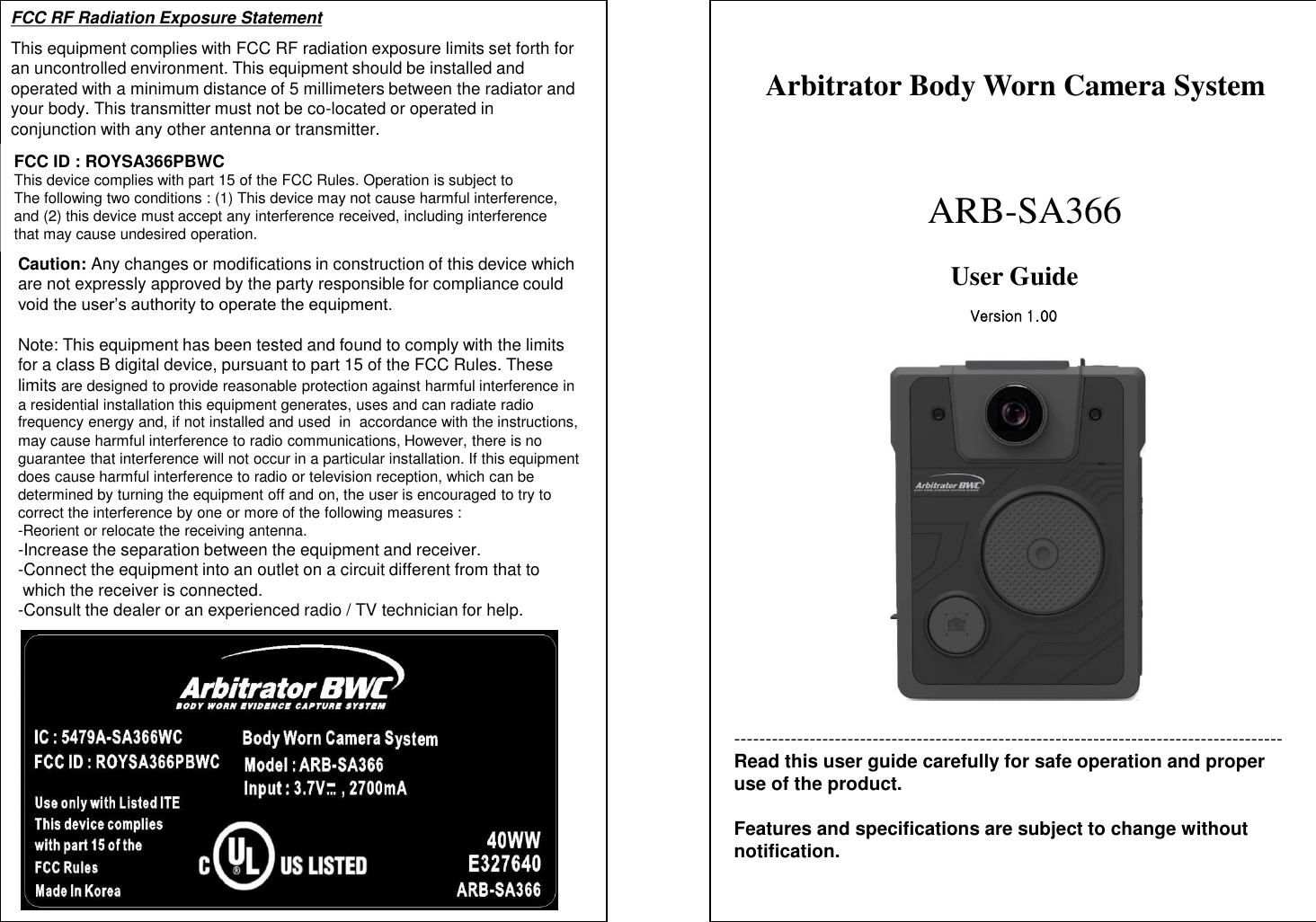
--------------------------------------------------------------------------------------- Read this user guide carefully for safe operation and proper use of the product.  Features and specifications are subject to change without notification. Arbitrator Body Worn Camera System        ARB-SA366 User Guide  FCC RF Radiation Exposure Statement This equipment complies with FCC RF radiation exposure limits set forth for an uncontrolled environment. This equipment should be installed and operated with a minimum distance of 5 millimeters between the radiator and your body. This transmitter must not be co-located or operated in conjunction with any other antenna or transmitter. Version 1.00 FCC ID : ROYSA366PBWC This device complies with part 15 of the FCC Rules. Operation is subject to The following two conditions : (1) This device may not cause harmful interference, and (2) this device must accept any interference received, including interference that may cause undesired operation. Caution: Any changes or modifications in construction of this device which are not expressly approved by the party responsible for compliance could void the user’s authority to operate the equipment.   Note: This equipment has been tested and found to comply with the limits  for a class B digital device, pursuant to part 15 of the FCC Rules. These  limits are designed to provide reasonable protection against harmful interference in a residential installation this equipment generates, uses and can radiate radio  frequency energy and, if not installed and used  in  accordance with the instructions, may cause harmful interference to radio communications, However, there is no  guarantee that interference will not occur in a particular installation. If this equipment does cause harmful interference to radio or television reception, which can be  determined by turning the equipment off and on, the user is encouraged to try to  correct the interference by one or more of the following measures : -Reorient or relocate the receiving antenna. -Increase the separation between the equipment and receiver. -Connect the equipment into an outlet on a circuit different from that to   which the receiver is connected. -Consult the dealer or an experienced radio / TV technician for help.
CAUTION 1  18 AUDIT LOG INFORMATION-2 1. When Using the Battery Danger (1) Misusing the battery may cause the battery to get hot, explode,  or ignite and cause serious injury. Be sure to follow the safety rules  listed below: - Do not place the battery in fire or heat the battery. - Do not install the battery backwards so that the polarity is reversed. - Do not connect the positive terminal and the negative terminal of the                 battery to each other with any metal object (such as a wire).      - Do not carry or store the batteries together with necklaces, hairpins,   or other metal objects. - Do not pierce the battery with nails, strike the battery with a hammer,    step  on the battery, or otherwise subject it to strong impacts or shocks. - Do not solder directly onto the battery. - Do not expose the battery to water or salt water, or allow the battery    to get wet.  (2) Do not disassemble or modify the battery. The battery contains       safety and protection devices which, if damaged, may cause the      battery to generate heat, explode or ignite.  (3) Do not place the battery on or near fire, stoves, or other high                   temperature locations. Do not place the battery in direct sunlight,                use or store the battery inside cars in hot weather. Doing so may        cause the battery to generate heat, explode, or ignite.        Using the battery in this manner may also result in a loss of        performance and a shortened life expectancy.  (4) Do not insert the battery into equipment designed to be hermetically        sealed. In some cases hydrogen or oxygen may be discharged from  the cell which may result in rupture, fire or explosion. CAUTION : Risk of explosion if battery is replaced by an incorrect type. Dispose of used batteries according to the instructions.                     (Please refer to instruction for safe disposal of lithium polymer battery at page#3) Category  Log Item  Parameter    System Power on/off System reboot by [event]  [event] : a factor of reboot System Start [Product Name] [Firmware Version] [Serial#] Standby Start / End Configuration is changed Configuration error [file.setting] Log in/out [officer ID]  [officer ID] Restoring FAT Start Restoring FAT End [with Error] SD formatted [with Error] Factory default Upgrading/Downgrading Start [Firmware File Name]   [Firmware Version] Upgrading/Downgrading End [with Error] GPS Enabled / Disabled Time adjustment [Before] [After]  [Before] = UTC time before adjustment [After] = UTC time after adjustment
17 2 CAUTION Warning (1) Immediately discontinue use of the battery if, while using, charging, or  storing the battery, the battery emits an unusual smell, feels hot,  changes color, changes shape or appears abnormal in any other way.        Contact your authorized reseller or Panasonic if any of these          problems are observed.  (2) Do not place the batteries in microwave ovens, high-pressure containers, or on induction cookware.  (3) In the event that the battery leaks and the fluid gets into one’s eye, do not rub the eye. Rinse well with water and immediately seek medical care.       If left untreated the battery fluid could cause damage to the eye.  Caution (1) If the device is to be used by small children, an adult should explain the  contents of the user’s manual to the children. The person should  provide adequate supervision to insure that the device is being used  as explained in the user’s manual.  (2) When the battery is worn out, insulate the terminals with adhesive tape or similar materials before disposal.  Danger Be sure to follow the rules listed below while charging the battery. Failure to do so may cause the battery to become hot, explode, or ignite and  cause serious injury.  · When charging the battery, either use a specified battery charger or             otherwise insure that the battery charging conditions specified by  Panasonic are met. · Do not attach the batteries to a power supply plug or directly to a vehicle’s  cigarette lighter. · Do not place the batteries in or near fire, or into direct sunlight. When the   battery becomes hot, the built-in safety equipment is activated,  preventing the battery from charging further, and overheating the  battery, which would destroy the safety equipment and can cause     additional heating, breaking, or ignition of the battery.  Battery Replacement  The battery should be replaced only by Panasonic Service Center. AUDIT LOG INFORMATION-1 Category  Log Item  Parameter    Event Recording Start [factor] [mode]  [factor] = Start Event Name [mode] = Event / Cont Stop Recording Stop [factor]  [Event Name] [factor] = <Stop EV> Event name (when recording stopped) I/O status change event  2'nd camera attached/detached USB attached/detached Power supplied/removed Wi-Fi disconnected with [mode] [Electric field strength]  [mode] = ST1/ST2/AP [MAC] =  Mac address of AP [FREQ] = Channel [SSID] = SSID of AP [Electric field strength -dB] Net [mode] [IP] [VPU Serial]  [mode] = ST1/ST2/AP [IP] = IP address [VPU Serial] = only ST1 Deleted [Event ID]  [Event ID] = Event Name Delete Error [Event ID]  [Event ID] = Event Name USB authentication success / failure Uploading Start / End [with Error/timeout] Remote Updating Start / End [with Error/timeout]     Status Low battery SD [Model Number] [SD Status] [Capacity] [Free Space] [Serial#]  [Model Number] = See meta file spec [SD Status] = Status number . [Capacity] = Total capacity (Kbytes). See config1.xml. [Free Space] =  Free Space (Kbytes). See config1.xml. [Serial#] = Serial number of SD SD card capacity is not enough
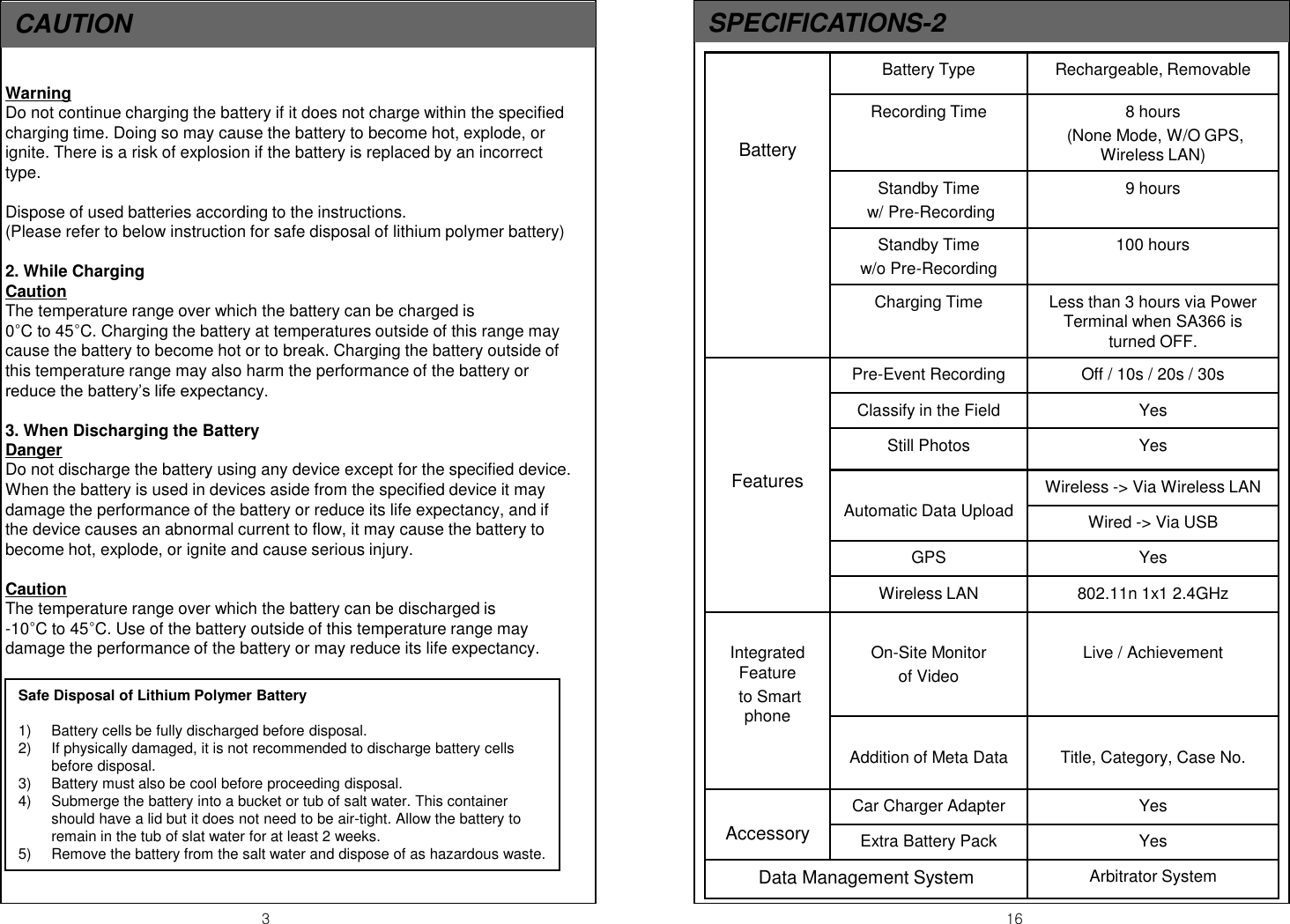
CAUTION   3  16 Warning Do not continue charging the battery if it does not charge within the specified charging time. Doing so may cause the battery to become hot, explode, or ignite. There is a risk of explosion if the battery is replaced by an incorrect type.  Dispose of used batteries according to the instructions. (Please refer to below instruction for safe disposal of lithium polymer battery)  2. While Charging Caution The temperature range over which the battery can be charged is                 0°C to 45°C. Charging the battery at temperatures outside of this range may cause the battery to become hot or to break. Charging the battery outside of this temperature range may also harm the performance of the battery or reduce the battery’s life expectancy.  3. When Discharging the Battery Danger Do not discharge the battery using any device except for the specified device. When the battery is used in devices aside from the specified device it may damage the performance of the battery or reduce its life expectancy, and if the device causes an abnormal current to flow, it may cause the battery to become hot, explode, or ignite and cause serious injury.  Caution The temperature range over which the battery can be discharged is                -10°C to 45°C. Use of the battery outside of this temperature range may damage the performance of the battery or may reduce its life expectancy. SPECIFICATIONS-2 Safe Disposal of Lithium Polymer Battery  1) Battery cells be fully discharged before disposal. 2) If physically damaged, it is not recommended to discharge battery cells before disposal. 3) Battery must also be cool before proceeding disposal. 4) Submerge the battery into a bucket or tub of salt water. This container should have a lid but it does not need to be air-tight. Allow the battery to remain in the tub of slat water for at least 2 weeks. 5) Remove the battery from the salt water and dispose of as hazardous waste.    Battery  Battery Type  Rechargeable, Removable Recording Time  8 hours  (None Mode, W/O GPS, Wireless LAN) Standby Time  w/ Pre-Recording 9 hours Standby Time  w/o Pre-Recording 100 hours Charging Time  Less than 3 hours via Power Terminal when SA366 is turned OFF.      Features Pre-Event Recording  Off / 10s / 20s / 30s Classify in the Field  Yes Still Photos  Yes  Automatic Data Upload Wireless -> Via Wireless LAN Wired -> Via USB GPS  Yes Wireless LAN  802.11n 1x1 2.4GHz  Integrated Feature  to Smart phone  On-Site Monitor  of Video   Live / Achievement  Addition of Meta Data  Title, Category, Case No.  Accessory Car Charger Adapter   Yes Extra Battery Pack  Yes Data Management System  Arbitrator System
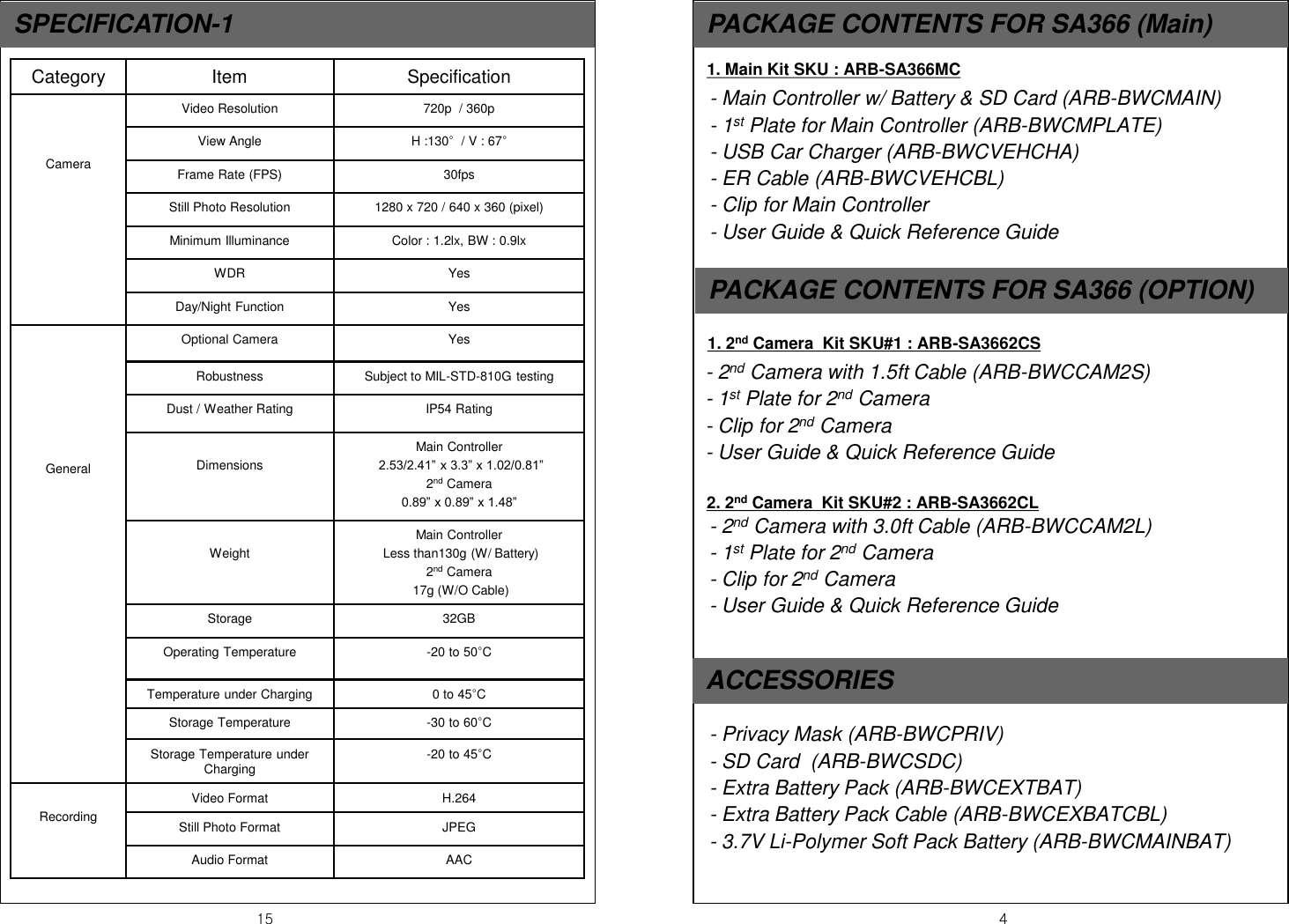
15  4 SPECIFICATION-1  PACKAGE CONTENTS FOR SA366 (Main) - Main Controller w/ Battery & SD Card (ARB-BWCMAIN) - 1st Plate for Main Controller (ARB-BWCMPLATE) - USB Car Charger (ARB-BWCVEHCHA) - ER Cable (ARB-BWCVEHCBL) - Clip for Main Controller - User Guide & Quick Reference Guide  ACCESSORIES - 2nd Camera with 1.5ft Cable (ARB-BWCCAM2S) - 1st Plate for 2nd Camera  - Clip for 2nd Camera - User Guide & Quick Reference Guide  PACKAGE CONTENTS FOR SA366 (OPTION) 1. 2nd Camera  Kit SKU#1 : ARB-SA3662CS 1. Main Kit SKU : ARB-SA366MC   2. 2nd Camera  Kit SKU#2 : ARB-SA3662CL - 2nd Camera with 3.0ft Cable (ARB-BWCCAM2L) - 1st Plate for 2nd Camera  - Clip for 2nd Camera - User Guide & Quick Reference Guide  - Privacy Mask (ARB-BWCPRIV) - SD Card  (ARB-BWCSDC) - Extra Battery Pack (ARB-BWCEXTBAT) - Extra Battery Pack Cable (ARB-BWCEXBATCBL) - 3.7V Li-Polymer Soft Pack Battery (ARB-BWCMAINBAT)   Category  Item  Specification    Camera Video Resolution  720p  / 360p View Angle  H :130°  / V : 67° Frame Rate (FPS)  30fps Still Photo Resolution  1280 x 720 / 640 x 360 (pixel)  Minimum Illuminance  Color : 1.2lx, BW : 0.9lx WDR  Yes Day/Night Function  Yes        General Optional Camera  Yes Robustness  Subject to MIL-STD-810G testing Dust / Weather Rating  IP54 Rating  Dimensions Main Controller  2.53/2.41” x 3.3” x 1.02/0.81” 2nd Camera 0.89” x 0.89” x 1.48”  Weight Main Controller  Less than130g (W/ Battery) 2nd Camera    17g (W/O Cable) Storage  32GB Operating Temperature  -20 to 50°C Temperature under Charging  0 to 45°C Storage Temperature  -30 to 60°C Storage Temperature under Charging  -20 to 45°C  Recording Video Format   H.264 Still Photo Format  JPEG Audio Format  AAC
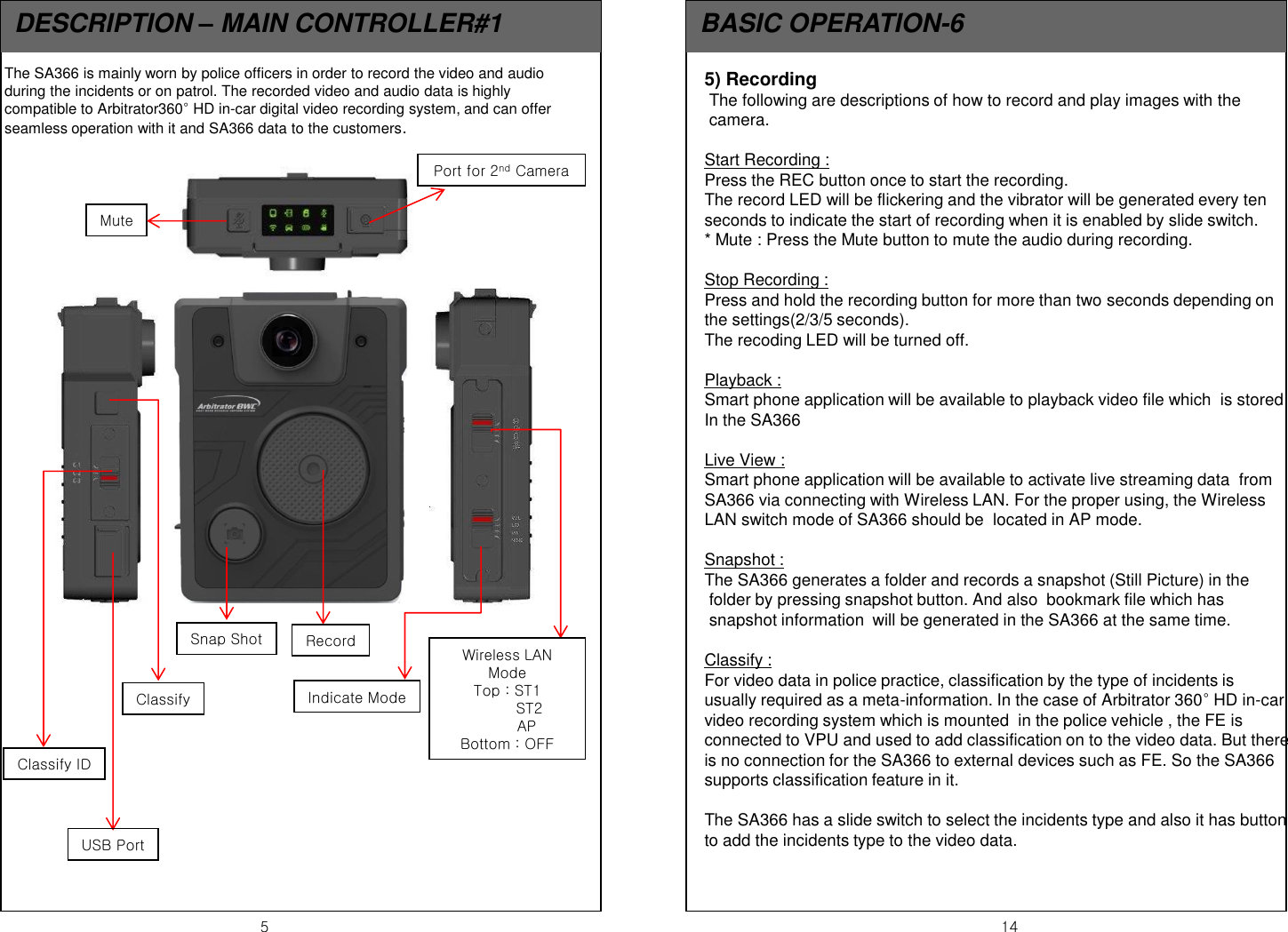
5  14 DESCRIPTION – MAIN CONTROLLER#1  BASIC OPERATION-6 The SA366 is mainly worn by police officers in order to record the video and audio during the incidents or on patrol. The recorded video and audio data is highly compatible to Arbitrator360° HD in-car digital video recording system, and can offer seamless operation with it and SA366 data to the customers. Mute Port for 2nd Camera Record Snap Shot Wireless LAN Mode Top : ST1          ST2         AP Bottom : OFF Indicate Mode Classify Classify ID USB Port 5) Recording  The following are descriptions of how to record and play images with the  camera.   Start Recording :  Press the REC button once to start the recording. The record LED will be flickering and the vibrator will be generated every ten seconds to indicate the start of recording when it is enabled by slide switch. * Mute : Press the Mute button to mute the audio during recording.  Stop Recording :  Press and hold the recording button for more than two seconds depending on the settings(2/3/5 seconds). The recoding LED will be turned off.    Playback :  Smart phone application will be available to playback video file which  is stored In the SA366  Live View :  Smart phone application will be available to activate live streaming data  from  SA366 via connecting with Wireless LAN. For the proper using, the Wireless LAN switch mode of SA366 should be  located in AP mode.  Snapshot : The SA366 generates a folder and records a snapshot (Still Picture) in the  folder by pressing snapshot button. And also  bookmark file which has  snapshot information  will be generated in the SA366 at the same time.    Classify :  For video data in police practice, classification by the type of incidents is  usually required as a meta-information. In the case of Arbitrator 360° HD in-car video recording system which is mounted  in the police vehicle , the FE is connected to VPU and used to add classification on to the video data. But there is no connection for the SA366 to external devices such as FE. So the SA366 supports classification feature in it.   The SA366 has a slide switch to select the incidents type and also it has button  to add the incidents type to the video data.
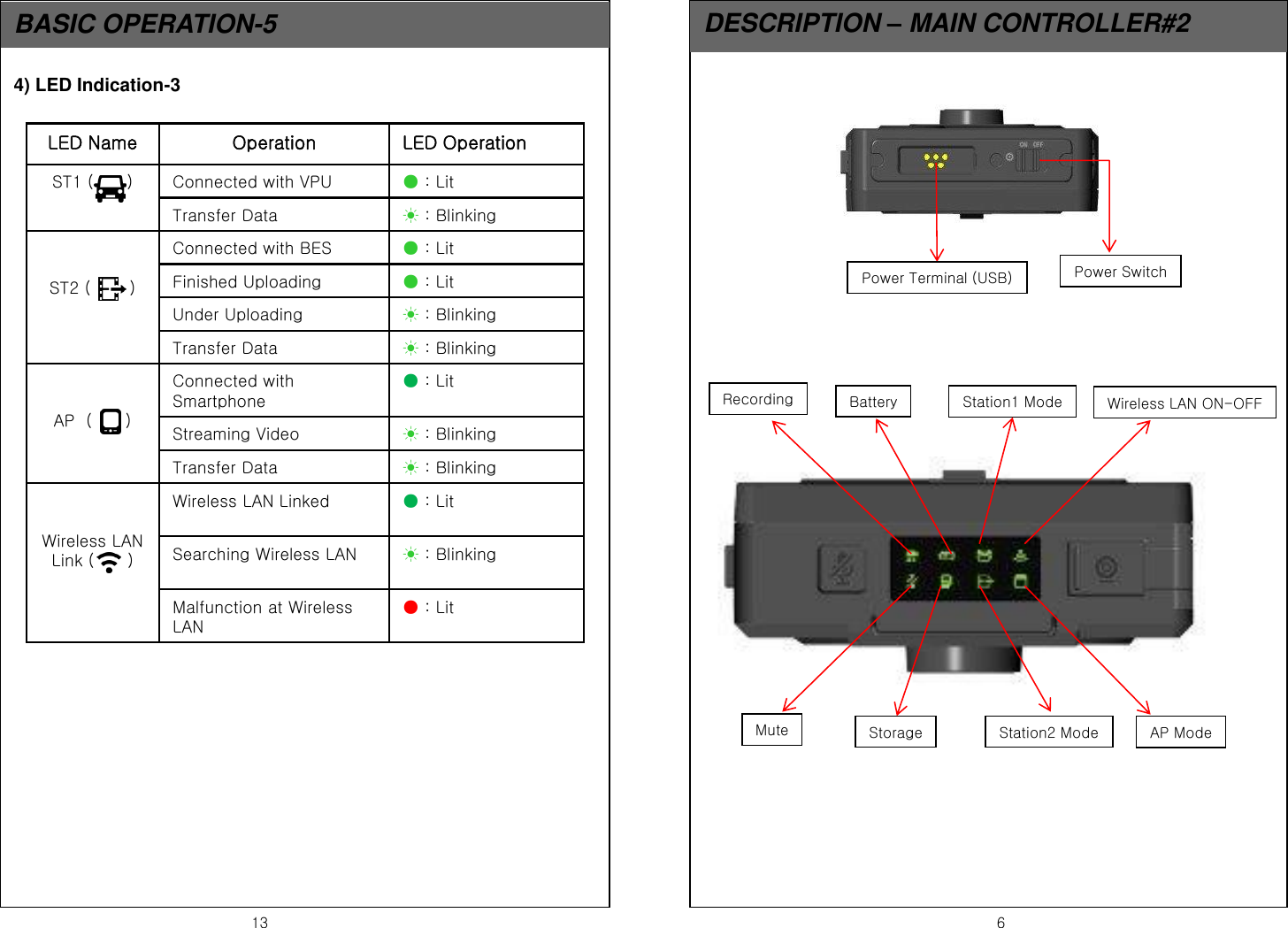
13  6 BASIC OPERATION-5  DESCRIPTION – MAIN CONTROLLER#2 Power Terminal (USB)  Power Switch Wireless LAN ON-OFF Station1 Mode Battery Recording AP Mode Station2 Mode Storage Mute LED Name  Operation  LED Operation ST1 (      )  Connected with VPU  ● : Lit  Transfer Data  ☀ : Blinking   ST2 (       ) Connected with BES  ● : Lit Finished Uploading   ● : Lit Under Uploading  ☀ : Blinking Transfer Data  ☀ : Blinking   AP  (      ) Connected with Smartphone ● : Lit Streaming Video  ☀ : Blinking Transfer Data  ☀ : Blinking   Wireless LAN Link (      ) Wireless LAN Linked  ● : Lit Searching Wireless LAN  ☀ : Blinking Malfunction at Wireless LAN ● : Lit 4) LED Indication-3
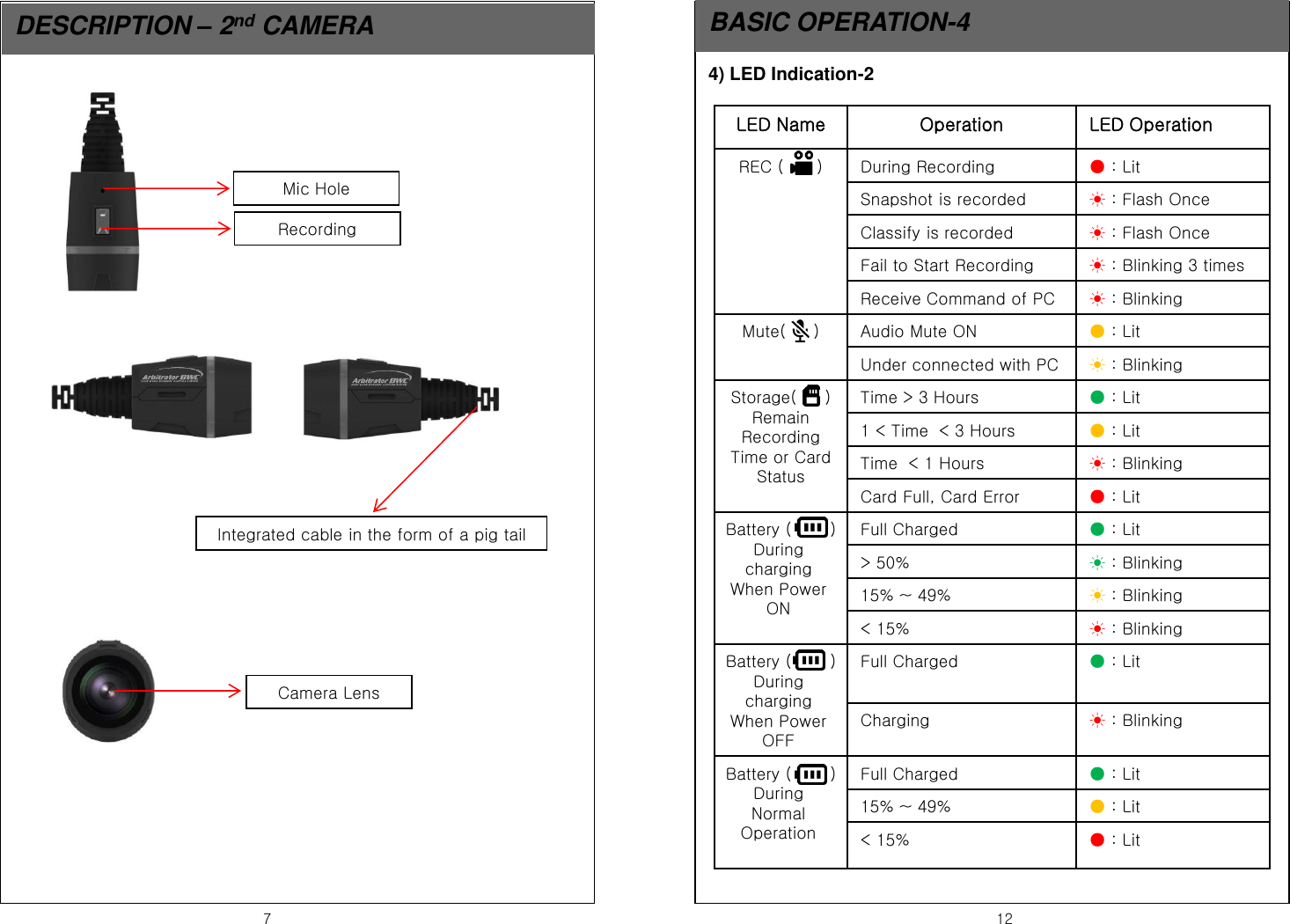
7  12 DESCRIPTION – 2nd CAMERA  BASIC OPERATION-4 Recording Mic Hole Integrated cable in the form of a pig tail Camera Lens 4) LED Indication-2 LED Name  Operation  LED Operation REC (      )  During Recording  ● : Lit  Snapshot is recorded  ☀ : Flash Once Classify is recorded  ☀ : Flash Once Fail to Start Recording  ☀ : Blinking 3 times Receive Command of PC  ☀ : Blinking Mute(     )  Audio Mute ON  ● : Lit Under connected with PC  ☀ : Blinking Storage(     ) Remain Recording Time or Card Status Time > 3 Hours  ● : Lit 1 < Time  < 3 Hours  ● : Lit Time  < 1 Hours  ☀ : Blinking Card Full, Card Error  ● : Lit Battery (       ) During charging When Power ON Full Charged  ● : Lit > 50%  ☀ : Blinking 15% ~ 49%  ☀ : Blinking < 15%  ☀ : Blinking Battery (       ) During charging When Power OFF Full Charged  ● : Lit Charging  ☀ : Blinking Battery (       ) During Normal Operation  Full Charged  ● : Lit 15% ~ 49%  ● : Lit < 15%  ● : Lit
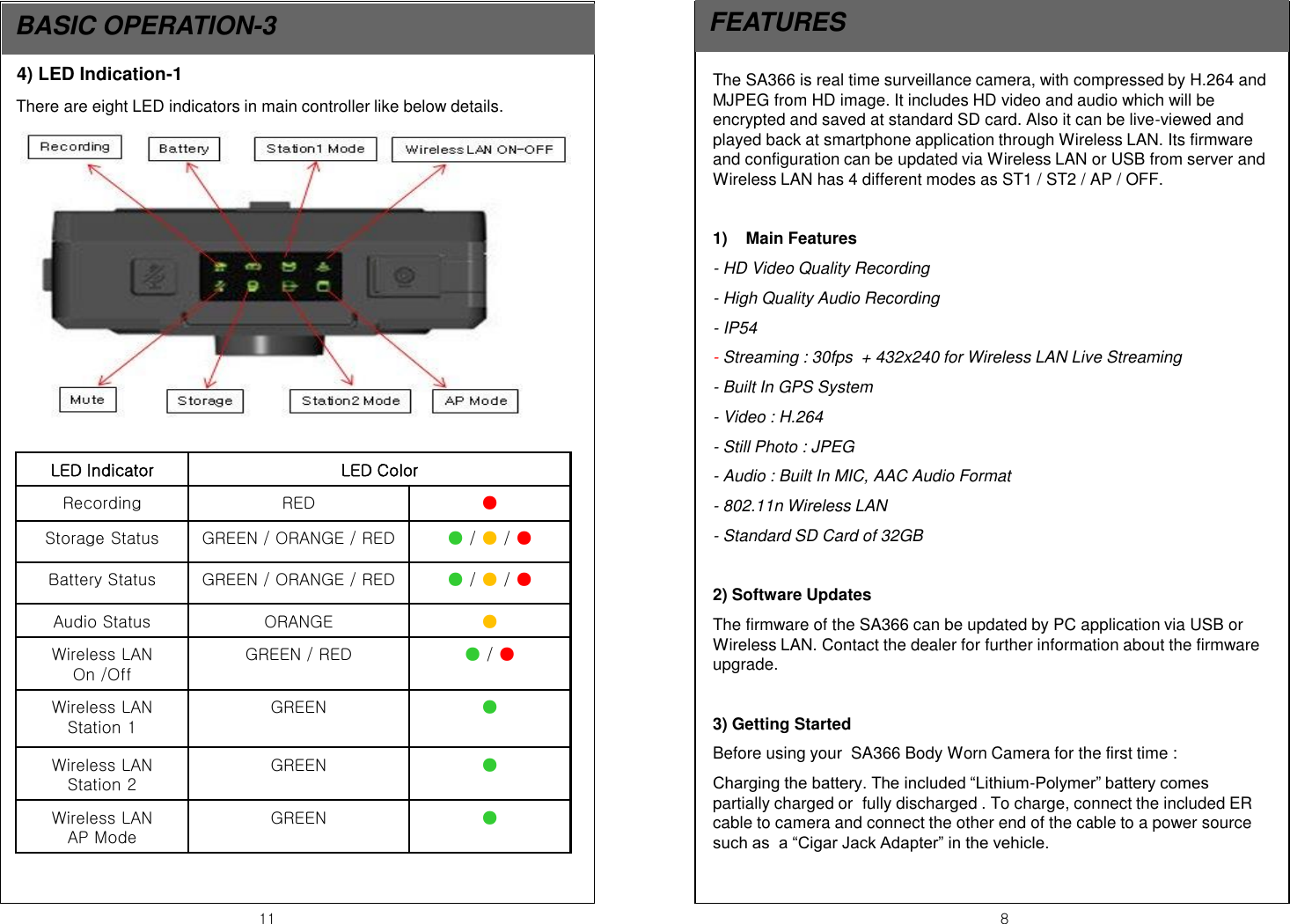
11  8 BASIC OPERATION-3  FEATURES The SA366 is real time surveillance camera, with compressed by H.264 and MJPEG from HD image. It includes HD video and audio which will be encrypted and saved at standard SD card. Also it can be live-viewed and played back at smartphone application through Wireless LAN. Its firmware and configuration can be updated via Wireless LAN or USB from server and Wireless LAN has 4 different modes as ST1 / ST2 / AP / OFF.  1) Main Features - HD Video Quality Recording - High Quality Audio Recording - IP54 - Streaming : 30fps  + 432x240 for Wireless LAN Live Streaming - Built In GPS System - Video : H.264 - Still Photo : JPEG - Audio : Built In MIC, AAC Audio Format - 802.11n Wireless LAN - Standard SD Card of 32GB    2) Software Updates The firmware of the SA366 can be updated by PC application via USB or Wireless LAN. Contact the dealer for further information about the firmware upgrade.  3) Getting Started Before using your  SA366 Body Worn Camera for the first time : Charging the battery. The included “Lithium-Polymer” battery comes  partially charged or  fully discharged . To charge, connect the included ER cable to camera and connect the other end of the cable to a power source such as  a “Cigar Jack Adapter” in the vehicle. 4) LED Indication-1 There are eight LED indicators in main controller like below details. LED Indicator  LED Color Recording  RED ● Storage Status  GREEN / ORANGE / RED ● / ● / ● Battery Status  GREEN / ORANGE / RED ● / ● / ● Audio Status  ORANGE  ● Wireless LAN  On /Off GREEN / RED  ● / ●   Wireless LAN Station 1 GREEN  ● Wireless LAN Station 2 GREEN  ● Wireless LAN  AP Mode GREEN  ●
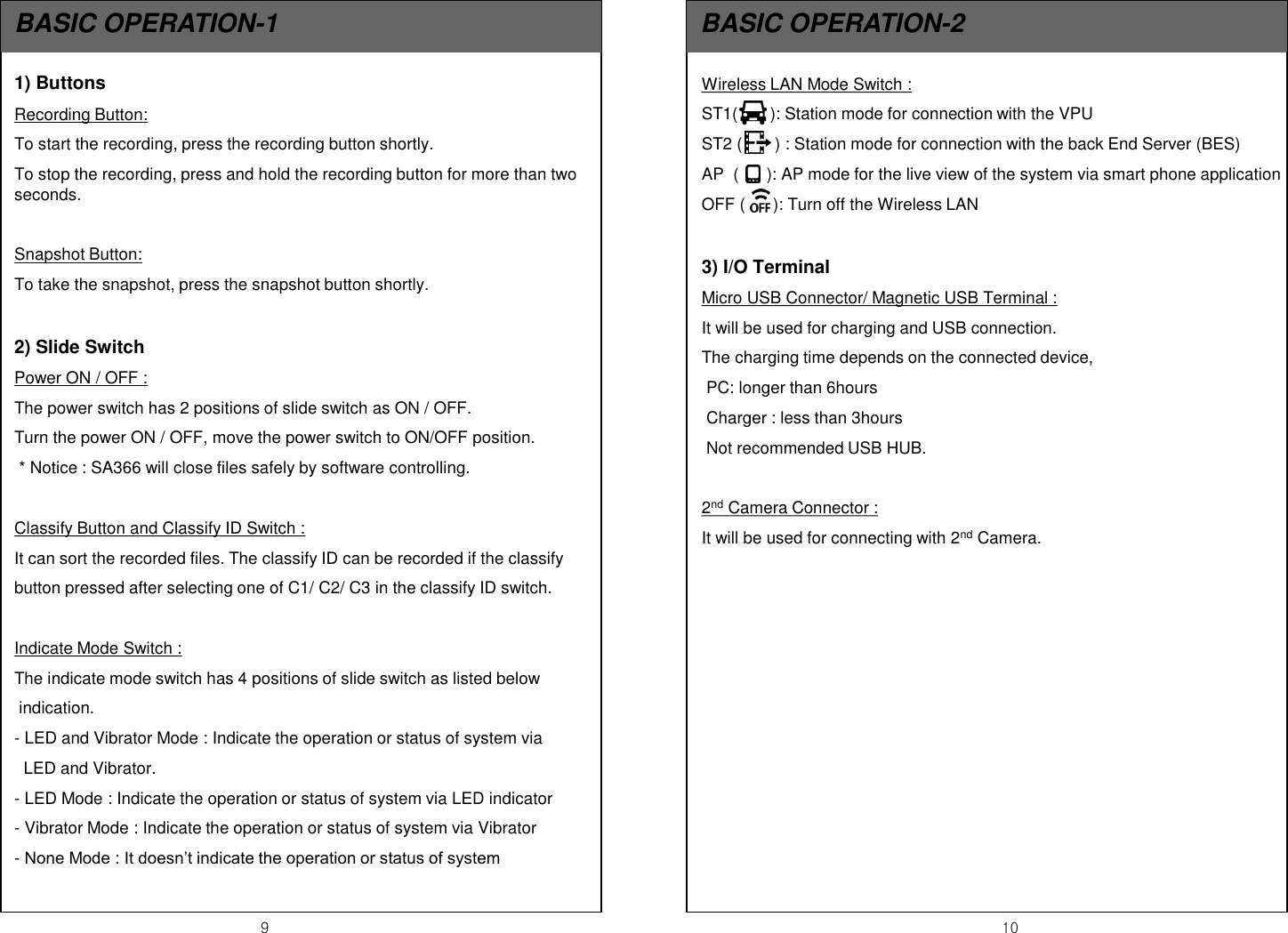
9  10 BASIC OPERATION-1  BASIC OPERATION-2 Wireless LAN Mode Switch :  ST1(       ): Station mode for connection with the VPU ST2 (       ) : Station mode for connection with the back End Server (BES) AP  (      ): AP mode for the live view of the system via smart phone application OFF (      ): Turn off the Wireless LAN  3) I/O Terminal  Micro USB Connector/ Magnetic USB Terminal :  It will be used for charging and USB connection.  The charging time depends on the connected device,  PC: longer than 6hours  Charger : less than 3hours  Not recommended USB HUB.  2nd Camera Connector : It will be used for connecting with 2nd Camera.   1) Buttons Recording Button:  To start the recording, press the recording button shortly. To stop the recording, press and hold the recording button for more than two seconds.   Snapshot Button: To take the snapshot, press the snapshot button shortly.  2) Slide Switch Power ON / OFF :  The power switch has 2 positions of slide switch as ON / OFF. Turn the power ON / OFF, move the power switch to ON/OFF position.  * Notice : SA366 will close files safely by software controlling.  Classify Button and Classify ID Switch : It can sort the recorded files. The classify ID can be recorded if the classify button pressed after selecting one of C1/ C2/ C3 in the classify ID switch.  Indicate Mode Switch : The indicate mode switch has 4 positions of slide switch as listed below   indication. - LED and Vibrator Mode : Indicate the operation or status of system via    LED and Vibrator. - LED Mode : Indicate the operation or status of system via LED indicator - Vibrator Mode : Indicate the operation or status of system via Vibrator - None Mode : It doesn’t indicate the operation or status of system

Navigation menu