Trinus Systems TDSS-900H Digital Transmission System - Handheld User Manual TDSS900 fcc with block
Trinus Systems Inc. Digital Transmission System - Handheld TDSS900 fcc with block
users manual

900MHz DSSS DIGITAL Transmitter/Docking
MODEL : TDSS900 USA VERSION
TRINUS CO.LTD
User’s Manual
900MHz DSSS DIGITAL Transmitter/Docking
MODEL : TDSS900 USA VERSION
This DEVICE COMPLIES WITH PART 15 OF THE FCC RULES.
OPERATION IS SUBJECT TO THE FOLLOWING TWO CONDITIONS
(1) THIS DEVICE MAY NOT CAUSE HARMFUL INTERFERENCE, AND
(2) THIS DEVICE MUST ACCEPT ANY INTERFERENCE RECEIVED, INCLUDING
INTERFERENCE THAT MAY CAUSE UNDERSIRED PERATION.
FCC NOTICE
This equipment has been tested and found to comply with the limits for a Class B digital
device, pursuant to part 15 of the FCC Rules. These limits are designed to provide
reasonable protection against harmful interference in a residential installation. This
equipment generates, uses and can radiate radio frequency energy and, if not installed
and used in accordance with the instructions, my cause harmful interference to radio
communication. However, there is no guarantee that interference will not occur in a
particular installation. If this equipment does cause harmful interference to radio or
television reception, which can be determined by turning the equipment off and on, the
user is encouraged to try to correct the interference by one or more of the following
measures:
- Reorient or relocate the receiving antenna.
- Increase the separation between the equipment and receiver.
- Connect the equipment into an outlet on a circuit difference from that to which the
receiver is connected.
- Consult the dealer of an experienced radio/TV technician for help.
NOTE : The manufacturer is not responsible for any radio or TV interference caused by
unauthorized modifications to this equipment. Such modifications could void the user’'s
authority to operate the equipment.
WARNING : The antenna must be installed a manner that ensures a minimum
separation of 20Cm between the antenna and human beings.

900MHz DSSS DIGITAL Transmitter/Docking
MODEL : TDSS900 USA VERSION
TRINUS CO.LTD
√ IMPORTANT SAFETY INSTRUCTIONS
When using your telephone equipment, basis safety precautions should always be followed
to reduce the risk of life electric shock, and injury to persons, including the following.
1. Read and understand all instructions.
2. Follow all warnings and instructions marked on the product.
3. Unplug this product from the outlet before cleaning. Do not use liquid cleaners or
aerosol cleaners. Use a damp cloth for cleaning.
4. Do not use this product near water, for example, near a bathtub, washbowl, kitchen
sink, or Laundry tub in a wet Basement or near a swimming pool.
5. Do not place this product on an unstable cart, stand, or table. The product may fall,
causing serious damage to the product.
6. Slots and openings in the cabinet and the back or bottom are provide for ventilation,
to protect it from overheating. These openings should never be blocked or covered.
The opening should never should never be placed near or over a radiator or heat
register. This product should not be placed in a built in installation unless proper
ventilation is provided.
7. This product should be operated only from the type of power source indicated on the
marking label. If you are not sure of the type of power supply to your home, consult
your dealer or local power company.
8. Do not allow anything to rest on the power cord. Do not locate this product where the
cord will be abused by persons walking on it.
9. Do not overload wall outlets and extension cords as this can result in the risk of fire or
electric shock.
10. Never push objects of any kind into this product through cabinet slots as they may
touch dangerous voltage points or short out parts that could result in a of fire or
electric shock.
Never spill liquid of any kind on the product.
11. To reduce the risk of electric shock, do not disassemble this product, but take it to a
qualified service contractor when some service or removing covers may expose you to
dangerous voltages or other risks. Incorrect reassembly can cause electric shock when
the appliance is subsequently used.
12. Unplug this product from the wall outlet and refer servicing to qualified service
personnel under the following conditions:
A. When the power supply cord or plug is damaged or frayed.
B. If liquid has been spilled into the product.
C. If the product has been exposed to rain or water.
D. If the product does not operate normally by following the operating instruction. Adjust
only those control that are covered by the operating instructions. Improper
adjustments of other controls may result in damage and will often require extensive
work by a qualified technician to restore the product to normal operation.
E. If the product has been dropped or the cabinet has been damaged.
F. If the product exhibits a distinctive change in performance.
13. Avoid using a TRANSMITTER (other than a cordless type) during an electrical storm.
There may be a remote risk of electric shock from lightning.
14. Do not use the TRANSMITTER to report a gas leak in the vicinity of the leak.
900MHz DSSS DIGITAL Transmitter/Docking
MODEL : TDSS900 USA VERSION
TRINUS CO.LTD
√IMPORTANT
Read this manual before attempting to setup or use this instrument. If contains
important Information regarding safe installation and use. Keep this manual for future
reference.
Also save the carton, packing and proof of purchase to simplify and accelerate any
needed action.
√WARNING
To prevent fire or shock hazard, do not expose this product to rain or any type of
moisture.
If accidentally dropped into water, this product should immediately by unplugged from
the AC outlet jack.
THIS SYMBOL IS INTENDED TO ALERT THE USER TO THE PRESENCE OF
IMPORTANT OPERATING AND MAINTENANCE (SERVICING) INSTRUCTIONS
IN THE OWNER'S MANUAL.
√ SAFETY INFORMATIONS FOR TDSS-900H & TDSS-900B
Your TRANSMITTER contains a low power transmitter.
When the Push-to Talk button is pushed it sends out radio frequency (RF) signals.
This device is authorized to operate at a duty factor not to exceed 50% in DECEMBER
2004 the Federal Communications Commission (FCC) adopted RF exposure guidelines with
safety levels for hand-held wireless devices.
CAUTION : To maintain compliance with the FCC’ RF exposure guidelines,
hold the transmitter and antenna at least 0.5 inches (1.25 centimeters) from your face,
with the antenna pointed up and away from the face, if you wear the handset on your
body while using the headset accessory, use only the manufacturers supplied belt clip for
this product and ensure that the antenna is at least 1 inch (2,5centimeters) from your
body when transmitting.
This device and its antenna(s) must not be co-located or operating in conjunction with
any other antenna or transmitter. use only the supplied antenna. Unauthorized antennas,
modifications, or attachments could damage the transmitter and may violate FCC
regulations.
This phone (device) has an output power of max 10mW, which no warning statements
required.
Now this phone (device) designed to be hold transmitter and antenna at least 0.5inches
from your Face. Therefore this phone (device) satisfies RF exposure compliance.

900MHz DSSS DIGITAL Transmitter/Docking
MODEL : TDSS900 USA VERSION
TRINUS CO.LTD
INSTALLATION PRECAUTION
1. Never install docking station wiring during a lighting storm.
2. Never install power jacks in wet locations unless the jack is specially designed for
wet locations.
3. Never touch insulated power terminals unless the telephone line has been
disconnected at the network interface.
4. Use caution when installing or modifying telephone lines.
MAINTENANCE
1. Use a damp cloth to the plastic cabinet. A mind soap will help to remove grease or
oil. Never use polish, solvents, abrasives or strong detergents since these can
damage the finish.
2. Your phone should be situated away from heat sources such as radiators, heater,
stoves or Any other appliance that produces heat.
CAUTION
To reduce the risk of fire or injure to persons, read and follow these instructions:
1. Use only the following type and the size battery : Li-Ion 2000mAh 3.7V battery
2. Do not dispose of the battery in a fire. The cell may explode. Check with local
codes for possible special disposal instructions.
3. Do not open or mutilate the battery. Released electrolyte is corrosive and may be
toxic if swallowed.
4. Exercise care in handling in order not to short the battery with conducting material such as
rings, bracelets and keys. The battery or conductor may overhead and cause burns
5. Recharge only the battery type that is provided with or identified for use with this product. If
a different type of battery is used, it may leak or explode.
6. Do not attempt to rejuvenate the battery provided with or identified for use with this product
by heating them. Sudden release of the battery electrolyte may occur, causing burns or
irritation to eyes or skin.
7. When inserting the battery into this product, the proper polarity or direction must be
observed. Reverse insertion of battery may result in leakage or explosion.
8. Remove the battery from this product if the product will not be used for a long period of
time(several months or more) since during this time they could leak in the product.
9. Discard the "dead" battery as soon as possible since "dead" battery are more likely to leak in
a product.
10. Do not store this product, or the battery provided with or identified for use this product, in
high-temperature areas. Battery that are stored in a freezer or refrigerator for the purpose of
extending shelf life should be stabilized at room temperature prior to use after cold storage.
11. Always disconnect all telephone line cords from the wall modular jacks before installing or
replacing the battery.

900MHz DSSS DIGITAL Transmitter/Docking
MODEL : TDSS900 USA VERSION
TRINUS CO.LTD
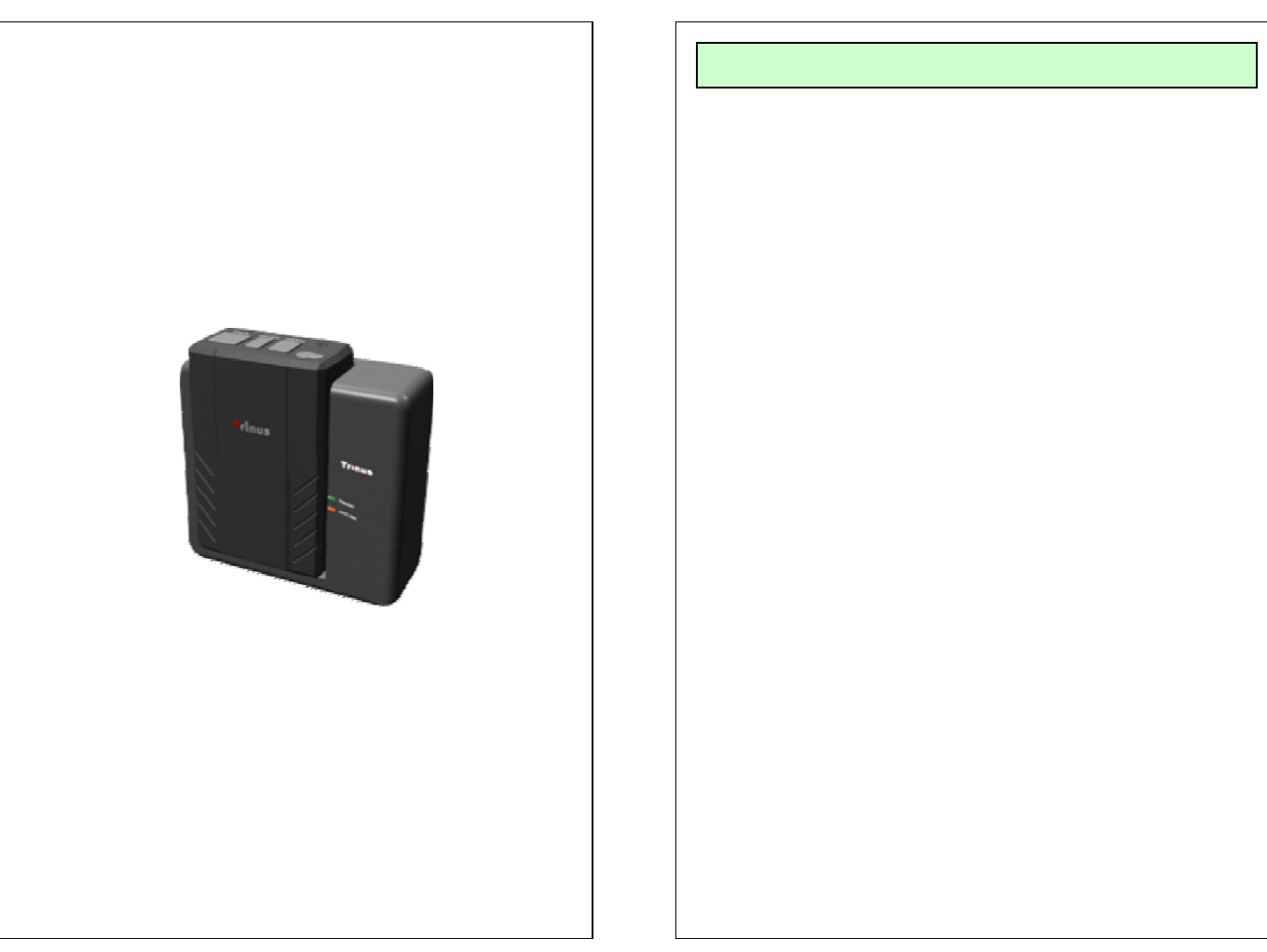
CARTON CONTENTS
TDSS-900H and TDSS-900B
User’s Manual, Warranty and Safety Information
Li-Ion 2000mAh 3.7V battery
Warranty card
User’s Guide
●Read this user’s guide carefully for safe operation and proper
use of the product .
●Features and specifications are subject to change without
notification.
TDSS-900
900MHz Series
WIRELESS TRANSCEIVER SYSTEM
- Connect the battery pack to TX Set and switch the
power ON (located on the bottom of TX unit)
- Install the bracket by using the screws
- Connect the antenna to the RX Set
- Slide RX Set onto the Bracket
- Connect the RJ-45 cable to RX Set
- Prior to use, charge the unit by placing TX set in the
RX set for at least for 5 hours
-Place TX in RX to match ID
- Connect the microphone to TX set
- Once TX and RX matching ID is done and TX leaves from RX,
Transmitter always set to talk with Docking
and are able to send the Audio signal anytime.
INSTALLATION
OPERATION (TX)
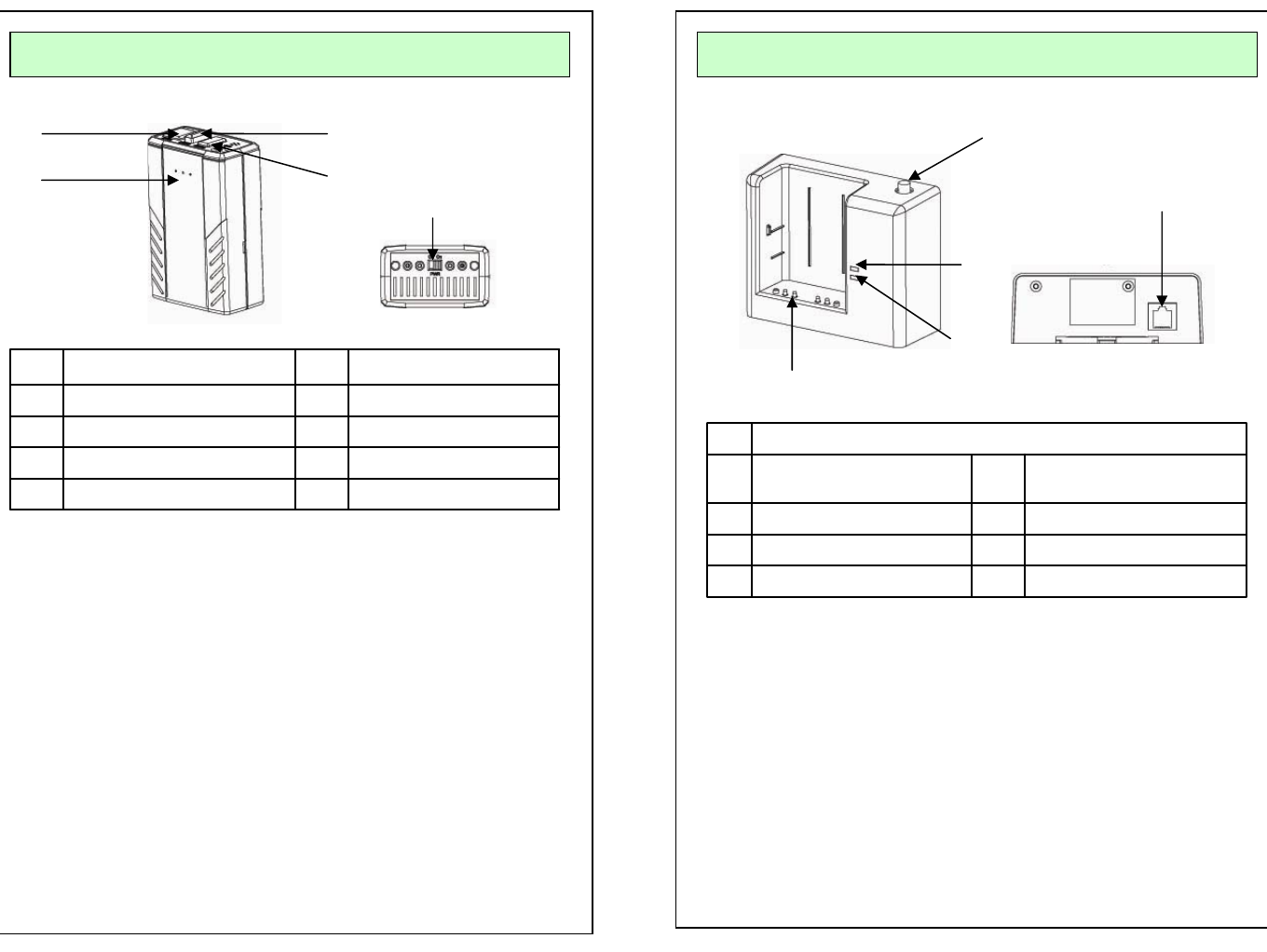
Internal MIC
MUTE ON/FF
MODE
BEEP
Rec ON/OFF
5
4
3
2
1
Microphone Jack*
Internal MIC*
1. Rec On/OFF: Talk ON – BLUE LED Rec on Blinking
Out Of Range – RED LED Fast Flickering
Low Battery – RED LED Slow Flickering
2. Beep: Beep Tone
3. Mode: Beep > Vibration > Beep + Vibration > NO action
Every time you push the button, mode will be automatically
changed in order. (This Function operate only at St-by mode)
* Rec On/Off, Out of range, Low battery
4. Mute On/Off:
When user want to mute the voice in the Communication.
Press the button to mute and Press the button again to unmute.
5. Power On/Off: Turn on/off the power of unit. When this is turned
off, Unit will not work.
* Internal MIC is built in.
* Microphone Jack
1
2
3
4
5
RJ-45 Jack
Charging PIN
Battery Charging Status
Recording ON/OFF
ID Matching
Antenna connection
5
4
3
2
1
1. Antenna Connection:
2. Rec On/Off BLUE LED :
- Green LED : Recording on / OFF
3. Battery Status and Communication Status
- RED LED: Battery Charging
- Flickering Green LED: Communication On/Off
- Green LED: Battery is fully charged
5. RJ45 Jack for the cable
OPERATION (Cradle)
1
4
3
12
5
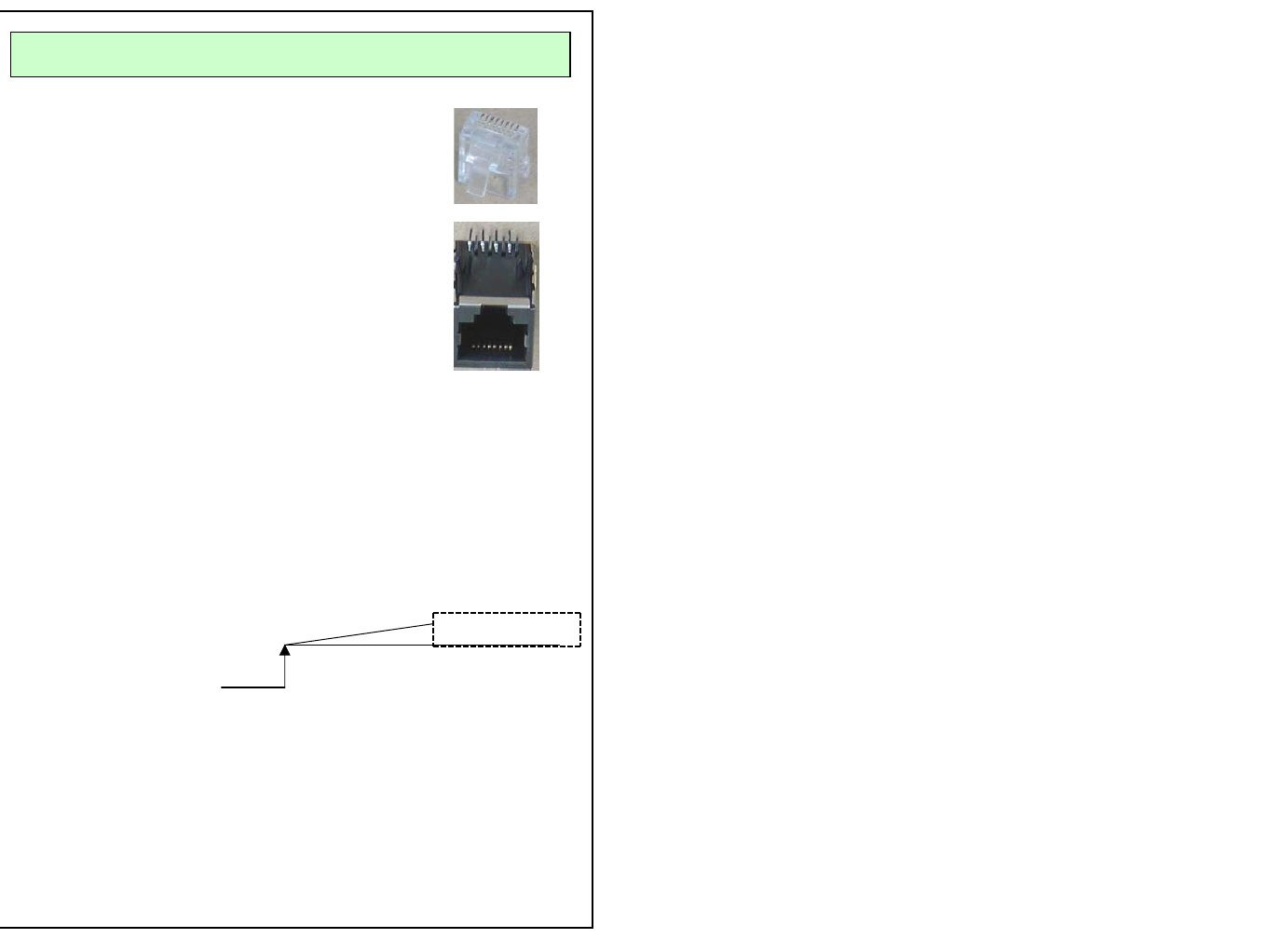
PIN DESCRIPTION
RJ-45 Connector Pin Description
Pin# 1: VCC, DC power (10V ~ 16VDC)
Pin# 2: GND
Pin# 3: Audio Signal
Pin# 4: Audio Signal GND
Pin# 5: GND
Pin# 6: None
Normal “H” 5.0V
0V
Pin# 7 : 0V when TX is off, 5V when TX is On.
Use this pin for recording trigger (Recording Trigger)
TX unit is on
Pin# 8 : No action
81
18