TruePath Wireless TPWLR58B1 TPWLR58B1-Long Reach BTS User Manual TruePath Wireless Interference Test Plan

TruePath Wireless LLC TPWLR58B1-Long Reach BTS TruePath Wireless Interference Test Plan

User Manual

        Base Station TPWLR58B1 System User Guide Customer Document  Version 1.1  Last Update: 1 September 2015        Confidential Notice: This document contains confidential information of TruePath Wireless, LLC. The disclosure and use of the contents of this document are governed by the terms of the Nondisclosure Agreement (NDA) signed and agreed to by employees, contractors, consultants, and others working with TruePath Wireless, LLC.  Please review the terms of the NDA before distributing the contents of this document. The contents of this document shall not be copied, reproduced, transferred to other documents, disclosed to others, or used for any other purpose(s) except as provided for in the NDA or with prior written permission of TruePath Wireless, LLC.
  CONFIDENTIAL  2 (19) BTS TPWLR58B1 Version 1.1   SYSTEM USER GUIDE Date 1 September 2015    2  Copyright © 2015 TruePath Wireless, LLC. All rights reserved. Reproduction in whole or in part without permission is prohibited. Information contained herein is subject to change without notice. The specifications and information regarding the products in this document are subject to change without notice. All statements, information, and recommendations in this document are believed to be accurate, but are presented without warranty of any kind, express, or implied. Users must take full responsibility for their application of any products. Trademarks, brand names and products mentioned in this document are the property of their respective owners. All such references are used strictly in an editorial fashion with no intent to convey any affiliation with the name or the product's rightful owner.    Revision History  Status Document Version Date Description (author or approver) Document Started 1.0 08/25/2015 Document generated from editing of Brian Fox “TPWLR58B1 (v1.0) SUG” doc. Update 1.1 1 Sept 2015 Added professional installation statement, and edited Appendix-A, number of external N-Type connectors, and use. Dimensions.
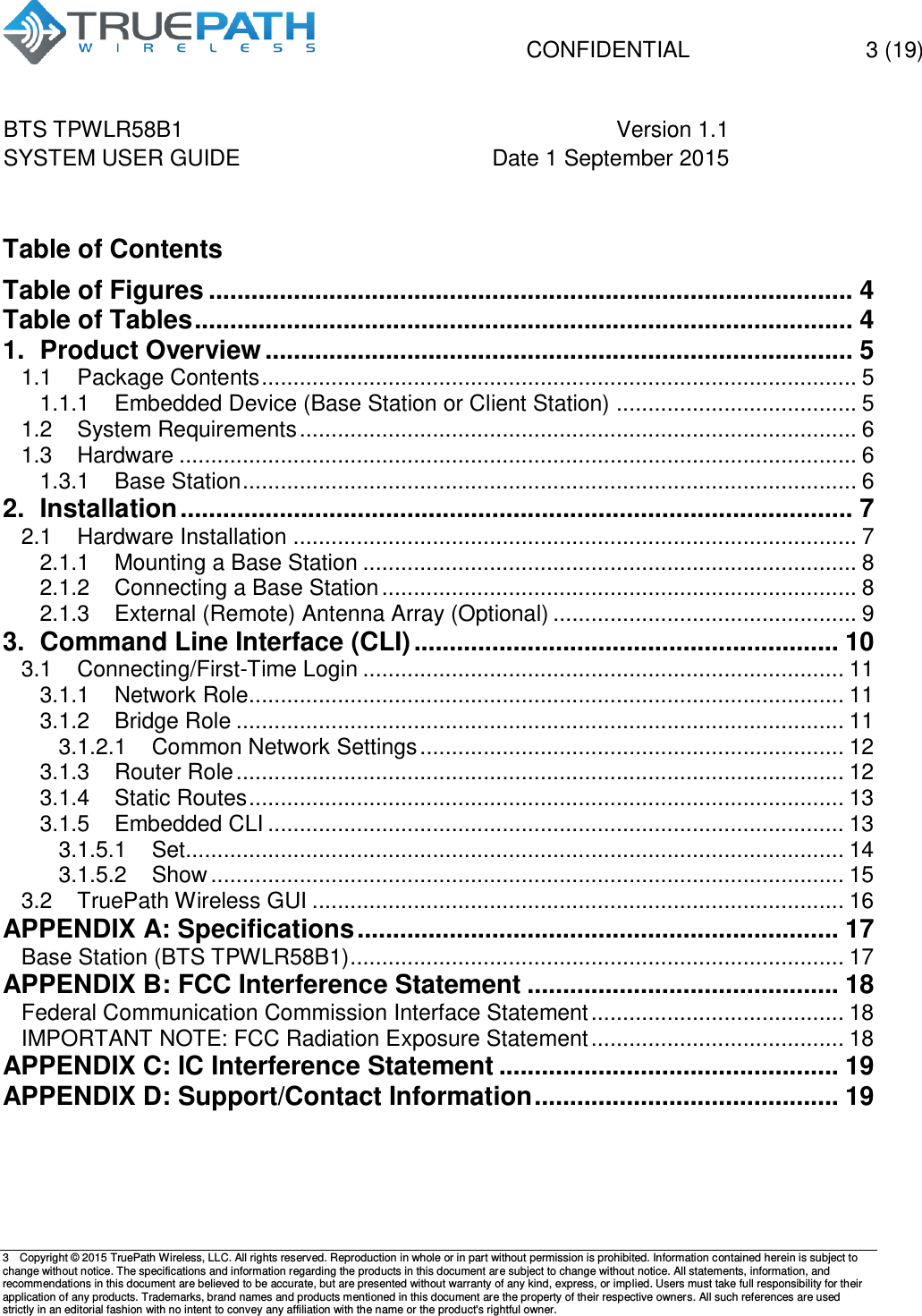
  CONFIDENTIAL  3 (19) BTS TPWLR58B1 Version 1.1   SYSTEM USER GUIDE Date 1 September 2015    3  Copyright © 2015 TruePath Wireless, LLC. All rights reserved. Reproduction in whole or in part without permission is prohibited. Information contained herein is subject to change without notice. The specifications and information regarding the products in this document are subject to change without notice. All statements, information, and recommendations in this document are believed to be accurate, but are presented without warranty of any kind, express, or implied. Users must take full responsibility for their application of any products. Trademarks, brand names and products mentioned in this document are the property of their respective owners. All such references are used strictly in an editorial fashion with no intent to convey any affiliation with the name or the product's rightful owner.     Table of Contents Table of Figures ........................................................................................... 4 Table of Tables ............................................................................................. 4 1. Product Overview ................................................................................... 5 1.1 Package Contents .............................................................................................. 5 1.1.1 Embedded Device (Base Station or Client Station) ...................................... 5 1.2 System Requirements ........................................................................................ 6 1.3 Hardware ........................................................................................................... 6 1.3.1 Base Station ................................................................................................. 6 2. Installation ............................................................................................... 7 2.1 Hardware Installation ......................................................................................... 7 2.1.1 Mounting a Base Station .............................................................................. 8 2.1.2 Connecting a Base Station ........................................................................... 8 2.1.3 External (Remote) Antenna Array (Optional) ................................................ 9 3. Command Line Interface (CLI) ............................................................ 10 3.1 Connecting/First-Time Login ............................................................................ 11 3.1.1 Network Role.............................................................................................. 11 3.1.2 Bridge Role ................................................................................................ 11 3.1.2.1 Common Network Settings ................................................................... 12 3.1.3 Router Role ................................................................................................ 12 3.1.4 Static Routes .............................................................................................. 13 3.1.5 Embedded CLI ........................................................................................... 13 3.1.5.1 Set........................................................................................................ 14 3.1.5.2 Show .................................................................................................... 15 3.2 TruePath Wireless GUI .................................................................................... 16 APPENDIX A: Specifications .................................................................... 17 Base Station (BTS TPWLR58B1) .............................................................................. 17 APPENDIX B: FCC Interference Statement ............................................ 18 Federal Communication Commission Interface Statement ........................................ 18 IMPORTANT NOTE: FCC Radiation Exposure Statement ........................................ 18 APPENDIX C: IC Interference Statement ................................................ 19 APPENDIX D: Support/Contact Information ........................................... 19
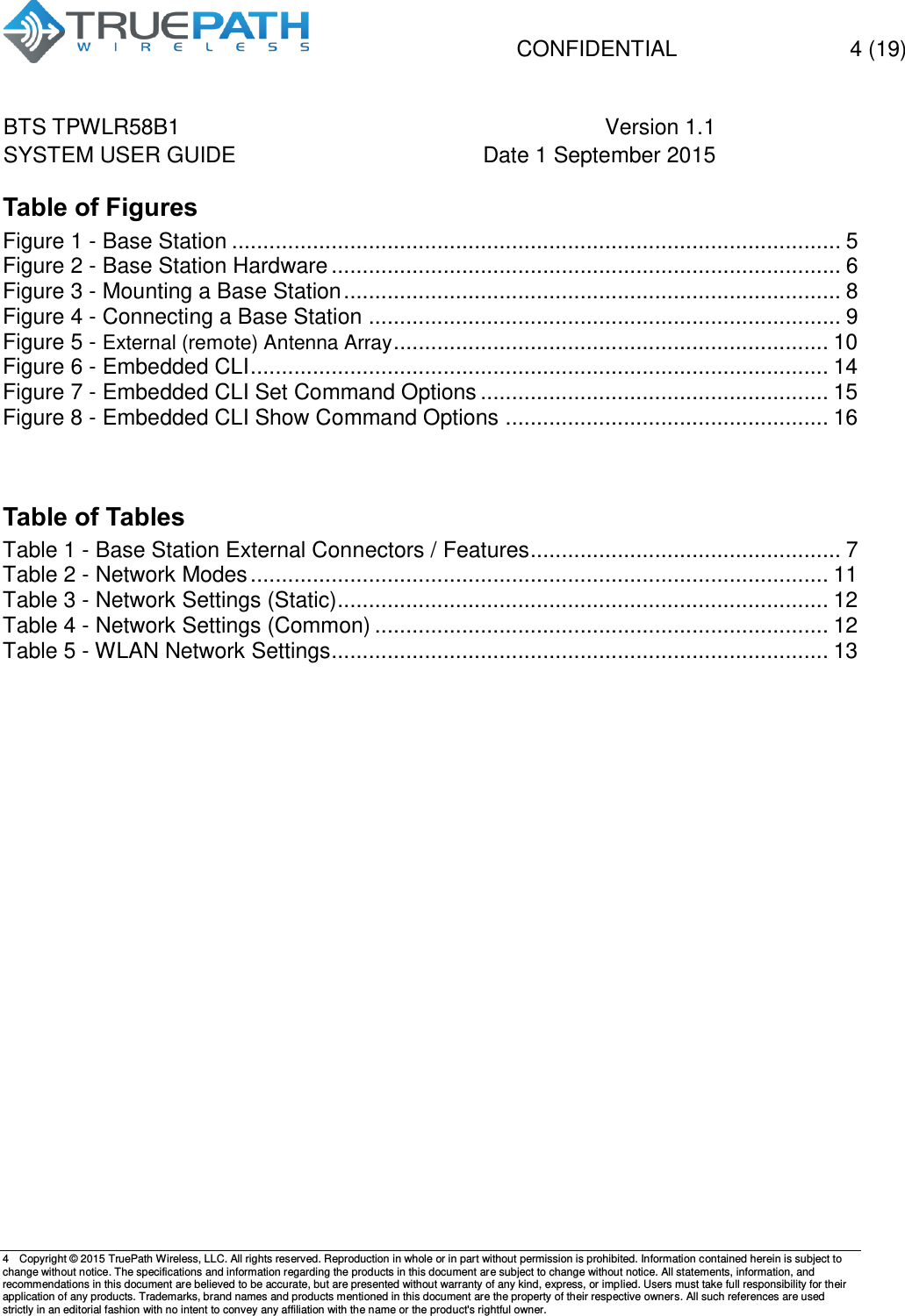
  CONFIDENTIAL  4 (19) BTS TPWLR58B1 Version 1.1   SYSTEM USER GUIDE Date 1 September 2015    4  Copyright © 2015 TruePath Wireless, LLC. All rights reserved. Reproduction in whole or in part without permission is prohibited. Information contained herein is subject to change without notice. The specifications and information regarding the products in this document are subject to change without notice. All statements, information, and recommendations in this document are believed to be accurate, but are presented without warranty of any kind, express, or implied. Users must take full responsibility for their application of any products. Trademarks, brand names and products mentioned in this document are the property of their respective owners. All such references are used strictly in an editorial fashion with no intent to convey any affiliation with the name or the product's rightful owner.    Table of Figures Figure 1 - Base Station .................................................................................................. 5 Figure 2 - Base Station Hardware .................................................................................. 6 Figure 3 - Mounting a Base Station ................................................................................ 8 Figure 4 - Connecting a Base Station ............................................................................ 9 Figure 5 - External (remote) Antenna Array ...................................................................... 10 Figure 6 - Embedded CLI ............................................................................................. 14 Figure 7 - Embedded CLI Set Command Options ........................................................ 15 Figure 8 - Embedded CLI Show Command Options .................................................... 16   Table of Tables Table 1 - Base Station External Connectors / Features .................................................. 7 Table 2 - Network Modes ............................................................................................. 11 Table 3 - Network Settings (Static) ............................................................................... 12 Table 4 - Network Settings (Common) ......................................................................... 12 Table 5 - WLAN Network Settings ................................................................................ 13
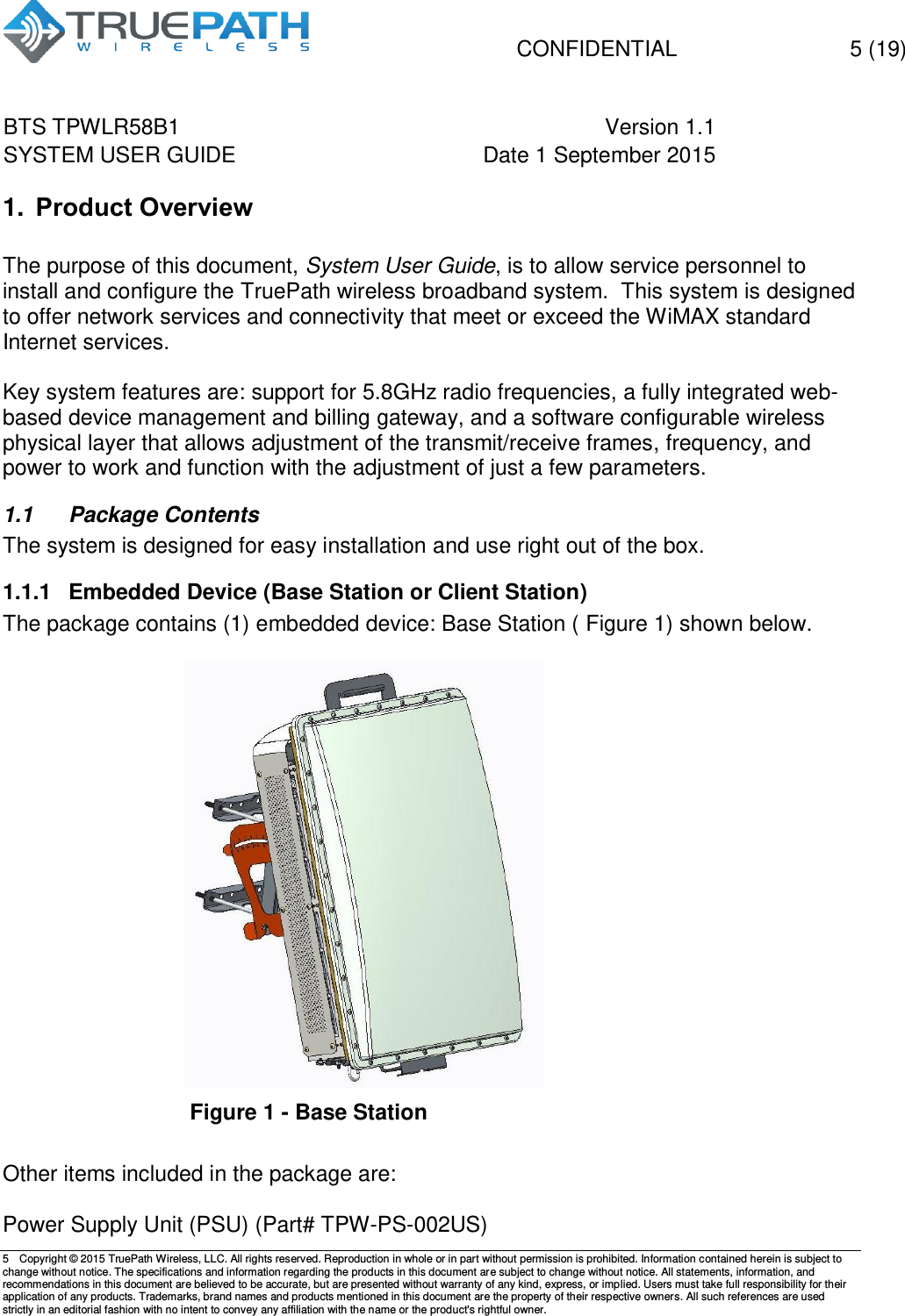
  CONFIDENTIAL  5 (19) BTS TPWLR58B1 Version 1.1   SYSTEM USER GUIDE Date 1 September 2015    5  Copyright © 2015 TruePath Wireless, LLC. All rights reserved. Reproduction in whole or in part without permission is prohibited. Information contained herein is subject to change without notice. The specifications and information regarding the products in this document are subject to change without notice. All statements, information, and recommendations in this document are believed to be accurate, but are presented without warranty of any kind, express, or implied. Users must take full responsibility for their application of any products. Trademarks, brand names and products mentioned in this document are the property of their respective owners. All such references are used strictly in an editorial fashion with no intent to convey any affiliation with the name or the product's rightful owner.    1. Product Overview  The purpose of this document, System User Guide, is to allow service personnel to install and configure the TruePath wireless broadband system.  This system is designed to offer network services and connectivity that meet or exceed the WiMAX standard Internet services.   Key system features are: support for 5.8GHz radio frequencies, a fully integrated web-based device management and billing gateway, and a software configurable wireless physical layer that allows adjustment of the transmit/receive frames, frequency, and power to work and function with the adjustment of just a few parameters.   1.1  Package Contents The system is designed for easy installation and use right out of the box. 1.1.1  Embedded Device (Base Station or Client Station) The package contains (1) embedded device: Base Station ( Figure 1) shown below.    Figure 1 - Base Station  Other items included in the package are:  Power Supply Unit (PSU) (Part# TPW-PS-002US)
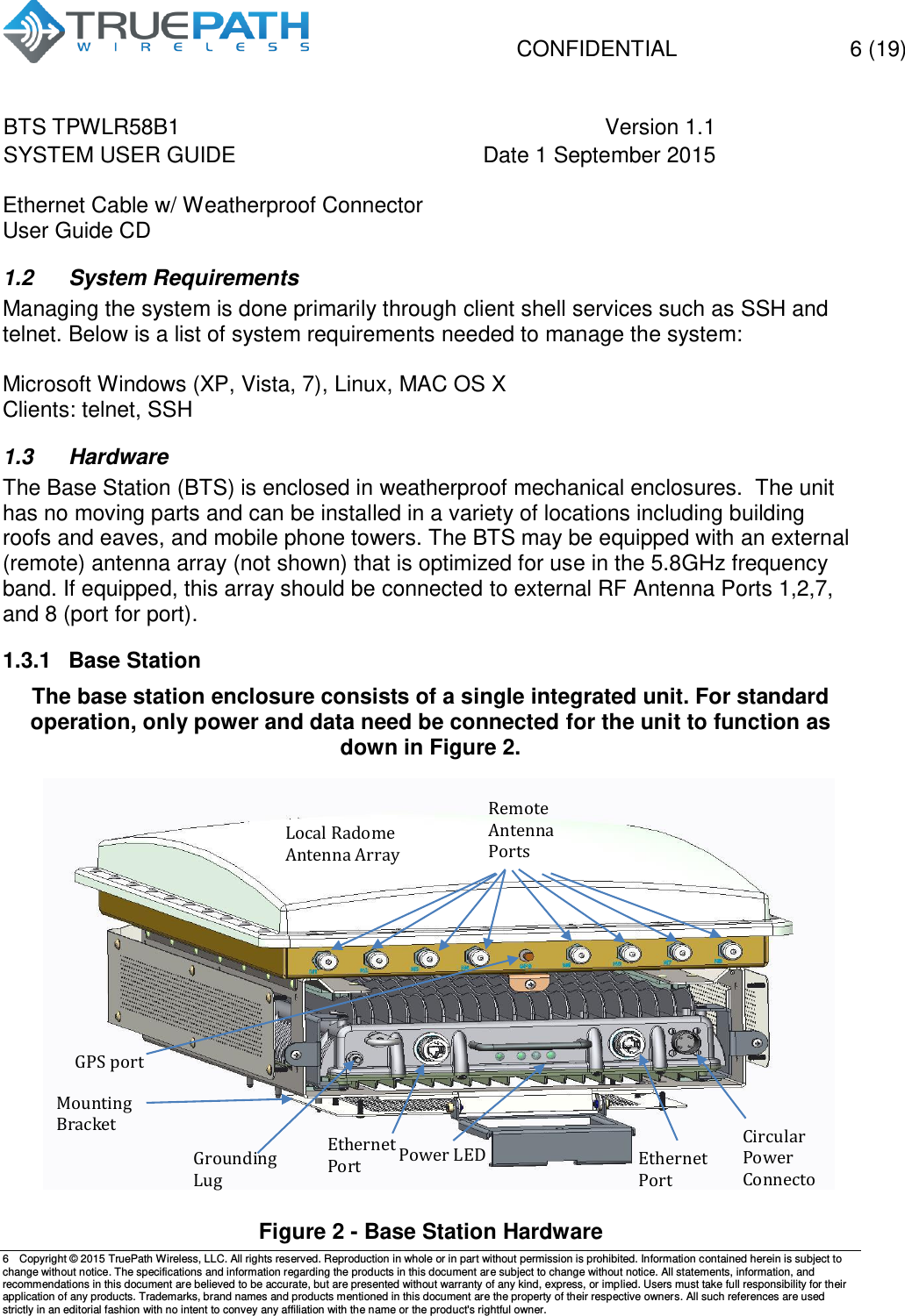
  CONFIDENTIAL  6 (19) BTS TPWLR58B1 Version 1.1   SYSTEM USER GUIDE Date 1 September 2015    6  Copyright © 2015 TruePath Wireless, LLC. All rights reserved. Reproduction in whole or in part without permission is prohibited. Information contained herein is subject to change without notice. The specifications and information regarding the products in this document are subject to change without notice. All statements, information, and recommendations in this document are believed to be accurate, but are presented without warranty of any kind, express, or implied. Users must take full responsibility for their application of any products. Trademarks, brand names and products mentioned in this document are the property of their respective owners. All such references are used strictly in an editorial fashion with no intent to convey any affiliation with the name or the product's rightful owner.    Ethernet Cable w/ Weatherproof Connector User Guide CD 1.2  System Requirements Managing the system is done primarily through client shell services such as SSH and telnet. Below is a list of system requirements needed to manage the system:  Microsoft Windows (XP, Vista, 7), Linux, MAC OS X Clients: telnet, SSH  1.3  Hardware The Base Station (BTS) is enclosed in weatherproof mechanical enclosures.  The unit has no moving parts and can be installed in a variety of locations including building roofs and eaves, and mobile phone towers. The BTS may be equipped with an external (remote) antenna array (not shown) that is optimized for use in the 5.8GHz frequency band. If equipped, this array should be connected to external RF Antenna Ports 1,2,7, and 8 (port for port).  1.3.1  Base Station The base station enclosure consists of a single integrated unit. For standard operation, only power and data need be connected for the unit to function as down in Figure 2.               Figure 2 - Base Station Hardware Grounding Lug Ethernet Port Ethernet Port Circular Power Connector Local Radome Antenna Array  Mounting Bracket Power LED Remote Antenna Ports GPS port
  CONFIDENTIAL  7 (19) BTS TPWLR58B1 Version 1.1   SYSTEM USER GUIDE Date 1 September 2015    7  Copyright © 2015 TruePath Wireless, LLC. All rights reserved. Reproduction in whole or in part without permission is prohibited. Information contained herein is subject to change without notice. The specifications and information regarding the products in this document are subject to change without notice. All statements, information, and recommendations in this document are believed to be accurate, but are presented without warranty of any kind, express, or implied. Users must take full responsibility for their application of any products. Trademarks, brand names and products mentioned in this document are the property of their respective owners. All such references are used strictly in an editorial fashion with no intent to convey any affiliation with the name or the product's rightful owner.     The remaining connectors and their function are summarized in Table 1 below.  Connector/Feature Type Mounting Bracket Custom bracket that wraps around a pole. Circular Power Connector +48VDC Input Ethernet Port(s) Qty: 2 Ethernet RJ-45 connector w/ external aux (reserved) weatherproof enclosure. External Antenna Ports (1-8) N-type RF connectors Local Radome Antenna Array  Integrated (Internal) Grounding Lug Nut/bolt Power LED High-intensity single color (green) LED Table 1 - Base Station External Connectors / Features  There are two high intensity LEDs that allow network support personnel the ability to see if the unit is functioning properly from the ground level.  Finally, a custom-mounting bracket is included for pole applications.  This and other installation techniques are covered in later sections of this document. 2. Installation  The TPWLR58B1 Base Station must be installed by professional installation contractors, trained by TruePath Wireless, LLC. The FCC Part 15 requirements will be followed by the professional installers.  To install the system, first the Internet Service Provider (ISP) needs to procure tower space for base station sectors and connect them to an Internet backhaul provider. Next, the back office consists of a webserver/payment gateway hosted by a 3rd party provider, while a radius/User manager, network management system (NMS) client and server are needed to support, provision, and configure the network.   Finally, an embedded client is installed at the target facility. 2.1  Hardware Installation The following sections describe various hardware installation features for both the client and base stations.
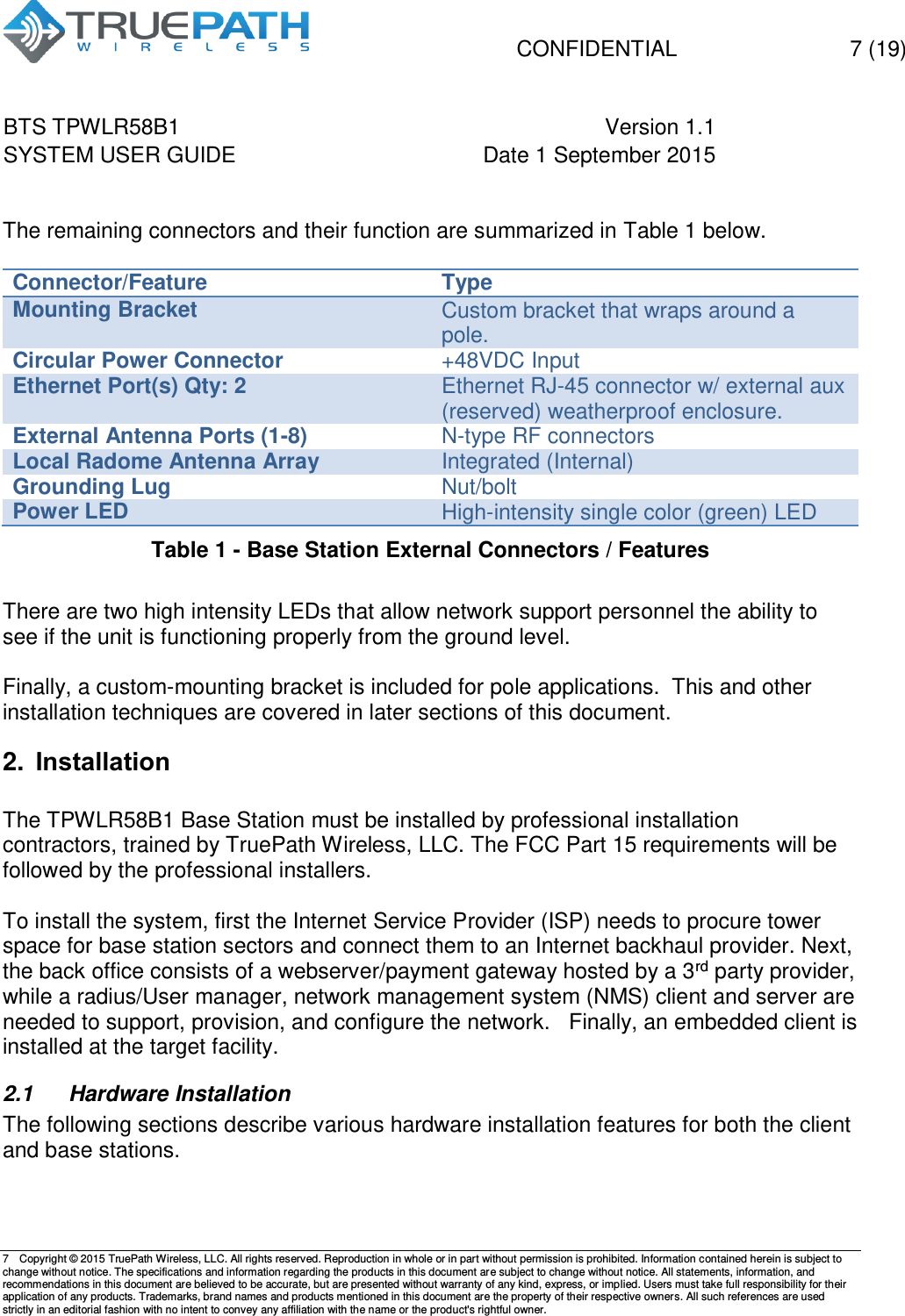
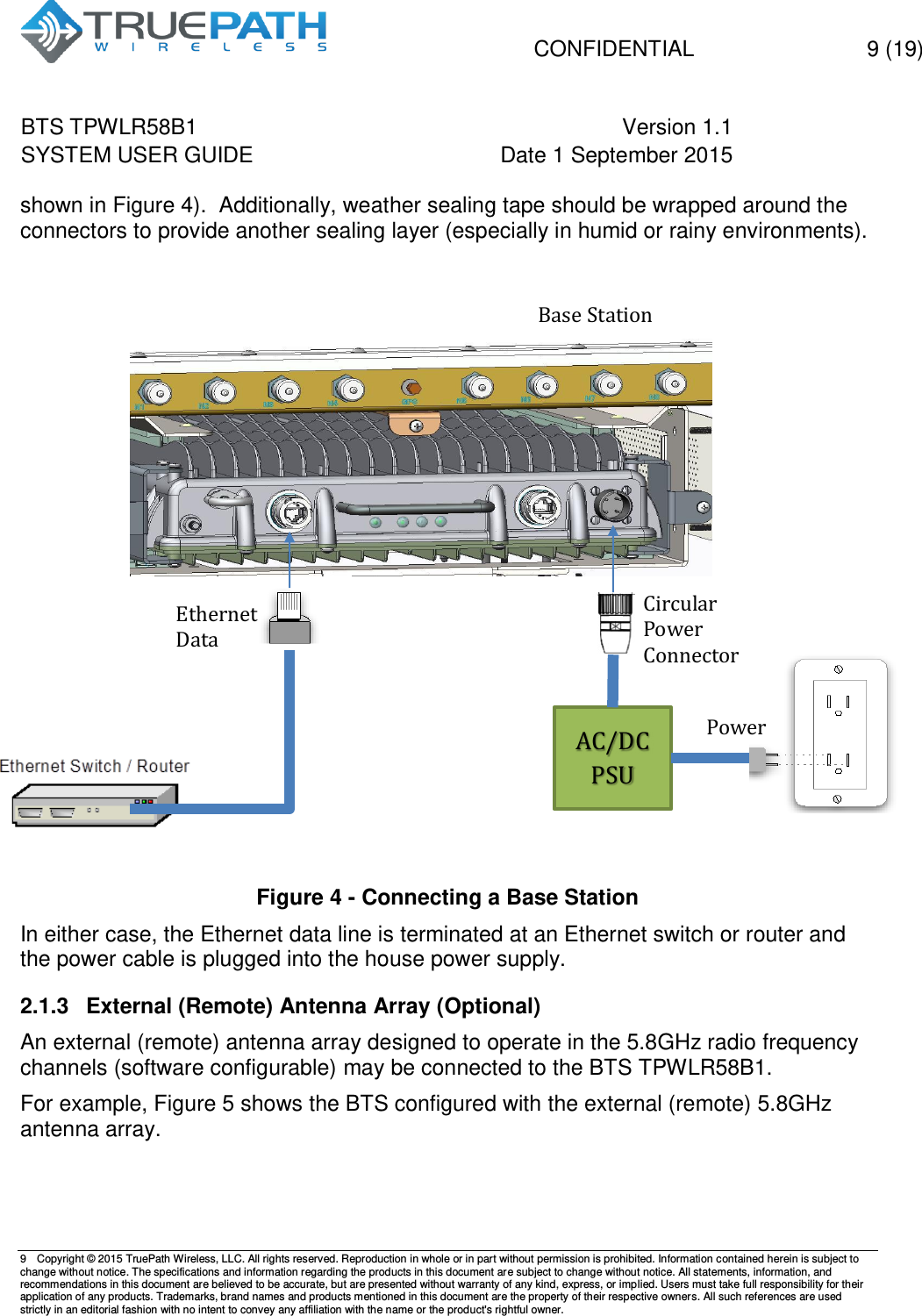
  CONFIDENTIAL  8 (19) BTS TPWLR58B1 Version 1.1   SYSTEM USER GUIDE Date 1 September 2015    8  Copyright © 2015 TruePath Wireless, LLC. All rights reserved. Reproduction in whole or in part without permission is prohibited. Information contained herein is subject to change without notice. The specifications and information regarding the products in this document are subject to change without notice. All statements, information, and recommendations in this document are believed to be accurate, but are presented without warranty of any kind, express, or implied. Users must take full responsibility for their application of any products. Trademarks, brand names and products mentioned in this document are the property of their respective owners. All such references are used strictly in an editorial fashion with no intent to convey any affiliation with the name or the product's rightful owner.    2.1.1  Mounting a Base Station Several features are included with the base station mounting hardware to make installation easier as illustrated in Figure 3 below.  First, when climbing up a tower, the mount features a handle for the installer to carry or fasten the unit.  Second, an elevation gauge aids installations where the pole is already calibrated.  Third, the pole-mounting bracket is adjustable to allow anchoring of the unit to poles with different diameters.  Fourth, a metal safety ring is included near the connectors which may be used to facilitate hoisting or lowering of the BTS during install or removal.  Finally, the external connectors are placed at the bottom of the unit to limit weather exposure.                          Figure 3 - Mounting a Base Station The finned thermal heat sink allows the unit to dissipate enough heat such that no additional environmental controls are needed. 2.1.2  Connecting a Base Station As mentioned in previous sections, power and an Ethernet data connection are needed to activate the base station.  To accomplish this, two weatherized RJ-45 connectors and cables should be plugged into the base station chassis and twisted to lock into place (as Mounting Bolts Pole Mounting Bracket External Connectors Elevation Gauge External Shield Thermal Heat Sink Handle Metal Safety Ring
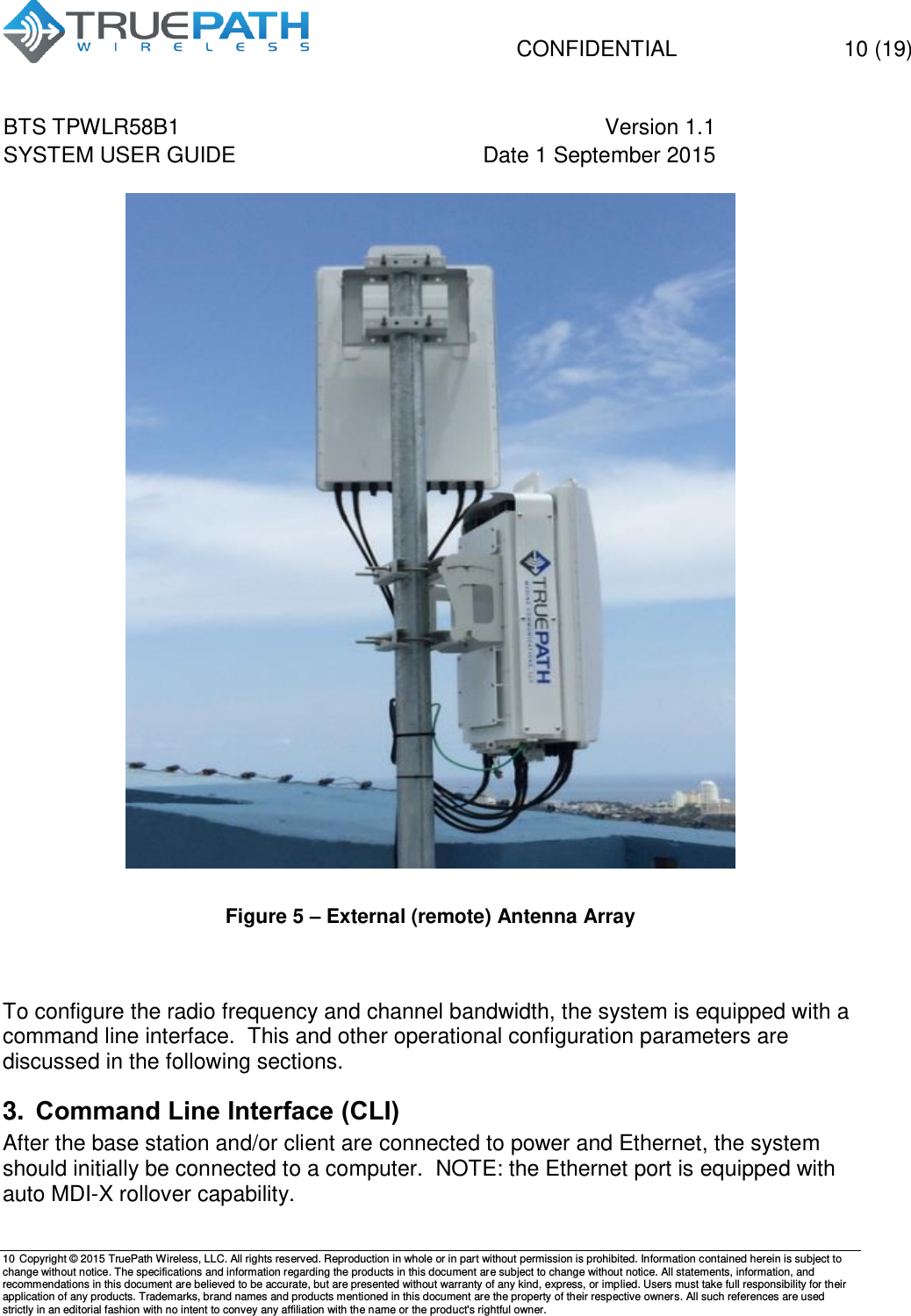
  CONFIDENTIAL  9 (19) BTS TPWLR58B1 Version 1.1   SYSTEM USER GUIDE Date 1 September 2015    9  Copyright © 2015 TruePath Wireless, LLC. All rights reserved. Reproduction in whole or in part without permission is prohibited. Information contained herein is subject to change without notice. The specifications and information regarding the products in this document are subject to change without notice. All statements, information, and recommendations in this document are believed to be accurate, but are presented without warranty of any kind, express, or implied. Users must take full responsibility for their application of any products. Trademarks, brand names and products mentioned in this document are the property of their respective owners. All such references are used strictly in an editorial fashion with no intent to convey any affiliation with the name or the product's rightful owner.    shown in Figure 4).  Additionally, weather sealing tape should be wrapped around the connectors to provide another sealing layer (especially in humid or rainy environments).                          Figure 4 - Connecting a Base Station In either case, the Ethernet data line is terminated at an Ethernet switch or router and the power cable is plugged into the house power supply. 2.1.3  External (Remote) Antenna Array (Optional) An external (remote) antenna array designed to operate in the 5.8GHz radio frequency channels (software configurable) may be connected to the BTS TPWLR58B1.   For example, Figure 5 shows the BTS configured with the external (remote) 5.8GHz antenna array.  AC/DC PSU Circular Power Connector Power Ethernet Data Base Station
  CONFIDENTIAL  10 (19) BTS TPWLR58B1 Version 1.1   SYSTEM USER GUIDE Date 1 September 2015    10 Copyright © 2015 TruePath Wireless, LLC. All rights reserved. Reproduction in whole or in part without permission is prohibited. Information contained herein is subject to change without notice. The specifications and information regarding the products in this document are subject to change without notice. All statements, information, and recommendations in this document are believed to be accurate, but are presented without warranty of any kind, express, or implied. Users must take full responsibility for their application of any products. Trademarks, brand names and products mentioned in this document are the property of their respective owners. All such references are used strictly in an editorial fashion with no intent to convey any affiliation with the name or the product's rightful owner.     Figure 5 – External (remote) Antenna Array   To configure the radio frequency and channel bandwidth, the system is equipped with a command line interface.  This and other operational configuration parameters are discussed in the following sections. 3. Command Line Interface (CLI) After the base station and/or client are connected to power and Ethernet, the system should initially be connected to a computer.  NOTE: the Ethernet port is equipped with auto MDI-X rollover capability.
  CONFIDENTIAL  11 (19) BTS TPWLR58B1 Version 1.1   SYSTEM USER GUIDE Date 1 September 2015    11 Copyright © 2015 TruePath Wireless, LLC. All rights reserved. Reproduction in whole or in part without permission is prohibited. Information contained herein is subject to change without notice. The specifications and information regarding the products in this document are subject to change without notice. All statements, information, and recommendations in this document are believed to be accurate, but are presented without warranty of any kind, express, or implied. Users must take full responsibility for their application of any products. Trademarks, brand names and products mentioned in this document are the property of their respective owners. All such references are used strictly in an editorial fashion with no intent to convey any affiliation with the name or the product's rightful owner.    3.1  Connecting/First-Time Login The default user name and password is: Username: admin Password: admin  These can be changed from the CLI interface after initial login.  It is important to note that this account can change all aspects of the management system; therefore the admin password should be changed immediately to avoid a security breach.  The TPWLR58B1 has the capability to be configured as either a network bridge or router.  The following (2) sections provide some background of the configuration options and capabilities of the system. 3.1.1  Network Role Each network mode is listed and described in   Table 2 below.    Network Mode Description Router IP packets are routed (Layer 3) between wired and wireless interfaces. Lower layer broadcast packets are dropped at each interface.  Multicast packets can be configured to forward across. Bridged Configures the unit as a transparent Layer 2 Ethernet bridge.  All packets (unicast, multicast, and broadcast) are forwarded between the wireless and wired interfaces (subject to ACL and firewall rules).   Table 2 - Network Modes   There is an option to disable specific interfaces.  Please use this with extreme caution.  Once disabled, no traffic will be accepted or passed from the interface (LAN/WAN). 3.1.2  Bridge Role As mentioned in the previous section, bridge mode configures the unit as a transparent Layer 2 Ethernet bridge.  All user data packets (unicast, multicast, and broadcast) are forwarded between the wireless and wired interfaces (subject to ACL and firewall rules).  The bridged mode management interface is configured via static IP.    The settings and descriptions are listed in Table 3 below.
  CONFIDENTIAL  12 (19) BTS TPWLR58B1 Version 1.1   SYSTEM USER GUIDE Date 1 September 2015    12 Copyright © 2015 TruePath Wireless, LLC. All rights reserved. Reproduction in whole or in part without permission is prohibited. Information contained herein is subject to change without notice. The specifications and information regarding the products in this document are subject to change without notice. All statements, information, and recommendations in this document are believed to be accurate, but are presented without warranty of any kind, express, or implied. Users must take full responsibility for their application of any products. Trademarks, brand names and products mentioned in this document are the property of their respective owners. All such references are used strictly in an editorial fashion with no intent to convey any affiliation with the name or the product's rightful owner.    Network Settings (Static) Description IP Address IP address used for device management.   Netmask Dotted decimal representation of 4 binary octets that determine which part of address is the network and that of the host (the mask).    For example, 255.255.255.0 is the most common mask used. Gateway IP Represents the address to send non-local data to.  The local network means any network that is configured on the device (i.e. bridge IP network). In bridge mode, this IP address must be in the same IP space as the bridge IP network. Table 3 - Network Settings (Static) In bridge network role, the gateway IP address also shows up in the static route table (covered in a later section). 3.1.2.1  Common Network Settings In addition to addressing, there are several network settings that are commonly configured in bridge network role.  These include spanning tree protocol and IP aliasing.  A list and description of each is in Table 4.  Network Settings (Common) Description Spanning Tree Protocol (STP) IEEE 802.1d protocol that works on bridged interfaces to find the shortest path between to stations.  Also, detects and blocks loops by preventing the same hardware/MAC address from being accepted from a port that it has transmitted the same address from. Table 4 - Network Settings (Common) 3.1.3  Router Role Management IP packets are routed (Layer 3) between wired and wireless interfaces. Lower layer broadcast packets are dropped at each interface.  Below (Table 5) is a list of settings and descriptions that are specific to the wireless LAN (WLAN) interface when the device is configured in a router role.
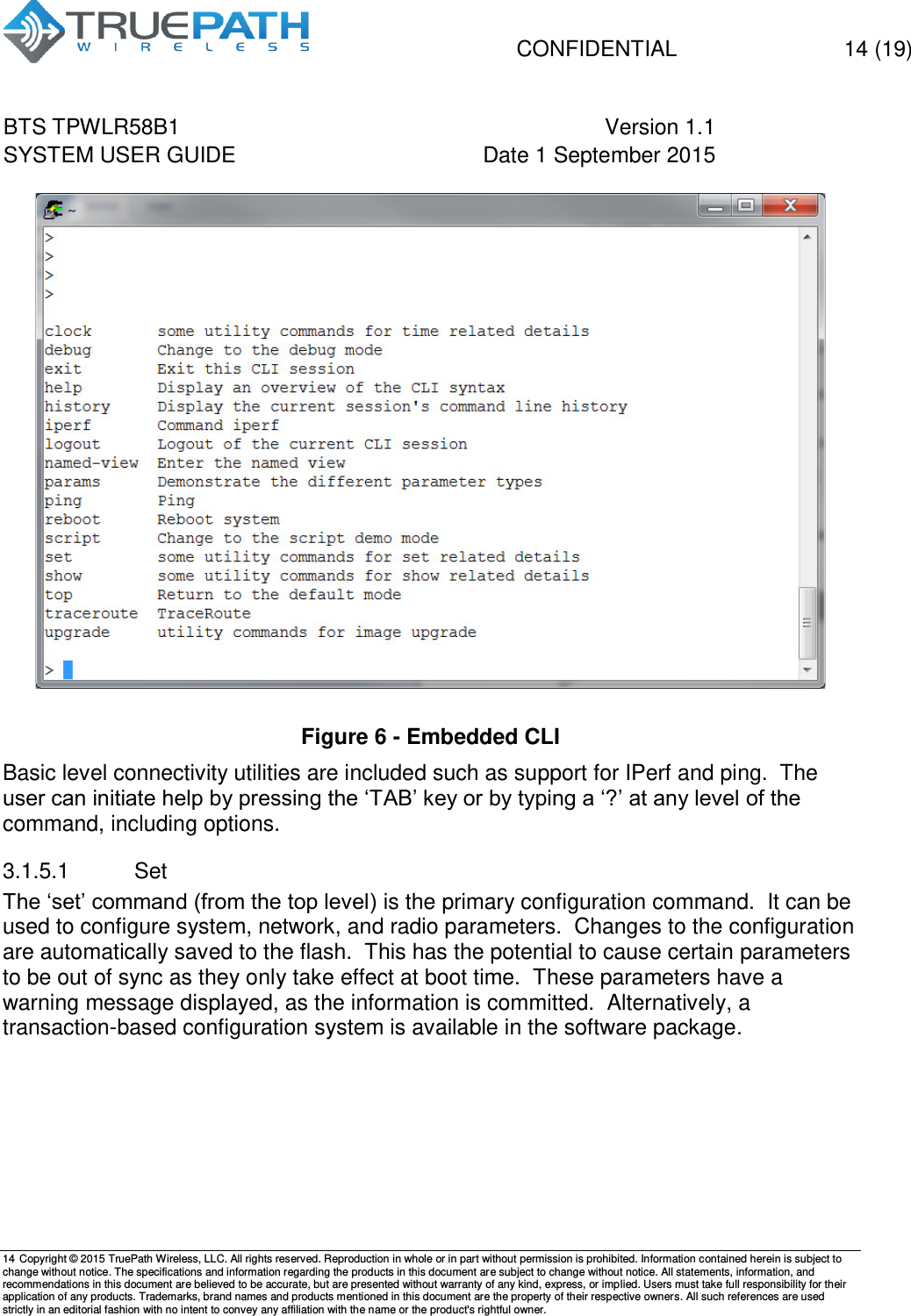
  CONFIDENTIAL  13 (19) BTS TPWLR58B1 Version 1.1   SYSTEM USER GUIDE Date 1 September 2015    13 Copyright © 2015 TruePath Wireless, LLC. All rights reserved. Reproduction in whole or in part without permission is prohibited. Information contained herein is subject to change without notice. The specifications and information regarding the products in this document are subject to change without notice. All statements, information, and recommendations in this document are believed to be accurate, but are presented without warranty of any kind, express, or implied. Users must take full responsibility for their application of any products. Trademarks, brand names and products mentioned in this document are the property of their respective owners. All such references are used strictly in an editorial fashion with no intent to convey any affiliation with the name or the product's rightful owner.    Network Settings Description IP Address IP address used for device management.  It is accessible from both the wireless and wired LAN interfaces. Netmask Dotted decimal representation of 4 binary octets that determine which part of address is the network and that of the host (the mask).    For example, 255.255.255.0 is the most common mask used. Table 5 - WLAN Network Settings 3.1.4  Static Routes  In both routed and static network modes, static routes can be entered to provide entries to the gateway interfaces for the networks served by the network interfaces (ROUTED, or BRIDGED).  In bridging mode, there should only be one gateway IP address to point to networks outside of the management IP network space. As a router, the gateway IP address points to the location that services the destination network. 3.1.5  Embedded CLI  The command line interface is a structured (hierarchical XML configuration) customer user interface.  It is equipped with features that are typically found on carrier-class systems.  This includes help, command completion, and option range/bounds checking.  Similarly, the interface is serviced by a secure sockets shell server and is fully integrated with the Linux authentication subsystem.  Additionally, the CLI is equipped to support look up tables to allow the CLI to be customized to make commands easier to read- while maintaining the underlying software interface.  Figure 6 shows some of the available root level commands.
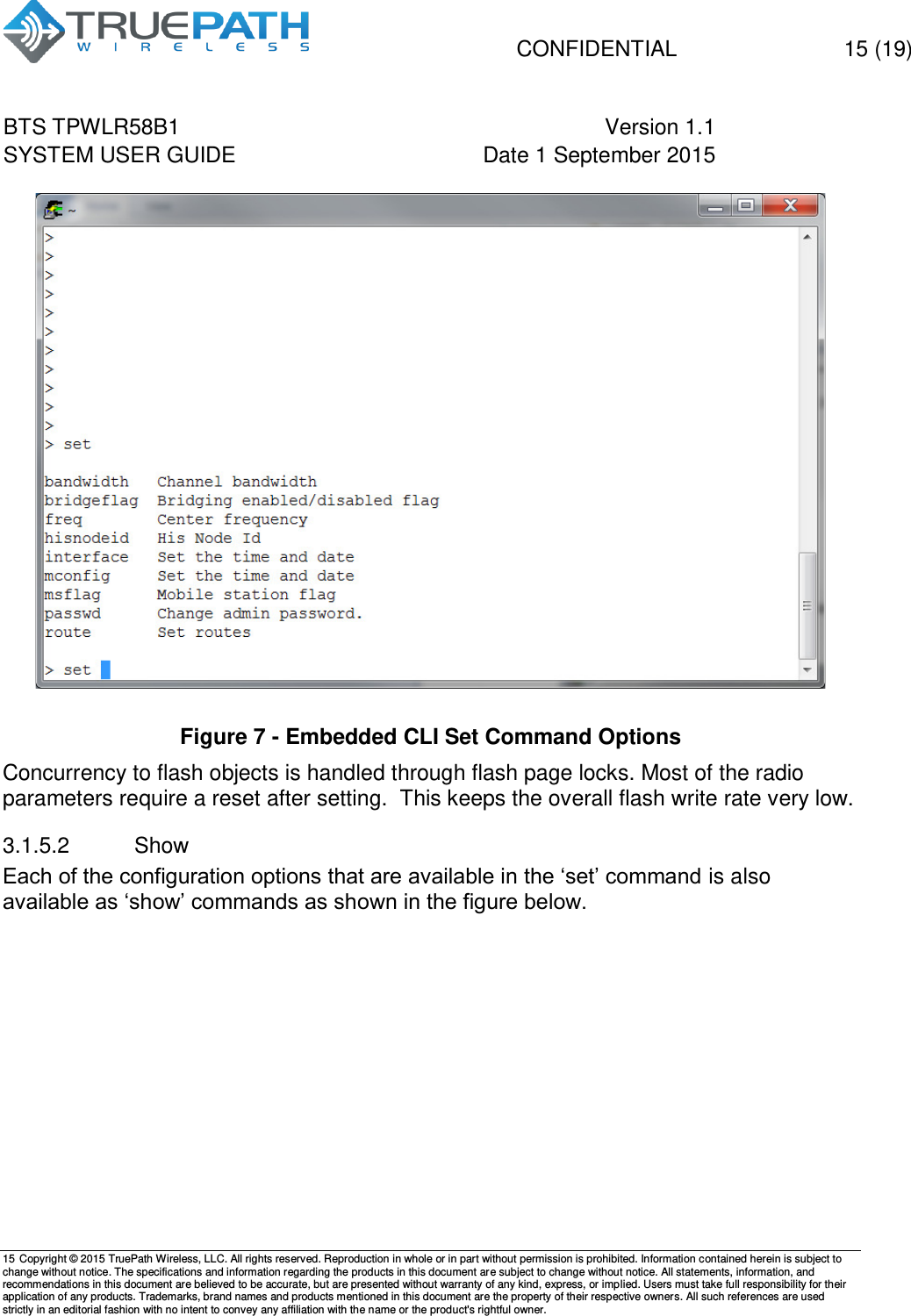
  CONFIDENTIAL  14 (19) BTS TPWLR58B1 Version 1.1   SYSTEM USER GUIDE Date 1 September 2015    14 Copyright © 2015 TruePath Wireless, LLC. All rights reserved. Reproduction in whole or in part without permission is prohibited. Information contained herein is subject to change without notice. The specifications and information regarding the products in this document are subject to change without notice. All statements, information, and recommendations in this document are believed to be accurate, but are presented without warranty of any kind, express, or implied. Users must take full responsibility for their application of any products. Trademarks, brand names and products mentioned in this document are the property of their respective owners. All such references are used strictly in an editorial fashion with no intent to convey any affiliation with the name or the product's rightful owner.     Figure 6 - Embedded CLI Basic level connectivity utilities are included such as support for IPerf and ping.  The user can initiate help by pressing the ‘TAB’ key or by typing a ‘?’ at any level of the command, including options. 3.1.5.1  Set The ‘set’ command (from the top level) is the primary configuration command.  It can be used to configure system, network, and radio parameters.  Changes to the configuration are automatically saved to the flash.  This has the potential to cause certain parameters to be out of sync as they only take effect at boot time.  These parameters have a warning message displayed, as the information is committed.  Alternatively, a transaction-based configuration system is available in the software package.
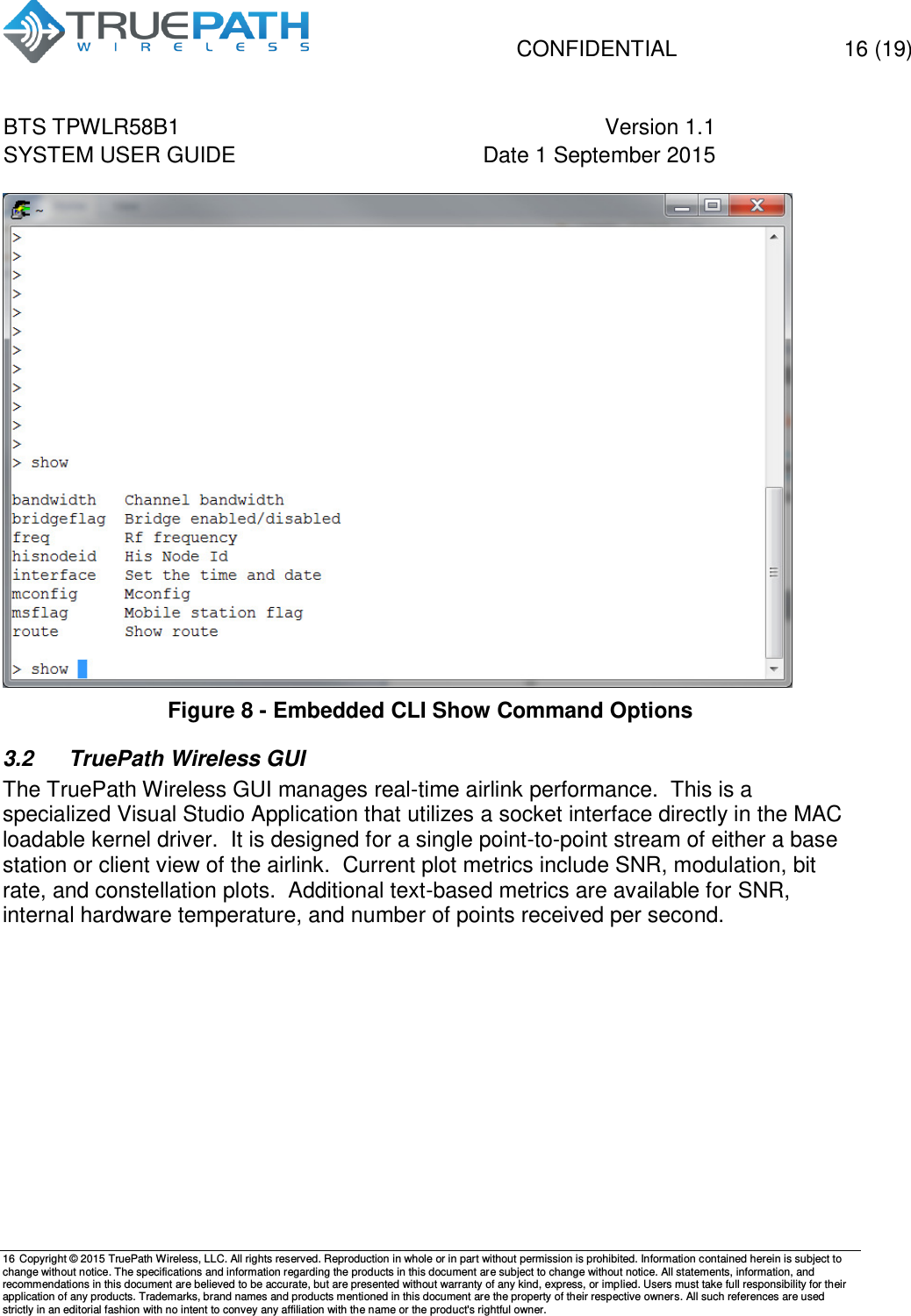
  CONFIDENTIAL  15 (19) BTS TPWLR58B1 Version 1.1   SYSTEM USER GUIDE Date 1 September 2015    15 Copyright © 2015 TruePath Wireless, LLC. All rights reserved. Reproduction in whole or in part without permission is prohibited. Information contained herein is subject to change without notice. The specifications and information regarding the products in this document are subject to change without notice. All statements, information, and recommendations in this document are believed to be accurate, but are presented without warranty of any kind, express, or implied. Users must take full responsibility for their application of any products. Trademarks, brand names and products mentioned in this document are the property of their respective owners. All such references are used strictly in an editorial fashion with no intent to convey any affiliation with the name or the product's rightful owner.     Figure 7 - Embedded CLI Set Command Options Concurrency to flash objects is handled through flash page locks. Most of the radio parameters require a reset after setting.  This keeps the overall flash write rate very low. 3.1.5.2  Show Each of the configuration options that are available in the ‘set’ command is also available as ‘show’ commands as shown in the figure below.
  CONFIDENTIAL  16 (19) BTS TPWLR58B1 Version 1.1   SYSTEM USER GUIDE Date 1 September 2015    16 Copyright © 2015 TruePath Wireless, LLC. All rights reserved. Reproduction in whole or in part without permission is prohibited. Information contained herein is subject to change without notice. The specifications and information regarding the products in this document are subject to change without notice. All statements, information, and recommendations in this document are believed to be accurate, but are presented without warranty of any kind, express, or implied. Users must take full responsibility for their application of any products. Trademarks, brand names and products mentioned in this document are the property of their respective owners. All such references are used strictly in an editorial fashion with no intent to convey any affiliation with the name or the product's rightful owner.     Figure 8 - Embedded CLI Show Command Options 3.2  TruePath Wireless GUI The TruePath Wireless GUI manages real-time airlink performance.  This is a specialized Visual Studio Application that utilizes a socket interface directly in the MAC loadable kernel driver.  It is designed for a single point-to-point stream of either a base station or client view of the airlink.  Current plot metrics include SNR, modulation, bit rate, and constellation plots.  Additional text-based metrics are available for SNR, internal hardware temperature, and number of points received per second.
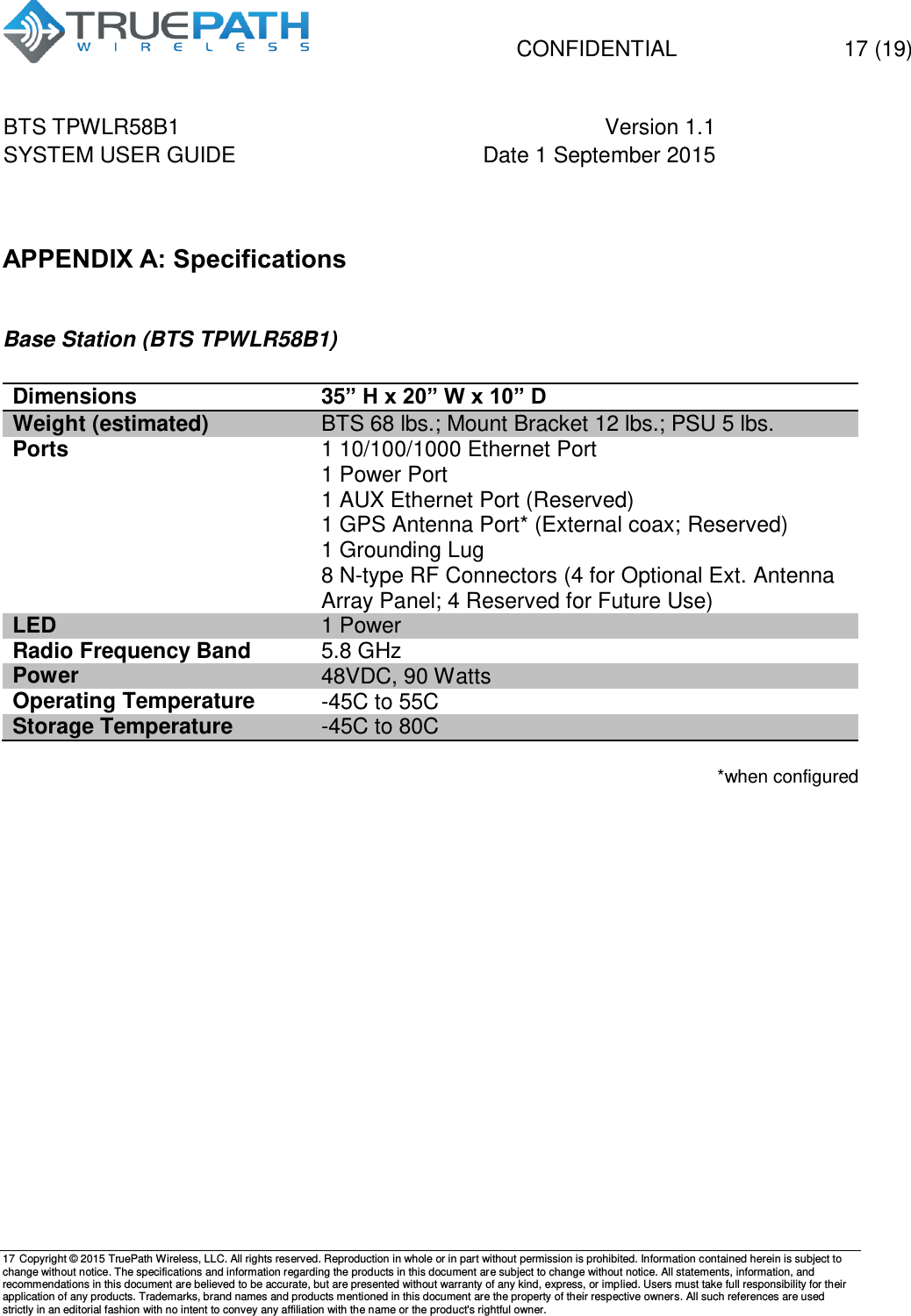
  CONFIDENTIAL  17 (19) BTS TPWLR58B1 Version 1.1   SYSTEM USER GUIDE Date 1 September 2015    17 Copyright © 2015 TruePath Wireless, LLC. All rights reserved. Reproduction in whole or in part without permission is prohibited. Information contained herein is subject to change without notice. The specifications and information regarding the products in this document are subject to change without notice. All statements, information, and recommendations in this document are believed to be accurate, but are presented without warranty of any kind, express, or implied. Users must take full responsibility for their application of any products. Trademarks, brand names and products mentioned in this document are the property of their respective owners. All such references are used strictly in an editorial fashion with no intent to convey any affiliation with the name or the product's rightful owner.     APPENDIX A: Specifications  Base Station (BTS TPWLR58B1)  Dimensions 35” H x 20” W x 10” D Weight (estimated) BTS 68 lbs.; Mount Bracket 12 lbs.; PSU 5 lbs. Ports 1 10/100/1000 Ethernet Port 1 Power Port 1 AUX Ethernet Port (Reserved) 1 GPS Antenna Port* (External coax; Reserved)  1 Grounding Lug 8 N-type RF Connectors (4 for Optional Ext. Antenna Array Panel; 4 Reserved for Future Use) LED 1 Power Radio Frequency Band   5.8 GHz Power 48VDC, 90 Watts Operating Temperature -45C to 55C Storage Temperature -45C to 80C  *when configured
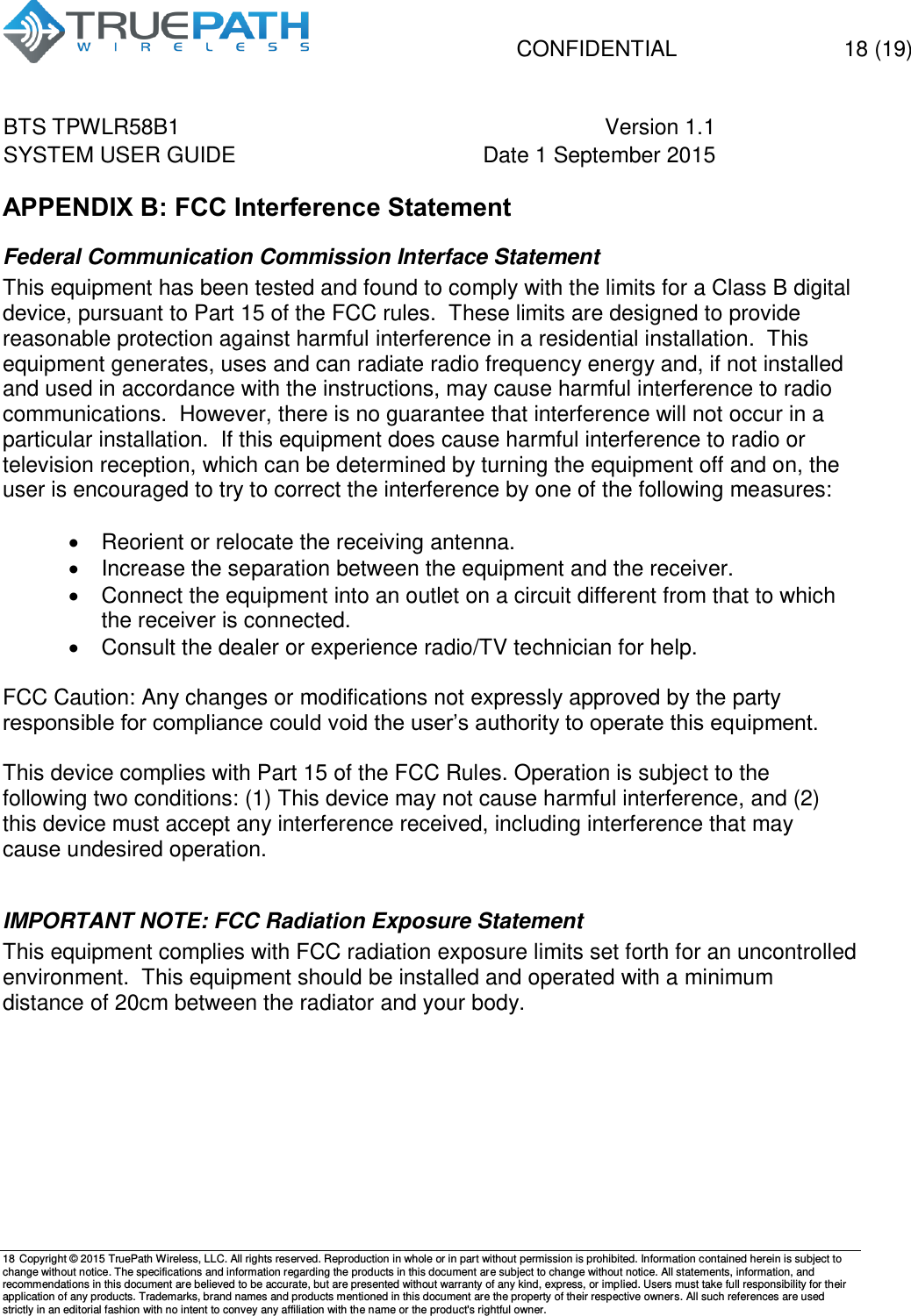
  CONFIDENTIAL  18 (19) BTS TPWLR58B1 Version 1.1   SYSTEM USER GUIDE Date 1 September 2015    18 Copyright © 2015 TruePath Wireless, LLC. All rights reserved. Reproduction in whole or in part without permission is prohibited. Information contained herein is subject to change without notice. The specifications and information regarding the products in this document are subject to change without notice. All statements, information, and recommendations in this document are believed to be accurate, but are presented without warranty of any kind, express, or implied. Users must take full responsibility for their application of any products. Trademarks, brand names and products mentioned in this document are the property of their respective owners. All such references are used strictly in an editorial fashion with no intent to convey any affiliation with the name or the product's rightful owner.    APPENDIX B: FCC Interference Statement Federal Communication Commission Interface Statement This equipment has been tested and found to comply with the limits for a Class B digital device, pursuant to Part 15 of the FCC rules.  These limits are designed to provide reasonable protection against harmful interference in a residential installation.  This equipment generates, uses and can radiate radio frequency energy and, if not installed and used in accordance with the instructions, may cause harmful interference to radio communications.  However, there is no guarantee that interference will not occur in a particular installation.  If this equipment does cause harmful interference to radio or television reception, which can be determined by turning the equipment off and on, the user is encouraged to try to correct the interference by one of the following measures:   Reorient or relocate the receiving antenna.   Increase the separation between the equipment and the receiver.   Connect the equipment into an outlet on a circuit different from that to which the receiver is connected.   Consult the dealer or experience radio/TV technician for help.  FCC Caution: Any changes or modifications not expressly approved by the party responsible for compliance could void the user’s authority to operate this equipment.  This device complies with Part 15 of the FCC Rules. Operation is subject to the following two conditions: (1) This device may not cause harmful interference, and (2) this device must accept any interference received, including interference that may cause undesired operation.  IMPORTANT NOTE: FCC Radiation Exposure Statement This equipment complies with FCC radiation exposure limits set forth for an uncontrolled environment.  This equipment should be installed and operated with a minimum distance of 20cm between the radiator and your body.
  CONFIDENTIAL  19 (19) BTS TPWLR58B1 Version 1.1   SYSTEM USER GUIDE Date 1 September 2015    19 Copyright © 2015 TruePath Wireless, LLC. All rights reserved. Reproduction in whole or in part without permission is prohibited. Information contained herein is subject to change without notice. The specifications and information regarding the products in this document are subject to change without notice. All statements, information, and recommendations in this document are believed to be accurate, but are presented without warranty of any kind, express, or implied. Users must take full responsibility for their application of any products. Trademarks, brand names and products mentioned in this document are the property of their respective owners. All such references are used strictly in an editorial fashion with no intent to convey any affiliation with the name or the product's rightful owner.    APPENDIX C: IC Interference Statement  This device complies with Industry Canada license-exempt RSS standard(s). Operation is subject to the following two conditions:  1. This device may not cause harmful interference; 2. This device must accept any interference received, including interference that may cause undesired operation of the device.  Cet appareil est conforme à Industrie Canada une licence standard RSS exonérés (s). Son fonctionnement est soumis aux deux conditions suivantes:  1. Cet appareil ne doit pas provoquer d'interférences 2. Cet appareil doit accepter toute interférence reçue, y compris les interférences pouvant provoquer un fonctionnement indésirable de l'appareil.  APPENDIX D: Support/Contact Information  TruePath Wireless Support TruePath Wireless Support Engineers are located in the U.S. and are dedicated to helping customers resolve issues as quickly as possible.   Please email all issues and requests to:  Email: support@truepathwireless.com       2860 Zanker Way, Suite 210 San Jose, CA 95134 USA © 2015 TruePath Wireless, LLC

Navigation menu