Tsuen Shing 200805 Two Way Radio with GMRS and FRS User Manual

Tsuen Shing Enterprises Limited Two Way Radio with GMRS and FRS

User Manual

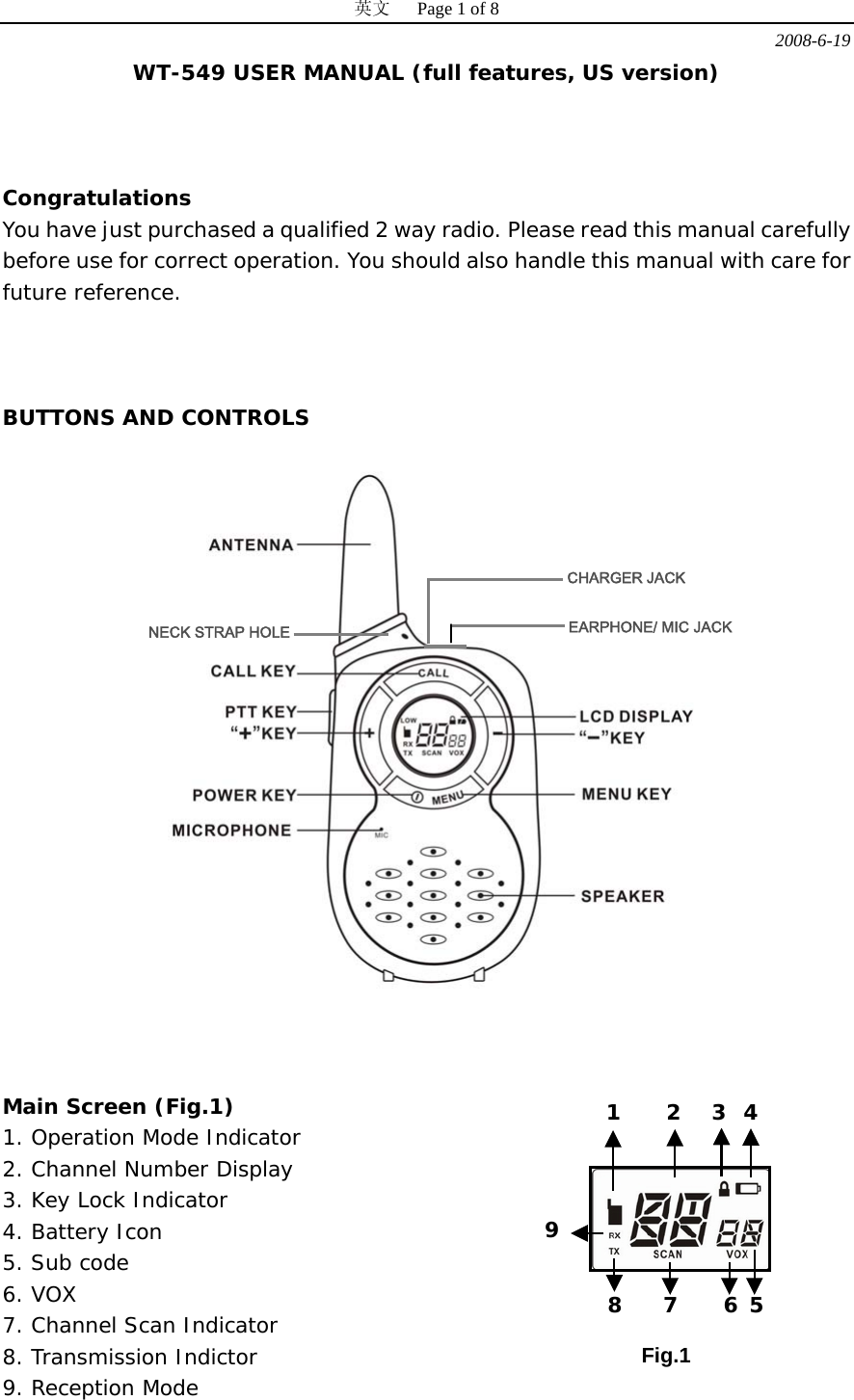
英文   Page 1 of 8 2008-6-19 WT-549 USER MANUAL (full features, US version)    Congratulations You have just purchased a qualified 2 way radio. Please read this manual carefully before use for correct operation. You should also handle this manual with care for future reference.     BUTTONS AND CONTROLS      Main Screen (Fig.1) 1. Operation Mode Indicator 2. Channel Number Display 3. Key Lock Indicator 4. Battery Icon 5. Sub code 6. VOX 7. Channel Scan Indicator 8. Transmission Indictor 9. Reception Mode   CHARGER JACK EARPHONE/ MIC JACK NECK STRAP HOLEFig.1 1 2 3 4 5 6 7 8 9
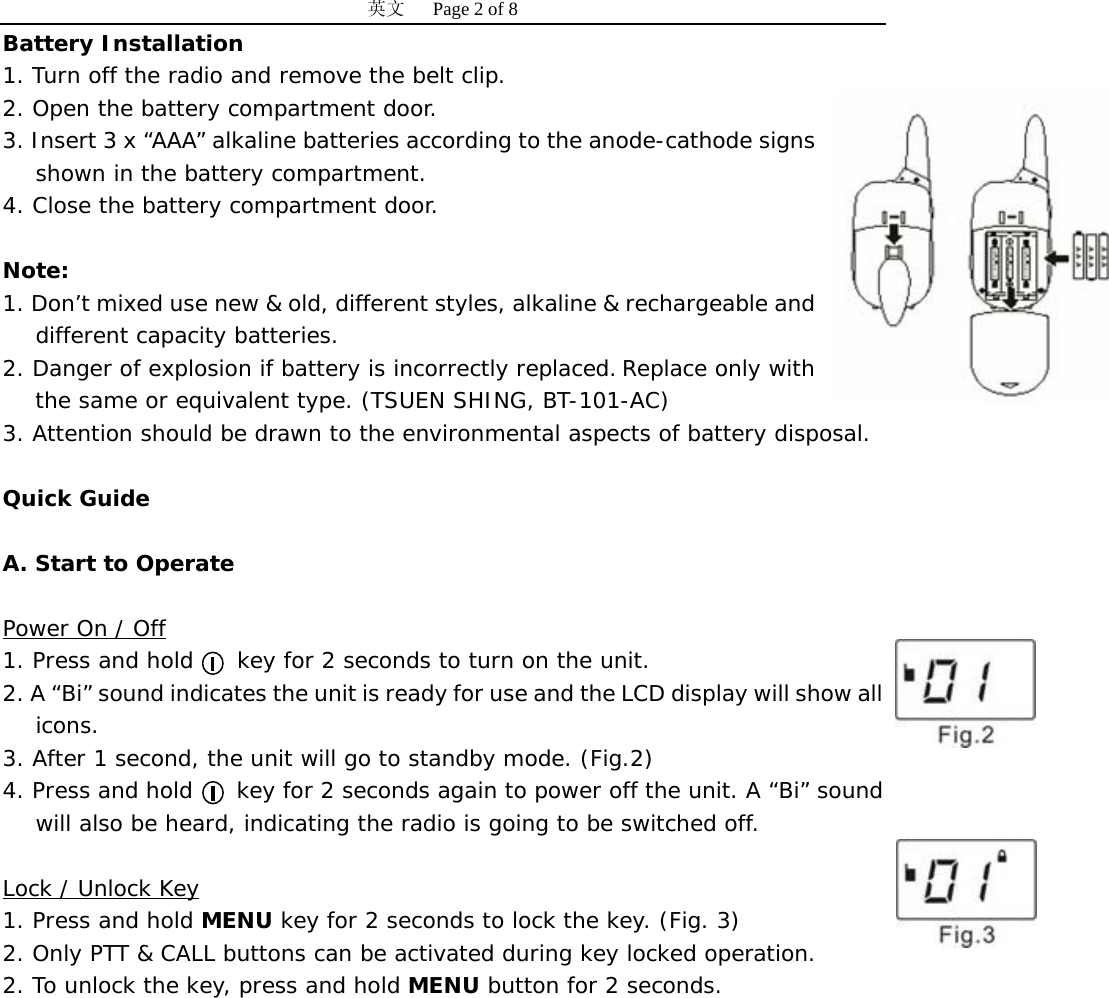
英文   Page 2 of 8 Battery Installation 1. Turn off the radio and remove the belt clip. 2. Open the battery compartment door. 3. Insert 3 x “AAA” alkaline batteries according to the anode-cathode signs shown in the battery compartment. 4. Close the battery compartment door.   Note:  1. Don’t mixed use new & old, different styles, alkaline & rechargeable and different capacity batteries. 2. Danger of explosion if battery is incorrectly replaced. Replace only with the same or equivalent type. (TSUEN SHING, BT-101-AC) 3. Attention should be drawn to the environmental aspects of battery disposal.  Quick Guide  A. Start to Operate  UPower On / Off 1. Press and hold    key for 2 seconds to turn on the unit. 2. A “Bi” sound indicates the unit is ready for use and the LCD display will show all icons. 3. After 1 second, the unit will go to standby mode. (Fig.2)  4. Press and hold    key for 2 seconds again to power off the unit. A “Bi” sound will also be heard, indicating the radio is going to be switched off.  ULock / Unlock Key 1. Press and hold MENU key for 2 seconds to lock the key. (Fig. 3) 2. Only PTT & CALL buttons can be activated during key locked operation. 2. To unlock the key, press and hold MENU button for 2 seconds.
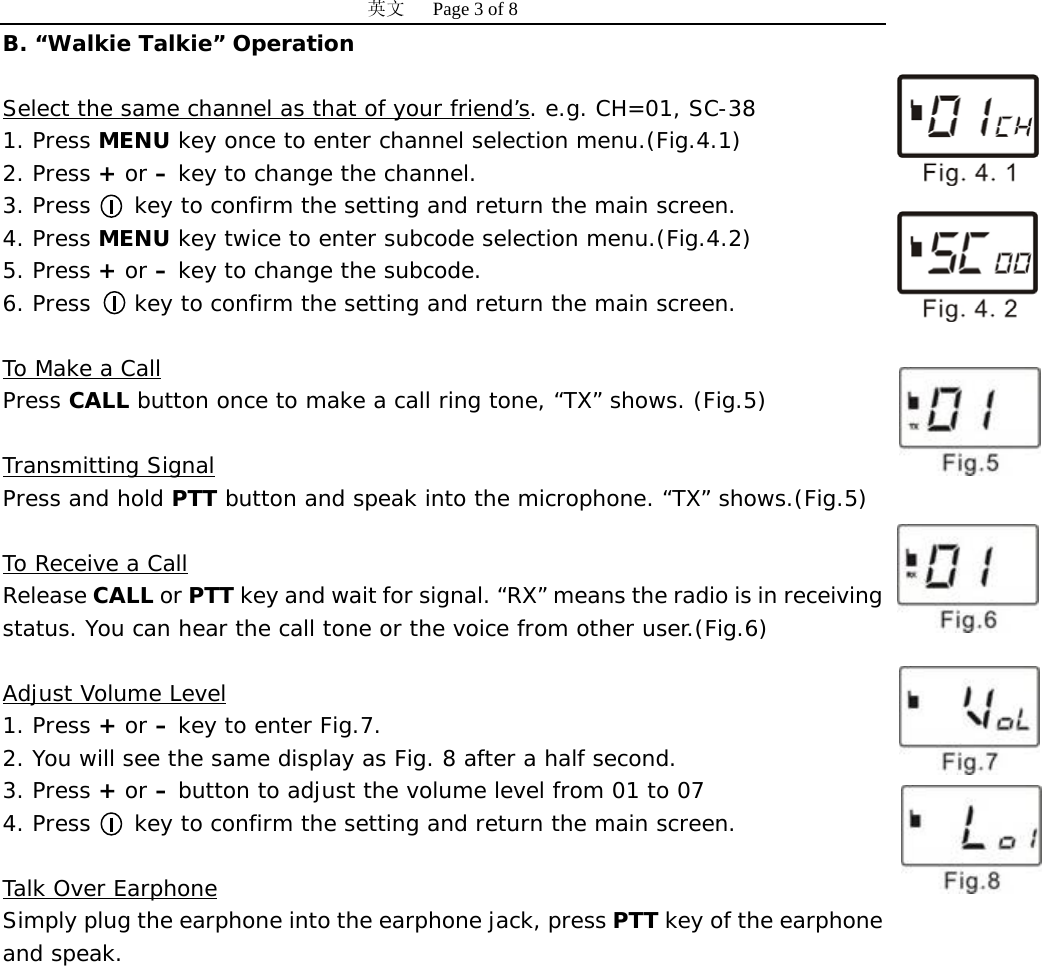
英文   Page 3 of 8 B. “Walkie Talkie” Operation  USelect the same channel as that of your friend’sU. e.g. CH=01, SC-38 1. Press MENU key once to enter channel selection menu.(Fig.4.1) 2. Press + or – key to change the channel.  3. Press    key to confirm the setting and return the main screen. 4. Press MENU key twice to enter subcode selection menu.(Fig.4.2) 5. Press + or – key to change the subcode. 6. Press    key to confirm the setting and return the main screen.  UTo Make a Call Press CALL button once to make a call ring tone, “TX” shows. (Fig.5)   UTransmitting Signal Press and hold PTT button and speak into the microphone. “TX” shows.(Fig.5)  UTo Receive a Call Release CALL or PTT key and wait for signal. “RX” means the radio is in receiving status. You can hear the call tone or the voice from other user.(Fig.6)   UAdjust Volume Level 1. Press + or – key to enter Fig.7.  2. You will see the same display as Fig. 8 after a half second. 3. Press + or – button to adjust the volume level from 01 to 07 4. Press    key to confirm the setting and return the main screen.  UTalk Over Earphone Simply plug the earphone into the earphone jack, press PTT key of the earphone and speak.
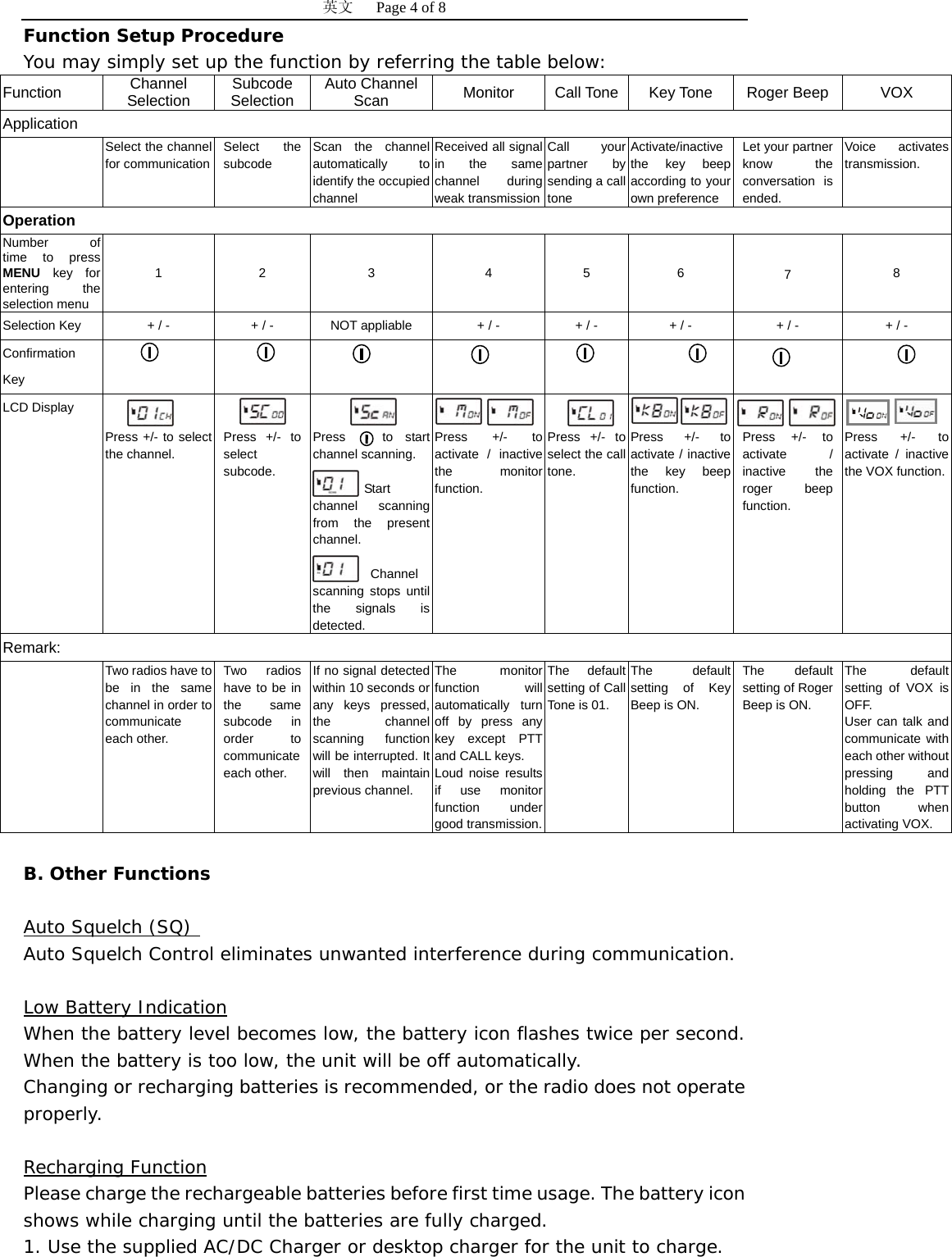
英文   Page 4 of 8 Function Setup Procedure You may simply set up the function by referring the table below: Function  Channel Selection  Subcode Selection  Auto Channel Scan  Monitor  Call Tone  Key Tone  Roger Beep  VOX Application  Select the channel for communication Select the subcode Scan the channel automatically to identify the occupied channel Received all signal in the same channel during weak transmissionCall your partner by sending a call tone Activate/inactive the key beep according to your own preference   Let your partner know the conversation is ended. Voice activates transmission. Operation Number of time to press MENU key for entering the selection menu 1 2  3  4 5 6  7  8 Selection Key  + / -  + / -  NOT appliable  + / -  + / -  + / -  + / -  + / - Confirmation Key          LCD Display    Press +/- to select the channel.   Press +/- to select subcode.   Press   to start channel scanning.  Start channel scanning from the present channel.  Channel scanning stops until the signals is detected.   Press +/- to activate / inactive the monitor function.   Press +/- to select the call tone.   Press +/- to activate / inactive the key beep function.   Press +/- to activate / inactive the roger beep function.   Press +/- to activate / inactive the VOX function.Remark:  Two radios have to be in the same channel in order to communicate each other. Two radios have to be in the same subcode in order to communicate each other. If no signal detected within 10 seconds or any keys pressed, the channel scanning function will be interrupted. It will then maintain previous channel. The monitor function will automatically turn off by press any key except PTT and CALL keys. Loud noise results if use monitor function under good transmission.The default setting of Call Tone is 01. The default setting of Key Beep is ON. The default setting of Roger Beep is ON. The default setting of VOX is OFF. User can talk and communicate with each other without pressing and holding the PTT button when activating VOX.    B. Other Functions  UAuto Squelch (SQ)  Auto Squelch Control eliminates unwanted interference during communication.  ULow Battery Indication When the battery level becomes low, the battery icon flashes twice per second. When the battery is too low, the unit will be off automatically.  Changing or recharging batteries is recommended, or the radio does not operate properly.  URecharging Function Please charge the rechargeable batteries before first time usage. The battery icon shows while charging until the batteries are fully charged.  1. Use the supplied AC/DC Charger or desktop charger for the unit to charge.
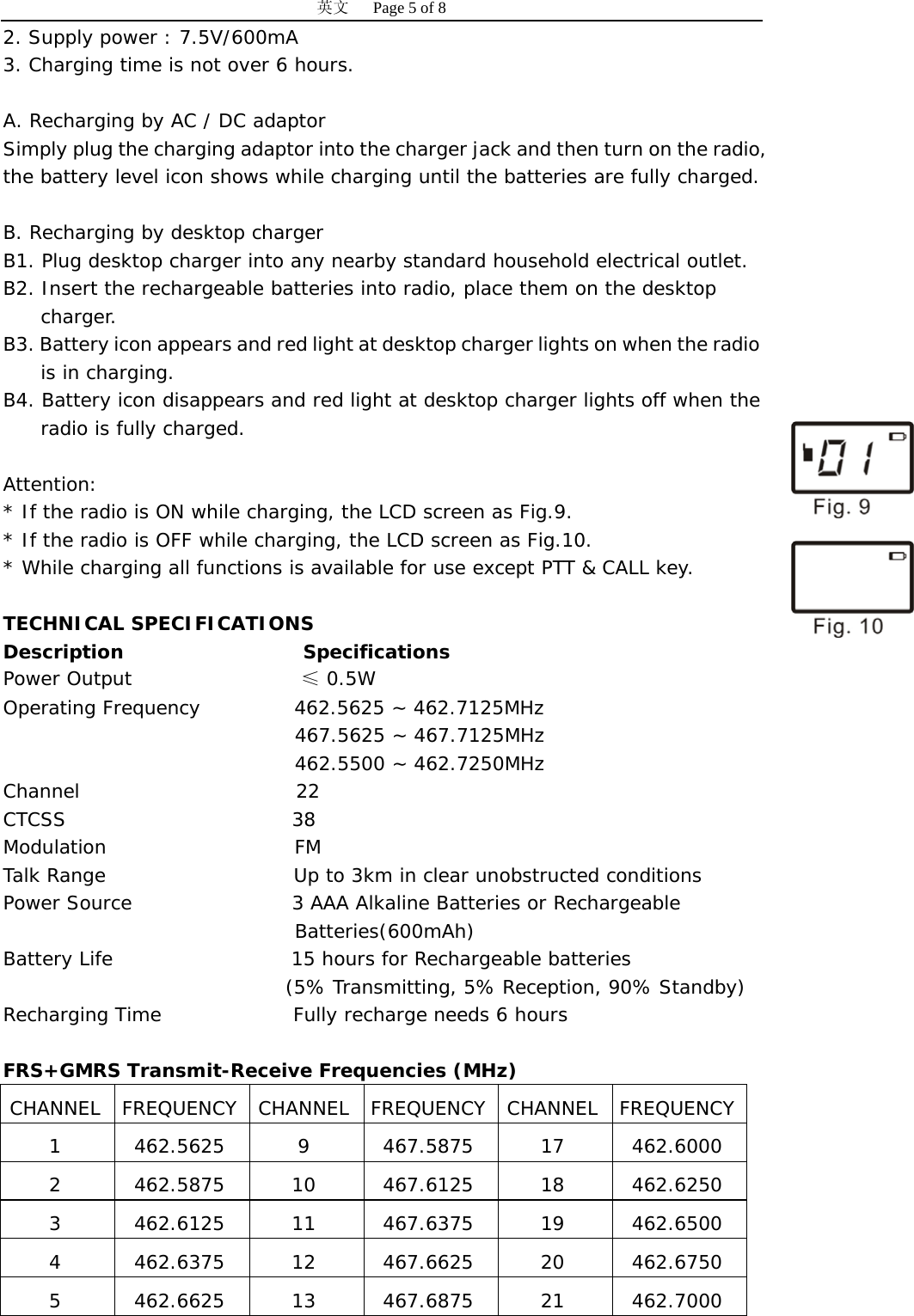
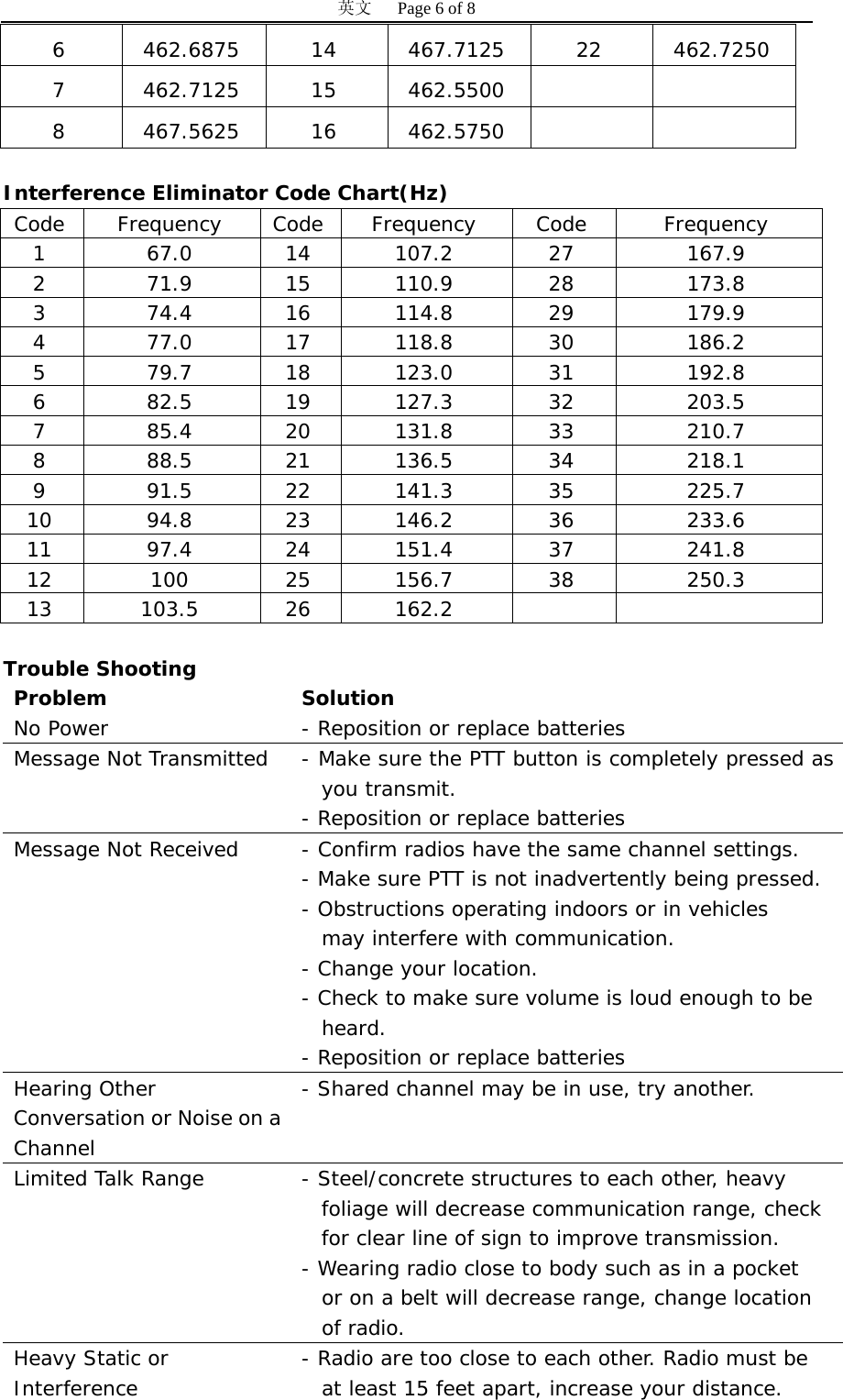
英文   Page 5 of 8 2. Supply power : 7.5V/600mA 3. Charging time is not over 6 hours.  A. Recharging by AC / DC adaptor Simply plug the charging adaptor into the charger jack and then turn on the radio, the battery level icon shows while charging until the batteries are fully charged.  B. Recharging by desktop charger B1. Plug desktop charger into any nearby standard household electrical outlet. B2. Insert the rechargeable batteries into radio, place them on the desktop  charger. B3. Battery icon appears and red light at desktop charger lights on when the radio is in charging. B4. Battery icon disappears and red light at desktop charger lights off when the radio is fully charged.  Attention: * If the radio is ON while charging, the LCD screen as Fig.9.   * If the radio is OFF while charging, the LCD screen as Fig.10. * While charging all functions is available for use except PTT & CALL key.  TECHNICAL SPECIFICATIONS Description                   Specifications Power Output                  ≤ 0.5W    Operating Frequency          462.5625 ~ 462.7125MHz 467.5625 ~ 467.7125MHz 462.5500 ~ 462.7250MHz Channel                       22 CTCSS                        38 Modulation                    FM Talk Range                    Up to 3km in clear unobstructed conditions Power Source                 3 AAA Alkaline Batteries or Rechargeable  Batteries(600mAh) Battery Life                   15 hours for Rechargeable batteries                               (5% Transmitting, 5% Reception, 90% Standby) Recharging Time              Fully recharge needs 6 hours  FRS+GMRS Transmit-Receive Frequencies (MHz) CHANNEL FREQUENCY CHANNEL FREQUENCY CHANNEL FREQUENCY 1 462.5625 9 467.5875 17 462.6000 2  462.5875 10 467.6125 18 462.6250 3  462.6125 11 467.6375 19 462.6500 4  462.6375 12 467.6625 20 462.6750 5  462.6625 13 467.6875 21 462.7000
英文   Page 6 of 8 6  462.6875 14 467.7125 22 462.7250 7  462.7125 15 462.5500     8  467.5625 16 462.5750      Interference Eliminator Code Chart(Hz)  0BTrouble Shooting Problem Solution No Power  - Reposition or replace batteries Message Not Transmitted  - Make sure the PTT button is completely pressed as you transmit. - Reposition or replace batteries  Message Not Received  - Confirm radios have the same channel settings. - Make sure PTT is not inadvertently being pressed. - Obstructions operating indoors or in vehicles    may interfere with communication. - Change your location.  - Check to make sure volume is loud enough to be    heard. - Reposition or replace batteries Hearing Other  Conversation or Noise on a Channel - Shared channel may be in use, try another. Limited Talk Range  - Steel/concrete structures to each other, heavy foliage will decrease communication range, check for clear line of sign to improve transmission. - Wearing radio close to body such as in a pocket   or on a belt will decrease range, change location    of radio. Heavy Static or  Interference  - Radio are too close to each other. Radio must be    at least 15 feet apart, increase your distance. Code Frequency Code Frequency  Code  Frequency 1 67.0 14 107.2 27  167.9 2 71.9 15 110.9 28  173.8 3 74.4 16 114.8 29  179.9 4 77.0 17 118.8 30  186.2 5 79.7 18 123.0 31  192.8 6 82.5 19 127.3 32  203.5 7 85.4 20 131.8 33  210.7 8 88.5 21 136.5 34  218.1 9 91.5 22 141.3 35  225.7 10 94.8 23 146.2 36  233.6 11 97.4 24 151.4 37  241.8 12 100 25 156.7 38  250.3 13 103.5 26 162.2
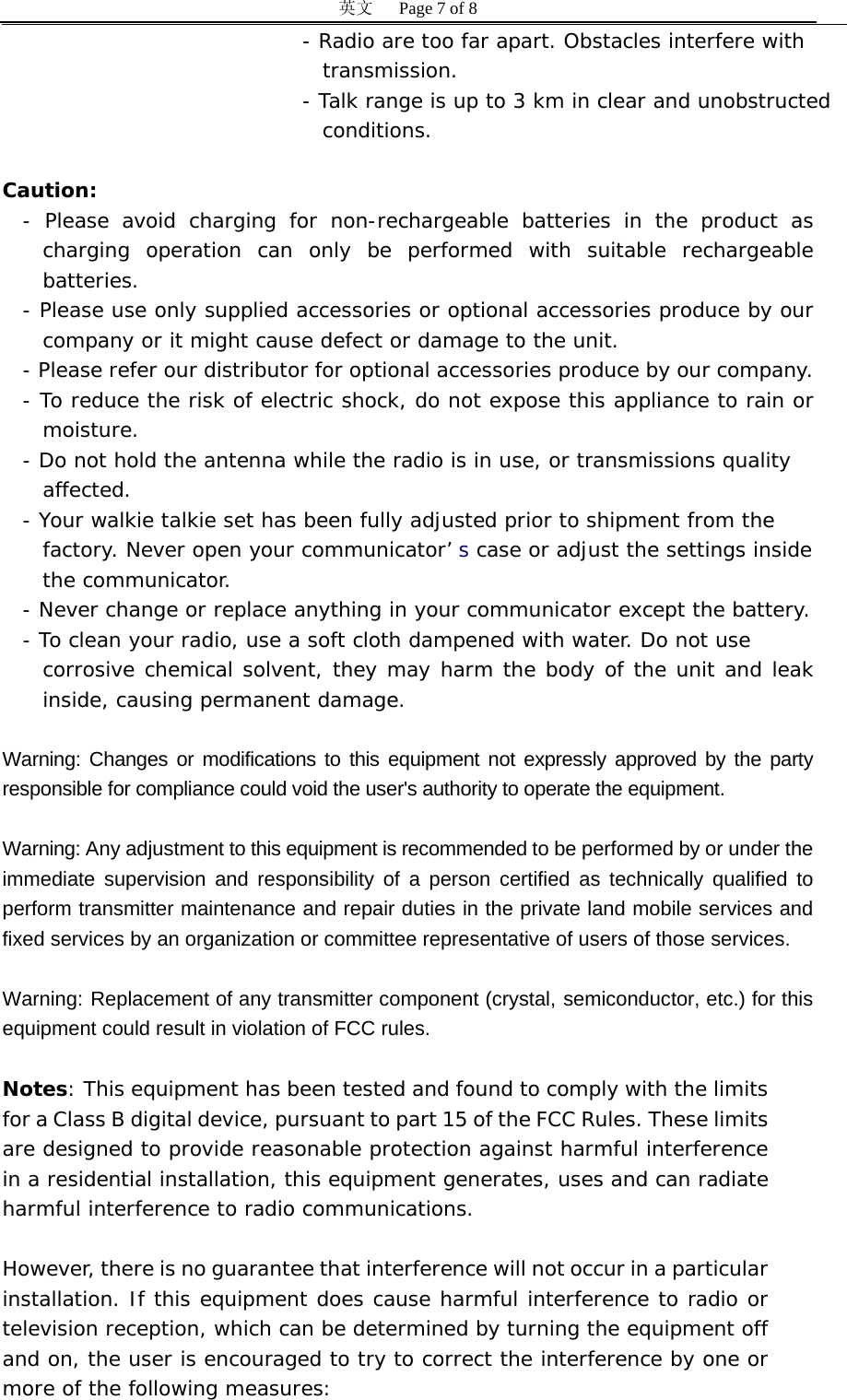
英文   Page 7 of 8 - Radio are too far apart. Obstacles interfere with    transmission. - Talk range is up to 3 km in clear and unobstructed  conditions.  Caution: - Please avoid charging for non-rechargeable batteries in the product as charging operation can only be performed with suitable rechargeable batteries. - Please use only supplied accessories or optional accessories produce by our company or it might cause defect or damage to the unit.  - Please refer our distributor for optional accessories produce by our company. - To reduce the risk of electric shock, do not expose this appliance to rain or moisture. - Do not hold the antenna while the radio is in use, or transmissions quality  affected. - Your walkie talkie set has been fully adjusted prior to shipment from the  factory. Never open your communicator’ s case or adjust the settings inside  the communicator. - Never change or replace anything in your communicator except the battery. - To clean your radio, use a soft cloth dampened with water. Do not use  corrosive chemical solvent, they may harm the body of the unit and leak inside, causing permanent damage.  Warning: Changes or modifications to this equipment not expressly approved by the party responsible for compliance could void the user's authority to operate the equipment.   Warning: Any adjustment to this equipment is recommended to be performed by or under the immediate supervision and responsibility of a person certified as technically qualified to perform transmitter maintenance and repair duties in the private land mobile services and fixed services by an organization or committee representative of users of those services.   Warning: Replacement of any transmitter component (crystal, semiconductor, etc.) for this equipment could result in violation of FCC rules.  Notes: This equipment has been tested and found to comply with the limits for a Class B digital device, pursuant to part 15 of the FCC Rules. These limits are designed to provide reasonable protection against harmful interference in a residential installation, this equipment generates, uses and can radiate harmful interference to radio communications.   However, there is no guarantee that interference will not occur in a particular installation. If this equipment does cause harmful interference to radio or television reception, which can be determined by turning the equipment off and on, the user is encouraged to try to correct the interference by one or more of the following measures:
英文   Page 8 of 8 - Reorient or relocate the receiving antenna. - Increase the separation between the equipment and receiver. - Connect the equipment into an outlet on a circuit different from that to which the receiver is connected. - Consult the dealer or an experienced radio/TV technician for help.  Before any station transmits on any channel authorized in the GMRS from any points (a geographical location) within or over the territorial limits of any area, where radio services are regulated by the FCC, the responsible party must obtain the license (a written authorization from the FCC for a GMRS system).     To apply for a GMRS system license, user may file online through the Univers al Licensing system (ULS), or file FCC Form 605 manually.   Additional GMRS information may be obtained from any of the following sources:  (a) FCC National Call Center at 1-888-225-5322.   (b) FCC World Wide Web homepage:   HUhttp://www.fcc.gov/wtb/prsUH. (c) In writing, to the FCC, Attention: GMRS, 1270 Fairfield Road, Gettysburg, PA 17325-7245.    The licensee is responsible for the proper operation of the GMRS system at all times. The licensee is also responsible for the appointment of a station operator. The licensee may limit the use of repeater to only certain user stations.  Your wireless hand-held portable transceiver contains a low power transmitter. When the Push-to-Talk (PTT) button is pushed it sends out radio frequency (RF) signals. The device is authorized to operate at a duty factor not to exceed 50%. In August 1996, the Federal Communications Commissions (FCC) adopted RF exposure guidelines with safety levels for hand-held wireless devices.   CAUTION: To maintain compliance with the FCC's RF exposure guidelines hold the transmitter and antenna at least 1 inch (2.5 centimeters) from your face and speak in a normal voice, with the antenna pointed up and away from the face. If you wear the handset on your body while using the headset accessory, use only the supplied belt clip for this product and when transmitting, take it out of the belt to ensure that the antenna is at least 1 inch (2.5 centimeters) from your body.   Use only the supplied antenna. Unauthorized antennas, modifications, or attachments could damage the transmitter and may violate FCC regulations.  This device complies with part 15 of the FCC Rules. Operation is subject to the following two conditions: (1) This device may not cause harmful interference, and (2) this device must accept any interference received, including interference that may cause undesired operation.

Navigation menu