Tzone Digital Technology TZ-TT18 Temperature&humidity; Transmitter User Manual Users manual

Tzone Digital Technology Co.,LTD Temperature&humidity; Transmitter Users manual

Users manual

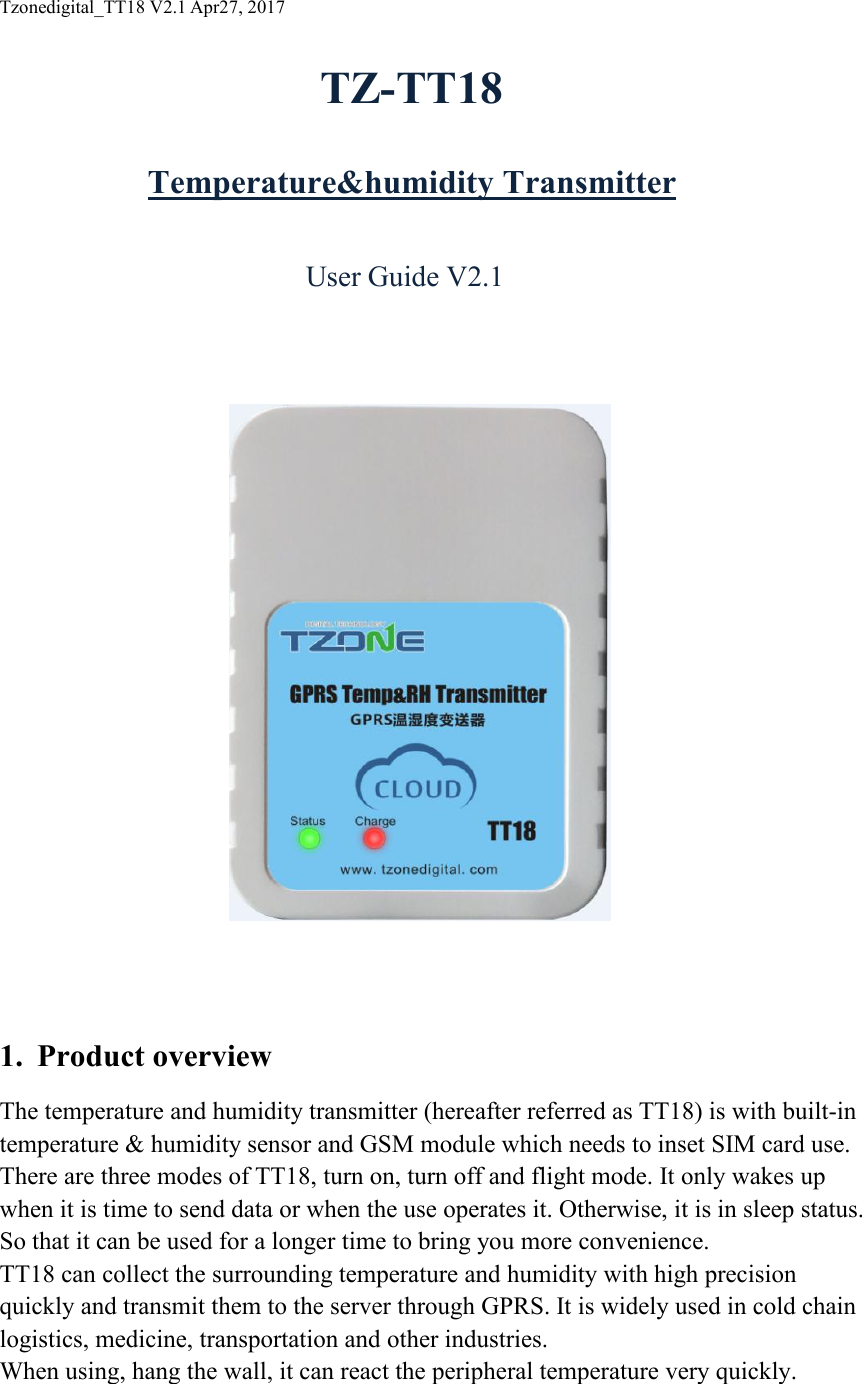
Tzonedigital_TT18 V2.1 Apr27, 2017TZ-TT18Temperature&humidity TransmitterUser Guide V2.11. Product overviewThe temperature and humidity transmitter (hereafter referred as TT18) is with built-intemperature & humidity sensor and GSM module which needs to inset SIM card use.There are three modes of TT18, turn on, turn off and flight mode. It only wakes upwhen it is time to send data or when the use operates it. Otherwise, it is in sleep status.So that it can be used for a longer time to bring you more convenience.TT18 can collect the surrounding temperature and humidity with high precisionquickly and transmit them to the server through GPRS. It is widely used in cold chainlogistics, medicine, transportation and other industries.When using, hang the wall, it can react the peripheral temperature very quickly.
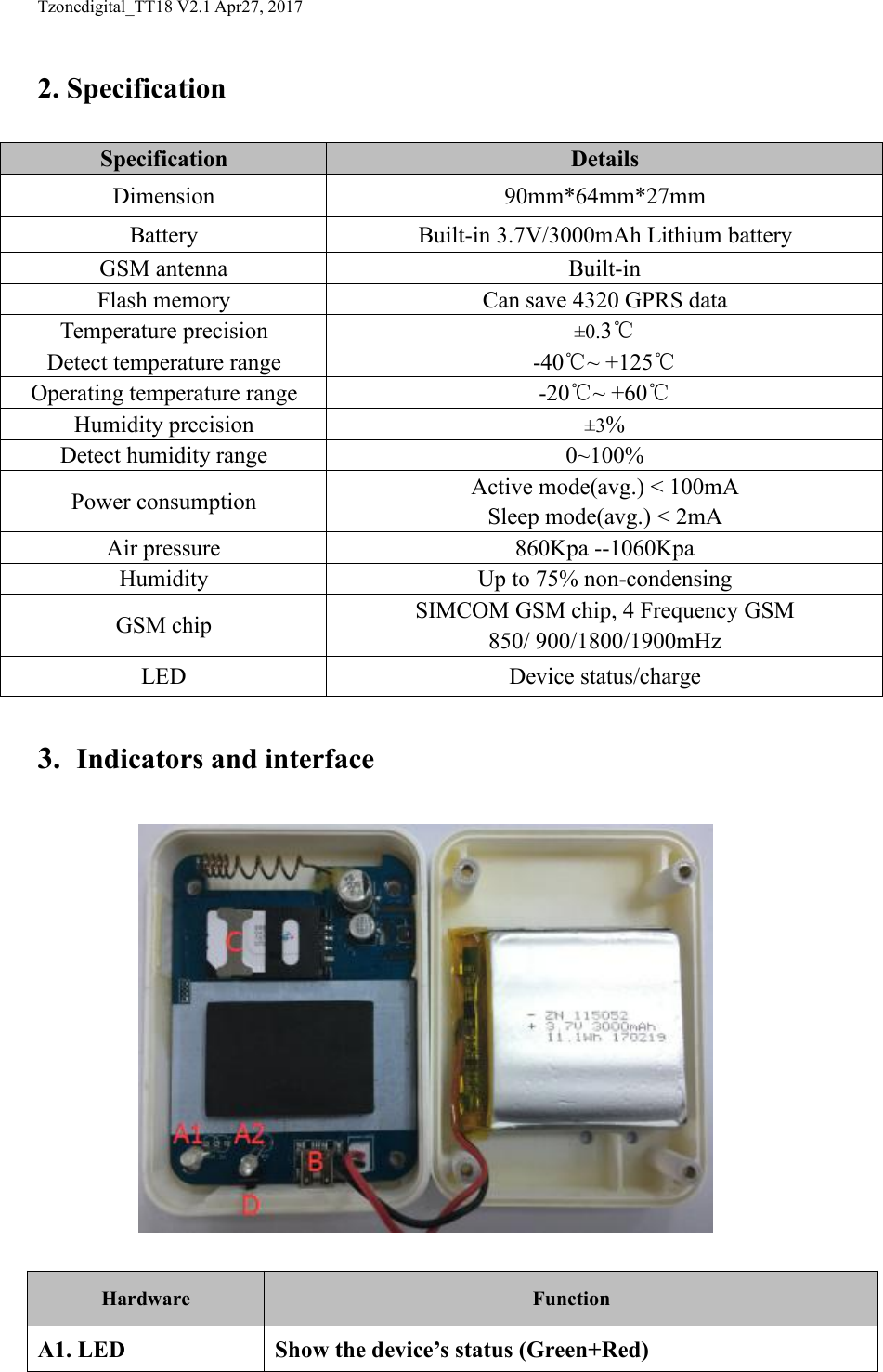
Tzonedigital_TT18 V2.1 Apr27, 20172. Specification3. Indicators and interfaceHardwareFunctionA1. LEDShow the device’s status (Green+Red)SpecificationDetailsDimension90mm*64mm*27mmBatteryBuilt-in 3.7V/3000mAh Lithium batteryGSM antennaBuilt-inFlash memoryCan save 4320 GPRS dataTemperature precision±0.3℃Detect temperature range-40℃~ +125℃Operating temperature range-20℃~ +60℃Humidity precision±3%Detect humidity range0~100%Power consumptionActive mode(avg.) < 100mASleep mode(avg.) < 2mAAir pressure860Kpa --1060KpaHumidityUp to 75% non-condensingGSM chipSIMCOM GSM chip, 4 Frequency GSM850/ 900/1800/1900mHzLEDDevice status/charge
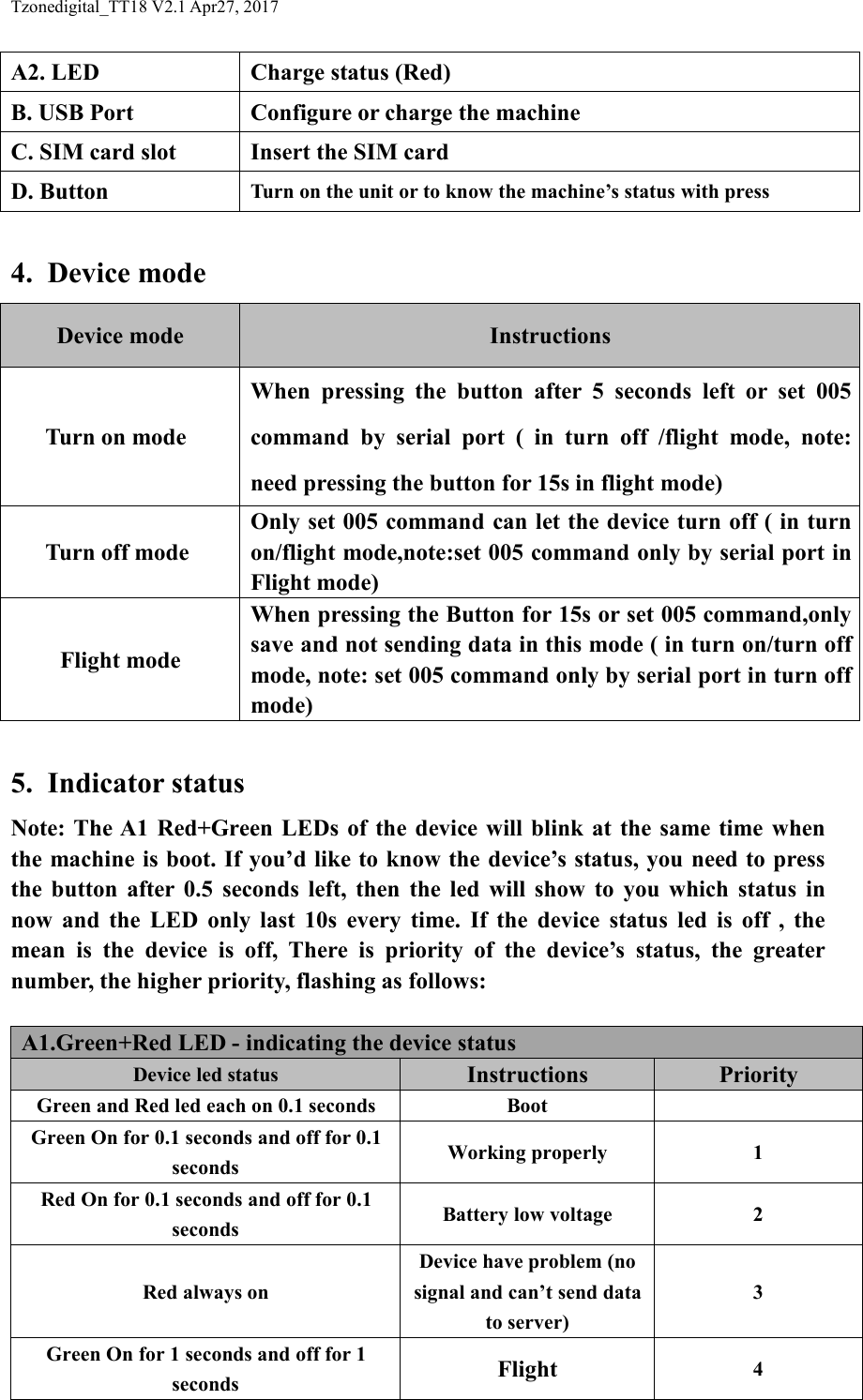
Tzonedigital_TT18 V2.1 Apr27, 2017A2. LEDCharge status (Red)B. USB PortConfigure or charge the machineC. SIM card slotInsert the SIM cardD. ButtonTurn on the unit or to know the machine’s status with press4. Device modeDevice modeInstructionsTurn on modeWhen pressing the button after 5 seconds left or set 005command by serial port ( in turn off /flight mode, note:need pressing the button for 15s in flight mode)Turn off modeOnly set 005 command can let the device turn off ( in turnon/flight mode,note:set 005 command only by serial port inFlight mode)Flight modeWhen pressing the Button for 15s or set 005 command,onlysave and not sending data in this mode ( in turn on/turn offmode, note: set 005 command only by serial port in turn offmode)5. Indicator statusNote: The A1 Red+Green LEDs of the device will blink at the same time whenthe machine is boot. If you’d like to know the device’s status, you need to pressthe button after 0.5 seconds left, then the led will show to you which status innow and the LED only last 10s every time. If the device status led is off , themean is the device is off, There is priority of the device’s status, the greaternumber, the higher priority, flashing as follows:A1.Green+Red LED - indicating the device statusDevice led statusInstructionsPriorityGreen and Red led each on 0.1 secondsBootGreen On for 0.1 seconds and off for 0.1secondsWorking properly1Red On for 0.1 seconds and off for 0.1secondsBattery low voltage2Red always onDevice have problem (nosignal and can’t send datato server)3Green On for 1 seconds and off for 1secondsFlight4
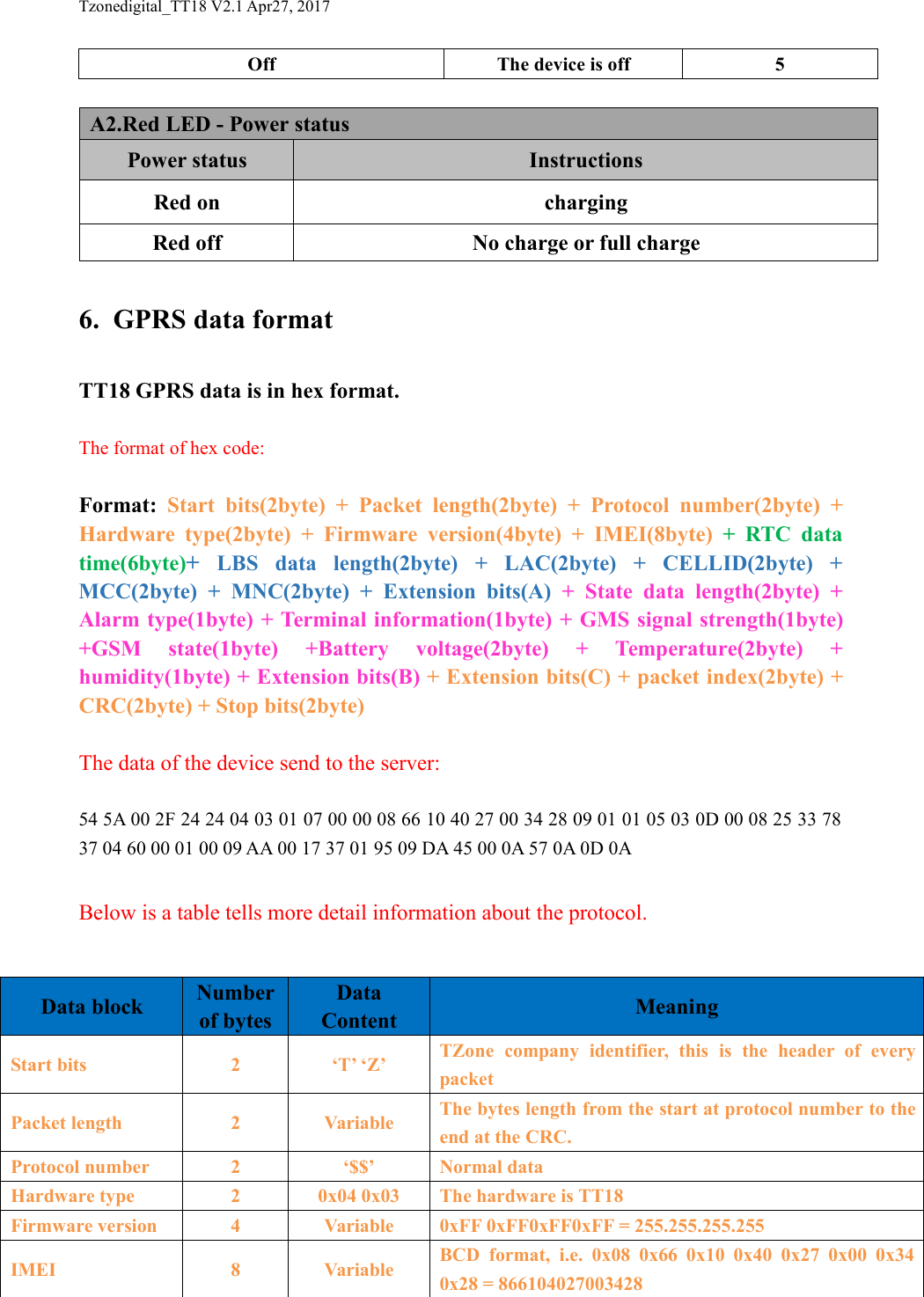
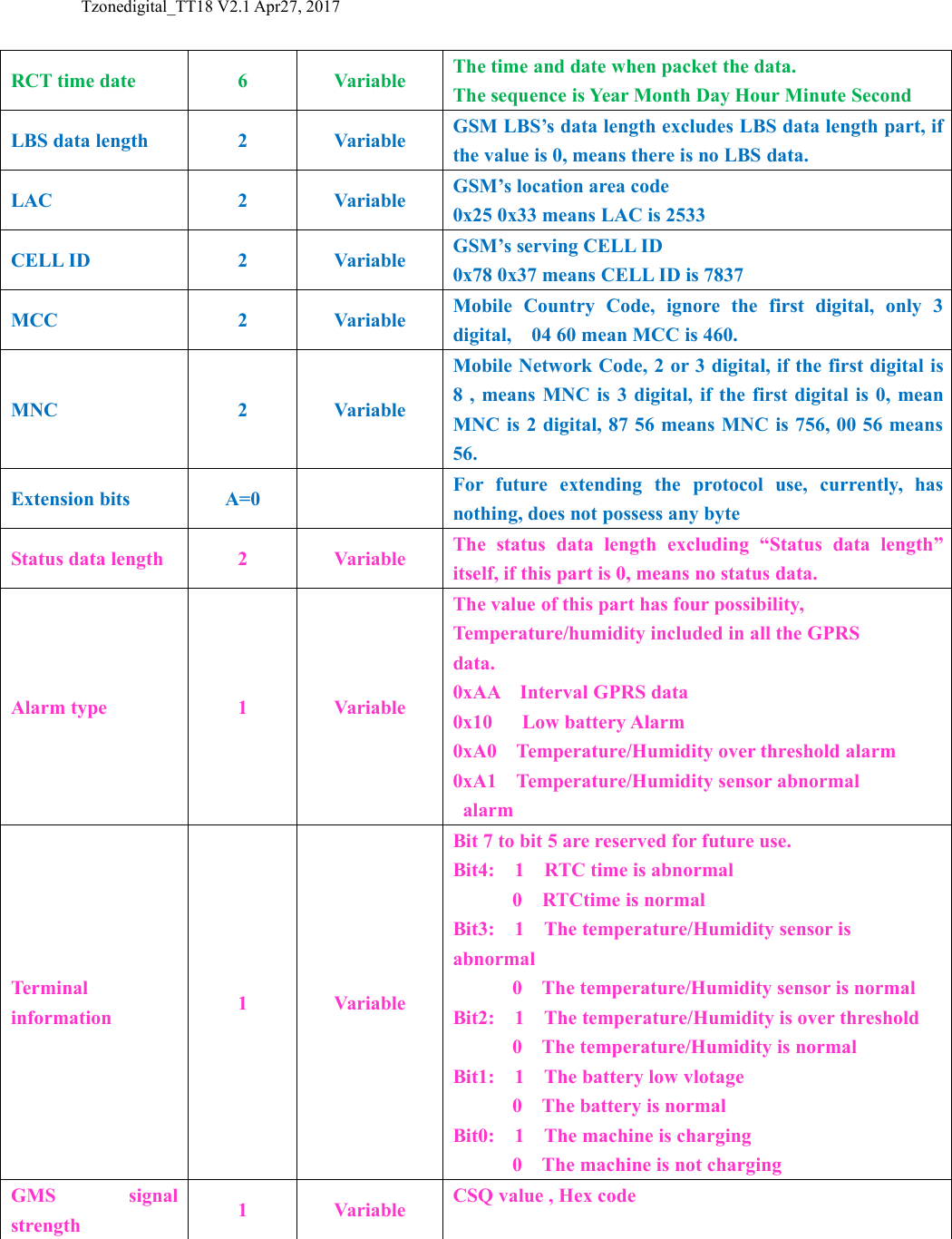
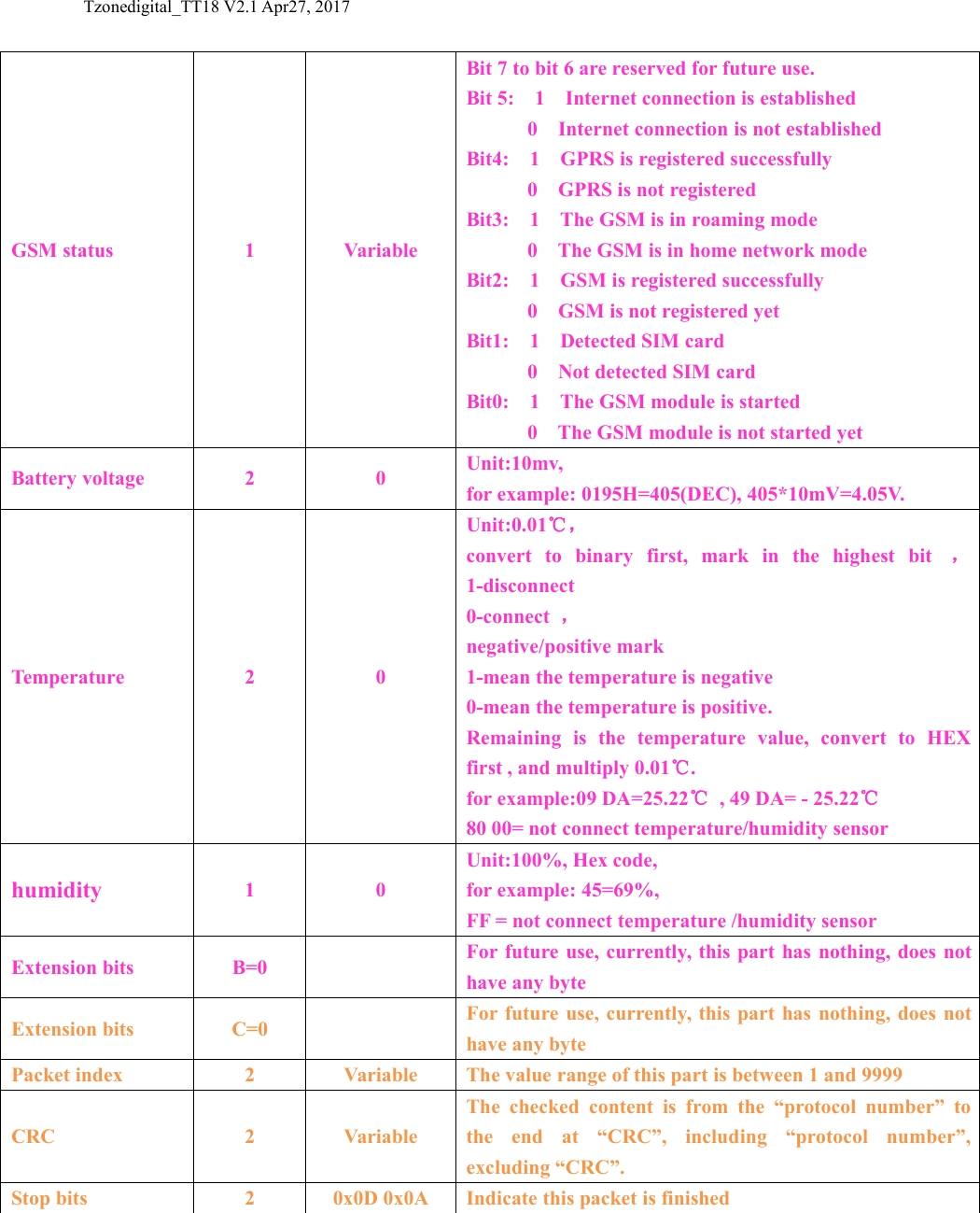
Tzonedigital_TT18 V2.1 Apr27, 2017OffThe device is off5A2.Red LED - Power statusPower statusInstructionsRed onchargingRed offNo charge or full charge6. GPRS data formatTT18 GPRS data is in hex format.The format of hex code:Format: Start bits(2byte) + Packet length(2byte) + Protocol number(2byte) +Hardware type(2byte) + Firmware version(4byte) + IMEI(8byte) + RTC datatime(6byte)+LBS data length(2byte) + LAC(2byte) + CELLID(2byte) +MCC(2byte) + MNC(2byte) + Extension bits(A) + State data length(2byte) +Alarm type(1byte) + Terminal information(1byte) + GMS signal strength(1byte)+GSM state(1byte) +Battery voltage(2byte) + Temperature(2byte) +humidity(1byte) + Extension bits(B) + Extension bits(C) + packet index(2byte) +CRC(2byte) + Stop bits(2byte)The data of the device send to the server:54 5A 00 2F 24 24 04 03 01 07 00 00 08 66 10 40 27 00 34 28 09 01 01 05 03 0D 00 08 25 33 7837 04 60 00 01 00 09 AA 00 17 37 01 95 09 DA 45 00 0A 57 0A 0D 0ABelow is a table tells more detail information about the protocol.Data blockNumberof bytesDataContentMeaningStart bits2‘T’ ‘Z’TZone company identifier, this is the header of everypacketPacket length2VariableThe bytes length from the start at protocol number to theend at the CRC.Protocol number2‘$$’Normal dataHardware type20x04 0x03The hardware is TT18Firmware version4Variable0xFF 0xFF0xFF0xFF = 255.255.255.255IMEI8VariableBCD format, i.e. 0x08 0x66 0x10 0x40 0x27 0x00 0x340x28 = 866104027003428
Tzonedigital_TT18 V2.1 Apr27, 2017RCT time date6VariableThe time and date when packet the data.The sequence is Year Month Day Hour Minute SecondLBS data length2VariableGSM LBS’s data length excludes LBS data length part, ifthe value is 0, means there is no LBS data.LAC2VariableGSM’s location area code0x25 0x33 means LAC is 2533CELL ID2VariableGSM’s serving CELL ID0x78 0x37 means CELL ID is 7837MCC2VariableMobile Country Code, ignore the first digital, only 3digital, 04 60 mean MCC is 460.MNC2VariableMobile Network Code, 2 or 3 digital, if the first digital is8 , means MNC is 3 digital, if the first digital is 0, meanMNC is 2 digital, 87 56 means MNC is 756, 00 56 means56.Extension bitsA=0For future extending the protocol use, currently, hasnothing, does not possess any byteStatus data length2VariableThe status data length excluding “Status data length”itself, if this part is 0, means no status data.Alarm type1VariableThe value of this part has four possibility,Temperature/humidity included in all the GPRSdata.0xAA Interval GPRS data0x10 Low battery Alarm0xA0 Temperature/Humidity over threshold alarm0xA1 Temperature/Humidity sensor abnormalalarmTerminalinformation1VariableBit 7 to bit 5 are reserved for future use.Bit4: 1 RTC time is abnormal0 RTCtime is normalBit3: 1 The temperature/Humidity sensor isabnormal0 The temperature/Humidity sensor is normalBit2: 1 The temperature/Humidity is over threshold0 The temperature/Humidity is normalBit1: 1 The battery low vlotage0 The battery is normalBit0: 1 The machine is charging0 The machine is not chargingGMS signalstrength1VariableCSQ value , Hex code
Tzonedigital_TT18 V2.1 Apr27, 2017GSM status1VariableBit 7 to bit 6 are reserved for future use.Bit 5: 1 Internet connection is established0 Internet connection is not establishedBit4: 1 GPRS is registered successfully0 GPRS is not registeredBit3: 1 The GSM is in roaming mode0 The GSM is in home network modeBit2: 1 GSM is registered successfully0 GSM is not registered yetBit1: 1 Detected SIM card0 Not detected SIM cardBit0: 1 The GSM module is started0 The GSM module is not started yetBattery voltage20Unit:10mv,for example: 0195H=405(DEC), 405*10mV=4.05V.Temperature20Unit:0.01℃,convert to binary first, mark in the highest bit ,1-disconnect0-connect ,negative/positive mark1-mean the temperature is negative0-mean the temperature is positive.Remaining is the temperature value, convert to HEXfirst , and multiply 0.01℃.for example:09 DA=25.22℃, 49 DA= - 25.22℃80 00= not connect temperature/humidity sensorhumidity10Unit:100%, Hex code,for example: 45=69%,FF = not connect temperature /humidity sensorExtension bitsB=0For future use, currently, this part has nothing, does nothave any byteExtension bitsC=0For future use, currently, this part has nothing, does nothave any bytePacket index2VariableThe value range of this part is between 1 and 9999CRC2VariableThe checked content is from the “protocol number” tothe end at “CRC”, including “protocol number”,excluding “CRC”.Stop bits20x0D 0x0AIndicate this packet is finished
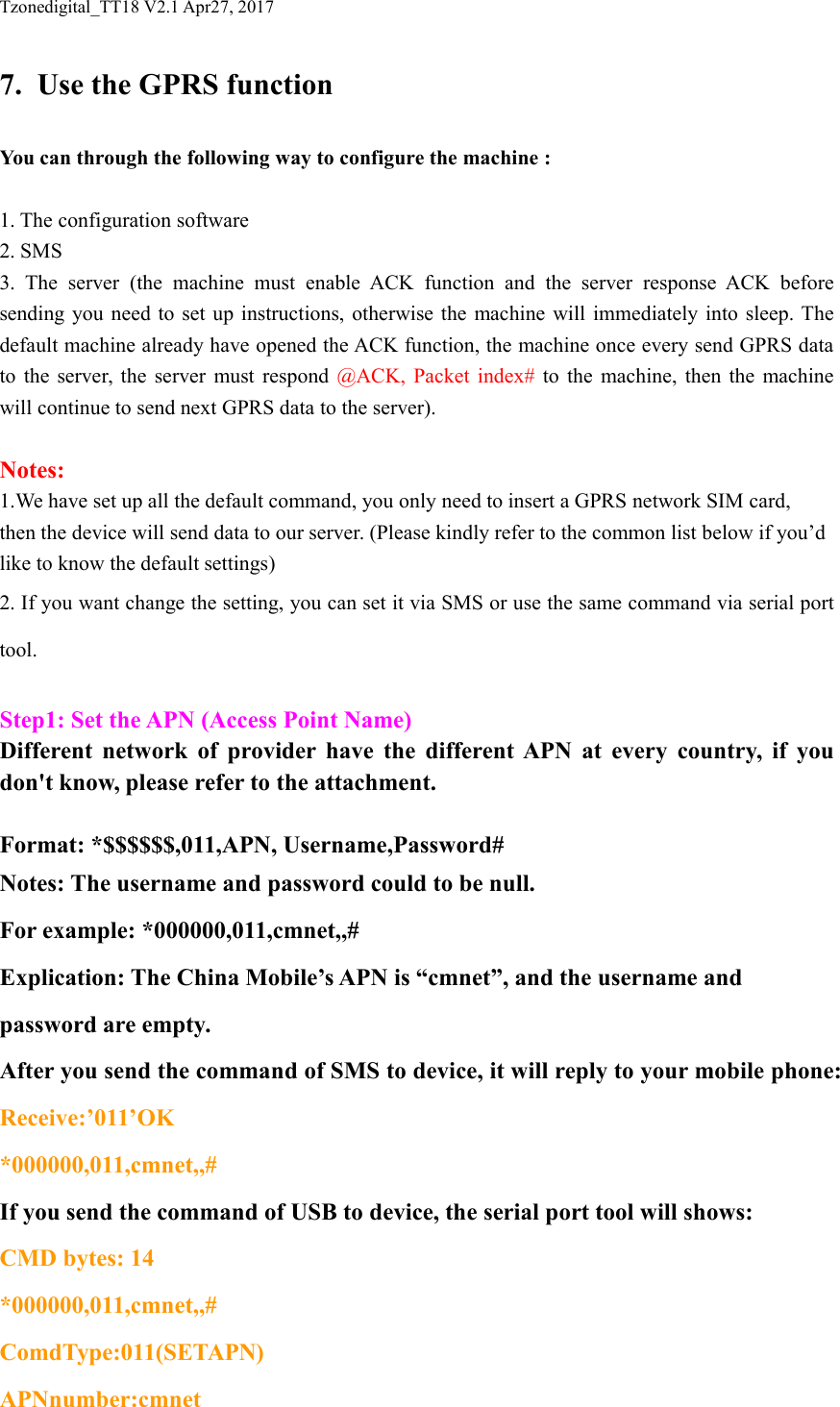
Tzonedigital_TT18 V2.1 Apr27, 20177. Use the GPRS functionYou can through the following way to configure the machine :1. The configuration software2. SMS3. The server (the machine must enable ACK function and the server response ACK beforesending you need to set up instructions, otherwise the machine will immediately into sleep. Thedefault machine already have opened the ACK function, the machine once every send GPRS datato the server, the server must respond @ACK, Packet index# to the machine, then the machinewill continue to send next GPRS data to the server).Notes:1.We have set up all the default command, you only need to insert a GPRS network SIM card,then the device will send data to our server. (Please kindly refer to the common list below if you’dlike to know the default settings)2. If you want change the setting, you can set it via SMS or use the same command via serial porttool.Step1: Set the APN (Access Point Name)Different network of provider have the different APN at every country, if youdon't know, please refer to the attachment.Format: *$$$$$$,011,APN, Username,Password#Notes: The username and password could to be null.For example: *000000,011,cmnet,,#Explication: The China Mobile’s APN is “cmnet”, and the username andpassword are empty.After you send the command of SMS to device, it will reply to your mobile phone:Receive:’011’OK*000000,011,cmnet,,#If you send the command of USB to device, the serial port tool will shows:CMD bytes: 14*000000,011,cmnet,,#ComdType:011(SETAPN)APNnumber:cmnet
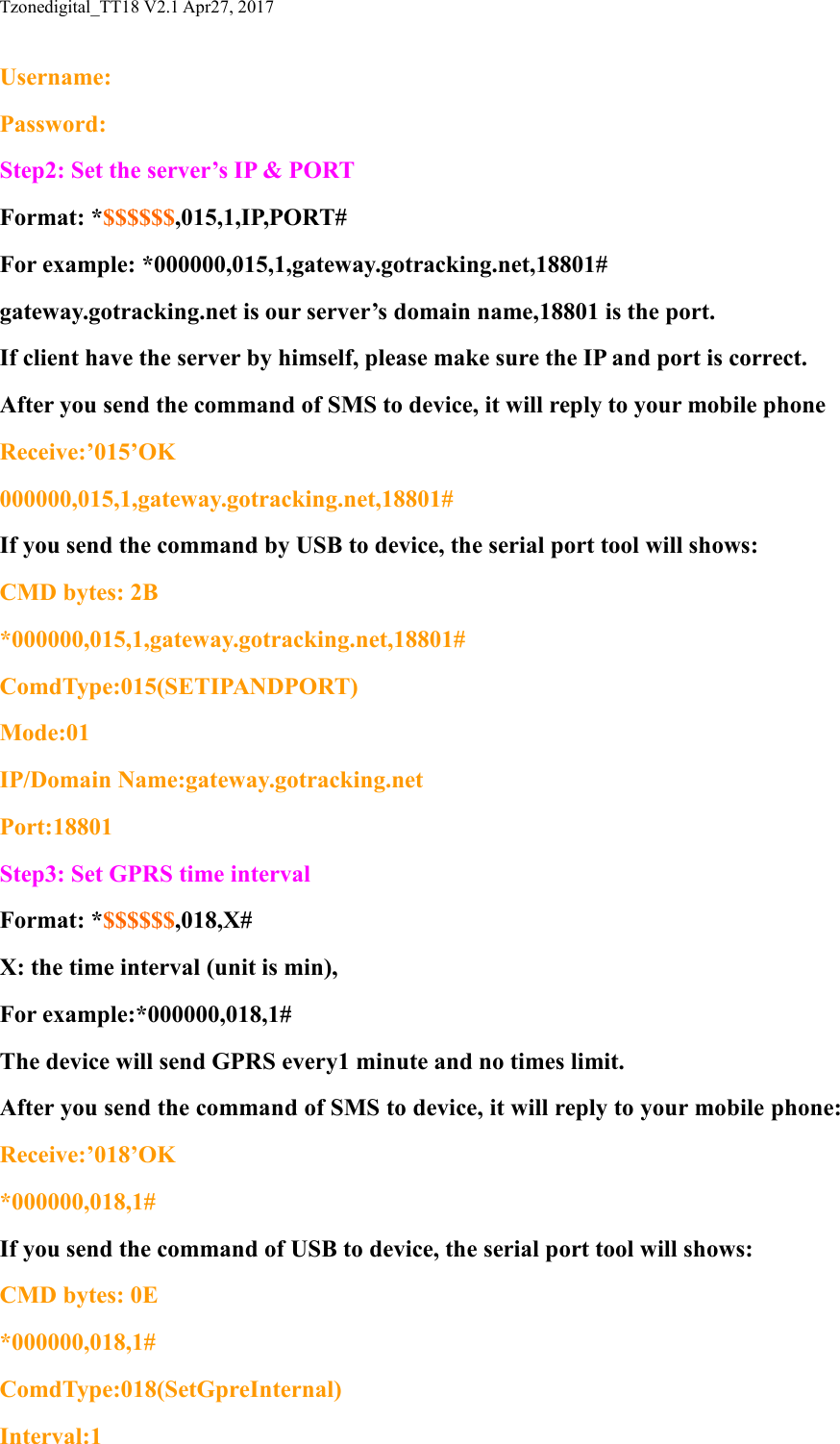
Tzonedigital_TT18 V2.1 Apr27, 2017Username:Password:Step2: Set the server’s IP & PORTFormat: *$$$$$$,015,1,IP,PORT#For example: *000000,015,1,gateway.gotracking.net,18801#gateway.gotracking.net is our server’s domain name,18801 is the port.If client have the server by himself, please make sure the IP and port is correct.After you send the command of SMS to device, it will reply to your mobile phoneReceive:’015’OK000000,015,1,gateway.gotracking.net,18801#If you send the command by USB to device, the serial port tool will shows:CMD bytes: 2B*000000,015,1,gateway.gotracking.net,18801#ComdType:015(SETIPANDPORT)Mode:01IP/Domain Name:gateway.gotracking.netPort:18801Step3: Set GPRS time intervalFormat: *$$$$$$,018,X#X: the time interval (unit is min),For example:*000000,018,1#The device will send GPRS every1 minute and no times limit.After you send the command of SMS to device, it will reply to your mobile phone:Receive:’018’OK*000000,018,1#If you send the command of USB to device, the serial port tool will shows:CMD bytes: 0E*000000,018,1#ComdType:018(SetGpreInternal)Interval:1
Tzonedigital_TT18 V2.1 Apr27, 20178. Command listIf you want to know more about the TT18 and configure it, you can refer to the commandlist.$$$$$$ is user`s password, and initial password is 000000SMS InstructionFormatNote1Request one current machineinformation*$$$$$$,000#The machine will reply in the formof SMS(the data will containIMEI、FW version、CCID、Temp、RH、CSQ、Battery、RTC)2Modify user password*$$$$$$,001,@@@@@@#$$$$$$ is old password@@@@@@ is new Password3Set the high/low temperature andhumidity alarm functionWhen the TT11 high/lowtemperature and humidity,TT11 will always send high/lowtemperature and humidity alarmGPRS data to the Preset Server.the machine can send dataaccording to the time interval youhave set(003 has priority to 004)*$$$$$$,003,A,B,C,D,X#A=[-40~125],high-temperaturethreshold(unit:min,default:100)B=[-40~125],low-temperaturethreshold(unit:min,default:-20)A must be bigger than Bif Temperatures exceed [A, B],itwill send alarm dataC=[0~100],high-humiditythreshold(unit:%,default:80)D=[0~100],low-humiditythreshold(unit:%,default:20)C must be bigger than Dif Humidity exceed [A, B],it willsend alarm dataX=[1,60],TT18 more thanthreshold change into X min send aGPRS data(unit:min,default:1)4Set low power alarmWhen the TT18 voltage is lowerthan the preset value,TT18 will send one lower poweralarm GPRS data to the PresetServer.the machine can send dataaccording to the time interval youhave set(004 has priority to 018)*$$$$$$,004,X,Y#X is the low power alarm voltage,[360,430]unit:10mv0(default:360)Y=[1~60] Y is the Low power tosend data interval time(unit:min,default:60, 0 is don’t send data )For example:*$$$$$$,004,380,10#When the battery voltage is lowerthan 3.8 V, 10 minutes to send aGPRS data5Set working model*$$$$$$,005,X#X=0, Turn off (default);X=1, Turn on;
Tzonedigital_TT18 V2.1 Apr27, 2017X=3, Flight;6Set RTC time*$$$$$$,006,year,month,day,hour,minute,second#Set the device RTC time .For example:*000000,006,16,01,11,10,46,30#Year:16Month:1Day:11Hour:10Minute:46Second:307Extend setting*$$$$$$,008,ABCDEFG#A=0, Disable machine informationreport function which get machineinformation SMS by CallingA=1, Enable machine informationreport function which get machineinformation SMS by Calling(default)B=0,disable GPRS ACK function;B=1,enable GPRS ACKfunction(default);Note: the machine once every sendGPRS data to the server, the servermust respond @ACK,Packetindex# to the machine, then themachine will continue to send nextGPRS data to the server.C/D/E/FG=08Set APN,Username,Password*$$$$$$,011,APN,Username,Password#APN : APN string (must < 28chars)User name: Your username (must< 28 chars)Password: Your password (must< 28 chars)* If haven't username orpassword, then left it blank.For example:*000000,011,CMNET,,# (It haven'tusername and password)9Set IP Address & port number*$$$$$$,015,X,IP,PORT#X=0 use IP connect the serverX=1 use DN connect the serverIP : xxx.xxx.xxx.xxxDN:(domain name)www.xxx.comPORT : [1,65535]
Tzonedigital_TT18 V2.1 Apr27, 201710Set the time intervals of GPRSData in turn on and flight mode*$$$$$$,018,X#X (3 Digital)[1,60] Time interval(Unit: min,default:5)11Set the GPRS mode*$$$$$$,019,X#X=0, Use the UDP modeX=1, Use the TCP mode(default)12Set the temperature&humiditySMS alarm function*$$$$$$,020,X,Y#X=0, disable this function(default)X=1,enable this functionY, SMS numberNote:only send a sms alarm whenover or below the threshold, soplease the first set 020 command,then set 003 command.13When bad condition only save data*$$$$$$,021,A,B,C,D,E#A=[-40~125],high-temperaturethreshold(unit:min,default:100)B=[-40~125],low-temperaturethreshold(unit:min,default:-40)A must be bigger than Bif Temperatures exceed [A, B],itwill save dataC=[0~100],high-humiditythreshold(unit:%,default:100)D=[0~100],low-humiditythreshold(unit:%,default:0)C must be bigger than Dif Humidity exceed [A, B],it willsave dataE=[350,430],low power threshold(unit:10mv,default:350)14The query command*$$$$$$,040,X#X: need to query the instructions15Clear data flash*$$$$$$,500#Clear history in the flash memory16Initialization*$$$$$$,990,099#It will set all parameter to factorydefault value(Excluding the Password).17Reboot by SMS command*$$$$$$,991#It will reboot the TT18 by thisSMS command.18Read the machine records of Flash*$$$$$$,999#Through the USB configure cable,read the machine records in theFlash to the computer, then all datarecords will be empty19Query all instructions#DEOnly used to configure software20Query one instructions#D5XX: command, For example:#D5005, Only used to configuresoftware
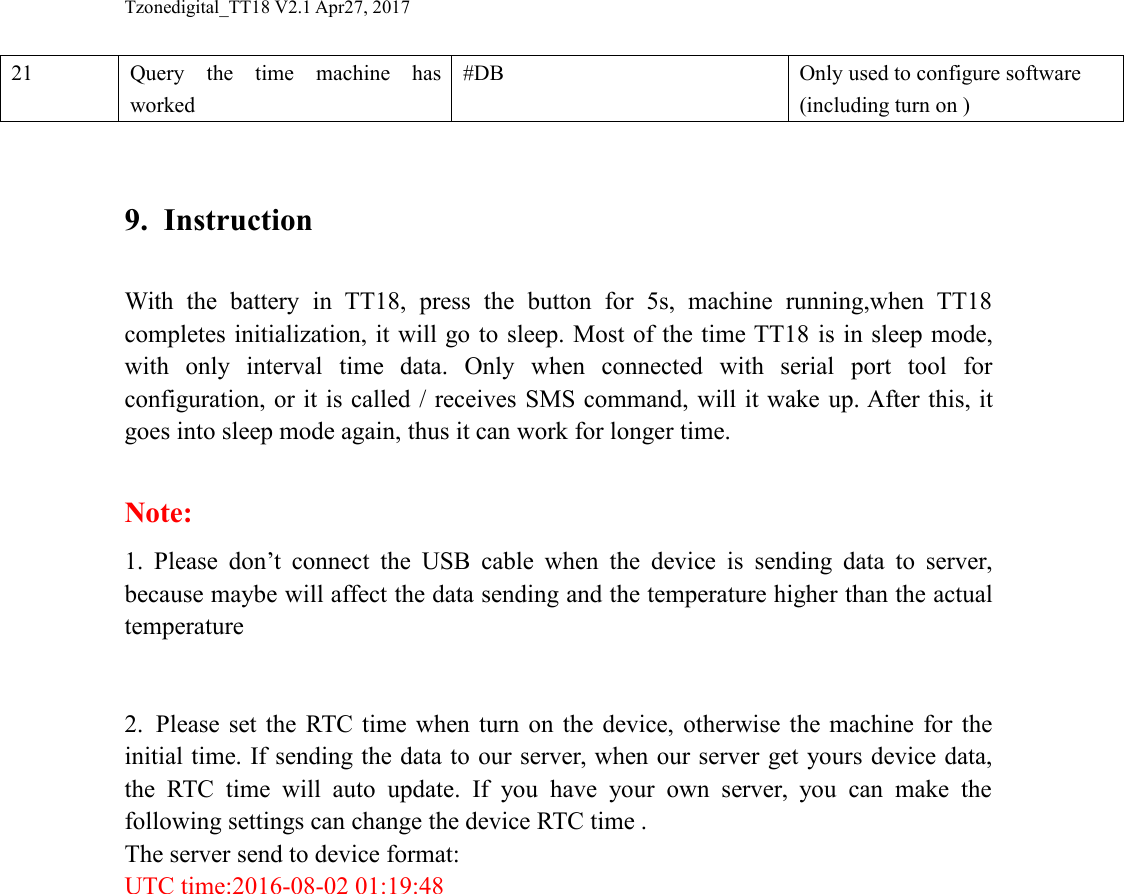
Tzonedigital_TT18 V2.1 Apr27, 201721Query the time machine hasworked#DBOnly used to configure software(including turn on )9. InstructionWith the battery in TT18, press the button for 5s, machine running,when TT18completes initialization, it will go to sleep. Most of the time TT18 is in sleep mode,with only interval time data. Only when connected with serial port tool forconfiguration, or it is called / receives SMS command, will it wake up. After this, itgoes into sleep mode again, thus it can work for longer time.Note:1. Please don’t connect the USB cable when the device is sending data to server,because maybe will affect the data sending and the temperature higher than the actualtemperature2. Please set the RTC time when turn on the device, otherwise the machine for theinitial time. If sending the data to our server, when our server get yours device data,the RTC time will auto update. If you have your own server, you can make thefollowing settings can change the device RTC time .The server send to device format:UTC time:2016-08-02 01:19:48
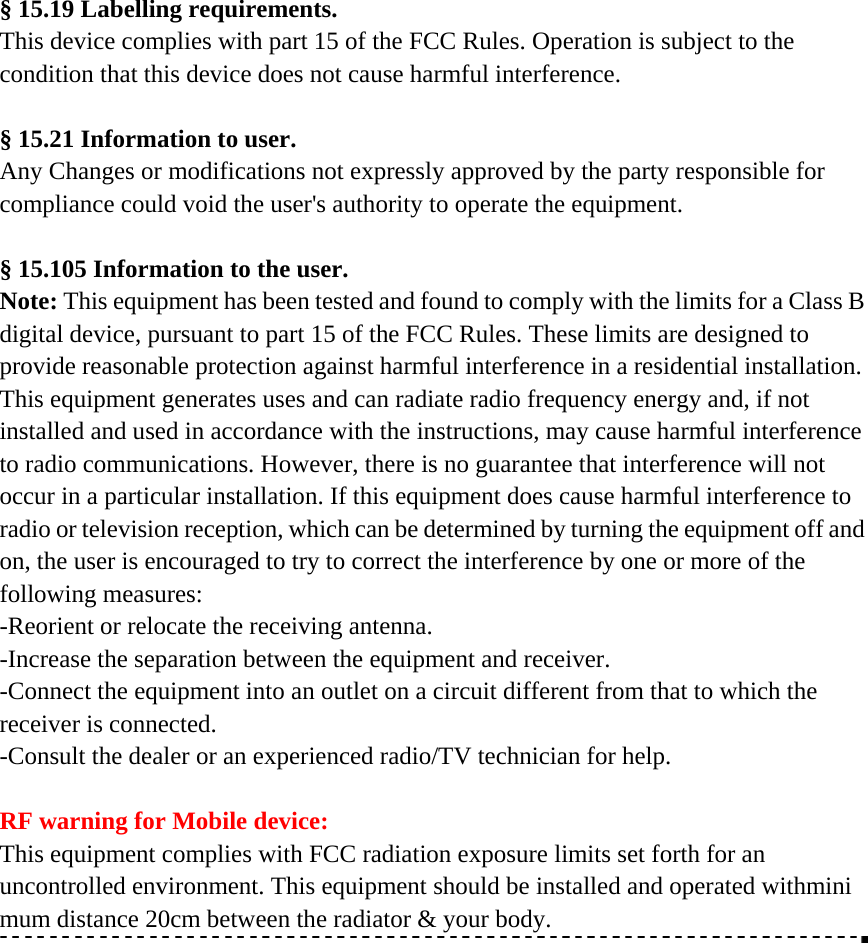
§ 15.19 Labelling requirements. This device complies with part 15 of the FCC Rules. Operation is subject to the condition that this device does not cause harmful interference.  § 15.21 Information to user. Any Changes or modifications not expressly approved by the party responsible for compliance could void the user's authority to operate the equipment.  § 15.105 Information to the user. Note: This equipment has been tested and found to comply with the limits for a Class B digital device, pursuant to part 15 of the FCC Rules. These limits are designed to provide reasonable protection against harmful interference in a residential installation. This equipment generates uses and can radiate radio frequency energy and, if not installed and used in accordance with the instructions, may cause harmful interference to radio communications. However, there is no guarantee that interference will not occur in a particular installation. If this equipment does cause harmful interference to radio or television reception, which can be determined by turning the equipment off and on, the user is encouraged to try to correct the interference by one or more of the following measures: -Reorient or relocate the receiving antenna. -Increase the separation between the equipment and receiver. -Connect the equipment into an outlet on a circuit different from that to which the receiver is connected. -Consult the dealer or an experienced radio/TV technician for help.  RF warning for Mobile device: This equipment complies with FCC radiation exposure limits set forth for an uncontrolled environment. This equipment should be installed and operated withminimum distance 20cm between the radiator & your body.

Navigation menu