U S Tech WIPET WIPET Panoramic camera User Manual
USTECH(Beijing)Technology Co., Ltd. WIPET Panoramic camera
U S Tech >
User manual

Start Guide
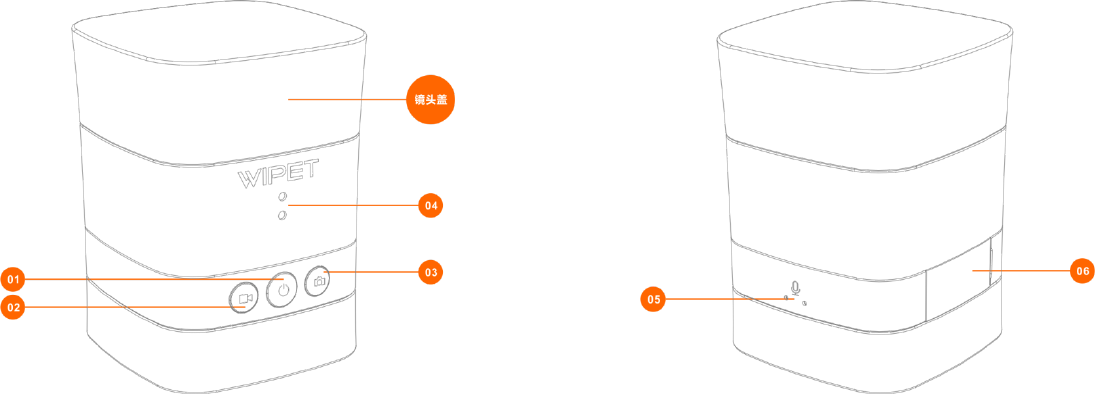
1. Part list
① Power button
② Video recording button
③ Photo shooting button
④ Status indicator lights
⑤ Microphone
⑥ Side cover
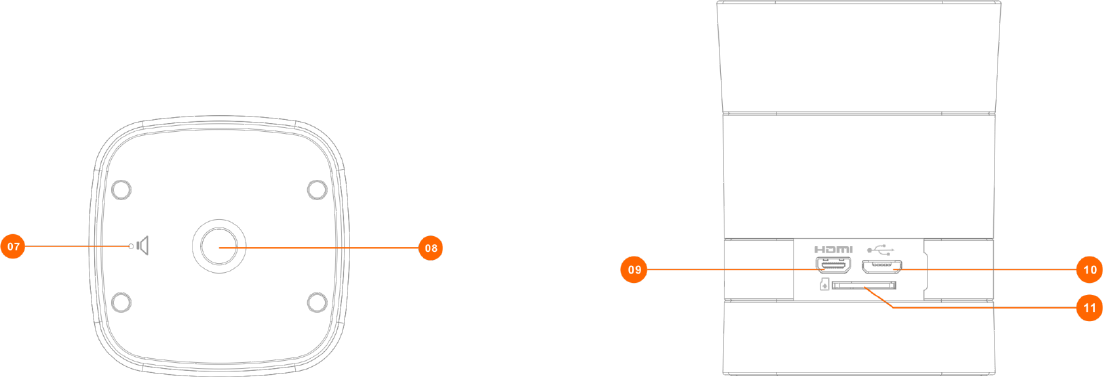
⑦ Buzzer
⑧ Tripod socket
⑨ HDMI slot
⑩ Micro-USB slot for charging and data transfer
⑪ TF Card slot
2、 Prepare for use
Charging
To charge the camera, please connect the USB cable to the camera via the Micro-USB slot . 5V / 1—2A adapter or mobile power
are suggested to use for charging.
During the charging, the upper indictor light is RED. The indicator light will be turned off when charging finished.
NOTICE: Camera needs a memory card to work properly. Please use a certified TF class10 memory card (maximum 64G supported).
If the quality of the memory card is inferior, it may lead to photo shooting or video recording failure.
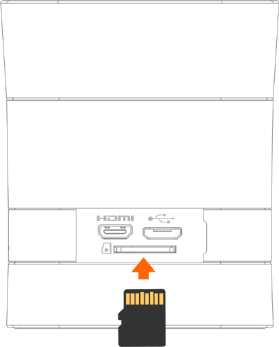
Install memory card
• Open the Side Cover
• Insert the TF card into the slot along the direction of the arrow showed in the graph.
• Close the Side Cover.
Remove memory card
• Gently press the memory card inside the slot, it will be popped out.
• Pull out the memory card.
Notice: Please turn off the camera before install or remove the TF card.
3、 Basic instruction
① Power on / Power off
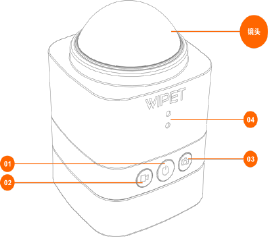
Power on: Gently press 1 second, after 3 beeps the camera is powered on. After about 8 seconds, the camera beeps again indicating the WIFI starts up. Now take off the lens
cover.
Power off: Press and hold the button for 3 seconds, after 7 beeps the camera is powered off.
② Video recording (Can modify the video recording mode via APP)
Press Video Recording button, after 2 beeps the camera starts recording (two Green indicator lights flash at the moment). Press the button again, after 3 beeps the
camera stops recording.
③ Photo shooting (Can modify photo shooting mode via APP)
Press the Photo Shooting button, after 1 beep the camera starts shooting. After about 2 seconds, after another 1 beep the camera finishes shooting.
④ Status description of the indictor lights
Upper indicator light
๏ Brighten during the whole charging time, darken when finish charging.
๏ Brighten after powered on and on standby.
Lower indicator light
๏ Brighten if no memory card or the capacity of the card is less than 500MB,
๏ Brighten if the memory card if OK.
๏ If upper and lower indicators flash at the same time, it shows that video recording is ongoing.
4、 Common problem description
When the camera is halted or has no response to any operation, please press and hold the power button at least 15
seconds to shut down the camera.
• If the camera beeps continuously, about 1 beep per second, it shows that the remaining battery power is less than 20%.
• The default WIFI password of the camera is 1234567890.
• To reset the WIFI password to the default factory value, press and hold the Photo Shooting button for 15 seconds until you
hear a beep sound.
• When the smart device judges that there is not enough memory left, the APP will not work properly. Please clean the
memory of the smart device.
• The camera is designed for the life waterproof, should not be put into water to work.
• In order to secure the image quality, please keep the lens clean, and use special lens cloth to wipe the lens.

5、 (Install WIPET APP on your smart device)
The operating system of your smart device must above the version of
Android4.3 or ISO 8.
Scan the QR code on the right, pay attention to our public Wechat
account to know the information of our products and APPs.
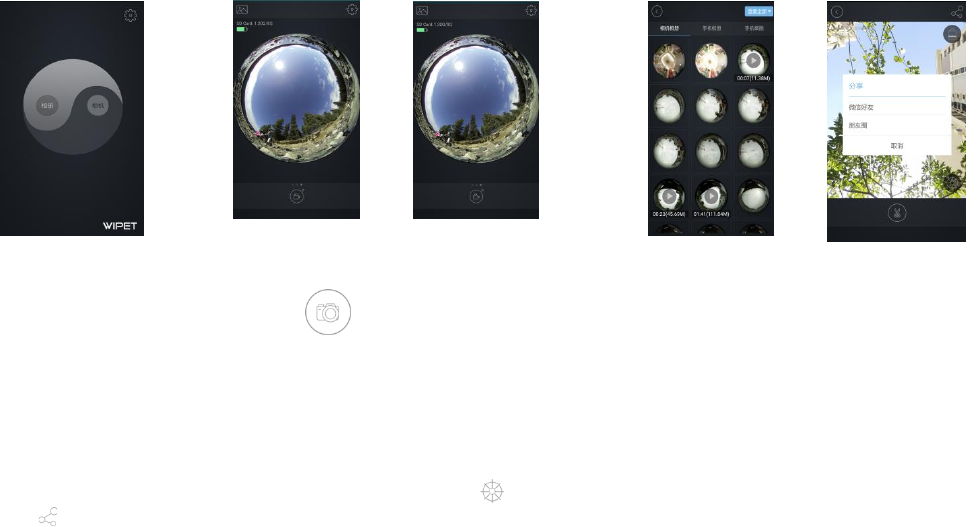
6、 Quick Operation Instruction of WIPET APP
• Photo Shooting & Video Recording
Press Camera button on the guild page. After successfully connected to the camera via WIFI, the APP enters into the preview page. On the preview page you can preview the panorama
scene via a disk. At the bottom of this page, there is a button area. Through finger slipping left or right on this area, it switches to a photo shooting button, a video recording button or a
brightness adjusting button, and you can simply press the current button to shoot a photo, record a video or adjust the brightness respectively.
• Download
On the preview page, press the button on the top, the APP enters into the camera album page. On this page select the pictures you want and press the download button to copy the
selected pictures from the camera to your smart device.
•
Press Album button on the guild page, the APP enters into the mobile album page. Press any one of the listed pictures or videos, the APP enters into the view page. You can view the picture
or video in different ways including disk, 360° spread, cylinder or 3D roam via switching button. You also can share the picture to your Wechat friends or friend circles simply by
pressing the button. Note: Before sharing you need to register WIPET membership. For detailed information, please refer to our official Wechat public account.
Guild Page
Preview Page
Album Page
Share Page
View Page

Product warranty card
Product Name: WIPET camera
Product Model: S1
Purchase Date: Year Month Day
Factory Serial Number:
购买产品后,关注公众号,并注册 WIPET 帐户以
取得产品免费固件升级。
Product Qualification Certificate
Product Name: WIPET camera
Product Model: S1
Inspector: 02

Warranty Regulations
The after-sales service of this product is based on the relevant laws and regulations, detailed contents are as follows:
1. The warranty period of this product is one year since the date of purchase.
2. In the warranty period, any failure generated by normal use following the Instruction Manual (judged by company’s official staff) will be repaired free of
charge.
3. In the warranty period, under any of the following circumstances, repair will be charged.
(1) Failure or damage caused by improper usage as well as improper repair by yourself.
(2) Failure or damage caused by transport, move or falling etc. after purchase.
(3) After opening the camera yourself, the product is no longer insured.
(4) Failure or damage caused by other unavoidable external factors.
4. Within 7 days from the date of signing, you enjoy return or replacement service if this product shows performance faults, but this should be checked and
identified by our after-sale service center.
5. The appearance of the product, fragile and consumable materials as well as accessories are not within the scope of warranty, including but not limited
to : memory card, camera bag, tripod, safety rope, fixation etc.
6. This warranty regulation is only valid in the mainland of the People's Republic of China.
7. FCC Warning Statement
Changes or modifications not expressly approved by the party responsible for compliance could void the user’s authority to operate the equipment.
This equipment has been tested and found to comply with the limits for a Class B digital device, pursuant to Part 15 of the FCC Rules. These limits are
designed to provide reasonable protection against harmful interference in a residential installation. This equipment generates uses and can radiate radio
frequency energy and, if not installed and used in accordance with the instructions, may cause harmful interference to radio communications. However,
there is no guarantee that interference will not occur in a particular installation.
If this equipment does cause harmful interference to radio or television reception, which can be determined by turning the equipment off and on, the
user is encouraged to try to correct the interference by one or more of the following measures:
-Reorient or relocate the receiving antenna.
-Increase the separation between the equipment and receiver.
-Connect the equipment into an outlet on a circuit different from that to which the receiver is connected.
- Consult the dealer or an experienced radio/TV technician for help.
This device complies with Part 15 of the FCC Rules. Operation is subject to the following two conditions:
1.This device may not cause harmful interference, and
2.This device must accept any interference received, including interference that may cause undesired operation.
* RF warning for Portable device:
The device has been evaluated to meet general RF exposure requirement. The device can be used in portable exposure condition without restriction.