Ubisoft Entertainment UBICONNECT1 RF BASE User Manual
Ubisoft Entertainment Ltd. RF BASE Users Manual
Users Manual

UBISOFT
2R
More information at www.battle-tag.com

UBISOFT
ENGLISH
More information at www.battle-tag.com 3
ENGLISH
SUMMARY
5
6
7
8/9
10/11
12
13
14
15
16/17
18
Install
T-Blaster
The Dash board
Batteries
Accessories
Put on your Sensor Vest
Connect T-Blaster
Information
Technical support
Warranties
Glossary

UBISOFT
4R
More information at www.battle-tag.com
WARNING
© 2010 Ubisoft Entertainment. Rights Reserved. Battle Tag, UbiConnect, Ubisoft, the Ubisoft logo and
UbiConnect logo are trademarks of Ubisoft Entertainment in the U.S. and/or other countries.
Uses Bink Video. Copyright © 1997-2010 by RAD Game Tools, Inc.
Internet connection required to update the game and UbiConnect devices.
Additional Online fees may apply, and player is responsible for all applicable internet fees.
WARNING - SEIZURES
A small percentage of people may experience a seizure or blackout triggered by light patterns,
ashing lights, or other images that appear in computer games.
If you have an epileptic condition, consult your physician before installing or playing this game.
Even people who have no history of epilepsy may experience a seizure while viewing a computer game.
A seizure can be accompanied by any of the following symptoms: altered vision, convulsions,
disorientation, eye or muscle twitching, involuntary movements, or loss of movement.
If you experience any of these symptoms, immediately stop playing and consult a doctor.
Parents or guardians of children playing this game should monitor their children closely.
If your child suffers any of these symptoms, stop playing the game immediately and consult a doctor.
UBISOFT
ENGLISH
More information at www.battle-tag.com 5
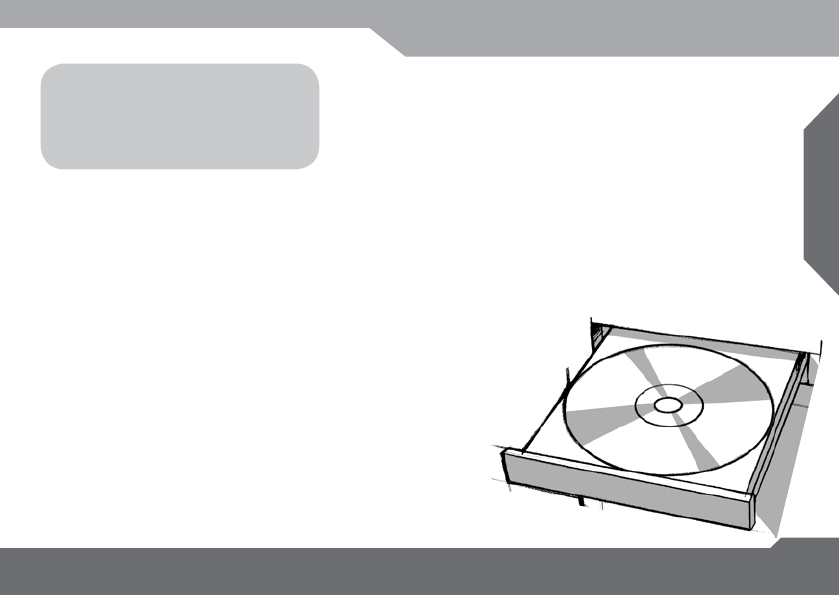
INSTALLATION
TO DO FIRST
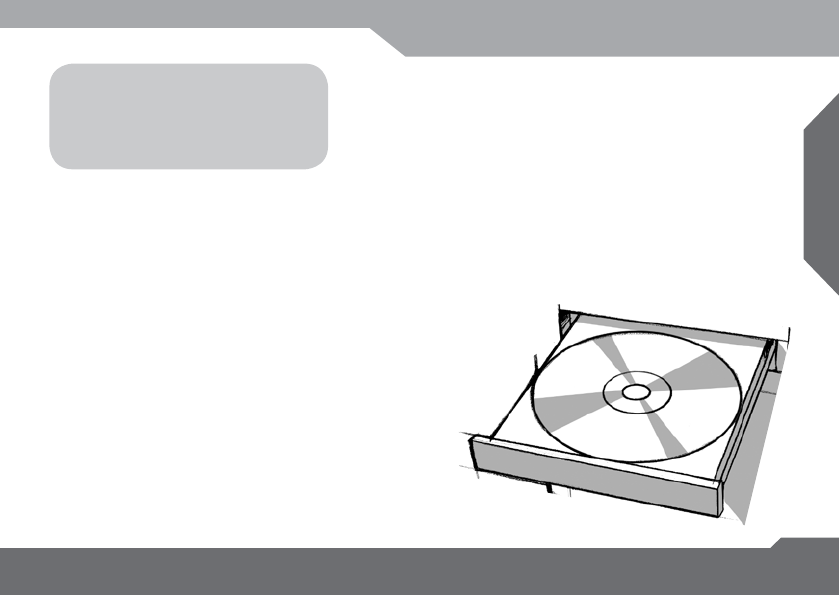
Insert the CD into your computer
and follow the instructions on screen
MINIMUM REQUIREMENT
Supported OS: Windows® XP (SP3) / Windows Vista (SP2) / Windows 7
Processor: 1.0 GHz Intel® Pentium 3 or AMD Athlon™ XP or faster
RAM: 256 MB Windows XP / 512 GB Windows Vista®, Windows 7
Video Card: 64 MB DirectX® 9.0-compliant 3D Graphics card
Hard Drive Space: 1 GB Free
Recommended Requirements
Processor: 3.0 GHz Intel® Pentium 4 or AMD Athlon™ 64 or faster
RAM: 512 MB Windows XP / 1 GB Windows Vista, Windows 7
Video Card: 256 MB DirectX® 9.0-compliant video card
UBISOFT
6R
More information at www.battle-tag.com
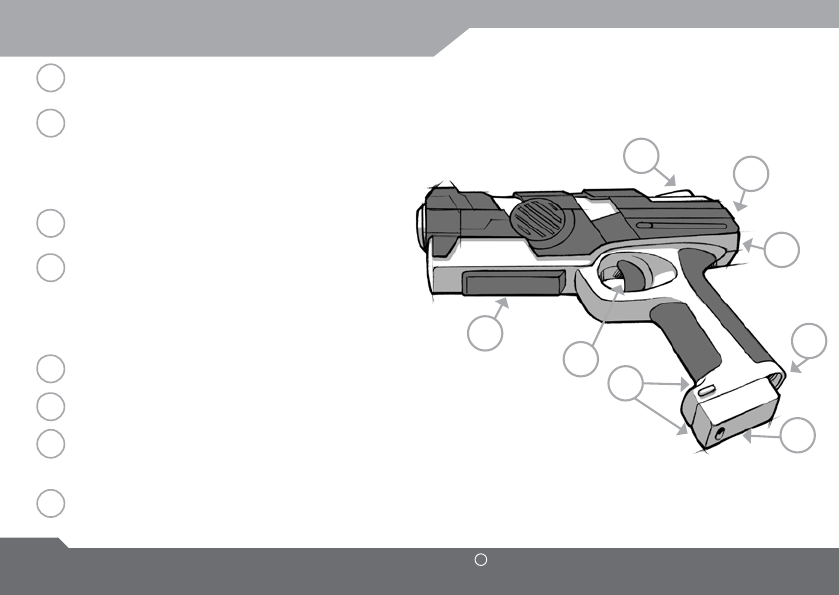
THE T-BLASTER
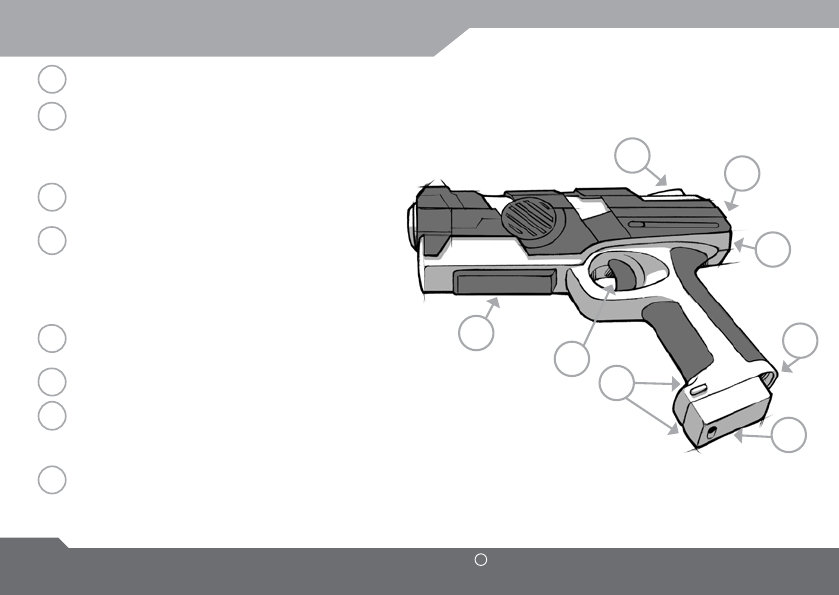
The trigger. Press it to shoot.
The Switch button. By pressing it, you can
swap between your health points, your
ammunitions or any information dened by
the chosen game mode or scenario.
The scanner. Push it with the bottom of
a T-BOX to initiate the use of this T-BOX.
The ash. It lights up to warn you.
Yellow when you shoot, red when you’re hit.
Green when you scan a T-Box. At the end of
the game if it ashes green, you’ve won, and
if it ashes red, you’ve lost.
Battery compartment and battery release
button.
On/Off button.
The dashboard shows your amount of
health points, your ammunitions and all the
information you need during the game.
Connect the Sensor Vest here.
A
B
C
D
E
F
G
H
A
B
H
C
D
E
F
G
UBISOFT
ENGLISH
More information at www.battle-tag.com 7
THE DASHBOARD
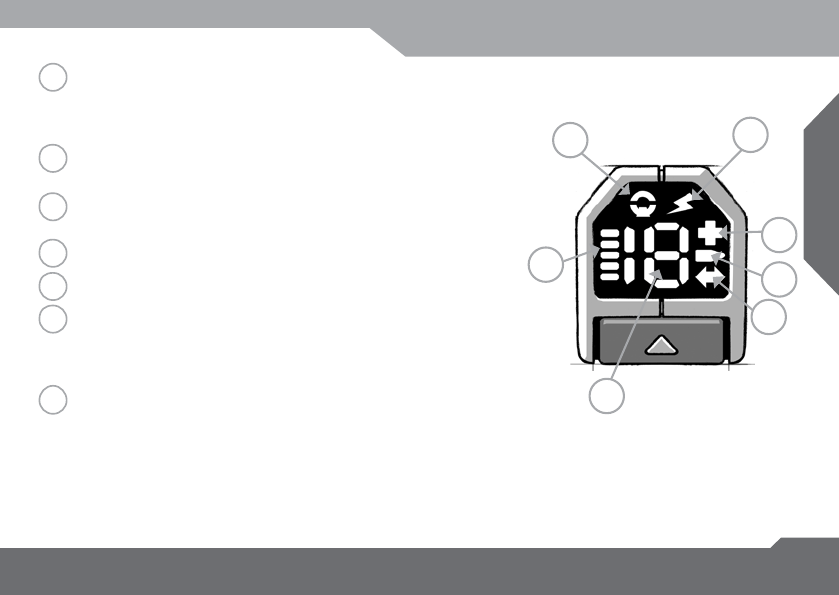
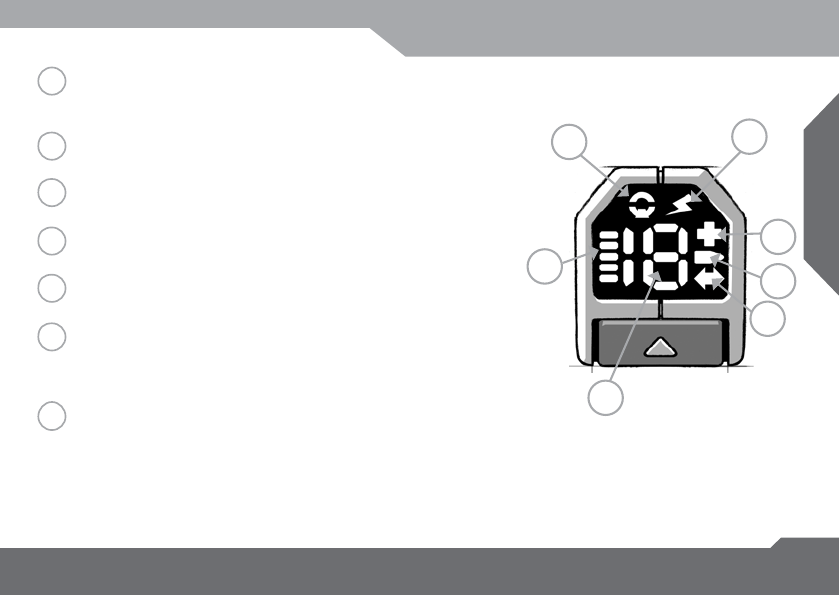
Lights up if you need to interact with UbiConnect and ashes
if you’re out of Ubiconnect range. In this case you will have
30 seconds to come back into range before being kicked out
of the game.
Lights up when your T-Blaster is turned on. Flashes when the
T-Blaster batteries are low.
Shows if you have to scan an objective. This objective depends
on the chosen game mode or scenario.
When lit up, the numbers show your remaining ammunition.
When lit up, the numbers show your remaining health points.
Before launching a game, it shows the number asigned to your
T-Blaster. During a game, it shows either the ammunitions, the
health points, the number of objectives you have to scan or
any information dened by the game mode or the scenario.
If Ammunition symbol (4) is lit, the bars show your remaining
clips. If the Objective symbol (3) is lit, the bars show the
remaining objectives you have to scan or any information
dened by the game mode or the scenario.
12
5
4
3
6
7
1
2
3
4
5
6
7
UBISOFT
8R
More information at www.battle-tag.com
INSTALLING BATTERIES
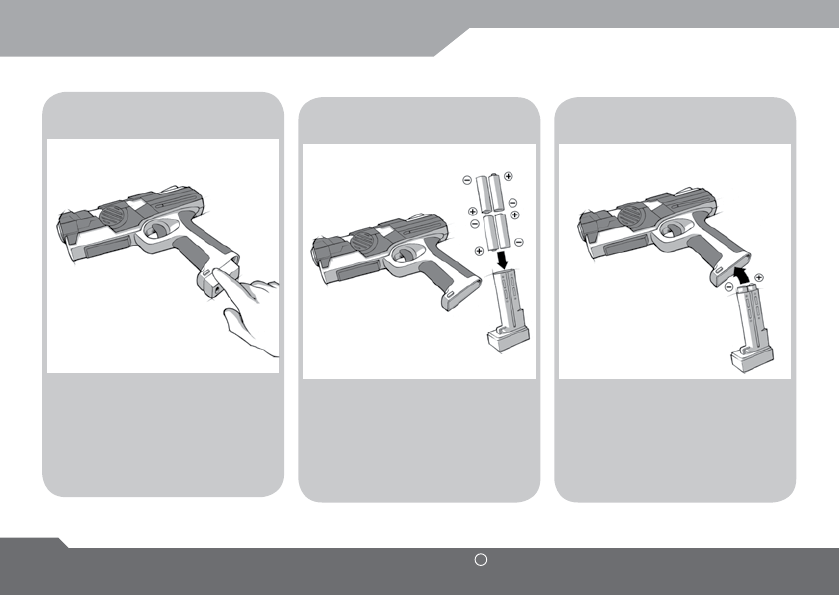
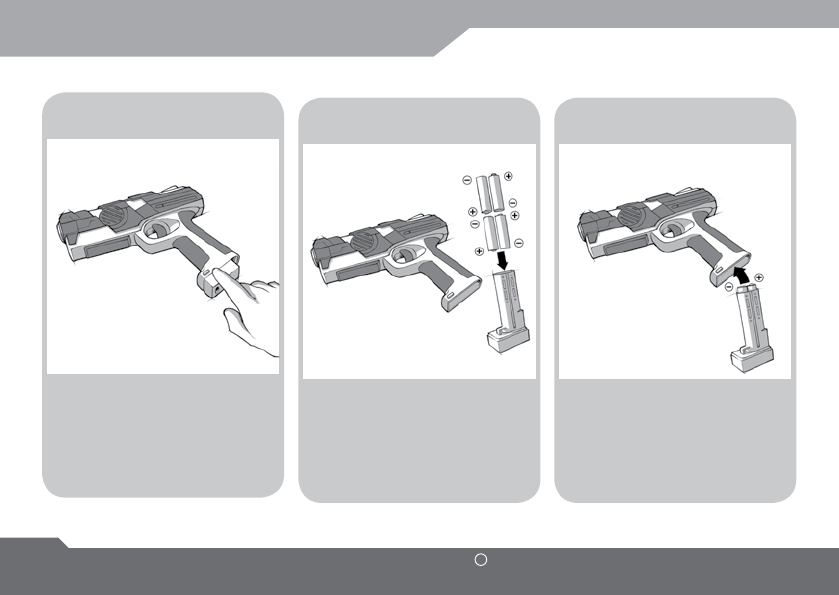
Remove the battery pack by
pressing the battery pack
button and pulling the
battery pack downward.
Push the battery pack
back in its housing until you
hear a clic.
Insert 4 new 1.5V AA LR6
size batteries (not included)
in each T-Blaster unit.
1 2 3

UBISOFT
ENGLISH
More information at www.battle-tag.com 9
WARNINGS
CAUTION
1. Be sure to insert batteries correctly and always follow carefully toy and battery manufacturers’
instructions. Always follow the instructions carefully. Use only batteries specied and be sure to insert
item correctly by matching the + and – polarity markings. Rechargeable batteries: do not mix these
with any other types of batteries. Always remove the product before recharging. Recharge batteries
under adult supervision. Do not recharge non-rechargeable battery.
2. Do not mix old and new batteries or alkaline, standard (carbon–zinc) or rechargeable (nickel-cadium) batteries.
3. Always remove weak or dead batteries from the product.
4. Remove batteries if product is not to be played with for a long time.
5. Do not short circuit the supply terminals.
6. Should this product cause or be affected by, local electrical interference, move it away from other
electrical equipment. Reset if necessary.
7. Any exhausted battery shall be disposed in an appropriate container in order to be recycled
8. Batteries shall be removed from the product before disposing of the product
9. If any leakage from the battery should happen, remove carefully the battery with disposable rubber
gloves and dipose it in an appropriate container. Wash your skin with clear water for at least 15 minutes
if the battery comes in contact with your skin. Clean up the leakage as soon as possible.
Be sure to use protective gloves during the cleaning process to avoid skin exposure.
Please retain this information for future reference.
Batteries should be replaced by an adult.
UBISOFT
10 R
More information at www.battle-tag.com
USE THE T-BOXES
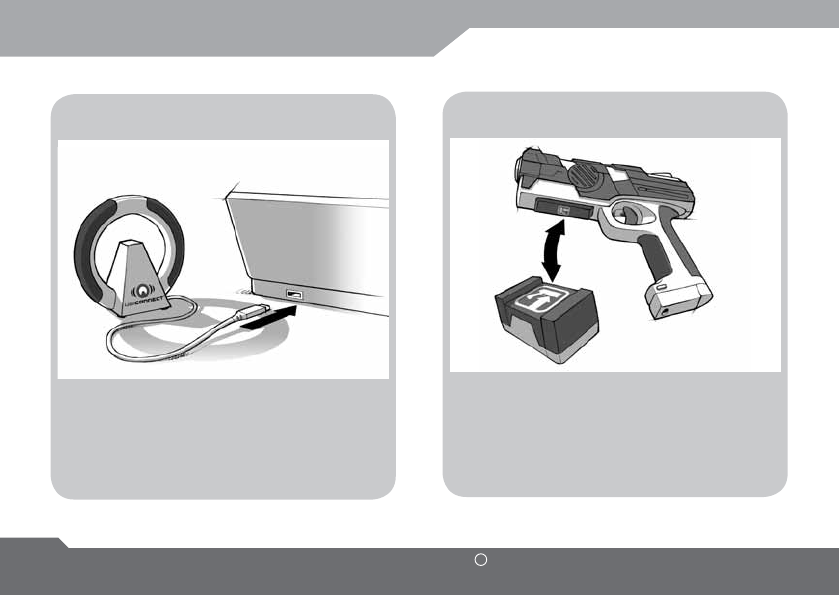
UBICONNECT
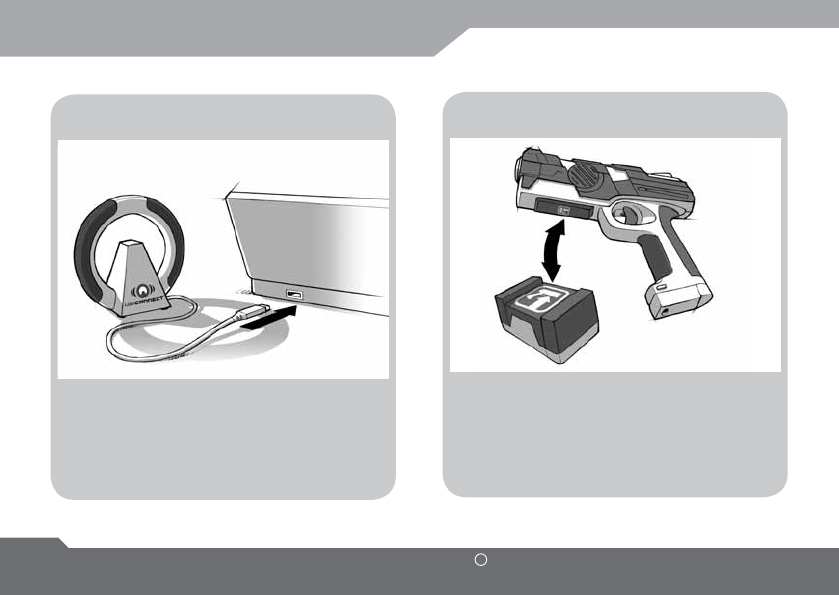
Press the Scan button
with the T-Box, aligning the two signs,
and wait for the conrmation sound.
The UbiConnect is the radio relay between
the T-Blasters (and all of the UbiConnect
devices) and the computer.
ACCESSORIES
UBISOFT
ENGLISH
More information at www.battle-tag.com 11
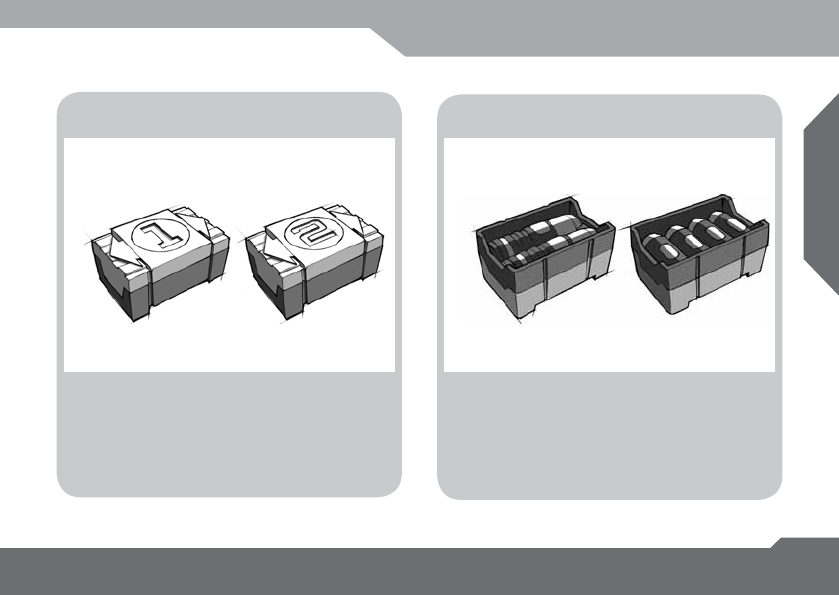
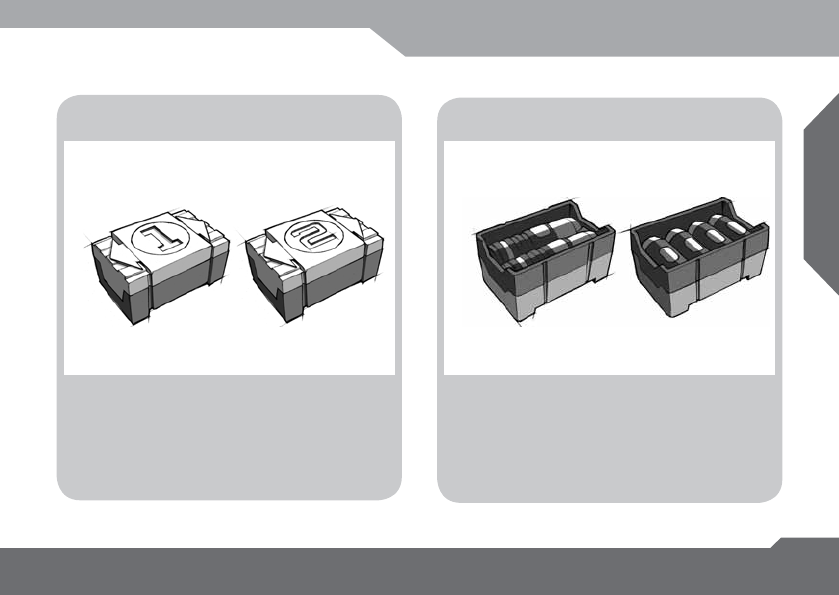
T-BASE AMMO PACK
Tag them with the scan button (C)
to reload your T-Blaster with ammunitions.
Used as objectives, team respawn base or
other use dened by game mode.
Players have to scan them to achieve
missions, validate goals, respawn...
ACCESSORIES / T-BOXES
UBISOFT
12 R
More information at www.battle-tag.com
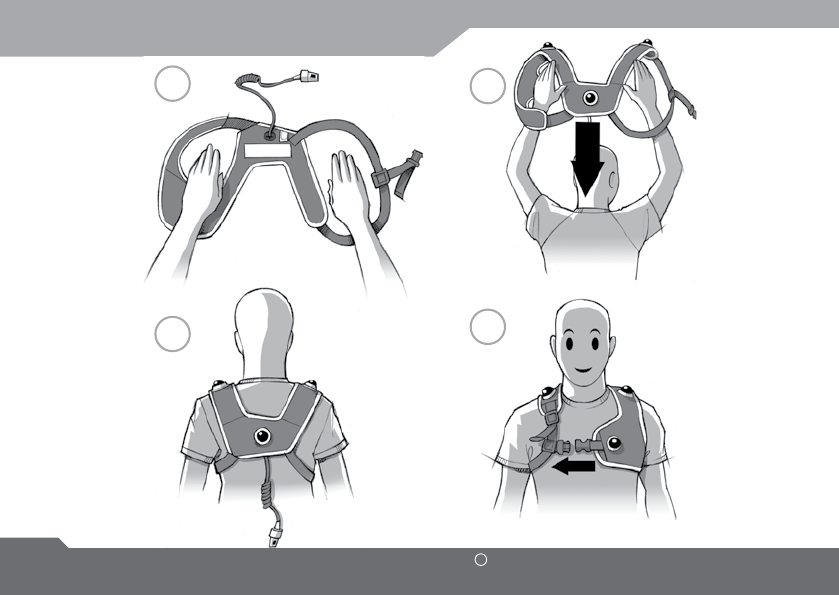
PUT ON YOUR SENSOR VEST
12
4
3
UBISOFT
ENGLISH
More information at www.battle-tag.com 13
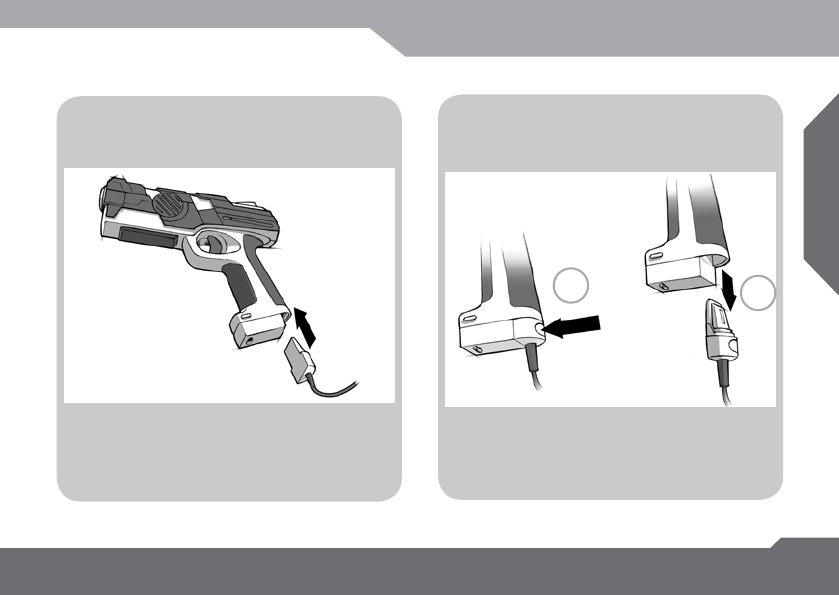
CONNECT T-BLASTER
Connect
the T-Blaster to the sensor vest
Disconnect
the T-Blaster From the sensor vest
12
1: Press the button
2: While pressing,
pull the sensor vest connector downward
Push the sensor vest connector
upward in its housing until you hear a clic.

UBISOFT
14 R
More information at www.battle-tag.com
INFORMATION
ENVIRONMENTAL PROTECTION RECOMMENDATION
At the end of its working life, this product should not be disposed of with standard household waste,but
rather dropped off at a collection point for the disposal of Waste Electrical and Electronic Equipment
(WEEE) for recycling.
This is conrmed by the symbol found on the product, user manual or packaging. Depending on their
characteristics, the materials may be recycled. Through recycling and other forms of processing Waste
Electrical and Electronic Equipment, you can make a signicant contribution towards helping to pro-
tect the environment. Please contact your local authorities for information on the collection point
nearest you.
FCC STATEMENT
1. This device complies with Part 15 of the FCC Rules. Operation is subject to the following two condi-
tions:
(1) This device may not cause harmful interference, and
(2) This device must accept any interference received, including interference that may cause unde-
sired operation.
2. Changes or modications not expressly approved by the party responsible for compliance could void
the user’s authority to operate the equipment.

UBISOFT
ENGLISH
More information at www.battle-tag.com 15
TECHNICAL SUPPORT
If you encounter a problem with your product, please go to http://www.battle-tag.com.
From there you will be able to access various utilities that may help you to resolve your issue.
If the problem persists, you can contact the Ubisoft products technical support service (“Technical
Support”):
Ubisoft Support
2000 Centre Green Way
Suite 300
Cary, NC 27513
USA
Phone: (919)460-9778
Monday-Friday 9am-9pm EST
http://support.ubi.com
TECHNICAL SUPPORT

UBISOFT
16 R
More information at www.battle-tag.com
Ubisoft warrants to the original purchaser of its products that the products will be free from defects in materi-
als and workmanship for a period of ninety (90) days from the date of purchase. Ubisoft products are sold “as is,”
without any expressed or implied warranties of any kind, and Ubisoft is not liable for any losses or damages of any
kind resulting from use of its products. Ubisoft agrees for a period of ninety (90) days to either replace defective
product free of charge provided you return the defective item with dated proof of purchase to the store from which
the product was originally purchased or repair or replace the defective product at its option free of charge, when
accompanied with a proof of purchase and sent to our ofces postage prepaid. This warranty is not applicable to
normal wear and tear, and shall be void if the defect in the product is found to be as a result of abuse, unreason-
able use, mistreatment, or neglect of the product. Beware, warranty doesn’t apply if you force-open the products.
Beware, shooting performances may be affected in case of use under full sunshine or in areas subjected to electro-
magnetic disturbances.
Limitations: This warranty is in lieu of all other warranties and no other representations or claims of any nature
shall be binding on, or obligate Ubisoft. Any implied warranties applicable to Ubisoft products, including warranties
of merchantability and tness for a particular purpose, are limited to the ninety (90) day period described above. In
no event will Ubisoft be liable for any special, incidental, or consequential damages resulting from possession, use,
or malfunction of Ubisoft products. Some states do not allow limitations as to how long an implied warranty lasts
and/or exclusions or limitations of incidental or consequential damages. So the above limitations and/or exclusions
of liability may not apply to you. This warranty gives you specic rights, and you may also have other rights that vary
from state to state.
Notice: Ubisoft reserves the right to make improvements in its products at any time and without notice.
Refunds: Ubisoft cannot provide refunds or otherwise process returns for credit of any kind other than an identical
product replacement. Any product refund request must occur at the place of purchase, as the individual retail outlets
set their own refund policy. This policy covers identical product replacements only.
Product/Documentation Replacements: Please contact a Ubisoft Technical Support Representative directly
before sending your product to us. In many cases, a replacement is not the best solution. Our Support Representa-
tives will help you determine if a replacement is necessary or available. You will need to rst acquire an RMA (Return
Materials Authorization) number to process your return or replacement. Without an RMA number from a Support
Representative, your replacement request will not be processed.
WARRANTIES

UBISOFT
ENGLISH
More information at www.battle-tag.com 17
Product/Documentation Replacements: Please contact a Ubisoft Technical Support Representative directly
before sending your product to us. In many cases, a replacement is not the best solution. Our Support Representa-
tives will help you determine if a replacement is necessary or available. You will need to rst acquire an RMA (Return
Materials Authorization) number to process your return or replacement. Without an RMA number from a Support
Representative, your replacement request will not be processed.
Any product from which the cable is deteriorated shall be disposed and not repaired.
If we determine a return or replacement is necessary:
Within the 90-Day Warranty Period: Please return the product (media only) along with a copy of the original
sales receipt, showing the date of purchase, a brief description of the difculty you are experiencing including your
name, address (no PO boxes), RMA number, and phone number to the address below. If the product was damaged
through misuse or accident (cracks, scratches), or if you do not have a dated sales receipt, then this 90-day warranty
is rendered void and you will need to follow the instructions for returns after the 90-day warranty period.
After the 90-Day Warranty Period: Please return the product (media only) along with a check or money
order for the amount corresponding to your product (see replacement fees below) made payable to Ubisoft, a brief
description of the difculty you are experiencing, including your name, address (no PO boxes), RMA number, and
phone number to the address below.
Replacement Fees: Our most recent replacement fee schedule is available online. Please visit http://support.
ubi.com for an updated price list.
Warranty Address and Contact Information
Phone: 919-460-9778
Hours: 9am–9pm (EST), M–F
Address: Ubisoft Replacements
2000 Centre Green Way
Suite 300
Cary, NC 27513
Please use a traceable delivery method when sending products to Ubisoft.
WARRANTIES
18 UBISOFT R
Plus d’informations sur www.battle-tag.com
GLOSSARY
Respawn : Depending of the scenario, when run out of life, you need to get back in the game.
There’s three ways of respawning: shooting at the UbiConnect, tagging a T-base or wait for the time
set by the scenario or the game options.
Health Points : You lose one health point each time you get shot. When you have lost all your health
points, you have to come back in game, using one of the three different ways to respawn depending of
the scenario and the game options.
Clips : Everytime the amount of bullets reaches zero, the T-Blaster automatically reloads a new clip.
To do so, you need to have at least one clip. If you don’t, you have to tag an Ammo Pack in order to
reload your T-Blaster.
T-Box : The T-Boxes include all the “Boxes” you can tag with your T-Blaster. For example, the Ammo
Packs, the Med-Kits (sold separately), the T-Bases…
Frag : This is the action of eliminating a player (when his last health point is taken away).
UbiConnect : The UbiConnect is the radio relay between the T-Blasters (and all the UbiConnect
devices) and the computer. The ubiconnect input is 5v 500 mA.
This symbol means the marked product is using DC current.
This symbol means the marked product is WEEE directive compliant. The Waste Electrical
and Electronic Equipment Directive (WEEE Directive) is the European Community directive
2002/96/EC on waste electrical and electronic equipment (WEEE) which is setting collection,
recycling and recovery targets for all types of electrical goods.

UBISOFT
FRANçAIS
Plus d’informations sur www.battle-tag.com 19
FRANçAIS
SOMMAIRE
20
21
22
23
24/25
26/27
28
29
30
31
32/33
34
Avertissement
Installation
T-Blaster
Le tableau de bord
Insertion des piles
Accessoires
S’équiper du plastron
Connexion du T-Blaster
Information
Service à la clientèle
Garantie
Lexique

20 UBISOFT R
Plus d’informations sur www.battle-tag.com
AVERTISSEMENT
© 2010 Ubisoft Entertainment. Rights Reserved. Battle Tag, UbiConnect, Ubisoft, the Ubisoft logo and
UbiConnect logo are trademarks of Ubisoft Entertainment in the U.S. and/or other countries.
Utilise Bink Video. Copyright © 1997-2010 by RAD Game Tools, Inc.
Connection Internet requise pour mettre à jour le jeu et les produits UbiConnect.
Des frais additionnels Internet peuvent s’appliquer, and le joueur est responsable de tout les frais
internet s’appliquant.
AVERTISSEMENT EPILEPSIE
Un très faible pourcentage d’individus peuvent être victime d’une crise d’épilepsie lorsqu’ils sont
confrontés à certaines stimulations lumineuses.
Ces personnes s’exposent à des crises lorsqu’elles regardent certaines images télévisées ou qu’elles
jouent à certains jeux vidéo. Ces phénomènes peuvent apparaître alors même que le sujet n’a pas
d’antécédent médical ou n’a jamais été confronté à une crise d’épilepsie.
Si vous-même ou un membre de votre famille avez déjà présenté des symptômes liés à l’épilepsie
(crise ou perte de conscience) en présence de stimulations lumineuses, veuillez consulter votre mé-
decin avant toute utilisation. Si vous-même ou votre enfant présentez un des symptômes suivants :
vertige, trouble de la vision, contraction des yeux ou des muscles, perte de conscience, trouble de
l’orientation, mouvement involontaire ou convulsion, cessez IMMEDIATEMENT de jouer et consultez
votre médecin.
Les parents ou tuteurs d’enfants qui jouent à ce jeu doivent surveiller attentivement leurs enfants.
Si votre enfant souffre d’un de ces symptômes, arrêtez immédiatement le jeu et consultez un médecin.
UBISOFT
FRANçAIS
Plus d’informations sur www.battle-tag.com 21
INSTALLATION
POUR COMMENCER
Insére le CD dans l’ordinateur
et suis les instructions
CONFIGURATION MINIMALE REQUISE
Système d’exploitation : Windows® XP (SP3)/Windows Vista® (SP2/Windows®7
Processeur : Pentium 3 Intel® ou Athlon™ XP AMD 1,o GHz ou supérieur
Mémoire vive : 256 Mo Windows XP/512 Mo Windows Vista, Windows 7
Carte vidéo : carte 3D avec 64 Mo et compatible avec DirectX® 9.0
Espace disque dur : 1 Go de libre
CONFIGURATION RECOMMANDEE
Processeur : Pentium 4 Intel ou Athlon™ 64 AMD 3,0 GHz ou supérieur
Mémoire vive : 512 Mo Windows XP / 1 Go Windows Vista, Windows 7
Carte vidéo : carte compatible avec DirectX 9.0 et avec 256 Mo
22 UBISOFT R
Plus d’informations sur www.battle-tag.com
LE T-BLASTER
La gâchette.
Quand tu appuies dessus, tu tires.
Le bouton de contrôle. Quand tu appuies des-
sus, tu peux consulter sur le tableau de bord
l’état de tes Points de Vie, tes munitions ou
d’autres informations selon le mode de jeu ou
le scénario choisi.
Le scanner. Appuies dessus avec un T-TAG pour
déclencher son utilisation.
Le ash. Il s’allume pour te prévenir dans cer-
tains cas: en jaune quand tu tires, en vert quand
tu scanne un T-TAG, en rouge quand tu es touché.
À la n d’une partie, il s’allume en vert quand tu
as gagné et en rouge quand tu as perdu.
Le compartiment des piles et bouton
d’éjection du compartiment des piles.
Bouton “On/Off”.
Le Tableau de Bord. Il indique tes points de
vie, tes munitions et toutes les informations
dont tu as besoin pendant le jeu.
Connecte ici le Plastron.
A
B
H
C
D
E
F
G
A
B
C
D
E
F
G
H
UBISOFT
FRANçAIS
Plus d’informations sur www.battle-tag.com 23
LE TABLEAU DE BORD
S’allume si tu dois tirer sur l’UbiConnect et clignote si tu es
hors de portée de l’UbiConnect. Dans ce cas, tu as 30 secondes
pour revenir à portée d’émission de l’UbiConnect.
S’allume quand le T-Blaster est en marche.
Clignote quand les piles sont faibles.
Indique que tu dois scanner un objectif. Cet objectif dépend
du mode de jeu ou du scénario choisi.
Quand ce symbole est allumé, les chiffres afchent le nombre
de munition qu’il te reste.
Quand ce symbole est allumé, les chiffres afchent le nombre
de Points de Vie qu’il te reste.
Avant de lancer une partie, il indique le numéro de ton T-Blaster.
En jeu, ils indiquent soit les munitions, les Points de Vie, le
numéro de l’objectif à scanner ou toute autre information dé-
nie par le mode de jeu ou le scénario.
Si le symbole Munition (4) est allumé, les barres indiquent le
nombre de chargeurs qu’il te reste. Si le symbole Objectif (3)
est allumé les barres peuvent indiquer le nombre d’objectifs qu’il te
reste à scanner, le nombre d’actions que tu dois réaliser ou tout autre
information selon le mode de jeu ou le scénario choisi.
12
5
4
3
6
7
1
2
3
4
5
6
7
24 UBISOFT R
Plus d’informations sur www.battle-tag.com
INSERTION DES PILES
Appuie sur le bouton
d’éjection du boitier des
piles comme indiqué sur
l’image.
Remets le boitier des piles
en place.
Insère 4 piles
(AA-LR61,5 volts) dans le
boitier des piles.
1 2 3

UBISOFT
FRANçAIS
Plus d’informations sur www.battle-tag.com 25
PRÉCAUTIONS D’EMPLOI
PRÉCAUTIONS D’EMPLOI
1. Prenez soin d’insérer les piles correctement et suivez toujours les instructions présente sur la
documentation constructeur. N’utilisez que les piles spéciées par le constructeur et soyez certain
d’insérer ces dernières correctement en respectant les polaritées + et -. Batteries rechargeable, ne
pas mélangez ce type de pile avec un autre type de pile. Retirez-les du produit avant de les chargez.
Rechargez les piles sous la surveillance d un adulte. Ne rechargez pas d’autres types de piles.
2. Ne mélangez pas des piles nouvelles et anciennes ou des piles alkaline standard (carbone-zinc) et
des piles rechargeables.
3. Retirez toujours une pile en n de vie ou totalement vide.
4. Retirez les piles d’un produit non utilisé pendant une longue période.
5. Ne court-circuitez pas le boitier de piles.
6. Si ce produit est la cause ou est affecté par des interférences électrique locales, écartez le des
autres équipements électrique et rallumez-le si nécessaire
7. Toute pile en n de vie doit être disposée dans un contenant prévu a cet effet an d’être recyclée.
8. Lors de sa mise au rebus aucun produit ne doit contenir de piles.
9. Dans le cas d’une fuite provenant de batteries, retirez les piles avec précaution en portant des gants en
caoutchouc jetable an de la disposer dans un contenant prévu a cet effet.
En cas de contact avec la peau, lavez votre peau abondamment à l’eau claire pendant au moins 15 minutes.
Nettoyez le liquide écoulé aussi rapidement que possible.
Prenez soin de porter des gants en caoutchouc jetables an d’éviter tout contact avec la peau.
Conservez ces informations comme référence future.
Les piles doivent être changées par un adulte.
26 UBISOFT R
Plus d’informations sur www.battle-tag.com
ACCESSOIRES
UTILISATION DES T-TAGS
UBICONNECT
Appuies sur le scanner
avec un T-Tag en faisant coïncider les deux
symboles et attends le signal sonore de
conrmation.
L’UbiConnect est le relais radio
entre les T-Blasters
(et tous les périphériques UbiConnect)
et l’ordinateur.
UBISOFT
FRANçAIS
Plus d’informations sur www.battle-tag.com 27
ACCESSOIRES/ T-TAGS
T-BASE
Ces T-Tags te permettent de recharger
ton T-Blaster en munitions.
Ce sont les T-Tags qui servent d’objectifs,
de bases, de balises à valider.
En fonction des scénarios et des options de
jeu choisis.
BOITES DE MUNITIONS
28 UBISOFT R
Plus d’informations sur www.battle-tag.com
12
4
3
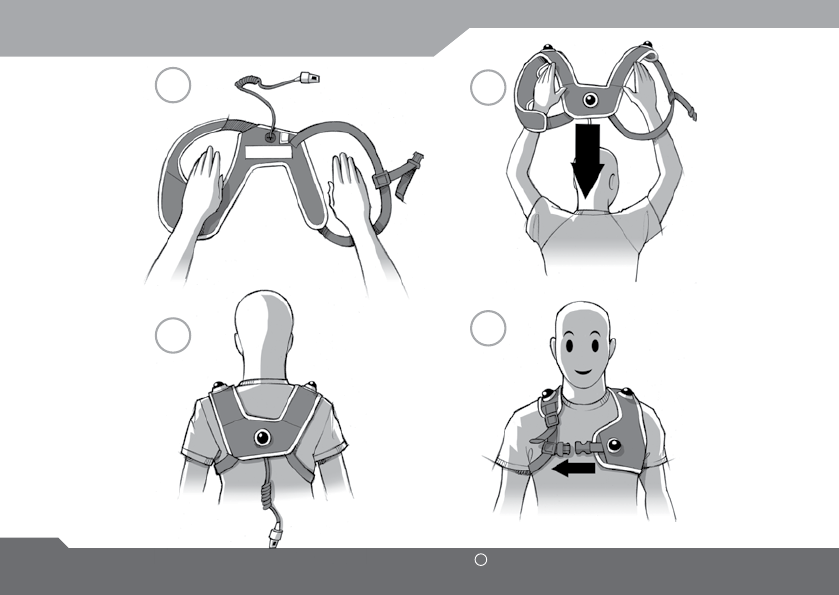
S’ÉQUIPER DU PLASTRON
UBISOFT
FRANçAIS
Plus d’informations sur www.battle-tag.com 29
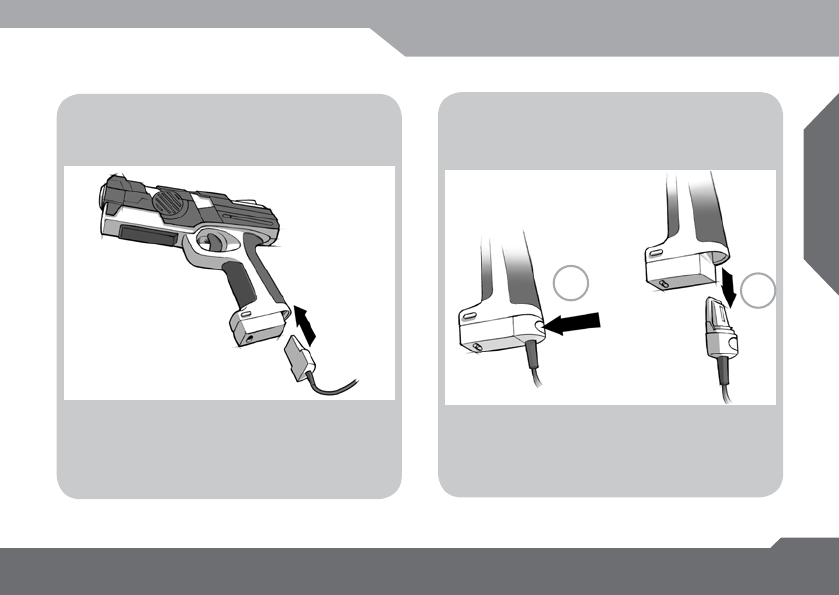
CONNEXION DU T-BLASTER
Connexion
du T-Blaster au Plastron
Déconnexion
du T-Blaster du Plastron
12
1 : Appuyer sur le bouton.
2 : Retire le connecteur.
Appuie le connecteur du plastron dans la
partie inférieure de la crosse.

30 UBISOFT R
Plus d’informations sur www.battle-tag.com
INFORMATION
RECOMMANDATION RELATIVE À LA PROTECTION DE L’ENVIRONNEMENT
En n de vie, ce produit ne doit pas être éliminé avec les déchets ménagers normaux mais déposé à
un point de collecte des déchets d’équipements électriques et électroniques en vue de son recyclage.
Ceci est conrmé par le symbole gurant sur le produit, le manuel utilisateur ou l’emballage.
En fonction de leurs caractéristiques, les matériaux peuvent être recyclés.
Par le recyclage et par les autres formes de valorisation des déchets d’équipements électriques et
électroniques, vous contribuez de manière signicative à la protection de l’environnement.
Veuillez consulter les autorités locales qui vous indiqueront le point de collecte concerné.

UBISOFT
FRANçAIS
Plus d’informations sur www.battle-tag.com 31
SERVICE À LA CLIENTÈLE
SERVICE À LA CLIENTÈLE
Contactez-nous par Internet :
connectez-vous à notre site à http://support.ubi.com.
À partir de ce site, depuis le centre de solutions d’Ubisoft, vous pourrez naviguer dans notre liste de
Questions/Réponses (FAQ), trouver réponse à vos questions dans notre base de données, ou envoyer
votre question à un de nos agents de service client. Il peut prendre jusqu’à 48h heures pour recevoir
une réponse, n de semaine et jours fériés exclus.
Contactez-nous par téléphone :
vous pouvez aussi nous joindre par téléphone à ce numéro : 1-866-824-6515.
Lorsque vous téléphonez à notre service client, veuillez vous assurer d’avoir toutes les informations en
main. Notre service téléphonique du service client est disponible du lundi au vendredi de 10 h à 19 h
(heure de l’Est) et vous devez laisser un message dans notre boîte vocale.
Contactez-nous par courrier :
voici notre adresse postale pour le service du support technique :
Support technique Ubisoft
5505, boul. St-Laurent, bureau 2000
Montréal, QC, H2T 1S6
Canada

32 UBISOFT R
Plus d’informations sur www.battle-tag.com
Ubisoft garantit à l’acquéreur d’origine que ses produits sont exempts de défaillance matérielle et de fabrication pour
une période de quatre-vingt-dix (90) jours à partir de la date d’achat. Les produits Ubisoft sont vendus tels quels,
sans aucune garantie expresse ou tacite, et Ubisoft n’est pas responsable des pertes ou des dommages résultant
de l’utilisation de ses produits. Ubisoft s’engage, pour une période de quatre-vingt-dix (90) jours, soit à remplacer
gratuitement un produit défectueux, dans la mesure où l’article défectueux est renvoyé au magasin où il a été acquis
initialement, avec une preuve d’achat datée, soit à réparer ou à remplacer le produit défectueux sans frais, selon
l’option choisie par Ubisoft, lorsqu’il est accompagné d’une preuve d’achat et envoyé à nos bureaux avec
affranchissement payé d’avance. Cette garantie ne s’applique pas à l’usure normale, et s’annule si la défaillance du
produit s’avère être le résultat d’une utilisation abusive, déraisonnable, d’un mauvais traitement, ou d’une
négligence envers le produit. Attention, la garantie ne s’applique pas si l’ouverture des produits est forcée.
Attention, les performances de tir peuvent être dégradées en cas d’utilisation en plein soleil ou dans une zone sujette
à perturbation électro magnétique.
Limitations : cette garantie tient lieu de toute autre garantie, et aucune prétention ou demande de paiement de
quelque sorte que ce soit ne peut contraindre ou obliger Ubisoft. Toutes garanties tacites s’appliquant aux produits
Ubisoft, y compris les garanties de qualité marchande et d’utilisation dans un but spécique, sont limitées à la
période de quatre-vingt-dix (90) jours mentionnée ci-dessus. Ubisoft ne sera en aucun cas responsable des préjudices
spéciaux, accessoires ou corrélatifs résultant de la possession, de l’utilisation ou de défaillances des produits Ubisoft.
Certains États n’autorisent pas de restrictions en ce qui concerne la durée d’une garantie tacite et/ou d’exclusions
ou de restrictions envers les détériorations accessoires ou corrélatives. Par conséquent, les restrictions et/ou les
exclusions de responsabilité citées ci-dessus ne s’appliquent peut-être pas à vous. Cette garantie vous donne des
droits spéciques, et il est également possible que vous ayez d’autres droits, selon l’État où vous vous trouvez.
Remarque : Ubisoft se réserve le droit d’apporter des améliorations à ses produits à tout moment, et ce, sans
préavis.
Remboursements : Ubisoft ne peut fournir de remboursements ou encore échanger les produits renvoyés contre
un crédit autre que le remplacement pour un produit identique. Toute demande de remboursement d’un produit doit
se faire au magasin où l’achat s’est effectué, car les points de vente au détail établissent leur propre politique de
remboursement. Cette politique ne couvre que les remplacements de produits identiques.
GARANTIE

UBISOFT
FRANçAIS
Plus d’informations sur www.battle-tag.com 33
Remplacement de produits/documentation : veuillez contacter directement un représentant du support
technique d’Ubisoft avant de nous envoyer votre produit. Très souvent, un remplacement n’est pas la meilleure
solution. Nos représentants du support vous aideront à déterminer si un remplacement est nécessaire ou disponible.
Vous devrez tout d’abord vous procurer un numéro d’ARM (autorisation de renvoi de matériel) an que votre renvoi
ou votre remplacement puisse s’effectuer. Votre demande de remplacement ne pourra pas se faire sans ce numéro
d’ARM.
Si un câble de ce produit vient à être endommagé il doit être placé au rebus et non reparé.
Si nous déterminons qu’un renvoi ou un remplacement est nécessaire :
Veuillez renvoyer le produit (média seulement) accompagné d’un chèque ou d’un mandat d’une valeur correspondant
à votre produit (voir les frais de remplacement ci-dessous) rédigé à l’ordre d’Ubisoft, avec une brève description de
la difculté rencontrée, ainsi que votre nom, votre adresse (pas de boîte postale), le numéro d’ARM, et votre numéro
de téléphone à l’adresse ci-dessous.
Frais de remplacement : notre grille de frais de remplacement la plus récente est disponible en ligne.
Veuillez consulter http://support.ubi.com pour obtenir la grille tarifaire mise à jour.
ADRESSE DE GARANTIE ET INFORMATION PERSONNE-RESSOURCE
Téléphone : 1 800 UBI-6515
Horaires : 7 h – 16 h (heure de l’Est), du lundi au vendredi
Adresse :
Support Ubisoft
5505, Boul. St-Laurent, bureau 5000
Montréal, QC, H2T 1S6
Canada
GARANTIE
UBISOFT
34 R
More information at www.battle-tag.com
Régénération : Selon le scénario, quand il ne te reste plus de points de vie, tu peux revenir en jeu.
Il existe trois modes de régénération : tirer sur l’UbiConnect, scanner une T-Base ou attendre le temps
déni par le scénario ou les options de jeu.
Points de vie : Tu perds un point de vie chaque fois que tu es touché par un tir. Quand tu as perdu
tous tes points de vie, si le scénario le permet, tu peux revenir en jeu selon un des trois modes.
Chargeurs : A chaque fois que ton nombre de balle atteint zéro, ton T-Blaster recharge
automatiquement un nouveau chargeur. Pour cela, il faut que tu en aies encore au moins un. Si tu n’en
as plus, tu peux aller recharger ton T-Blaster avec une Boîte de Munitions.
T-Tags : Les T-Tags regroupent toutes les “boîtes” que tu peux scanner avec ton T-Blaster. Il y a par
exemple, les Boîtes de Munitions, les Trousses de Soins (vendues séparément), les T-Bases…
Frag : C’est l’action d’éliminer un joueur, quand son dernier point de vie lui est enlevé.
UbiConnect : C’est le relais radio entre les T-Blasters (et tous les périphériques UbiConnect) et
l’ordinateur. L’ubiconnect utilise 5v 500 mA.
LEXIQUE
Ce symbole signie que le produit marqué utilise un courant continue.
Ce symbole signie que le produit marqué est sous la directive WEEE. Le Waste Electrical
and Electronic Equipment Directive (WEEE Directive) est la directive Europeene 2002/96/EC
sur la mise au rebus d’equipement electriques et electroniques et qui denis les standard de
collecte et de recyclage pour chaque type de produit electrique.

UBISOFT
ENGLISH
More information at www.battle-tag.com 35
NOTE
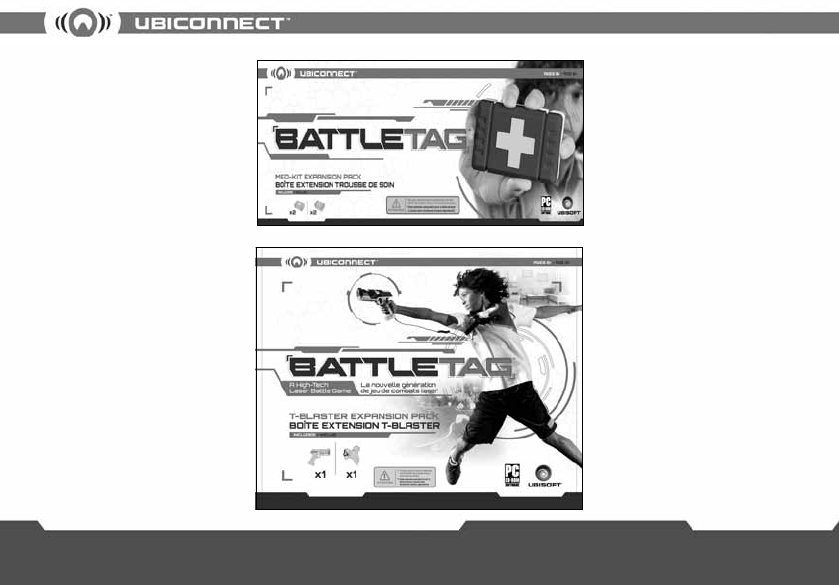
Need a medic while playing ?
The Med-Kit Expansion pack
contains 2 Med-Kits and 2 extra
T-bases for extended gameplay
fun.
Vous voulez jouer en équipe
jusqu’à 8 joueurs ?
La Boîte Extension T-Blaster qui
inclut un T-Blaster et un plastron
additionnels est aussi disponible.
Besoin de points de vie durant le jeu ?
L’extension Trousse de Soin inclut 2
trousses de soin et 2 T-bases pour
encore plus de fun.
Want to expand your team up to
8 players?
The T-Blaster Expansion Pack
which includes one extra
T-Blaster and one extra sensor
vest is also available.
Also available Aussi disponible