UnaliWear KANEGA Cellular and 802.11b/g/n Enabled Watch (mPERS device) User Manual FCC UnaliWear Kanega Users Manual Quick Start v7b
UnaliWear, Inc. Cellular and 802.11b/g/n Enabled Watch (mPERS device) FCC UnaliWear Kanega Users Manual Quick Start v7b
FCC UnaliWear Kanega Users Manual - Quick Start v7c

Community@UnaliWear.com
(888) 343-1513
PDT2-170626-2 Page 1 of 6
Thank You!
Thank you for volunteering to join the UnaliWear User Experience Test of the Kanega watch.
Your watch is here!
What’s in the Box?
• The pre-production Kanega watch
• Four batteries
• Battery charger
• Power plug for charger
Getting to Know the Kanega Watch
There are a few things to know about the Kanega watch.
First, the crown button is different than that of your typical watch. You can press it, but it doesn’t turn,
as there is no need to manually set the time with the Kanega watch. (The time is set automatically!)
When instructed to press the crown button, press the center part of the crown. The outer part of the
crown is solid to protect against accidental presses, so only the center part can be pressed.
Second, the Kanega watch is designed to be worn all the time. The batteries are designed to be changed
about once a day.
Four batteries are provided so that two can be charging while the other two are on the watch. With two
batteries on the charger, an empty slot is available for a battery that is removed from the watch.
Charging the Batteries for the First Time
Before you do anything with the watch, you need to charge the batteries.
Connect the power cable of the charger to a wall plug.
Place two batteries in the charger as shown in the picture.
The sides of the charger will pulse red if the battery is charging and will alternately flash red
if the battery is not making good contact with the charger. The light will turn solid green
once the battery is fully charged.
Charging a battery from empty may take up to three hours.
NOTE: A helpful online video of tips on replacing and charging the Kanega watch batteries can be
found at:
http://www.UnaliWear.com/UX-tester

Community@UnaliWear.com
(888) 343-1513
PDT2-170626-2 Page 2 of 6
Placing the Batteries on the Watch
Once two batteries are fully charged with green charging lights, place one charged battery on each side
of the watch. (Now is a good time to put the other batteries on the charger so that they will be ready
when needed.)
When placing a battery on the watch, squeeze the sides of the battery and place it bottom first. Give it a
press with your thumb to make sure it is secure.
Turning on the Watch for the First Time
Your watch has been shipped with a protective cover over the watch face. For optimum viewing remove
the protective film and discard before proceeding.
To turn on the Kanega watch for the first time, press and hold the crown button until you see the bar on
the display disappear, then release. The time will appear in the display.
The time may initially be off an hour or two. The Kanega watch will determine your location and contact
the internet to adjust to your time zone, but this may take some time.
Testing
As a “trailblazer” tester, you are getting one of the first pre-production watches. The focus in the early
testing is on the hardware functionality and battery operation and charging.
The Kanega watch features the ability to update its software automatically through the Wi-Fi and
cellular connection. This allows us to update the software automatically. So, we’ll be upgrading the
functionality throughout the test.
But for now, ask your watch to tell you the time. The name of your watch is “Fred Astaire”. Try asking
your watch about the time:
• “Fred Astaire” (wait for the watch to buzz twice). The watch buzzes once to let you know
it heard “Fred Astaire” and once to let you know when it is ready for your command.
• “What time is it?”
If everything is working properly, then the Kanega watch will respond with the time.
Getting Your Attention
When the Kanega watch needs to tell you something, such as when the battery charge is low, it will
notify you with two short buzzes.
You can tell the Kanega watch that is OK to proceed by pressing the crown button once or not OK to
proceed (No) by rapidly pressing the crown button twice. In addition, you can verbally respond to a
notification by saying, “Fred Astaire” followed by “Yes” or “No”.
If you do not respond verbally or with button presses, the Kanega watch will assume it is a bad time to
communicate with you and will defer the notification. You can also defer the notification with two quick
presses of the crown button or by saying “Fred Astaire” and “No”.
Community@UnaliWear.com
(888) 343-1513
PDT2-170626-2 Page 3 of 6
Recharging the Batteries
The Kanega watch will notify you when it is time to change the batteries on your watch with two short
buzzes as described above.
Replace the discharged batteries with fully charged ones from the charger. Always leave non-used
batteries on the charger so that you always have fully charged batteries ready to go.
Note: The first couple of times you charge your batteries they may not last very long before needing to
be charged again. This is because they are being used to charge the internal backup battery inside the
watch. Once the internal battery is completely charged, your batteries will last longer. Be sure to
always change your batteries before they go completely dead.
Contacting the Monitoring Center
Note: in this early phase of testing, the monitoring center is not active. Calls will be directed to
UnaliWear and will be answered during normal business hours. Calls made through the watch may be
recorded so that audio quality can be evaluated.
In case of an emergency, call 911 with a telephone.
During this phase of testing, a special operation is needed to test the call out functionality:
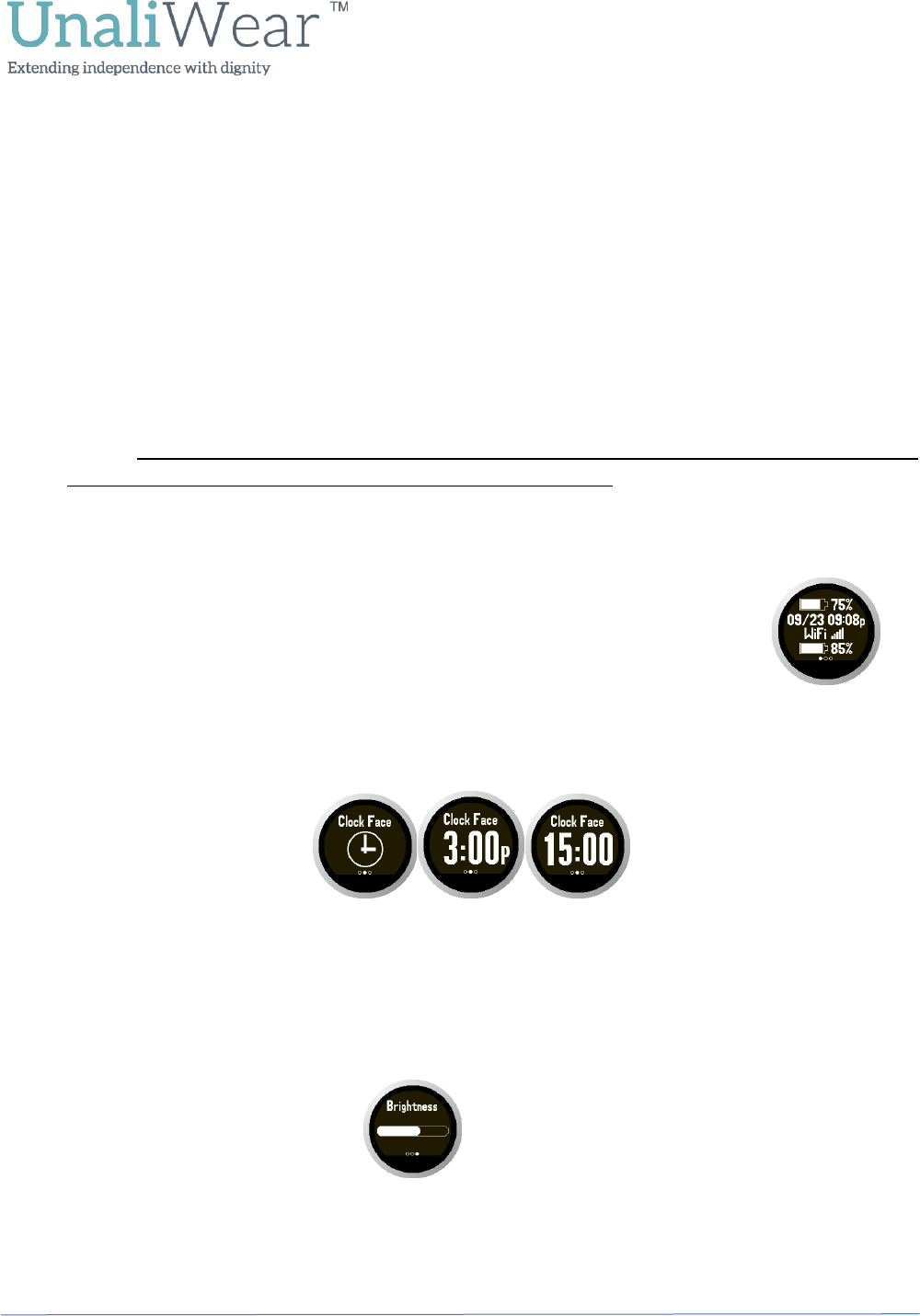
1. Press and hold the crown button (Approximately 1 second) at any time, regardless of the screen the
watch is displaying. You will feel a short buzz and then another longer buzz. Release the button after
the second vibration.
2. The Kanega watch will announce, “I am contacting the operator” and then place a call to UnaliWear.
(This will be the monitoring center in later stages).
3. Press the crown button once to end the call.
You can also contact UnaliWear (or the monitoring center in later stages) by use of a voice command:
1. Say the watch’s name, “Fred Astaire”.
2. Wait until you see the listening ear icon, then say “Get help” or “Call the Operator”.
3. The Kanega watch will say “I am contacting the operator” and then place a call to UnaliWear.
(This will be the monitoring center in later stages).
4. Press the crown button once to hang up.
This
Say “Fred Astaire”
Say “Get Help” or
“Call the Operator”
Single buzz
If the watch needs
additional time to analyze a
voice command, this screen
will occasionally appear.
Press and hold Crown
Button for 1 second
From any screen
Two buzzes
Listening for a
command
Community@UnaliWear.com
(888) 343-1513
PDT2-170626-2 Page 4 of 6
The Kanega Watch Display
The watch display remains off during normal use. The display will turn on when:
• You say the name of your watch, “Fred Astaire”,
• You press the crown button, or
• You raise your arm to look at the time. (Note: the watch may not turn on when raised
immediately after a period of inactivity as the watch may think that you are asleep.)
Information and Option Screens
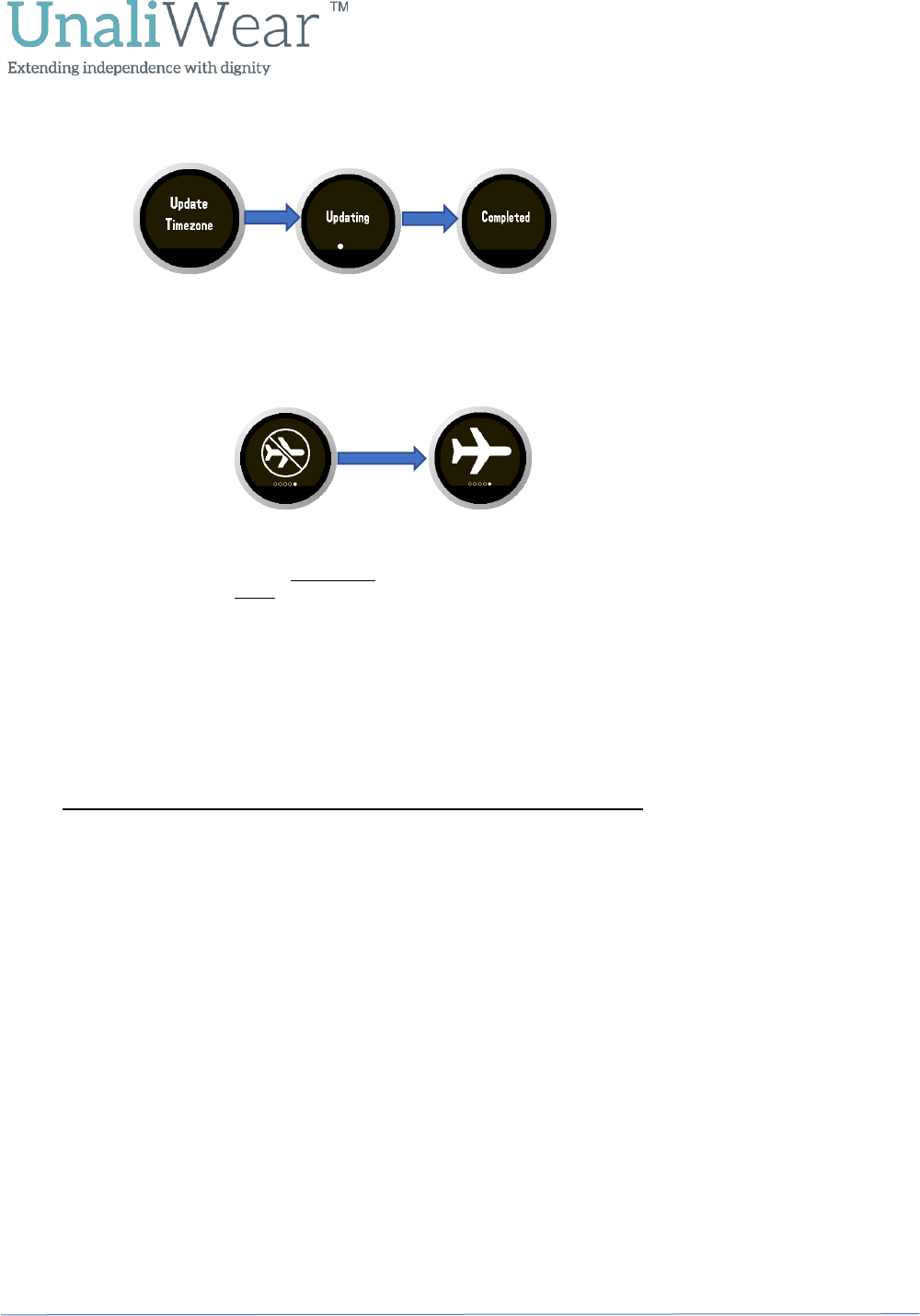
• If you press the crown button while the time is showing, the Kanega watch shows the date and
day of the week.
• While the date and day is showing, a double press of the crown button brings up the information
screen. A single press of the crown button will then cycle through the option screens, including
Clock Face, Brightness, Timezone Update and Airplane Mode screens as explained in more detail
below. To return to the time display, simply wait until the watch times out (approximately 10
seconds) and it will always return to the Clock screen.
Information Screen
The information screen shows the battery charge in percent and information about
the last time the Kanega watch checked-in with the UnaliWear servers: date, time,
connection (cell or Wi-Fi), and signal strength of the connection.
Clock Face Options
The clock face screen allows selection of an analog or digital display of the time. The digital display can
use either a 12 or 24-hour clock.
Press the crown button three times quickly to cycle through the clock face options and select the style of
display time.
Brightness Control
The brightness of the Kanega watch display can be increased or decreased with the brightness control
screen. Press the crown button three times quickly to select the desired brightness.
Timezone Update
When traveling to a different time zone, your watch will automatically update to the new time zone.
However, this can take up to an hour or in some cases longer depending on the cellular signal strength.
Community@UnaliWear.com
(888) 343-1513
PDT2-170626-2 Page 5 of 6
For a quicker update, you can force a time zone update. To force a time zone update, press the crown
button three times quickly.
Airplane Mode
When traveling on an airplane you should always place your watch in Airplane Mode. To turn the
Airplane Mode ON, press the crown button three times quickly. Pressing the crown button three times
again will turn it back OFF.
In the OFF mode, which is the default setting, wi fi and cellular will function normally (just like a cellular
phone). When the Airplane mode is turned ON, your watch will Not communicate over wi fi or cellular.
If the Airplane mode is ON and you try to use the Get Help feature, the watch will alert you that the
Airplane mode is ON and then talk you through the next steps to complete your Get Help call.
Note: Remember to turn the Airplane mode OFF once you have landed.
Care of the Kanega Watch
The pre-production Kanega watch can be splashed, but it is not yet waterproof. Please take care not to
immerse. A damp cloth is all that is needed to clean the Kanega watch.
Questions? Need Anything? Talk to Us
We’ll be in touch to ask how things are going, but in the meantime, please contact us anytime if you
have any questions or issues.
Email: Community@ UnaliWear.com
Phone: 888 343-1513 Toll free (M-F, 8:30AM to 5:00PM Central time)
Thank You!
Thank you again. Your testing is helping us provide “Independence with Dignity for millions of vulnerable
people”!
Airplane Mode OFF
Wi Fi and cellular are
working (Watch default
setting)
Airplane Mode ON
Wi Fi and cellular will
Not work.
Three quick
presses of the
Crown Button

Community@UnaliWear.com
(888) 343-1513
PDT2-170626-2 Page 6 of 6
FCC WARNING
This equipment has been tested and found to comply with the limits for a Class B digital device, pursuant
to Part 15 of the FCC Rules. These limits are designed to provide reasonable protection against harmful
interference in a residential installation. This equipment generates, uses and can radiate radio frequency
energy and, if not installed and used in accordance with the instructions, may cause harmful
interference to radio communications.
However, there is no guarantee that interference will not occur in a particular location. If this equipment
does cause harmful interference to radio or television reception, which can be determined by turning
the equipment off and on, the user is encouraged to try to correct the interference by one or more of
the following measures:
• Reorient or relocate the receiving antenna.
• Increase the separation between the equipment and receiver.
• Connect the equipment into an outlet on a circuit different from that to which the receiver is
connected.
• Consult the dealer or an experienced radio/TV technician for help
Radio Frequency Interference Statement
Warning: This is a Class B product. In a domestic environment, this product may cause radio interference
in which case the user may be required to take adequate measures.
Canadian Doc Notice
For Class B Computing Devices
This digital apparatus does not exceed the Class B limits for radio noise emissions from digital apparatus
as set out in the Radio Interference Regulation of the Canadian Department of Communications.
“Le présent appareil numérique n’èmet pas de bruits radioélectriques dépassant les limites applicables
aux appareils numériques de la class B prescrites dansle Règlement sur le brouillage radioélectrique é
dicté par le ministère des Communications du Canada."
Contains FCC ID: RI7UE866N3
Contains IC: 5131A-UE866N3
Your wireless device is a radio transmitter and receiver. It is designed and manufactured not to exceed the exposure limits for Radio
Frequency (RF) energy set by the Federal Communications Commission (FCC) of the U.S. Government. These FCC RF exposure limits
are derived from the recommendations of two expert organizations: the National Council on Radiation Protection and Measurement
(NCRP) and the Institute of Electrical and Electronics Engineers (IEEE). The RF exposure limit set by the FCC for wireless mobile
devices employs a unit of measurement known as the Specific Absorption Rate (SAR). The SAR is a measure of the rate of absorption of
RF energy by the human body expressed in units of watts per kilogram (W/kg).
SAR values for wrist worn devices are measured in reference to (wrist) extremity and head under simultaneous (multiple) transmitter
conditions for each frequency band operation. For speaker mode communication this device has been tested when worn on the wrist and
positioned a minimum of 1.0 cm from the head. For this device, the FCC safety limit for extremity SAR is 4.0 W/kg (10gm) and head SAR
is 1.6 W/kg (1gm). The highest SAR tested value for this device is 0.03 W/kg (wrist) and 0.84 W/kg (head).
Contains: 2AM4C-UE866
TO ACCESS THE E-LABEL:
1. Press the crown button once to display the date screen
2. Press the crown button twice to display the user info screen
3. Press the crown button twice to display the above regulatory screen