Uni rich Technology URBIT1036 Gnome Speaker User Manual 15 URBT 1036 UserMan
Uni-rich Technology Limited Gnome Speaker 15 URBT 1036 UserMan
15_URBT-1036 UserMan

User’s Guide for Model No. URBT-1036
Gnome Speaker
FCC ID:2AEWC-URBT1036

FEATURES
• IPX4 water resistant
• Built-in Bluetooth speaker
• Wireless range: 60 feet
• Micro-USB port for battery recharge
• Battery life: approx. 4 hours at 50% volume
• Micro-USB to USB cable
INCLUDES
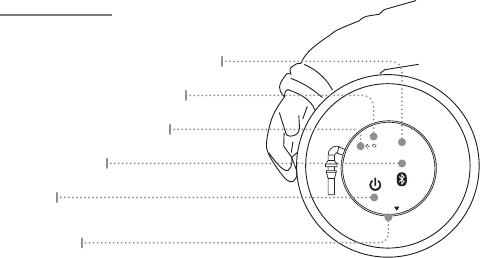
CONTROLS
Bluetooth Pairing Indicator
Battery Charge Indicator
Power
Press to power on or o.
Water Cap
Lift here to access charging port.
Pair Bluetooth
Press and hold to begin pairing.
Micro-USB Charging Port (inside)
DC IN
PAIR
OPEN

WATER RESISTANCE
This unit has an IPX 4 level of water resistance. This makes it suitable for indoor
and outdoor use in the presence of incidental or light exposure to splashing water,
rain, or snow. Water splashing against the enclosure from any angle should have
no harmful eects. It is not recommend to submerge this speaker in water for any
amount of time.
IMPORTANT: To ensure your speaker is prepared for use in a wet environment,
disconnect and remove any power cables, and tightly close the water cap on the
unit. If the water cap is not properly closed, water resistance will be compromised
and could result in damage to the speaker or personal injury.
DC IN
PAIR
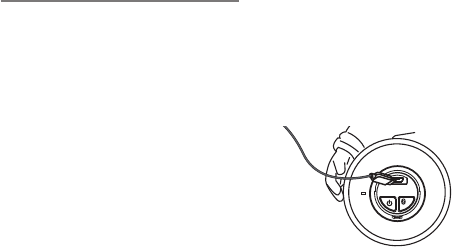
CHARGING THE BATTERY
Requires a Micro-USB to USB cable (included).
Note: Be sure the computer is not in sleep mode.
1. Using a Micro-USB to USB cable (included), connect the USB plug to the USB
port of a powered on computer or USB power adaptor.
2. Pull back the water cap and connect the Micro-USB plug to the Micro-USB port
of the unit. The unit will now charge.
WARNING: DO NOT, UNDER ANY
CIRCUMSTANCES, CHARGE THE SPEAKER
WHILE IT IS IN OR NEAR WATER. ALLOW
AMPLE TIME TO DRY BEFORE CHARGING.
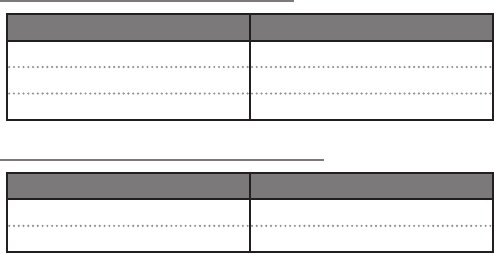
BATTERY CHARGE INDICATORS
STATUS INDICATOR
Low Battery Flashing red light
Charging Device Solid red light
Full Charge No light
BLUETOOTH PAIRING INDICATORS
STATUS INDICATOR
Pairing Device Flashing blue light
Device Paired Solid blue light

PAIRING A BLUETOOTH DEVICE
1. Press the Power button to power on the speaker.
2. Press and hold the Pair button to begin pairing.
The Pairing Indicator will begin ashing quickly. When pairing, remain within 3 feet
of the unit.
3. Using the controls on your Bluetooth device, scan for and select ISBW216 in
your Bluetooth settings to pair. If your device requests a password, enter the
default password 0 0 0 0 .
Refer to the user’s manual for your specic device for instructions on pairing and
connecting Bluetooth devices.
4. When successfully paired, the Pairing Indicator will turn solid and an audible
chime will sound through the speaker.
After initial pairing, the unit will stay paired unless unpaired manually by the user or
erased due to a reset of the device. If your device should become unpaired or you nd
it is unable to connect, repeat the above steps.

PLAYING AUDIO WIRELESSLY
1. Use the connected Bluetooth device to select and start playing audio.
2. Once audio is heard playing through the unit, use the controls on the connected
Bluetooth Device or the unit to play, pause, and skip audio tracks.
WARNINGS AND PRECAUTIONS
• WARNING: Donotplacethisunitdirectlyontofurnituresurfaceswithanytypeofsoft,
porous,orsensitivenish.Aswithanyrubbercompoundmadewithoils,thefeetcould
causemarksorstainingwherethefeetreside.Werecommendusingaprotectivebarrier
suchasaclothorapieceofglassbetweentheunitandthesurfacetoreducetheriskof
damageand/orstaining.
• WARNING: Wherethemainsplugorappliancecouplerisusedasthedisconnectdevice,
suchdisconnectdeviceshallremainreadilyoperable.
• NOTE:Thisdeviceusesaninternalrechargeablelithium-ionbatterythatshouldlastthe
lifetimeofthedevice.Ifyoususpectyourbatterymaybedeadafterseveralattemptsto
charge,pleasecontact1-888-999-4215forsupport.
• Neverdisassembletheunitorattempttoremovethebatteryasthatcouldcauseleakageof
anelectrolyticsubstance.
FCC WARNINGS
Warning:Changesormodicationstothisunitnotexpresslyapprovedbytheparty
responsibleforcompliancecouldvoidtheuser’sauthoritytooperatetheequipment.
NOTE:ThisequipmenthasbeentestedandfoundtocomplywiththelimitsforaClassB
digitaldevice,pursuanttoPart15oftheFCCRules.Theselimitsaredesignedtoprovide
reasonableprotectionagainstharmfulinterferenceinaresidentialinstallation.This
equipmentgenerates,uses,andcanradiateradiofrequencyenergyand,ifnotinstalled
andusedinaccordancewiththeinstructions,maycauseharmfulinterferencetoradio
communications.However,thereisnoguaranteethatinterferencewillnotoccurina
particularinstallation.Ifthisequipmentdoescauseharmfulinterferencetoradioortelevision
reception,whichcanbedeterminedbyturningtheequipmentoffandon,theuseris
encouragedtotrytocorrecttheinterferencebyoneormoreofthefollowingmeasures:
• Reorientorrelocatethereceivingantenna.
• Increasetheseparationbetweentheequipmentandreceiver.
• Connecttheequipmentintoanoutletonacircuitdifferentfromthattowhichthereceiver
isconnected.
• Consultthedealeroranexperiencedradio/TVtechnicianforhelp.
This device complies with part 15 of the FCC rules. Operation is subject to
the following two conditions:
(1) this device may not cause harmful interference, and
(2) this device must accept any interference received, including interference
that may cause undesired operation.