Uniden Pro520E Users Manual
PRO520E to the manual a5d83eb4-ded3-0c44-0994-deb9156fda8d
2015-02-10
: Uniden Uniden-Pro520E-Users-Manual-360372 uniden-pro520e-users-manual-360372 uniden pdf
Open the PDF directly: View PDF  .
.
Page Count: 6
.-"'" r~£C i--.
uni en@
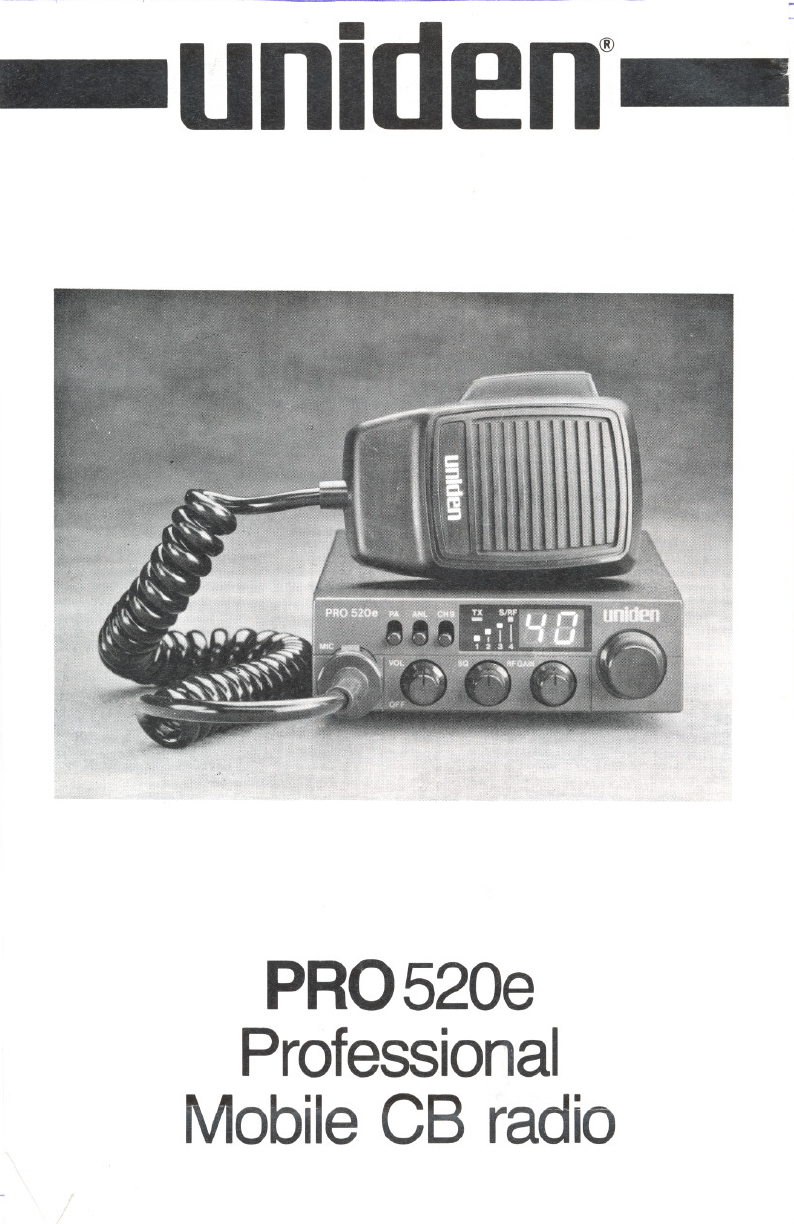
PRO520e
Professional
MobileCB radio
----- f
,---...
INTRODUCTION
Welcome to the world of sophisticated,
state-of-the-art CB radio communic-
ations. YourUnidenPRO520e represents
the most advanced mobile radio ever de-
signed for use in the Citizens Band Radio
Service. It willoperateonany of the40AM
WARNING
Before transmitting with your transceiver,
you mustobtainaDepartmentof Commu-
nications (D.O.C.)CitizensRadioLicence.
Obtain an application form, from the
D.O.C. Before completing the form you
should read the conditions governing the
licensing and operation of the C.R.S.
frequenciesauthorizedby theDepartment
of Communications. YourPRO 520e fea-
tures asuperheterodyne circuit with
PHASELOCKEDLOOP techniques to as-
sure precise frequency control.
(D.O.C.brochure RB 249). Thisbrochure
alsocan be obtained fromthe D.O.C.After
completing the application form, mail it
with the appropriate fee to the Superin-
tendant Regulatory of Licensing in the
Stateor territoryin which thestation willbe
operated.
----.
CONTROLS DFUNCTIONS
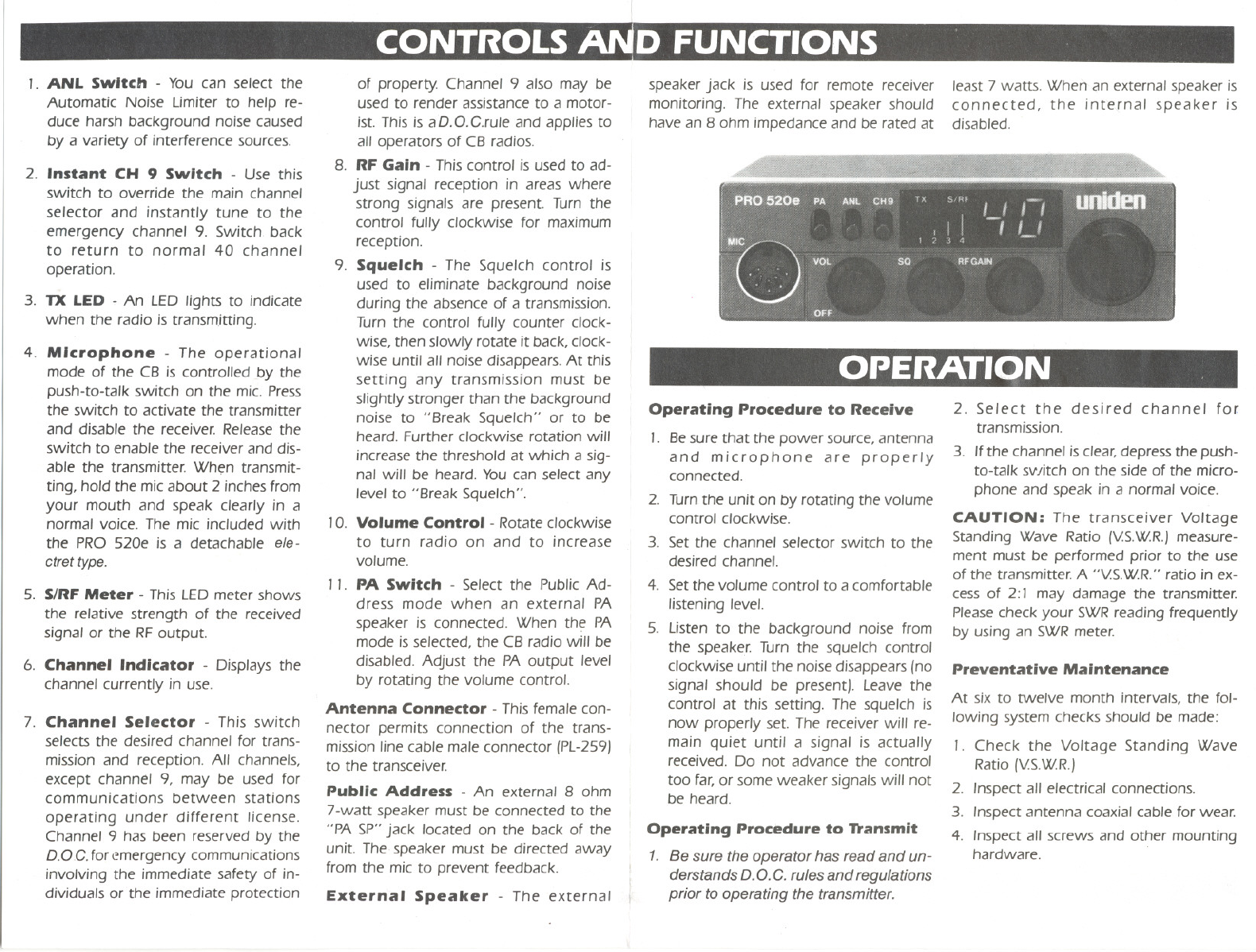
,. ANL Switch - You can select the
Automatic Noise limiter to help re-
duce harsh background noise caused
by a variety of interferencesources.
2. Instant CH 9 Switch - Use this
switch to override the main channel
selector and instantly tune to the
emergency channel 9. Switch back
to return to normal 40 channel
operation.
3. TX LED - An LED lights to indicate
when the radio is transmitting.
4. Microphone - The operational
mode of the CB is controlled by the
push-to-talk switch on the mic. Press
the switch to activate the transmitter
and disable the receiver. Release the
switch to enable the receiver and dis-
able the transmitter. Wh~n transmit-
ting, hold the micabout 2 inches from
your mouth and speak clearly in a
normal voice. The mic included with
the PRO 520e is a detachable ele-
ctret type.
5. S/RF Meter - This LEDmeter shows
the relative strength of the received
signal or the RF output.
6. Channel Indicator - Displays the
channel currently in use.
7. Channel Selector - This switch
selects the desired channel for trans-
mission and reception. All channels,
except channel 9, may be used for
communications between stations
operating under different license.
Channel 9 has been reserved by the
D.OC. foremergency communications
involving the immediate safety of in-
dividuals or the immediate protection
of property. Channel 9 also may be
used to render assistance to a motor-
ist. This is aD.O.C.rule and applies to
all operators of CB radios.
8. RF Gain - This control is used to ad-
just signal reception in areas where
strong signals are present. Turn the
control fully clockwise for maximum
reception.
9. Squelch - The Squelch control is
used to eliminate background noise
during the absence of a transmission.
Turn the control fully counter clock-
wise, then slowly rotate it back, clock-
wise until all noise disappears. At this
setting any transmission must be
slightly stronger than the background
noise to "Break Squelch" or to be
heard. Further clockwise rotation will
increase the threshold at which a sig-
nal will be heard. You can select any
level to "Break Squelch".
'0. Volume Control - Rotate clockwise
to turn radio on and to increase
volume.
, ,. PA Switch - Select the PublicAd-
dress mode when an external PA
speaker is connected. When the PA
mode is selected, the CB radio will be
disabled. Adjust the PA output level
by rotating the volume control.
Antenna Connector - This female con-
nector permits connection of the trans-
mission line cable male connector (PL-259)
to the transceiver.
Public Address - An external 8 ohm
7-watt speaker must be connected to the
"PA SP" jack located on the back of the
unit. The speaker must be directed away
from the mic to prevent feedback.
External Speaker - The external
speaker jack is used for remote receiver
monitoring. The external speaker should
Ihave an 8 ohm impedance and be rated at
least 7 watts. When.;tn external speaker is
connected, the inre,[nal speaker is
disabled.
OPERATION
,""
Operating Procedure to Receive
I
,. Besure that the power source, antenna
and microphone are properly
Iconnected.
I 2. Turnthe unit on by rotating the volume
control clockwise.
3. Set the channel selector switch to the
desired channel.
I4. Set the volume control to a comfortable
listening level.
5. listen to the background noise from
the speaker. Turn the squelch control
clockwise until the noise disappears (no
signal should be present). Leave the
control at this setting. The squelch is
now properly set. The receiver will re-
main quiet until a signal is actually
received. Do not advance the control
too far, or some weaker signals will not
be heard.
: Operating Procedure to D'ansmit
1. Be sure the operator has read and un-
derstands D.O. C. rules and regulations
prior to operating the transmitter.
2. Select the desired channel for
transmission.
3. Ifthe channel is clear, depress the push-
to-talk svlitch on the side of the micro-
phone and speak in a normal voice.
CAUTION: The transceiver Voltage
Standing Wave Ratio (VS.W.R.)measure-
ment must be performed prior to the use
of the transmitter. A "VS.WR." ratio in ex-
cess of 2:' may damage the transmitter.
Please check your SWRreading frequently
by using an SWRmeter.
Preventative Maintenance
At six to twelve month intervals, the fol-
lowing system checks should be made:
,. Check the Voltage Standing Wave
Ratio (VS.WR.)
2. Inspect all electrical connections.
3. Inspect antenna coaxial cable for wear.
4. Inspect all screws and other mounting
hardware.
SPECIFICATIONS
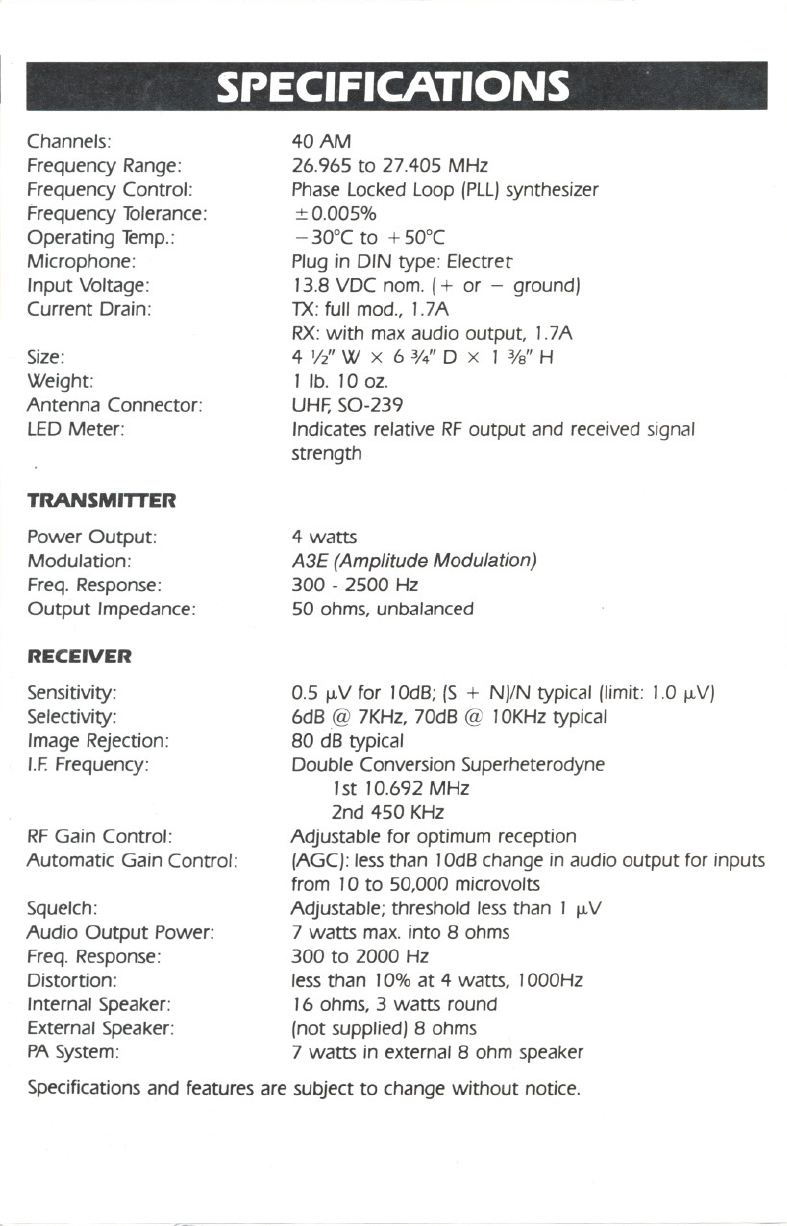
Channels:
Frequency Range:
Frequency Control:
Frequency Tolerance:
Operating Temp.:
Microphone:
Input Voltage:
Current Drain:
Size:
Weight:
Antenna Connector:
LEDMeter:
TRANSMITTER
Power Output:
Modulation:
Freq. Response:
Output Impedance:
RECEIVER
40 AM
26.965 to 27.405 MHz
Phase Locked Loop (PLL}synthesizer
+0.005%
- 30°C to + 50°C
Plug in DIN type: Electret
13.8 VDC nom. (+ or - ground}
TX:full mod., 1.7A
RX.:with max audio output, 1.7A
4 '/l' W x 6 3/4"0 x 1 3/8"H
1 lb. 10 oz.
UHF,SO-239
Indicates relative RFoutput and received signal
strength
4 watts
A3E (Amplitude Modulation)
300 - 2500 Hz
50 ohms, unbalanced
0.5 ~V for 10dB; (S + N}/N typical (limit: 1.0 ~V}
6dB@ 7KHz, 70dB @ 10KHztypical
80 dB typical
Double Conversion Superheterodyne
1st 10.692 MHz
2nd 450 KHz
Adjustable for optimum reception
(AGC}:less than 10dBchange in audio output for inputs
from 10 to 50,000 microvolts
Squelch: Adjustable; threshold less than 1 ~V
Audio Output Power: 7 watts max. into 8 ohms
Freq. Response: 300 to 2000 Hz
Distortion: less than 10% at 4 watts, 1000Hz
Internal Speaker: 16 ohms, 3watts round
External Speaker: (not supplied} 8 ohms
PASystem: 7 watts in external 8 ohm speaker
Specifications and features are subject to change without notice.
Sensitivity:
Selectivity:
Image Rejection:
I.F.Frequency:
RF Gain Control:
Automatic Gain Control:
~
~
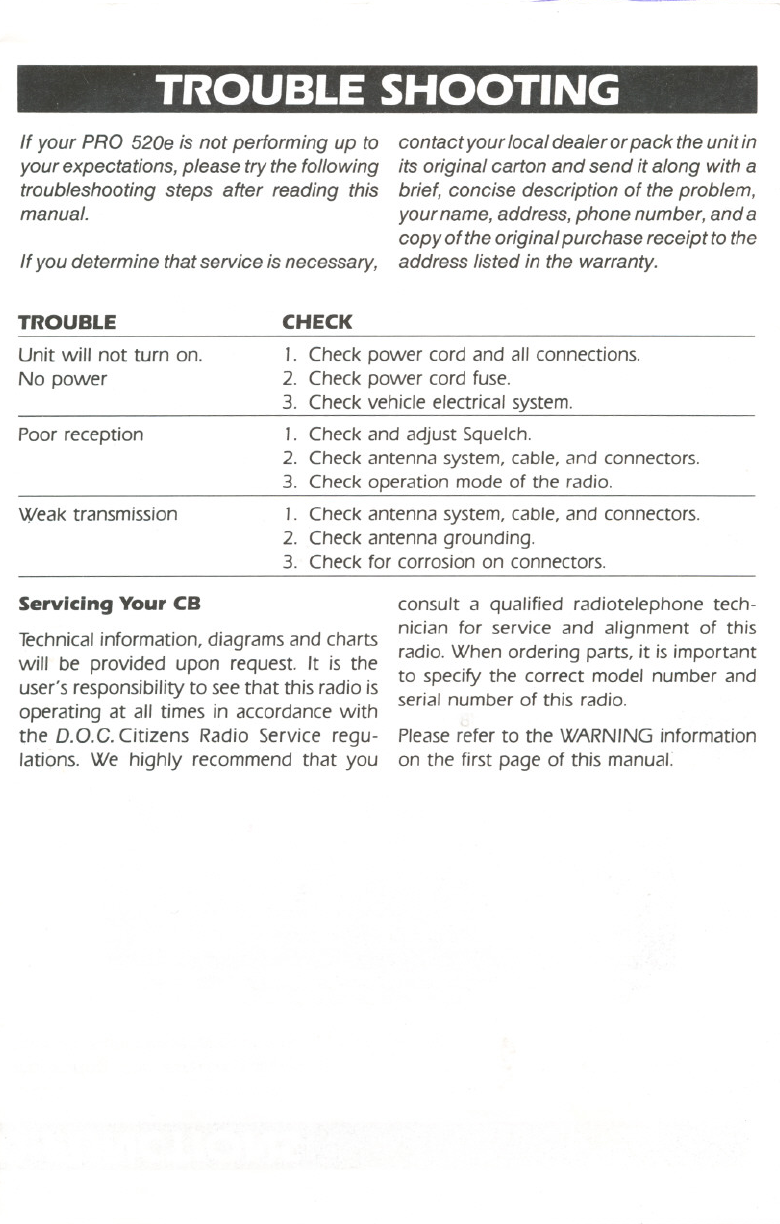
"TROUBLE SHOOTING
CHECK
1. Check power cord and all connections.
2. Check power cord fuse.
3. Check vehicle electrical system.
1. Check and adjust Squelch.
2. Check antenna system, cable, and connectors.
3. Check operation mode of the radio.
1. Check antenna system, cable, and connectors.
2. Check antenna grounding.
3. Check for corrosion on connectors.
If your PRO 520e is not performing up to
your expectations, please try the following
troubleshooting steps after reading this
manual.
If you determine that service is necessary,
TROUBLE
Unit will not turn on.
No power
Poor reception
Weak transmission
contact your local dealer or pack the unit in
its original carton and send it along with a
brief, concise description of the problem,
your name, address, phone number, and a
copy of the original purchase receipt to the
address listed in the warranty.
Servicing Your CB
Technicalinformation, diagrams and charts
will be provided upon request. It is the
user's responsibility to see that this radio is
operating at all times in accordance with
the D.O.C. Citizens Radio Service regu-
lations. We highly recommend that you
.~ q:::
consult a qualified radiotelephone tech-
nician for service and alignment of this
radio. When ordering parts, it is important
to specify the correct model number and
serial number of this radio.
Please refer to the WARNING information
on the first page of this manual:
--"
--
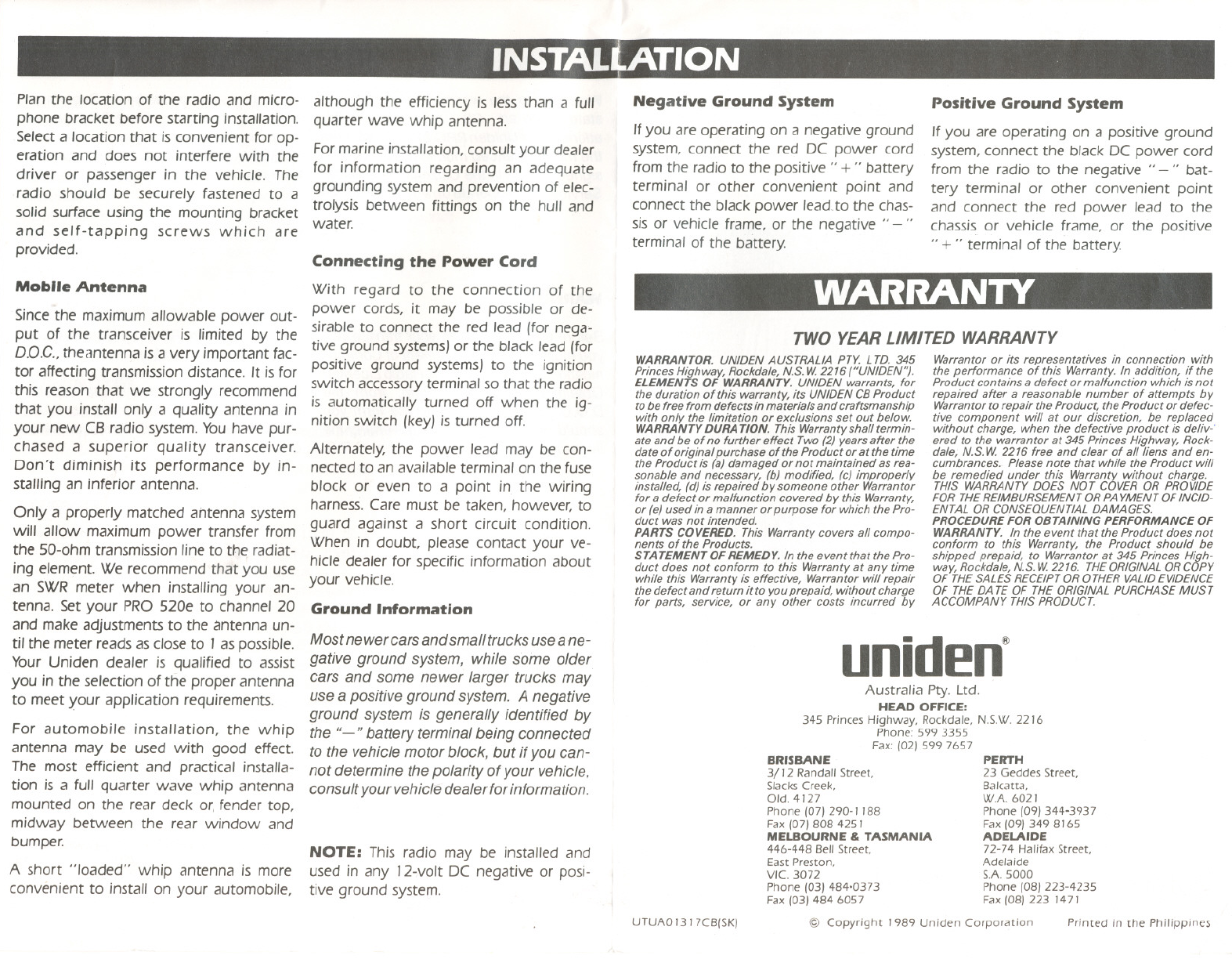
INSTALtATI ON
",V,; I
Plan the location of the radio and micro-
phone bracket before starting installation.
Selecta locationthat is convenient forop-
eration and does not interfere with the
driver or passenger in the vehicle. The
radio should be securely fastened to a
solid surface using the mounting bracket
and self-tapping screws which are
provided.
Mobile Antenna
Since the maximum allowable power out-
put of the transceiver is limited by the
OD.C., thecmtenna is a very important fac-
tor affecting transmission distance. It is for
this reason that we strongly recommend
that you install only a quality antenna in
your new CB radio system. Youhave pur-
chased a superior quality transceiver.
Don't diminish its performance by in-
stalling an inferior antenna.
Only a properly matched antenna system
will allow maximum power transfer from
the 50-ohm transmission line to the radiat-
ing element. We recommend that you use
an SWR meter when installing your an-
tenna. Set your PRO S20e to channel 20
and make adjustments to the antenna un-
tilthe meter reads as close to 1as possible.
Your Uniden dealer is qualified to assist
you in the selection of the proper antenna
to meet your application requirements.
For automobile installation, the whip
antenna may be used with good effect.
The most efficient and practical installa-
tion is a fullquarter wave whip antenna
mounted on the rear deck or,fender top,
midway between the rear window and
bumper.
A short "loaded" whip antenna is more
convenient to installon your automobile,
although the efficiency is less than a full
quarter wave whip antenna.
For marine installation, consult your dealer
for information regarding an adequate
grounding system and prevention of elec-
trolysis between fittings on the hull and
water.
Connecting the Power Cord
With regard to the connection of the
power cords, it may be possible or de-
sirable to connect the red lead (for nega'-
tive ground systems) or the black lead (for
positive ground systems) to the ignition
switch accessory terminal so that the radio
is automatically turned off when the ig-
nition switch (key) is turned off.
Alternately, the power lead may be con-
nected to an available terminal on the fuse
block or even to a point in the wiring
harness. Care must be taken, however, to
guard against a short circuit condition.
When in doubt, please contact your ve-
hicle dealer for specific information about
your vehicle.
Ground Information
Mostnewer carsandsmalltrucksuseane-
gative ground system, while some older
cars and some newer larger trucks may
use apositive ground system. A negative
ground system is generally identified by
the "-" battery terminal being connected
to the vehicle motor block, but if you can-
not determine the polarity of your vehicle,
consultyour vehicledealer forinformation.
NOTE: This radio may be installed and
used in any 12~voltDC negative or posi-
tive ground system.
Negative Ground System
Ifyou are operating on a negative ground
system, connect the red DC power cord
from the radio to the positive" + " battery
terminal or other convenient point and
connect the black power lead,to the chas-
sis or vehicle frame, or the negative" - "
terminal of the battery.
Positive Ground System
Ifyou are operating on a positive ground
system, connect the black DC power cord
from the radio to the negative" -" bat-
tery terminal or other convenient point
and connect the red power lead to the
chassis or vehicle frame, or the positive
" + " terminal of the battery.
WARRANTY
TWO YEAR LIMITED WARRANTY
WARRANTOR.UN/DENAUSTRALIA PTY. LTD. 345
Princes Highway, Rockdale, N.S. W 2216 ("UNIDEN").
ELEMENTS OF WARRANTY. UNIDEN warrants,for
the duration of this warranty, its UNIDEN CB Product
to be free from defects in materials and craftsmanship
with only the limitation or exclusions set out below.
WARRANTY DURA TION. This Warranty shall termin-
ate and be of no further effect Two (2) years after the
date of original purchase of the Product or at the time
the Product is (a) damaged or not maintained as rea-
sonable and necessary, (b) modified, (c) improperly
installed, (d) is repaired by someone other Warrantor
for a defect or malfunction covered by this Warranty,
or (e) used in a manner or purpose for which the Pro-
duct was not intended.
PARTS COVERED. This Warranty covers all compo-
nents of the Products.
STA TEMENT OF REMEDY. In the event that the Pro-
duct does not conform to this Warranty at any time
while this Warranty is effective, Warrantor will repair
the defect and return it to you prepaid, without charge
for parts, service, or any other costs incurred by
Warrantor or its representatives in connection with
the performance of this Warranty. In addition, if the
Product contains a defect or malfunction which is not
repaired after a reasonable number of attempts by
Warrantor to repair the Product, the Product or defec-
tive component will at our discretion, be replaced
without charge, when the defective product is deliv-'
ered to the warrantor at 345 Princes Highway, Rock-
dale, N.S. W 2216 free and clear of all liens and en-
cumbrances. Please note that while the Product will
be remedied under this Warranty without charge.
THIS WARRANTY DOES NOT COVER OR PROVIDE
FOR THEREIMBURSEMENT OR PA YMENT OF INCID-
ENTAL OR CONSEQUENTIAL DAMAGES.
PROCEDURE FOR OBTAINING PERFORMANCE OF
WARRANTY. In the event that the Product does not
conform to this Warranty, the Product should be
shipped prepaid, to Warrantor at 345 Princes High-
way, Rockdale, N.S. W 2216. THEORIGINAL OR COpy
OF THESALES RECEIPTOR OTHER VALIDEVIDENCE
OF THE DA TE OF THE ORIGINAL PURCHASE MUST
ACCOMPANY THIS PRODUCT.
uniden@
Australia Pry. Ltd.
HEAD OFFICE:
345 Princes Highway, Rockda/e, NSW. 2216
Phone: 599 3355
Fax: /02) 599 7657
BRISBANE
3/12 Randall Street,
Slacks Creek,
Old, 4127
Phone /07) 290-1 188
Fax /07) 808 4251
MELBOURNE & TASMANIA
446-448 Bell Street,
East Preston,
VIe. 3072
Phone /03) 484-0373
Fax /03) 484 6057
UTUAO I 3 I 7CB/SK)
PERTH
23 Geddes Street,
Balcatta,
WA 6021
Phone (09) 344-3937
Fax /09) 3498165
ADELAIDE
72-74 HalifaxStreet,
Adelaide
SA 5000
Phone /08) 223-4235
Fax (08) 223 1471
@ Copyright J989 Uniden Corporation Printed in the Philippines
