Unit Connection Technology WS015T Outdoor Transmitter User Manual

Unit Connection Technology Co., Ltd Outdoor Transmitter

User Manual

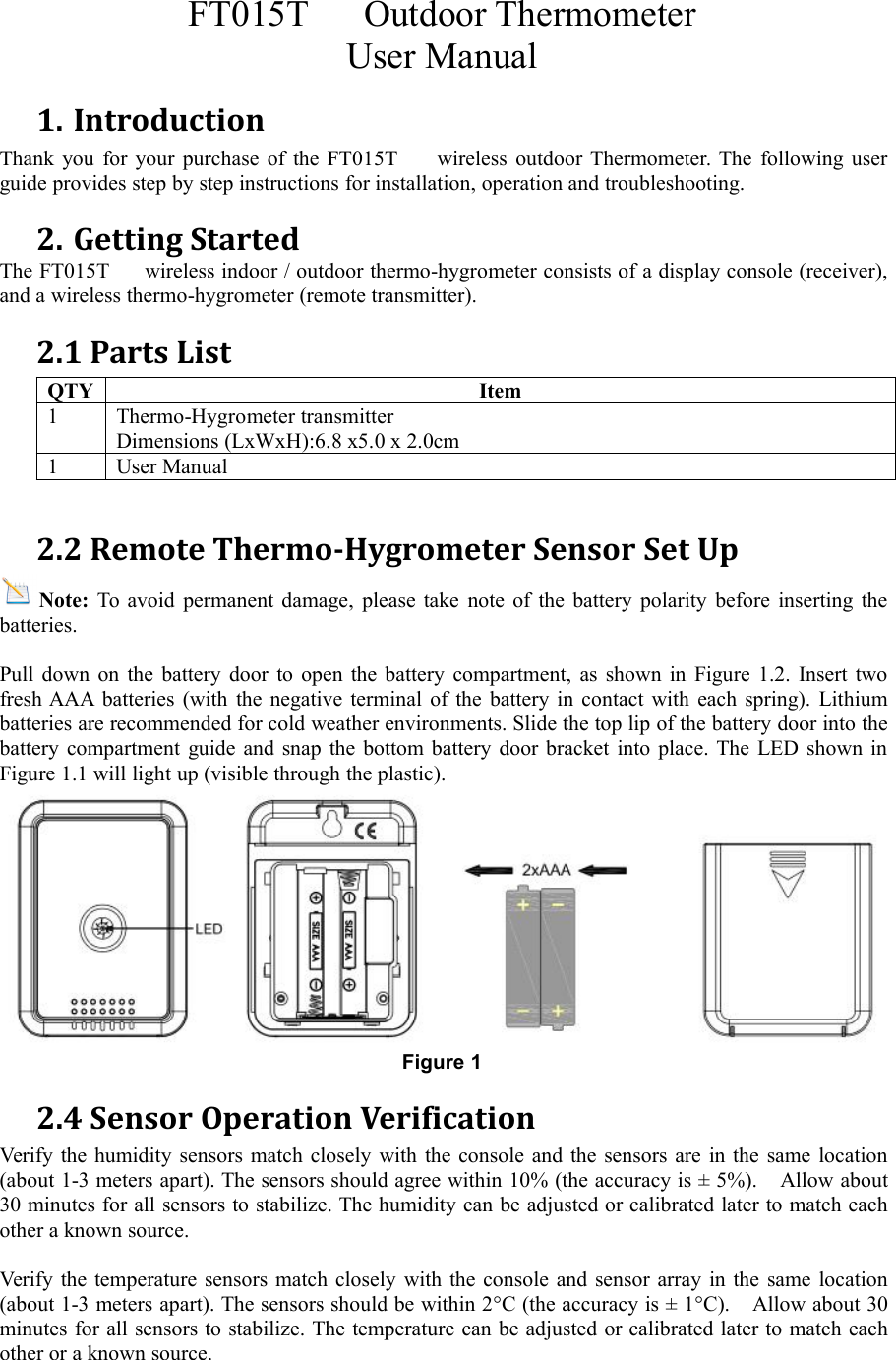
FT015T Outdoor ThermometerUser Manual1. IntroductionThank you for your purchase of the FT015T wireless outdoor Thermometer. The following userguide provides step by step instructions for installation, operation and troubleshooting.2. Getting StartedThe FT015T wireless indoor / outdoor thermo-hygrometer consists of a display console (receiver),and a wireless thermo-hygrometer (remote transmitter).2.1 Parts ListQTYItem1Thermo-Hygrometer transmitterDimensions (LxWxH):6.8 x5.0 x 2.0cm1User Manual2.2 Remote Thermo-Hygrometer Sensor Set UpNote: To avoid permanent damage, please take note of the battery polarity before inserting thebatteries.Pull down on the battery door to open the battery compartment, as shown in Figure 1.2. Insert twofresh AAA batteries (with the negative terminal of the battery in contact with each spring). Lithiumbatteries are recommended for cold weather environments. Slide the top lip of the battery door into thebattery compartment guide and snap the bottom battery door bracket into place. The LED shown inFigure 1.1 will light up (visible through the plastic).Figure 12.4 Sensor Operation VerificationVerify the humidity sensors match closely with the console and the sensors are in the same location(about 1-3 meters apart). The sensors should agree within 10% (the accuracy is ± 5%). Allow about30 minutes for all sensors to stabilize. The humidity can be adjusted or calibrated later to match eachother a known source.Verify the temperature sensors match closely with the console and sensor array in the same location(about 1-3 meters apart). The sensors should be within 2°C (the accuracy is ± 1°C). Allow about 30minutes for all sensors to stabilize. The temperature can be adjusted or calibrated later to match eachother or a known source.
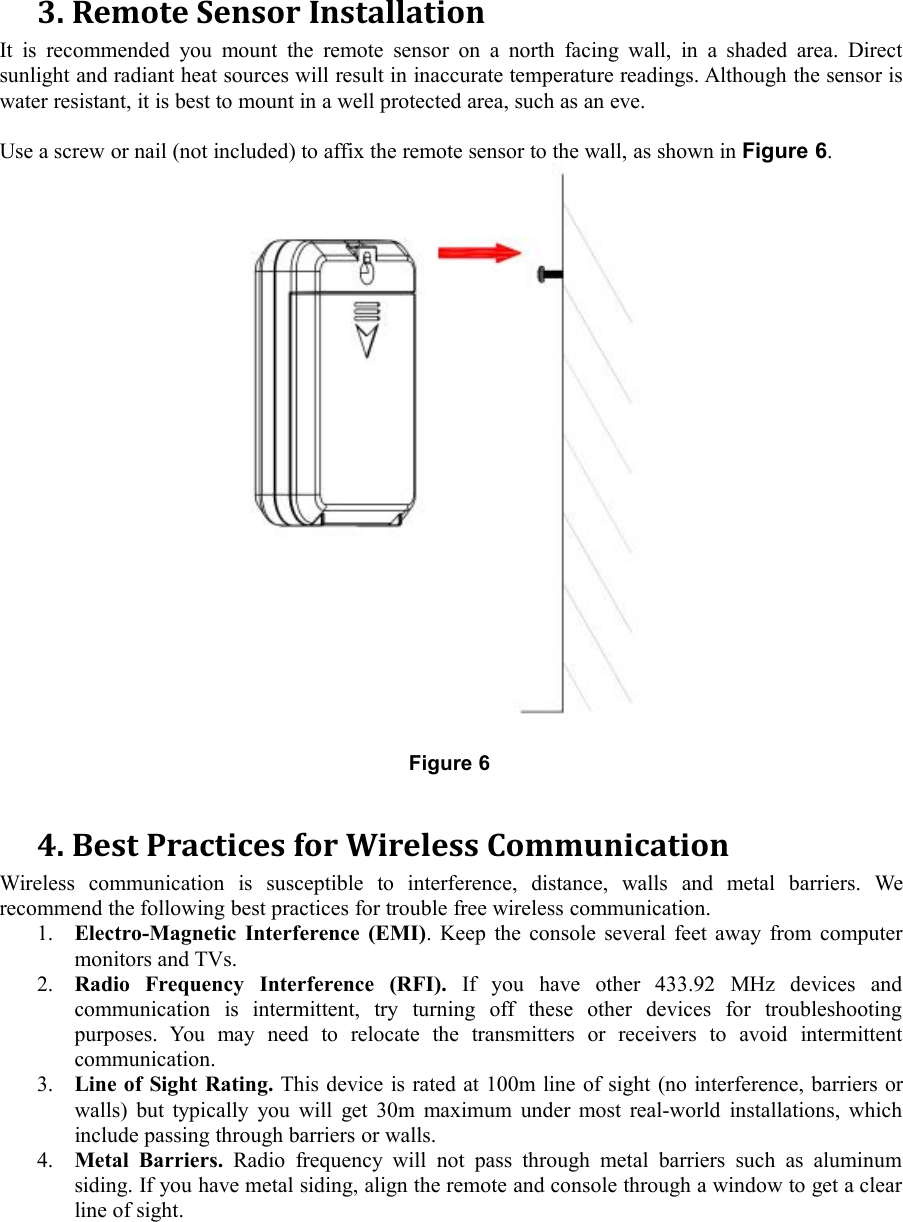
3. Remote Sensor InstallationIt is recommended you mount the remote sensor on a north facing wall, in a shaded area. Directsunlight and radiant heat sources will result in inaccurate temperature readings. Although the sensor iswater resistant, it is best to mount in a well protected area, such as an eve.Use a screw or nail (not included) to affix the remote sensor to the wall, as shown in Figure 6.Figure 64. Best Practices for Wireless CommunicationWireless communication is susceptible to interference, distance, walls and metal barriers. Werecommend the following best practices for trouble free wireless communication.1. Electro-Magnetic Interference (EMI). Keep the console several feet away from computermonitors and TVs.2. Radio Frequency Interference (RFI). If you have other 433.92 MHz devices andcommunication is intermittent, try turning off these other devices for troubleshootingpurposes. You may need to relocate the transmitters or receivers to avoid intermittentcommunication.3. Line of Sight Rating. This device is rated at 100m line of sight (no interference, barriers orwalls) but typically you will get 30m maximum under most real-world installations, whichinclude passing through barriers or walls.4. Metal Barriers. Radio frequency will not pass through metal barriers such as aluminumsiding. If you have metal siding, align the remote and console through a window to get a clearline of sight.
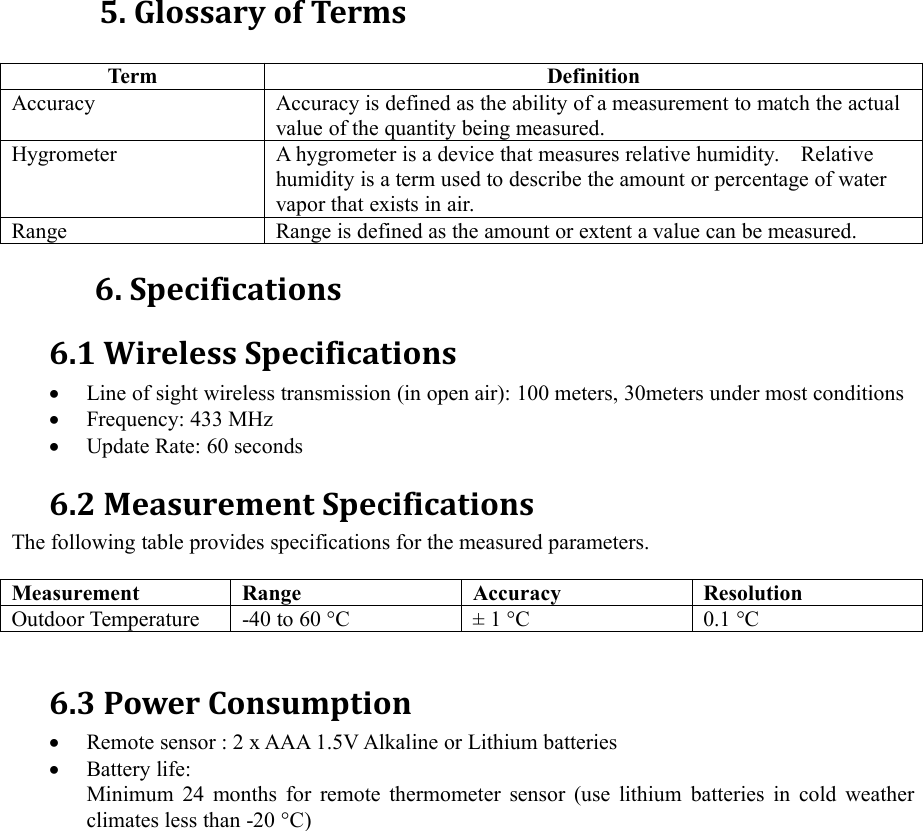
5. Glossary of TermsTermDefinitionAccuracyAccuracy is defined as the ability of a measurement to match the actualvalue of the quantity being measured.HygrometerA hygrometer is a device that measures relative humidity. Relativehumidity is a term used to describe the amount or percentage of watervapor that exists in air.RangeRange is defined as the amount or extent a value can be measured.6. Specifications6.1 Wireless SpecificationsLine of sight wireless transmission (in open air): 100 meters, 30meters under most conditionsFrequency: 433 MHzUpdate Rate: 60 seconds6.2 Measurement SpecificationsThe following table provides specifications for the measured parameters.MeasurementRangeAccuracyResolutionOutdoor Temperature-40 to 60 °C± 1 °C0.1 °C6.3 Power ConsumptionRemote sensor : 2 x AAA 1.5V Alkaline or Lithium batteriesBattery life:Minimum 24 months for remote thermometer sensor (use lithium batteries in cold weatherclimates less than -20 °C)
FCC Caution.§ 15.19 Labelling requirements.This device complies with part 15 of the FCC Rules. Operation is subject to the followingtwo conditions: (1) This device may not cause harmful interference, and (2) this devicemust accept any interference received, including interference that may cause undesiredoperation.§ 15.21 Information to user.Any Changes or modifications not expressly approved by the party responsible forcompliance could void the user's authority to operate the equipment.§ 15.105 Information to the user.Note: This equipment has been tested and found to comply with the limits for a Class Bdigital device, pursuant to part 15 of the FCC Rules. These limits are designed to providereasonable protection against harmful interference in a residential installation. Thisequipment generates uses and can radiate radio frequency energy and, if not installed andused in accordance with the instructions, may cause harmful interference to radiocommunications. However, there is no guarantee that interference will not occur in aparticular installation. If this equipment does cause harmful interference to radio ortelevision reception, which can be determined by turning the equipment off and on, theuser is encouraged to try to correct the interference by one or more of the followingmeasures:-Reorient or relocate the receiving antenna.-Increase the separation between the equipment and receiver.-Connect the equipment into an outlet on a circuit different from that to which thereceiver is connected.-Consult the dealer or an experienced radio/TV technician for help.

Navigation menu