Vencer BTVD3302 Bluetooth stereo receiver dongle User Manual Quick Guide VD 3302 V1 0 R1
Vencer Co., Ltd. Bluetooth stereo receiver dongle Quick Guide VD 3302 V1 0 R1
Vencer >
Manual
B
Bl
lu
ue
et
to
oo
ot
th
h
S
St
te
er
re
eo
o
R
Re
ec
ce
ei
iv
ve
er
r
D
Do
on
ng
gl
le
e
V
VD
D-
-3
33
30
02
2
20F-1, No.77, Sec.1 , Hsin Tai Wu Rd., Hsi-Chih, Taipei Taiwan R.O.C.
Tel. No.:+886-2-2698-3608 Fax No.:+886-2-2698-3648
1/4
The Bluetooth stereo receiver dongle is a Bluetooth device developed with the latest Bluetooth
V3.0 technology, which can connect to other Bluetooth stereo devices such as mobile phone,
desktop or notebook computer, PDA which supported A2DP profile.

B
Bl
lu
ue
et
to
oo
ot
th
h
S
St
te
er
re
eo
o
R
Re
ec
ce
ei
iv
ve
er
r
D
Do
on
ng
gl
le
e
V
VD
D-
-3
33
30
02
2
20F-1, No.77, Sec.1 , Hsin Tai Wu Rd., Hsi-Chih, Taipei Taiwan R.O.C.
Tel. No.:+886-2-2698-3608 Fax No.:+886-2-2698-3648
2/4
Q
Qu
ui
ic
ck
k
S
St
ta
ar
rt
t
:
:
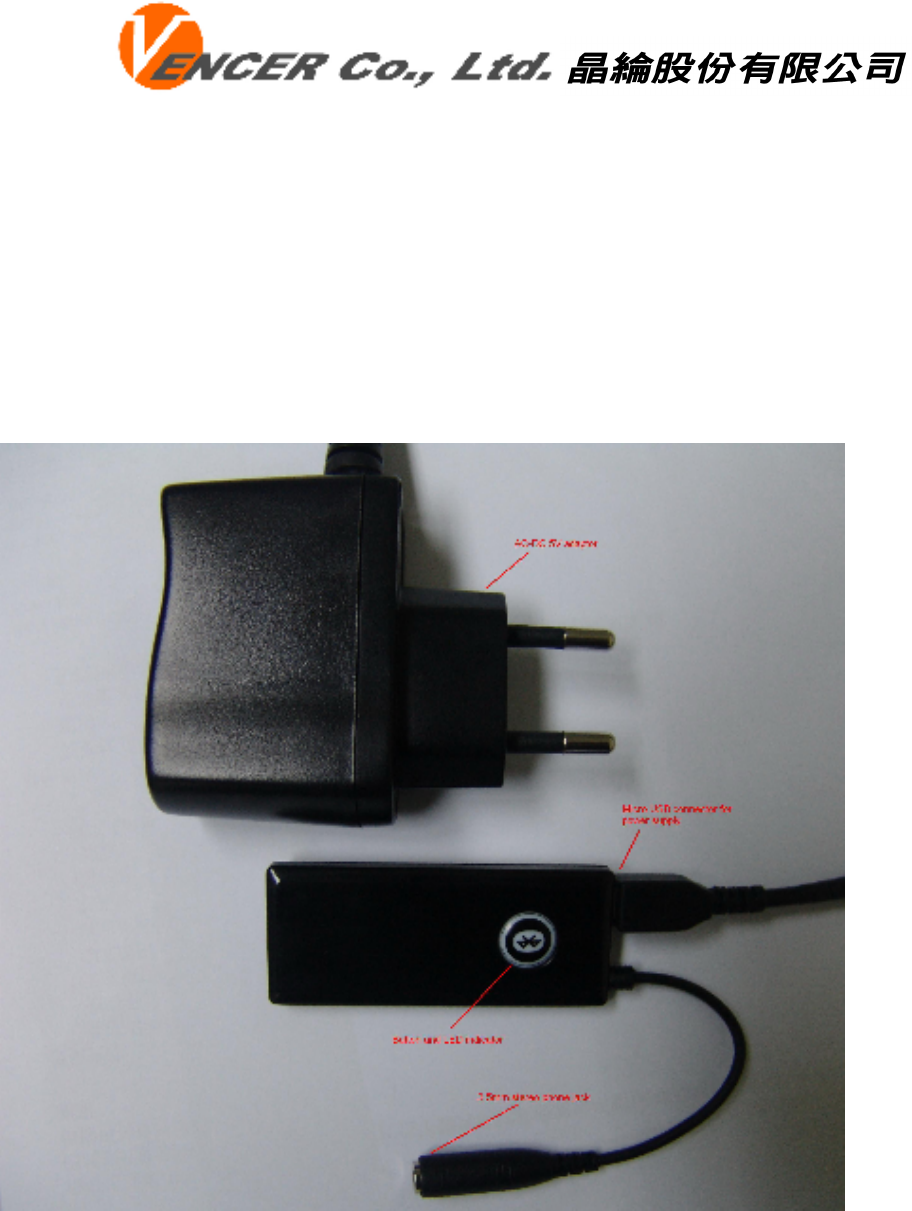
1. Connect Power.
Plug mini USB into VD-3302 and connect AC to DC adaptor to the block plug to connect power
to VD-3302.
2. Power On dongle
To press button for 2 seconds, the VD-3302 will power on and blue LED light on for 1 second.
3. Power Off dongle
To press button for 2 seconds, the VD-3302 will power off and red LED light on for 1 second
4. Pairing
You are required to pair the VD-3302 with your Bluetooth enabled audio device like mobile
phone/PC/PDA before using it.
Step 1 : Turn OFF the VD-3302. Hold and keep pressing the button for 4 seconds
until the red/blue LED indicators always light alternative. VD-3300RX is now ready for pairing.
Step 2 : Initiate pairing process on your Bluetooth enabled audio device to pair . After search,
you can find the device name “VD-3302”
Step 3 : When asked the Passkey by the mobile phone, enter “1234” and confirm it.
When pairing is successful, the LED indicator will change to be blue and flash.

B
Bl
lu
ue
et
to
oo
ot
th
h
S
St
te
er
re
eo
o
R
Re
ec
ce
ei
iv
ve
er
r
D
Do
on
ng
gl
le
e
V
VD
D-
-3
33
30
02
2
20F-1, No.77, Sec.1 , Hsin Tai Wu Rd., Hsi-Chih, Taipei Taiwan R.O.C.
Tel. No.:+886-2-2698-3608 Fax No.:+886-2-2698-3648
3/4
5. Connect
Initial connect process on your Bluetooth enabled audio device to connect with VD-3302.
You also can press button one time to connect with device which already paired.
6. LED indicator
Pairing : Blue/Red LED alternative
Connected : Blue LED quick flash
Standby(disconnect) : Blue LED slow flash

B
Bl
lu
ue
et
to
oo
ot
th
h
S
St
te
er
re
eo
o
R
Re
ec
ce
ei
iv
ve
er
r
D
Do
on
ng
gl
le
e
V
VD
D-
-3
33
30
02
2
20F-1, No.77, Sec.1 , Hsin Tai Wu Rd., Hsi-Chih, Taipei Taiwan R.O.C.
Tel. No.:+886-2-2698-3608 Fax No.:+886-2-2698-3648
4/4
Federal Communications Commission (FCC) Statement
15.21
You are cautioned that changes or modifications not expressly approved by the part responsible
for compliance could void the user’s authority to operate the equipment.
15.105(b)
This equipment has been tested and found to comply with the limits for a Class B digital device,
pursuant to part 15 of the FCC rules. These limits are designed to provide reasonable protection
against harmful interference in a residential installation. This equipment generates, uses and can
radiate radio frequency energy and, if not installed and used in accordance with the instructions,
may cause harmful interference to radio communications. However, there is no guarantee that
interference will not occur in a particular installation. If this equipment does cause harmful
interference to radio or television reception, which can be determined by turning the equipment
off and on, the user is encouraged to try to correct the interference by one or more of the
following measures:
-Reorient or relocate the receiving antenna.
-Increase the separation between the equipment and receiver.
-Connect the equipment into an outlet on a circuit different from that to which the receiver
is connected.
-Consult the dealer or an experienced radio/TV technician for help.
This device complies with Part 15 of the FCC Rules. Operation is subject to the following two
conditions:
1) this device may not cause harmful interference, and
2) this device must accept any interference received, including interference that may cause
undesired operation of the device.
FCC RF Radiation Exposure Statement:
This equipment complies with FCC radiation exposure limits set forth for an uncontrolled
environment. End users must follow the specific operating instructions for satisfying RF
exposure compliance. This transmitter must not be co-located or operating in conjunction with
any other antenna or transmitter.