Verifone Vx700 Users Manual 28212_Vx700_Installation_Guide
Vx700 to the manual bb122082-236b-4670-a600-89aee9ce62bb
2015-02-03
: Verifone Verifone-Vx700-Users-Manual-469719 verifone-vx700-users-manual-469719 verifone pdf
Open the PDF directly: View PDF  .
.
Page Count: 40
VeriFone Part Number 28212, Revision A
Vx700
Installation Guide
All rights reserved. No part of the contents of this document may be reproduced or transmitted in any form without the written
permission of VeriFone, Inc.
The information contained in this document is subject to change without notice. Although VeriFone has attempted to ensure the
accuracy of the contents of this document, this document may include errors or omissions. The examples and sample programs are
for illustration only and may not be suited for your purpose. You should verify the applicability of any example or sample program
before placing the software into productive use. This document, including without limitation the examples and software programs, is
supplied “As-Is.”
VeriFone, Inc.
2099 Gateway Place, Suite 600
San Jose, CA 95110 USA
1-800-VeriFone
www.verifone.com
VeriFone Part Number 28212, Revision A
Vx700 Installation Guide
© 2008 VeriFone, Inc.
VeriFone, the VeriFone logo, Omni, VeriCentre, Verix, and ZonTalk are registered trademarks of VeriFone. Other brand names or
trademarks associated with VeriFone’s products and services are trademarks of VeriFone, Inc.
All other brand names and trademarks appearing in this manual are the property of their respective holders.
Comments? Please email all comments on this document to your local VeriFone Support Team.

VX700 INSTALLATION GUIDE 3
PREFACE . . . . . . . . . . . . . . . . . . . . . . . . . . . . . . . . . . . . . . . 5
Target Audience . . . . . . . . . . . . . . . . . . . . . . . . . . . . . . . . . . . . . . . . . . . . . . . . . . 5
Document Organization . . . . . . . . . . . . . . . . . . . . . . . . . . . . . . . . . . . . . . . . . . . . 5
Guide Conventions. . . . . . . . . . . . . . . . . . . . . . . . . . . . . . . . . . . . . . . . . . . . . . . . 5
Acronym Definitions . . . . . . . . . . . . . . . . . . . . . . . . . . . . . . . . . . . . . . . . . . . . 6
CHAPTER 1
Terminal Overview The Vx700 Keypad . . . . . . . . . . . . . . . . . . . . . . . . . . . . . . . . . . . . . . . . . . . . . . . . 9
Features at a Glance . . . . . . . . . . . . . . . . . . . . . . . . . . . . . . . . . . . . . . . . . . . . . . 9
Features and Benefits. . . . . . . . . . . . . . . . . . . . . . . . . . . . . . . . . . . . . . . . . . 10
CHAPTER 2
Terminal Setup and
Usage
Ergonomic References. . . . . . . . . . . . . . . . . . . . . . . . . . . . . . . . . . . . . . . . . . . . 13
Terminal Positioning and Orientation . . . . . . . . . . . . . . . . . . . . . . . . . . . . . . 13
Screen Viewing Angle. . . . . . . . . . . . . . . . . . . . . . . . . . . . . . . . . . . . . . . . . . 14
Privacy . . . . . . . . . . . . . . . . . . . . . . . . . . . . . . . . . . . . . . . . . . . . . . . . . . . . . 15
Reach and Viewing Angles (Standing Users). . . . . . . . . . . . . . . . . . . . . . . . 16
Reach and Viewing Angles (Wheelchair Users) . . . . . . . . . . . . . . . . . . . . . . 18
Examine
Vx700 Features . . . . . . . . . . . . . . . . . . . . . . . . . . . . . . . . . . . . . . . . . . . . . . . . . 20
Cable Connections . . . . . . . . . . . . . . . . . . . . . . . . . . . . . . . . . . . . . . . . . . . . . . . 20
RS-232 and USB Connections. . . . . . . . . . . . . . . . . . . . . . . . . . . . . . . . . . . . . . 21
Connection Options . . . . . . . . . . . . . . . . . . . . . . . . . . . . . . . . . . . . . . . . . . . 21
Pin Connections . . . . . . . . . . . . . . . . . . . . . . . . . . . . . . . . . . . . . . . . . . . . . . 22
Connection to Secure Card Reader (Optional) . . . . . . . . . . . . . . . . . . . . . . . . . 26
The SCR710 Secure Card Reader . . . . . . . . . . . . . . . . . . . . . . . . . . . . . . . . 26
Power Supply . . . . . . . . . . . . . . . . . . . . . . . . . . . . . . . . . . . . . . . . . . . . . . . . . . . 27
CHAPTER 3
Specifications Power . . . . . . . . . . . . . . . . . . . . . . . . . . . . . . . . . . . . . . . . . . . . . . . . . . . . . . . . . 29
Power Consumption . . . . . . . . . . . . . . . . . . . . . . . . . . . . . . . . . . . . . . . . . . . 29
DC Power Pack . . . . . . . . . . . . . . . . . . . . . . . . . . . . . . . . . . . . . . . . . . . . . . . . . 29
Temperature. . . . . . . . . . . . . . . . . . . . . . . . . . . . . . . . . . . . . . . . . . . . . . . . . . . . 29
External Dimensions . . . . . . . . . . . . . . . . . . . . . . . . . . . . . . . . . . . . . . . . . . . . . 29
CHAPTER 4
Maintenance Cleaning the Terminal . . . . . . . . . . . . . . . . . . . . . . . . . . . . . . . . . . . . . . . . . . . . 31
CHAPTER 5
VeriFone Service
and Support
Returning the Terminal for Service. . . . . . . . . . . . . . . . . . . . . . . . . . . . . . . . . . . 33
Accessories . . . . . . . . . . . . . . . . . . . . . . . . . . . . . . . . . . . . . . . . . . . . . . . . . . . . 34
Power Pack. . . . . . . . . . . . . . . . . . . . . . . . . . . . . . . . . . . . . . . . . . . . . . . . . . 34
Data Cables . . . . . . . . . . . . . . . . . . . . . . . . . . . . . . . . . . . . . . . . . . . . . . . . . 35
APPENDIX AVx700 ATM - Vending Machine Integration . . . . . . . . . . . . . . . . . . . . . . . . . . . . 37
Terminal Dimensions . . . . . . . . . . . . . . . . . . . . . . . . . . . . . . . . . . . . . . . . . . 37
Rear Terminal Dimensions . . . . . . . . . . . . . . . . . . . . . . . . . . . . . . . . . . . . . . 38
Vending Machine Integration for the Vx700 . . . . . . . . . . . . . . . . . . . . . . . . . 39

4VX700 INSTALLATION GUIDE
VX700 INSTALLATION GUIDE 5
PREFACE
This installation guide assists machine manufacturers to properly install the Vx700
in terms of electrical connectivity as well as mechanical, security, and privacy
specifications.
Target Audience
This document is useful to payment/banking machine
manufacturers/implementors.
Document
Organization
This document is organized as follows:
Chapter 1, Terminal Overview, provides an overview of the basic features and
benefits of the Vx700.
Chapter 2, Terminal Setup and Usage, explains how to set up and install the
Vx700 into a payment machine/ATM.
Chapter 3, Specifications, discusses power requirements and dimensions of the
Vx700.
Chapter 4, Maintenance, explains how to maintain the Vx700.
Chapter 5, VeriFone Service and Support, provides information on contacting your
local VeriFone representative or service provider, and information on how to order
accessories or documentation from VeriFone.
Guide
Conventions
This section provides a quick reference to conventions used in this guide.
The following conventions help the reader distinguish between different types of
information:
•The courier typeface is used for code entries, filenames and extensions, and
anything that requires typing at the DOS prompt or from the terminal keypad.
•The italic typeface indicates book title or emphasis.
•Text i n blue indicates terms that are cross-referenced. When the pointer is
placed over these references the pointer changes to the finger pointer,
indicating a link. Click on the link to view the topic.
NOTE
Notes point out interesting and useful information.
CAUTION
Cautions point out potential programming problems.

PREFACE
Guide Conventions
6VX700 INSTALLATION GUIDE
Acronym Definitions
Various acronyms are used in place of the full definition. Table 1 presents
acronyms and their definitions.
WARNING
Warnings point out potential incidents where bodily injury might occur.
Table 1 Acronym Definitions
Acronym Definitions
AES Advanced Encryption Standard Algorithm
API Application Programming Interface
ARM Advanced RISC Machines
CAPK Certification Authority Public Key
CBC Cipher Block Chaining mode
COG Chip on Glass
COGS Cost of Goods Sold
CTS Clear to Send
DEA/DES Data Encryption Algorithm/Standard
DUKPT Derived Unique Key Per Transaction Method
ECB Electronic Code Book mode
ECR Electronic Cash Register
EMV Joint Europay, MasterCard and Visa Standard
ERS Engineering Requirements Specification
HDLC High-level Data Link Control
ICC Integrated Chip Card (Smart Card)
LCD Liquid Crystal Display
MAC Message Authentication Code
MDB Multi-Drop Bus
MMU Memory Management Unit
MSAM Multiple Secure Access Module
MSR Magnetic Stripe Reader
OS Operating System
PED PIN Entry Device
PIN Personal Identification Number
POS Point-of-Sale
PRD Product Requirement Document
PSCR Primary Smart Card Reader
RTS Ready to Send
SOC System on Chip
SAM Secure Access Module
SC Smart Card (Integrated Chip Card)
SDK Software Development Kit
SL3 Security Level 3 and 4

PREFACE
Guide Conventions
VX700 INSTALLATION GUIDE 7
SR Ship Release
SRAM Static Random Access Memory
STN Super Twisted Nematic
UI User Interface
USB Universal Serial Bus
VSS VeriShield Security Scripts
Table 1 Acronym Definitions (continued)
Acronym Definitions

PREFACE
Guide Conventions
8VX700 INSTALLATION GUIDE

VX700 INSTALLATION GUIDE 9
CHAPTER 1
Terminal Overview
This chapter provides a brief description of the Vx700. The Vx700 is one of
VeriFone’s versatile unattended payment solutions set. The Vx700 is designed for
manufacturers who want secure, PCI PED approved, EMV-compliant transaction
payment technology in their own payment/transaction machines.
The
V
x
700
Keypad
The Vx700 is an outdoor-rated unattended keypad, suitable for payment
applications and process control, and features high reliability in tough
environments. Built around VeriFone’s successful Verix-based programming
environment, the Vx700 gives access to a broad range of application software
components and sophisticated development tools.
Capable of operating from a wide range of input voltages, the Vx700 has low
power capabilities to enable use in critical power applications. An interface for
USB host and slave provides for simple connectivity over local or wide area
networks.
The Vx700 links to a variety of VeriFone card accepting devices for a complete
payment solution ranging from magnetic stripe to full EMV chip card processing. It
has options to directly support contactless payment cards, including MasterCard
PayPass, Visa payWave, M/Chip, and qVSDC, with the addition of an optional
plug-in contactless interface module and an external antenna that is mounted on
the integration equipment – such as a vending machine or kiosk.
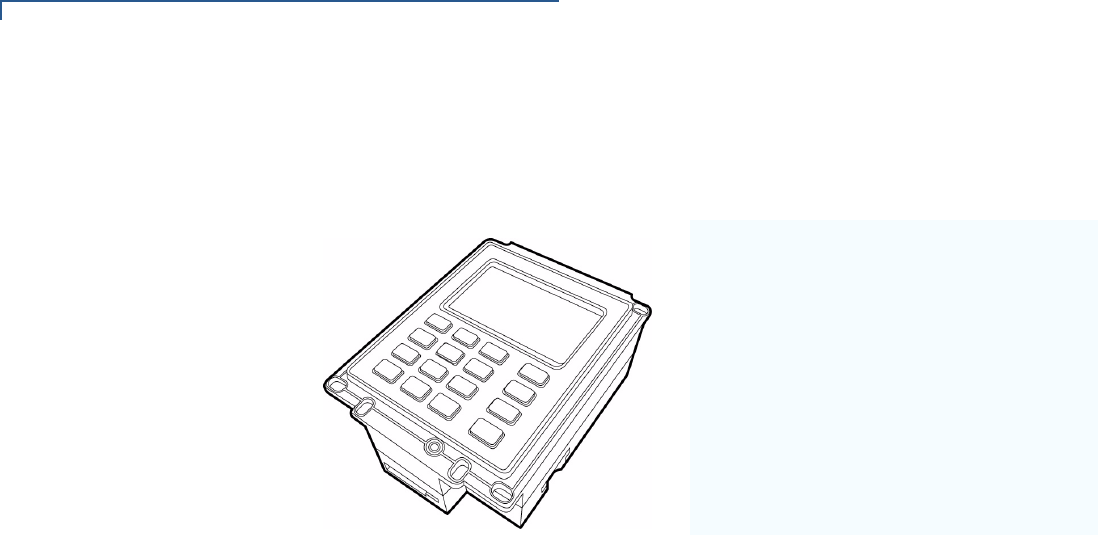
Features at a
Glance
The Vx700 has a stainless steel front panel that is rated at IP65. The rear panel
containing the cable connections is rated at IP34. These features allow the Vx700
to operate in extreme environments. It is PCI PED approved for assured payment
security, has superior graphical display with optional backlighting, easy-to-use
long-life keypad with concave keys, and is vandal-resistant.
TERMINAL OVERVIEW
Features at a Glance
10 VX700 INSTALLATION GUIDE
The unique form factor of the Vx700 allows it to be fitted into bill acceptor cut-outs
for vending applications. It is equally suited for ticketing, transportation, kiosk,
petroleum dispensing, or drive-through restaurant deployments.
Figure 1 Vx700 overview
Features and
Benefits
Exceptional Ease of Use
•16-key keypad with concave keys, high contrast legends, and tactile
identifiers.
•External interface for four function user-defined keys.
•128 x 64 backlit LCD.
•Built-in multi-tone beeper.
•External sounder connection.
•USB and Serial connectivity.
•Wide input voltage range (9V to 28V).
•Low power consumption.
Critical Security Protection
•Stainless steel front panel rated IP65 and IK09 vandal resistance
(10 Joules impact resistance).
•Rear panel rated at IP34.
•Petroleum and chemical resistant.
•PCI PED 1.3 on-line and off-line approved.
•Verix-based programming
environment.
•Small, easy to integrate form factor.
•Fits into bill acceptor cut-out.
•2 million operation keypad, 16 keys.
•128 x 64 backlit graphical display.
•IP65 sealed, -25C to +60C operating
range.

TERMINAL OVERVIEW
Features at a Glance
VX700 INSTALLATION GUIDE 11
Strong Feature Set
•Ensures uncompromising reliability from VeriFone, the worldwide leader in
e-payment.
•Verix-based – able to run existing applications with only minor modifications.
•High-level API for easy integration.
•RS-232 and USB 2.0 serial ports.
•Optional MDB interface for host and slave vending applications.
•Optional V.22bis - V.34 modem with HDLC capability via USB connection.
•Optional Ethernet 10/100 BaseT via USB connection.
•Connects to SCR710 secure card reader.
•Support for magnetic stripe cards (3 track) via SCR710.
•EMV cards (EMV 4.0) via SCR710.
•Optional support for 2 SAMs (Secure Access Modules).
Other Features
•200 MHz ARM9 processor
•4MB Flash, 2MB SRAM (standard)
•8MB Flash, 4MB SRAM (option)

TERMINAL OVERVIEW
Features at a Glance
12 VX700 INSTALLATION GUIDE
VX700 INSTALLATION GUIDE 13
CHAPTER 2
Terminal Setup and Usage
Ergonomic
References
To ensure that the Vx700 is mounted in the most comfortable viewing and reach
position, this section shows a series of guide dimensions for both standing
persons and wheelchair users.
Terminal Positioning
and Orientation
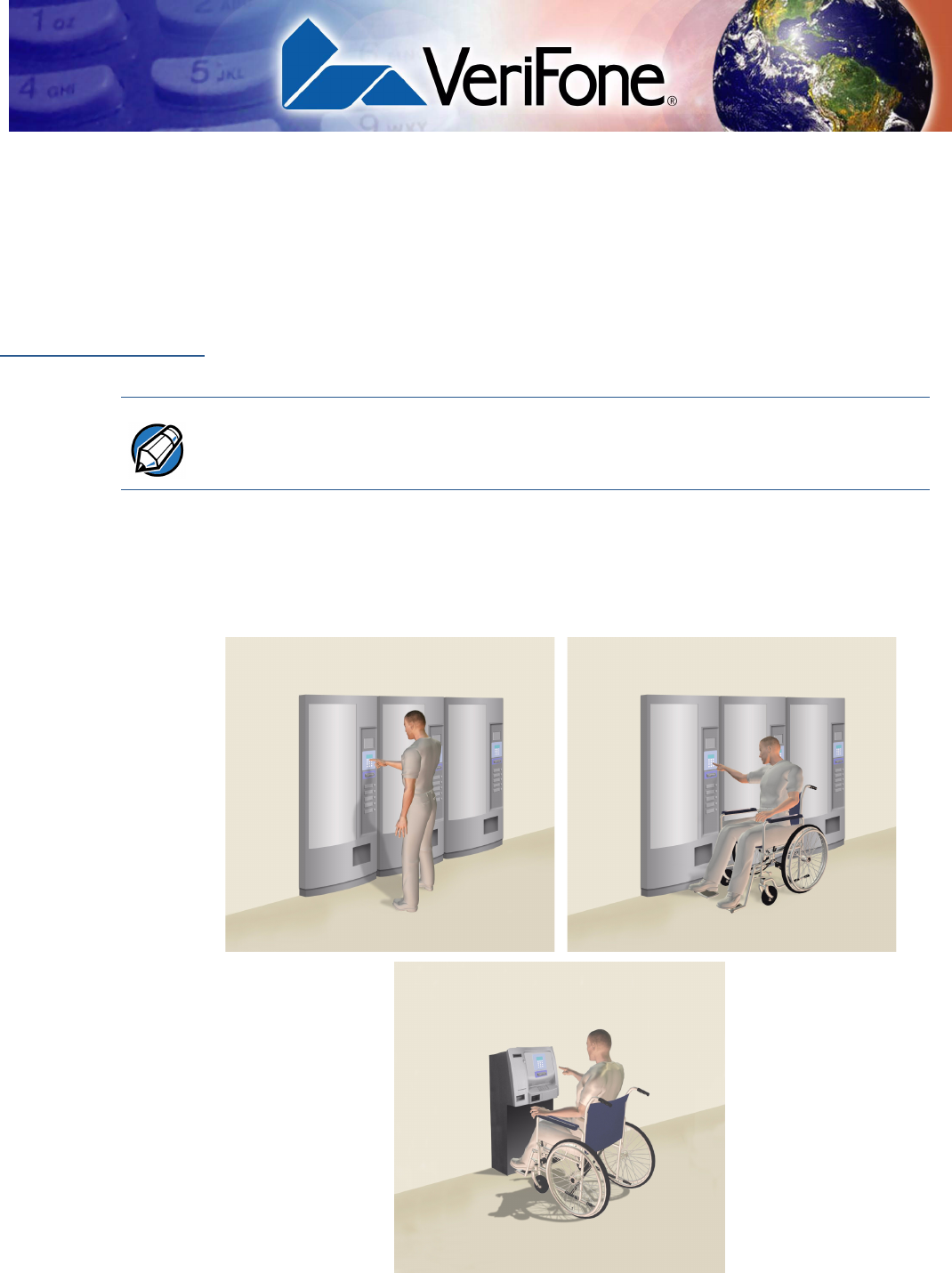
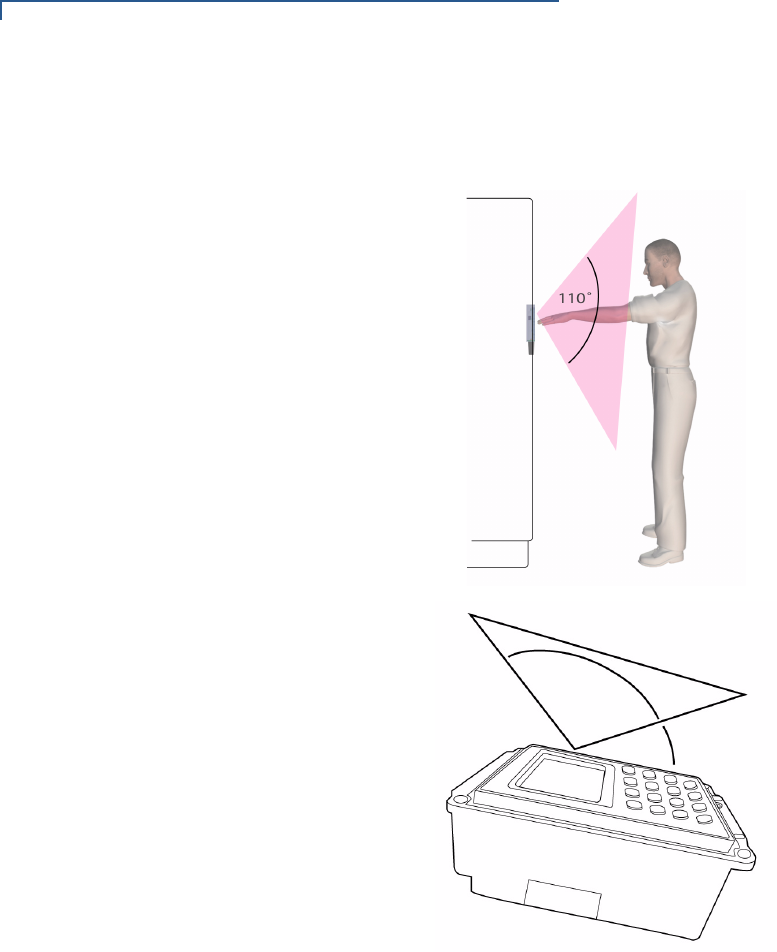
This section provides a general overview of the preferred mounting angle,
orientation, and viewing angle for ease of use and privacy. When installing the
Vx700 in an unattended transaction/payment machine, consider the situations
illustrated in Figure 2.
Figure 2 Typical Terminal Usage Situations
NOTE The data in this section is based on average Caucasian males. For different
ethnic groups, refer to more accurate anthropometric data.
TERMINAL SETUP AND USAGE
Ergonomic References
VX700 INSTALLATION GUIDE 15
Privacy
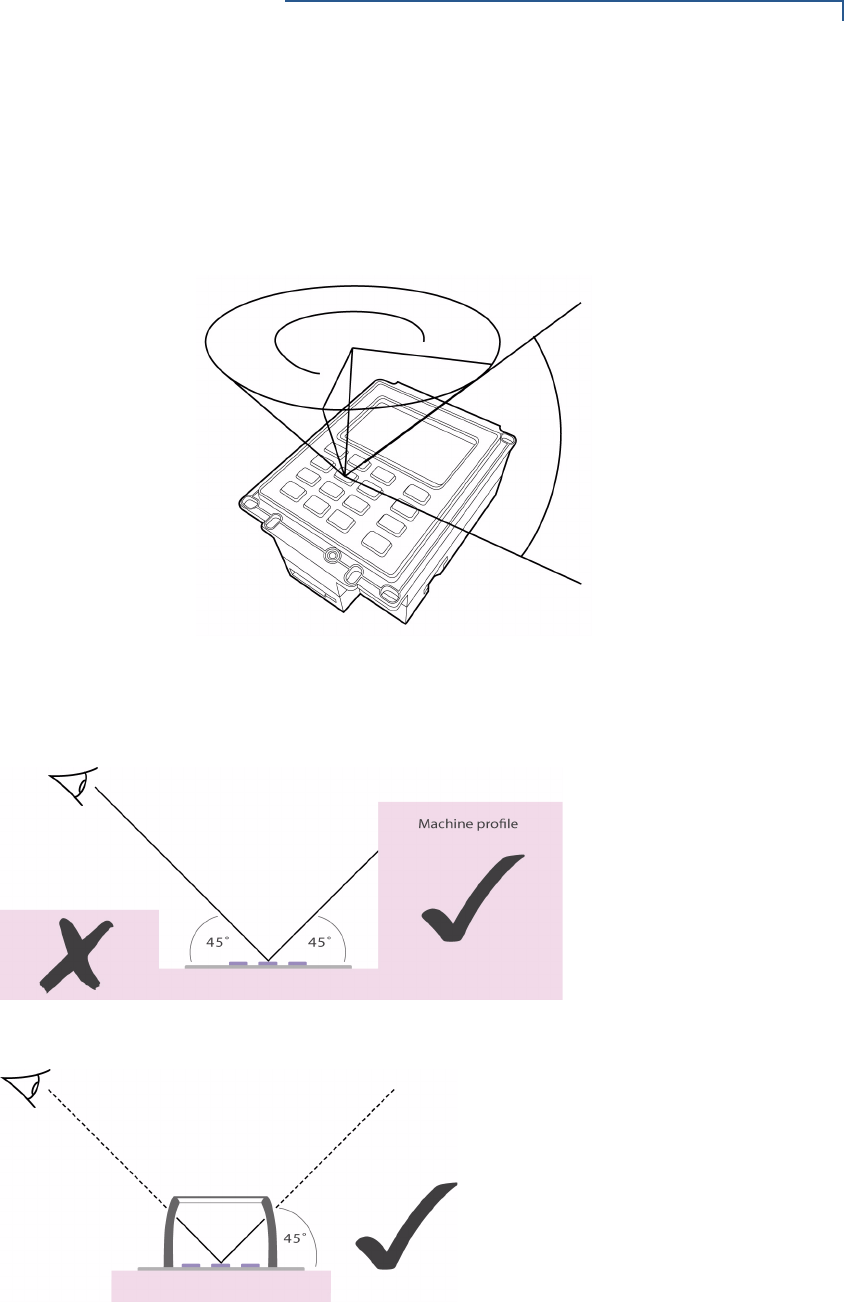
The following requirements relates to the user’s privacy when entering PIN. The
area of visibility should be no larger than a cone taken from the number 5 key at
an angle of 45o and covering an area of 270o directly in front of the user, as shown
in Figure 4.
Figure 4 PIN Entry Visibility Area
PIN entry can be secured using the payment machine’s structure (Figure 5) or by
installing a privacy shield (Figure 6).
Figure 5 PIN Entry Privacy Using the Machine’s Structure
Figure 6 PIN Entry Privacy Shield
270º
45º
TERMINAL SETUP AND USAGE
Ergonomic References
16 VX700 INSTALLATION GUIDE
Reach and Viewing
Angles (Standing
Users)
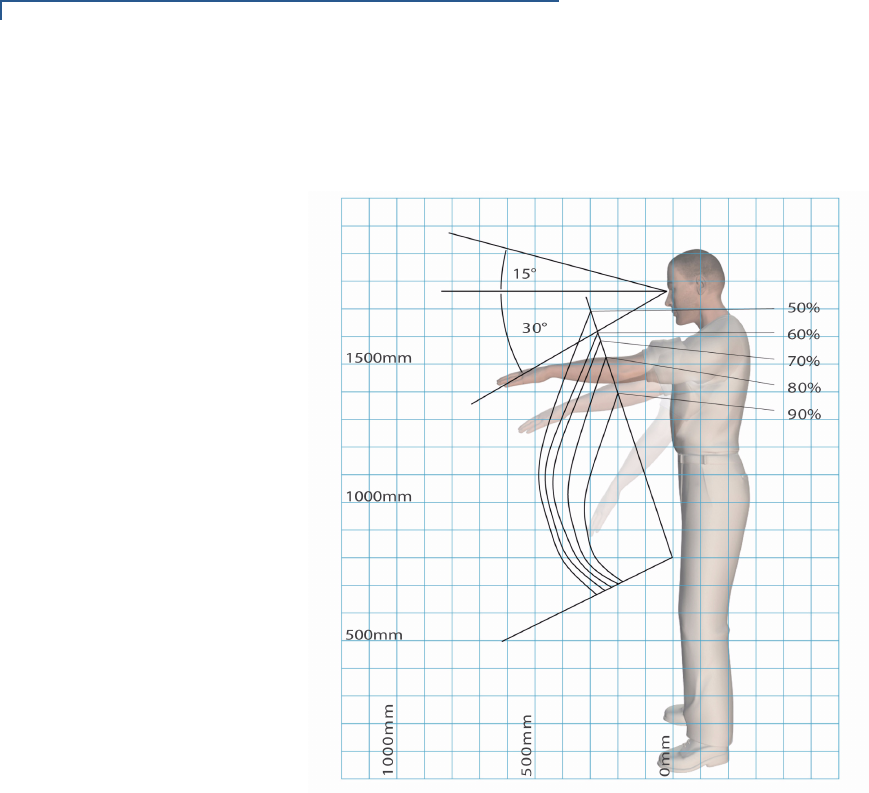
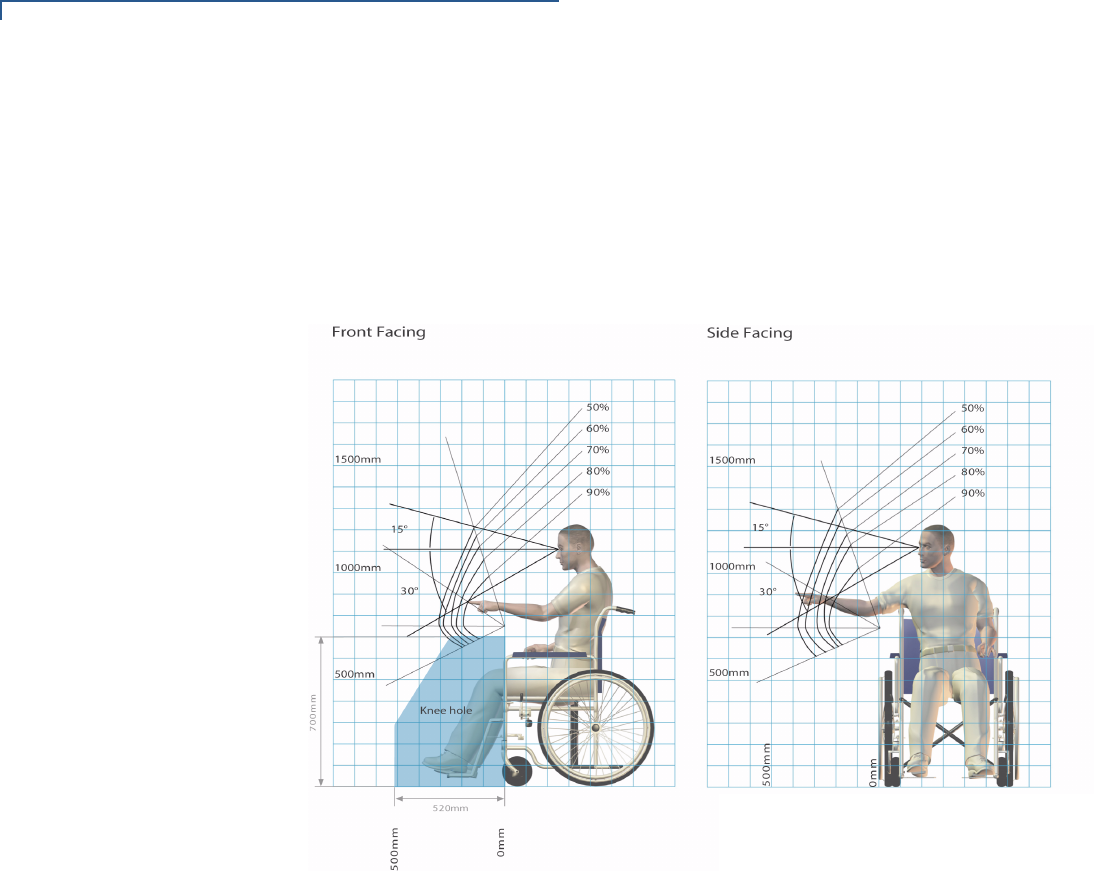
Refer to Figure 7 and Figure 8 for the viewing angle and reach contours most
comfortable for a standing user when utilizing a payment machine/ATM.
Figure 7 Comfortable Reach and Viewing Angle (Standing)
TERMINAL SETUP AND USAGE
Ergonomic References
VX700 INSTALLATION GUIDE 17
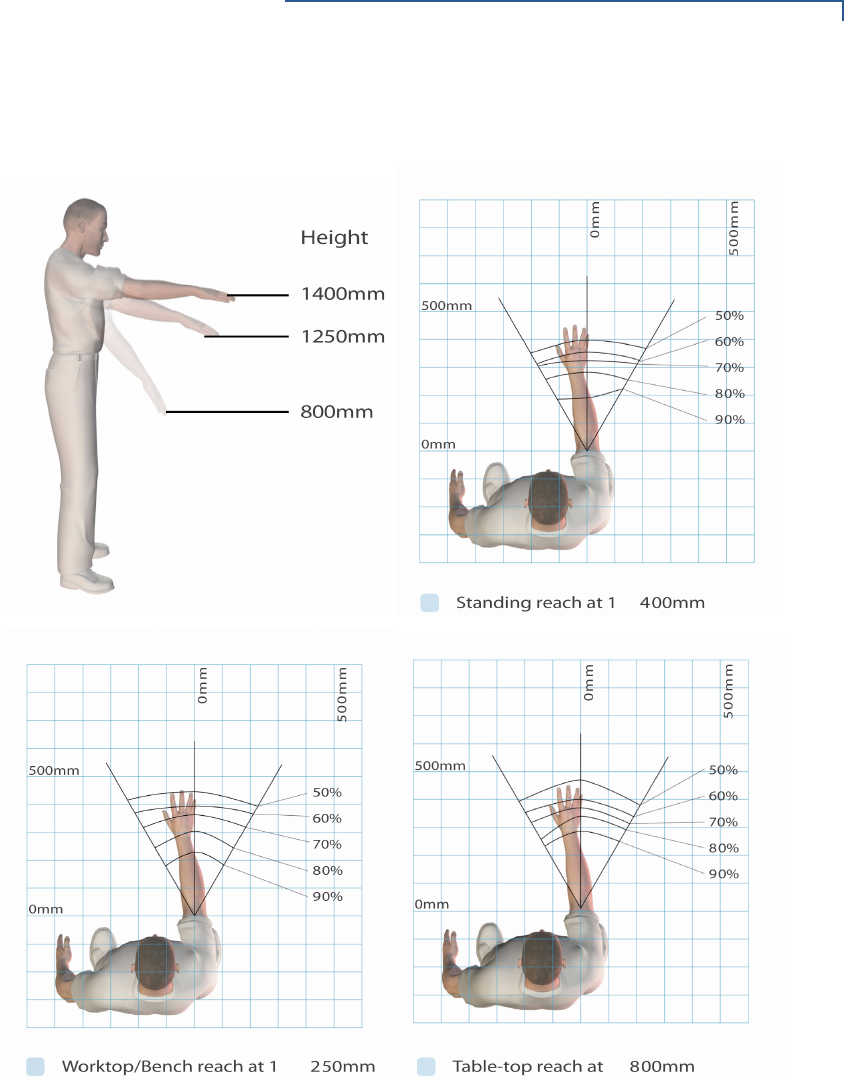
Figure 8 shows additional reach contours for standing users.
Figure 8 Reach Contours (Standing Users)
TERMINAL SETUP AND USAGE
Ergonomic References
18 VX700 INSTALLATION GUIDE
Reach and Viewing
Angles (Wheelchair
Users)
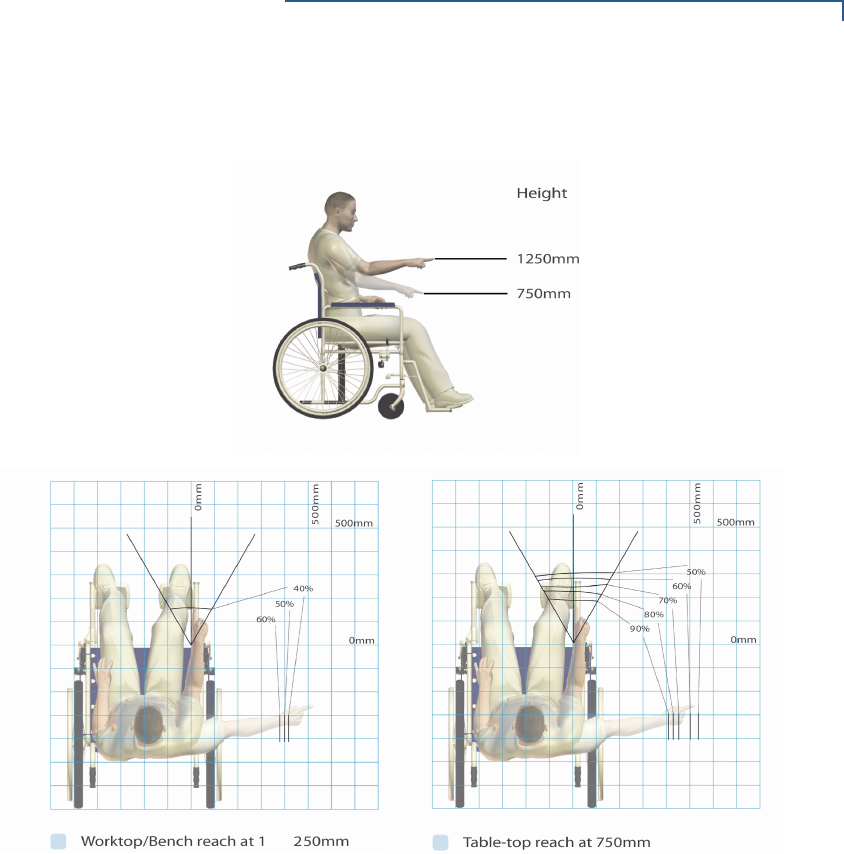
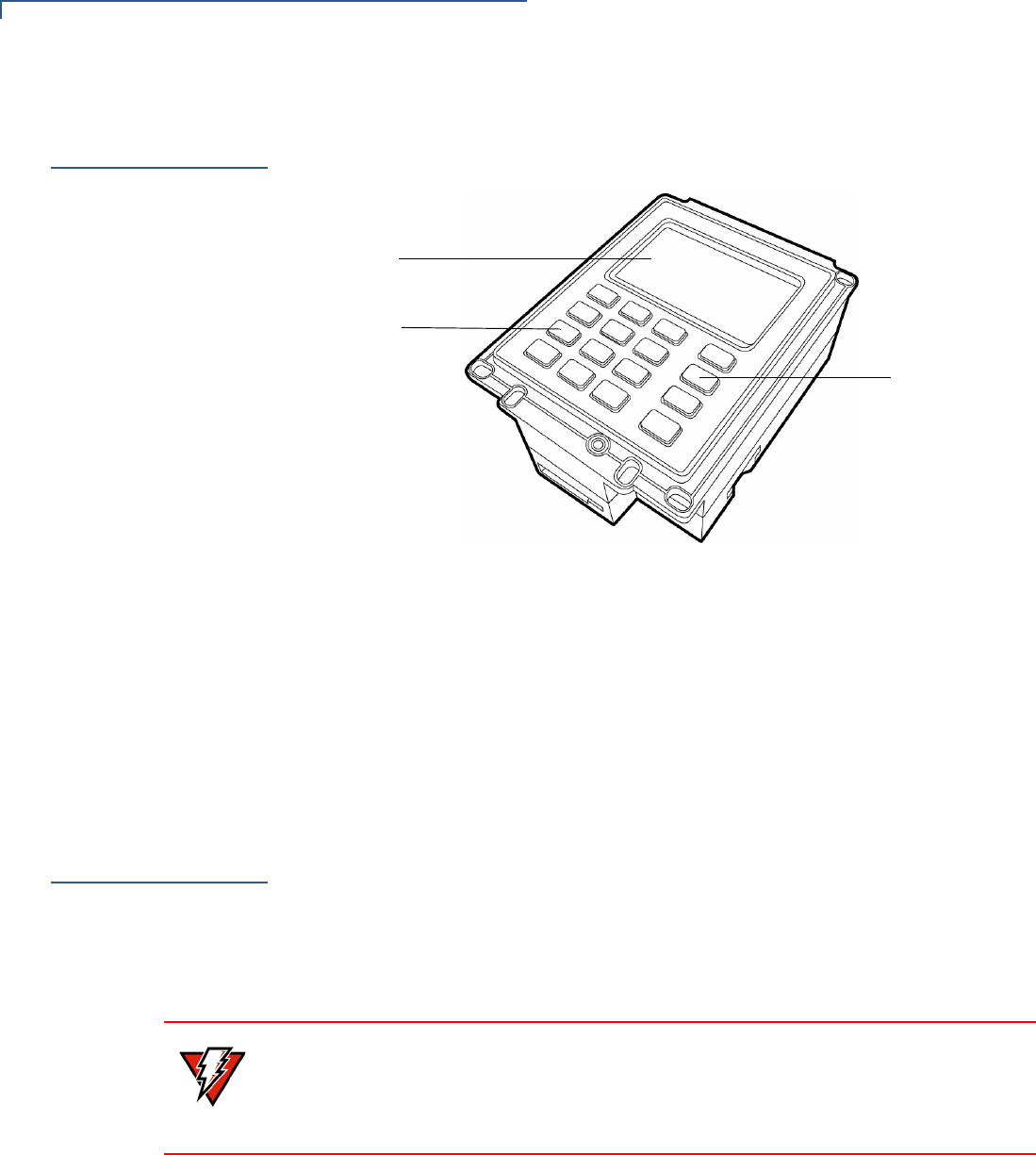
Wheelchair users prefer to use and view operating features when facing a
payment machine/ATM. They may also want to reach to the side for security,
mobility, and privacy reasons. It is important that, where possible, the machine
design provides a knee space to allow a frontal approach for wheelchair users.
Figure 9 and Figure 10 shows the viewing angle and reach contours that are most
comfortable for a wheelchair user when utilizing a payment machine/ATM.
Figure 9 Reach and Viewing Angles (Wheelchair Users)
TERMINAL SETUP AND USAGE
Examine Vx700 Features
20 VX700 INSTALLATION GUIDE
Examine
V
x
700 Features
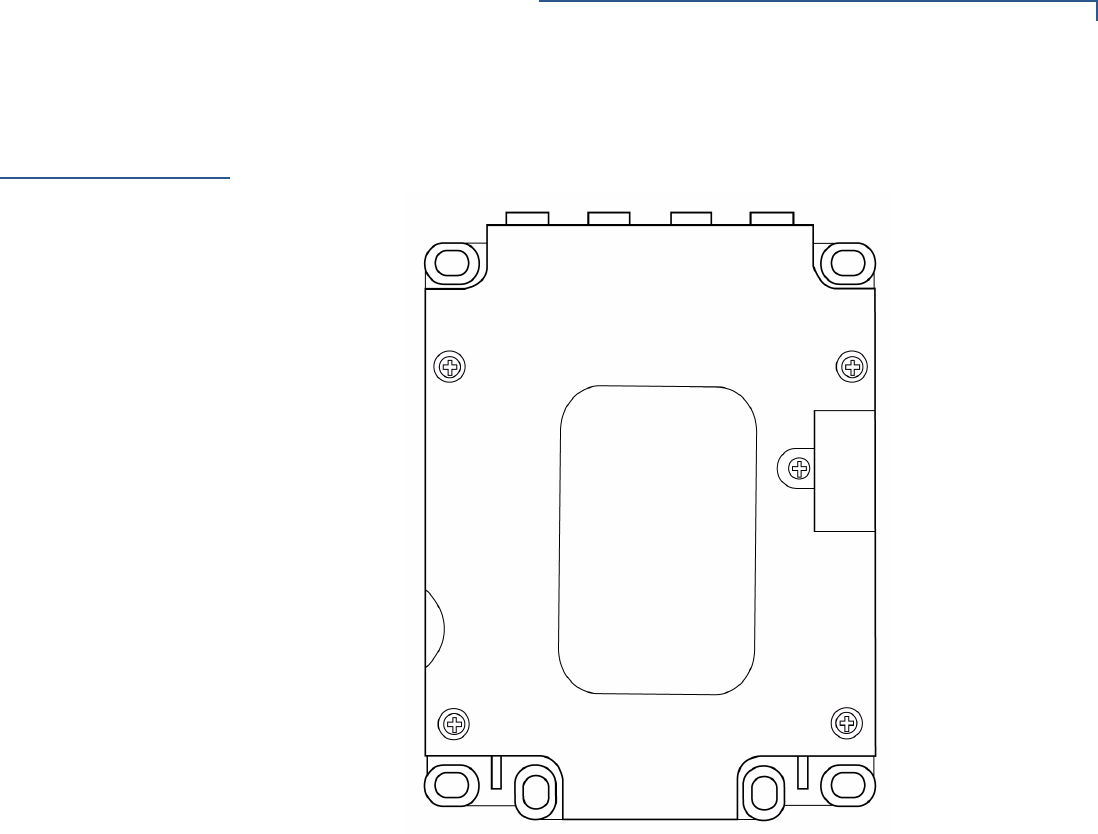
Before you continue with the installation process, familiarize yourself with the
Vx700 features:
Figure 11 Vx700 Features
The Vx700 includes the following features:
•A 128 x 64 backlit display.
•16-key Keypad and four Function keys.
•Four color-coded function keys beside the Keypad (CANCEL [RED], CLEAR
[YELLOW], HELP [BLUE], ENTER [GREEN]).
Cable
Connections
The Vx700 has 3 general connection options, depending on what the Vx700
connects to:
1MDB (Multi-Drop Bus) interface for host and slave vending applications.
2V.22bis - V.34 modem with HDLC capability via USB connection.
3Ethernet 10/100 BaseT via USB connection.
DISPLAY
KEYPAD
FUNCTION KEYS
WARNING Do not use a unit that has been tampered with or otherwise damaged.
The Vx700 comes equipped with tamper-evident label. If a label or component
appears damaged, immediately notify the shipping company and your VeriFone
representative or service provider.
TERMINAL SETUP AND USAGE
RS-232 and USB Connections
VX700 INSTALLATION GUIDE 21
RS-232 and USB
Connections
The Vx700 USB and RS-232 ports are shown in Figure 12.
Figure 12 Underside with Port Labels
Connection Options
The different connection options are listed below:
1USB connects to a host system using cable VPN 27720-01-(R).
2USB 2/3 connects to Ethernet networks using VPN 08448-03(R), USB
memory sticks, USB modem, or other USB devices. Additional software may
be required to support particular USB devices.
3COM 1 connects to host system using a cable VPN 27716-01-(R) or an MDB
interface thru VPN 27712-01-(R).
4COM 2 connects to the SCR710 Card Reader using a VPN 27718-01-(R).
5COM 8 connects specific applications using a cable VPN 27717-01-(R).
6SDIO connects to a contactless module (future expansion).
7MSR connects to a card reader (future expansion).
8DC IN connects to the power supply unit VPN CPS11224-3B-(R) (if required).
COM 2USB 2/3COM 8
SDIO
USB COM 1 DC IN
MSR
SAM

TERMINAL SETUP AND USAGE
RS-232 and USB Connections
22 VX700 INSTALLATION GUIDE
Pin Connections
The following are the possible options for cable adapters to support the
peripherals for the Vx700:
1Serial Port (COM 1): Logical Port 1 (USB Slave, Serial, Power)
•6-Wire RS232 port with TX, RX, RTS, CTS, DTR, and DCD signals.
•Provides for back-to-back download capability.
•Pin 10 allows the terminal to be turned off by raising this pin high; a low on
this pin re-powers the unit (default is low if this feature is not implemented
by the host).
2USB Slave: Logical Port 1 (USB Slave, Serial, Power)
•Provides for 2-Wire USB device port.
•Port is directly connected to CPU USB ports and is a USB slave.
•Power is not supplied from the USB Host, Pin 1 is NC. This configuration
powers the Vx700 by the DC Jack.
Table 2 Logical Port 1 (UPSTREAM) Serial connections
PIN RJ-48 (10 Way Connector)
1TX
2RX
3RTS
4CTS
5DTR
6VIN 9 - 28V
7GND
8DCD
9MDB 12V
10 RECYCLE POWER
Table 3 Logical Port 1 (UPSTREAM) USB connections
PIN Mini USB “B” (5 way connector)
1NC
2nUSB (Slave)
3nUSB (Slave)
4NC
5GND

TERMINAL SETUP AND USAGE
RS-232 and USB Connections
VX700 INSTALLATION GUIDE 23
3Serial Port (COM 2 and 3): Logical Ports 2 and 3 (USB Host, Serial)
•6-Wire RS232 port with TX, RX, RTS, CTS, DTR, and DCD signals and
VSYS out.
Table 4 Logical Port 2 (DOWNSTREAM) Serial connections
PIN RJ45 (8 Way Connector)
1TX
2RX
3RTS
4CTS
5DTR
6VSYS OUT 12V
7GND
8DCD
Table 5 Logical Port 3 (DOWNSTREAM) Serial connections
PIN RJ45 (8 Way Connector)
1TX
2RX
3RTS
4CTS
5DTR
6VSYS OUT 12V
7GND

TERMINAL SETUP AND USAGE
RS-232 and USB Connections
24 VX700 INSTALLATION GUIDE
4USB Host: Logical Ports 2 and 3 (USB Host, Serial)
•2-Wire USB Host port for external peripherals.
•Both ports provide up to 500mA, at 5V, for external peripherals.
•Devices requiring a higher current and voltage are not supported.
•A connector adaptor provides for a standard USB host connection.
•The host may use existing USB Verifone dongles, such as the USB-
Modem and USB-Serial, as well as devices in development, USB-Ethernet
and USB memory sticks.
Table 6 Logical Ports 2 & 3 (DOWNSTREAM) USB connections
PIN USB “A” (8 Way Connector)
1USB POWER OUT 500mA
2nUSB (HOST)
3pUSB (HOST)
4GND
5USB POWER OUT 500mA
6nUSB (HOST)
7pUSB (HOST)
8GND
TERMINAL SETUP AND USAGE
RS-232 and USB Connections
VX700 INSTALLATION GUIDE 25
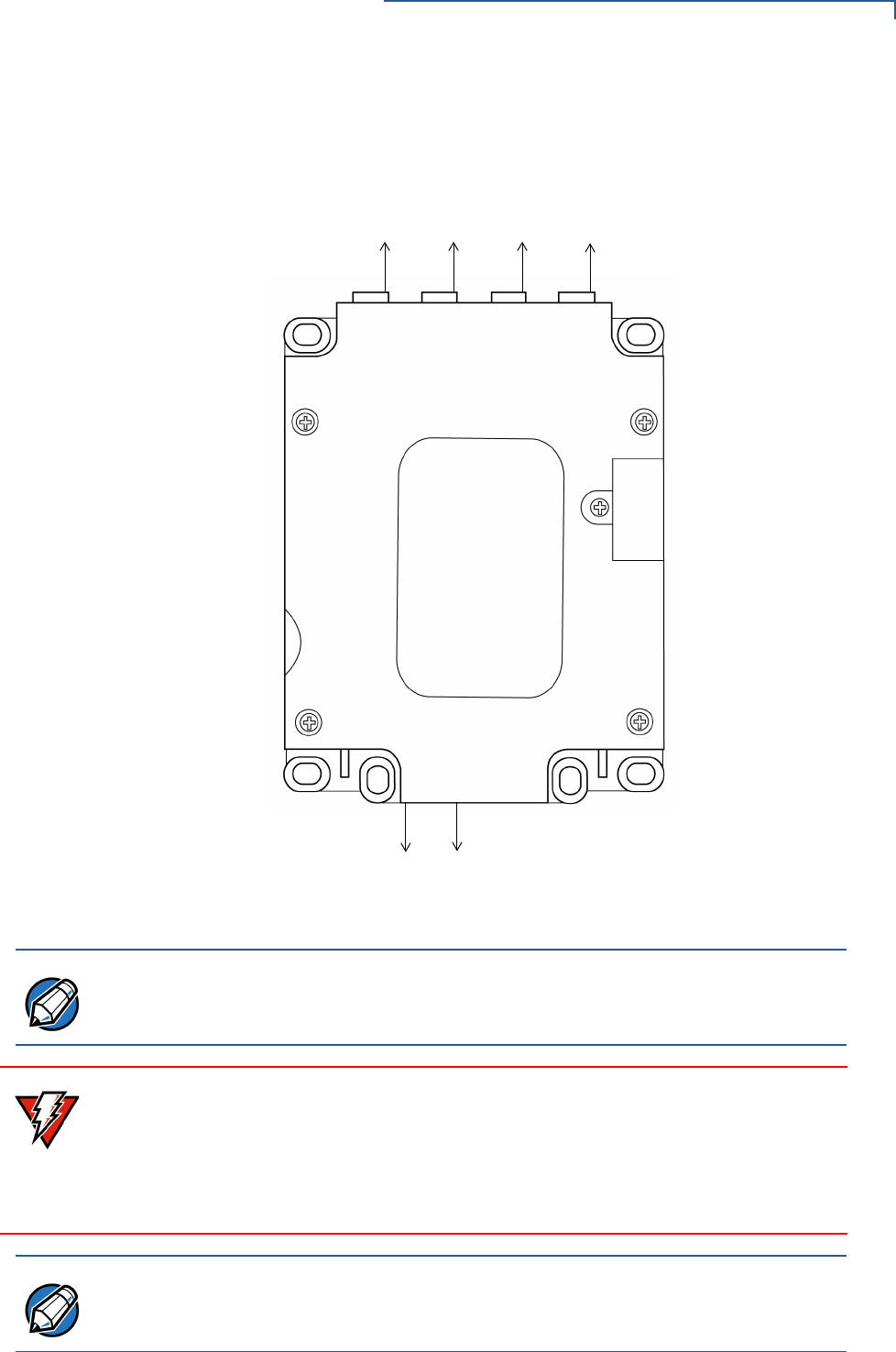
The following figure shows the approximate location of Pin 1 on the ports of the
Vx700:
Figure 13 Approximate Location of Pin 1
COM 2 USB 2/3 COM 8 MSR
SAM
SDIO
USB COM1 DCIN
PIN 1 PIN 1 PIN 1 PIN 1
PIN 1 PIN 1
NOTE For further assistance on the location of Pin 1, please contact your VeriFone
representative.
WARNING Turn off or unplug the host system when connecting or disconnecting the Vx700.
Memory corruption and data loss can result if the host system is processing data
when power is removed.
Refer to the host system instructions for specific warnings.
If an extension cable is required, only USB-certified cables should be used.
NOTE Standard accessories included with the Vx700 depends on the selected Vx700
part number. For more information, contact your VeriFone representative.

TERMINAL SETUP AND USAGE
Connection to Secure Card Reader (Optional)
26 VX700 INSTALLATION GUIDE
Connection to
Secure Card
Reader
(Optional)
This section describes the connection of the Vx700 to the optional smart card
reader SCR710.
The SCR710 Secure
Card Reader
VeriFone’s SCR710 is an outdoor-rated and robust secure card reader, suitable
for payment card acceptance in tough environments where reliability is
paramount.
The SCR710 provides three-track magnetic stripe reading capability along with a
full EMV 4.0 chip interface and Interac approval. It is PCI certified, which ensures
that sensitive cardholder data remains confidential during transfer to the attached
Vx700 PIN pad or Mx700 EPP.
NOTE The SCR710 is powered by the Vx700 and has a power supply requirement of
12V DC with a maximum power consumption of 2.4W.
TERMINAL SETUP AND USAGE
Power Supply
VX700 INSTALLATION GUIDE 27
Power Supply
Not all Vx700 configurations and device contexts require the use of a power
supply – VeriFone ships power supplies with the Vx700 as required.
If you have changed the context in which the Vx700 is used or have questions
about which power supply should be used, contact your VeriFone representative.
Connect and route all cables from the Vx700 before plugging the power pack cord
into a wall outlet or surge protector.
When the Vx700 has power and an application is loaded, the application starts
after the initial VeriFone copyright screen and displays a unique copyright screen.
If no application is loaded, DOWNLOAD NEEDED appears on the display after the
initial VeriFone copyright screen.
CAUTION Using an incorrectly rated power supply can damage the unit or cause it not to
work properly. Use only the recommended power supply, CPS11224-3B-(R), for
the Vx700 VPN (see Specifications for detailed power supply specifications).
WARNING Disconnecting power during a transaction can cause transaction data files not yet
stored in memory to be lost.
NOTE To protect against possible damage caused by lightning strikes and electrical
surges, VeriFone recommends installing a power surge protector.

TERMINAL SETUP AND USAGE
Power Supply
28 VX700 INSTALLATION GUIDE
VX700 INSTALLATION GUIDE 29
CHAPTER 3
Specifications
This chapter discusses power requirements, dimensions, and other specifications
of the Vx700.
Power
9V to 28V; 4A (option to support 45V DC)
Power Consumption
The Vx700 has the following power consumption modes:
DC Power Pack
UL, ITE listed, Class 2 power supply:
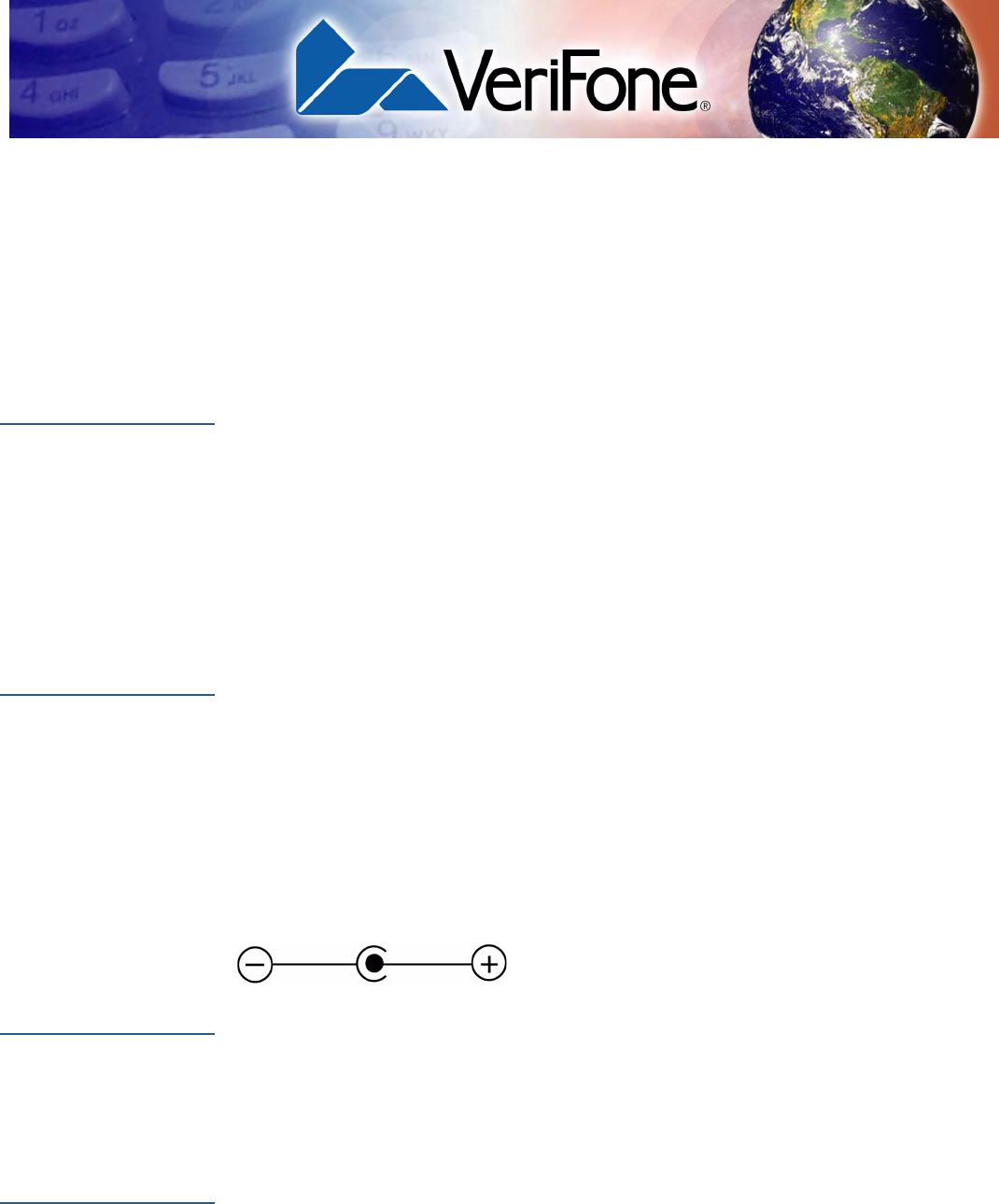
Power connector dimensions:
Barrel connector polarity:
Temperature
The Vx700 operating range and humidity tolerance as follows:
External
Dimensions
The Vx700 has the following dimensions:
•1.5W: Full Speed
•1W: Low Power Mode
•0.39W: Sleep Mode
aInput rated: 100 - 240V AC, 50/60 Hz, 0.6A
bOutput rated: 12V DC, 4A
Outer: 5.5mm Center: 2.1mm Shaft Length: 9.5mm
•Operating Temperature -25° to 60° C (13° to 140° F)
•Relative Humidity 5% to 95%; non-condensing
•Length: 132mm (5.2 in)
•Width: 100mm (4.0 in)
•Height: 48.9mm (2.0 in)

SPECIFICATIONS
External Dimensions
30 VX700 INSTALLATION GUIDE

VX700 INSTALLATION GUIDE 31
CHAPTER 4
Maintenance
The Vx700 has no user-maintainable parts. This section discusses procedures
and precautions for terminal care and maintenance.
Cleaning the
Terminal
To Clean the Terminal:
•Slightly dampen a clean cloth with water and a drop or two of mild soap.
•Wipe the Vx700 gently.
•For stubborn stains, use alcohol or an alcohol-based cleaner.
CAUTION Never use thinner, trichloroethylene, or ketone-based solvents – they may cause
deterioration of plastic or rubber parts.
Do not spray cleaners or other solutions directly onto the keypad or terminal
display.

MAINTENANCE
Cleaning the Terminal
32 VX700 INSTALLATION GUIDE

VX700 INSTALLATION GUIDE 33
CHAPTER 5
VeriFone Service and Support
For terminal problems, contact your local VeriFone representative or service
provider.
For product service and repair information:
•USA – VeriFone Service and Support Group, 1-800-VeriFone (837-4366),
Monday - Friday, 8 A.M. - 8 P.M., Eastern time.
•International – Contact your VeriFone representative.
Returning the
Terminal for
Service
Before returning a Vx700 to VeriFone, you must obtain an MRA number. The
following procedure describes how to return one or more terminals, for repair or
replacement (U.S. customers only).
To Return a Terminal for Service
1Get the following information from the printed labels on the bottom of each
Vx700 to be returned:
•Product ID, including the model and part number. For example, “Vx700”
and “Pxxx- xxx-xx,” “Mxxx-xx-xx-xxx,” or “2xxxx-xx”.
•Serial number (S/N xxx-xxx-xxx).
2Obtain the MRA number(s) by completing one of the following:
aCall VeriFone toll-free within the United States at 1-800-VeriFone and
follow the automated menu options.
•Select the MRA option from the automated message. The MRA
department is open Monday to Friday, 8 A.M.–8 P.M., Eastern Time.
•Give the MRA representative the information you gathered in Step 1.
If the list of serial numbers is long, you can fax the list, along with the
information gathered in Step 1, to the MRA department at 727-953-
4172 (U.S.).
bAddress a fax to “VeriFone MRA Dept.” with the model and part number(s)
•Include a telephone number where you can be reached and your fax
number.
NOTE International customers are advised to contact their local VeriFone representative
for assistance regarding service, return, or replacement of terminals.
VERIFONE SERVICE AND SUPPORT
Accessories
34 VX700 INSTALLATION GUIDE
cComplete the Inquiry Contact Form at http://www.verifone.com/aboutus/
contact/contact_form.cfm.
•Address the Subject box with “To VeriFone MRA Dept.”
•Reference the model and part number in the Note box.
3Describe the problem(s).
4Provide the shipping address where the repaired or replacement unit must be
returned.
5Keep a record of the following items:
•Assigned MRA number(s).
•VeriFone serial number assigned to the Vx700 you are returning for
service or repair (terminal serial numbers are located on the bottom of the
unit.
•Shipping documentation, such as air bill numbers used to trace the
shipment.
•Model(s) returned (model numbers are located on the VeriFone label on
the bottom of the Vx700).
Accessories
VeriFone produces the following accessories for the
Vx700. When ordering, please refer to the part number in the left column.
•VeriFone online store at www.store.verifone.com.
•USA – VeriFone Customer Development Center, 800-VeriFone (837-4366),
Monday - Friday, 7 A.M. - 8 P.M., Eastern time.
•International – Contact your VeriFone representative.
Power Pack
Contact your local VeriFone distributor to determine which power pack or
power cord fits your needs.
NOTE One MRA number must be issued for each Vx700 you return to VeriFone, even if
you are returning several of the same model.
CPS11224-3B-(R) Universal DC power pack
(supplied separately)
21973-01 AC power cord (US)

VERIFONE SERVICE AND SUPPORT
Accessories
VX700 INSTALLATION GUIDE 35
Data Cables
27720-01-(R) Host USB
08448-03-(R) Ethernet Adapter
27716-01-(R) Host RS-232
27712-01-(R) MDB interface
27718-01-(R) SCR710 Card Reader
27717-01-(R) USB Application

VERIFONE SERVICE AND SUPPORT
Accessories
36 VX700 INSTALLATION GUIDE
VX700 INSTALLATION GUIDE 37
APPENDIX A
V
x
700 ATM -
Vending
Machine
Integration
This appendix shows the terminal dimensions of the Vx700 and the proper
orientation of the terminal for installation in an ATM or Vending Machine.
Terminal
Dimensions
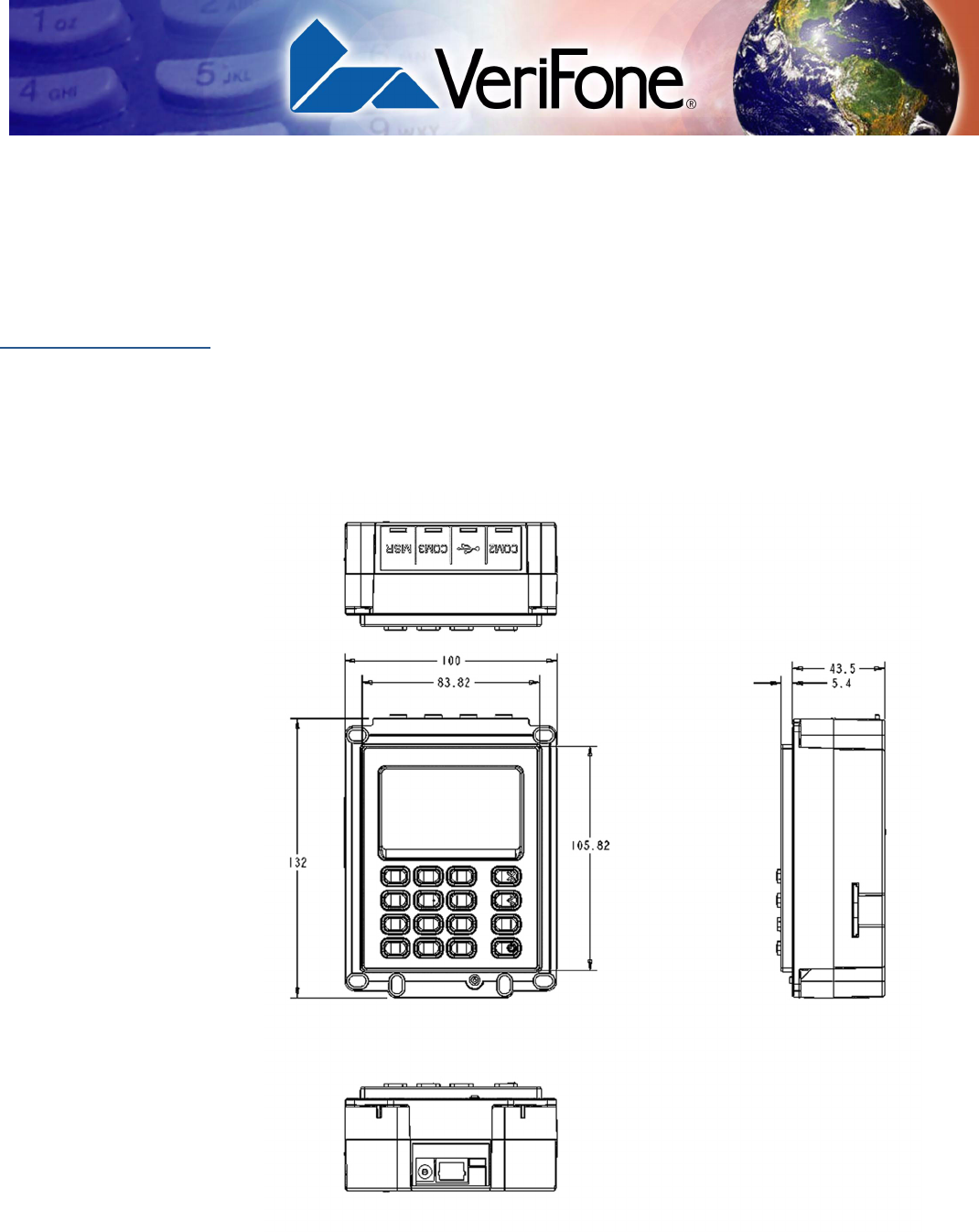
This section illustrates the terminal dimensions for Vending Machine integration of
the Vx700. The images indicate measurements in Metric units.
Figure 14 Terminal Dimensions showing Length, Width, and Height
Vx700 ATM - Vending Machine Integration
38 VX700 INSTALLATION GUIDE
Rear Terminal
Dimensions
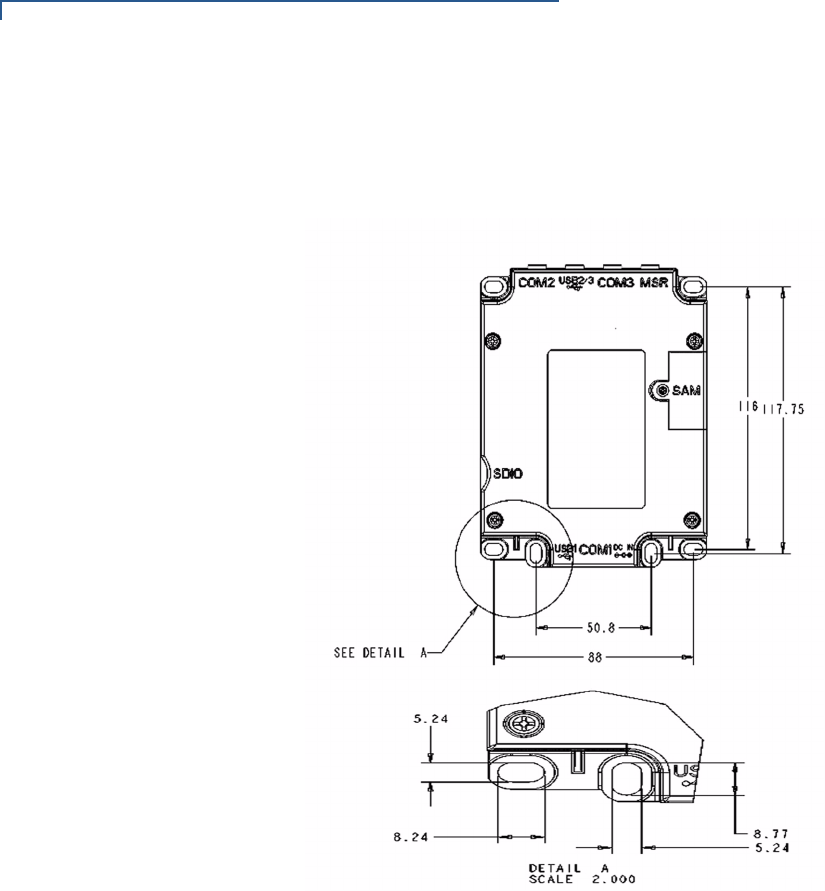
This figure illustrates the rear terminal dimensions.
Figure 15 Rear Terminal Dimensions, with a close up of Earth Stud slot
Vx700 ATM - Vending Machine Integration
VX700 INSTALLATION GUIDE 39
Vending Machine
Integration for the
V
x
700
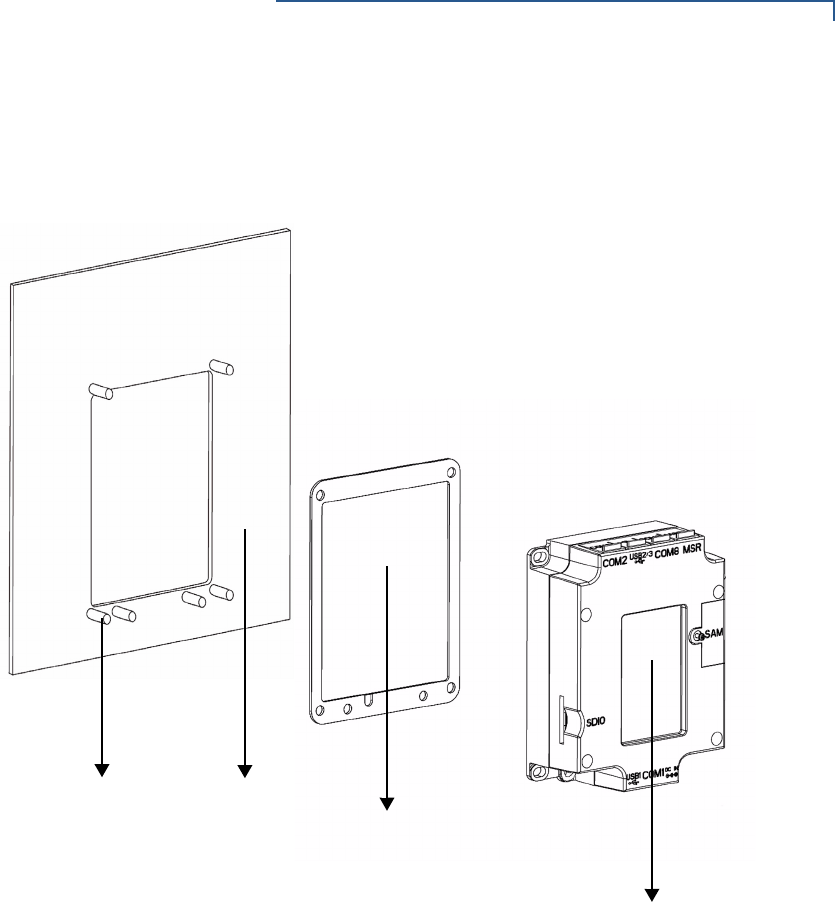
This section illustrates the proper orientation of the Vx700 terminal with a Vending
Machine terminal panel.
Figure 16 Vending Machine Panel Orientation with the Vx700
VENDING
GASKET
VX700
EARTH STUD
MACHINE
PANEL