Versa Wireless VERSAX Security Sensor User Manual Installation Box Insert

Versa Wireless Inc. Security Sensor Installation Box Insert

User Manual

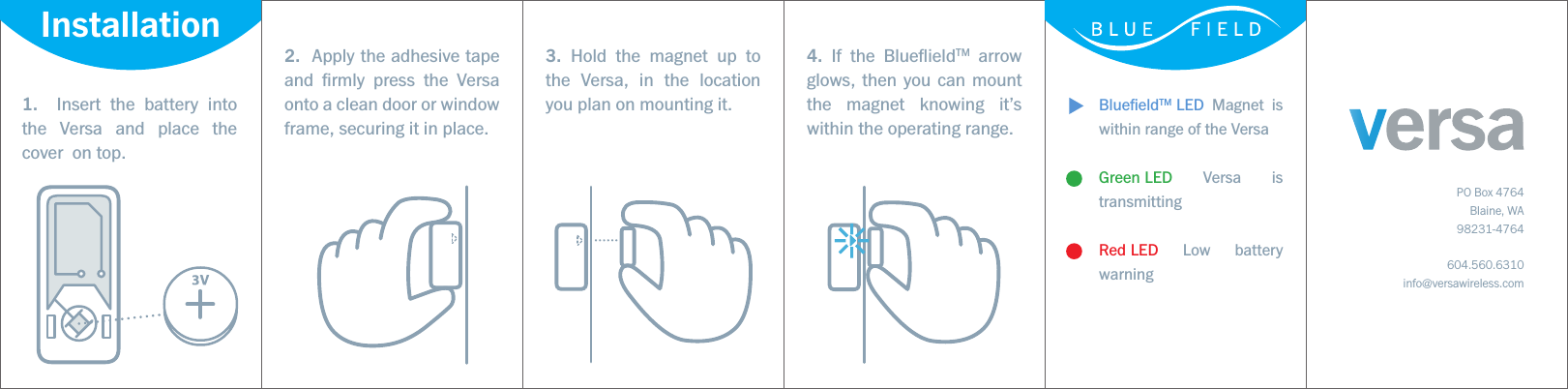
BluefieldTM LED Magnet is within range of the VersaGreen LED Versa is transmittingRed LED Low battery warning1.  Insert the battery into the Versa and place the cover  on top.2.  Apply the adhesive tape and firmly press the Versa onto a clean door or window frame, securing it in place. 3. Hold the magnet up to the Versa, in the location you plan on mounting it.4. If the BlueflieldTM arrow glows, then you can mount the magnet knowing it’s within the operating range.PO Box 4764Blaine, WA98231-4764604.560.6310info@versawireless.comInstallation
Operating Instructions Mounting GuidelinesInstalling the VersaProgramingTestingFCC NoticeThe Versa is a compact wireless security contact that can be installed on windows, doors, and many other objects that open and close. The Versa is equipped with a BluefieldTM LED that glows BLUE when a magnetic field comes within range of the sensor during startup, and is also equipped with a GREEN LED that flashes upon proper initial startup and each time a signal is transmited  to the control panel.  Signal transmission occurs when a magnet is brought within range or is moved out of range of the sensor. The Versa is also equipped with a RED LED that will flash to indicate when the battery has reached the Low Battery operating level for the sensor. A low battery signal will also be transmitted to the control panel.Note: The BluefieldTM and Green signal LED’s are operational when the cover is removed and will operate for 3 minutes after the cover has been installed. To restart these LED functions, remove the cover. A tamper switch has also been added for additional security.The following steps describe general guidelines for programming (learning) the sensor into the alarm control panel memory. For more details, please refer to the security panel manufactures installation & programming Instructions.1.   To remove the top of the Versa, use a small flathead screwdriver and twist the top cover o utilizing the recessed indents on the sides of the sensor.2.   Set the panel to sensor learning mode.3.   Press and release the tamper switch on the sensor until the panel responds.4.   Replace the top of the sensor.5.   Exit program mode.Note: Always test in place before securing the Versa to it’s final location1.   Select the desired location for the Versa and magnet and insert the battery (positive side up) into the base of the Versa.2.   Hold the sensor up in the desired location and temporally tape in place. Now hold the magnet up to it’s desired location. If the magnet is within range to trigger the sensor, the Versa’s Bluefield LED arrow  will glow, ensuring proper placement.3.   If the BluefieldTM LED arrow does not glow, position or orientate the magnet closer to the Versa, or in some cases use a larger magnet to bridge the gap.4.   Once the correct location of the magnet has been found, fix the Versa and magnet in place with the included 3M adhesive tape.When installing the Versa on a door,mount the sensor on the frame and the magnet on the door. This is to ensure that the sensor receives the least amount of movement as changing the orientation of a wireless device can eect it’s performance.•   If possible, place the Versa within 100 ft. of the security panel. While a transmitter may have an open air range of 500+ feet, a home and oce environment can have dierent eects on the transmitters range. Sometimes a change in the Versa's orientation can help enhance the wireless transmission.•   Avoid mounting the Versa in areas where it will be exposed to moisture or where the operating temperature of 32 to 120ºF (0 to 50ºC) will be exceeded.•   Use spacers (not included) to keep the Versa and magnet away from metal or metallic surfaces such as foil wallpaper.•   Avoid mounting the Versa in areas with a large quantity of metal or electrical wiring,       such as a furnace or utility room as this can greatly aect the transmitting signal. 1.   Put the control panel into sensor test mode.2.   With the cover o (or during 3 minutes after replacing the lid) hold the magnet up to the Versa so that the BluefieldTM LED is illuminated and then pull the magnet away from the sensor. You will see the GREEN signal LED flash indicating a signal has been transmitted.3.   Listen for siren or keypad beeps to determine appropriate response (refer to the control panel installation instructions).4.   Exit sensor test mode.Note: It is recommended that a system test be performed per the Operation & User’s Guide at least once a year.Never handle the circuitboard antenna or by pulling on it. Doing so will void the warranty.Before mounting the sensor, verify that the sensor mounting location provides good RF communication to the panel. To verify, do the following:1.   This device may not cause harmful interference.2.   This device must accept any interference that may be received, including interference that may cause undesired operation.Changes or modifications not expressly approved by Versa Wireless Inc. can void the user’s authority to operate the equipment.Le présent appareil est conforme aux CNR d'Industrie Canada applicables aux appareils radio exempts de licence. L'exploitation est autorisée aux deux conditions suivantes : (1) l'appareil ne doit pas produire de brouillage, et (2) l'utilisateur de l'appareil doit accepter tout brouillage radioélectrique subi, même si le brouillage est susceptible d'en compromettre le fonctionnement. This device complies with FCC Rules Part 15. Operation is subject to the following two conditions:

Navigation menu