Viatom Technology 1600 Wrist Pulse Oximeter User Manual

Shenzhen Viatom Technology Co., Ltd. Wrist Pulse Oximeter Users Manual

Users Manual

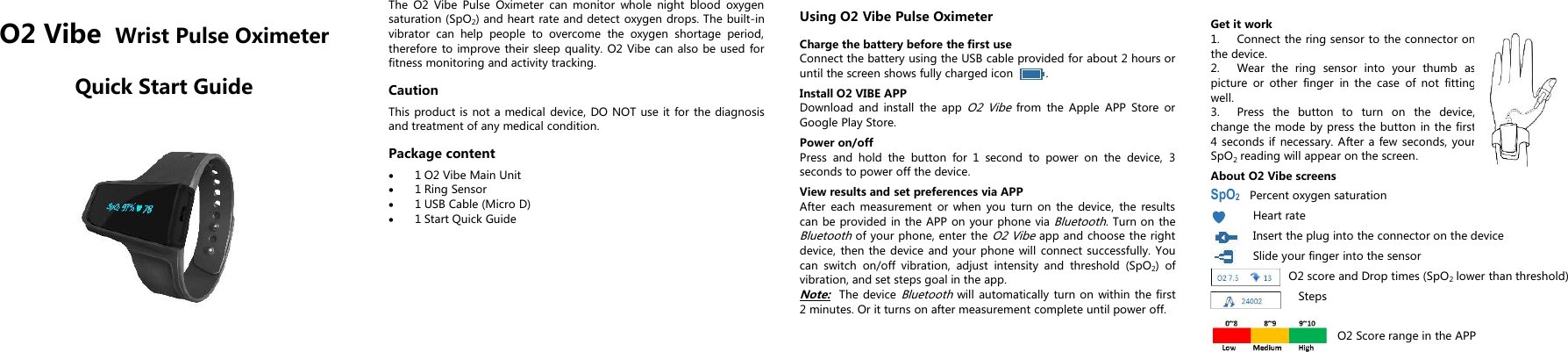
O2 Vibe Wrist Pulse OximeterQuick Start GuideThe O2 Vibe Pulse Oximeter can monitor whole night blood oxygensaturation (SpO2) and heart rate and detect oxygen drops. The built-invibrator can help people to overcome the oxygen shortage period,therefore to improve their sleep quality. O2 Vibe can also be used forfitness monitoring and activity tracking.CautionThis product is not a medical device, DO NOT use it for the diagnosisand treatment of any medical condition.Package content1 O2 Vibe Main Unit1 Ring Sensor1 USB Cable (Micro D)1 Start Quick GuideUsing O2 Vibe Pulse OximeterCharge the battery before the first useConnect the battery using the USB cable provided for about 2 hours oruntil the screen shows fully charged icon .Install O2 VIBE APPDownload and install the appO2 Vibefrom the Apple APP Store orGoogle Play Store.Power on/offPress and hold the button for 1 second to power on the device, 3seconds to power off the device.View results and set preferences via APPAfter each measurement or when you turn on the device, the resultscan be provided in the APP on your phone viaBluetooth.Turn on theBluetoothof your phone, enter theO2 Vibeapp and choose the rightdevice, then the device and your phone will connect successfully. Youcan switch on/off vibration, adjust intensity and threshold (SpO2) ofvibration, and set steps goal in the app.Note:The deviceBluetoothwill automatically turn on within the first2 minutes. Or it turns on after measurement complete until power off.Get it work1. Connect the ring sensor to the connector onthe device.2. Wear the ring sensor into your thumb aspicture or other finger in the case of not fittingwell.3. Press the button to turn on the device,change the mode by press the button in the first4 seconds if necessary. After a few seconds, yourSpO2reading will appear on the screen.About O2 Vibe screensSpO2Percent oxygen saturationHeart rateInsert the plug into the connector on the deviceSlide your finger into the sensorO2 score and Drop times (SpO2lower than threshold)StepsO2 Score range in the APP
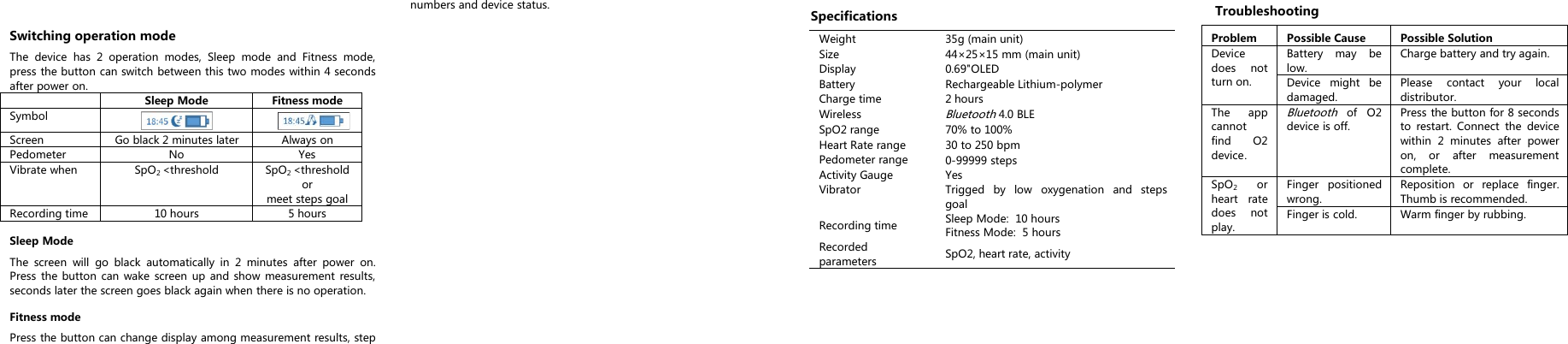
Switching operation modeThe device has 2 operation modes, Sleep mode and Fitness mode,press the button can switch between this two modes within 4 secondsafter power on.Sleep ModeFitness modeSymbolScreenGo black 2 minutes laterAlways onPedometerNoYesVibrate whenSpO2<thresholdSpO2<thresholdormeet steps goalRecording time10 hours5 hoursSleep ModeThe screen will go black automatically in 2 minutes after power on.Press the button can wake screen up and show measurement results,seconds later the screen goes black again when there is no operation.Fitness modePress the button can change display among measurement results, stepnumbers and device status.SpecificationsWeight35g (main unit)Size44×25×15 mm (main unit)Display0.69"OLEDBatteryRechargeable Lithium-polymerCharge time2 hoursWirelessBluetooth4.0 BLESpO2 range70% to 100%Heart Rate range30 to 250 bpmPedometer range0-99999 stepsActivity GaugeYesVibratorTrigged by low oxygenation and stepsgoalRecording timeSleep Mode: 10 hoursFitness Mode: 5 hoursRecordedparametersSpO2, heart rate, activityTroubleshootingProblemPossible CausePossible SolutionDevicedoes notturn on.Battery may below.Charge battery and try again.Device might bedamaged.Please contact your localdistributor.The appcannotfind O2device.Bluetoothof O2device is off.Press the button for 8 secondsto restart. Connect the devicewithin 2 minutes after poweron, or after measurementcomplete.SpO2orheart ratedoes notplay.Finger positionedwrong.Reposition or replace finger.Thumb is recommended.Finger is cold.Warm finger by rubbing.
How to contact us?Shenzhen Viatom Technology Co., Ltd4E,Building 3, Tingwei industrial Park, Honlang North 2nd Road,Xin’an Street, Baoan District, 518101 Shenzhen, P.R.Chinawww.viatomtech.comPN:255-00917-00 Version: AContents of this manual are subject to changes without prior notice.©Copyright 2016 Shenzhen Viatom Technology Co., Ltd. All rightsreserved.FCC Statement1. This device complies with Part 15 of the FCC Rules. Operation issubject to the following twoconditions:(1) This device may not cause harmful interference.(2) This device must accept any interference received, includinginterference that may causeundesired operation.2. Changes or modifications not expressly approved by the partyresponsible for compliance couldvoid the user's authority to operate the equipment.NOTE: This equipment has been tested and found to comply with thelimits for a Class B digital device, pursuant to part 15 of the FCC Rules.These limits are designed to provide reasonable protection againstharmful interference in a residential installation.This equipment generates uses and can radiate radio frequencyenergy and, if not installed and used in accordance with theinstructions, may cause harmful interference to radio communications.However, there is no guarantee that interference will not occur in aparticular installation. If this equipment does cause harmfulinterference to radio or television reception, which can be determinedby turning the equipment off and on, the user is encouraged to try tocorrect the interference by one or more of the following measures:- Reorient or relocate the receiving antenna.- Increase the separation between the equipment and receiver.-Connect the equipment into an outlet on a circuit different from thatto which the receiver is connected.-Consult the dealer or an experienced radio/TV technician for help

Navigation menu