Virgin Pulse VP-12 2.4GHz 40 Channel Analog Modulation Cordless Phone User Manual
Virgin Pulse LLC 2.4GHz 40 Channel Analog Modulation Cordless Phone
Contents
- 1. User Manual
- 2. FCC Information
User Manual
1.877.4VPULSE or www.virginpulse.com

1.877.4VPULSE or www.virginpulse.com
IMPORTANT SAFETY INSTRUCTIONS
Some of the following information may not apply to your particular product; however, when using telephone equipment, basic
safety precautions should always be followed to reduce the risk of fire, electric shock and injury to persons, including the
following:
1. Read and understand all instructions.
2. Follow all warnings and instructions marked on the product.
3. Unplug this product from the wall outlet before cleaning. Do not use liquid cleaners or aerosol cleaners. Use a damp cloth
for cleaning.
4. Telephones should not be used while you are in a bathtub, shower or pool. Immersion of the telephone or handset in water
could cause an electrical shock.
5. Slots and openings in the cabinet back or bottom are provided for ventilation, to protect it sfrom overheating. These
openings must not be blocked or covered. The openings should never be blocked by placing the product on the bed, sofa,
rug, or other similar surface. This product should not be placed in a built-in installation unless proper ventilation is provided.
6. This product should be operated only from the type of power source indicated on the marking label. If you are not sure of
the type of power supply to your home, consult your dealer or local power company.
7. Do not allow anything to rest on the power cord. Do not locate this product where the cord will be abused by persons
walking on it.
8. Do not overload wall outlets and extension cords as this can result in the risk of fire or electric shock.
9. Never push objects of any kind into this product through cabinet slots as they may touch dangerous voltage points or
short out parts that could result in a risk of fire or electric shock. Never spill liquid of any kind on the product.
10. To reduce the risk of electric shock, do not disassemble this product, but take it to a qualified serviceman when service or
repair work is required. Opening or removing covers may expose you to dangerous voltages or other risks. Incorrect re-
assembly can cause electric shock when the telephone equipment is subsequently used.
11. Do not expose the product to extreme temperatures such as areas near a hot radiator or stove or in a hot car.
12. Do not place lighted candles, cigarettes, cigars, etc., on the telephone.
13. Never touch uninsulated telephone wires or terminals unless the telephone line has been disconnected at the network
interface.
14. Never install or modify telephone wiring during a lightning storm.
15. Never install telephone jacks in wet locations unless the jack is specifically designed for wet locations.

1.877.4VPULSE or www.virginpulse.com
16. Use caution when installing or modifying telephone lines to prevent electrical shock and/or fire.
17. Unplug this product from the wall outlet and refer servicing to qualified service personnel under the following conditions:
A. When the power supply cord or plug is damaged or frayed.
B. If the product has been exposed to rain or water.
C. If the product does not operate normally byfollowing the operating instructions.
D. If the product’s cabinet has been damaged.
E. If the product exhibits a distinct change in performance.
18. Avoid using a telephone (other than a cordless type) during an electrical storm. There may be a remote risk of electric
shock from lightning.
19. Do not use the telephone to report a gas leak in the vicinity of the leak.
20. Do not place this product on an unstable cart, stand or table. The product may fall, causing serious damage to the product.
IF YOUR PRODUCT UTILIZES BATTERIES, THE FOLLOWING ADDITIONAL
PRECAUTIONS SHOULD BE OBSERVED:
Risk of explosion if battery is replaced by an incorrect type,
1. Risk of explosion if battery is replaced by an incorrect type, use only the type and size battery(ies) specified in the user
manual: GPI Internation Ltd. 3.6V 600mA NI-MH GP60AAAH3BMJ.
2. Do not dispose of the battery(ies) in fire. They may explode.Check with local codes for possible special disposal
instructions.
3. Do not open or mutilate the battery(ies). Released electrolyte is corrosive and may cause damage to the eyes or skin. It
may be toxic if swallowed.
4. Exercise care in handling battery(ies) in order not to short out the battery(ies) with conducting materials such as rings,
bracelets, and keys. The battery(ies) or conductor may overheat and cause burns.
5. Do not attempt to recharge the battery(ies) provided with or identified for use with this product that are not intended to be
charged. The battery(ies) may leak corrosive electrolyte or explode.
6. Do not attempt to rejuvenate the battery(ies) provided with or identified for use with this product by heating them. Sudden
release of the battery(ies) electrolyte may occur causing burns or irritation to eyes or skin.

1.877.4VPULSE or www.virginpulse.com
7. When replacing battery(ies), all batteries should be replaced at the same time. Mixing fresh and discharged batteries could
increase internal cell pressure and rupture the dischargedbattery(ies). (Applies to products employing more than one
separately replaceable primary battery.)
8. When inserting battery(ies) into this product, the proper polarity or direction must be observed. Reverse insertion of
battery(ies) can cause charging, and that may result in leakage or explosion.
9. Remove battery(ies) from this product if storing over 30 days because the battery(ies) could leak and damage the product.
10. Discard dead battery(ies) as soon as possible since “dead” batteries are more likely to leak in a product.
11. Do not store this product, or the battery(ies) provided with or identified for use with this product, in high-temperature areas.
Batteries that are stored in a freezer or refrigerator for the purpose of extending shelf life should be protected from
condensation during storage and defrosting. Batteries should be stabilized at room temperature prior to use after cold
storage.
12. If your product uses rechargeable battery(ies), charge the battery(ies) only in accordance with the instructions and limitation
specified in the User Manual.
SAVE THESE INSTURCTIONS

1.877.4VPULSE or www.virginpulse.com
Your telephone equipment is approved for connection to the Public Switched Telephone Network and is in compliance with
parts 15 and 68, FCC Rules and Regulations and the Technical Requirements for Telephone Terminal Equipment published by
ACTA.
1. Notification to the Local Telephone Company
On the bottom of this equipment is a label indicating, among other information, the US number and Ringer Equivalence
Number (REN) for the equipment. You must, upon request, provide this information to your telephone company.
The REN is useful in determining the number of devices you may connect to your telephone line and still have all of these
devices ring when your telephone number is called. In most (but not all) areas, the sum of the RENs of all devices
connected to one line should not exceed 5. To be certain of the number of devices you may connect to your line as
determined by the REN, you should contact your local telephone company.
A plug and jack used to connect this equipment to the premises wiring and telephone network must comply with the
applicable FCC Part 68 rules and requirements adopted by the ACTA. A compliant telephone cord and modular plug is
provided with this product. It is designed to be connected to a compatible modular jack that is also compliant. See
installation instructions for details.
Notes
This equipment may not be used on coin service provided by the telephone company.
• Party lines are subject to state tariffs, and therefore, you may not be able to use your own telephone equipment if you
are on a party line. Check with your local telephone company.
• Notice must be given to the telephone company upon permanent disconnection of your telephone from your line.
• If your home has specially wired alarm equipment connected to the telephone line, ensure the installation of this product
does not disable your alarm equipment. If you have questions about what will disable alarm equipment, consult your
telephone company or a qualified installer.
2. Rights of the Telephone Company
Should your equipment cause trouble on your line which may harm the telephone network, the telephone company shall,
where practicable, notify you that temporary discontinuance of service may be required. Where prior notice is not practicable
and the circumstances warrant such action, the telephone company may temporarily discontinue service immediately. In
case of such temporary discontinuance, the telephone company must: (1) promptly notify you of such temporary
discontinuance; (2) afford you the opportunity to correct the situation; and (3) inform you of your right to bring a
complaint to the Commission pursuant to procedures set forth in Subpart E of Part 68, FCC Rules and Regulations.
EQUIPMENT APPROVAL INFORMATION
1.877.4VPULSE or www.virginpulse.com
The telephone company may make changes in its communications facilities, equipment, operations or procedures where
such action is required in the operation of its business and not inconsistent with FCC Rules and Regulations. If these
changes are expected to affect the use or performance of your telephone equipment, the telephone company must give
you adequate notice, in writing, to allow you to maintain uninterrupted service.
This product meets the applicable Industry Canada technical specifications.
HEARING AID COMPATIBILITY
This telephone system meets FCC standards for Hearing Aid Compatibility.
US Number is located on the bottom of the base unit
REN NUMBER IS LOCATED ON THE BOTTOM OFTHE BASE UNIT.
CAUTION: When using telephone equipment, there are basic safety instructions that should always be followed.
Refer to the IMPORTANT SAFETY INSTRUCTIONS provided with this product and save them for future reference.

1.877.4VPULSE or www.virginpulse.com
This device complies with Part 15 of the FCC Rules. Operation is subject to the following two conditions: (1) This device may not
cause harmful interference; and (2) This device must accept any interference received, including interference that may cause
undesired operation.
Warning: Changes or modifications to this unit not expressly approved by the party responsible for compliance could void the
user’s authority to operate the equipment.
This equipment has been tested and found to comply with the limits for a Class B digital device, pursuant to Part 15 of the FCC
Rules. These limits are designed to provide reasonable protection against harmful interference in a residential installation.
This equipment generates, uses, and can radiate radio frequency energy and, if not installed and used in accordance with the
instructions, may cause harmful interference to radio communications. However, there is no guarantee that interference will not
occur in a particular installation.
If this equipment does cause harmful interference to radio or television reception, which can be determined by turning the
equipment off and on, the user is encouraged to try to correct the interference by one or more of the following measures:
• Reorient or relocate the receiving antenna (that is, the antenna for radio or television that is “receiving” the interference).
• Reorient or relocate and increase the separation between the telecommunications equipment and receiving antenna.
• Connect the telecommunications equipment into an outlet on a circuit different from that to which the receiving antenna is
connected.
If these measures do not eliminate the interference, please consult your dealer or an experienced radio/television technician for
additional suggestions. Also, the Federal Communications Commission has prepared a helpful booklet, “How To Identify and
Resolve Radio/TV Interference Problems.” This booklet is available from the U.S. Government Printing Office, Washington, D.C.
20402. Please specify stock number 004-000-00345-4 when ordering copies.
INTERFERENCE INFORMATION

1.877.4VPULSE or www.virginpulse.com
INTRODUCTION
Congratulations! You’ve just bought the sexiest, cordless phone on the planet. Of course,
we may be biased. But consider this: With an attachable clip and headset jack, you don’t
have to pin the phone between your neck and shoulder to have your hands free. Then
again, you may never want to take your hands off of this phone once you see how good
it feels. Imagine, a phone that allows hands-free operation while being awfully fun to
handle. Can you handle it?
Your Cordless ID phone stores and displays specific information, provided by your local
telephone company, to subscribers of Caller ID or similar caller identification services.
Your Cordless ID phone enables you to:
•
Identify callers before you answer the phone.
•
View the time and date of each incoming call.
•
Record up to 40 Caller ID numbers sequentially.
•
Know who called while you were away.
To get the most from your new phone, we suggest that you take a few minutes right now
to read through this user's guide.
IMPORTANT: In order to use all of the features of this unit, you must subscribe to
either the standard Name/Number Caller ID Service or Caller ID with Call Waiting Service.
To know who is calling while you are on the phone, you must subscribe to Caller ID with
Call Waiting Service.
IMPORTANT: Because cordless phones operate on electricity, you should have at
least one phone in your home that isn’t cordless, in case the power in your home goes
out.
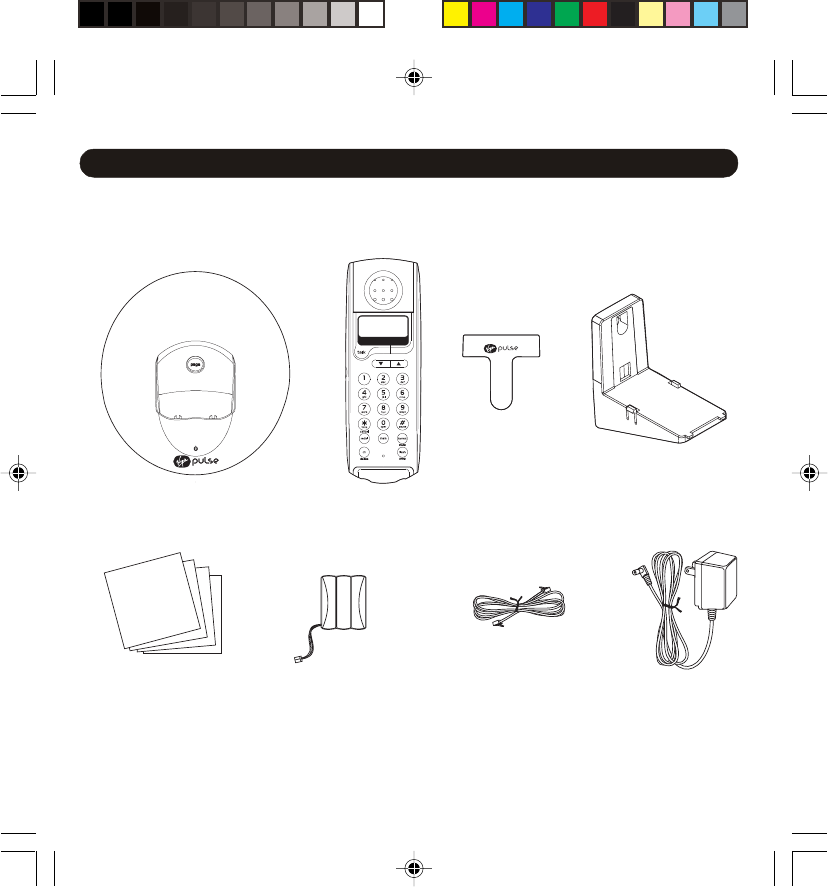
Parts Checklist
Your package includes these items:
BEFORE YOU BEGIN
Base Unit Handset Belt Clip Wall Mount
Bracket
Battery Line Cord AC AdaptorProduct Manual/
Quick Start Guide/
Warranty Card/
Virgin Brand Piece
1.877.4VPULSE or www.virginpulse.com
Telephone Jack Requirements
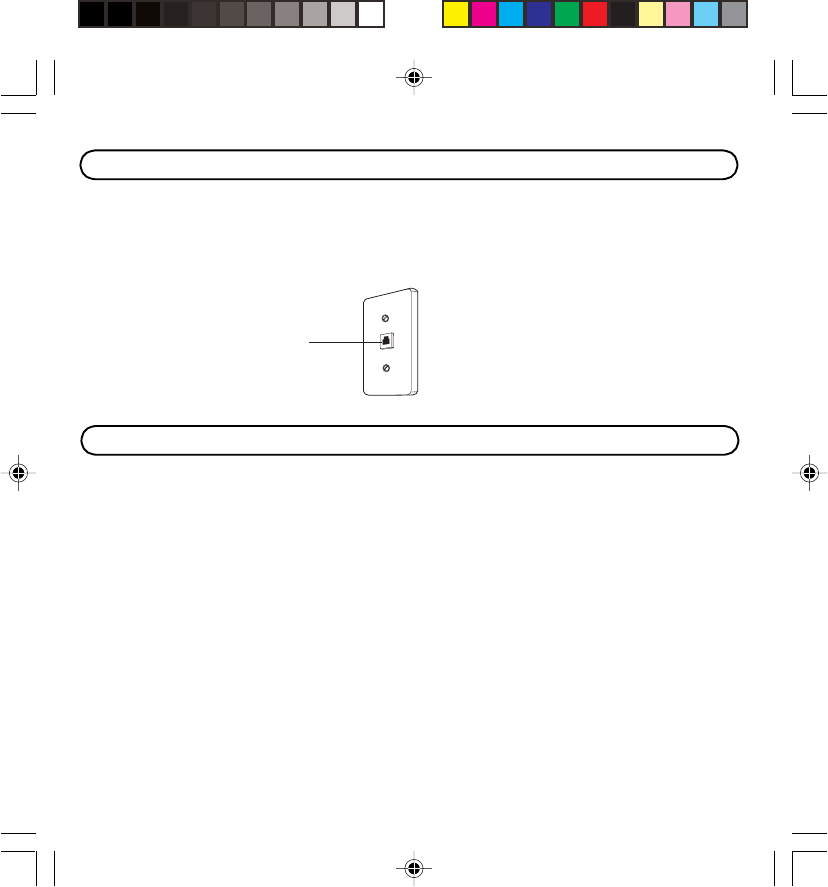
To use this phone, you need an RJ11C type modular telephone jack, which might look like the
one pictured here, installed in your home. If you don’t have a modular jack, call your local
phone company to find out how to get one installed.
Digital Security System
Your cordless phone uses a digital security system to provide protection against false
ringing, unauthorized access, and charges to your phone line.
When you place the handset in the base, the unit verifies its security code. After a power
outage or battery replacement, you should place the handset in the base for the code.
Wall Plate
Modular
telephone
line jack

1.877.4VPULSE or www.virginpulse.com
• Never install telephone wiring during a lightning storm.
• Never install telephone jacks in wet locations unless the jack is specifically designed for
wet locations.
• Never touch uninsulated telephone wires or terminals, unless the telephone line has
been disconnected at the network interface.
• Use caution when installing or modifying telephone lines.
• Temporarily disconnect any equipment connected to the phone such as faxes, other
phones, or modems.
INSTALLATION NOTE: Some cordless telephones operate at frequencies that may
cause interference to nearby TVs, microwave ovens, and VCRs. To minimize or prevent
such interference, the base of the cordless telephone should not be placed near or on top
of a TV, microwave ovens, or VCR. If such interference continues, move the cordless
telephone farther away from these appliances.
Certain other communications devices may also use the 2.4 GHz frequency for
communication, and, if not properly set, these devices may interfere with each other and/or
your new telephone. If you are concerned with interference, please refer to the owner’s
manual for these devices on how to properly set channels to avoid interference. Typical
devices that may use the 2.4 GHz frequency for communication include wireless audio/
video senders, wireless computer networks, multi-handset cordless telephone systems,
and some long-range cordless telephone systems.
IMPORTANT INSTALLATION INFORMATION
1.877.4VPULSE or www.virginpulse.com
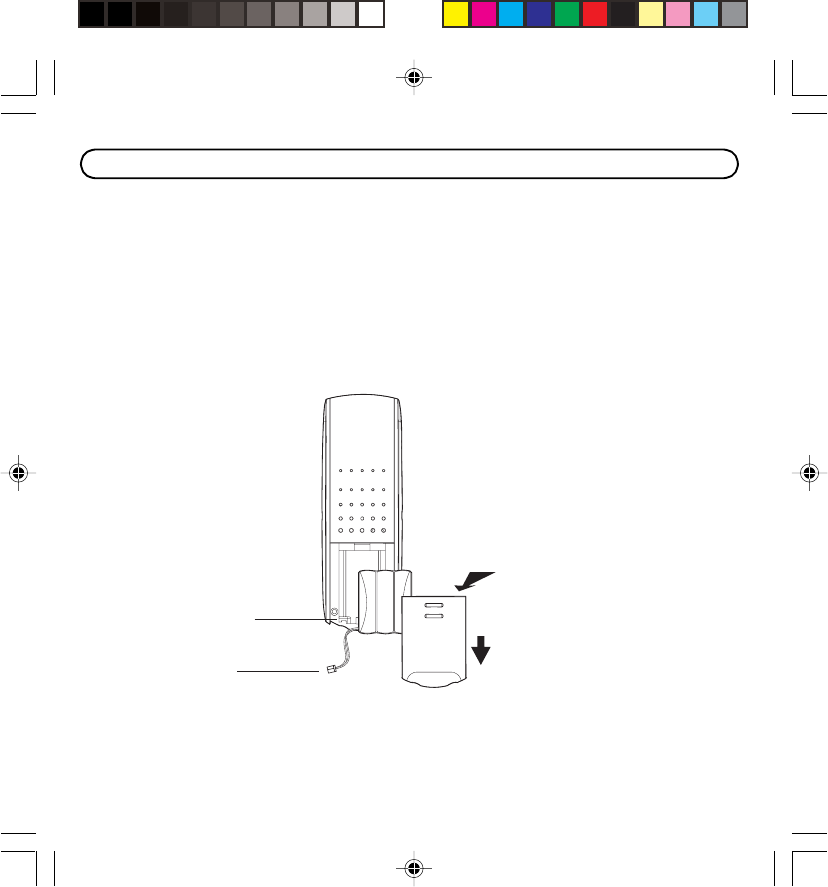
Battery jack
Battery plug
1. Remove the battery compartment door on the
handset. Push down on top of door and slide out.
2. Insert the battery pack, and connect the cord into
the jack inside the compartment.
3. Put the battery compartment door back on and
set the handset aside.
Installing the Battery
Push down
Slide out
1.877.4VPULSE or www.virginpulse.com
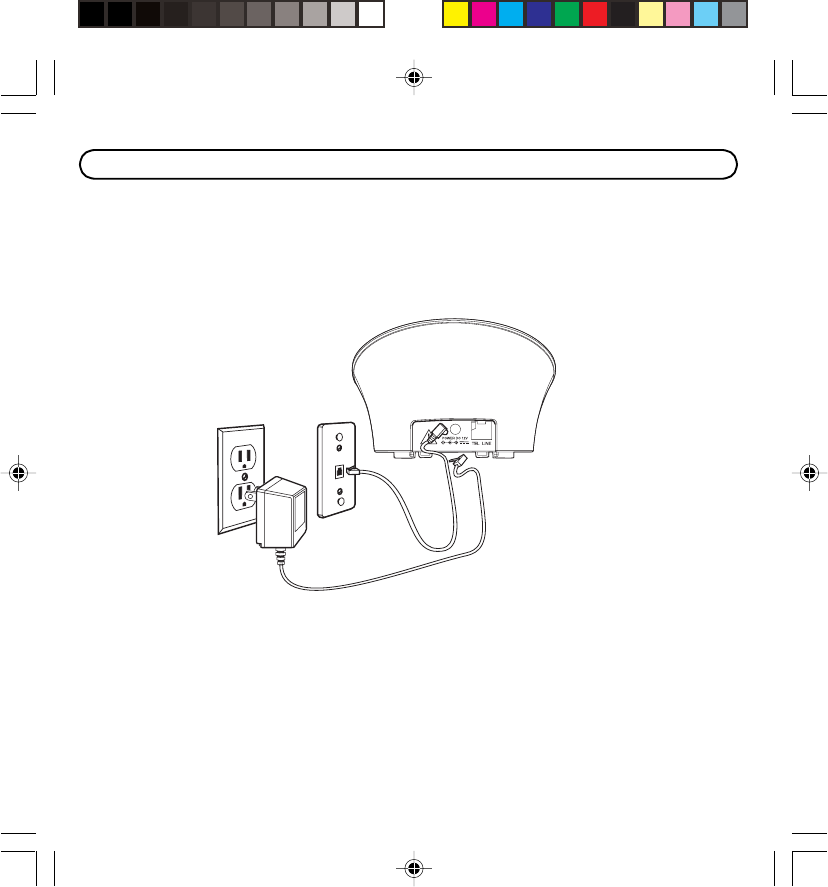
Your telephone should be placed on a level surface such as a desk or table top, or you can
mount it on a wall. A wall mounting bracket is packaged with your phone.
( NOTE: For desktop charging only, the handset may be charged facing up or down. )
Connecting the Telephone Line
• Plug one end of the telephone line cord into the jack marked TEL LINE on the back of
the base and the other end into a modular wall phone jack.
• Set the RINGER switch (on the handset) to ON, and place the handset in the cradle on
the base.
( NOTE: The phone is shipped from the manufacturer in tone dialing mode. )
INSTALLING THE PHONE

1.877.4VPULSE or www.virginpulse.com
Connecting the AC (Electrical) Power
• Plug the power supply cord into the power jack on the back of the base and the other
end into an electrical outlet. The charge/in use indicator turns on to indicate the battery
is charging when the handset is placed on the base cradle.
• Place the handset in the charge cradle on the base.
Allow the phone to charge for 12 hours prior to first use. If you don’t properly charge the
phone, battery performance is compromised.
CAUTION: Use only the power supply that came with this unit. Using other power
supplies may damage the unit.
1.877.4VPULSE or www.virginpulse.com
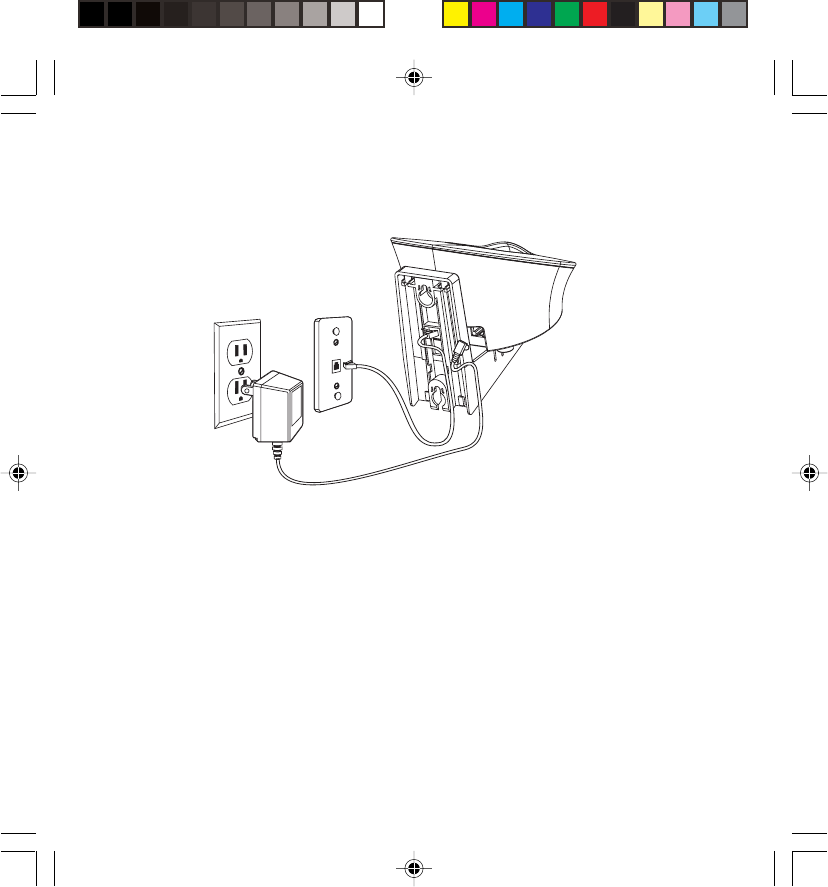
Wall Mounting
( NOTE: For best results, before you hang the phone on the wall, charge the phone on a
flat surface. )
1. Connect the power and phone cords to the base unit. Make sure to feed the phone cord
through the rectangular opening in wall mount.
2. Turn the base over.
3. Attach the wall mounting bracket by first inserting the tabs on the open edge of the
bracket into the slots on the lower portion of the bottom of the base. Then push down
and snap the bracket into place.
4. Slip the mounting holes (on the back of the base and bracket) over the wall plate
posts and slide the unit down into place. (Wall plate not included.)
( NOTE: If desired, gather the extra telephone line and power supply cord together, fasten
with a wire tie, and store inside the wall mounting bracket. )

1.877.4VPULSE or www.virginpulse.com
There are five programmable menus available: Language, Area Code, Ringer Tone, Tone/
Pulse Dialing, and Default Setting.
Language Setting Selection
1. Press the flash/program button until “1ENG 2FRA 3ESP “ shows in the display.
“ 1 ENG ” is the default setting.
2. Use the cid/vol UP or DOWN button or the handset number pad to move the
arrow to your selection.
3. Press flash/program to store selection.
Area Code Selection
1. Press the flash/program button until “AREA CODE - - -” shows in the display. “- - -” is
the default setting.
2. Use the handset number pad to enter your three digit area code.
NOTE: If you make a mistake, press the channel/delete button to erase the wrong area
code and repeat step 2.
3. Press flash/program to store selection.
Ringer Tone Selection
1. Press the flash/program button until “RINGER TONE” shows in the display. “1” is
the default setting.
2. Use the cid/vol UP or DOWN button or the handset number pad to move the
arrow from 1, 2, 3, 4, 5 or 6 to select the desired ringtone.
3. Press flash/program to store selection.
PHONE SET UP

1.877.4VPULSE or www.virginpulse.com
Tone/Pulse Dialing Selection
1. Press the flash/program button until “ 1 TONE 2PULSE” shows in the display.
“ 1TONE” is the default setting.
2. Use the cid/vol UP or DOWN button or the handset number pad to move the
arrow to 1TONE or 2PULSE.
3. Press flash/program to store selection.
Default Setting Selection (Reset)
1. Press the flash/program button until DEFAULT shows in the display. 1 NO is the default
setting.
2. Use the cid/vol UP or DOWN button or the handset number pad to move the
arrow to 1 NO or 2 YES. 2 YES will restore or reset the phone to original factory settings.
3. Press flash/program to select. You will hear a confirmation tone.
1.877.4VPULSE or www.virginpulse.com
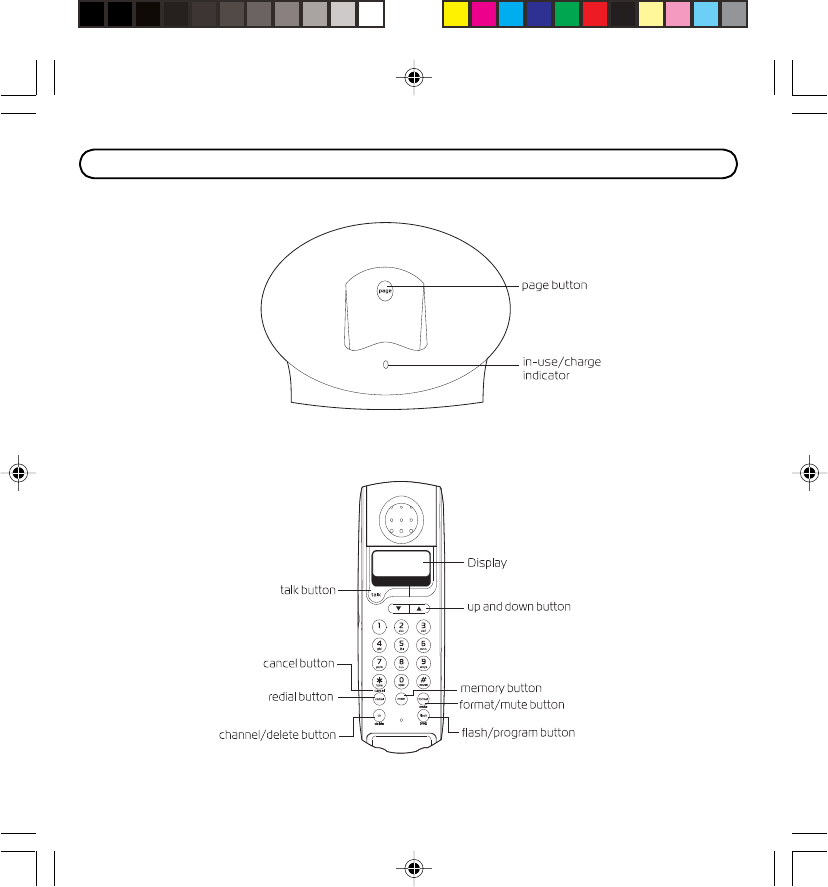
CORDLESS PHONE BASICS
BASE UNIT
PHONE

1.877.4VPULSE or www.virginpulse.com
Receiving a Call
1. Check the display to see who is calling.
2. Press the talk button.
Making a Call
To make a call, press the talk button before you dial and press it again to hang up. Or you
may dial a number, and then press the talk button.
Redial
While the phone is on, press the redial button to quickly redial the last number you dialed
(up to 32 digits). If you get a busy signal, and want to keep dialing the number, just press
redial again (you don't have to turn the phone off and back on). Or you may press the redial
button, and then press the talk button.
Flash
If you subscribe to the combined Call Waiting Caller ID service from your local telephone
company, you will receive Caller ID information (if available) on Call Waiting calls. During a
phone call, you will hear a beep to indicate another call is waiting on the line and Caller ID
information for the waiting call shows on the handset display. To connect to the waiting call,
press the flash button on the handset and your original call is put on hold. You may switch
back and forth between the two calls by pressing the flash button.
( TIP: Don’t use the talk button to activate custom calling services such as call waiting, or
you’ll hang up the phone. )
Charge/In Use Indicator
The phone is ON when the charge/ in use indicator on the base is lit. The charge/in use
indicator on the base flashes when you receive a call.

1.877.4VPULSE or www.virginpulse.com
Channel Button
While talking, you might need to manually change the channel in order to get rid of static.
Press and release the ch/delete button to advance to the next clear channel.
Temporary Tone
This feature is useful only if you have pulse dialing service. Temporary Tone Dialing enables
pulse (rotary) service phone users to access touch-tone services offered by banks, credit
card companies, etc. For example, when you call your bank you may need to enter your
bank account number. Temporarily switching to Touch Tone mode allows you to send your
number.
1. Dial the telephone number and wait for the line to connect.
2. When your call is answered, press the * tone/cancel button on the handset number
pad to temporarily change from PULSE dialing to TONE dialing.
3. Follow the automated instructions to get the information you need.
4. Hang up the handset and the phone automatically returns to PULSE (rotary) dialing
mode.
Cancel
Press the * tone/cancel button to cancel any command you initiated.
Finding the Handset
This feature helps to locate a misplaced handset.
Press the page button on the base. The handset beeps continuously for about 2 minutes
or until you press the talk on the handset or the page button on the base.
NOTE: The ringer does not have to be on for this feature to work.

1.877.4VPULSE or www.virginpulse.com
Ringer Switch
The RINGER switch must be ON for the handset to ring during incoming calls.
Volume
While the phone is ON, use the cid/vol UP or DOWN button to adjust the receiver
volume. Press the UP button to increase the volume and the DOWN button to
decrease the volume.
Voice Messaging
Provided your phone company offers voice messaging service and you subscribe to it, the
in use/charge indicator on the base flashes and the display shows “MESSAGE WAITING”
when the phone is not in use to indicate there is a message waiting. It stops flashing after
the message has been reviewed.
1.877.4VPULSE or www.virginpulse.com
Caller ID (CID) is a service available from your local telephone company. For Caller ID to
work on this system, you must subscribe to Caller ID service. To receive Caller ID
information for a Call Waiting call, you must subscribe to the combined Caller ID Call Waiting
service.
When your telephone rings, and you are subscribed to Caller ID Call Waiting service, you will
receive information (if available) transmitted by your local telephone company. You will also
receive Caller ID information from Call Waiting calls.
If you receive an incoming call and you are already on the phone, a beep indicates the
presence of a Call Waiting Call on the line, and Caller ID information for the Call Waiting call
shows on the display. This information may include the phone number, date and time; or
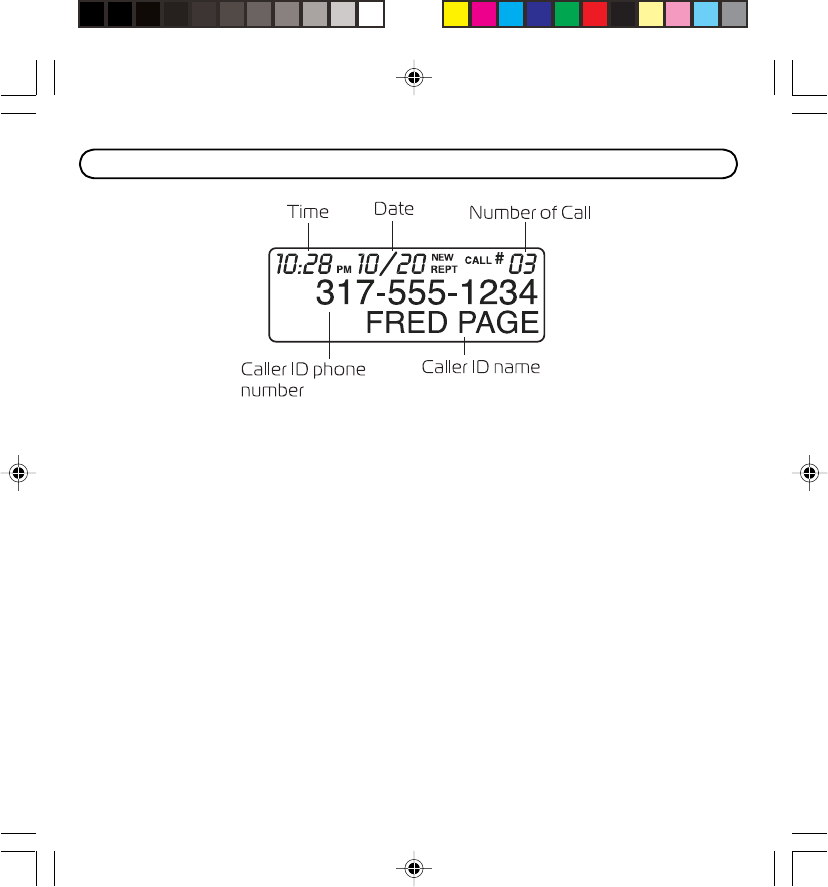
the name, phone number, and date and time. The unit stores up to 40 calls for later review.
• Press the flash/prog button to put the current person on hold so that you can
answer the incoming call.
CALLER ID FEATURES

1.877.4VPULSE or www.virginpulse.com
Receiving and Storing Calls
When you receive a call, the caller’s information is transmitted by the phone company to
your Caller ID telephone between the first and second ring.
When the memory is full, a new call automatically replaces the oldest call in memory. NEW
appears in the display for calls received that have not been reviewed.
If you receive multiple call from the same CID, the “Number of Calls” will not be incrementd,
but “REPT” (repeat) indicator will be displayed. Only the latest date and time of call for that
CID will be displayed.
( NOTE: Check with your local phone company regarding name service availability. )
Reviewing Records
As calls are received and stored, the display is updated to let you know how many calls
have been received.
• Press the cid/vol UP button to scroll through the call records from the most recent to
the oldest.
• Press the cid/vol DOWN button to scroll through the call records from the oldest to
the newest.
Transferring CID Records to Memory
You may transfer a Caller ID record to your phone’s memory.
( NOTE: It is important that you format CID records correctly before storing in memory. It is
not possible to re-format CID records stored in memory. )
1. Use the cid/vol UP or DOWN button to scroll to the desired record.
2. Press the mem button.
3. Press the desired memory location. Example, press the number 1 key to store the record
in memory location 1. You will hear a confirmation tone.

1.877.4VPULSE or www.virginpulse.com
Replacing an Existing Memory Location with a New CID Record:
1. Repeat steps 1 through step 3 in Transferring CID Records To Memory.
2. After entering the memory location, “REPLACE MEMO?” shows in the display.
3. Press the mem button again, and the new CID record replaces the existing memory in
that location. You will hear a confirmation tone.
Deleting Records
Use the chan/delete button to erase the record currently shown in the display or all records.
Deleting the Current Record
1. Make sure the phone is OFF (not in talk mode).
2. Use the cid/vol UP or DOWN buttons to display the desired Caller ID record.
3. Press chan/delete. The display shows DELETE CALL ID?
4. Press chan/delete again to erase the record and the next Caller ID record shows in the
display. You will hear a confirmation tone.
Deleting All Records
1. Make sure the phone is OFF (not in talk mode).
2. Use the cid/vol UP or DOWN buttons to display any Caller ID record.
3. Press and hold chan/delete button until DELETE ALL?
shows in the display.
4. Press chan/delete again to erase all records. You will hear a confirmation tone. The
display shows NO CALLS.

1.877.4VPULSE or www.virginpulse.com
Dialing a Caller ID Number
1. Make sure the phone is OFF (not in talk mode).
2. Use the cid/vol UP or DOWN buttons to display the desired Caller ID record.
3. Press talk. The number dials automatically.
Changing the CID Number Format
The format button lets you change the format of the displayed CID number. The available
formats are as follows.
7-digit 7-digit telephone number.
10-digit 3-digit area code + 7-digit telephone number.
11-digit long distance code “1” + 3-digit area code + 7-digit telephone number.
1. Use the cid/vol UP or DOWN buttons to scroll to the number you want to call
back.
2. If the number will not dial as shown, press the format button. Repeat if necessary,
until the correct number of digits are shown.
3. Press talk. The number dials automatically.
Memory
Store up to ten 24-digit numbers in memory for quick dialing. This memory feature is in
addition to the 40 Caller ID records that can be stored in the Caller ID memory log.

1.877.4VPULSE or www.virginpulse.com
Storing a Name and Number in Memory
1. Make sure the phone is OFF (not in talk mode).
2. Press the mem button.
3. Press the desired memory location (0 through 9).
4. Press the mem button again. The display shows ENTER NAME.
( NOTE: If you don't want to enter the name, skip step 5. )
5. Use the number keys on the handset to enter the name (up to 15 characters) and press
the memory button to save. More than one letter is stored in each of the number keys.
For example, to enter the name Bill Smith, press the 2 key twice for the letter “B”. Press
the 4 key 3 times for the letter “I”. Press the 5 key 3 times for the letter “L”. Wait for 1
second, and then press the 5 key 3 times for the second letter “L”. Press the 1 key to
insert a space between the “L” and the “S”. Press the 7 key 4 times for the letter “S”;
press the 6 key once for the letter “M”; press the 4 key 3 times for the letter “I”; press
the 8 key for the letter “T”; press the 4 key twice for the letter “H”.
( NOTE: The cursor will automatically move to the next position if another number key is
pressed. To delete or backspace over an incorrect letter use the delete key.)
6. Press the mem button to save the name. The display shows ENTER NUMBR.
7. Use the number keypad to enter the telephone number you want to store (up to 24
digits).
8. Press mem again to store the number. You will hear a confirmation tone.

1.877.4VPULSE or www.virginpulse.com
Changing a Stored Number
1. Repeat steps 1 through 7 in Storing a Name and Number in Memory.
2. Press the mem button, and "REPLACE MEMO? " shows in the display.
3. Press the mem button to store the number. You will hear a confirmation tone.
Storing a Redial Number
1. Repeat steps 1 through 6 in Storing a Name and Number in Memory.
2. Press the redial button.
3. Press the mem button to store the number. You will hear a confirmation tone.
Replacing an Existing Memory Location with a New Redial Number:
1. Repeat steps 1 through 6 in Storing a Name and Number in Memory.
2. Press the redial button.
3. Press the mem button, and "REPLACE MEMO?" shows in the display.
4. Press the mem button to replace the existing number with the new redial number. You
will hear a confirmation tone.
Dialing a Stored Number
1. Make sure the phone is ON by pressing the talk button.
2. Press the mem button.
3. Press the number (0-9) for the desired memory location. The number dials
automatically.
- OR -
1. Make sure the phone is OFF (not in talk mode).
2. Press mem button.

1.877.4VPULSE or www.virginpulse.com
3. Use the cid/vol UP or DOWN buttons to scroll through the numbers stored in
memory until the desired number is shown.
4. Press talk. The numbers dial automatically.
( IMPORTANT: If you make test calls to emergency numbers stored in memory, remain
on the line and briefly explain the reason for the call to the dispatcher. Also, it’s a good
idea to make these calls in off-peak hours, such as early morning or late evening. )
Inserting a Pause in the Dialing Sequence
Press the # pause button twice to insert a delay in the dialing sequence of a stored
telephone number when a pause is needed to wait for a dial tone (for example after you
dial 9 for an outside line, or to wait for a computer access tone). PAUSE shows on the
display as a P. Each pause counts as 1 digit in the dialing sequence.
Reviewing and Deleting Stored Numbers
1. Press mem, then use the cid/vol UP or DOWN buttons to view the entry. Or use
the touch tone pad on your handset to enter the memory location.
2. While the entry is displayed, press chan/delete to delete the entry. The display shows
DELETE?
3. Press chan/delete a second time to delete the entry. The display shows DELETED.
You will hear a confirmation tone.
( NOTE: When the stored telephone number is over 15 characters long, you may press
the format button to view the remaining numbers. )

1.877.4VPULSE or www.virginpulse.com
Chain Dialing from Memory
Use this feature to make calls which require a sequence of numbers such as using a
calling card for a frequently called long distance number. Basically, you dial each part of the
sequence from memory. The following example shows how you can use chain dialing to
make a call through a long distance service:
The Number For Memory Location
Long distance access number 7
Authorization code 8
Frequently called long distance number 9
1. Make sure the phone is ON.
2. Press mem and then press 7.
3. When you hear the access tone, press mem and then press 8.
4. At the next access tone, press mem and then 9.
( TIP: Wait for the access tones before pressing the next mem button, or your call
might not go through. )
1.877.4VPULSE or www.virginpulse.com
Connecting an Optional Headset to the Handset
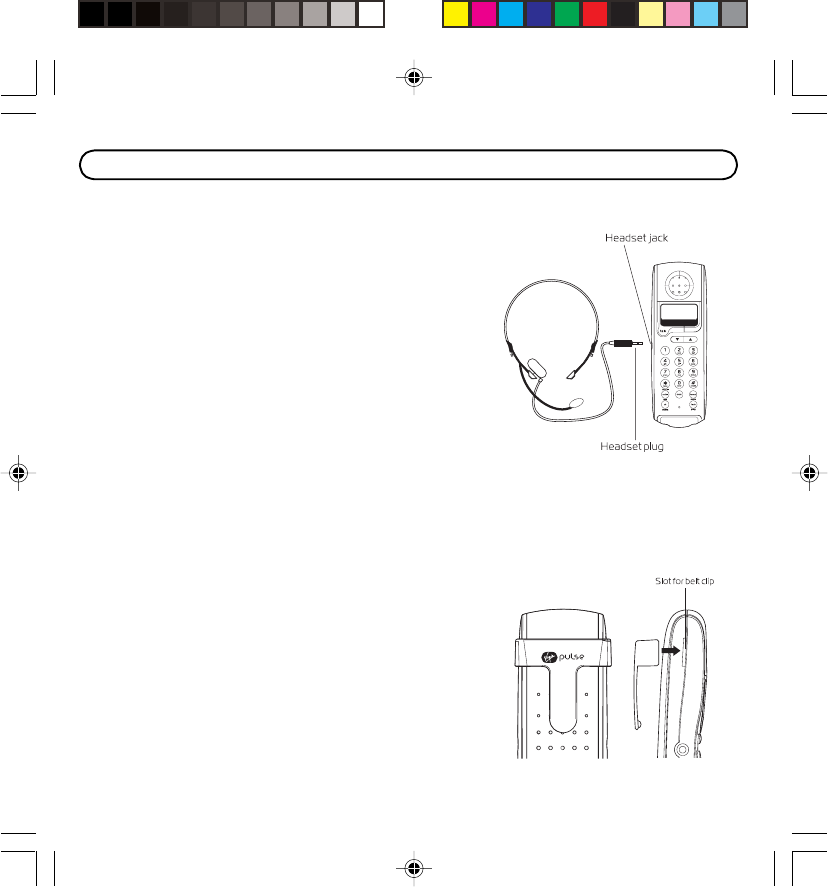
The handset can be used with an optional headset for
hands free operation.
1. Connect the headset to the HEADSET jack on the
side of the handset The handset
receiver and microphone are disabled when the
headset is connected.
2. Adjust the headset to rest comfortably on top of
your head and over your ear. Move the
microphone to approximately two to three inches
from your mouth.
3. Press the talk button to answer a call or make calls
using the headset.
4. To return to normal operation, unplug the headset from the jack.
For servicing of replacement, you can purchase a
switable headset through service center or retailer
shop.
Connecting the Belt Clip
To attach the belt clip, insert the sides of the belt clip into
the slots on each side of the handset. Snap the ends of
the belt clip into place.
HEADSET AND BELT CLIP OPERATION
1.877.4VPULSE or www.virginpulse.com
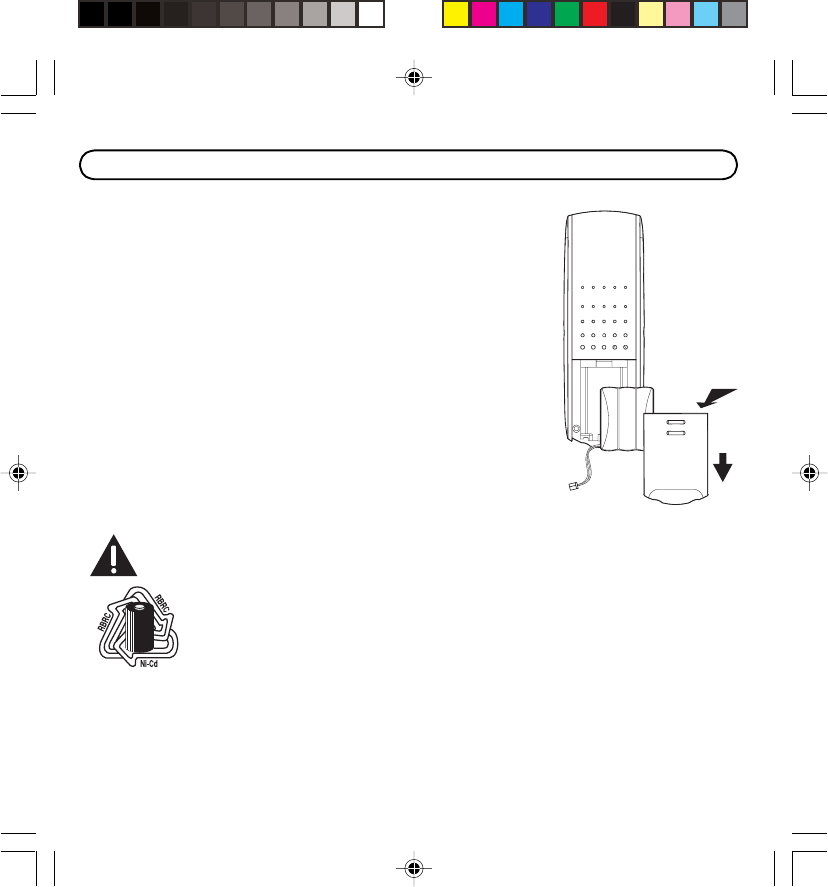
Make sure the telephone is OFF before you replace battery.
1. Remove the battery compartment door by pushing down on
the top of the door and sliding out..
2. Disconnect the battery plug from the jack inside the battery
compartment and remove the battery pack from the handset.
3. Insert the new battery pack and connect the cord to the jack
inside the handset.
4. Put the battery compartment door back on.
5. Place handset in the base to charge.
Allow the handset battery to properly charge (for 12 hours)
prior to first use or when you install a new battery pack. If you
do not properly charge the phone, battery performance
will be compromised.
CAUTION: To reduce the risk of fire or personal injury,
use only the battery listed in the instruction book.
Note: The RBRC seal on the battery used in your product indicates that
we are participating in a program to collect and recycle Nickel Cadmium
batteries throughout the United States. Please call 1-800-8-BATTERY for
information or contact your local recycling center.
Battery Safety Precautions
• Do not burn, disassemble, mutilate, or puncture. Like other batteries of this type, toxic
materials could be released which can cause injury.
CHANGING THE BATTERY
Push down
Slide out

1.877.4VPULSE or www.virginpulse.com
• To reduce the risk of fire or personal injury, use only the battery listed in the User’s
Guide.
• Keep batteries out of the reach of children.
• Remove batteries if storing phone without power for over 30 days.
General Product Care
To keep your telephone working and looking good, follow these guidelines:
• Avoid putting the phone near heating appliances and devices that generate electrical
noise (for example, motors or fluorescent lamps).
• DO NOT expose to direct sunlight or moisture.
• Avoid dropping and other rough treatment to the phone.
• Clean with a soft cloth.
• Never use a strong cleaning agent or abrasive powder because this will damage the
finish.
• Retain the original packaging in case you need to ship the phone at a later date.

1.877.4VPULSE or www.virginpulse.com
The following indicators show the status of a message or of the unit.
INCOMPLETE Caller information has been interrupted during transmission or
DATA the phone is excessively noisy.
ENTER NAME Prompt telling you to enter a name for one of the 10 memory
locations.
ENTER TEL Prompt telling you to enter the telephone number for one of the
NUMBER 10 memory locations.
DELETE ALL? Prompt asking if you want to erase all Caller ID records.
DELETE? Prompt asking if you want to erase one of the 10 numbers stored in
the phone's outgoing memory.
END OF LIST Indicates there is no additional information in the Caller ID memory
log.
NEW Indicates call or calls have not been reviewed.
UNKNOWN The incoming call is from an area not serviced by
NUMBER/ Caller ID or the information was not sent.
NAME/CALLER
PAGING Someone has pressed the page button on the base.
BLOCKED NUMBER The person is calling from a number that has been
NUMBER/ blocked from transmission.
NAME/CALL
DISPLAY MESSAGES

1.877.4VPULSE or www.virginpulse.com
REPT Repeat call message. Indicates that a new call from the same
number was received more than once.
NO DATA No Caller ID information was received.
MESSAGE Indicates a message is available
WAITING
DELETED Prompt indicating the Caller ID/Memory record is erased.
BLOCKED CALL The name and number of a calling person has been blocked from
transmission.
BLOCKED NAME The person’s name is blocked from transmission.
EMPTY There is no data stored in that memory location.
NO CALLS There is no caller ID records in the call log.

1.877.4VPULSE or www.virginpulse.com
Signal Meaning
A long warbling tone Signals an incoming call
(with ringer on)
One short beep and one long beep Page signal
One beep every 7 seconds Low battery warning
Two long beeps Confirmation tone
Three short beeps Error tone
Melody 1 Custom ring tone 1
Melody 2 Custom ring tone 2
Melody 3 Custom ring tone 3
Melody 4 Custom ring tone 4
Melody 5 Standard ring tone 1
Melody 6 Standard ring tone 2
HANDSET SOUND SIGNALS

1.877.4VPULSE or www.virginpulse.com
No Display
• Is battery fully charged? Charge the battery for 12 hours or replace the battery. Make sure
the battery is properly installed and connected.
• If you are using AC (electrical) power, make sure that the unit is connected to a non-
switched electrical outlet. Disconnect the unit from the plug and plug it in again.
• Are you subscribed to Caller ID service from your local telephone company?
Caller ID incomplete data message
• The unit displays this message if it detects anything other than valid Caller ID
information during the silent period after the first ring. This message indicates the
presence of noise on the line.
No dial tone
• Check connection:
Is the base power cord connected to a working electrical outlet?
Is the telephone line cord connected to the base unit and the wall phone jack?
• Disconnect the base from the wall phone jack and connect another phone to the same
jack. If there is no dial tone on the second phone, the problem might be your wiring or
local service.
• The handset might be out of range of the base. Move closer to the base.
• Make sure the battery is properly charged (for 12 hours).
• Ensure the battery pack is installed correctly.
• Did the handset beep when you pressed the talk button? Did the in use indicator come
on? If not, the battery may need to be charged.
TROUBLESHOOTING TIPS

1.877.4VPULSE or www.virginpulse.com
Dial tone is OK, but can't dial out
• Make sure the tone/pulse setting is programmed correctly.
Handset does not ring
• Make sure the RINGER switch on the handset is turned to ON.
• You may have too many extension phones on your line. Try unplugging some phones.
• See solutions for No dial tone.
Charge/In Use Indicator on the base flashes
• Provided your phone company offers voice messaging service and you subscribed to it,
the charge/in use indicator on the base flashes when the phone is not in use to indicate
there is a message waiting. It stops flashing after the message has been reviewed.
Phone dials in pulse with tone service
• Make sure the phone is in TONE dialing mode.
Phone won’t dial out with pulse service
• Make sure the phone is in PULSE dialing mode.
You experience static, noise, or fading in and out
• Change channels
• The handset maybe out of range. Move closer to the base.
• Relocate the base.
• Charge the battery.
• Make sure base is not plugged into an electrical outlet with another household appliance.

1.877.4VPULSE or www.virginpulse.com
Causes of Poor Reception
• Aluminum siding on the exterior of your house .
• Foil backing on insulation within over walls.
• Heating ducts and other metal construction can shield the phone’s signals.
• You’re too close to appliances such as microwaves, stoves, computers, etc.
• Atmospheric conditions, such as strong storms.
• Base is installed in the basement or lower floor of the house.
• Base is plugged into an AC outlet with other electronic devices.
• Baby monitor, wireless networking, wireless audio/video, and/or other cordless phones
are using the same frequency.
• Handset battery is low.
• You’re out of range of the base.
Unit beeps
• Place handset in base cradle for 20 seconds to reset the security code. If that doesn’t
work, charge the battery for 12 hours.
• Clean the charging contacts on the handset and base with a soft cloth or an eraser.
• See solutions for “No dial tone”.
• Replace the battery.

1.877.4VPULSE or www.virginpulse.com
Memory Dialing
• Did you program the memory location keys correctly?
• Did you fllow te proper dialing sequence?
• Make sure the tone/pulse setting is programmed correctly.
• Did you reprogram numbers into memory after a power outage or battery replacement?
If trouble is experienced with this equipment, for repair or warranty information, please
contact customer service at 1.877.4VPULSE. If the equipment is causing harm to the
telephone network, the telephone company may request that you disconnect the equipment
until the problem is resolved.
This product may be serviced only by the manufacturer or its authorized service agents.
Changes or modifications not expressly approved by Virgin Enterprises Limited could void
the user’s authority to operate this product. For instructions on how to obtain service, refer to
the warranty included in this guide or call customer service at 1.877.4VPULSE.
Or refer inquiries to:
Attach your sales receipt to the booklet for future reference or jot down the date this product
was purchased or received as a gift. This information will be valuable if service should be
required during the warranty period.
Purchase date ________________________________________________
Name of store ________________________________________________
SERVICE

1.877.4VPULSE or www.virginpulse.com
What your warranty covers:
• Defects in materials or workmanship.
For how long after your purchase:
• One year, from date of purchase.
What we will do:
• Provide you with a new or, at our option, a refurbished unit. The exchange unit is under
warranty for the remainder of the original product’s warranty period.
How you get service:
• Properly pack your unit. Include any cables, etc., which were originally provided with the
product. We recommend using the original carton and packing materials.
• “Proof of purchase in the form of a bill of sale or receipted invoice which is evidence that
the product is within the warranty period, must be presented to obtain warranty service.”
For rental firms, proof of first rental is also required. Also print your name and address
and a description of the defect. Send via standard UPS or its equivalent to:
Virgin Pulse LLC
PO Box 663
Prince Street Station
New York, NY 10012
• Pay any charges billed to you by the Exchange Center for service not covered by the
warranty.
• Insure your shipment for loss or damage. Virgin Pulse LLC accepts no liability in
case of damage or loss.
LIMITED WARRANTY

1.877.4VPULSE or www.virginpulse.com
• A new or refurbished unit will be shipped to you freight prepaid.
What your warranty does not cover:
• Customer instruction. (Your Owner’s Manual provides information regarding operating
instructions and user controls. Any additional information, should be obtained from your
dealer.)
• Installation and setup service adjustments.
• Batteries.
• Damage from misuse or neglect.
• Products which have been modified or incorporated into other products.
• Products purchased or serviced outside the USA.
• Acts of nature, such as but not limited to lightning damage.
Product Registration:
• Please complete and mail the Product Registration Card packed with your unit. It will
make it easier to contact you should it ever be necessary. The return of the card is not
required for warranty coverage.
Limitation of Warranty
• The warranty stated above is the only warranty applicable to this product. All other
warranties, express or implied (including all implied warranties of merchantability or
fitness for a particular purpose) are hereby disclaimed. No verbal or written information
given by OUR COMPANY, its agents, or employees shall create a guaranty or in any
way increase the scope of this warranty.
• Repair or replacement as provided under this warranty is the exclusive remedy of the
consumer. OUR COMPANY shall not be liable for incidental or consequential damages
resulting from the use of this product or arising out of any breach of any express or

1.877.4VPULSE or www.virginpulse.com
implied warranty on this product. This disclaimer of warranties and limited warranty are
governed by the laws of the state of Indiana. Except to the extent prohibited by
applicable law, any implied warranty of merchantability or fitness for a particular purpose
on this product is limited to the applicable warranty period set forth above.
How state law relates to this warranty:
• Some states do not allow the exclusion nor limitation of incidental or consequential
damages, or limitations on how long an implied warranty lasts so the above limitations
or exclusions may not apply to you.
• This warranty gives you specific legal rights, and you also may have other rights that
vary from state to state.
If you purchased your product outside the USA:
• This warranty does not apply. Contact your dealer for warranty information.

1.877.4VPULSE or www.virginpulse.com
Virgin item#VP-12 Made in China Rev. 5/25/03
Made in China Rev. 5/25/03
"VIRGIN" and the Virgin Signature logo are registered trademarks of Virgin Enterprises Limited. Virgin Pulse is a trademark of
Virgin Enterprises Limted. Products manufactured and distributed for, and under license from Virgin Enterprises Limited. Virgin
Pulse is a trademark of Virgin Enterprises Limited, 2003.
Customer Care 1.877.4VPULSE or www.virginpulse.com