Virgin Pulse VP-14 FRS 14 Channels User Manual Manual

Virgin Pulse LLC FRS 14 Channels Manual

Manual

1.877.4VPULSE or  www.virginpulse.com
1.877.4VPULSE or www.virginpulse.comINTRODUCTIONCongratulations! You’ve just bought the sexiest 2-way radios on the planet. Of course,we may be biased. But consider this: they’re seductively simple to use and super easy tocarry in your hand, on your arm, or on your hip. Take them on a hike through the moun-tains or even down to the local shopping mall. Anywhere you want to stay in touch. They’resmart, fun, and practical. Over and out.
1.877.4VPULSE or  www.virginpulse.comFCC INFORMATIONCaution: Do not open your radio to make any internal adjustments. Your radio is set up to transmit a regulated signal on  one of  14assigned frequencies. It is against the law to alter or adjust  the settings inside the radio. Adjustments to  your radio can  only be made bya  qualified  technician  using  the  proper  test  equipment.To be safe and sure:• Never  open your radio’s case.• Never  change or replace anything in your radio except the batteries.Your radio might cause  interference with TV  or  radio even if  it  is being operated  properly. To determine  whether your radio is causing theinterference, turn it off. If the interference  goes  away, your radio is the  cause.  You can try to  eliminate  the interference by moving yourradio  away from the receiver.If you cannot eliminate the  interference,  the  FCC requires  that  you  stop  using  the radio.This device complies  with Part 15 of the FCC Rules. Operation is subject  to the following two conditions: (1)  this device may not  causeharmful  interference, and (2) this device must accept any interference received, including interference that may  cause  undesiredoperation.INDUSTRY CANADA NOTICEIndustry Canada does not require you to have a license to operate your FRS radio in Canada.  Use of this FRS radio in othercountries may or may not be allowed. Check with local authorities before transmitting outside of Canada.This device complies with RSS-210. Operation is subject to the following two conditions: (1) This device may not cause interference,and (2) this device must accept any interference including interference that may cause undesired operation of this device.SAFETY INFORMATIONYour wireless hand-held portable transceiver contains a low power transmitter. When the Push-to-Talk button is pushed, it will sendout radio frequency (RF) signals. The device is authorized to operate at a duty factor not to exceed 50%. In August 1996, theFederal Communications Commissions (FCC) adopted RF exposure guidelines with safety levels for hand-held wireless devices.CAUTION:To maintain compliance with the FCC’s RF exposure guidelines, you should hold the transmitter and antenna at least 2 inch (5centimeters) from your face and speak in a normal voice, with the antenna pointed up and away from the face. If you wear the radioon your body while using the headset accessory, only the supplied belt clip for this product can be used. When transmitting, makesure the antenna is at least 1 inch (2.5 centimeters) from your body.Only the supplied antenna can be used, any unauthorized antennas, modifications, or attachments could damage the transmitterand may violate FCC regulations.
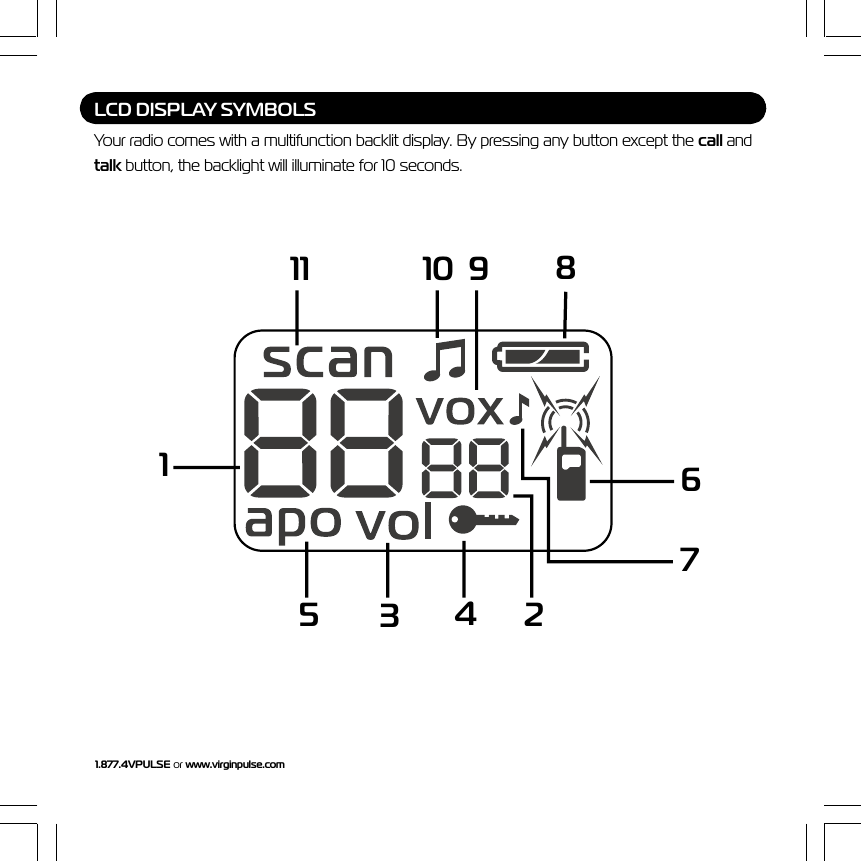
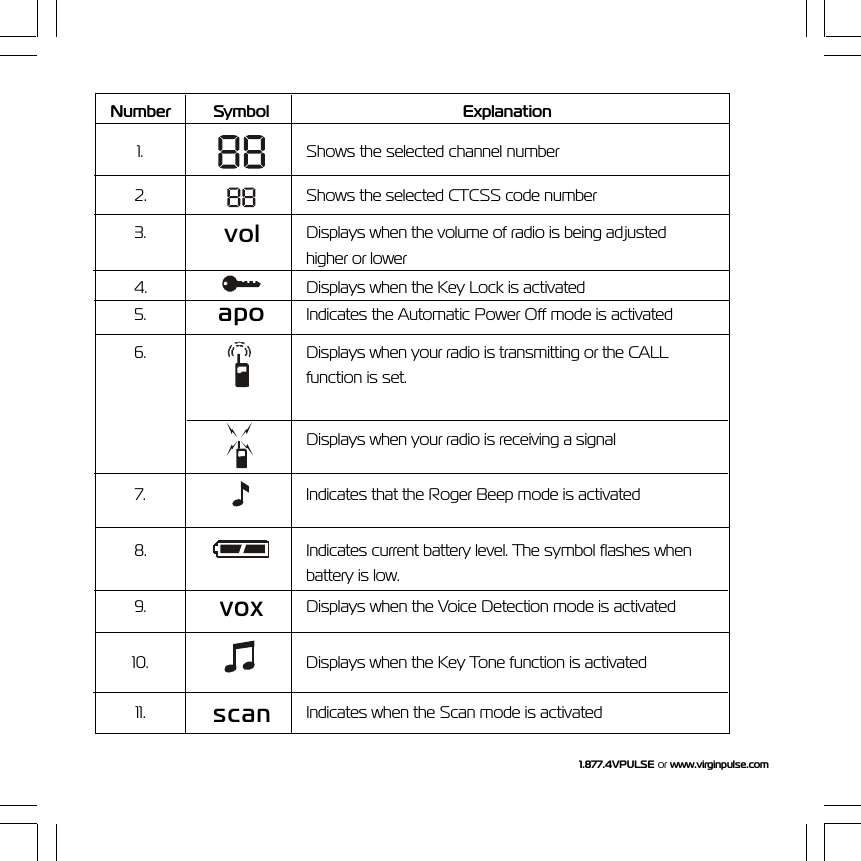
1.877.4VPULSE or www.virginpulse.comLCD DISPLAY SYMBOLSYour radio comes with a multifunction backlit display. By pressing any button except the call andtalk button, the backlight will illuminate for 10 seconds.11 10 9 81534276
1.877.4VPULSE or  www.virginpulse.comNumber Symbol Explanation1. Shows the selected channel number2. Shows the selected CTCSS code number3.volDisplays when the volume of radio is being adjustedhigher or lower4. Displays when the Key Lock is activated5. apo Indicates the Automatic Power Off mode is activated6. Displays when your radio is transmitting or the CALLfunction is set.Displays when your radio is receiving a signal7. Indicates that the Roger Beep mode is activated8. Indicates current battery level. The symbol flashes whenbattery is low.9.voxDisplays when the Voice Detection mode is activated10. Displays when the Key Tone function is activated11.scanIndicates when the Scan mode is activated
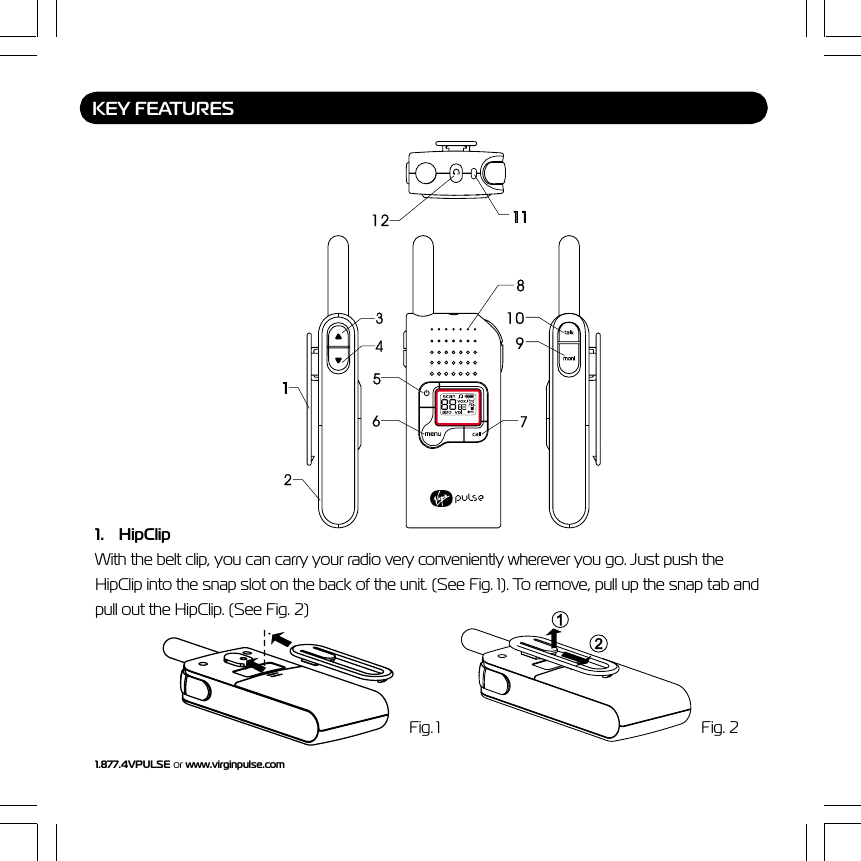
1.877.4VPULSE or www.virginpulse.com1. HipClipWith the belt clip, you can carry your radio very conveniently wherever you go. Just push theHipClip into the snap slot on the back of the unit. (See Fig. 1). To remove, pull up the snap tab andpull out the HipClip. (See Fig. 2)KEY FEATURESFig. 1 Fig. 2
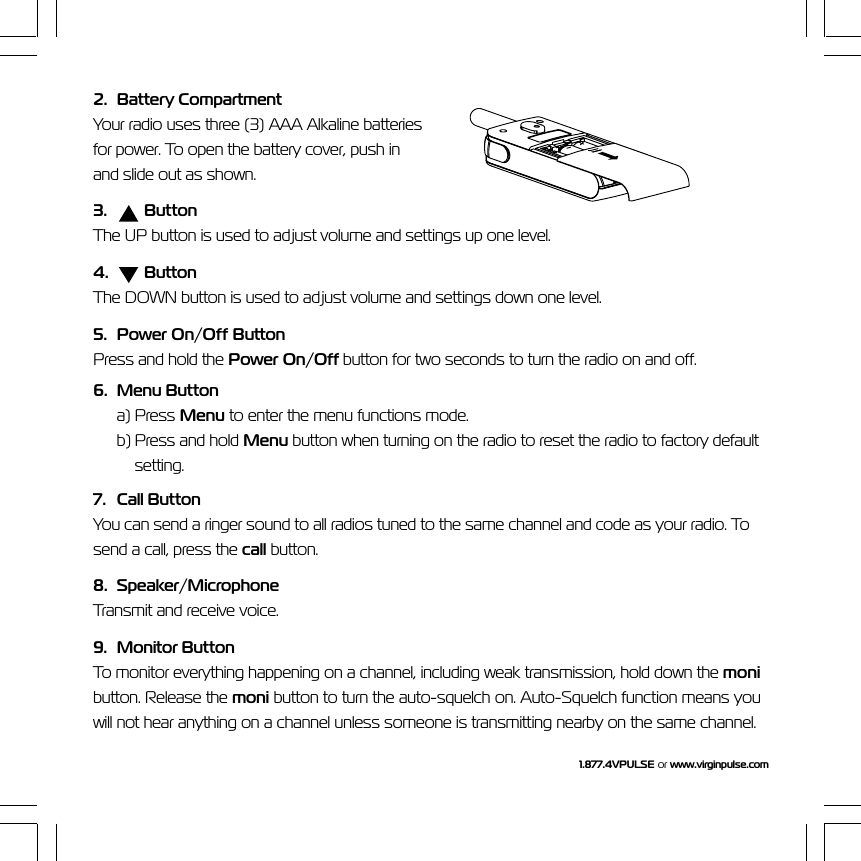
1.877.4VPULSE or  www.virginpulse.com2. Battery CompartmentYour radio uses three (3) AAA Alkaline batteriesfor power. To open the battery cover, push inand slide out as shown.3.  ButtonThe UP button is used to adjust volume and settings up one level.4.    ButtonThe DOWN button is used to adjust volume and settings down one level.5. Power On/Off ButtonPress and hold the Power On/Off button for two seconds to turn the radio on and off.6. Menu Buttona) Press Menu to enter the menu functions mode.b) Press and hold Menu button when turning on the radio to reset the radio to factory defaultsetting.7. Call ButtonYou can send a ringer sound to all radios tuned to the same channel and code as your radio. Tosend a call, press the call button.8. Speaker/MicrophoneTransmit and receive voice.9. Monitor ButtonTo monitor everything happening on a channel, including weak transmission, hold down the monibutton. Release the moni button to turn the auto-squelch on. Auto-Squelch function means youwill not hear anything on a channel unless someone is transmitting nearby on the same channel.
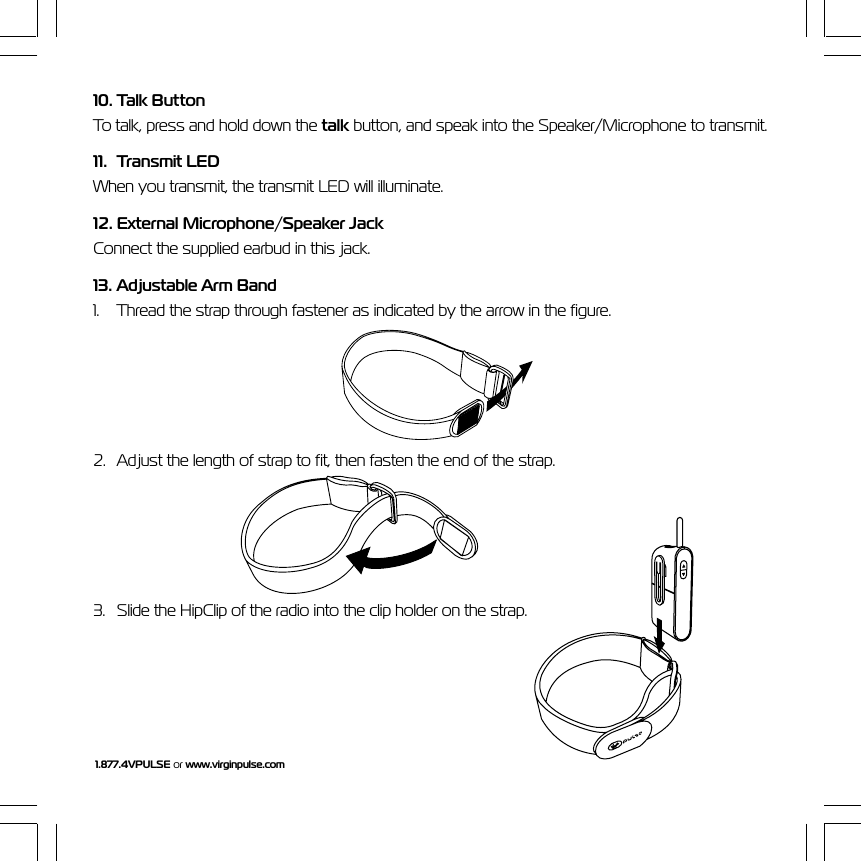
1.877.4VPULSE or www.virginpulse.com10. Talk ButtonTo talk, press and hold down the talk button, and speak into the Speaker/Microphone to transmit.11. Transmit LEDWhen you transmit, the transmit LED will illuminate.12. External Microphone/Speaker JackConnect the supplied earbud in this jack.13. Adjustable Arm Band1. Thread the strap through fastener as indicated by the arrow in the figure.2. Adjust the length of strap to fit, then fasten the end of the strap.3. Slide the HipClip of the radio into the clip holder on the strap.
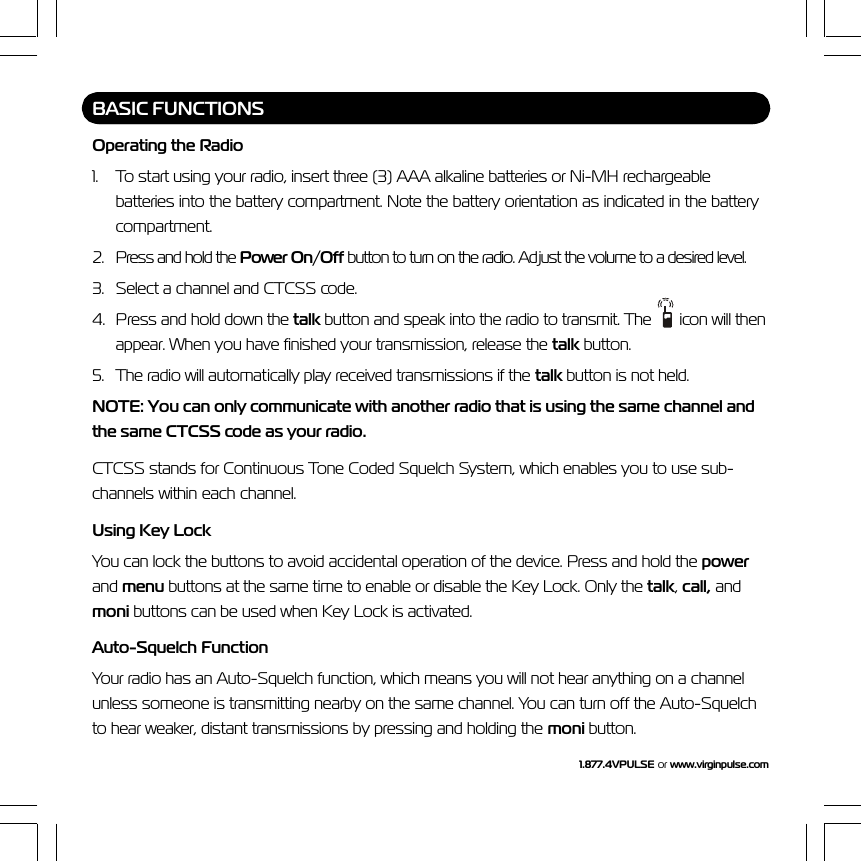
1.877.4VPULSE or  www.virginpulse.comBASIC FUNCTIONSOperating the Radio1. To start using your radio, insert three (3) AAA alkaline batteries or Ni-MH rechargeablebatteries into the battery compartment. Note the battery orientation as indicated in the batterycompartment.2. Press and hold the Power On/Off button to turn on the radio. Adjust the volume to a desired level.3. Select a channel and CTCSS code.4. Press and hold down the talk button and speak into the radio to transmit. The   icon will thenappear. When you have finished your transmission, release the talk button.5. The radio will automatically play received transmissions if the talk button is not held.NOTE: You can only communicate with another radio that is using the same channel andthe same CTCSS code as your radio.CTCSS stands for Continuous Tone Coded Squelch System, which enables you to use sub-channels within each channel.Using Key LockYou can lock the buttons to avoid accidental operation of the device. Press and hold the powerand menu buttons at the same time to enable or disable the Key Lock. Only the talk, call, andmoni buttons can be used when Key Lock is activated.Auto-Squelch FunctionYour radio has an Auto-Squelch function, which means you will not hear anything on a channelunless someone is transmitting nearby on the same channel. You can turn off the Auto-Squelchto hear weaker, distant transmissions by pressing and holding the moni button.
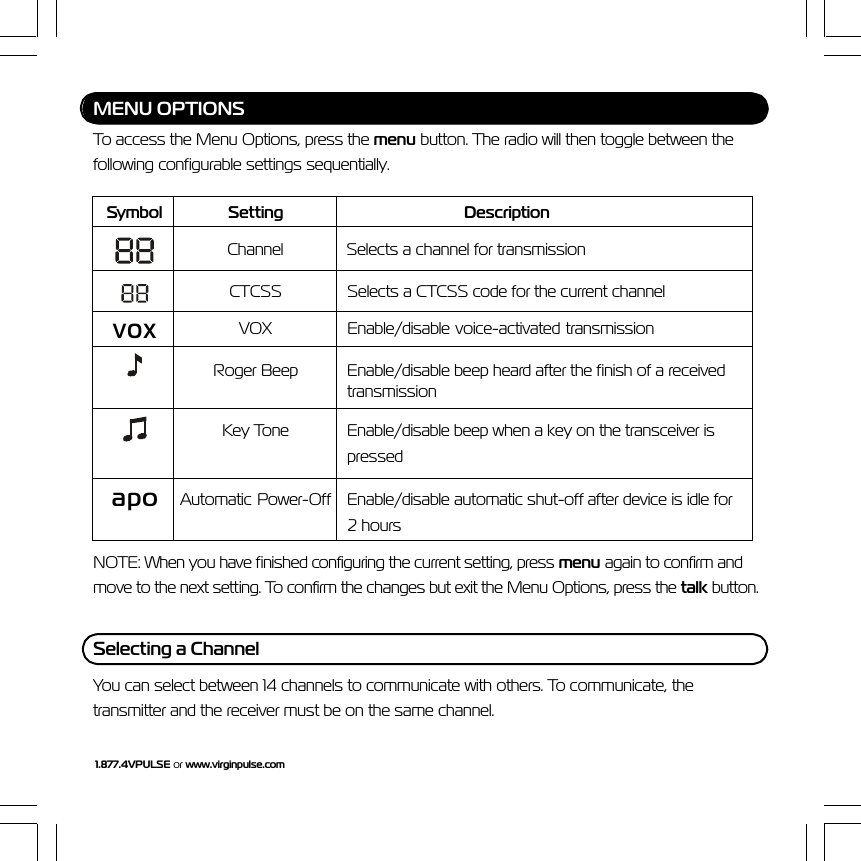
1.877.4VPULSE or www.virginpulse.comMENU OPTIONSTo access the Menu Options, press the menu button. The radio will then toggle between thefollowing configurable settings sequentially.Symbol Setting DescriptionChannel Selects a channel for transmissionCTCSS Selects a CTCSS code for the current channelvoxVOX Enable/disable voice-activated transmissionRoger Beep Enable/disable beep heard after the finish of a receivedtransmissionKey Tone Enable/disable beep when a key on the transceiver ispressedapo Automatic  Power-Off Enable/disable automatic shut-off after device is idle for2 hoursNOTE: When you have finished configuring the current setting, press menu again to confirm andmove to the next setting. To confirm the changes but exit the Menu Options, press the talk button.Selecting a ChannelYou can select between 14 channels to communicate with others. To communicate, thetransmitter and the receiver must be on the same channel.
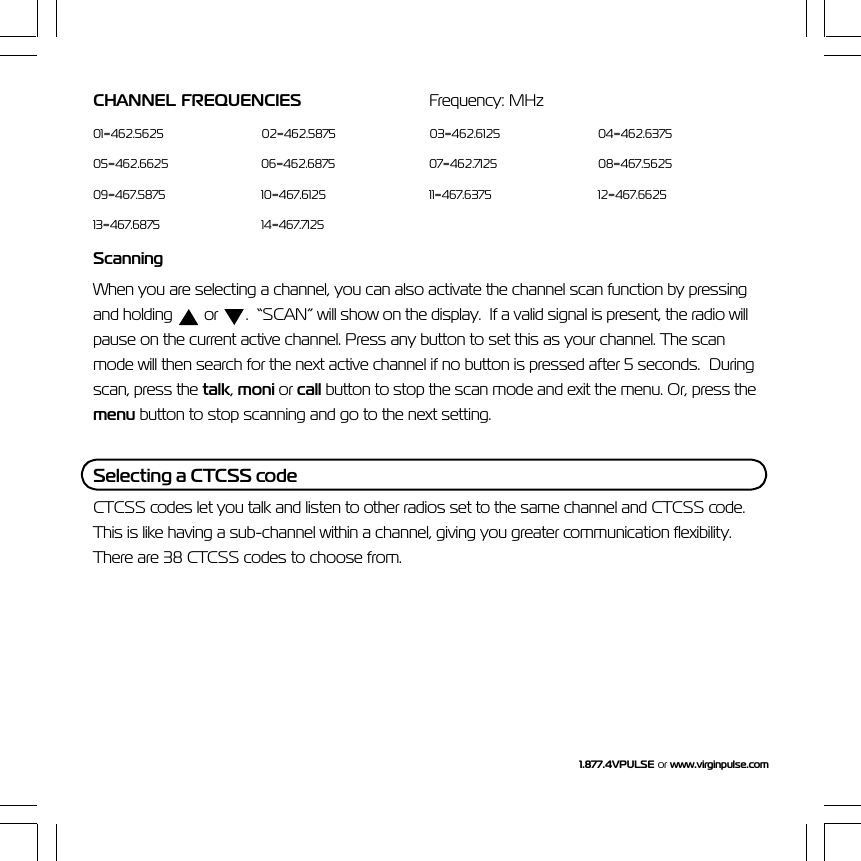
1.877.4VPULSE or  www.virginpulse.comCHANNEL  FREQUENCIES Frequency: MHz01=462.5625 02=462.5875 03=462.6125 04=462.637505=462.6625 06=462.6875 07=462.7125 08=467.562509=467.5875 10=467.6125 11=467.6375 12=467.662513=467.6875 14=467.7125ScanningWhen you are selecting a channel, you can also activate the channel scan function by pressingand holding   or  .  “SCAN” will show on the display.  If a valid signal is present, the radio willpause on the current active channel. Press any button to set this as your channel. The scanmode will then search for the next active channel if no button is pressed after 5 seconds.  Duringscan, press the talk, moni or call button to stop the scan mode and exit the menu. Or, press themenu button to stop scanning and go to the next setting.Selecting a CTCSS codeCTCSS codes let you talk and listen to other radios set to the same channel and CTCSS code.This is like having a sub-channel within a channel, giving you greater communication flexibility.There are 38 CTCSS codes to choose from.
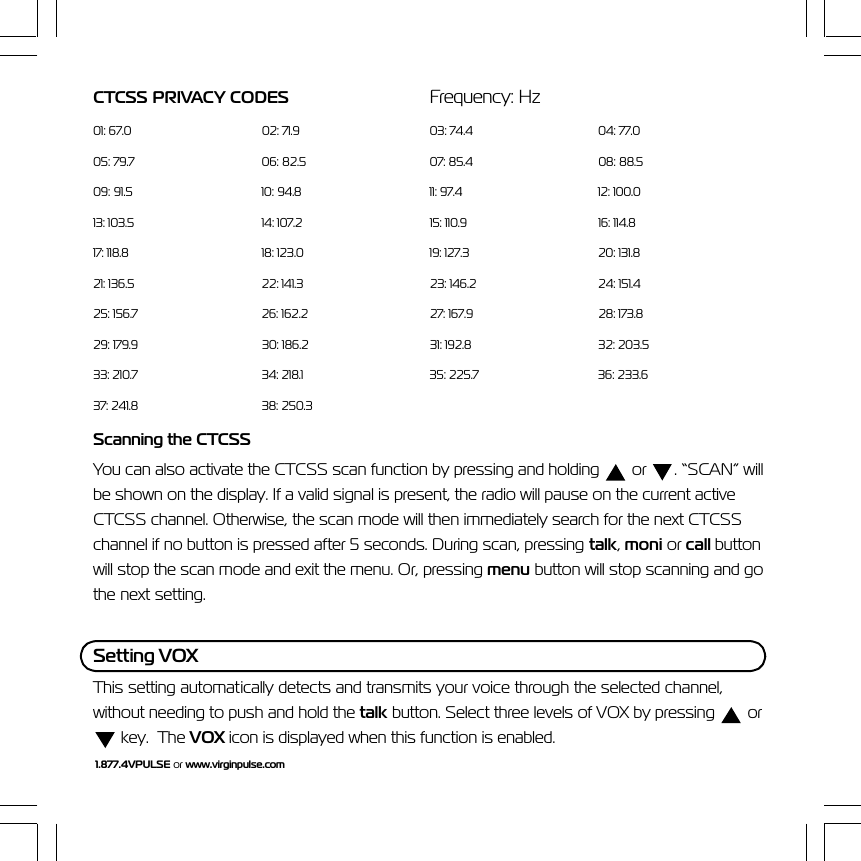
1.877.4VPULSE or www.virginpulse.comCTCSS PRIVACY CODES Frequency: Hz01: 67.0 02: 71.9 03: 74.4 04: 77.005: 79.7 06: 82.5 07: 85.4 08: 88.509: 91.5 10: 94.8 11: 97.4 12: 100.013: 103.5 14: 107.2 15: 110.9 16: 114.817: 118.8 18: 123.0 19: 127.3 20: 131.821: 136.5 22: 141.3 23: 146.2 24: 151.425: 156.7 26: 162.2 27: 167.9 28: 173.829: 179.9 30: 186.2 31: 192.8 32: 203.533: 210.7 34: 218.1 35: 225.7 36: 233.637: 241.8 38: 250.3Scanning the CTCSSYou can also activate the CTCSS scan function by pressing and holding   or  . “SCAN” willbe shown on the display. If a valid signal is present, the radio will pause on the current activeCTCSS channel. Otherwise, the scan mode will then immediately search for the next CTCSSchannel if no button is pressed after 5 seconds. During scan, pressing talk, moni or call buttonwill stop the scan mode and exit the menu. Or, pressing menu button will stop scanning and gothe next setting.Setting VOXThis setting automatically detects and transmits your voice through the selected channel,without needing to push and hold the talk button. Select three levels of VOX by pressing   or key.  The VOX icon is displayed when this function is enabled.
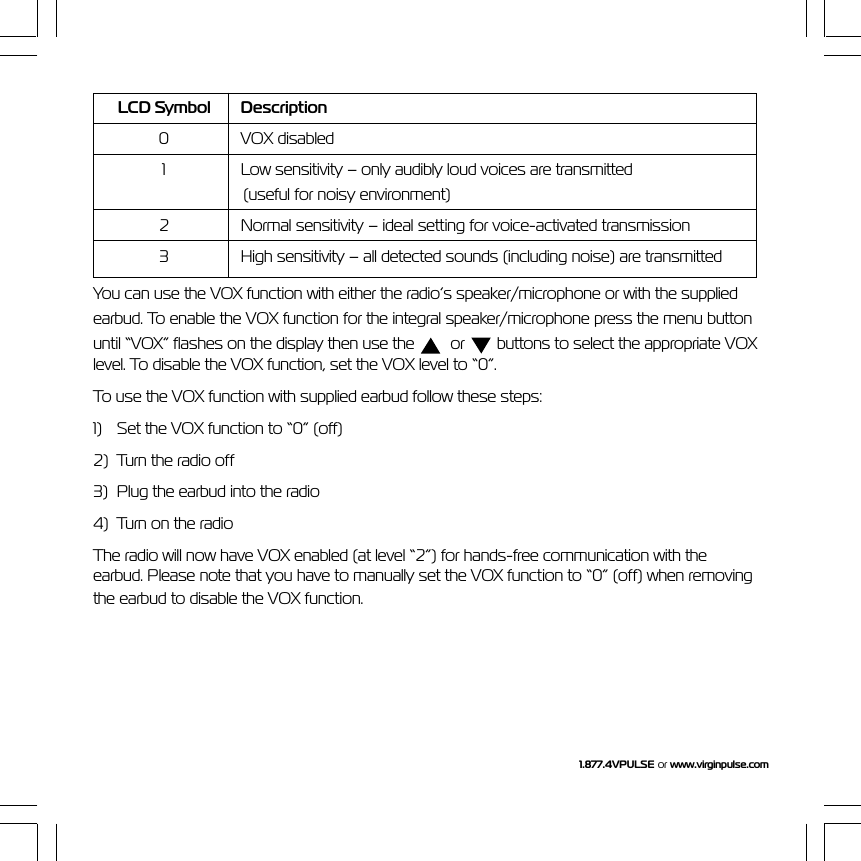
1.877.4VPULSE or  www.virginpulse.comLCD Symbol Description0 VOX disabled1 Low sensitivity – only audibly loud voices are transmitted(useful for noisy environment)2 Normal sensitivity – ideal setting for voice-activated transmission3 High sensitivity – all detected sounds (including noise) are transmittedYou can use the VOX function with either the radio’s speaker/microphone or with the suppliedearbud. To enable the VOX function for the integral speaker/microphone press the menu buttonuntil “VOX” flashes on the display then use the    or   buttons to select the appropriate VOXlevel. To disable the VOX function, set the VOX level to “0”.To use the VOX function with supplied earbud follow these steps:1) Set the VOX function to “0” (off)2) Turn the radio off3) Plug the earbud into the radio4) Turn on the radioThe radio will now have VOX enabled (at level “2”) for hands-free communication with theearbud. Please note that you have to manually set the VOX function to “0” (off) when removingthe earbud to disable the VOX function.
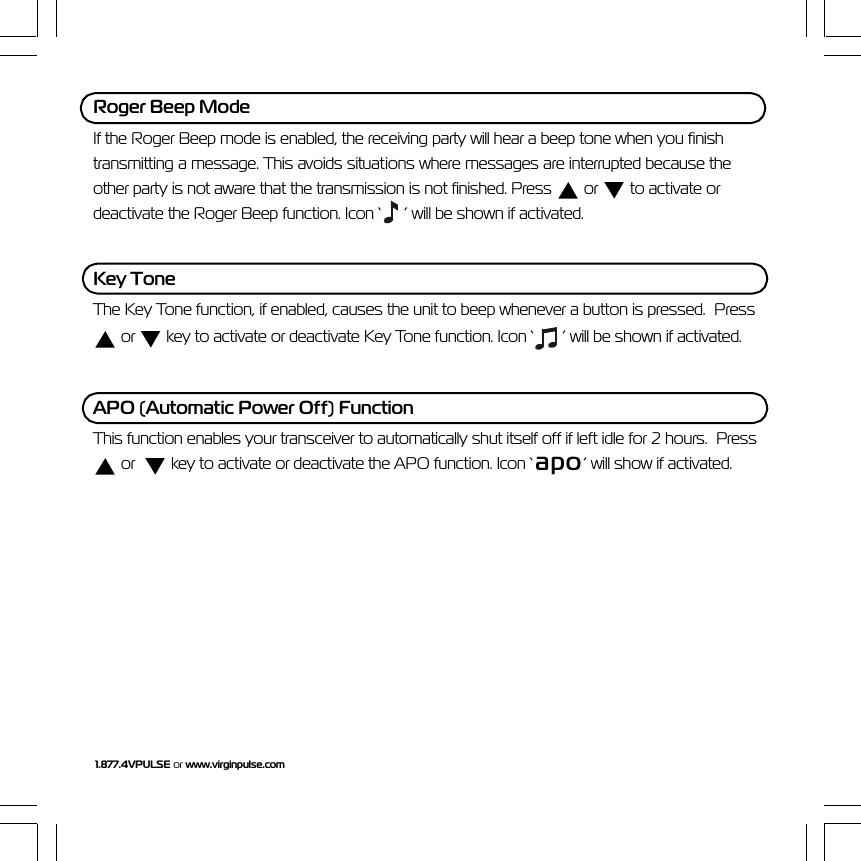
1.877.4VPULSE or www.virginpulse.comRoger Beep ModeIf the Roger Beep mode is enabled, the receiving party will hear a beep tone when you finishtransmitting a message. This avoids situations where messages are interrupted because theother party is not aware that the transmission is not finished. Press   or   to activate ordeactivate the Roger Beep function. Icon ‘  ’ will be shown if activated.Key ToneThe Key Tone function, if enabled, causes the unit to beep whenever a button is pressed.  Press or   key to activate or deactivate Key Tone function. Icon ‘  ’ will be shown if activated.APO (Automatic Power Off) FunctionThis function enables your transceiver to automatically shut itself off if left idle for 2 hours.  Press or    key to activate or deactivate the APO function. Icon ‘ apo’ will show if activated.
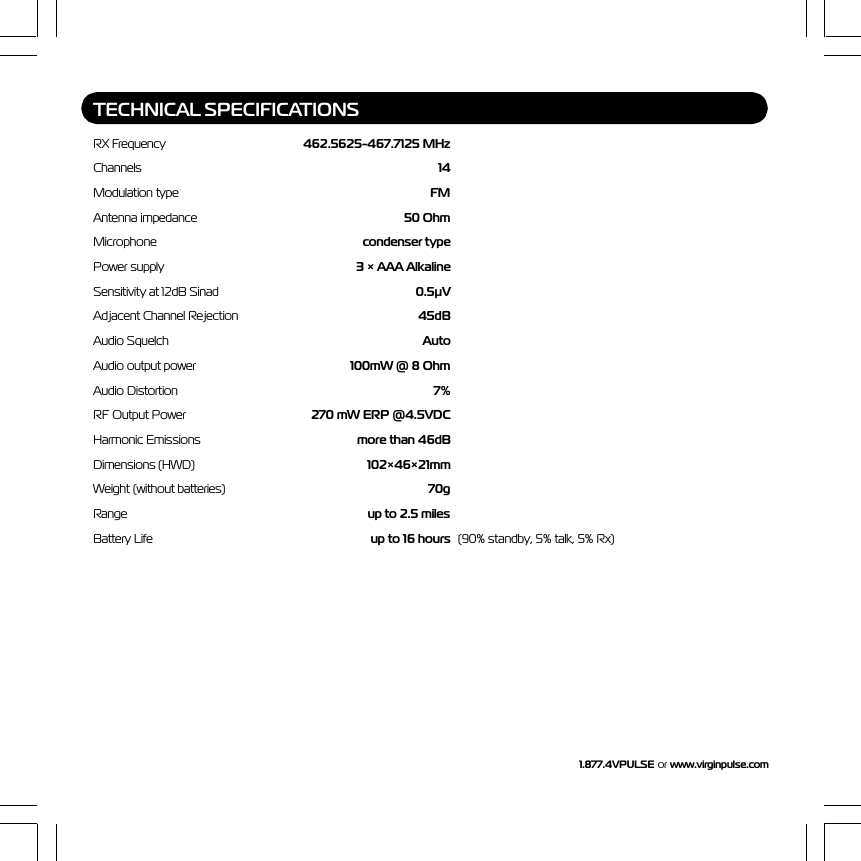
1.877.4VPULSE or  www.virginpulse.comTECHNICAL SPECIFICATIONSRX Frequency 462.5625-467.7125 MHzChannels 14Modulation type FMAntenna impedance 50 OhmMicrophone condenser typePower supply 3 × AAA AlkalineSensitivity at 12dB Sinad 0.5µVAdjacent Channel Rejection 45dBAudio Squelch AutoAudio output power 100mW @ 8 OhmAudio Distortion 7%RF Output Power 270 mW ERP @4.5VDCHarmonic Emissions more than 46dBDimensions (HWD) 102×46×21mmWeight (without batteries) 70gRange up to 2.5 milesBattery Life up to 16 hours (90% standby, 5% talk, 5% Rx)
1.877.4VPULSE or www.virginpulse.com Form: VP-14 IB-00500 Rev. 5/25/03Virgin Item#VP-14Made in ChinaProducts manufactured and distributed for, and under license from Virgin Enterprises Limited. Virgin Pulse is a trademark ofVirgin Enterprises Limited, 2003.Customer Care 1.877.4VPULSE or www.virginpulse.comTM

Navigation menu