Vision Automobile Electronics Co ZM1601US-5 Wireless Siren & Strobe Alarm (Battery Power) User Manual Federal Communications Commision Statement
Vision Automobile Electronics Industrial Co Ltd Wireless Siren & Strobe Alarm (Battery Power) Federal Communications Commision Statement
Users Manual
Installation & Operation Manual
ZM1601IN-5
ZM1601MY-5
ZM1601EU-5
ZM1601RU-5
ZM1601US-5
ZM1601IL-5
ZM1601KR-5
ZM1601HK-5
ZM1601JP-5
ZM1601BR-5
Wireless Siren & Strobe Alarm
Battery Power
ZM 1601-5
V0
1031128
6B1Z-16005
Introduction
Thanks for choosing the Vision’s wireless siren & strobe alarm of the home security device.
This siren is a Z-Wave™ enabled device (interoperable, two-way RF mesh networking
technology) and is fully compatible with any Z-Wave™ enabled network and it’s security
framework. Every mains powered Z-Wave enabled device acts as a signal repeater and
multiple devices result in more possible transmission routes which helps eliminate “RF
dead-sport”.
Z-Wave™ enabled devices displaying the Z-Wave™ logo can also be used with it
regardless of the manufacturer, and ours can also be used in other manufacturer’s
Z-Wave™ enabled networks. This product will sound a loud siren and flash a strobe light
when an alarm message or alert is received on any Z-Wave™ enabled network. When the
device is secure included into Z-Wave network, above communication will be encrypted.
Product Description and Specification
*** For indoor use only ***
Specification:
Package Content:
Protocol: Z-Wave™ (ZM5202)
Frequency Range:
865.22MHz (ZM1601IN-5)
868.10MHz (ZM1601MY-5)
868.42MHz (ZM1601EU-5)
869.00MHz (ZM1601RU-5)
908.42MHz (ZM1601US-5)
916.00MHz (ZM1601IL-5)
919~923MHz (ZM1601KR-5)
919.80MHz (ZM1601HK-5)
922~926MHz (ZM1601JP-5)
921.42MHz (ZM1601BR-5)
Operating Range: Up to 100 feet line of sight
Loud Audible Alarm: > 105db@1meter
LED Strobe Lighting
Operating Temp.: -15°C~ 60°C (5°F~140°F)
Battery: 4pcs x AA Energizer Batteries
1pc
1pc
2pcs
4pcs
1pc
ZM 1601 Siren
Adhesive tape
Screw
AA Energizer Batteries
User Manual
Z-Wave™ Command Classes:
COMMAND_CLASS_ASSOCIATION_GRP_INFO
COMMAND_CLASS_ASSOCIATION_V2
COMMAND_CLASS_BATTERY
COMMAND_CLASS_CONFIGURATION
COMMAND_CLASS_DEVICE_RESET_LOCALLY
COMMAND_CLASS_FIRMWARE_UPDATE_MD_V2
COMMAND_CLASS_MANUFACTURER_SPECIFIC_V2
COMMAND_CLASS_NOTIFICATION_V4
COMMAND_CLASS_POWERLEVEL
COMMAND_CLASS_SECURITY
COMMAND_CLASS_SWITCH_BINARY (mapping COMMAND_CLASS_BASIC)
COMMAND_CLASS_VERSION_V2
COMMAND_CLASS_ZWAVEPLUS_INFO
Installation
Note: If you are installing the entire Z-Wave™ system for the first time, please refer to the
installation guide of Z-Wave™ Interface Controller before installing ZM 1601.
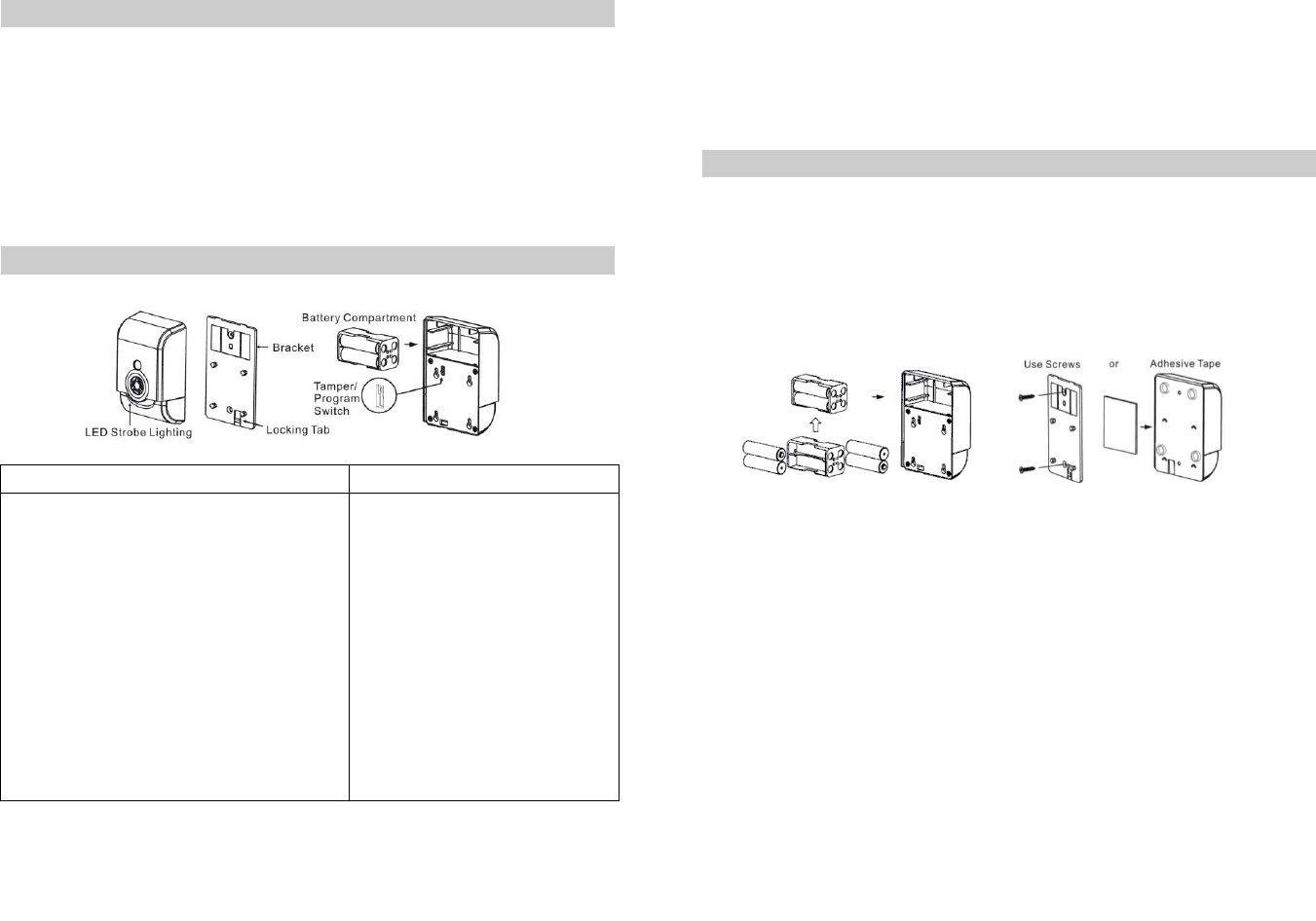
1. Remove the bracket from the siren by press the locking tab, and then gently slide
up the siren. Observe the correct polarity before insert the batteries.
2. Using the screws or adhesive tape to affix the bracket on the chosen location.
3.
Slide back the front cover, and then the LED should go off
.
4. LED Status for Z-Wave Network:
After power on, the LED setting light will flash if the siren has not been included yet.
After power on, the LED setting light will go off if the siren has been included.
5. For “Inclusion” in (adding to) a network: Put the Z-Wave™ Interface Controller into
“inclusion” mode, and following its instruction to add the ZM 1601 to your controller.
To get in the “inclusion” mode, the distance between siren and controller is
suggested to be in one meter. Open the bracket and press the program switch of
ZM 1601 for 1 second at least & release to be included. After setting, the LED
Setting Light should go off, if not, please try again. (After sending one time’s
Z-Wave NIF and not be included then it will send 4 times NWI in every 4 ~ 6
seconds for auto inclusion. The LED setting light will flash again if the siren has not
been included or the LED setting light will go off after inclusion.)
For “Exclusion” from (removing from) a network: Set up the Z-Wave™ Interface
Controller into “exclusion” mode, and following its instruction to delete the ZM 1601
from your controller. Press the program switch of ZM 1601 for 1 second at least &
release to be excluded. After setting The LED setting light will flash again
-2-
-1-
Note:
a. LED setting light will flash continuously in Exclusion condition.
b. All user and network settings will be cleared and the device reset to factory
defaults when the device is excluded.
For “Association”: removing the back cover of the ZM1601 to get into “Awake”
mode, then put the Z-Wave Interface Controller into “association”, and following its
instruction to association the ZM1601 with other device. Close the back cover
after “association” done, afterward the ZM1601 will get into “Sleep” mode for power
saving. Support one association group (5 nodes).
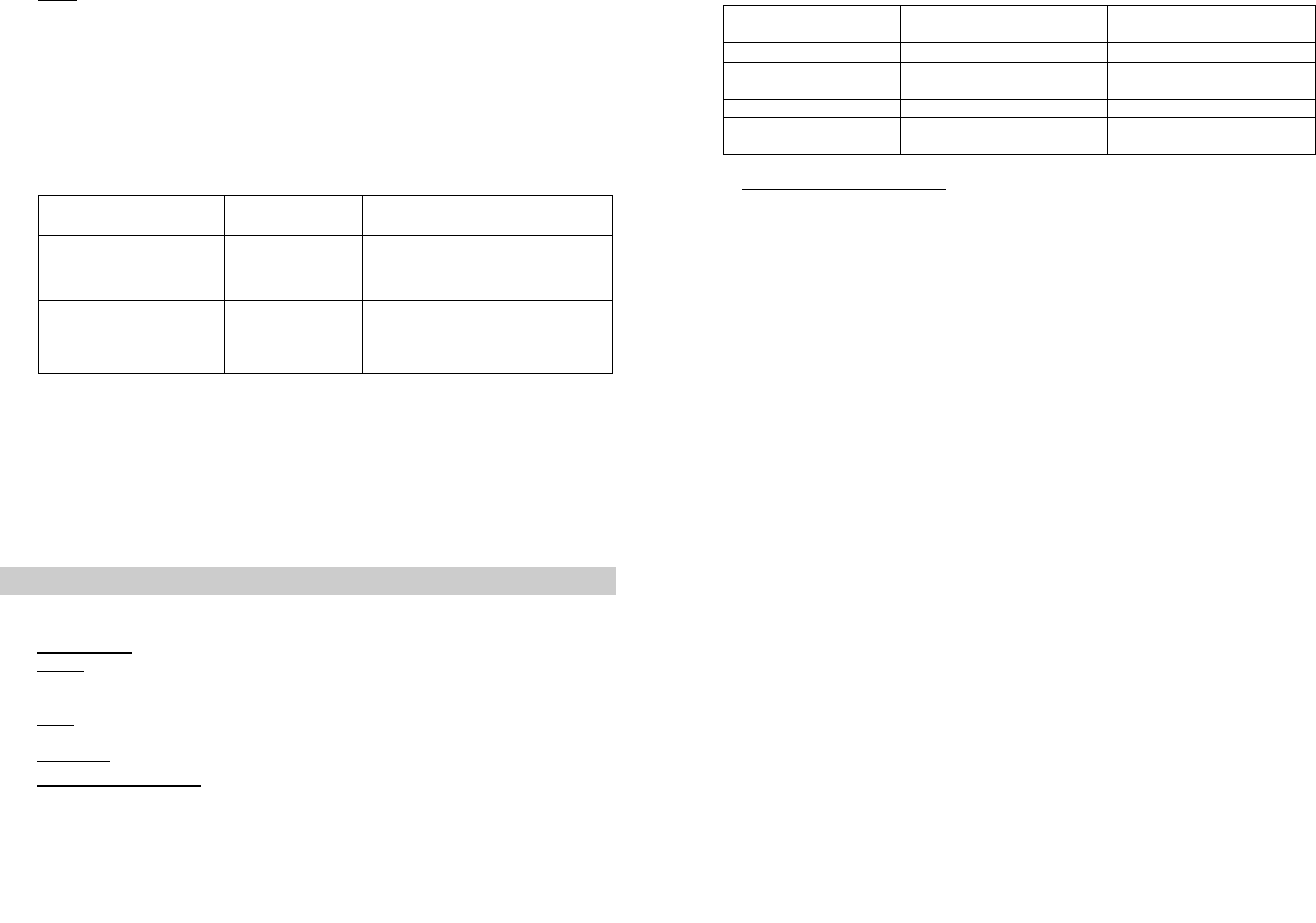
6. Configuration command class:
Byte
Value
Parameter 1
(Siren/Strobe Mode)
1
0 (All Enable) - Default
1 (Siren Only)
2 (Strobe Only)
Parameter 2
(Alarm Auto Stop Time)
1
0 (30 seconds) - Default
1 (60 seconds)
2 (120 seconds)
3 (Will Not Automatically Stop)
(Parameter 1) Siren/Strobe Mode: User can change value from 0 to 2 to turn
either Siren sound, Strobe light, or both when triggered.
(Parameter 2) Alarm Auto Stop Time: User can change the duration of siren time
when triggered.
7. Support OTA Firmware update from controller. Please refer to your controller
manual. We recommend to exclude then include the devices from system after
OTA.
8. All the rest commands depend on Z-Wave standard.
Operation
1. Normal operation, the LED light will not on.
2. Alarm Mode:
Active: It will active the Alarm Mode after receiving Basic Set (ON) or Binary
Switch (ON). The LED Strobe Light & SIREN will be active according to the
Configuration’s setting value.
Stop: It will stop the Alarm Mode after receiving Basic Set (OFF) or Binary Switch
(OFF) which depends on Configuration’s setting value.
Auto Stop: After stopping alarm, it will send Binary Switch Report (0x00)
3. Self-Protection Mode: After put back the bracket over 5 seconds, ZM 1601 will
enter the Self-Protection Mode which will active LED Strobe Light & SIREN at the
same time. The Alarm Mode will be triggered If the back cover has been opened
during the Self-Protection Mode If the device is at low battery status, then it will
send Low Voltage Report (COMMAND_CLASS_BATTERY). The Stop method is
same as the Alarm Mode. Open the bracket or close the bracket after 5 seconds will
send notification.
4. Battery Capacity Detection:
* Use “Battery Get” command to have the battery capacity back in % (hexadecimal)
* Auto Battery Capacity Detection
* Low Battery Report at 4.8V (+/- 0.15V)
5. Support Explorer Frame Function
Alarm
Version 1
Notification
Version 4
Alarm Type
0x03
Alarm Level
0x00 (Trigger) /
0xFF (Non Trigger)
Notification Type
0x07
Notification Event
0x03 (Trigger) /
0x00 (Non Trigger)
-3-
-4-

Federal Communications Commission Statement
This equipment has been tested and found to comply with the limits for a Class B digital
device, pursuant to Part 15 of the FCC Rules. These limits are designed to provide
reasonable protection against harmful interference in a residential installation. This
equipment generates, uses and can radiate radio frequency energy and, if not installed
and used in accordance with the instruction, may cause harmful interference to radio
communications. However, there is no guarantee that interference will not occur in a
particular installation. If this equipment does cause harmful interference to radio or
television reception, which can be determined by turning the equipment off and on, the
user is encouraged to try and correct the interferene by one of the following measures:
-Reorient or relocate the receiving antenna,
-Increase the separation between the equipment and receiver,
-Connect the equipment into and outlet on a circuit different from that to which the
receiver is connected.
Consult the dealer or an experienced radio/TV technician for help.
This device complies with Part 15 of the FCC Rules. Operation is subject to the following
two conditions: (1) this device may not cause harmful interference, and (2) this device
must accept any interference received, including interference that may cause undersired
operation.
FCC Caution: Any changes or modifications not expressly approved by the party
responsible for compliance could void the user’s authority to operate this equipment.
Limited Warranty
Vision Guarantees that every wireless siren & strobe alarm is free from physical defects
in material and workmanship under normal use for one year from the date of purchase. If
the product proves defective during this one-year warranty period, Vision will replace it
free of charge. Vision does not issue any refunds. This warranty is extended to the
original end user purchase only and is not transferable. This warranty does not apply to :
(1) damage to units caused by accident, dropping or abuse in handling, or any negligent
use; (2) units which have been subject to unauthorized repair, taken apart, or otherwise
modified; (3) units not used in accordance with instruction; (4) damages exceeding the
cost of the product; (5) transit damage, initial installation costs, removal cost, or
reinstallation cost.
For information on addional devices, plesae visit us at www.visionsecurity.com.tw
-5-
Industry Canada Notice
Operation is subject to the following two conditions: (1) this device may
not cause interference and (2) this device must accept any interference,
including interference that may cause undesired operation of the device.
Industry Canada Caution
This device complies with Industry Canada licence-exempt RSS standard(s).
Operation is subject to the following two conditions:
(1) this device may not cause interference, and
(2) this device must accept any interference, including interference that may cause undesired
operation of the device.
Le présent appareil est conforme aux CNR d'IndustrieCanadaapplicables aux appareils radio
exempts de licence. L'exploitation est autorisée aux deux conditions suivantes :
(1) l'appareil ne doit pas produire de brouillage, et
(2) l'utilisateur de l'appareil doit accepter tout brouillage radioélectrique subi, même si le
brouillage est susceptible d'en compromettre le fonctionnement.