Vosonic Vp8390 Users Manual VP8390A
VP8390 to the manual 40273fe4-9e04-46d2-a562-58ecc7cdd608
2015-02-05
: Vosonic Vosonic-Vp8390-Users-Manual-458706 vosonic-vp8390-users-manual-458706 vosonic pdf
Open the PDF directly: View PDF  .
.
Page Count: 41

VP8390
User’s Guide
Rev. A
_________________________________________________________
© 2006 Vosonic Technology Corporation. All ̅ights reserved.
2
Thank you for purchasing the Vosonic VP8390.
1. Before using the Vosonic VP8390, you will have to
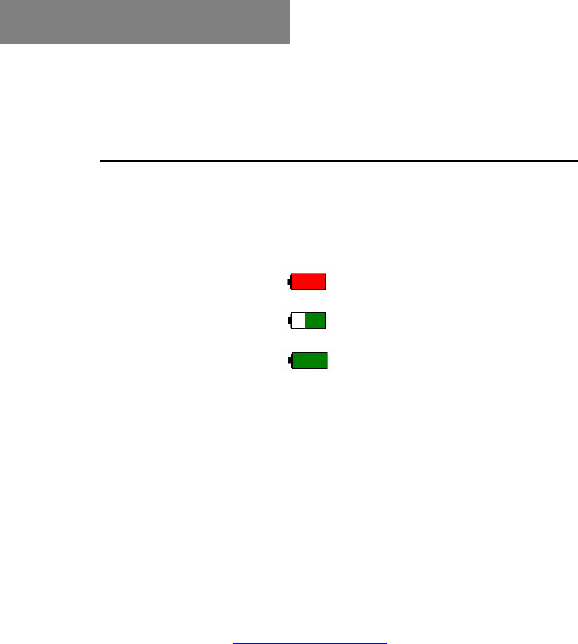
1-1 Charge the battery
Battery Level:
Battery Low (Red)
Charging:
Battery Full: (Green)
1-2 Install Windows USB driver
(if you are a Windows 98 user)
1-3 Keep VP8390 plugged into the AC
adapter/charger while connected to your
computer.
1-4 Make sure the HDD is already partitioned and
formatted as FAT system.
1-5 Check www.vosonic.com for the latest
firmware we offer with new functions and
improved features.
Enjoy your VP8390
The Vosonic Team
Dear Customer

3
FCC Certifications
This equipment has been tested and found to comply with the limits
for a Class B digital de vice, pursuant to Part 15 of the FCC Rules.
These limits are designed to provide reasonable protection against
harmful interference in a residential installation.
This equipment generates, uses and can radiate radio frequency
energy and, if not installed and used in accordance with the
instructions, may cause harmful interference to radio
communications.
However, there is no guarantee that interference will not occur in a
particular installation. If this equipment does interfere with radio or
television reception, which can be determined by turning the
equipment off and on, try to correct the interference in one of the
following ways:
• Reorient or relocate the receiving antenna.
• Increase the separation between the equipment and receiver.
• Connect the equipment into an outlet on a different circuit from
that to which the receiver is connected.
• Consult the dealer or an experienced technician for help.
CAUTION
Under no circumstances should you try to repair the system
yourself, as this will invalidate the warranty. Do not open the
system as there is risk of electrical shock.

4
Important Warranty Information
yTo reduce the risk of fire or shock hazard, do not expose this
equipment to rain, liquid or moisture.
yVosonic shall have no obligation to repair, replace or refund
until the customer returns the defective product to Vosonic.
yThe repairs and replacement service will not apply to Product
units that were misused, repaired without authorization or for
other reasons beyond the range of intended use.
yAny replacement product may be either new or like–new,
provided that it has functionality at least equal to that of the
product being replaced.
yVosonic is not responsible for any data stored on returned
products, please backup any data prior to shipping the unit.
yThe limited warranty for accessories (including battery) is only
valid for 6 months from the date of purchasing.
yAll OUT OF WARRANTY repairs may be subject to a normal
repair fee. Please contact your dealer or Vosonic for current
charges.
Package Checklist
yMain unit
yViewing / Recording Cradle
yEarphones
yA/V cable with 3 RCA plugs for AV input and output on cradle
yA/V cables for Audio / Video output on device
(This allows you to view video away from home without carrying
the cradle)
yMulti-connect 3 RCA Jack
yMini 5 Pins USB Cable for cradle
yLine-in cable
yRemote Control
yCarrying Case
yEnglish user's guide
ySetup CD-ROM
yVideo-conversion software
yPower Adapter (100-240V auto-switched)

5
yViewing / Recording Cradle
Video playback
AVI: Motion-JPEG in AVI format, 640x480 @30fps
with PCM audio
MOV: Motion-JPEG in MOV format, 640x480 @30fps
with PCM audio
Note: QuickTime movie is an unsupported codec
Video resolution*)
MPEG-1
Resolution: 352x288 @30fps
Bit Rate: 1.5Mbps
Audio: MPEG-1 Layer II/III
Format: MPG/.DAT, VCD
MPEG-4
Resolution: 720x480 @25fps
640x480 @30fps
720x480 @10fps (4MV)
640x480 @15fps (4MV)
Bit Rate: 4Mbps
Audio: AAC
Format: MP4, Simple Profile without 4MV
MPEG-4: ISO standard by Moving Picture Experts
Group
XviD
Resolution: 720x480 @25fps
640x480 @30fps
Bit Rate: 4Mbps
Audio: MP3, PCM
Format: AVI
Remark: AC3 unsupported
WMV9
Resolution: 352x240 @25fps
320x240 @30fps
Bit Rate: 1.1Mbps
Audio: WMA
Format: WMV
Remark: Unsupported WMV 7/8
*) Note: Video Output Quality is 320 x 240 pixels.
Specifications

6
Audio playback
MP3: MPEG-1 Layer I/II/III, MPEG-2 Layer 2.5,
sample rate up to 48KHz, bit rate 16~384kbps,
CBR and VBR, Stereo or Mono, MP3 file
format
WMA: WMA 7/8/9, Sample Rate up to 44KHz, bit
rate: 32~192Kbps, CBR, Stereo / Mono,
Microsoft DRM10
AAC: MPEG4-AAC, sample rate up to 48KHz, bit rate
16~320kbps, CBR, VBR, ABR, Stereo / Mono,
M4A or AAC file format
WAV: sample rate up to 48KHz, Stereo / Mono, un-
compressed 8 or 16bits PCM in MS-RIFF WAV
(WAV) file format
CDA: CD-Audio (16bits 44.1KHz stereo)
* Support M3U play list
Photo viewer
JPEG: Baseline YUV
TIFF: 1 and 8 bits grey scale, 8 bits indexed-color, 8
and 16 bits true color
BMP: Monochrome, 8 bits indexed-color, RGB, RLE8
GIF
RAW: Support for the following camera models:
Canon: 1Ds Mark-II, 1D Mark II N, 1Ds, 1D-
II, 1D, 5D, 20D, 10D, 300D (Digital Rebel,
Kiss Digital), Digital Rebel XT, D30, Power
Shot G1/G2/G3/G5/G6, 350D, 30D
Nikon: D200, D100, D70, D50, D1X, D2X, D1H,
D1
Kodak: DSC Pro SLR/c, DSC Pro SLR/n, DSC
Pro 14n, P880
Fujifilm: FinePix S2Pro, FinePix S3Pro, Finepix
S5500 ,Finepix E900
Olympus: E-1, E-500 ,E-300
Minolta: A1, A2, A200, DYNAX D7, MAXXUM
5D, MAXXUM 7D, DiMAGE 7
Panasonic: DMC-FZ30
Pentax: istD, istDL, istDS
Sony DSC-R1 (.SR2), DMC-LX1
Lecia R8/R9

7
For more supported models check www.vosonic.com
Zoom IN/Out
Rotate by 900
EXIF data
Slideshow with background music
Voice Recording Voice recording from line-in or internal microphone
*AAC format
Video Recording
Resolution: 352x240 @30ftps
Audio: AAC
Format: MP4
FM Radio 87.5MHz ~ 108MHz
Direct Printing PictBridge Compliant
Text Viewer Support TXT file (Read)
Support Memory
Card Interfaces
Compact FlashTM Card type I/type II (CF)
Memory Stick® (MS)
Secure Digital Card (SD)
MultiMedia Card (MMC)
IBM ®MicroDrive
Mini-SD (with adapter)
RS-MMC (with adapter)
MS Duo (with adapter),
MS Pro Duo (with adapter).
Hard Disk Format 2.5” Hard Disk (ATA Interface)
Hard Disk Size 20G ~ 120G
AV device Analogue AV-OUT composite RCA jack
Stereo earphone jack.
Display 3.5” OLED, 320 x 240 pixels, RGB
Interface USB 2.0
Built–in speaker 8 Ohm up to 400mW
Power supplier
5V/2.5A DC IN, Li-ion 3.7V 2300 mAh battery*) (NP-
100 compatible)
Non-Stop Photo backup: Approx. 38 times for 1GB**)
Non-Stop Music Playback: Approx. 12 hours (LCD OFF)
Non-Stop Video Playback: Approx. 4 hours
*) The Li-ion rechargeable battery can be recharged approx. 500
times. Battery life-time may vary with use.
**)The number of backup times is subject to the Hard Drive/
memory card / Files type.
8
TV system PAL / NTSC (Interlace TV)
Remote Control IrDA (Lithium Battery CR2025 3V x 1)
Dimensions 72 x 135 x 23mm (W x L x H)
Weight 236gr. (including 2.5” HDD & battery pack)
System OS
Windows 98/98SE with driver
Windows XP, Windows 2000 SP3 or above requires no
driver
Linux kernel 2.4 or above requires no driver
Mac OS 9.0 (with driver)
Mac OS 10.0.1 and above requires no driver
Note: VP8390 doesn't support Windows 2000 SP1, SP2. Please
upgrade to SP3 or above.
xPlease visit our web site to download the most recent manual and
software.
xThe VP8390 may not play the videos created with a codec other
than those specified above. If you have other file types that you
would like to view on your VP8390, you must use the video-
editing software to re-encode them into the proper video codec
with supported sound stream.
9
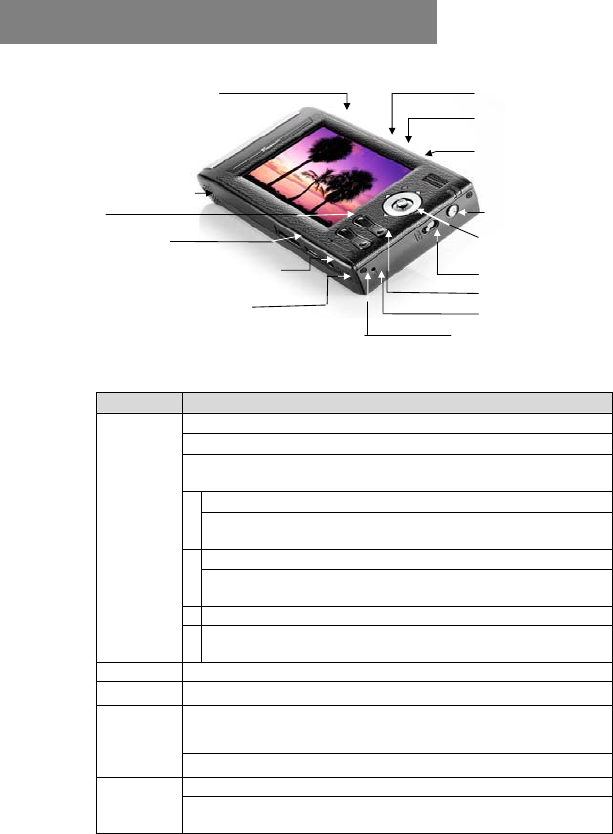
Compact Flash Type I/II
IBM MicroDrive Slot
Battery Compartment
ESC
Cradle connector
USB port: Insert USB cord mini jack
DC In (AC adapter socket)
Composite video output
Composite video output
Memory Stick/Memory Stick
Pro, MMC/SD card slot
Power
Joystick
Power Button Lock
Menu
Scroll up / volume
RESET
Keypad Function Description
Press/ Enter: Execute the current selection
Rotate: This function operates in Photo Playback Mode.
Pause: This function operates in Music & Video Playback
Mode.
Direction icon: Use joystick to move cursor on the screen.
Fast Backward: This function operates in Music & Video
Playback Mode.
Direction icon: Use joystick to move cursor on the screen.
Fast Forward: This function operates in Music & Video
Playback Mode.
Direction icon: Use joystick to move cursor on the screen.
Joystick
Direction icon: Use joystick button to move cursor on the
screen.
MENU Play modes & system setting selection
ESC Takes you back to previous mode
Photo zoom-out
This function operates in Photo Playback Mode.
+
Increase volume
Decrease volume
_ Photo zoom-in
This function operates in Photo Playback Mode.
2. Overview of Panels & Keys
10
3-1 Starting up
____________________________________________________
1) Charge the batteries
xBefore using for the first time, charge the batteries for a full 4
hours.
xYou can also charge it by plugging the adapter/charger into the
cradle and placing your VP8390 in the cradle.
2) Power On /Off
x Press the Power button
x The green light will go on and the unit will boot up.
x To shut off the unit, press the power button.
3) Driver installation
Windows Me and Windows XP Home Professional Edition,
Win2000 Professional SP 3 above
`
Windows 98/98 SE
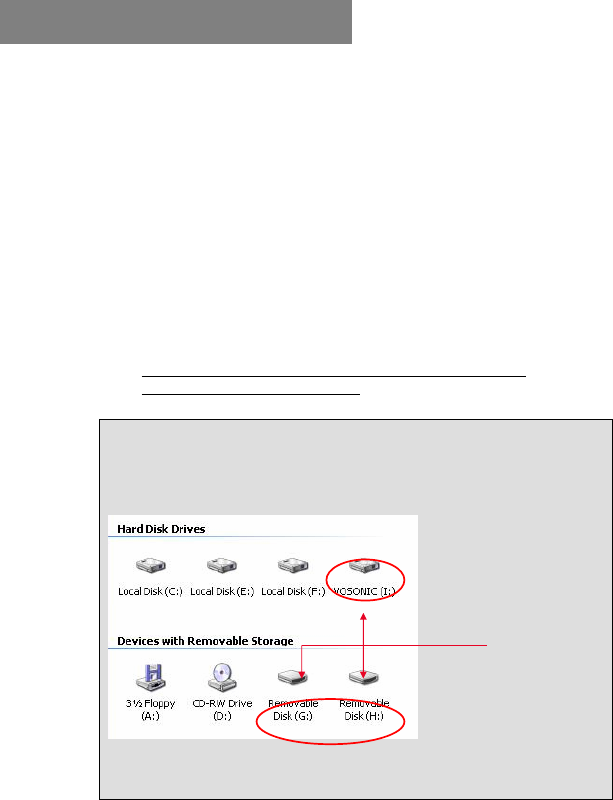
Users of Windows Me and Windows XP Home and Professional Edition,
Win2000 Professional Service Pack 3 and above do not need to install any
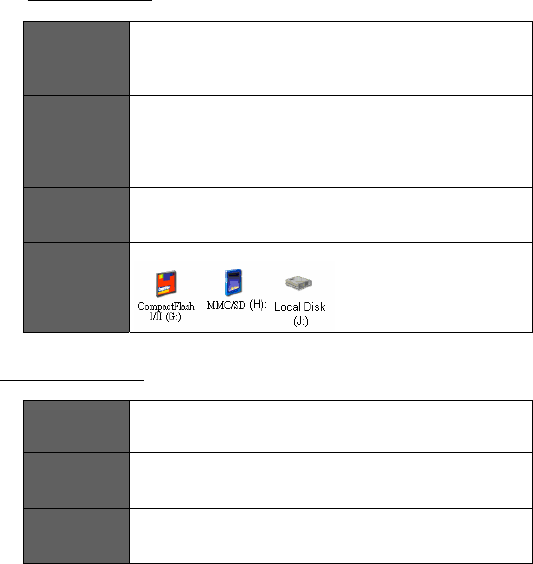
drivers. Windows will automatically detect your device as the following
figure shows.
* Right-click on ‘My Computer’, select Properties and then look in the tab labelled
‘General’. It should say “Service Pack 1” or higher.
Detected Drives
3. Using the VP8390
:LQGRZV6(
,QVHUW\RXUGULYHULQVWDOODWLRQ&'LQWR\RXU&'520GULYH
DQGGRXEOHFOLFNRQ0\FRPSXWHU
%URZVH\RXU&'520GULYHDQGUXQVHWXSH[HWREHJLQ
GULYHULQVWDOODWLRQ3UHVV1H[WDQGIROORZWKHLQVWDOODWLRQ
LQVWUXFWLRQV
5HVWDUW\RXUFRPSXWHUDIWHULQVWDOODWLRQLVFRPSOHWH
8QGHU:LQGRZVWKHGLVNGULYHVORRNOLNHWKLV
0DFLQWRVK0DF26[
,QVHUW\RXUGULYHULQVWDOODWLRQ&'LQWR\RXU&'520GULYHDQG
GRXEOHFOLFNRQ0\FRPSXWHU%URZVH\RXU&'520GULYHWR
0DF26,QVWDOOHU
)ROORZWKHLQVWDOODWLRQLQVWUXFWLRQVWREHLQJLQVWDOOLQJGULYHV
5HVWDUW\RXUFRPSXWHUDIWHULQVWDOODWLRQLVFRPSOHWH
1RWHV
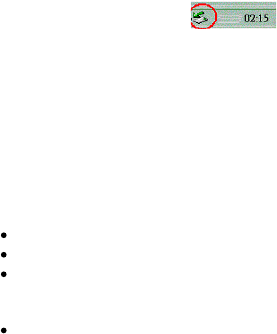
)RU:LQGRZV;3XVHUVWRVDIHO\GLVFRQQHFWWKH93IURPWKHFRPSXWHU
FOLFNRQWKHV\VWHPWUD\UHPRYH LFRQDQGZDLWXQWLO\RX
JHWD
PHVVDJHVD\LQJWKDW\RXFDQVDIHO\XQSOXJWKHGHYLFHEHIRUHGLVFRQQHFWLQJWKH
86%FDEOH
7RDYRLGEDWWHU\GUDLQLWLVUHFRPPHQGHGWRNHHSWKHXQLWSOXJJHGLQWRWKH
$&DGDSWHUFKDUJHU
'RZQORDGLQJRU(GLWLQJWKHILOHVRQ3&
BBBBBBBBBBBBBBBBBBBBBBBBBBBBBBBBBBBBBBBBBBBBBBBBBBBB
3RZHURQWKH93
&RQQHFWWKH93WRWKH3&ZLWKWKHSURYLGHG86%FDEOH
'RXEOH&OLFNWKH0\FRPSXWHULFRQWKHV\VWHPZLOOGLVSOD\
LFRQVLGHQWLI\LQJWKHPHGLDW\SHVFRUUHVSRQGLQJO\6HOHFWWKH
GULYH\RXZDQW
<RXFDQQRZUHDGZULWHFRS\GHOHWHDQGPRYHGDWDIURPWR
WKH93GULYH
1RWH
7KH93XVHVWKH)$7ILOHV\VWHPWKHPD[LPXPVL]HRIDVLQJOHILOHLV
XVXDOO\OLPLWHGWR*%
:KHQWKH86%PRGHLVVHWWR>073@PRGH:LQGRZVZLOORQO\GLVSOD\WKH
93LQWHUQDO+DUG'LVNWKHUHLVQRFDUGUHDGHUIXQFWLRQKHUH
86%&211(&7,21
BBBBBBBBBBBBBBBBBBBBBBBBBBBBBBBBBBBBBBBBBBBBBBBBBBBB
:KHQ93FRQQHFWVWRWKHFRPSXWHUWKH06&'HYLFH
PHVVDJHZLOODSSHDUDWWKHERWWRPRIWKHVFUHHQ
'XULQJILOHWUDQVIHULQ3&PRGH'R1RW
8QSOXJWKH86%FDEOH
5HPRYHPHPRU\FDUGVIURPWKHFDUGVORWHOVHFRUUXSWLRQ
RUGDWDORVVPD\RFFXU
13
4-1 Setup
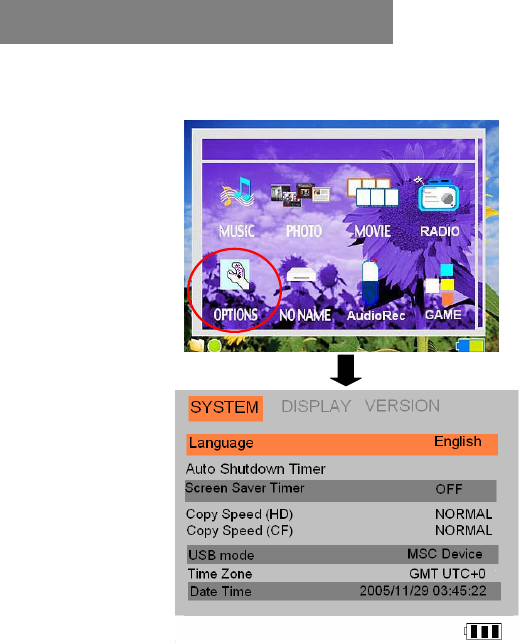
To enter your setup screen, click OPTIONS then SYSTEM
1) Language
This unit can be set to English, Japanese, Korean, Spanish,
German, French, Italian, Portuguese, Chinese and Thai.
2) Auto shutdown Timer
Press the joystick to adjust the setting, timed from 1 to 30 minutes.
Scroll down to decrease the time value, scroll up to increase it.
4. Settings for your VP8390
14
3) Copy Speed (HD)
Use the joystick to adjust the setting, from Normal to High to Ultra.
Note: If you find that the unit shuts down after setting the copy speed to
ULTRA or HIGH, it is recommended to set the copy speed to NORMAL
to avoid data corruption.
4) Copy Speed (CF)
Use the joystick to adjust the setting, from Normal to High to Ultra.
Note: If you find that the unit shuts down after setting the copy speed to
HIGH or ULTRA, it is recommended to set copy speed to NORMAL to
avoid data corruption.
5) USB Mode
PictBridge: Print images from the VP8390 directly to a PictBridge-
enabled printer.
MSC Device (Mass Storage Class): General use as a card reader
6) Time Zone / Date Time
These show date and current local time.
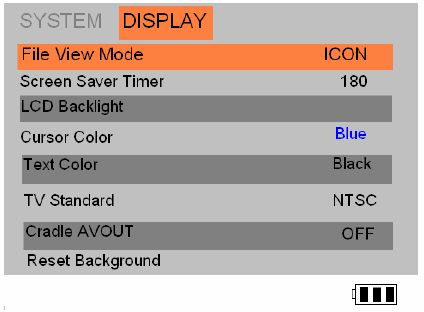
4-2 Display
To set up your Screen Display, click Options and highlight
Display by using the menu button.
)LOH9LHZHU0RGH
8VLQJWKHMR\VWLFN\RXFDQVZDSEHWZHHQJUDSKLFLFRQVILOH
YLHZHU
PRGHDQGOLVWYLHZ
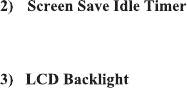
<RXFDQFKDQJHWKHDXWRVFUHHQRIIWLPHUWRVDYHEDWWHU\SRZHUE\
XVLQJWKHMR\VWLFN9DOXHVDUHEHWZHHQWRVHFRQGV
<RXFDQDGMXVWWKH/&'EDFNOLJKWE\XVLQJWKHMR\VWLFN3XVK
GRZQXSWRGHFUHDVHLQFUHDVHEULJKWQHVV
796WDQGDUG
176&7DLZDQ86-DSDQHWF
3$/(XURSHDQFRXQWULHV
&KDQJHWKHVHVHWWLQJVE\XVLQJWKHMR\VWLFN
&UDGOH$9287
:KHQVHWLQFUDGOHWKH$9RXWFRQQHFWLRQDOORZVWKHXVHUWR
YLHZ
DQGVKDUHWKHSKRWRVRUPRYLHVRQWHOHYLVLRQ
5HVHW%DFNJURXQG
5HVHWGHVNWRSEDFNJURXQGLPDJHWR9RVRQLF¶VGHIDXOWORJR
16
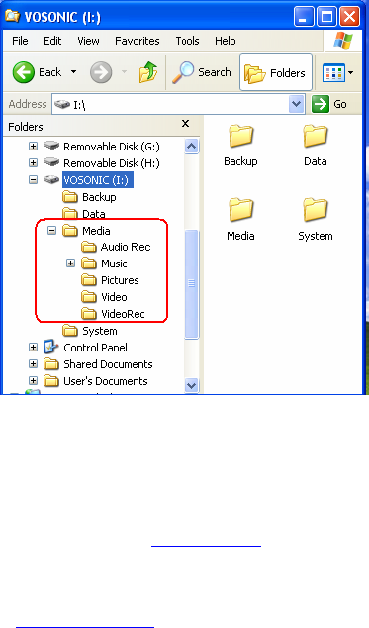
4-3. Your Media files
For rapid search or playback of Videos, Music and Picture files,
please import the files to the corresponding folders.
Media File Conversion
Because of the wide variety of formats, there’s a chance that some of the
media files you have will not directly play on your device. If you have
video files that do not play directly on your VP8390, they will have to be
converted first.
Please find the MAGIX MEDIA SUITE on the included CD-ROM. This
program, developed by MAGIX (www.magix.com), has a simple
interface which you can use to convert, edit, archive & burn video.
Note: To convert a video file to the right size and format supported by the
VP8390, please consult the VP8390 specifications for supported file types, or
email service@vosonic.com.tw for instructions.
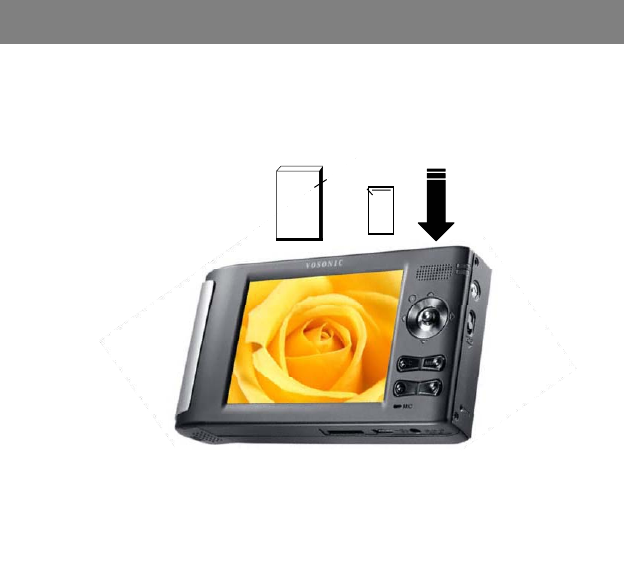
)URQWRI&DUG
1RWH3OHDVHLQVHUWWKHPHPRU\FDUGZLWKWKHIURQWRIWKHFDUGIDFLQJWKH/&'DV
VKRZQEHORZ
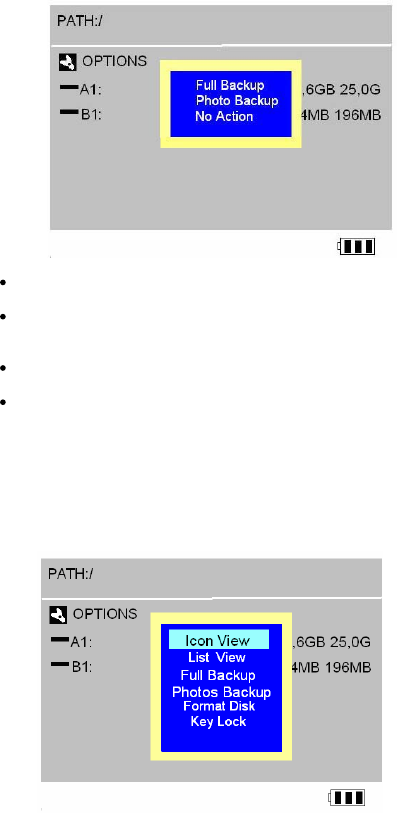
:KHQDPHPRU\FDUGLVLQVHUWHGWKHV\VWHPZLOODXWRPDWLFDOO\GLVSOD\D
PHQXZLWKWKHRSWLRQV1R$FWLRQ)XOO%DFNXSRU3KRWR%DFNXS
)XOO%DFNXS
<RXFDQEDFNXSWKHZKROHIROGHULQFOXGLQJLWVVXEIROGHUDQG ILOHV
IURPPHPRU\FDUGVWRLQWHUQDOVWRUDJH+DUG'ULYH'LVN7RGR
VRVFUROOWRWKH)XOO%DFNXSPRGHDQGSUHVVWKHMR\VWLFNEXWWRQ
3KRWR%DFNXS
7KH3KRWR%DFNXSDOORZV\RXWRTXLFNO\VHDUFKWKHGLJLWDOLPDJHV
E\VDYLQJWKHVXEIROGHURQO\<RXFDQEDFNXSWKHVXEIROGHUIURP
8VLQJDPHPRU\FDUGWRWUDQVIHUSKRWRVWR93
PHPRU\FDUGVWRLQWHUQDOVWRUDJH+DUG'ULYH'LVN7RGRVR
VFUROOGRZQWRWKH³3KRWR%DFNXSPRGHDQGSUHVVMR\VWLFNEXWWRQ
DG
TE
,IWKHVDPHFDUGLVLQVHUWHGDQGFRSLHGWZLFHWZRGLIIHUHQW
IROGHUVZLOOEHFUHDWHG93ZRQWRYHUZULWHIROGHUV
$OOILOHVWUDQVIHUHGIURPHDFKPHPRU\FDUGDUHVWRUHGRQWRWKH
%DFNXSIROGHULQQXPHULFDOO\DVFHQGLQJRUGHU&)
&)&)&)´
7RVWRSWKHGDWDWUDQVIHUMXVWSUHVVWKH-R\VWLFNRUWKH(6&
EXWWRQ
,IDQHUURQHRXVPHVVDJHLVGLVSOD\HGSOHDVHUHIRUPDWWKH
PHPRU\FDUGVILUVWWKLVPD\EHGXHWREDGVHFWRUV
1R$FWLRQ
(VFDSHIURPFXUUHQWPRGH
,I\RXZDQWWRUHWXUQWRWKH3KRWR)XOOEDFNXSPRGHVMXVWVFUROO
WKHPHPRU\FDUGWKDW\RXZDQWWREDFNXSDQGSUHVV0(18EXWWRQ
19
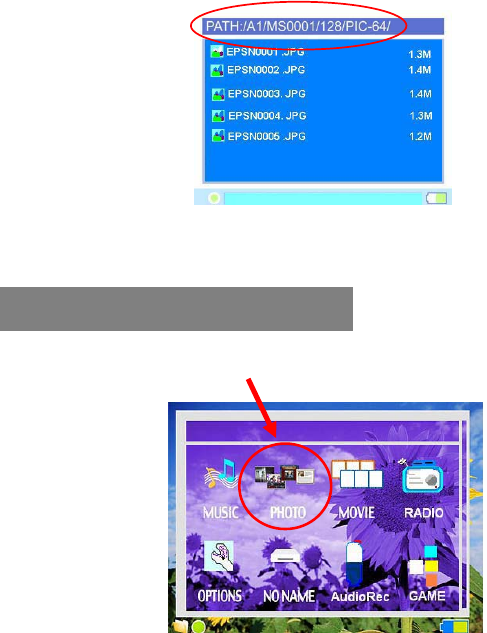
4) Navigating the Directory Structure
Just below the top status bar, you can see the path to the directory
you are currently viewing.
!
Enter Photo Folder
6. Photo Play Mode
20
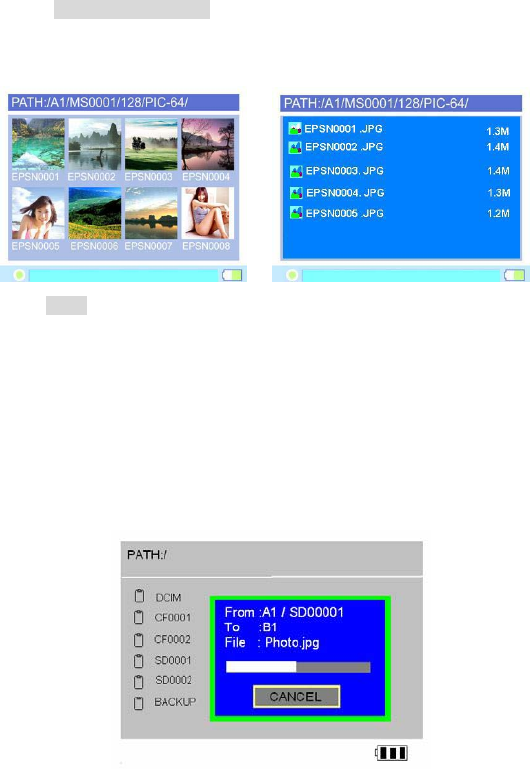
Press MENU to select the play modes, choose the desired mode and press
the joystick.
Icon View / List View
Copy
xUse the Joystick button to high-light the file you want to copy.
xPress MENU to select COPY mode, then press joystick.
xWhen the message “copied to clipboard“ pops on screen, press
joystick.
xUse the joystick to find the folder or path where you want to
paste.
xPress MENU to select Paste mode, then press joystick.
xAt the prompt “Paste from clipboard?” use the joystick to reply
Yes or No.
xClick “Yes” and the copy fucntion will be performed.
Icon View: The screen displays thumbnails
of all the JPEG pictures
groups of eight.
List View: The screen will display all the
JPEG pictures as a list.
21
Delete
xUse the joystick to find the file you want to delete.
xPress MENU to select Delete mode, then press joystick.
xAt the prompt “Delete File?“, use thej button to reply Yes or No.
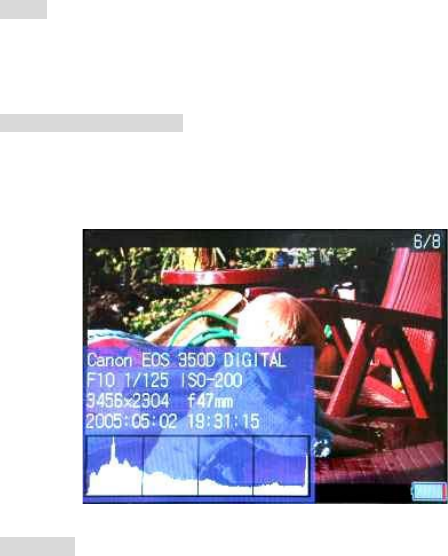
Show EXIF and histogram
Click the specific JPG file you want to view. press ENTER, then
press Menu. Select Display Settings and press OK. Find the
Show EXIF and press OK to show file information such as shutter
speed, flash condition, focal length and other image information.
Slide Show
Click the specific JPG file you want to view and press Menu to
select Slide Show mode.
Slide Interval Setting:
xHold and push the Joystick button to the left to
decrease the interval time
xHold and push the Joystick button to the right to
increase the interval time
6HWDV%DFNJURXQG
&OLFNWKHVSHFLILF-3*ILOH\RXZDQWDQGSUHVV0HQXWRILQG³6HWDV
%DFNJURXQG´PRGHWKHQSUHVVMR\VWLFN
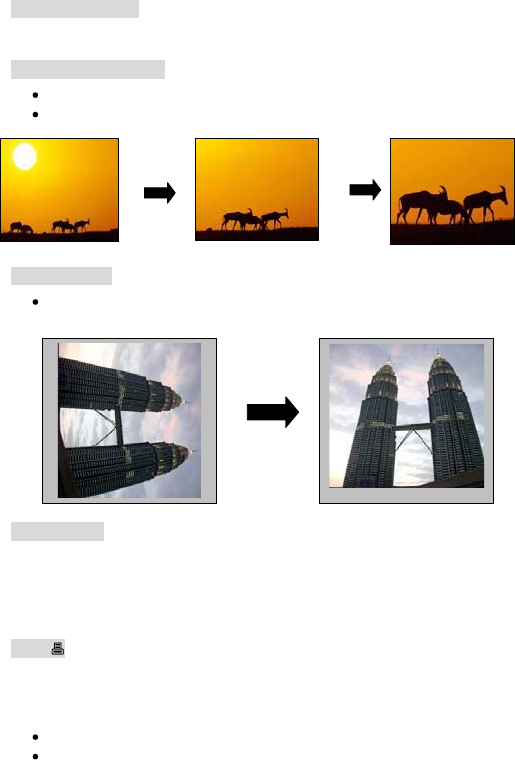
=RRP,Q2XW'LVSOD\
<RXFDQXVH>@RU>@EXWWRQVWR]RRPLQRXWRIWKHSLFWXUH
8VHWKHMR\VWLFNWRSDQULJKWOHIWXSGRZQ
5RWDWH'LVSOD\
3UHVVWKHMR\VWLFNWRURWDWHWKHSLFWXUHLQFRXQWHUFORFNZLVH
GLUHFWLRQ
3ULQWHU6HWXS
)RU3KRWRVWREHSULQWHGGLUHFWO\WRSULQWHUVWKHSULQWHUVPXVWEH
3LFWEULGJHFRPSDWLEOH,IDSULQWHULVQRW3LFWEULGJHFRPSDWLEOHRULILWLV
QRWFRQQHFWHGZHOOWRWKHXQLWWKH93ZLOOGLVSOD\D³1R6XSSRUWHG
3ULQWHU´PHVVDJH
3ULQW
3LFW%ULGJHWHFKQRORJ\DOORZV\RXWRFRQQHFW\RXU93GLUHFWO\WR
\RXUSULQWHUZLWKRXWDFRPSXWHU-XVWSOXJ\RXU93LQWRWKHSULQWHU
XVLQJWKH86%FDEOHDQG\RXDUHUHDG\WRSULQW
&RQQHFWWKH86%FDEOHWRWKHPDLQXQLWDQGSULQWHU
7XUQRQWKH93

23
xSet the VP8390 USB mode at [ PictBridge/Media Palyer ]
xFind the specific JPEG pictures you want to print and press the
MENU button
xSelect [Print[ and press the joystick
Note: The printing function is available only for JPEG files.
To make sure that your video file is in the right size and format supported
by the VP8390, please read the VP8390 specifications first.
xPush up the joystick to fast forward the videos.
xPush joystick to the left to rewind and find the specific part of
movie you want to play.
xPush joystick to the right to fast forward and find the specific
part of movie you want to play.
xTo pause or start/resume playback, press joystick.
Play Video Clips or Slideshow on your TV
xClick [Options] on the main menu
xUse [MENU] to go to [Display]
xSet [Cradle AVOUT] at ON
xConnect the A/V cable to the A/V OUT socket of the cradle
xConnect the AC adaptor to the cradle
xTurn on the VP8390 and your television.
xThe screen on your VP8390 should go black.
xYou should see the VP8390 screen now displayed on your
television.
Note: The video Output Quality is :
PAL system : 352 X 288 pixels. NTSC system :320 X 240 pixels.
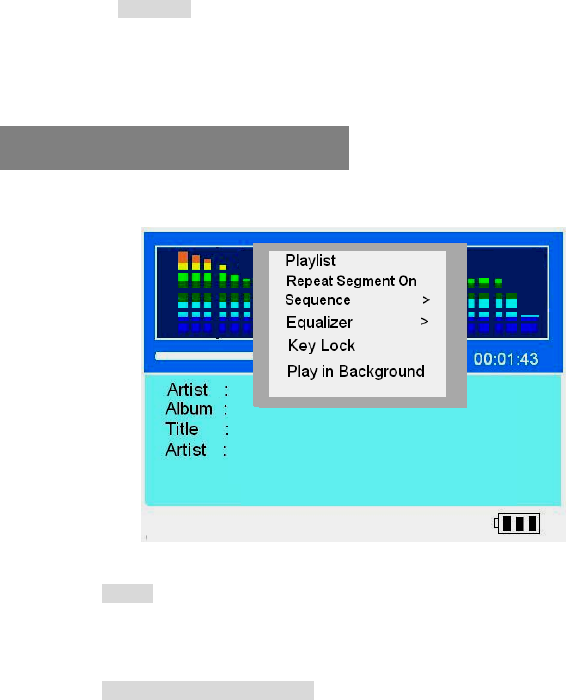
Play modes
Press the MENU to set the play modes
Playlist
!
Playlist is a list of songs that the VP8390 will automatically play one
after the other. To create Playlist, you can simply copy, delete or
paste the files into the folder you want.
7. Video Play Mode
24
Play Mode
Press MENU to select the Play Mode.
Press joystick to set the setting.
Scroll to the MUSIC, press Joystick to finish the selection
Playlist
Playlist is a list of songs that the VP8390 will automatically play one
after the other. To create Playlists, you can simply copy, delete or paste
the files to the folder you want.
Create and use a music playlist
!
VP8390 can play the mp3 songs listed in an .m3u play list file. M3U is a
media queuing format, known as a play list which will play sequentially
each of the mp3 files in the order listed.
8. Music Play Mode

&RQQHFW93WR\RXU3&XVLQJ86%
8VH:LQPDSWRFUHDWHDSOD\OLVW
6DYHWKHSOD\OLVWRQWKH93RQKDUGGULYH
6DYHWKHSOD\OLVWDVPXW\SHRISOD\OLVWHJLQWKH6DYHRSWLRQV
SXOOGRZQPHQX
1RWH 3OHDVHUHPHPEHUWRVHWERWKWKHSOD\OLVWDQGRSHUDWLQJV\VWHPWR
WKHVDPHODQJXDJHRWKHUZLVHWKH08SOD\OLVWZRQ¶WEHUHFRJQL]HG
5HSHDW6HJPHQW2Q/RRSUHSOD\XVHUGHILQHGVHFWLRQVRIDVRQJ
:KHQOLVWHQLQJWRPXVLFSUHVVWKHMR\VWLFNWRVHWWKHVWDUWLQJSRLQW
3UHVVWKHMR\VWLFNDJDLQWRVHWWKHHQGLQJSRLQW7KH93ZLOO
SOD\WKHVHFWLRQLQDORRS
6HTXHQFH
6KXIIOH
7RVKXIIOHWKHPXVLFLQDUDQGRPRUGHU\RXFDQVFUROOWR
>6KXIIOH@DQGSUHVVWKHMR\VWLFN7KHVKXIIOHRQO\ZRUNV
ZLWKLQRQHIROGHU
5HSHDW$OO
3UHVV0(18
&OLFN>6HTXHQFH@WKHQVHOHFW>5HSHDW$OO@
&OLFNLWWRVHWLW21FOLFNDJDLQWRVHWLW2))
5HSHDW6LQJOH
3UHVV0(18
&OLFN>6HTXHQFH@WKHQVHOHFW>5HSHDW6LQJOH@
&OLFNLWWRVHWLW21FOLFNDJDLQWRVHWLW2))
3OD\DOO
3UHVV0(18
&OLFN>6HTXHQFH@WKHQVHOHFW>3OD\DOO@
&OLFNLWWRVHWLW21FOLFNDJDLQWRVHWLW2))
(TXDOL]HU
7KHUHDUH(4PRGHV1RUPDO%DVV&ODVVLF'DQFH/LYH
5RFN7UHEOHDQG8VHUGHILQHGIRU\RXUVHOHFWLRQ
.H\/RFN
7RORFNDOOWKH93EXWWRQVIURPEHLQJDFFLGHQWDOO\
SUHVVHGVFUROOWR³.H\ORFN³PRGHDQGSUHVVWKHMR\VWLFN
3UHVV0(18DQG(6&EXWWRQVWRDFWLYDWHWKHEXWWRQVDJDLQ
3OD\LQ%DFNJURXQG
$OORZV\RXWRVZLWFKWRRWKHUPRGHVVXFKDVZDWFKLQJ
SKRWRVVLPXOWDQHRXVO\ZLWKWKHPXVLFEHLQJSOD\LQJ
2WKHUIXQFWLRQV
3XVKWKHMR\VWLFNWRWKHOHIWWRUHZLQGDQGILQGWKHVSHFLILF
SDUWRIPXVLF\RXZDQWWRSOD\
3XVKWKHMR\VWLFNWRWKHULJKWWRIDVWIRUZDUGDQGILQGWKH
VSHFLILFSDUWRIPXVLF\RXZDQWWRSOD\
$GGLQJVRQJVWRD3OD\OLVWZKLOHOLVWHQLQJWR0XVLF
$IWHUKLGLQJWKHMXNHER[3OD\LQEDFNJURXQG
6ZLWFKWRRWKHUIROGHUVDQGKLJKOLJKWWKHPXVLFILOH\RX
ZDQWSUHVVPHQXWRVHOHFWWKH>$GGWR3OD\OLVW@DQGSUHVVRN
EXWWRQ7KHVRQJZLOOEHDGGHGWRWKHFXUUHQWSOD\OLVW
:LWK\RXUFUDGOHSURSHUO\FRQQHFWHGWRD79'9'RUVDWHOOLWH
UHFHLYHUPDNLQJDUHFRUGLQJLVDVLPSOHDIIDLU3OHDVHPDNHVXUH\RXU
79KDV$9RXWSXW
3RZHURQWKH93
*RWR>2SWLRQV@DQGVHW>86%PRGH@DW3LFW%ULGJH0HGLD3OD\HU
*RWR>',63/$<@DQGVHW>&UDGOH$9287@WR2))
&RQQHFWWKH$9FDEOHZLWKWKH5&$SOXJVWRWKH$9LQSXWRIWKH
FUDGOH
9LGHR5HFRUGLQJ
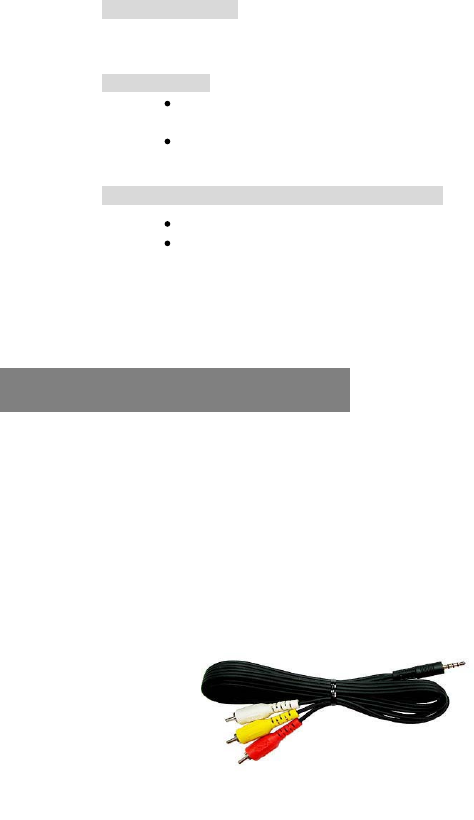
$9FDEOHZLWK5&$SOXJV
&RQQHFWWKHRWKHUHQGWRWKH$9RXWSXWVRFNHWRIWKH79VHW
&RQQHFWWKH$&DGDSWHUWRWKHFUDGOH
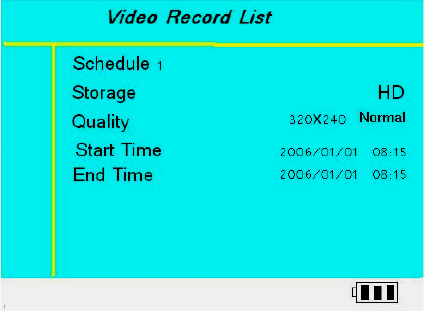
6HOHFW>9LGHR5HF@DQGSUHVVMR\VWLFNWRUHFRUG:KLOHUHFRUGLQJWKH
UHFRUGLQJWLPHZLOOEHGLVSOD\HGLQWKHWRSULJKWFRUQHURIWKHVFUHHQ
3UHVVMR\VWLFNDJDLQWRVWRSUHFRUGLQJ
6HWXS3DUDPHWHUV
1RWH
'XHWRWKH:LQGRZV)$7$9,ILOHW\SHVSHFLILFDWLRQWKH
PD[LPXPUHFRUGLQJILOHVL]HLV*%
$OOUHFRUGHGYLGHRVZLOOEHVDYHGLQFUHPHQWDOO\DV95(&03
95(&0395(&03HWF
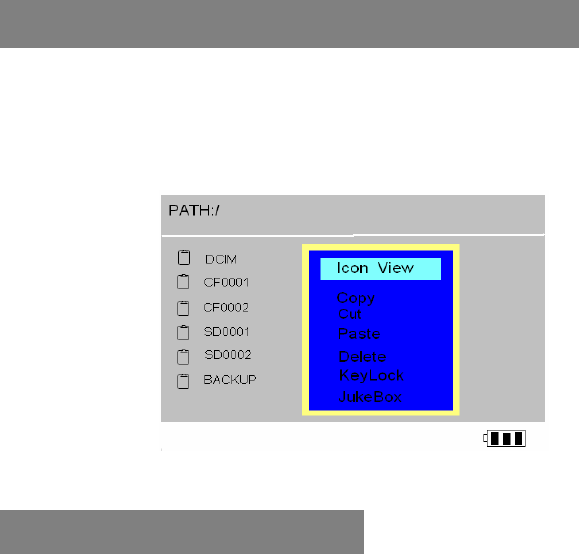
,QVFUHHQ%URZVHUPRGH\RXFDQFRS\SDVWHRUGHOHWHILOHVIURP
RQHORFDWLRQLQWKHILOHWUHHVWUXFWXUHWRDQRWKHU6LPSO\3UHVV
0(18WRVHOHFWWKHPRGHV$V\RXILQLVKWKHVHOHFWLRQMXVWSUHVV
MR\VWLFN
&RS\3DVWHDQG'HOHWH)LOHVDQG)ROGHUV
/LVWHQWR)05DGLR
&RQQHFWWKHHDUSKRQHVWRHDUSKRQHMDFN7KHHDUSKRQHVDFWDVWKH
)0DQWHQQD

3UHVHWWLQJD&KDQQHO
$XWRPDWLFDOO\VFDQIURPFKDQQHOWRFKDQQHO
6HOHFW5DGLR
3UHVV0(18
6HOHFW>6FDQDQG6DYH@PRGH
7KHWXQHUZLOOVWRSVFDQQLQJDWWKHILUVWUHFHLYDEOHEURDGFDVWVWDWLRQ
7KHFXUUHQW)0VWDWLRQZLOOEHVHWWRDSUHVHWFKDQQHOQXPEHU<RX
FDQVWRUHXSWRVWDWLRQVLQPHPRU\
7KHUHDUHWZRJURXSV*5283DQG*5283ZKHUHHDFKJURXS
FDQVDYHXSWRFKDQQHOV
7RVWRSDXWRWXQLQJSUHVVWKH>(6&@EXWWRQ
1RWH7KLVIXQFWLRQPD\VRPHWLPHVIDLOGRWREDGUHFHSWLRQRIVRPHFKDQQHOV
7KHUDGLRVHWWLQJZLOOEHVDYHGLQWKHV\VWHPIROGHUXQGHU+DUG
'ULYHDV5$',2,1,SOHDVHGRQRWUHPRYHWKLVIROGHURUWKH
VHWWLQJVZLOOEHORVW
<RXFDQXVHWKH³5HFRUG´IXQFWLRQDQ\WLPH+RZHYHU\RXFDQQRW
UHFRUGYRLFHVWUHDPVDQGOLVWHQWRPXVLFDWWKHVDPHWLPH
$GMXVWLQJWKHYROXPHWRWKHULJKWYDOXHVLVYHU\LPSRUWDQWIRU
SURSHUXQGLVWRUWHGUHFRUGLQJVLWLVEHWWHUWRFKRRVHDPLGGOHZD\
VHWWLQJVRWKDWWKHVLJQDOLVQRWWRRKLJKLWZLOOEHFOLSSHGQRUWRR
ORZWRJHWORVWLQWKHQRLVHOHYHORIWKHKDUGZDUH
$OOUHFRUGLQJILOHVDUHVDYHGLQWKH$XGLR5HF)ROGHU
$OOUHFRUGLQJILOHVDUHVDYHGDV$$&IRUPDW
(QDEOH'LVDEOH$287$XGLR2XWSXW212))
$XGLR5HFRUGLQJ
(QDEOHV\RXWRPRQLWRUWKHILOHZKLFKLVEHLQJUHFRUGHG

5HFRUGLQJ4XDOLW\
00LGGOH
//RZ
7KHUHDUHWZRGLIIHUHQWFKDQQHOV6WHUHR0RQRIRUOLQHLQUHFRUGLQJ
IRUYRLFHUHFRUGLQJKHUHLVRQO\RQHFKDQQHO0RQR
5HFRUGLQJIURPEXLOWLQPLFURSKRQH
6HOHFW$XGLR5HFDQGSUHVVMR\VWLFN
3UHVV0(18DQGXVHMR\VWLFNWRVHWWKH5(&,1387DW>0,&,Q@
3UHVVMR\VWLFNWRVWDUWWKHUHFRUGLQJ
3UHVVMR\VWLFNDJDLQWRVWRSWKHUHFRUGLQJ
5HFRUGLQJIURP/LQHLQ
<RXFDQXVHDOLQH±LQFRUGWRUHFRUGPXVLFGLUHFWO\IURPDQDXGLR
GHYLFHVXFKDV&'SOD\HU
5HPHPEHUWRNHHSWKH$&DGDSWRUSOXJJHGLQWKURXJKRXWWKHUHFRUGLQJ
&RQQHFWOLQH±LQFDEOHWRDXGLRRXWSXWRIWKHVRXUFH
&RQQHFWWKHRWKHUHQGWR93FUDGOH$9LQSXW
6FUROOWR>$XGLR5HF@DQGSUHVV>-R\VWLFN
3UHVV0(18DQGXVHMR\VWLFNWRVHWWKH5(&,1387DW/LQH±LQ
3UHVVMR\VWLFNWRVWDUWWKHUHFRUGLQJ
3UHVVMR\VWLFNDJDLQWRVWRSWKHUHFRUGLQJ
1RWH 6RPH&'VDUHFRS\SURWHFWHGDQGWKH93ZLOOQRWEHDEOHWRUHFRUG
IURPWKHVHVRXUFHV
5HFRUGLQJ)0UDGLR
8VHWKHMR\VWLFNWRILQGDGHVLUHGFKDQQHOVWDWLRQ
6HOHFW5DGLRDQGSUHVV0(18
6HOHFW5HFRUGPRGH
3UHVVWKHMR\VWLFNWRVWDUWUHFRUGLQJ

)RUPDWW[W
5HDGVWH[WILOHVLQGLIIHUHQWODQJXDJHVDVDQ(%RRN
3OD\WKH0DWUL[JDPHDWGLIIHUHQWVSHHGVDQGXSWRGLIIHUHQW
OHYHOV
6HOHFWOHYHOE\SUHVVLQJXSRUGRZQZKHQHQWHULQJWKHJDPH
&RQWUROGLUHFWLRQVOHIWULJKWDQGGRZQ
3UHVV0(18WRSDXVH
7RFKDUJHWKHEDWWHULHVSOHDVHFRQQHFWWKH$&DGDSWHUSOXJWRWKH
'&9LQSXWVRFNHWRIWKHPDLQXQLW:KHQWKH3RZHU/HG
LQGLFDWRUJRHVRIIWKHEDWWHU\LVIXOO\FKDUJHG
3OHDVHXVHRQO\WKH9RVRQLFRULJLQDOP$K 9
UHFKDUJHDEOH/LLRQEDWWHU\
)RUDGGLWLRQDOEDWWHU\SDFNVSOHDVHFRQWDFW\RXUGHDOHURUGLUHFWO\
IURP9RVRQLF
*DPH
7H[WILOHV5HDGHU
%DWWHU\5HFKDUJH

32
xWhen the copy error message pop on screen, there may be a chance
of corrupted data or the memory card may be damaged. Please re-
format your memory card.
xIn case of a shut-down caused by erroneous operation, please reset
the unit by depressing the [reset] button located on the right side of
the main unit.
xIf the unit is linked via USB to the PC while the battery is low,
erroneous displays / operations may occur. If this happens, unplug
the USB cable, and reset the unit.
xTo keep your hard drive in good operating shape, we
recommend to periodically run Scandisk and Disk
Defragmenter from your computer.
xHard Drive must be formatted to the FAT or FAT-32 file
system, the NTFS format is not compatible with this unit.
xIf the computer or VP8390 cannot detect the Hard Drive, check
that the flat connector is plugged securely
xIt is not recommended to format 32GB or above Hard Drives
under Windows 2000 or Windows XP
Note: Win 2K/Win XP cannot format the 30GB or above Hard Drive
with FAT format.
xPlease don't use force when connecting the USB cable with the
unit.
xInsert and remove the memory card from each slot with care.
xDo not shake or expose the unit to shock or severe vibration
while data is being transferred.
16. Erroneous display / operation
17. Hard Drive and memory card
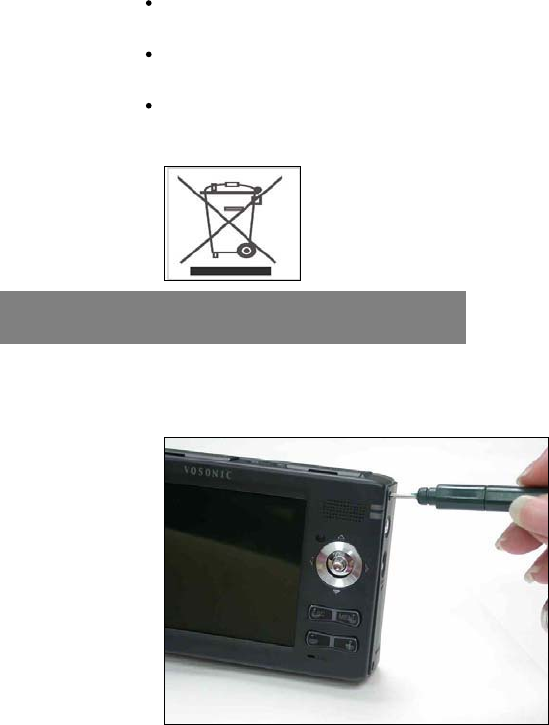
7RUHGXFHWKHULVNRIHOHFWURQLFVKRFNGRQRWUHPRYHEDFN
FRYHU
7RUHGXFHWKHULVNRIILUHRUVKRFNKD]DUGGRQRWH[SRVHWKLV
HTXLSPHQWWRUDLQOLTXLGRUPRLVWXUH
7RDYRLGDQ\GDQJHUWRWKHHQYLURQPHQWDQGWRKXPDQKHDOWK
SOHDVHGRQRWGLVSRVHRIWKHHOHFWURQLFGHYLFHLQWKHUHJXODU
WUDVKELQEXWDWGHVLJQDWHGFROOHFWLRQSRLQWV
8VHWKHVXSSOLHGPLQLVFUHZGULYHU3KLOLSVKHDGWRUHPRYHWKH
EDFNFRYHUUHWDLQLQJVFUHZV
+DUG'ULYH$VVHPEO\&KDUW
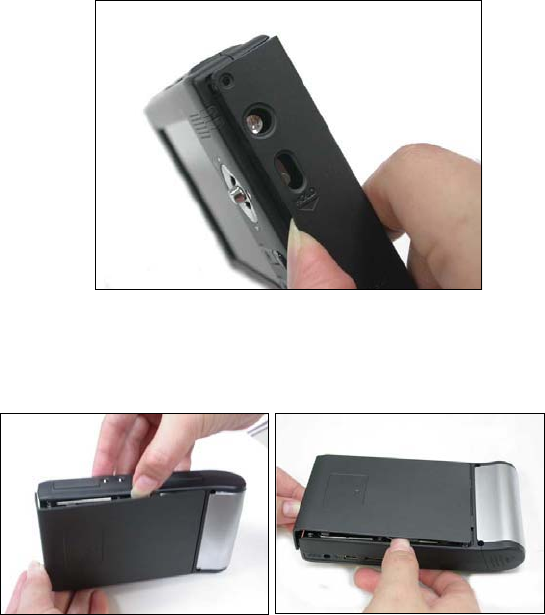
8VH\RXUILQJHUQDLOWRDYRLGVFUDWFKLQJWKHFDVHWRRSHQWKH
VLGHFOLS
6OLJKWO\OLIWWKHULJKWVLGHEDFNFRYHU
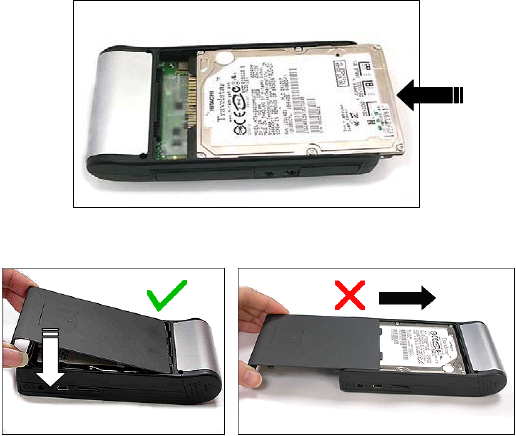
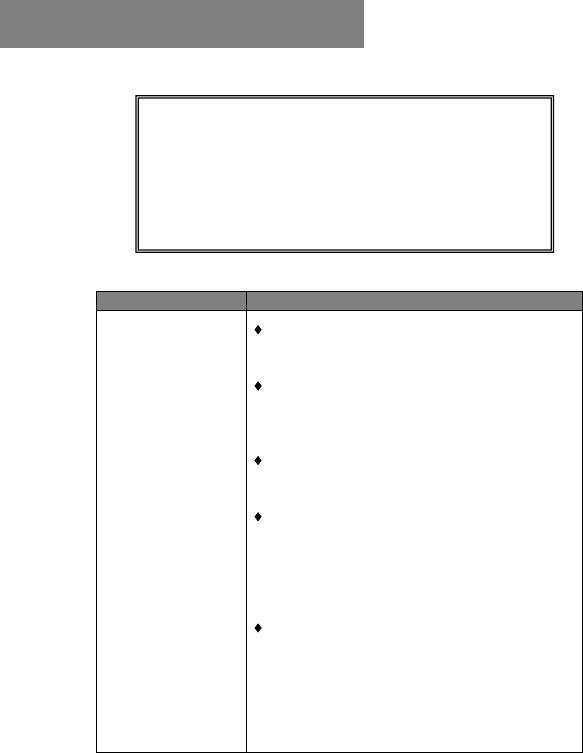
&DUHIXOO\VOLGHWKH+''LQWRWKH,'(FRQQHFWRU7DNHFDUHQRW
WREHQGWKHFRQQHFWRU¶VSLQVHOVHWKH+''ZLOOQRWIXQFWLRQ
3ODFHGRQRWVOLGHEDFNWKHFRYHU

36
xSelect the Hard Disk icon and press MENU
xSelect Format Disk option and press the joystick. Disk formatting
will be performed.
WARNING
iWhen you partition and format a hard disk, all data on that
partition is permanently deleted.
iIf the hard disk already contains data, please backup the
data first.
iThe Hard Disk will be formatted as FAT file system
19. Formatting the Hard Disk without a PC
3UREOHP 6ROXWLRQV
86%&RQQHFWLRQ
LVVXHV
8QGHU:LQGRZV6(ILUVWLQVWDOOWKHGULYHU
IURPWKHVXSSOLHG&'EHIRUHFRQQHFWLQJWKH
93WRWKH3&
,QVWHDGRIXVLQJD86%SRUWLQWKHIURQWRI
\RXUFRPSXWHUWU\D86%SRUWDWWKHEDFN
)URQW86%SRUWVDUHRIWHQQRQSRZHUHGDQG
RQO\86%FRPSDWLEOH
,IXVLQJDODSWRSFRPSXWHUDQGDGRFNLQJ
VWDWLRQWU\FRQQHFWLQJZLWKRXWWKHGRFNLQJ
VWDWLRQ
,I\RXFDQQRWVHHRQ\RXU3&WKHILOHV\RX
KDYHFRSLHGWRWKH93YLDWKH86%\RX
PXVWSURSHUO\UHPRYHXQPRXQWWKH93
IURPWKHFRPSXWHUEHIRUH GLVFRQQHFWLQJWKH
86%FDEOHWRDYRLGORVVRIGDWDRU³IUHH]LQJ´
WKHFRPSXWHUDQGRUWKH93
,IWKH93+''LFRQGRHVQRWVKRZXSLQ
:LQGRZVIRURYHUPLQXWHWKH93+''¶V
)LOHV$OORFDWLRQ7DEOH)$7PD\EH
FRUUXSWHG<RXFDQXVHWKH)RUPDW)XQFWLRQRQ
WKH93WRUHIRUPDWWKH'ULYHEXWQRWH
WKDW LWZLOOHUDVH$//GDWDRQ\RXU93
:$51,1*
8QGHUQRFLUFXPVWDQFHVVKRXOG\RXWU\WRUHSDLUWKHV\VWHP
\RXUVHOIDVWKLVZLOOLQYDOLGDWHWKHZDUUDQW\'RQRWRSHQ
WKHV\VWHPDVWKHUHLVDULVNRIHOHFWULFDOVKRFN,IDIDXOW
RFFXUVILUVWFKHFNWKHSRLQWVOLVWHGEHORZEHIRUHWDNLQJWKH
V\VWHPIRUUHSDLU,I\RXDUHXQDEOHWRUHPHG\DSUREOHP
FRQVXOW\RXUGHDOHURUVHUYLFHFHQWHU
7URXEOHVKRRWLQJ

38
MacintoshTM OS
issues
iMacOS 10.0.x does not adequately support
FAT volumes. Upgrading to version 10.1 or
later is mandatory.
iThe FAT-32 format made by MacOS 10´s
Disk Utility is incorrect. Formatting must be
done under MacOS 9.
iThe FAT volumes do not appear or disappear
until after the mouse has been moved.
Data corruption,
General Error,
Can’t open
Source File
iIf the File Allocation Table (FAT) is
corrupted, the data transferred to the VP8390
from a memory card may appear faulty. Please
backup the data and run ScanDisk, Disk
Defragmenter or reformat the memory card
(but note that it will erase ALL data on your
memory card).
iIf the browser shows a “?” sign, it indicates
that it is not one of the standard file types
which the system supports or can play.
Formatting and
partitioning
iTo work in the standalone mode, both the disk
and the memory cards must be formatted to the
FAT or FAT-32 file systems.
Video Playback
iUn-synchronized playback may occur due to
the original video being encoded in NTSC
format while your VP8390 is set to display the
output as PAL (see the system display settings)
or vice versa. Try changing this to the other
setting.
Operation freezes
or Stops
iPress Reset to turn off the device, then turn it
on again.
iIf you get abnormal freezes from a video
/audio playback, call our technical support
hotline or email to service@vosonic.com.tw
!
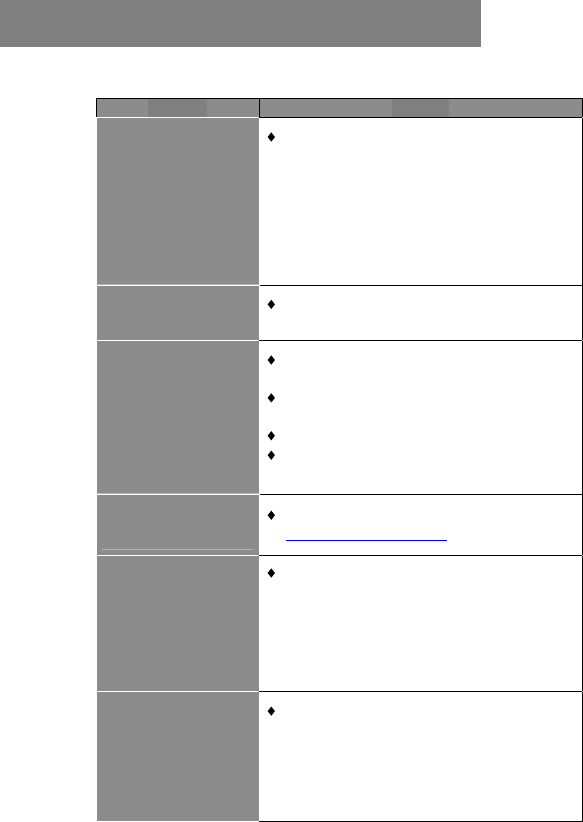
3UREOHP 6ROXWLRQ
:K\FDQW,KHDU
PXVLF"
,IWKHSOD\HUSOD\VDYLGHRRUPXVLFILOHDQG
\RXGRQWKHDUDQ\WKLQJWKHQWKHUHPD\EHD
SUREOHPZLWK\RXUVSHDNHUVRUKHDGSKRQHV
,I\RXFDQKHDURWKHUVRXQGVWKURXJK\RXU
VSHDNHUVWKHQWKHUHPLJKWEHDSUREOHPZLWK
RXUVRXUFHILOH,I\RXIHHOWKHODWWHULVWKH
FDVHWKHQSOHDVHFRQWDFWXVDQGSURYLGHXV
ZLWKDVPXFKLQIRUPDWLRQDV\RXFDQ
7KHV\VWHPGRHVQRW
UHDFWZKHQEXWWRQV
DUHSUHVVHG
5HPRYHDQGUHFRQQHFWWKH$&DGDSWHUSOXJ
DQGVZLWFKRQWKHV\VWHPDJDLQ
7KHUHPRWHFRQWURO
GRHVQRWIXQFWLRQ
SURSHUO\
5HGXFHWKHGLVWDQFHEHWZHHQWKHUHPRWH
FRQWURODQGWKHV\VWHP
,QVHUWWKHEDWWHU\ZLWKWKHSRODULW\VLJQV
DOLJQHGDVLQGLFDWHG
5HSODFHWKHEDWWHU\
3RLQWWKHUHPRWHFRQWUROGLUHFWO\WRZDUGWKH
,5VHQVRURQWKHIURQWRIWKHV\VWHP
+RZFDQ,JHWDQ
H[WUDEDWWHU\IRUP\
93
&RQWDFW\RXURULJLQDOGHDOHURUHPDLOWR
VHUYLFH#YRVRQLFFRPWZ
+RZGR,EURZVHP\
ILOHVRQWKH93
ZKLOHSOD\LQJPXVLF"
<RXFDQEURZVH\RXUILOHVZKLOHOLVWHQLQJWR
D 03 :0$ RU :$9 PXVLF ILOH RQO\
:KLOH \RXU PXVLF LV SOD\LQJ SUHVV 0(18
DQGVHOHFW³3OD\LQ%DFNJURXQG³PRGH
1RWH 7KLV IHDWXUH LV RQO\ DYDLODEOH GXULQJ 0XVLF
SOD\EDFN
:KHQ,SOD\YLGHRV
RQP\79WKH
SLFWXUHLPDJHKDVQR
FRORUDQGRULV
GLVWRUWHGZK\"
86$ DQG (XURSH XVH GLIIHUHQW 79 V\VWHPV
167&VWDQGDUGLVXVHGLQWKH86$DQG3$/
VWDQGDUGLVXVHGLQ(XURSH(QWHU237,216
DQGVHOHFW ',63/$<WRVHW\RXU93WR
WKH79VWDQGDUGUHTXLUHGLQ\RXUFRXQWU\
)UHTXHQWO\$VNHG4XHVWLRQV
+RZWRXSGDWHWKHILUPZDUHIRUP\9RVRQLF
9,6,792621,&217+(:(%
*RWRKWWSZZZYRVRQLFFRPWRGRZQORDGWKHODWHVWILUPZDUH
7KHODWHVWYHUVLRQRIWKLVPDQXDOPD\DOVREHDYDLODEOHRQ9RVRQLFVZHEVLWH
&217$&792621,&
7RKHOS9RVRQLFWRSURPSWO\DQVZHU\RXUTXHVWLRQVSOHDVHKDYH\RXUSURGXFW¶V
PRGHOQXPEHUVHULDOQXPEHUILUPZDUHYHUVLRQDQG\RXUFRQWDFWLQIRUPDWLRQZKHQ
\RXFDOOVHQGDQHPDLOWR&XVWRPHU6HUYLFHVHUYLFH#YRVRQLFFRPWZ7KH61DQG
PRGHOQXPEHUDUHRQWKHEDFNRI\RXU93FDVH
5(*,67(5$0(0%(5$79RVRQLF &/8%
7KHHDVLHVWZD\WRFRPPXQLFDWHDQGVKDUH\RXUH[SHULHQFHZLWKRWKHUXVHUVLVWR
UHJLVWHUDVD9RVRQLFPHPEHUVDW9RVRQLF&OXE
KWWSZZZYRVRQLFWZPDLOQHW
92621,&7(&+12/2*<&25325$7,21
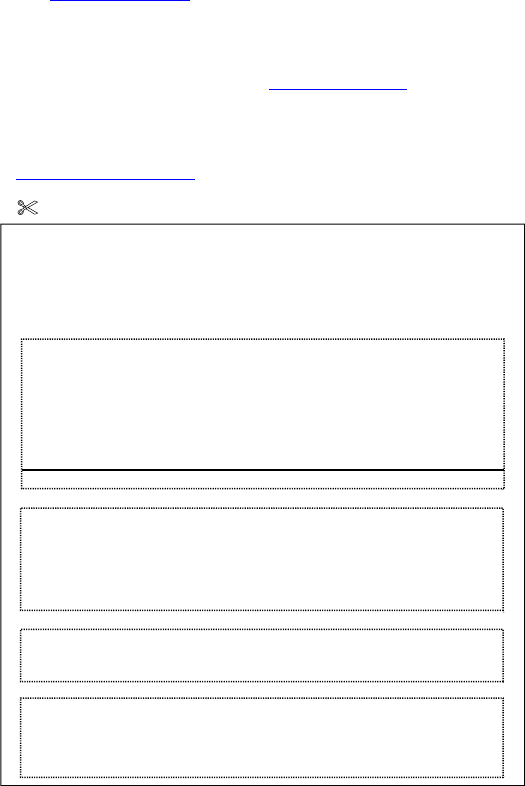
7RSURFHVVDUHTXHVWIRU50$6HUYLFHWKHIROORZLQJLQIRUPDWLRQPXVWEH
SURYLGHG
0RGHO1RBBBBBBBBBBBBBB 611RBBBBBBBBBBBB
8VHU1DPH BBBBBBBBBBBBBBBBBBBBBBBBB 7HOBBBBBBBBBBB
(PDLOBBBBBBBBBBBBBBBBBBBBBBBBBBBBBBBBBBBBBBBBBBBBBB
5HWXUQ$GGUHVVBBBBBBBBBBBBBBBBBBBBBBBBBBBBBBBBBBBBBBB
3UREOHP'HVFULSWLRQ)RU8VHU
5HWXUQHG3URGXFW'HWDLO)RU0DQXIDFWXUHU
'HDOHULQIRUPDWLRQ

41
Index
Introduction and Warranty details. . . . . . . . . . . . . . . . . . 2
Specifications . . . . . . . . . . . . . . . . . . . . . . . . . . . . . . . . . . 5
Overview of panels & keys . . . . . . . . . . . . . . . . . . . . . . . 9
Using the VP8360 . . . . . . . . . . . . . . . . . . . . . . . . . . . . . 10
Settings . . . . . . . . . . . . . . . . . . . . . . . . . . . . . . . . . . . . . 13
Using memory cards . . . . . . . . . . . . . . . . . . . . . . . . . . . . 17
Photos . . . . . . . . . . . . . . . . . . . . . . . . . . . . . . . . . . . . . . 19
Video . . . . . . . . . . . . . . . . . . . . . . . . . . . . . . . . . . . . . . 23
Music . . . . . . . . . . . . . . . . . . . . . . . . . . . . . . . . . . . . . . 24
Video recording . . . . . . . . . . . . . . . . . . . . . . . . . . . . . . . 26
Working with Files and Folders . . . . . . . . . . . . . . . . . . . 28
FM Radio . . . . . . . . . . . . . . . . . . . . . . . . . . . . . . . . . . . . 28
Audio recording . . . . . . . . . . . . . . . . . . . . . . . . . . . . . . . 29
Text Files . . . . . . . . . . . . . . . . . . . . . . . . . . . . . . . . . . . 30
Game . . . . . . . . . . . . . . . . . . . . . . . . . . . . . . . . . . . . . . . 31
Battery recharge . . . . . . . . . . . . . . . . . . . . . . . . . . . . . . . 31
Error messages . . . . . . . . . . . . . . . . . . . . . . . . . . . . . . . . 31
Hard Disk and memory cards . . . . . . . . . . . . . . . . . . . . 32
Hard Disk Assembly Chart . . . . . . . . . . . . . . . . . . . . . . . 33
Hard Disk formatting . . . . . . . . . . . . . . . . . . . . . . . . . . 35
Troubleshooting . . . . . . . . . . . . . . . . . . . . . . . . . . . . . . 36
FAQ . . . . . . . . . . . . . . . . . . . . . . . . . . . . . . . . . . . . . . . . 38
Firmware upgrade . . . . . . . . . . . . . . . . . . . . . . . . . . . . . 39
THANK YOU FOR CHOOSING THIS PRODUCT
We hope it will provide you with years of trouble-free
enjoyment. Please look after your Vosonic. If you
experience problems and cannot find solutions in the
previous sections, please contact your dealer or check
for updated firmware at
www.vosonic.com
or email to
service@vosonic.com.tw
The Vosonic Team
