Vtech Go Smart Wheels Airport Playset Owners Manual
2014-11-12
: Vtech Vtech-Go-Go-Smart-Wheels-Airport-Playset-Owners-Manual-109314 vtech-go-go-smart-wheels-airport-playset-owners-manual-109314 vtech pdf
Open the PDF directly: View PDF  .
.
Page Count: 14
Airport Playset
91-002826-000
© 2013 VTech
Printed in China
User’s Manual
US CA
Dear Parent,
Welcome to the world Go! Go! Smart Wheels™! We’re cited
you’ve decided to ride along with us and plore all that Go! Go!
Smart Wheels™ has to er. ese ts have been designed to give
your child a thrilling learning perience with hours and hours
fun as well.
Go! Go! Smart Wheels™ features vehicles that interact with your
child by lighting up, singing and talking, while teaching your
child lers and vehicle names (each sold separately). ere are
her surprises in store, too! With our innovative SmartPoint™
technology, available clusively on Go! Go! Smart Wheels™ playsets
(each sold separately), your child will smile as th hear the
vehicles respond to each unique SmartPoint™ location with
singing, sound effects and fun phrases.
Our Go! Go! Smart Wheels™ playsets also feature buons, gears and
her mechanical features to encourage the development your
child’s fine mor skills. Many the playsets also have tracks that
can be aanged in endle ways, stimulating your child’s
creativity. In addition, many the Go! Go! Smart Wheels™ playsets
connect to her playsets in the collection, so there’s no end to what
your child can do!
To learn more about VTech® ts, visit www.vtechkids.com
With Go! Go! Smart Wheels™, it’s playtime with miles learning!
Sincerely,
Your iends at VTech®
2
Introduction
INTRODUCTION
Thank you for purchasing the VTech® Go! Go! Smart Wheels™ Airport
Playset learning toy!
Fly into learning fun with the Go! Go! Smart Wheels™ Airport Playset
by VTech®. Watch the included airplane or other Go! Go! Smart
Wheels™ vehicles (each sold separately) respond to the airport’s
six SmartPoint™ locations. The learning fun doesn’t stop here! The
tracks can connect to other Go! Go! Smart Wheels™ playsets (each
sold separately).
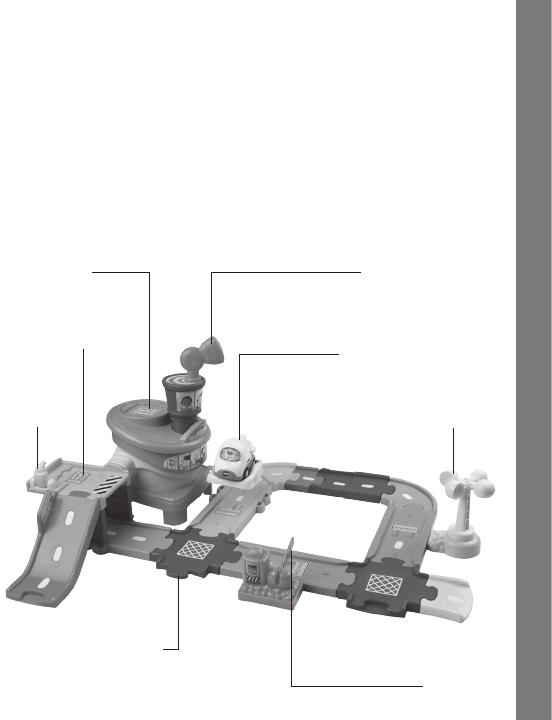
Airplane sings, talks and
lights up
Spinning weather vane
Antenna turns to ‘fly’
airplane on cloud platform
Landing pad
Fuel
station
SmartPointTM vehicle
location area
Connect tracks to other
Go! Go! Smart Wheels™
playsets (each sold separately) Lift-up gate
3
Included In This Package
INCLUDED IN THIS PACKAGE
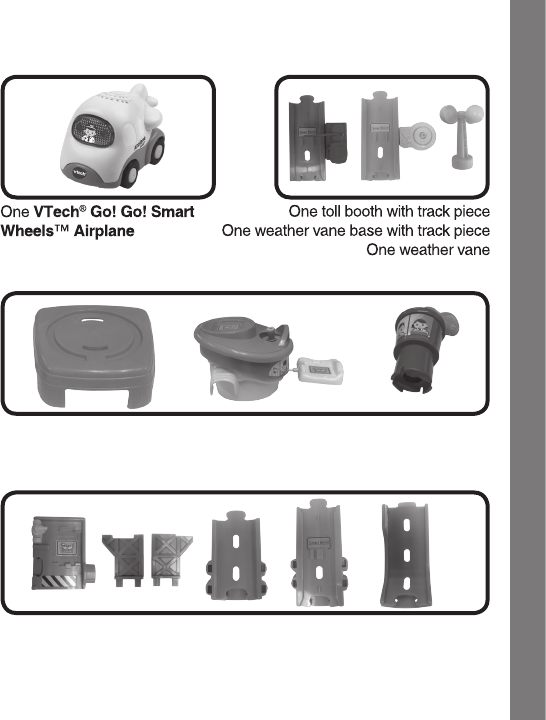
One airport base
One airport tower
One control tower with antenna
One fuel station platform
Two supports
Two fuel station base track pieces
One ramp track piece
4
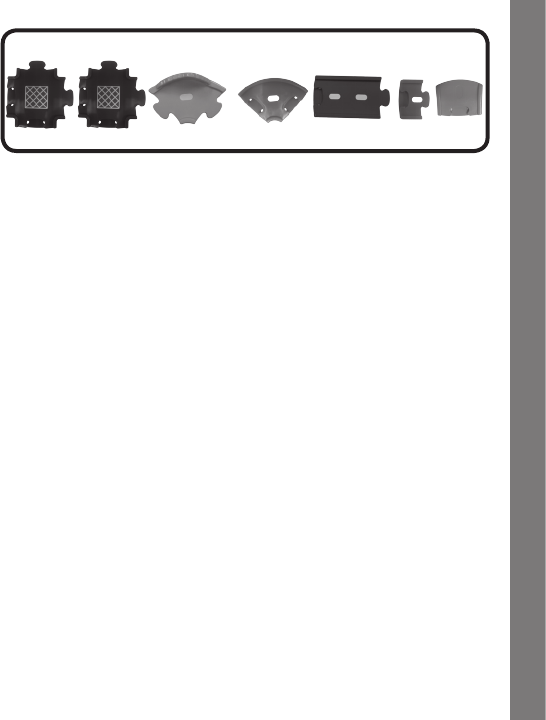
Two crossroad track pieces
Two curved track pieces
One straight track piece
One mini straight track piece
One short straight track piece
One user’s manual
WARNING:
All packing materials, such as tape, plastic sheets, packaging
locks and tags are not part of this toy, and should be discarded
for your child’s safety.
ATTENTION :
Pour la sécurité de votre enfant, débarrassez-vous de tous
les produits d’emballage tels que rubans adhésifs, feuilles de
plastique, attaches et étiquettes. Ils ne font pas partie du jouet.
NOTE:
Please keep this user’s manual as it contains important
information.
Included In This Package
5
GETTING STARTED
BATTERY INSTALLATION
1. Make sure the unit is turned OFF.
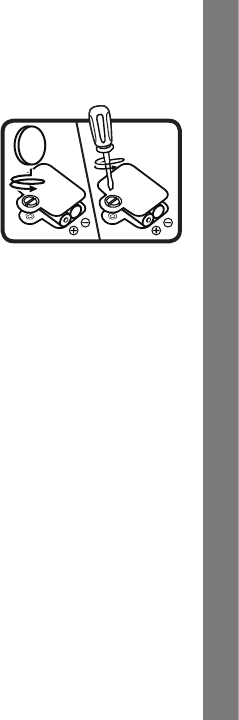
2. Locate the battery cover on the
bottom of the airplane. Use a coin or
a screwdriver to loosen the screw.
3. Install 2 new ‘AAA’ (AM-4/LR03)
batteries following the diagram inside
the battery box. (The use of new
alkaline batteries is recommended for
maximum performance.)
4. Replace the battery cover and tighten the screw to secure the
battery cover.
BATTERY NOTICE
• Usenewalkalinebatteriesformaximumperformance.
• Useonlybatteriesofthesameorequivalenttypeasrecommended.
• Donotmixdifferenttypesofbatteries:alkaline,standard(carbon-
zinc) or rechargeable (Ni-Cd, Ni-MH), or new and used batteries.
• Donotusedamagedbatteries.
• Insertbatterieswiththecorrectpolarity.
• Donotshort-circuitthebatteryterminals.
• Removeexhaustedbatteriesfromthetoy.
• Removebatteriesduringlongperiodsofnon-use.
• Donotdisposeofbatteriesinfire.
• Donotchargenon-rechargeablebatteries.
• Removerechargeablebatteriesfromthetoybeforecharging (if
removable).
• Rechargeable batteriesare onlyto be charged under adult
supervision.
Getting Started
6
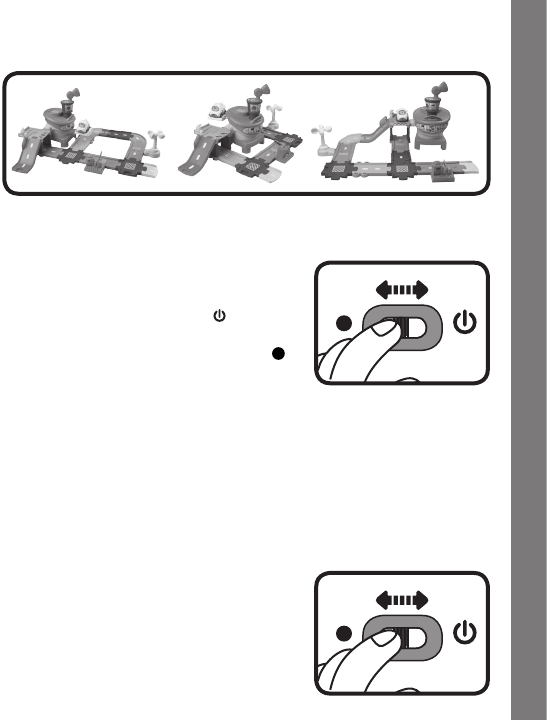
ASSEMBLY INSTRUCTIONS
With the VTech® Go! Go! Smart Wheels™ Airport Playset, safety
comesfirst.Toensureyourchild’ssafety,adultassemblyisrequired.
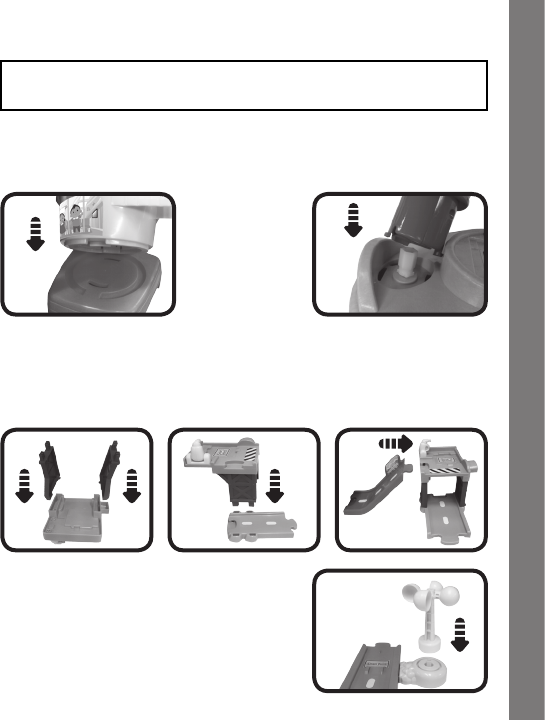
1. Assemble the airport:Inserttheairporttowerintotheairportbase.
Once securely in place, you will hear a loud ‘click’ sound. Insert the
control tower with antenna into the top of the airport tower. Again, you
will hear a loud ‘click’ sound to indicate the control tower is secure.
2. Assemble the fuel station platform:Insertthetwofuelstation
supports into the bottom of the fuel station platform. Then insert the
fuel station supports into one of the fuel station base track pieces.
You will hear a loud ‘click’ sound to indicate the platform is secure.
After that, attach the ramp track piece to the fuel station platform.
3. Assemble the weather vane: Place
the weather vane on its base.
Assembly Instructions
7
After the above steps, connect these pieces with the included track
pieces. You can configure them into different shapes.
PRODUCT FEATURES
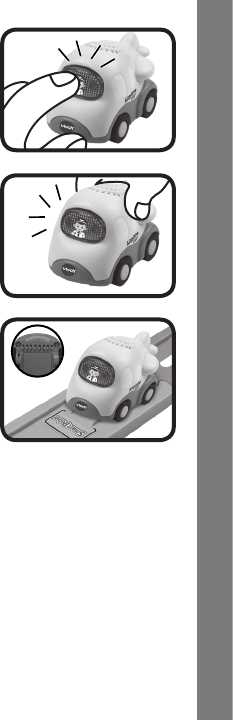
1. ON/OFF SWITCH
To turn the airplane ON, slide the ON/
OFF SWITCH to the ON ( ) position.
To turn the airplane OFF, slide the
ON/OFF SWITCH to the OFF ( )
position.
2. AUTOMATIC SHUT-OFF
To preserve battery life, the VTech® Go! Go! Smart Wheels™
Airplane will automatically power-down after approximately 60
seconds without input. The unit only can be turned on again by
pressingthelight-upscreenbuttonorpushingtheairplanequickly.
ACTIVITIES
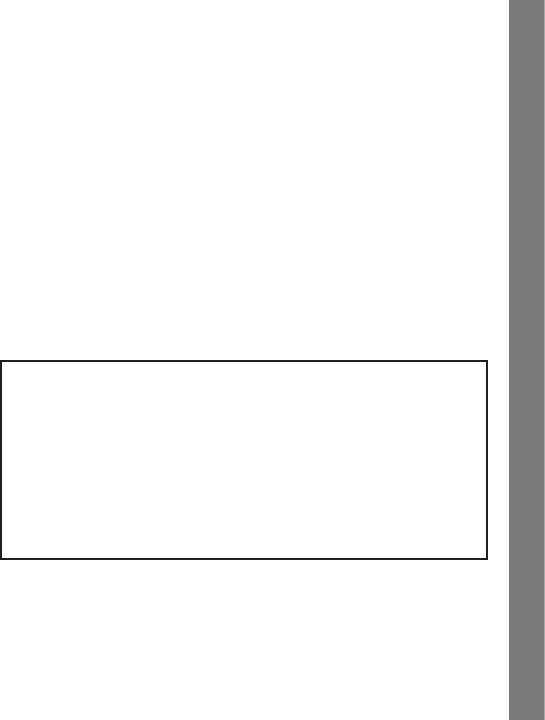
1. Slide the ON/OFF SWITCH to turn
the airplane ON. You will hear airplane
sounds, a song and a phrase. The light
will flash with the sounds.
Product Features
8
2. Press the LIGHT-UP PILOT BUTTON
to hear airplane sounds, songs and
phrases. The light will flash with the
sounds.
3. Push the airplane to hear fun sounds
and melodies. While the melody is
playing, push the airplane again to add
in fun sounds on top of the melody. The
light will flash with the sounds.
4. For added fun, the airplane interacts
with the Go! Go! Smart Wheels™
Aiport Playset. Simply roll the
airplane over one of the airport’s six
SmartPoints™ to see the airplane’s
light flash and to hear greetings, fun
sounds, short tunes and sing-along
songs. The airplane even interacts
with other Go! Go! Smart Wheels™
playsets (each playset sold separately).
Activities

9
MELODY LIST
1. Alouette
2. HeyDiddleDiddle
3. My Bonnie Lies Over the Ocean
4. OhWhere,OhWhereHasMyLittleDogGone?
5. Skip to My Lou
6. ABC Song
SONG LYRICS
SONG 1
Look at the beautiful sky.
It’s a nice day for flying.
Flying up, flying down!
Flying all around!
SONG 2
Let’s take a flight today!
Fly a thousand miles away!
SONG 3
Turn the antenna around!
Take me off of the ground!
Melody List/Song Lyrics

10
CARE & MAINTENANCE
1. Keep the unit clean by wiping it with a slightly damp cloth.
2. Keep the unit out of direct sunlight and away from any direct heat
source.
3. Remove the batteries when the unit is not in use for an extended
period of time.
4. Donotdroptheunitonahardsurfaceanddonotexposetheunit
to moisture or water.
Care & Maintenance
11
TROUBLESHOOTING
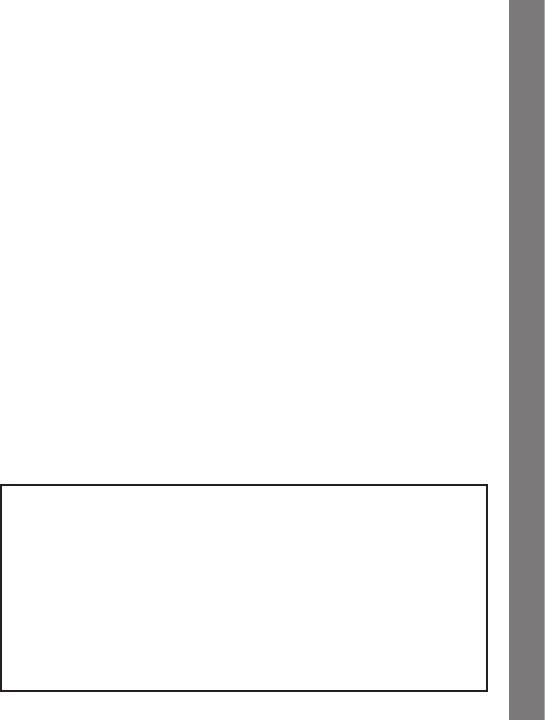
If for some reason the program/activity stops working or malfunctions,
pleasefollowthesesteps:
1. Turn the unit OFF.
2. Interrupt the power supply by removing the batteries.
3. Let the unit stand for a few minutes, then replace the batteries.
4. Turn the unit ON. The unit should now be ready to play again.
5. If the product still does not work, replace with an entire set of new
batteries.
Iftheproblempersists,pleasecallourConsumerServicesDepartment
at 1-800-521-2010 in the U.S. or 1-877-352-8697 in Canada, and a
service representative will be happy to help you.
For information on this product’s warranty, please call VTech® at 1-800-
521-2010 in the U.S. or 1-877-352-8697 in Canada.
IMPORTANT NOTE:
Creating and developing Infant Learning products is accompanied
by a responsibility that we at VTech® take very seriously. We make
every effort to ensure the accuracy of the information which forms
the value of our products. However, errors sometimes can occur.
It is important for you to know that we stand behind our products
andencourage you to call our Consumer Services Department
at 1-800-521-2010 in the U.S. or 1-877-352-8697 in Canada with
any problems and/or suggestions that you might have. A service
representative will be happy to help you.
Troubleshooting
12
NOTE:
Thisequipmenthasbeentestedandfoundtocomplywiththelimitsfor
a Class B digital device, pursuant to Part 15 of the FCC Rules. These
limits are designed to provide reasonable protection against harmful
interferenceinaresidentialinstallation.Thisequipmentgeneratesand
usesradiofrequencyenergyandifnotinstalledandusedinaccordance
with the manufacturer’s instructions, may cause interference to radio
communications. However, there is no guarantee that interference
willnotoccurinaparticularinstallation.Ifthisequipmentdoescause
interference with radio or television reception, which can be determined
byturningtheequipmentonandoff,theuserisencouragedtotryto
correcttheinterferencebyoneormoreofthefollowingmeasures:
• Reorientthereceivingantenna.
• Increasetheseparationbetweentheequipmentandreceiver.
• Connecttheequipmentintoanoutletonacircuitdifferentfromthat
to which the receiver is connected.
• Consultthedealeroranexperiencedradio/TVtechnicianforhelp.
Caution: changes or modifications not expressly approved by the party
responsible for compliance could void the user’s authority to operate
theequipment.
THISDEVICE COMPLIESWITHPART 15OFTHE FCC RULES.
OPERATIONISSUBJECTTOTHEFOLLOWINGTWOCONDITIONS:
(1)THISDEVICEMAYNOTCAUSEHARMFULINTERFERENCE,AND
(2)THISDEVICEMUST ACCEPT ANYINTERFERENCE RECEIVED,
INCLUDING INTERFERENCETHAT MAY CAUSE UNDESIRED
OPERATION.
THISCLASSB DIGITALAPPARATUS COMPLIESWITHCANADIAN
ICES-003.
CETAPPAREILNUMÉRIQUEDELACLASSEBESTCONFORMEÀLA
NORMENMB-003DUCANADA.
Other Info