Vtech Go Smart Wheels Ultimate Amazement Park Playset Owners Manual
2014-11-12
: Vtech Vtech-Go-Go-Smart-Wheels-Ultimate-Amazement-Park-Playset-Owners-Manual-109339 vtech-go-go-smart-wheels-ultimate-amazement-park-playset-owners-manual-109339 vtech pdf
Open the PDF directly: View PDF  .
.
Page Count: 23
© 2014 VTech
Printed in China
91-002921-002
User’s Manual
Ultimate Amazement Park PlaysetTM
Dear Parent,
Go! Go! Smart Wheels Go! Go!
Smart Wheels
fun as well.
Go! Go! Smart Wheels features vehicles that interact with your
child by lighting up, singing and talking, while teaching your
SmartPoint™
Go! Go! Smart Wheels® playsets
vehicles respond to each unique SmartPoint™ location with
singing, sound effects and fun phrases.
Our Go! Go! Smart Wheels
Go! Go! Smart Wheels®
®
playsets
your child can do!
To learn more about VTech
With Go! Go! Smart Wheels
Sincerely, VTech®
SmartPoint™
2
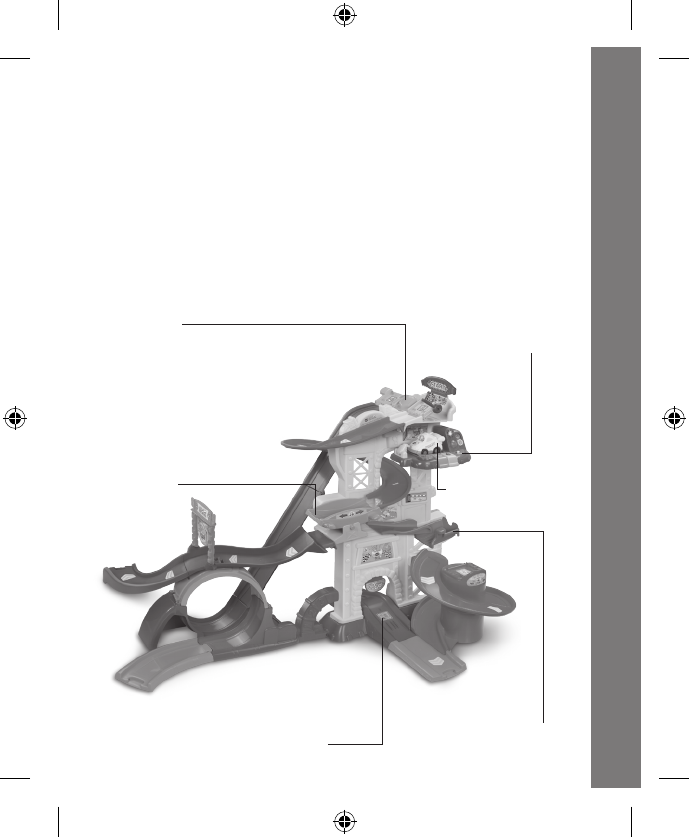
ROCKING
PLATFORM
FLIP-DOWN PLATFORM8 SMARTPOINT™ LOCATIONS
SMARTPOINT™
RACE CAR
ELECTRONIC
PIT STOP
LAUNCHER
INTRODUCTION
Thank you for purchasing the VTech® Go! Go! Smart Wheels®
Ultimate Amazement Park PlaysetTM learning toy!
Pull the flag and zoom around obstacles with the Go! Go! Smart
Wheels® Ultimate Amazement Park PlaysetTM by VTech® ! Develop
language and motor skills while racing through three incredible features
including a 360 degree loop, spiral and ramp!
Introduction
33
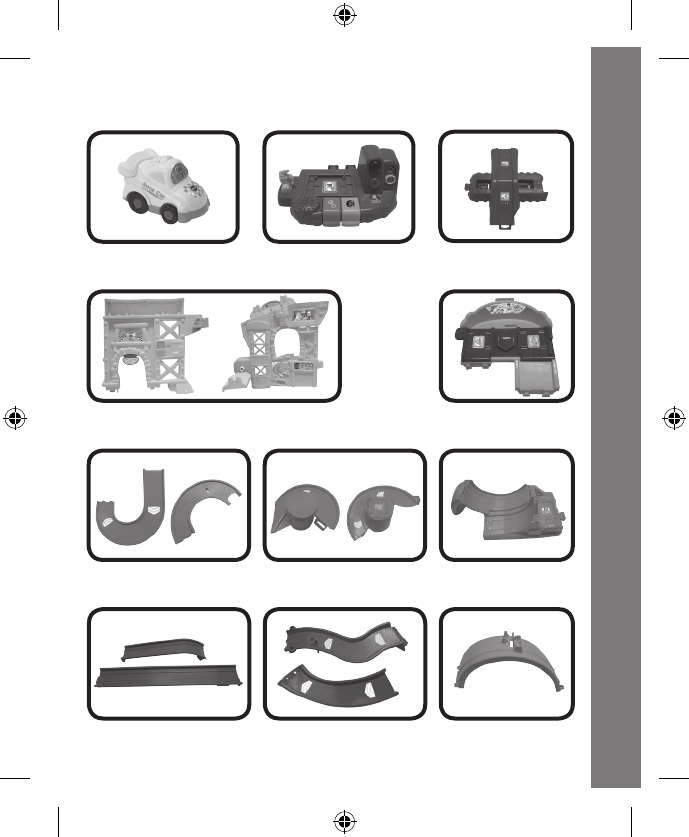
INCLUDED IN THIS PACKAGE
Included In This Package
One SmartPointTM
electronic pit stop
One SmartPointTM
tower base
One SmartPointTM
launcher
One SmartPointTM
race car
Two C-shaped tracks Two spiral tracks with
SmartPointTM platform
One SmartPointTM
loop base
One semicircular
loop track
Two ramp tracks Two long straight tracks
Two tower pieces
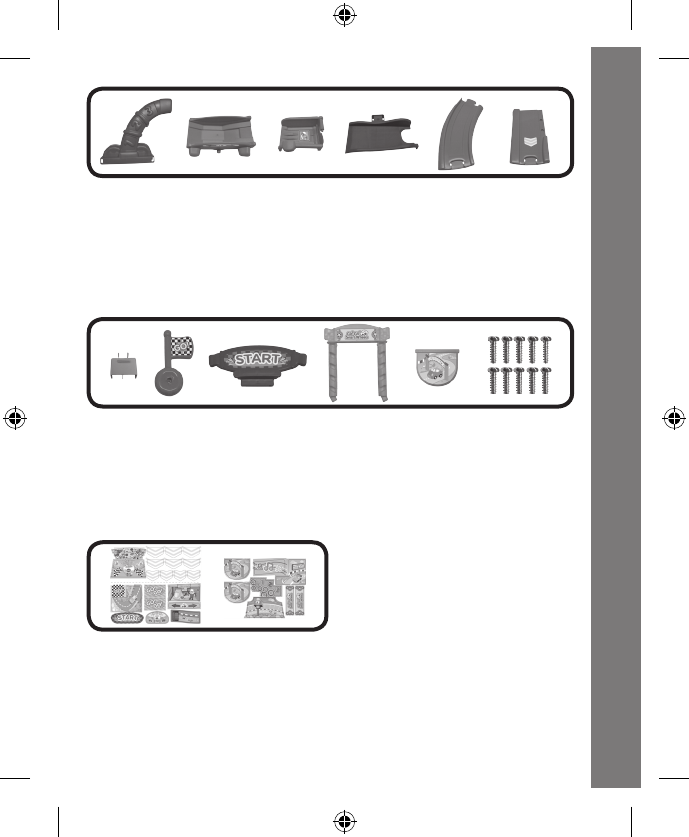
4
Included In This Package
One base support
One rocking platform
One flip-down SmartPointTM platform
One mini ramp track
One short curved track
One short straight track
One small track support
One flag piece
One start sign
One gate
One flipping board
10 screws
One user’s manual
Two label sheets
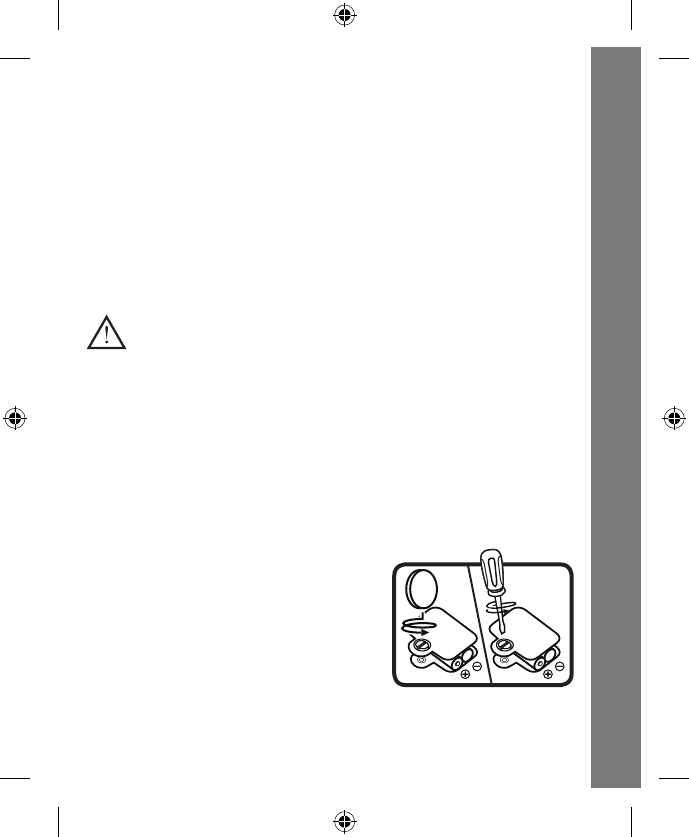
5
GETTING STARTED
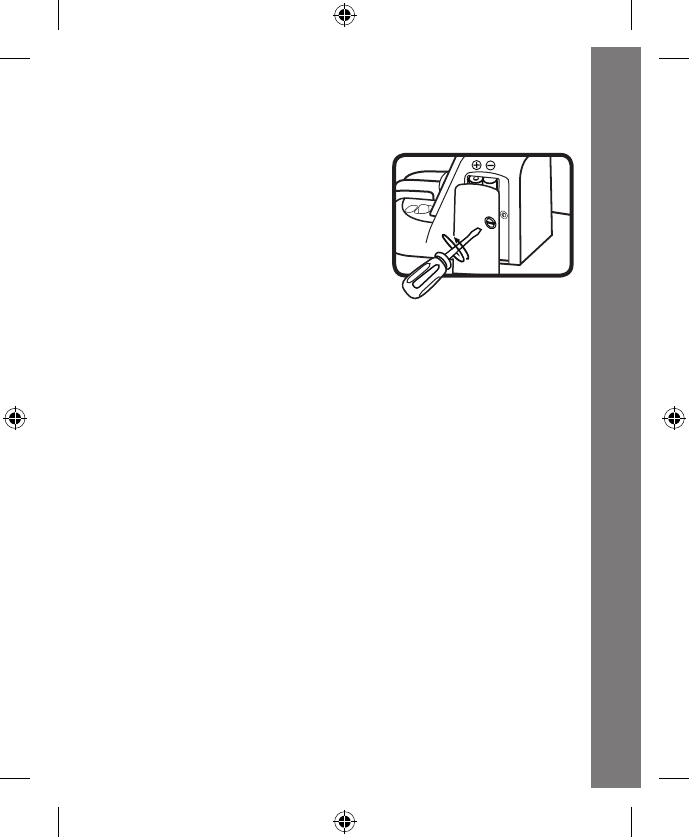
BATTERY INSTALLATION – RACE CAR
1. Make sure the unit is turned OFF.
2. Locate the battery cover on the
bottom of the race car. Use a coin or
a screwdriver to loosen the screw.
3. Install 2 new “AAA” (AM-4/LR03)
batteries following the diagram inside
the battery box. (The use of new
alkaline batteries is recommended for
maximum performance.)
4. Replace the battery cover and tighten
the screw to secure the battery cover.
Getting Started
CAUTION:
Adult assembly required. This package contains
small screws. For your child’s safety, do not let your
child play with the toy until it is fully assembled.
WARNING:
All packing materials, such as tape, plastic sheets, packaging
locks and tags are not part of this toy, and should be discarded
for your child’s safety.
ATTENTION:
Pour la sécurité de votre enfant, débarrassez-vous de tous
les produits d’emballage tels que rubans adhésifs, feuilles de
plastique, attaches et étiquettes. Ils ne font pas partie du jouet.
NOTE:
Please keep this user’s manual as it contains important
information.
6
BATTERY INSTALLATION – ELECTRONIC PIT STOP
1. Make sure the unit is turned OFF.
2. Locate the battery cover on the right
side of the electronic pit stop. Use a
a screwdriver to loosen the screw.
3. Install 2 new “AAA” (AM-4/LR03)
batteries following the diagram inside
the battery box. (The use of new
alkaline batteries is recommended
for maximum performance.)
4. Replace the battery cover and tighten
the screw to secure the battery cover.
BATTERY NOTICE
• Usenewalkalinebatteriesformaximumperformance.
• Useonlybatteriesofthesameorequivalenttypeasrecommended.
• Donotmixdifferenttypesofbatteries:alkaline,standard(carbon-
zinc)orrechargeable(Ni-Cd,Ni-MH),ornewandusedbatteries.
• Donotusedamagedbatteries.
• Insertbatterieswiththecorrectpolarity.
• Donotshort-circuitthebatteryterminals.
• Removeexhaustedbatteriesfromthetoy.
• Removebatteriesduringlongperiodsofnon-use.
• Donotdisposeofbatteriesinfire.
• Donotchargenon-rechargeablebatteries.
• Remove rechargeable batteries from the toy before charging (if
removable).
• Rechargeable batteries are only to be charged under adult
supervision.
Battery Notice
7
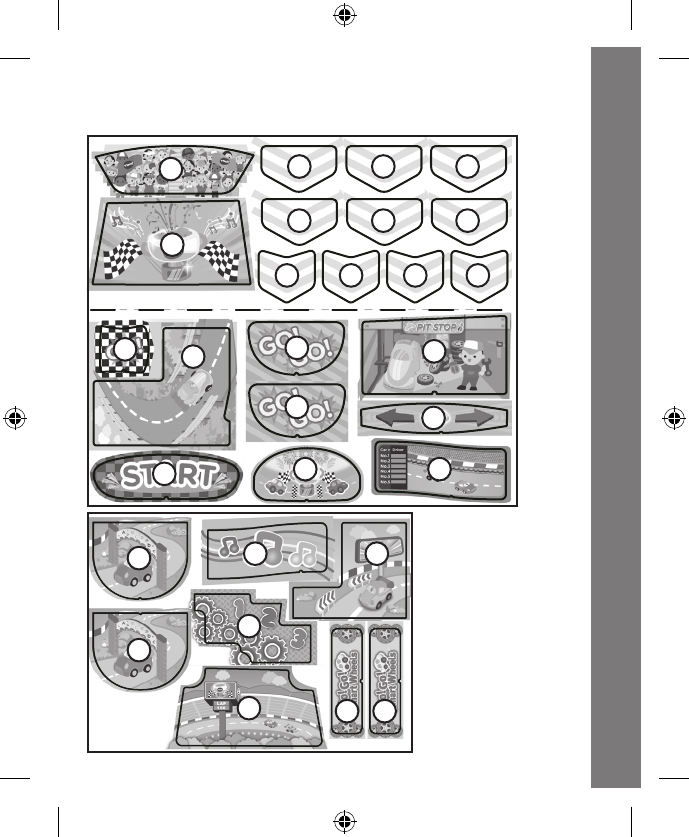
Label Instructions
13
3
4
568
8
9
10
711 12
4 4 4
3
3
3
3
2
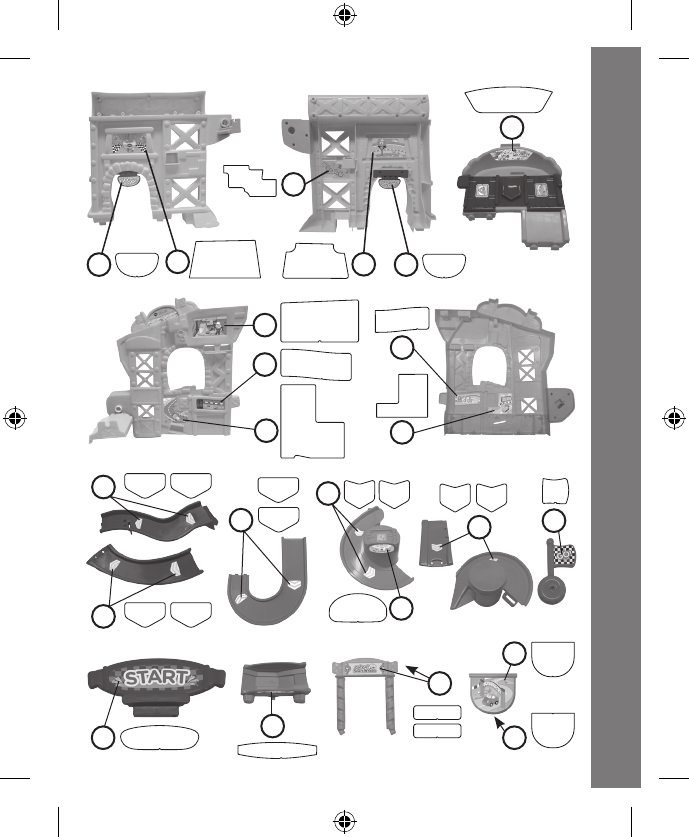
Please adhere the labels to the playset
securely as indicated below:
13
14
15 16
17
18 19 19
8
88 2
9
6
12
17
18
15
16
13
14
19
1
710
5
4
11
3
3
3
Label Instructions
4
9
ASSEMBLY INSTRUCTIONS
With the VTech®
Go! Go! Smart Wheels® Ultimate Amazement
Park PlaysetTM, safety comes first. To ensure your child’s safety,
adultassemblyisrequired.YouwillneedaPhillipsheadscrewdriver
toassembletheplayset(notincluded).
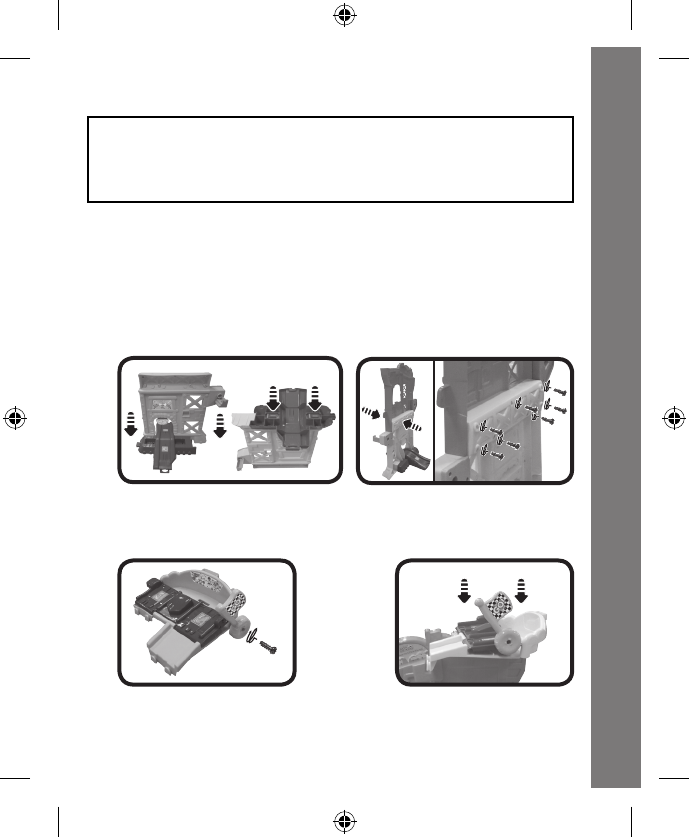
Assemble the Tower
1. Insert the big tower piece with the archway on the bottom into the
slots on the tower base. Then turn the pieces upside-down and push
down firmly until the pieces “click” into place. Insert the second big
tower piece into the slots located on the top of the first tower piece.
Use a screwdriver to fasten seven screws into the holes on the back
of the lower tower piece.
2. Attach the ag to the launcher using a screw. Then insert the
launcher into the slots on the top of the fully assembled tower piece.
Youshouldheara“click”soundtoindicatethatthepiecesaresecure.
Assembly Instructions
10
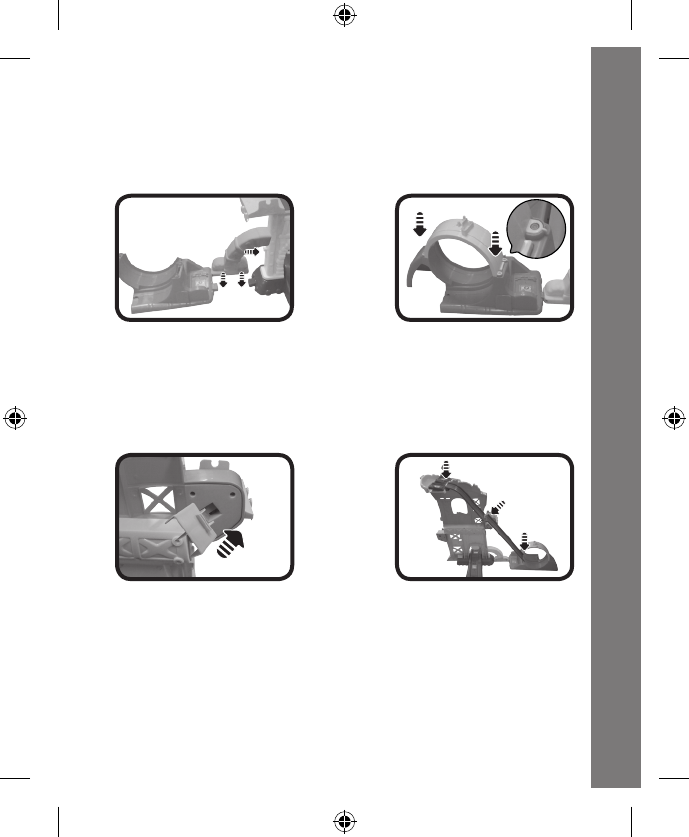
Assemble the 360 Degree Loop Course
1. Place the loop track base on the left side of the assembled tower.
Use the base support to connect the tower and loop base. Then
insert the semicircular loop track into the slots on the top of the
loop track base as shown until you hear them “click” into place.
2. Insert the small track support piece into the slot on the back of the
tower as shown. Then connect the two long straight tracks together.
Insert the hooked end into the left side of the launcher and insert the
opposite end of the long track into the slot on the loop track base
until you hear them “click” into place. The fully assembled long track
should be attached to the notch on the small track support piece.
Assemble the Spiral Course
1. Slide the longer C-shaped track onto the notches located on the
right side of the launcher so it snaps into place. Then pass the
shorter C-shaped track through the archway on the top tower
piece and connect it to the end of the longer C-shaped track.
Once connected, insert the notch that is located at the base of the
archway into the hole that is located on the bottom of the shorter
C-shaped track until it snaps into place.
Assembly Instructions
11
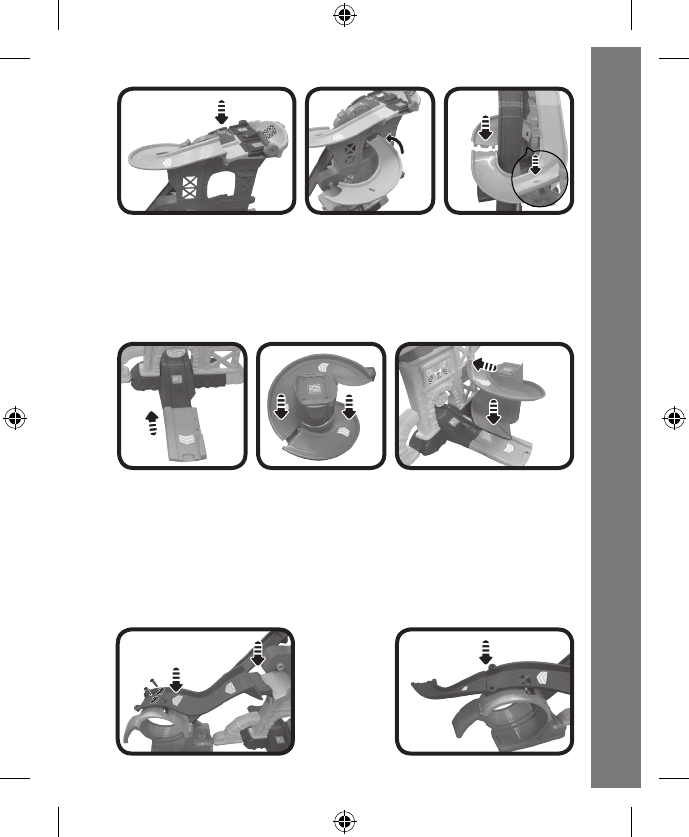
2. Snap the short straight track into the slot on the front of the tower
base. Assemble the spiral track by joining the two spiral track
pieces together making sure the piece with a SmartPoint™ is
on top. Then insert the assembled spiral into the holes located on
the bottom tower piece and the short straight track until you hear
them “click” into place.
4. Assemble the Ramp Course
Insert the long curved track with two circular holes into the slot on
the left side of the top tower piece as shown. Position the notch
located on the bottom of this curved track into the slot located on
the top of the loop track. Use a screwdriver to fasten two screws
into the holes on the track. After that, attach the other long curved
track to the end of the ramp.
Assembly Instructions
12
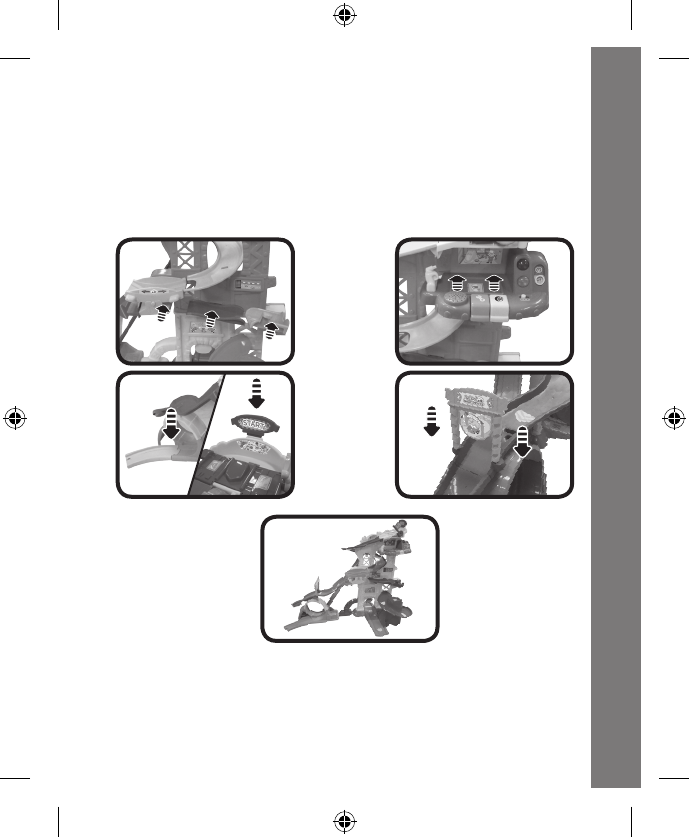
5. Finish the Assembly
Insert the rocking platform, mini ramp track, flip-down platform and
the electronic pit stop into the holes on the tower as shown until
you hear them click into place. Insert the start piece into the slot
on the top of the launcher and place the last short curved track at
the end of the loop base. Finally, attach the flipping board to the
gate, then insert the gate into the slots on the long curved track.
Once you’ve completed the above steps, you are ready to play! For
optimal performance, please play with your Ultimate Amazement Park
Playset™ on a sturdy and smooth surface.
Assembly Instructions
13
PRODUCT FEATURES – RACE CAR
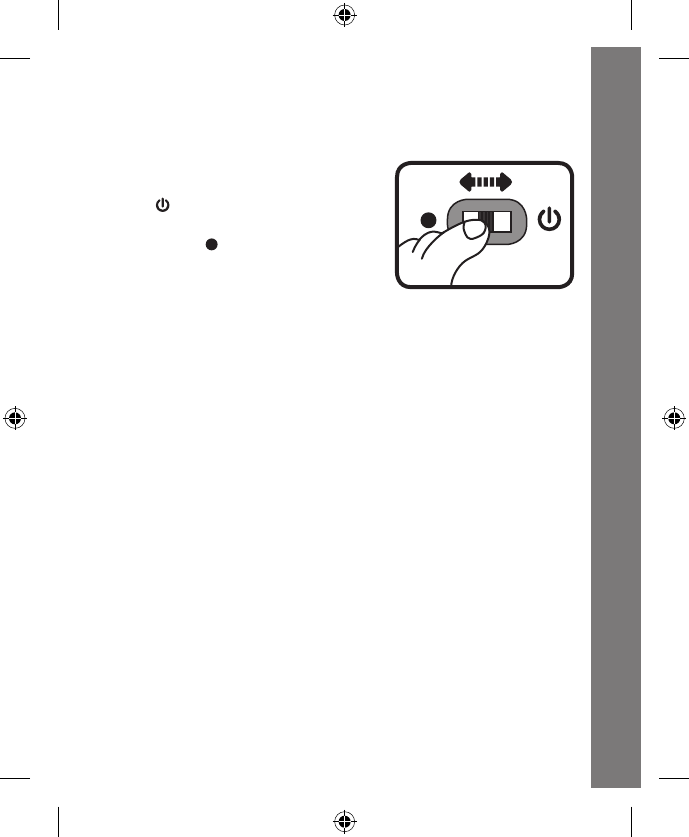
1. ON/OFF SWITCH
To turn the race car ON, slide the ON/
OFF SWITCH on the race car to the
ON ( ) position. To turn the race
car OFF, slide the ON/OFF SWITCH
to the OFF ( ) position.
2. AUTOMATIC SHUT-OFF
To preserve battery life, the race car included with the VTech®
Go! Go! Smart Wheels® Ultimate Amazement Park PlaysetTM will
automaticallypower-downafterapproximately60secondswithout
input. The unit can be turned on again by pressing the light-up driver
buttonorpushingtheracecarquickly.
Note: This product is in a try-me mode in the packaging. After opening
the package, turn the vehicle off and on again to proceed with
normal play.
Product Features – Race Car
14
ACTIVITIES - RACE CAR
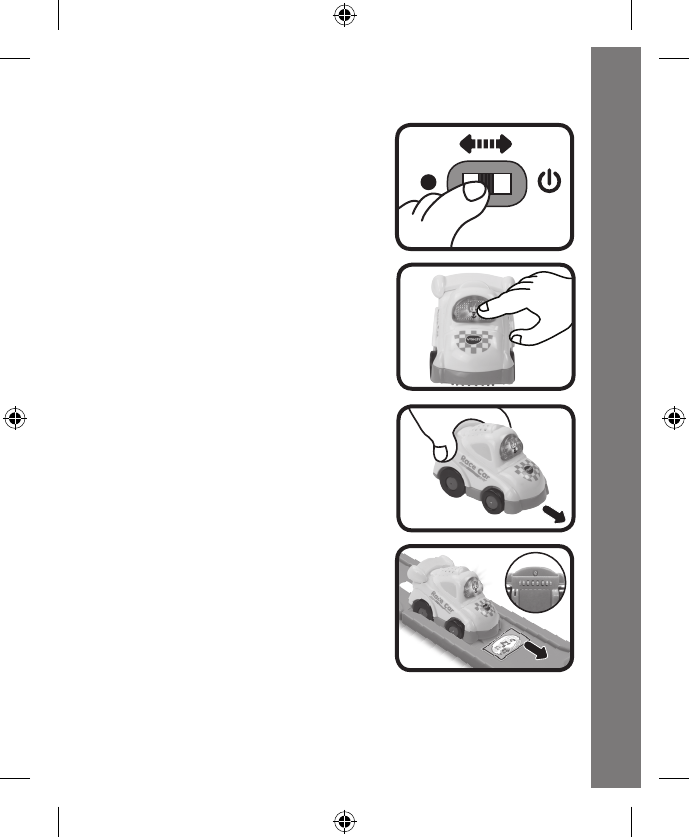
1. Slide the ON/OFF SWITCH to turn
the unit ON.You willhear racecar
sounds, a song and a phrase. The
light will flash with the sounds.
2. Press the LIGHT-UP DRIVER
BUTTON to hear race car sounds,
songs and phrases. The light will
flash with the sounds.
3. Push the race car to hear fun sounds
and melodies. While the melody is
playing, push the race car again
to add in fun sounds on top of the
melody. The light will flash with the
sounds.
4. For added fun, the race car interacts
with the VTech® Go! Go! Smart
Wheels® Ultimate Amazement
Park PlaysetTM. Simply roll the race
car over one of the playset’s eight
SmartPointTM locations to see the
race car’s light flash and to hear
greetings, fun sounds, short tunes
and sing-along songs. The race car
even interacts with other Go! Go!
Smart Wheels® playsets (each
playset sold separately).
Activities – Race Car
15
PRODUCT FEATURES – ELECTRONIC
PIT STOP
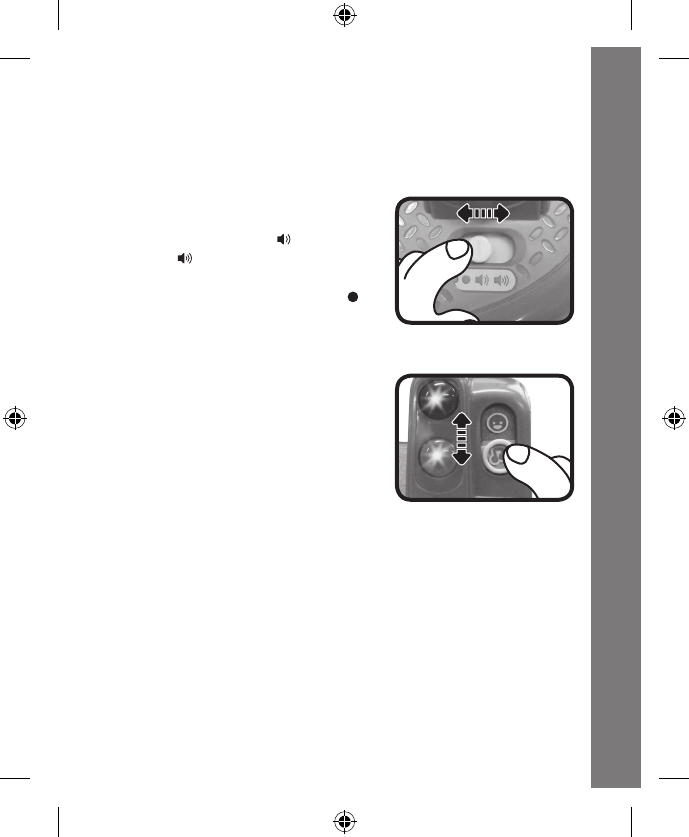
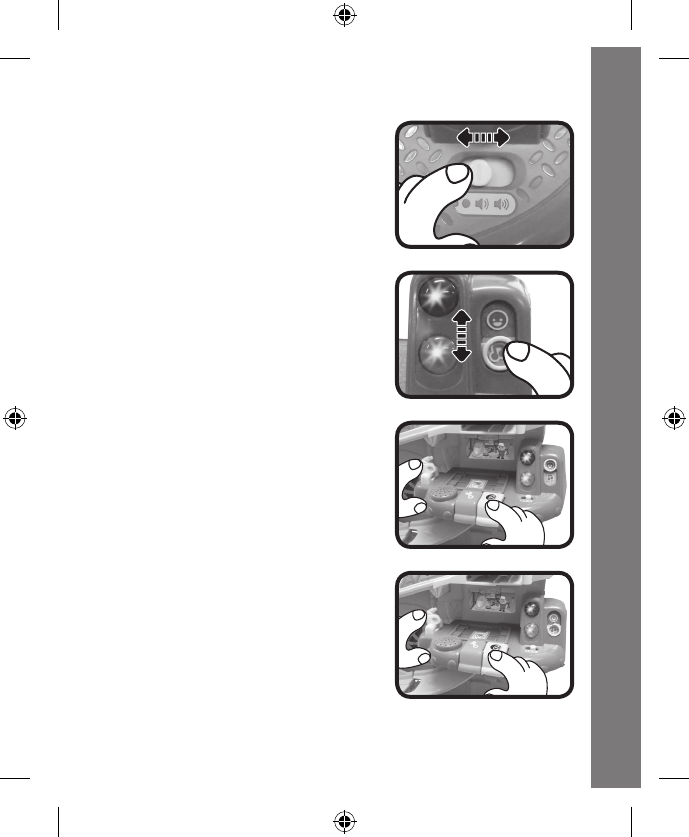
1. ON/OFF/VOLUME CONTROL SWITCH
To turn the unit ON, slide the ON/
OFF/ VOLUME CONTROL SWITCH
to the low volume ( ) or high
volume( ) position. To turn the unit
OFF, slide the ON/OFF/VOLUME
CONTROL SWITCH to the OFF( )
position.
2. MODE SELECTOR SWITCH
The electronic pit stop has two
modes of play: Play Mode and
Music Mode. Slide the MODE
SELECTOR SWITCH to choose a
mode of play.
3. AUTOMATIC SHUT-OFF
To preserve battery life, the electronic pit stop will automatically
power-down after approximately 30 seconds without input.The
unit can be re-activated by playing with any button or switch on
the electronic pit stop.
Activities - Electronic Pit Stop
16
ACTIVITIES - ELECTRONIC PIT STOP
1. Slide the ON/OFF/VOLUME
CONTROL SWITCH to either
volume setting to turn the unit ON.
Youwillhearasongandagreeting.
The lights will flash with the sounds.
2. Slide the MODE SELECTOR
SWITCH to choose a mode of play.
You will hear an exciting song, fun
sound effects or phrases depending
on the selected mode. The light will
flash with the sounds.
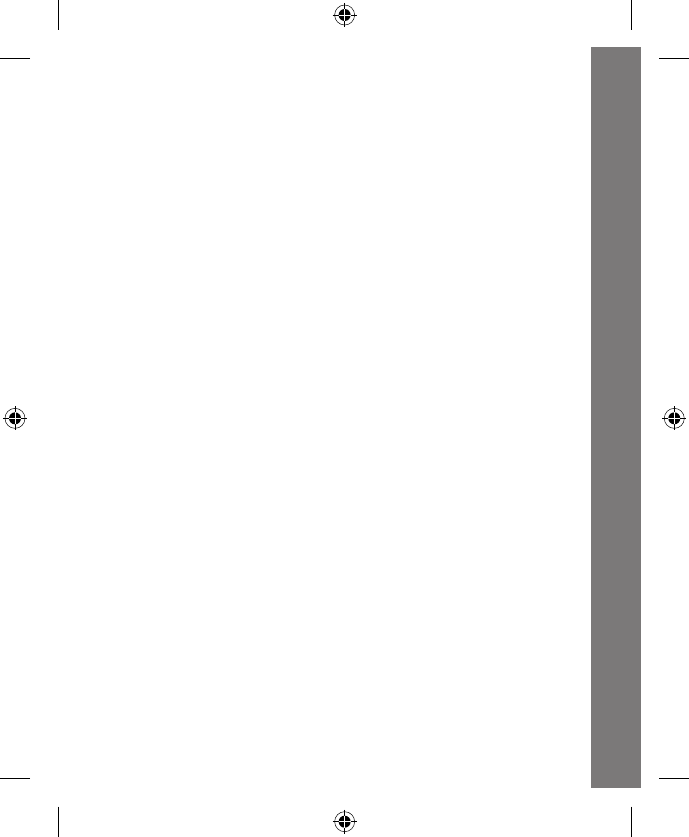
3. In Play Mode, press the wrench
button or the tire button or wiggle the
gas pump to learn colors, names and
the functions of the tools. The light
will flash with the sounds.
4. In Music Mode, press the wrench
button or the tire button to play
melodies. Wiggle the gas pump to
play sing-along songs and melodies.
While listening to the sing-along
songs and melodies, play with any of
the three buttons to add in fun sound
effects on top of the music.
Activities - Electronic Pit Stop
17
5. Ifthereisnoinputafterapproximately10seconds,youwillhear
a sound effect and a reminder to play. After another 10 seconds
of no input, the unit will play a short tune and then go into sleep
mode. The unit can be reactivated by playing with any button or
switch on the electronic pit stop.
MELODY LIST
1. Pop! Goes the Weasel
2. Chopsticks
3. Can Can
4. Alouette
5. Humpty Dumpty
6. Oh Susannah
7. Camptown Races
8. Alphabet Song
9. YankeeDoodle
10. Jack Be Nimble
11. Take Me Out to the Ball Game
12. DaringYoungManontheFlyingTrapeze
13. Shoo Fly, Don’t Bother Me
14. The Animal Fair
15. Mary Had a Little Lamb
SONG LYRICS
SONG 1
Start your engines!
Ready, get set, go!
Finish the course!
Don’t be slow!
Activities - Electronic Pit Stop
18
SONG 2
Driving is amazing!
Zooming! Zipping! Let’s go fast!
Loop-the-loop!
Don’t finish last!
SONG 3
Mycar’sfixedup,I’mreadytogo!
Beep! Beep! Hit the gas. . .let’s go!
PRODUCT FEATURES - AMAZEMENT
PARK
1. SMARTPOINT™ LOCATIONS
The Ultimate Amazement Park PlaysetTM features eight different
SmartPoint™ locations that interact with the included race car or
any other Go! Go! Smart Wheels® SmartPoint™vehicle(each
sold separately). Simply roll the vehicle over each SmartPoint™
to hear fun sounds, music and phrases.
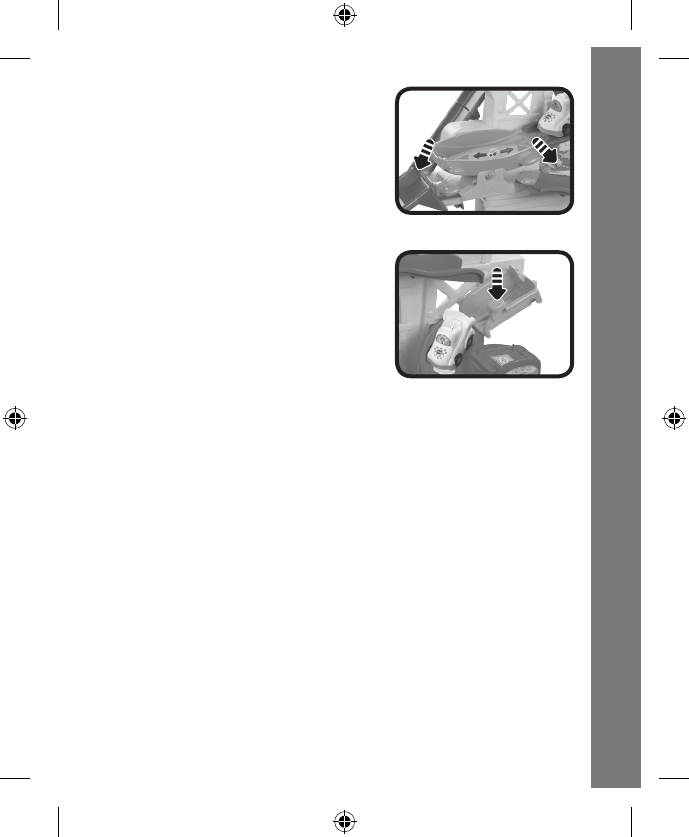
2. LAUNCHER
To move your race car down one of
three fun courses, place it on one of
the two SmartPoint™ locations on
the launcher at the top of the toy. Pull
the flag and watch the car zip down!
WARNING: When launching the car, do not place your face in
front of the course and ramp exits.
Product Features - Amazement Park
19
3. ROCKING PLATFORM
When your car lands on the
ROCKING PLATFORM, push it
down to the left or right to move your
race car forward and backward.
4. FLIP-DOWN PLATFORM
To move your car down to the
SPIRAL COURSE, press down on
the FLIP-DOWN PLATFORM to
watch your race car go down.
Note: For optimal performance on the Ultimate Amazement Park
Playset’s three courses, please use the included vehicle.
CARE & MAINTENANCE
1. Keep the unit clean by wiping it with a slightly damp cloth.
2.
Keep the unit out of direct sunlight and away from any direct heat
source.
3. Removethebatterieswhentheunitwillnotbeinuseforanextended
period of time.
4. Donotdroptheunitonhardsurfacesanddonotexposetheunit
to moisture or water.
Care & Maintenance
20
TROUBLESHOOTING
If for some reason the program/activity stops working or malfunctions,
pleasefollowthesesteps:
1. Please turn the unit OFF.
2. Interrupt the power supply by removing the batteries.
3. Let the unit sit for a few minutes, then replace the batteries.
4. Turn the unit ON. The unit should now be ready to play again.
5. If the product still does not work, replace with an entire set of new
batteries.
If the problem persists, please call our Consumer Services Department
at 1-800-521-2010 in the U.S. or 1-877-352-8697 in Canada, and a
service representative will be happy to help you.
For information on this product’s warranty, please call VTech® at
1-800-521-2010 in the U.S. or 1-877-352-8697 in Canada.
IMPORTANT NOTE:
Creating and developing Infant Learning products is accompanied
by a responsibility that we at VTech® take very seriously. We make
every effort to ensure the accuracy of the information, which forms
the value of our products. However, errors sometimes can occur.
It is important for you to know that we stand behind our products
and encourage you to call our Consumer Services Department at
1-800-521-2010 in the U.S. or 1-877-352-8697 in Canada, with
any problems and/or suggestions that you might have. A service
representative will be happy to help you.
Troubleshooting
21
Note:
Thisequipmenthasbeentestedandfoundtocomplywiththelimits
for a Class B digital device, pursuant to Part 15 of the FCC Rules.
These limits are designed to provide reasonable protection against
harmful interference in a residential installation. This equipment
generates,usesand canradiateradiofrequency energyand,ifnot
installed and used in accordance with the instructions, may cause
harmful interference to radio communications. However, there is no
guarantee that interference will not occur in a particular installation. If
thisequipmentdoescauseharmfulinterferencetoradioortelevision
reception,whichcanbedeterminedbyturningtheequipmentoffand
on, the user is encouraged to try to correct the interference by one or
moreofthefollowingmeasures:
• Reorientorrelocatethereceivingantenna.
• Increasetheseparationbetweentheequipmentandreceiver.
• Connecttheequipmentintoanoutletonacircuitdifferentfromthat
to which the receiver is connected.
• Consultthedealeroranexperiencedradio/TVtechnicianforhelp.
Caution: Changes or modifications not expressly approved by the
party responsible for compliance could void the user’s authority to
operatetheequipment.
Other Info
22
THIS DEVICE COMPLIES WITH PART 15 OF THE FCC RULES.
OPERATIONISSUBJECTTOTHEFOLLOWINGTWOCONDITIONS:
(1)THISDEVICEMAYNOTCAUSEHARMFULINTERFERENCE,AND
(2)THISDEVICEMUSTACCEPTANYINTERFERENCERECEIVED,
INCLUDING INTERFERENCETHAT MAY CAUSE UNDESIRED
OPERATION.
CAN ICES-3 (B)/NMB-3(B)
Other Info
