WFE TECHNOLOGY C00002 Electronic Cylinder User Manual C700SMN FCC
WFE TECHNOLOGY CORP Electronic Cylinder C700SMN FCC
Users Manual
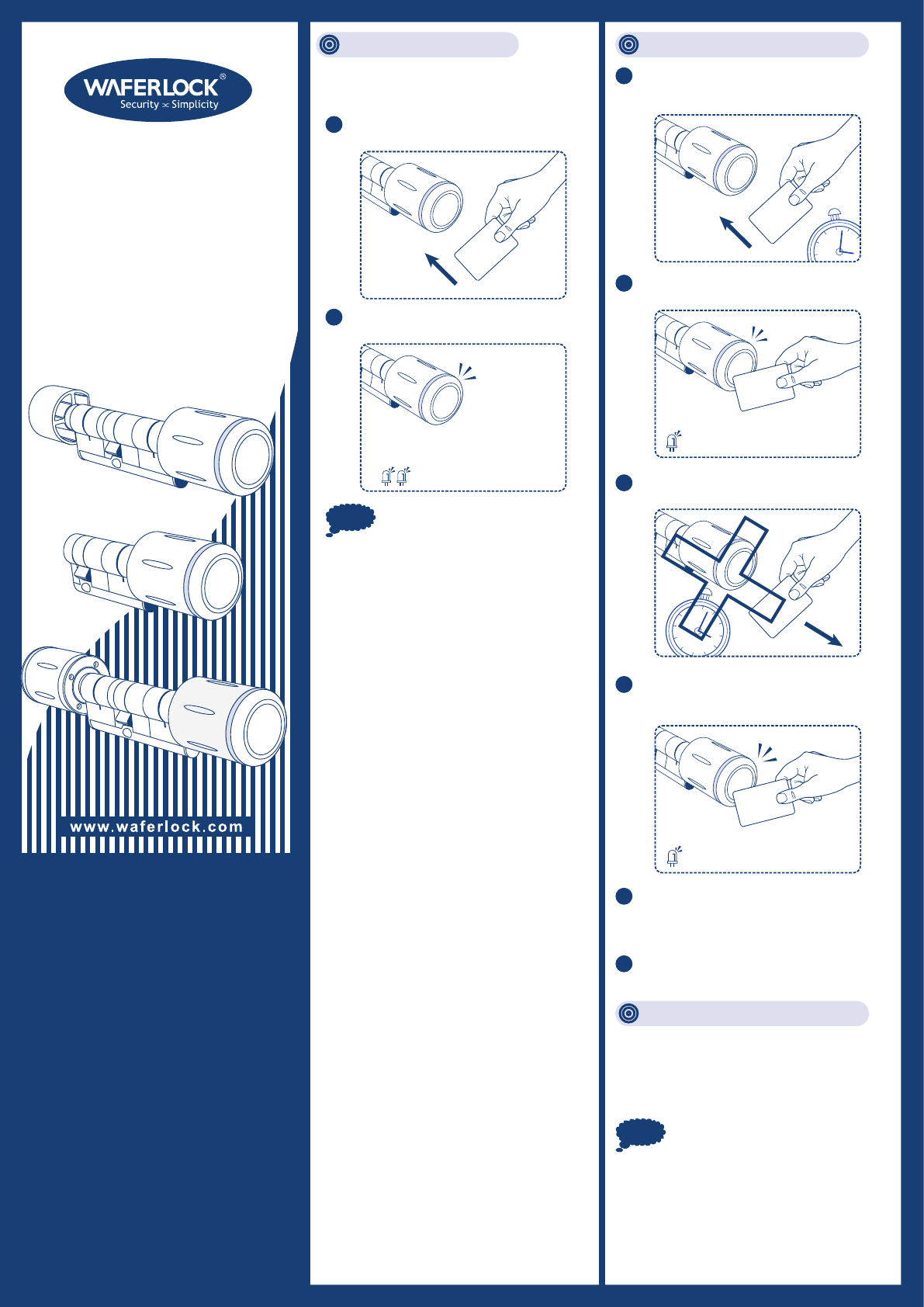
C-700-S04
C-700M-S04
C-700N-S04
Standard / Half / Double
Digital Locking
Construction Mode: Set up the Programming Card:
CE Marking
This device has been tested to and conforms to the
regulatory requirements of the European Union and
has attained CE Marking. The CE Mark is a
conformity marking consisting of the letters “CE”. The
CE Mark applies to products regulated by certain
European health, safety and environmental protection
legislation. The CE Mark is obligatory for products it
applies to: the manufacturer affixes the marking in
order to be allowed to sell his product in the European
market.
This product conforms to the essential requirements of
the R&TTE directive 1999/5/EC in order to attain CE
Marking.
The CE Marking is not a quality mark. Foremost, it
refers to the safety rather than to the quality of a
product. Secondly, CE Marking is mandatory for the
product it applies to, whereas most quality markings
are voluntary.
WFE TECHNOLOGY CORPORATION
Tel: 886-4-22300362 Fax: 886-4-22377995
No. 16 Ke Yuan 2nd Rd., Central Taiwan Science Park
Taichung city 407, Taiwan.
E-mail: info@waferlock.com
www.waferlock.com
Note 1. There is only ONE Programming card
per cylinder, please do not lose it.
If the cylinder(s) is installed on a door,
installer can use the following way to
access the cylinder(s).
Note
1Take any card (transponder) to approach
the reader of the cylinder.
2
3
4
5If you remove the Programming card within
10 seconds, then set up of the Programming
card will be failed.
6If failed, repeat from Step 1~4 to try again.
Shadow Programming Card:
Please contact and present this card to your
local supplier for assistance in case the
Programming Card is lost.
2Green & Red LED will flash 3 times, and
motor triggered.
1. Construction Mode can be used
during installation of the cylinder if
the Programming Card is not
programmed yet.
2. Any Mifare card (transponder) will be able to
access/open the cylinder before Programming
card is learned.
2. Programming Card is meant to Add/Delete Users,
it can not be used to access/open the cylinders.
3. Multi locks with One Programming Card: You
can use one Programming card for the multiple
cylinders. The way to setup the Programming
card for each cylinder is the same as above steps.
1Have any Programming Card ready then
place it 1~3cm in front of the reader of
the cylinder for 10 seconds.
1 “beep” sound will be heard and Red
LED will flash periodically for 10 seconds.
If the Programming card is learned
successfully, 3 “beep” sounds will be heard,
and Green LED will flash 3 times.
Within these 10 seconds, do not remove the
Programming Card away from the reader.
Programming
1
0
s
e
c
Programming
1
0
s
e
c
User Manual
Standalone
Cylinder
Red/Green LED flash 3 times
1 “beep” sound
1 “beep” sound
Programming
Red LED x 10 seconds
Programming
3 “beep” sounds
Green LED flash 3 times
Federal Communication Commission
Interference Statement
This equipment has been tested and found to
comply with the limits for a Class B digital
device, pursuant to Part 15 of the FCC Rules.
These limits are designed to provide reasonable
protection against harmful interference in a
residential installation.
This equipment generates, uses and can radiate
radio frequency energy and, if not installed and
used in accordance with the instructions, may
cause harmful interference to radio
communications. However, there is no guarantee
that interference will not occur in a particular
installation. If this equipment does cause harmful
interference to radio or television reception,
which can be determined by turning the
equipment off and on, the user is encouraged to
try to correct the interference by one of the
following measures:
• Reorient or relocate the receiving antenna.
• Increase the separation between the equipment
and receiver.
• Connect the equipment into an outlet on a circuit
different from that to which the receiver is
connected.
• Consult the dealer or an experienced radio/TV
technician for help.
FCC Caution: To assure continued compliance,
any changes or modifications not expressly
approved by the party responsible for
compliance could void the user's authority to
operate this equipment. (Example - use only
shielded interface cables when connecting to
computer or peripheral devices).
This device complies with Part 15 of the FCC
Rules. Operation is subject to the following two
conditions:
(1) This device may not cause harmful
interference, and (2) This device must accept
any interference received, including interference
that may cause undesired operation.
Programming Card: Enrollment Card: Passage Card:
Shadow Card:
User Card:
Your Warranty
Your Warranty covers all manufacturers' defects in
workmanship and material. It does not cover any
unit that is damaged beyond normal usage, by
improper installations, by contacts to chemicals, or
any other acts or omissions unsanctioned within the
user manual.
All components are covered for one (1) year after
the date of purchase or installation from supplier.
The user is required to provide dated proof of
purchase. Waferlock or its authorized distributor
will determine if there is a warrantable condition
associated with material and/or manufacturing
workmanship.
If the lock conforms to the warranty conditions, the
lock will be repaired free of charge. The shipping
freights would be at owner's expense.
The warranty does not include any further
obligation whatsoever, including but not limited to
the installation of the replacement unit to the
customer's lock.
All other warranties, express or implied, are
disclaimed. All collateral agreements, which purport
to modify this limited warranty, are of no effect.
Note
Note
1. The maximum user for each cylinder
is 1000.
2. You will hear 10 short beep sounds and
Red/Green light flashed 3 times in between when
the cylinder is fully programming with 1000 users.
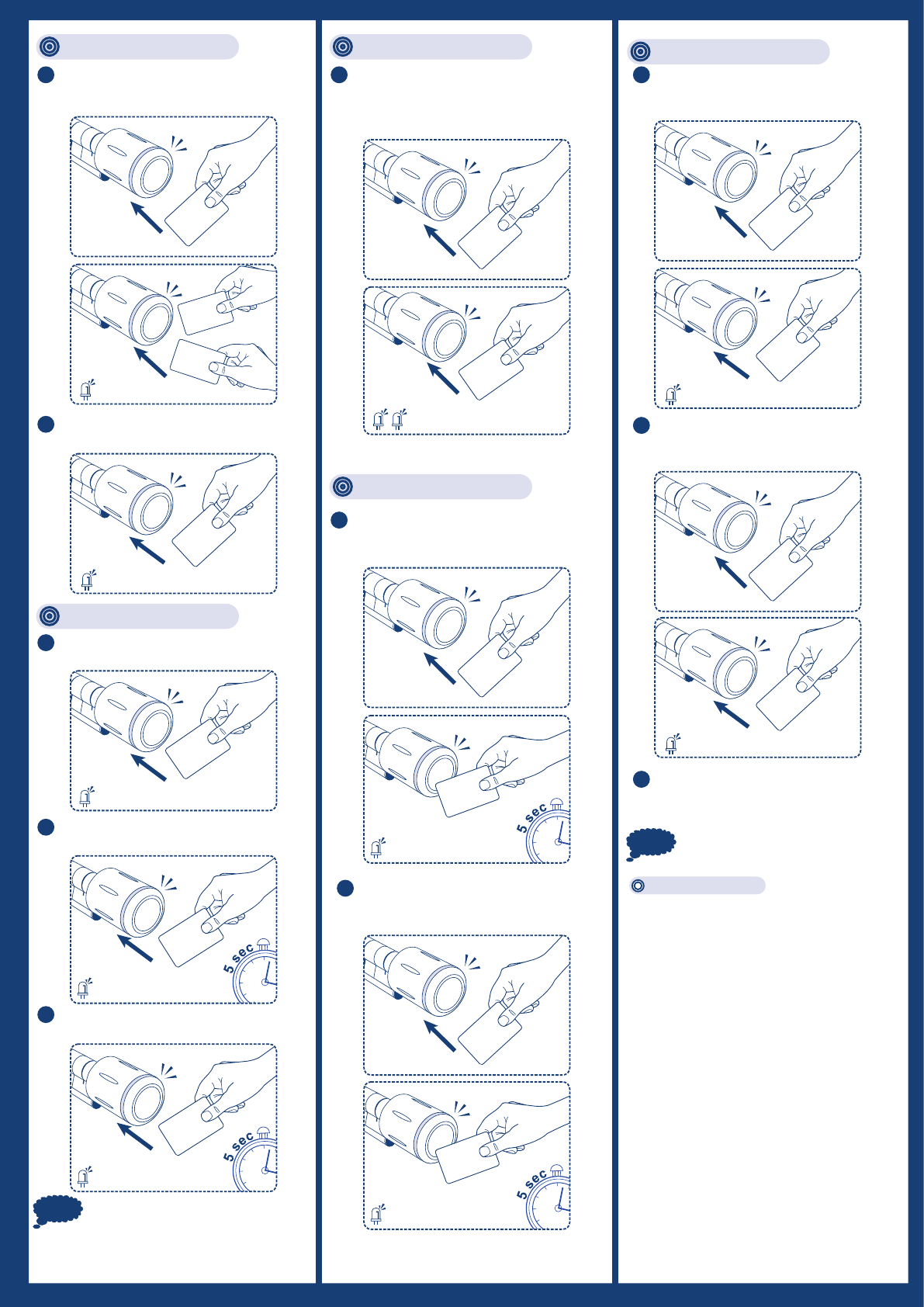
To activate an user card with passage
mode function:
Passage Card x 1 time, User Card x 1 time.
1
To deactivate an user card with passage
mode function:
Passage Card x 1 time, User Card x 1 time.
2
If Passage Card is lost, please contact
your local supplier to purchase new
Passage Card.
3
To add a new user or new Passage Card
Programming Card x 1 time, User Card x 1
time or Passage Card x 1 time.
1
To delete all users:
Programming Card x 3 times.
Passage Card can only be
re-programmed, it can not be deleted.
2
To delete lost user card:
Programming Card x 1 time, Shadow Card x
1 time for 5 seconds.
1
To delete existing user card:
Programming Card x 1 time, existing
user card x 1 time for 5 seconds.
2
To add a batch of User Card
(20, 50 or 75 users)
Programming Card x 1 time,
Enrollment Card x 1 time.
1
To open:
User Card x 1 time.
1
To activate Passage Mode:
User Card x 1 time for 5 seconds.
2
To deactivate Passage Mode:
User Card x 1 time for 5 seconds.
3
X 1
or
User
Passage
Green LED flash 1 times
X 1
Programming
X 1
Programming
X 1
Passage
X 1
Passage
X 1
Programming
X 1
Programming
X 3
Programming
Red LED flash 5 times
X 1
User
Green LED flash 5 times
X 1
User
Red LED flash 5 times
X 1
User
Green LED flash 1 time
X 1
User
Green LED flash 5 times
X 1
User
Red LED flash 5 times
X 1
X 1
Shadow
Red LED flash 5 times
User
Red LED flash 5 times
X 1
Enrollment
Red/Green LED flash