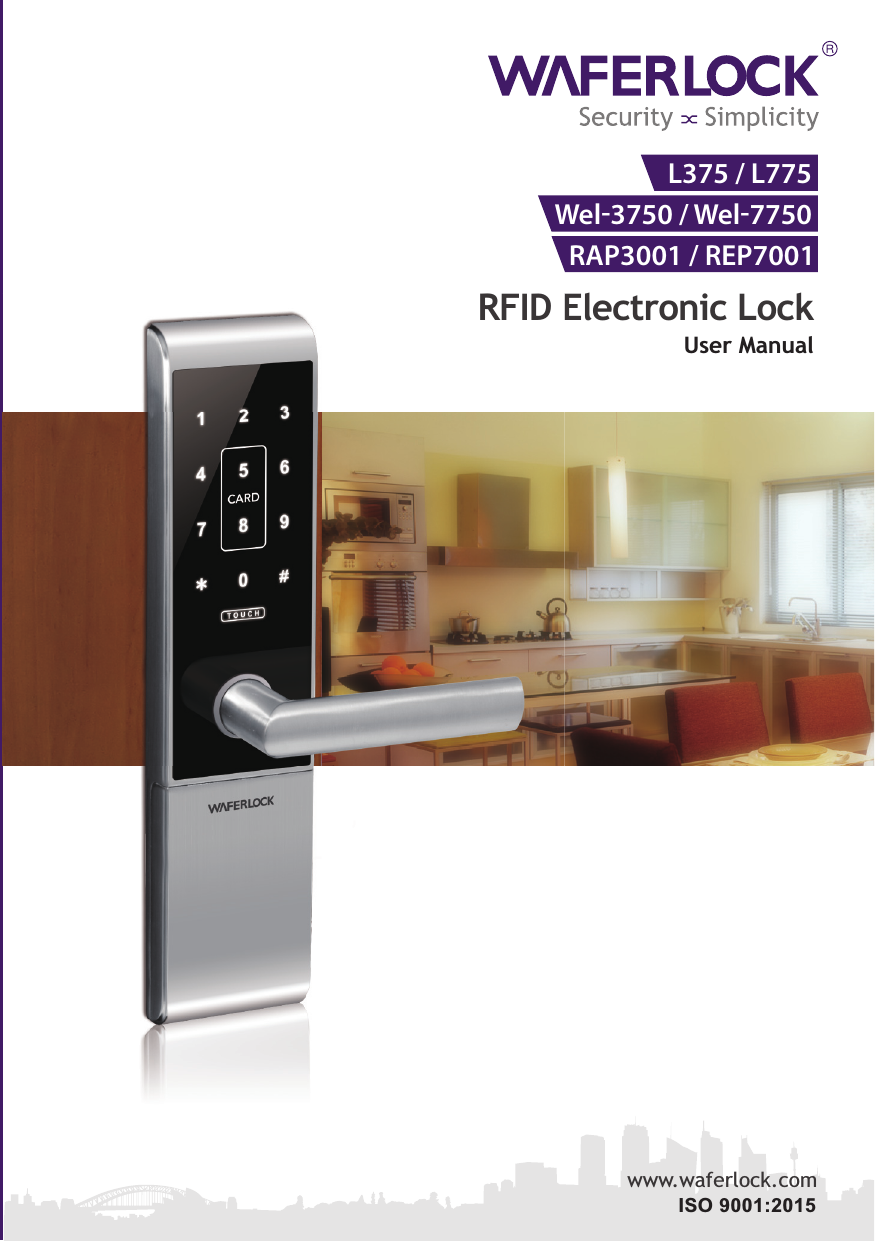
WFE TECHNOLOGY L00005 WEL-3750/WEL7750/WEL3790/WEL7790 RFID Electronic Lock User Manual L375

WFE TECHNOLOGY CORP WEL-3750/WEL7750/WEL3790/WEL7790 RFID Electronic Lock Users Manual L375

Contents

Users Manual_L375

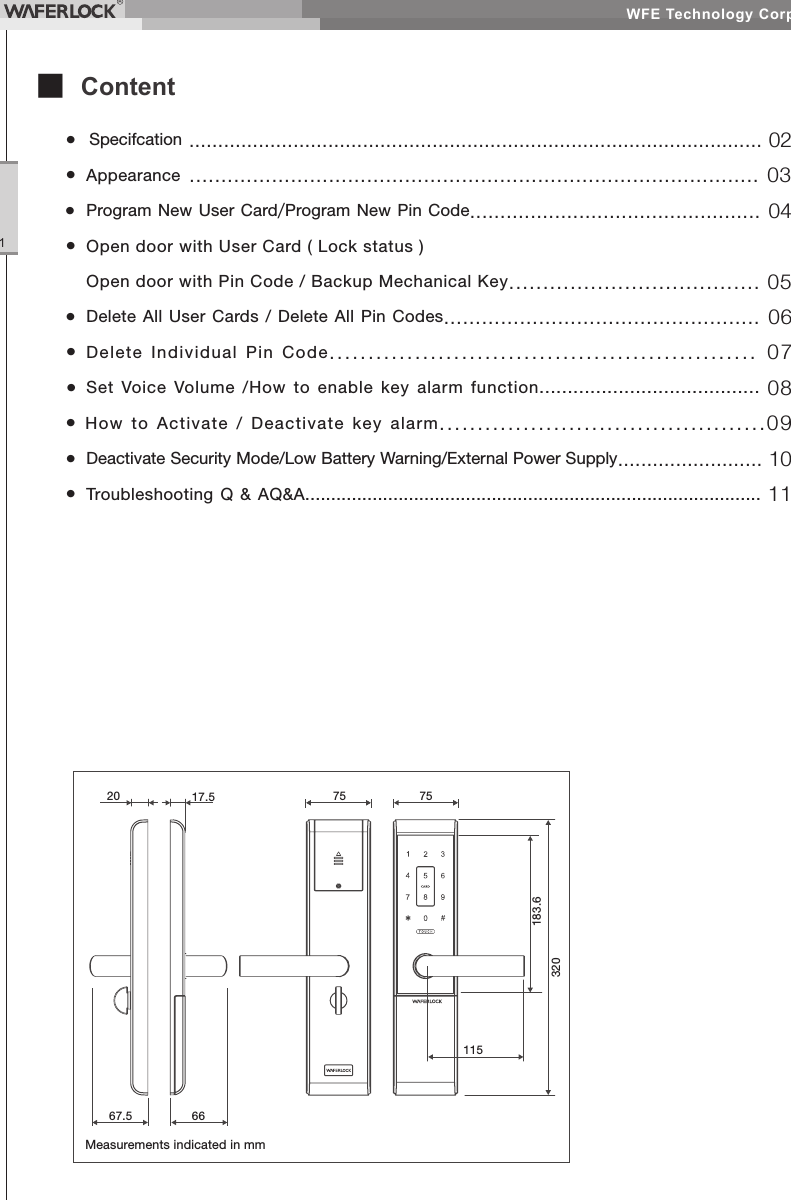
WFE Technology Corp.1■ Content•  Specifcation ................................................................................................... 02• Appearance .......................................................................................... 03• Program New User Card/Program New Pin Code................................................ 04• Open door with User Card ( Lock status )  Open door with Pin Code / Backup Mechanical Key..................................... 05•  Delete All User Cards / Delete All Pin Codes.................................................. 06•  Delete Individual Pin Code....................................................... 07• Set Voice Volume /How to enable key alarm function....................................... 08• How to Activate  / Deactivate key alarm...........................................09•  Deactivate Security Mode/Low Battery Warning/External Power Supply......................... 10•  Troubleshooting Q & AQ&A........................................................................................ 11Measurements indicated in mm20 17.5 757567.5 66183.6320115
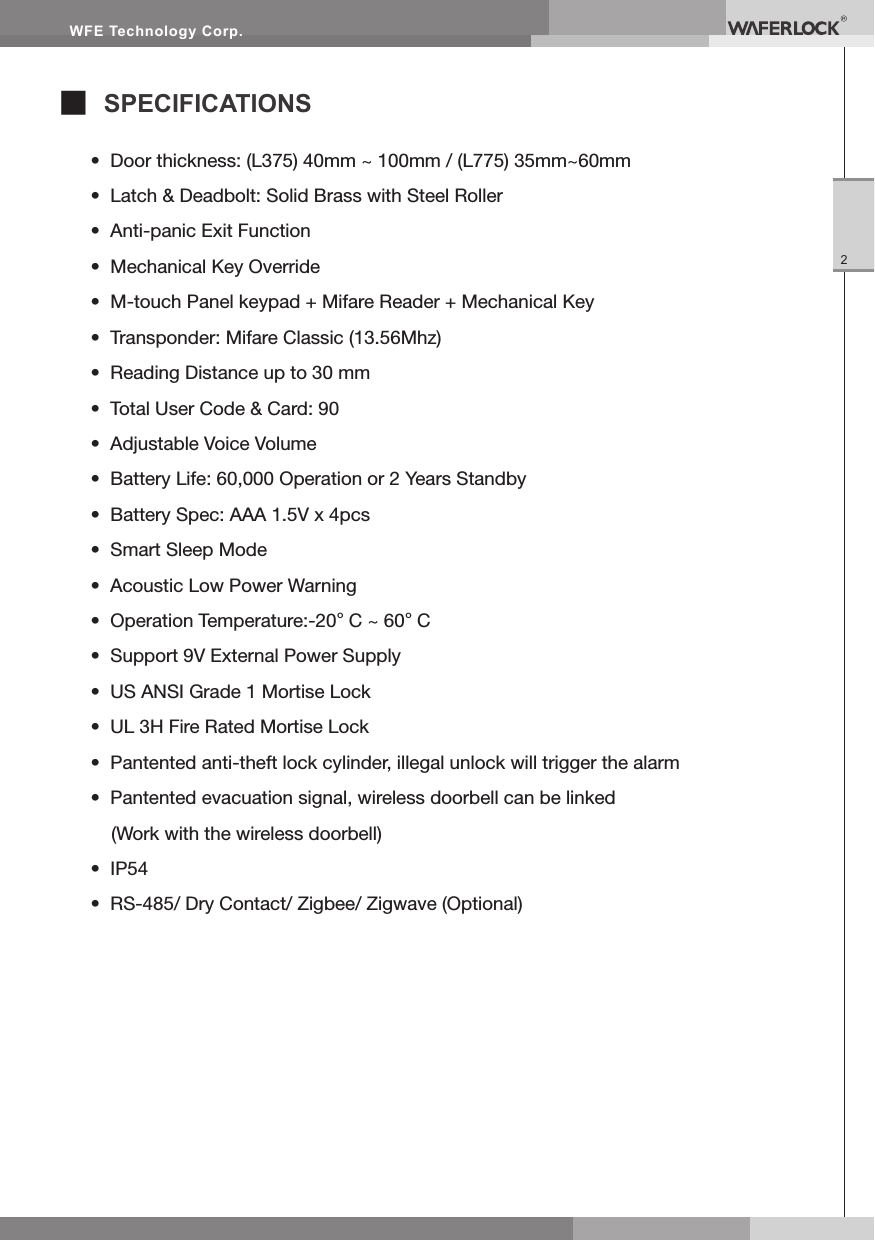
WFE Technology Corp.2■ SPECIFICATIONS•  Door thickness: (L375) 40mm ~ 100mm / (L775) 35mm~60mm•  Latch & Deadbolt: Solid Brass with Steel Roller•  Anti-panic Exit Function•  Mechanical Key Override•  M-touch Panel keypad + Mifare Reader + Mechanical Key•  Transponder: Mifare Classic (13.56Mhz)•  Reading Distance up to 30 mm•  Total User Code & Card: 90•  Adjustable Voice Volume•  Battery Life: 60,000 Operation or 2 Years Standby•  Battery Spec: AAA 1.5V x 4pcs•  Smart Sleep Mode•  Acoustic Low Power Warning•  Operation Temperature:-20°C ~ 60°C•  Support 9V External Power Supply•  US ANSI Grade 1 Mortise Lock•  UL 3H Fire Rated Mortise Lock•  Pantented anti-theft lock cylinder, illegal unlock will trigger the alarm•  Pantented evacuation signal, wireless doorbell can be linked  (Work with the wireless doorbell)•  IP54•  RS-485/ Dry Contact/ Zigbee/ Zigwave (Optional)
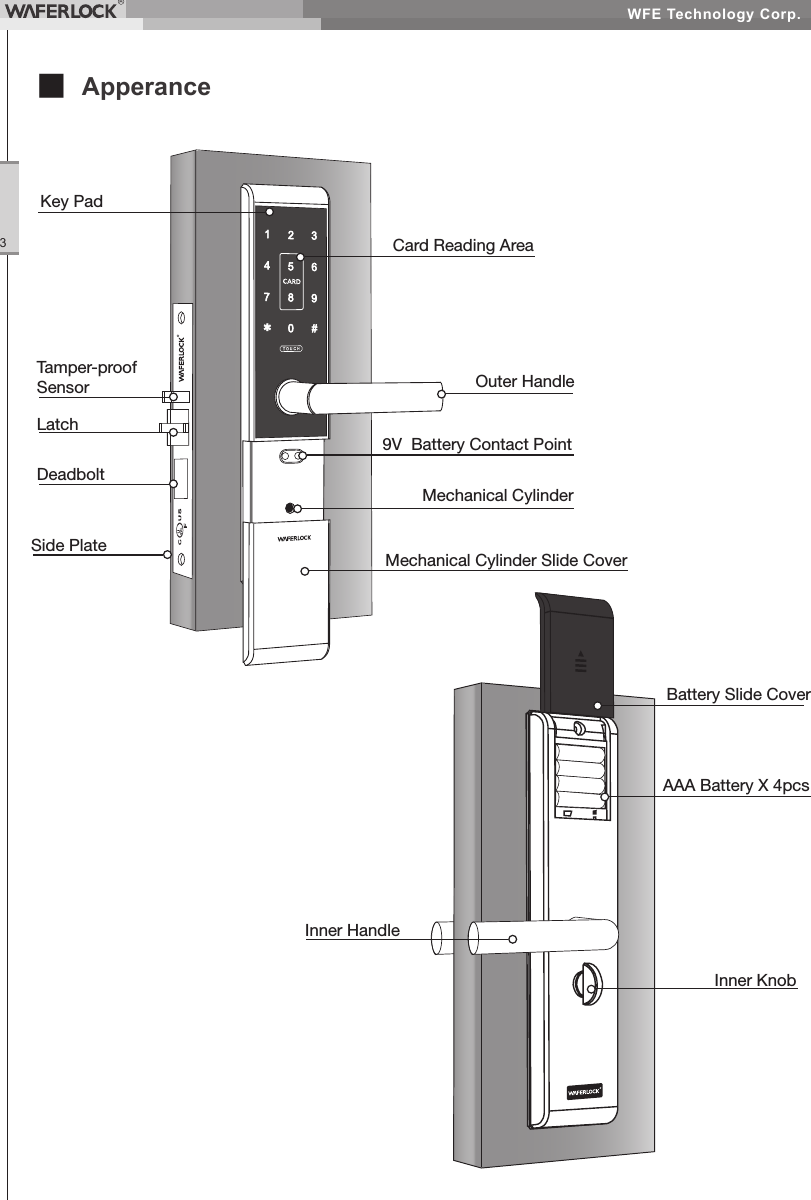
WFE Technology Corp.3■ ApperanceDeadboltKey PadCard Reading Area9V  Battery Contact PointMechanical CylinderMechanical Cylinder Slide CoverOuter HandleLatchTamper-proof SensorSide PlateInner HandleAAA Battery X 4pcsInner KnobBattery Slide Cover
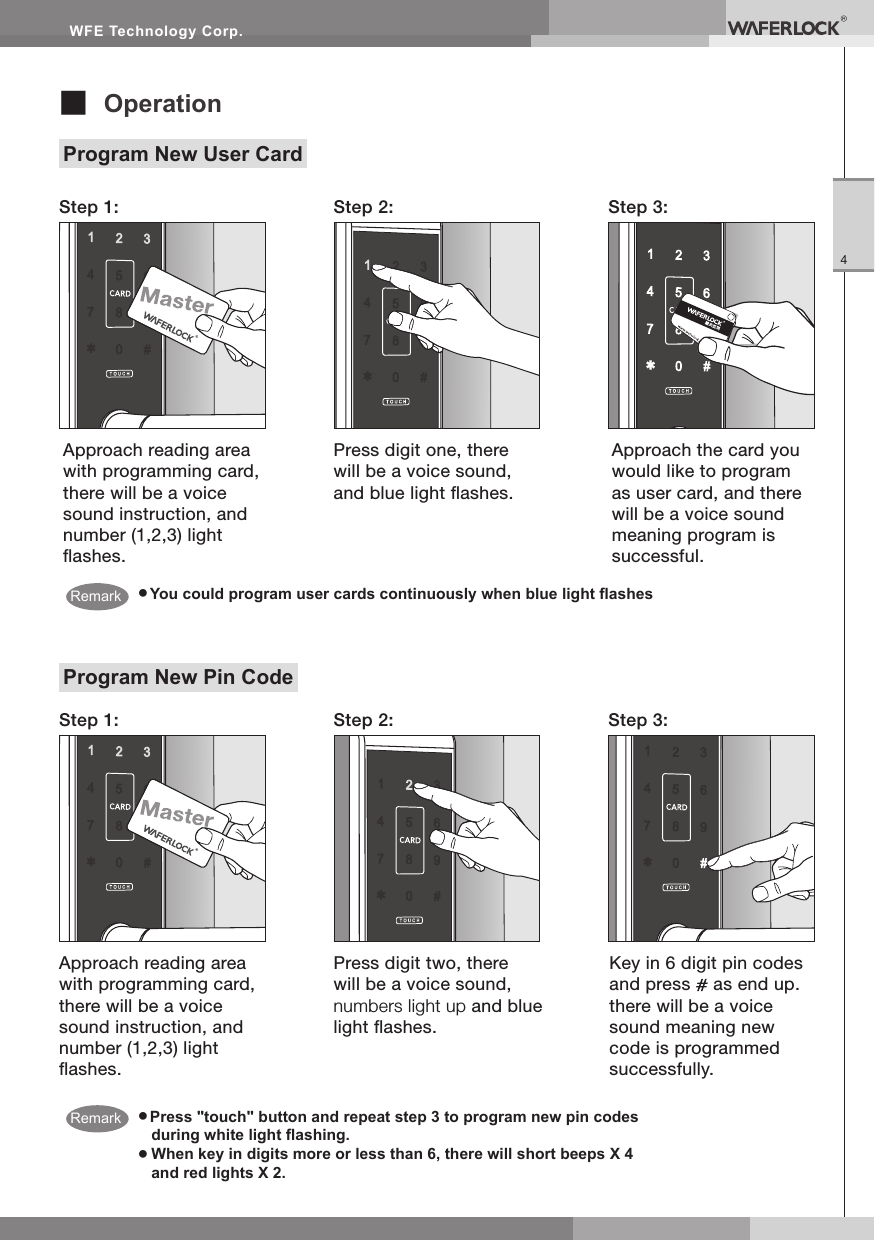
WFE Technology Corp.4■ OperationProgram New User Card● You could program user cards continuously when blue light ashesStep 1:Step 1:Step 2:Step 2:Step 3:Step 3:Approach the card you would like to program as user card, and there will be a voice sound meaning program is successful.Approach reading area with programming card, there will be a voice sound instruction, and number (1,2,3) light ashes.Press digit one, there will be a voice sound, and blue light ashes.● Press "touch" button and repeat step 3 to program new pin codes during white light ashing.●  When key in digits more or less than 6, there will short beeps X 4 and red lights X 2.Program New Pin CodeApproach reading area with programming card, there will be a voice sound instruction, and number (1,2,3) light ashes.Press digit two, there will be a voice sound,  numbers light up and blue light ashes.Key in 6 digit pin codes and press   as end up. there will be a voice sound meaning new code is programmed successfully. RemarkRemark
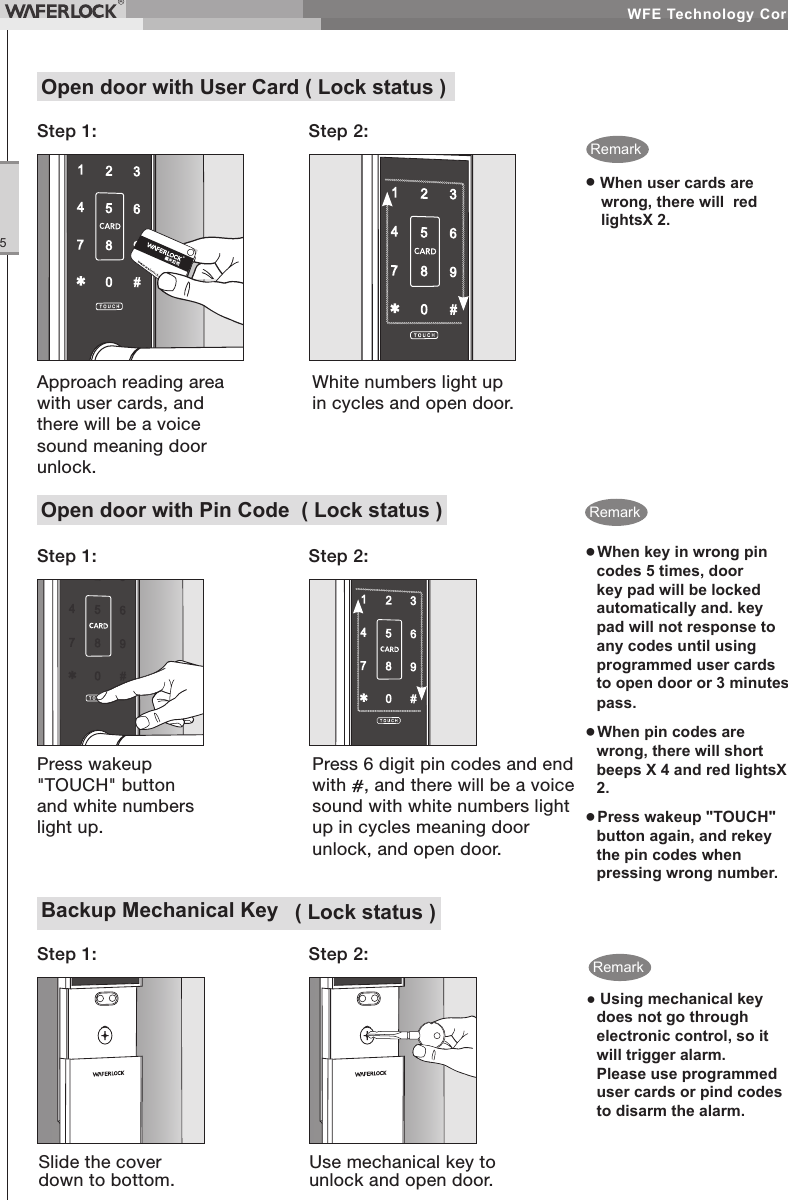
WFE Technology Corp.5Backup Mechanical Key  ( Lock status )Step 2:Step 1:Slide the cover down to bottom.Use mechanical key to unlock and open door.● Using mechanical key does not go through electronic control, so it will trigger alarm.  Please use programmed user cards or pind codes to disarm the alarm.Open door with User Card ( Lock status )Step 1: Step 2:●  When user cards are wrong, there will  red lightsX 2.Approach reading area with user cards, and there will be a voice sound meaning door unlock.White numbers light up in cycles and open door.RemarkOpen door with Pin Code  ( Lock status )● When key in wrong pin codes 5 times, door key pad will be locked automatically and. key pad will not response to any codes until using programmed user cards to open door or 3 minutes pass.● When pin codes are wrong, there will short beeps X 4 and red lightsX 2.● Press wakeup "TOUCH" button again, and rekey the pin codes when pressing wrong number.Step 2:Press wakeup "TOUCH" button and white numbers light up.Press 6 digit pin codes and end with  , and there will be a voice sound with white numbers light up in cycles meaning door unlock, and open door.Step 1:RemarkRemark
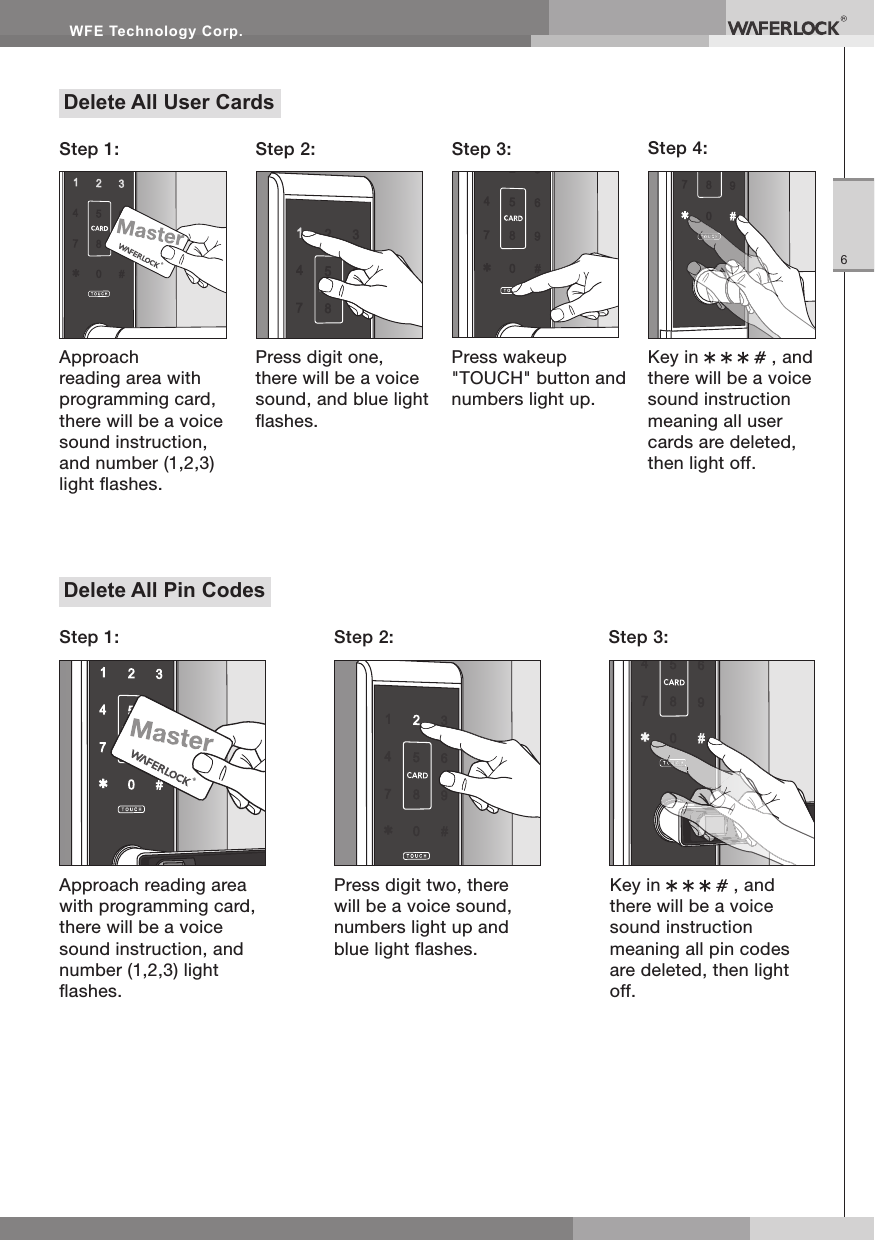
WFE Technology Corp.6Delete All User CardsStep 2: Step 3: Step 4:Press digit one, there will be a voice sound, and blue light ashes.Press wakeup "TOUCH" button and  numbers light up.Key in         , and there will be a voice sound instruction meaning all user cards are deleted, then light off.Approach reading area with programming card, there will be a voice sound instruction, and number (1,2,3) light ashes.Step 1:Delete All Pin CodesApproach reading area with programming card, there will be a voice sound instruction, and number (1,2,3) light ashes.Step 1: Step 2: Step 3:Press digit two, there will be a voice sound,  numbers light up and blue light ashes.Key in         , and there will be a voice sound instruction meaning all pin codes are deleted, then light off.
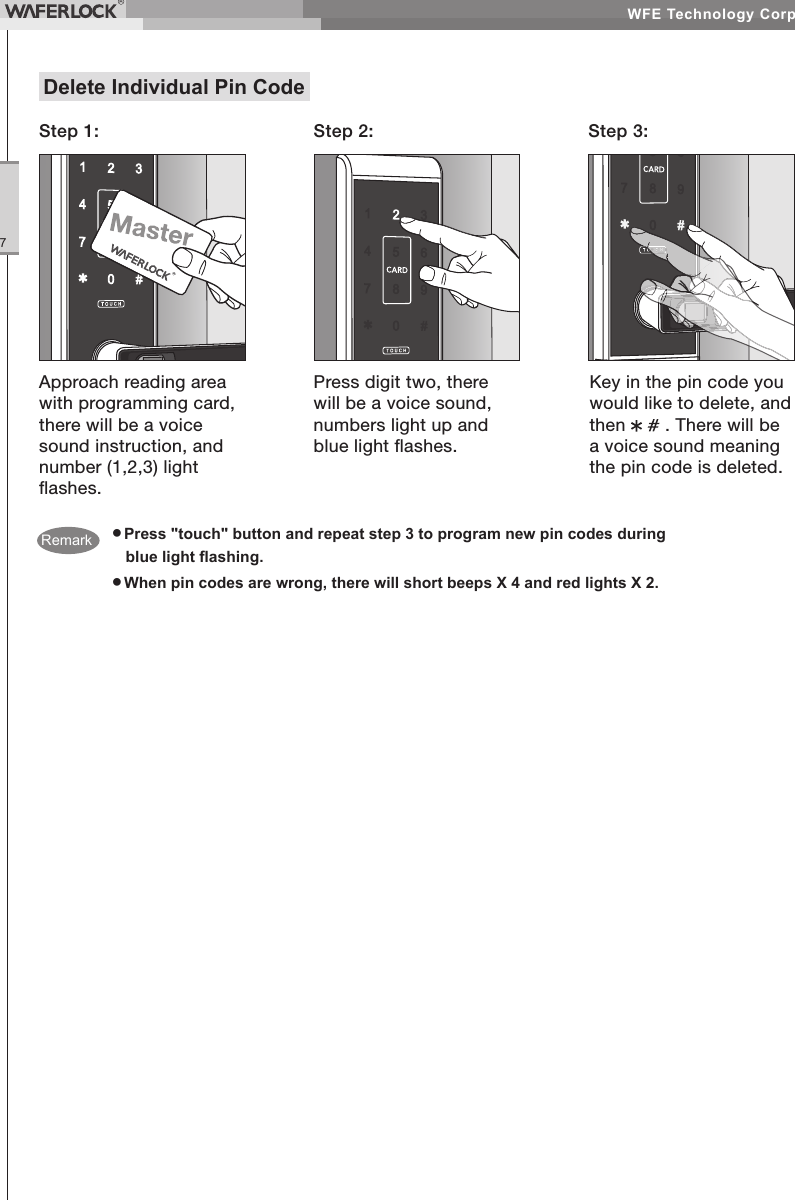
WFE Technology Corp.7● Press "touch" button and repeat step 3 to program new pin codes during blue light ashing.● When pin codes are wrong, there will short beeps X 4 and red lights X 2.Delete Individual Pin CodeStep 1: Step 2: Step 3:Approach reading area with programming card, there will be a voice sound instruction, and number (1,2,3) light ashes.Press digit two, there will be a voice sound, numbers light up and blue light ashes.Key in the pin code you would like to delete, and then    . There will be a voice sound meaning the pin code is deleted.Remark
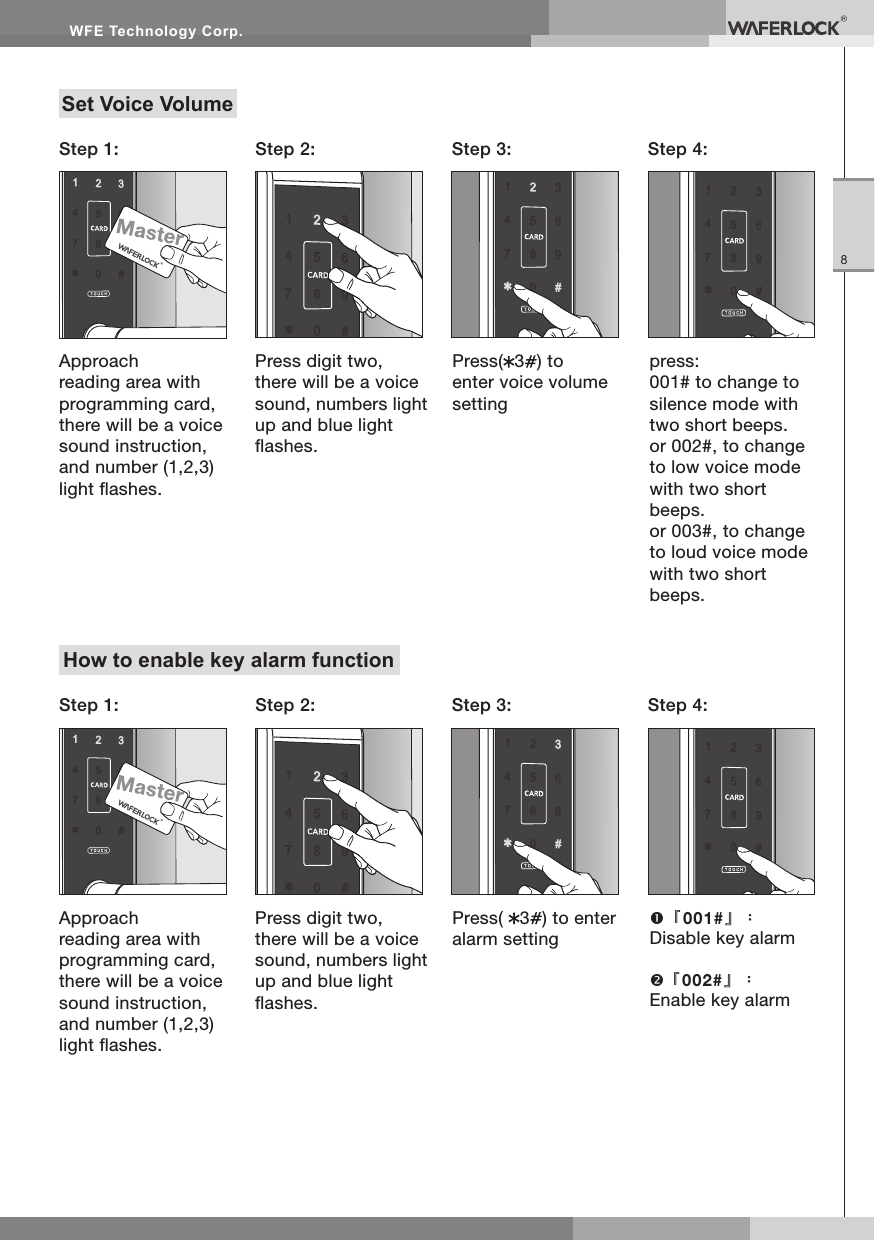
WFE Technology Corp.8Set Voice VolumeApproach reading area with programming card, there will be a voice sound instruction, and number (1,2,3) light ashes.Step 1: Step 2: Step 4:Step 3:Press digit two, there will be a voice sound, numbers light up and blue light ashes.Press( 3) to enter voice volume settingpress:001# to change to silence mode with two short beeps.or 002#, to change to low voice mode with two short beeps.or 003#, to change to loud voice mode with two short beeps.How to enable key alarm functionApproach reading area with programming card, there will be a voice sound instruction, and number (1,2,3) light ashes.Step 1: Step 2: Step 4:Step 3:Press digit two, there will be a voice sound, numbers light up and blue light ashes.Press(  3) to enter alarm setting『001#』:Disable key alarm『002#』:Enable key alarm
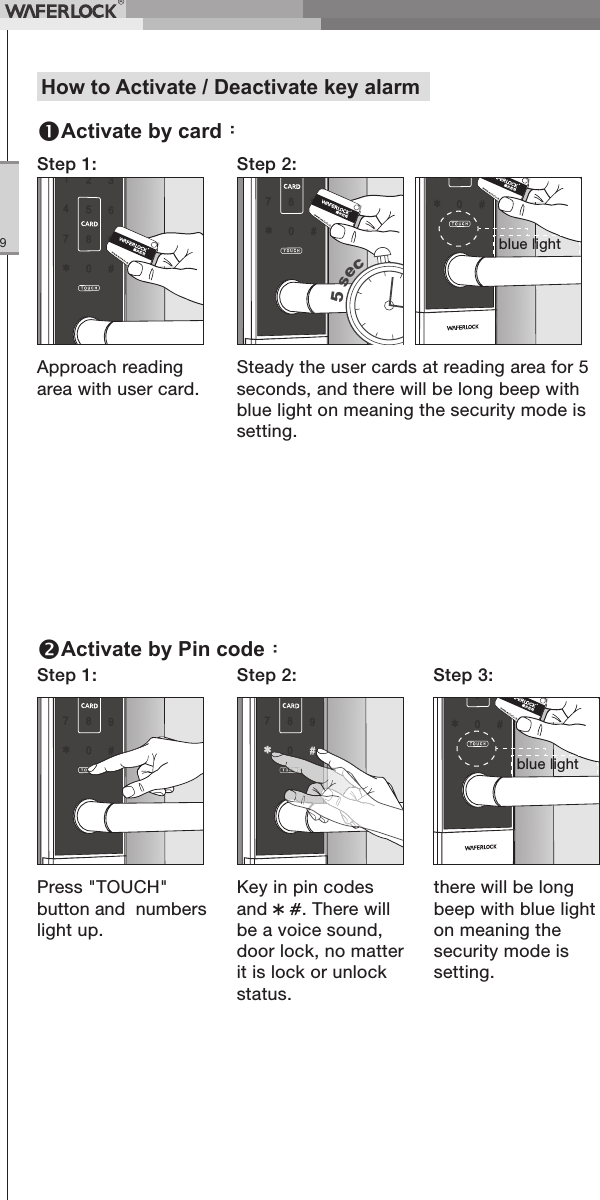
WFE Technology Corp.9Approach reading area with user card.Step 1: Step 2:Steady the user cards at reading area for 5 seconds, and there will be long beep with blue light on meaning the security mode is setting.Press "TOUCH" button and  numbers light up.Step 1: Step 2: Step 3:Key in pin codes and   . There will be a voice sound, door lock, no matter it is lock or unlock status.there will be long beep with blue light on meaning the security mode is setting.How to Activate / Deactivate key alarmActivate by card:Activate by Pin code:5 secblue lightblue light
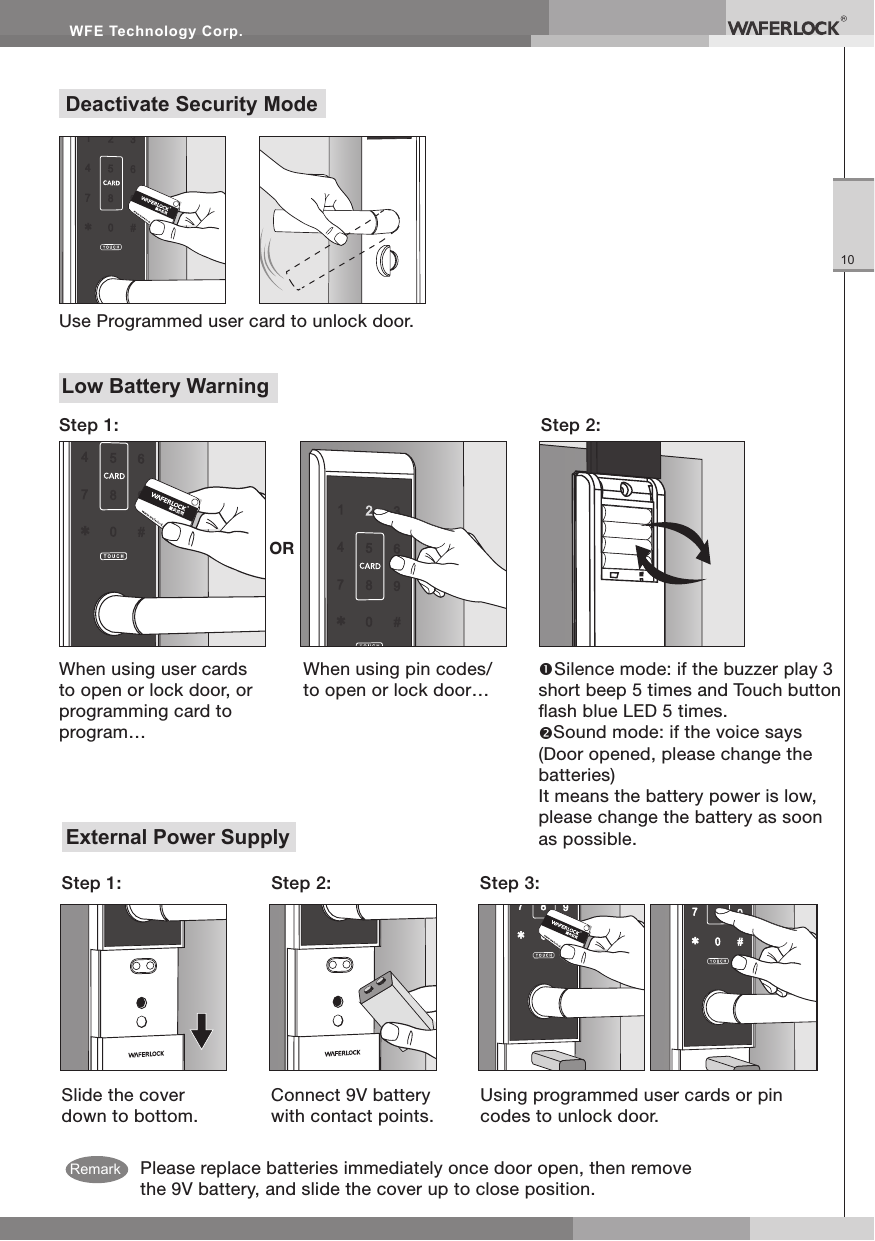
WFE Technology Corp.10Low Battery WarningStep 2:Step 1:When using pin codes/to open or lock door…Silence mode: if the buzzer play 3 short beep 5 times and Touch button ash blue LED 5 times.Sound mode: if the voice says (Door opened, please change the batteries)It means the battery power is low, please change the battery as soon as possible.When using user cards to open or lock door, or programming card to program…ORPlease replace batteries immediately once door open, then remove the 9V battery, and slide the cover up to close position.External Power SupplySlide the cover down to bottom.Step 1: Step 2: Step 3:Connect 9V battery with contact points.Using programmed user cards or pin codes to unlock door.Deactivate Security ModeUse Programmed user card to unlock door.Remark
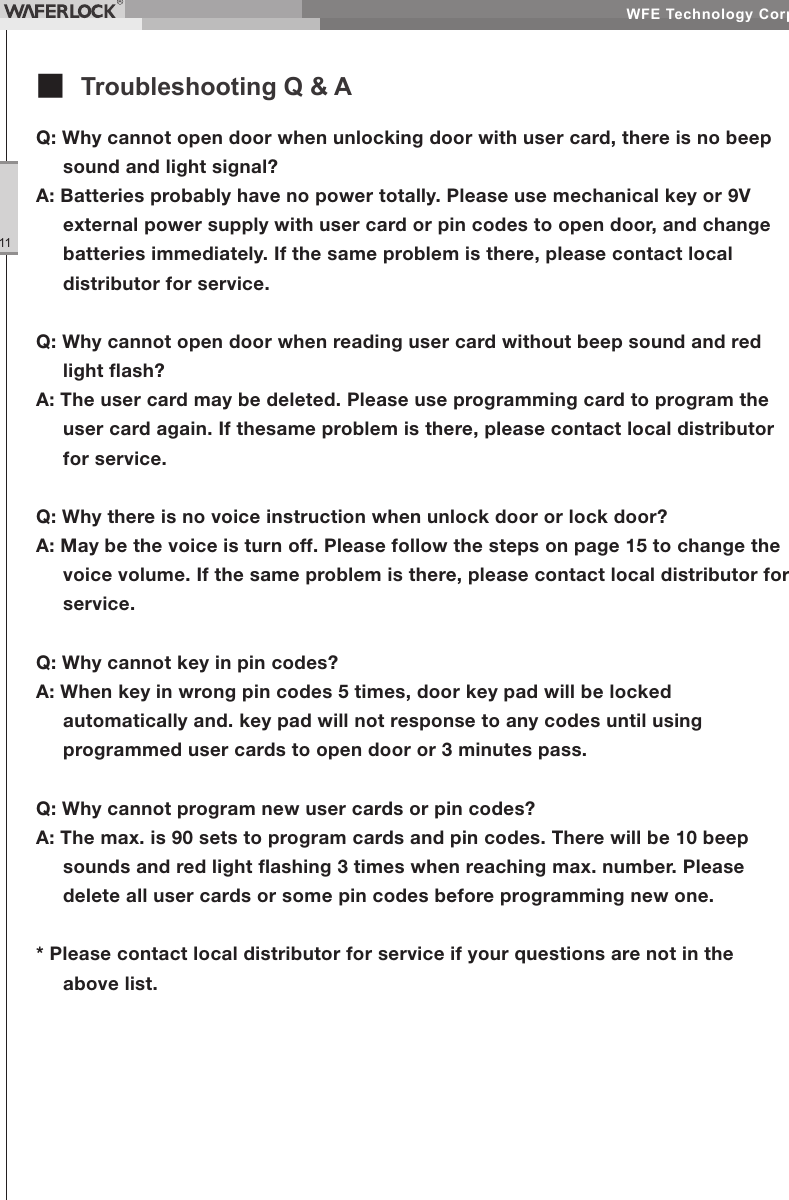
WFE Technology Corp.11Q: Why cannot open door when unlocking door with user card, there is no beep sound and light signal?A: Batteries probably have no power totally. Please use mechanical key or 9V external power supply with user card or pin codes to open door, and change batteries immediately. If the same problem is there, please contact local distributor for service.Q: Why cannot open door when reading user card without beep sound and red light ash?A: The user card may be deleted. Please use programming card to program the user card again. If thesame problem is there, please contact local distributor for service.Q: Why there is no voice instruction when unlock door or lock door?A: May be the voice is turn off. Please follow the steps on page 15 to change the voice volume. If the same problem is there, please contact local distributor for service.Q: Why cannot key in pin codes?A: When key in wrong pin codes 5 times, door key pad will be locked automatically and. key pad will not response to any codes until using programmed user cards to open door or 3 minutes pass.Q: Why cannot program new user cards or pin codes?A: The max. is 90 sets to program cards and pin codes. There will be 10 beep sounds and red light ashing 3 times when reaching max. number. Please delete all user cards or some pin codes before programming new one.* Please contact local distributor for service if your questions are not in the above list.■ Troubleshooting Q & A
WFE Technology Corp.12Federal Communication Commission Interference StatementThis equipment has been tested and found to comply with the limits for a Class B digital device, pursuant to Part 15 of the FCC Rules. These limits are designed to provide reasonable protection against harmful interference in a residential installation.This equipment generates, uses and can radiate radio frequency energy and, if not installed and used in accordance with the instructions, may cause harmful interference to radio communications. However, there is no guarantee that interference will not occur in a particular installation. If this equipment does cause harmful interference to radio or television reception, which can be determined by turning the equipment off and on, the user is encouraged to try to correct the interference by one of the following measures:. Reorient or relocate the receiving antenna.. Increase the separation between the equipment and receiver.. Connect the equipment into an outlet on a circuit different from that to which the receiver is connected.. Consult the dealer or an experienced radio/TV technician for help.FCC Caution: To assure continued compliance, any changes or modications not expressly approved by the party responsible for compliance could void the user's authority to operate this equipment. (Example - use only shielded interface cables when connecting to computer or peripheral devices).This device complies with Part 15 of the FCC Rules. Operation is subject to the following two conditions:(1) This device may not cause harmful interference, and (2) This device must accept any interference received, including interference that may cause undesired operation.
WFE Technology Corp.13
WFE Technology Corp.14
L375 / L775Wel-3750 / Wel-7750RAP3001 / REP7001www.waferlock.comISO 9001:2015WFE Technology CorporationRFID Electronic LockUser ManualRFID

Navigation menu