WICKED AUDIO WI-BT345X Dual Driver Bluetooth Earphone User Manual 17 03 06 WCKD1 Booklet US

WICKED AUDIO, INC Dual Driver Bluetooth Earphone 17 03 06 WCKD1 Booklet US

User manual

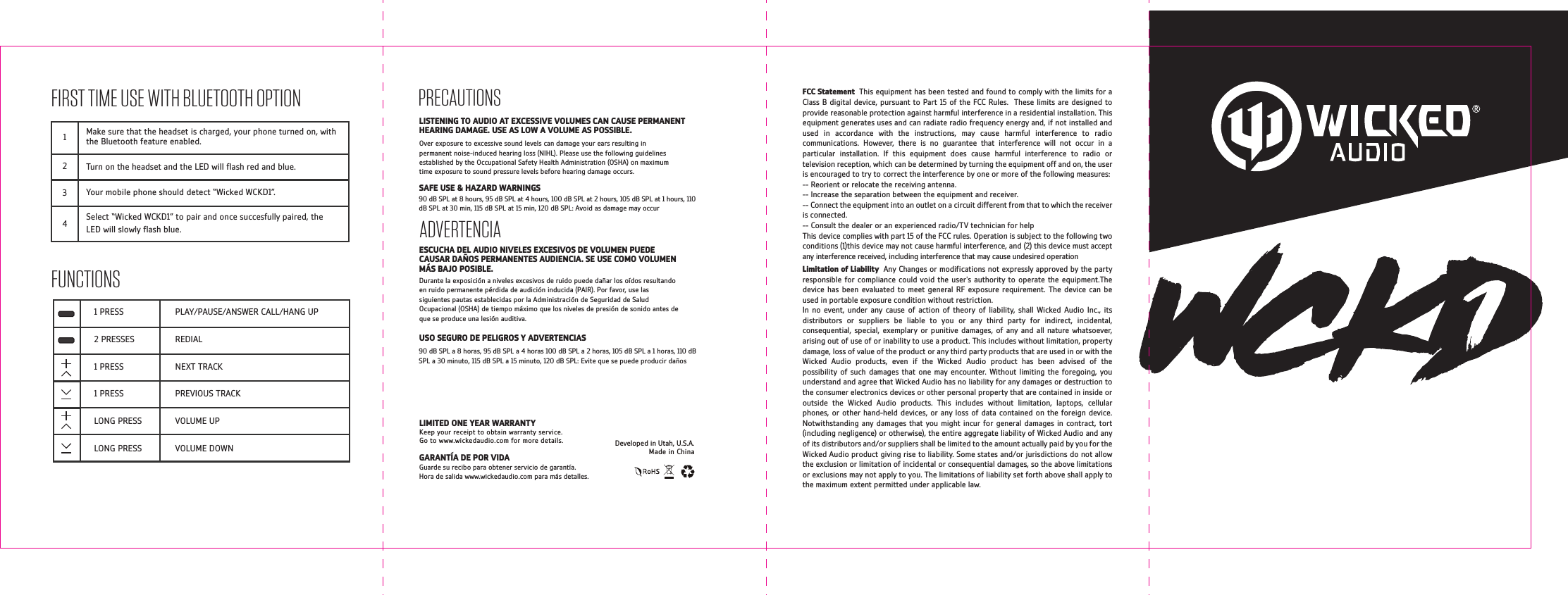
FIRST TIME USE WITH BLUETOOTH OPTIONFUNCTIONS1234Make sure that the headset is charged, your phone turned on, with the Bluetooth feature enabled.Turn on the headset and the LED will ash red and blue.Your mobile phone should detect “Wicked WCKD1”.Select “Wicked WCKD1” to pair and once succesfully paired, the LED will slowly ash blue.PLAY/PAUSE/ANSWER CALL/HANG UPREDIALNEXT TRACKPREVIOUS TRACKVOLUME UPVOLUME DOWN1 PRESS2 PRESSES1 PRESS1 PRESSLONG PRESSLONG PRESS  GARANTÍA DE POR VIDAGuarde su recibo para obtener servicio de garantía. Hora de salida www.wickedaudio.com para más detalles.Over exposure to excessive sound levels can damage your ears resulting in permanent noise-induced hearing loss (NIHL). Please use the following guidelines established by the Occupational Safety Health Administration (OSHA) on maximum time exposure to sound pressure levels before hearing damage occurs.PRECAUTIONS90 dB SPL at 8 hours, 95 dB SPL at 4 hours, 100 dB SPL at 2 hours, 105 dB SPL at 1 hours, 110 dB SPL at 30 min, 115 dB SPL at 15 min, 120 dB SPL: Avoid as damage may occur90 dB SPL a 8 horas, 95 dB SPL a 4 horas 100 dB SPL a 2 horas, 105 dB SPL a 1 horas, 110 dB SPL a 30 minuto, 115 dB SPL a 15 minuto, 120 dB SPL: Evite que se puede producir dañosSAFE USE & HAZARD WARNINGSADVERTENCIAESCUCHA DEL AUDIO NIVELES EXCESIVOS DE VOLUMEN PUEDE CAUSAR DAÑOS PERMANENTES AUDIENCIA. SE USE COMO VOLUMEN MÁS BAJO POSIBLE.USO SEGURO DE PELIGROS Y ADVERTENCIASDurante la exposición a niveles excesivos de ruido puede dañar los oídos resultando en ruido permanente pérdida de audición inducida (PAIR). Por favor, use las siguientes pautas establecidas por la Administración de Seguridad de Salud Ocupacional (OSHA) de tiempo máximo que los niveles de presión de sonido antes de que se produce una lesión auditiva.LISTENING TO AUDIO AT EXCESSIVE VOLUMES CAN CAUSE PERMANENT HEARING DAMAGE. USE AS LOW A VOLUME AS POSSIBLE.Developed in Utah, U.S.A.Made in ChinaLIMITED ONE YEAR WARRANTYKeep your receipt to obtain warranty service. Go to www.wickedaudio.com for more details.FCC Statement  This equipment has been tested and found to comply with the limits for a Class B digital device, pursuant to Part 15 of the FCC Rules.  These limits are designed to provide reasonable protection against harmful interference in a residential installation. This equipment generates uses and can radiate radio frequency energy and, if not installed and used in accordance with the instructions, may cause harmful interference to radio communications. However, there is no guarantee that interference will not occur in a particular installation. If this equipment does cause harmful interference to radio or television reception, which can be determined by turning the equipment off and on, the user is encouraged to try to correct the interference by one or more of the following measures:-- Reorient or relocate the receiving antenna. -- Increase the separation between the equipment and receiver. -- Connect the equipment into an outlet on a circuit different from that to which the receiver is connected. -- Consult the dealer or an experienced radio/TV technician for helpThis device complies with part 15 of the FCC rules. Operation is subject to the following two conditions (1)this device may not cause harmful interference, and (2) this device must accept any interference received, including interference that may cause undesired operationLimitation of Liability  Any Changes or modications not expressly approved by the party responsible for compliance could void the user's authority to operate the equipment.The device has been evaluated to meet general RF exposure requirement. The device can be used in portable exposure condition without restriction.In no event, under any cause of action of theory of liability, shall Wicked Audio Inc., its distributors or suppliers be liable to you or any third party for indirect, incidental, consequential, special, exemplary or punitive damages, of any and all nature whatsoever, arising out of use of or inability to use a product. This includes without limitation, property damage, loss of value of the product or any third party products that are used in or with the Wicked Audio products, even if the Wicked Audio product has been advised of the possibility of such damages that one may encounter. Without limiting the foregoing, you understand and agree that Wicked Audio has no liability for any damages or destruction to the consumer electronics devices or other personal property that are contained in inside or outside the Wicked Audio products. This includes without limitation, laptops, cellular phones, or other hand-held devices, or any loss of data contained on the foreign device. Notwithstanding any damages that you might incur for general damages in contract, tort (including negligence) or otherwise), the entire aggregate liability of Wicked Audio and any of its distributors and/or suppliers shall be limited to the amount actually paid by you for the Wicked Audio product giving rise to liability. Some states and/or jurisdictions do not allow the exclusion or limitation of incidental or consequential damages, so the above limitations or exclusions may not apply to you. The limitations of liability set forth above shall apply to the maximum extent permitted under applicable law.
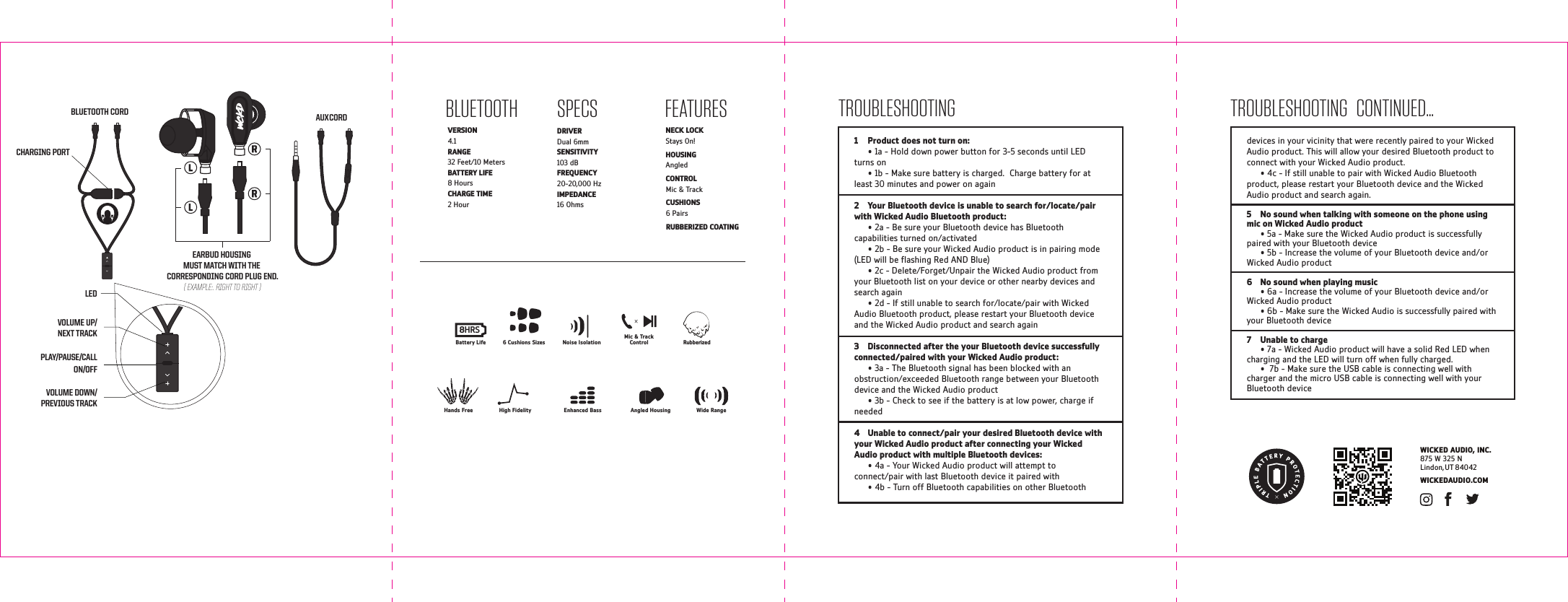
FEATURESLEDPLAY/PAUSE/CALLON/OFFVOLUME DOWN/PREVIOUS TRACKVOLUME UP/NEXT TRACKSPECSDRIVER  Dual 6mm  SENSITIVITY  103 dB FREQUENCY  20-20,000 HzIMPEDANCE  16 Ohms WICKEDAUDIO.COMWICKED AUDIO, INC.875 W 325 NLindon, UT 84042BLUETOOTHVERSION  4.1 RANGE  32 Feet/10 MetersBATTERY LIFE  8 HoursCHARGE TIME  2 HourNECK LOCK Stays On!HOUSING Angled CONTROL Mic & TrackCUSHIONS 6 PairsRUBBERIZED COATING1  Product does not turn on:      • 1a - Hold down power button for 3-5 seconds until LED turns on  • 1b - Make sure battery is charged.  Charge battery for at least 30 minutes and power on again2  Your Bluetooth device is unable to search for/locate/pair with Wicked Audio Bluetooth product:  • 2a - Be sure your Bluetooth device has Bluetooth capabilities turned on/activated  • 2b - Be sure your Wicked Audio product is in pairing mode (LED will be ashing Red AND Blue)  • 2c - Delete/Forget/Unpair the Wicked Audio product from your Bluetooth list on your device or other nearby devices and search again  • 2d - If still unable to search for/locate/pair with Wicked Audio Bluetooth product, please restart your Bluetooth device and the Wicked Audio product and search again3  Disconnected after the your Bluetooth device successfully connected/paired with your Wicked Audio product:  • 3a - The Bluetooth signal has been blocked with an obstruction/exceeded Bluetooth range between your Bluetooth device and the Wicked Audio product   • 3b - Check to see if the battery is at low power, charge if needed4  Unable to connect/pair your desired Bluetooth device with your Wicked Audio product after connecting your Wicked Audio product with multiple Bluetooth devices:  • 4a - Your Wicked Audio product will attempt to connect/pair with last Bluetooth device it paired with  • 4b - Turn off Bluetooth capabilities on other Bluetooth TROUBLESHOOTING   CONTINUED...TROUBLESHOOTINGdevices in your vicinity that were recently paired to your Wicked Audio product. This will allow your desired Bluetooth product to connect with your Wicked Audio product.  • 4c - If still unable to pair with Wicked Audio Bluetooth product, please restart your Bluetooth device and the Wicked Audio product and search again.5  No sound when talking with someone on the phone using mic on Wicked Audio product  • 5a - Make sure the Wicked Audio product is successfully paired with your Bluetooth device  • 5b - Increase the volume of your Bluetooth device and/or Wicked Audio product6  No sound when playing music  • 6a - Increase the volume of your Bluetooth device and/or Wicked Audio product   • 6b - Make sure the Wicked Audio is successfully paired with your Bluetooth device7  Unable to charge  • 7a - Wicked Audio product will have a solid Red LED when charging and the LED will turn off when fully charged.  •  7b - Make sure the USB cable is connecting well with charger and the micro USB cable is connecting well with your Bluetooth deviceAUX CORDCHARGING PORTBLUETOOTH CORDEARBUD HOUSING MUST MATCH WITH THE CORRESPONDING CORD PLUG END.( EXAMPLE:. RIGHT TO RIGHT )Hands Free Enhanced BassHigh Fidelity Angled Housing Wide RangeRubberizedNoise Isolation6 Cushions SizesMic & TrackControlBattery Life8HRS

Navigation menu