WJ Communications WJM3000 RFID Reader Module User Manual WJM Users 10 January DRAFT

WJ Communications, Inc. RFID Reader Module WJM Users 10 January DRAFT

User Manual

      WJM Series User’s Manual V01.00 www.wj.com 1/12/07 Page 1           WJ Module (WJM) Reader Modules User’s Manual Version 1.0       WJ Communications, Inc.   401 River Oaks Pkwy  San Jose, CA 94089  Tel: (800) WJ1-4401  Fax: (408) 577-6621  http://www.wj.com
      WJM Series User’s Manual V01.00 www.wj.com 1/12/07 Page 2 Disclaimer:  This information is subject to change without notice. This information is provided “as is,” and WJ makes no claims of it for purposes intended, merchantability or other.  All trademarks, service marks, trade names and logos are used in good faith and remain the property of their rightful owners.  For actual design-in, refer to the latest publications of WJ Communications data sheets for the most up-to-date specifications of WJ Communications products. Not all products and/or types are available in every country. Please check with a WJ sales representative or distributorship for availability and additional information. No part of this document may be copied or reproduced in any form or by any means without prior written consent of WJ Communications. WJ Communications assumes no responsibility for any errors that may appear in this document. WJ Communications does not assume any liability for infringement of patents, copyrights or other intellectual property rights of third parties by or arising from the use of WJ Communications products listed in this document or any other liability arising from the use of such WJ Communications products. No license, express, implied or otherwise, is granted under any patents, copyrights or other intellectual property rights of WJ Communications or others. Descriptions of circuits, software and other related information in this document are provided for illustrative purposes in semiconductor product operation and application examples. The incorporation of these circuits, software and information in the design of customer's equipment shall be done under the full responsibility of customer. WJ Communications no responsibility for any losses incurred by customers or third parties arising from the use of these circuits, software and information. While WJ Communications endeavors to enhance the quality, reliability and safety of WJ Communications products, customers agree and acknowledge that the possibility of defects thereof cannot be eliminated entirely. To minimize risks of damage to property or injury (including death) to persons arising from defects in WJ Communications products, customers must incorporate sufficient safety measures in their design, such as redundancy, fire-containment and anti-failure features.   Copyright© 2006 WJ Communications Inc.  November 2006.     Revision History:  The following table shows the revision history for this document.  Version Date    By Revision 1.0 11/29/06  BEC Initial Release
      WJM Series User’s Manual V01.00 www.wj.com 1/12/07 Page 3  Conventions:   WARNING:  A warning is used where care must be taken or a certain procedure must be followed, in order to prevent injury or harm to your health.   Caution:  A caution indicates information on conditions that must be met or a procedure that must be followed, that if not heeded could cause permanent damage to the equipment or software.   Note:  A note indicates conditions that must be met or procedures that must be followed to ensure proper functioning of the equipment or software.   Information:  An informational alert indicates items that make usage of the equipment or software easier.
      WJM Series User’s Manual V01.00 www.wj.com 1/12/07 Page 4 Table Of Contents 1 Introduction......................................................................................................6 1.1 Contents of this Document........................................................................6 1.2 Audience...................................................................................................6 2 Product Description .........................................................................................7 2.1 WJM1000..................................................................................................7 2.2 WJM3000..................................................................................................7 2.3 WJM Multi Interface Board (MIB)..............................................................7 3 WJM Antennas................................................................................................8 4 Using the WJM................................................................................................9 4.1 Hardware Installation................................................................................9 4.2 Communications.......................................................................................9 4.3 Connector Pinout......................................................................................9 4.4 User Interface Demo...............................................................................10 4.4.1 Installation ........................................................................................10 4.5 Application Programmers Interface (API)................................................10 4.5.1 .NET DLL (Dynamic Link Library).....................................................10 4.5.2 WJM Example DLL Project...............................................................11 4.6 Upgrade Utility ........................................................................................11 5 Compatibility..................................................................................................12 5.1 Host ........................................................................................................12 5.2 Tags........................................................................................................12 6 Troubleshooting / Technical Support.............................................................13 6.1 General...................................................................................................13 6.2 Performance ...........................................................................................13 6.3 Tag Programming...................................................................................14 6.4 Additional Information .............................................................................14 7 Technical Specifications: WJM......................................................................15 7.1 Mechanical Configuration: ......................................................................16 8 Notices ..........................................................................................................17 8.1 RF Connectors and Connections............................................................17 8.2 RFID Limitations .....................................................................................17 8.3 Safety......................................................................................................17 8.4 Patents....................................................................................................18 8.5 Copyright Notice .....................................................................................18 9 Regulatory Compliance .................................................................................19 9.1 FCC Statement.......................................................................................19 9.1.1 RF Radiation Exposure Statement...................................................20 10 Comments and Feedback............................................................................20
      WJM Series User’s Manual V01.00 www.wj.com 1/12/07 Page 5   List of Figures  Figure 1: MIB1000 (Serial)....................................................................................8 Figure 2: WJM Mechanical / Dimensions............................................................16
      WJM Series User’s Manual V01.00 www.wj.com 1/12/07 Page 6 1 Introduction  1.1 Contents of this Document  This manual describes background information for using the WJ Communications WJM series UHF RFID readers.   Other documents available from the WJ website:  • Installation of the necessary drivers (WJCIRFID.inf) for PCs running Microsoft Windows operating systems • Installation and use of the WJM demo software on PCs running Microsoft Windows • Hardware Installation Guide • WJM Application Programmers Interface Specification Application Notes available on the installation CD and from the WJ website:  • Operating the WJM in serial communications mode  • Programming tags with a WJM  • An FCC grant  1.2 Audience  This manual assumes that the reader is generally familiar with Windows personal computers and, if applicable, Windows CE or Pocket PC handheld devices.
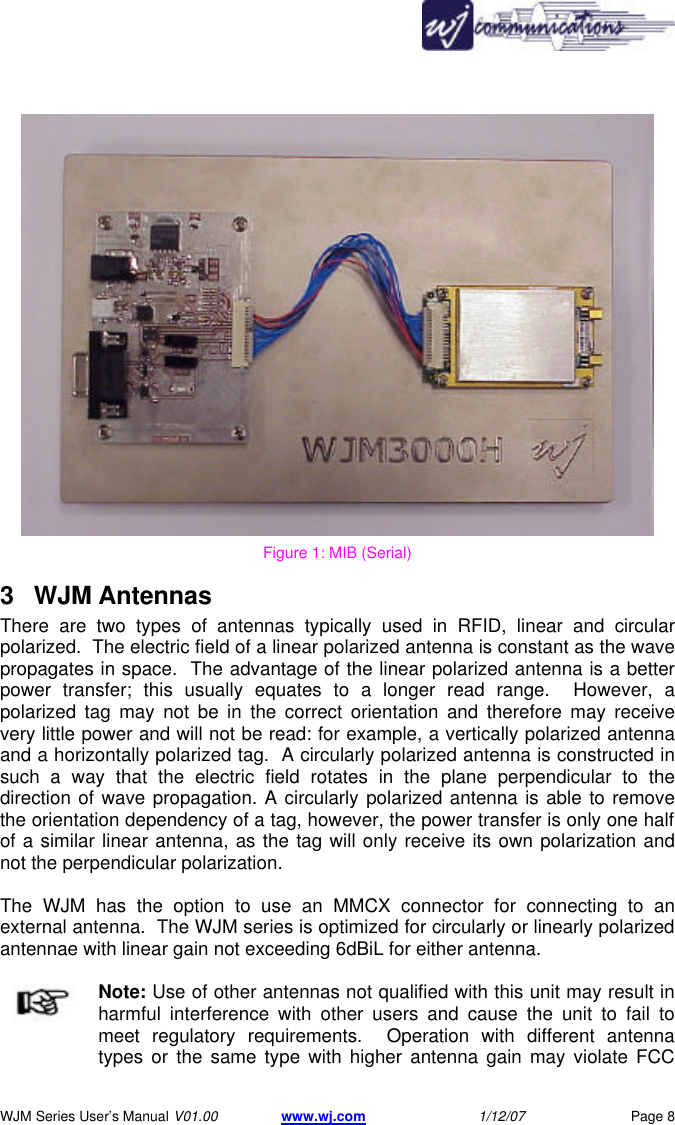
      WJM Series User’s Manual V01.00 www.wj.com 1/12/07 Page 7 2 Product Description  The WJ Communications WJM-series readers are UHF readers operating in a frequency band of roughly between 902 and 928 MHz.  These readers are compatible with UHF ISO18000-6B and 6C (EPCglobal Class 1 Generation 2) RFID tags.  These modules are ideal for handheld and mobile applications due to their small form factor, low power consumption and light weight. The WJM features two MMCX jacks for connecting up to two external antennas.  The transmitter output is software controlled from 18dBm up to 30dBm (1 watt) in 1dB increments.  The WJM Interface Board is an easy way to communicate with the WJM.  More information can be found in section 2.4 WJM Interface Board.  The WJM has a header mount option that allows the WJM to be direct mounted rather than connected via cabling.    WJ Communications recommends that when integrating these modules into final  products, the modules be mounted on a heat sink or on the surface of the metal enclosure housing the integrated product. 2.1 WJM1000 The WJM1000 is designed as a 0.25 watt reader, ideally for portable and another compact devices. Operation of this product is greater than 20cm from the users body, with the intent that the antenna is directed away from the user. The RF connectors are MMCX to keep the small form factor. 2.2 WJM3000 The WJM300 is designed for fixed reader environments.  It transmits at 1 watt in both typical and dense reader environments. Operation of this product is greater than 20cm from the users body, with the intent that the antenna is directed away from the user. The RF connectors are MMCX to keep the small form factor.  WJM Multi Interface Board (MIB) The MIB allows you to control WJ’s WJM series RFID reader cards by using a standard interface.  This platform serves as an evaluation board for the WJM series readers as well as a quick means to integrate the WJM for development.   The MIB also serves as a convenient platform to facilitate simple firmware upgrades to the WJM readers.  The MIB uses a standard RS232 serial port for communications.  Use of a USB to serial adapter offers a convenient USB interface.
      WJM Series User’s Manual V01.00 www.wj.com 1/12/07 Page 8  Figure 1: MIB (Serial) 3 WJM Antennas There are two types of antennas typically used in RFID, linear and circular polarized.  The electric field of a linear polarized antenna is constant as the wave propagates in space.  The advantage of the linear polarized antenna is a better power transfer; this usually equates to a longer read range.  However, a polarized tag may not be in the correct orientation and therefore may receive very little power and will not be read: for example, a vertically polarized antenna and a horizontally polarized tag.  A circularly polarized antenna is constructed in such a way that the electric field rotates in the plane perpendicular to the direction of wave propagation. A circularly polarized antenna is able to remove the orientation dependency of a tag, however, the power transfer is only one half of a similar linear antenna, as the tag will only receive its own polarization and not the perpendicular polarization.  The WJM has the option to use an MMCX connector for connecting to an external antenna.  The WJM series is optimized for circularly or linearly polarized antennae with linear gain not exceeding 6dBiL for either antenna. Note: Use of other antennas not qualified with this unit may result in harmful interference with other users and cause the unit to fail to meet regulatory requirements.  Operation with different antenna types or the same type with higher antenna gain may violate FCC
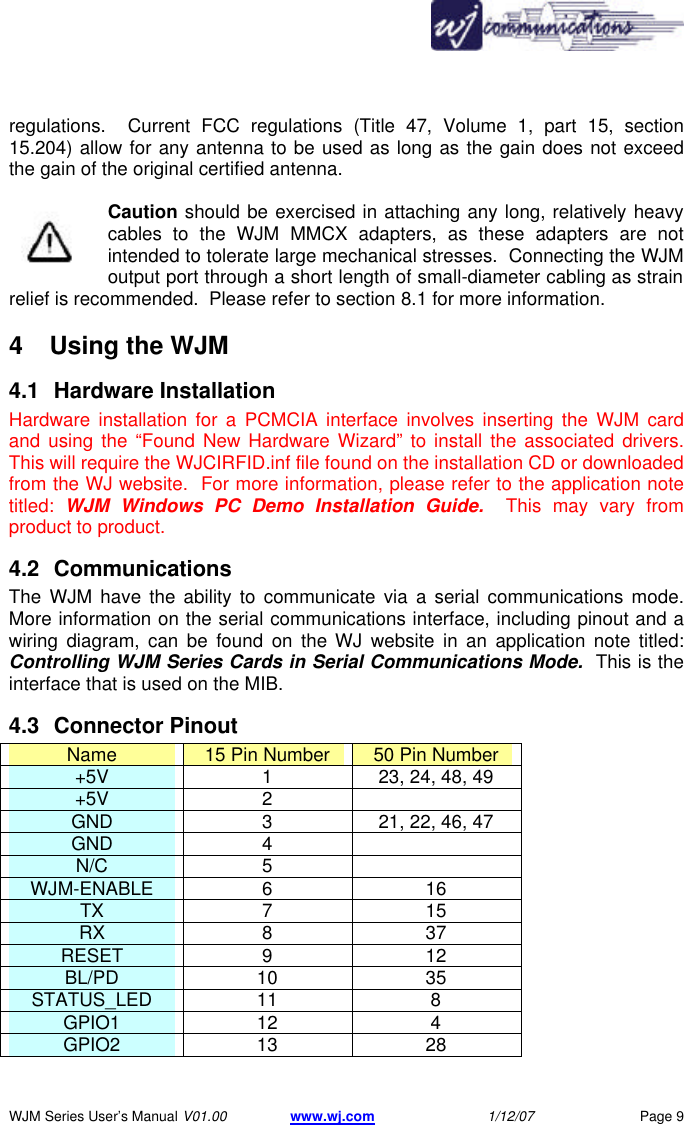
      WJM Series User’s Manual V01.00 www.wj.com 1/12/07 Page 9 regulations.  Current FCC regulations (Title 47, Volume 1, part 15, section 15.204) allow for any antenna to be used as long as the gain does not exceed the gain of the original certified antenna.  Caution should be exercised in attaching any long, relatively heavy cables to the WJM MMCX adapters, as these adapters are not intended to tolerate large mechanical stresses.  Connecting the WJM output port through a short length of small-diameter cabling as strain relief is recommended.  Please refer to section 8.1 for more information. 4  Using the WJM  4.1 Hardware Installation Hardware installation for a PCMCIA interface involves inserting the WJM card and using the “Found New Hardware Wizard” to install the associated drivers.  This will require the WJCIRFID.inf file found on the installation CD or downloaded from the WJ website.  For more information, please refer to the application note titled:  WJM Windows PC Demo Installation Guide.  This may vary from product to product. 4.2 Communications The WJM have the ability to communicate via a serial communications mode.  More information on the serial communications interface, including pinout and a wiring diagram, can be found on the WJ website in an application note titled: Controlling WJM Series Cards in Serial Communications Mode.  This is the interface that is used on the MIB. 4.3 Connector Pinout Name 15 Pin Number 50 Pin Number +5V 1 23, 24, 48, 49 +5V 2   GND 3 21, 22, 46, 47 GND 4   N/C 5   WJM-ENABLE 6 16 TX 7 15 RX 8 37 RESET 9 12 BL/PD 10 35 STATUS_LED 11 8 GPIO1 12 4 GPIO2 13 28
      WJM Series User’s Manual V01.00 www.wj.com 1/12/07 Page 10 GPIO3 14 3 GPIO4 15 27 4.4 User Interface Demo The WJM Demo Software is freely available to the public:  • WJM Demo – runs on PCs with Microsoft Windows 98, ME, 2000 or XP  The demo software uses the Microsoft .NET Framework, which must also be installed for the demo installation programs (files with an .msi extension) to run.  Please visit the website for the latest version of this software that will support newer operating systems. 4.4.1 Installation  Execute the file WJM_Demo_Installer.exe and follow the onscreen instructions.  If you do not have .NET Framework installed, the installation program will prompt you to install it.  This is necessary for the demo software to function.  Please check the WJ Communications website for the latest version.  When upgrading the firmware of your reader, please upgrade the PC Demo. 4.5 Application Programmers Interface (API) The WJM is controlled using commands issued to the WJM from a host.  Each command is formatted to control specific elements and options.  The API specification is available on the WJ website that specifies all commands with explanation of the format.  Please refer to the applications notes section of the WJ website for WJM Host Protocol API.  4.5.1 .NET DLL (Dynamic Link Library) This library provides a series of methods that allow developers to call the high-level functions of the WJM-series PC-card readers without being concerned about low-level packet construction and processing. Compatibility has been verified for Windows XP and may work with other Windows operating systems. The original source code, written in C# for the .NET Framework and Compact Framework, and a compiled library ready for linking to your code are both provided. For more information, please refer to the application notes section of the WJ website in Introduction to the WJM DLL.
      WJM Series User’s Manual V01.00 www.wj.com 1/12/07 Page 11 4.5.2 WJM Example DLL Project Also available on the WJ website is the source code for a simple example C#.NET windows application showing how to use the DLL. 4.6 Upgrade Utility The WJM can be upgraded to the latest firmware by downloading the latest version from the WJ website at www.wj.com.  Follow the links to technical support.  The WJM cards can be upgraded via the MIB and choosing the associated COM port.  Follow the on-screen directions.  Note: At this time, there is no way to downgrade the reader cards except by returning the card to WJ for reprogramming.
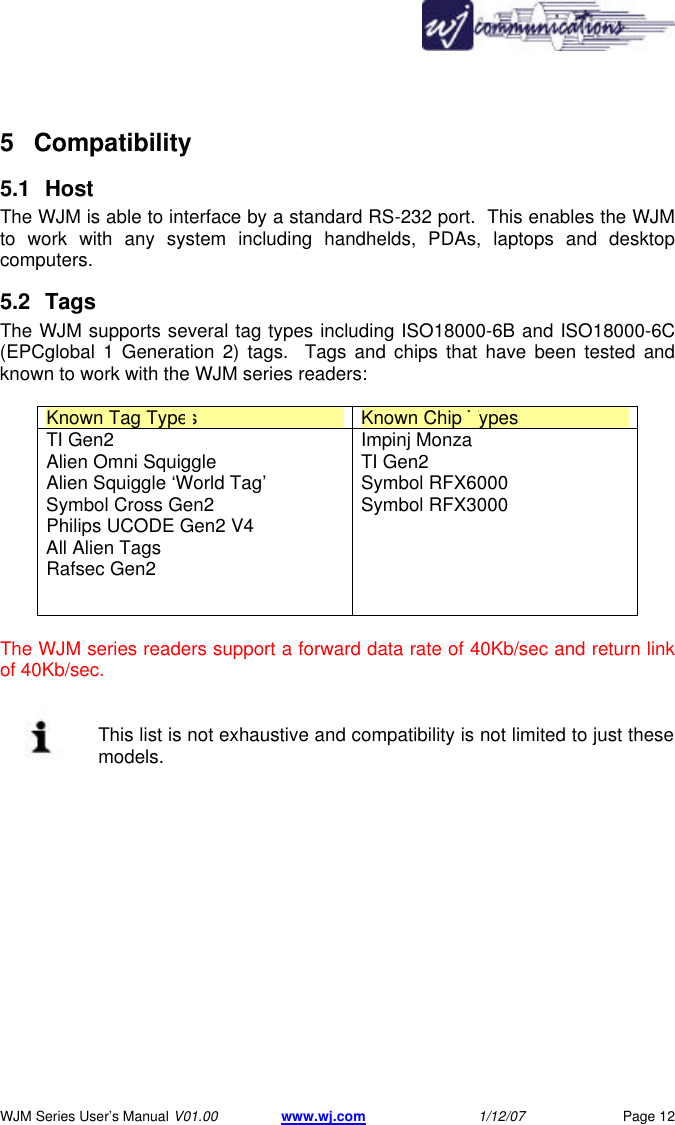
      WJM Series User’s Manual V01.00 www.wj.com 1/12/07 Page 12 5 Compatibility 5.1 Host The WJM is able to interface by a standard RS-232 port.  This enables the WJM to work with any system including handhelds, PDAs, laptops and desktop computers. 5.2 Tags The WJM supports several tag types including ISO18000-6B and ISO18000-6C (EPCglobal 1 Generation 2) tags.  Tags and chips that have been tested and known to work with the WJM series readers:  Known Tag Types Known Chip Types TI Gen2 Alien Omni Squiggle Alien Squiggle ‘World Tag’ Symbol Cross Gen2 Philips UCODE Gen2 V4 All Alien Tags Rafsec Gen2  Impinj Monza TI Gen2 Symbol RFX6000 Symbol RFX3000  The WJM series readers support a forward data rate of 40Kb/sec and return link of 40Kb/sec.   This list is not exhaustive and compatibility is not limited to just these models.
      WJM Series User’s Manual V01.00 www.wj.com 1/12/07 Page 13 6 Troubleshooting / Technical Support  6.1 General The reader does not connect to the demo software: • Wrong COM port selected - Verify the COM port of the reader in the Device Manager. • Card is not powered - Verify the green LED is lit on the MIB, and blue LED is blinking. • Boot load switch is in Boot (MIB only) - Switch the boot loader switch to the normal 6.2 Performance Reader does not read tags • Tag is not compliant with reader protocols - WJM reads ISO18000-6B and ISO18000-6C (EPC Gen2) tags • Antenna cables are not connected properly - Make sure the antenna connections are tight. • Antenna is polarized perpendicular to tag polarization - Rotate the tag or the reader antenna 90 degrees. • Wrong antenna selected - With the top of the card facing you antenna ports up, antenna A is on the left.  Reader performance is poor • Antenna field affected by objects nearby - Verify the reader’s antenna is free of nearby objects that would partially cover the antenna; metal, hands, plastics: all these can effect antenna operation. • Tag is being obscured by objects nearby - Tags perform poorly when in close proximity to metals and/or liquids. • Low power level - Increase the transmit power setting • Poor quality antenna  Read rate is slow • Message log file has gotten too big, clear the message log found in the “options” menu. • Inventory period set too high Adjust inventory period (delay time between reads)
      WJM Series User’s Manual V01.00 www.wj.com 1/12/07 Page 14 Reader does not write tags • Tag has been locked or has an unknown access password • Tag is too far from the antenna 6.3    Tag Programming Programming of RFID tags is more complicated than simply reading tags: there is a substantial amount of communication between the tag and reader.  Writing to the tag requires more power for a longer period of time than reading.  It is most often the case that a tag can be read at a longer range than it can be programmed (assuming the same conditions.) To improve tag write/programming reliability and success it is recommended that the tag be brought closer to the antenna so as to receive the maximum RF field strength.  It is important that the tag and reader not be moving relative to each other.  While individual results will vary depending on tag type, environment and other such variables, these guidelines have been shown to increase the chance of successful tag programming. 6.4 Additional Information Additional information can be found in the tech support section of the WJ website.  These pages will contain application notes, an FAQ and an online user forum.  Before contacting technical support, please have your firmware and software upgraded to the latest version. For technical support please visit the WJ website for the latest information as well as Frequently Asked Questions (FAQs) and find and share answers to problems on the online user forum.
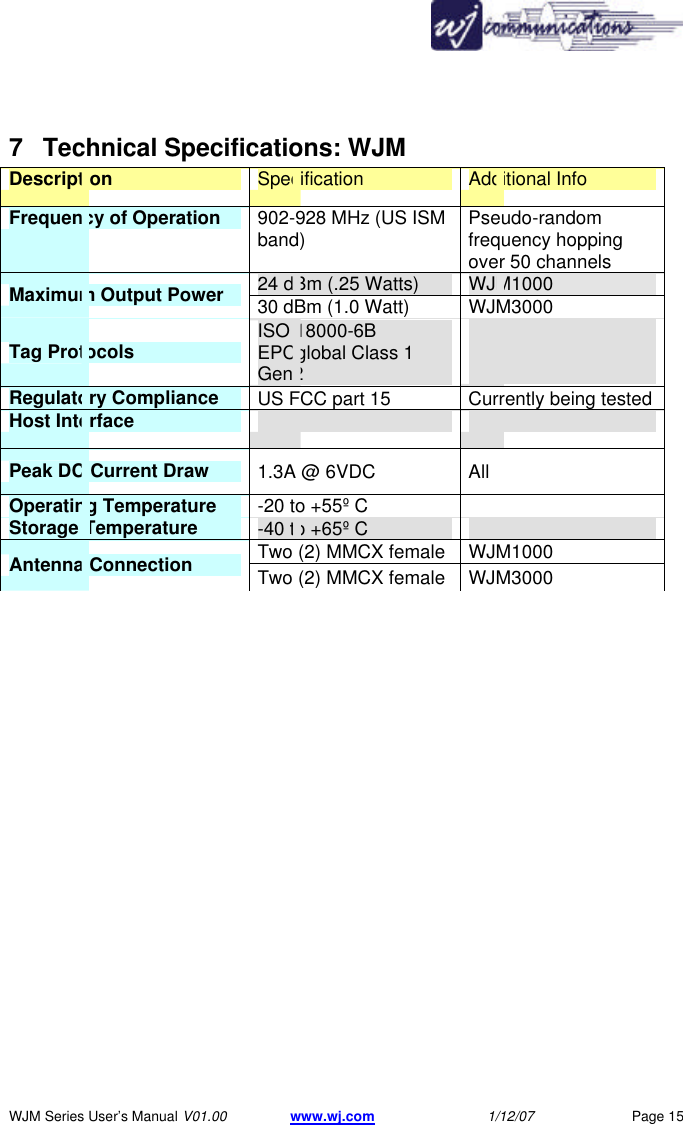
      WJM Series User’s Manual V01.00 www.wj.com 1/12/07 Page 15 7 Technical Specifications: WJM  Description Specification Additional Info Frequency of Operation 902-928 MHz (US ISM band)  Pseudo-random frequency hopping over 50 channels  24 dBm (.25 Watts) WJM1000 Maximum Output Power 30 dBm (1.0 Watt)  WJM3000 Tag Protocols ISO 18000-6B EPCglobal Class 1 Gen2   Regulatory Compliance US FCC part 15 Currently being tested Host Interface    Peak DC Current Draw 1.3A @ 6VDC All Operating Temperature -20 to +55º C   Storage Temperature -40 to +65º C   Two (2) MMCX female  WJM1000 Antenna Connection Two (2) MMCX female  WJM3000
      WJM Series User’s Manual V01.00 www.wj.com 1/12/07 Page 16 7.1 Mechanical Configuration:  Figure 2: WJM Mechanical / Dimensions
      WJM Series User’s Manual V01.00 www.wj.com 1/12/07 Page 17  8 Notices  8.1 RF Connectors and Connections Caution: Care must be taken during insertion, removal and usage of the RF Connectors to prevent damage and degradation.  Torques of greater than 1.7 in-lbs (0.19 newton-meters) can damage the MMCX connectors.  It is best to use less torque to reduce the potential for damage.  Use of a flexible RG178/196 cable (or something similar) when interfacing to the reader is recommended.  Damage to the connectors may render the card unusable.  The loads required to break these connectors from the PC board are moderate but easily achievable in a lab setting.  It is possible to generate a large bending moment using a large diameter cable connected to the unit.  Note: The WJM series products include an automatic circuit to prevent damage due to improper or no antenna connection.  8.2 RFID Limitations Communication between tags and readers is a complex phenomenon that depends on details of the environment surrounding the tags and reader.  Careful installation, testing, development and appropriate operating procedures are indispensable for successful implementation of RFID. The user can manipulate some environmental aspects, such as tag placement and orientation to increase the possibility of a successful reader-tag transaction. 8.3 Safety  Caution: Any use of this equipment with antennas or cabling installed outdoors or otherwise exposed to inclement weather must avoid proximity with power lines or other high-voltage conductors and provide for proper grounding and lightning arresting devices to protect the equipment user in the event of a lightning strike.  See National Electrical Code (NEC) requirements articles 725, 800 and 810 for further information.  Do not operate the WJM in any area where critical safety equipment may be sensitive to RF interference, such as medical or life support equipment.   Do not operate the WJM on any aircraft in flight or at any other time when operation of radio devices, such as cellular phones, is prohibited.
      WJM Series User’s Manual V01.00 www.wj.com 1/12/07 Page 18 Caution: Personnel should not be closer than 23 cm (9 inches) from any WJM antenna for prolonged periods of time.  See FCC bulletins 56 and 65 for further information on electromagnetic field exposure.   8.4 Patents  Portions of the products described in this manual may be covered by currently pending US and foreign patents.   8.5 Copyright Notice  The contents of this document are the property of WJ Communications, Incorporated, except where otherwise noted.  Individuals who have purchased or otherwise legally acquired the WJM-series hardware units described in this document are expressly permitted to make copies of the document, in electronic or paper form, for personal, backup and archival use.  Brief segments may be excerpted and used with attribution for descriptive purposes in commentaries, reviews or other informational documents.  All other reproduction in whole or in part is expressly prohibited without the consent of the copyright owner.   Copyright 2006 by WJ Communications, Inc.
      WJM Series User’s Manual V01.00 www.wj.com 1/12/07 Page 19 9 Regulatory Compliance  9.1  FCC Statement (pending) This equipment has been tested and found to comply with the limits for a Class B digital device, pursuant to Part 15 of the FCC Rules.  These limits are designed to provide reasonable protection against harmful interference in a residential installation.  This equipment generates, uses and can radiate radio frequency energy and, if not installed and used in accordance with the instructions, may cause harmful interference to radio communications.  However, there is no guarantee that interference will not occur in a particular installation.  If this equipment does cause harmful interference to radio or television reception, which can be determined by turning the equipment off and on, the user is encouraged to try to correct the interference by one or more of the following measures:  • Reorient or relocate the receiving antenna.   • Increase the separation between the equipment and receiver.   • Connect the equipment into an outlet on a circuit different from that to which the receiver is connected.   • Consult the dealer or an experienced radio/TV technician for help.     This device complies with Part 15 of the FCC Rules. Operation is subject to the following two conditions: (1) this device may not cause harmful interference, and (2) this device must accept any interference received, including interference that may cause undesired operation.  Note: Changes or modifications not expressly approved by WJ Communications could void the user's authority to operate the equipment described in this manual.   The WJM has been approved for use external antennas of the same gain or lower.  Use of any higher gain antenna(s) will void the user’s authority to operate the equipment.
      WJM Series User’s Manual V01.00 www.wj.com 1/12/07 Page 20 9.1.1 RF Radiation Exposure Statement  These devices comply with FCC radiation exposure limits set forth for an uncontrolled environment and users must follow specific operating instructions for satisfying RF exposure compliance.   Warning: To comply with RF radiation exposure requirements in FCC’s regulations, the WJM1000 and WJM3000 products must be installed so there is a separation distance of at least 20 cm (8 in) between all persons and the antenna.  These devices may not be co-located with any other transmitter or transmitter antenna.   10 Comments and Feedback  WJ Communications welcomes comments, suggestions and feedback related to this manual or to the products it describes.  Please submit your remarks in the “Contact Us” page of the WJ website or submit your feedback in writing to:  WJ Communications, Inc. 401 River Oaks Parkway  San Jose, CA 95134-1916 USA

Navigation menu