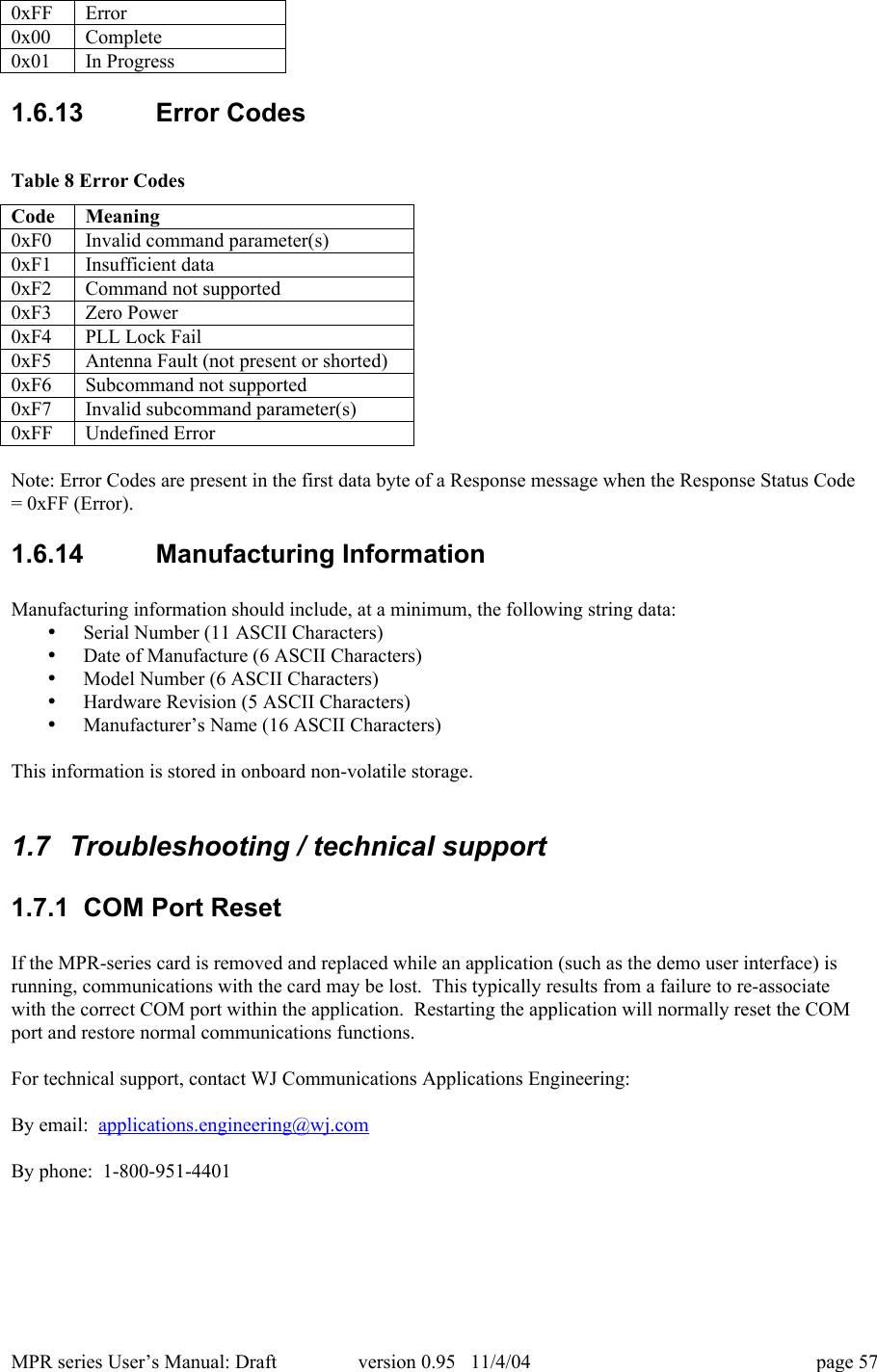
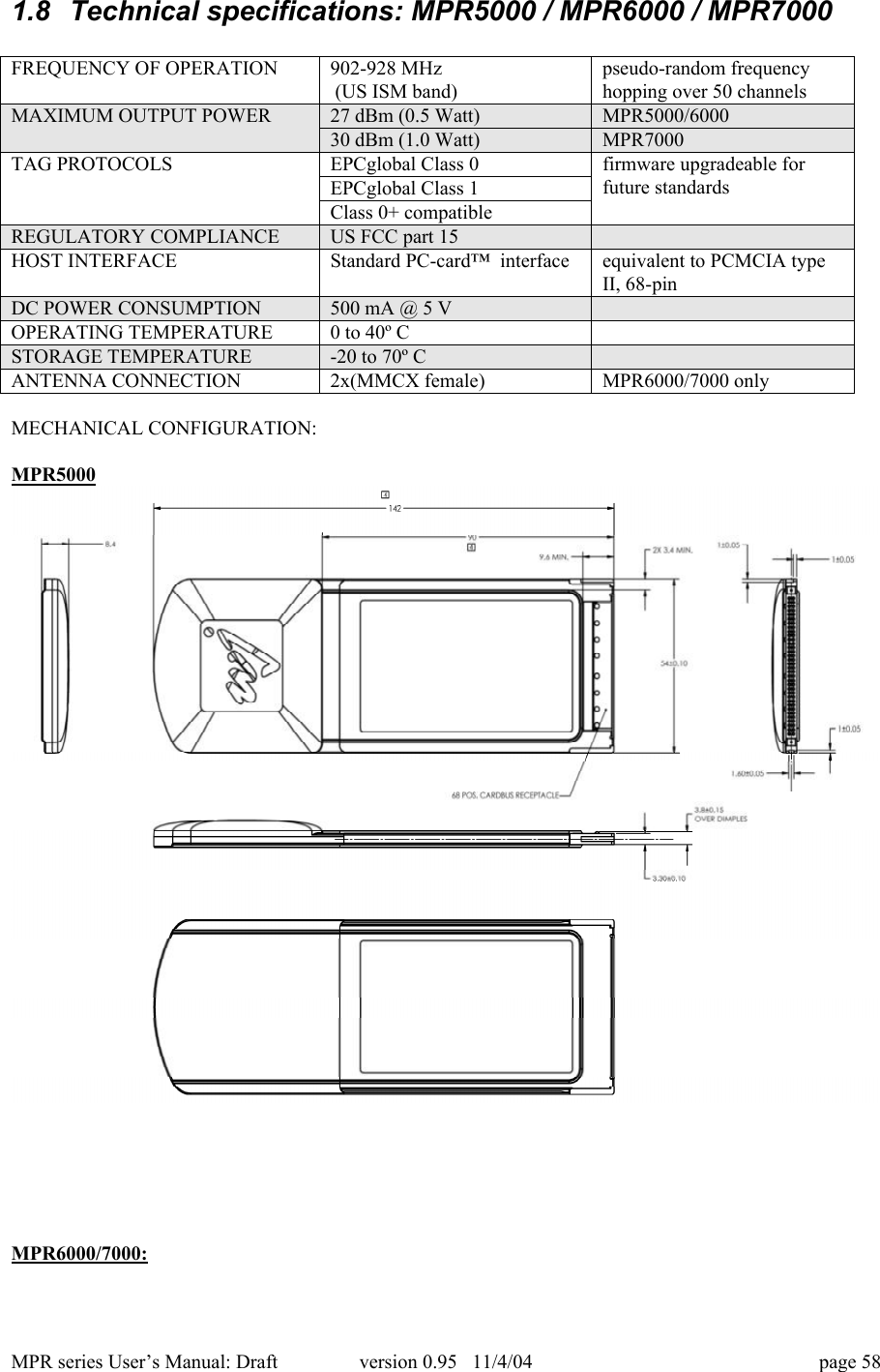
WJ Communications WJMPR6XXX RFID Reader User Manual

WJ Communications, Inc. RFID Reader

User Manual

MPR series User’s Manual: Draft version 0.95   11/4/04 page 11  MPR Series MultiProtocol RFID Reader User’s ManualVersion 0.95  11/4/041.1  Cover sheet
MPR series User’s Manual: Draft version 0.95   11/4/04 page 21.2  TOC
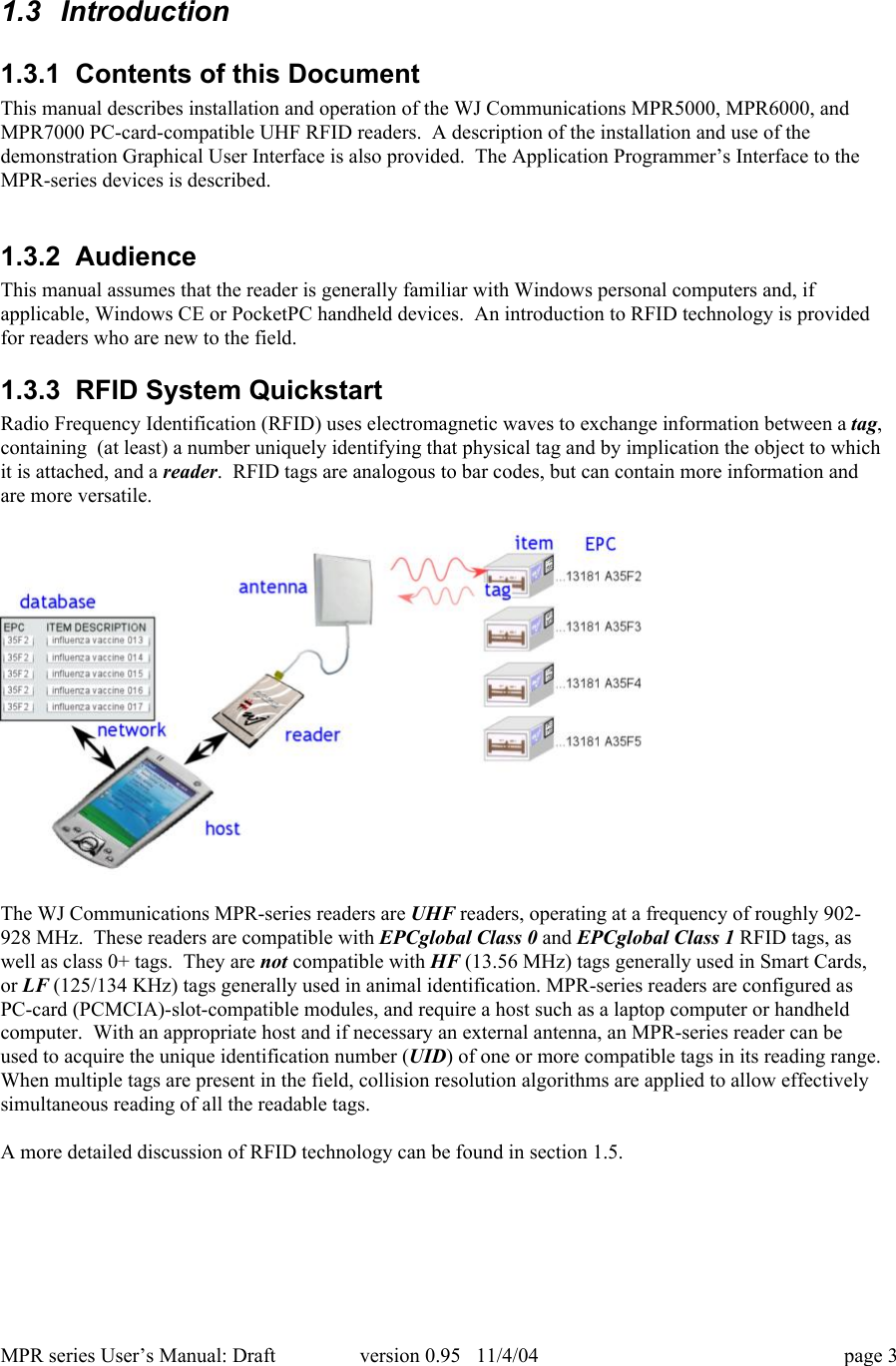
MPR series User’s Manual: Draft version 0.95   11/4/04 page 31.3  Introduction1.3.1  Contents of this DocumentThis manual describes installation and operation of the WJ Communications MPR5000, MPR6000, andMPR7000 PC-card-compatible UHF RFID readers.  A description of the installation and use of thedemonstration Graphical User Interface is also provided.  The Application Programmer’s Interface to theMPR-series devices is described.1.3.2  AudienceThis manual assumes that the reader is generally familiar with Windows personal computers and, ifapplicable, Windows CE or PocketPC handheld devices.  An introduction to RFID technology is providedfor readers who are new to the field.1.3.3  RFID System QuickstartRadio Frequency Identification (RFID) uses electromagnetic waves to exchange information between a tag,containing  (at least) a number uniquely identifying that physical tag and by implication the object to whichit is attached, and a reader.  RFID tags are analogous to bar codes, but can contain more information andare more versatile.The WJ Communications MPR-series readers are UHF readers, operating at a frequency of roughly 902-928 MHz.  These readers are compatible with EPCglobal Class 0 and EPCglobal Class 1 RFID tags, aswell as class 0+ tags.  They are not compatible with HF (13.56 MHz) tags generally used in Smart Cards,or LF (125/134 KHz) tags generally used in animal identification. MPR-series readers are configured asPC-card (PCMCIA)-slot-compatible modules, and require a host such as a laptop computer or handheldcomputer.  With an appropriate host and if necessary an external antenna, an MPR-series reader can beused to acquire the unique identification number (UID) of one or more compatible tags in its reading range.When multiple tags are present in the field, collision resolution algorithms are applied to allow effectivelysimultaneous reading of all the readable tags.A more detailed discussion of RFID technology can be found in section 1.5.
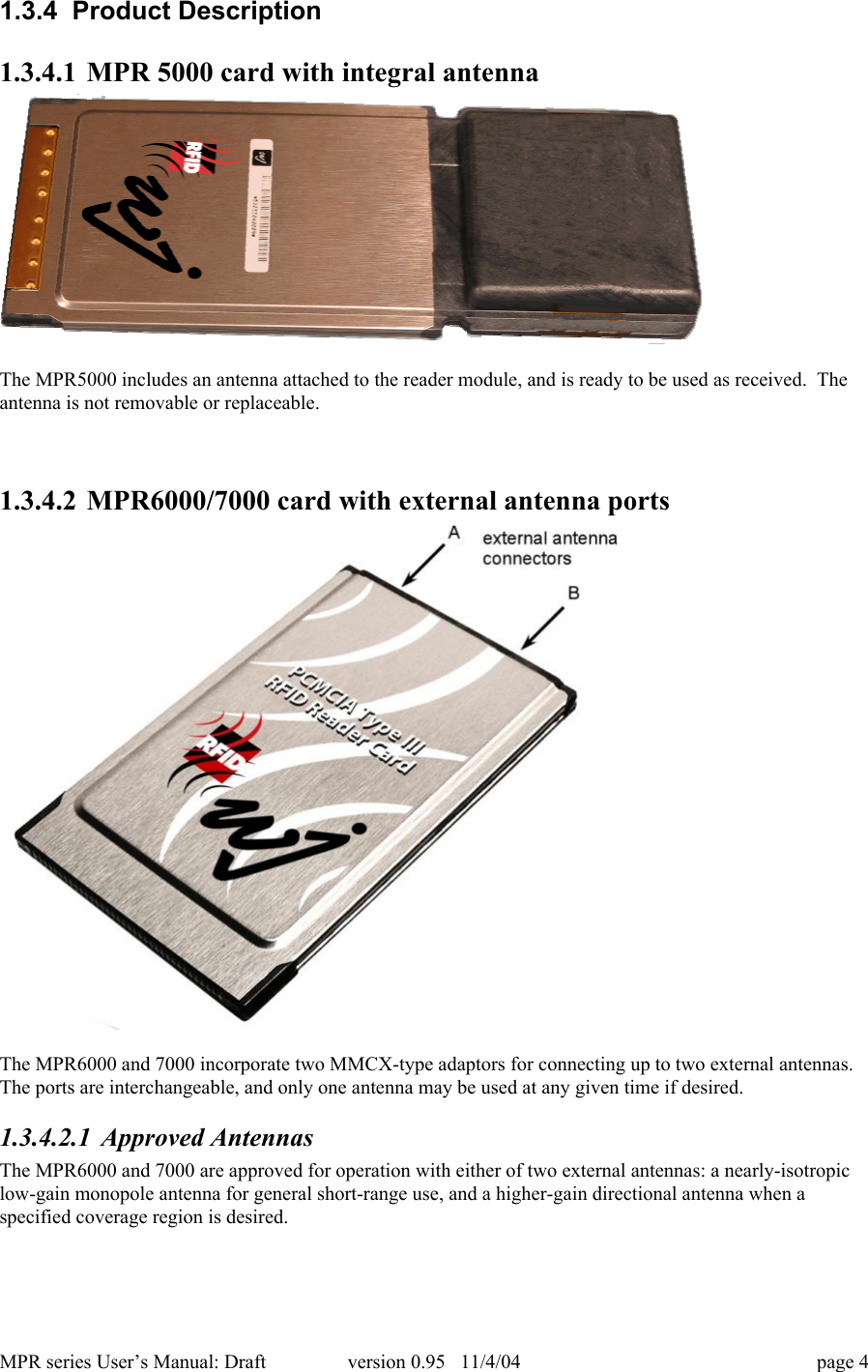
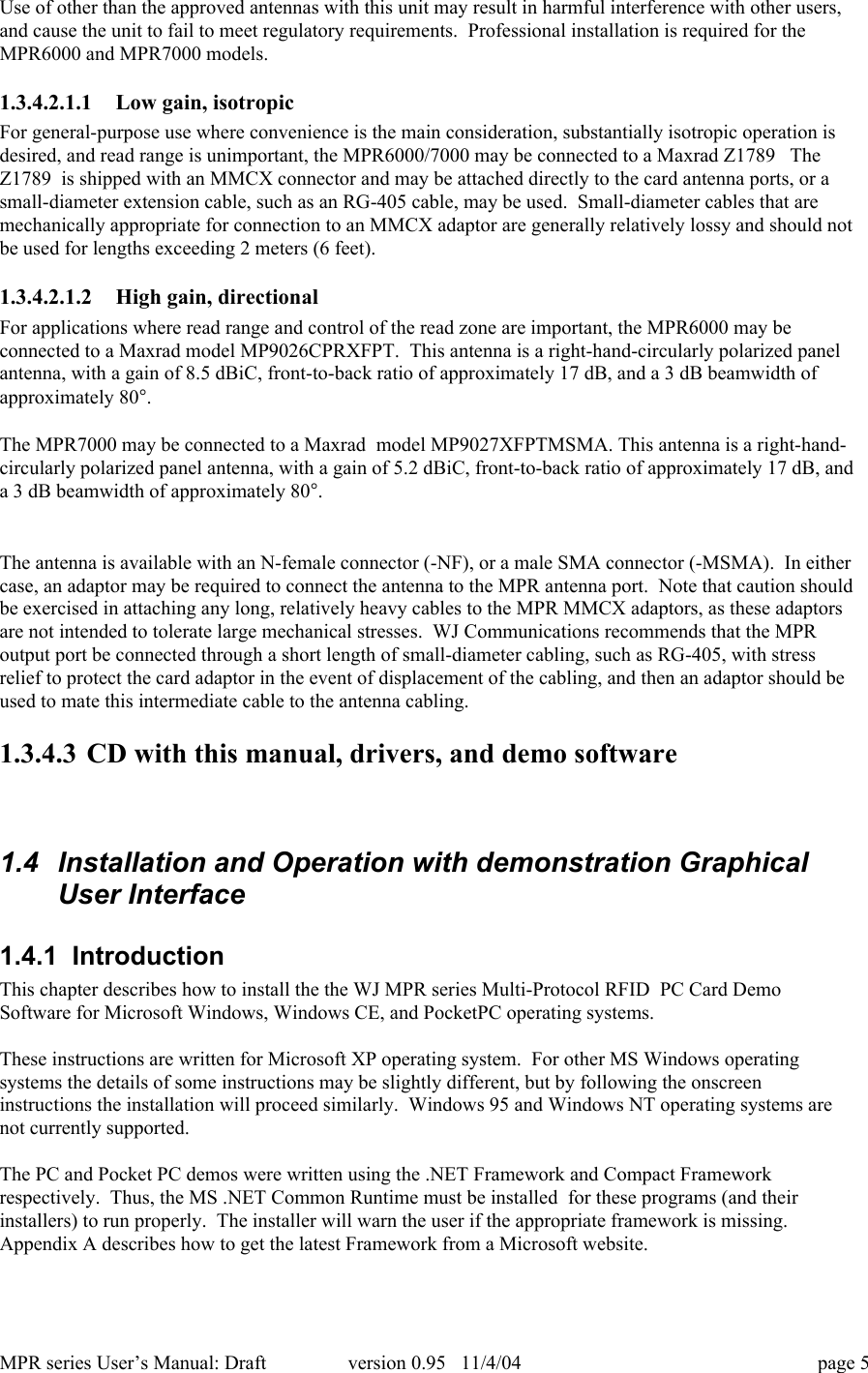
MPR series User’s Manual: Draft version 0.95   11/4/04 page 41.3.4  Product Description1.3.4.1 MPR 5000 card with integral antennaThe MPR5000 includes an antenna attached to the reader module, and is ready to be used as received.  Theantenna is not removable or replaceable.1.3.4.2 MPR6000/7000 card with external antenna portsThe MPR6000 and 7000 incorporate two MMCX-type adaptors for connecting up to two external antennas.The ports are interchangeable, and only one antenna may be used at any given time if desired.1.3.4.2.1 Approved AntennasThe MPR6000 and 7000 are approved for operation with either of two external antennas: a nearly-isotropiclow-gain monopole antenna for general short-range use, and a higher-gain directional antenna when aspecified coverage region is desired.
MPR series User’s Manual: Draft version 0.95   11/4/04 page 5Use of other than the approved antennas with this unit may result in harmful interference with other users,and cause the unit to fail to meet regulatory requirements.  Professional installation is required for theMPR6000 and MPR7000 models.1.3.4.2.1.1 Low gain, isotropicFor general-purpose use where convenience is the main consideration, substantially isotropic operation isdesired, and read range is unimportant, the MPR6000/7000 may be connected to a Maxrad Z1789   TheZ1789  is shipped with an MMCX connector and may be attached directly to the card antenna ports, or asmall-diameter extension cable, such as an RG-405 cable, may be used.  Small-diameter cables that aremechanically appropriate for connection to an MMCX adaptor are generally relatively lossy and should notbe used for lengths exceeding 2 meters (6 feet).1.3.4.2.1.2 High gain, directionalFor applications where read range and control of the read zone are important, the MPR6000 may beconnected to a Maxrad model MP9026CPRXFPT.  This antenna is a right-hand-circularly polarized panelantenna, with a gain of 8.5 dBiC, front-to-back ratio of approximately 17 dB, and a 3 dB beamwidth ofapproximately 80°.The MPR7000 may be connected to a Maxrad  model MP9027XFPTMSMA. This antenna is a right-hand-circularly polarized panel antenna, with a gain of 5.2 dBiC, front-to-back ratio of approximately 17 dB, anda 3 dB beamwidth of approximately 80°.The antenna is available with an N-female connector (-NF), or a male SMA connector (-MSMA).  In eithercase, an adaptor may be required to connect the antenna to the MPR antenna port.  Note that caution shouldbe exercised in attaching any long, relatively heavy cables to the MPR MMCX adaptors, as these adaptorsare not intended to tolerate large mechanical stresses.  WJ Communications recommends that the MPRoutput port be connected through a short length of small-diameter cabling, such as RG-405, with stressrelief to protect the card adaptor in the event of displacement of the cabling, and then an adaptor should beused to mate this intermediate cable to the antenna cabling.1.3.4.3 CD with this manual, drivers, and demo software1.4  Installation and Operation with demonstration GraphicalUser Interface1.4.1  IntroductionThis chapter describes how to install the the WJ MPR series Multi-Protocol RFID  PC Card DemoSoftware for Microsoft Windows, Windows CE, and PocketPC operating systems.These instructions are written for Microsoft XP operating system.  For other MS Windows operatingsystems the details of some instructions may be slightly different, but by following the onscreeninstructions the installation will proceed similarly.  Windows 95 and Windows NT operating systems arenot currently supported.The PC and Pocket PC demos were written using the .NET Framework and Compact Frameworkrespectively.  Thus, the MS .NET Common Runtime must be installed  for these programs (and theirinstallers) to run properly.  The installer will warn the user if the appropriate framework is missing.Appendix A describes how to get the latest Framework from a Microsoft website.
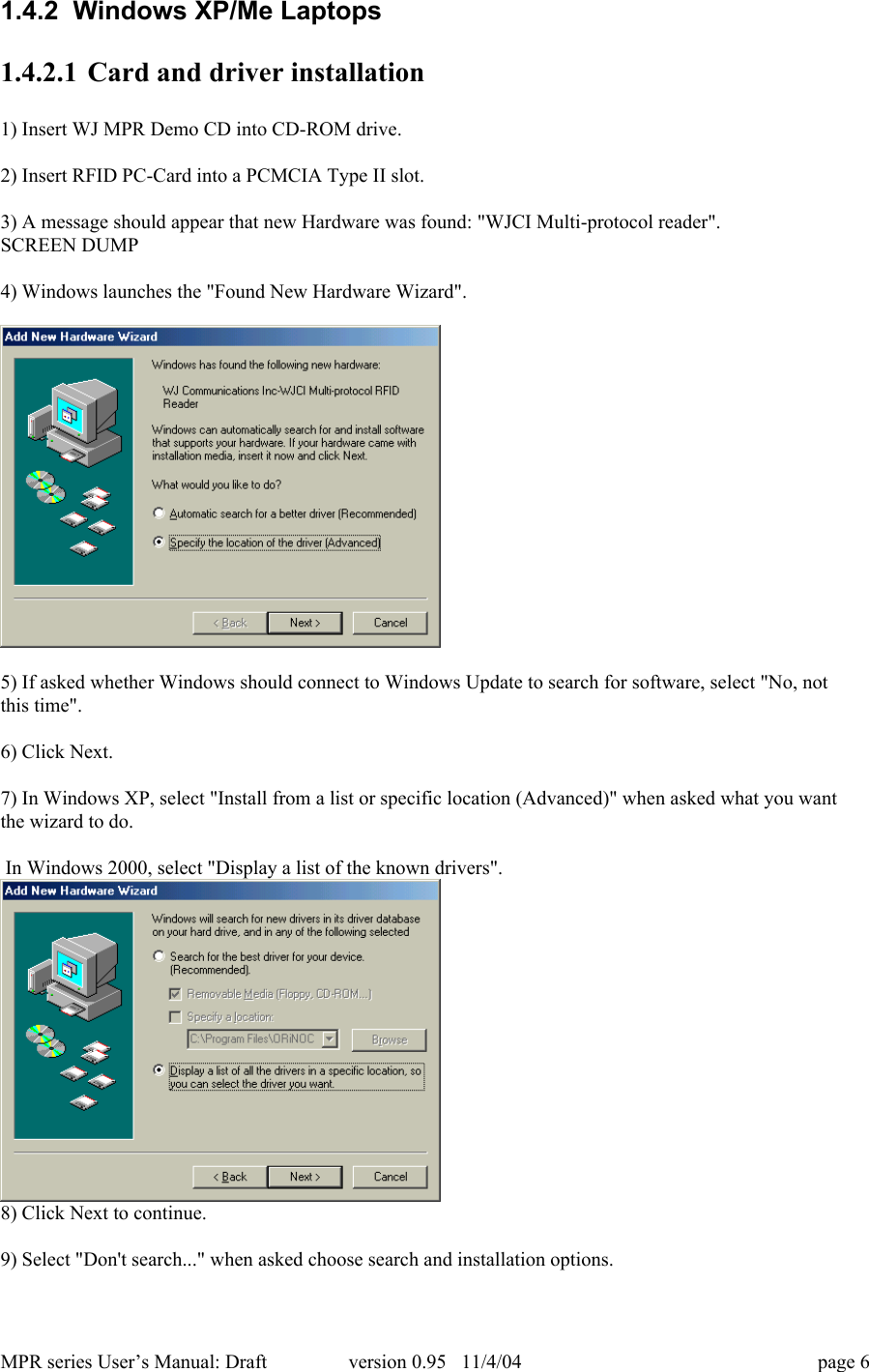
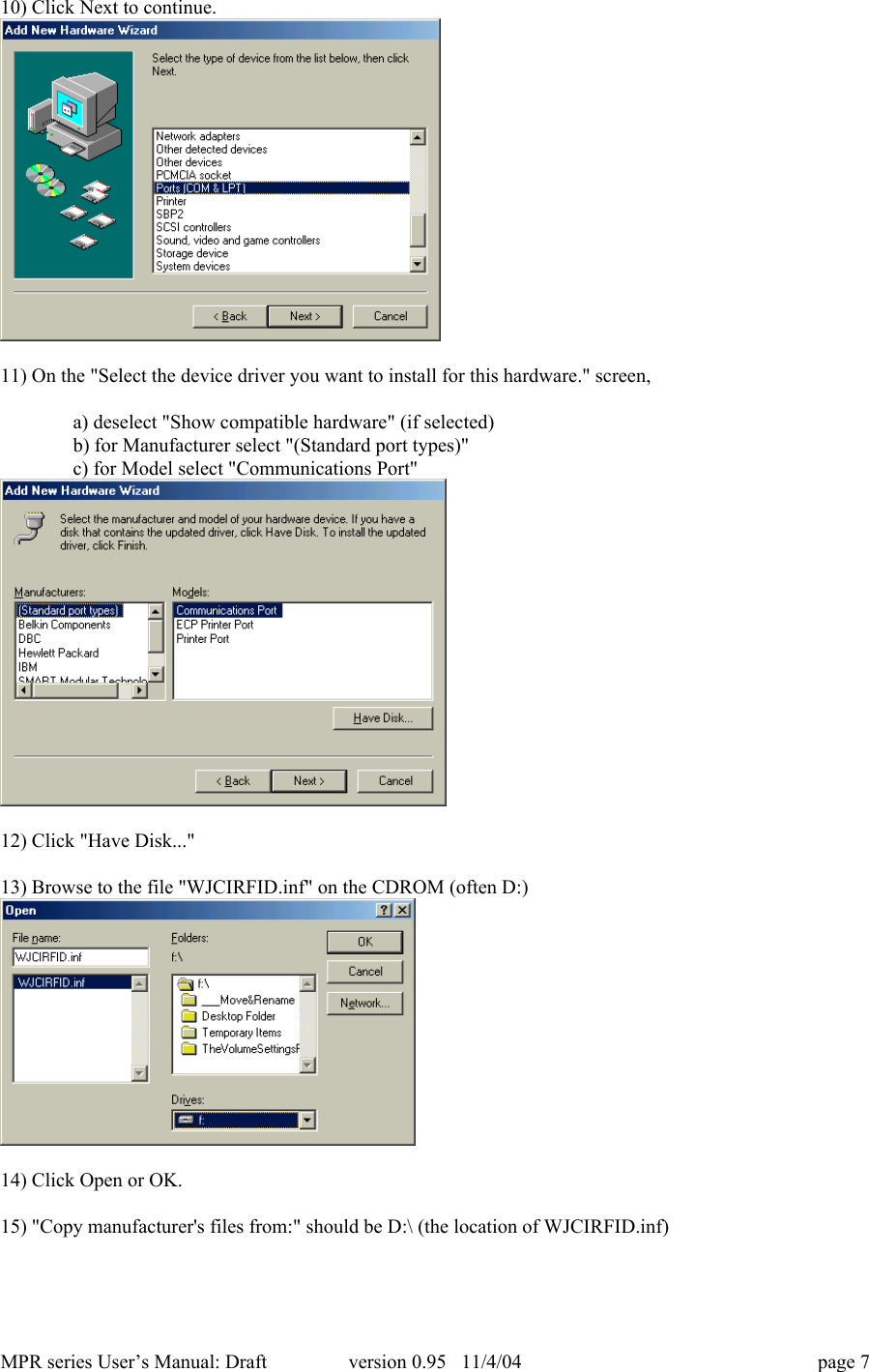
MPR series User’s Manual: Draft version 0.95   11/4/04 page 61.4.2  Windows XP/Me Laptops1.4.2.1 Card and driver installation1) Insert WJ MPR Demo CD into CD-ROM drive.2) Insert RFID PC-Card into a PCMCIA Type II slot.3) A message should appear that new Hardware was found: "WJCI Multi-protocol reader".SCREEN DUMP4) Windows launches the "Found New Hardware Wizard".5) If asked whether Windows should connect to Windows Update to search for software, select "No, notthis time".6) Click Next.7) In Windows XP, select "Install from a list or specific location (Advanced)" when asked what you wantthe wizard to do. In Windows 2000, select "Display a list of the known drivers".8) Click Next to continue.9) Select "Don't search..." when asked choose search and installation options.
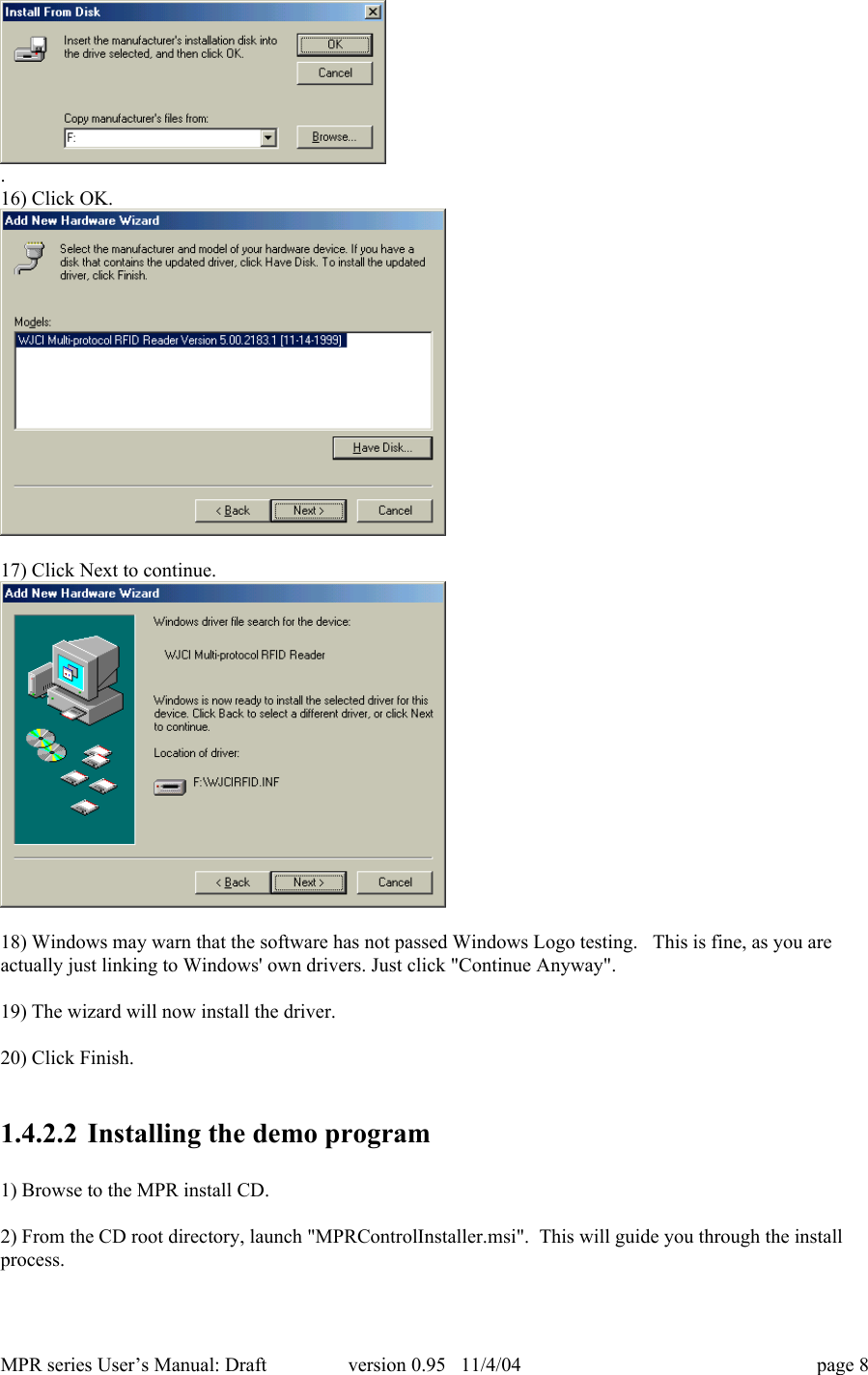
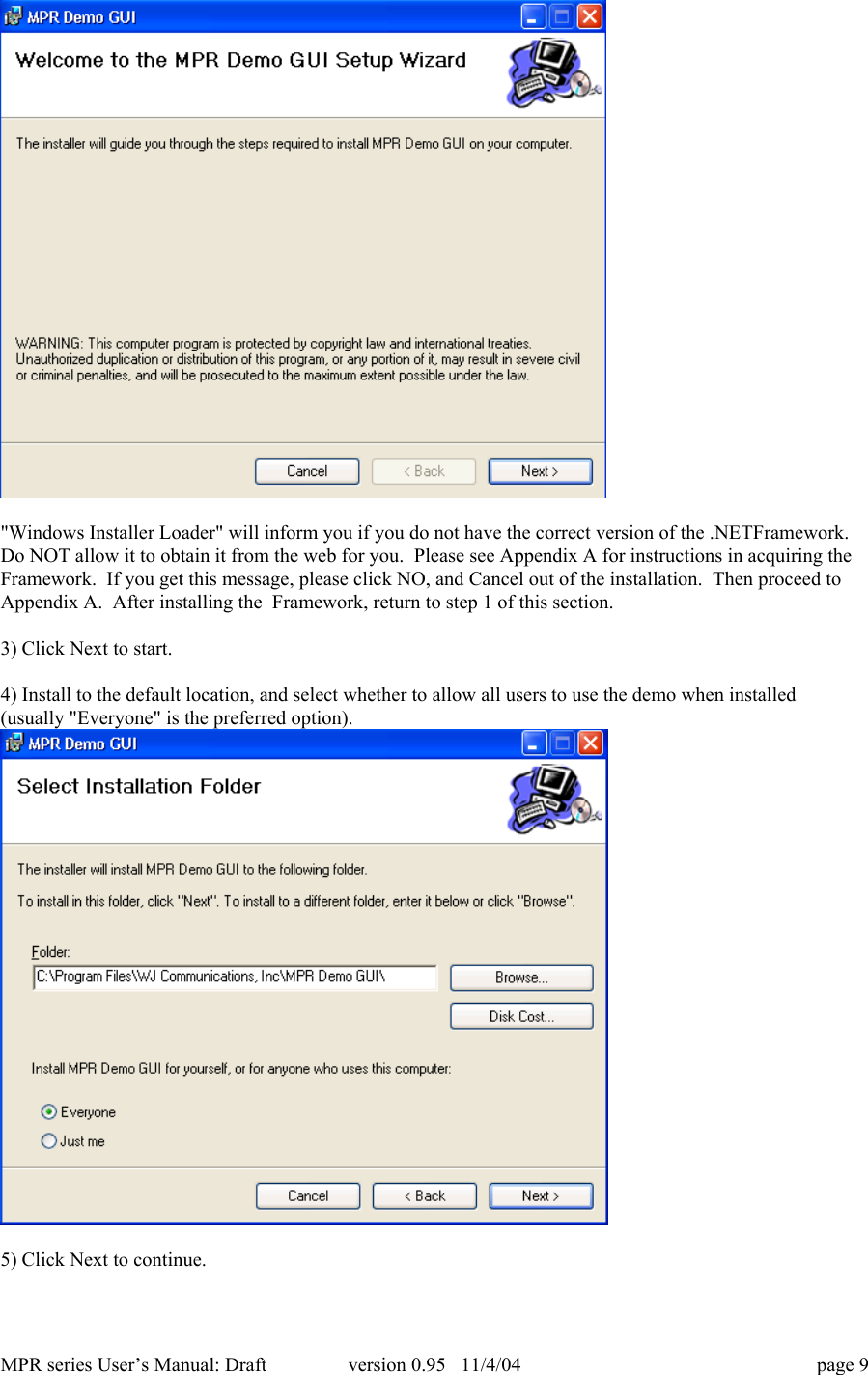
MPR series User’s Manual: Draft version 0.95   11/4/04 page 710) Click Next to continue.11) On the "Select the device driver you want to install for this hardware." screen,a) deselect "Show compatible hardware" (if selected)b) for Manufacturer select "(Standard port types)"c) for Model select "Communications Port"12) Click "Have Disk..."13) Browse to the file "WJCIRFID.inf" on the CDROM (often D:)14) Click Open or OK.15) "Copy manufacturer's files from:" should be D:\ (the location of WJCIRFID.inf)
MPR series User’s Manual: Draft version 0.95   11/4/04 page 8.16) Click OK.17) Click Next to continue.18) Windows may warn that the software has not passed Windows Logo testing.   This is fine, as you areactually just linking to Windows' own drivers. Just click "Continue Anyway".19) The wizard will now install the driver.20) Click Finish.1.4.2.2 Installing the demo program1) Browse to the MPR install CD.2) From the CD root directory, launch "MPRControlInstaller.msi".  This will guide you through the installprocess.
MPR series User’s Manual: Draft version 0.95   11/4/04 page 9"Windows Installer Loader" will inform you if you do not have the correct version of the .NETFramework.Do NOT allow it to obtain it from the web for you.  Please see Appendix A for instructions in acquiring theFramework.  If you get this message, please click NO, and Cancel out of the installation.  Then proceed toAppendix A.  After installing the  Framework, return to step 1 of this section.3) Click Next to start.4) Install to the default location, and select whether to allow all users to use the demo when installed(usually "Everyone" is the preferred option).5) Click Next to continue.
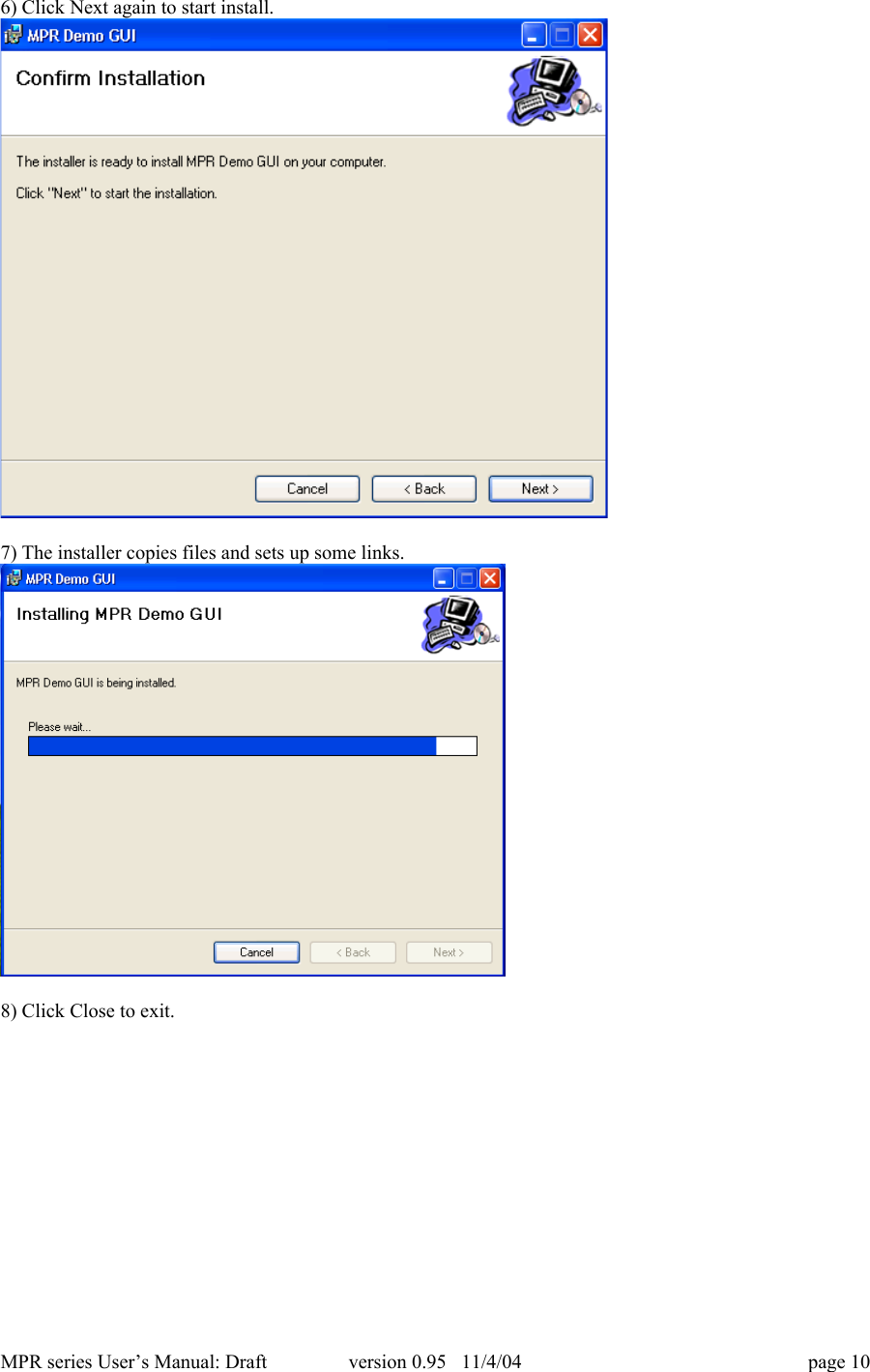
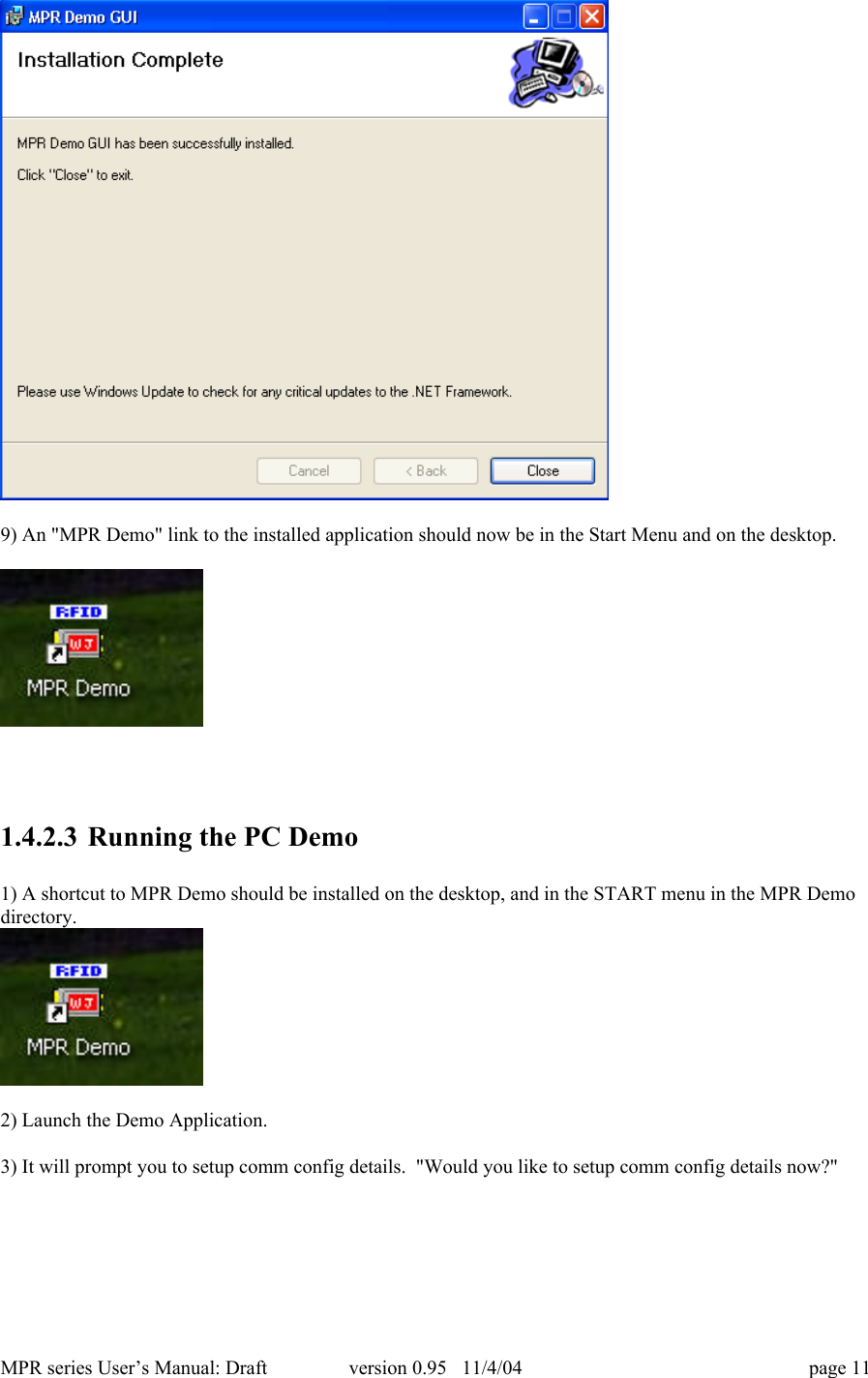
MPR series User’s Manual: Draft version 0.95   11/4/04 page 106) Click Next again to start install.7) The installer copies files and sets up some links.8) Click Close to exit.
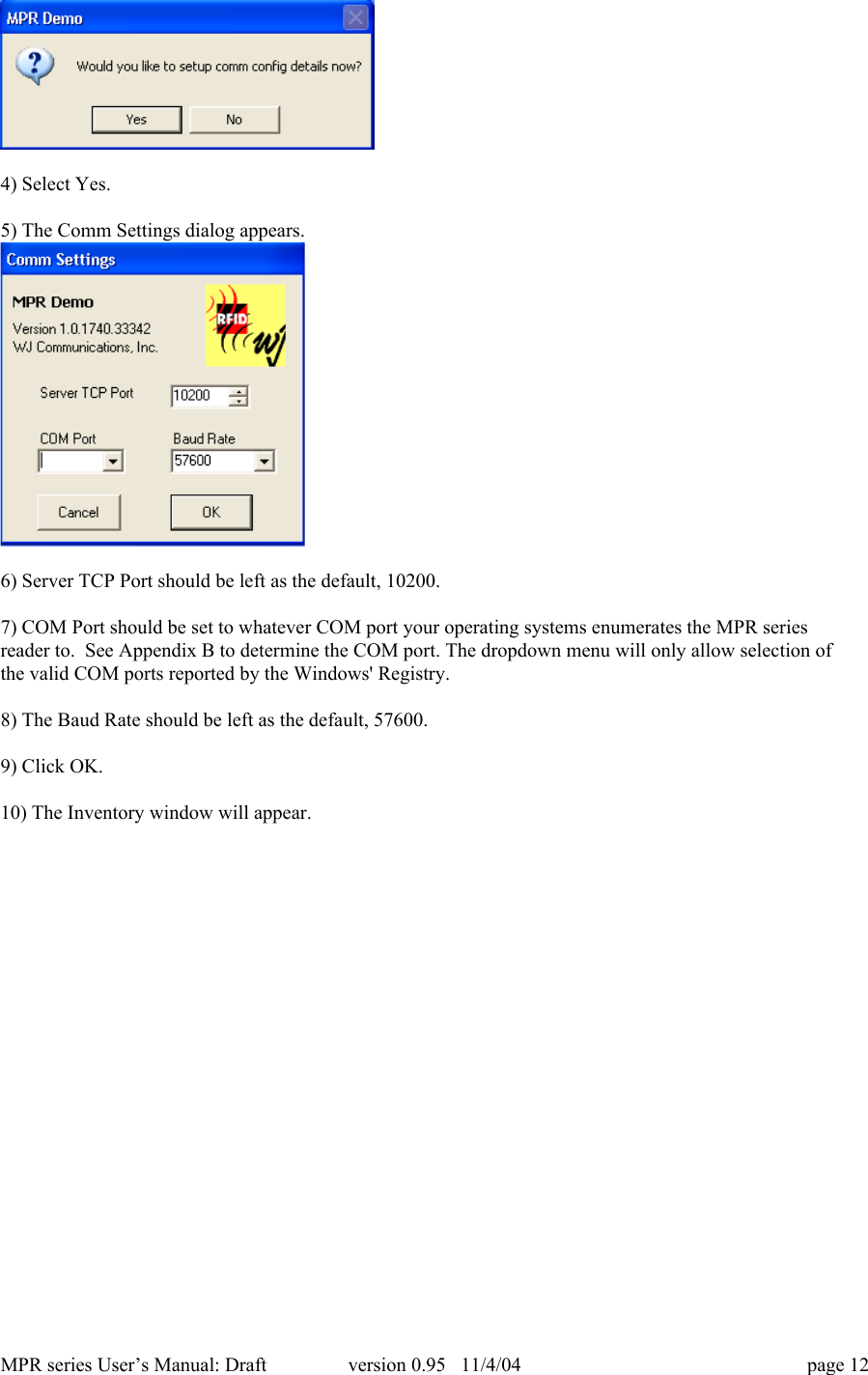
MPR series User’s Manual: Draft version 0.95   11/4/04 page 119) An "MPR Demo" link to the installed application should now be in the Start Menu and on the desktop.1.4.2.3 Running the PC Demo1) A shortcut to MPR Demo should be installed on the desktop, and in the START menu in the MPR Demodirectory.2) Launch the Demo Application.3) It will prompt you to setup comm config details.  "Would you like to setup comm config details now?"
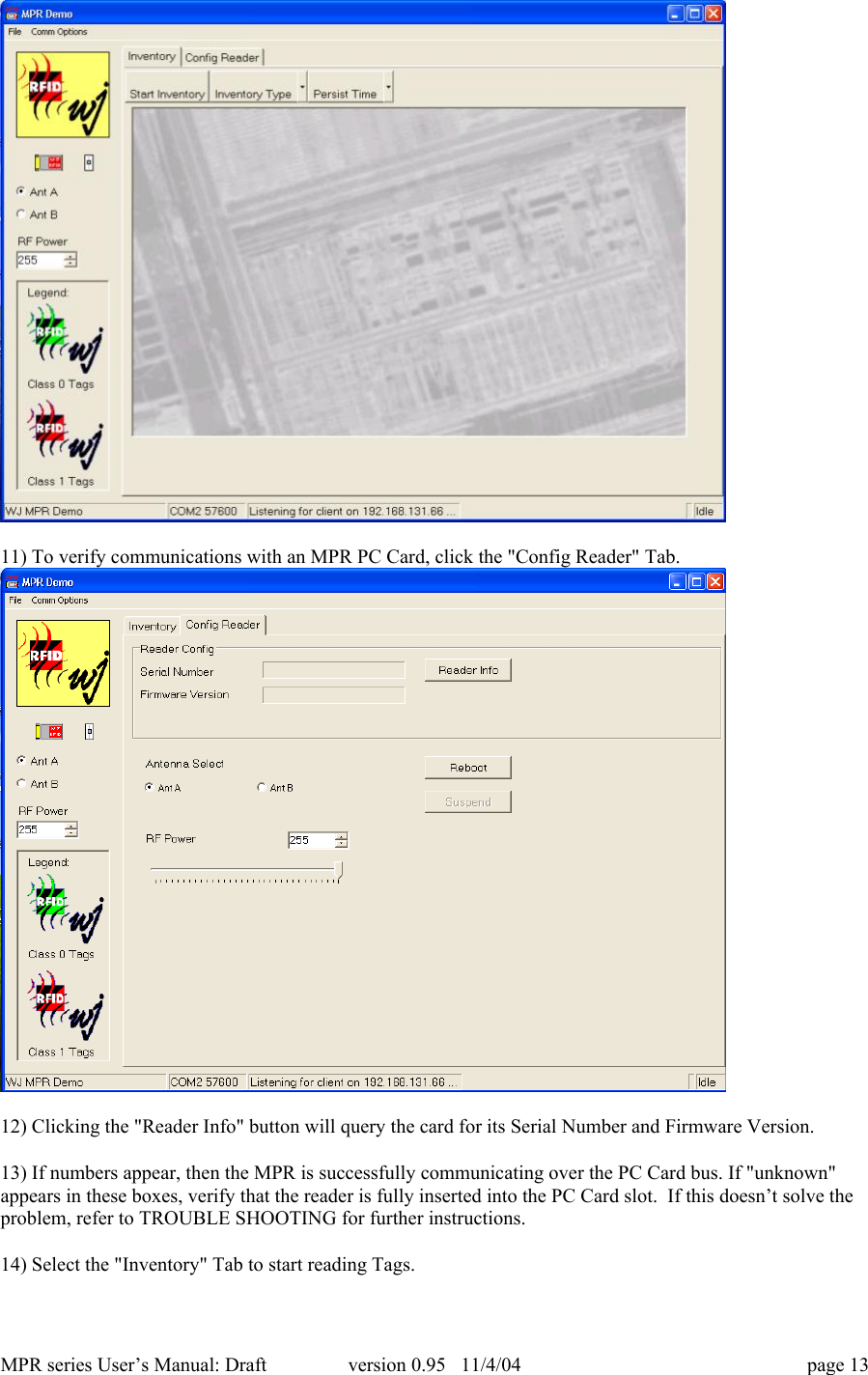
MPR series User’s Manual: Draft version 0.95   11/4/04 page 124) Select Yes.5) The Comm Settings dialog appears.6) Server TCP Port should be left as the default, 10200.7) COM Port should be set to whatever COM port your operating systems enumerates the MPR seriesreader to.  See Appendix B to determine the COM port. The dropdown menu will only allow selection ofthe valid COM ports reported by the Windows' Registry.8) The Baud Rate should be left as the default, 57600.9) Click OK.10) The Inventory window will appear.
MPR series User’s Manual: Draft version 0.95   11/4/04 page 1311) To verify communications with an MPR PC Card, click the "Config Reader" Tab.12) Clicking the "Reader Info" button will query the card for its Serial Number and Firmware Version.13) If numbers appear, then the MPR is successfully communicating over the PC Card bus. If "unknown"appears in these boxes, verify that the reader is fully inserted into the PC Card slot.  If this doesn’t solve theproblem, refer to TROUBLE SHOOTING for further instructions.14) Select the "Inventory" Tab to start reading Tags.
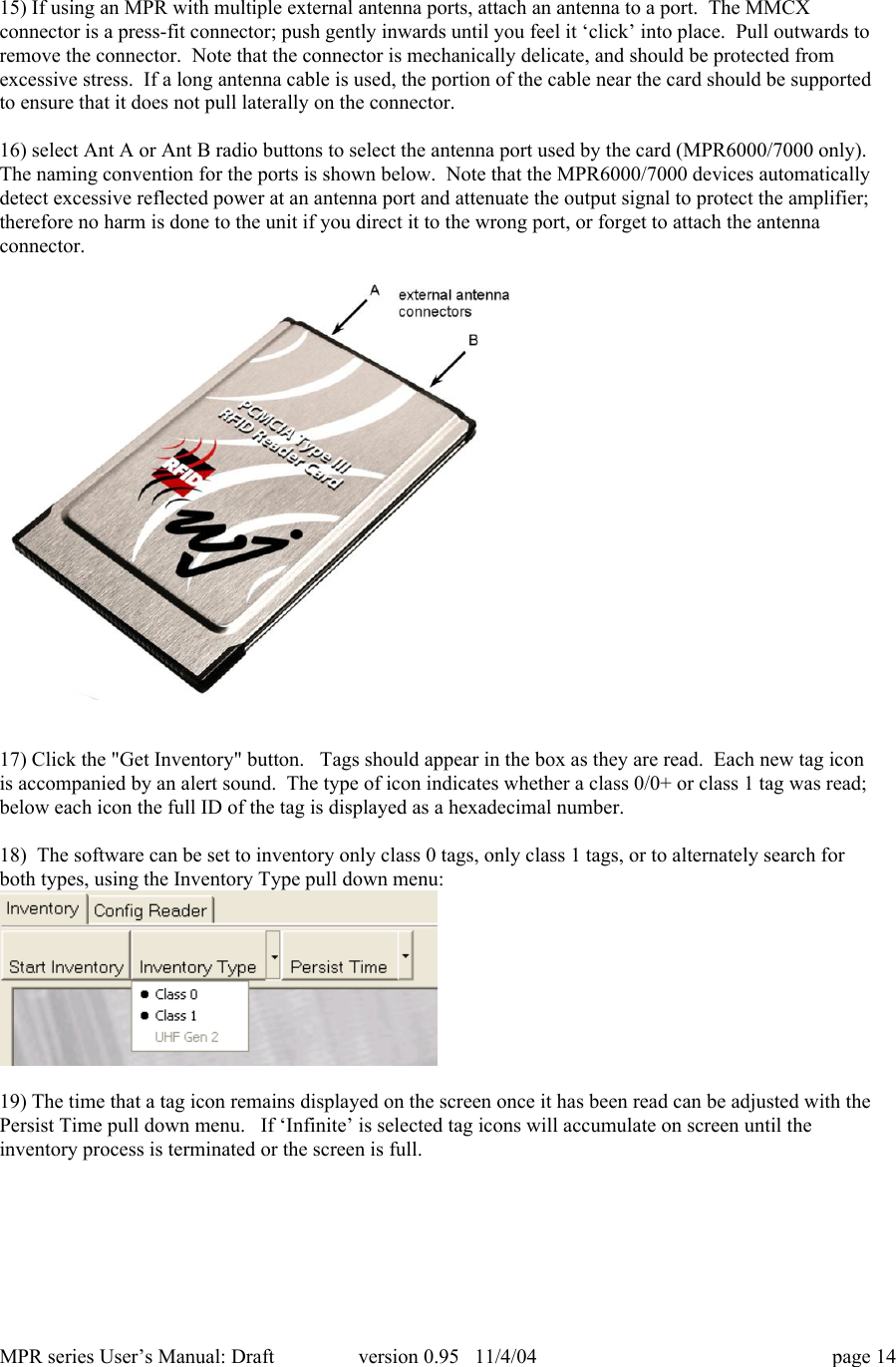
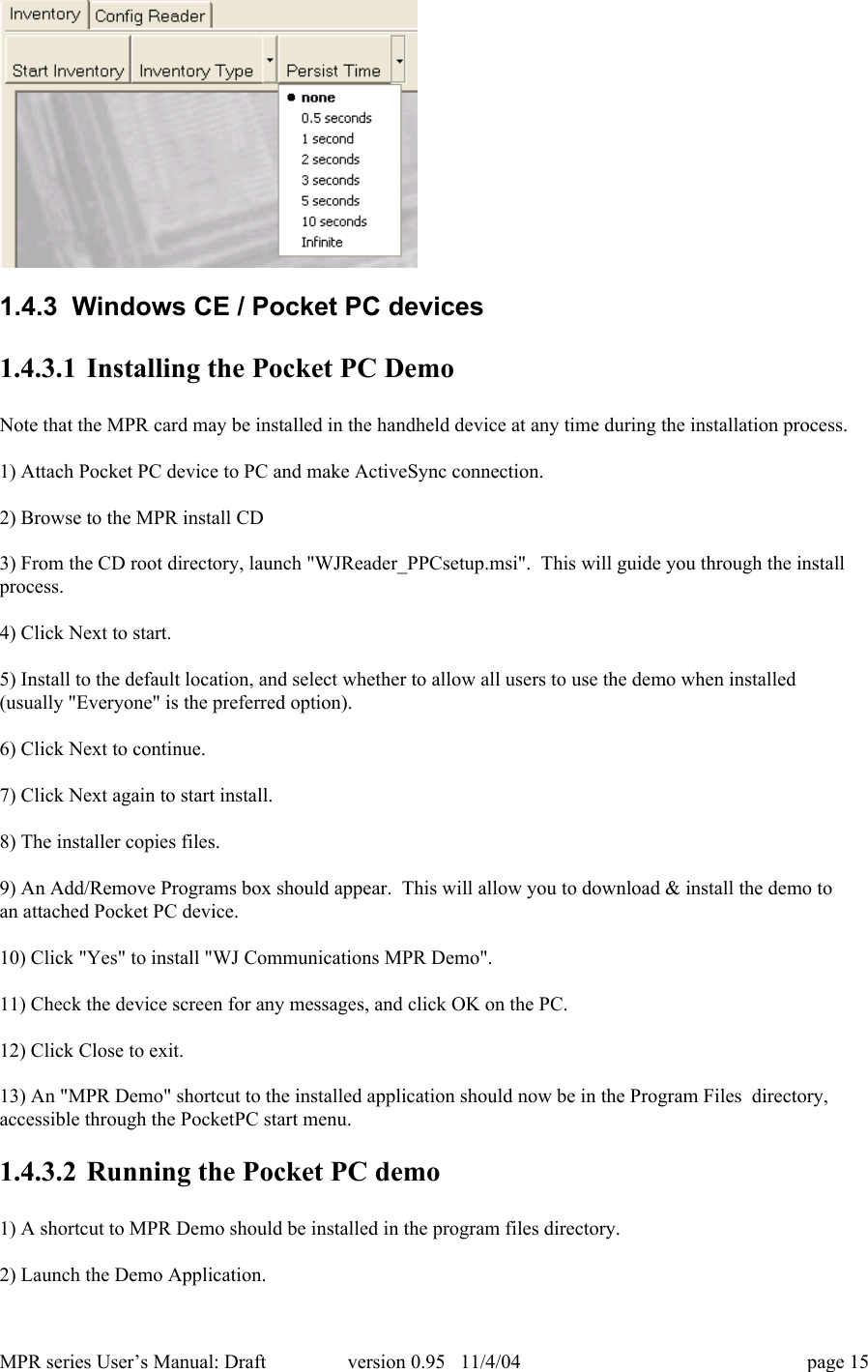
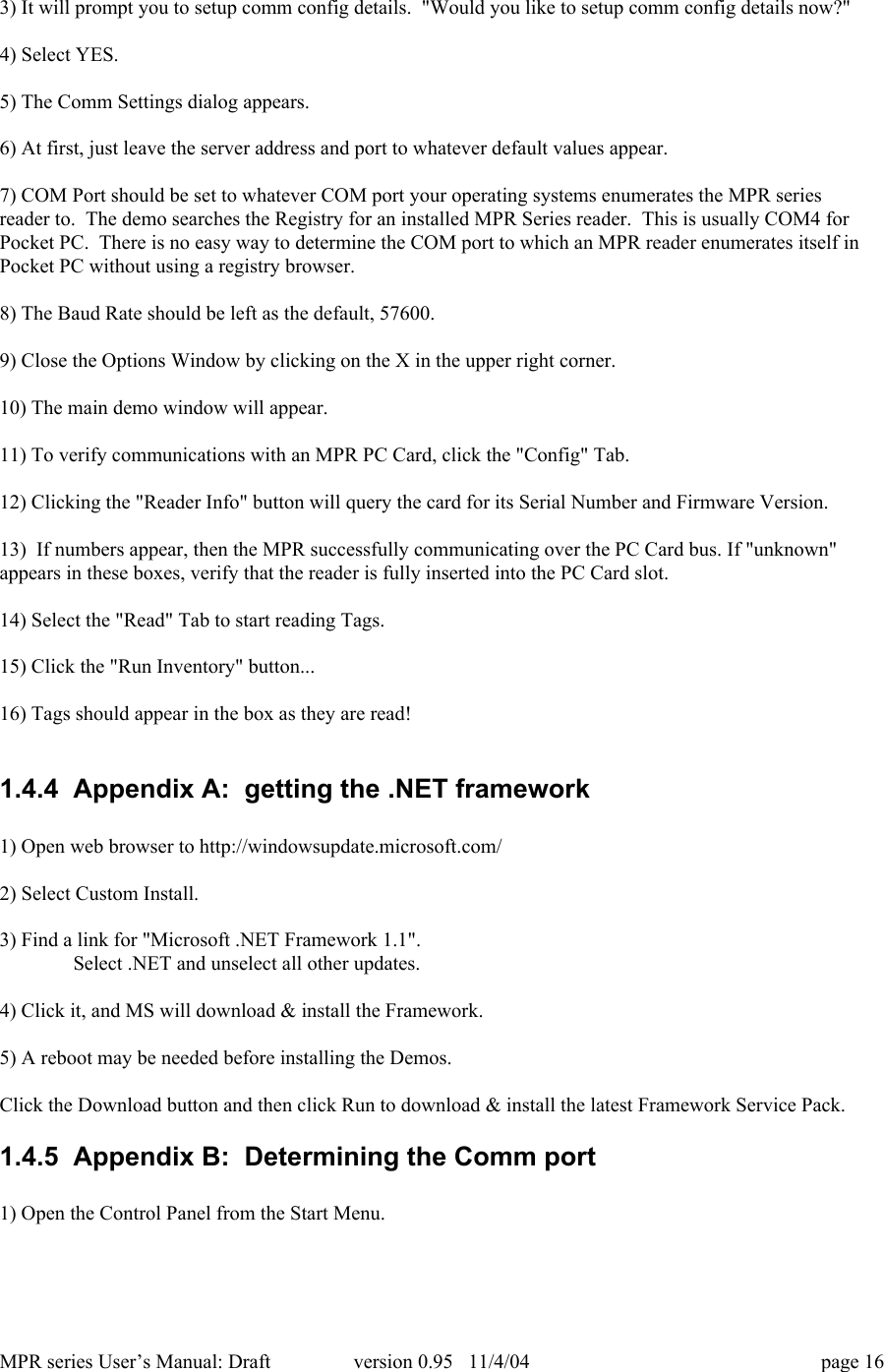
MPR series User’s Manual: Draft version 0.95   11/4/04 page 1415) If using an MPR with multiple external antenna ports, attach an antenna to a port.  The MMCXconnector is a press-fit connector; push gently inwards until you feel it ‘click’ into place.  Pull outwards toremove the connector.  Note that the connector is mechanically delicate, and should be protected fromexcessive stress.  If a long antenna cable is used, the portion of the cable near the card should be supportedto ensure that it does not pull laterally on the connector.16) select Ant A or Ant B radio buttons to select the antenna port used by the card (MPR6000/7000 only).The naming convention for the ports is shown below.  Note that the MPR6000/7000 devices automaticallydetect excessive reflected power at an antenna port and attenuate the output signal to protect the amplifier;therefore no harm is done to the unit if you direct it to the wrong port, or forget to attach the antennaconnector.17) Click the "Get Inventory" button.   Tags should appear in the box as they are read.  Each new tag iconis accompanied by an alert sound.  The type of icon indicates whether a class 0/0+ or class 1 tag was read;below each icon the full ID of the tag is displayed as a hexadecimal number.18)  The software can be set to inventory only class 0 tags, only class 1 tags, or to alternately search forboth types, using the Inventory Type pull down menu:19) The time that a tag icon remains displayed on the screen once it has been read can be adjusted with thePersist Time pull down menu.   If ‘Infinite’ is selected tag icons will accumulate on screen until theinventory process is terminated or the screen is full.
MPR series User’s Manual: Draft version 0.95   11/4/04 page 151.4.3  Windows CE / Pocket PC devices1.4.3.1 Installing the Pocket PC DemoNote that the MPR card may be installed in the handheld device at any time during the installation process.1) Attach Pocket PC device to PC and make ActiveSync connection.2) Browse to the MPR install CD3) From the CD root directory, launch "WJReader_PPCsetup.msi".  This will guide you through the installprocess.4) Click Next to start.5) Install to the default location, and select whether to allow all users to use the demo when installed(usually "Everyone" is the preferred option).6) Click Next to continue.7) Click Next again to start install.8) The installer copies files.9) An Add/Remove Programs box should appear.  This will allow you to download & install the demo toan attached Pocket PC device.10) Click "Yes" to install "WJ Communications MPR Demo".11) Check the device screen for any messages, and click OK on the PC.12) Click Close to exit.13) An "MPR Demo" shortcut to the installed application should now be in the Program Files  directory,accessible through the PocketPC start menu.1.4.3.2 Running the Pocket PC demo1) A shortcut to MPR Demo should be installed in the program files directory.2) Launch the Demo Application.
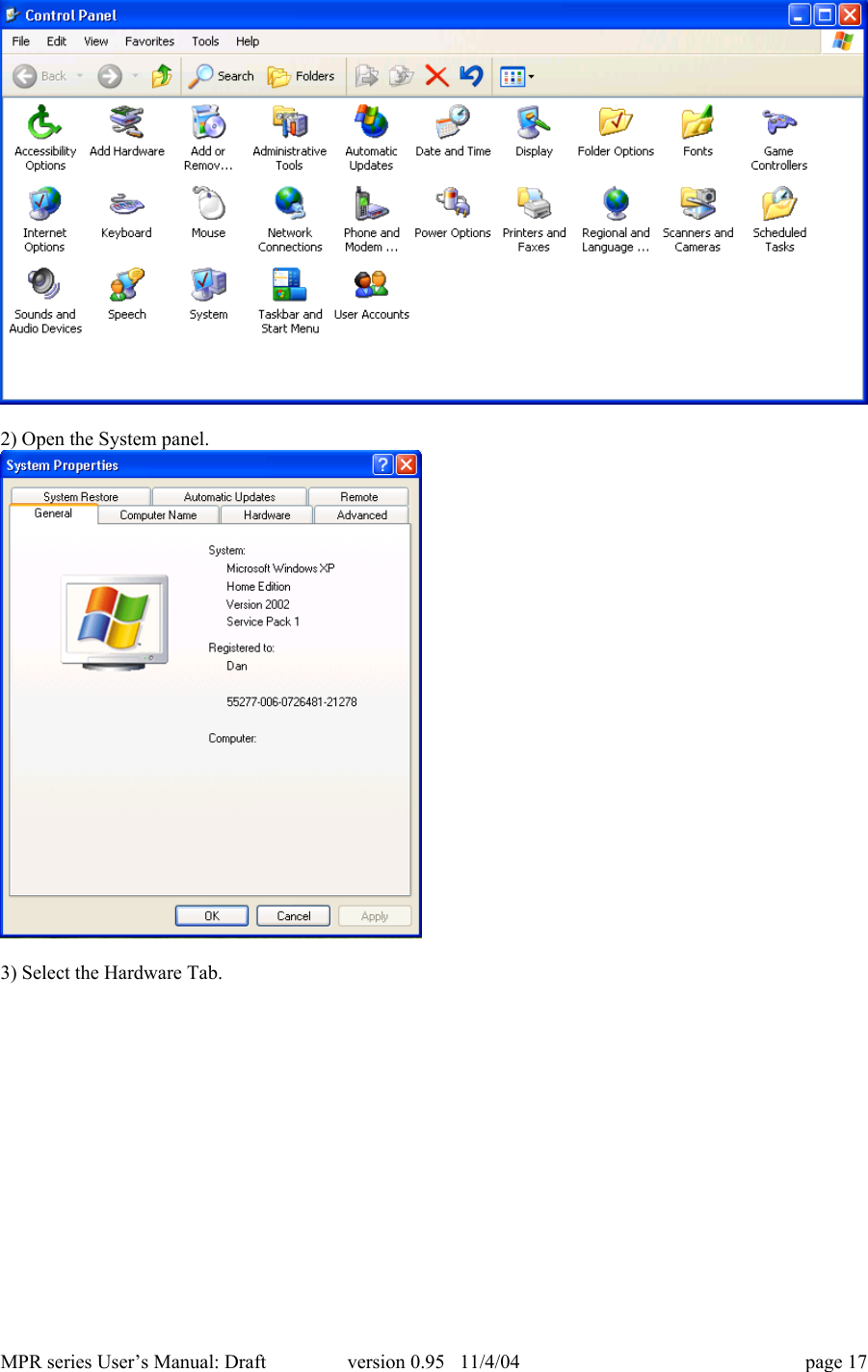
MPR series User’s Manual: Draft version 0.95   11/4/04 page 163) It will prompt you to setup comm config details.  "Would you like to setup comm config details now?"4) Select YES.5) The Comm Settings dialog appears.6) At first, just leave the server address and port to whatever default values appear.7) COM Port should be set to whatever COM port your operating systems enumerates the MPR seriesreader to.  The demo searches the Registry for an installed MPR Series reader.  This is usually COM4 forPocket PC.  There is no easy way to determine the COM port to which an MPR reader enumerates itself inPocket PC without using a registry browser.8) The Baud Rate should be left as the default, 57600.9) Close the Options Window by clicking on the X in the upper right corner.10) The main demo window will appear.11) To verify communications with an MPR PC Card, click the "Config" Tab.12) Clicking the "Reader Info" button will query the card for its Serial Number and Firmware Version.13)  If numbers appear, then the MPR successfully communicating over the PC Card bus. If "unknown"appears in these boxes, verify that the reader is fully inserted into the PC Card slot.14) Select the "Read" Tab to start reading Tags.15) Click the "Run Inventory" button...16) Tags should appear in the box as they are read!1.4.4  Appendix A:  getting the .NET framework1) Open web browser to http://windowsupdate.microsoft.com/2) Select Custom Install.3) Find a link for "Microsoft .NET Framework 1.1".Select .NET and unselect all other updates.4) Click it, and MS will download & install the Framework.5) A reboot may be needed before installing the Demos.Click the Download button and then click Run to download & install the latest Framework Service Pack.1.4.5  Appendix B:  Determining the Comm port1) Open the Control Panel from the Start Menu.
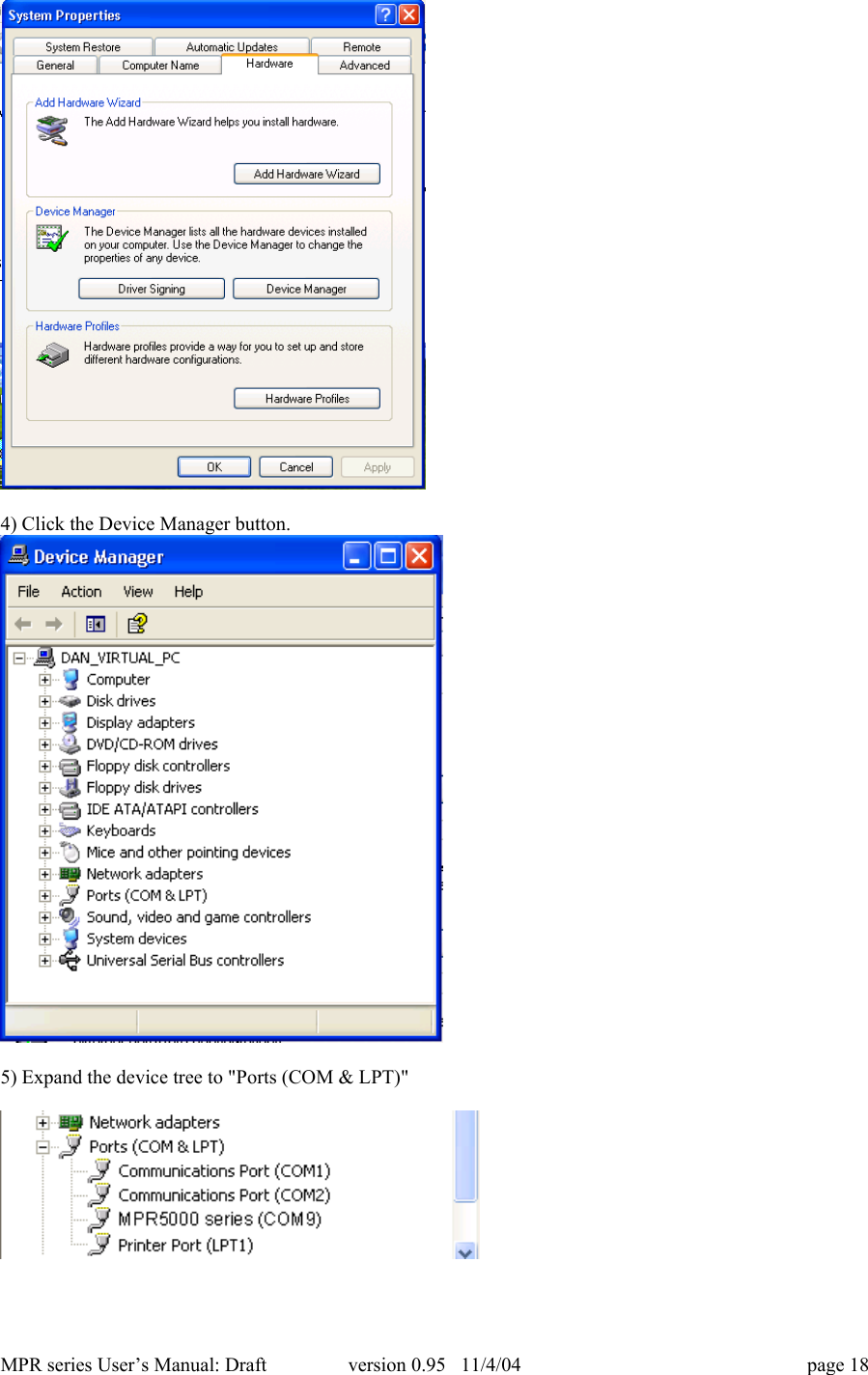
MPR series User’s Manual: Draft version 0.95   11/4/04 page 172) Open the System panel.3) Select the Hardware Tab.
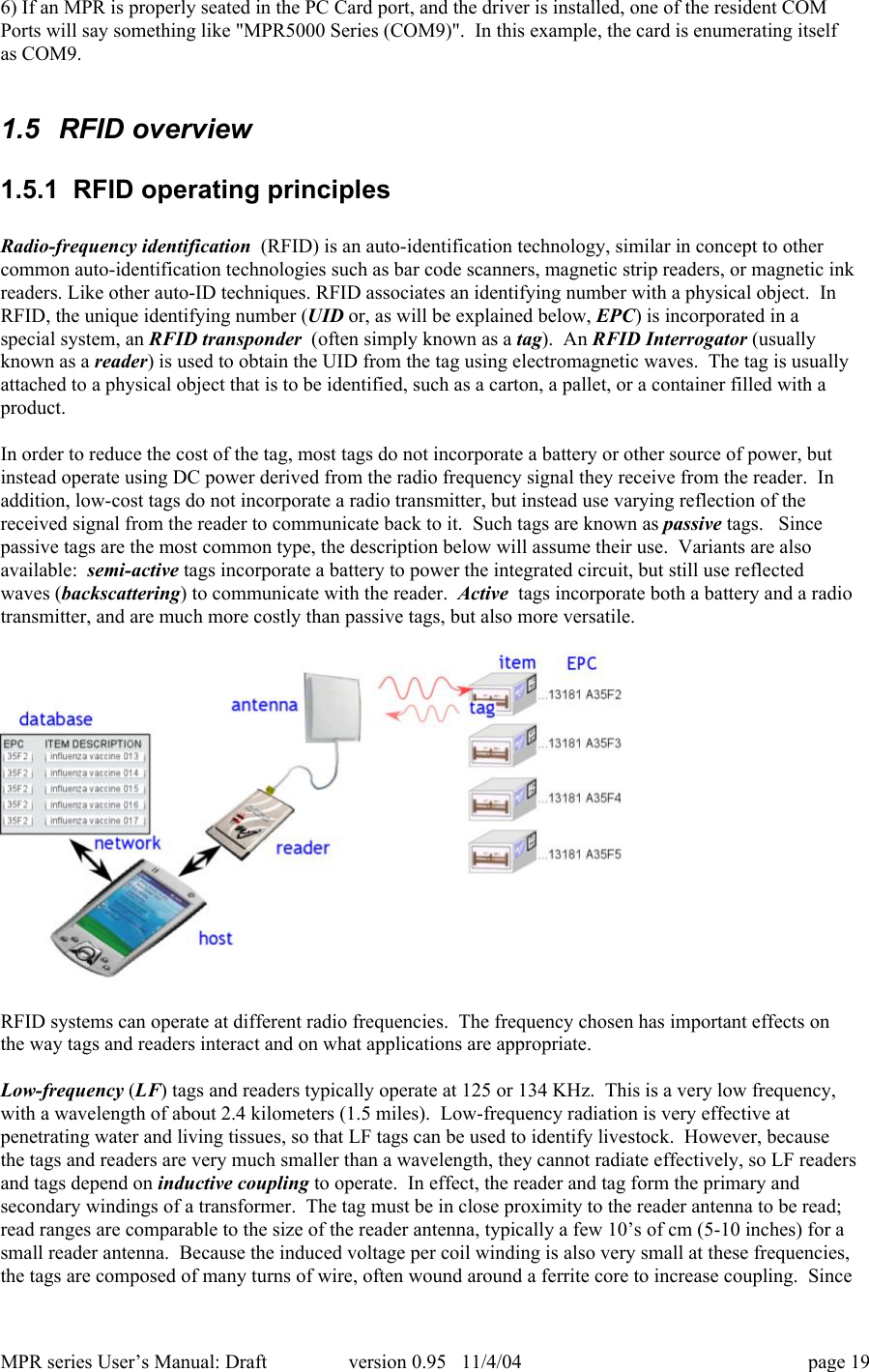
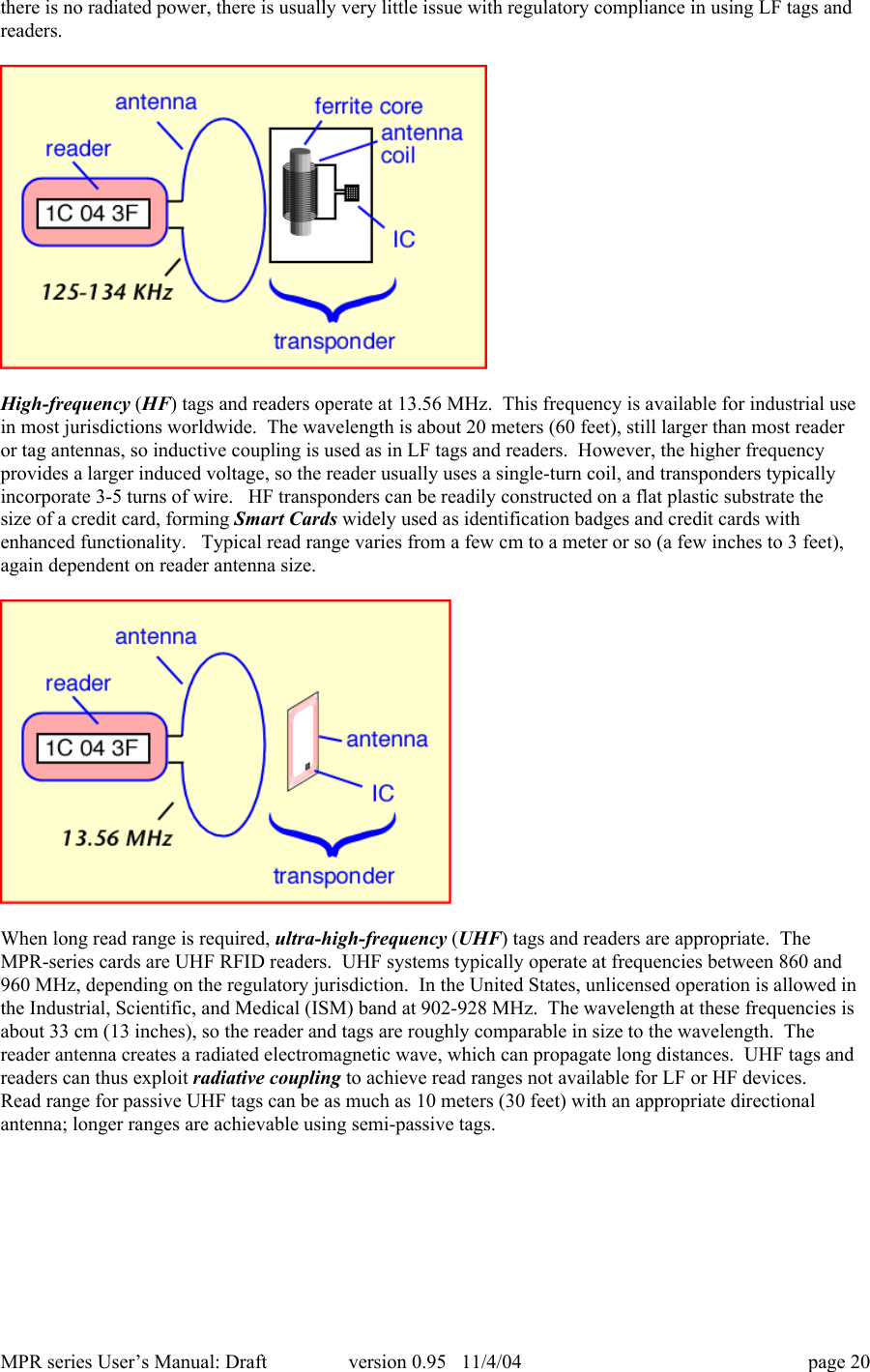
MPR series User’s Manual: Draft version 0.95   11/4/04 page 184) Click the Device Manager button.5) Expand the device tree to "Ports (COM & LPT)"
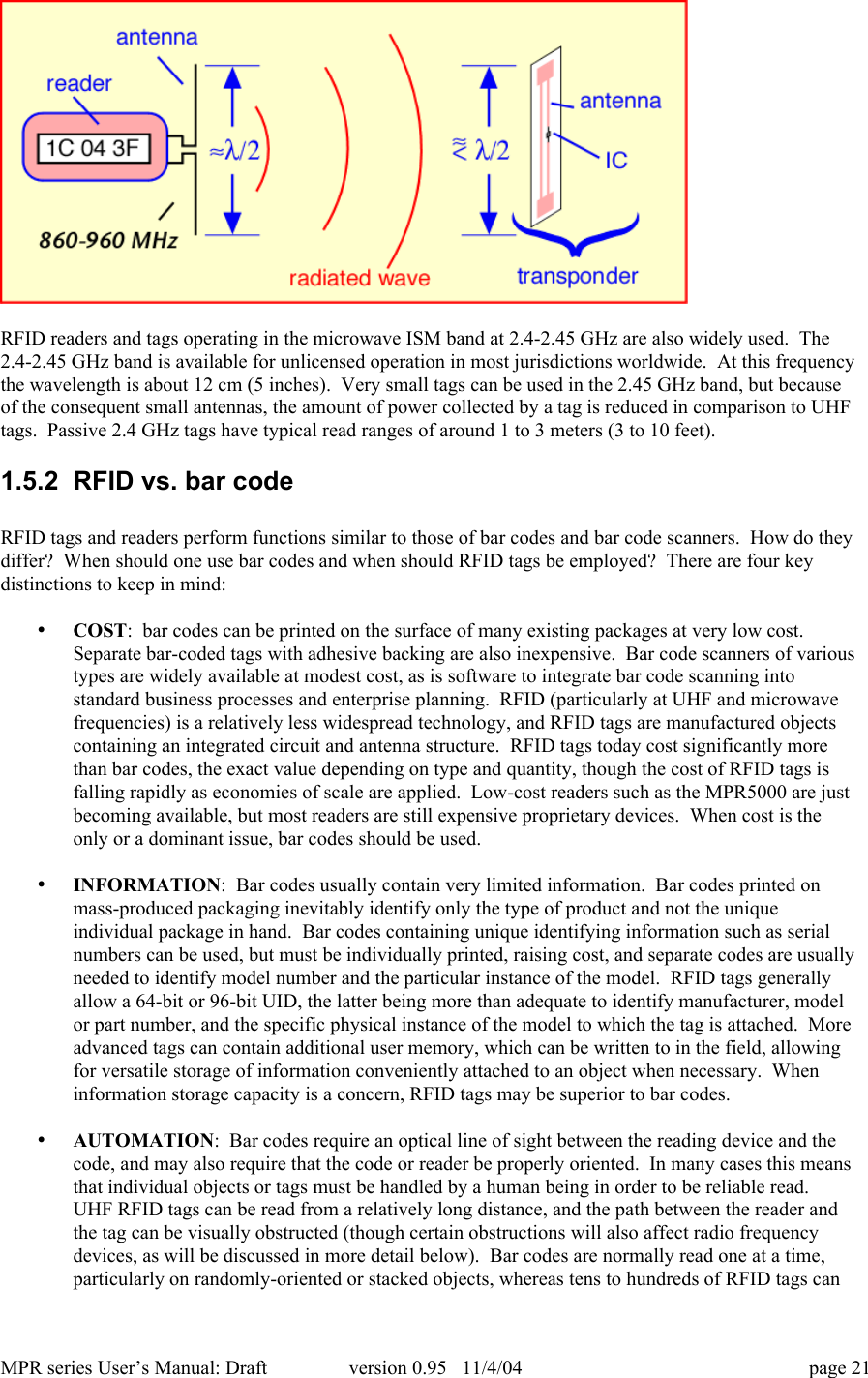
MPR series User’s Manual: Draft version 0.95   11/4/04 page 196) If an MPR is properly seated in the PC Card port, and the driver is installed, one of the resident COMPorts will say something like "MPR5000 Series (COM9)".  In this example, the card is enumerating itselfas COM9.1.5  RFID overview1.5.1  RFID operating principlesRadio-frequency identification  (RFID) is an auto-identification technology, similar in concept to othercommon auto-identification technologies such as bar code scanners, magnetic strip readers, or magnetic inkreaders. Like other auto-ID techniques. RFID associates an identifying number with a physical object.  InRFID, the unique identifying number (UID or, as will be explained below, EPC) is incorporated in aspecial system, an RFID transponder  (often simply known as a tag).  An RFID Interrogator (usuallyknown as a reader) is used to obtain the UID from the tag using electromagnetic waves.  The tag is usuallyattached to a physical object that is to be identified, such as a carton, a pallet, or a container filled with aproduct.In order to reduce the cost of the tag, most tags do not incorporate a battery or other source of power, butinstead operate using DC power derived from the radio frequency signal they receive from the reader.  Inaddition, low-cost tags do not incorporate a radio transmitter, but instead use varying reflection of thereceived signal from the reader to communicate back to it.  Such tags are known as passive tags.   Sincepassive tags are the most common type, the description below will assume their use.  Variants are alsoavailable:  semi-active tags incorporate a battery to power the integrated circuit, but still use reflectedwaves (backscattering) to communicate with the reader.  Active  tags incorporate both a battery and a radiotransmitter, and are much more costly than passive tags, but also more versatile.RFID systems can operate at different radio frequencies.  The frequency chosen has important effects onthe way tags and readers interact and on what applications are appropriate.Low-frequency (LF) tags and readers typically operate at 125 or 134 KHz.  This is a very low frequency,with a wavelength of about 2.4 kilometers (1.5 miles).  Low-frequency radiation is very effective atpenetrating water and living tissues, so that LF tags can be used to identify livestock.  However, becausethe tags and readers are very much smaller than a wavelength, they cannot radiate effectively, so LF readersand tags depend on inductive coupling to operate.  In effect, the reader and tag form the primary andsecondary windings of a transformer.  The tag must be in close proximity to the reader antenna to be read;read ranges are comparable to the size of the reader antenna, typically a few 10’s of cm (5-10 inches) for asmall reader antenna.  Because the induced voltage per coil winding is also very small at these frequencies,the tags are composed of many turns of wire, often wound around a ferrite core to increase coupling.  Since
MPR series User’s Manual: Draft version 0.95   11/4/04 page 20there is no radiated power, there is usually very little issue with regulatory compliance in using LF tags andreaders.High-frequency (HF) tags and readers operate at 13.56 MHz.  This frequency is available for industrial usein most jurisdictions worldwide.  The wavelength is about 20 meters (60 feet), still larger than most readeror tag antennas, so inductive coupling is used as in LF tags and readers.  However, the higher frequencyprovides a larger induced voltage, so the reader usually uses a single-turn coil, and transponders typicallyincorporate 3-5 turns of wire.   HF transponders can be readily constructed on a flat plastic substrate thesize of a credit card, forming Smart Cards widely used as identification badges and credit cards withenhanced functionality.   Typical read range varies from a few cm to a meter or so (a few inches to 3 feet),again dependent on reader antenna size.When long read range is required, ultra-high-frequency (UHF) tags and readers are appropriate.  TheMPR-series cards are UHF RFID readers.  UHF systems typically operate at frequencies between 860 and960 MHz, depending on the regulatory jurisdiction.  In the United States, unlicensed operation is allowed inthe Industrial, Scientific, and Medical (ISM) band at 902-928 MHz.  The wavelength at these frequencies isabout 33 cm (13 inches), so the reader and tags are roughly comparable in size to the wavelength.  Thereader antenna creates a radiated electromagnetic wave, which can propagate long distances.  UHF tags andreaders can thus exploit radiative coupling to achieve read ranges not available for LF or HF devices.Read range for passive UHF tags can be as much as 10 meters (30 feet) with an appropriate directionalantenna; longer ranges are achievable using semi-passive tags.
MPR series User’s Manual: Draft version 0.95   11/4/04 page 21RFID readers and tags operating in the microwave ISM band at 2.4-2.45 GHz are also widely used.  The2.4-2.45 GHz band is available for unlicensed operation in most jurisdictions worldwide.  At this frequencythe wavelength is about 12 cm (5 inches).  Very small tags can be used in the 2.45 GHz band, but becauseof the consequent small antennas, the amount of power collected by a tag is reduced in comparison to UHFtags.  Passive 2.4 GHz tags have typical read ranges of around 1 to 3 meters (3 to 10 feet).1.5.2  RFID vs. bar codeRFID tags and readers perform functions similar to those of bar codes and bar code scanners.  How do theydiffer?  When should one use bar codes and when should RFID tags be employed?  There are four keydistinctions to keep in mind:• COST:  bar codes can be printed on the surface of many existing packages at very low cost.Separate bar-coded tags with adhesive backing are also inexpensive.  Bar code scanners of varioustypes are widely available at modest cost, as is software to integrate bar code scanning intostandard business processes and enterprise planning.  RFID (particularly at UHF and microwavefrequencies) is a relatively less widespread technology, and RFID tags are manufactured objectscontaining an integrated circuit and antenna structure.  RFID tags today cost significantly morethan bar codes, the exact value depending on type and quantity, though the cost of RFID tags isfalling rapidly as economies of scale are applied.  Low-cost readers such as the MPR5000 are justbecoming available, but most readers are still expensive proprietary devices.  When cost is theonly or a dominant issue, bar codes should be used.• INFORMATION:  Bar codes usually contain very limited information.  Bar codes printed onmass-produced packaging inevitably identify only the type of product and not the uniqueindividual package in hand.  Bar codes containing unique identifying information such as serialnumbers can be used, but must be individually printed, raising cost, and separate codes are usuallyneeded to identify model number and the particular instance of the model.  RFID tags generallyallow a 64-bit or 96-bit UID, the latter being more than adequate to identify manufacturer, modelor part number, and the specific physical instance of the model to which the tag is attached.  Moreadvanced tags can contain additional user memory, which can be written to in the field, allowingfor versatile storage of information conveniently attached to an object when necessary.  Wheninformation storage capacity is a concern, RFID tags may be superior to bar codes.• AUTOMATION:  Bar codes require an optical line of sight between the reading device and thecode, and may also require that the code or reader be properly oriented.  In many cases this meansthat individual objects or tags must be handled by a human being in order to be reliable read.UHF RFID tags can be read from a relatively long distance, and the path between the reader andthe tag can be visually obstructed (though certain obstructions will also affect radio frequencydevices, as will be discussed in more detail below).  Bar codes are normally read one at a time,particularly on randomly-oriented or stacked objects, whereas tens to hundreds of RFID tags can
MPR series User’s Manual: Draft version 0.95   11/4/04 page 22be simultaneously present in the field of the reader and read ‘simultaneously’ from the viewpointof the user.  RFID techniques permit automated information handling to a much greater extentthan bar codes.• ROBUSTNESS:  Bar codes cannot be read if the printed code becomes dirty, defaced, orexcessively bent or curled.  RFID tags are robust to dirt, paint, ink, and to some extent mechanicaldamage, and can be read (albeit with reduced range) when misoriented or mechanically distorted.RFID tags are tougher than bar codes.1.5.3  RFID system componentsAn RFID system is composed of (at least) a reader, one or more antennas, and one or more compatibletags.  In many applications it may be necessary or helpful to create human-readable labels incorporatingRFID tags; in this case an RFID tag printer is also very useful.  While standalone RFID systems areappropriate in some circumstances, more commonly the RFID reader is just a sensor that needs to interactwith a larger information system in order to be useful.  Middleware is used to enable the interactionbetween the reader and the network, and to filter and aggregate the large amounts of data the reader collectsinto a more useful compendium provided to the network.1.5.3.1 ReaderA UHF RFID reader is a radio transmitter and receiver.  Most readers are capable of interrogating passivetags, and are equipped with certain features uniquely suited to use for communicating with passive RFIDtags.  A reader reading passive tags simultaneously communicates with the tag population and providespower to operate the integrated circuits contained in the tags.  During transmission, the reader transmits anamplitude-modulated signal that is received by tags within range.  The transmit power is generally limitedby regulatory requirements; for example, in the United States, no more than 1 watt average RF power maybe transmitted.  Modulation rate varies depending on the standard employed, but is typically a few tens ofkilobits per second for UHF tags.   Special coding of the transmitted data is employed to maximize thepower available to the tags.Once the tags have been powered up and received their instructions from the reader, they take turnsresponding with their UID.  Because of the unique requirements of the backscatter radio system used bypassive and semi-passive tags, the reader must continue to transmit a non-modulated (continuous-wave orCW) signal while it listens for tag responses.  The tags employ the CW signal to continue to provide powerto the tag electronics, and modulate the impedance of their own antennas in order to vary the signalreflected back to the reader.  The reader must extract the very small tag reflections from all the otherreflected signals it encounters.  The MPR-series cards use one antenna for both transmit and receivefunctions.  [ MPR6000 and MPR7000 readers have two external antenna connectors.  However, only oneantenna is in use at any given time, for both transmit and receive.  The reader can switch from one antennato the other in order to cover differing physical regions, such as the high and low portions of a doorway, orto avoid missing tags because of local losses of signal strength – fading – that are sensitive to the exactposition of the antenna and other objects.]  Even with a well-matched antenna, the reflection from theantenna back to the reader is much larger than any other reflected signal, and represents the main obstacleto receiving the tag reflection.  Degraded antenna match will lead to an increased antenna reflection,making it harder for the reader to extract the tag signal and thus reducing read range.  The antenna match issensitive to the immediate antenna environment (objects within a few cm of the antenna).  For best results,antennas should always be mounted in accordance with manufacturer’s recommendations, and free ofobstructions for at least 50 cm (20 inches) in the read direction.In the United States, readers are required by law to hop randomly from one frequency channel to anotherwhen operating within the ISM band, residing for no longer than 0.4 seconds at any one frequency.  Inaddition, regulations forbid coordination of hopping patterns between collocated transmitters.   Whenconfigured for US operation, the MPR series uses 50 channels separated from one another by 500 KHz, and
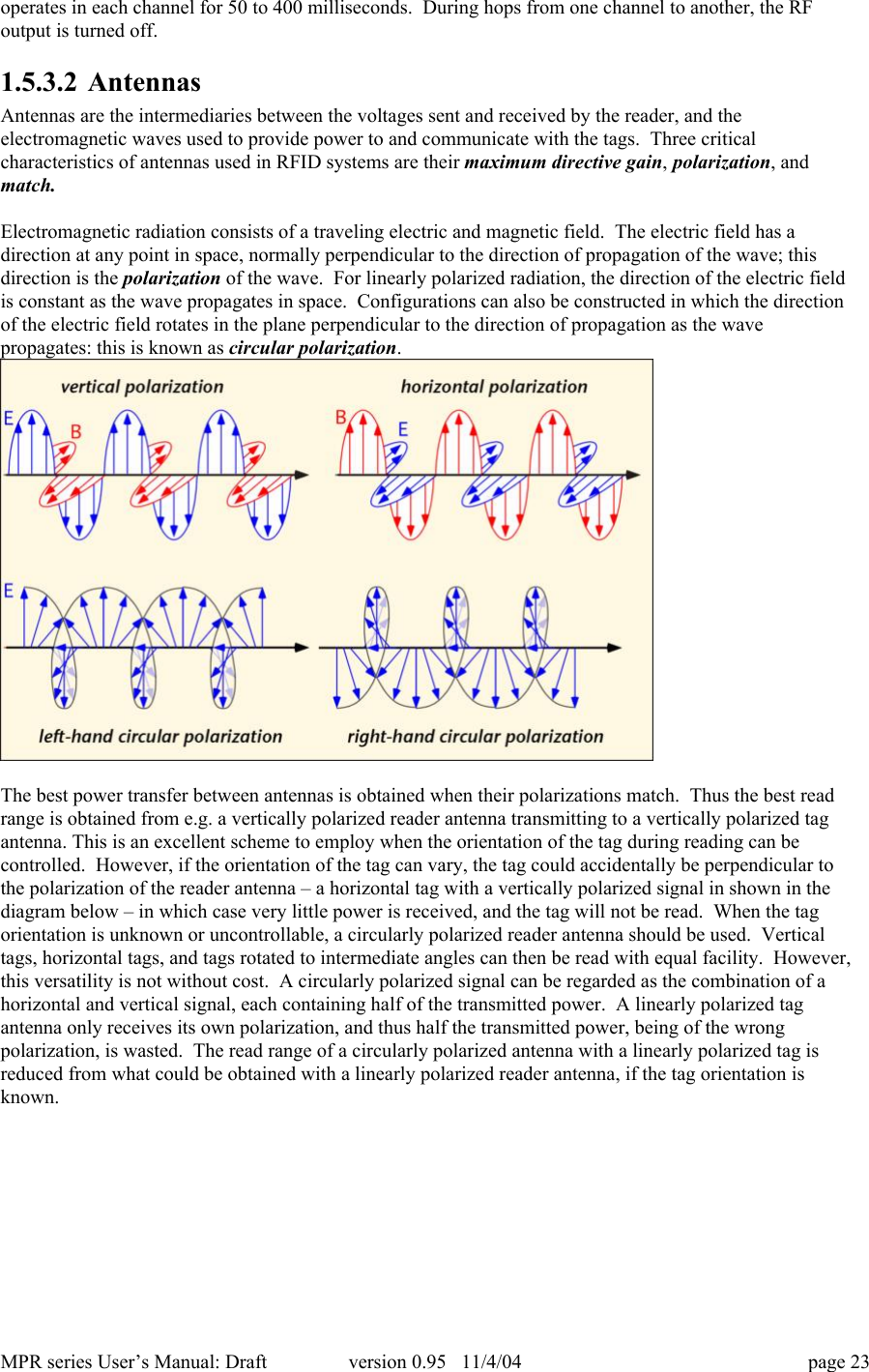
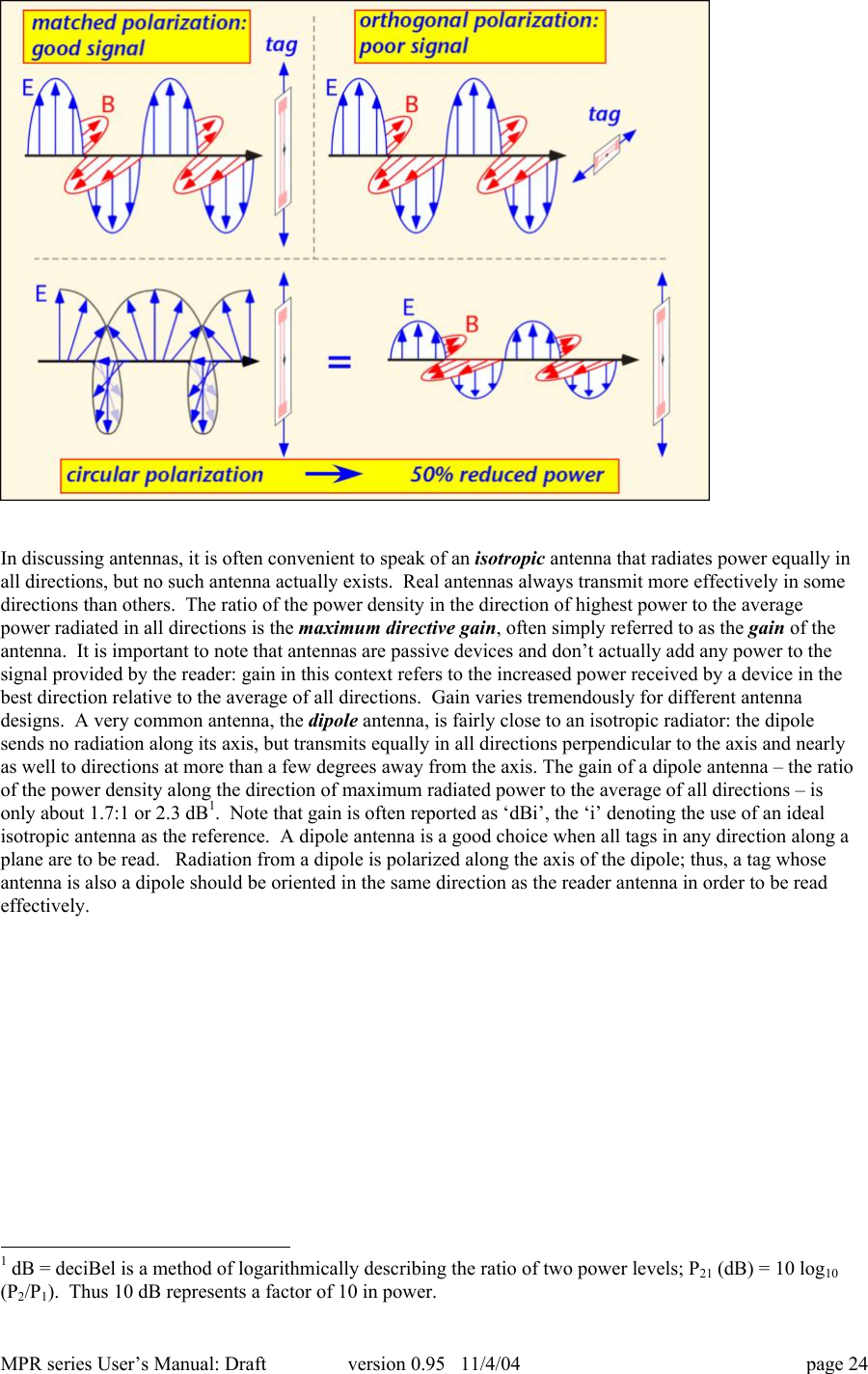
MPR series User’s Manual: Draft version 0.95   11/4/04 page 23operates in each channel for 50 to 400 milliseconds.  During hops from one channel to another, the RFoutput is turned off.1.5.3.2 AntennasAntennas are the intermediaries between the voltages sent and received by the reader, and theelectromagnetic waves used to provide power to and communicate with the tags.  Three criticalcharacteristics of antennas used in RFID systems are their maximum directive gain, polarization, andmatch.Electromagnetic radiation consists of a traveling electric and magnetic field.  The electric field has adirection at any point in space, normally perpendicular to the direction of propagation of the wave; thisdirection is the polarization of the wave.  For linearly polarized radiation, the direction of the electric fieldis constant as the wave propagates in space.  Configurations can also be constructed in which the directionof the electric field rotates in the plane perpendicular to the direction of propagation as the wavepropagates: this is known as circular polarization.The best power transfer between antennas is obtained when their polarizations match.  Thus the best readrange is obtained from e.g. a vertically polarized reader antenna transmitting to a vertically polarized tagantenna. This is an excellent scheme to employ when the orientation of the tag during reading can becontrolled.  However, if the orientation of the tag can vary, the tag could accidentally be perpendicular tothe polarization of the reader antenna – a horizontal tag with a vertically polarized signal in shown in thediagram below – in which case very little power is received, and the tag will not be read.  When the tagorientation is unknown or uncontrollable, a circularly polarized reader antenna should be used.  Verticaltags, horizontal tags, and tags rotated to intermediate angles can then be read with equal facility.  However,this versatility is not without cost.  A circularly polarized signal can be regarded as the combination of ahorizontal and vertical signal, each containing half of the transmitted power.  A linearly polarized tagantenna only receives its own polarization, and thus half the transmitted power, being of the wrongpolarization, is wasted.  The read range of a circularly polarized antenna with a linearly polarized tag isreduced from what could be obtained with a linearly polarized reader antenna, if the tag orientation isknown.
MPR series User’s Manual: Draft version 0.95   11/4/04 page 24In discussing antennas, it is often convenient to speak of an isotropic antenna that radiates power equally inall directions, but no such antenna actually exists.  Real antennas always transmit more effectively in somedirections than others.  The ratio of the power density in the direction of highest power to the averagepower radiated in all directions is the maximum directive gain, often simply referred to as the gain of theantenna.  It is important to note that antennas are passive devices and don’t actually add any power to thesignal provided by the reader: gain in this context refers to the increased power received by a device in thebest direction relative to the average of all directions.  Gain varies tremendously for different antennadesigns.  A very common antenna, the dipole antenna, is fairly close to an isotropic radiator: the dipolesends no radiation along its axis, but transmits equally in all directions perpendicular to the axis and nearlyas well to directions at more than a few degrees away from the axis. The gain of a dipole antenna – the ratioof the power density along the direction of maximum radiated power to the average of all directions – isonly about 1.7:1 or 2.3 dB1.  Note that gain is often reported as ‘dBi’, the ‘i’ denoting the use of an idealisotropic antenna as the reference.  A dipole antenna is a good choice when all tags in any direction along aplane are to be read.   Radiation from a dipole is polarized along the axis of the dipole; thus, a tag whoseantenna is also a dipole should be oriented in the same direction as the reader antenna in order to be readeffectively.                                                            1 dB = deciBel is a method of logarithmically describing the ratio of two power levels; P21 (dB) = 10 log10(P2/P1).  Thus 10 dB represents a factor of 10 in power.
MPR series User’s Manual: Draft version 0.95   11/4/04 page 25The MPR5000 integral antenna behaves like a dipole oriented parallel to the short edge of the card.  Thus,radiation is mainly forward (looking along the long axis of the card), up, and down, but with very littlepower radiated to the left or right of the card.  The radiation pattern can be regarded as a torus (doughnut)with axis along the short side of the card.The recommended isotropic antenna for the MPR6000/7000, the MAXRAD [model number for PN1789] isa monopole antenna, essentially a half of a dipole antenna placed above a conductive ground plane.  Theground plane acts to create a reflected image of the monopole; the monopole and its image together form adipole antenna.  Thus for directions above the ground plane, the radiation of the monopole resembles thatof a dipole, but for sufficiently large ground planes there is very little radiation below the ground plane.The ground plane should be at least 2-3 wavelengths across (about 60 cm or 25 inches on a side at 900MHz) to ensure minimal bottom-side radiation.  Monopole antennas are compact and easy to use, andappropriate when one wishes to find tags located in any direction around the monopole axis.PATTERN IF AVAILABLERelatively isotropic antennas are easy to use, but if tags are expected to be found mainly in one directionwith respect to the antenna, radiation in the other directions is wasted.  In such circumstances, an antennawith higher gain – a directional antenna – will provide better read range.  A common type of directional
MPR series User’s Manual: Draft version 0.95   11/4/04 page 26antenna is the patch antenna (also known as a microstrip or panel antenna).  Patch antennas aremanufactured using techniques similar to those used to make printed circuits, and are inexpensive androbust.  They use a metal ground plane above which are printed resonant metal blocks; as a consequencethey are generally flat and radiate primarily in the direction opposite the ground plane.  Most commercialpatch antennas are packaged inside a plastic radome to provide mechanical protection and a more pleasingappearance.The recommended directional antenna for the MPR6000/7000, the Maxrad MP9026CPR, is a patchantenna, with about 8.5 dBiC of gain in the direction perpendicular to the rounded face of the radome.(The notation ‘dBiC’ indicates that the gain is that which would be measured using a circularly polarizedreceiving antenna; a linearly polarized received would find 3 dB less power in the direction of maximumgain.)   Patch antennas can be linearly or circularly polarized.  The MP9026CPR   is circularly polarized.As discussed above, circular polarization is a good choice when the tag orientation is not known.   Thepatch antenna, being of higher gain, will provide a significant improvement in read range over themonopole antenna.   Shown below is the radiation pattern of this antenna along the azimuth (horizontalplane for a typical vertically-mounted antenna).In principle, antenna gain could be increased to increase read range.  However, in most jurisdictions, themaximum gain employed in unlicensed operation is limited by regulation.  For example, in the UnitedStates, the FCC limits the effective isotropic radiated power (EIRP, the product of the actual power and theantenna gain) to 4 watts.  For the MPR6000, which is rated at _ watt output, the highest antenna gainlegally allowed is a factor of 8 (9 dB) relative to an isotropic antenna.    The MPR7000, which is rated at 1Watt output,  cannot use an antenna with more than 6 dBi of gain.Note that the recommended antennas have been specifically approved for use with the MPR6000/7000 inthe United States by the FCC [pending at time of writing].  FCC regulations (title  47 part 15) require thatantennas be approved for use with specific radio communications devices, unless they are installed by aprofessional installer, and that in all cases the combination of antenna and radio device must operate withinregulatory constraints.External antennas are generally connected to the reader using flexible coaxial cables and connectors.  It isimportant to select these cables and connectors appropriately for the application.  The MPR6000 andMPR7000 use MMCX connectors, which are very small and convenient for the limited form factor of aPC-card slot.  However, MMCX connectors must be protected from mechanical stress.  This can be doneby using fine-diameter cabling, such as RG-405, to make the connections to the card.  However, such cablehas relatively high losses, and should not be used for runs longer than about 2 meters (6 feet).  When theantenna must be mounted a long distance from the cable, an adaptor should be used at the end of a short runof small-diameter cable to connect to a  larger cable, such as RG-213 or RG214, using an adaptor to therelevant connector, which may be an SMA or N-type connector.
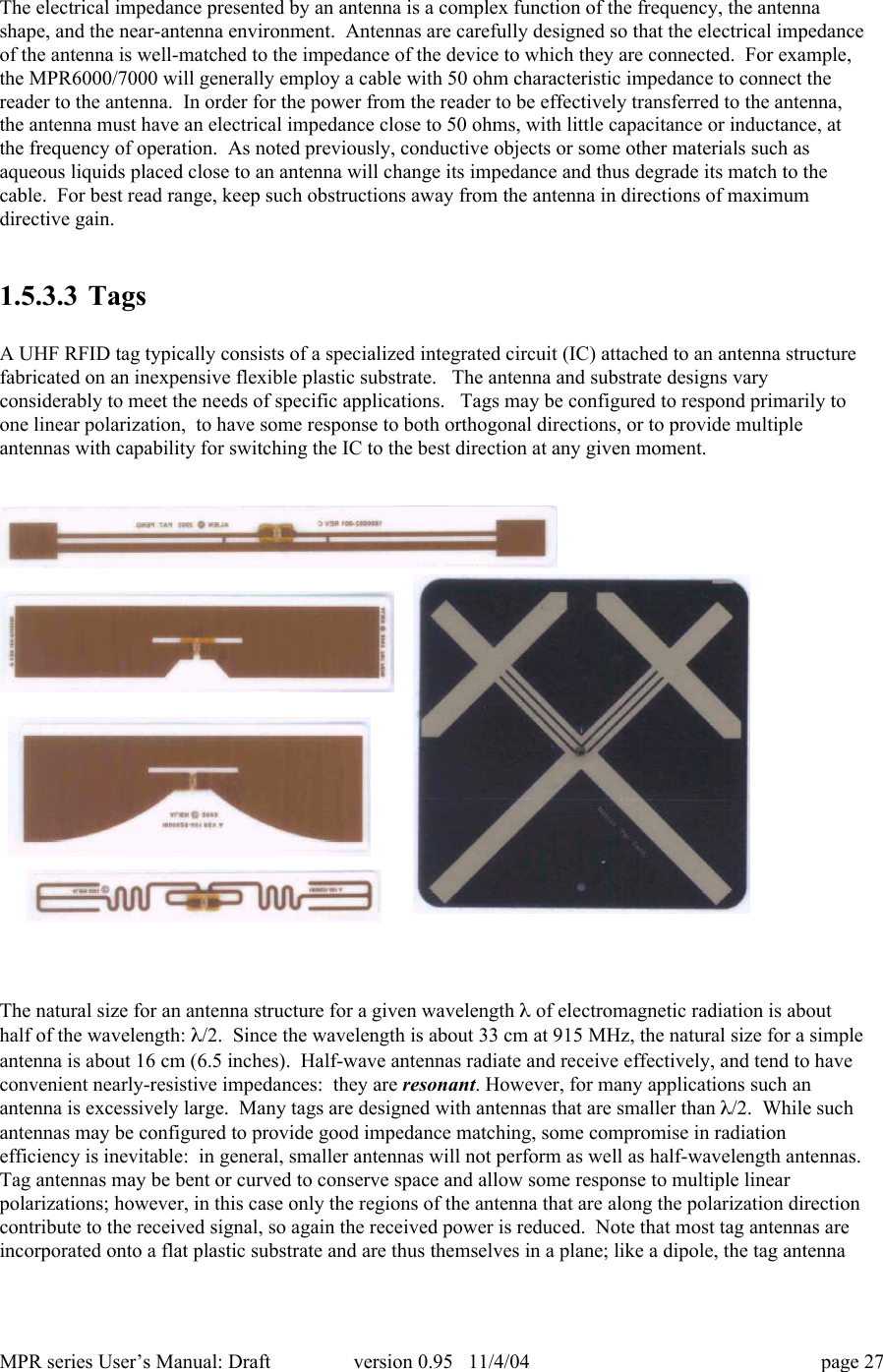
MPR series User’s Manual: Draft version 0.95   11/4/04 page 27The electrical impedance presented by an antenna is a complex function of the frequency, the antennashape, and the near-antenna environment.  Antennas are carefully designed so that the electrical impedanceof the antenna is well-matched to the impedance of the device to which they are connected.  For example,the MPR6000/7000 will generally employ a cable with 50 ohm characteristic impedance to connect thereader to the antenna.  In order for the power from the reader to be effectively transferred to the antenna,the antenna must have an electrical impedance close to 50 ohms, with little capacitance or inductance, atthe frequency of operation.  As noted previously, conductive objects or some other materials such asaqueous liquids placed close to an antenna will change its impedance and thus degrade its match to thecable.  For best read range, keep such obstructions away from the antenna in directions of maximumdirective gain.1.5.3.3 TagsA UHF RFID tag typically consists of a specialized integrated circuit (IC) attached to an antenna structurefabricated on an inexpensive flexible plastic substrate.   The antenna and substrate designs varyconsiderably to meet the needs of specific applications.   Tags may be configured to respond primarily toone linear polarization,  to have some response to both orthogonal directions, or to provide multipleantennas with capability for switching the IC to the best direction at any given moment.The natural size for an antenna structure for a given wavelength l of electromagnetic radiation is abouthalf of the wavelength: l/2.  Since the wavelength is about 33 cm at 915 MHz, the natural size for a simpleantenna is about 16 cm (6.5 inches).  Half-wave antennas radiate and receive effectively, and tend to haveconvenient nearly-resistive impedances:  they are resonant. However, for many applications such anantenna is excessively large.  Many tags are designed with antennas that are smaller than l/2.  While suchantennas may be configured to provide good impedance matching, some compromise in radiationefficiency is inevitable:  in general, smaller antennas will not perform as well as half-wavelength antennas.Tag antennas may be bent or curved to conserve space and allow some response to multiple linearpolarizations; however, in this case only the regions of the antenna that are along the polarization directioncontribute to the received signal, so again the received power is reduced.  Note that most tag antennas areincorporated onto a flat plastic substrate and are thus themselves in a plane; like a dipole, the tag antenna
MPR series User’s Manual: Draft version 0.95   11/4/04 page 28does not transmit and cannot receive signals whose direction of propagation lies in this plane.  A tag cannotbe seen by the reader when it is viewed on edge.Tag antennas are also sensitive to their local environment, a fact that is of particular import since tags aremeant to be attached to objects.  Many common materials, such as paper and most plastics, have little effecton microwave propagation; tags can be attached readily to cardboard or plastic boxes or containers withoutaffecting their operation.  However, large metal objects have important effects both on the local electricfields and the impedance of nearby antennas.  Tag antennas cannot be attached directly to metal plates orboxes without suffering degraded performance.  Tag antennas spaced 5 mm to 1 cm (0.2 to 0.4 inch) from ametal surface can perform acceptably, particularly if designed for near-metal service.  Aqueous fluids(water and water-containing materials such as milk, juices, most cleaning fluids, etc.) also have a strongeffect on local field intensity and may affect tag antenna impedance as well, depending somewhat on thetag design.  Again the best operation of a tag will be obtained if it is kept at least 1-2 cm from bodies ofaqueous fluid.The received signal from a tag antenna is connected to an integrated circuit.  Tag IC’s are very small (tokeep the cost of manufacturing low), and are typically embedded in a plastic coating for mechanicalprotection.  The IC contains a rectifying circuit to convert the received 900 MHz signal to a DC voltageused to power the remainder of the IC.  Variations in the received power are converted to variations in aDC voltage, providing the IC with a method of sensing information transmitted by the reader.  The IC canalso modify the impedance it presents to the antenna, by using a transistor as a switching element, thuscausing a variation in the signal reflected back to the reader and enabling the tag to communicate back tothe reader without needing its own radio transmitter.The necessity of powering the tag is the primary limitation on the read range.  Tags require a few 10’s ofmicrowatts of RF power to operate, limiting the range to about 3-6 meters with an isotropic antenna, orabout 10-15 meters with a directional antenna.  When linearly-polarized reader antennas are used, readrange may be degraded by misorientation of the tag.  Most indoor environments have very complexpropagation characteristics, with the transmitted signal reflecting off numerous obstacles such as walls,floors, other tagged objects, people, vehicles, desks, tables, etc.  As a consequence, the signal strength canvary by a factor of 10 or more between two neighboring locations separated by about a half-wavelength (16cm or 5 inches): this phenomenon is known as fading, and is encountered in most wireless communicationssystems.  A tag with the misfortune to find itself in a fade may fail to power up, while a tag farther from thereader but happily located in a region of maximum signal strength responds readily.  Thus there is noreliable simple correlation between tag location the likelihood of reading a tag.  The exact signal strengthconfiguration is sensitive to the positions of all reflecting / diffracting objects in proximity to the readregion (including people and their tools and toys) to an accuracy of much less than a wavelength, and thusin practice is impossible to predict or control.The best approach to deal with fading is the use of diversity:  intentional variations in the propagationenvironment to ensure that each tag finds itself in a region of decent signal strength at some point.Diversity can be achieved by alternately employing two antennas in slightly different positions (displacedby at least a half a wavelength); the MPR6000 or MPR7000 can be operated in this fashion by alternatelyaddressing antennas A and B.  Alternatively, the location of the tags relative to the reader antenna(s) can bevaried; this beneficial effect occurs naturally when the tags to be read are moving on a conveyorized belt,or are rotated as a pallet of boxes is wrapped with plastic in preparation for transport.1.5.3.4 System integrationAn RFID reader can collect large amounts of data, often much more than would have been obtained by ahuman being employing a bar code reader.  To convert this data into knowledge may require considerablefiltering.  For example, if a fork lift driver moves a pallet out of a door, then returns to the facility to correctan error in some paperwork, and finally drives out through the door to the truck again, the reader may takethree inventories of the same pallet, but it is rarely desirable to treat the resulting information as suggesting
MPR series User’s Manual: Draft version 0.95   11/4/04 page 29that the same items were shipped three times.  On the other hand, if the pallet is returned by a hand truck,and the operator’s colleague stands in front of the reader antenna during the transfer, the reader may fail torecord some or all of the tags.  A successful RFID implementation requires the integration of appropriateprocedures for human workers to follow in placing and using tags and objects carrying them, carefulinstallation of reader hardware, and the right middleware to convert the raw data from the reader intoinformation useful for operating the business.Procedures are intimately connected with the planned usage for the RFID tags.  Are the tags attached toindividual items, boxes, or a pallet or other large container?  Are the items to be inventoried on a shelf,counted as they move along a conveyorized transport belt, or tracked through a door?  Can the orientationof objects to be read be controlled or must the reader account for randomly-oriented tags, and does thisinclude tags placed end-on to the reader?   What is the desired read range?  Do the objects to be labeledcontain metals or aqueous fluids, and if so can the tags be placed sufficiently far from these disturbinginfluences to be read?  Is the necessary read reliability 90%, 99%, or 99.9%?  Given the answers to suchquestions, the implementer can then develop procedures to ensure that the desired reliability is achieved.As might be inferred from the discussion in section 1.5.3.2, selection and placement of reader antennas is acritical consideration for a successful installation. The MPR6000/7000  can be connected to two externalantennas; these antennas should be configured to reliably cover the region over which tags are to be read.For example, at a doorway, one directional antenna may be placed < 1 meter (3 feet) from the ground andthe other around 2 meters (6 feet) high, thus providing good coverage of the whole door area.  When manyreaders are used in close proximity, consideration should be given to minimizing interference betweenreaders; for example, configurations in which one reader antenna looks directly at a neighboring reader’santenna should be avoided.  It may be useful to provide reflective or absorbtive shielding between readerinstallations.The lower levels of middleware, dealing directly with the reader population, must incorporate very specificknowledge about the use procedures and environment in which the tags are being read, and are likely to behighly customized for each application.  This software must provide filtering and aggregation capabilitiesto ensure that the data that is forwarded to the enterprise information systems is correctly categorized andrepresentative of what is happening to the physical inventory of objects being tracked.  Once this has beenaccomplished, the integration of a properly filtered and aggregated dataset with a standard enterpriseresource planning package such as those available from vendors like Oracle or SAP is a reasonably well-established function, with the necessary customization provided by a large number of third-party vendors.1.5.4  RFID standardsBar codes for commercial products are standardized worldwide under the auspices of the Uniform CodeCouncil and EAN International.  In September of 2003, these organizations joined with the AutoID Labsheadquartered at the Massachusetts Institute of Technology to form EPC Global Inc., chartered with thestandardization of a generalization of the bar code system, the Electronic Product Code (EPC), as well asthe creation of software and hardware standards to support the use of RFID systems in implementingidentification of objects by means of EPC’s.  This work is intended to complement existing and ongoingactivities at the International Standards Organization (ISO), where many standards for the operation ofLF and HF RFID systems have already been defined.1.5.4.1 EPC GlobalEPC Global is creating a set of standards intended to provide a robust infrastructure for the proliferation ofRFID technology:• EPC Tag data:  the standards define various formats for the unique identifier (EPC) for each tag, tobe consistent with existing EAN/UCC standards: serialized version of the EAN.UCC Global TradeItem Number (GTIN®), the EAN.UCC Serial Shipping Container Code (SSCC®), the EAN.UCC
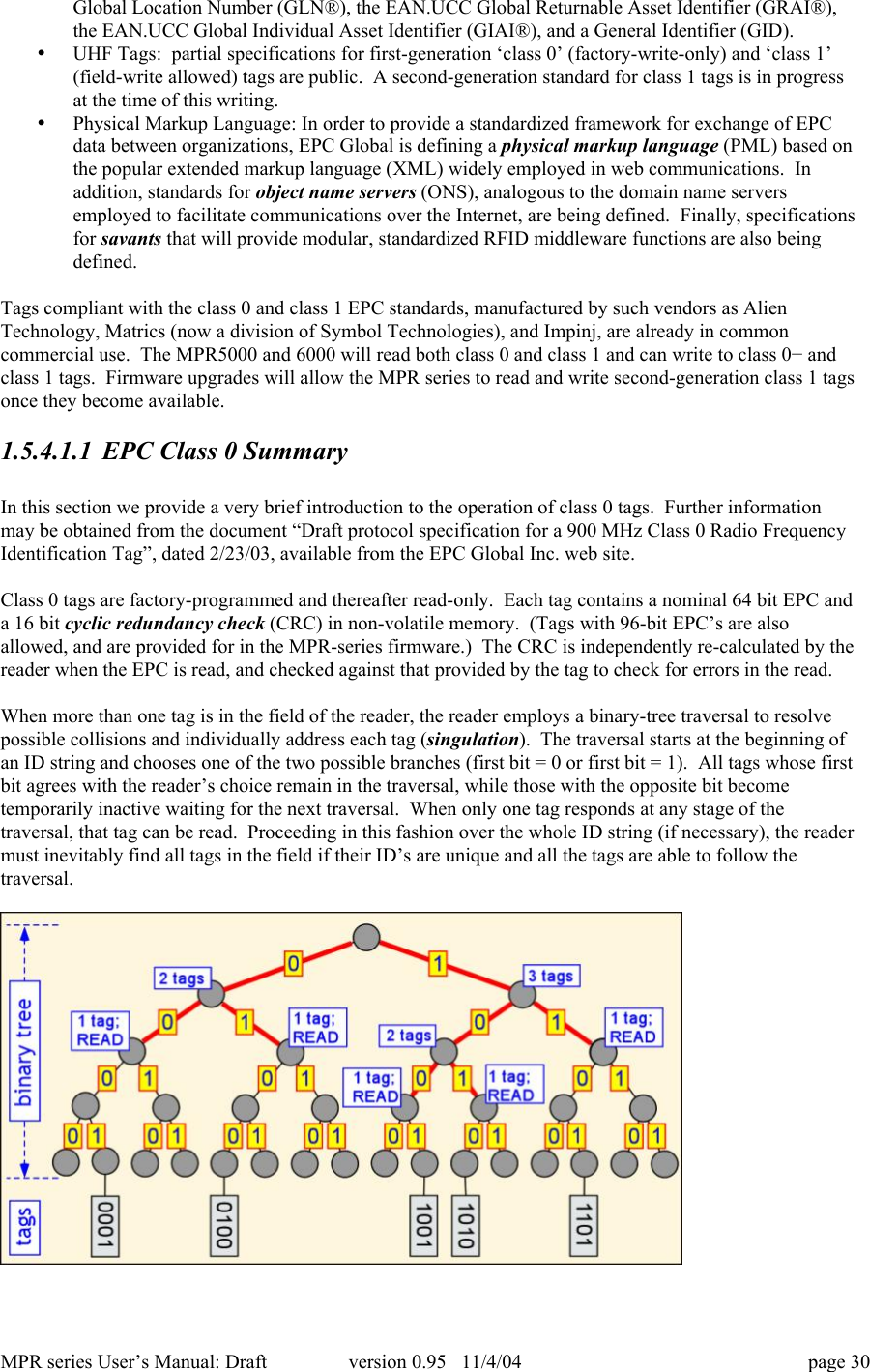
MPR series User’s Manual: Draft version 0.95   11/4/04 page 30Global Location Number (GLN®), the EAN.UCC Global Returnable Asset Identifier (GRAI®),the EAN.UCC Global Individual Asset Identifier (GIAI®), and a General Identifier (GID).• UHF Tags:  partial specifications for first-generation ‘class 0’ (factory-write-only) and ‘class 1’(field-write allowed) tags are public.  A second-generation standard for class 1 tags is in progressat the time of this writing.• Physical Markup Language: In order to provide a standardized framework for exchange of EPCdata between organizations, EPC Global is defining a physical markup language (PML) based onthe popular extended markup language (XML) widely employed in web communications.  Inaddition, standards for object name servers (ONS), analogous to the domain name serversemployed to facilitate communications over the Internet, are being defined.  Finally, specificationsfor savants that will provide modular, standardized RFID middleware functions are also beingdefined.Tags compliant with the class 0 and class 1 EPC standards, manufactured by such vendors as AlienTechnology, Matrics (now a division of Symbol Technologies), and Impinj, are already in commoncommercial use.  The MPR5000 and 6000 will read both class 0 and class 1 and can write to class 0+ andclass 1 tags.  Firmware upgrades will allow the MPR series to read and write second-generation class 1 tagsonce they become available.1.5.4.1.1 EPC Class 0 SummaryIn this section we provide a very brief introduction to the operation of class 0 tags.  Further informationmay be obtained from the document “Draft protocol specification for a 900 MHz Class 0 Radio FrequencyIdentification Tag”, dated 2/23/03, available from the EPC Global Inc. web site.Class 0 tags are factory-programmed and thereafter read-only.  Each tag contains a nominal 64 bit EPC anda 16 bit cyclic redundancy check (CRC) in non-volatile memory.  (Tags with 96-bit EPC’s are alsoallowed, and are provided for in the MPR-series firmware.)  The CRC is independently re-calculated by thereader when the EPC is read, and checked against that provided by the tag to check for errors in the read.When more than one tag is in the field of the reader, the reader employs a binary-tree traversal to resolvepossible collisions and individually address each tag (singulation).  The traversal starts at the beginning ofan ID string and chooses one of the two possible branches (first bit = 0 or first bit = 1).  All tags whose firstbit agrees with the reader’s choice remain in the traversal, while those with the opposite bit becometemporarily inactive waiting for the next traversal.  When only one tag responds at any stage of thetraversal, that tag can be read.  Proceeding in this fashion over the whole ID string (if necessary), the readermust inevitably find all tags in the field if their ID’s are unique and all the tags are able to follow thetraversal.
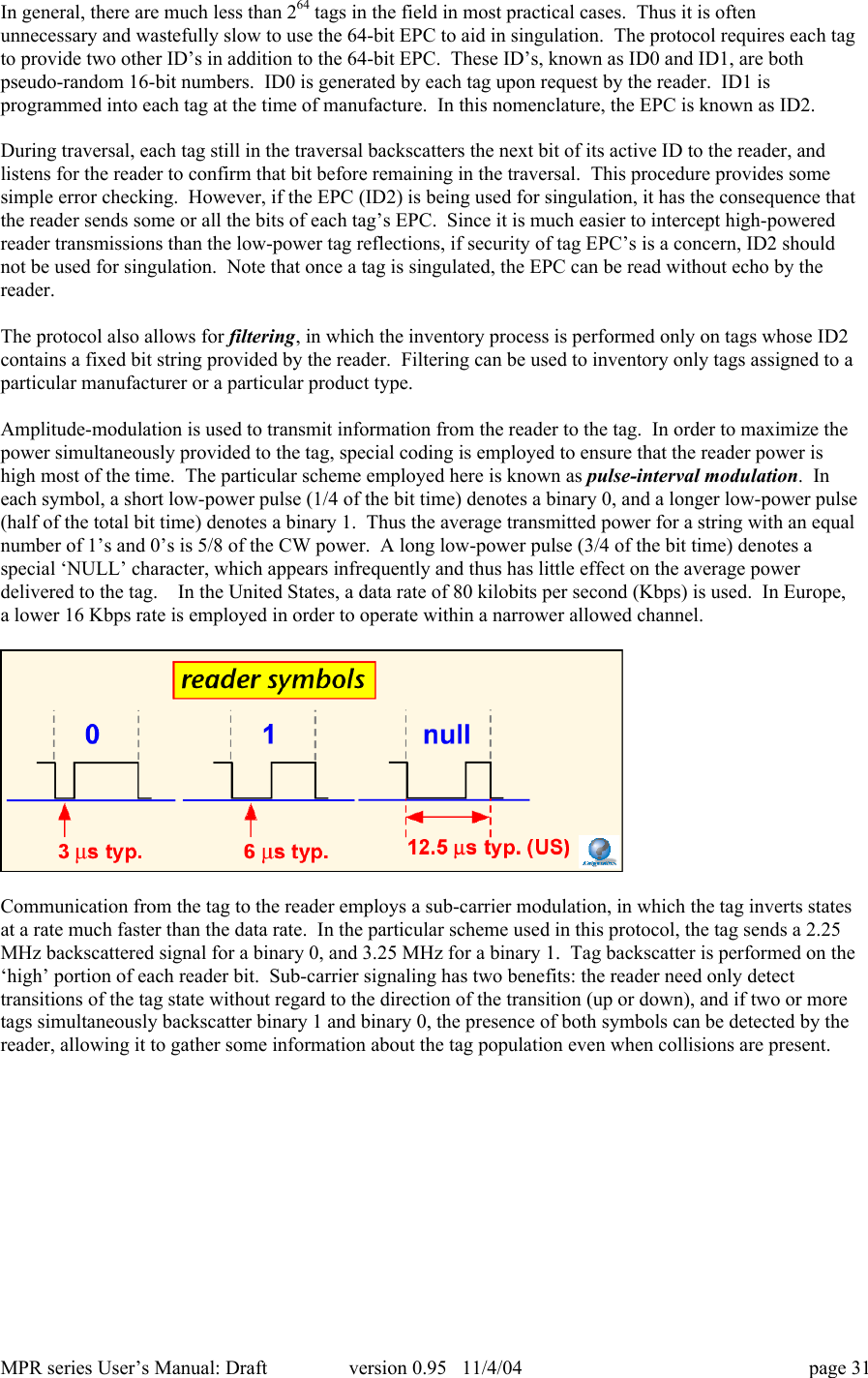
MPR series User’s Manual: Draft version 0.95   11/4/04 page 31In general, there are much less than 264 tags in the field in most practical cases.  Thus it is oftenunnecessary and wastefully slow to use the 64-bit EPC to aid in singulation.  The protocol requires each tagto provide two other ID’s in addition to the 64-bit EPC.  These ID’s, known as ID0 and ID1, are bothpseudo-random 16-bit numbers.  ID0 is generated by each tag upon request by the reader.  ID1 isprogrammed into each tag at the time of manufacture.  In this nomenclature, the EPC is known as ID2.During traversal, each tag still in the traversal backscatters the next bit of its active ID to the reader, andlistens for the reader to confirm that bit before remaining in the traversal.  This procedure provides somesimple error checking.  However, if the EPC (ID2) is being used for singulation, it has the consequence thatthe reader sends some or all the bits of each tag’s EPC.  Since it is much easier to intercept high-poweredreader transmissions than the low-power tag reflections, if security of tag EPC’s is a concern, ID2 shouldnot be used for singulation.  Note that once a tag is singulated, the EPC can be read without echo by thereader.The protocol also allows for filtering, in which the inventory process is performed only on tags whose ID2contains a fixed bit string provided by the reader.  Filtering can be used to inventory only tags assigned to aparticular manufacturer or a particular product type.Amplitude-modulation is used to transmit information from the reader to the tag.  In order to maximize thepower simultaneously provided to the tag, special coding is employed to ensure that the reader power ishigh most of the time.  The particular scheme employed here is known as pulse-interval modulation.  Ineach symbol, a short low-power pulse (1/4 of the bit time) denotes a binary 0, and a longer low-power pulse(half of the total bit time) denotes a binary 1.  Thus the average transmitted power for a string with an equalnumber of 1’s and 0’s is 5/8 of the CW power.  A long low-power pulse (3/4 of the bit time) denotes aspecial ‘NULL’ character, which appears infrequently and thus has little effect on the average powerdelivered to the tag.    In the United States, a data rate of 80 kilobits per second (Kbps) is used.  In Europe,a lower 16 Kbps rate is employed in order to operate within a narrower allowed channel.Communication from the tag to the reader employs a sub-carrier modulation, in which the tag inverts statesat a rate much faster than the data rate.  In the particular scheme used in this protocol, the tag sends a 2.25MHz backscattered signal for a binary 0, and 3.25 MHz for a binary 1.  Tag backscatter is performed on the‘high’ portion of each reader bit.  Sub-carrier signaling has two benefits: the reader need only detecttransitions of the tag state without regard to the direction of the transition (up or down), and if two or moretags simultaneously backscatter binary 1 and binary 0, the presence of both symbols can be detected by thereader, allowing it to gather some information about the tag population even when collisions are present.
MPR series User’s Manual: Draft version 0.95   11/4/04 page 32Each time power is turned on, the reader proceeds through a set of steps to initialize the tag IC timing.First, the reader transmits a RESET consisting of  800 ms of CW power.  A tag’s “ID’d” flag (telling it thatit was already read by the reader) may survive a RESET, but in other respects the tag returns to its defaultstate.  After the RESET, 8 pulses are used to calibrate the tag internal oscillator to the 2.2 MHz sub-carrierfrequency.  Finally,  a set of pulses of varying length is transmitted to set the thresholds for distinguishingbetween 0, 1, and null, and to signal the tag when to begin its transmission.In the United States, communications devices operating in unlicensed bands must either use direct-sequence or frequency-hopping spreading techniques.  The MPR series products use pseudo-randomhopping from one frequency to another.  The Class 0 protocol does not require the reader to power downduring hops, but the MPR5000 does in order to minimize spurious radiation.  Therefore, a RESET /calibration sequence is necessary after each hop.  The time between hops is available for the user to adjust,although regulations require that the transmitter remain on any given frequency for no longer than 400 msat a time.  In Europe, revised regulations allowing 10 channels have been promulgated and it is anticipatedthat with the passing of time frequency-hopping operation will become the normal means of operation  inmost European jurisdictions.  European regulations will require that the reader listen before talking: that is,the reader must check each putative channel for other active transmitters before beginning its owntransmission.  Note that the MPR5000/6000/7000 operate at 902-928 MHz and are not approved for use inRegion 1 (European) jurisdictions.Tags have 10 possible states, roughly corresponding to [startup / calibrate], [global commands], [binary treetraversal], and [singulated commands].  Each command is 8 bits long, with an additional parity bit providedfor error checking.  The tag echoes each bit it receives in order to provide a simple error check andacknowledgement function.  Mandatory commands are:• ResetIDFlag:  resets the identified flag to NOT READ; that is, it forces tags to forget whether theyhave been previously inventoried.• SetNegotiationPage:  this curious terminology is used to describe the choice of ID (ID0, 1, or 2)used for singulation during binary tree traversal.• SegRegionofOperation:  sets the backscatter parameters according to whether the device isoperating under FCC or European regulations.• ForceDormant:  tags receiving this command immediately enter the Dormant state.  The Dormantstate is the default tag turn-on state, exited when a RESET is received.• ForceMute: tags receiving this command immediately enter the Mute state.  In the Mute state, thetags receive data but do not respond until a NULL is received.  Tags that have been bypassedduring traversal reside in the Mute state until the next traversal begins.• Read:  Read ID1 or ID2 (ID0, being randomly generated at the time of request, has no enduringinterest and need not be read from the tag).• Kill:  Permanently disables the tag if a valid argument (passcode) is provided.1.5.4.1.2 EPC Class 1 Summary
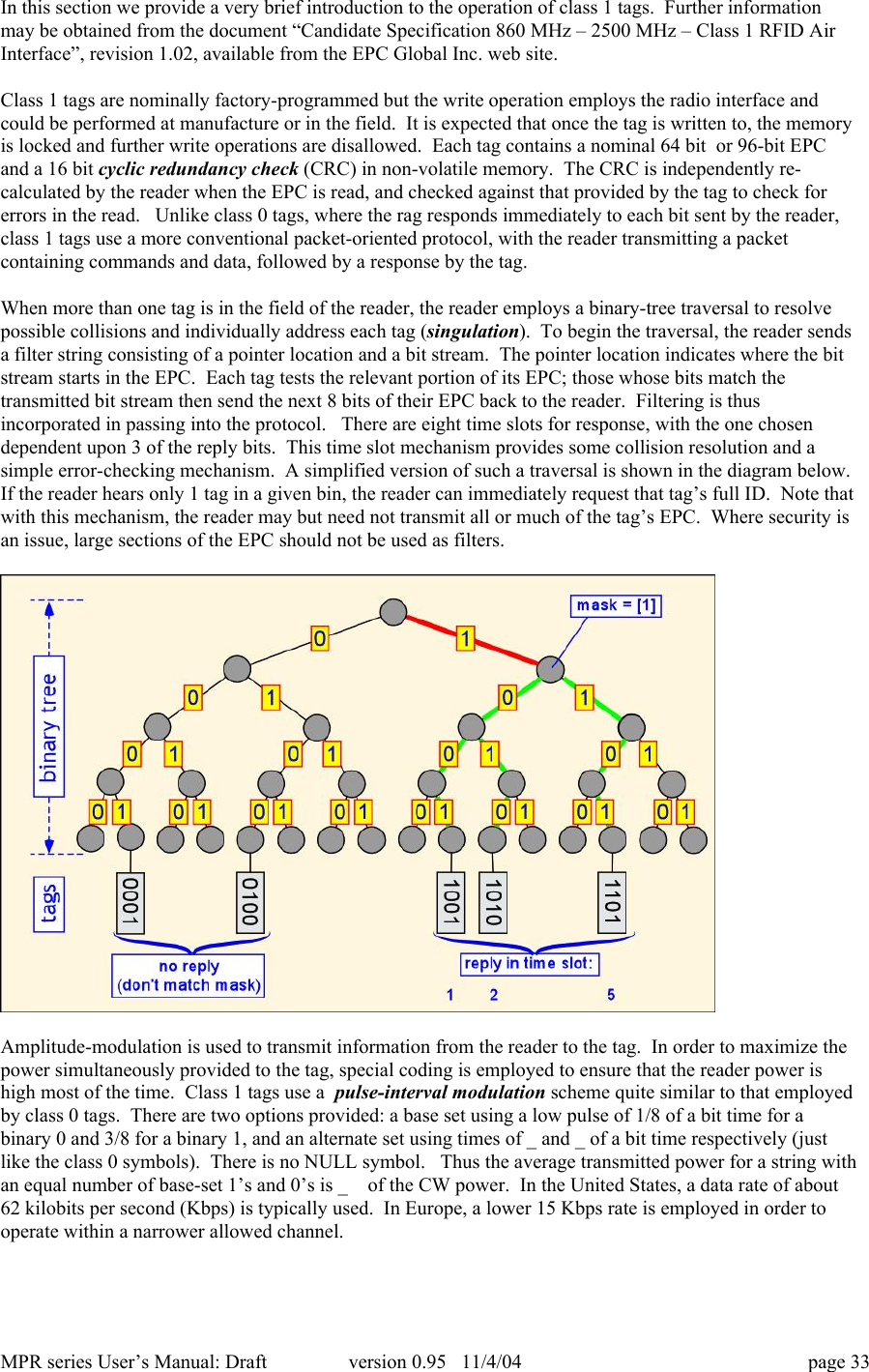
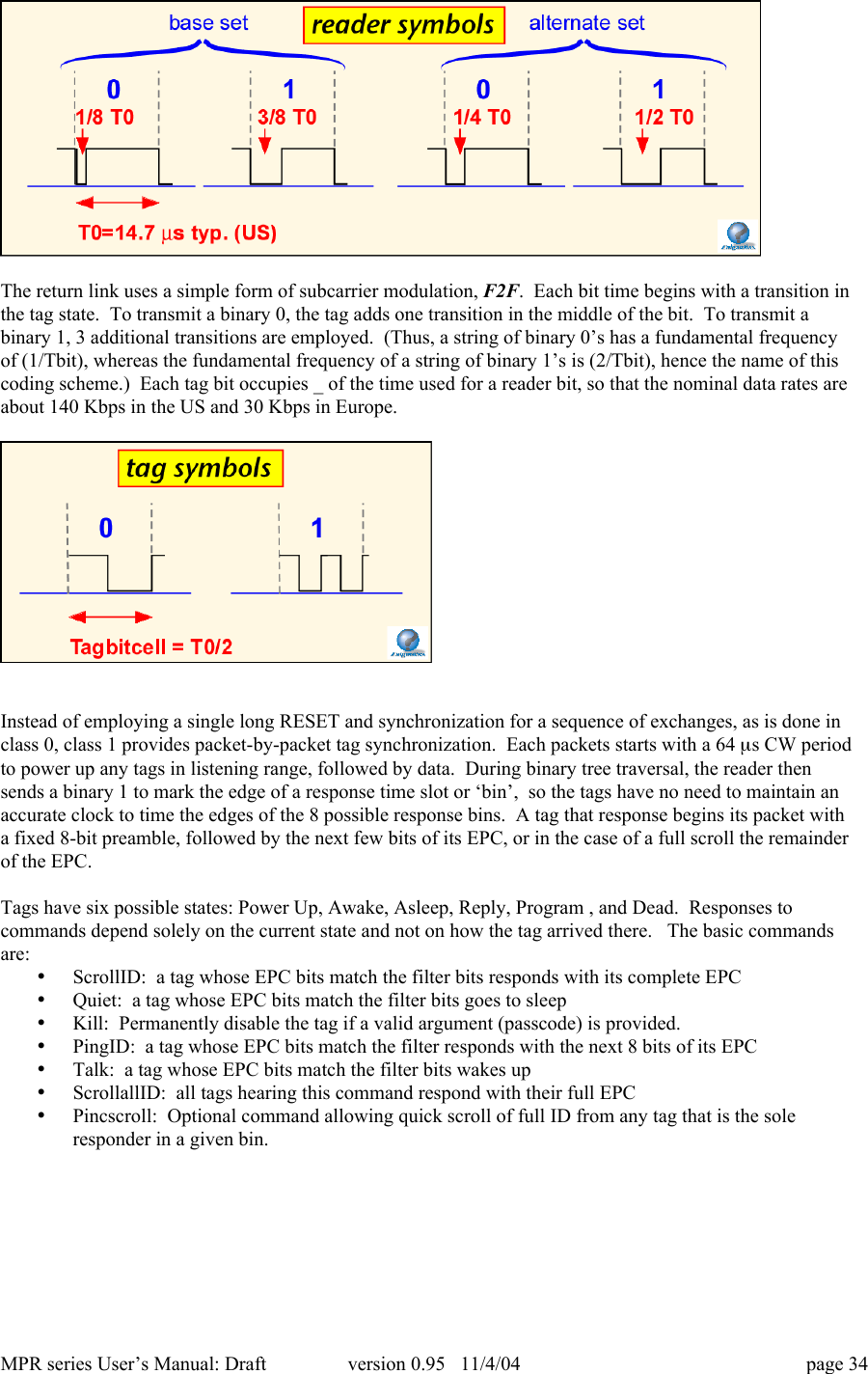
MPR series User’s Manual: Draft version 0.95   11/4/04 page 33In this section we provide a very brief introduction to the operation of class 1 tags.  Further informationmay be obtained from the document “Candidate Specification 860 MHz – 2500 MHz – Class 1 RFID AirInterface”, revision 1.02, available from the EPC Global Inc. web site.Class 1 tags are nominally factory-programmed but the write operation employs the radio interface andcould be performed at manufacture or in the field.  It is expected that once the tag is written to, the memoryis locked and further write operations are disallowed.  Each tag contains a nominal 64 bit  or 96-bit EPCand a 16 bit cyclic redundancy check (CRC) in non-volatile memory.  The CRC is independently re-calculated by the reader when the EPC is read, and checked against that provided by the tag to check forerrors in the read.   Unlike class 0 tags, where the rag responds immediately to each bit sent by the reader,class 1 tags use a more conventional packet-oriented protocol, with the reader transmitting a packetcontaining commands and data, followed by a response by the tag.When more than one tag is in the field of the reader, the reader employs a binary-tree traversal to resolvepossible collisions and individually address each tag (singulation).  To begin the traversal, the reader sendsa filter string consisting of a pointer location and a bit stream.  The pointer location indicates where the bitstream starts in the EPC.  Each tag tests the relevant portion of its EPC; those whose bits match thetransmitted bit stream then send the next 8 bits of their EPC back to the reader.  Filtering is thusincorporated in passing into the protocol.   There are eight time slots for response, with the one chosendependent upon 3 of the reply bits.  This time slot mechanism provides some collision resolution and asimple error-checking mechanism.  A simplified version of such a traversal is shown in the diagram below.If the reader hears only 1 tag in a given bin, the reader can immediately request that tag’s full ID.  Note thatwith this mechanism, the reader may but need not transmit all or much of the tag’s EPC.  Where security isan issue, large sections of the EPC should not be used as filters.Amplitude-modulation is used to transmit information from the reader to the tag.  In order to maximize thepower simultaneously provided to the tag, special coding is employed to ensure that the reader power ishigh most of the time.  Class 1 tags use a  pulse-interval modulation scheme quite similar to that employedby class 0 tags.  There are two options provided: a base set using a low pulse of 1/8 of a bit time for abinary 0 and 3/8 for a binary 1, and an alternate set using times of _ and _ of a bit time respectively (justlike the class 0 symbols).  There is no NULL symbol.   Thus the average transmitted power for a string withan equal number of base-set 1’s and 0’s is _  of the CW power.  In the United States, a data rate of about62 kilobits per second (Kbps) is typically used.  In Europe, a lower 15 Kbps rate is employed in order tooperate within a narrower allowed channel.
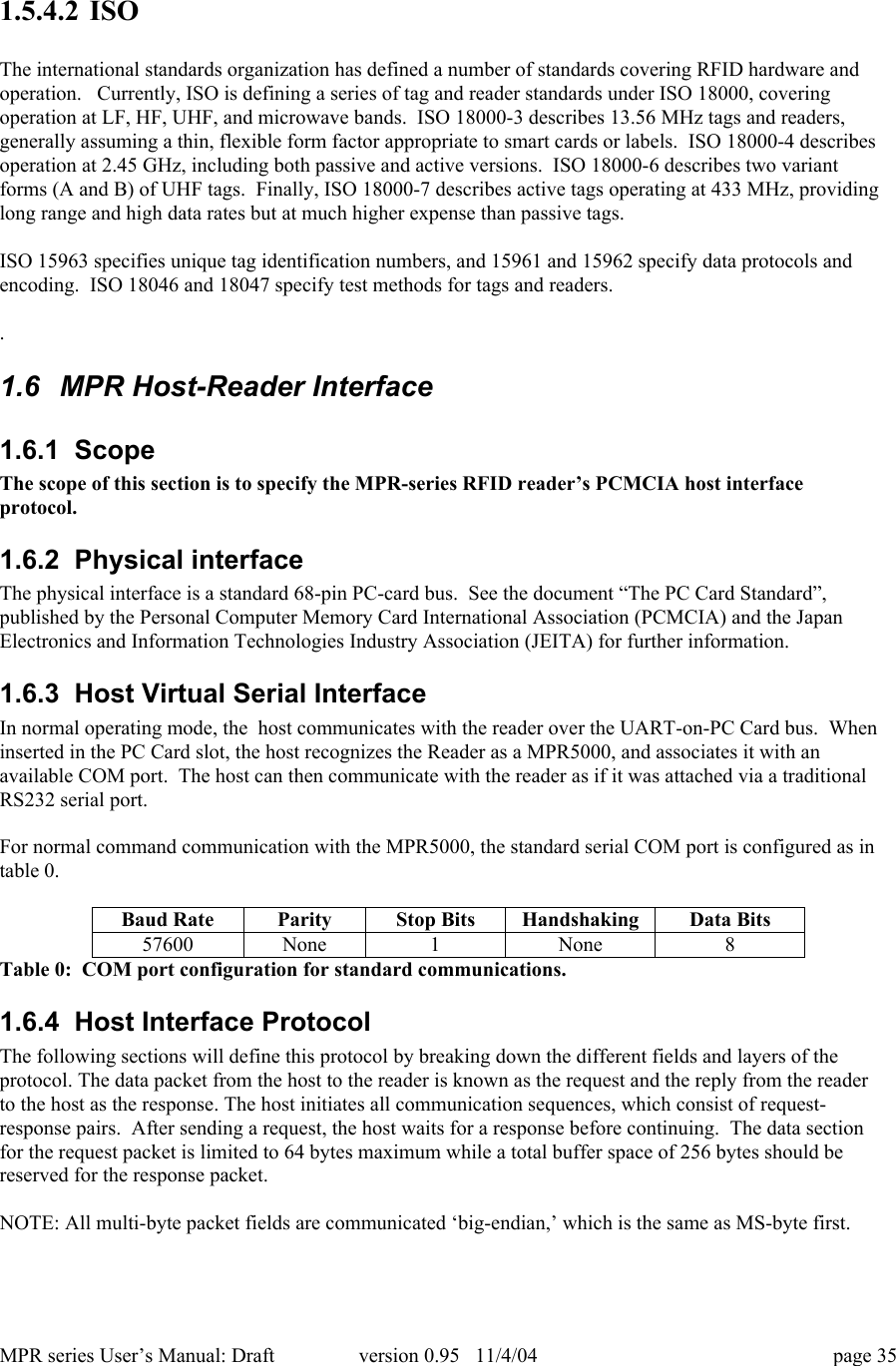
MPR series User’s Manual: Draft version 0.95   11/4/04 page 34The return link uses a simple form of subcarrier modulation, F2F.  Each bit time begins with a transition inthe tag state.  To transmit a binary 0, the tag adds one transition in the middle of the bit.  To transmit abinary 1, 3 additional transitions are employed.  (Thus, a string of binary 0’s has a fundamental frequencyof (1/Tbit), whereas the fundamental frequency of a string of binary 1’s is (2/Tbit), hence the name of thiscoding scheme.)  Each tag bit occupies _ of the time used for a reader bit, so that the nominal data rates areabout 140 Kbps in the US and 30 Kbps in Europe.Instead of employing a single long RESET and synchronization for a sequence of exchanges, as is done inclass 0, class 1 provides packet-by-packet tag synchronization.  Each packets starts with a 64 ms CW periodto power up any tags in listening range, followed by data.  During binary tree traversal, the reader thensends a binary 1 to mark the edge of a response time slot or ‘bin’,  so the tags have no need to maintain anaccurate clock to time the edges of the 8 possible response bins.  A tag that response begins its packet witha fixed 8-bit preamble, followed by the next few bits of its EPC, or in the case of a full scroll the remainderof the EPC.Tags have six possible states: Power Up, Awake, Asleep, Reply, Program , and Dead.  Responses tocommands depend solely on the current state and not on how the tag arrived there.   The basic commandsare:• ScrollID:  a tag whose EPC bits match the filter bits responds with its complete EPC• Quiet:  a tag whose EPC bits match the filter bits goes to sleep• Kill:  Permanently disable the tag if a valid argument (passcode) is provided.• PingID:  a tag whose EPC bits match the filter responds with the next 8 bits of its EPC• Talk:  a tag whose EPC bits match the filter bits wakes up• ScrollallID:  all tags hearing this command respond with their full EPC• Pincscroll:  Optional command allowing quick scroll of full ID from any tag that is the soleresponder in a given bin.
MPR series User’s Manual: Draft version 0.95   11/4/04 page 351.5.4.2 ISOThe international standards organization has defined a number of standards covering RFID hardware andoperation.   Currently, ISO is defining a series of tag and reader standards under ISO 18000, coveringoperation at LF, HF, UHF, and microwave bands.  ISO 18000-3 describes 13.56 MHz tags and readers,generally assuming a thin, flexible form factor appropriate to smart cards or labels.  ISO 18000-4 describesoperation at 2.45 GHz, including both passive and active versions.  ISO 18000-6 describes two variantforms (A and B) of UHF tags.  Finally, ISO 18000-7 describes active tags operating at 433 MHz, providinglong range and high data rates but at much higher expense than passive tags.ISO 15963 specifies unique tag identification numbers, and 15961 and 15962 specify data protocols andencoding.  ISO 18046 and 18047 specify test methods for tags and readers..1.6  MPR Host-Reader Interface1.6.1  ScopeThe scope of this section is to specify the MPR-series RFID reader’s PCMCIA host interfaceprotocol.1.6.2  Physical interfaceThe physical interface is a standard 68-pin PC-card bus.  See the document “The PC Card Standard”,published by the Personal Computer Memory Card International Association (PCMCIA) and the JapanElectronics and Information Technologies Industry Association (JEITA) for further information.1.6.3  Host Virtual Serial InterfaceIn normal operating mode, the  host communicates with the reader over the UART-on-PC Card bus.  Wheninserted in the PC Card slot, the host recognizes the Reader as a MPR5000, and associates it with anavailable COM port.  The host can then communicate with the reader as if it was attached via a traditionalRS232 serial port.For normal command communication with the MPR5000, the standard serial COM port is configured as intable 0.Baud RateParityStop BitsHandshakingData Bits57600None1None8Table 0:  COM port configuration for standard communications.1.6.4  Host Interface ProtocolThe following sections will define this protocol by breaking down the different fields and layers of theprotocol. The data packet from the host to the reader is known as the request and the reply from the readerto the host as the response. The host initiates all communication sequences, which consist of request-response pairs.  After sending a request, the host waits for a response before continuing.  The data sectionfor the request packet is limited to 64 bytes maximum while a total buffer space of 256 bytes should bereserved for the response packet.NOTE: All multi-byte packet fields are communicated ‘big-endian,’ which is the same as MS-byte first.
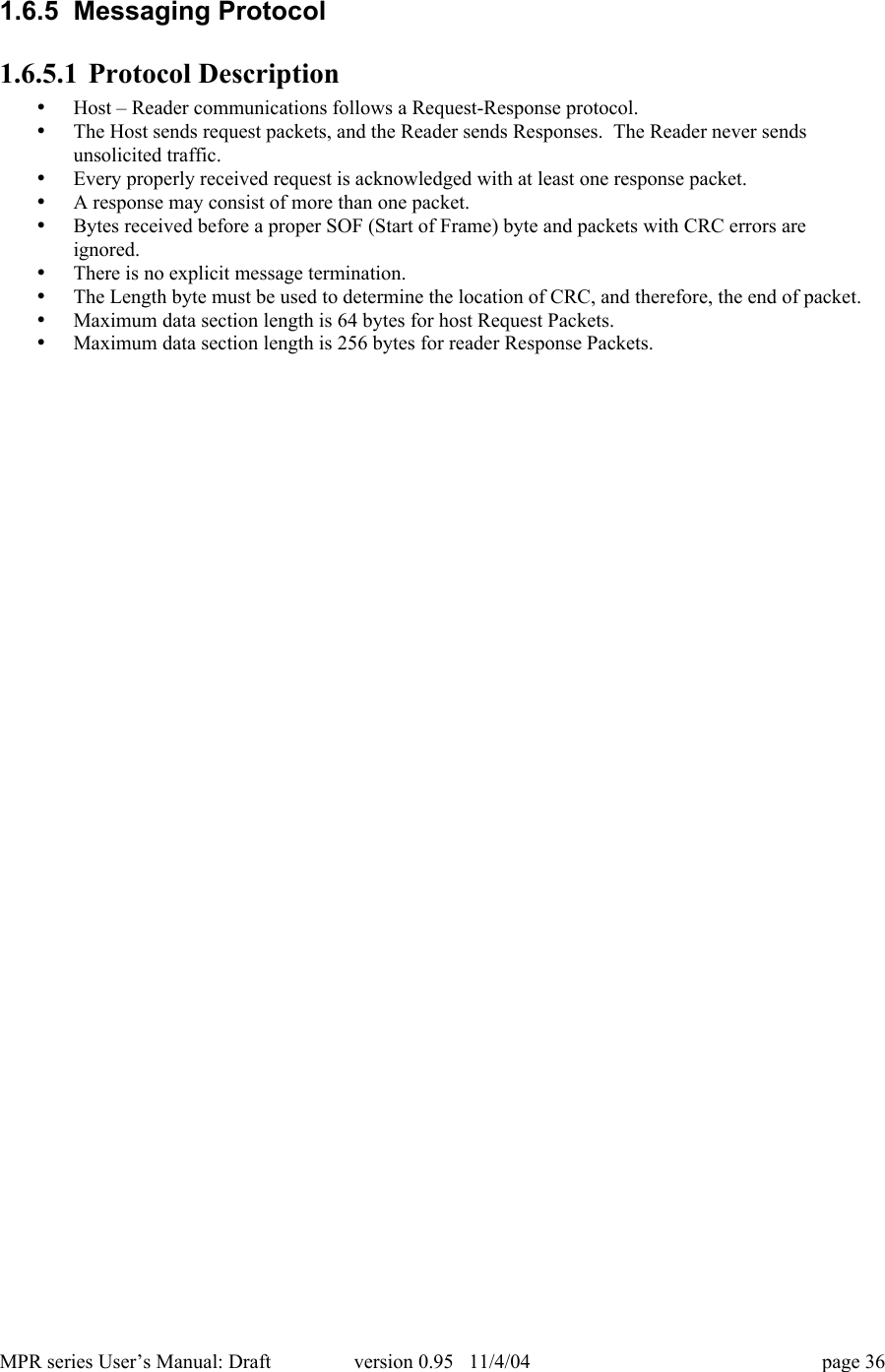
MPR series User’s Manual: Draft version 0.95   11/4/04 page 361.6.5  Messaging Protocol1.6.5.1 Protocol Description• Host – Reader communications follows a Request-Response protocol.• The Host sends request packets, and the Reader sends Responses.  The Reader never sendsunsolicited traffic.• Every properly received request is acknowledged with at least one response packet.• A response may consist of more than one packet.• Bytes received before a proper SOF (Start of Frame) byte and packets with CRC errors areignored.• There is no explicit message termination.• The Length byte must be used to determine the location of CRC, and therefore, the end of packet.• Maximum data section length is 64 bytes for host Request Packets.• Maximum data section length is 256 bytes for reader Response Packets.
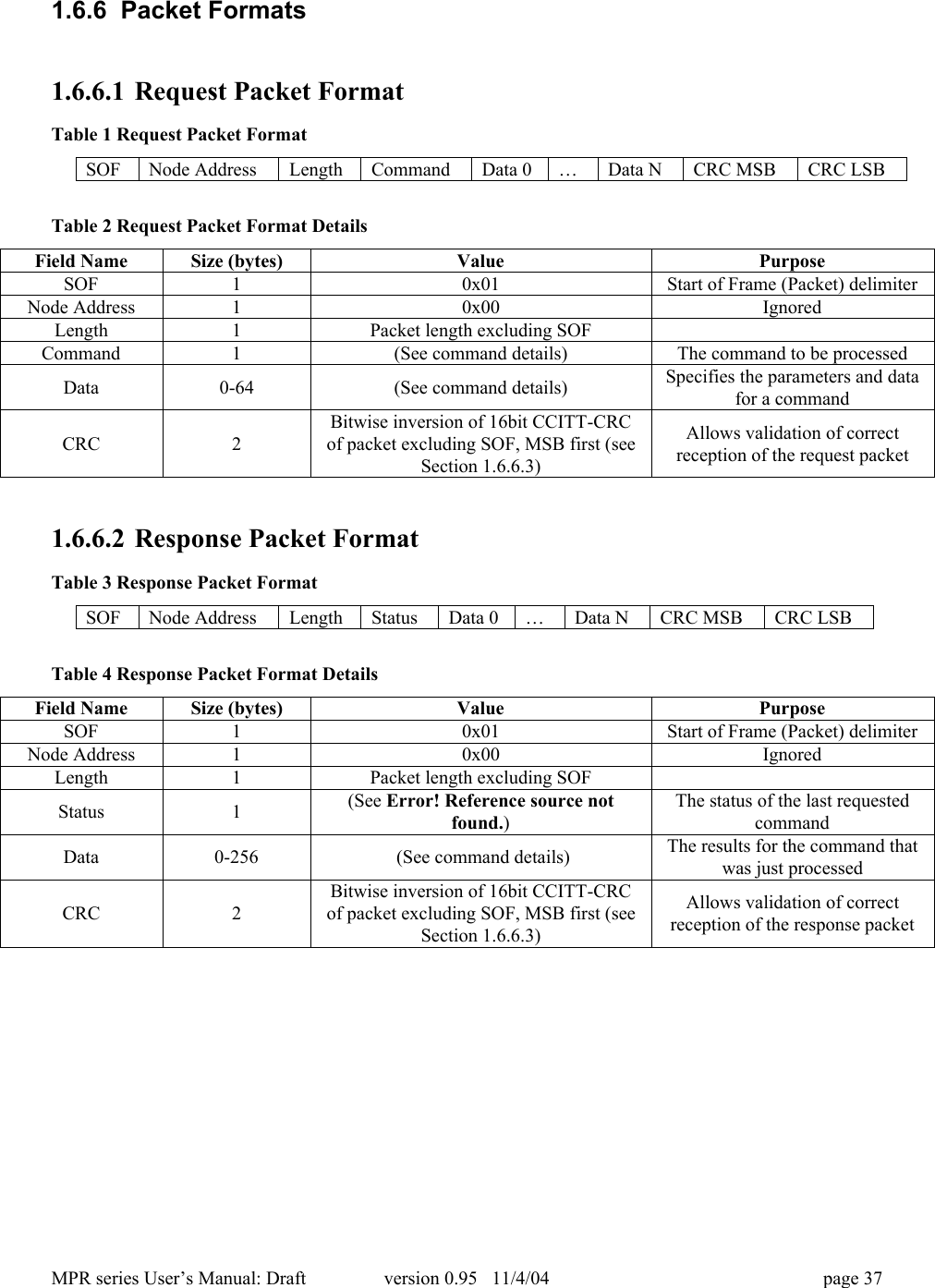
MPR series User’s Manual: Draft version 0.95   11/4/04 page 371.6.6  Packet Formats1.6.6.1 Request Packet FormatTable 1 Request Packet FormatSOFNode AddressLengthCommandData 0…Data NCRC MSBCRC LSBTable 2 Request Packet Format DetailsField NameSize (bytes)ValuePurposeSOF10x01Start of Frame (Packet) delimiterNode Address10x00IgnoredLength1Packet length excluding SOFCommand1(See command details)The command to be processedData0-64(See command details)Specifies the parameters and datafor a commandCRC2Bitwise inversion of 16bit CCITT-CRCof packet excluding SOF, MSB first (seeSection 1.6.6.3)Allows validation of correctreception of the request packet1.6.6.2 Response Packet FormatTable 3 Response Packet FormatSOFNode AddressLengthStatusData 0…Data NCRC MSBCRC LSBTable 4 Response Packet Format DetailsField NameSize (bytes)ValuePurposeSOF10x01Start of Frame (Packet) delimiterNode Address10x00IgnoredLength1Packet length excluding SOFStatus1(See Error! Reference source notfound.)The status of the last requestedcommandData0-256 (See command details)The results for the command thatwas just processedCRC2Bitwise inversion of 16bit CCITT-CRCof packet excluding SOF, MSB first (seeSection 1.6.6.3)Allows validation of correctreception of the response packet
MPR series User’s Manual: Draft version 0.95   11/4/04 page 381.6.6.3 CRC CalculationA 16bit CCITT CRC is used for error detection and placed at the end of the frame.   The calculation uses allbytes of the frame excluding the leading SOF.  The CCITT CRC polynomial is x16  + x12 + x5 + 1, and thepreload value is 0xFFFF.  The CRC is appended to the frame after the command data, MSB first.  Thefollowing code snippet and test vectors can be used as a guide to implement the CRC.  The bitwiseinversion (CRC XOR 0xFF) of the CRC is included in a transmitted frame.  On receipt, the CRC iscomputed on the bytes between SOF and CRC.  For valid frames, this will agree with the transmitted CRCvalue.Some Test Vectors:"ABCDEFG" returns 0xB82F"WJCI RFID" returns 0x9ACFAn array of 256 capital 'N' characters returns 0xE45C/*This calculation uses a table lookup to generate CCITT CRC values.The CCITT polynomial is: x^16 + x^12 + x^5 + 1Forward direction table - i.e. msbit first*/static unsigned int crctab[256] = {0x0000, 0x1021, 0x2042, 0x3063, 0x4084, 0x50A5, 0x60C6, 0x70E7, 0x8108,0x9129, 0xA14A, 0xB16B, 0xC18C, 0xD1AD, 0xE1CE, 0xF1EF, 0x1231, 0x0210,0x3273, 0x2252, 0x52B5, 0x4294, 0x72F7, 0x62D6, 0x9339, 0x8318, 0xB37B,0xA35A, 0xD3BD, 0xC39C, 0xF3FF, 0xE3DE, 0x2462, 0x3443, 0x0420, 0x1401,0x64E6, 0x74C7, 0x44A4, 0x5485, 0xA56A, 0xB54B, 0x8528, 0x9509, 0xE5EE,0xF5CF, 0xC5AC, 0xD58D, 0x3653, 0x2672, 0x1611, 0x0630, 0x76D7, 0x66F6,0x5695, 0x46B4, 0xB75B, 0xA77A, 0x9719, 0x8738, 0xF7DF, 0xE7FE, 0xD79D,0xC7BC, 0x48C4, 0x58E5, 0x6886, 0x78A7, 0x0840, 0x1861, 0x2802, 0x3823,0xC9CC, 0xD9ED, 0xE98E, 0xF9AF, 0x8948, 0x9969, 0xA90A, 0xB92B, 0x5AF5,0x4AD4, 0x7AB7, 0x6A96, 0x1A71, 0x0A50, 0x3A33, 0x2A12, 0xDBFD, 0xCBDC,0xFBBF, 0xEB9E, 0x9B79, 0x8B58, 0xBB3B, 0xAB1A, 0x6CA6, 0x7C87, 0x4CE4,0x5CC5, 0x2C22, 0x3C03, 0x0C60, 0x1C41, 0xEDAE, 0xFD8F, 0xCDEC, 0xDDCD,0xAD2A, 0xBD0B, 0x8D68, 0x9D49, 0x7E97, 0x6EB6, 0x5ED5, 0x4EF4, 0x3E13,0x2E32, 0x1E51, 0x0E70, 0xFF9F, 0xEFBE, 0xDFDD, 0xCFFC, 0xBF1B, 0xAF3A,0x9F59, 0x8F78, 0x9188, 0x81A9, 0xB1CA, 0xA1EB, 0xD10C, 0xC12D, 0xF14E,0xE16F, 0x1080, 0x00A1, 0x30C2, 0x20E3, 0x5004, 0x4025, 0x7046, 0x6067,0x83B9, 0x9398, 0xA3FB, 0xB3DA, 0xC33D, 0xD31C, 0xE37F, 0xF35E, 0x02B1,0x1290, 0x22F3, 0x32D2, 0x4235, 0x5214, 0x6277, 0x7256, 0xB5EA, 0xA5CB,0x95A8, 0x8589, 0xF56E, 0xE54F, 0xD52C, 0xC50D, 0x34E2, 0x24C3, 0x14A0,0x0481, 0x7466, 0x6447, 0x5424, 0x4405, 0xA7DB, 0xB7FA, 0x8799, 0x97B8,0xE75F, 0xF77E, 0xC71D, 0xD73C, 0x26D3, 0x36F2, 0x0691, 0x16B0, 0x6657,0x7676, 0x4615, 0x5634, 0xD94C, 0xC96D, 0xF90E, 0xE92F, 0x99C8, 0x89E9,0xB98A, 0xA9AB, 0x5844, 0x4865, 0x7806, 0x6827, 0x18C0, 0x08E1, 0x3882,0x28A3, 0xCB7D, 0xDB5C, 0xEB3F, 0xFB1E, 0x8BF9, 0x9BD8, 0xABBB, 0xBB9A,0x4A75, 0x5A54, 0x6A37, 0x7A16, 0x0AF1, 0x1AD0, 0x2AB3, 0x3A92, 0xFD2E,0xED0F, 0xDD6C, 0xCD4D, 0xBDAA, 0xAD8B, 0x9DE8, 0x8DC9, 0x7C26, 0x6C07,0x5C64, 0x4C45, 0x3CA2, 0x2C83, 0x1CE0, 0x0CC1, 0xEF1F, 0xFF3E, 0xCF5D,0xDF7C, 0xAF9B, 0xBFBA, 0x8FD9, 0x9FF8, 0x6E17, 0x7E36, 0x4E55, 0x5E74,0x2E93, 0x3EB2, 0x0ED1, 0x1EF0
MPR series User’s Manual: Draft version 0.95   11/4/04 page 39};unsigned short CalculateBlockCRC16(byte count, char *buffer){unsigned short crc = 0xFFFF;char *pBuf;pBuf = (char *)buffer;while (count--)crc = (unsigned short)((crc << 8) ^ crctab[(crc >> 8) ^*pBuf++]);return (unsigned short)(~crc);}
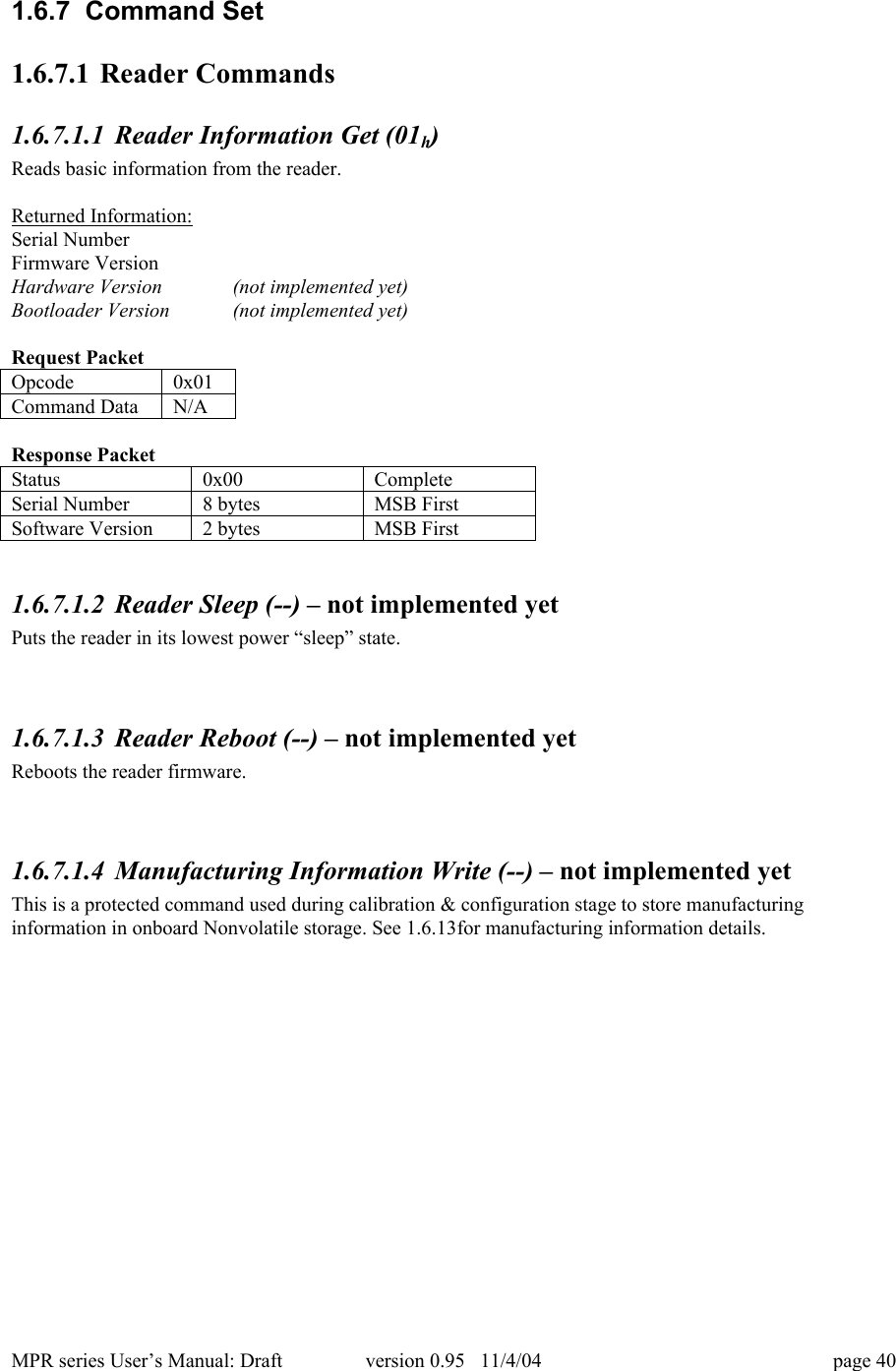
MPR series User’s Manual: Draft version 0.95   11/4/04 page 401.6.7  Command Set1.6.7.1 Reader Commands1.6.7.1.1 Reader Information Get (01h)Reads basic information from the reader.Returned Information:Serial NumberFirmware VersionHardware Version (not implemented yet)Bootloader Version (not implemented yet)Request PacketOpcode0x01Command DataN/AResponse PacketStatus0x00CompleteSerial Number8 bytesMSB FirstSoftware Version2 bytesMSB First1.6.7.1.2 Reader Sleep (--) – not implemented yetPuts the reader in its lowest power “sleep” state.1.6.7.1.3 Reader Reboot (--) – not implemented yetReboots the reader firmware.1.6.7.1.4 Manufacturing Information Write (--) – not implemented yetThis is a protected command used during calibration & configuration stage to store manufacturinginformation in onboard Nonvolatile storage. See 1.6.13for manufacturing information details.
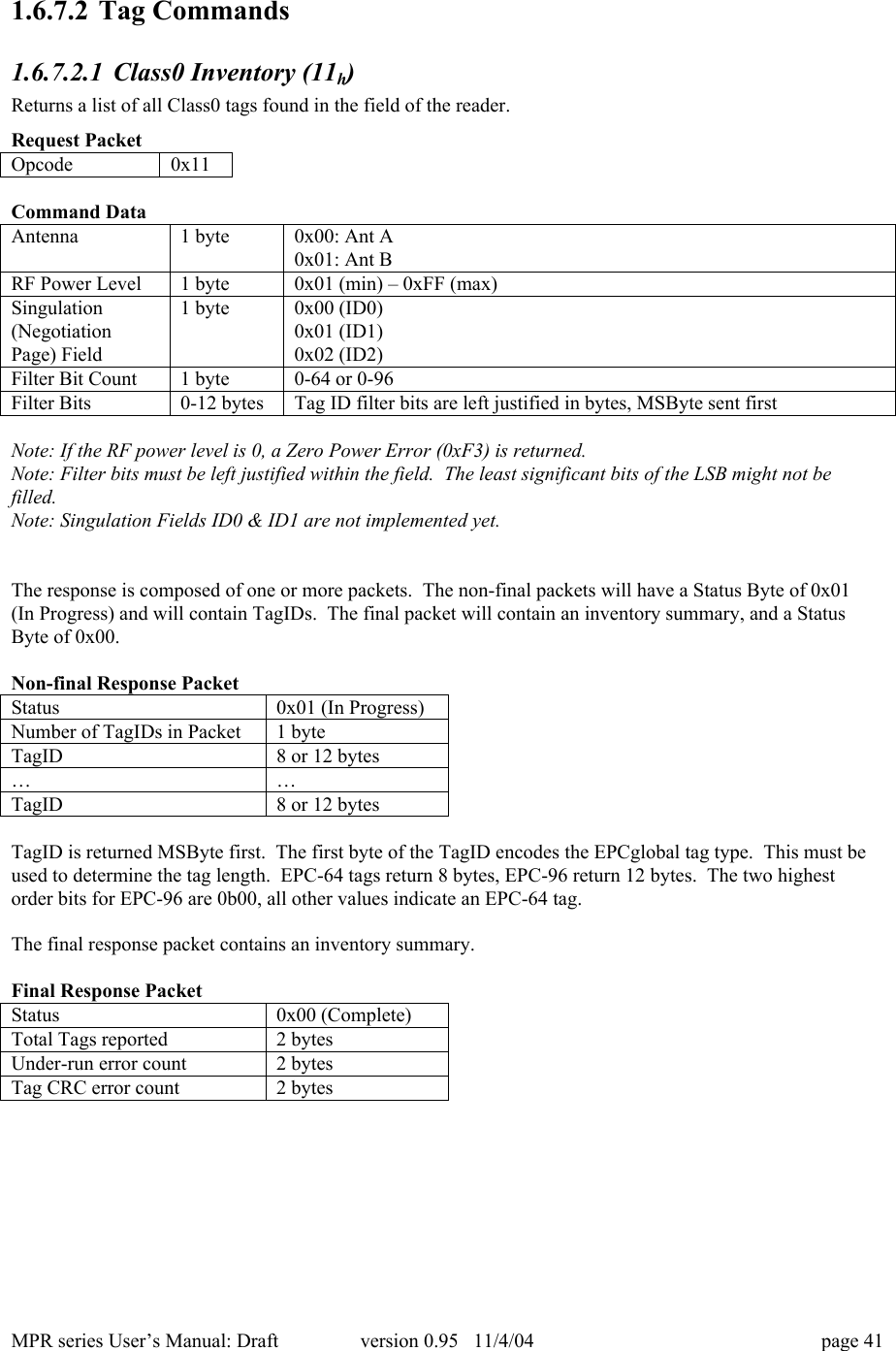
MPR series User’s Manual: Draft version 0.95   11/4/04 page 411.6.7.2 Tag Commands1.6.7.2.1 Class0 Inventory (11h)Returns a list of all Class0 tags found in the field of the reader.Request PacketOpcode0x11Command DataAntenna1 byte0x00: Ant A0x01: Ant BRF Power Level1 byte0x01 (min) – 0xFF (max)Singulation(NegotiationPage) Field1 byte0x00 (ID0)0x01 (ID1)0x02 (ID2)Filter Bit Count1 byte0-64 or 0-96Filter Bits0-12 bytesTag ID filter bits are left justified in bytes, MSByte sent firstNote: If the RF power level is 0, a Zero Power Error (0xF3) is returned.Note: Filter bits must be left justified within the field.  The least significant bits of the LSB might not befilled.Note: Singulation Fields ID0 & ID1 are not implemented yet.The response is composed of one or more packets.  The non-final packets will have a Status Byte of 0x01(In Progress) and will contain TagIDs.  The final packet will contain an inventory summary, and a StatusByte of 0x00.Non-final Response PacketStatus0x01 (In Progress)Number of TagIDs in Packet1 byteTagID8 or 12 bytes……TagID8 or 12 bytesTagID is returned MSByte first.  The first byte of the TagID encodes the EPCglobal tag type.  This must beused to determine the tag length.  EPC-64 tags return 8 bytes, EPC-96 return 12 bytes.  The two highestorder bits for EPC-96 are 0b00, all other values indicate an EPC-64 tag.The final response packet contains an inventory summary.Final Response PacketStatus0x00 (Complete)Total Tags reported2 bytesUnder-run error count2 bytesTag CRC error count2 bytes
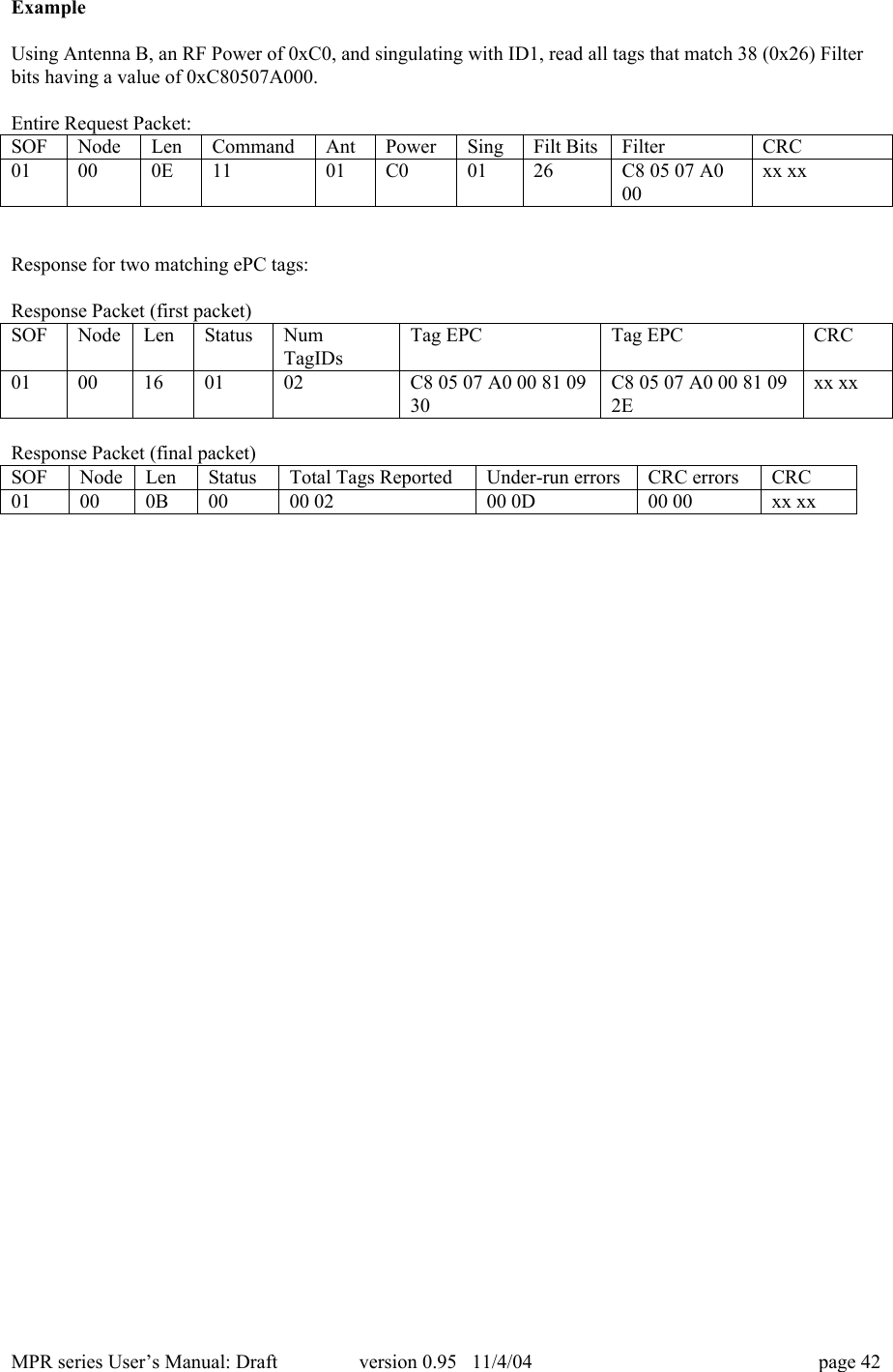
MPR series User’s Manual: Draft version 0.95   11/4/04 page 42ExampleUsing Antenna B, an RF Power of 0xC0, and singulating with ID1, read all tags that match 38 (0x26) Filterbits having a value of 0xC80507A000.Entire Request Packet:SOFNodeLenCommandAntPowerSingFilt BitsFilterCRC01000E1101C00126C8 05 07 A000xx xxResponse for two matching ePC tags:Response Packet (first packet)SOFNodeLenStatusNumTagIDsTag EPCTag EPCCRC0100160102C8 05 07 A0 00 81 0930C8 05 07 A0 00 81 092Exx xxResponse Packet (final packet)SOFNodeLenStatusTotal Tags ReportedUnder-run errorsCRC errorsCRC01000B0000 0200 0D00 00xx xx
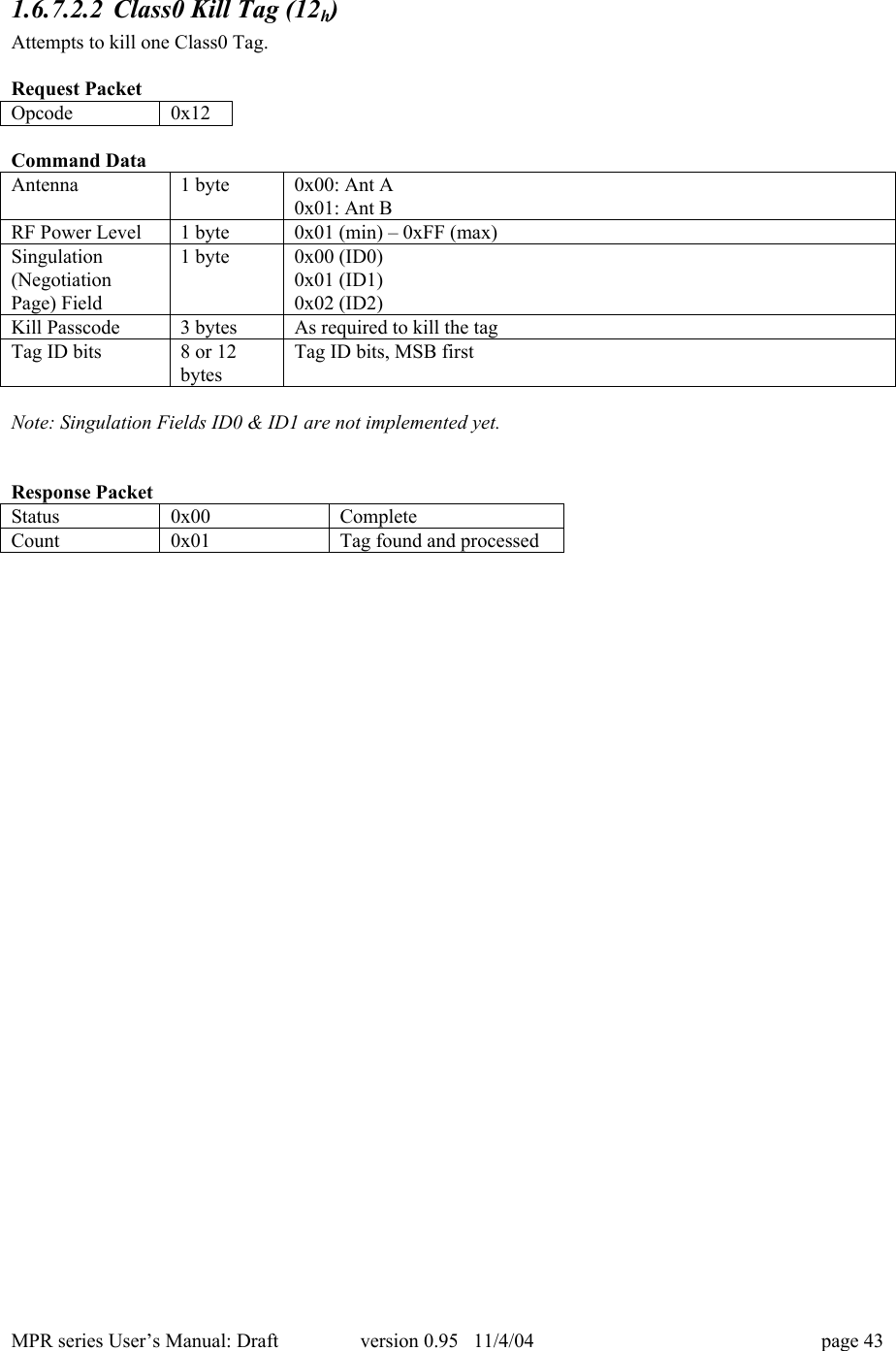
MPR series User’s Manual: Draft version 0.95   11/4/04 page 431.6.7.2.2 Class0 Kill Tag (12h)Attempts to kill one Class0 Tag.Request PacketOpcode0x12Command DataAntenna1 byte0x00: Ant A0x01: Ant BRF Power Level1 byte0x01 (min) – 0xFF (max)Singulation(NegotiationPage) Field1 byte0x00 (ID0)0x01 (ID1)0x02 (ID2)Kill Passcode3 bytesAs required to kill the tagTag ID bits8 or 12bytesTag ID bits, MSB firstNote: Singulation Fields ID0 & ID1 are not implemented yet.Response PacketStatus0x00CompleteCount0x01Tag found and processed
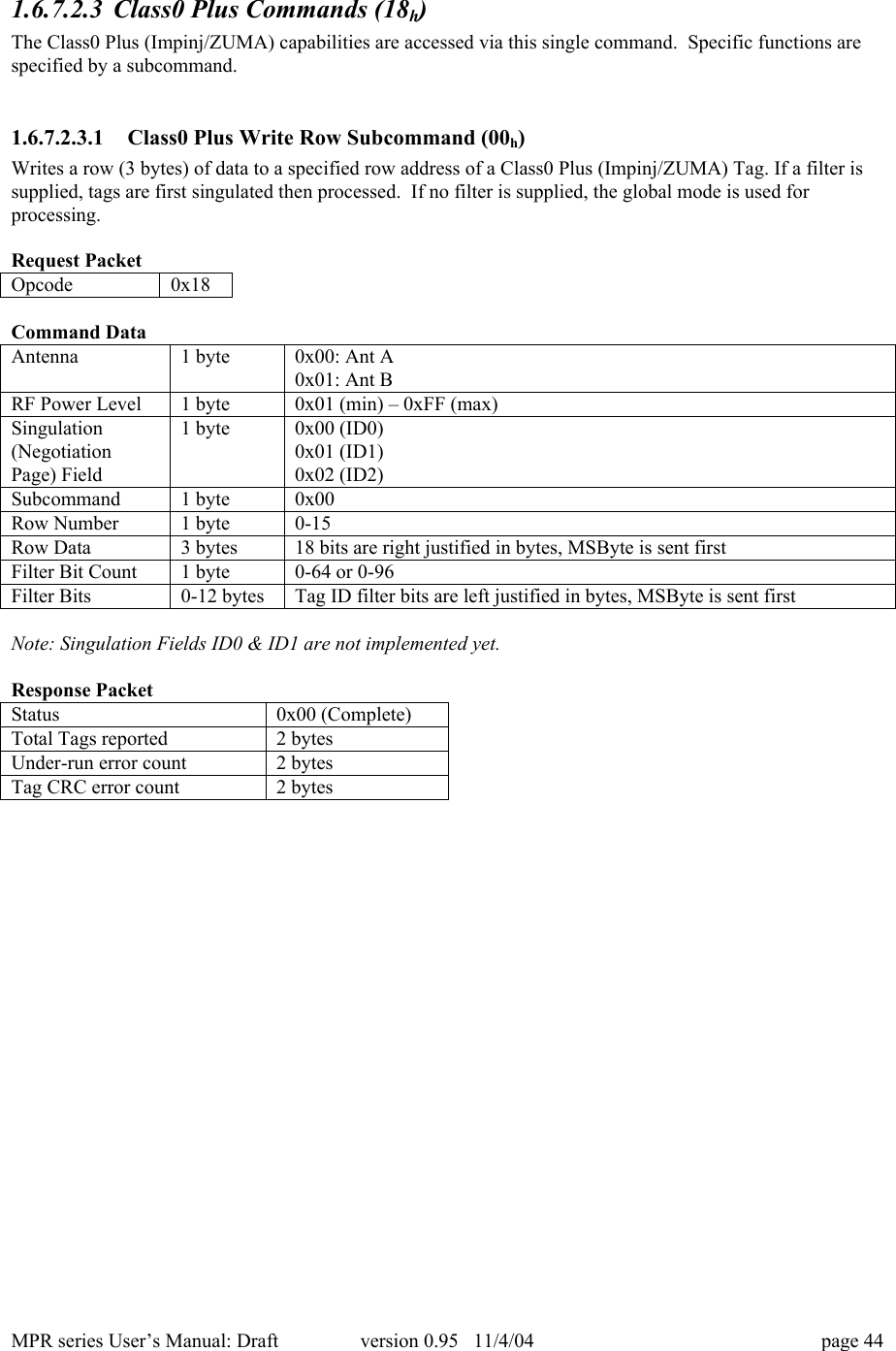
MPR series User’s Manual: Draft version 0.95   11/4/04 page 441.6.7.2.3 Class0 Plus Commands (18h)The Class0 Plus (Impinj/ZUMA) capabilities are accessed via this single command.  Specific functions arespecified by a subcommand.1.6.7.2.3.1 Class0 Plus Write Row Subcommand (00h)Writes a row (3 bytes) of data to a specified row address of a Class0 Plus (Impinj/ZUMA) Tag. If a filter issupplied, tags are first singulated then processed.  If no filter is supplied, the global mode is used forprocessing.Request PacketOpcode0x18Command DataAntenna1 byte0x00: Ant A0x01: Ant BRF Power Level1 byte0x01 (min) – 0xFF (max)Singulation(NegotiationPage) Field1 byte0x00 (ID0)0x01 (ID1)0x02 (ID2)Subcommand1 byte0x00Row Number1 byte0-15Row Data3 bytes18 bits are right justified in bytes, MSByte is sent firstFilter Bit Count1 byte0-64 or 0-96Filter Bits0-12 bytesTag ID filter bits are left justified in bytes, MSByte is sent firstNote: Singulation Fields ID0 & ID1 are not implemented yet.Response PacketStatus0x00 (Complete)Total Tags reported2 bytesUnder-run error count2 bytesTag CRC error count2 bytes
MPR series User’s Manual: Draft version 0.95   11/4/04 page 451.6.7.2.3.2 Class0 Plus Read Row Subcommand (01h)Reads a row of data from a Class0 Plus (Impinj/ZUMA) tag.  This subcommand only operates onsingulated tags.Request PacketOpcode0x18Command DataAntenna1 byte0x00: Ant A0x01: Ant BRF Power Level1 byte0x01 (min) – 0xFF (max)Singulation(NegotiationPage) Field1 byte0x00 (ID0)0x01 (ID1)0x02 (ID2)Subcommand1 byte0x01Row Number1 byte0-15Filter Bit Count1 byte0-64 or 0-96Filter Bits0-12 bytesTag ID filter bits are left justified in bytes, MSByte is sent firstNote: Singulation Fields ID0 & ID1 are not implemented yet.The response is composed of one or more packets.  The non-final packets will have a Status Byte of 0x01(In Progress) and will contain a TagID and a row of data for each singulated Tag.  The final packet willcontain an inventory summary and a Status Byte of 0x00 (Complete).Non-final Response PacketStatus0x01 (In Progress)Number of TagIDs in Packet1 byteTagID8 or 12 bytesTag Data3 bytes……TagID8 or 12 bytesTag Data3 bytesThe final response packet contains an inventory summary.Final Response PacketStatus0x00 (Complete)Total Tags reported2 bytesUnder-run error count2 bytesTag CRC error count2 bytes
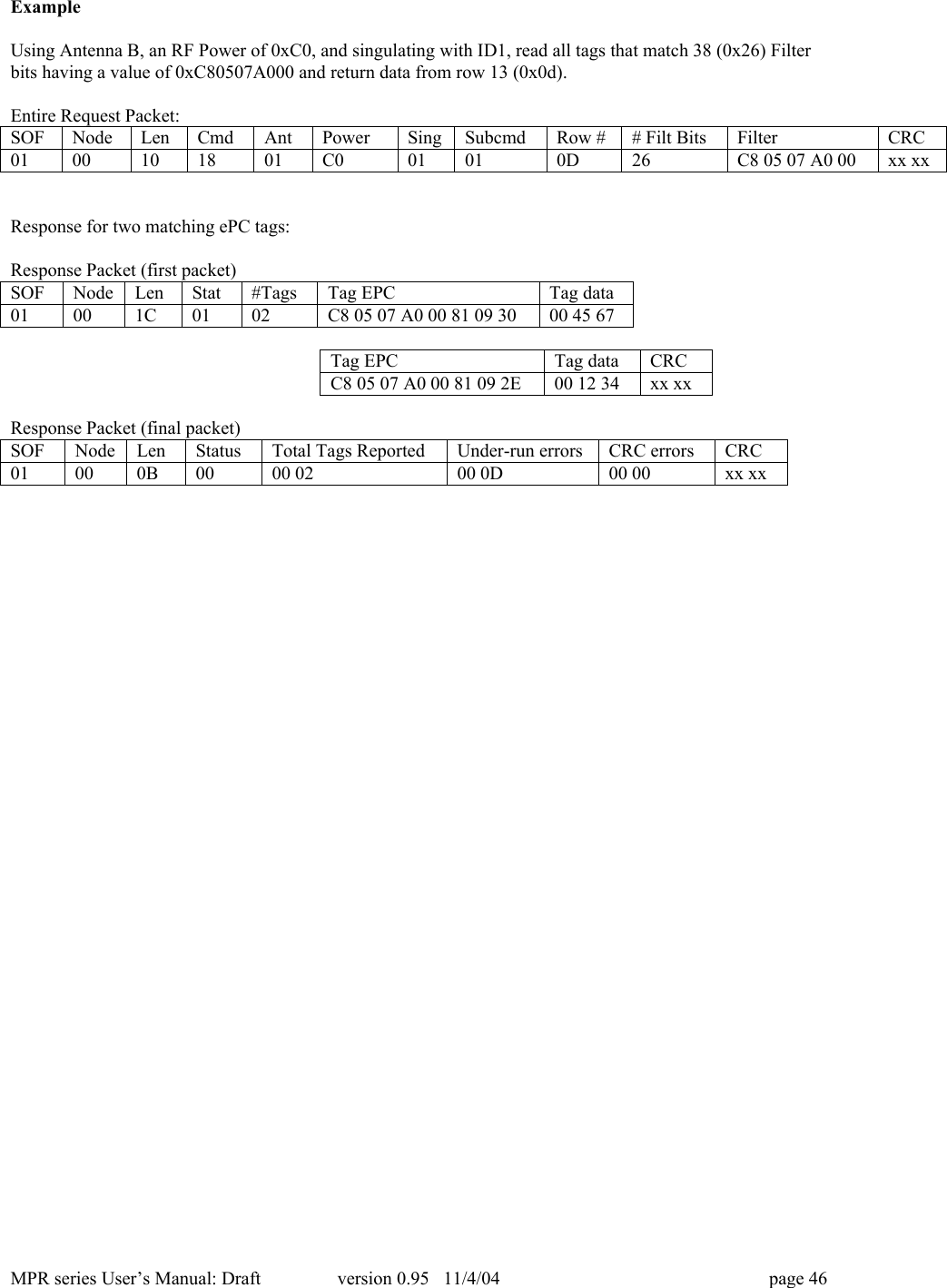
MPR series User’s Manual: Draft version 0.95   11/4/04 page 46ExampleUsing Antenna B, an RF Power of 0xC0, and singulating with ID1, read all tags that match 38 (0x26) Filterbits having a value of 0xC80507A000 and return data from row 13 (0x0d).Entire Request Packet:SOFNodeLenCmdAntPowerSingSubcmdRow ## Filt BitsFilterCRC0100101801C001010D26C8 05 07 A0 00xx xxResponse for two matching ePC tags:Response Packet (first packet)SOFNodeLenStat#TagsTag EPCTag data01001C0102C8 05 07 A0 00 81 09 3000 45 67Tag EPCTag dataCRCC8 05 07 A0 00 81 09 2E00 12 34xx xxResponse Packet (final packet)SOFNodeLenStatusTotal Tags ReportedUnder-run errorsCRC errorsCRC01000B0000 0200 0D00 00xx xx
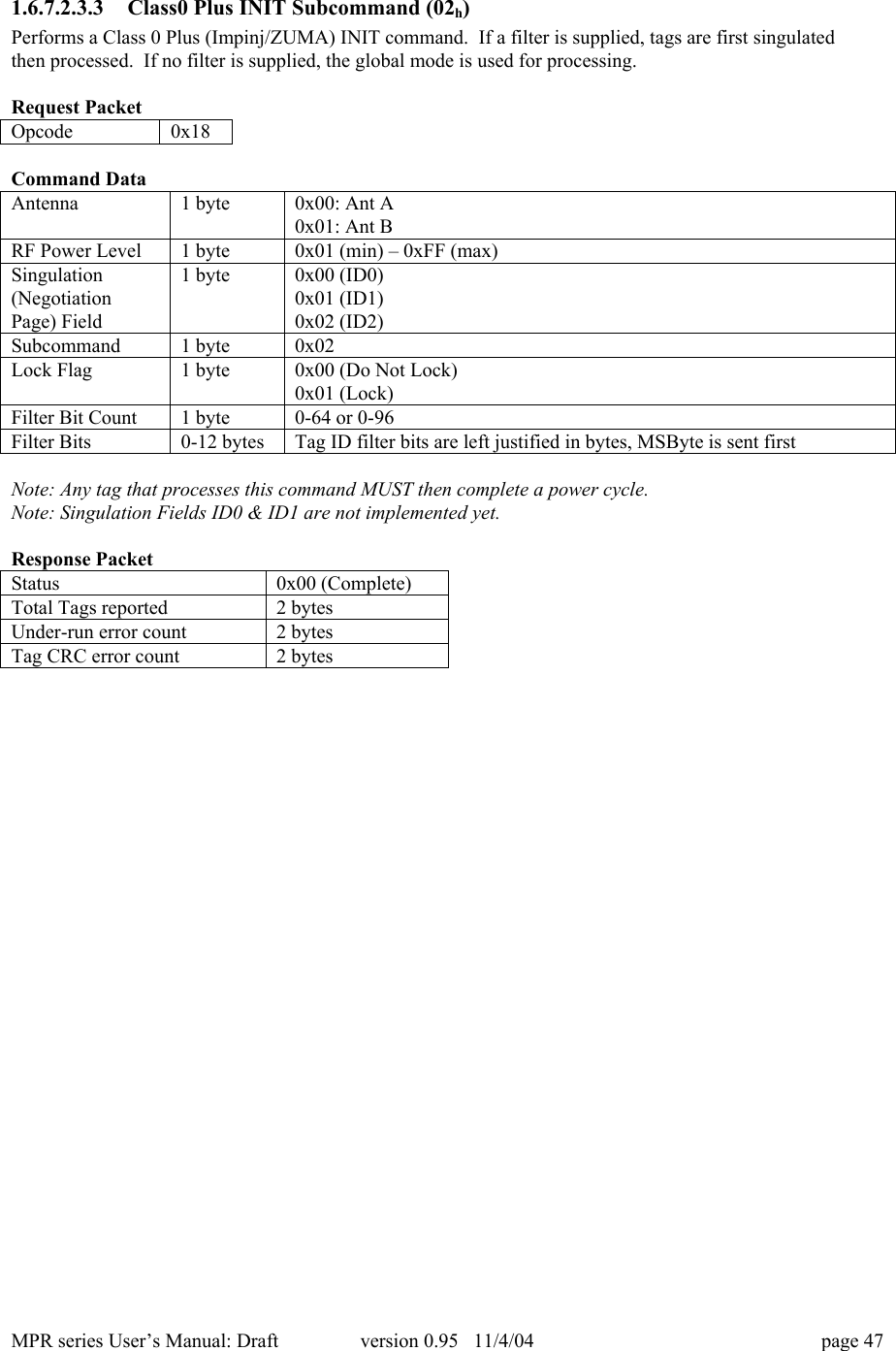
MPR series User’s Manual: Draft version 0.95   11/4/04 page 471.6.7.2.3.3 Class0 Plus INIT Subcommand (02h)Performs a Class 0 Plus (Impinj/ZUMA) INIT command.  If a filter is supplied, tags are first singulatedthen processed.  If no filter is supplied, the global mode is used for processing.Request PacketOpcode0x18Command DataAntenna1 byte0x00: Ant A0x01: Ant BRF Power Level1 byte0x01 (min) – 0xFF (max)Singulation(NegotiationPage) Field1 byte0x00 (ID0)0x01 (ID1)0x02 (ID2)Subcommand1 byte0x02Lock Flag1 byte0x00 (Do Not Lock)0x01 (Lock)Filter Bit Count1 byte0-64 or 0-96Filter Bits0-12 bytesTag ID filter bits are left justified in bytes, MSByte is sent firstNote: Any tag that processes this command MUST then complete a power cycle.Note: Singulation Fields ID0 & ID1 are not implemented yet.Response PacketStatus0x00 (Complete)Total Tags reported2 bytesUnder-run error count2 bytesTag CRC error count2 bytes
MPR series User’s Manual: Draft version 0.95   11/4/04 page 481.6.7.2.3.4 Class0 Plus Write ACK Subcommand (03h)Performs a Class 0 Plus (Impinj/ZUMA) Write ACK command.  This subcommand only operates onsingulated tags.Request PacketOpcode0x18Command DataAntenna1 byte0x00: Ant A0x01: Ant BRF Power Level1 byte0x01 (min) – 0xFF (max)Singulation(NegotiationPage) Field1 byte0x00 (ID0)0x01 (ID1)0x02 (ID2)Subcommand1 byte0x03Row Number1 byte0-15Row Data3 bytes18 bits are right justified in bytes, MSByte is sent firstFilter Bit Count1 byte0-64 or 0-96Filter Bits0-12 bytesTag ID filter bits are left justified in bytes, MSByte is sent firstNote: If writing to row 0 or at the completion of writing the Tag EPC and CRC, the tag MUST thencomplete a power cycle.Note: Singulation Fields ID1 & ID2 are not implemented yet.Response PacketStatus0x00 (Complete)Total Tags reported2 bytesUnder-run error count2 bytesTag CRC error count2 bytes
MPR series User’s Manual: Draft version 0.95   11/4/04 page 491.6.7.2.4 Class1 Inventory (21h)Returns a list of all Class1 tags found in the field of the reader.Request PacketOpcode0x21Command DataAntenna1 byte0x00: Ant A0x01: Ant BRF Power Level1 byte0x01 (min) – 0xFF (max)Filter Bit Count1 byte0-64 or 0-96Filter Bits0-12 bytesTag ID filter bits are left justified in bytes, MSByte sent firstNote: If RF Power Level is zero, a Zero Power Error is returned.Response:The response is composed of one or more packets.  The nonfinal packets will have a Status Byte of 0x01(In Progress) and will contain TagIDs.  The final packet will contain an inventory summary, and a StatusByte of 0x00.Non-final Response PacketStatus0x01 (In Progress)Number of TagIDs in Packet1 byteTagID8 or 12 bytes……TagID8 or 12 bytesTagID is returned MSByte first.  The first byte of the TagID encodes the ePC tag type.  This must be usedto determine the tag length.  EPC-64 tags return 8 bytes, EPC-96 12 bytes.  The two highest order bits forEPC-96 are 0b00, all other values indicate an EPC-64 tag.The final response packet contains an inventory summary.Final Response PacketStatus0x00 (Complete)Total Tags reported2 bytesUnder-run error count2 bytesTag CRC error count2 bytes
MPR series User’s Manual: Draft version 0.95   11/4/04 page 50ExampleUsing Antenna A, and RF Power 0xB0, read all Class 1 tags that match 38 (0x26) Filter bits having a valueof 0xC80507A000.Entire Request Packet:SOFNodeLenCommandAntPowerFilt BitsFilterCRC01000D1100B026C8 05 07 A0 00xx xxResponse for two matching ePC tags:Response Packet (first packet)SOFNodeLenStatusNum TagIDsTag EPCTag EPCCRC0100160102C8 05 07 A0 00 81 0930C8 05 07 A0 00 81 092Exx xxResponse Packet (final packet)SOFNodeLenStatusTotal Tags ReportedUnder-run errorsCRC errorsCRC01000B0000 0200 0D00 00xx xx
MPR series User’s Manual: Draft version 0.95   11/4/04 page 511.6.7.2.5 Class1 Kill Tag (22h)Attempt to kill one Class1 Tag.Request PacketOpcode0x22Command DataAntenna1 byte0x00: Ant A0x01: Ant BRF Power Level1 byte0x01 (min) – 0xFF (max)Tag ID bits8 or 12 bytesTag ID bits, MSB firstKill Passcode1 bytesAs required to kill the tagResponse PacketStatus0x00Complete
MPR series User’s Manual: Draft version 0.95   11/4/04 page 521.6.7.2.6 Class1 Tag Write (23h)Write to a Class1 Tag.Request PacketOpcode0x23Command DataAntenna1 byte0x00: Ant A0x01: Ant BRF Power Level1 byte0x01 (min) – 0xFF (max)Pointer1 byte0, 16, 32, 48, 64, 80 or 96Data2 bytes16 bits sent MSByte firstResponse PacketStatus0x00Complete
MPR series User’s Manual: Draft version 0.95   11/4/04 page 531.6.7.2.7 Class1 Verify ID (24h)Verify the ID was correctly programmed into a Class1 tag.Request PacketOpcode0x24Command DataAntenna1 byte0x00: Ant A0x01: Ant BRF Power Level1 byte0x01 (min) – 0xFF (max)Response:The response is composed of one or more packets.  The nonfinal packets will have a Status Byte of 0x01(In Progress) and will contain Tag CRCs, Ids and Passwords.  The final packet will contain a summary, anda Status Byte of 0x00 (Complete).Non-final Response PacketStatus0x01 (In Progress)In ProgressNumber of TagIDs in Packet1 byteTag CRC (MSByte first)1 byteMSByte firstTag ID8 or 12 bytesTag Password1 byte……Tag CRC (MSByte first)1 byteMSByte firstTag ID8 or 12 bytesTag Password1 byteThe final response packet contains an inventory summary.Final Response PacketStatus0x00 (Complete)Total Tags reported2 bytesUnder-run error count2 bytesTag CRC error count2 bytes
MPR series User’s Manual: Draft version 0.95   11/4/04 page 541.6.7.2.8 Class1 Erase ID (25h)Erase the ID that was previously programmed into a Class1 tag.Request PacketOpcode0x25Command DataAntenna1 byte0x00: Ant A0x01: Ant BRF Power Level1 byte0x01 (min) – 0xFF (max)Response PacketStatus0x00Complete
MPR series User’s Manual: Draft version 0.95   11/4/04 page 551.6.8  Host Side Drivers1.6.9  VPUThe VPU (Versatile PCMCIA UART) is a PCMCIA to serial UART bridge. It provides the hardwareinterface between the PCMCIA socket and the hardware in the MPR.  The MPR appears as a standardCOM port to the host.  Commands are sent and received via serial interface APIs that are common to mostprogramming languages.The MPR, when used in a Windows 95/98/XP operating system will use the standard Microsoft serialdrivers. An information file (MS Windows .inf file) is provided to associate the MPR5000 with theWindows 95/98/XP built-in serial drivers. During the installation process, the user will be prompted tosupply this file.During the installation of the MPR Series PC Card on Windows XP platforms, the user will be warned thatthe drivers are not digitally signed.WarningMicrosoft strongly recommends you only use device drivers with the Designed for Microsoft WindowsXP logo. Installing device drivers that have not been digitally-signed by Microsoft may disable the system,allow viruses onto your computer, or otherwise impair the correct operation of your computer eitherimmediately or in the future.This is not a problem. The MPR will work properly without the digital signature.  This hardware usesMicrosoft’s own drivers! There is no additional risk of disabling the system, allowing viruses on yourcomputer or to otherwise impair the correct operation of your computer.
MPR series User’s Manual: Draft version 0.95   11/4/04 page 561.6.10  Special FunctionsThe vast majority of signaling with the MPR is done over the virtual COM port channel provided by thePCMCIA to UART bridge.  There are a couple of extra functions that the host may perform bycommunicating directly with the bridge module. These functions are initiated by changing the COM portsettings to the values specified in Error! Reference source not found., followed by sending a sequence ofbytes.Table 5 Special Function COM port settingsBaud RateParityStop BitsHandshakingData Bits57600None1.5(See Note)None5Note: Some serial port APIs do not correctly interpret the 1.5 stop bit setting (LabView’s VISA is onesuch API).  If these functions don’t work, try using 2 stop bits instead of 1.5.Always return the serial settings to those specified in Error! Reference source not found. (Error!Reference source not found.) for normal operation of the reader.1.6.10.1 Hard ResetThis function performs a hard reset of the MPR5000.  This could be used to cause the MPR5000 to recoverfrom a catastrophic fault, or to return it to its initial powered on state.Byte Sequence: 0x10, 0x001.6.11  Specialized PCMCIA Operating Modes1.6.11.1 TTL Serial Port ModePin 33 of the PC-card interface is the COM_ENABLE pin.  When this pin is held HIGH (defaultcondition), the MPR5000 operates under the standard PCMCIA interface rules, and serial control isprovided through UART emulation over the PC-card bus.  When this pin is held LOW (grounded), the cardcan be operated as a ‘true’ TTL serial device, with the pin assignments shown in the table.1.6.11.1.1.1.1 TTL SERIAL COMMUNICATIONS MODEPinFunction37TX38RX39BOOT_LOAD40WAKE41RESETTable 6: TTL Serial Communications Mode1.6.12  Status CodesTable 7 Response Status CodesCodeMeaning
MPR series User’s Manual: Draft version 0.95   11/4/04 page 570xFFError0x00Complete0x01In Progress1.6.13  Error CodesTable 8 Error CodesCodeMeaning0xF0Invalid command parameter(s)0xF1Insufficient data0xF2Command not supported0xF3Zero Power0xF4PLL Lock Fail0xF5Antenna Fault (not present or shorted)0xF6Subcommand not supported0xF7Invalid subcommand parameter(s)0xFFUndefined ErrorNote: Error Codes are present in the first data byte of a Response message when the Response Status Code= 0xFF (Error).1.6.14  Manufacturing InformationManufacturing information should include, at a minimum, the following string data:• Serial Number (11 ASCII Characters)• Date of Manufacture (6 ASCII Characters)• Model Number (6 ASCII Characters)• Hardware Revision (5 ASCII Characters)• Manufacturer’s Name (16 ASCII Characters)This information is stored in onboard non-volatile storage.1.7  Troubleshooting / technical support1.7.1  COM Port ResetIf the MPR-series card is removed and replaced while an application (such as the demo user interface) isrunning, communications with the card may be lost.  This typically results from a failure to re-associatewith the correct COM port within the application.  Restarting the application will normally reset the COMport and restore normal communications functions.For technical support, contact WJ Communications Applications Engineering:By email:  applications.engineering@wj.comBy phone:  1-800-951-4401
MPR series User’s Manual: Draft version 0.95   11/4/04 page 581.8  Technical specifications: MPR5000 / MPR6000 / MPR7000FREQUENCY OF OPERATION902-928 MHz (US ISM band)pseudo-random frequencyhopping over 50 channels27 dBm (0.5 Watt)MPR5000/6000MAXIMUM OUTPUT POWER30 dBm (1.0 Watt)MPR7000EPCglobal Class 0EPCglobal Class 1TAG PROTOCOLSClass 0+ compatiblefirmware upgradeable forfuture standardsREGULATORY COMPLIANCEUS FCC part 15HOST INTERFACEStandard PC-card™  interfaceequivalent to PCMCIA typeII, 68-pinDC POWER CONSUMPTION500 mA @ 5 VOPERATING TEMPERATURE0 to 40º CSTORAGE TEMPERATURE-20 to 70º CANTENNA CONNECTION2x(MMCX female)MPR6000/7000 onlyMECHANICAL CONFIGURATION:MPR5000MPR6000/7000:
MPR series User’s Manual: Draft version 0.95   11/4/04 page 591.9   Notices1.9.1  RFID limitationsCommunication between tags and readers at UHF frequencies is a complex phenomenon depending ondetails of the environment surrounding the tags and reader(s) as well as the equipment being used.  Someenvironmental aspects (such as tag placement and orientation) may be controllable by the user; others (suchas reflections of the RF radiation by ambient objects) are generally not.  Careful installation and testing,and development and adherence to appropriate operating procedures, are indispensable for successfulimplementation of RFID.  WJ Communications Inc. makes no representation or warrantee that any specificconfiguration of RFID tags and readers will provide any given performance characteristics.1.9.2  SafetyAny use of this equipment with antennas or cabling installed outdoors or otherwise exposed to inclementweather must avoid proximity with power lines or other high-voltage conductors, and provide for propergrounding and lightning arresting devices to protect the equipment user in the event of a lightning strike.See National Electrical Code (NEC) requirements articles 725, 800, and 810 for further information.Do not operate the MPR5000/6000/7000 in any area where critical safety equipment may be sensitive toRF interference, such as medical or life support equipment.Do not operate the MPR5000/6000/7000 on board any aircraft in flight, or at any other time when operationof radio devices such as cellular phones is prohibited.Personnel should not be closer than 23 cm (9 inches) from any MPR antenna for prolonged periods of time.See FCC bulletins 56 and 65 for further information on electromagnetic field exposure.1.9.3  Limitation of liabilityThe information in this manual is subject to change without notice and does not represent a commitment onthe part of WJ Communications Inc.   WJ Communications, Inc. specifically disclaims liability for any andall direct, indirect, special, general, incidental, consequential, punitive or exemplary damages, including but
MPR series User’s Manual: Draft version 0.95   11/4/04 page 60not limited to loss of profits, revenue, or anticipated loss of profits or revenue, arising out of the use orinability to use any WJ Communications Inc. product, even if WJ Communications Inc. has been advised orthe possibility of such damages or they are foreseeable, or for claims by any third party.1.9.4  PatentsPortions of the products described in this manual may be covered by currently-pending US and foreignpatents.1.9.5  Copyright noticeThe contents of this document are the property of WJ Communications, Incorporated, except whereotherwise noted.  Individuals who have purchased or otherwise legally acquired the MPR-series hardwareunits described in this document are expressly permitted to make copies of the document, in electronic orpaper form, for personal, backup, and archival use.  Brief segments may be excerpted and used withattribution for descriptive purposes in commentaries, reviews, or other informational documents.  All otherreproduction in whole or in part is expressly prohibited without the consent of the copyright owner.Copyright 2004 by WJ Communications, Inc.1.9.6  Comments and feedbackWJ Communications welcomes comments,suggestions, and feedback related to this manual or to theproducts it describes.  Please submit your remarks to:Titus Wandingertitus.wandinger@wj.com1-800-WJ1-4401 (951-4401)WJ Communications, Inc.401 River Oaks ParkwaySan Jose, CA  95134-1916USA1.10 Regulatory Compliance1.10.1  FCC StatementThis equipment has been tested and found to comply with the limits for aClass B digital device, pursuant to Part 15 of the FCC Rules. These limits aredesigned to provide reasonable protection against harmful interference in aresidential installation. This equipment generates, uses and can radiate radiofrequency energy and, if not installed and used in accordance with theinstructions, may cause harmful interference to radio communications. However,there is no guarantee that interference will not occur in a particular installation.If this equipment does cause harmful interference to radio or television reception,which can be determined by turning the equipment off and on, the user isencouraged to try to correct the interference by one or more of the followingmeasures:-- Reorient or relocate the receiving antenna.-- Increase the separation between the equipment and receiver.-- Connect the equipment into an outlet on a circuit different from that to which the receiver    isconnected.-- Consult the dealer or an experienced radio/TV technician for help.
MPR series User’s Manual: Draft version 0.95   11/4/04 page 61NOTE: Changes or modifications not expressly approved by WJ Communications could void theuser's authority to operate the equipment described in this manual.The MPR6000 and MPR7000 have been approved for use only with approved external antennas describedin this manual; use of any other antenna may void the user’s authority to operate the equipment.1.10.1.1 RF Radiation Exposure StatementThese devices complies with FCC radiation exposure limits set forth for an uncontrolled environment, andusers must follow specific operating instructions for satisfying RF exposure compliance.To comply with RF radiation exposure requirements in FCC’s  Rules, the MPR6000 and MPR7000products must be installed so there is a separation distance of at least 23 cm (9 in) between all persons andthe antenna.  These devices may not be co-located with any other transmitter or transmitter antenna.Model MPR5000 has been SAR – evaluated and is authorized for use in laptop and notebook computers.

Navigation menu