Walnut Technology MINI SPECTRA User Manual SPECTRA

Walnut Technology (Dongguan) Limited SPECTRA SPECTRA

User Manual

      Legends  01 Read Before the First Ride  01 Video Tutorials  01 Download the eBoard Go App  01 6-Step Quick Start  02 Introduction  05 Feature Highlight  05 SenDeck  08 Start Mode  09 Motion Control  10 Brake  11 Speed Mode  11 Riding Status Indicator  12 Magnetic Charge  13 Device  16 Home  17 Discover  17 Inbox  17 Me 18 Tutorial for Beginners  20 Ride Environment Requirements  20 Ride Limits  21 Pre-ride Checklist  21 Warnings  21
       Storage and Transportation  22 Travel Notice  23 Maintenance and Upkeep  23 Disposal 24  25 Specifications  28 Charger  28 After-Sales Information  29 Safety Certificates  29
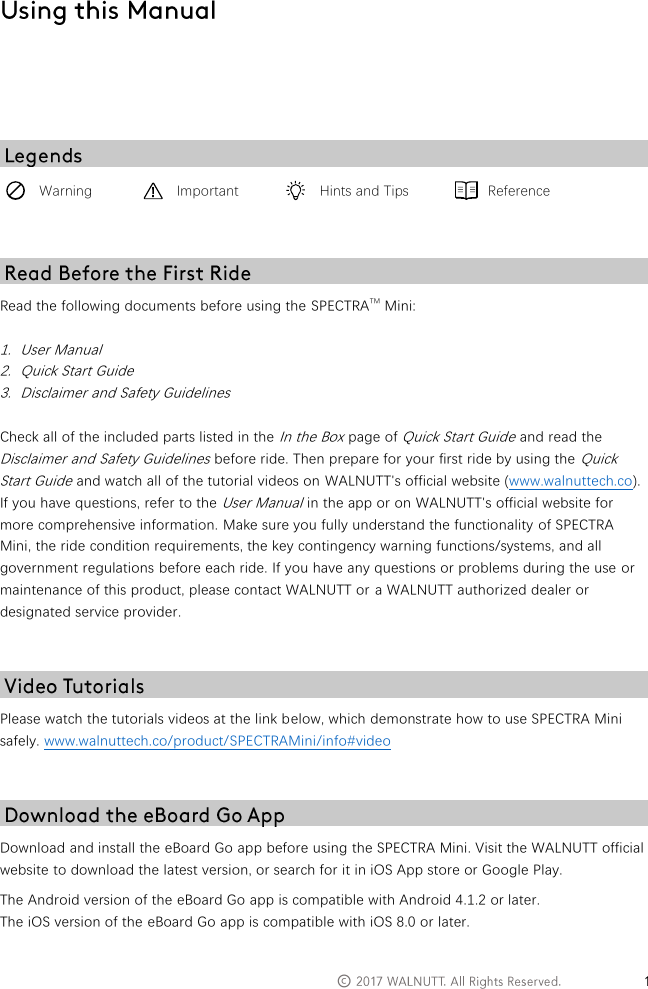
  ©         Warning  Important  Hints and Tips  Reference   Read the following documents before using the SPECTRATM Mini:  1. User Manual 2. Quick Start Guide 3. Disclaimer and Safety Guidelines  Check all of the included parts listed in the In the Box page of Quick Start Guide and read the Disclaimer and Safety Guidelines before ride. Then prepare for your first ride by using the Quick Start Guide and watch all of the tutorial videos on WALNUTT's official website (www.walnuttech.co). If you have questions, refer to the User Manual in the app or on WALNUTT's official website for more comprehensive information. Make sure you fully understand the functionality of SPECTRA Mini, the ride condition requirements, the key contingency warning functions/systems, and all government regulations before each ride. If you have any questions or problems during the use or maintenance of this product, please contact WALNUTT or a WALNUTT authorized dealer or designated service provider.   Please watch the tutorials videos at the link below, which demonstrate how to use SPECTRA Mini safely. www.walnuttech.co/product/SPECTRAMini/info#video   Download and install the eBoard Go app before using the SPECTRA Mini. Visit the WALNUTT official website to download the latest version, or search for it in iOS App store or Google Play.  The Android version of the eBoard Go app is compatible with Android 4.1.2 or later. The iOS version of the eBoard Go app is compatible with iOS 8.0 or later.
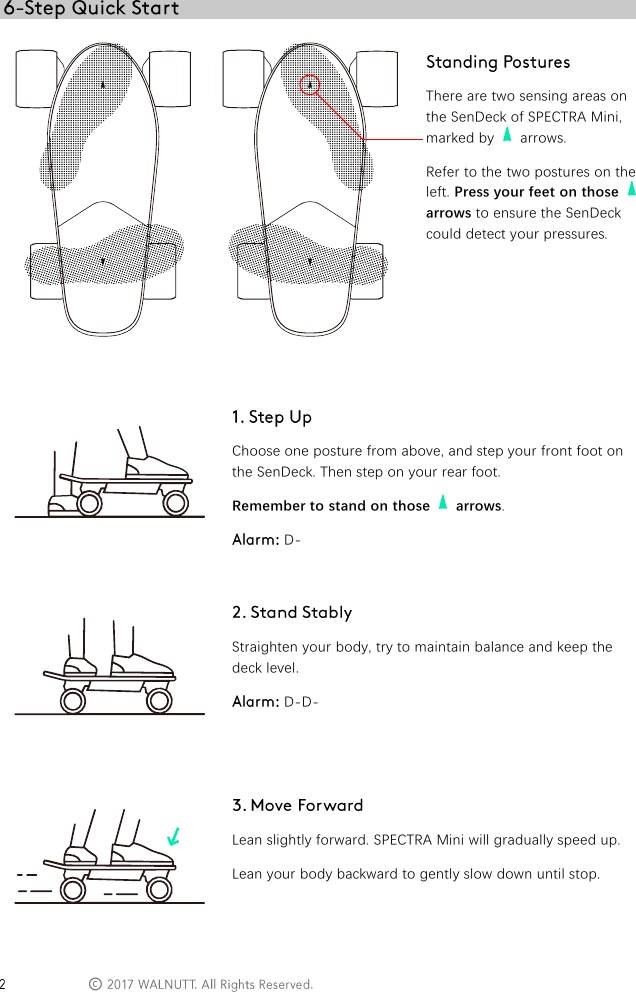
 ©        There are two sensing areas on the SenDeck of SPECTRA Mini, marked by    arrows. Refer to the two postures on the left. Press your feet on those   arrows to ensure the SenDeck could detect your pressures.    Choose one posture from above, and step your front foot on the SenDeck. Then step on your rear foot. Remember to stand on those    arrows.  D-    Straighten your body, try to maintain balance and keep the deck level.  D-D-    Lean slightly forward. SPECTRA Mini will gradually speed up. Lean your body backward to gently slow down until stop.
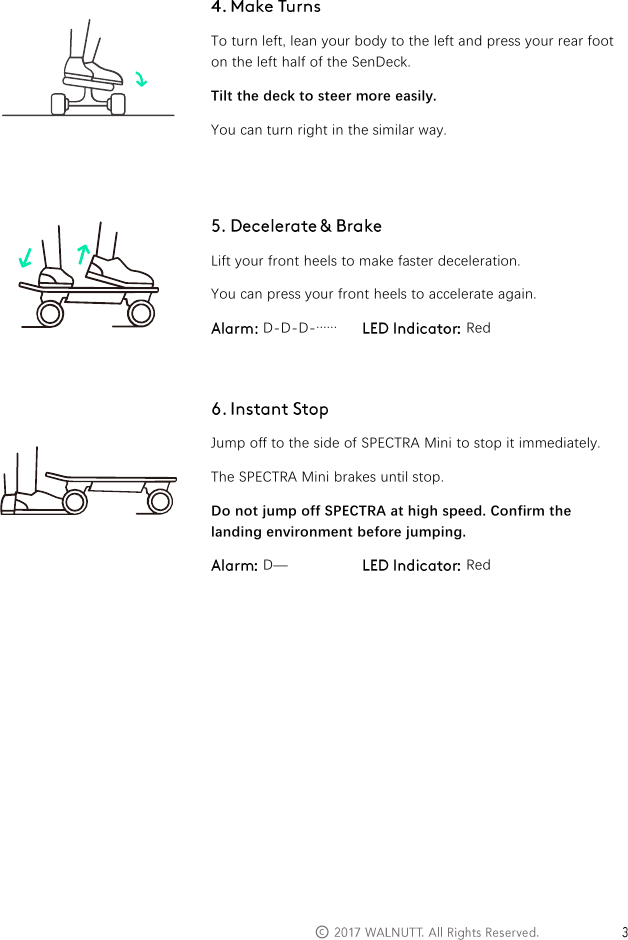
  ©      To turn left, lean your body to the left and press your rear foot on the left half of the SenDeck. Tilt the deck to steer more easily. You can turn right in the similar way.    Lift your front heels to make faster deceleration. You can press your front heels to accelerate again.  D-D-D-……   Red    Jump off to the side of SPECTRA Mini to stop it immediately. The SPECTRA Mini brakes until stop. Do not jump off SPECTRA at high speed. Confirm the landing environment before jumping.  D—  Red
 ©           This section introduces SPECTRA Mini and lists its components.
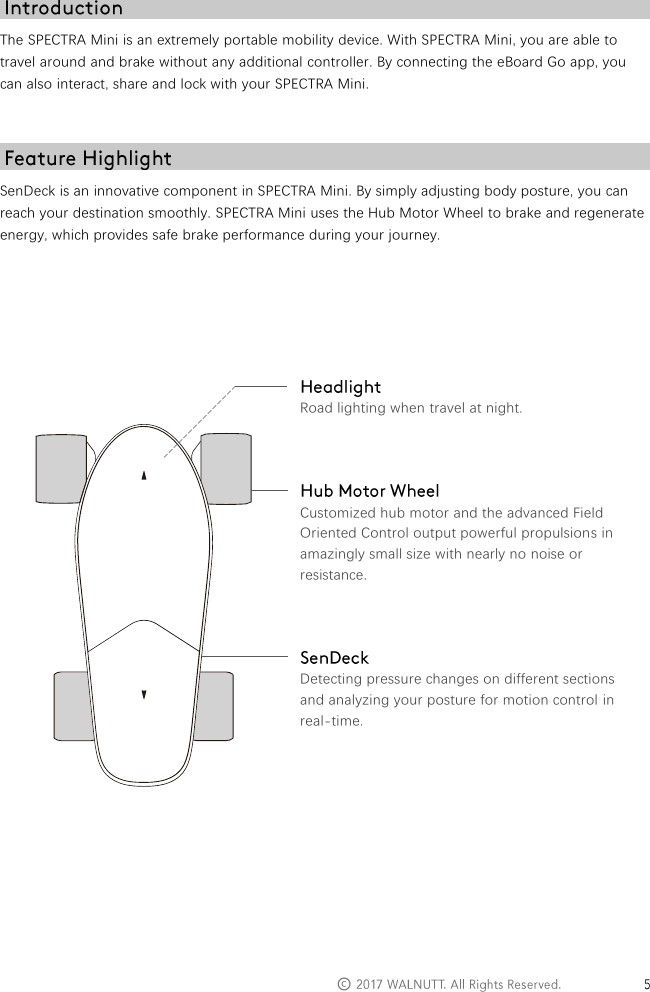
  ©   The SPECTRA Mini is an extremely portable mobility device. With SPECTRA Mini, you are able to travel around and brake without any additional controller. By connecting the eBoard Go app, you can also interact, share and lock with your SPECTRA Mini.   SenDeck is an innovative component in SPECTRA Mini. By simply adjusting body posture, you can reach your destination smoothly. SPECTRA Mini uses the Hub Motor Wheel to brake and regenerate energy, which provides safe brake performance during your journey.         Road lighting when travel at night.    Customized hub motor and the advanced Field Oriented Control output powerful propulsions in amazingly small size with nearly no noise or resistance.    Detecting pressure changes on different sections and analyzing your posture for motion control in real-time.
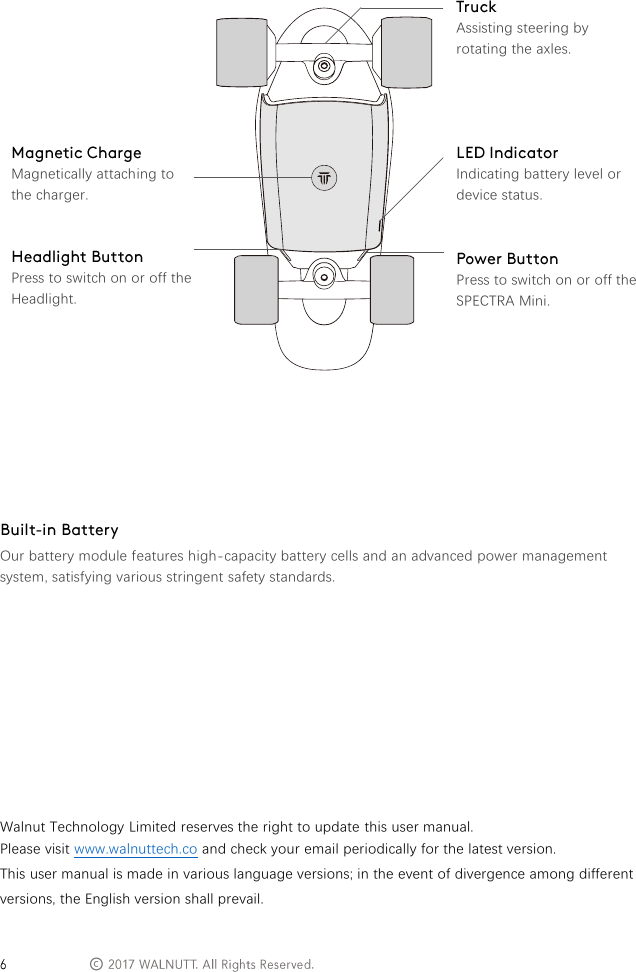
 ©        Magnetically attaching to the charger.   Press to switch on or off the Headlight.      Assisting steering by rotating the axles.     Indicating battery level or device status.   Press to switch on or off the SPECTRA Mini.      Our battery module features high-capacity battery cells and an advanced power management system, satisfying various stringent safety standards.          Walnut Technology Limited reserves the right to update this user manual. Please visit www.walnuttech.co and check your email periodically for the latest version. This user manual is made in various language versions; in the event of divergence among different versions, the English version shall prevail.
  ©            This section introduces the features of SPECTRA Mini.
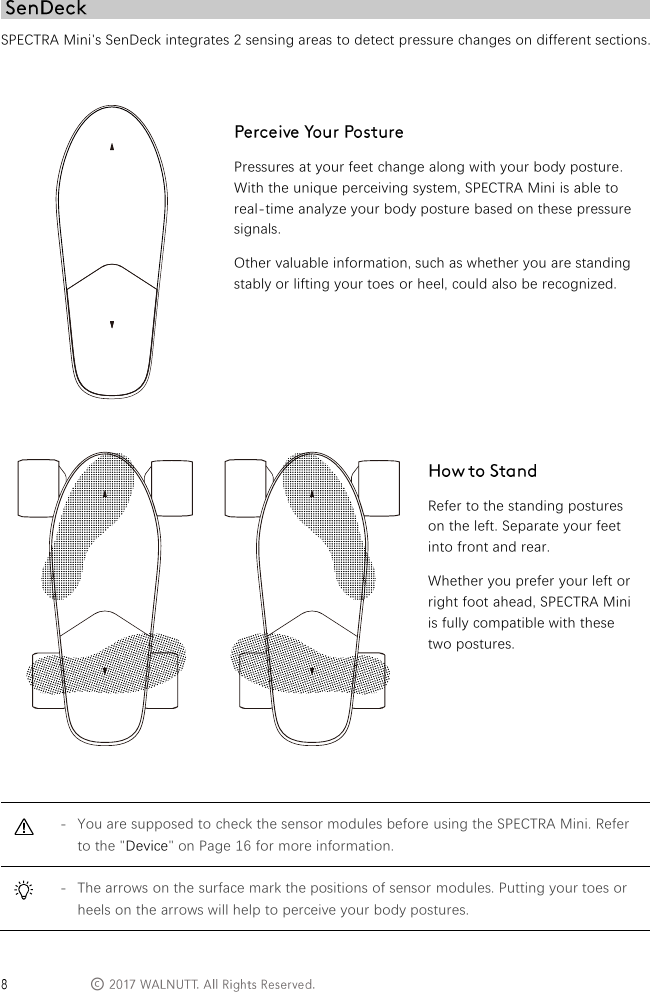
 © SPECTRA Mini's SenDeck integrates 2 sensing areas to detect pressure changes on different sections.    Pressures at your feet change along with your body posture. With the unique perceiving system, SPECTRA Mini is able to real-time analyze your body posture based on these pressure signals. Other valuable information, such as whether you are standing stably or lifting your toes or heel, could also be recognized.         Refer to the standing postures on the left. Separate your feet into front and rear. Whether you prefer your left or right foot ahead, SPECTRA Mini is fully compatible with these two postures.   - You are supposed to check the sensor modules before using the SPECTRA Mini. Refer to the "Device" on Page 16 for more information.  - The arrows on the surface mark the positions of sensor modules. Putting your toes or heels on the arrows will help to perceive your body postures.
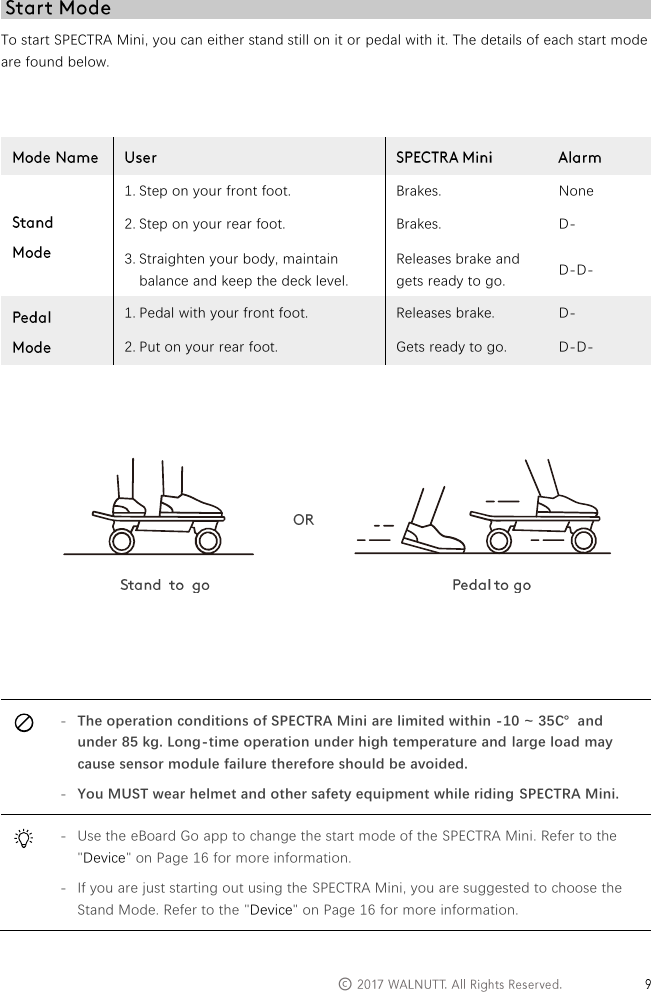
  ©   To start SPECTRA Mini, you can either stand still on it or pedal with it. The details of each start mode are found below.    1. Step on your front foot. Brakes. None 2. Step on your rear foot. Brakes. D- 3. Straighten your body, maintain balance and keep the deck level. Releases brake and gets ready to go. D-D- 1. Pedal with your front foot. Releases brake. D- 2. Put on your rear foot. Gets ready to go. D-D-           - The operation conditions of SPECTRA Mini are limited within -10 ~ 35℃  and under 85 kg. Long-time operation under high temperature and large load may cause sensor module failure therefore should be avoided. - You MUST wear helmet and other safety equipment while riding SPECTRA Mini.  - Use the eBoard Go app to change the start mode of the SPECTRA Mini. Refer to the "Device" on Page 16 for more information. - If you are just starting out using the SPECTRA Mini, you are suggested to choose the Stand Mode. Refer to the "Device" on Page 16 for more information.
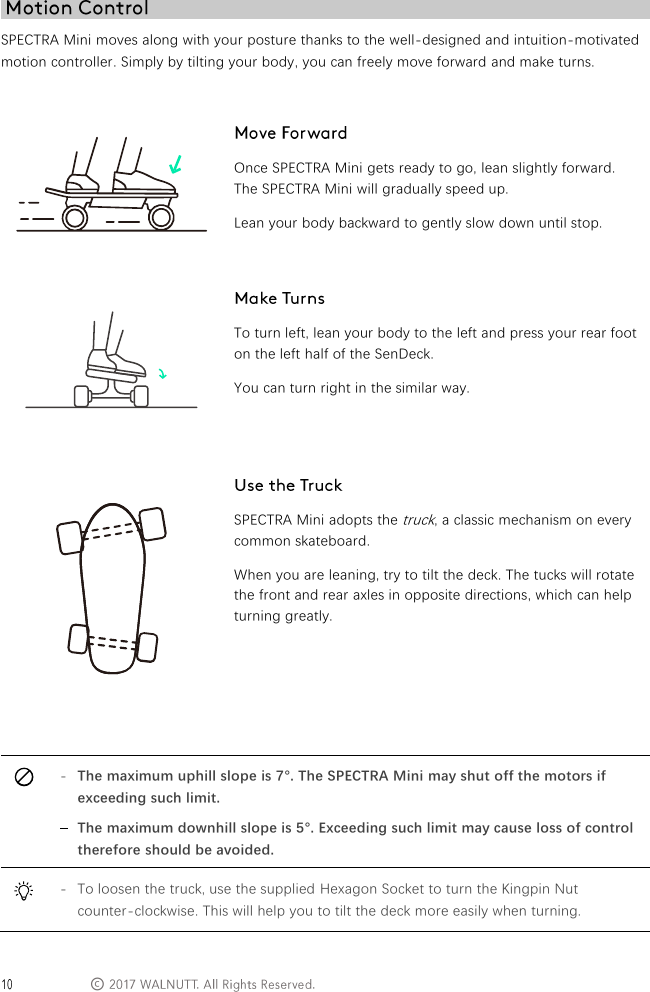
 © SPECTRA Mini moves along with your posture thanks to the well-designed and intuition-motivated motion controller. Simply by tilting your body, you can freely move forward and make turns.      Once SPECTRA Mini gets ready to go, lean slightly forward. The SPECTRA Mini will gradually speed up. Lean your body backward to gently slow down until stop.   To turn left, lean your body to the left and press your rear foot on the left half of the SenDeck. You can turn right in the similar way.   SPECTRA Mini adopts the truck, a classic mechanism on every common skateboard. When you are leaning, try to tilt the deck. The tucks will rotate the front and rear axles in opposite directions, which can help turning greatly.    - The maximum uphill slope is 7°. The SPECTRA Mini may shut off the motors if exceeding such limit. - The maximum downhill slope is 5°. Exceeding such limit may cause loss of control therefore should be avoided.  - To loosen the truck, use the supplied Hexagon Socket to turn the Kingpin Nut counter-clockwise. This will help you to tilt the deck more easily when turning.
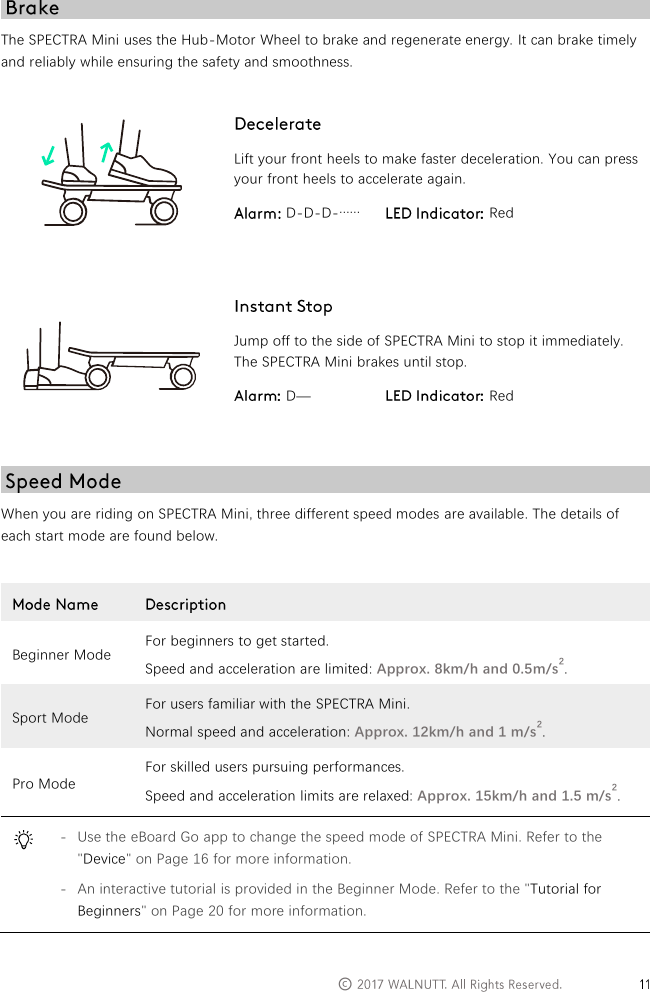
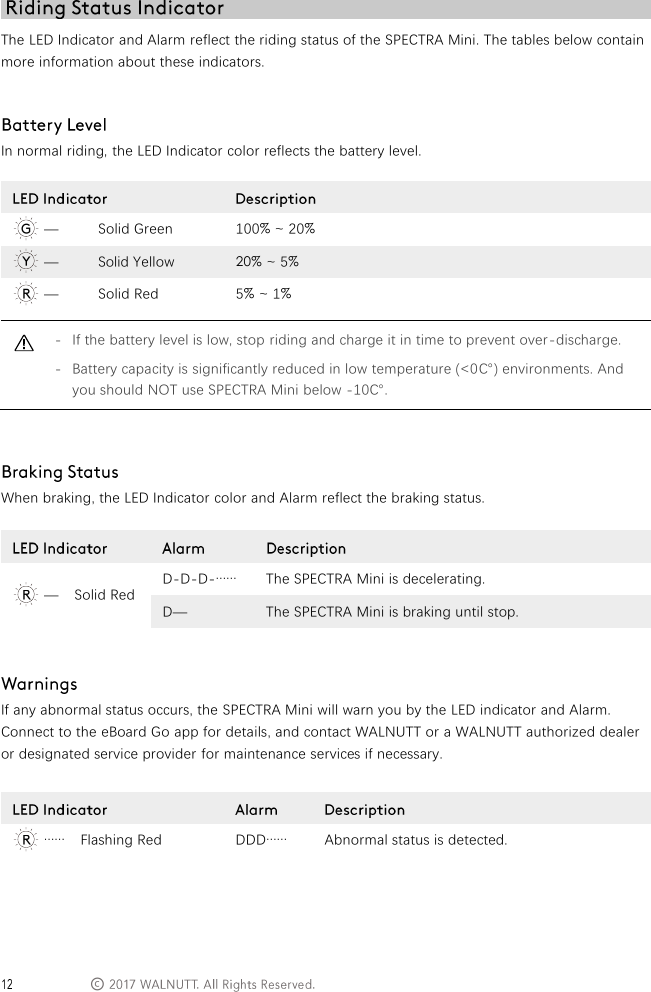
  ©   The SPECTRA Mini uses the Hub-Motor Wheel to brake and regenerate energy. It can brake timely and reliably while ensuring the safety and smoothness.   Lift your front heels to make faster deceleration. You can press your front heels to accelerate again.  D-D-D-……   Red    Jump off to the side of SPECTRA Mini to stop it immediately. The SPECTRA Mini brakes until stop.  D—  Red   When you are riding on SPECTRA Mini, three different speed modes are available. The details of each start mode are found below.   Beginner Mode For beginners to get started. Speed and acceleration are limited: Approx. 8km/h and 0.5m/s2. Sport Mode For users familiar with the SPECTRA Mini. Normal speed and acceleration: Approx. 12km/h and 1 m/s2. Pro Mode For skilled users pursuing performances. Speed and acceleration limits are relaxed: Approx. 15km/h and 1.5 m/s2.  - Use the eBoard Go app to change the speed mode of SPECTRA Mini. Refer to the "Device" on Page 16 for more information. - An interactive tutorial is provided in the Beginner Mode. Refer to the "Tutorial for Beginners" on Page 20 for more information.
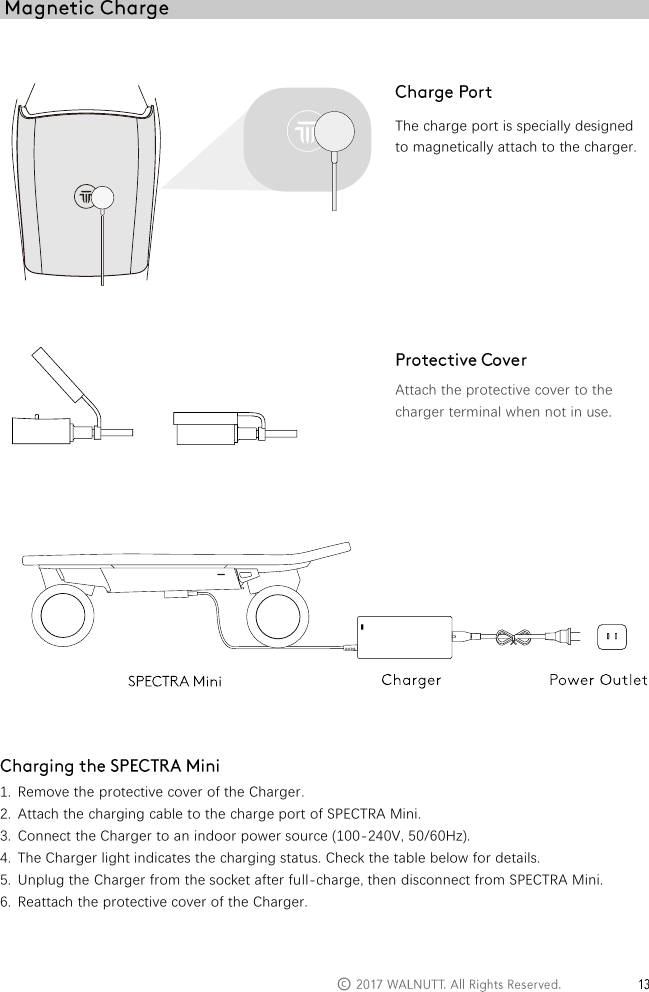
 © The LED Indicator and Alarm reflect the riding status of the SPECTRA Mini. The tables below contain more information about these indicators.   In normal riding, the LED Indicator color reflects the battery level.   — Solid Green 100% ~ 20%  — Solid Yellow 20% ~ 5%  — Solid Red 5% ~ 1%  - If the battery level is low, stop riding and charge it in time to prevent over-discharge. - Battery capacity is significantly reduced in low temperature (<0℃) environments. And you should NOT use SPECTRA Mini below -10℃. When braking, the LED Indicator color and Alarm reflect the braking status.    If any abnormal status occurs, the SPECTRA Mini will warn you by the LED indicator and Alarm. Connect to the eBoard Go app for details, and contact WALNUTT or a WALNUTT authorized dealer or designated service provider for maintenance services if necessary.      —    Solid Red D-D-D-…… The SPECTRA Mini is decelerating. D— The SPECTRA Mini is braking until stop.  ……    Flashing Red DDD…… Abnormal status is detected.
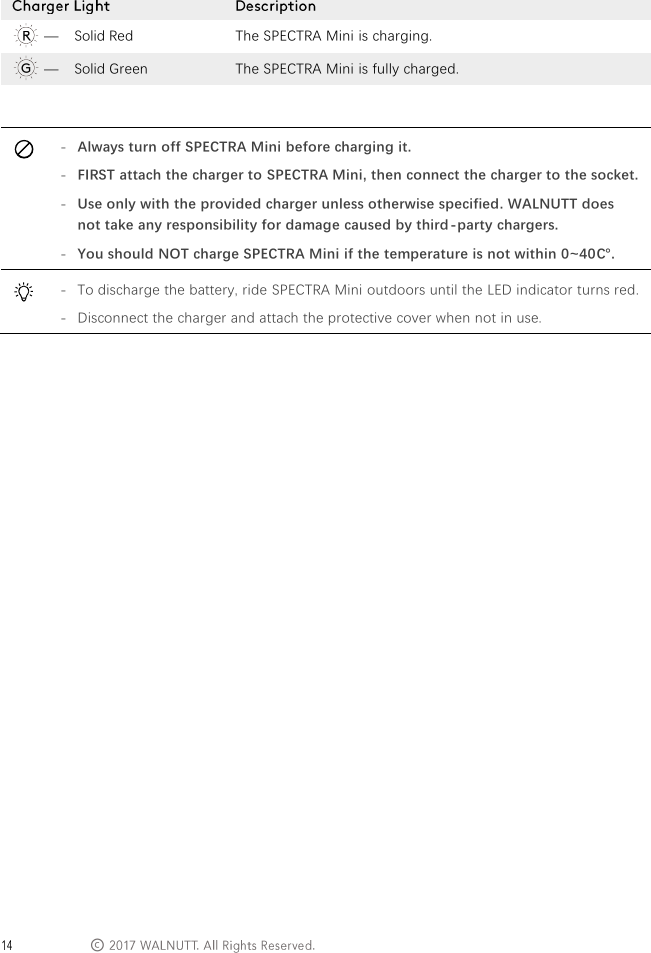
  ©      The charge port is specially designed to magnetically attach to the charger.         Attach the protective cover to the charger terminal when not in use.       1. Remove the protective cover of the Charger. 2. Attach the charging cable to the charge port of SPECTRA Mini. 3. Connect the Charger to an indoor power source (100-240V, 50/60Hz). 4. The Charger light indicates the charging status. Check the table below for details.  5. Unplug the Charger from the socket after full-charge, then disconnect from SPECTRA Mini. 6. Reattach the protective cover of the Charger.
 ©   —    Solid Red The SPECTRA Mini is charging.  —    Solid Green The SPECTRA Mini is fully charged.    - Always turn off SPECTRA Mini before charging it. - FIRST attach the charger to SPECTRA Mini, then connect the charger to the socket. - Use only with the provided charger unless otherwise specified. WALNUTT does not take any responsibility for damage caused by third-party chargers. - You should NOT charge SPECTRA Mini if the temperature is not within 0~40℃.  - To discharge the battery, ride SPECTRA Mini outdoors until the LED indicator turns red. - Disconnect the charger and attach the protective cover when not in use.
  ©            The eBoard Go app is designed specifically to interact with SPECTRA Mini and to explore the world.
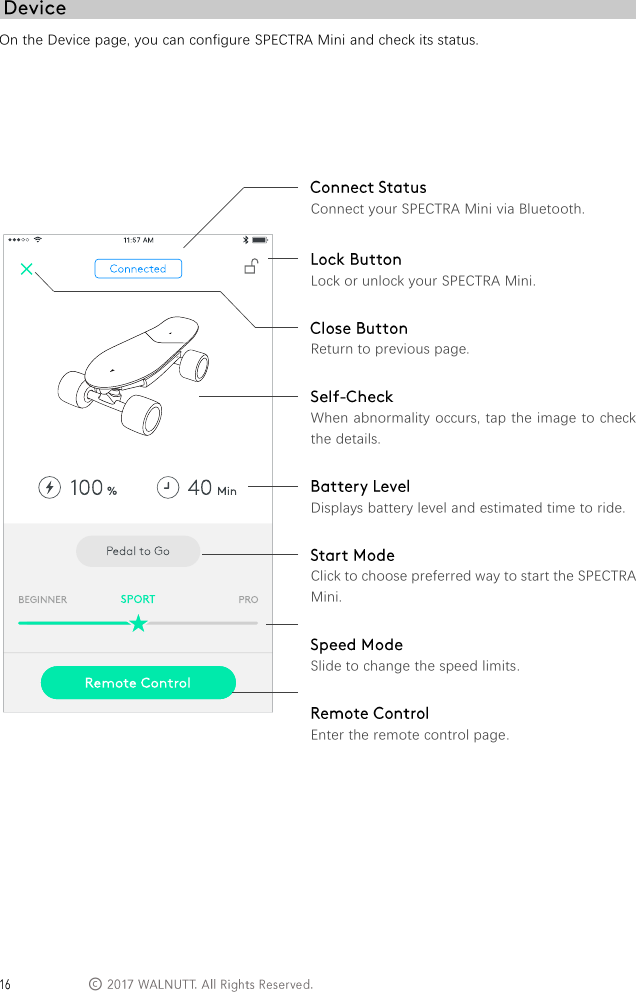
 © On the Device page, you can configure SPECTRA Mini and check its status.                 Connect your SPECTRA Mini via Bluetooth.  Lock or unlock your SPECTRA Mini.  Return to previous page.  When abnormality occurs, tap the image to check the details.  Displays battery level and estimated time to ride.  Click to choose preferred way to start the SPECTRA Mini.  Slide to change the speed limits.  Enter the remote control page.
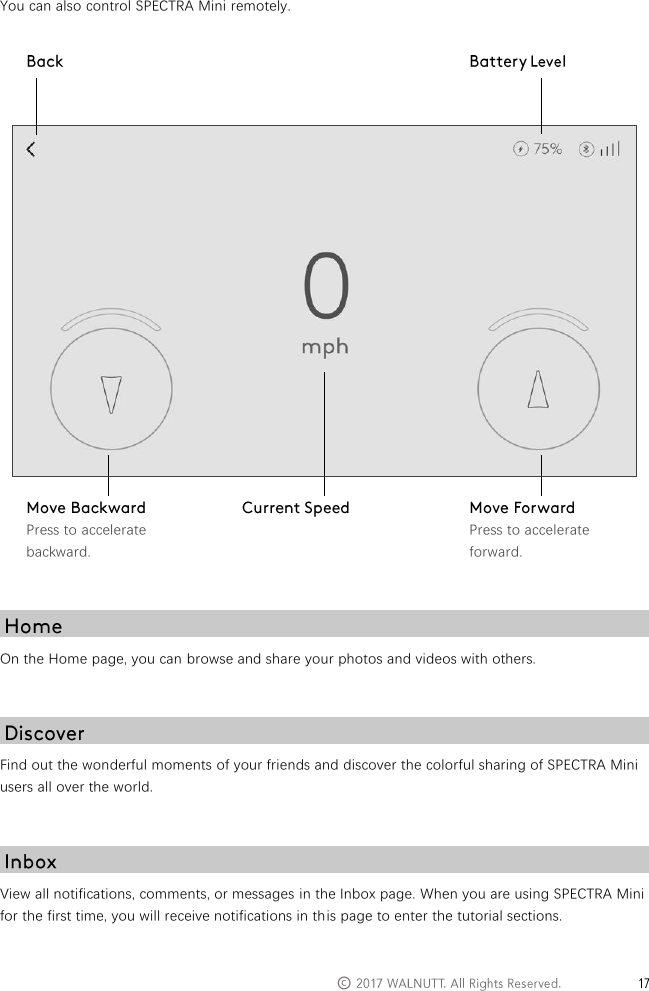
  ©   You can also control SPECTRA Mini remotely.    On the Home page, you can browse and share your photos and videos with others.   Find out the wonderful moments of your friends and discover the colorful sharing of SPECTRA Mini users all over the world.   View all notifications, comments, or messages in the Inbox page. When you are using SPECTRA Mini for the first time, you will receive notifications in this page to enter the tutorial sections.    Press to accelerate backward.  Press to accelerate forward.
 ©  View your own static information, such as total mileage and previous routes. You can also configure the app in the Me page.
  ©            This section describes safe ride practices and cautions.
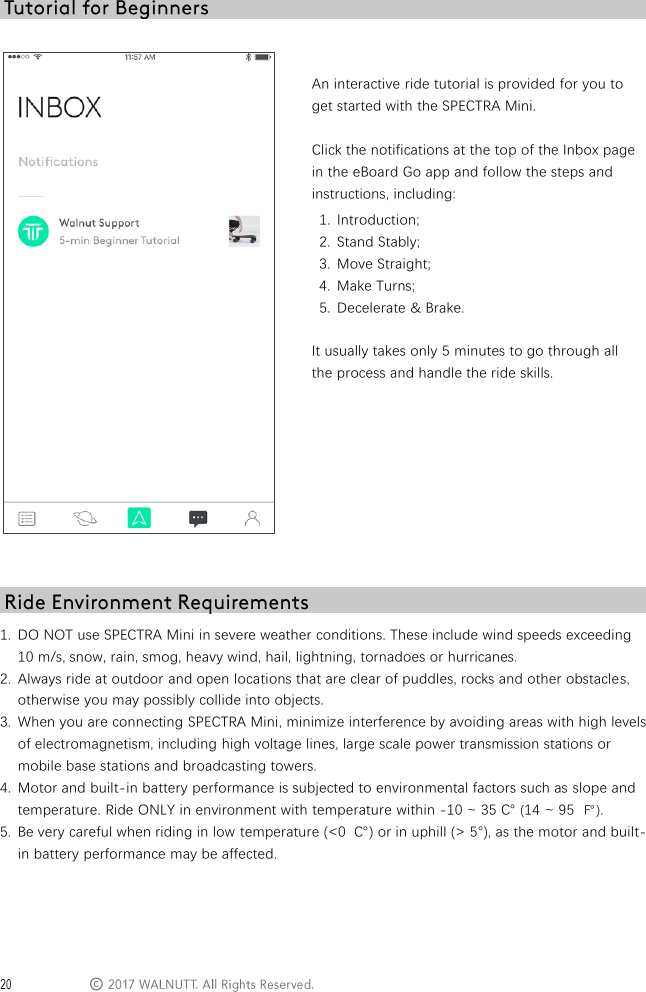
 ©    An interactive ride tutorial is provided for you to get started with the SPECTRA Mini.  Click the notifications at the top of the Inbox page in the eBoard Go app and follow the steps and instructions, including: 1. Introduction; 2. Stand Stably; 3. Move Straight; 4. Make Turns; 5. Decelerate & Brake.  It usually takes only 5 minutes to go through all the process and handle the ride skills.   1. DO NOT use SPECTRA Mini in severe weather conditions. These include wind speeds exceeding 10 m/s, snow, rain, smog, heavy wind, hail, lightning, tornadoes or hurricanes.  2. Always ride at outdoor and open locations that are clear of puddles, rocks and other obstacles, otherwise you may possibly collide into objects. 3. When you are connecting SPECTRA Mini, minimize interference by avoiding areas with high levels of electromagnetism, including high voltage lines, large scale power transmission stations or mobile base stations and broadcasting towers. 4. Motor and built-in battery performance is subjected to environmental factors such as slope and temperature. Ride ONLY in environment with temperature within -10 ~ 35 ℃ (14 ~ 95 ℉). 5. Be very careful when riding in low temperature (<0  ℃) or in uphill (> 5°), as the motor and built-in battery performance may be affected.
  ©   All the SPECTRA Mini users should abide by all regulations set forth by government and other regulatory agencies. As regulations in different regions may vary, we strongly recommend that you timely consult with local traffic authorities and note the most updated information  in our official website (www.walnuttech.co) to ensure the following features are fully updated:  With respect to ride areas, the SPECTRA Mini and the electric scooters or skateboards may be considered in the same category. Refer to their allowed lanes or areas to ride. For example, in California, it has been legislated that the electric scooters or skateboards should ride on the non-motor vehicle lanes.  For safety reasons, ride speed of the SPECTRA Mini is restricted under appropriate limit by default, which helps users to ride SPECTRA Mini safely and legally. You also need to pay attentions to the speed limits in specific sections set by local traffic regulations.   1. Ensure the SPECTRA Mini is fully charged. 2. Ensure all the components are functioning normally. 3. Ensure there is nothing obstructing the wheels. 4. Ensure there are NO loose parts or rupture in shell. 5. Ensure the SPECTRA Mini is starting on an open, flat and level area. 6. Connect to the eBoard Go app and check that there is NO abnormality warning.   Risk of Fire - No User Serviceable Parts 1. Improper operation may result in risk of losing control, collisions and fallings, which may cause fire, injury or even death. 2. To ride safely, read and follow FULL instructions and warnings in the User Manual, Disclaimer and Safety Guidelines and other documents provided. 3. NO user serviceable parts. Do not disassemble the product or replace any part of it. 4. You MUST wear helmet and other safety equipment while riding. 5. Use ONLY with the charger specified by instruction and charge the SPECTRA Mini indoor. 6. DO NOT ride in uphill over 7°, or in downhill over 5°, or cross the stairs. 7. DO NOT carry any passenger. Do not make stunt performance. 8. DO NOT ride in rainy days, or other extreme weather or environment.
 ©  To avoid serious injury to children and animals, please observe the following rule: 1. Small parts, such as cables, screws and hexagon socket, are dangerous if swallowed. Keep all parts out of reach of children and animals.  To avoid fire, serious injury, and property damage, please observe the following rules: 1. DO NOT leave SPECTRA Mini or the charger near heat sources such as a furnace or heater, or inside of a vehicle on hot days. 2. DO NOT allow SPECTRA Mini or the charger to come into contact, or become immersed in, water or other liquids. If they get wet, wipe dry with a soft, clean and absorbent cloth. DO NOT use substances containing alcohol, benzene, thinners or other flammable substances to clean or maintain SPECTRA Mini or the charger. 3. DO NOT drop, strike, or impale SPECTRA Mini or the charger. DO NOT place heavy objects on SPECTRA Mini or the charger. 4. DO NOT manually short-circuit the charge port of SPECTRA Mini, or the charger terminal. 5. Keep the SPECTRA Mini and the charger away from metal or conductive objects such as glasses, watches, jewelry, and hairpins. 6. NEVER transport the SPECTRA Mini or the charger if it is damaged or the SPECTRA Mini's battery level is higher than 50%.   1. Store the SPECTRA Mini and charger in a cool, dry and indoor place away from direct sunlight to ensure the built-in Li-ion battery and other electronic components DO NOT overheat. Recommended storage temperature: 22 - 28  ℃  (71 - 82  ℉) for storage period of more than three months. NEVER store in environments outside the temperature range of -15 - 45  ℃  (5 - 113  ℉). 2. Discharge the SPECTRA Mini's battery level to 40% - 65% if it will not be used for 10 days or more. This can greatly extend the built-in battery life. 3. NEVER long-time store the SPECTRA Mini after depleting the battery. This will over-discharge the built-in battery and damage the battery cells, and the built-in battery could not be reinstated. 4. Turn off the SPECTRA Mini when stored for an extended period.
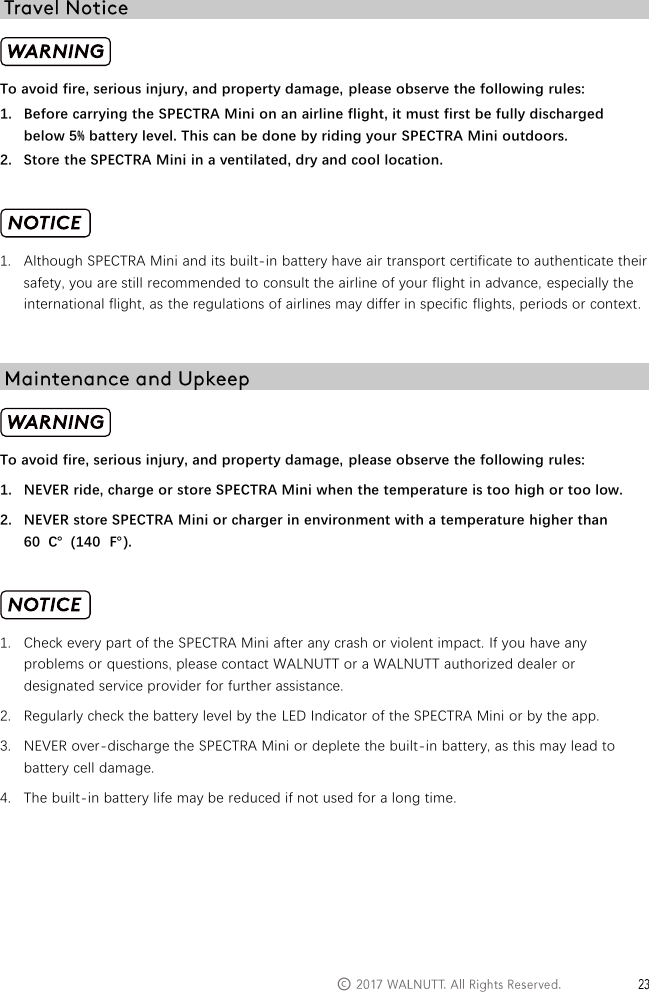
  ©    To avoid fire, serious injury, and property damage, please observe the following rules: 1. Before carrying the SPECTRA Mini on an airline flight, it must first be fully discharged below 5% battery level. This can be done by riding your SPECTRA Mini outdoors. 2. Store the SPECTRA Mini in a ventilated, dry and cool location.   1. Although SPECTRA Mini and its built-in battery have air transport certificate to authenticate their safety, you are still recommended to consult the airline of your flight in advance, especially the international flight, as the regulations of airlines may differ in specific flights, periods or context.   To avoid fire, serious injury, and property damage, please observe the following rules: 1. NEVER ride, charge or store SPECTRA Mini when the temperature is too high or too low. 2. NEVER store SPECTRA Mini or charger in environment with a temperature higher than 60  ℃  (140  ℉).   1. Check every part of the SPECTRA Mini after any crash or violent impact. If you have any problems or questions, please contact WALNUTT or a WALNUTT authorized dealer or designated service provider for further assistance. 2. Regularly check the battery level by the LED Indicator of the SPECTRA Mini or by the app. 3. NEVER over-discharge the SPECTRA Mini or deplete the built-in battery, as this may lead to battery cell damage. 4. The built-in battery life may be reduced if not used for a long time.
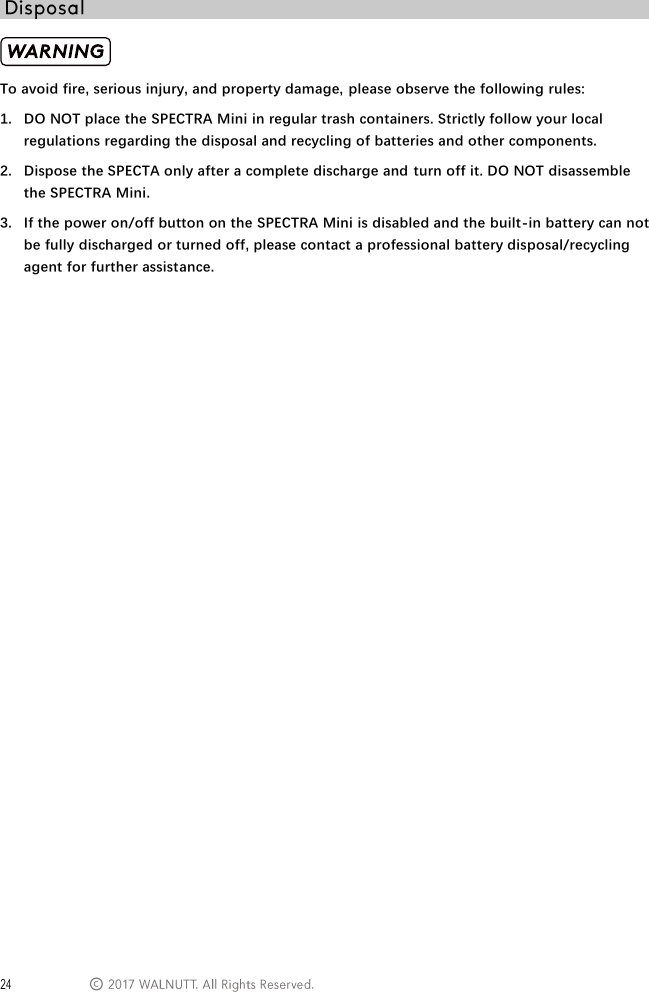
 ©  To avoid fire, serious injury, and property damage, please observe the following rules: 1. DO NOT place the SPECTRA Mini in regular trash containers. Strictly follow your local regulations regarding the disposal and recycling of batteries and other components.  2. Dispose the SPECTA only after a complete discharge and turn off it. DO NOT disassemble the SPECTRA Mini. 3. If the power on/off button on the SPECTRA Mini is disabled and the built-in battery can not be fully discharged or turned off, please contact a professional battery disposal/recycling agent for further assistance.
  ©    The SPECTRA Mini is stunning because of its unique material and original design, intuitive thanks to the revolutionary control method, full-range safe based on thoughtful consideration and protections, and extremely portable within amazingly small size and light weight.   No. The SPECTRA Mini knows your body postures and moves along with them. When you lean forward, it speeds up; and when you lean backward, it slows down. You can also use the eBoard Go app to interact with, configure and lock the SPECTRA Mini.   We put your safety in the first place from design to manufacturing. Whether the SPECTRA Mini or its built-in battery has adopted rigorous testing and qualified for various safety certifications. To ensure safety, whenever you jump off the SPECTRA Mini, it stops instantly. Meanwhile, to prevent any error or malfunction, the SPECTRA Mini tests its system and components, and warns you immediately in case of any abnormality detected.   An interactive ride tutorial is provided for you to get started with the  SPECTRA Mini. It usually takes only 5 minutes to go through all the process and handle the ride skills. You are also recommended to watch the tutorials videos on our website.   The SPECTRA Mini adopts the skateboard truck to rotate the front and rear axles in different directions to enhance the steering.
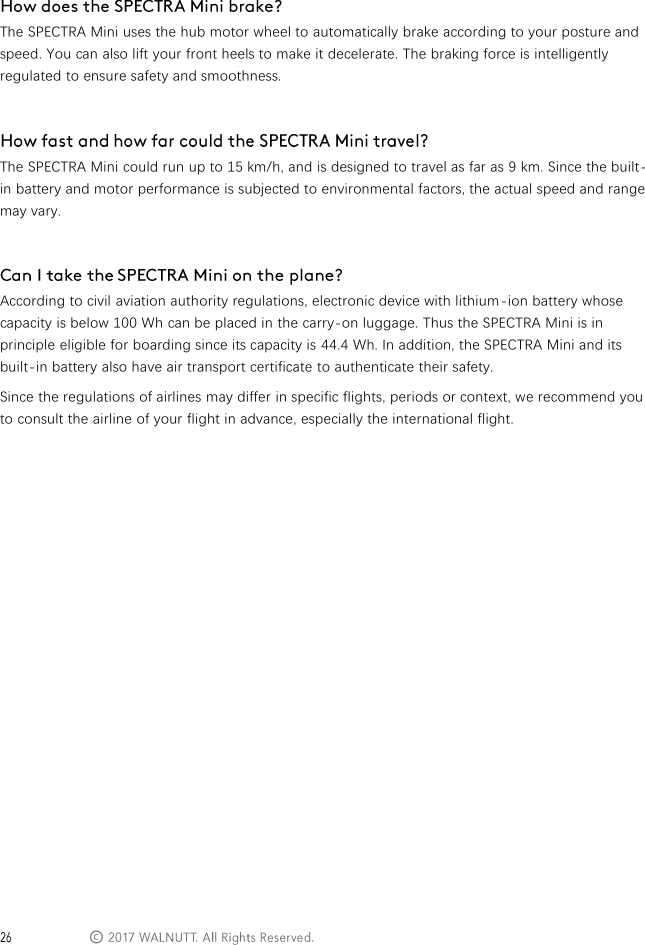
 ©   The SPECTRA Mini uses the hub motor wheel to automatically brake according to your posture and speed. You can also lift your front heels to make it decelerate. The braking force is intelligently regulated to ensure safety and smoothness.   The SPECTRA Mini could run up to 15 km/h, and is designed to travel as far as 9 km. Since the built-in battery and motor performance is subjected to environmental factors, the actual speed and range may vary.   According to civil aviation authority regulations, electronic device with lithium -ion battery whose capacity is below 100 Wh can be placed in the carry-on luggage. Thus the SPECTRA Mini is in principle eligible for boarding since its capacity is 44.4 Wh. In addition, the SPECTRA Mini and its built-in battery also have air transport certificate to authenticate their safety. Since the regulations of airlines may differ in specific flights, periods or context, we recommend you to consult the airline of your flight in advance, especially the international flight.
  ©
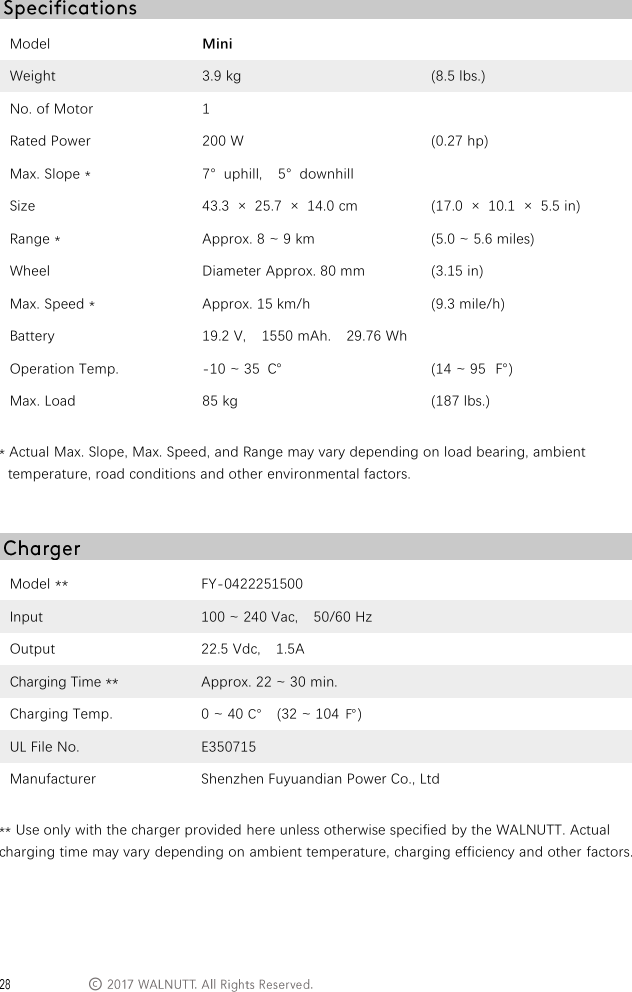
 © Model Mini  Weight 3.9 kg (8.5 lbs.) No. of Motor 1  Rated Power 200 W (0.27 hp) Max. Slope * 7°  uphill,  5°  downhill  Size 43.3  ×  25.7  ×  14.0 cm (17.0  ×  10.1  ×  5.5 in) Range * Approx. 8 ~ 9 km (5.0 ~ 5.6 miles) Wheel Diameter Approx. 80 mm (3.15 in) Max. Speed * Approx. 15 km/h (9.3 mile/h) Battery 19.2 V,    1550 mAh.    29.76 Wh  Operation Temp. -10 ~ 35 ℃ (14 ~ 95 ℉) Max. Load 85 kg (187 lbs.)  * Actual Max. Slope, Max. Speed, and Range may vary depending on load bearing, ambient temperature, road conditions and other environmental factors.   Model ** FY-0422251500 Input 100 ~ 240 Vac,    50/60 Hz Output 22.5 Vdc,    1.5A Charging Time ** Approx. 22 ~ 30 min. Charging Temp. 0 ~ 40 ℃    (32 ~ 104 ℉) UL File No. E350715 Manufacturer Shenzhen Fuyuandian Power Co., Ltd  ** Use only with the charger provided here unless otherwise specified by the WALNUTT. Actual charging time may vary depending on ambient temperature, charging efficiency and other factors.
©Visit the following pages to learn more about After-sales policy and warranty information: 1. After-sales: Policy: www.walnuttech.co/service2. Refund Policy: www.walnuttech.co/service/refund-return3. Paid Repair Service: www.walnuttech.co/service/repair-service4. Warranty Service: www.walnuttech.co/service/warranty-serviceYour safety is our priority. Whether the SPECTRA Mini or its built-in battery has adopted rigorous testing and qualified for various safety certifications. The SPECTRA Mini's safety has been authenticated by testing in qualified laboratories, such as electrical testing, EMC testing, mechanical testing, radio equipment testing and environmental testing, etc. The SPECTRA Mini, as well as the built-in battery, possesses certificates of major safety standards, including CE, UL and FCC, etc. Their chemical compositions have also been recognized as safe and harmless in the light of provisions in RoHS 2.0 and MDSD. In addition, they also have marine and air transport safety certificates based on UN38.3.
FCC StatementThis equipment has been tested and found to comply with the limits for a Class B digital device, pursuant to Part 15 of the FCC Rules. These limits are designed to provide reasonable protection against harmful interference in a residential installation. This equipment generates uses and can radiate radio frequency energy and, if not installed and used in accordance with the instructions, may cause harmful interference to radio communications. However, there is no guarantee that interference will not occur in a particular installation. If this equipment does cause harmful interference to radio or television reception, which can be determined by turning the equipment off and on, the user is encouraged to try to correct the interference by one or more of the following measures:-- Reorient or relocate the receiving antenna.  -- Increase the separation between the equipment and receiver.   -- Connect the equipment into an outlet on a circuit different from that to which the receiver is connected.  -- Consult the dealer or an experienced radio/TV technician for help.This device complies with part 15 of the FCC Rules. Operation is subject to the following two conditions:(1) This device may not cause harmful interference, and (2) this device must accept any interference received, including interference that may cause undesired operation.Changes or modifications not expressly approved by the party responsible for compliance could void the user's authority to operate the equipment.

Navigation menu