Walt Disney Parks and Resorts US XBR-R1G1 xBR-R1G1 User Manual

Walt Disney Parks and Resorts US., INC. xBR-R1G1

User Manual

 900-000096  Rev 03 (preliminary) xBR V3 Installation and User Guide  Page 1 of 14   XBR V3 INSTALLATION AND USER GUIDE
 900-000096  Rev 03 (preliminary) xBR V3 Installation and User Guide  Page 2 of 14  Revision History  Rev  Date  Author  Description 01  07/03/2012 Eric Anderson  Initial release 02  09/25/2012 Eric Anderson  Clarification of section 4.5 UL power supply requirements. Remove references to pending FCC compliance. 03  10/16/2012 Eric Anderson & Andrew Stack Logo change         Document Approvers & Sign-Off  Date  Approver  Role  Document Accept/Reject 07/03/2012 Larry Kulesa  Project Manager  Rev01-  Accepted
 900-000096  Rev 03 (preliminary) xBR V3 Installation and User Guide  Page 3 of 14  Table of Contents 1 Introduction ............................................................................................................ 4 1.1 Purpose ............................................................................................................ 4 1.2 Definitions ........................................................................................................ 4 2 Safety Warnings ...................................................................................................... 5 2.1 Important Safety Instructions ............................................................................. 5 2.2 Explosive Safety Warning ................................................................................... 5 2.3 Lightning Warning ............................................................................................. 5 3 Regulatory Compliance ............................................................................................. 6 3.1 Federal Communications Commission (United States) ............................................ 6 3.2 UL Certification .................................................................................................. 6 4 Specifications .......................................................................................................... 7 4.1 Physical ............................................................................................................ 7 4.2 Connection Ports ............................................................................................... 9 4.3 RF Frequencies .................................................................................................. 9 4.4 Operating Conditions .......................................................................................... 9 4.5 Power .............................................................................................................. 9 5 Installation ........................................................................................................... 10 5.1 Trained Installation and Service Personnel Warning ............................................. 10 5.2 Electrostatic Discharge Warning ........................................................................ 10 5.3 Telecom Warning ............................................................................................. 10 5.4 Installation Instructions .................................................................................... 11 6 Connection Guide .................................................................................................. 13
 900-000096  Rev 03 (preliminary) xBR V3 Installation and User Guide  Page 4 of 14  1 Introduction The  Synapse  xBR  V3  Long  Range  Reader  is  part  of  a  proprietary  data  acquisition  and tracking system.  It provides a transmitter and multiple  receivers to  collect data. This  data can be then sent over an Ethernet connection to a data collection/concentration object. 1.1 Purpose This document provides basic installation and user instructions for the Synapse xBR V3 Long Range Reader. 1.2 Definitions Term  Definition PoE  Power over Ethernet
 900-000096  Rev 03 (preliminary) xBR V3 Installation and User Guide  Page 5 of 14  2 Safety Warnings 2.1 Important Safety Instructions When  using  this  device,  basic  safety  precautions  should  always  be  followed  to  reduce the risk of fire, electric shock and injury to persons. Do not use this product near water. For example, do not use: • near a bath tub • near a wash bowl • near a kitchen sink or laundry tub • in a wet basement • near a swimming pool 2.2 Explosive Safety Warning Warning! Do not  operate this device near explosive devices, unshielded blasting caps or in an otherwise explosive environment unless the device has been approved for such use by qualified personnel. Warning!  Do  not  disconnect  the  power  or  any  other  cabling  in  an  explosive environment until such qualified personnel, trained specifically in explosive environment handling, have determined it is safe to do so. Warning! Do not touch or move the access point when the antennas are transmitting or receiving. 2.3 Lightning Warning Warning! Do not connect or disconnect cables or otherwise work with the access point hardware during periods of lightning activity. Avoid  using  this  product  during  an  electrical  storm.  There  may  be  a  remote  risk  of electric shock from lightning.
 900-000096  Rev 03 (preliminary) xBR V3 Installation and User Guide  Page 6 of 14  3 Regulatory Compliance 3.1 Federal Communications Commission (United States) Regulatory Compliance Information This device complies with part 15 of the FCC Rules. Operation is subject to the following two conditions: (1) This device may not cause harmful interference, and (2) this device must accept any interference received, including interference that may cause undesired operation. RF Exposure Statement The  device  has  been  found  to  be  compliant  to  the  requirements  set  forth  in  CFR  47 Sections  2.1091  for  an  uncontrolled  environment.  The  antenna(s)  used  for  this transmitter must be installed to provide a separation distance of at least 35 cm from all persons and must not be co-located or operating in conjunction with any other antenna or transmitter. Caution Any changes or modifications not expressly approved by Synapse Product Development could void the user’s authority to operate this equipment. 3.2 UL Certification UL permission to list has been applied for, but has not yet been granted.
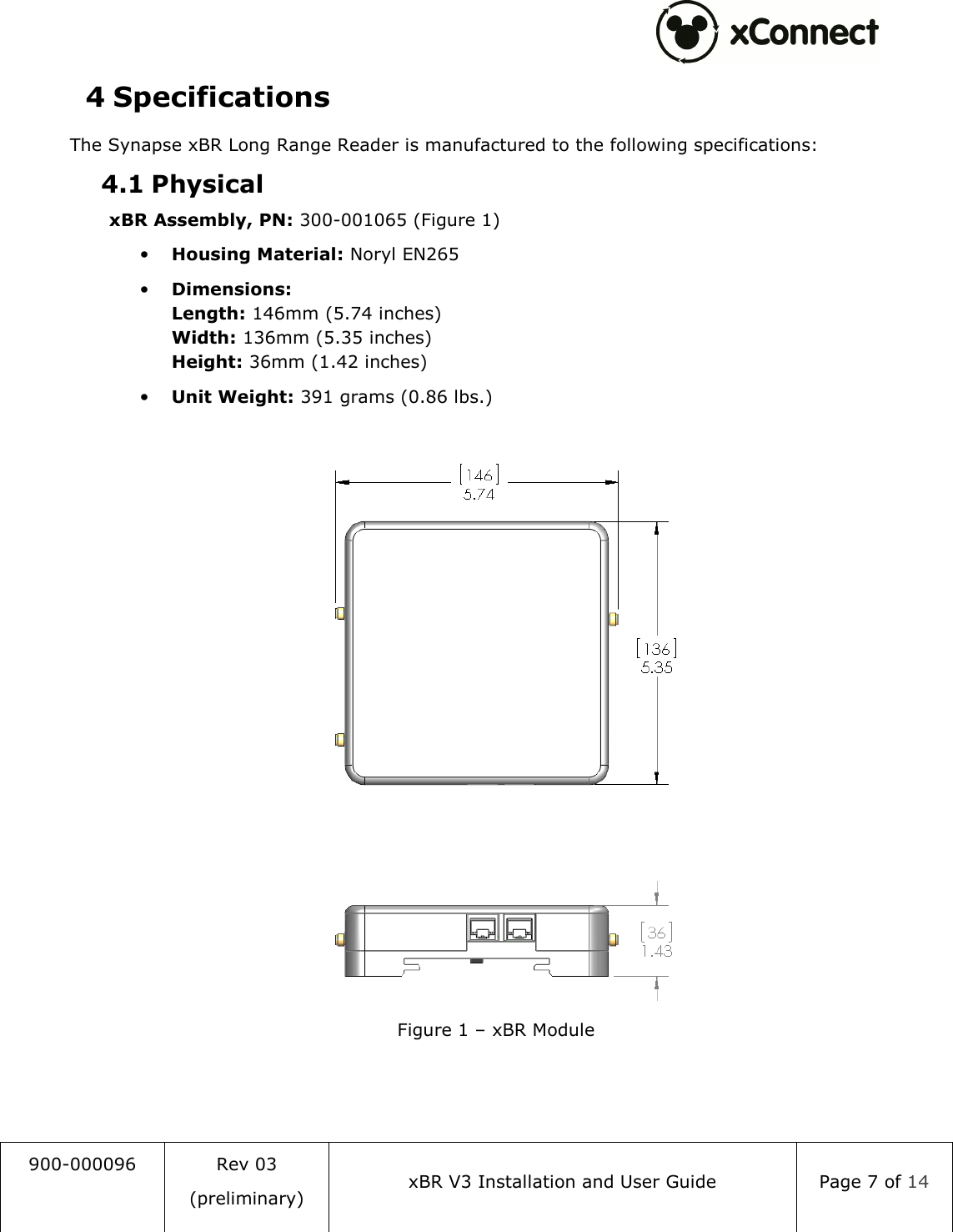
 900-000096  Rev 03 (preliminary) xBR V3 Installation and User Guide  Page 7 of 14  4 Specifications The Synapse xBR Long Range Reader is manufactured to the following specifications: 4.1 Physical xBR Assembly, PN: 300-001065 (Figure 1) • Housing Material: Noryl EN265 • Dimensions: Length: 146mm (5.74 inches) Width: 136mm (5.35 inches) Height: 36mm (1.42 inches) • Unit Weight: 391 grams (0.86 lbs.)   Figure 1 – xBR Module
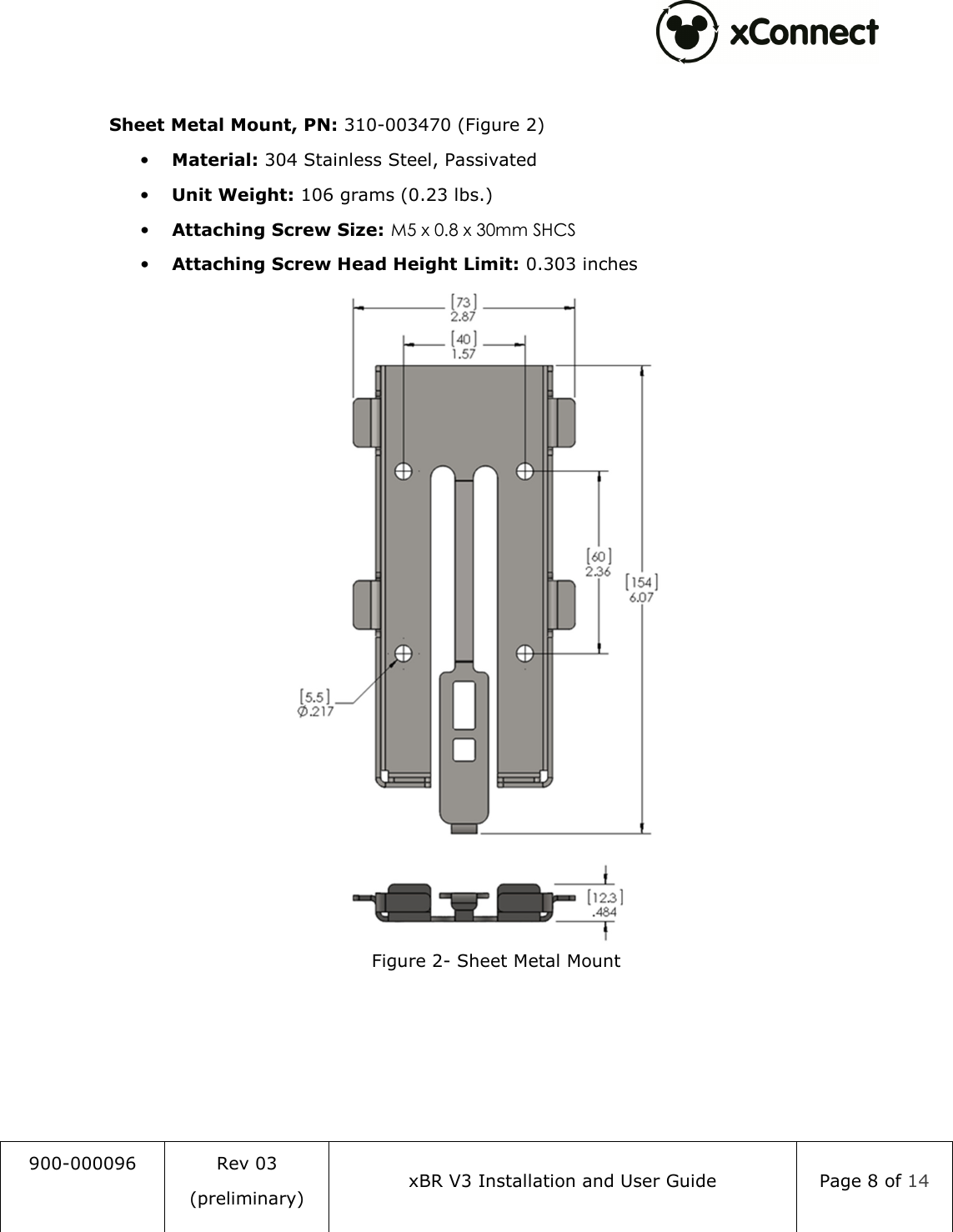
 900-000096  Rev 03 (preliminary) xBR V3 Installation and User Guide  Page 8 of 14   Sheet Metal Mount, PN: 310-003470 (Figure 2) • Material: 304 Stainless Steel, Passivated • Unit Weight: 106 grams (0.23 lbs.) • Attaching Screw Size: M5 x 0.8 x 30mm SHCS • Attaching Screw Head Height Limit: 0.303 inches  Figure 2- Sheet Metal Mount
 900-000096  Rev 03 (preliminary) xBR V3 Installation and User Guide  Page 9 of 14  4.2 Connection Ports • Ethernet 10/100 RJ-45 (POE): 100m Max. cable length • Ethernet 10/100 RJ-45: 100m Max. cable length • 3 SMA Antennal Ports: (1 transmit, 2 receive) • DC Power Jack: 2.5mm ID, 5.5mm OD, center conductor positive  4.3 RF Frequencies • RX: 2401, 2424, 2450, 2474 MHz • TX: 2482 MHz  4.4 Operating Conditions  Temperature: • Operating: 0°C to 40°C (32°F to 104°F) • Storage: -10°C to 70°C (14°F to 158°F) • Relative Humidity: 5% to 95% non-condensing • Altitude: 8,000 ft @28°C (82.4°F)  4.5 Power  Power over Ethernet (IEEE, 802.3af compliant)     PoE 48V dc, 200 mA  DC Barrel Jack: 20-48Vdc, 300mA NOTE: If a power adapter other than one provided by Synapse Product Development is used in the US or Canada, it should be cULus (NRTL) Listed, with an output rated 20-48Vdc maximum, minimum 300mA, Marked “LPS” or “Class 2”, output rated SELV, non-energy hazardous, and suitable for connection to a standard power receptacle in the US and Canada.
 900-000096  Rev 03 (preliminary) xBR V3 Installation and User Guide  Page 10 of 14  5 Installation 5.1 Trained Installation and Service Personnel Warning Warning!  Installation  and  service  of  this  product  is  to  be  performed  by  trained installation  and  service  personnel  only.  Read  and  follow  all  warning  notices  and instructions marked on the product or included in the documentation. Before installing the product, read the rest of this document and follow specific product instructions. When installing, the placement of the device must also satisfy the following installation requirements: • If not operating  with PoE (Power  over Ethernet), connect  the unit’s AC adapter to an AC wall outlet (100-240 VAC) using only the standard power cord/adapter provided with the product. • Placement  must  allow  for  easily  disconnecting  the  power  cord/adapter  of  the device from the AC wall-outlet. • Do not cover the device or block the airflow to the device with any other objects. • Keep  the  device  away  from  excessive  heat  and  humidity  and  keep  the  device free from vibration and dust. • Installation must at all times conform to local regulations. • Connections  to  Wireless  Access  Point  can  be  made  with  either  Unshielded Twisted  Pair  (UTP)  or  Shielded  Twisted  Pair  (STP)  cabling.  When  using  the device in combination with Power over Ethernet, use only STP cabling. 5.2 Electrostatic Discharge Warning  Warning!  Wear  an  anti-static  wrist  strap  or  take  other  suitable  measures  to  prevent electrostatic discharge when handling this equipment. 5.3 Telecom Warning Note: This  unit  is  intended  for  local  (intra-building)  connections  only  and  is  not designed  or  evaluated  for  direct  connections  to  the  public  telecommunications/cable distributions systems. Cable and Ethernet connections should be made in accordance to the National Electrical Code (NEC). For example, one of the following should be true*: - Cable runs are located in the same building as this unit. - Cable runs through air between buildings are less than 42m (140ft). - Cable runs between buildings are directly buried. - Cable runs between buildings are in underground conduit, where a continuous metallic cable  shield  or  a  continuous  metallic  conduit  containing  the  cable  is  bonded  to  each building grounding electrode system.
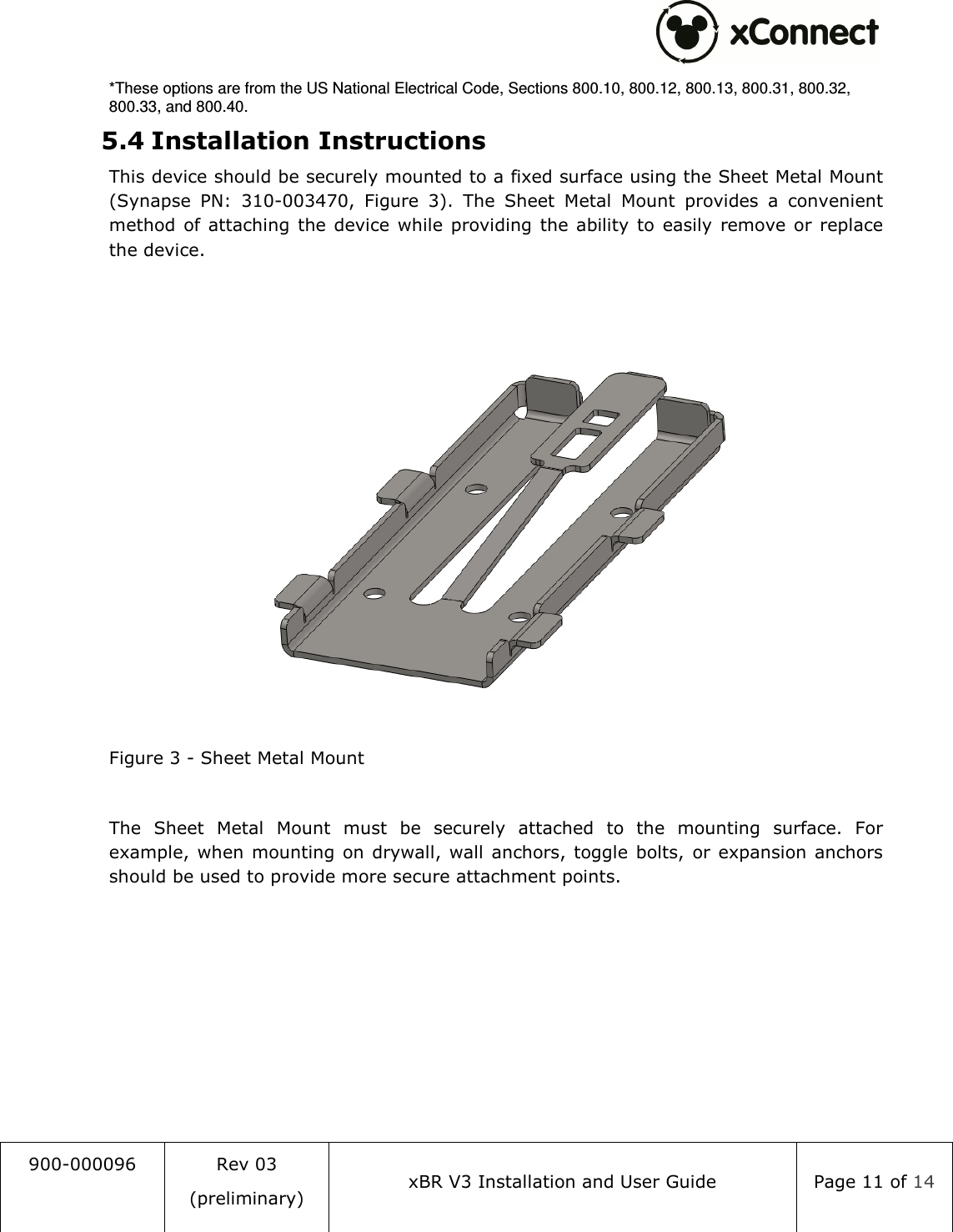
 900-000096  Rev 03 (preliminary) xBR V3 Installation and User Guide  Page 11 of 14  *These options are from the US National Electrical Code, Sections 800.10, 800.12, 800.13, 800.31, 800.32, 800.33, and 800.40. 5.4 Installation Instructions This device should be securely mounted to a fixed surface using the Sheet Metal Mount (Synapse  PN:  310-003470,  Figure  3).  The  Sheet  Metal  Mount  provides  a  convenient method  of attaching  the device  while  providing  the ability to  easily  remove  or replace the device.   Figure 3 - Sheet Metal Mount  The  Sheet  Metal  Mount  must  be  securely  attached  to  the  mounting  surface.  For example,  when  mounting  on drywall, wall anchors, toggle bolts,  or  expansion anchors should be used to provide more secure attachment points.
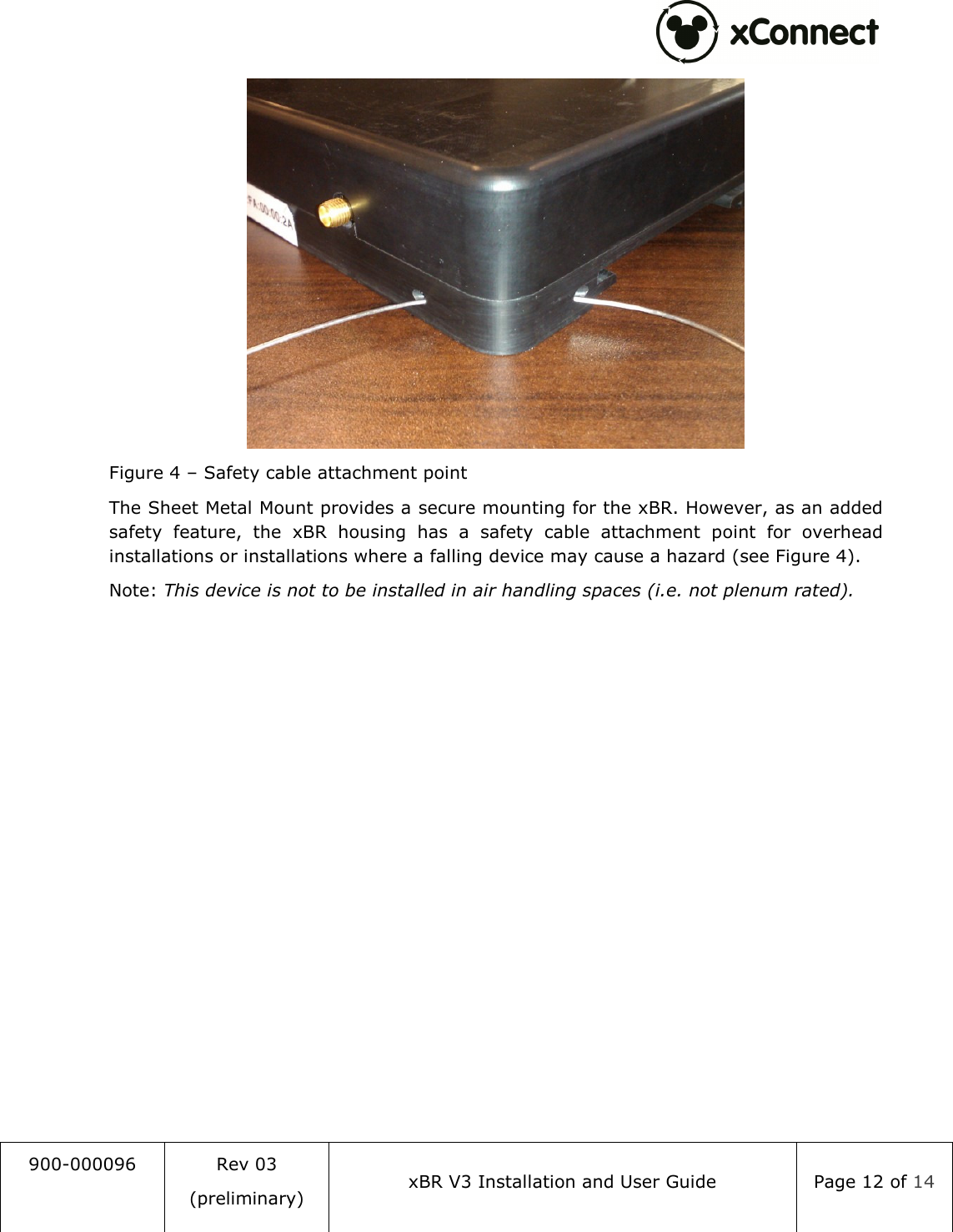
 900-000096  Rev 03 (preliminary) xBR V3 Installation and User Guide  Page 12 of 14   Figure 4 – Safety cable attachment point The Sheet Metal Mount provides a secure mounting for the xBR. However, as an added safety  feature,  the  xBR  housing  has  a  safety  cable  attachment  point  for  overhead installations or installations where a falling device may cause a hazard (see Figure 4). Note: This device is not to be installed in air handling spaces (i.e. not plenum rated).
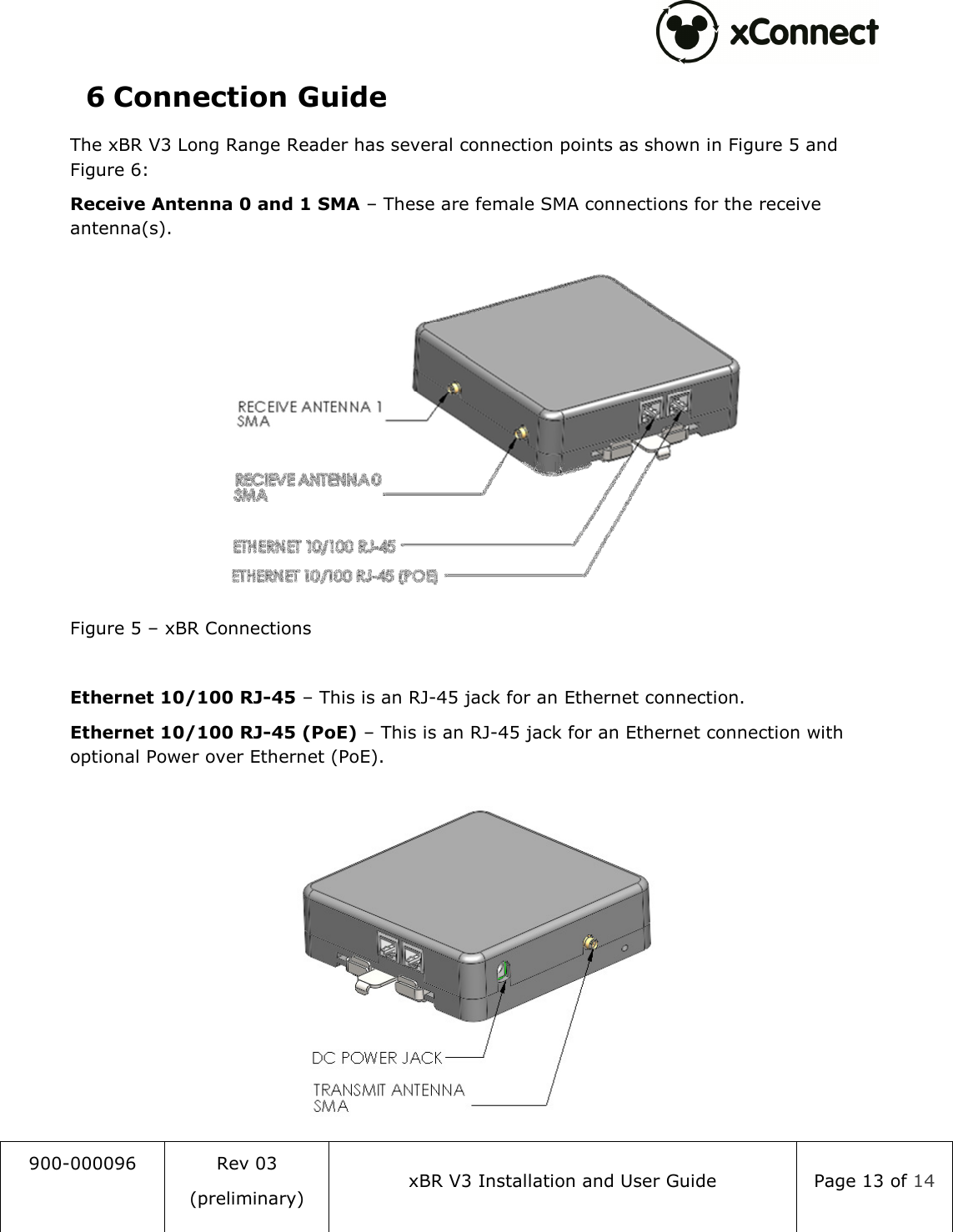
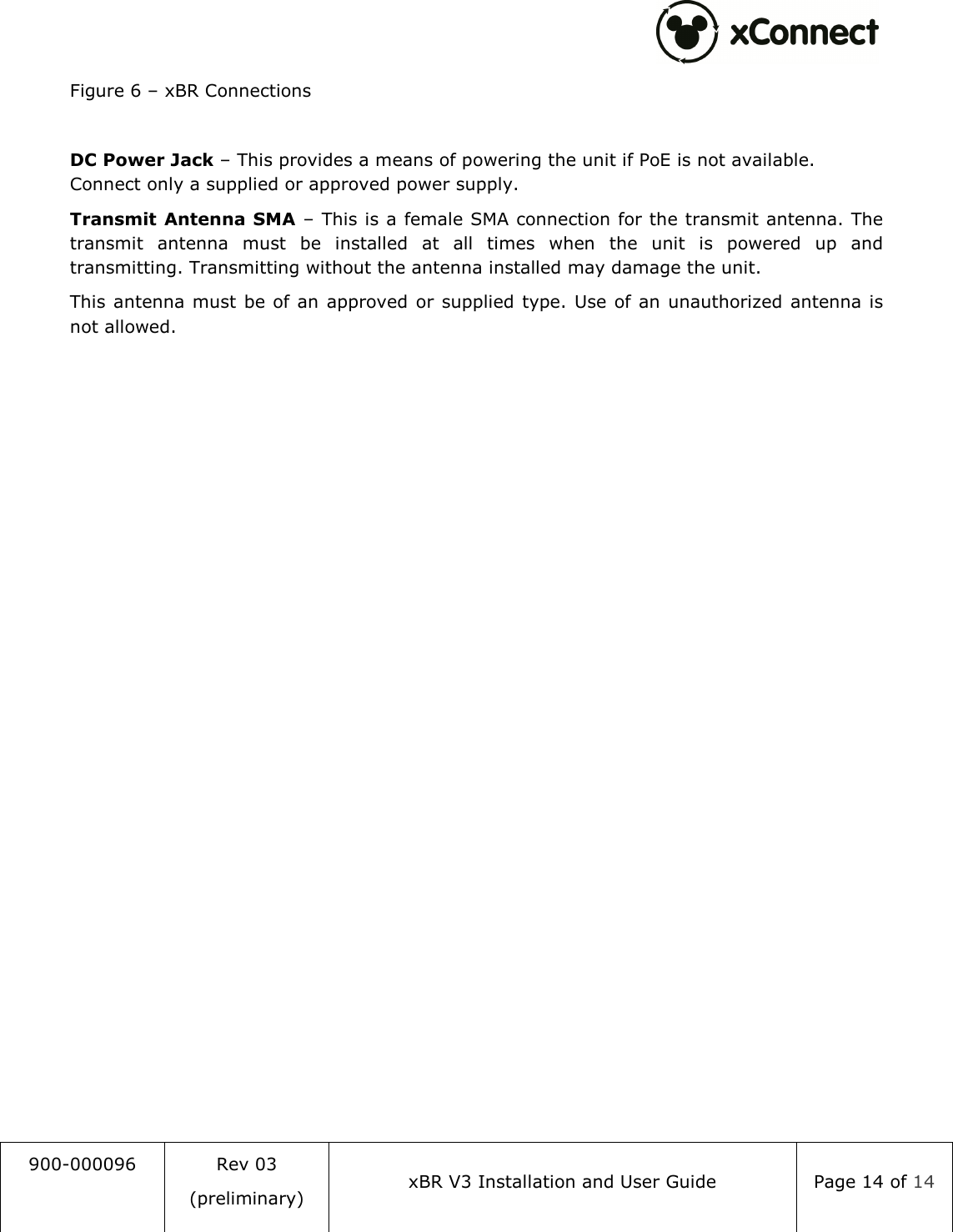
 900-000096  Rev 03 (preliminary) xBR V3 Installation and User Guide  Page 13 of 14  6 Connection Guide The xBR V3 Long Range Reader has several connection points as shown in Figure 5 and Figure 6: Receive Antenna 0 and 1 SMA – These are female SMA connections for the receive antenna(s).  Figure 5 – xBR Connections  Ethernet 10/100 RJ-45 – This is an RJ-45 jack for an Ethernet connection. Ethernet 10/100 RJ-45 (PoE) – This is an RJ-45 jack for an Ethernet connection with optional Power over Ethernet (PoE).
 900-000096  Rev 03 (preliminary) xBR V3 Installation and User Guide  Page 14 of 14  Figure 6 – xBR Connections  DC Power Jack – This provides a means of powering the unit if PoE is not available. Connect only a supplied or approved power supply. Transmit Antenna SMA – This is a female SMA connection for the transmit antenna. The transmit  antenna  must  be  installed  at  all  times  when  the  unit  is  powered  up  and transmitting. Transmitting without the antenna installed may damage the unit. This  antenna must  be of an approved  or supplied type. Use of an unauthorized antenna is not allowed.

Navigation menu