Weider Pro 4000 System Weevsy2826 Users Manual WESY39240 212817
2015-05-18
: Weider Weider-Pro-4000-System-Weevsy2826-Users-Manual-733855 weider-pro-4000-system-weevsy2826-users-manual-733855 weider pdf
Open the PDF directly: View PDF  .
.
Page Count: 28
CAUTION
Read all precautions and instruc-
tions in this manual before using
this equipment. Save this manual
for future reference.
Model No. WEEVSY2826.0
Serial No.
Write the serial number in the
space above for future reference.
QUESTIONS?
As a manufacturer, we are com-
mitted to providing complete
customer satisfaction. If you
have questions, or if there are
missing or damaged parts,
please call:
Or write:
ICON Health & Fitness, Ltd.
Unit 4
Revie Road Industrial Estate
Revie Road, Beeston
Leeds, LS11 8JG
UK
email: csuk@iconeurope.com
USER’S MANUAL
08457 089 009
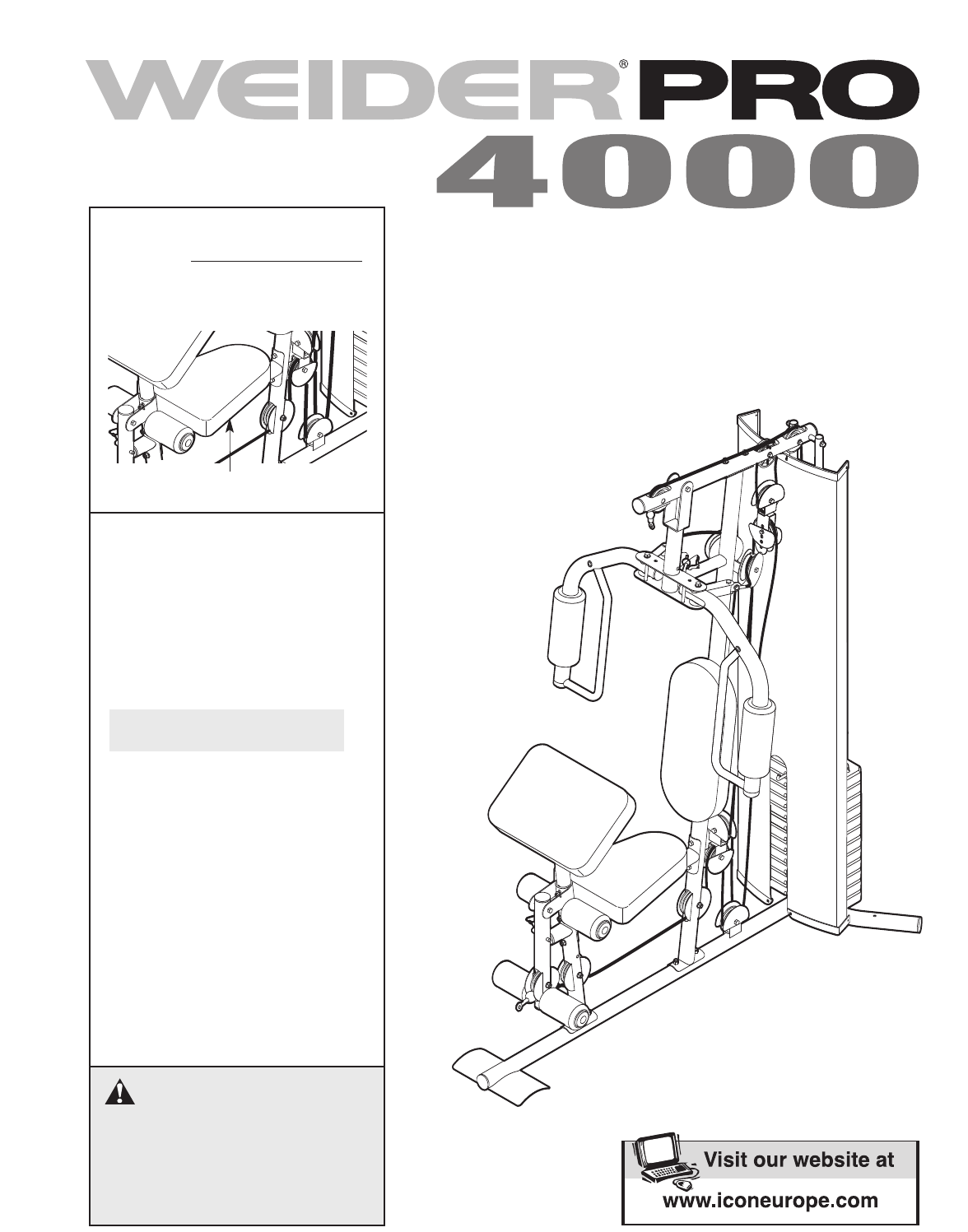
Serial Number Decal (Under Seat)
2
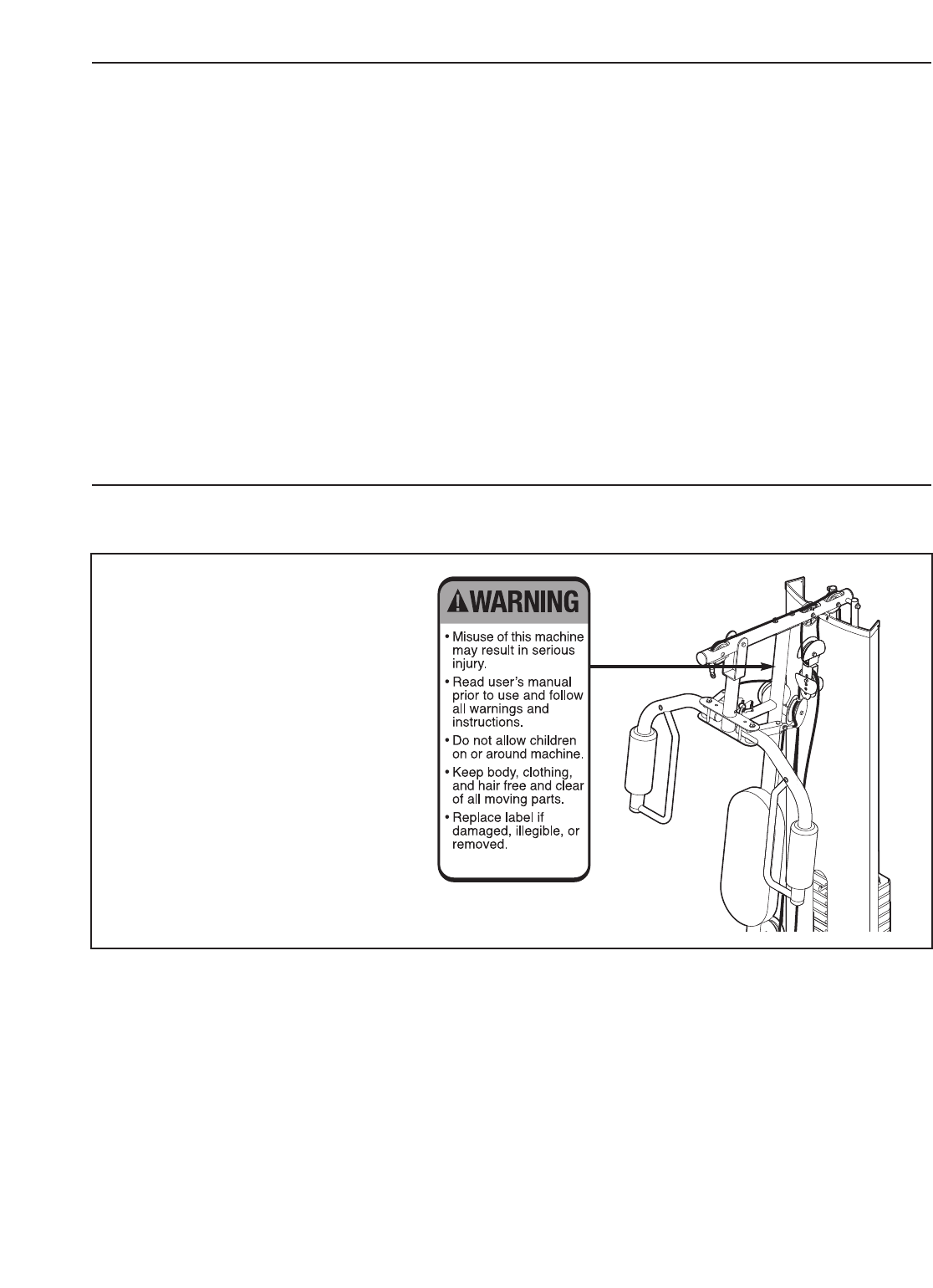
WARNING DECAL PLACEMENT
WEIDER is a registered trademark of ICON IP
,Inc.
TABLE OF CONTENTS
The decal shown here has been
placed on the weight system. If the
decal is missing, or if it is illegible,
call the telephone number on the
front cover of this manual and
order a free replacement decal.
Apply the decal in the location
shown.
WARNING DECAL PLACEMENT . . . . . . . . . . . . . . . . . . . . . . . . . . . . . . . . . . . . . . . . . . . . . . . . . . . . . . . . . . . . . 2
IMPORTANT PRECAUTIONS . . . . . . . . . . . . . . . . . . . . . . . . . . . . . . . . . . . . . . . . . . . . . . . . . . . . . . . . . . . . . . . . 3
BEFORE YOU BEGIN . . . . . . . . . . . . . . . . . . . . . . . . . . . . . . . . . . . . . . . . . . . . . . . . . . . . . . . . . . . . . . . . . . . . . . 4
ASSEMBLY . . . . . . . . . . . . . . . . . . . . . . . . . . . . . . . . . . . . . . . . . . . . . . . . . . . . . . . . . . . . . . . . . . . . . . . . . . . . . . 5
ADJUSTMENTS . . . . . . . . . . . . . . . . . . . . . . . . . . . . . . . . . . . . . . . . . . . . . . . . . . . . . . . . . . . . . . . . . . . . . . . . . . 17
WEIGHT RESISTANCE CHART . . . . . . . . . . . . . . . . . . . . . . . . . . . . . . . . . . . . . . . . . . . . . . . . . . . . . . . . . . . . . .19
CABLE DIAGRAMS . . . . . . . . . . . . . . . . . . . . . . . . . . . . . . . . . . . . . . . . . . . . . . . . . . . . . . . . . . . . . . . . . . . . . . .20
MAINTENANCE . . . . . . . . . . . . . . . . . . . . . . . . . . . . . . . . . . . . . . . . . . . . . . . . . . . . . . . . . . . . . . . . . . . . . . . . . .21
EXERCISE GUIDELINES . . . . . . . . . . . . . . . . . . . . . . . . . . . . . . . . . . . . . . . . . . . . . . . . . . . . . . . . . . . . . . . . . . 22
ORDERING REPLACEMENT PARTS . . . . . . . . . . . . . . . . . . . . . . . . . . . . . . . . . . . . . . . . . . . . . . . . . .Back Cover
Note: A PART IDENTIFICATION CHART and a PART LIST/EXPLODED DRAWING are attached in the centre of
this manual. Remove the PART IDENTIFICATION CHART and THE PART LIST/EXPLODED DRAWING before
beginning assembly.
VERTICAL WARNING
PN 218558 – Black Text/Clear Background
PN 218559 – White Text/Clear Background
1. Read all instructions in this manual and all
warnings on the weight system before using
the weight system. Use the weight system
only as described in this manual.
2. It is the responsibility of the owner to ensure
that all users of the weight system are ade-
quately informed of all precautions.
3. The weight system is intended for home use
only. Do not use the weight system in any
commercial, rental, or institutional setting.
4. Keep the weight system indoors, away from
moisture and dust. Place the weight system
on a level surface, with a mat beneath it to
protect the floor or carpet. Make sure that
there is enough clearance around the weight
system to mount, dismount, and use the
weight system.
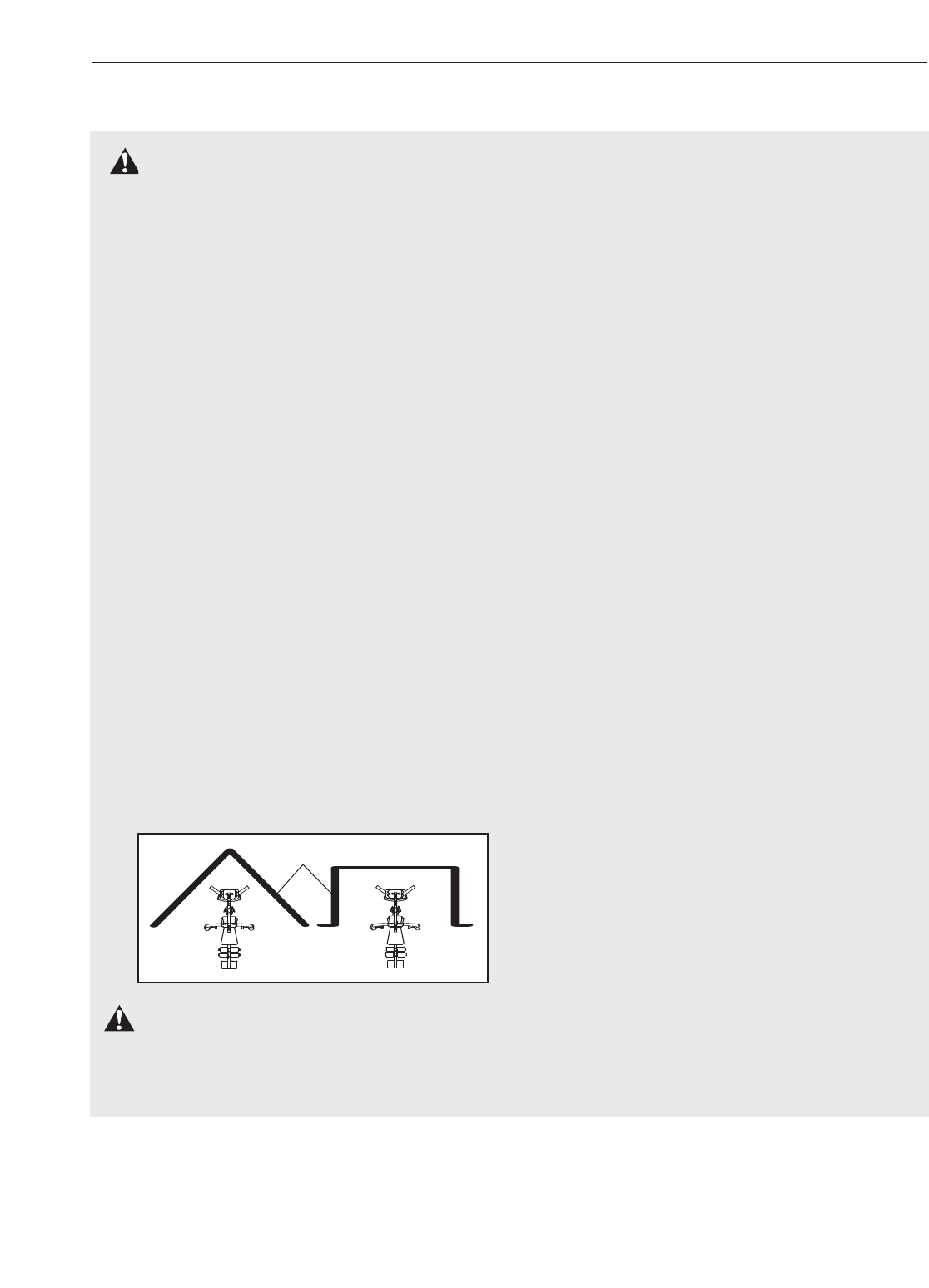
5. This weight system has an open weight
stack; the weight stack must not be accessi-
ble from any point outside the user’s field of
view. To prevent access to the weight stack,
place the weight system in a corner or bay of
aroom, as shown in the drawing below.
There must be no more than 1 meter (3 ft. 4
in.) of clearance between the weight system
and the adjacent walls.
6. Keep children under 12 and pets away from
the weight system at all times.
7. Make sure all parts are properly tightened
each time the weight system is used. Replace
any worn parts immediately.
8. Always wear athletic shoes for foot protec-
tion while exercising.
9. Keep hands and feet away from moving parts.
10. The weight system is designed to support a
maximum user weight of 136 kg (300 lbs.).
11. Always secure the weight stack with the lock
pin and lock after exercising to prevent unau-
thorized use of the weight system (see LOCK-
ING THE WEIGHT STACK on page 18).
12. Make sure that the cables remain on the pul-
leys at all times. If the cables bind as you are
exercising, stop immediately and make sure
that the cables are on the pulleys.
13. Always stand on the foot plate when perform-
ing an exercise that could cause the weight
system to tip.
14. Never release the arms, leg lever, lat bar, or
handle strap while weights are raised. The
weights will fall with great force.
15.
Always disconnect the lat bar from the weight
system when performing an exercise that
does not require the lat bar.
16. If you feel pain or dizziness while exercising,
stop immediately and cool down.
WARNING: Before beginning this or any exercise program, consult your physician. This
is especially important for persons over the age of 35 or persons with pre-existing health problems.
Read all instructions before using. ICON assumes no responsibility for personal injury or property
damage sustained by or through the use of this product.
WARNING: To reduce the risk of serious injury, read the following important precautions
before using the weight system.
IMPORTANT PRECAUTIONS
3
Wall
4
Shroud
High Pulley Station
Low Pulley Station
Right Side
Left Side
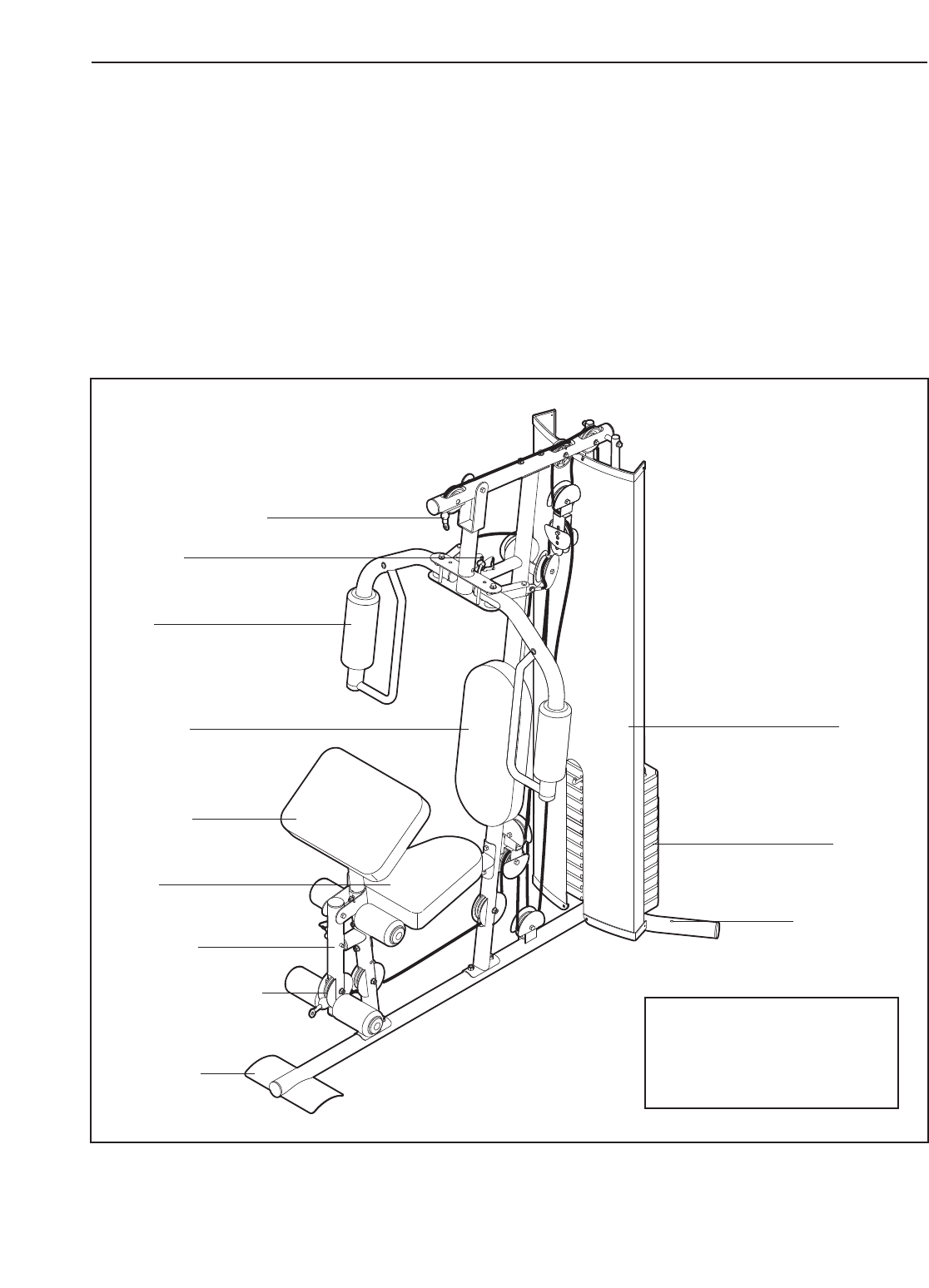
Note: The terms “right
side” and “left side” are
determined relative to a
person sitting on the seat;
they do not correspond to
right and left on the draw-
ings in this manual.
*Use the anchor holes to
secure the weight system
in a fixed position, if
desired.
Backrest
Weights
Leg Lever
Foot Plate
Seat
Anchor Hole*
Arm
Arm Pin
Curl Pad
BEFORE YOU BEGIN
Thank you for selecting the versatile WEIDER®PRO
4000 weight system. The weight system offers a selec-
tion of weight stations designed to develop every
major muscle group of the body. Whether your goal is
totone your body, build dramatic muscle size and
strength, or improve your cardiovascular system, the
weight system will help you to achieve the specific
results you want.
For your benefit, read this manual carefully before
using the weight system. If you have questions after
reading this manual, please see the front cover of this
manual. To help us assist you, please note the product
model number and serial number before contacting us.
The model number is WEEVSY2826.0. The serial
number can be found on a decal attached to the
weight system (see the front cover of this manual).
Before reading further, please review the drawing
below and familiarize yourself with the parts that are
labelled.
ASSEMBLED DIMENSIONS:
Height: 193 cm (76 in.)
Width: 94 cm (37 in.)
Depth: 122 cm (48 in.)
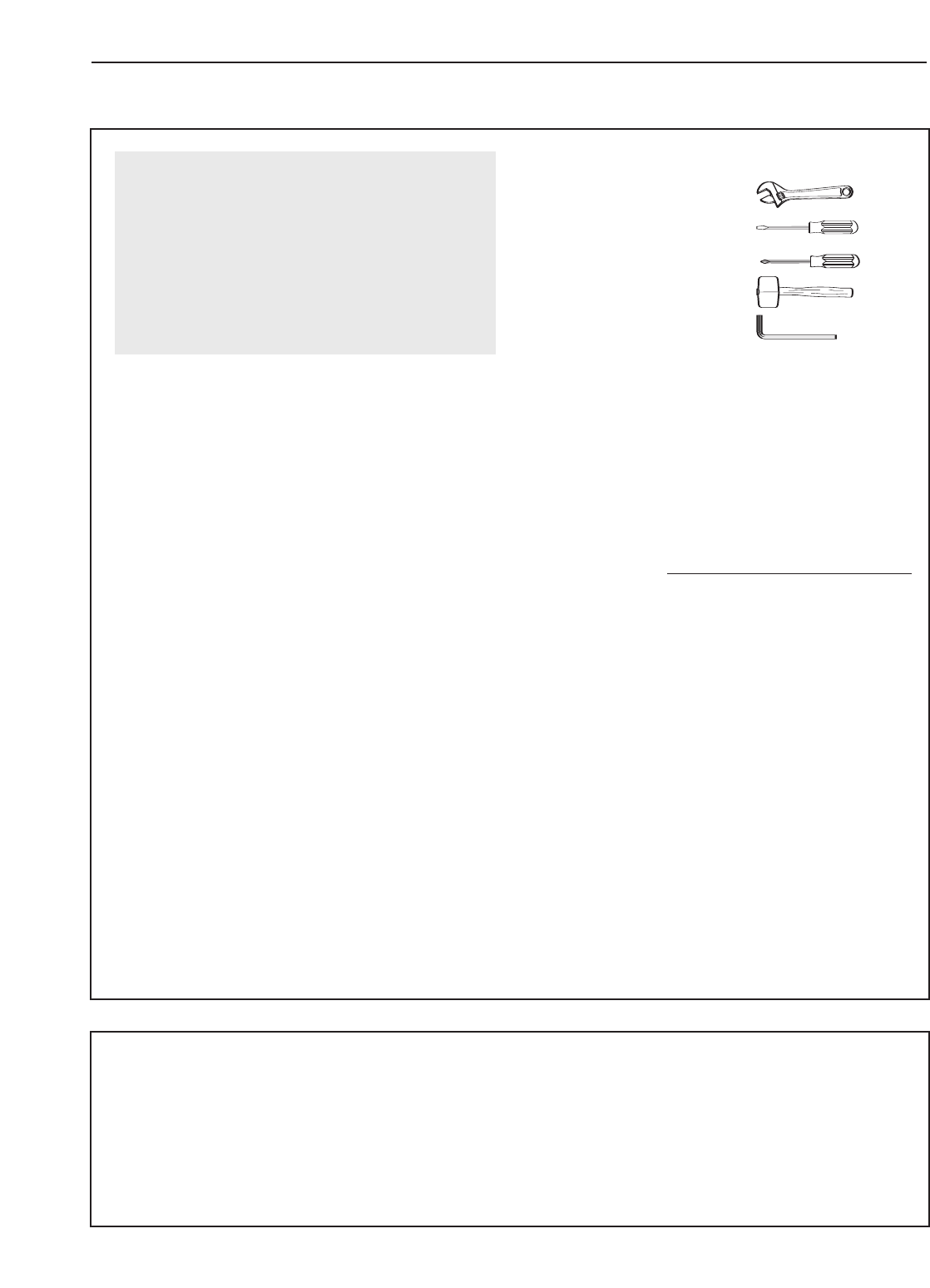
Make sure you have the following tools:
•Two adjustable spanners
•One standard screwdriver
•One phillips screwdriver
•One rubber mallet
•One hex key (included)
• You will also need grease or petroleum jelly, a
small amount of soapy water, and clear tape or
masking tape.
Note: Assembly will be more convenient if you have
asocket set, a set of open-end or closed-end span-
ners, or a set of ratchet spanners.
How to Identify Parts
To help you identify the small parts used in assembly,
we have included a PART IDENTIFICATION CHART
in the centre of this manual. Place the chart on the
floor and use it to easily identify parts during each
assembly step. Note: Some small parts may have
been preattached. If a part is not in the parts
bag, check to see if it has been preattached.
How to Orient Parts
As you assemble the weight system, all parts must
be oriented exactly as shown in the drawings.
Tightening Parts
Tighten all parts as you assemble them, unless
instructed to do otherwise.
Questions?
If you have questions after reading the assembly
instructions, call the telephone number on the front
cover of this manual.
5
Assembly Requires Two Persons
For your convenience and safety, assemble the
weight system with the help of another person.
Set Aside Enough Time
Due to the many features of the weight system, the
assembly process will require several hours. By
setting aside plenty of time and by deciding to
make the task enjoyable, assembly will go smoothly.
You may want to assemble the weight system over
acouple of evenings.
Select a Location for the Weight System
Because of its weight and size, the weight system
should be assembled in the location where it will be
used. Make sure that there is enough room to walk
around the weight system as you assemble it.
How to Unpack the Box
To make assembly as easy as possible, we have
divided the assembly process into four stages. The
parts needed for each stage are found in individual
bags. Important: Wait until you begin each stage
to open the parts bag for that stage. Place all
parts of the weight system in a cleared area and
remove the packing materials. Do not dispose of
the packing materials until assembly is completed.
Make Assembly Easier
Everything in this manual is designed to
ensure that the weight system can be assem-
bled successfully by anyone. Before begin-
ning assembly, make sure to read the
information on this page. This brief intro-
duction will save you much more time than
it takes to read it.
The Four Stages of the Assembly Process
Frame Assembly—You will begin by assembling
the base and the uprights that form the skeleton of
the weight system.
Arm Assembly—During this stage you will
assemble the arms and the leg lever.
Cable Assembly—During this stage you will
attach the cables and pulleys that connect the
arms to the weights.
Seat Assembly—During the final stage you will
assemble the seat and the backrest.
ASSEMBLY
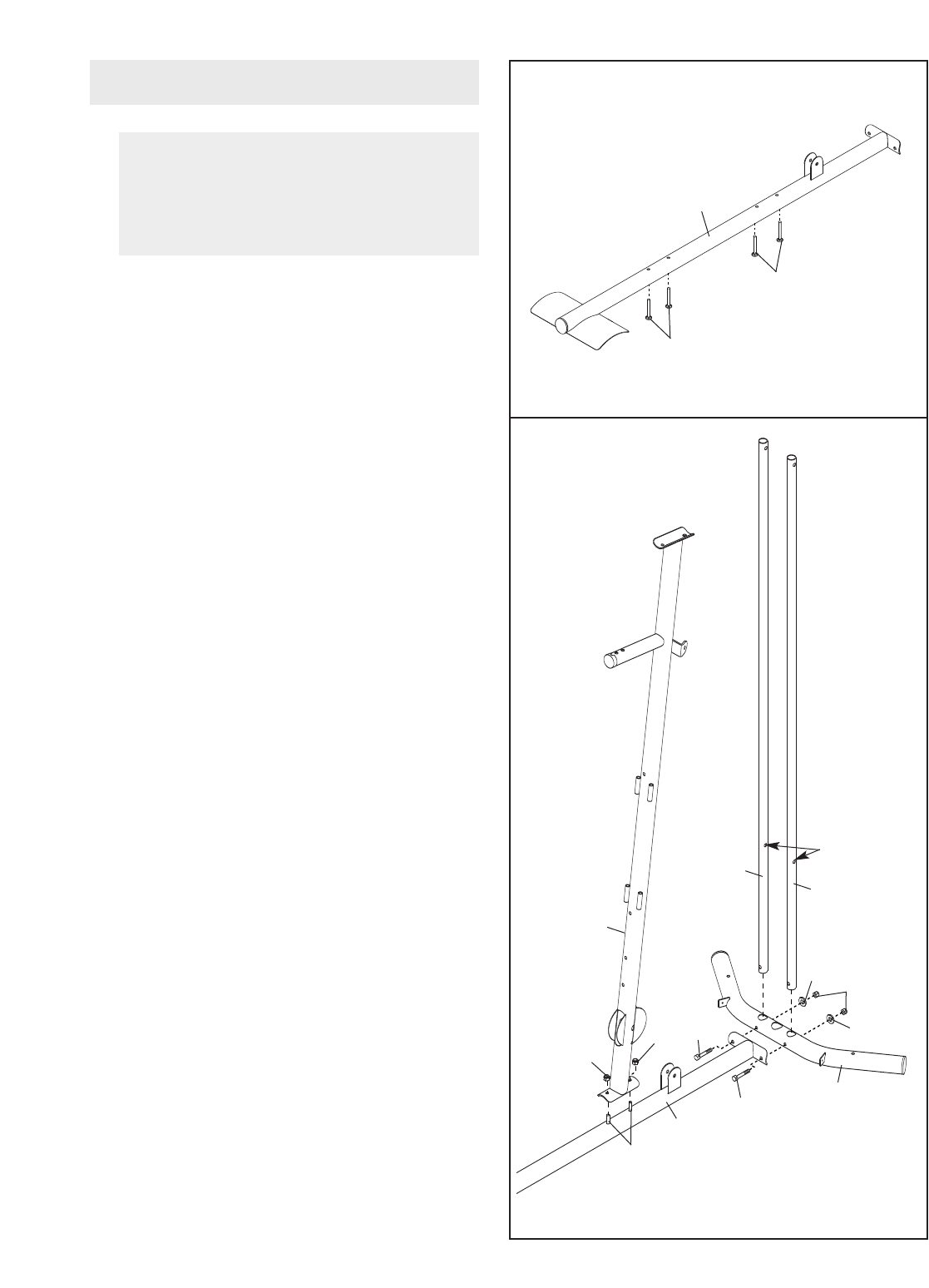
6
2. Orient the two Weight Guides (21) so that the
indicated holes are closer to the lower ends.
Attach the two Weight Guides and the Base (1)
to the Stabilizer (2) with two M10 x 80mm
Button Bolts (71), two M10 Washers (57), and
two M10 Nylon Locknuts (56). Tighten the
Nylon Locknuts.
Attach the Upright (3) to the Base (1) with the
two indicated M8 x 74mm Carriage Bolts (78)
and two M8 Nylon Locknuts (58). Do not tight-
en the Nylon Locknuts yet.
1.
Insert four M8 x 74mm Carriage Bolts (78) up
through the Base (1). Note: It may be helpful
to place a piece of tape over the bolt heads
to hold them in place.
Before beginning assembly, make sure
you understand the information in the
box on page 5. Refer to the PART IDENTI-
FICATION CHART in the centre of this
manual for help identifying small parts.
Frame Assembly 1
1
78
78
2
78
56
58
3
1
58 79
79 2
57
57
21
Holes
21
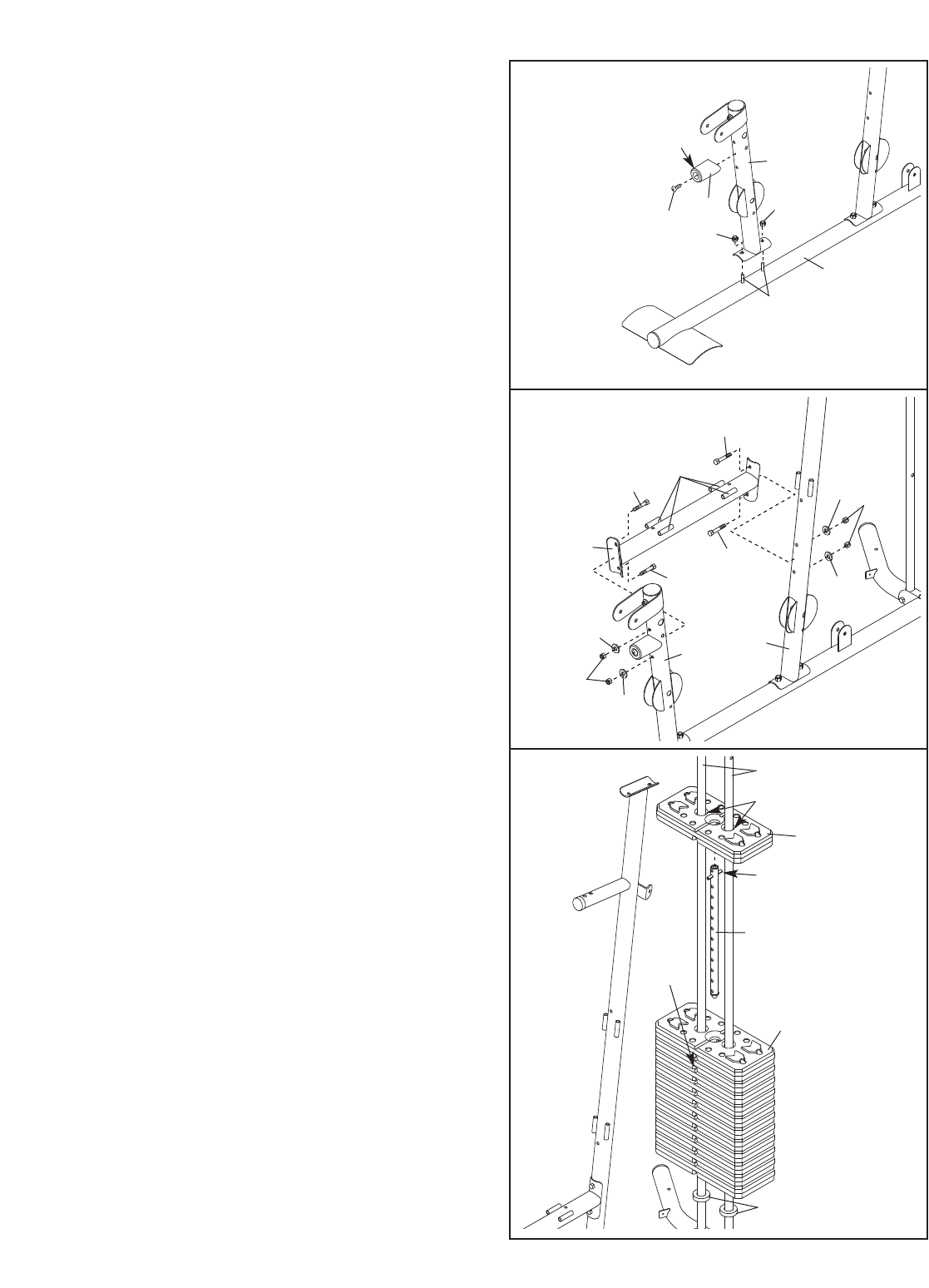
7
3. Attach the Front Leg (7) to the Base (1) with the
two indicated M8 x 74mm Carriage Bolts (78)
and two M8 Nylon Locknuts (58). Donot tight-
en the Nylon Locknuts yet.
Attach the Leg Bumper (60) to the Front Leg (7)
with an M4 x 19mm Screw (69). Make sure the
end of the Leg Bumper is pointing upward.
4. Hold the Seat Frame (6) between the Upright
(3) and the Front Leg (7). Orient the Seat
Frame so that the welded rods are closer to the
Upright.
Attach the Seat Frame (6) to the Upright (3)
with two M8 x 77mm Button Bolts (68), two M8
Washers (59), and two M8 Nylon Locknuts (58).
Do not tighten the Nylon Locknuts yet.
Attach the Seat Frame (6) to the Front Leg
(7) in the same manner.
5. Slide the two Weight Bumpers (27) onto the
Weight Guides (21). Orient eleven Weights (22)
so the pin holes are on the bottom, and slide
the Weights onto the Weight Guides.
Insert the Weight Tube (24) into the eleven
Weights (22). Make sure the pin on the
Weight Tube is oriented as shown.
Using the included grease packet, lubricate the
indicated holes in a Weight (22). Slide the
Weight onto the Weight Guides (21).
3
4
78
58
58
69
Up
60
7
1
6
68
Welded
Rods
68
68
59
59
59
59
3
7
58
58
68
5
22
21
22
27
24
Pin
Pin
Hole
Grease
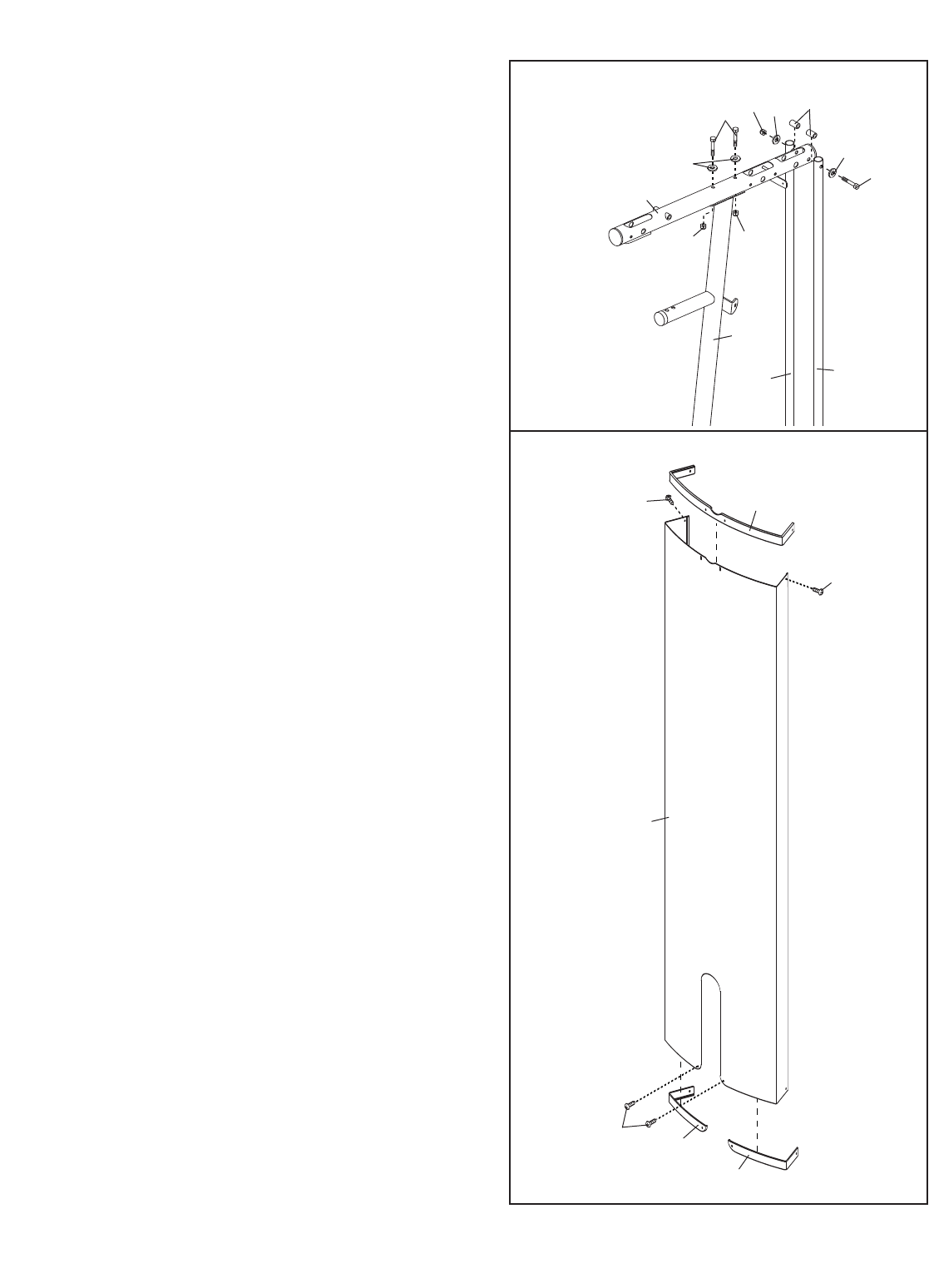
8
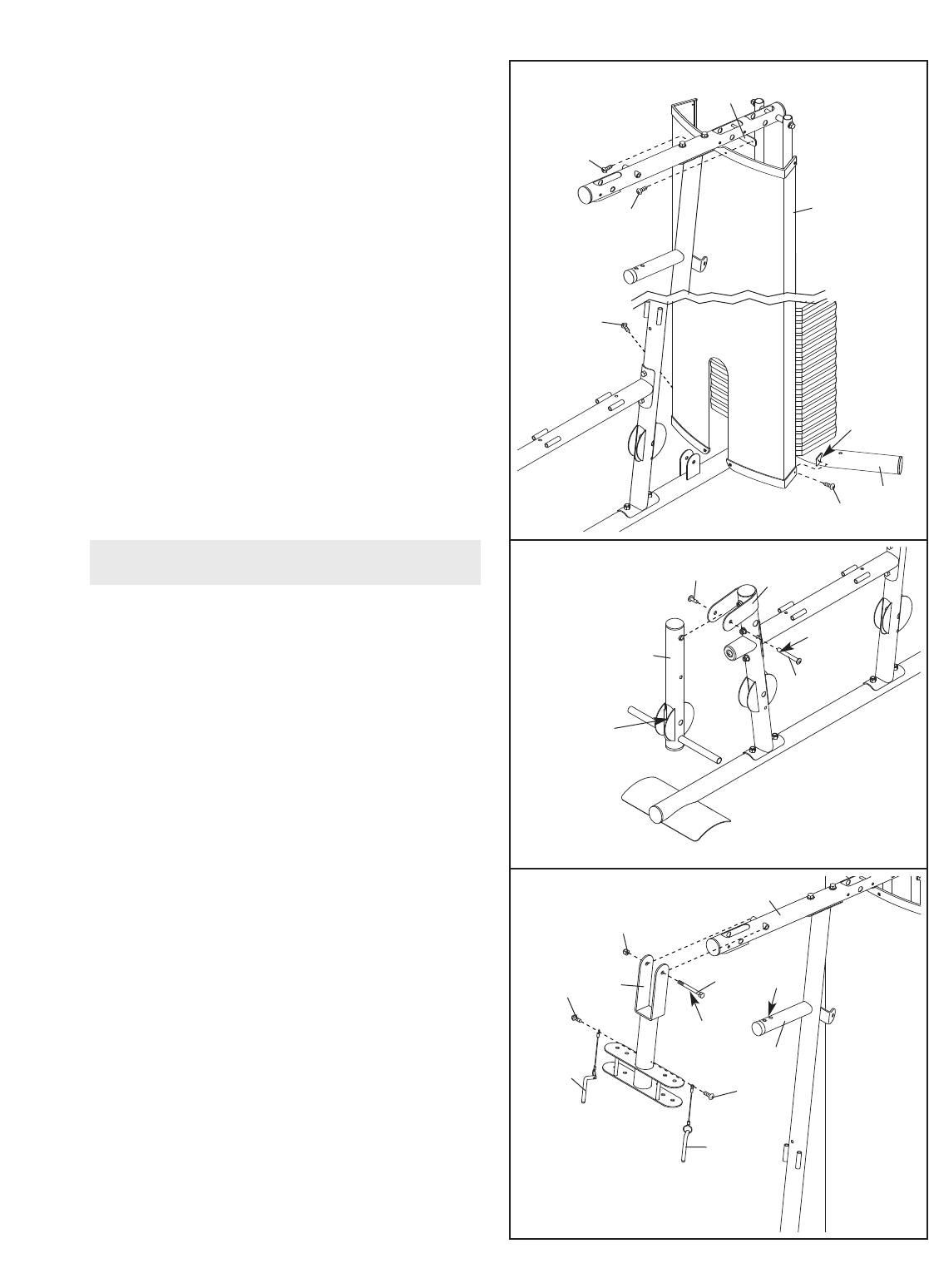
6. Attach the Top Frame (4) to the Upright (3) with
two M8 x 77mm Button Bolts (68), two M8
Washers (59), and two M8 Nylon Locknuts (58).
Do not tighten the Nylon Locknuts yet.
Attach the Top Frame (4) between the Weight
Guides (21) with an M10 x 155mm Button Bolt
(74), two M10 Washers (57), two 13mm
Spacers (76), and an M10 Nylon Locknut (56).
Do not tighten the Nylon Locknuts yet.
7. Attach the Left Cap (19) and the Right Cap (20)
to the bottom of the Shroud (17) with two M4 x
10mm Screws (84).
Attach the Top Cap (18) to the top of the
Shroud (17) with two M4 x 10mm Screws (84).
6
7
4
3
56
58
74
21
21
59
5776
57
68
58
18
84
84
17
20
19
84
9
8. Attach the Shroud (17) to the Top Frame (4)
with two M4 x 16mm Screws (86).
Attach the Shroud (17) to the brackets on the
Stabilizer (2) with two M4 x 16mm Screws (86).
Make sure the brackets are inside the
Shroud.
Tighten the Nylon Locknuts (56, 58) used in
steps 2–6.
9. Grease the M10 x 70mm Bolt Set (73). Orient
the Leg Lever (8) so that the welded support is
on the side shown. Attach the Leg Lever to the
Front Leg (7) with the Bolt Set. Do not over-
tighten the Bolt Set; the Leg Lever must
pivot freely.
10. Grease an M10 x 90mm Button Bolt (67).
Attach the Pivot Frame (5) to the Top Frame (4)
with the Button Bolt and an M10 Nylon Locknut
(56). Do not overtighten the Nylon Locknut;
the Pivot Frame must pivot freely.
Attach the two Arm Pins (40) to the Pivot Frame
(5) with two M4 x 16mm Screws (86). Insert the
Arm Pins into the two holes in the Upright (3).
8
9
10
86
86 17
4
86
86
Bracket
2
73
73
Grease
Welded
Support
7
8
Grease
Holes
5
56
67
86
86
3
40
40
4
Arm Assembly
10
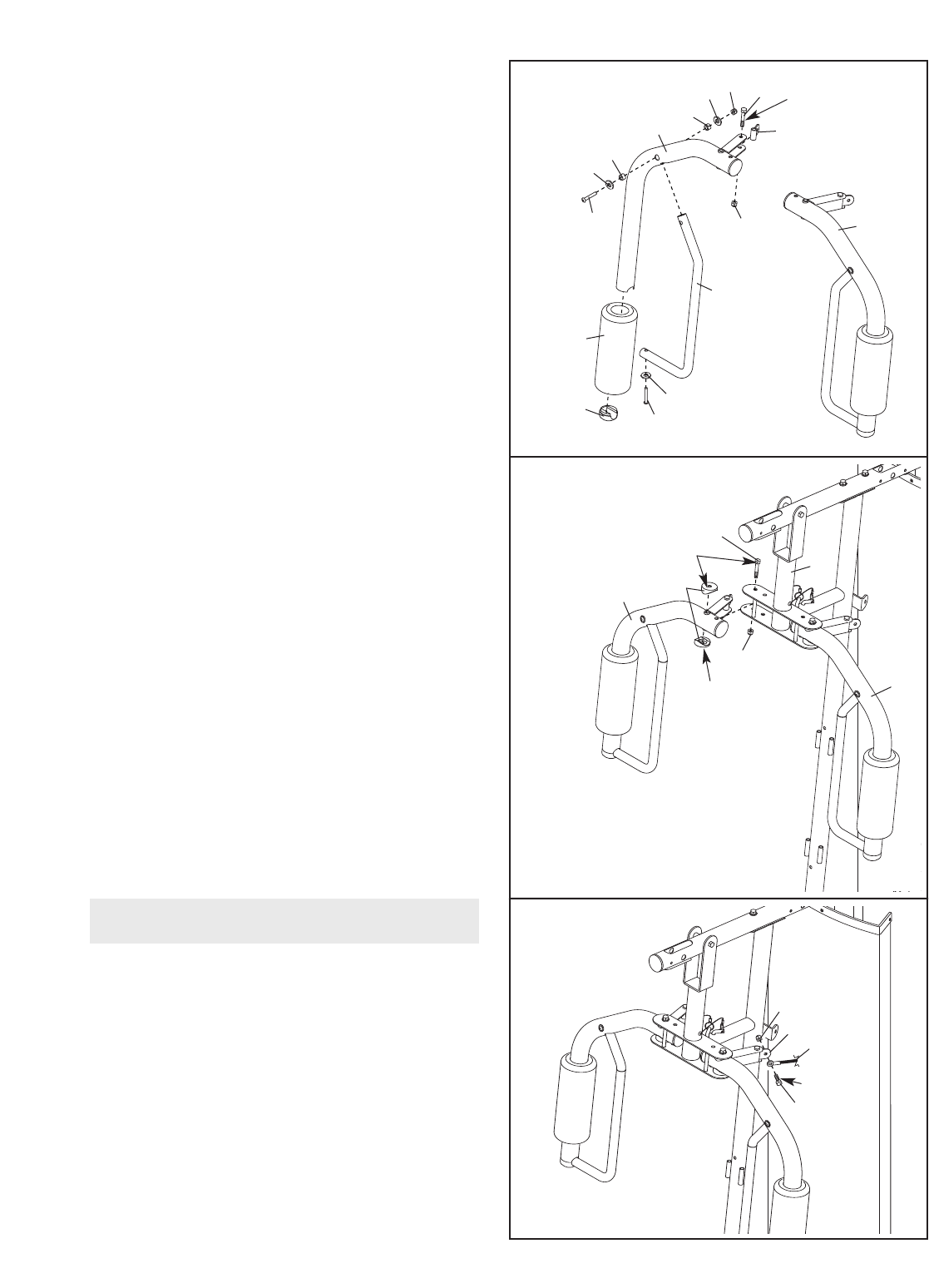
11. Grease an M10 x 52mm Button Bolt (66).
Attach a Cable Pivot (39) to the Right Arm (9)
with the Button Bolt and an M10 Nylon Locknut
(56). Do not overtighten the Nylon Locknut;
the Cable Pivot must pivot freely.
Wet the inside of a Large Foam Pad (42) with
soapy water. Slide the Large Foam Pad onto
the Right Arm (9).
Attach the upper end of a Handle (11) to the
Right Arm (9) with an M10 x 72mm Button Bolt
(85), two M10 Washers (57), two 16mm
Spacers (52), and an M10 Nylon Locknut (56).
Do not tighten the Button Bolt yet.
Press a Handle Cap (31) into the Right Arm (9).
Attach the lower end of the Handle (11) to the
Right Arm with an M10 x 40mm Button Bolt (77)
and an M10 Large Washer (80). Tighten the
M10 x 72mm Button Bolt (85).
Assemble the Left Arm (10) in the same
manner.
12. Grease an M10 x 90mm Button Bolt (67) and
two Arm Bushings (44). Attach the Right Arm
(9) to the Pivot Frame (5) with the Bolt, the two
Arm Bushings, and an M10 Nylon Locknut (56).
Do not overtighten the Nylon Locknut; the
Right Arm must pivot freely.
Attach the Left Arm (10) to the Pivot Frame
(5) in the same manner.
13. Refer to the CABLE DIAGRAMS on page 20
as you identify and assemble the cables.
Identify the Arm Cable (54). Grease an M8 x
19mm Shoulder Bolt (65). Attach the Cable to
the indicated Cable Pivot (39) with the Shoulder
Bolt and an M8 Nylon Locknut (58). Make sure
that the Cable can pivot freely around the
Shoulder Bolt.
11
12
11
10
39
31
77
80
66
52
52
57
85 56
56
57
9
10
42
944
56
5
67
58
65
54
39
Grease
Grease
Grease
Grease
13
Cable Assembly
11
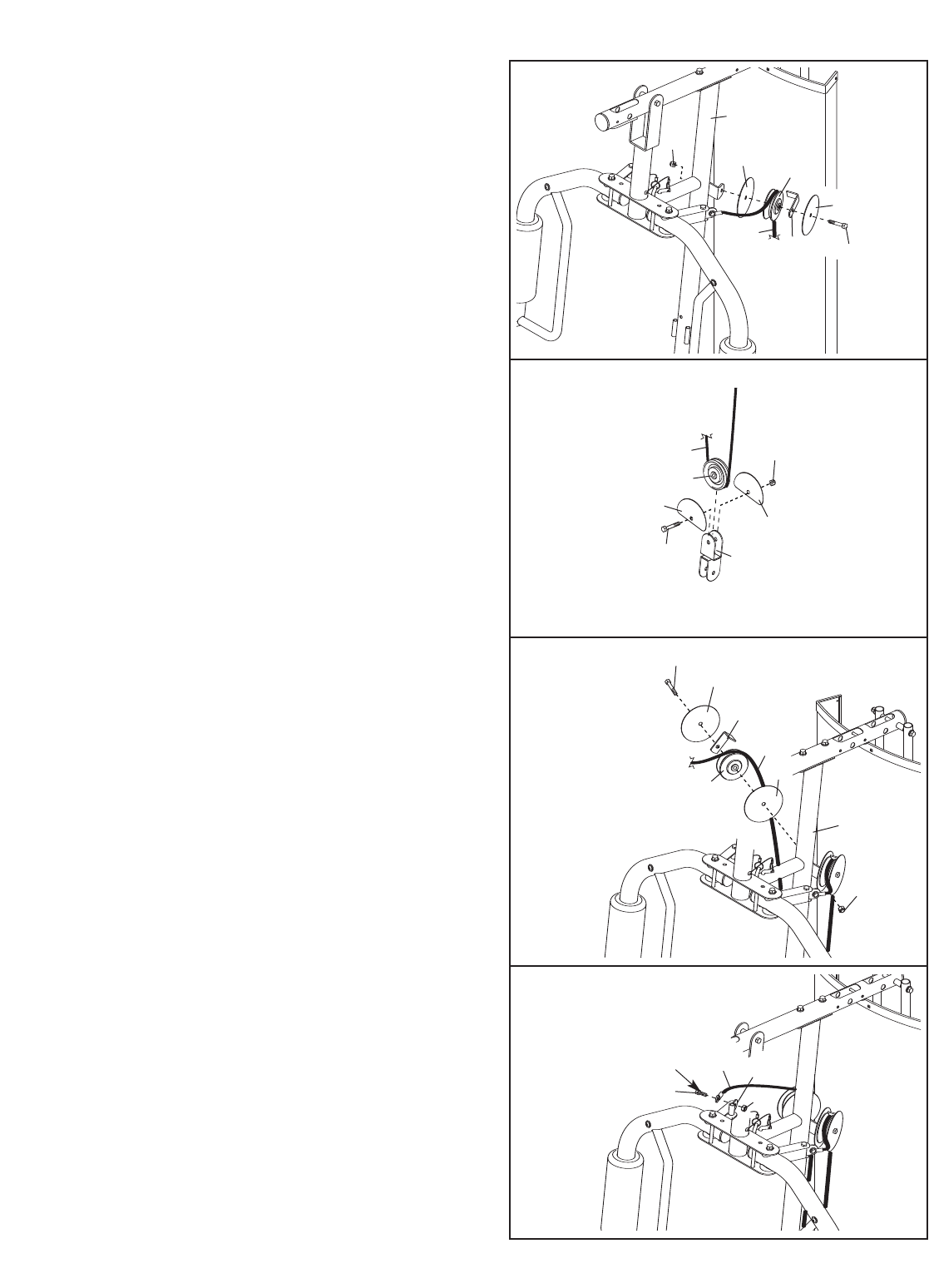
14. Route the Arm Cable (54) over a “V”-pulley
(46). Attach the “V”-pulley, a Large Cable Trap
(50), and two Guards (41) to the Upright (3)
with an M10 x 62mm Button Bolt (75) and an
M10 Nylon Locknut (56). Make sure the Cable
Trap is oriented to hold the Cable in the
groove of the “V”-pulley.
16. Route the Arm Cable (54) over a “V”-pulley
(46). Attach the “V”-pulley,aLarge Cable Trap
(50), and two Guards (41) to the Upright (3)
with an M10 x 62mm Button Bolt (75) and an
M10 Nylon Locknut (56). Make sure the Cable
Trap is oriented to hold the Cable in the
groove of the “V”-pulley.
17. Grease an M8 x 19mm Shoulder Bolt (65).
Attach the Arm Cable (54) to the indicated
Cable Pivot (39) with the Shoulder Bolt and an
M8 Nylon Locknut (58). Make sure that the
Cable can pivot freely around the Shoulder
Bolt.
15. Route the Arm Cable (54) under a 90mm Pulley
(48). Attach the Pulley and two Half Guards
(43) to the Double “U”-bracket (63) with an M10
x45mm Button Bolt (81) and an M10 Nylon
Locknut (56). Make sure the Half Guards are
on the outside of the Double “U”-bracket as
shown.
56
3
46
50
41
75
54
41
14
48
43
43
63
81
56
54
15
16
17
56
3
54
46
50
41
75
41
58
65
54 39
Grease
12
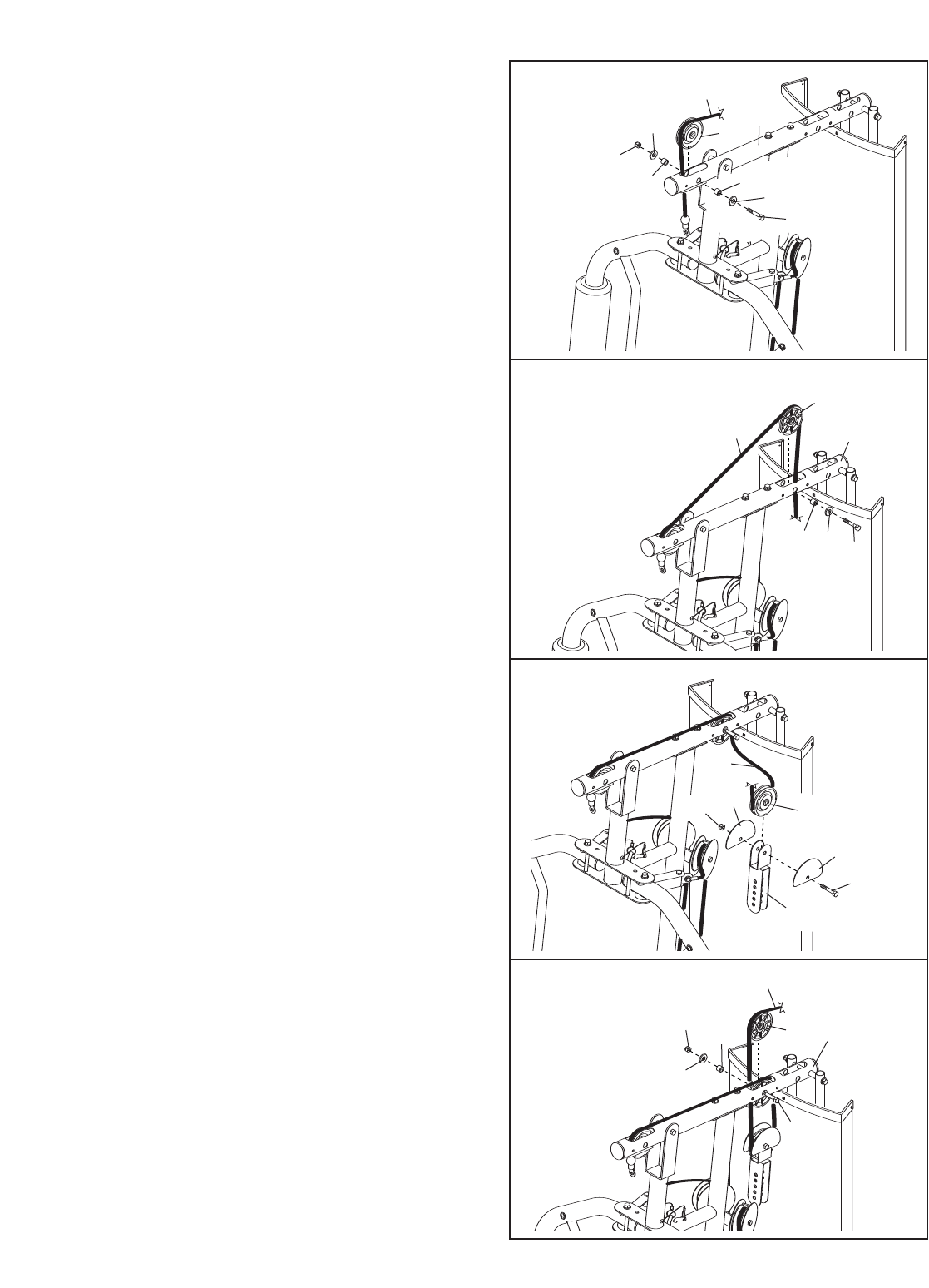
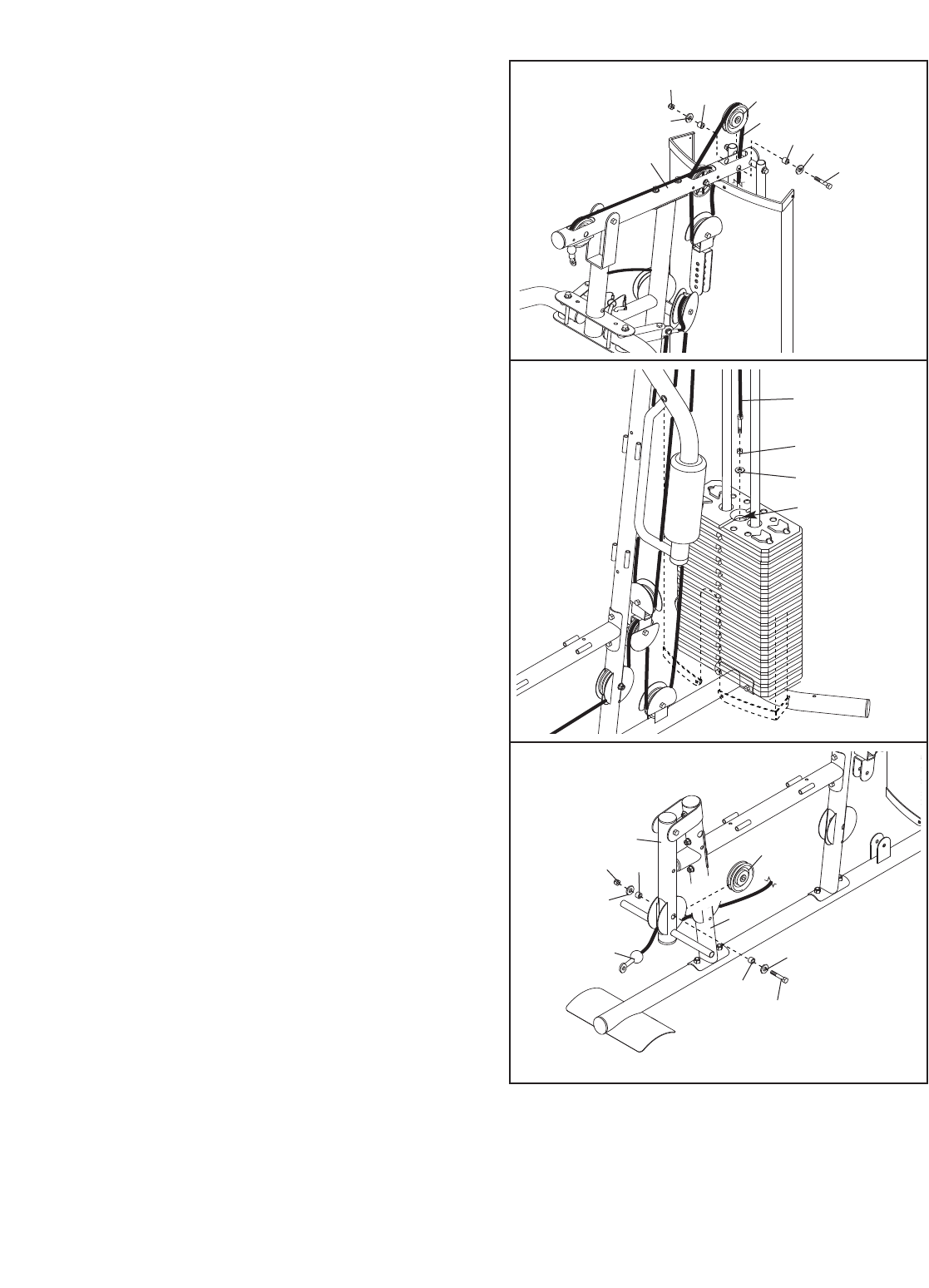
18. Identify the High Cable (55). Route the Cable
up through the Top Frame (4) and over a 90mm
Pulley (48). Attach the Pulley inside of the Top
Frame with an M10 x 78mm Button Bolt (71),
two M10 Washers (57), two 19mm Spacers
(33), and an M10 Nylon Locknut (56).
20. Wrap the High Cable (55) under a 90mm Pulley
(48). Attach the Pulley and two Half Guards
(43) at the upper hole in the Adjustable “U”-
bracket (45) with an M10 x 45mm Button Bolt
(81) and an M10 Nylon Locknut (56). Make
sure that the Half Guards are on the outside
of the Adjustable “U”-bracket.
21. Route the High Cable (55) up through the Top
Frame (4) and over a 90mm Thin Pulley (47).
Attach the Thin Pulley inside of the Top Frame
with the M10 x 78mm Button Bolt (71) used in
step 19, a 19mm Spacer (33), an M10 Washer
(57), and an M10 Nylon Locknut (56).
19. Route the High Cable (55) over a 90mm Thin
Pulley (47) and down through the Top Frame
(4). Attach the Thin Pulley inside of the Top
Frame with an M10 x 78mm Button Bolt (71), an
M10 Washer (57), and a 19mm Spacer (33).
Make sure that the Thin Pulley does not fall
out of the Top Frame while you complete
steps 19 and 20.
18
19
20
21
56
4
55
33 33
57
57
48
71
4
55
33 57
47
71
81
56 48
55
43
43
45
55
47
71
4
33
57
56
13
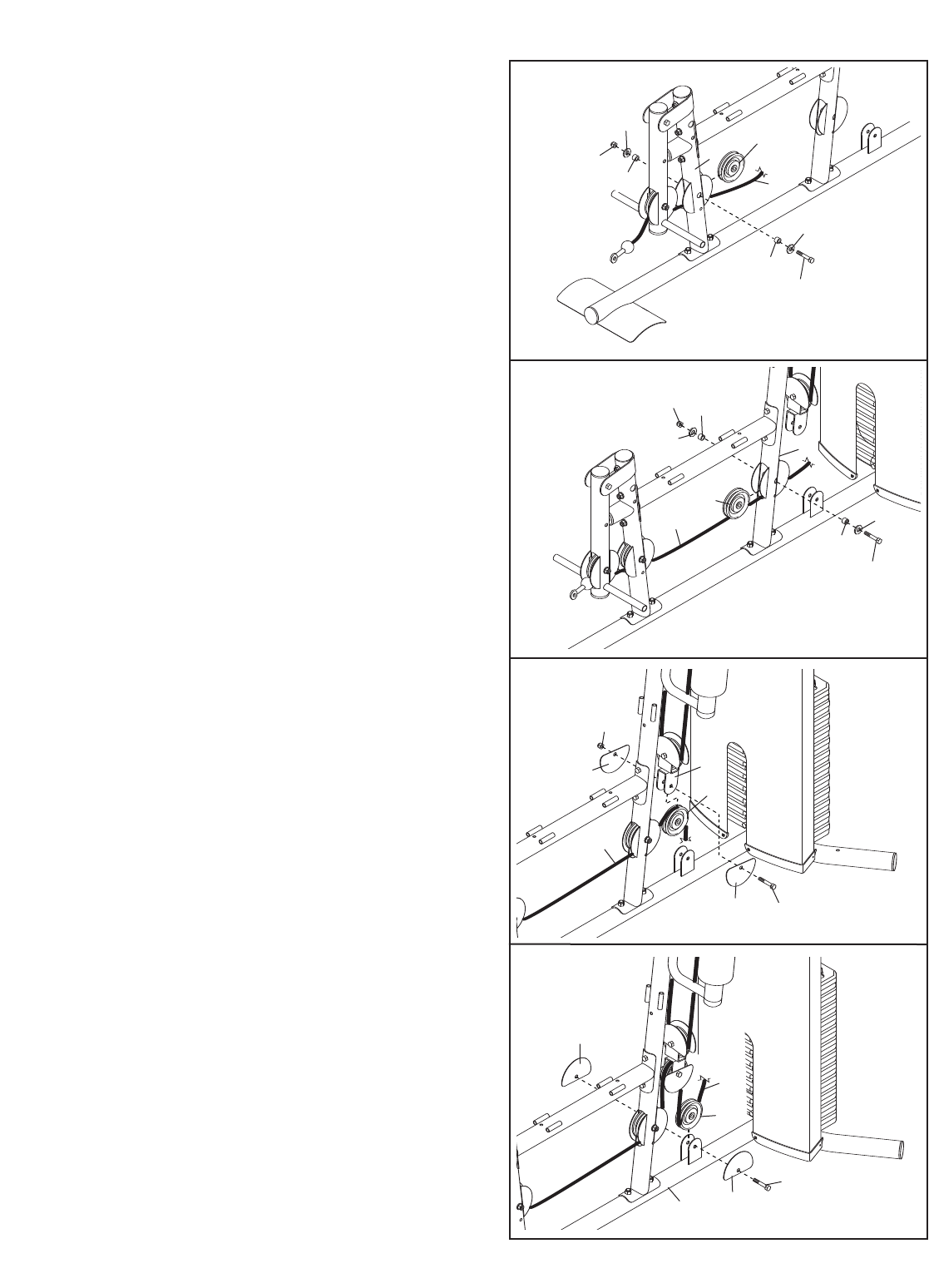
22. Route the High Cable (55) over a 90mm Pulley
(48) and down through the Top Frame (4).
Attach the Pulley inside of the Top Frame with
an M10 x 78mm Button Bolt (71), two M10
Washers (57), two 19mm Spacers (33), and an
M10 Nylon Locknut (56).
24. Identify the Low Cable (53). Route the Cable
through the Leg Lever (8) and the Front Leg (7).
Attach a 90mm Pulley (48) inside of the Leg
Lever (8), over the Low Cable (53), with an M10
x72mm Button Bolt (85), two M10 Washers
(57), two 16mm Spacers (52), and an M10
Nylon Locknut (56).
23. Thread an M12 Nut (87) all the way onto the
High Cable (55). Place a Large Washer (88) on
top of the Weight Tube (24).
Tighten the High Cable (55) into the Weight
Tube (24) until all the slack is removed from the
cables. Tighten the M12 Nut (87) against the
Large Washer (88).
22
23
24
71
55
33
33
48
57
457
56
55
87
88
24
8
7
53
52
52
57
57
48
85
56
14
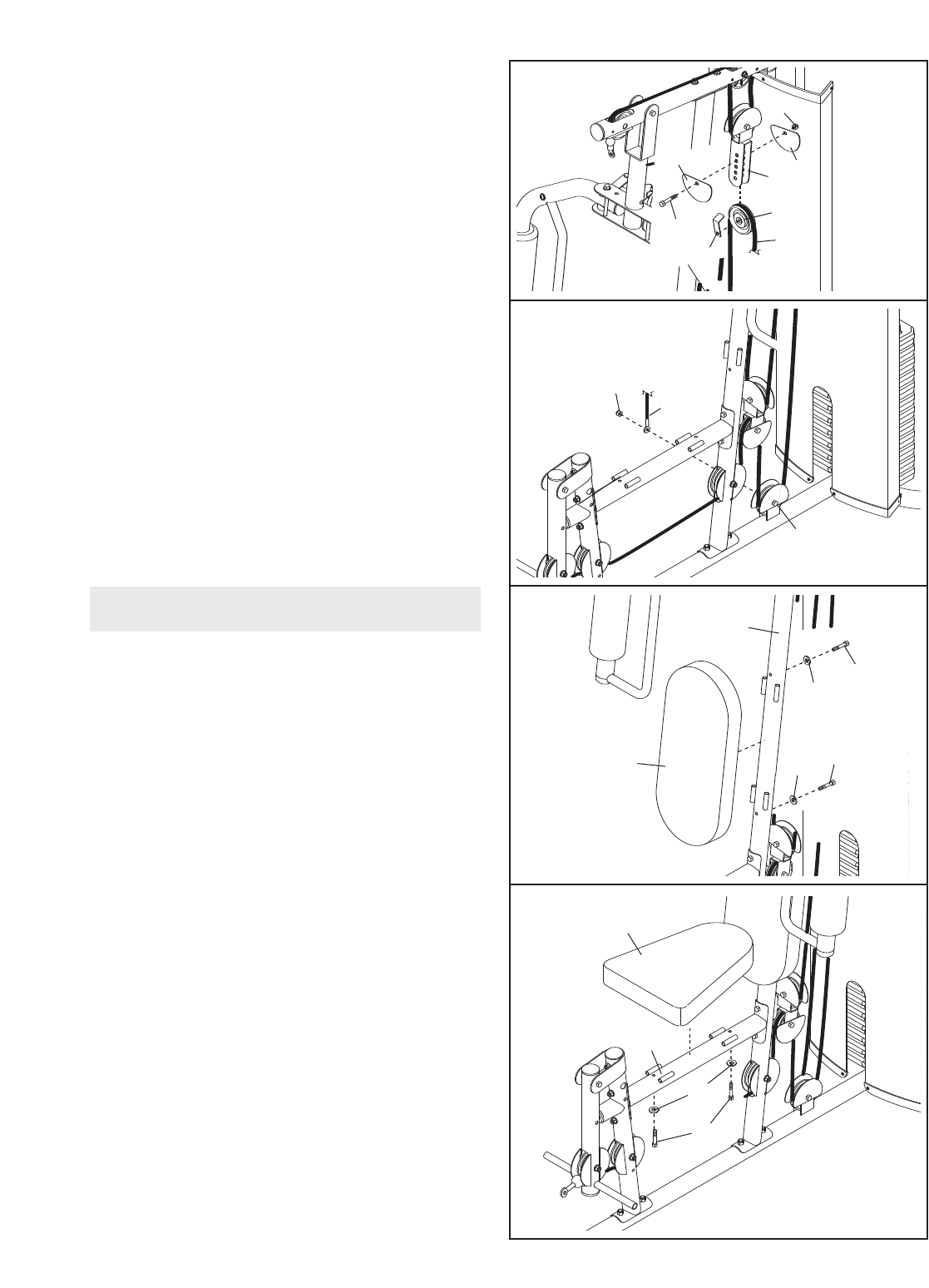
26. Attach a 90mm Pulley (48) inside of the Upright
(3), over the Low Cable (53), with an M10 x
78mm Button Bolt (71), two M10 Washers (57),
two 19mm Spacers (33), and an M10 Nylon
Locknut (56).
28. Route the Low Cable (53) under a 90mm Pulley
(48). Insert an M10 x 52mm Button Bolt (66)
through two Half Guards (43), the Base (1), and
the Pulley. Make sure the Half Guards are on
the outside of the bracket as shown.
27. Route the Low Cable (53) over a 90mm Pulley
(48). Attach the Pulley and two Half Guards
(43) to the Double “U”-bracket (63) with an M10
x45mm Button Bolt (81) and an M10 Nylon
Locknut (56). Make sure the Half Guards are
on the outside of the Double “U”-bracket as
shown.
26
27
28
25. Attach a 90mm Pulley (48) inside of the Front
Leg (7), over the Low Cable (53), with an M10 x
78mm Button Bolt (71), two M10 Washers (57),
two 19mm Spacers (52), and an M10 Nylon
Locknut (56).
25
567
53
33
33
57
57
48
71
56
3
53
33
33
57
57
48
71
56
53
48
43
43 63
81
53
48
43
1
43
66
15
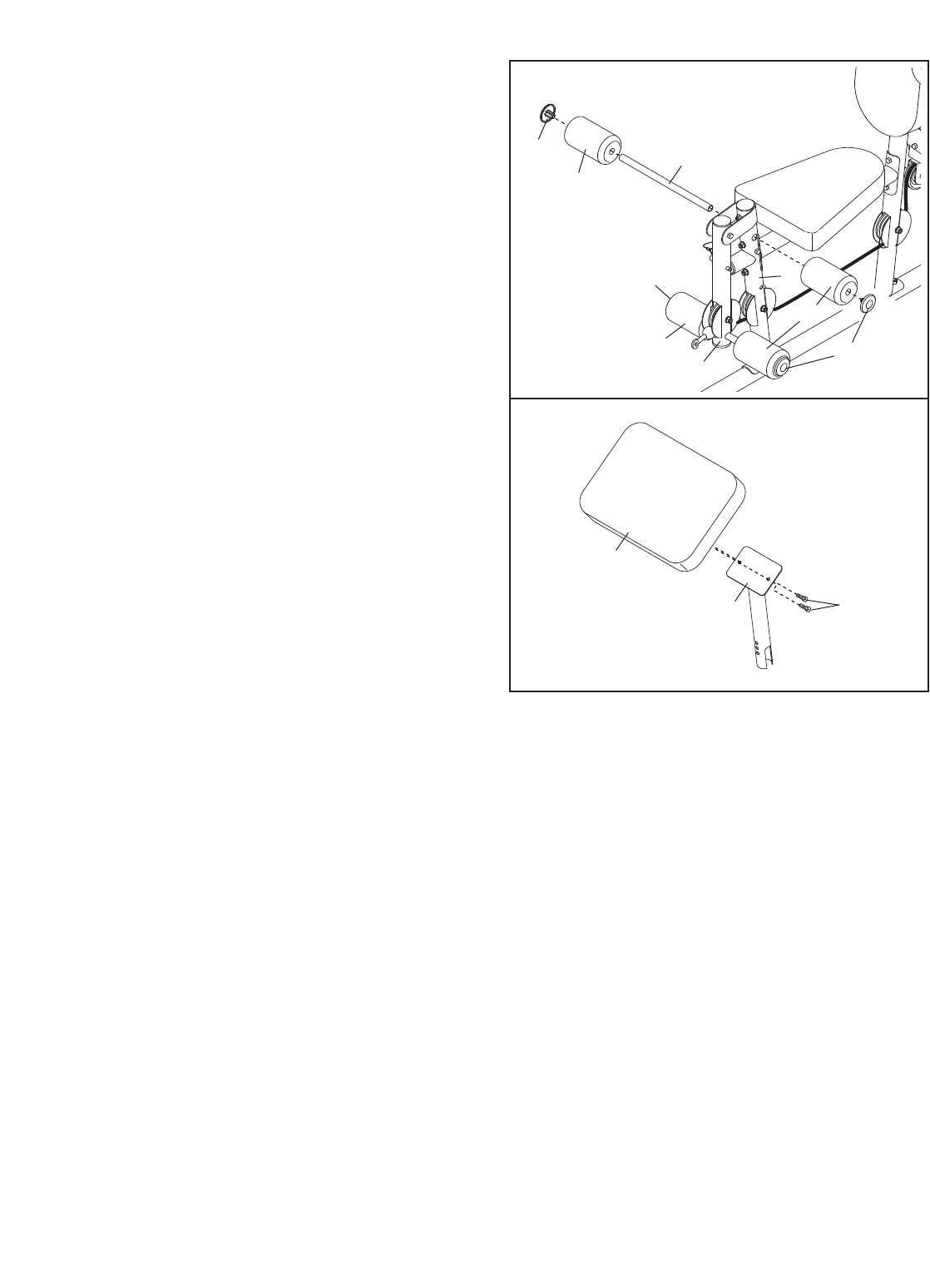
31. Attach the Backrest (16) to the Upright (3) with
two M6 x 80mm Button Screws (70) and two
M6 Washers (82).
30. Attach the Low Cable (53) to the M10 x 52mm
Button Bolt (66) used in step 28 with an M10
Nylon Locknut (56).
32. Attach the Seat (15) to the Seat Frame (6) with
two M6 x 80mm Button Screws (70) and two
M6 Washers (82).
30
31
32
16
70
70
82
82
3
15
82
70
6
Seat Assembly
29. Route the Low Cable (53) over a 90mm Pulley
(48). Attach the Pulley, a Cable Trap (51), and
two Half Guards (43) to the Adjustable “U”-
bracket (45) with an M10 x 52mm Button Bolt
(66) and an M10 Nylon Locknut (56).
29
56
43
43
48
45
66 53
56
53
66
51
16
34. Orient the Curl Pad (14) so that the holes in the
back are closer to the lower edge. Attach the
Curl Pad to the Curl Post (13) with two M6 x
17mm Button Screws (62).
35. Make sure that all parts have been properly tightened. The use of the remaining parts will be explained in
ADJUSTMENTS, beginning on the following page.
Before using the weight system, pull each cable a few times to make sure that the cables move smoothly
around the pulleys. If one of the cables does not move smoothly,find and correct the problem. IMPORTANT:
If the cables are not properly installed, they may be damaged when heavy weight is used. See the
CABLE DIAGRAMS on page 20 of this manual for proper cable routing. If there is any slack in the
cables, you will need to remove the slack by tightening the cables. See MAINTENANCE on page 21.
33. Insert the Pad Tube (29) into the Front Leg (7).
Slide two Small Foam Pads (28) onto the Pad
Tube. Then, press two Pad Caps (34) onto the
Pad Tube.
Slide two Small Foam Pads (28) onto the Leg
Lever (8). Press two Pad Caps (34) onto the
Leg Lever.
33
29
8
28
7
34
34
28 34
28
14
13 62
34
This section explains how to adjust the weight system. See the EXERCISE GUIDELINES on page 22 for impor-
tant information about how to get the most benefit from your exercise program. Also, refer to the accompanying
exercise guide to see the correct form for each exercise.
Make sure all parts are properly tightened each time the weight system is used. Replace any worn parts immediate-
ly. The weight system can be cleaned with a damp cloth and a mild, non-abrasive detergent. Do not use solvents.
17
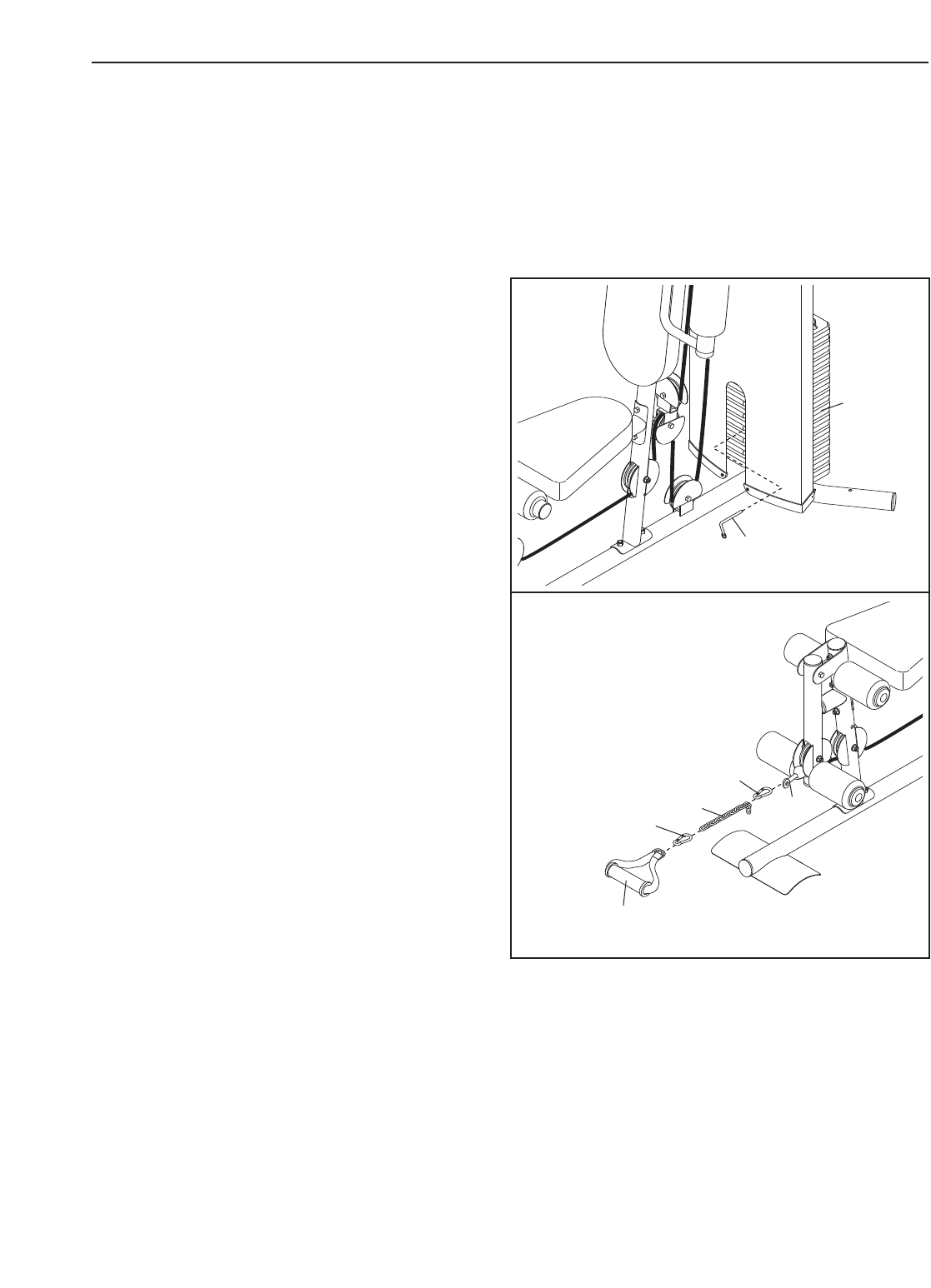
CHANGING THE WEIGHT SETTING
To change the setting of the weight stack, insert the
Weight Pin (26) under the desired Weight (22).
Insert the Weight Pin so that the bent end touches
the Weight, and then turn the bent end downward.
Note: Do not use the top weight by itself.
Note: Due to the cables and pulleys, the amount
of resistance at each exercise station may vary
from the weight setting. Use the WEIGHT
RESISTANCE CHART on page 19 to find the
approximate amount of resistance at each
weight station.
37
37
26
22
25
ATTACHING THE ACCESSORIES TOAPULLEY
STATION
Attach the Ankle Strap (38) to the Low Cable (53) at
the low pulley station with a Cable Clip (37). For
some exercises, the Chain (25) should be attached
between the Ankle Strap and the Cable with two
Cable Clips. Adjust the length of the Chain
between the Ankle Strap and the Cable so that
the Handle Strap is in the correct starting posi-
tion for the exercise to be performed.
The Lat Bar (not shown) or the Ankle Strap (38) can
be attached at either pulley station in the same man-
ner.
38
53
ADJUSTMENTS
18
5
10
9
21
64
12
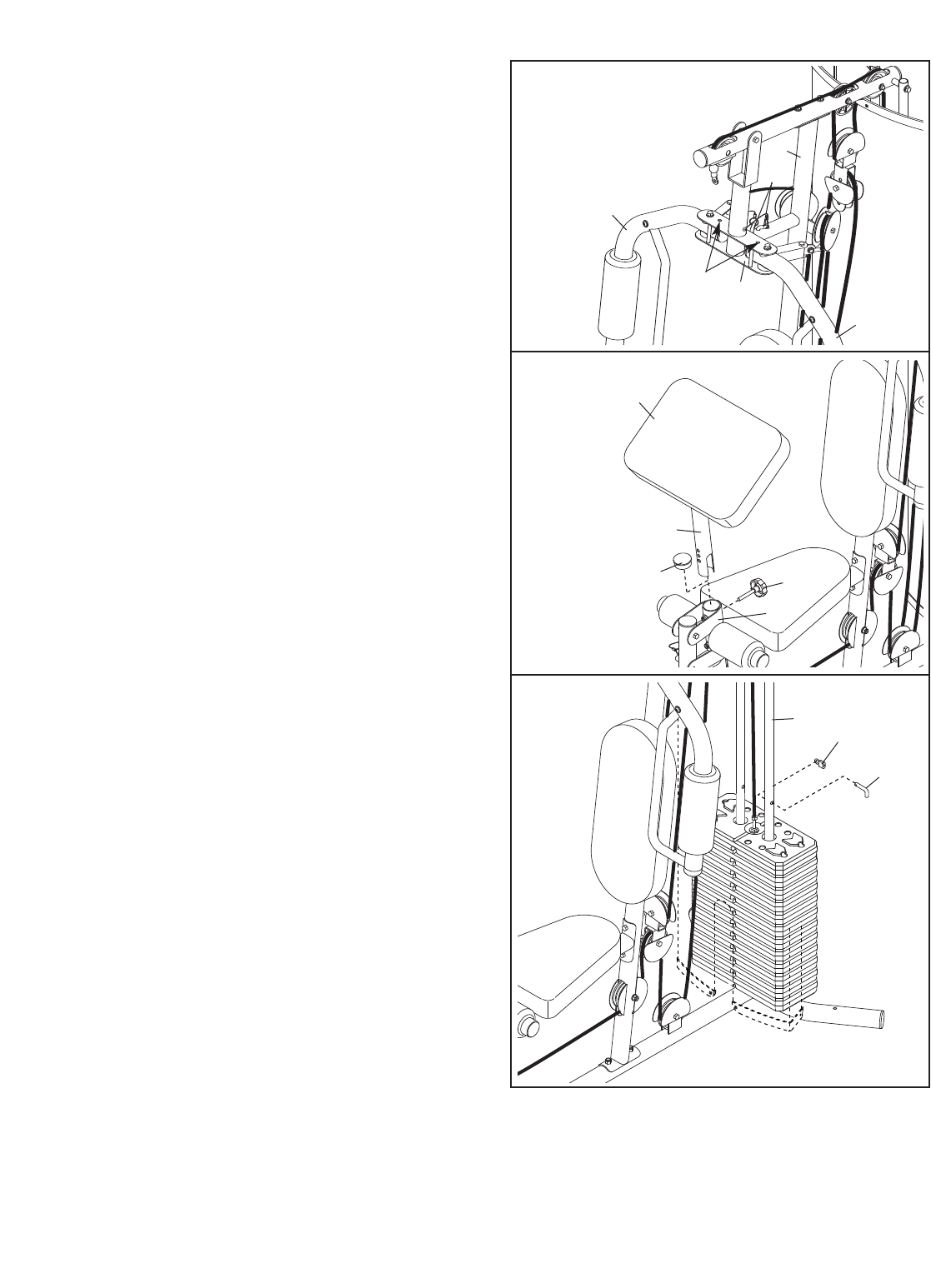
ARM CONVERSION
To use the Arms (9, 10) as butterfly arms, insert the
Arm Pins (40) into the holes in the Upright (3) and
the Pivot Frame (5) as shown.
To use the Arms (9, 10) as press arms, insert the
Arm Pins (40) into the holes in the Pivot Frame (5)
and the Arms.
40
3
Holes
LOCKING THE WEIGHT STACK
Lock the weight stack by inserting the Lock Pin (64)
through a Weight Guide (21) and securing the Lock
(12) onto the Lock Pin.
13
61
14
7
30
USING THE CURL PAD
To use the Curl Pad (14), remove the 64mm Round
Inner Cap (30) from the Front Leg (7). Insert the
Curl Post (13) into the Front Leg and secure it in
place with the Curl Knob (61).
When performing an exercise that does not require
the Curl Pad (14), remove the Curl Pad and insert
the 64mm Round Inner Cap (30) into the Front Leg
(7). Store the Curl Pad away from the weight system.

19
WEIGHT RESISTANCE CHART
The chart below shows the approximate weight resistance at each exercise station. “Top” refers to the 6 lb. top
weight. The other numbers refer to the 12.5 lb. weight plates. Weight resistance shown for the butterfly arm sta-
tion is for each arm. Note: The actual resistance at each station may vary due to differences in individual
weight plates as well as friction between the cables, pulleys, and weight guides.
WEIGHT
HIGH
PULLEY
(lbs.)
BUTTERFLY
ARM
(lbs.)
PRESS
ARM
(lbs.)
LOW
PULLEY
(lbs.)
LEG
LEVER
(lbs.)
125 16 30 42 40
240 20 40 51 51
352 27 51 66 70
466 33 62 80 84
582 39 78 98 102
691 45 90 112 115
7106 52 101 128 136
8120 58 110 140 156
9138 65 126 159 167
10 151 70 142 174 183
11164 75 152 189 195
12 184 81 160 196 210
Note: 1 lb. equals .454 kg.
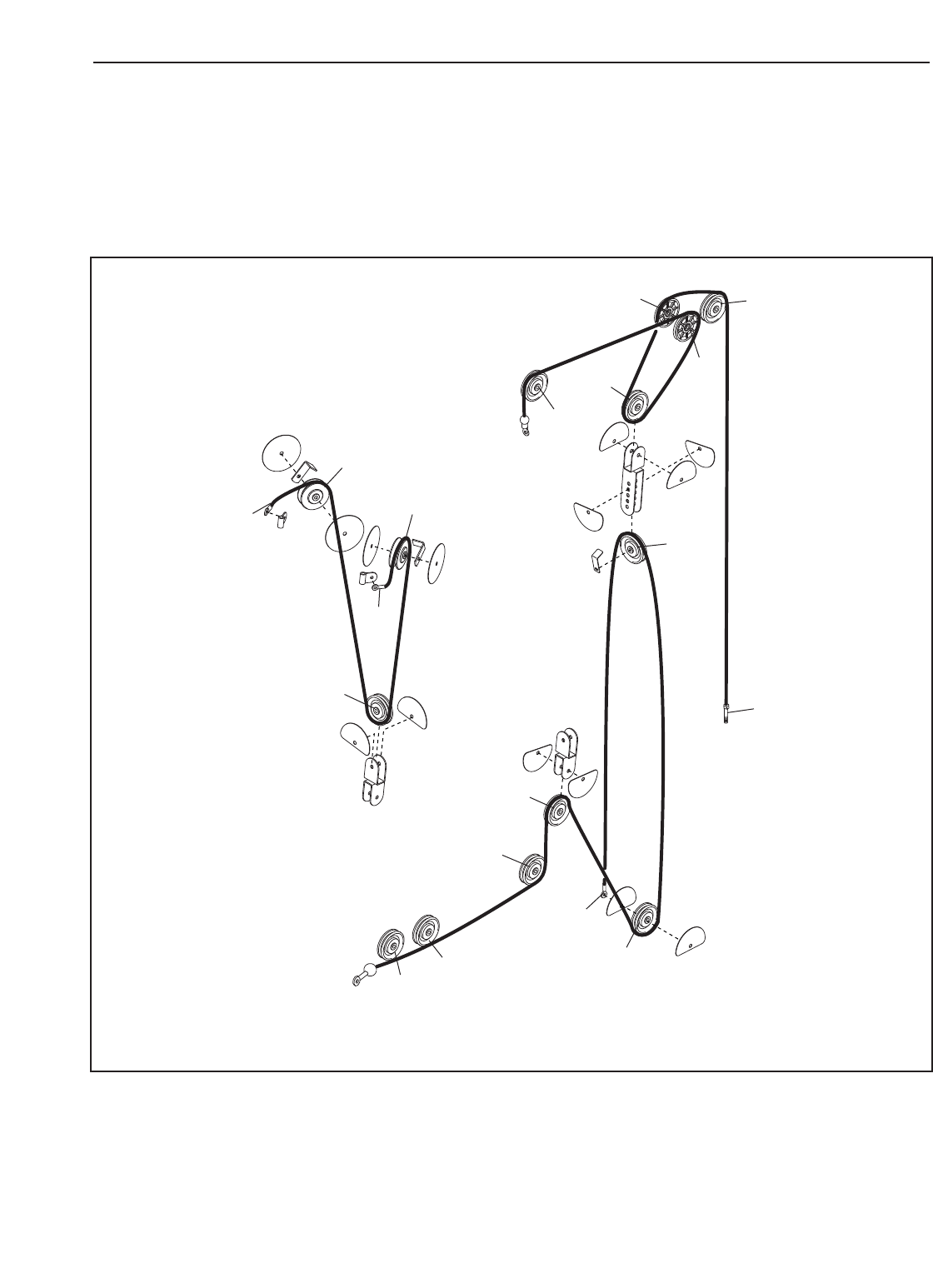
CABLE DIAGRAMS
The cable diagrams below show the proper routing of the Low Cable (53), the Arm Cable (54), and the High
Cable (55). Use the diagrams to make sure that the cables, cable traps, and finger guards have been assem-
bled correctly. If the cables have not been correctly routed, the weight system will not function properly and dam-
age may occur. The numbers show the correct route for each cable. Make sure that the cable traps do not
touch or bind the cables.
1
2
4
2
3
45
5
Arm Cable (54)
Length: 259 cm (102 in.)
High Cable (55)
Length: 292 cm (115 in.)
Low Cable (53)
Length: 424 cm (167 in.)
3
1
6
1
2
3
4
5
7
6
20
Make sure all parts are properly tightened each time the weight system is used. Replace any worn parts imme-
diately. The weight system can be cleaned with a damp cloth and a mild, non-abrasive detergent. Do not use
solvents.
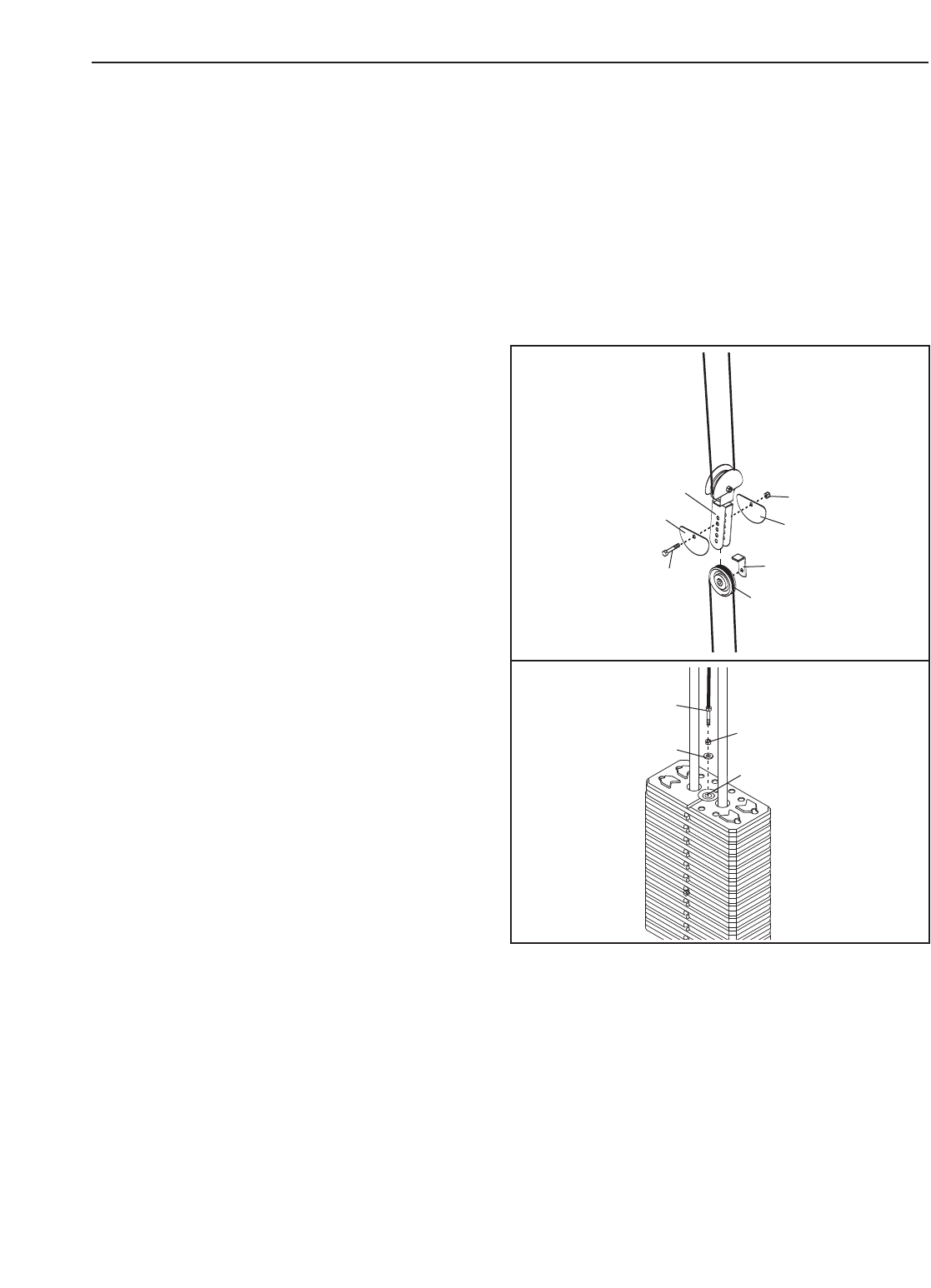
TIGHTENING THE CABLES
Woven cable, the type of cable used on the weight system, can stretch slightly when it is first used. If there is
slack in the cables before resistance is felt, the cables should be tightened. To tighten the cables, first insert the
weight pin into the middle of the weight stack. Slack can be removed from these cables several ways:
21
See drawing 1. Remove the M10 Nylon Locknut
(56) and the M10 x 52mm Button Bolt (66) from the
Adjustable “U”-bracket (45), the Cable Trap (51),
the 90mm Pulley (48), and the two Half Guards
(43). Reattach the Pulley, Cable Trap, and Half
Guards to the next closest hole to the center of the
Adjustable “U”-bracket. Make sure that the Cable
Trap is oriented to hold the cable in the groove
of the Pulley, that the Half Guards are oriented
as shown, and that the Cable and Pulley move
smoothly.
See drawing 2. Loosen the M12 Nut (87) on the
High Cable (55). Tighten the Cable into the Weight
Tube (24) until the slack is removed from the Cable.
Then, retighten the M12 Nut against the Large
Washer (88).
48
51
66
43
43
56
45
1
87
88
24
2
Do not overtighten the cables. If the cables are overtightened, the top weight will be lifted off the weight
stack. If a cable tends to slip off the pulleys often, it may have become twisted. Remove the cable and
re-install it. If the cables need to be replaced, see ORDERING REPLACEMENT PARTS on the back cover of
this manual.
55
MAINTENANCE

22
EXERCISE GUIDELINES
THE FOUR BASIC TYPES OF WORKOUTS
Muscle Building
Toincrease the size and strength of your muscles,
push them close to their maximum capacity. Your mus-
cles will continually adapt and grow as you progres-
sively increase the intensity of your exercise. You can
adjust the intensity level of an individual exercise in
two ways:
•by changing the amount of resistance used
•by changing the number of repetitions or sets per-
formed. (A “repetition” is one complete cycle of an
exercise, such as one sit-up. A “set” is a series of
repetitions.)
The proper amount of resistance for each exercise
depends upon the individual user. You must gauge
your limits and select the amount of resistance that is
right for you. Begin with 3 sets of 8 repetitions for each
exercise you perform. Rest for 3 minutes after each
set. When you can complete 3 sets of 12 repetitions
without difficulty, increase the amount of resistance.
Toning
You can tone your muscles by pushing them to a mod-
erate percentage of their capacity. Select a moderate
amount of resistance and increase the number of rep-
etitions in each set. Complete as many sets of 15 to
20 repetitions as possible without discomfort. Rest for
1minute after each set. Work your muscles by com-
pleting more sets rather than by using high amounts of
resistance.
Weight Loss
To lose weight, use a low amount of resistance and
increase the number of repetitions in each set.
Exercise for 20 to 30 minutes, resting for a maximum
of 30 seconds between sets.
Cross Training
Cross training is an efficient way to get a complete and
well-balanced fitness program. An example of a bal-
anced program follows:
•Plan strength training workouts on Monday,
Wednesday, and Friday.
•Plan 20 to 30 minutes of aerobic exercise, such as
running on a treadmill or riding on an exercise cycle
or an elliptical exerciser, on Tuesday and Thursday.
•Rest from both strength training and aerobic exercise
for at least one full day each week to give your body
time to regenerate.
The combination of strength training and aerobic exer-
cise will reshape and strengthen your body, plus devel-
op your heart and lungs.
PERSONALISING YOUR EXERCISE PROGRAM
Determining the exact length of time for each workout,
aswell as the number of repetitions or sets completed,
is an individual matter. It is important to avoid overdo-
ing it during the first few months of your exercise pro-
gram. You should progress at your own pace and be
sensitive to your body’s signals. If you experience pain
or dizziness at any time while exercising, stop immedi-
ately and begin cooling down. Find out what is wrong
before continuing. Remember that adequate rest and a
proper diet are important factors in any exercise pro-
gram.
WARMING UP
Begin each workout with 5 to 10 minutes of stretching
and light exercise to warm up. Warming up prepares
your body for more strenuous exercise by increasing
circulation, raising your body temperature and deliver-
ing more oxygen to your muscles.
WORKING OUT
Each workout should include 6 to 10 different exercis-
es. Select exercises for every major muscle group,
emphasizing areas that you want to develop most. To
give balance and variety to your workouts, vary the
exercises from session to session.
Schedule your workouts for the time of day when your
energy level is the highest. Each workout should be
followed by at least one day of rest. Once you find the
schedule that is right for you, stick with it.
EXERCISE FORM
Maintaining proper form is an essential part of an
effective exercise program. This requires moving
through the full range of motion for each exercise, and
moving only the appropriate parts of the body.
Exercising in an uncontrolled manner will leave you
feeling exhausted. On the exercise guide accompany-
ing this manual you will find photographs showing the
correct form for several exercises, and a list of the
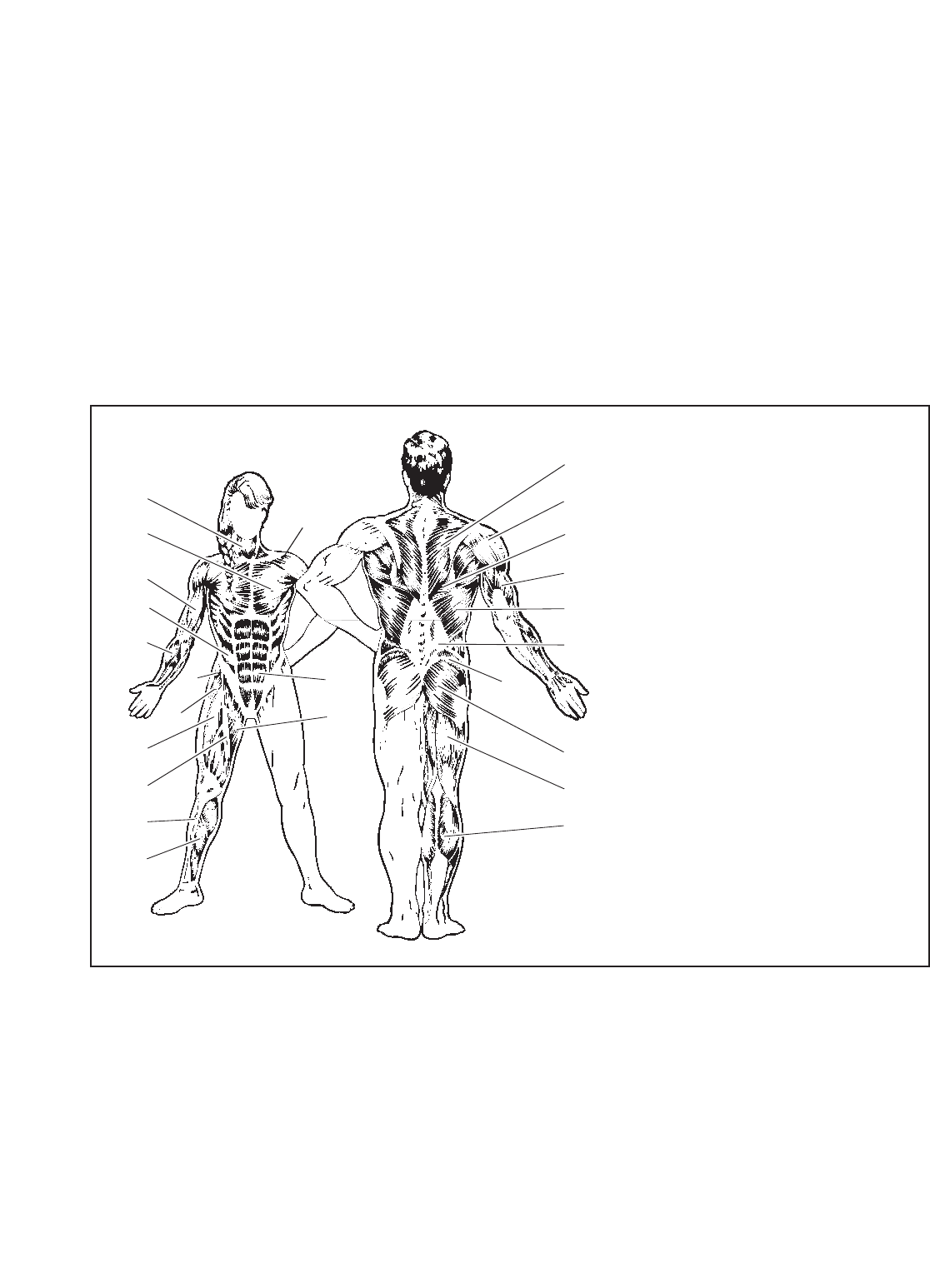
muscles affected. Refer to the muscle chart on the
next page to find the names of the muscles.
The repetitions in each set should be performed
smoothly and without pausing. The exertion stage of
each repetition should last about half as long as the
return stage. Proper breathing is important. Exhale
during the exertion stage of each repetition and inhale
during the return stroke. Never hold your breath.
23
Rest for a short period of time after each set. The
ideal resting periods follow:
•Rest for three minutes after each set for a muscle
building workout.
•Rest for one minute after each set for a toning work-
out.
•Rest for 30 seconds after each set for a weight loss
workout.
Plan to spend the first couple of weeks familiarizing
yourself with the equipment and learning the proper
form for each exercise.
COOLING DOWN
End each workout with 5 to 10 minutes of stretching.
Include stretches for both your arms and legs. Move
slowly as you stretch and do not bounce. Ease into
each stretch gradually and go only as far as you can
without strain. Stretching at the end of each workout
is an effective way to increase flexibility.
STAYING MOTIVATED
For motivation, keep a record of each workout. List the
date, the exercises performed, the resistance used,
and the numbers of sets and repetitions completed.
Record your weight and key body measurements at
the end of every month. Remember, the key to achiev-
ing the greatest results is to make exercise a regular
and enjoyable part of your everyday life.
O
P
Q
R
S
T
U
V
X
W
N
M
J
G
F
H
I
K
E
C
D
B
A
L
MUSCLE CHART
A. Sternomastoid (neck)
B. Pectoralis Major (chest)
C. Biceps (front of arm)
D. Obliques (waist)
E. Brachioradials (forearm)
F. Hip Flexors (upper thigh)
G. Abductor (outer thigh)
H. Quadriceps (front of thigh)
I. Sartorius (front of thigh)
J. Tibialis Anterior (front of calf)
K. Soleus (front of calf)
L. Anterior Deltoid (shoulder)
M. Rectus Abdominus (stomach)
N. Adductor (inner thigh)
O. Trapezius (upper back)
P. Rhomboideus (upper back)
Q. Posterior Deltoid (shoulder)
R. Triceps (back of arm)
S. Latissimus Dorsi (mid back)
T. Spinae Erectors (lower back)
U. Gluteus Medius (hip)
V. Gluteus Maximus (buttocks)
W. Hamstring (back of leg)
X. Gastrocnemius (back of calf)
M6 Washer (82)
M8 Nylon
Locknut (58)
M8 Washer (59)
M10 Nylon Locknut (56)
M10 x 40mm Button Bolt (77)
M8 x 19mm
Shoulder
Bolt (65)
M6 x 80mm Screw (70)
M4 x 19mm
Screw (69)
M8 x 74mm Carriage Bolt (78)
M6 x 16mm
Screw (62)
M10 x 45mm Button Bolt (81)
M10 x 52mm Button Bolt (66)
M10 x 62mm Button Bolt (75)
M8 x 77mm Button Bolt (68)
M10 x 78mm Button Bolt (71)
M10 x 72mm Button Bolt (85)
M10 x 80mm Button Bolt (79)
M10 x 90mm Button Bolt (67)
M10 x 155mm Button Bolt (74)
M4 x 10mm
Screw (84)
M4 x 16mm
Screw (86)
M10 Washer (57)
M10 Large Washer (80)
M10 x 70mm Bolt Set (73)
M12 Nut (87)
Large Washer (88)
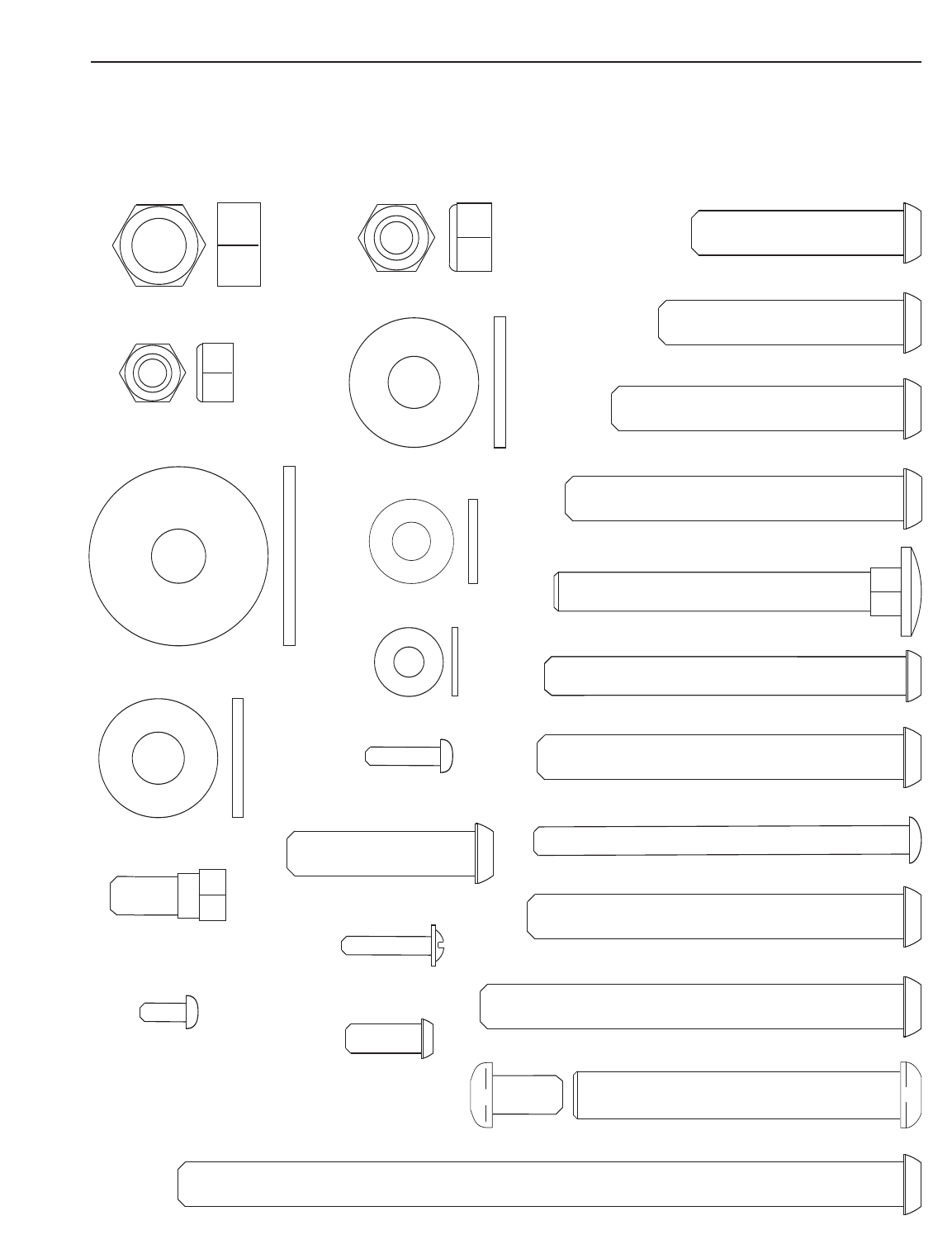
PART IDENTIFICATION CHART
Refer to the drawings below to identify small parts used in assembly. The number in parentheses by each draw-
ing is the key number of the part, from the PART LIST in the centre of this manual. Note: Some small parts
may have been pre-attached. If a part is not in the parts bag, check to see if it has been pre-attached.

Note: “#” indicates a non-illustrated part. Specifications are subject to change without notice. See the back cover
of the user’s manual for information about ordering replacement parts.
Key No. Qty. Description Key No. Qty. Description
1 1 Base
2 1 Stabilizer
3 1 Upright
4 1 Top Frame
5 1 Pivot Frame
6 1 Seat Frame
7 1 Front Leg
8 1 Leg Lever
9 1 Right Arm
10 1 Left Arm
11 2 Handle
12 1 Lock
13 1 Curl Post
14 1 Curl Pad
15 1 Seat
16 1 Backrest
17 1 Shroud
18 1 Top Cap
19 1 Left Cap
20 1 Right Cap
21 2 Weight Guide
22 12 Weight
23 1 Weight Tube Cap
24 1 Weight Tube
25 1 Chain
26 1 Weight Pin
27 2 Weight Bumper
28 4 Small Foam Pad
29 1 Pad Tube
30 4 64mm Round Inner Cap
31 2 Handle Cap
32 1 38mm Round Outer Cap
33 10 19mm Spacer
34 4 Pad Cap
35 1 Lat Bar
36 2 Handgrip
37 3 Cable Clip
38 1 Ankle Strap
39 2 Cable Pivot
40 2 Arm Pin
41 4 Guard
42 2Large Foam Pad
43 10 Half Guard
44 4 Arm Bushing
45 1 Adjustable “U”-bracket
46 2 “V”-pulley
47 2 90mm Thin Pulley
48 10 90mm Pulley
49 3 57mm Round Inner Cap
50 2 Large Cable Trap
51 1 Cable Trap
52 6 16mm Spacer
53 1 Low Cable
54 1 Arm Cable
55 1 High Cable
56 23 M10 Nylon Locknut
57 20 M10 Washer
58 12 M8 Nylon Locknut
59 6 M8 Washer
60 1 Leg Bumper
61 1 Curl Knob
62 2 M6 x 17mm Button Screw
63 1 Double “U”-bracket
64 1 Lock Pin
65 2 M8 x 19mm Shoulder Bolt
66 4 M10 x 52mm Button Bolt
67 3 M10 x 90mm Button Bolt
68 6 M8 x 77mm Button Bolt
69 2 M4 x 19mm Screw
70 4 M6 x 80mm Button Screw
71 5 M10 x 78mm Button Bolt
72 2 64mm Round Outer Cap
73 1 M10 x 70mm Bolt Set
74 1 M10 x 155mm Button Bolt
75 2 M10 x 62mm Button Bolt
76 2 13mm Spacer
77 2 M10 x 40mm Button Bolt
78 4 M8 x 74mm Carriage Bolt
79 2 M10 x 80mm Button Bolt
80 2 M10 Large Washer
81 3 M10 x 45mm Button Bolt
82 4 M6 Washer
83 2 57mm Thick Round Inner Cap
84 4 M4 x 10mm Screw
85 3 M10 x 72mm Button Bolt
86 6 M4 x 16mm Screw
87 1 M12 Nut
88 1Large Washer
#1User’sManual
# 1 Exercise Guide
# 2 Grease Packet
#1Hex Key
PART LIST—Model No. WEEVSY2826.0 R0706A
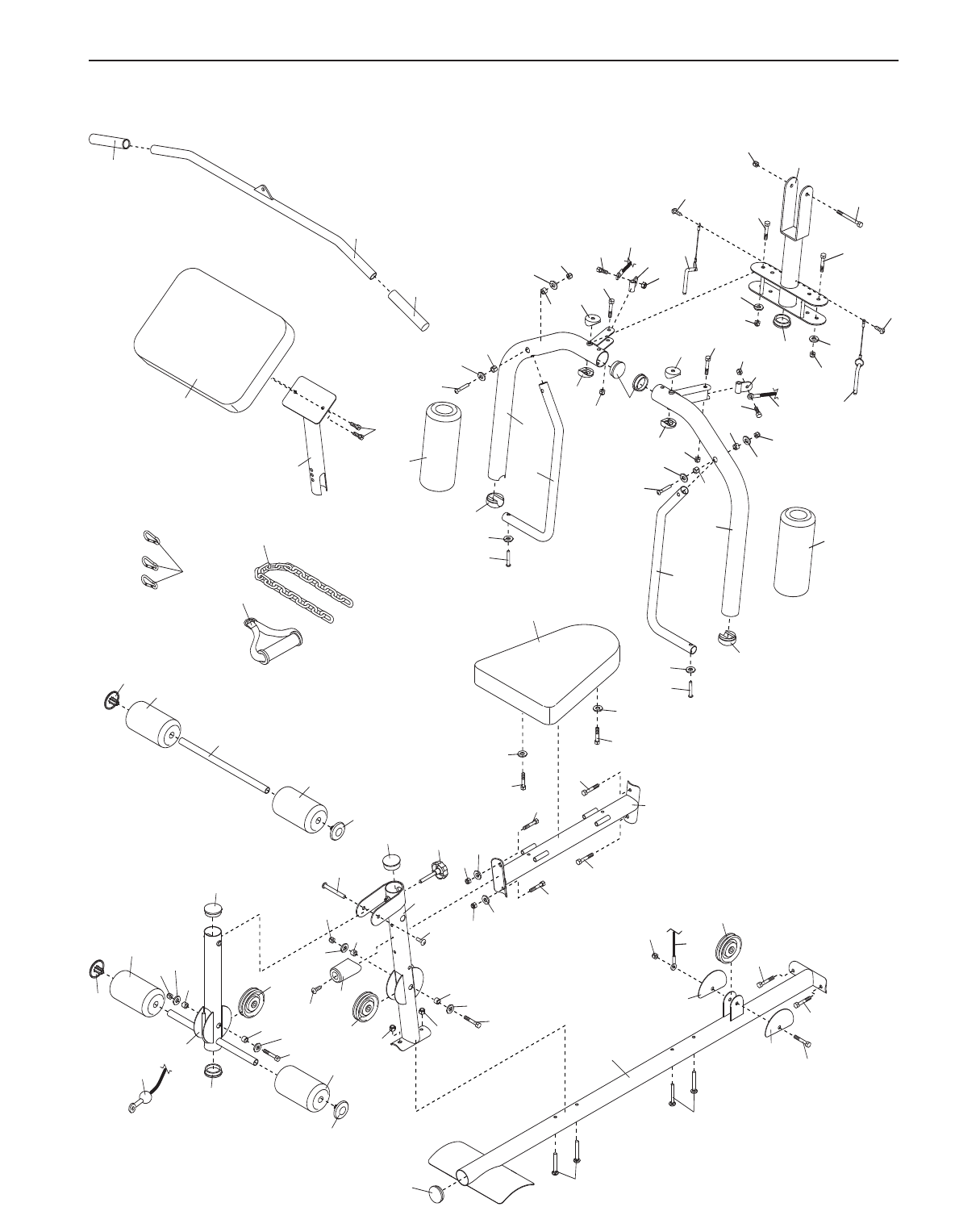
1
56
67
5
67
67
86
57
56
56
40
58
39
54
65
66
44
44 56
83
66
44
44
56
65 54
39
58
42
42
11
11
31
31
85
13
14
62
36
35
36
37
15
6
70
70 68
68
68
68
61
58
58
30
28
34
34
29
28
49
52
57
56
52
48
57
49
85
34
28
53
28
69
57
56
33
48 58 58
33
71
30 78
78
66
43
43
56
48
79
79
8
34 60 57
9
10
8
7
40
86
57
59
59
25
38
1
57
49
8
85
57
57
57
77
80
77
80
56
56
82
82
52
52
52
52
73
73 53
8
EXPLODED DRAWING A—Model No. WEEVSY2826.0 R0706A
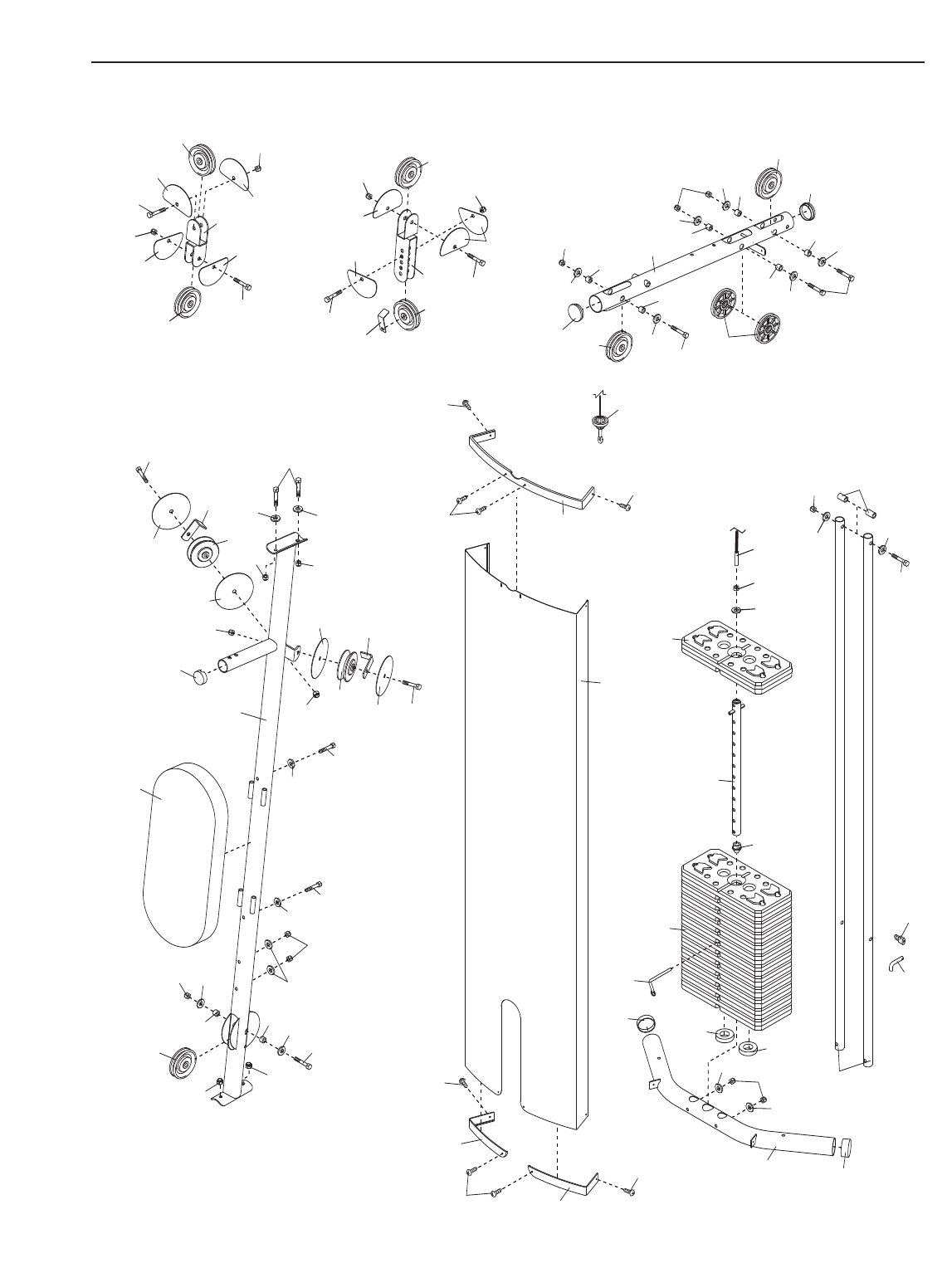
2
3
72
72
26
22
27
27
21
57
56
57
24
23
74
56
55
48
30
33
57 71 47
33
57
56 4
56
57
57
33
33
48
30
33
33
57
57 71
18
17
86
56
45
19
84
20
86
32
16
70
82
56
56 41
46
50
41 75
41
58
58
46
59 59
68
50
41
75
58
59
57
57
56
33 33
71
58
58
48
56
56
81
43
48
43
48
43
43
63
5
81
76
57
57
12
64
84
84
70
82
43
81
48
51
48
66
43
43
56
22
7
87
88
86
55
EXPLODED DRAWING B—Model No. WEEVSY2826.0 R0706A

Part No. 241168 R0706A Printed in China © 2006 ICON IP, Inc.
ORDERING REPLACEMENT PARTS
To order replacement parts, contact the ICON Health & Fitness, Ltd. office, or write:
ICON Health & Fitness, Ltd.
Customer Service Department
Unit 4, Revie Road Industrial Estate
Revie Road
Beeston
Leeds, LS118JG
UK
Tel:
Outside the UK: 0 (444) 113 387 7133
Fax: 0 (444) 113 387 7125
Tohelp us assist you, please be prepared to give the following information:
• the MODEL NUMBER of the product (WEEVSY2826.0)
•the NAME of the product (WEIDER PRO 4000 weight system)
• the SERIAL NUMBER of the product (see the front cover of this manual)
• the KEY NUMBER and DESCRIPTION of the part(s) (see the PART LIST and EXPLODED DRAWING in the
centre of this manual)
08457 089 009
