Weider Pro 9835 System Wesy4108 Users Manual *WESY41080 147764
Weider-Wesy41080-Owner-S-Manual weider-wesy41080-owner-s-manual
WESY41080 to the manual fa0e7066-667a-4930-95c8-ae659d0b4a3c
2015-05-18
: Weider Weider-Pro-9835-System-Wesy4108-Users-Manual-734092 weider-pro-9835-system-wesy4108-users-manual-734092 weider pdf
Open the PDF directly: View PDF  .
.
Page Count: 33
QUESTIONS?
As a manufacturer, we are
committed to providing complete
customer satisfaction. If you
have questions, or if there are
missing or damaged parts, we
will guarantee complete satisfac-
tion through direct assistance
from our factory.
TO AVOID UNNECESSARY
DELAYS, PLEASE CALL DIRECT
TO OUR TOLL-FREE CUSTOMER
HOT LINE. The trained techni-
cians on our customer hot line
will provide immediate assis-
tance, free of charge to you.
CUSTOMER HOT LINE:
1-800-999-3756
Mon.ÐFri., 6 a.m.Ð6 p.m. MST
Model No. WESY41080
Serial No.
Write the serial number in the space
above for future reference.
CAUTION
Read all precautions and instruc-
tions in this manual before using
this equipment. Save this manual
for future reference.
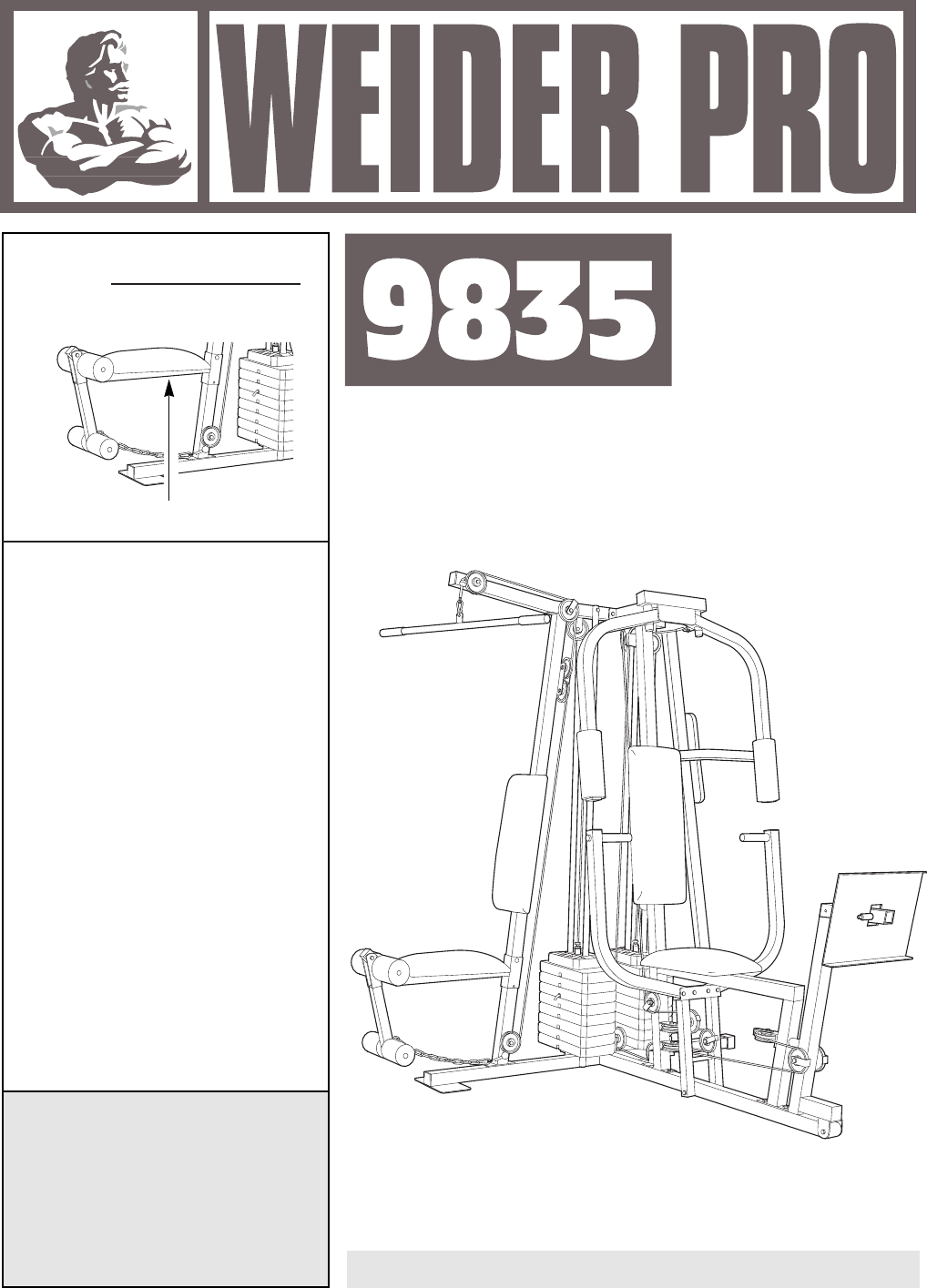
Serial Number Decal (Under Seat)
USERÕS
MANUAL
PATENT PENDING

2
Important Precautions . . . . . . . . . . . . . . . . . . . . . . . . . . . . . . . . . . . . . . . . . . . . . . . . . . . . . . . . . . . . . . . . . . . 2
Before You Begin . . . . . . . . . . . . . . . . . . . . . . . . . . . . . . . . . . . . . . . . . . . . . . . . . . . . . . . . . . . . . . . . . . . . . . 3
Assembly . . . . . . . . . . . . . . . . . . . . . . . . . . . . . . . . . . . . . . . . . . . . . . . . . . . . . . . . . . . . . . . . . . . . . . . . . . . . 4
How to Use the Home Gym System . . . . . . . . . . . . . . . . . . . . . . . . . . . . . . . . . . . . . . . . . . . . . . . . . . . . . . . 23
Trouble-shooting and Maintenance . . . . . . . . . . . . . . . . . . . . . . . . . . . . . . . . . . . . . . . . . . . . . . . . . . . . . . . . 25
Cable Diagrams . . . . . . . . . . . . . . . . . . . . . . . . . . . . . . . . . . . . . . . . . . . . . . . . . . . . . . . . . . . . . . . . . . . . . . 26
Weight Resistance Chart . . . . . . . . . . . . . . . . . . . . . . . . . . . . . . . . . . . . . . . . . . . . . . . . . . . . . . . . . . . . . . . . 27
Ordering Replacement Parts . . . . . . . . . . . . . . . . . . . . . . . . . . . . . . . . . . . . . . . . . . . . . . . . . . . . . . Back Cover
Limited Warranty . . . . . . . . . . . . . . . . . . . . . . . . . . . . . . . . . . . . . . . . . . . . . . . . . . . . . . . . . . . . . . . Back Cover
Note: A PART LIST/EXPLODED DRAWING and a PART IDENTIFICATION CHART are attached to the center of
this manual. Remove the PART LIST/EXPLODED DRAWING and the PART IDENTIFICATION CHART before
beginning assembly.
1. It is the responsibility of the owner to ensure
that all users of the home gym system are
adequately informed of all precautions.
2. Read all instructions in this manual and in
the accompanying literature before using the
home gym system.
3. If you feel pain or dizziness at any time while
exercising, stop immediately and begin cool-
ing down.
4. Use the home gym system only on a level
surface. Cover the floor or carpet beneath the
home gym system for protection.
5. Inspect and tighten all parts often. Replace
any worn parts immediately.
6. Make sure the cables remain on the pulleys
at all times. If the cables bind while you are
exercising, stop immediately and make sure
the cables are on all of the pulleys.
7. Always stand on a foot plate when perform-
ing an exercise that could cause the home
gym system to tip.
8. Keep children under the age of 12 and pets
away from the home gym system at all times.
9. Keep hands and feet away from moving parts.
10. Always wear athletic shoes for foot protec-
tion when exercising.
11. Never release the press arm, butterfly arms,
leg lever, lat bar or handle while weights are
raised. The weights will fall with great force.
12. Always disconnect the lat bar from the home
gym system when performing an exercise
that does not use the lat bar.
13. The home gym system is intended for home
use only. Do not use the home gym system in
a commercial, rental or institutional setting.
14. When using the leg press station, always
make sure the lock pin is fully inserted and
folded down, so it cannot slide out (see page
24).
15. Do not use the VKR station when either
weight stack is in use.
WARNING: Before beginning this or any exercise program, consult your physician. This is especially
important for persons over the age of 35 or persons with pre-existing health problems. Read all
instructions before using. ICON assumes no responsibility for personal injury or property damage
sustained by or through the use of this product.
To reduce the risk of serious injury, read the following important
precautions before using the home gym system.
WARNING:
Table of Contents
Important Precautions
3
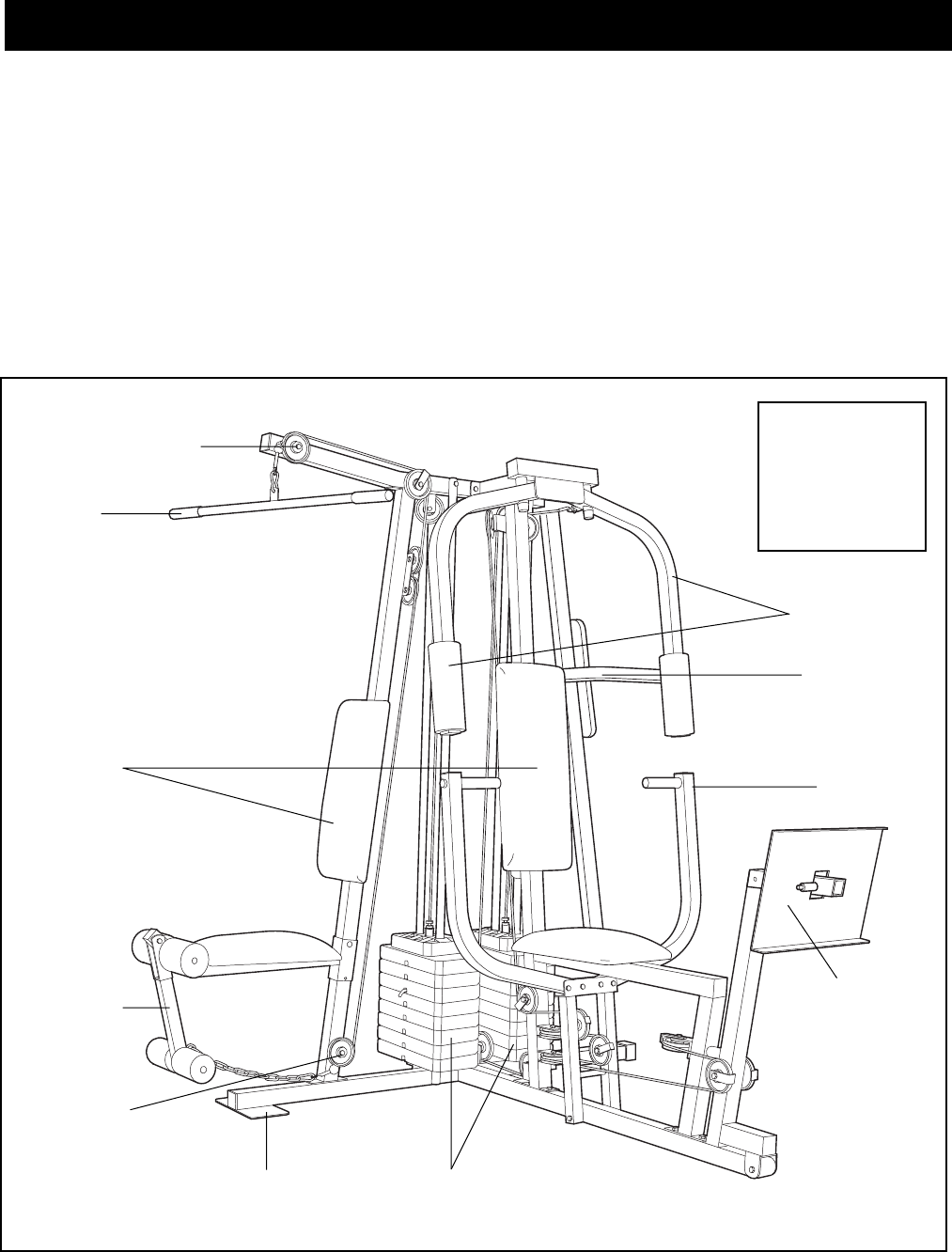
ASSEMBLED
DIMENSIONS:
Height: 78 in.
Width: 64 in.
Length: 70 in.
Foot Plate
Low Pulley
Station
High Pulley Station
Lat Bar
Leg Lever
Butterfly Arms
Press Arm
Weight Stacks
Backrests
Leg Press
Plate
VKR Station
Thank you for selecting the versatile WEIDER PRO¨
9835 Home Gym System. The WEIDER PRO¨9835
offers a selection of weight stations designed to devel-
op every major muscle group of the body. Whether
your goal is to tone your body, build dramatic muscle
size and strength, or improve your cardiovascular sys-
tem, the WEIDER PRO¨9835 will help you to achieve
the specific results you want.
For your benefit, read this manual carefully before
using the WEIDER PRO¨9835 Home Gym System.
If you have additional questions, please call our
Customer Service Department toll-free at 1-800-999-
3756, Monday through Friday, 6 a.m. until 6 p.m.
Mountain Time (excluding holidays). To help us assist
you, please note the product model number and serial
number before calling. The model number is
WESY41080. The serial number can be found on a
decal attached to the WEIDER PRO¨9835 (see the
front cover of this manual).
Before reading further, please review the drawing
below and familiarize yourself with the parts that are
labeled.
Before You Begin
4
Note: This introduction will save you more
time than it takes to read it!
Identifying Parts
To help you identify the small parts used in assem-
bly, we have included a PART IDENTIFICATION
CHART located in the center of this manual. Place
the chart on the floor or work table and use it to
quickly identify different parts as you open the pack-
ages for each step.
Note: Some small parts may have been pre-attached
for shipping. If a part is not in the parts bag, check to
see if it has been pre-attached.
Orienting Parts
As you assemble this product, make sure all parts
are oriented as shown in the drawings.
Tightening of Parts
Tighten all parts as you assemble them, unless
instructed to do otherwise.
Lining Up the Tools
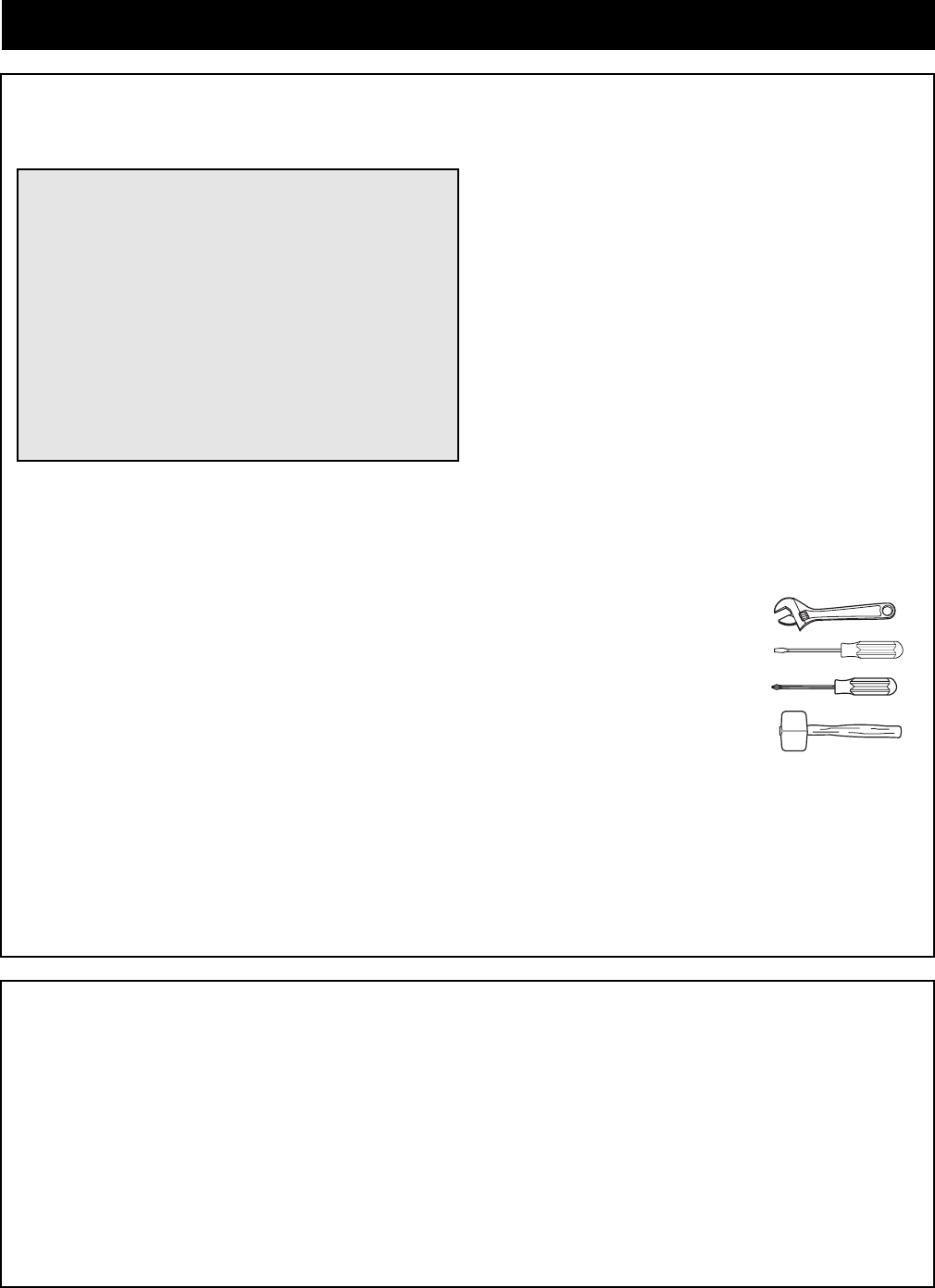
Assembly requires the following tools (not included):
¥ Two (2) adjustable wrenches
¥ One (1) standard screwdriver
¥ One (1) phillips screwdriver
¥ One (1) rubber mallet
¥ Lubricant, such as grease or petroleum jelly,
and soapy water
¥ Tape, such as clear tape or masking tape
Assembly will be more convenient if you have a
socket set, a set of open-end or closed-end wrenches
or a set of ratchet wrenches.
Giving Yourself a Good Start
Before you begin the assembly process itself, take
the time to complete the steps outlined here.
Clearing the Workspace
Clear a workspace that is large enough to hold all
parts and allow you to walk all the way around the
assembled equipment.
Unpacking the Box
To make the assembly process as smooth as possi-
ble, we have broken it into separate stages. All parts
used in each stage are found in individual packages
in the shipping box. Place all parts in a cleared area
and remove the packing materials. Do not dispose of
the packing materials until assembly is completed.
Important: Wait until you begin each assembly
stage to open the parts bag labeled for that
assembly stage.
Assembly
Making Things Easier for Yourself
Everything in this manual is designed to ensure
that the assembly of our products can be complet-
ed successfully by anyone. However, it is impor-
tant to recognize that your new equipment is a
sophisticated product with many small parts. The
assembly process will take timeÑpossibly several
hours. You may want to complete the process
over a couple of evenings. Most people find that
by setting aside plenty of time, and by deciding to
make the task enjoyable, assembly will go
smoothly.
The Four Stages of the Assembly Process
Frame Assembly
You will begin by assembling the base and the
upright frames that serve as the skeleton of the
equipment. The seats and all moving parts will be
attached to the frame.
Arm Assembly
Completes the press and butterfly arms that you
operate while you are exercising.
Cable Assembly
Completes the cables and pulleys that connect the
moving arms with each other and with the weights.
This ties the different parts together and makes the
equipment function as a unit
Seat Assembly
Completes the seats and backrests that support
your body while you are exercising.
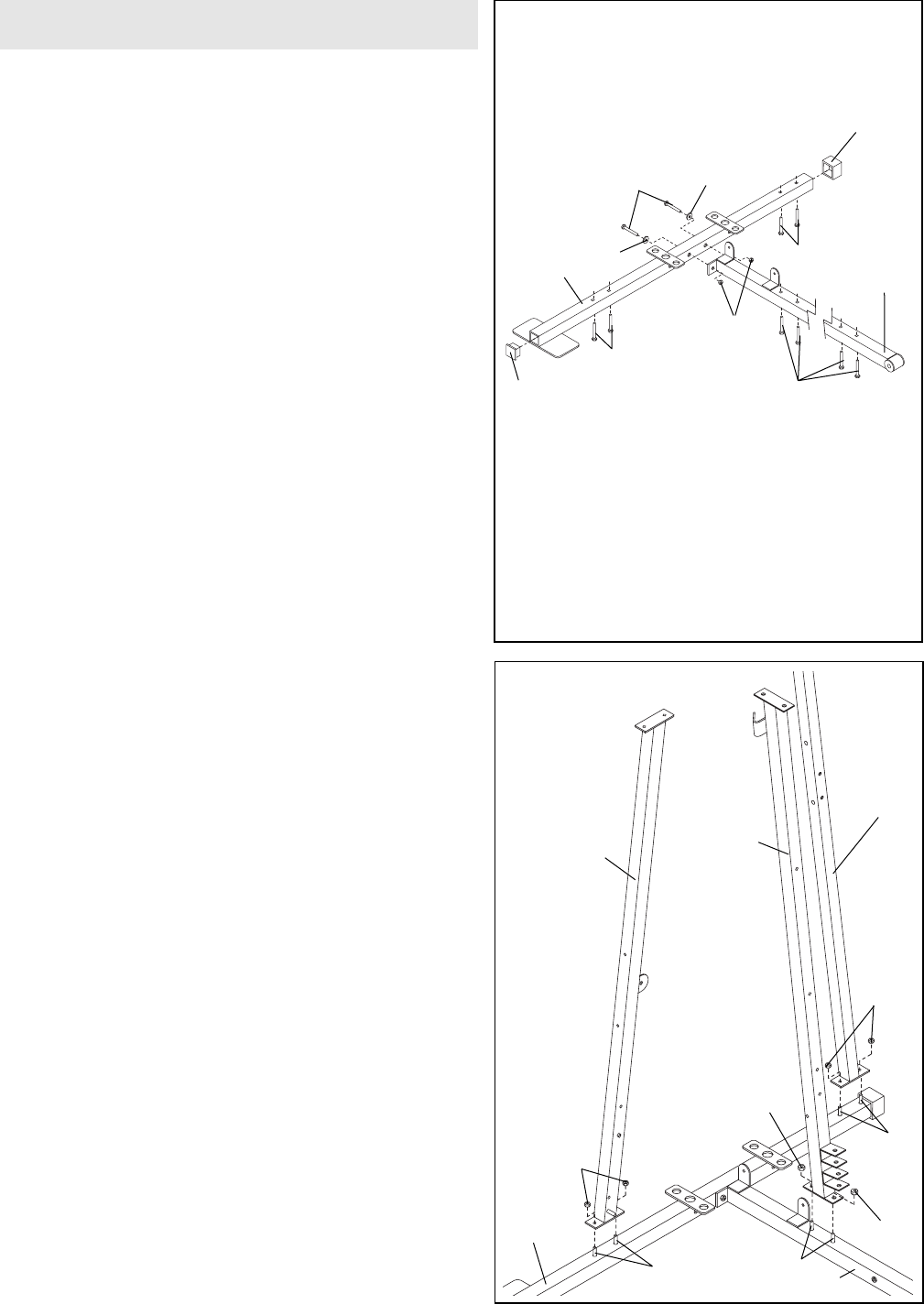
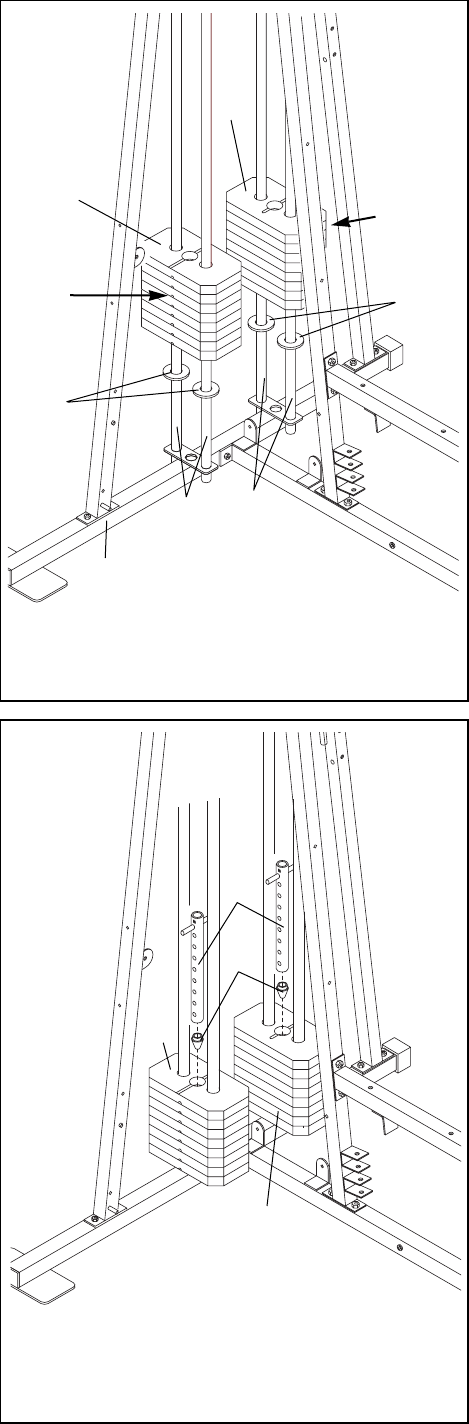
2. Slide the Lat Upright (1) onto the indicated 5/16Ó x
2 1/2Ó Carriage Bolts (49) in the Weight Base (14).
Hand tighten two 5/16Ó Nylon Locknuts (40) onto the
Carriage Bolts. Do not tighten the Nylon Locknuts
yet.
Slide the VKR Upright (51) onto the indicated 5/16Ó x
2 1/2Ó Carriage Bolts (49) in the Weight Base (14).
Hand tighten two 5/16Ó Nylon Locknuts (40) onto the
Carriage Bolts. Do not tighten the Nylon Locknuts
yet.
Slide the Leg Press Upright (4) onto the indicated
5/16Ó x 2 1/2Ó Carriage Bolts (49) in the Press Base
(13). Hand tighten two 5/16Ó Nylon Locknuts (40) onto
the Carriage Bolts. Do not tighten the Nylon
Locknuts yet.
5
Frame Assembly
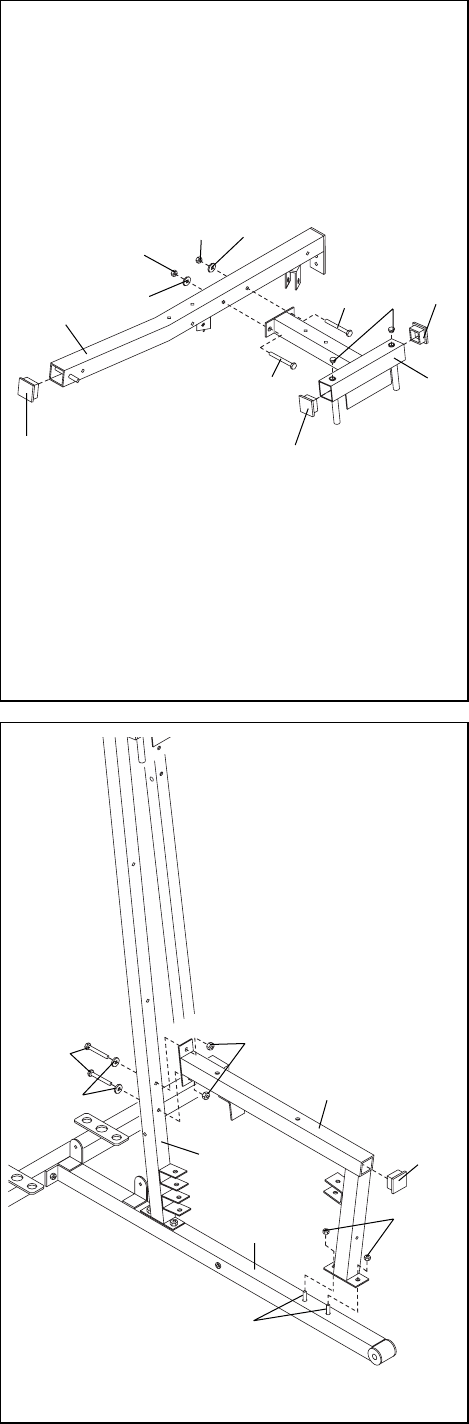
1. Before beginning assembly, make sure you have
read and understand the information in the box
above.
Locate and open the parts bags labeled ÒFRAME
ASSEMBLY BAG ONEÓ and ÒFRAME ASSEMBLY
BAG TWO.Ó
Press a 2Ó Square Outer Cap (58) onto the indicated
end of the Weight Base (14). Press a 2Ó Square Inner
Cap (56) into the indicated end of the Weight Base.
Insert four 5/16Ó x 2 1/2Ó Carriage Bolts (49) up
through the Weight Base (14) and place it flat on the
floor. Insert four 5/16Ó x 2 1/2Ó Carriage Bolts (49) up
through the Press Base (13) and place it on the floor
next to the Weight Base.
Attach the Press Base (13) to the Weight Base (14)
with two 5/16Ó x 2 3/4Ó Bolts (55), two 5/16Ó Washers
(20) and two 5/16Ó Nylon Locknuts (40). Do not tight-
en the Nylon Locknuts yet.
1
56
58
55
20
20
49
40
49
13
14 49
2
14
40
40
40
49 49 13
14
49
40
51
3. Press a 2Ó Square Inner Cap (56) into the end of the
Top Frame (2). Press a 2Ó Square Inner Cap (56) into
each side of the Butterfly Frame (3). Press two 1Ó
Round Inner Caps (70) into the top of the Butterfly
Frame.
Insert a 5/16Ó x 3Ó Bolt (92) through the bracket on
the Butterfly Frame (3) and the Top Frame (2). Make
sure that the Bolt is on the side shown. Tighten a
5/16Ó Nylon Jam Nut (91) with a 5/16Ó Washer (20)
onto the Bolt.
Insert a 5/16Ó x 2 3/4Ó Bolt (55) through the bracket
on the Butterfly Frame (3) and the Top Frame (2).
Make sure that the Bolt is on the side shown.
Hand tighten a 5/16Ó Washer (20) and a 5/16Ó Nylon
Locknut (40) onto the Bolt.
4. Slide the Front Seat Frame (8) onto the indicated
5/16Ó x 2 1/2Ó Carriage Bolts (49) in the Press Base
(13). Hand tighten two 5/16Ó Nylon Locknuts (40) onto
the Carriage Bolts.
Attach the other end of the Front Seat Frame (8) to
the Leg Press Upright (4) with two 5/16Ó x 2 3/4Ó Bolts
(55), two 5/16Ó Washers (20) and two 5/16Ó Nylon
Locknuts (40).
Press a 2Ó Square Inner Cap (56) into the Front Seat
Frame (8).
3
6
2
3
55
40
20
56 56
56
92 70
91 20
4
55
20
49
40
56
8
40
4
13
7
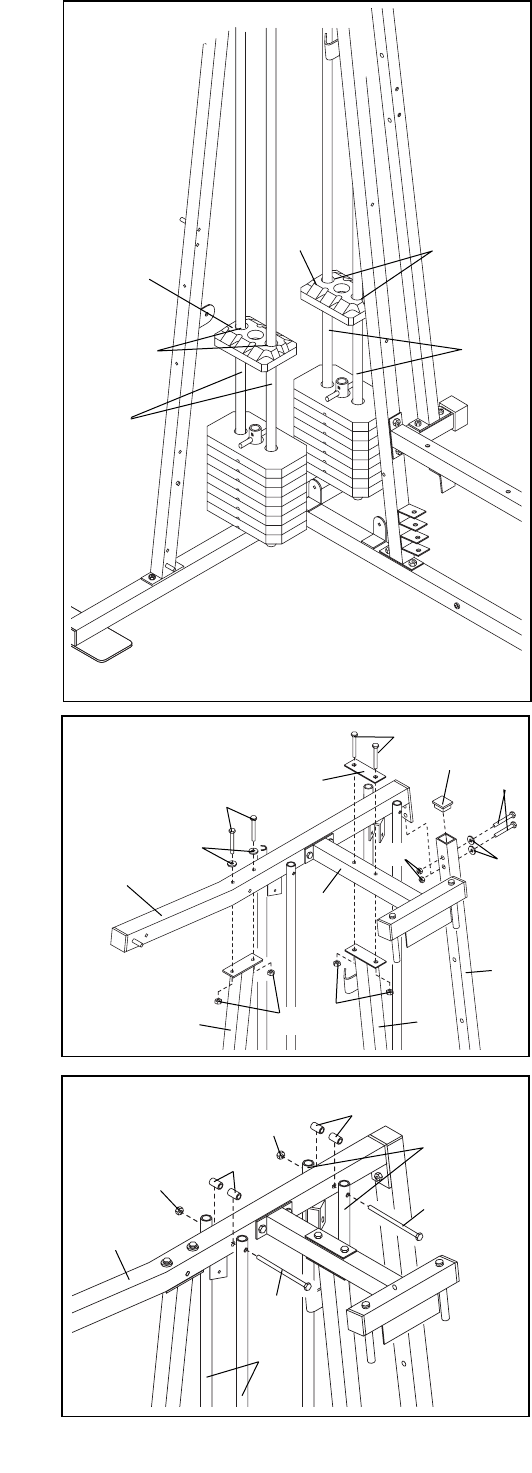
6. Press a Weight Tube Bumper (26) into each Weight
Tube (25).
Insert a Weight Tube (25) into each stack of Weights
(90). Make sure the pins on the Weight Tubes are
in the pin grooves in the upper Weights.
6
26
25
90
90
5. Insert two Weight Guides (23) into each of the brack-
ets on the Weight Base (14).
Slide a Weight Bumper (27) onto each of the Weight
Guides (23).
Slide eight Weights (90) onto each set of Weight
Guides (23). Make sure the pin grooves are on the
indicated side of each stack of Weights.
5
90
90
Pin
Grooves
27
27
23 23
14
Pin
Grooves
8. Attach the Top Frame (2) to the Lat Upright (1) with
two 5/16Ó x 2 3/4Ó Bolts (55), two 5/16Ó Washers (20)
and two 5/16Ó Nylon Locknuts (40). Do not tighten
the Nylon Locknuts yet.
Attach the Butterfly Frame (3) to the Leg Press
Upright (4) with two 5/16Ó x 2 3/4Ó Bolts (55), the
Support Plate (98) and two 5/16Ó Nylon Locknuts
(40). Do not tighten the Nylon Locknuts yet.
Press a 2Ó Square Inner Cap (56) into the top end of
the VKR Upright.
Attach the VKR Upright (51) to the bracket on the Top
Frame (2) with two 5/16Ó x 2 3/4Ó Bolts (55), two 5/16Ó
Washers (20) and two 5/16Ó Nylon Locknuts (40). Do
not tighten the Nylon Locknuts yet.
9. Attach the upper ends of one set of Weight Guides
(23) to the Top Frame (2) with a 5/16Ó x 6Ó Bolt (67),
two 1/2Ó x 3/4Ó Spacers (69) and a 5/16Ó Nylon
Locknut (40).
Attach the upper ends of the other set of Weight
Guides (23) in the same manner.
Before continuing, firmly tighten all nylon lock-
nuts used in steps 1 through 9.
7. Lubricate the insides of the holes in the Top Weights
(24) as shown. Slide a Top Weight onto each set of
Weight Guides (23).
7
9
8
23
Lubricate
Lubricate
23
23
69
40
67
67
40
2
69
24
24
23
855
55 98
20
40 40 4
3
2
1
51
40 20
55
56
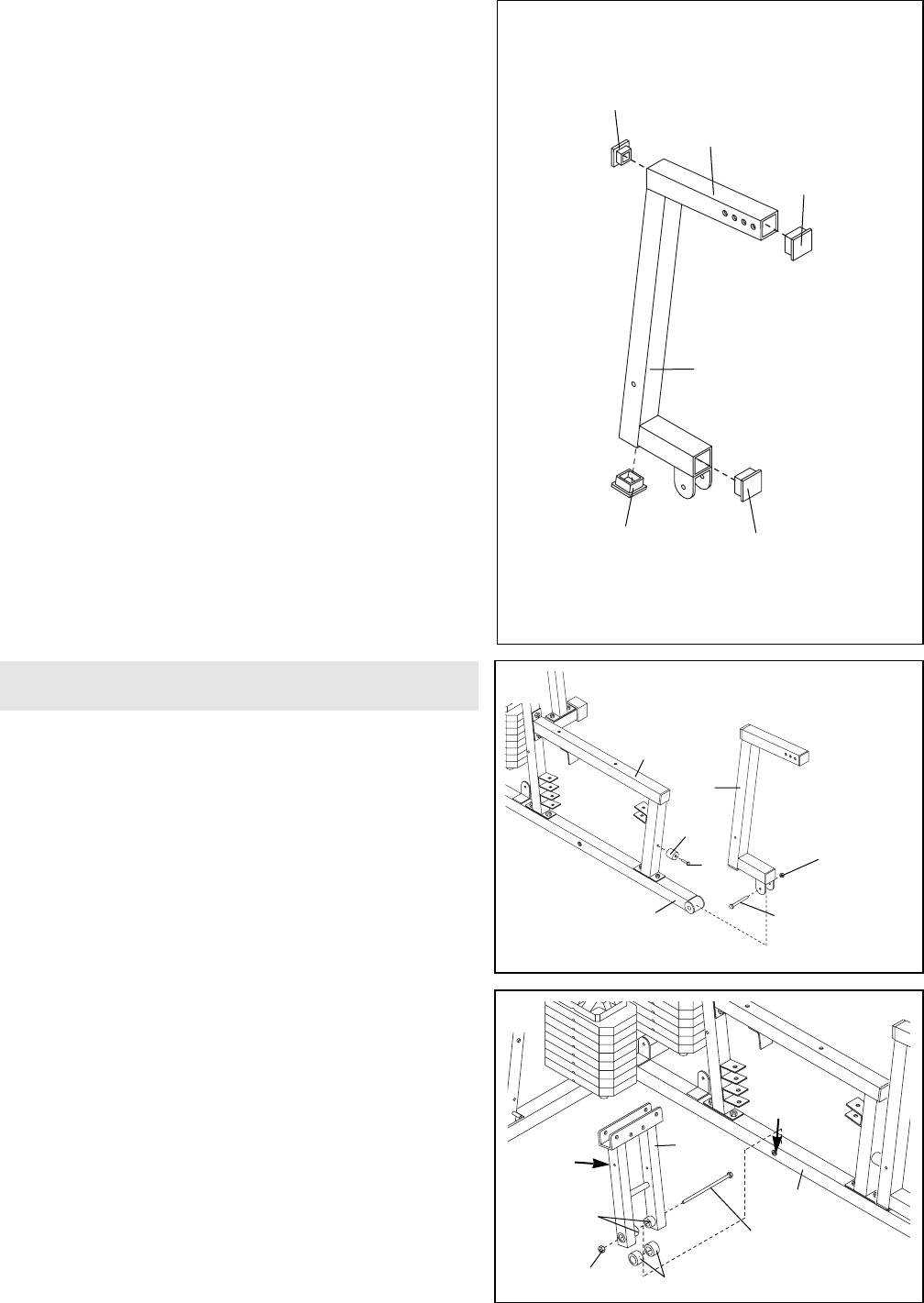
10. Press a 2Ó Square Inner Cap (56) into each end of the
Leg Press Arm (9).
11. Locate and open the parts bag labeled ÒARM
ASSEMBLY.Ó
Attach the Leg Press Bumper (53) to the Front Seat
Frame (8) with the 1Ó Tap Screw (72).
Lubricate the 3/8Ó x 3Ó Bolt (94). Attach the Leg Press
Arm (9) to the Press Base (13) with the Bolt and a
3/8Ó Nylon Jamnut (43). Do not overtighten the
Nylon Jamnut, it should be easy to pivot the Leg
Press Arm.
12. Press a 1Ó x 7/8Ó Plastic Bushing (54) onto each
welded spacer on the Press Frame (12). Slide the
Press Frame onto the Press Base (13) so that the
Plastic Bushings are aligned with the indicated tube.
Note: This will be a tight fit. Make sure the Press
Frame is oriented with the upper set of holes on
the side shown.
Lubricate the 3/8Ó x 8Ó Bolt (52). Attach the Press
Frame (12) to the Press Base (13) with the Bolt and a
3/8Ó Nylon Locknut (42).
12
10
11
9
9
56
43
94ÑLubricate
53
72
13
54
42
12
13
9
8
56
A
56 56
52ÑLubricate
Tube
Welded
Spacers
Upper
Holes
Arm Assembly
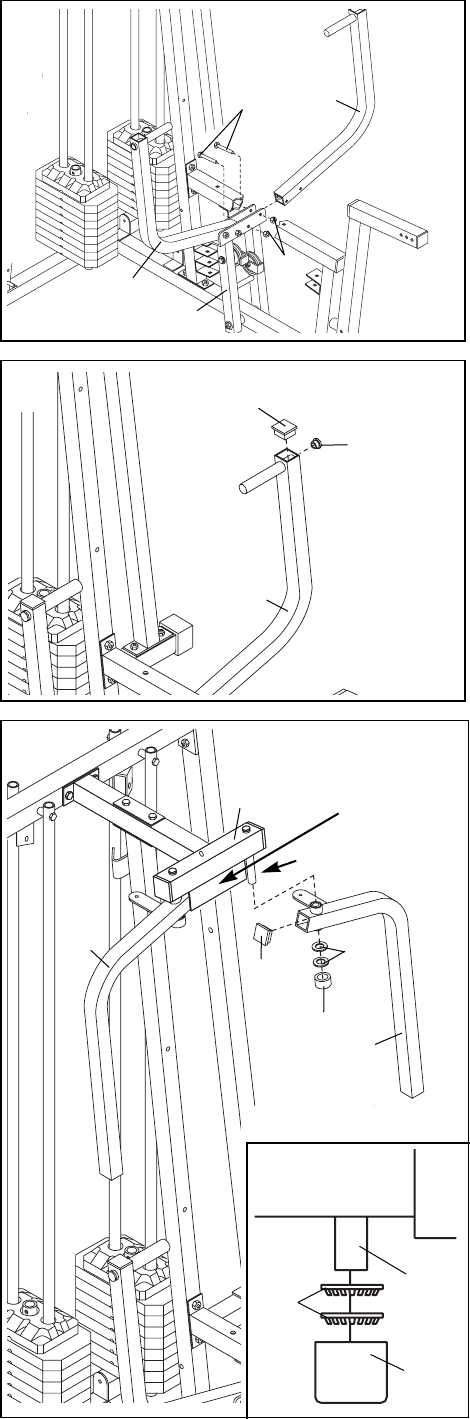
13. Attach a Press Arm (7) to one side of the Press
Frame (12) with two 5/16Ó x 2 1/2Ó Bolts (39) and two
5/16Ó Nylon Locknuts (40).
Attach the other Press Arm (7) to the Press Frame
(12) in the same manner.
14. Press a 1Ó Round Inner Cap (70) into one of the
Press Arms (7). Press a 1 3/4Ó Square Inner Cap (48)
into the Press Arm.
Repeat this step for the other Press Arm (not shown).
15. Lubricate both axles on the Butterfly Frame (3).
Refer to the drawing and identify the Right Arm (5)
and the Left Arm (6) by imagining yourself sitting on
the Seat.
Press a 1 3/4Ó Square Inner Cap (48) into the upper
end of the Left Arm (6). Slide the Left Arm onto the
indicated axle. Note: Be careful not to confuse the
Left Arm with the Right Arm (5). Make sure the
upper end of the Left Arm is behind the indicated
bracket on the Butterfly Frame (3).
IMPORTANT NOTE: Before assembling the 1Ó
Retainers (45) used in this step, make sure you
thoroughly understand the step. The Retainers
can be assembled only once. If they must be
removed, you will need to order new Retainers.
Tap two 1Ó Retainers (45) and a 1Ó Round Outer Cap
(46) onto the axle. Make sure the teeth on the
Retainers bend toward the Round Outer Cap, as
shown in the inset drawing.
Attach the Right Arm (5) in the same manner.
10
13
14
15
39 7
70
40
48
12
7
7
3
Lubricate Axle
Axle
6
545
48
46
Bracket
45
46
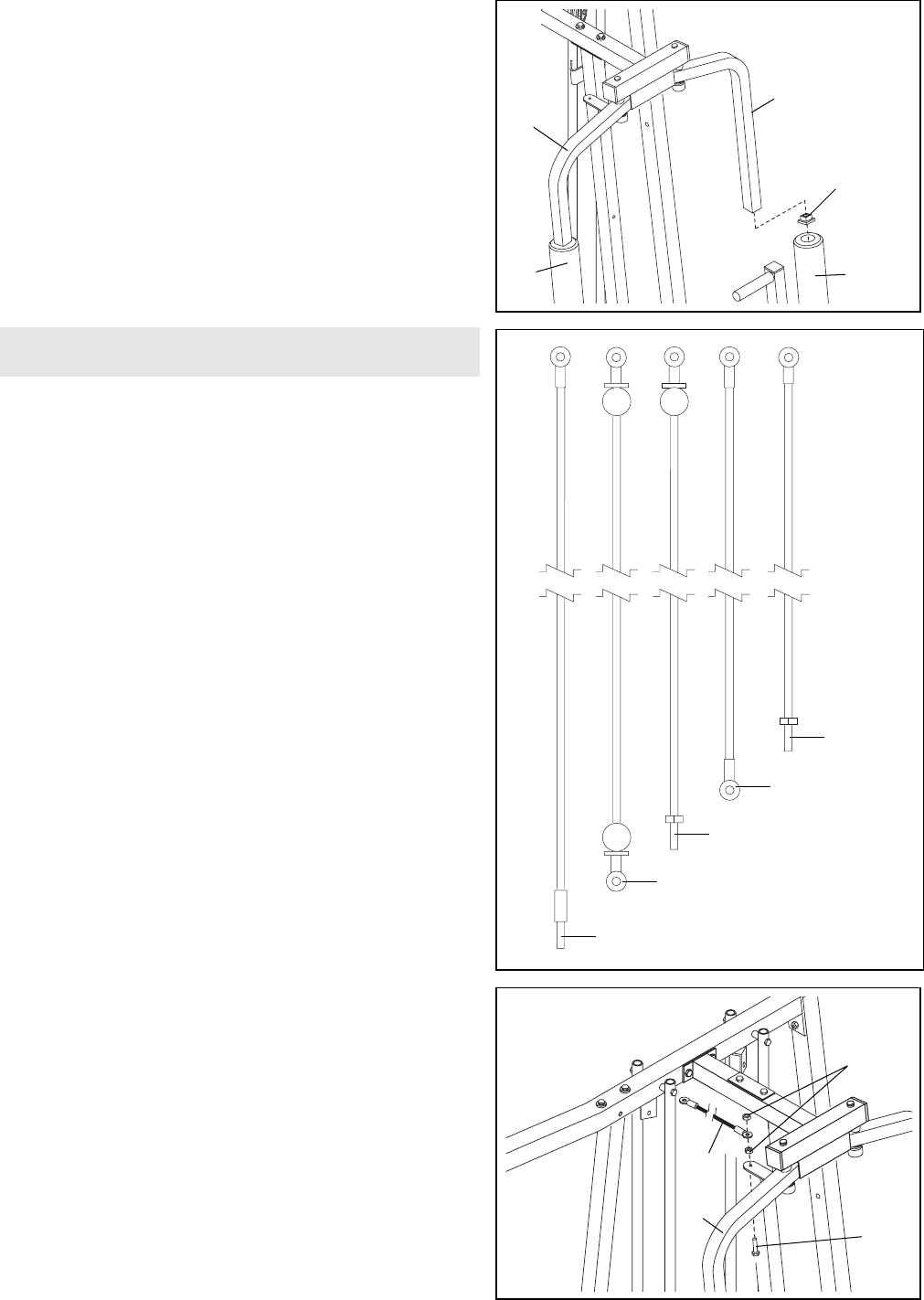
16. Press a 1 3/4Ó Square Inner Cap (48) into the lower
end of the Left Arm (6). Wet the lower end of the Left
Arm with soapy water. Slide a 10Ó Pad (45) onto the
Left Arm.
Repeat this step with the Right Arm (5).
Note: The remaining parts from the parts bag labeled
ÒARM ASSEMBLYÓ will be used in assembly step 55.
17. Locate and open the parts bags labeled ÒCABLE
ASSEMBLYÓ and ÒPULLEYS.Ó
During steps 18 through 47, refer to the CABLE DIA-
GRAMS on pages 26 and 27 of this manual to verify
proper cable routing. Before beginning this section,
fully unwind the five Cables and identify the Cables
by comparing the lengths and the ends. The approxi-
mate length of each Cable, in inches, is listed after
the key number in the drawing.
IMPORTANT: While assembling the cables, do not
overtighten the bolts and nuts attaching the pul-
leys. The pulleys must be able to turn freely.
18. Insert a 5/16Ó x 1Ó Bolt (95) through the bracket on the
Right Butterfly Arm (5). Tighten a 5/16Ó Nylon Jam Nut
(91) onto the Bolt.
Find the Butterfly Cable (89)Ñthis is the second
shortest Cable. Slide one end of the Butterfly Cable
onto the 5/16Ó x 1Ó Bolt (95). Thread another 5/16Ó
Nylon Jam Nut (91) onto the Bolt, but do not fully
tighten it. Leave enough room between the two
Jam Nuts for the Cable to pivot.
11
18
16
17
5
6
48
22
88Ñ238Ó
95
5
91
89
22
86Ñ86Ó
85Ñ102Ó
89Ñ82Ó
87Ñ75Ó
Cable Assembly
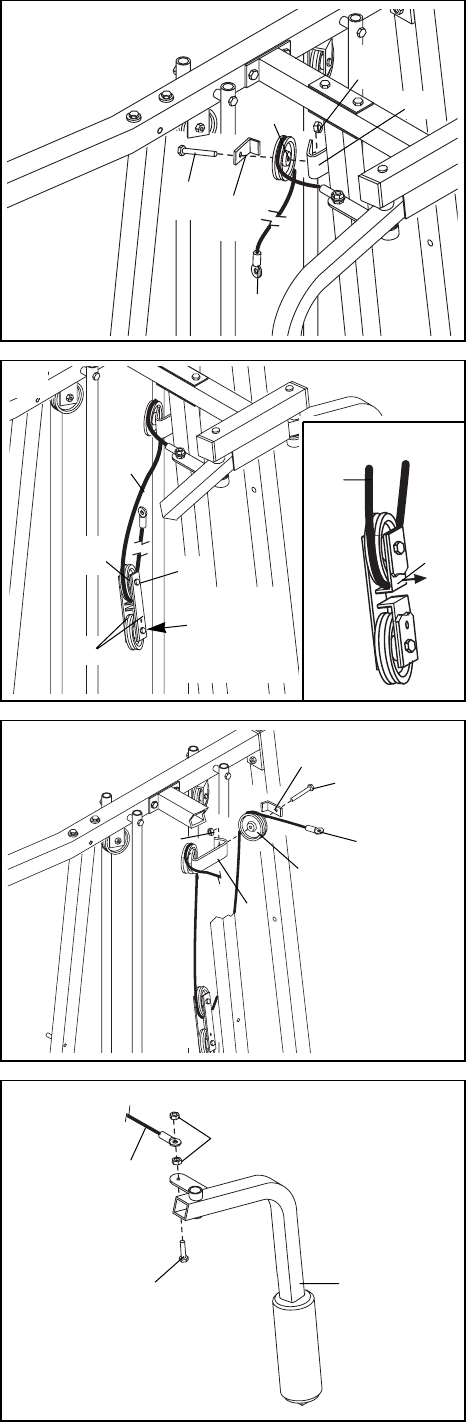
19. Wrap the Butterfly Cable (89) around a 3 1/2Ó Pulley
(82) as shown. Attach the Pulley and a Cable Trap
(80) to the bracket on the Leg Press Upright (4) with a
3/8Ó x 2Ó Bolt (50) and a 3/8Ó Nylon Locknut (42). The
Cable Trap must be oriented as shown and be
positioned to hold the Cable in the groove of the
Pulley.
20. Locate one of the pre-assembled pairs of Pulley
Plates (31) and 3 1/2Ó Pulleys (82).
Route the Butterfly Cable (89) under the indicated
3 1/2Ó Pulley (82). The end of the Pulley Plates (31)
with two holes should be downward. Refer to the inset
drawing. Make sure the Cable is between the Cable
Trap (80) and the Pulley, and that the Cable Trap is
positioned to hold the Cable in place.
Tighten the 3/8Ó x 2Ó Bolt (50) and the 3/8Ó Nylon
Locknut (42, not shown).
21. Wrap the Butterfly Cable (89) around a 3 1/2Ó Pulley
(82) as shown. Attach the Pulley and a Cable Trap
(80) to the other side of the bracket on the Leg Press
Upright (4) with a 3/8Ó x 2Ó Bolt (50) and a 3/8Ó Nylon
Locknut (42). The Cable Trap must be oriented as
shown and be positioned to hold the Cable in the
groove of the Pulley.
22. Note: The Left Arm (6) is shown removed for easi-
er part identification. Insert a 5/16Ó x 1Ó Bolt (95)
through the bracket on the Left Arm. Fully tighten a
5/16Ó Nylon Jam Nut (91) onto the Bolt.
Slide the free end of the Butterfly Cable (89) onto the
5/16Ó x 1Ó Bolt (95). Thread another 5/16Ó Nylon Jam
Nut (91) onto the Bolt, but do not fully tighten it.
Leave enough room between the two Jam Nuts for
the Cable to pivot.
12
22
19
20
21
6
End with
two holes
should be
down
82
31
4
89
82
50 80
4
42 89
82
50
80
89 89
50 80
95
91
89
42
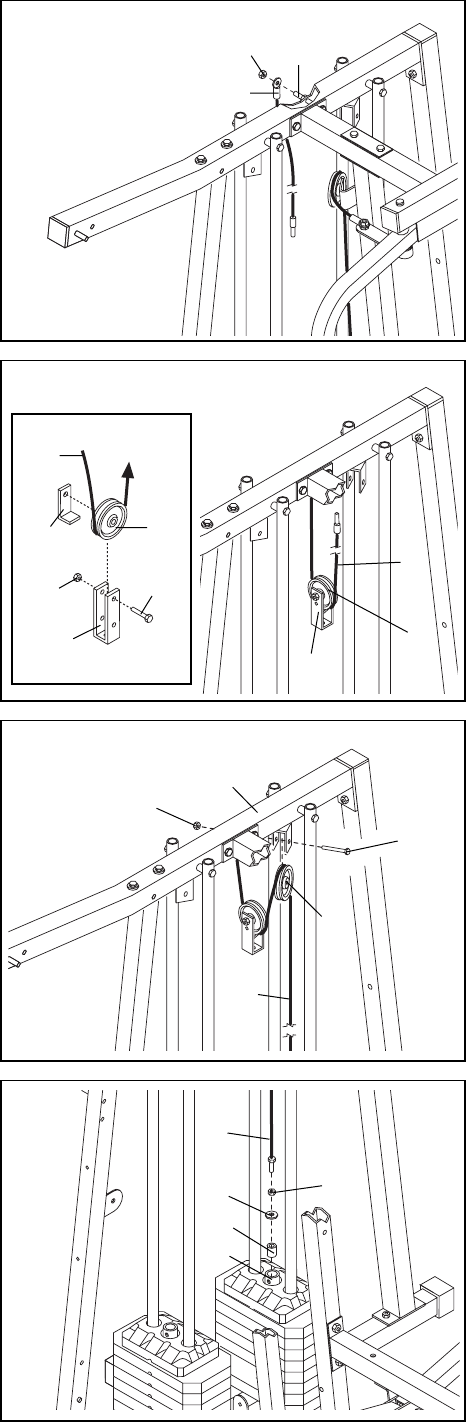
23. Find the Rear Cable (87)Ñthis is the shortest
Cable. Slide one end of the Rear Cable onto the 5/16Ó
x 3Ó Bolt (92). Thread another 5/16Ó Nylon Jam Nut
(91) onto the Bolt, but do not fully tighten it. Leave
enough room between the two Jam Nuts for the
Cable to pivot.
24. See the inset drawing. Attach a 3 1/2Ó Pulley (82) and
a Cable Trap (80) to the upper hole in a Large ÒUÓ
Bracket (84) with a 3/8Ó x 2Ó Bolt (50) and a 3/8Ó
Nylon Locknut (42). Make sure the Cable Trap is
inside the Large ÒUÓ Bracket. Note: This may
come pre-assembled.
Route the Rear Cable (87) through the Large ÒUÓ
Bracket (84) and the 3 1/2Ó Pulley (82). Make sure
the Cable is in the groove of the Pulley and that
the Cable and Pulley move smoothly.
25. Wrap the Rear Cable (87) around a 3 1/2Ó Pulley (82).
Attach the Pulley to the Top Frame (2) with a 3/8Ó x 2Ó
Bolt (50) and a 3/8Ó Nylon Locknut (42). The Cable
must be routed from the direction shown.
26. Thread a 1/2Ó Plain Nut (35) onto the end of the Rear
Cable (87). Place a 1/2Ó Washer (68) and a 1 1/4Ó x
1/2Ó Weight Spacer (10) on top of the Weight Tube
(25).
Thread the end of the Rear Cable (87) into the upper
end of the Weight Tube (25) until the Weight Spacer
(10) touches the Weight Tube.
Note: It is necessary to lift the Weight Tube (25) with
the Top Weight (24) slightly to thread the Rear Cable
(87) in place.
13
26
23
24
25
92
91
87
87
80
42
84
50
82
82
82
50
42
35
87
68
2
87
84
87
10
25
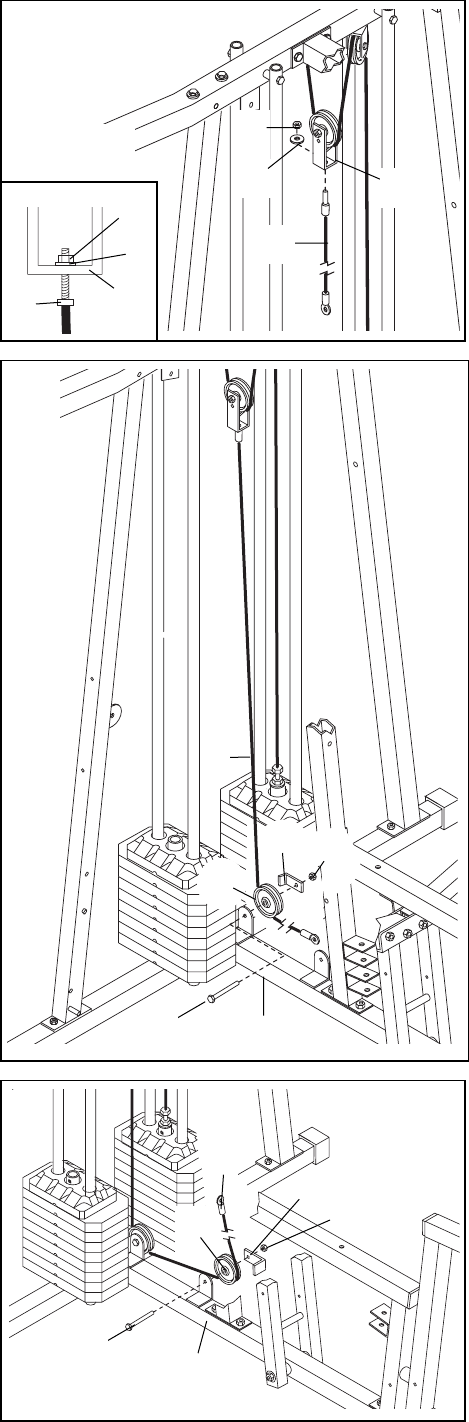
27. Find the Press Cable (88)Ñthis is the longest
Cable. Attach the end of the Press Cable (88) to the
Large ÒUÓ Bracket (84) with a 1/4Ó Nylon Locknut (44)
and a 1/4Ó Washer (37). Do not completely tighten
the Nylon Locknut. It should be threaded onto the
end of the Cable so only a couple of threads are
showing above the Nylon Locknut, as shown in
the inset drawing.
28. Wrap the Press Cable (88) around a 3 1/2Ó Pulley
(82). Attach the Pulley and a Cable Trap (80) to the
indicated bracket on the Press Base (13) with a 3/8Ó x
2Ó Bolt (50) and a 3/8Ó Nylon Locknut (42). Make
sure the Cable Trap is turned to hold the Cable in
place.
29. Wrap the Press Cable (88) around a 3 1/2Ó Pulley
(82). Attach the Pulley and a Cable Trap (80) to the
other bracket on the Press Base (13) with a 3/8Ó x 2Ó
Bolt (50) and a 3/8Ó Nylon Locknut (42). Make sure
the Cable Trap is turned to hold the Cable in
place.
14
27
28
29
88
37 84
44
88
50 13
82
80 42
50
88
82
80
42
13
44
37
84
88
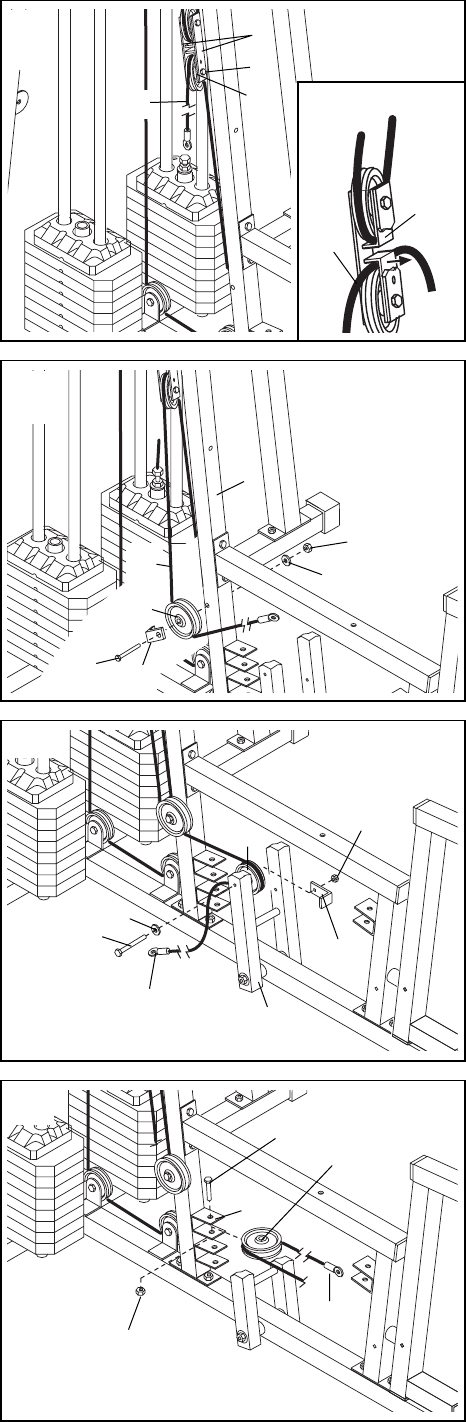
30. Route the Press Cable (88) over the indicated 3 1/2Ó
Pulley (82) attached to the Pulley Plates (31). The
Cable must be routed from the direction shown.
Refer to the inset drawing. Make sure the Cable is
between the Cable Trap (80) and the Pulley. Make
sure the Cable Trap is positioned to hold the
Cable in place as shown in the inset drawing.
Tighten the 3/8Ó x 2Ó Bolt (50) and the 3/8Ó Nylon
Locknut (42, not shown).
31. Route the Press Cable (88) around a 3 1/2Ó Pulley
(82). Attach the Pulley and a Cable Trap (80) to the
Leg Press Upright (4) with a 3/8Ó x 3 1/2Ó Bolt (66), a
3/8Ó Washer (38) and a 3/8Ó Nylon Jam Nut (43).
Make sure the Cable Trap (80) is turned to hold
the Cable in place.
32. Route the Press Cable (88) around a 3 1/2Ó Pulley
(82). Attach the Pulley and a Cable Trap (80) to the
Press Frame (12) with a 3/8Ó x 3Ó Bolt (94), a 3/8Ó
Washer (38) and a 3/8Ó Nylon Jamnut (43).
Make sure the Cable Trap (80) is turned to hold
the Cable in place.
33. Wrap the Press Cable (88) around a ÒVÓ Pulley (81).
Attach the ÒVÓ Pulley to the upper bracket on the Leg
Press Upright (4) with a 3/8Ó x 2Ó Bolt (50) and a 3/8Ó
Nylon Jam Nut (43).
15
31
32
33
30 31
82
50
88
80
88
82
88
88
94 38
12
82
80
43
88
81
4
50
43
38
43
4
80
66
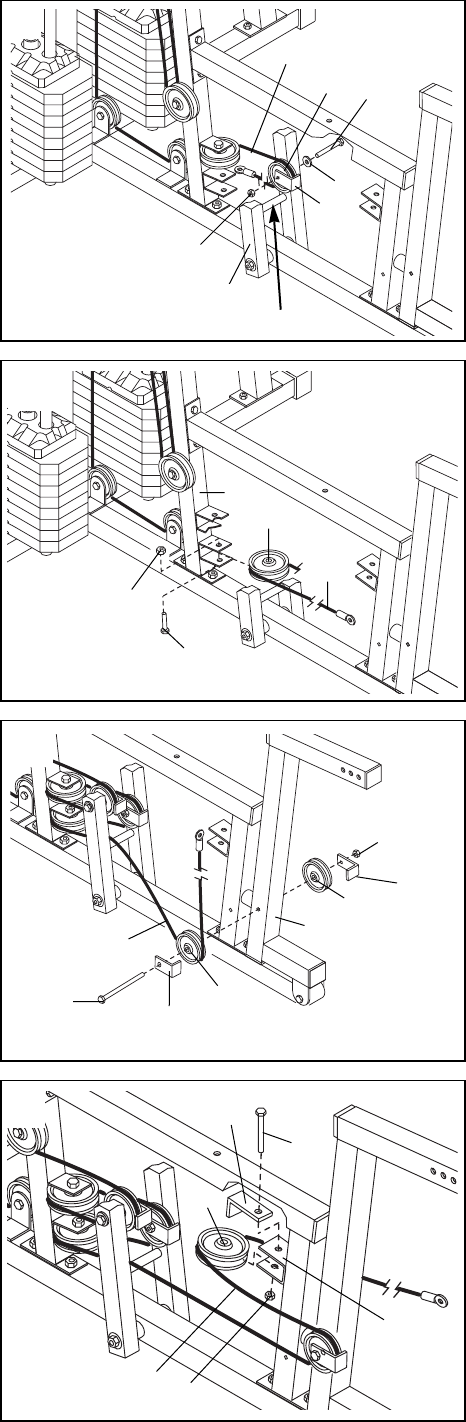
34. Route the Press Cable (88) around a 3 1/2Ó Pulley
(82). Attach the Pulley and a Cable Trap (80) to the
Press Frame (12) with a 3/8Ó x 3Ó Bolt (94), a 3/8Ó
Washer (38) and a 3/8Ó Nylon Jamnut (43).
Make sure the Cable Trap (80) is turned to hold
the Cable in place and that the Cable is between
the Pulley and the crossbar on the Press Frame.
35. Wrap the Press Cable (88) around a ÒVÓ Pulley (81).
Attach the ÒVÓ Pulley to the lower bracket on the Leg
Press Upright (4) with a 3/8Ó x 2Ó Bolt (50) and a 3/8Ó
Nylon Jam Nut (43).
36. Wrap the Press Cable (88) around a 3 1/2Ó Pulley
(82). Attach the Pulley and a Cable Trap (80) to the
Leg Press Arm (9) with the 3/8Ó x 4 1/2Ó Bolt (74).
Slide another 3 1/2Ó Pulley (82) with a Cable Trap (80)
onto the 3/8Ó x 4 1/2Ó Bolt (74). Hand tighten a 3/8Ó
Nylon Jamnut (43) onto the Bolt. Do not tighten the
Nylon Jamnut until step 38.
37. Wrap the Press Cable (88) around a ÒVÓ Pulley (81).
Attach the ÒVÓ Pulley and a Large Cable Trap (83) to
the bracket on the Front Seat Frame (8) with a 3/8Ó x
2 1/2Ó Bolt (65) and a 3/8Ó Nylon Locknut (42). Be
sure that the Large Cable Trap is turned to hold
the Cable in place and that the Cable and Pulley
move smoothly.
16
37
34
35
36
83
65
81
88 42
8
88
43
12
Crossbar
82 94
80
38
43
82
82
9
80
80
74
88
88
81
4
50
43
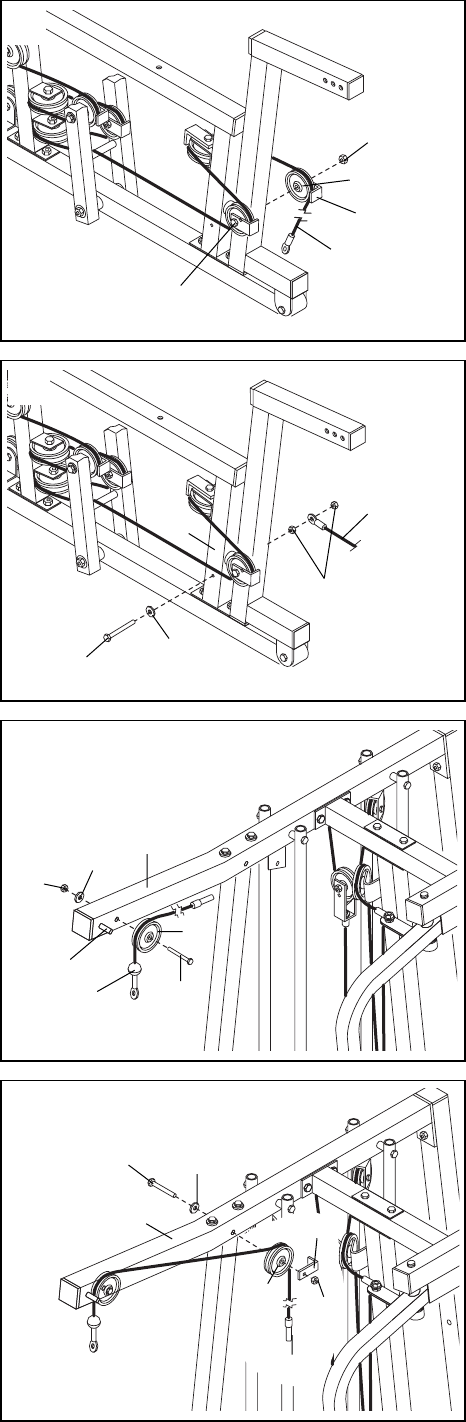
38. Note: The 3 1/2Ó Pulley (82) used in this step was
attached in step 36. It is shown removed for easier
part identification.
Route the Press Cable (88) around the 3 1/2Ó Pulley
(82). Make sure the Cable Trap (80) is turned to
hold the Cable in place and that the Cable is rout-
ed as shown. Tighten the 3/8Ó x 4 1/2Ó Bolt (74) and
the 3/8Ó Nylon Jamnut (43).
39. Slide a 5/16Ó Washer (20) onto a 5/16Ó x 2 3/4Ó Bolt
(55). Insert the Bolt into the Front Seat Frame (8).
Fully tighten a 5/16Ó Nylon Jam Nut (91) onto the Bolt.
Slide the end of the Press Cable (88) onto the Bolt.
Thread another 5/16Ó Nylon Jam Nut (91) onto the
Bolt, but do not fully tighten it. Leave enough
room between the two Jam Nuts for the Cable to
pivot.
40. Locate the High Cable (85)Ñthis is the longest
remaining cable. Wrap the High Cable around a
3 1/2Ó Pulley (82). Attach the Pulley to the Top Frame
(2) with a 3/8Ó x 3 1/2Ó Bolt (66), a 3/8Ó Washer (38)
and a 3/8Ó Nylon Jamnut (43). Make sure the end of
the Cable with the ball is on the indicated side of
the Pulley and that the Cable is between the
Pulley and the post.
41. Wrap the High Cable (85) around a 3 1/2Ó Pulley (82).
Attach the Pulley and a Cable Trap (80) to the Top
Frame (2) with a 3/8Ó x 3 1/2Ó Bolt (66), a 3/8Ó Washer
(38) and a 3/8Ó Nylon Jam Nut (43). Be sure that the
Cable Trap is positioned to hold the Cable in
place.
17
41
39
40
42
38 2
66
82
85
Post
85
80
38
66
2
82 43
38
82
43
80
88
91
8
88
20
55
74
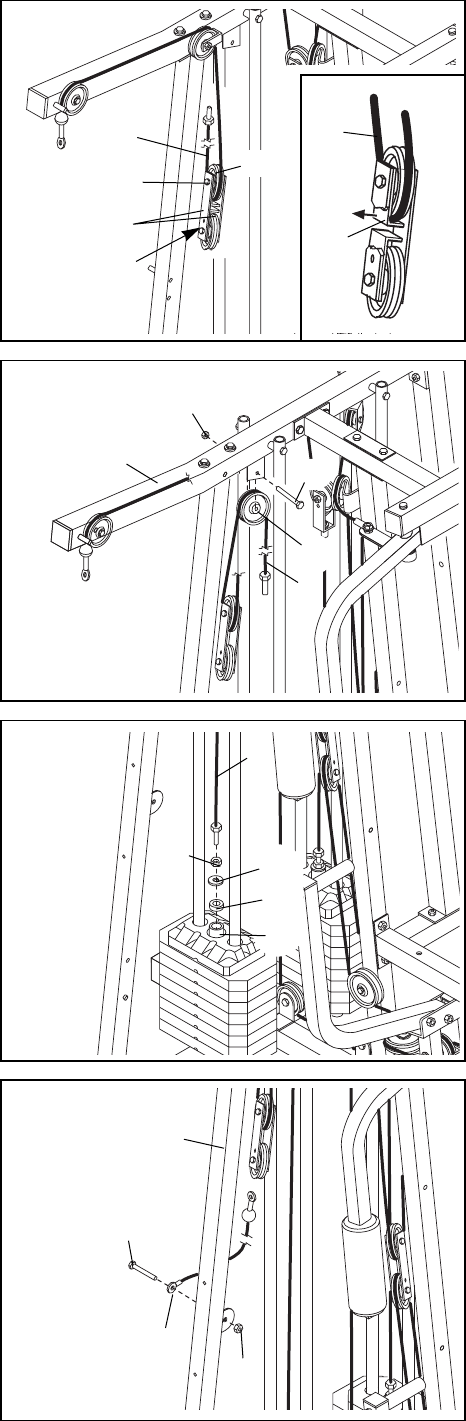
42. Locate the remaining preassembled pair of Pulley
Plates (31) and 3 1/2Ó Pulleys (82).
Route the High Cable (85) under the indicated 3 1/2Ó
Pulley (82). The end of the Pulley Plates (31) with two
holes should be downward. Refer to the inset draw-
ing. Make sure the Cable is between the Cable
Trap (80) and the Pulley, and that the Cable Trap is
positioned to hold the Cable in place.
Tighten the 3/8Ó x 2Ó Bolt (50) and the 3/8Ó Nylon
Locknut (42, not shown).
43. Wrap the High Cable (85) around a 3 1/2Ó Pulley (82).
Attach the Pulley to the Top Frame (2) with a 3/8Ó x 2Ó
Bolt (50) and a 3/8Ó Nylon Locknut (42). The Cable
must be routed from the direction shown.
44. Thread a 1/2Ó Plain Nut (35) onto the end of the High
Cable (85). Place a 1/2Ó Washer (68) and a 1 1/4Ó x
1/2Ó Weight Spacer (10) on top of the Weight Tube
(25).
Thread the end of the Rear Cable (87) into the upper
end of the Weight Tube (25) until the Weight Spacer
(10) touches the Weight Tube.
Note: It is necessary to lift the Weight Tube (25) with
the Top Weight (24) slightly to thread the Rear Cable
(87) in place.
18
42
43
44
85 85
80
82
50
31
End with two
holes should
be down
50
82
2
42
85
35
85
68
10
25
45. Attach the closed loop on the end of the Low Cable
(86) to the bracket on the Lat Upright (1) with the
5/16Ó x 1Ó Bolt (95) and a 5/16Ó Nylon Locknut (40).
Make sure the flat side of the closed loop at the
end of the Low Cable (86) is turned towards the
bracket.
45
40
86
95
1
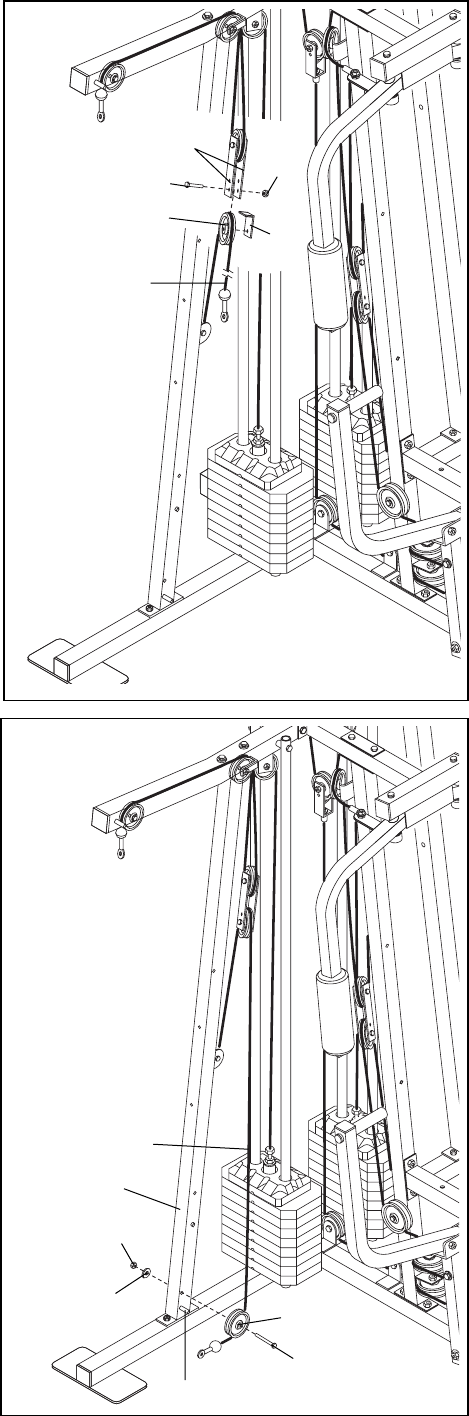
46. Remove the indicated 3/8Ó x 2Ó Bolt (50), the 3/8Ó
Nylon Locknut (42), the 3 1/2Ó Pulley (82) and the
Cable Trap (80) from the indicated Pulley Plates (31).
Lay the Low Cable (86) over the Pulley. Re-attach the
Pulley and the Cable Trap to the lowest hole in the
Pulley Plates with the Bolt and the Nylon Locknut.
Make sure the Cable Trap is turned to hold the
Cable in place.
47. Wrap the Low Cable (86) around a 3 1/2Ó Pulley (82).
Attach the Pulley to the Lat Upright (1) with the 3/8Ó x
3 1/2Ó Bolt (66), a 3/8Ó Washer (38) and a 3/8Ó Nylon
Jamnut (43). The ball on the Cable must be on the
indicated side of the Pulley. Make sure the Cable
and Pulley move smoothly and that the Cable is
between the Pulley and the post.
19
46
47
31
42
82
80
50
43
38 82
66
Post
86
1
86
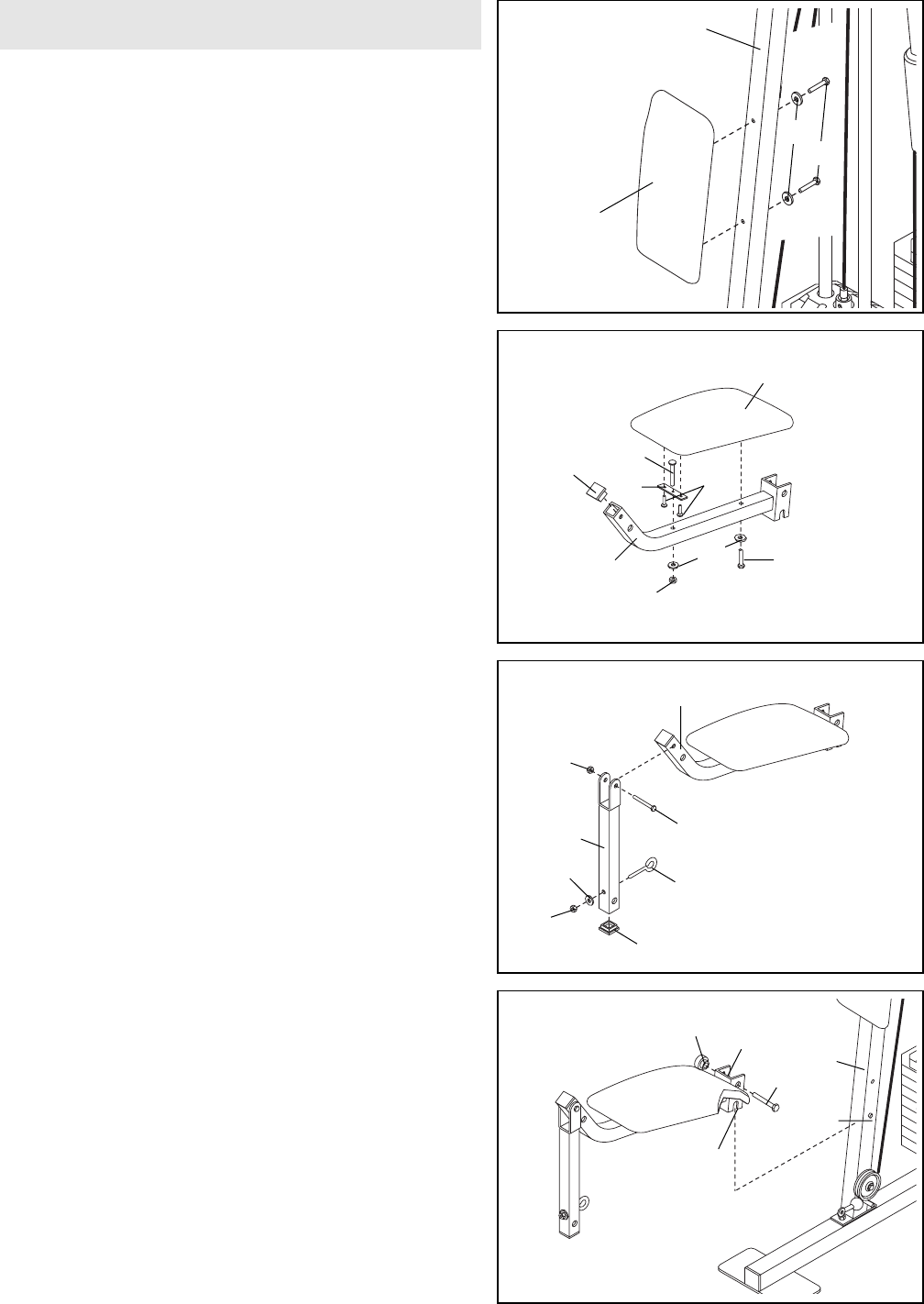
49. Press a 1 1/2Ó Square Inner Cap (57) into the Rear
Seat Frame (16).
Insert a 1/4Ó x 2Ó Carriage Bolt (61) through the cen-
ter hole in a Seat Plate (41). Attach the Seat Plate to
the Seat (17) with two 1/4Ó x 1/2Ó Screws (59).
Insert the 1/4Ó x 2Ó Carriage Bolt (61) through the indi-
cated hole in the Rear Seat Frame (16). Tighten a
1/4Ó Nylon Locknut (44) with a 1/4Ó Washer (37) onto
the Carriage Bolt.
Attach the other end of the Seat (17) to the Rear Seat
Frame (16) with a 1/4Ó Washer (37) and a 1/4Ó x 2Ó
Machine Screw (63).
50. Press a 1 1/2Ó Square Inner Cap (57) into the Leg
Lever (15).
Lubricate the 5/16Ó x 2 1/4Ó Bolt (62). Attach the Leg
Lever (15) to the Rear Seat Frame (16) with the Bolt
and a 5/16Ó Nylon Locknut (40). Do not overtighten
the Nylon Locknut; the Leg Lever must pivot
freely.
Insert the 5/16Ó x 2Ó Eyebolt (79) into the Leg Lever
(15) from the direction shown. Tighten a 5/16Ó Nylon
Locknut (40) with a 5/16Ó Washer (20) onto the
Eyebolt.
51. Rest the slot in the Rear Seat Frame (16) on the indi-
cated post in the Lat Upright (1). Attach the Rear Seat
Frame to the Lat Upright with a 5/16Ó x 2 3/4Ó
Carriage Bolt (77) and the Seat Knob (30).
51
49
50
20
Slot
44
63
17
16
57 41
61
59
Post
1
77
16
30
16
62ÑLubricate
57
40
20
40
15
79
37
48. Locate and open the parts bag labeled ÒSEAT
ASSEMBLY.Ó
Attach a Small Backrest (97) to the Lat Upright (1)
with two 1/4Ó x 2 1/2Ó Machine Screws (64) and two
1/4Ó Washers (37).
48 1
97
37
64
Seat Assembly
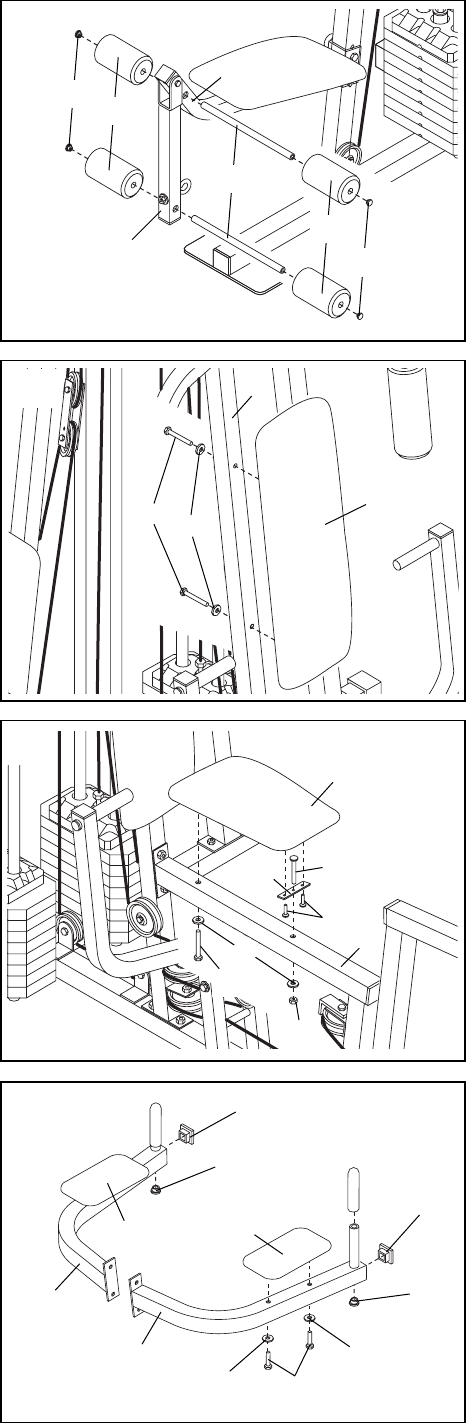
52. Press two 3/4Ó Round Inner Caps (78) into each Pad
Tube (28).
Insert a Pad Tube (28) into the Rear Seat Frame (16).
Slide a Foam Pad (29) onto each end of the Pad
Tube.
Insert the other Pad Tube (28) into the Leg Lever (15).
Slide a Foam Pad (29) onto each end of the Pad
Tube.
53. Attach a Large Backrest (19) to the Leg Press Upright
(4) with two 1/4Ó x 2 1/2Ó Machine Screws (64) and
two 1/4Ó Washers (37).
54. Insert a 1/4Ó x 2 1/2Ó Carriage Bolt (60) through the
center hole in a Seat Plate (41). Attach the Seat Plate
to the Seat (17) with two 1/4Ó x 1/2Ó Screws (59).
Insert the 1/4Ó x 2 1/2Ó Carriage Bolt (60) through the
indicated hole in the Front Seat Frame (8). Tighten a
1/4Ó Nylon Locknut (44) with a 1/4Ó Washer (37) onto
the Carriage Bolt.
Attach the other end of the Seat (17) to the Front Seat
Frame (8) with a 1/4Ó Washer (37) and a 1/4Ó x 2 1/2Ó
Machine Screw (64).
52
53
54
21
37
4
19
64
17
59
60
8
37
44
41
64
16
15
78 29
28
78
29
55. Press a 1Ó Round Inner Cap (70) into the holes in the
VKR arms located underneath the handles.
Press a 1 1/2Ó Square inner Cap (57) into the end of
each VKR Arm (18, 32). Attach a VKR Armrest (71) to
the Right VKR Arm (32) with two 1/4Ó x 2Ó Machine
Screws (63) and two 1/4Ó Flat Washers (37).
Attach a VKR Armrest (71) to the Left VKR Arm (18)
in the same manner.
55 57
70
70
63
37
32
37
18
71
71
57
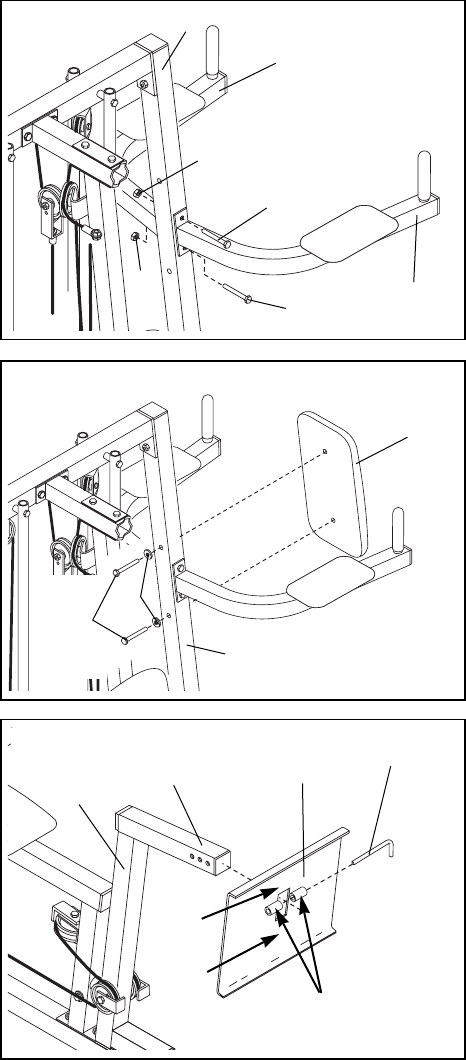
56. Attach the Left (18) and the Right (32) VKR Arm to
the VKR Upright (51) with two 5/16Ó x 3Ó Bolts (92)
and two 5/16Ó Nylon Locknuts (40).
22
59. Make sure that all parts have been properly tightened. The use of the remaining parts will be explained in
HOW TO USE THE HOME GYM SYSTEM, beginning on page 23 of this manual.
Before using the home gym system, pull each cable a few times to be sure that the cables move smoothly
over the pulleys. If one of the cables does not move smoothly, find and correct the problem. IMPORTANT: If
the cables are not properly installed, they may be damaged when heavy weight is used. See the
CABLE DIAGRAMS on page 26 and 27 of this manual for proper cable routing. If there is any slack
in the cables, you will need to remove the slack by tightening the cables. See TROUBLE-SHOOTING
AND MAINTENANCE on page 25.
56
40
92
40
32
51
18
92
57. Attach the VKR Backrest (76) to the VKR Upright (51)
with two 1/4Ó x 2 1/2Ó Machine Screws (64) and two
1/4Ó Flat Washers (37).
57
51
76
64
37
58. Slide the Leg Press Plate (11) onto the end of the
adjustment tube (A) on the Leg Press Arm (9).
Slide the Lock Pin (73) through the welded tubes on
the Leg Press Plate (11) and one of the holes in the
adjustment tube (A).
Make sure the Leg Press Plate is oriented correct-
ly. Note that on one side the distance from the
square hole to the edge of the Plate is 3 1/2Ó and
on the other side the distance is 5 3/4.Ó The side
with the 3 1/2Ó distance must be pointed upwards.
57
Welded Tubes
73
11
9
A
3 1/2Ó
5 3/4Ó
23
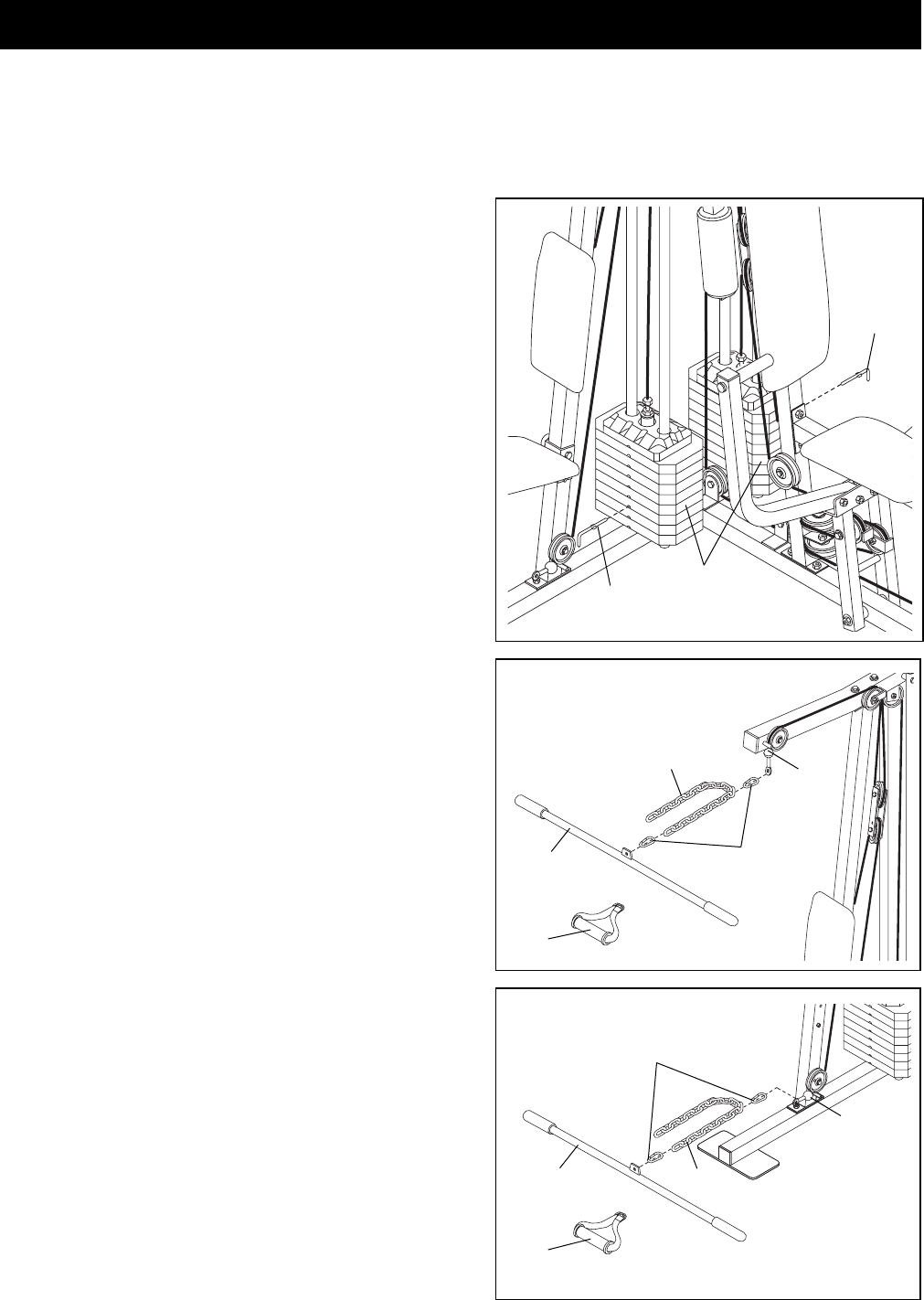
CHANGING THE WEIGHT SETTING
The home gym system features two weight stacks. The
one weight stack is connected to the lat, upper, and lower
pulley stations. The other weight stack is connected to the
butterfly and press arms and the leg press.
To change the weight setting of either weight stack, insert
a Weight Pin (93) under the desired Weight (90). Insert
the Weight Pin until the bent end of the Weight Pin is
touching the Weights, and turn the bent end downward.
The weight setting of either weight stack can be changed
from 6.5 pounds to 106.5 pounds, in increments of 12.5
pounds. Note: Due to the cables and pulleys, the
amount of resistance at each exercise station may
vary from the weight setting. Use the WEIGHT
RESISTANCE CHART on page 27 to find the approxi-
mate amount of resistance at each weight station.
ATTACHING THE LAT BAR OR HANDLE TO THE HIGH
PULLEY STATION
Attach the Lat Bar (36) to the High Cable (85) with a
Cable Clip (33). For some exercises, the Chain (34)
should be attached between the Lat Bar and the High
Cable with two Cable Clips. Adjust the length of the
Chain between the Lat Bar and the High Cable so the
Lat Bar is in the correct starting position for the exer-
cise to be performed.
The Handle (96) can be attached in the same manner.
ATTACHING THE LAT BAR OR HANDLE TO THE LOW
PULLEY STATION
Attach the Lat Bar (36) to the Low Cable (86) with a Cable
Clip (33). For some exercises, the Chain (34) should be
attached between the Lat Bar and the Low Cable with two
Cable Clips. Adjust the length of the Chain between
the Lat Bar and the Low Cable so the Lat Bar is in the
correct starting position for the exercise to be per-
formed.
The Handle (96) can be attached in the same manner.
The instructions below describe how each part of the home gym system can be adjusted. Refer to the exercise
poster accompanying this manual to see how the home gym system should be set up for each exercise.
IMPORTANT: When attaching the lat bar or handle, make sure that the attachments are in the correct
starting position for the exercise to be performed. If there is any slack in the cables or chain as an exer-
cise is performed, the effectiveness of the exercise will be reduced.
96
85
33
34
36
93
93
90
96
86
33
34
36
How to Use the Home Gym System
24
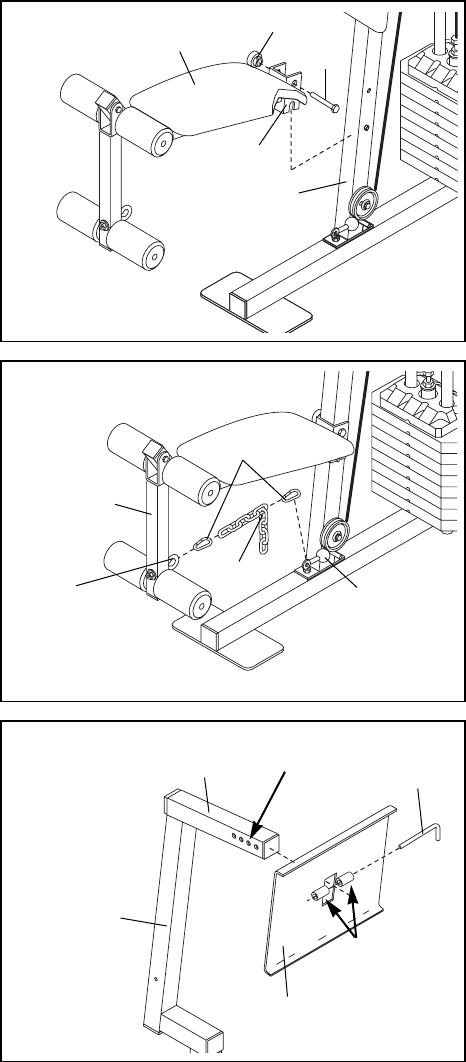
ATTACHING AND REMOVING THE SEAT
To attach the Seat (17), set the bracket on the Rear Seat
Frame (16) onto the pins on the Lat Upright (1). Attach the
Rear Seat Frame to the Lat Upright with the 5/16Ó x 2 3/4Ó
Carriage Bolt (77) and the Seat Knob (30).
For some exercises, the Seat (17) must be removed.
First, be sure that the chain is not attached to the leg
lever. Next, remove the Seat Knob (30) and the 5/16Ó x
2 3/4Ó Carriage Bolt (77) from the Rear Seat Frame (16).
Lift the Rear Seat Frame off the Lat Upright (1).
ATTACHING THE LEG LEVER TO THE LOW
PULLEY STATION
To use the Leg Lever (15), the seat must be attached to
the front upright (see ATTACHING AND REMOVING THE
SEAT above).
Attach one end of the Chain (34) to the Low Cable (86)
with a Cable Clip (33). Attach the other end of the Chain
to the Eyebolt (79) with a Cable Clip.
ADJUSTING THE LEG PRESS PLATE
Remove the Lock Pin (73) from the adjustment tube (A).
Align the welded tubes on the Leg Press Plate (11) with
the desired set of holes in the adjustment tube (A). Re-
insert the Lock Pin (73) through the welded tubes on the
Leg Press Plate and the holes in the adjustment tube.
Make sure the Lock Pin is turned downward, so it
locks into place.
17 30
1
15
79 86
A
9
73
Holes
33
34
11
Welded
Tubes
77
16
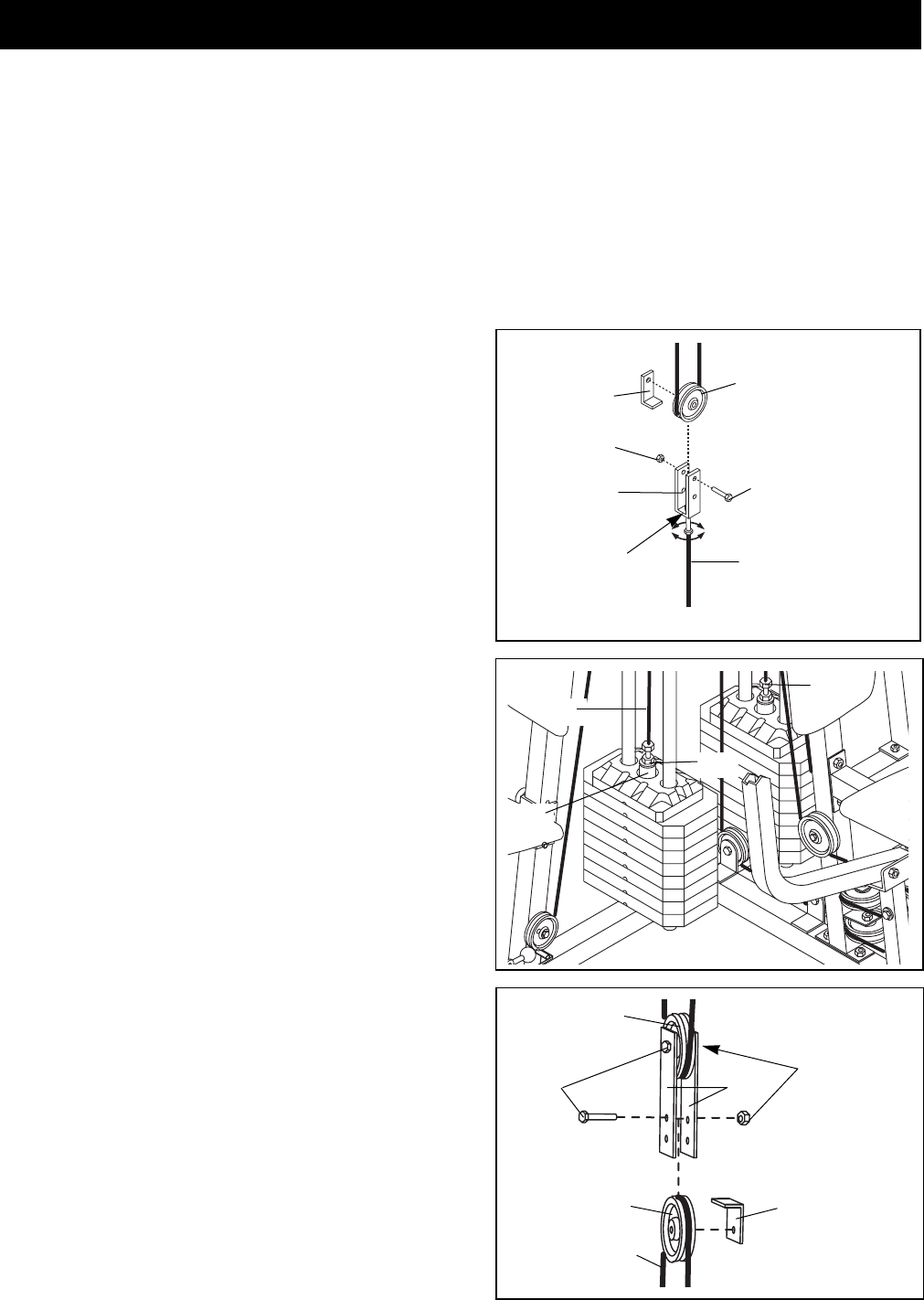
To tighten the cables, first insert the weight pin into the
middle of the weight stack. Slack can be removed from
the cables in several ways:
¥ See drawing 1. Tighten the 1/4Ó Nylon Locknut (44)
that connects the end of the Press Cable (88) to the
Large ÒUÓ Bracket (84).
¥ See drawing 1. Remove the 3/8Ó Nylon Locknut (42)
and the 3/8Ó x 2Ó Bolt (50) from the Cable Trap (80),
Pulley, and Large ÒUÓ Bracket (84). Re-attach the
Pulley and Cable Trap to the other hole in the Large
ÒUÓ Bracket. Make sure the Cable Trap is in the
proper position and that the Cable and Pulley
move smoothly.
¥ See drawing 2. Loosen the 1/2Ó Plain Nut (35) on the
end of the High Cable (85). Thread the Cable further
into the Weight Tube (25). Hand tighten the 1/2Ó
Plain Nut.
The Rear Cable (87) can be tightened in the same
manner.
¥ See Drawing 3. If you feel additional slack while using
the home gym system, the Low Cable (86) and the
Press Cable (88) can be tightened further.
Remove the 3/8Ó x 2Ó Bolts (50), the 3/8Ó Nylon
Locknuts (42), the 3 1/3Ó Pulleys (82), and the Cable
Traps (80) from the Pulley Plates (31). Reattach the
upper Pulley without the Cable Trap. Reattach the
lower Pulley to the higher hole in the Pulley Plates
without the Cable Trap. Keep the Cable Traps for
future use. Make sure the Cable and Pulley move
smoothly.
Do not overtighten the cables. If the cables are over-
tightened, the top weight will be lifted off the weight
stack. If a cable tends to slip off the pulleys often, it
may have become twisted. Remove the cable and re-
install it.
If the cables need to be replaced, see ORDERING RE-
PLACEMENT PARTS on the back cover of this manual.
84
80 82
44
35
88
42
87
85
86, 88
82
82
31
80
42
50
2
3
1
50
25
25
Trouble-shooting and Maintenance
Inspect and tighten all parts each time you use the home gym system. Replace any worn parts immediately. The
home gym system can be cleaned using a damp cloth and mild non-abrasive detergent. Do not use solvents.
TIGHTENING THE CABLES
Woven cable, the type of cable used on the home gym system, can stretch slightly when it is first used. If there
is slack in the cables before resistance is felt, the cables should be tightened. If any slack is felt when using the
weight stack closest to the lat upright, both the High Cable (85) and the Low Cable (86) will need to be tight-
ened. If any slack is felt when using the other weight stack, the Rear Cable (87), the Press Cable (88), and the
Butterfly Cable (89) will need to be tightened.
26
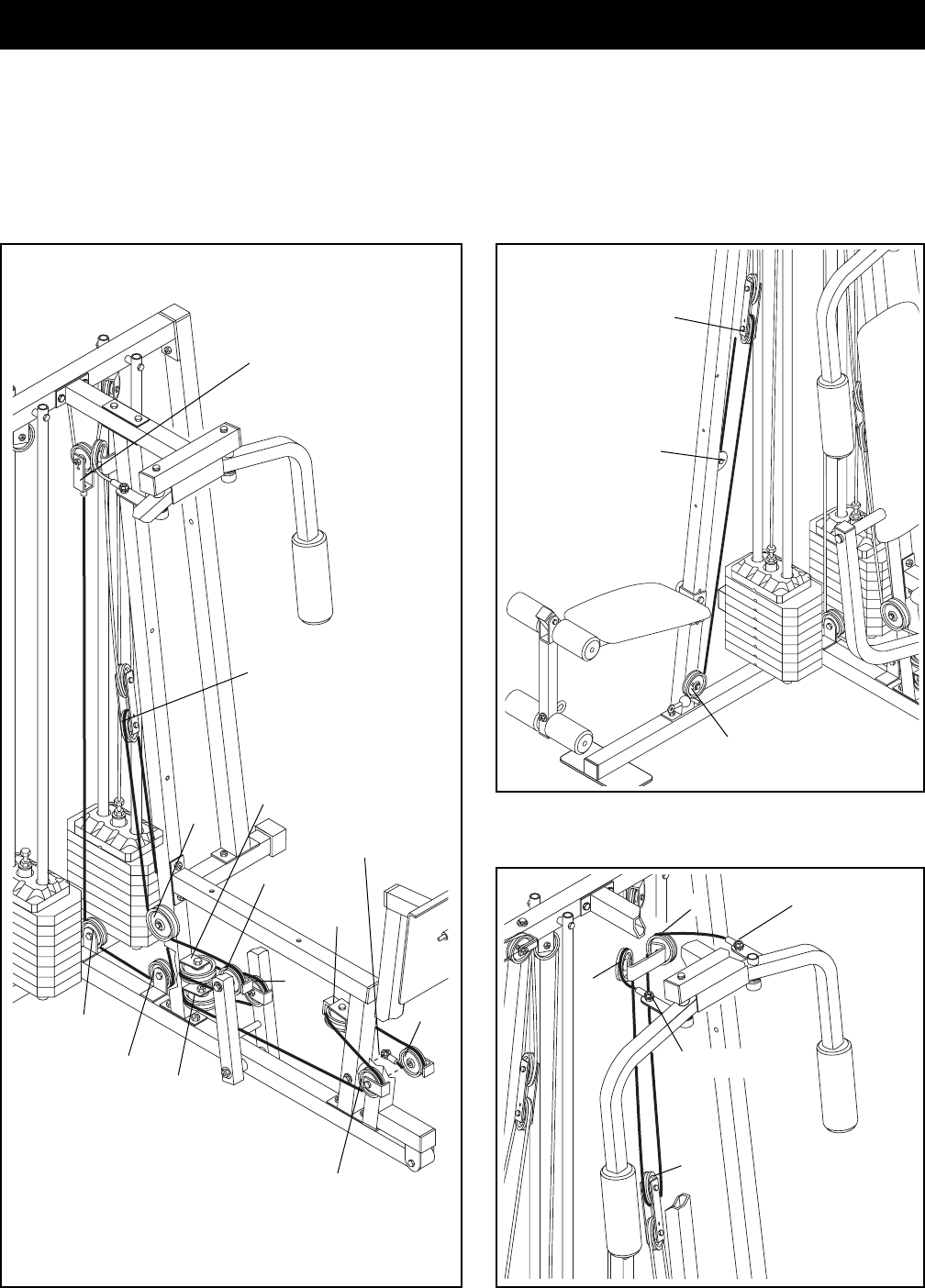
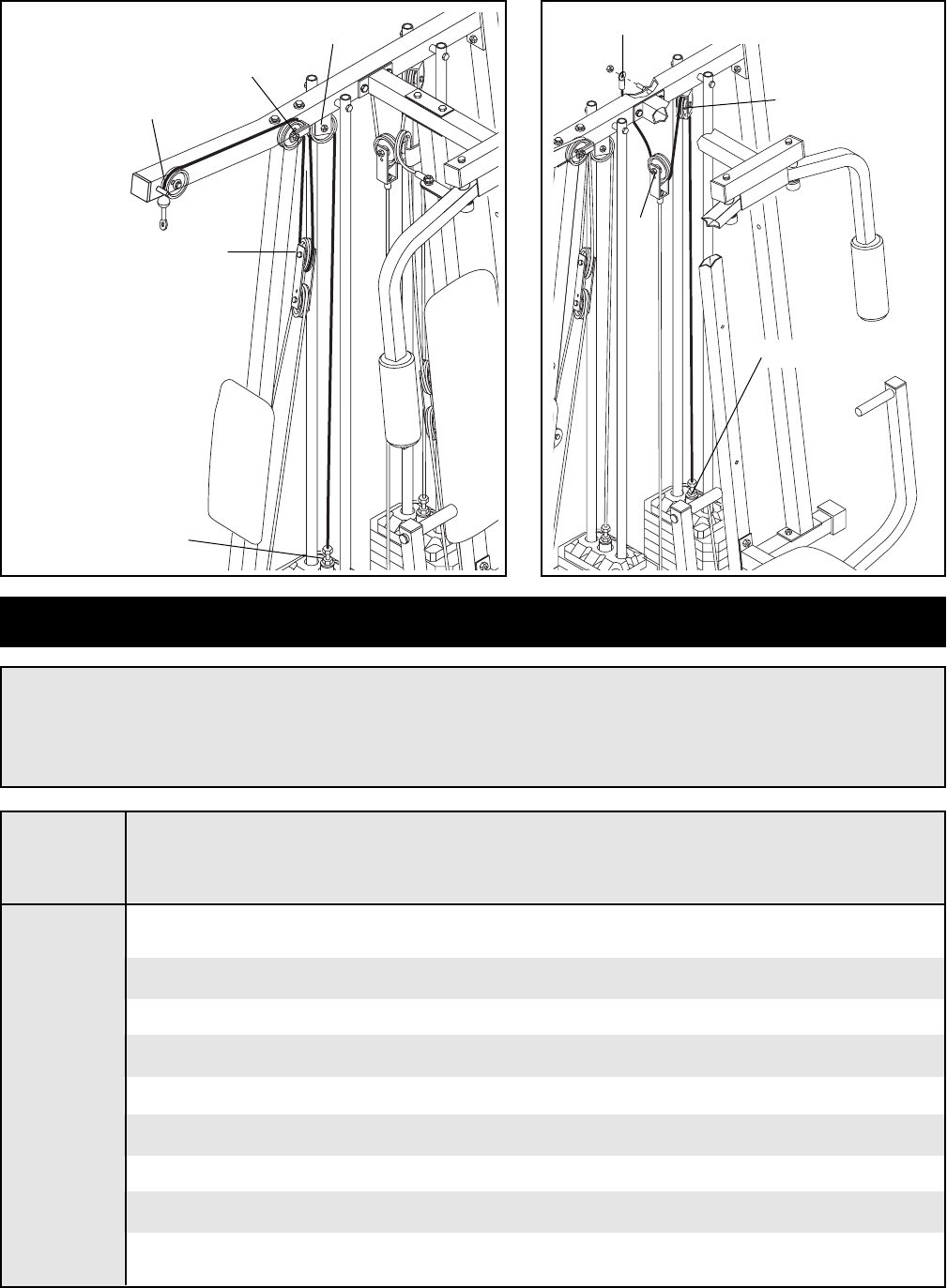
The cable diagrams on this page and the next page show the proper routing of the High Cable (85), the Low
Cable (86), the Rear Cable (87), the Press Cable (88), and the Butterfly Cable (89). Use the diagrams to be sure
that the Cables have been assembled correctly. The starting and ending points of each Cable have been
labeled. The numbers show the proper route for each Cable. IMPORTANT: If the Cables have not been cor-
rectly routed, the home gym system will not function properly and damage may occur.
Low Cable (86)
Butterfly Cable (89)
Press Cable (88)
2
4
1ÑRight Arm
3
5ÑLeft Arm
2
1
3ÑLow Pulley
1ÑLong ÒUÓ Bracket
8
9
7
6
3
Leg PressÑ13
4
5
2
10
12
11
Cable Diagrams
27
Weight StackÑ5
High PulleyÑ1
2
2
3
3
1ÑTop Frame
4ÑWeight Stack
4
WEIGHT PRESS BUTTERFLY LEG HIGH LOW LEG
ARM ARM LEVER PULLEY PULLEY PRESS
PLATES (lbs.) (lbs.) (lbs.) (lbs.) (lbs.) (lbs.)
Top 27 20 9 10 10 52
153 37 18 24 24 94
279 50 33 40 41 141
3101 65 38 53 53 180
4125 83 48 66 63 228
5148 103 58 80 80 263
6175 120 68 96 91 310
7205 143 76 107 101 358
8240 173 90 123 120 410
This chart shows the approximate weight resistance at each station. ÒTopÓ refers to the 6.5 lbs. top
weight. The other numbers refer to the 12.5 lbs. weight plates. Note: The actual resistance at each
weight station may vary due to differences in individual weight plates, as well as friction between the
cables, pulleys, and weight guides.
Weight Resistance Chart
High Cable (85) Rear Cable
(87)
49
1
2
3
4
5
6
7
78
9
11
12
13
14
15
16
17
97
19
17
21
21
22
22
23
23
24
25
25
26
26
27
27
28
28
29
29
29
29 30
31
33
34
36
21
21
85
85
87
31
41
41
86
87
88
88
89
89
56
66
82
38
43
20
55
55
66
50
38
40 20
42
82
80 43
42 50
40
69
69
67
67
42
50
82
55
20
55
20
49
56
58
50
43
40
20
55
20
66
82
43
43
81
40
37
64
82
42 50
50
37
64
40
82
80
50
42 42
82
80
50
40
56
55
92
70
98
55
56
91
91
47
47
95
95
45
45
46
46
48
48
50
40
82
80
42
80
82
49
49 75
38
38
94 94
40
39
54
70
48
82 43
80
52
81
42
40
82
91
53 72
73
59
83
65
37
44
56
64
37
60
40
55
74 80 82
56
94 56
43
82 80
43
48
70
78
57
20
40
79
62
78
78
40
44
37
37
63
59
57
61
43
38
40
40
82
66
77
37
64
64
95
40
37
44
84
42
82
50
50
90
90
91 91
38
20
91
93
93
80
80
80
96
48
56
56
40
40
55
20
57
57
63
37
92
37
64
40 76
71
71
21
18
32
51
37
40
86
68
68
35
35
10
10
40
56
70
70
20
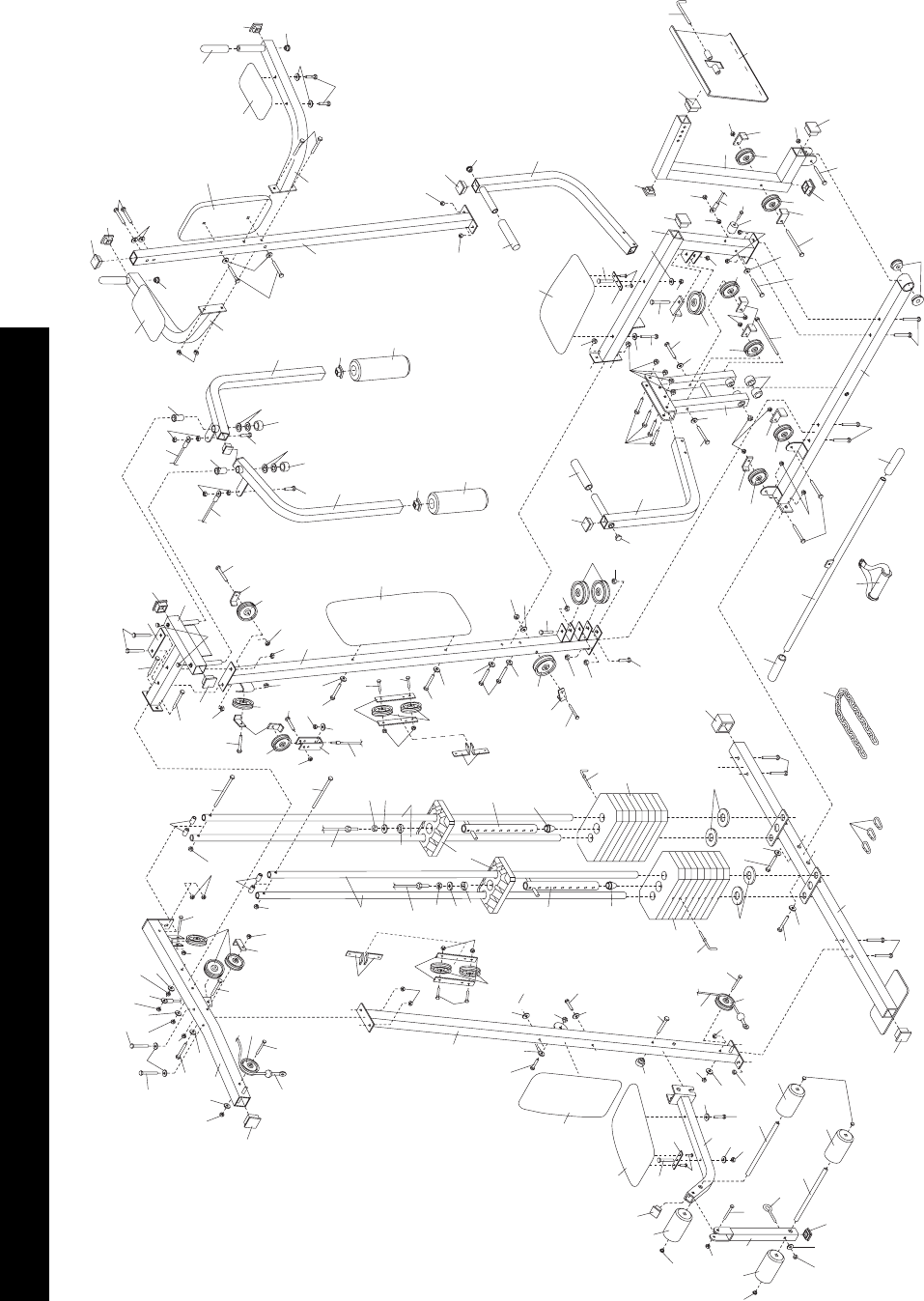
Exploded Drawing - Model No. WESY41080 R0898A

Note: Ò#Ó indicates a non-illustrated part. Specifications are subject to change without notice.
1 1 Lat Upright
2 1 Top Frame
3 1 Butterfly Frame
4 1 Leg Press Upright
5 1 Right Fly Arm
6 1 Left Fly Arm
7 2 Press Arm
8 1 Front Seat Frame
9 1 Leg Press Arm
10 2 1 1/4Ó x 1/2Ó Weight Spacer
11 1 Leg Press Plate
12 1 Press Frame
13 1 Press Base
14 1 Weight Base
15 1 Leg Lever
16 1 Rear Seat Frame
17 2 Seat
18 1 Left VKR Arm
19 1 Large Backrest
20 12 5/16Ó Washer
21 6 5Ó Plastic Grip
22 2 10Ó Pad
23 4 Weight Guide
24 2 Top Weight
25 2 Weight Tube
26 2 Weight Tube Bumper
27 4 Weight Bumper
28 2 Pad Tube
29 4 Foam Pad
30 1 Seat Knob
31 4 Pulley Plate
32 1 Right VKR Arm
33 3 Cable Clip
34 1 Chain
35 2 1/2Ó Plain Nut
36 1 Lat Bar
37 15 1/4Ó Washer
38 6 3/8Ó Washer
39 4 5/16Ó x 2 1/2Ó Bolt
40 30 5/16Ó Nylon Locknut
41 2 Seat Plate
42 13 3/8Ó Nylon Locknut
43 10 3/8Ó Nylon Jam Nut
44 3 1/4Ó Nylon Locknut
45 4 1Ó Retainer
46 2 1Ó Round Outer Cap
47 2 1 1/8Ó x 2 1/2Ó Plastic Bushing
48 6 1 3/4Ó Square Inner Cap
49 8 5/16Ó x 2 1/2Ó Carriage Bolt
50 13 3/8Ó x 2Ó Bolt
51 1 VKR Upright
52 1 3/8Ó x 8Ó Bolt
53 1 Leg Press Bumper
54 2 1Ó x 7/8Ó Plastic Bushing
55 12 5/16Ó x 2 3/4Ó Bolt
56 10 2Ó Square Inner Cap
57 4 1 1/2Ó Square Inner Cap
58 1 2Ó Square Outer Cap
59 4 1/4Ó x 1/2Ó Screw
60 1 1/4Ó x 2 1/2Ó Carriage Bolt
61 1 1/4Ó x 2Ó Carriage Bolt
62 1 5/16Ó x 2 1/4Ó Bolt
63 5 1/4Ó x 2Ó Machine Screw
64 7 1/4Ó x 2 1/2Ó Machine Screw
65 1 3/8Ó x 2 1/2Ó Bolt
66 4 3/8Ó x 3 1/2Ó Bolt
67 2 5/16Ó x 6Ó Bolt
68 2 1/2Ó Washer
69 4 1/2Ó x 3/4Ó Spacer
70 6 1Ó Round Inner Cap
71 2 VKR Armrest
72 1 1Ó Tap Screw
73 1 Lock Pin
74 1 3/8Ó x 4 1/2Ó Bolt
75 2 Press Bushing
76 1 VKR Backrest
77 1 5/16Ó x 2 3/4Ó Carriage Bolt
78 4 3/4Ó Round Inner Cap
79 1 5/16Ó x 2Ó Eyebolt
80 15 Cable Trap
81 3 ÒVÓ Pulley
82 19 3 1/2Ó Pulley
83 1 Large Cable Trap
84 1 Large ÒUÓ Bracket
85 1 High Cable
86 1 Low Cable
87 1 Rear Cable
88 1 Press Cable
89 1 Butterfly Cable
90 16 Weight
91 8 5/16Ó Nylon Jam Nut
92 3 5/16Ó x 3Ó Bolt
93 2 Weight Pin
94 3 3/8Ó x 3Ó Bolt
95 3 5/16Ó x 1Ó Bolt
96 1 Handle
97 1 Small Backrest
98 1 Support Plate
# 1 UserÕs Manual
# 1 Exercise Poster
Part List - Model No. WESY41080 R0898A
Key No. Qty. Description Key No. Qty. Description
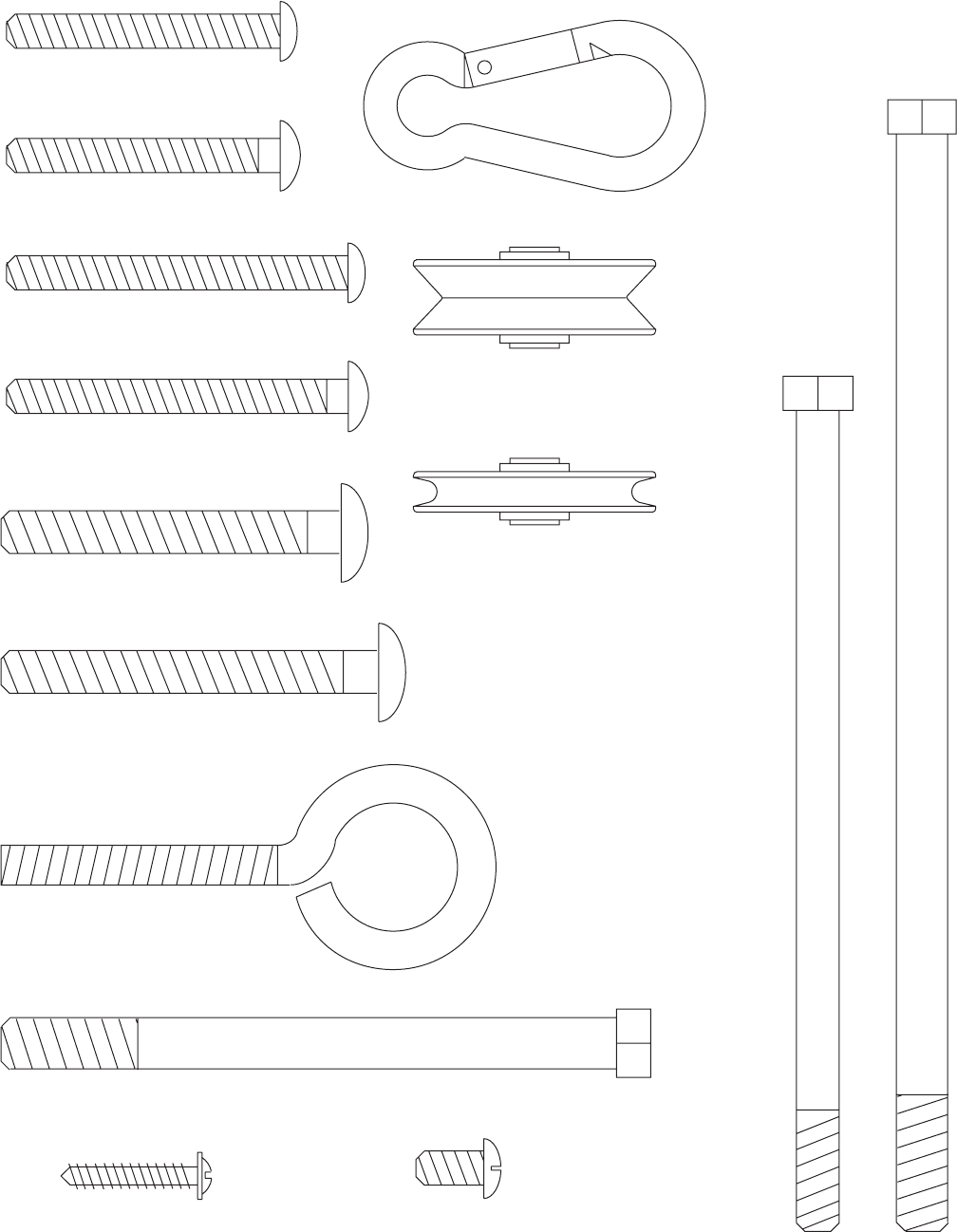
5/16" x 2" Eyebolt (79)
Cable Clip (33)
1/4" x 1/2" Screw (59)
3/8" x 4 1/2" Bolt (74)
5/16" x 2 3/4" Carriage Bolt (77)
5/16" x 2 1/2" Carriage Bolt (49)
1/4" x 2 1/2" Carriage Bolt (60)
1/4" x 2 1/2" Machine Screw (64)
1/4" x 2" Carriage Bolt (61)
1/4" x 2" Machine Screw (63)
"V" Pulley (81)
(Not shown to scale)
3 1/2" Pulley (82)
(Not shown to scale)
5/16" x 6" Bolt (67)
3/8" x 8" Bolt (52)
1" Tap Screw (72)
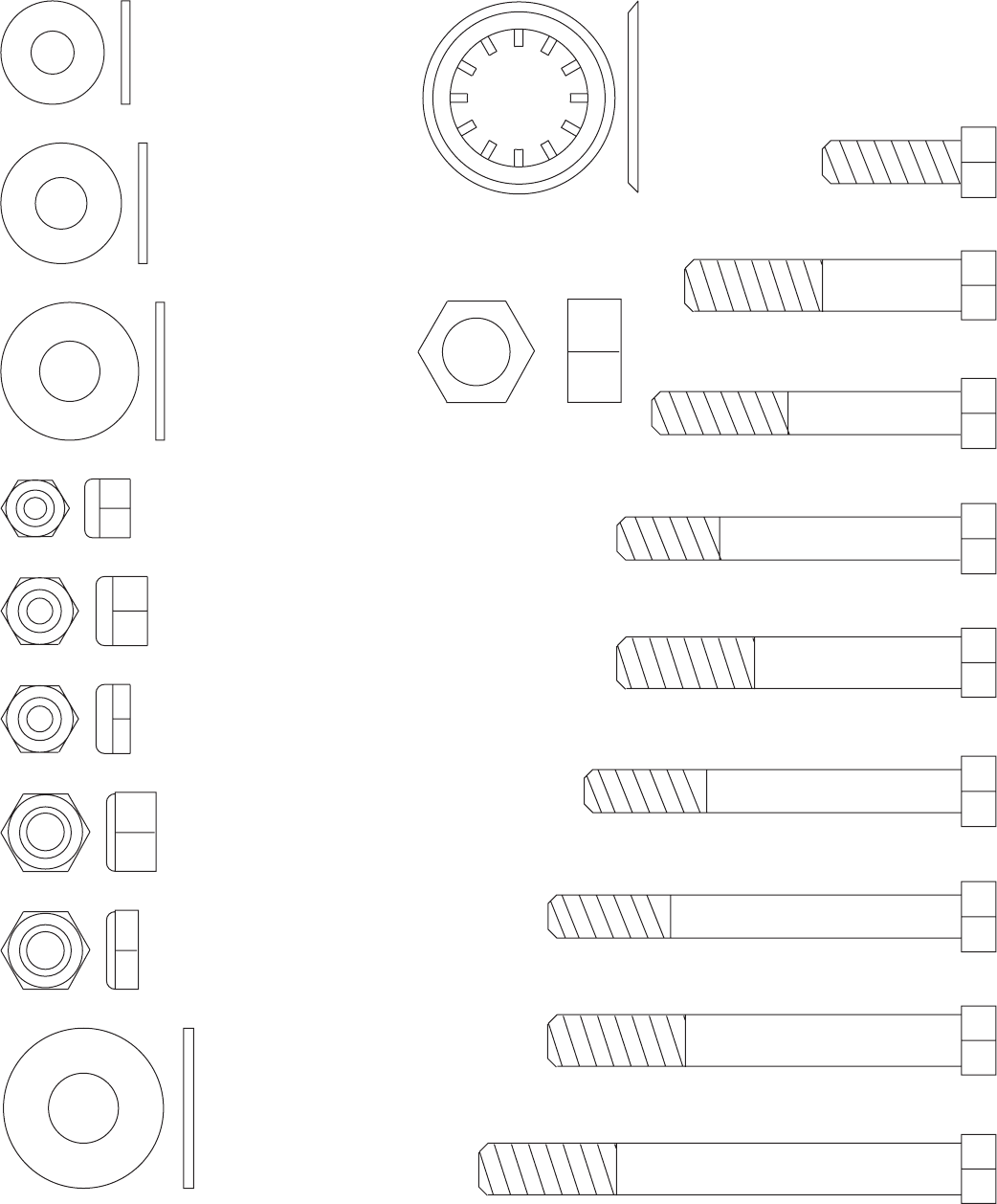
3/8" Nylon Jam Nut (43)
5/16" x 1" Bolt (95)
3/8" x 2" Bolt (50)
5/16" x 2 1/4" Bolt (62)
5/16" x 2 1/2" Bolt (39)
3/8" x 2 1/2" Bolt (65)Ð1
5/16" x 2 3/4" Bolt (55)
5/16" x 3" Bolt (92)
3/8" x 3" Bolt (94)
3/8" x 3 1/2" Bolt (66)
1/4" Washer (37)
5/16" Washer (20)
3/8" Washer (38)
1/4" Nylon Locknut (44)
5/16" Nylon Locknut (40)
5/16" Nylon Jam Nut (91)
3/8" Nylon Locknut (42)
1" Retainer (45)
1/2" Washer (68)
1/2" Plain Nut (35)
1/2" x 3/4" Spacer (69)
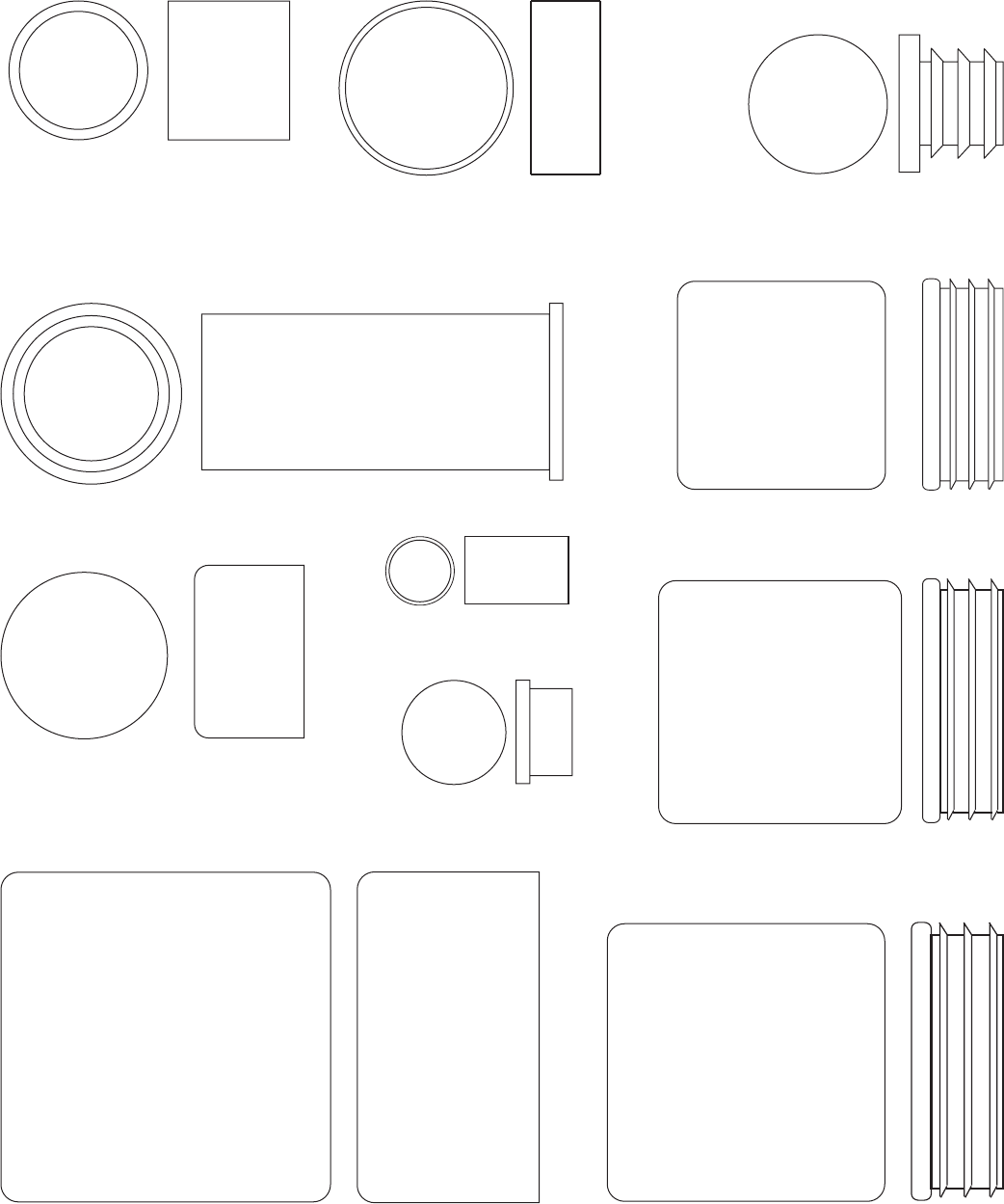
2" Square Inner Cap (56)2" Square Outer Cap (58)
1 3/4" Square Inner Cap (48)
1" Round Outer Cap (46)
1 1/2" Square Inner Cap (57)
1" Round Inner Cap (70)
3/4" Round Inner Cap (78)
1" x 7/8" Plastic Bushing (54)
1 1/8" x 2 1/2" Plastic Bushing (47)
1 1/4" x 1/2Ó Spacer (10)

To order replacement parts, simply call our Customer Service Department toll-free at 1-800-999-3756, Monday
through Friday, 6 a.m. until 6 p.m. Mountain Time (excluding holidays). To help us assist you, please be pre-
pared to give the following information:
1. The MODEL NUMBER of the product (WESY41080).
2. The NAME of the product (WEIDER PRO¨9835 Home Gym System).
3. The SERIAL NUMBER of the product (see the front cover of this manual).
4. The KEY NUMBER and DESCRIPTION of the part(s) (see the PART LIST and EXPLODED DRAWING
attached at the center of this manual).
Part No. 147764 H01818-C R0898A Printed in Canada © 1998 ICON Health & Fitness, Inc.
Ordering Replacement Parts
Limited Warranty
ICON Health & Fitness, Inc. (ICON), warrants this product to be free from defects in workmanship and mate-
rial, under normal use and service conditions, for a period of ninety (90) days from the date of purchase. This
warranty extends only to the original purchaser. ICON's obligation under this warranty is limited to replacing
or repairing, at ICON's option, the product at one of its authorized service centers. All products for which war-
ranty claim is made must be received by ICON at one of its authorized service centers with all freight and other
transportation charges prepaid, accompanied by sufficient proof of purchase. All returns must be pre-autho-
rized by ICON. This warranty does not extend to any product or damage to a product caused by or attribut-
able to freight damage, abuse, misuse, improper or abnormal usage or repairs not provided by an ICON autho-
rized service center, products used for commercial or rental purposes, or products used as store display mod-
els. No other warranty beyond that specifically set forth above is authorized by ICON.
ICON is not responsible or liable for indirect, special or consequential damages arising out of or in connection
with the use or performance of the product or damages with respect to any economic loss, loss of property,
loss of revenues or profits, loss of enjoyment or use, costs of removal, installation or other consequential dam-
ages of whatsoever nature. Some states do not allow the exclusion or limitation of incidental or consequential
damages. Accordingly, the above limitation may not apply to you.
The warranty extended hereunder is in lieu of any and all other warranties and any implied warranties of mer-
chantability or fitness for a particular purpose is limited in its scope and duration to the terms set forth herein.
Some states do not allow limitations on how long an implied warranty lasts. Accordingly, the above limitation
may not apply to you.
This warranty gives you specific legal rights. You may also have other rights which vary from state to state.
ICON HEALTH & FITNESS, INC., 1500 S. 1000 W., LOGAN, UT 84321-9813
