West Marine Radio Vhf580 Users Manual
VHF580 to the manual 36ee05a7-ea78-47c4-8096-cbae768862bb
2015-02-03
: West-Marine West-Marine-Marine-Radio-Vhf580-Users-Manual-477279 west-marine-marine-radio-vhf580-users-manual-477279 west-marine pdf
Open the PDF directly: View PDF  .
.
Page Count: 54
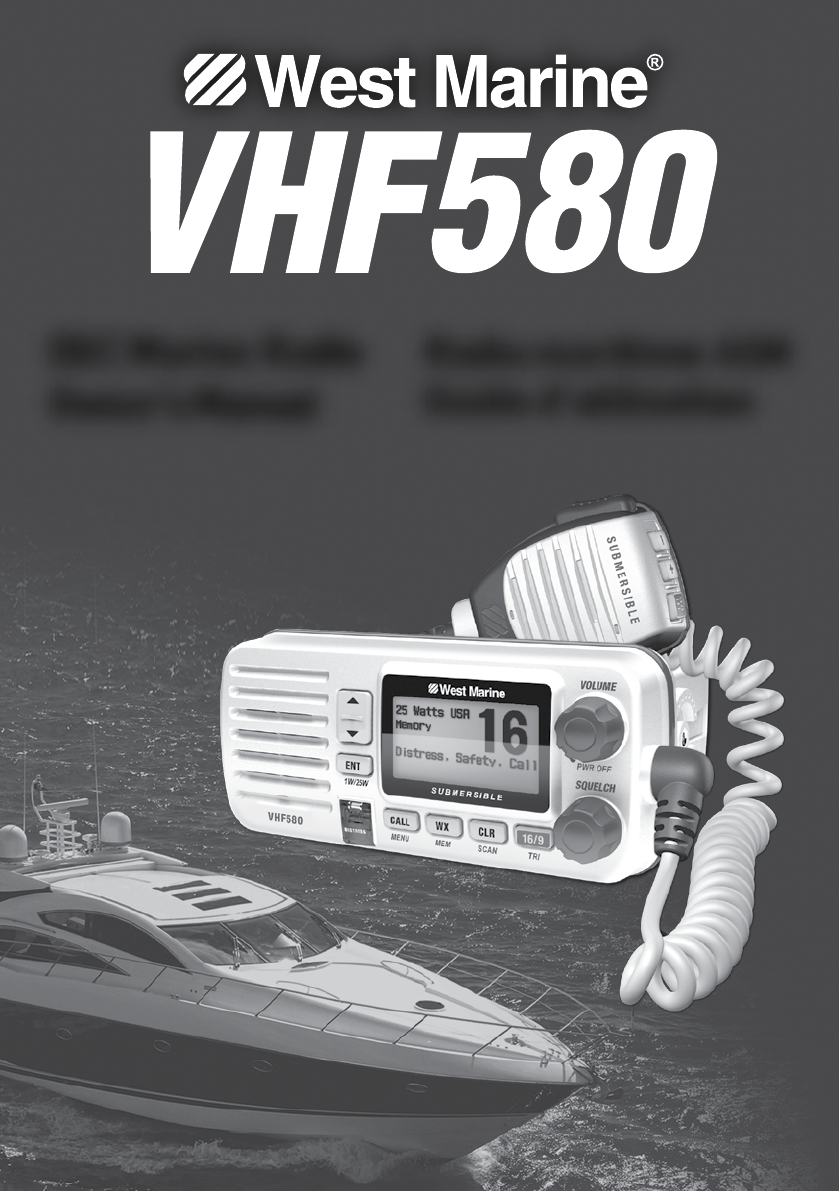
DSC Marine Radio
Owner’s Manual
Radio maritime ASN
Guide d’utilisation
2
DISTRESS
#Enter User MMSI
Speak slowly - clearly - calmly.
16/9-TRI
16/9-TRI
PUSH TO TALK
MAYDAY -- MAYDAY --
MAYDAY
THIS IS {name or call sign of your boat}.
MAYDAY{name or call sign of your boat}.
I WILL BE LISTENING ON CHANNEL 16.
THIS IS {name or call sign of your boat}, OVER.
PUSH TO TALK
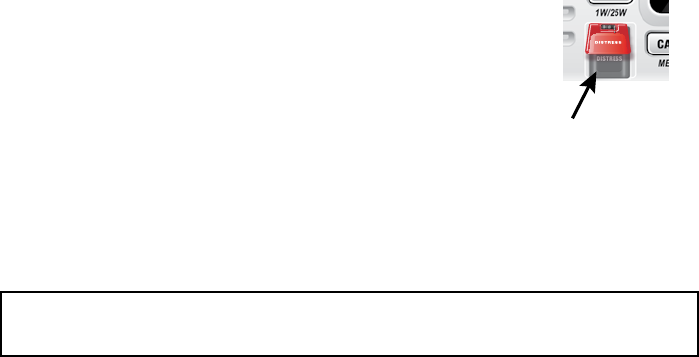
Lift the red cover
and press the
DISTRESS button.
3
#
Parlez lentement – clairement – calmement.
16/9-TRI
16/9/TRI
PUSH TO TALK
MAYDAY - MAYDAY –
MAYDAY
ICI
JE VAIS ÉCOUTER SUR LE CANAL 16
ICI
À VOUS
PUSH TO TALK
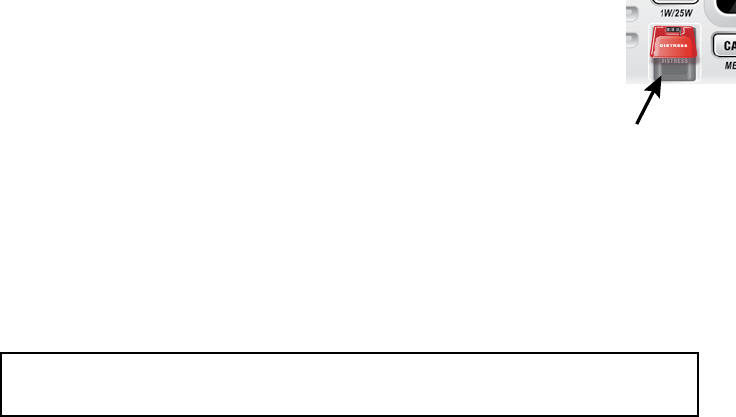
Soulevez le
couvercle rouge
et appuyez sur la
touche DISTRESS.
4
DISTRESS
#Inserte el MMSI del usuario
Hable despacio -- claro -- y con calma.
16/9-TRI
16/9TRI
PUSH TO TALK
MAYDAY
--- MAYDAY--- MAYDAY
ESTE ES{nombre o señal de su navío}
MAYDAY{nombre o señal de su navío}
é
ESTARÉ ESCUCHANDO EN EL CANAL 16
ESTE ES{nombre o señal de su navío}OVER
PUSH TO TALK
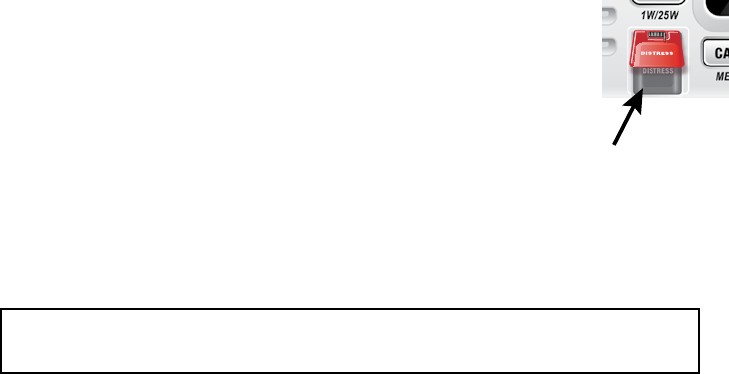
Levante la tapa
roja y oprima el
botón DISTRESS.
Making a Voice Distress Call ...................... 2
Cómo hacer una llamada de apuro por voz 3
Faire un appel de détresse vocal ............... 4
Features .................................................... 6
Manual overview ...................................... 6
What’s included ........................................ 7
Parts of the Radio ..................................... 8
Parts of the Microphone ............................ 9
Turning on the Radio ............................... 10
Seng the UIC Channel Mode
(USA/CAN/INT) ...................................... 10
Normal mode operaon ......................... 11
Scan mode ............................................... 13
Weather mode ........................................ 15
Using Your Radio ..................................... 16
Making a voice MAYDAY call ................... 17
Seng the volume .................................. 17
Seng the squelch level ......................... 17
Changing the channel .............................. 17
Making a transmission ............................. 17
Boosng the transmission power ............ 18
Choosing Triple Watch or Dual Watch ..... 18
Using FIPS codes for weather alerts......... 19
Changing display and sound opons ....... 20
Seng the GPS posion manually .......... 20
What is DSC? ........................................... 21
Advanced DSC features ........................... 21
What is an MMSI number? ...................... 21
Entering MMSI numbers ......................... 22
Using the Directory .................................. 23
Making DSC Calls ...................................... 24
Making an automac distress call ............ 26
Receiving a DSC call.................................. 27
Test Calls .................................................. 28
Posion Request and Reply ..................... 30
Pung the radio into standby ................ 31
Disabling automac channel switching .... 32
Renaming Channels ................................. 32
Mounng the radio ................................. 33
Connecng the radio ............................... 34
Connecng to a GPS receiver .................. 35
Connecng to a Chartploer ................... 37
Connecng to an External Speaker .......... 37
Engine Noise Suppression ........................ 39
Radio Specicaons ................................ 40
Channel descripons and what
they mean .............................................. 41
US Marine Channels and Frequencies ..... 42
Canadian Marine Channels and
Frequencies ........................................... 44
Internaonal Marine Channels and
Frequencies ........................................... 45
Weather Channels and Frequencies (US,
CAN, and INT) ........................................ 47
Emergency Alert System (SAME)
Informaon ............................................ 48
NMEA Operaon ...................................... 50
NMEA Output .......................................... 50
6
x
x
x
x
x
x
x
x
x
x
Convenons
x
BOLD SMALL CAPITALS
xUpper and Lower Case bold
xItalics
Term Meaning
DSC Digital Selective Calling. A VHF radio standard for communicating among
boats and sending automated distress calls.
FIPS Federal Information Processing Standard. A set of location codes roughly
equivalent to your county codes.
WX Weather Radio
GPS Global Positioning System
NMEA
National Marine Electronics Association. The organization that governs
standards for electronic equipment used on boats. NMEA 0183 is the
standard for serial data communication used by GPS.
MMSI
Maritime Mobile Service Identity number. A unique, nine-digit number that
identifies you and your boat when making DSC calls. It is also used by the
Coast Guard if you send an automated distress call.
Station Any DSC radio, whether it’s operated on a boat, at a marina, or by a shore
station.
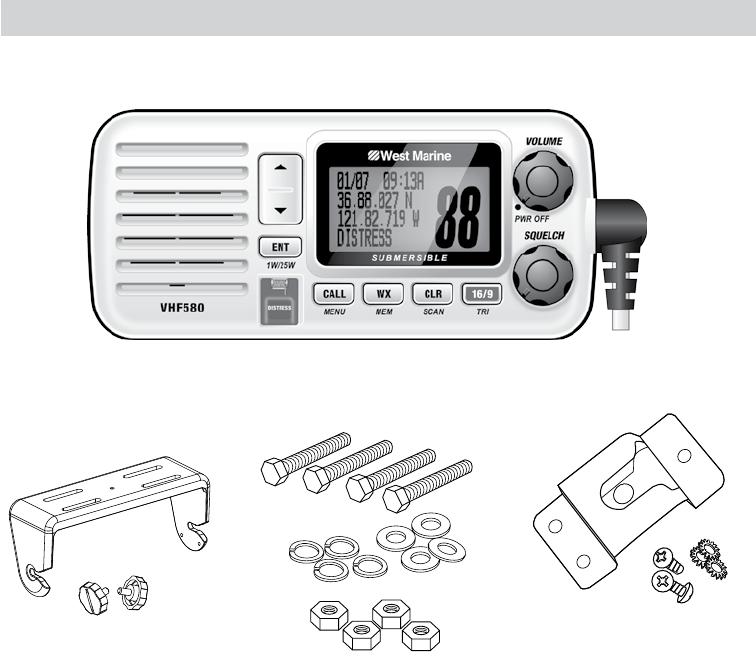
7
Mounting Bracket and
Knobs
Mounting Hardware Microphone Hanger and
Mounting Hardware
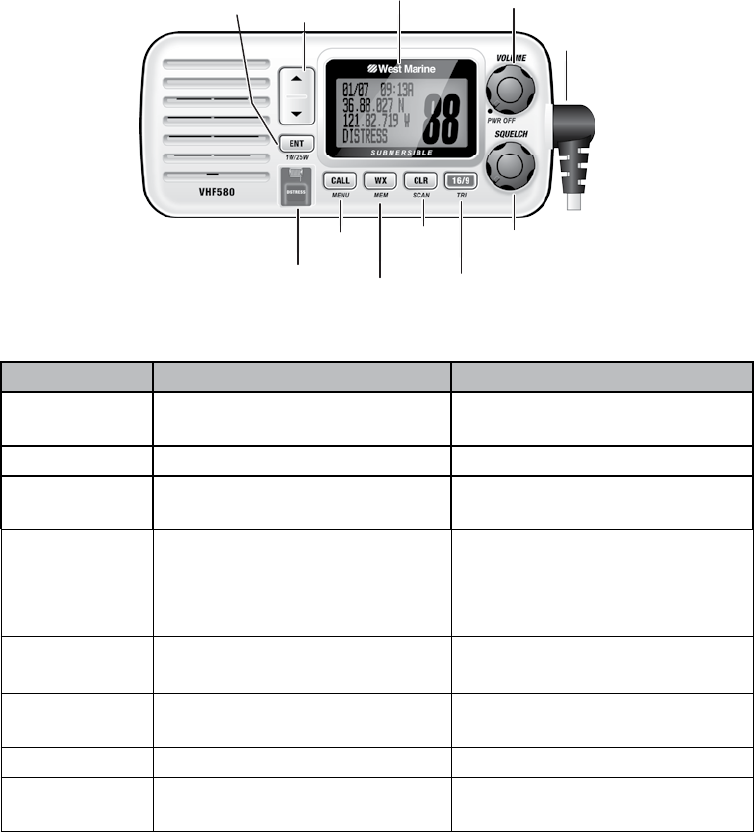
8
Button Press to... Press and hold to...
ENT-1W/25W
Choose an option on a menu or
to display the GPS data.
Change the transmit power (see
page 18).
CHANNEL UP
Move up one channel at a time. Move quickly up the channels.
CHANNEL DOWN
Move down one channet at a
time. Move quickly down the channels.
16/9-TRI
1st press: Go to Channel 16.
2nd press: Go to Channel 9.
3rd press: Go back to the original
channel.
Go into Triple Watch or Dual
Watch mode (see page 18).
CLR-SCAN
Go to previous menu or cursor
position in menu mode.
Start scanning the channels
saved in memory.
WX-MEM
Listen to the current weather
conditions in your area.
Save a channel into memory or
remove a channel from memory.
CALL-MENU
Display the call menu. Display the normal menu.
DISTRESS
Select the nature of your distress
for a distress call. Transmit a distress call.
SQUELCH knob
(turn clockwise to
decrease channel
noise)
16/9-TRI
(triple/dual-
watch) button
CLR-SCAN
(channel
scan) button
WX-MEM
button
CALL-
MENU
button
DISTRESS
button
LCD
display
ENT
1W/25W
button
VOLUME-PWR
(power) knob
(turn clockwise
to increase
volume)
Microphone
cord
CHANNEL UP &
CHANNEL DOWN
button
9
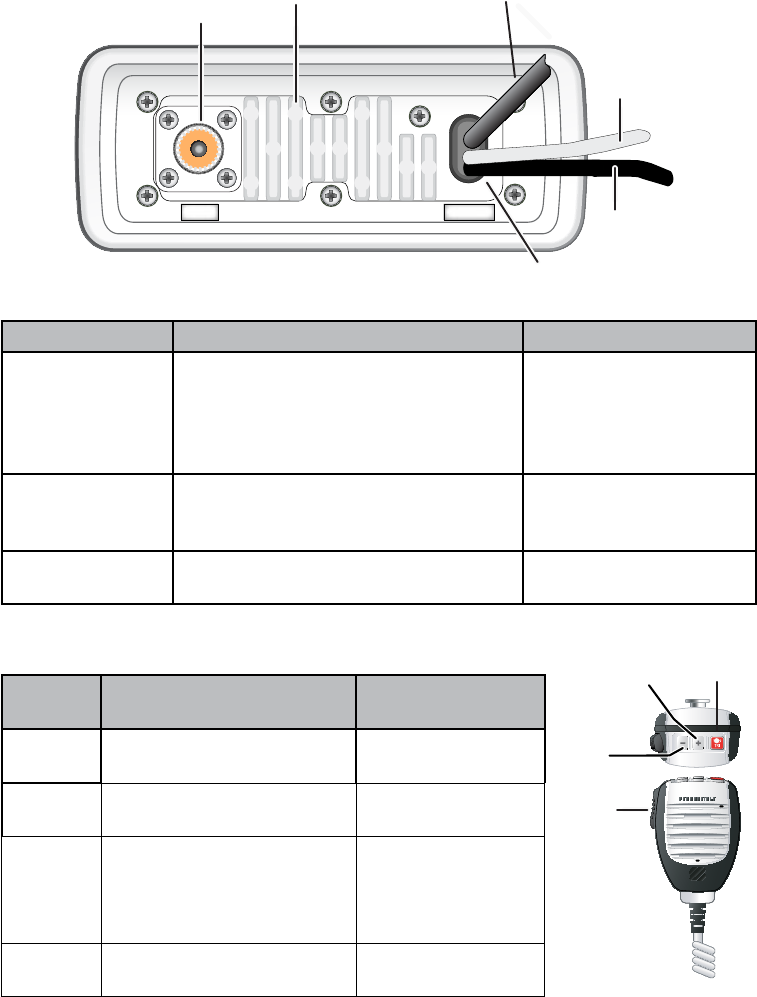
Connector/Cable Connects to... For details, see ...
Antenna
connector
External VHF antenna with a male
PL259 (SO238) connector and 50 Ω
impedance. Minimum 4 ft, 3dB rated
antenna for sailboats, 8 ft, 6 dB rated
for power boats.
Connecting the radio
(see page 34).
Power cable
Nominal 13.8 VDC power supply with
negative ground (10.5 VDC to 16.0
VDC) (Red wire +, black wire -).
Connecting the radio
(see page 34).
Accessory cable GPS receiver, GPS chartplotter. Connecting accessories
(see page 35).
Button Press to... Press and hold
to...
( + ) Move up one channel at a
time.
Move quickly up
the channels.
( - ) Move down one channel at
a time.
Move quickly down
the channels.
16/9-TRI
1st press: Go to Channel 16.
2nd press: Go to Channel 9.
3rd press: Go back to the
original channel.
Go into Triple
Watch or Dual
Watch mode (see
page 18).
PUSH TO TALK
Cancel scanning and stay
on a channel.
Talk on a channel.
13.8V DC
ANTENNA
Black wire
(-)
Red wire
(+)
Power
Cable
Antenna
connector
(SO238)
Heat sink Accessory
cable
PUSH-
TO-TALK
button
16/9 TRI
(Triple/Dual-
Watch) button
+
(up) button
(move up a
channel)
-
(down) button
(move down a
channel)
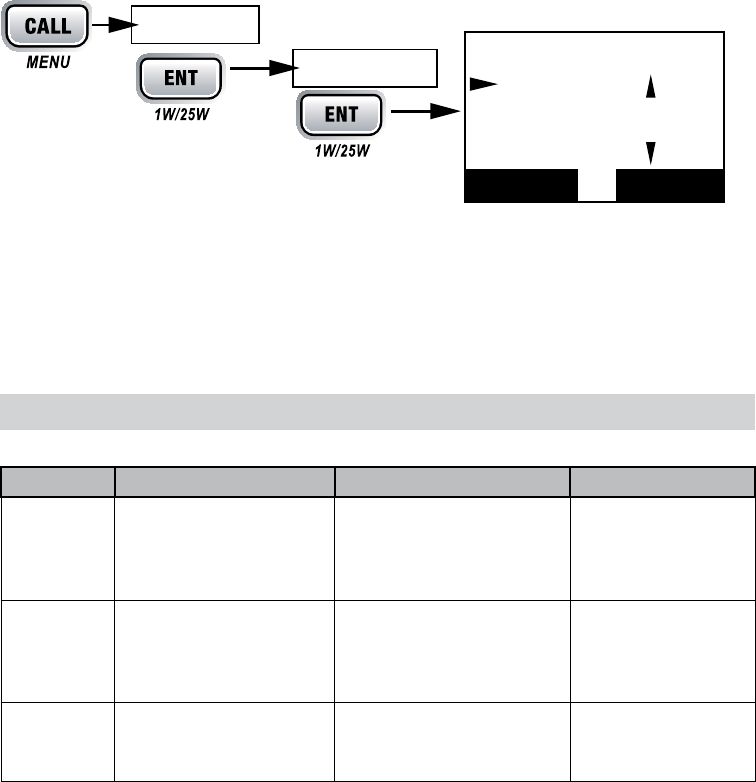
10
VOLUME-PWR
MMSI not entered
CALL-MENU
USA/CAN/INT
USA ModeCanada Mode
Intl Mode
ENT-1W/25W
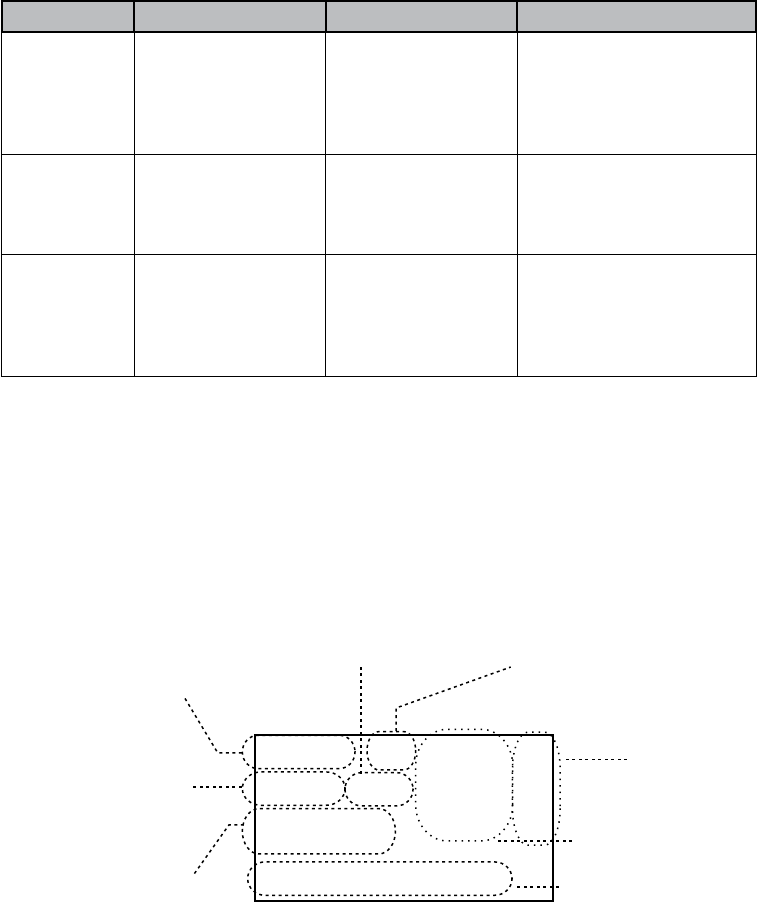
Mode What It Does Use It When To Turn it on./off...
Normal Monitors a single
marine radio channel
and lets you talk on
that channel.
You want to talk to
another station on a
specic channel.
(default mode)
Scan Monitors all the chan-
nels you save into
memory.
You have a small group
of channels you use
most often and want to
check them for trafc.
Press and hold
the-CLR-SCAN but-
ton.
Weather Monitors the selected
NOAA weather
channel.
You want to hear the
current and forecasted
weather in your area.
Press the WX-MEM
button.
16
UIC Channels
USA Mode
Canada Mode
Intl Mode
Back[CLR]
Select[ENT]
Setup
Press and hold -
USA/CAN/INT
11
Watch Mode What It Does Use It When To Turn it on./off...
Weather Alert Checks for alerts
on the last weather
channel you
used every seven
seconds.
You want to be
made aware of
severe weather
conditions in your
area.
conditions in your area.
Select WX-ALERT Mode
in Setup submenu, and
then choose ON or OFF.
Triple Checks for activity
on channels 16
and 9 every two
seconds.
You want to monitor
a channel yet
maintain a watch on
channels 16 and 9.
Press and hold
16/9-TRI
for
two seconds.
Dual Checks for activity
on channel 16 every
two seconds.
You want to monitor
a channel yet
maintain a watch on
channel 16.
Change Triple Watch
to Dual Watch in the
setup menu, then press
and hold
16/9-TRI
for two
seconds.
#
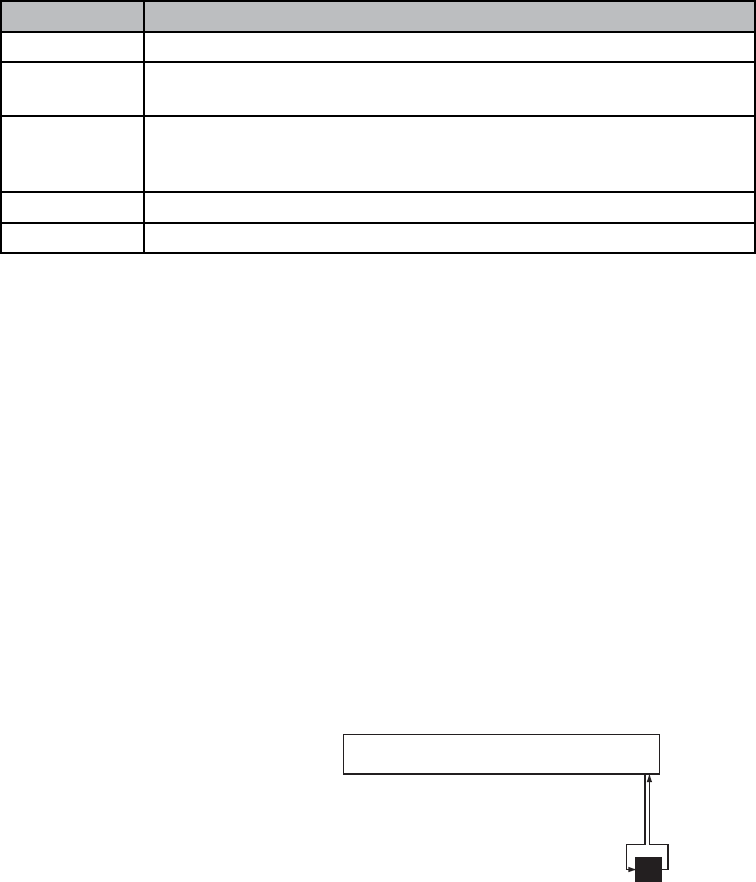
25
Marine Operator
25 Watts USA
Memory Alert
GPS Data OK
Transmit power
(1 W or 25 W)
Current channel
is stored in
memory
Status messages
(see the status
message table)
Current
channel
number
Current channel
name (if the name
is too long, the
name line scrolls)
Channel mode
(USA, CANadian,
or INTernational)
Weather Alert
Watch on
Status
Icons
12
Message Meaning
GPS Data OK The radio is receiving valid GPS data.
Check GPS The radio is not receiving valid GPS data: check the GPS status
screen andthe GPS connection.
Input Position
The radio has been unable to receive valid GPS data for at least four
hours; it can no longer track your position. You need to manually input
your position (see Setting the GPS position manually on page 20).
Battery Low The battery voltage output is too low (below 10.5 VDC).
Battery High The battery voltage output is too high (above 16.0 VDC).
Using the radio in normal mode
x
PUSH TO TALK
x
x
CHANNEL UP
x
CHANNEL DOWN
x
ENT-1W/25W
ENT-
1W/25W.
Normal mode with Weather Alert Watch
CALL-MENU
SetupWX-
Alert Mode
CHANNEL UP
CHANNEL
DOWN
WX Alert Mode
ON
OFF
Normal mode with Triple and Dual Watch
wx
Every 7 seconds,
the radio checks the
most recently-used
weather channel.
with WX Alert on
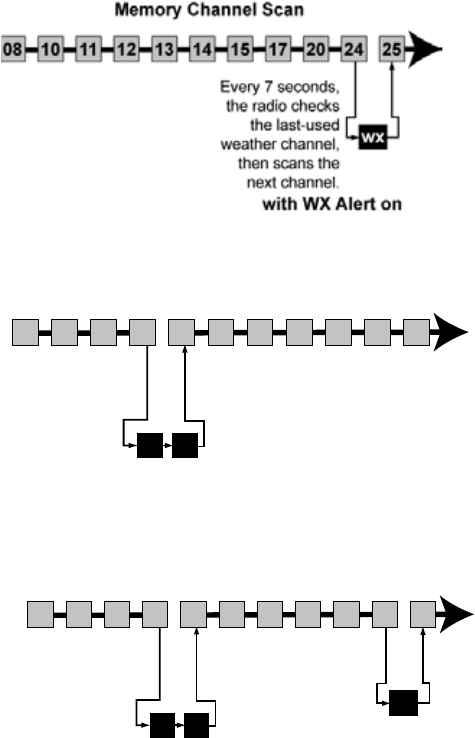
Monitoring Channel 25
13
16/9-TRI
18
Normal mode with both Weather Alert and Triple/Dual Watch
09 16 09 16 09 16
Triple Watch: Every 2 seconds,
the radio checks channels 9 & 16.
Monitoring Channel 25
wx
WX Alert : Every 7 seconds,
the radio checks the most
recently-used weather channel.
09 16 09 16 09 16
Triple Watch: Every 2 seconds,
the radio checks channels 9 & 16.
Monitoring Channel 25
11
1008 1312 17
15 20
14
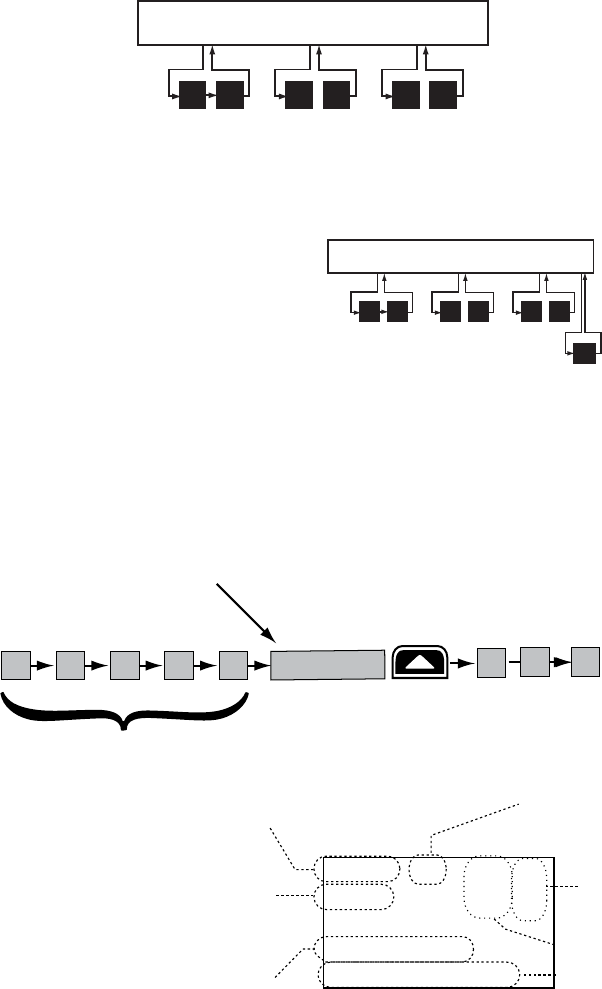
The radio scans about
5 channels in 1 second.
When it detects a signal, the radio stays on the
channel until you press the CHANNEL UP button or the
signal stops.
Resume scan
1 Watt USA
Memory
Scanning Channels
01A,05A,06,07A,08
07 A
Transmit power
last used
Channel mode
(USA, CANadian,
or INTernational)
Current channel
being scanned
Scan list (if the
text is too long,
the line scrolls)
All scanned
channels must
be in memory
Normal scan
mode or Triple/
Dual-watch on
Status
icons
14
Using the radio in scan mode
x
x
x
WX-MEM
x
WX-
MEM
x
CLR-SCAN
CLR-SCAN
x
CHANNEL UP
x
PUSH TO TALK, CALL-MEM,
WX-MEM
Scan mode with Weather Alert Watch
CALL-MENU
SetupWX-Alert Mode
CHANNEL UP
CHANNEL DOWN
WX AlertMode
ONOff
Scan mode with Triple and Dual Watch
16/9-TRI
18
CLR-SCAN
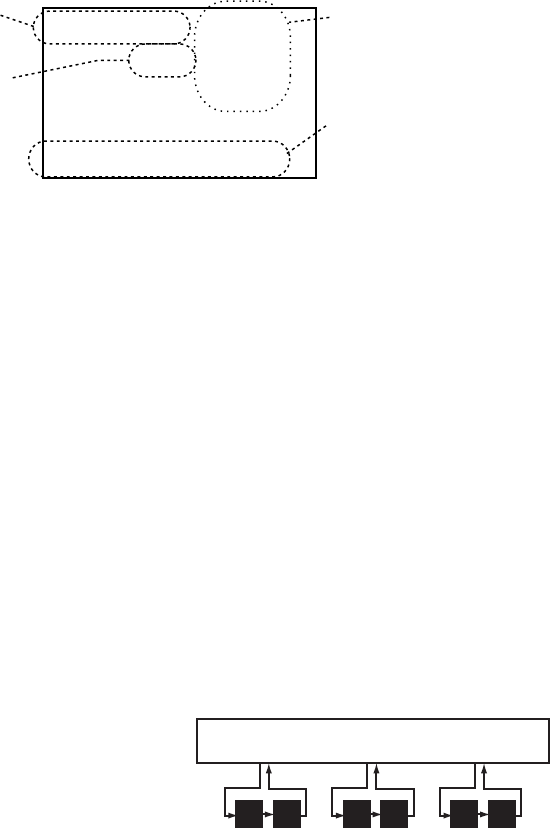
Scan mode with both Weather
Alert and Triple/Dual Watch
09 16
Triple Watch : Every 2
seconds, the radio checks
channels 9 & 16 then goes on
to the next channel.
Memory Channel Scan
08 252417151413121110 20
09 16
Triple Watch:
Every 2 seconds,
the radio checks
channels 9 & 16
then goes on to
the next channel.
WX Alert : Every 7
seconds, the radio
checks the last-used
weather channel,
then scans the next
channel.
wx
Memory Channel Scan
08 252417151413121110 20
15
Using the radio in weather mode
x
x
WX-MEM
x
x
x
Weather mode with Weather Alert Watch
CALL-MENU
SetupWX-Alert Mode
CHANNEL UP
CHANNEL DOWN
WX Alert
ModeONOff
Weather mode with Triple and Dual Watch
16/9-TRI
09
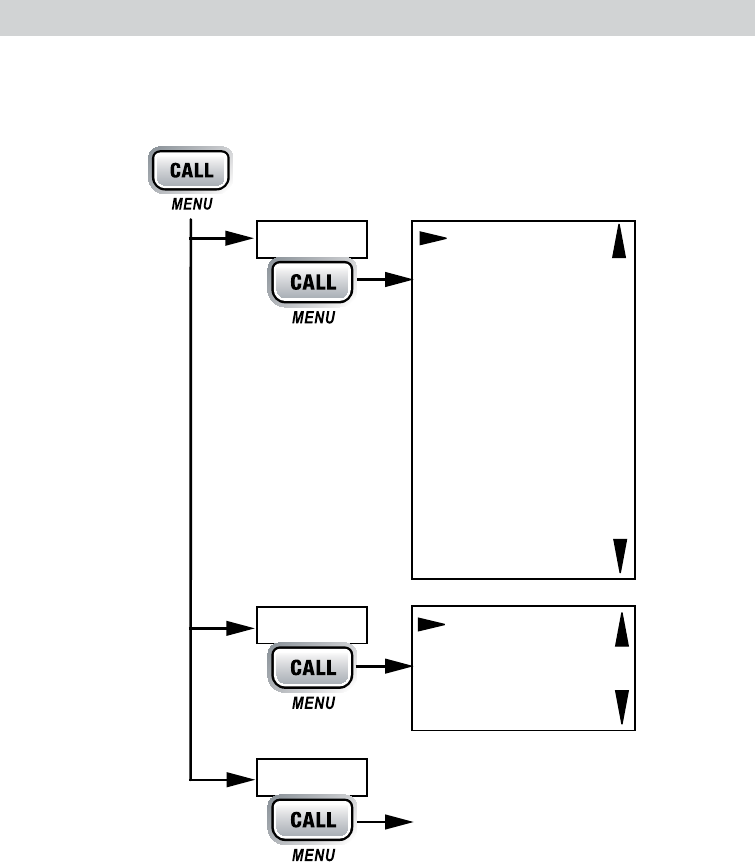
Hurricane Warning
Weather Band
Alert
Weather
mode is on
Current
channel
number
Type of alert
(If the text is too
long, it scrolls.)
Flashing: An alert
has been issued
Steady: Weather
Alert Watch is on
09 16 09 16 09 16
Triple Watch: Every 2 seconds, the
radio checks channel 9, then channel 16.
Monitoring Weather Channel WX08
16
CALL-MENU
CALL-MENU
x
x
CHANNEL UP
x
ENT-1W/25W
x
CHANNEL DOWN
x
CLR-SCAN
xExit
CALL-MENU
USA/CAN/INT
Dual/TriWatch
GPS Setup
FIPS Codes
Auto CH SW
POS Reply
Test Reply
Channel Name
Group MMSI
User MMSI
WX Alert Mode
[Exit]
Contrast
Lamp Adjust
Key Beep
[Exit]
(Close Menu)
Setup
System
[Exit]
Press and hold -
17
#
CHANNEL UP
CHANNEL DOWN
CHANNEL UP
CHANNEL DOWN
PUSH TO TALK
PUSH TO TALK
x
PUSH TO TALK
RELEASE MIC BUTTON
x
x
x41
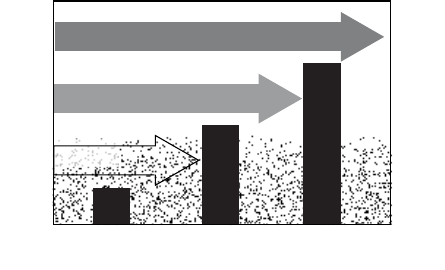
Weak signals
No
Squelch
Medium
Squelch
High
Squelch
Strong signals
Noise
18
ENT-1W/25W
ENT-1W/25W
#
#
41
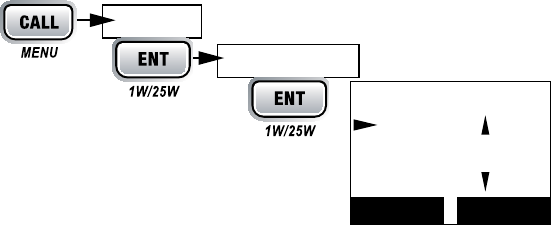
CALL MENU
SetupDual/Tri Watch
ENT-1W/25W
Dual/TriWatch
88
A
Dual Watch
Triple Watch
[Exit]
Dual/TriWatch
Setup
Press and hold -
Back[CLR] Select[ENT]
19
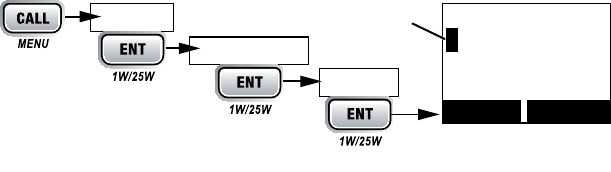
x
x
x
x
#
Setup
New
CHANNEL UP
CHANNEL DOWN
CHANNEL UP
CHANNEL DOWN
ENT-1W/25W
CLR-SCAN
ENT-1W/25W
YesNo
DeleteEdit
CHANNEL UP
CHANNEL DOWN
Exit
000000
Use the up and down arrows
to adjust each of the six
digits in turn.
16
FIPS Code
Back[CLR]
Forward[ENT]
FIPS Codes
Setup
Press and hold -
[New]
20
Contrast
CALL-MENU
SystemContrast
CHANNEL UP
CHANNEL DOWN
CALL-MENU
Lamp adjust
CALL-MENU
SystemLamp Adjust.
CHANNEL UP
CHANNEL DOWN
Turning the key beep on and o
CALL-MENU
SystemKey BeepOff
Input Position
#
Setup
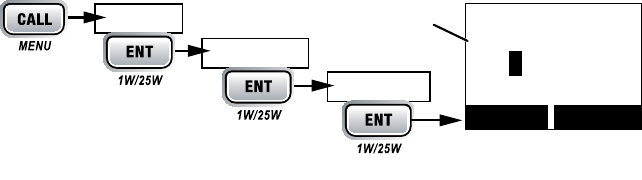
GPS SetupPosition Set
CHANNEL UP
CHANNEL DOWN
ENT-1W/25W
CLR-SCAN
CHANNEL UP
CHANNEL DOWN
ENT-1W/25W
CHANNEL UP
CHANNEL DOWN
ENT-1W/25W
--/-- 11:22U
---o --.- KT
35o 40.610 N
139o 46. 564 E
Use the up and down arrows
to adjust each of the values
in turn.
16
Back[CLR]
Forward[ENT]
Setup
Press and hold -
GPS Setup
Position Set
21
GPS Setup
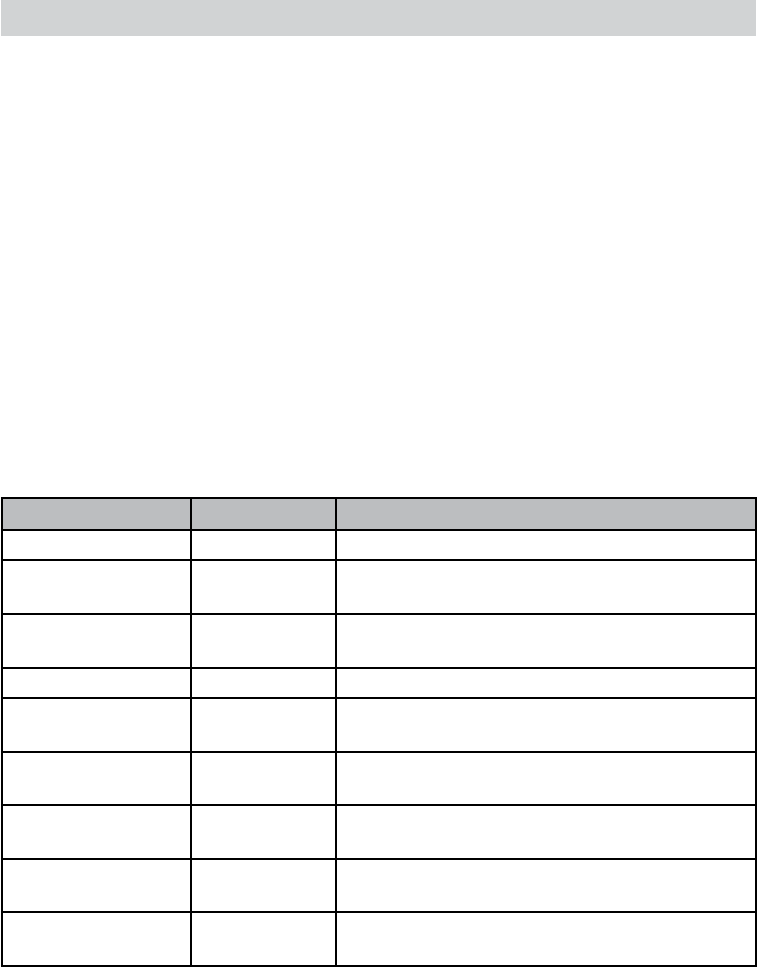
Feature Menu Item Function
Individual Call Individual Contact another vessel from your directory.
Group Call Group Contact all vessels that share your group MMSI
code.
All Ships Call All Ships Broadcast to all vessels within range (used for
safety or advisory messages).
Position Request POS Request Request the current location of another vessel.
Position Send Position Send Transmit your current location to another
vessel.
Test Call Test Make sure your radio is working and configured
correctly/
Name and MMSI
Directory
Directory Store a list of 20 names and MMSI identification
codes for DSC calls.
Standby Mode Standby Automaticcally respond to all DSC calls within
an “Unavailable” status.
Received Call Log Receive Log Display the last 10 distress calls received by the
radio and the last 20 general calls.
22
x
x
x
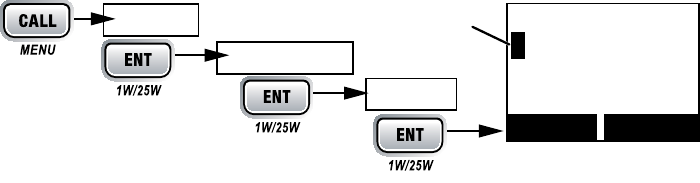
Individual or User MMSI Number
#
Setup
Cannot change over 1 time
CHANNEL UP
CHANNEL DOWN
CHANNEL UP
CHANNEL DOWN
ENT-1W/25W
CLR-SCAN
ENT-1W/25W
#
Yes
No
0________
Use the up and down arrows
to adjust each of the nine
digits in turn.
16
User MMSI
Back[CLR]
Forward[ENT]
User MMSI
Setup
Press
[New]
23
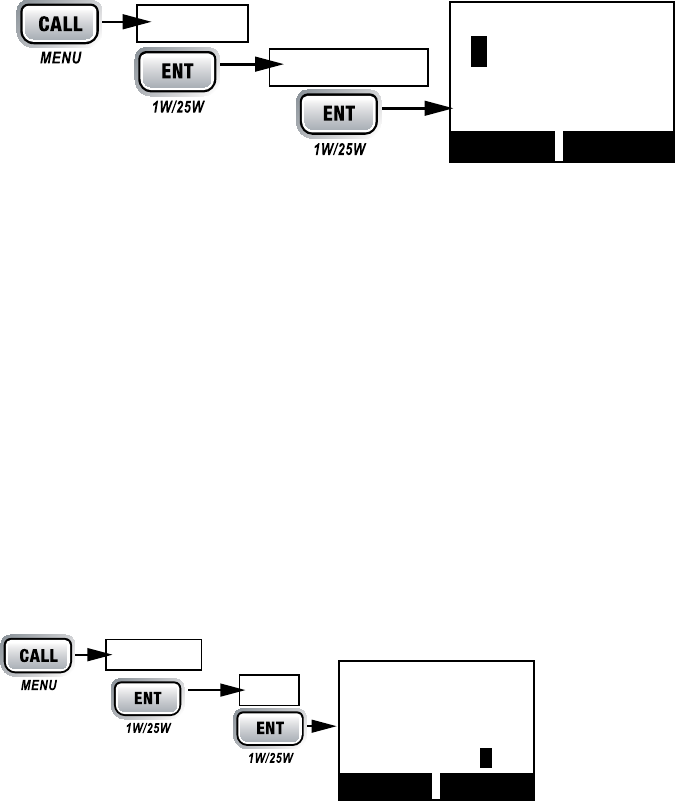
Group MMSI number
Setup
Group MMSI
CHANNEL UP
CHANNEL DOWN
CHANNEL UP
CHANNEL DOWN
ENT-1W/25W
CLR-SCAN
ENT-1W/25W
Yes
NoSetup
CALL-MENU
Directory
New
CHANNEL UP
CHANNEL DOWN
CHANNEL UP
CHANNEL DOWN
00_______
16
Group MMSI
Back[CLR]
Forward[ENT]
Group MMSI
Setup
Press and hold -
16
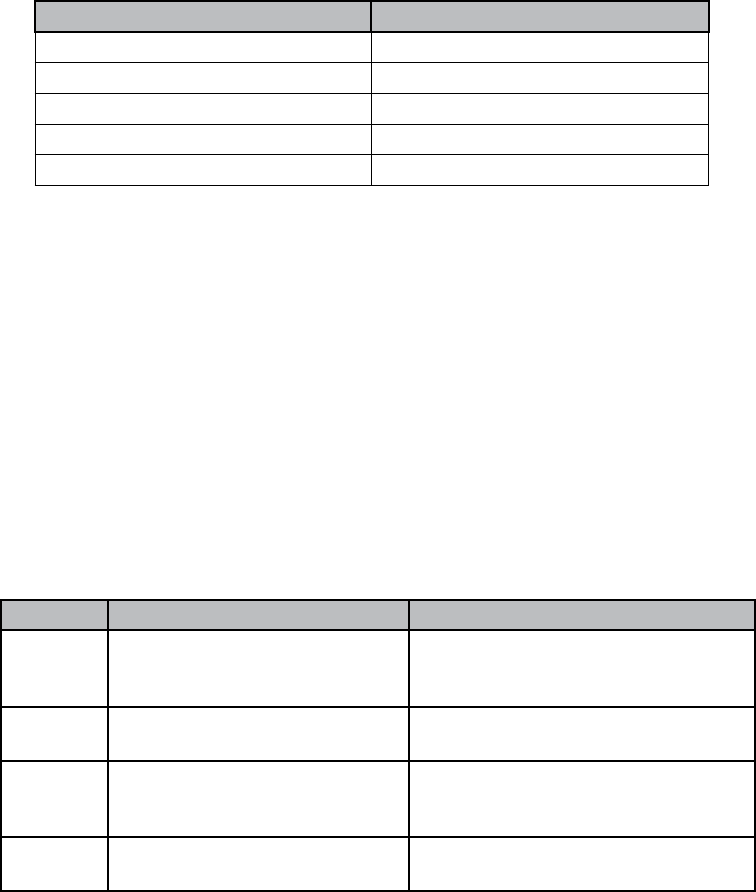
MMSI
123456789
Name
KENT NEWMAN
Back[CLR] Select[ENT]
Directory
Press
[New]
24
ENT-1W/25W
CLR-SCAN
ENT-1W/25W
CHANNEL UP
CHANNEL DOWN
Channel Up Button Channel Down Button
Capital letters (A through Z) One blank space
Lower-case letters (a through z) Numbers (0 through 9)
Punctuation (/ ‘ + -) Punctuation (/ ‘ + -)
Numbers (0 through 9) Lower-case letters (a through z)
One blank space Capital letters (A through Z)
ENT-1W/25W
ENT-1W/25W
ENT-1W/25W
CLR-SCAN
DeleteEdit
CHANNEL UP
CHANNEL DOWN
Exit
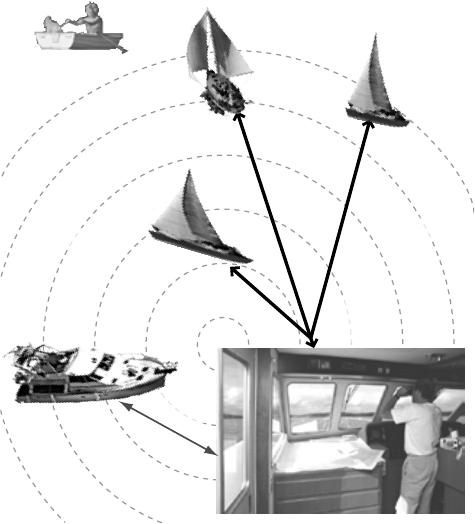
Call type What it does When to use it
Distress Alerts all stations that you need
assistance and sends them your
current position.
In an emergency only.
Individual Calls a single station using the
User MMSL.
Any time you want to talk to another
station.
Group Calls all the stations that have the
same Group MMSL as yours.
Any time you want with the whole
group you are traveling with at the
same time.
All Ships Calls all stations within range of
your radio.
Safety warnings (e.g., debris in the
water) or any urgent situation.
25
x
x
x
Calling a single staon
(Individual Call)
CALL-MENU
Individual
CHANNEL UP
CHANNEL DOWN
ENT-1W/25W
Manual
ENT-
1W/25W
CHANNEL UP
CHANNEL DOWN
ENT-1W/25W
SendCancel
x
xNot
support CH
All ships call
Group
call
Individual
call
All ships call

26
Calling a parcular group of staons (Group Call)
CALL-MENU
Group
CHANNEL UP
CHANNEL DOWN
ENT-1W/25W
Send
Cancel
Calling all staons (All-Ships Call)
All Ships
Send
Cancel
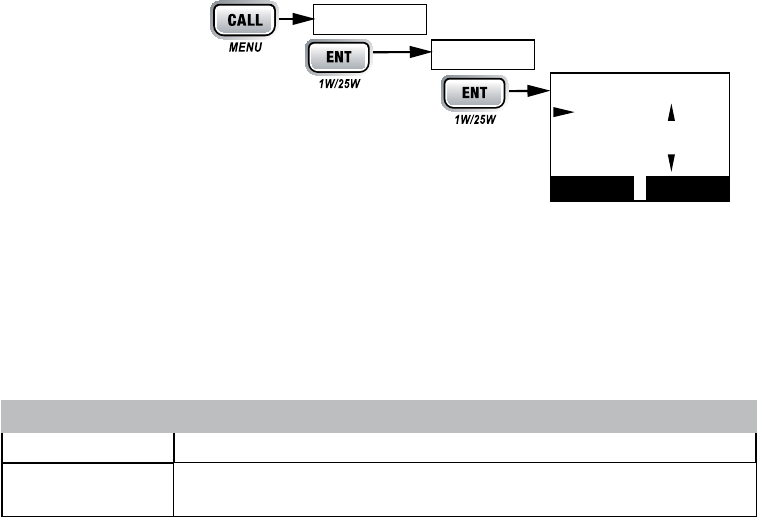
To send an automatic distress call, press and hold DISTRESS for three seconds. If
no MMSI number has been programmed, the radio prompts you to enter your MMSI
number.
DISTRESS
CHANNEL UP
CHANNEL DOWN
DISTRESS
Undesignated Sinking Fire
Adrift Flooding Abandoning
Collision Piracy.Armed Grounding
Overboard Capsizing
27
Canceling an automac distress call
Cancel
ENT-1W/25W
Send: Able-Comply
Send: Unable-Comply
Not Support CHSend: Unable-Comply
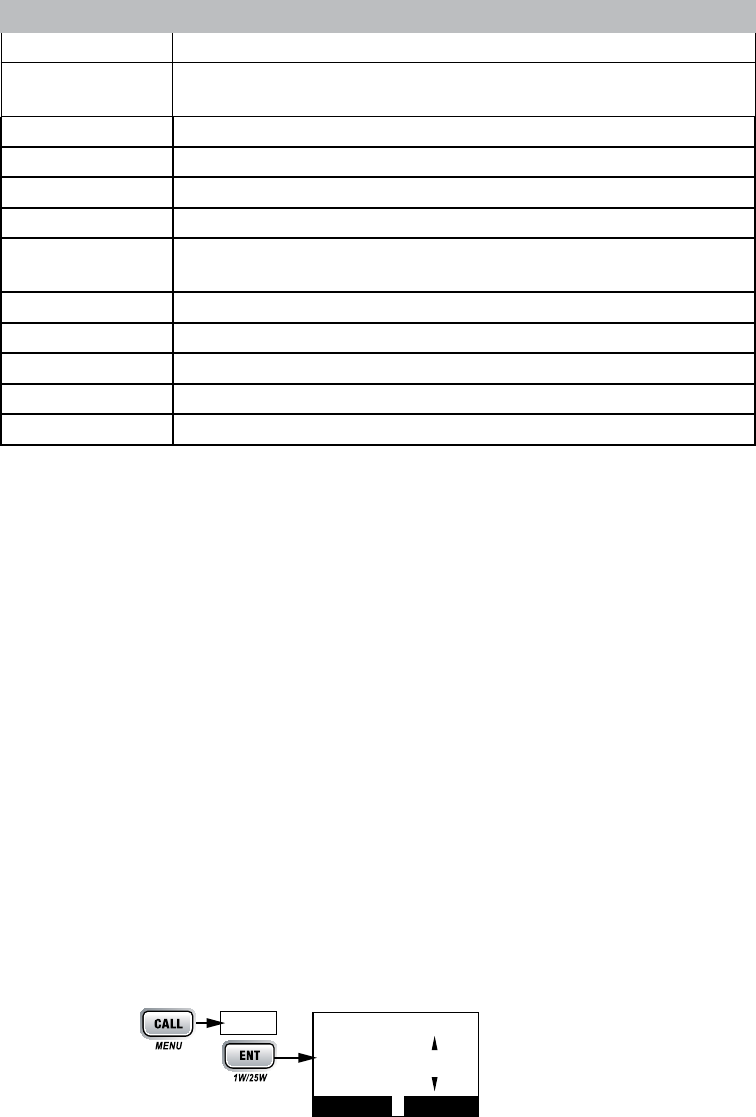
Receive log
CALL-MENU
Receive Log
Distress
Other
IndividualGroup,All Ships
CHANNEL UP
CHANNEL DOWN
DSC Call Type Receive Log Information
Distress MMSI (or name), position, time, nature code.
Distress
Acknowledge
MMSI (or name), distress MMSI, position, time, nature code.
Distress
88
A
123456789
246813579
[Exit]
Distress Log
Receive Log
Press
Back[CLR] Select[ENT]
28
DSC Call Type Receive Log Information
Distress Relay MMSI (or name), distress MMSI, position, time, nature code.
Distress Relay
Acknowledge
MMSI (or name), distress MMSI, position, time, nature code.
Geographical MMSI (or name), category code, communication channel number.
All Ships MMSI (or name), category code, communication channel number.
Group MMSI (or name), category code, communication channel number.
Individual MMSI (or name), category code, communication channel number.
Individual
Acknowledge
MMSI (or name), Completed/Unattended, category code,
communication channel number.
Test MMSI (or name), category code.
Test Acknowledge MMSI (or name), category code.
Pos Reply MMSI (or name), position, time, category code.
Pos Request MMSI (or name), category code.
Pos Send MMSI (or name), position, time, category code,
CLR-SCAN
Exit
Returning a call
CHANNEL DOWN
Call Back
ENT-1W/25W
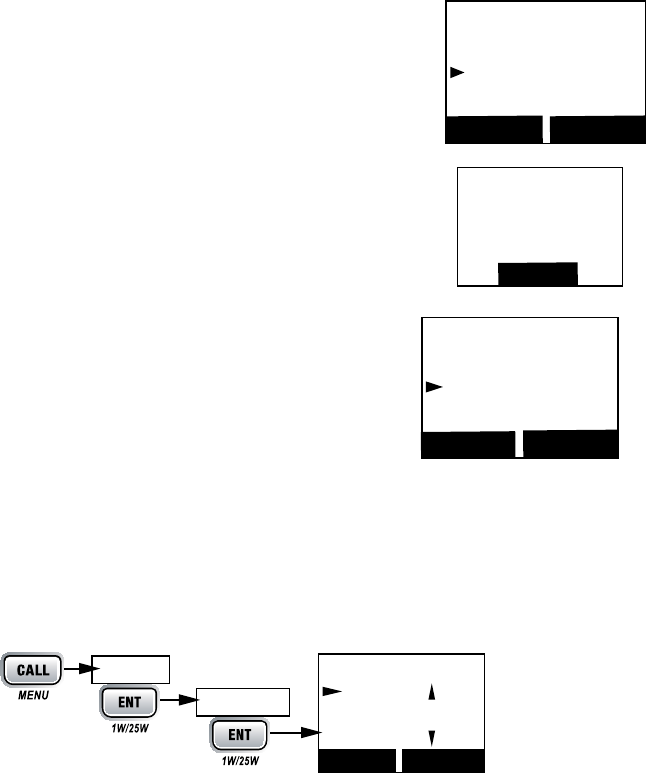
Making Test Calls (Test)
#
CALL-MENU
Test
CHANNEL UP
CHANNEL DOWN
ENT-1W/25W
16
Test
[Manual]
JIM CASSIDY
KENT NEWMAN
Back[CLR] Select[ENT]
Test
Press
29
Manual
22
ENT-1W/25W
SendCancel
Receiving Test Calls
Reply
Cancel
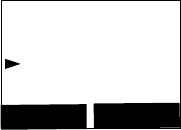
Enabling automac test call reply
CALL-MENU
SetupTest Reply
Auto
ENT-1W/25W
Manual
Requesng another staon’s posion (POS Request)
CALL-MENU
DSC CallPOS Request
CHANNEL UP
CHANNEL DOWN
ENT-1W/25W
16
Test
123456789
Send
Cancel
Back[CLR] Select[ENT]
16
Test
Acknowledged
123456789
Completed
Back[CLR]
16
Test
123456789
Reply
Cancel
Select[ENT]
Back[CLR]
Test Reply
Auto
Manual
16
Back[CLR]
Select[ENT]
Setup
Test Reply
Press and hold -
30
Manual
22
ENT-1W/25W
Send
Cancel
35
No Position
Receiving a posion request (Posion Reply)
Reply
Reply
No Position
Cancel
Enabling automac posion reply
CALL-MENU
SetupPOS Reply
Auto
ENT-1W/25W
Manual
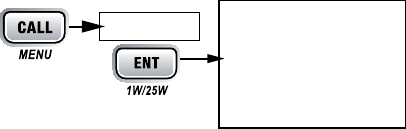
Sending your own posion (Posion Send)
CALL-MENU
Position Send
CHANNEL UP
CHANNEL DOWN
ENT-1W/25W
Manual
16
POS Request
KENT NEWMAN
Reply
Cancel
Select[ENT]
Back[CLR]
31
ENT-1W/25W
Send
Cancel
Call
Standby
CALL-MENU
SetupAuto CH SW
Off
ENT-1W/25W
#
41
01A
1 Watt USA
Memory
DSC Standby
Unattended
Standby
Press
32
Setup
Channel Name
CHANNEL UP
CHANNEL DOWN
ENT-1W/25W
Rename
CHANNEL UP
CHANNEL DOWN
ENT-1W/25W
ENT-1W/25W
CLR-SCAN
Yes
No
Default
Exit
33
x
x
x
x
x
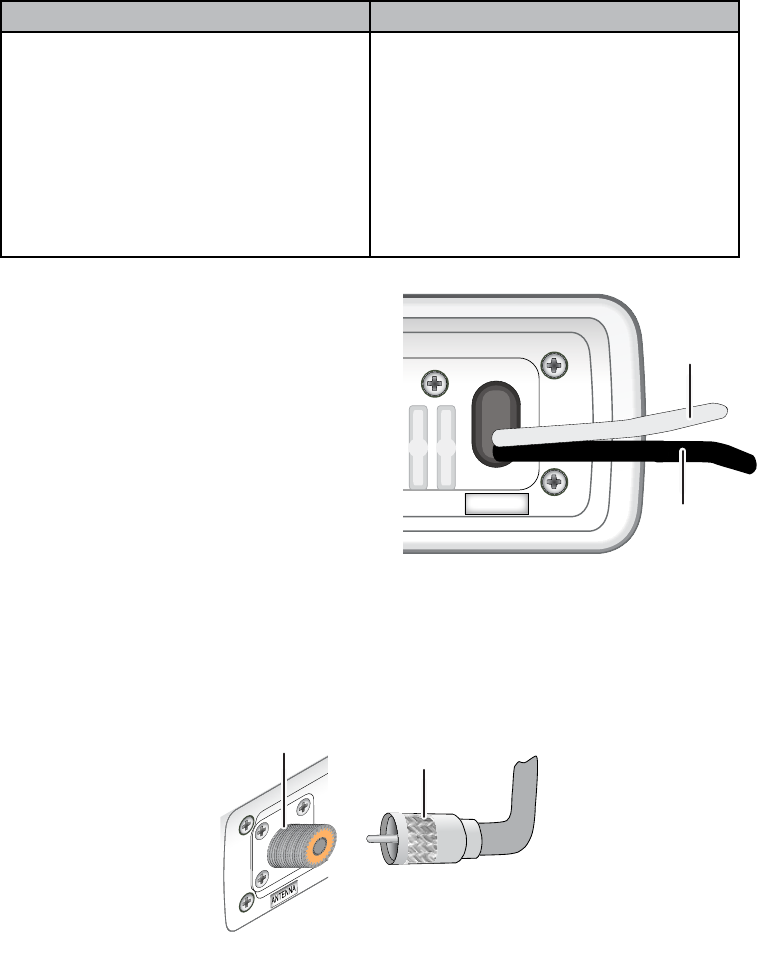
1
2
Step 1:
Slide the radio
into the mounting
bracket.
Step 2:
Tighten the mounting knobs
to secure the radio in place.
Hex bolt
Washer
Spring washer
Hex nut
Mounting
bracket
Mounting
surface
34
x
x
Power Supply Requirements VHF Antenna Requirements
Nominal 13.8 VDC power supply with a
negative ground (10.5 VDC to 16.0 VDC).
Power leads should be kept as short as
possible. A direct connection to the power
supply is ideal.
Minimum of #14 AWG copper wire for
extensions up to 20 feet, 12 AWG wire for
extensions from 20 to 35 feet, or 10 AWG
wire for extensions from 35 to 60 feet.
Male PL-259 connector
50 Ω impedance
Minimum 4 foot, 3 dB rated antenna for
sailboats or 8 foot, 6dB rated antenna for
powerboats
Minimum RG-58 lead-in wire for antenna
leads up to 20 feet, RG-8X for antenna
leads from 20 to 35 feet, or RG-8U for
antenna leads from 35 to 60 feet.
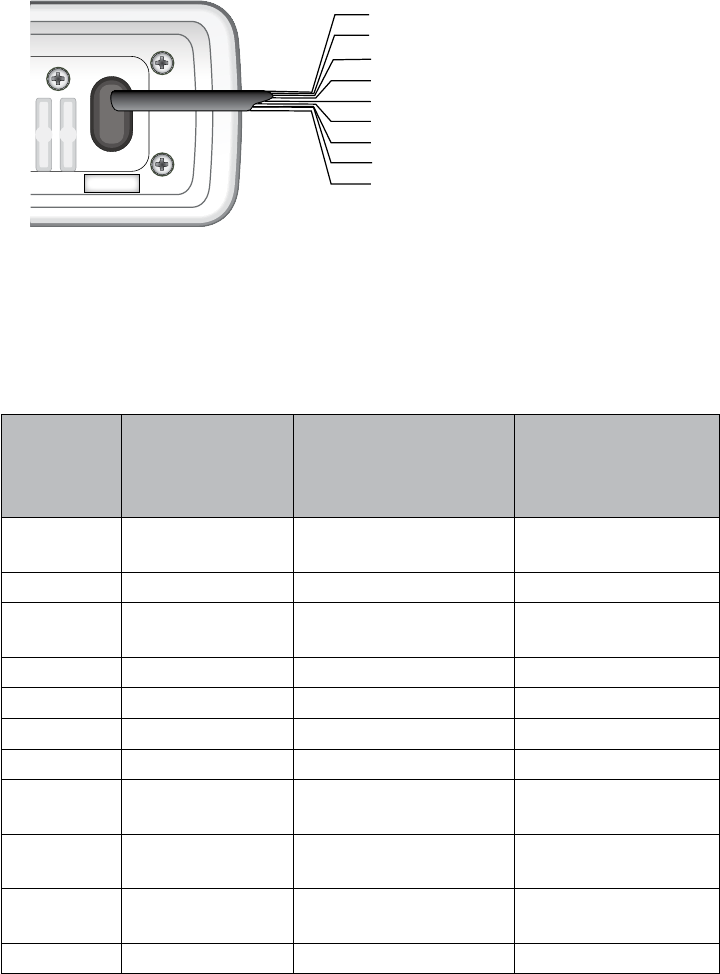
#
51
ANTENNA
13.8V DC
Black wire
(-)
Red wire
(+)
Radio connector,
SO238 (female
PL-259)
Antenna lead-in
connector,
male PL-259
35
GPS MFG. Model Number(s)
GPS NMEA0183
OUTPUT Wire Color
(Connect to YELLOW
WIRE on your radio)
Ground Wire Color
(connect to BARE
WIRE on your radio)
Furuno GP1650,
GP1850 White Black
Furuno GP30, GP36 White Blue
Garmin Fixed Mount
Models Blue Black
Garmin Portable Models Brown Black
JRC 100 Series Green Black
JRC 200 Series White Black
JRC GPS500 Yellow Green
Lowrance /
Eagle
Fixed Mount
Models White Black
Lowrance /
Eagle Portable Models Orange Black
Magellan Fixed Mount
Models Gray Black
Magellan Portable Models Orange Black
Yellow: NMEA_IN (+)
Red: External Speaker (+)
White: NMEA_OUT (+)
Orange: N/A
Blue: External Speaker (-, GND)
Black: HS-C/GND
Brown: NMEA_OUT (-)
Bare: Shield/GND
Green: NMEA_IN (-)
13.8V DC
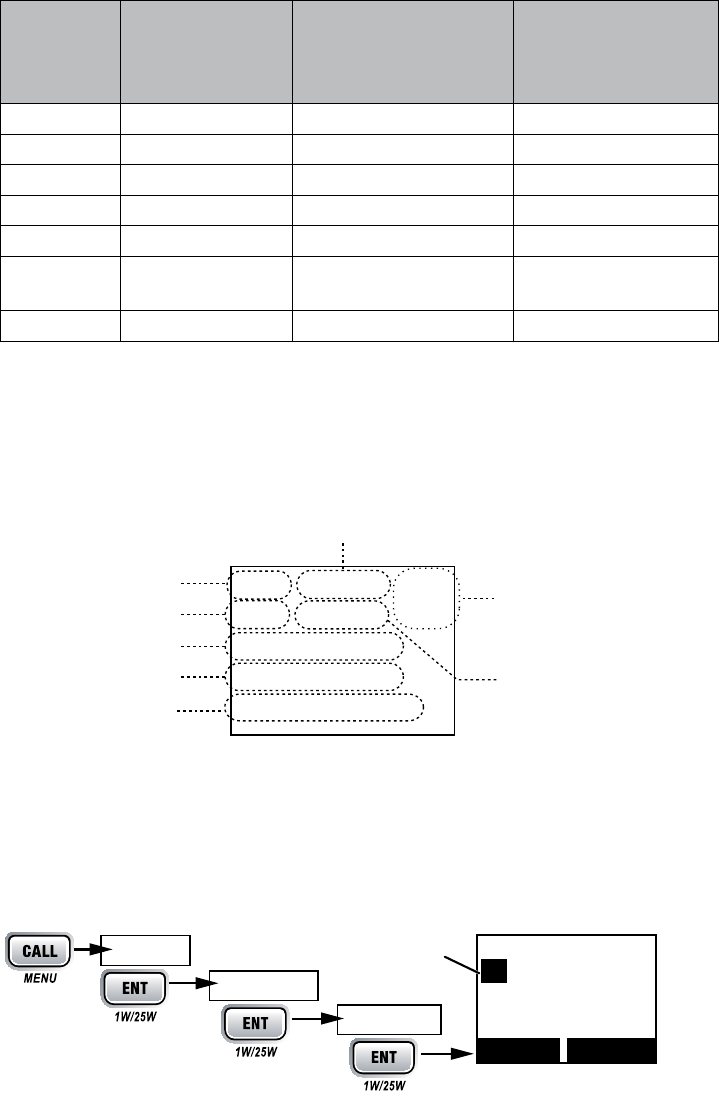
36
GPS MFG. Model Number(s)
GPS NMEA0183
OUTPUT Wire Color
(Connect to YELLOW
WIRE on your radio)
Ground Wire Color
(connect to BARE
WIRE on your radio)
Northstar All Models Yellow Black
RayMarine 420 Yellow Brown
RayMarine 520 / 620 Blue Brown
RayMarine RL Series White Brown
Simrad All Models White Brown
Sitex Neptune,
Nautilus Gray Brown
Standard CP150 / CP150C Green Yellow
#
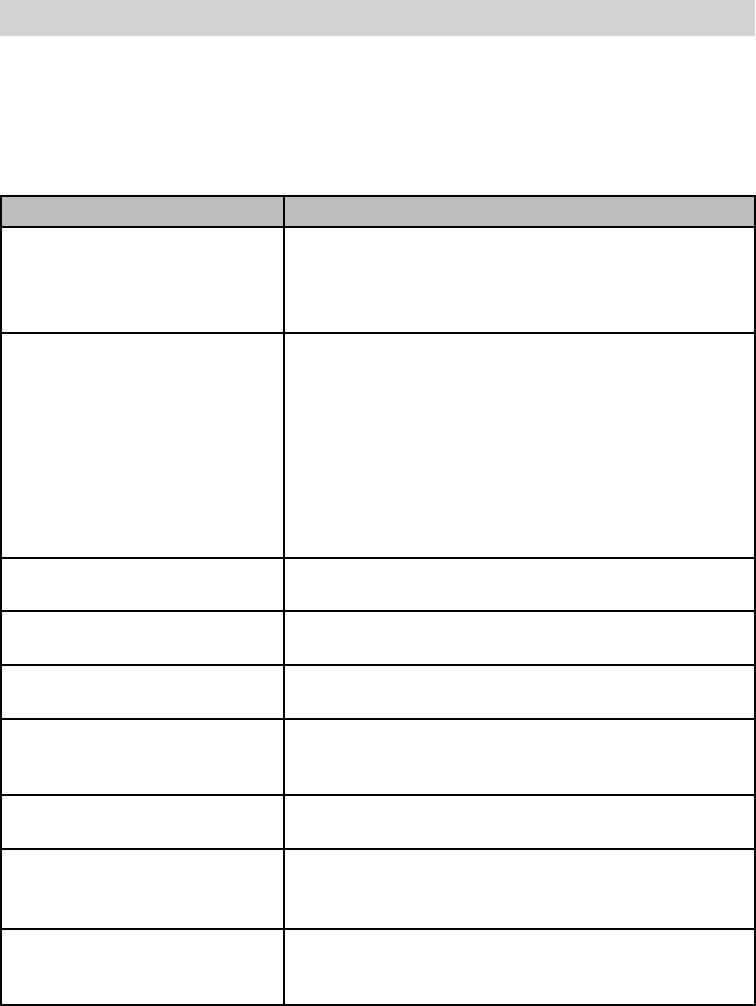
GPS Data OK
Check GPSGPS
Data OK
ENT-1W/25W
Conguring the GPS
16
06/20 11:00:00
208o 30. 0 KT
35o 40. 610 N
139o 46. 564 E
GPS Data: External
Date
Time
Current
channel
Course
Latitude
Longitude Speed
Status
Use the up and down arrows
to adjust the time by
one hour.
16
Back[CLR]
Select[ENT]
Time Adjust
09 : 14
Setup
Press and hold -
GPS Setup
Time Adjust
37
Setup
GPS SetupTime Adjust
CHANNEL UP
CHANNEL DOWN
ENT-
1W/25W
Set
Cancel
Daylight Save
ENT-1W/25W
On
Off
ENT-1W/25W
GPS Setup
#
VOLUME-PWR
x
x
#
38
x
x
x
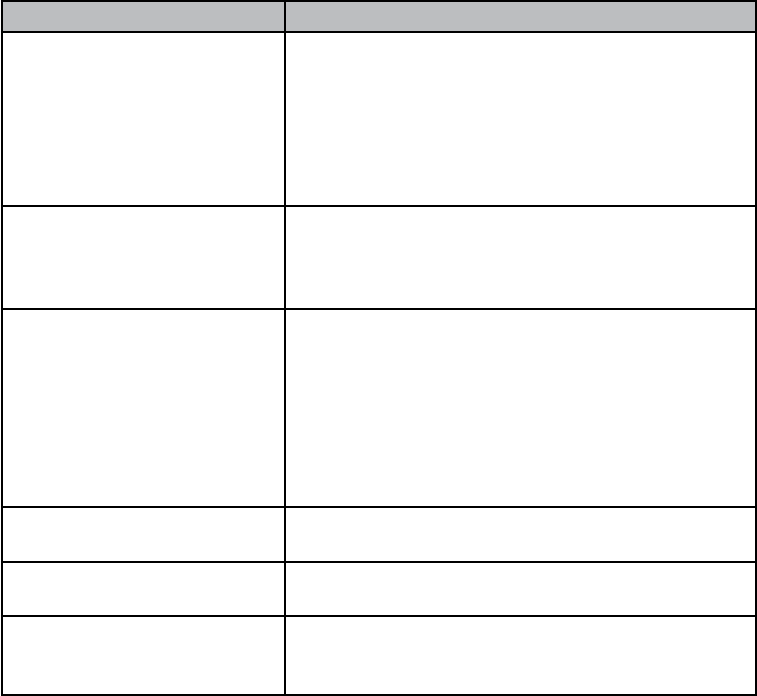
Problem Things to Try
The radio won’t power on.
Check the power connections.
Check the fuse.
Check the master battery switch and branch circuit
that connect to the radio.
The radio won’t transmit.
Make sure you are not in weather or scan mode.
Make sure you are not trying to transmit on a receive-
only channel (see the channels and frequency tables
beginning on page 41).
Make sure you are transmitting at the correct power
level for this channel (see the channels and frequency
tables beginning on page 41).
Make sure the duration of each transmission is less
than 5 minutes.
Noise comes out of the speaker
all the time Adjust the squelch level; it is probably too low.
I can’t hear anything (no
volume) from the speaker. Adjust the squelch level; it is probably too high.
I can transmit, but no one can
hear me.
Check your UIC channel settings (see Setting the UIC
channel mode (USA/CAN/INT) on page 10).
The display flashes, and I don’t
know why.
The display will flash if the radio is in a watch mode or
in scan mode. Try turning off scanning, Weather Alert
Watch, or Triple/Dual Watch (see page 11.)
I can’t read the display. Adjust the contrast and backlight brightness level (see
page 20)
The display is too bright at
night.
Adjust the backlight brightness level.
Turn off the radio; hold CALL-MENU button and turn it
back on (see page 20)
I can’t see any words on the
display.
Reset the radio back to the default brightness level:
turn off the radio; hold the CALL-MENU button and
turn it back on.
39
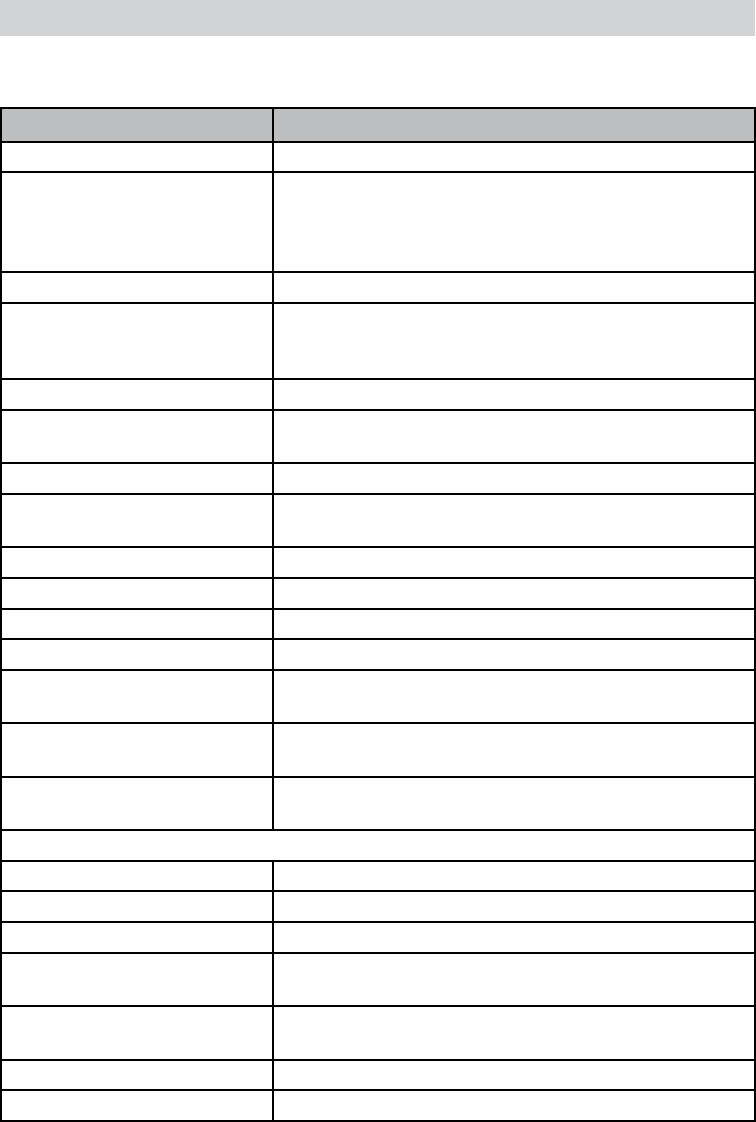
Problem Things to Try
I’m not getting any GPS data
on my display.
Make sure your GPS receiver is correctly
connected (see Connecting to a GPS receiver,
page 35).
Make sure your GPS receiver is working properly.
Make sure that your GPS receiver supports the
NMEA parameters described in NMEA Operation
on page 35.
I’m not getting any hazard
alerts.
Make sure Weather Alert Watch is turned on.
Check to make sure the FIPS codes in your radio
include your current location (see Using FIPS
codes for weather alerts on page 19).
I’m getting all the hazard
alerts, not just the ones for
my area.
Check to make sure the FIPS codes in your radio
were entered correctly (see Using FIPS codes for
weather alerts on page 19).
Sometimes the Weather Alert Watch may catch
a hazard alert in the middle of the broadcast and
miss which FIPS codes are affected. For your safe-
ty, the radio triggers the alert tone and switches to
the weather channel when this happens.
I can’t make Group DSC
calls. Make sure the Group MMSI was entered correctly.
Where can I nd my radio’s
serial number?
Look on the right side of the radio (the side with the
microphone cord), behind the mounting bracket.
The radio won’t let me enter
my User MMSI. What do I
do?
Contact customer service.
40
General
Controls Volume-Pwr, Squelch
Status Indicators Transmit power, Scan mode, Triple Watch mode,
Battery High, Battery low, USA, CAN, INT, Alert,
Memory, GPS, Message, Weather band, GPS status
and Channel Display
Display LCD (Full Dot Matrix)
Buttons ENT-1W/25W, Channel UP, Channel DOWN,
CALL-MENU, WX-MEM, CLR-SCAN, 16/9-TRI, and
DISTRESS
Connectors and Cables Antenna, accessory, and DC power
Size H 75 mm x W 167 mm x L 129 mm (without Heat Sink)
H 2.95 inches x W 6.58 inches x L 5.08 inches
Weight 1.0 kg (2.2 pounds)
Supply Voltage Nominal 13.8V DC, negative ground (10.5 VDC to 16.0
VDC)
Standard Accessories Mounting bracket and hardware, microphone hanger,
Antenna Impedance 50 Ω nominal
Microphone Rugged 2 kΩ condenser mic element with coiled cord
Speaker 1.77 inch, 8 Ω
Operating Temperature
Range
–20 °C to + 50 °C (–4 °F to +122 °F)
Shock and Vibration Meets or exceeds EIA standards, RS152B and
RS204C
FCC Approvals Type accepted under part 80 of the Rules; meets Great
Lakes Agreement and party boat requirements
Transmitter
Power Output 1 watt or 25 watt (user selectable)
Power Requirement 25 watts output: 6A@13.8V DC
Modulation ±5 kHz deviation
Hum and Noise Signal-to-
Noise
45 dB@1 kHz with 3 kHz deviation with 1000 Hz
modulating frequency (nominal)
Audio Distortion Less than 8% with 3 kHz deviation with 1000 Hz
modulating frequency
Spurious Suppression –25 dBm @ Hi, –25 dBm @ Lo
Output Power Stabilization Built-in automatic level control (ALC)
41
General
Frequency Range 156 to 158 MHz
Frequency Stability ±10 ppm @ –20°C to + 50°C
Receiver
Frequency Range 156 to 163 MHz
Sensitivity 0.25 μV for 12 dB SINAD (nominal)
Circuit Dual Conversion Super Heterodyne PLL (Crystal for
DSC)
Squelch Sensitivity 0.2 μV Threshold
Spurious Response 75 dB (nominal)
Adjacent Channel Selectivity 78 dB @ ±25 kHz (nominal)
Audio Output Power 2.5 watts (10% Distortion, 8 Ω load)
Power Requirement 360 mA @ 13.8V DC at squelched, 920 mA @ 13.8V
DC at maximum audio output
IF Frequencies 1st 41.925 MHz, 2nd 455 kHz (1st 21.7 MHz, 2nd 455
kHz for DSC)
#
Channel name/description Used for:
DISTRESS SAFETY AND
CALLING
primarily emergency messages and distress calls
INTERSHIP SAFETY safety messages from one ship to another, or from a
ship to Coast Guard aircraft
NON-COMMERCIAL
(recreational or voluntary
ships only)
messages about the needs of the ship, including fishing
reports, rendezvous, scheduling repairs and berthing
information
COMMERCIAL (working
ships only)
messages about the needs of the ship or the business
the ship is engaged in
PUBLIC
CORRESPONDENCE/
MARINE OPERATOR
calls to the marine operator at a public coast station.
Marine operators can connect you to the telephone
network so you can make and receive calls. (There is
usually a charge for this service.)
42
Channel name/description Used for:
PORT OPERATIONS/VTS
(vessel traffic system)
messages about the movement and safety of ships in or
near ports, locks or waterways. In certain major ports,
some channels may be restricted to specific types of
port operations messages.
NAVIGATIONAL/BRIDGE
TO BRIDGE
messages about ship navigation, for example, passing
or meeting other ships, maneuvering through locks,
or navigating around drawbridges. Messages must be
short!
STATE CONTROL messages about government regulation and control,
boating activities, or assistance to ships; also used to
talk to ships and coast stations operated by state or local
governments
DIGITAL SELECTIVE
CALLING
DSC signals only (no voice communications allowed at
any time)
Ch No. RX Freq TX Freq Status Name on display
1A* 156.0500 156.0500 Simplex Vessel traffic system/
Commercial
5A 156.2500 156.2500 Simplex Vessel traffic system/
Commercial
6 156.3000 156.3000 Simplex Inter-ship safety
7A 156.3500 156.3500 Simplex Commercial
8 156.4000 156.4000 Simplex Commercial
9 156.4500 156.4500 Simplex Non commercial
10 156.5000 156.5000 Simplex Commercial
11 156.5500 156.5500 Simplex Vessel traffic system
12 156.6000 156.6000 Simplex Vessel traffic system
13 156.6500 156.6500 Simplex, 1W Bridge to bridge
14 156.7000 156.7000 Simplex Vessel traffic system
15 156.7500 Inhibit Receive Only Environmental
16 156.8000 156.8000 Simplex Distress, Safety, Calling
17 156.8500 156.8500 Simplex, 1W Govt maritime control
18A 156.9000 156.9000 Simplex Commercial
19A 156.9500 156.9500 Simplex Commercial
20 161.6000 157.0000 Duplex Port operation
20A 157.0000 157.0000 Simplex Port operation
21A 157.0500 157.0500 Simplex Coast guard only
22A 157.1000 157.1000 Simplex Coast guard
23A 157.1500 157.1500 Simplex Coast guard only
43
Ch No. RX Freq TX Freq Status Name on display
24 161.8000 157.2000 Duplex Marine operator
25 161.8500 157.2500 Duplex Marine operator
26 161.9000 157.3000 Duplex Marine operator
27 161.9500 157.3500 Duplex Marine operator
28 162.0000 157.4000 Duplex Marine operator
63A 156.1750 156.1750 Simplex Vessel traffic system
65A 156.2750 156.2750 Simplex Port operation
66A 156.3250 156.3250 Simplex Port operation
67 156.3750 156.3750 Simplex, 1W Bridge to bridge
68 156.4250 156.4250 Simplex Non commercial
69 156.4750 156.4750 Simplex Non commercial
70 (156.5250 156.5250) DSC Only DSC
71 156.5750 156.5750 Simplex Non commercial
72 156.6250 156.6250 Simplex Non commercial (ship-ship)
73 156.6750 156.6750 Simplex Port operation
74 156.7250 156.7250 Simplex Port operation
75 156.775 156.7750 Simplex, 1W Port operation
76 156.825 156.8250 Simplex, 1W Port operation
77 156.8750 156.8750 Simplex, 1W Port operation (ship-ship)
78A 156.9250 156.9250 Simplex Non commercial
79A 156.9750 156.9750 Simplex Commercial
80A 157.0250 157.0250 Simplex Commercial
81A 157.0750 157.0750 Simplex Government
82A 157.1250 157.1250 Simplex Government
83A 157.1750 157.1750 Simplex Coast guard
84 161.8250 157.2250 Duplex Marine operator
85 161.8750 157.2750 Duplex Marine operator
86 161.9250 157.3250 Duplex Marine operator
87** 157.3750 157.3750 Simplex Marine operator
88** 157.4250 157.4250 Simplex Commercial (ship-ship)
A
Ch No. RX Freq TX Freq Status Name on display
1 160.6500 156.0500 Duplex Marine operator
2 160.7000 156.1000 Duplex Marine operator
44
Ch No. RX Freq TX Freq Status Name on display
3 160.7500 156.1500 Duplex Marine operator
4A 156.2000 156.2000 Simplex Canadian coast guard
5A 156.2500 156.2500 Simplex Vessel traffic system
6 156.3000 156.3000 Simplex Inter-ship safety
7A 156.3500 156.3500 Simplex Commercial
8 156.4000 156.4000 Simplex Commercial
9 156.4500 156.4500 Simplex Boater calling channel
10 156.5000 156.5000 Simplex Commercial
11 156.5500 156.5500 Simplex Vessel traffic system
12 156.6000 156.6000 Simplex Vessel traffic system
13 156.6500 156.6500 Simplex, 1W Bridge to bridge
14 156.7000 156.7000 Simplex Vessel traffic system
15 156.7500 156.7500 Simplex, 1W Environmental
16 156.8000 156.8000 Simplex Distress, Safety, Calling
17 156.8500 156.8500 Simplex, 1W State control
18A 156.9000 156.9000 Simplex Commercial
19A 156.9500 156.9500 Simplex Canadian coast guard
20 161.6000 157.0000 Duplex, 1W Port operation
21A 157.0500 157.0500 Simplex Canadian coast guard
22A 157.1000 157.1000 Simplex Canadian coast guard
23 161.7500 157.1500 Duplex Marine operator
24 161.8000 157.2000 Duplex Marine operator
25 161.8500 157.2500 Duplex Marine operator
26 161.9000 157.3000 Duplex Marine operator
27 161.9500 157.3500 Duplex Marine operator
28 162.0000 157.4000 Duplex Marine operator
60 160.6250 156.0250 Duplex Marine operator
61A 156.0750 156.0750 Simplex Canadian coast guard
62A 156.1250 156.1250 Simplex Canadian coast guard
63A 156.1750 156.1750 Simplex Port operation
64 160.8250 156.2250 Duplex Marine operator
64A 156.2250 156.2250 Simplex Port operation
65A 156.2750 156.2750 Simplex Port operation
66A 156.3250 156.3250 Simplex, 1W Port operation
67 156.3750 156.3750 Simplex Bridge to bridge
68 156.4250 156.4250 Simplex Non commercial
69 156.4750 156.4750 Simplex Non commercial
70 (156.5250 156.5250) DSC Only DSC
45
Ch No. RX Freq TX Freq Status Name on display
71 156.5750 156.5750 Simplex Non commercial
72 156.6250 156.6250 Simplex Non commercial
73 156.6750 156.6750 Simplex Port operation
74 156.7250 156.7250 Simplex Port operation
75 156.7750 156.7750 Simplex, 1W Port operation
76 156.8250 156.8250 Simplex, 1W Port operation
77 156.8750 156.8750 Simplex, 1W Port operation
78A 156.9250 156.9250 Simplex Inter ship
79A 156.9750 156.9750 Simplex Inter ship
80A 157.0250 157.0250 Simplex Inter ship
81A 157.0750 157.0750 Simplex Canadian coast guard
82A 157.1250 157.1250 Simplex Canadian coast guard
83 161.7750 157.1750 Duplex Canadian coast guard
83A 157.1750 157.1750 Simplex Canadian coast guard
84 161.8250 157.2250 Duplex Marine operator
85 161.8750 157.2750 Duplex Marine operator
86 161.9250 157.3250 Duplex Marine operator
87 157.3750 157.3750 Simplex Port operation
88 157.4250 157.4250 Simplex Port operation
Ch No. RX Freq TX Freq Status Name on display
1 160.6500 156.0500 Duplex Marine operator
2 160.7000 156.1000 Duplex Marine operator
3 160.7500 156.1500 Duplex Marine operator
4 160.8000 156.2000 Duplex Marine operator
5 160.8500 156.2500 Duplex Marine operator
6 156.3000 156.3000 Simplex Inter-ship safety
7 160.9500 156.3500 Duplex Marine operator
8 156.4000 156.4000 Simplex Commercial (ship-ship)
9 156.4500 156.4500 Simplex Boater calling channel
10 156.5000 156.5000 Simplex Commercial
11 156.5500 156.5500 Simplex Vessel traffic system
12 156.6000 156.6000 Simplex Vessel traffic system
13 156.6500 156.6500 Simplex Bridge to bridge
14 156.7000 156.7000 Simplex Vessel traffic system
15 156.7500 156.7500 Simplex, 1W Environmental
46
Ch No. RX Freq TX Freq Status Name on display
16 156.8000 156.8000 Simplex Distress, Safety, Calling
17 156.8500 156.8500 Simplex, 1W Govt maritime control
18 161.5000 156.9000 Duplex Port operation
19 161.5500 156.9500 Duplex Commercial
20 161.6000 157.0000 Duplex Port operation
21 161.6500 157.0500 Duplex Port operation
22 161.7000 157.1000 Duplex Port operation
23 161.7500 157.1500 Duplex Marine operator
24 161.8000 157.2000 Duplex Marine operator
25 161.8500 157.2500 Duplex Marine operator
26 161.9000 157.3000 Duplex Marine operator
27 161.9500 157.3500 Duplex Marine operator
28 162.0000 157.4000 Duplex Marine operator
60 160.6250 156.0250 Duplex Marine operator
61 160.6750 156.0750 Duplex Marine operator
62 160.7250 156.1250 Duplex Marine operator
63 160.7750 156.1750 Duplex Marine operator
64 160.8250 156.2250 Duplex Marine operator
65 160.8750 156.2750 Duplex Marine operator
66 160.9250 156.3250 Duplex Marine operator
67 156.3750 156.3750 Simplex Bridge to bridge
68 156.4250 156.4250 Simplex Non commercial
69 156.4750 156.4750 Simplex Non commercial
70 (156.5250) (156.5250) DSC Only DSC
71 156.5750 156.5750 Simplex Non commercial
72 156.6250 156.6250 Simplex Non commercial
73 156.6750 156.6750 Simplex Port operation
74 156.7250 156.7250 Simplex Port operation
75 156.7750 156.7750 Simplex, 1W Port operation
76 156.8250 156.8250 Simplex, 1W Port operation
77 156.8750 156.8750 Simplex Port operation (ship-ship)
78 161.5250 156.9250 Duplex Port operation
79 161.5750 156.9750 Duplex Port operation
80 161.6250 157.0250 Duplex Port operation
81 161.6750 157.0750 Duplex Port operation
82 161.7250 157.1250 Duplex Port operation
83 161.7750 157.1750 Duplex Port operation
84 161.8250 157.2250 Duplex Marine operator
47
Ch No. RX Freq TX Freq Status Name on display
85 161.8750 157.2750 Duplex Marine operator
86 161.9250 157.3250 Duplex Marine operator
87* 157.3750 157.3750 Simplex Marine operator
88* 157.4250 157.4250 Simplex Marine operator
Ch No. RX Freq Name on display
WX01 162.5500 162.550 MHz
WX02 162.4000 162.400 MHz
WX03 162.4750 162.475 MHz
WX04 162.4250 162.425 MHz
WX05 162.4500 162.450 MHz
WX06 162.5000 162.500 MHz
WX07 162.5250 162.525 MHz
WX08 161.6500 161.650 MHz
WX09 161.7750 161.775 MHz
WX10 163.2750 163.275 MHz
Types of events
x
x
x
x
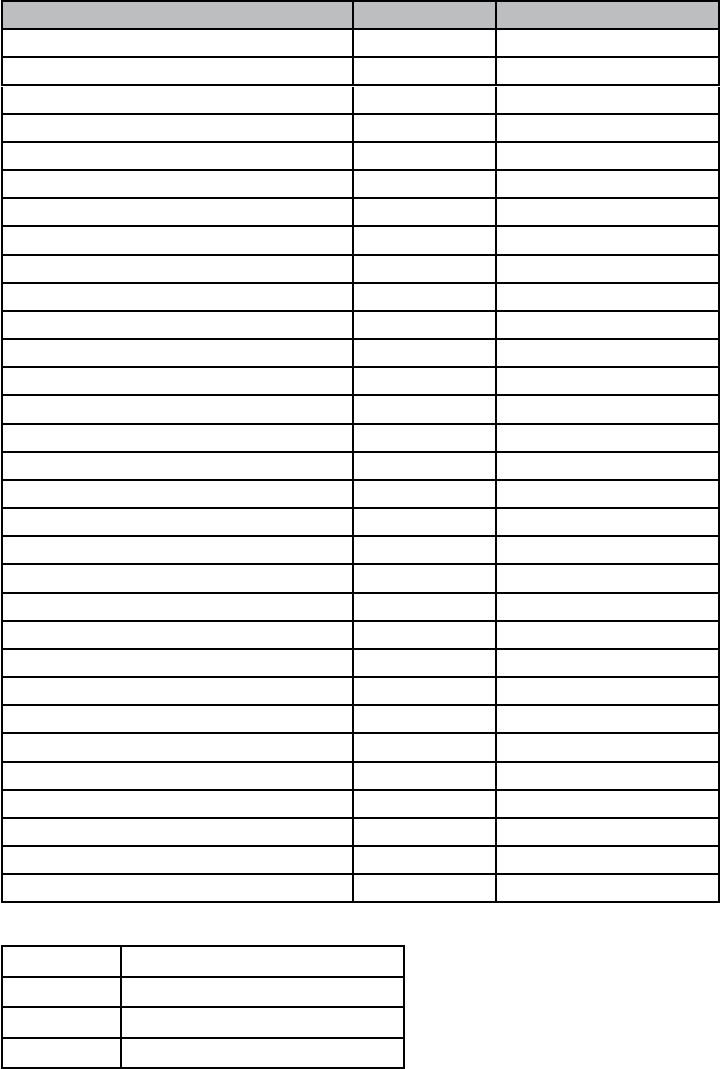
Event SAME Code Type
Blizzard Warning BZW Warning
Coastal Flood Watch CFA Watch
Coastal Flood Warning CFW Warning
Dust Storm Warning DSW Warning
Flash Flood Watch FFA Watch
48
Event SAME Code Type
Flash Flood Warning FFW Warning
Flash Flood Statement FFS Statement
Flood Watch FLA Watch
Flood Warning FLW Warning
Flood Statement FLS Statement
High Wind Watch HWA Watch
High Wind Warning HWW Warning
Hurricane Watch HUA Watch
Hurricane Warning HUW Warning
Hurricane Statement HLS Statement
Severe Thunderstorm Watch SVA Watch
Severe Thunderstorm Warning SVR Warning
Severe Weather Statement SVS Statement
Special Marine Warning SMW Warning
Special Weather Statement SPS Statement
Tornado Watch TOA Watch
Tornado Warning TOR Warning
Tropical Storm Watch TRA Watch
Tropical Storm Warning TRW Warning
Tsunami Watch TSA Watch
Tsunami Warning TSW Warning
Winter Storm Watch WSA Watch
Winter Storm Warning WSW Warning
National Information Center NIC Test
Avalanche Watch AVA Watch
Avalanche Warning AVW Warning
Child Abduction Emergency CAE Emergency
Civil Danger Warning CDW Warning
Civil Emergency Message CEM Emergency
Earthquake Warning EQW Warning
Evacuation Immediate EVI Warning
Fire Warning FRW Warning
Hazardous Materials Warning HMW Warning
Law Enforcement Warning LEW Warning
Local Area Emergency LAE Emergency
911 Telephone Outage Emergency TOE Emergency
Nuclear Power Plant Warning NUW Warning
Radiological Hazard Warning RHW Warning
49
Event SAME Code Type
Shelter in Place Warning SPW Warning
Volcano Warning VOW Warning
Test Message ADR Test
Practice/Demo Warning DMO Test
Required Monthly Test RMT Test
Required Weekly Test RWT Test
Biological Hazard Warning BHW Warning
Boil Water Warning BWW Warning
Chemical Hazard Warning CHW Warning
Dam Watch DBA Watch
Dam Break Watch DBW Warning
Contagious Disease Warning DEW Warning
Emergency Action Notification EAN Warning
Emergency Action Termination EAT Statement
Evacuation Watch EVA Watch
Flood Contamination Warning FCA Warning
Flash Freeze Warning FSW Warning
Iceberg Warning IBW Warning
Industrial Fire Warning IFW Warning
Landslide Warning LSW Warning
National Audible Test NAT Test
Network Notification Message NMN Statement
National Periodic Test NPT Test
National Silent Test NST Test
Power Outage Advisory POS Statement
Wild Fire Watch WFA Watch
Wild Fire Warning WFW Warning
Unrecognized Watch **A Watch
Unrecognized Emergency **E Statement
Unrecognized Statement **S Statement
Unrecognized Warning **W Warning
TXB Transmitter Backup On
TXF Transmitter Carrier On
TXO Transmitter Carrier On
TXP Transmitter Primary On
50
NMEA Input
Baud rate 4800 bps
Data bits 8
Parity None
Stop bits 1
Data amplitude Over 2.0 V
Drive capability Over 10 mA
x
x
x
x
x
#
#
#
#
x
x
Warning!
41
51
http://www.navcen.uscg. gov/marcomms/boater.htm
Wash hands after handling.
52
QUESTIONS?
Contact your local West
Marine store.
Call 1-800-BOATING
Visit our website at
www.westmarine.com
Printed in Vietnam
Impreso en Vietnam
Imprimé au Vietnam
U01UT629BZZ(0)
QUESTIONS?
Contactez votre magasin
West Marine local
Appelez 1-800-BOATING
Contactez-nous au
www.westmarine.com
¿PREGUNTAS?
Comuníquese con su tienda
local de West Marine.
Llame al 1-800-BOATING
Comuníquese con nosotros
en www.westmarine.com
para bajar el manual en
español de la radio VHF580
Watsonville, CA
