Whirlpool XPSG ECM Wireless Module User Manual User Guide

Whirlpool Corporation ECM Wireless Module User Guide

Contents

User Guide

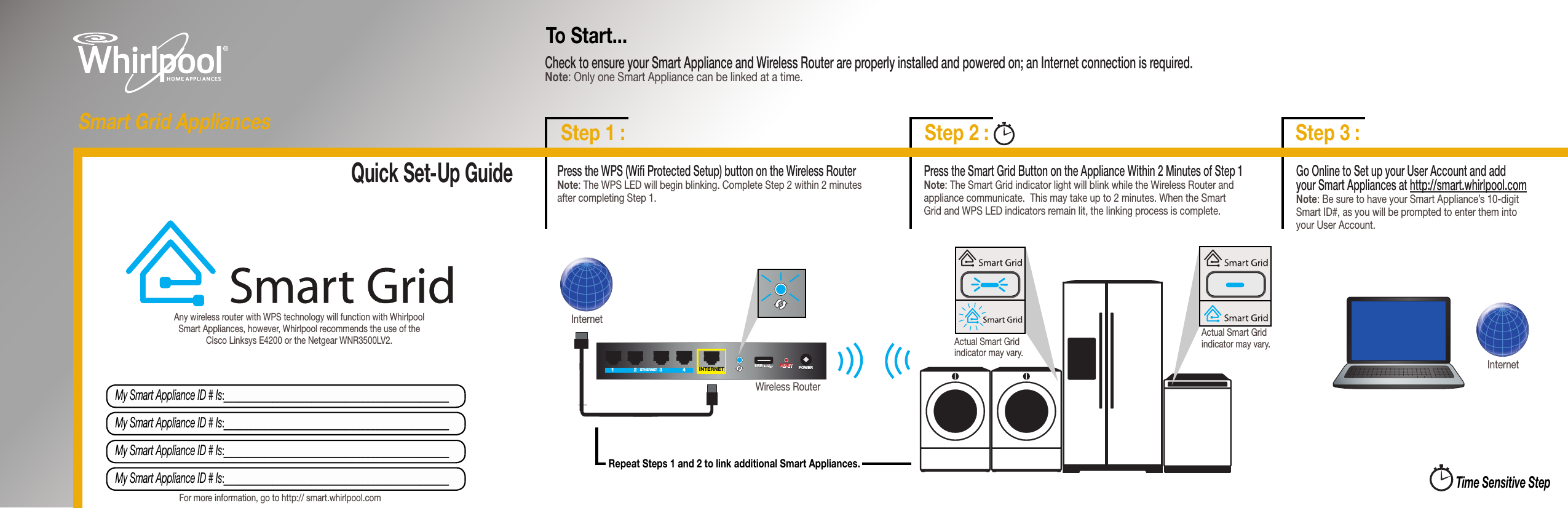
Quick Set-Up GuideTime Sensitive StepRepeat Steps 1 and 2 to link additional Smart Appliances.Check to ensure your Smart Appliance and Wireless Router are properly installed and powered on; an Internet connection is required. Note: Only one Smart Appliance can be linked at a time. To Start...InternetGo Online to Set up your User Account and add  your Smart Appliances at http://smart.whirlpool.com Note: Be sure to have your Smart Appliance’s 10-digit Smart ID#, as you will be prompted to enter them into  your User Account.My Smart Appliance ID # Is:______________________________________________My Smart Appliance ID # Is:______________________________________________My Smart Appliance ID # Is:______________________________________________My Smart Appliance ID # Is:______________________________________________Press the Smart Grid Button on the Appliance Within 2 Minutes of Step 1 Note: The Smart Grid indicator light will blink while the Wireless Router and appliance communicate.  This may take up to 2 minutes. When the Smart Grid and WPS LED indicators remain lit, the linking process is complete.Any wireless router with WPS technology will function with Whirlpool Smart Appliances, however, Whirlpool recommends the use of the Cisco Linksys E4200 or the Netgear WNR3500LV2.For more information, go to http:// smart.whirlpool.comInternetWireless Router 1234INTERNETUSBUSB RESETRESET POWERPOWERETHERNETActual Smart Grid indicator may vary.Actual Smart Grid indicator may vary.Step 3 :Step 2 :Step 1 :Smart Grid AppliancesPress the WPS (Wi Protected Setup) button on the Wireless Router         Note: The WPS LED will begin blinking. Complete Step 2 within 2 minutes after completing Step 1.1234INTERNETUSBUSB RESETRESET POWERPOWERETHERNET
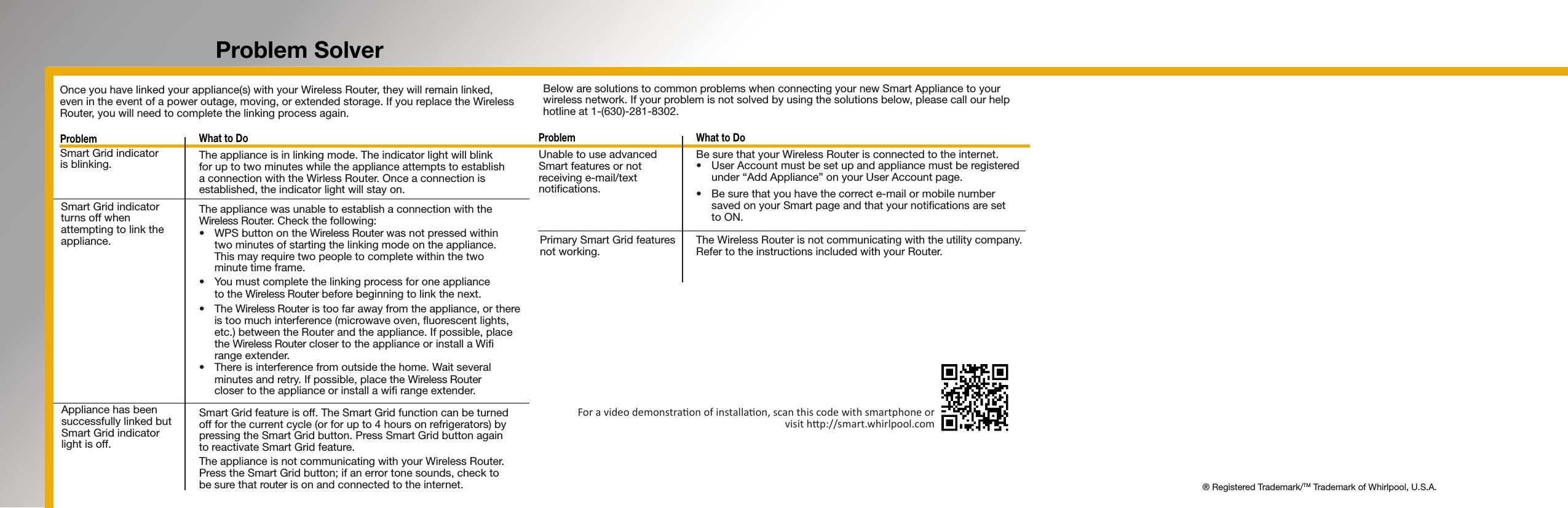
Problem Solver  What to Do  The appliance is in linking mode. The indicator light will blink for up to two minutes while the appliance attempts to establish a connection with the Wirless Router. Once a connection is established, the indicator light will stay on.   The appliance was unable to establish a connection with the  Wireless Router. Check the following: • WPSbuttonontheWireless Router was not pressed within  two minutes of starting the linking mode on the appliance.  This may require two people to complete within the two  minute time frame. • Youmustcompletethelinkingprocessforoneappliance to the Wireless Router before beginning to link the next. • TheWireless Router is too far away from the appliance, or there is too much interference (microwave oven, uorescent lights, etc.) between the Router and the appliance. If possible, place the Wireless Router closer to the appliance or install a Wi range extender. • Thereisinterferencefromoutsidethehome.Waitseveralminutes and retry. If possible, place the Wireless Router  closer to the appliance or install a wi range extender.   Smart Grid feature is off. The Smart Grid function can be turned off for the current cycle (or for up to 4 hours on refrigerators) by pressing the Smart Grid button. Press Smart Grid button again  to reactivate Smart Grid feature.   The appliance is not communicating with your Wireless Router. Press the Smart Grid button; if an error tone sounds, check to  be sure that router is on and connected to the internet.Problem  What to Do Be sure that your Wireless Router is connected to the internet.  • UserAccountmustbesetupandappliancemustberegisteredunder “Add Appliance” on your User Account page. • Besurethatyouhavethecorrecte-mailormobilenumber     saved on your Smart page and that your notications are set      to ON.     The Wireless Router is not communicating with the utility company. Refer to the instructions included with your Router.   Once you have linked your appliance(s) with your Wireless Router, they will remain linked, even in the event of a power outage, moving, or extended storage. If you replace the Wireless Router, you will need to complete the linking process again.ProblemSmart Grid indicator  is blinking.Smart Grid indicator turns off when attempting to link the appliance.Appliance has been successfully linked but Smart Grid indicator  light is off.Unable to use advanced Smart features or not receiving e-mail/text notications.Primary Smart Grid features  not working.Below are solutions to common problems when connecting your new Smart Appliance to your wireless network. If your problem is not solved by using the solutions below, please call our help hotline at 1-(630)-281-8302.For a video demonstraon of installaon, scan this code with smartphone or visit hp://smart.whirlpool.com® Registered Trademark/TM Trademark of Whirlpool, U.S.A.

Navigation menu