Williams Sound DLT300 Portable Conference Transmitter User Manual

Williams Sound, LLC Portable Conference Transmitter

User Manual

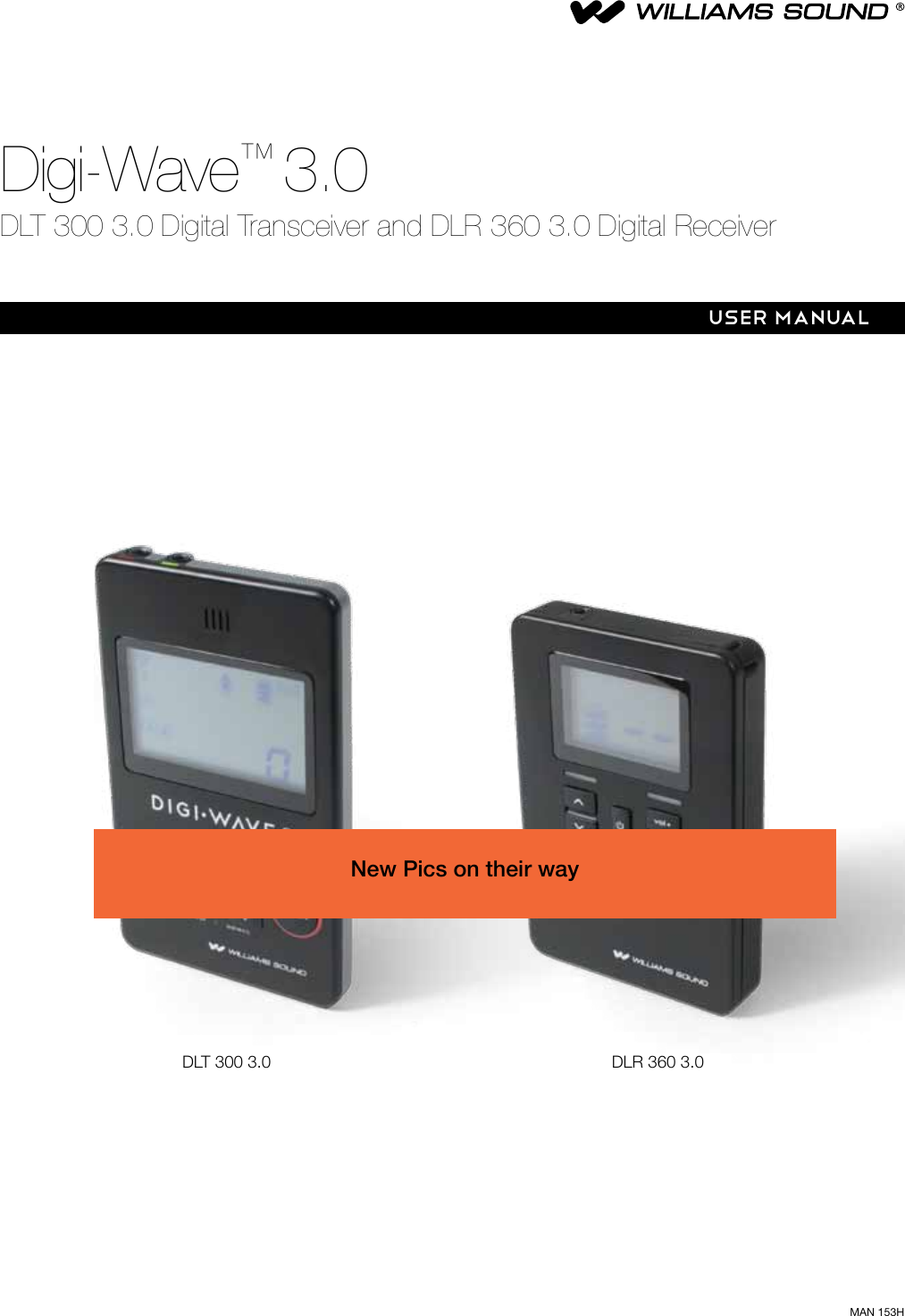
MAN 153HDigi-Wave™ 3.0DLT 300 3.0 Digital Transceiver and DLR 360 3.0 Digital ReceiverUSER MANUALDLT 300 3.0 DLR 360 3.0New Pics on their way
DLT 300 3.0 Digital Transceiver and DLR 360 3.0 Digital Receiver2ContentsDigi-Wave™ 3.0 ...................................................................................................................................................................... 2DLT 300 3.0 Digital Transceiver and DLR 360 3.0 Digital Receiver  ................................................................................... 2System Overview ..................................................................................................................................................................... 4DLT 300 3.0 Controls and Connectors .................................................................................................................................... 5DLT 300 3.0 Operation ............................................................................................................................................................ 5Button Functions .............................................................................................................................................................. 5DLR 360 3.0 Controls and Connectors ....................................................................................................................................7DLR 360 3.0 Operation ........................................................................................................................................................... 7Getting Started: Preprogrammed Systems .............................................................................................................................. 8Before Programming the Digi-Wave™ System ......................................................................................................................... 9Programming the Digi-Wave™ System for 1-way Modes ....................................................................................................... 11Programming the Digi-Wave™ System for 2-way Modes ....................................................................................................... 12Programming the Digi-Wave™ System:  DLT Optional Settings .............................................................................................13Example 1:  2-way Mode, Tour Guide .................................................................................................................................... 15How it works .................................................................................................................................................................. 15Example 1:  2-way Mode, Tour Guide (continued) .................................................................................................................. 16How it works (CONTINUED) ........................................................................................................................................... 16Example 1:  2-Way Setup for Tour Guide Operation ............................................................................................................... 162-Way Setup for Tour Guide Operation (continued) ................................................................................................................ 17Example 2: Simultaneous Interpretation (1-way) ....................................................................................................................18How it works .................................................................................................................................................................. 181-way setup for Simultaneous Interpretation ..........................................................................................................................19Example 3:  Intercom  (2,3,4,5, or 6-way party line)  ..............................................................................................................20How it works .................................................................................................................................................................. 202-way Setup for Intercom (2,3,4,5, or 6-way party line) ..........................................................................................................21Repeater Mode ..................................................................................................................................................................... 22Repeater Mode (continued) ................................................................................................................................................... 23Dierences between DLT 300 3.0, DLT 100 2.0 and DLT 100 ................................................................................................ 24Dierences between DLR 360 3.0, DLR 60 2.0 and DLR 60 ..................................................................................................25Dierences between DLT 100, DLT 100 2.0, and DLT 300 3.0 rmware versions ................................................................... 25Specications ........................................................................................................................................................................ 26DLT 300 3.0 Transceiver ................................................................................................................................................. 26Specications ........................................................................................................................................................................ 27DLR 360 3.0 Receiver .................................................................................................................................................... 27Digi-Wave™ 3.0DLT 300 3.0 DIGITAL TRANSCEIVER AND DLR 360 3.0 DIGITAL RECEIVER
DLT 300 3.0 Digital Transceiver and DLR 360 3.0 Digital Receiver3HEARING SAFETYCAUTION!This product is designed to amplify sounds to a high volume level which could potentially cause hearing damage if used improperly. To protect your hearing and the hearing of others:  (1) Turn the volume down before putting on the earphone or headphone, and then adjust the volume to a comfortable level, (2) Set the volume level at the minimum setting that you need to hear, (3) if you experience feedback (a squealing or howling sound), reduce the volume setting and move the microphone away from the earphone or headphone, and (4) Do not allow children or other unauthorized persons to have access to this productMEDICAL DEVICE SAFETYCAUTION!1.  Before using this product with an implantable or other medical device, consult your physician or the manufacturer of your implantable or other medical device.2.   If you have a pacemaker or other medical device, make sure that you are using this product in accordance with safety guidelines established by your physician or the implantable device manufacturer.RECYCLING INSTRUCTIONSBattery Safety and DisposalHelp Williams Sound protect the environment! Please take time to dispose of your equipment properly. Please do NOT dispose of batteries in the household trash. Please take the batteries to a retail or community collection point for recycling.Product Recycling: Please do NOT dispose of your Williams Sound equipment in the household trash. Please take the equipment to an electronics recycling center or return the product to the factory for proper disposal.Troubleshooting ..................................................................................................................................................................... 28FAQs ..................................................................................................................................................................................... 29FCC statements .................................................................................................................................................................... 302-year Warranty ..................................................................................................................................................................... 31
DLT 300 3.0 Digital Transceiver and DLR 360 3.0 Digital Receiver4System OverviewThe Digi-wave™ system is a patented, digital spread-spectrum (DSS), simultaneous two-way wireless listening system operating in the 2.4 GHz band.  Due to it’s frequency-hopping algorithm, it avoids interference and is a very secure method of communication.  For a more detailed explanation of how Digi-wave technology works, please visit our website and download the “Digi-wave™ Technology White Paper” (under “Support – Downloads - Tech Bulletins”).  A Digiwave communication system consists of at least one transceiver (DLT 300 3.0) and various combinations of transceivers and receivers (DLR 360 3.0) depending on the venue.The DLT 300 3.0 is a 2-way transceiver, meaning that it can transmit and receive audio simultaneously.  It can operate in one of 3 dierent modes:1. In Two-way Mode, a speaker (with a DLT 300 3.0) can hear another speaker’s voice (from a second DLT 300 3.0) and, at the same time, can also transmit their own voice.  In this way, two-way communication is established (similar to a phone conversation).  Two-way mode can only be established between DLT 300 3.0 units.  In addition, DLR 360 3.0 receivers in the same group can also hear the broadcast.2. In One-way Mode, one DLT 300 3.0 acts as a transmitter (speaker) and another DLT 300 3.0 acts as a receiver (listener).  In addition, DLR 360 3.0 receivers in the same group can also hear the broadcast.  There are 4 one-way modes.3. In Repeater Mode, the DLT 300 3.0 receives audio from another DLT 300 3.0 and re-broadcasts the signal to increase the transmitted range of the person speaking.  In this way, larger groups can be covered by using one or more DLT 300 3.0’s acting as repeaters.  Listeners can have either DLT 300 3.0’s or DLR 360 3.0’s to listen to the broadcast.4. In Intercom Mode, up to six people can talk simultaneously.  All of the DLT 300 3.0’s are in 2-way mode in the same group.  More DLT’s can be in the group, but only six can have live mics at the same time (the seventh DLT who wishes to speak pushes their TALK button and knocks the sixth talker o).  DLR’s can listen-in on the conversation if desired.The DLR 360 3.0 is a receiver only.  Users of receivers can only hear what is being broadcast by DLT(s).Combinations of one or more DLT 300 3.0’s and DLR 360 3.0’s in One-way mode, Two-way mode, or Repeater mode can be used to facilitate dierent events, depending on what needs to be spoken and what needs to be heard.  Examples of scenarios will be covered here.Typical Scenarios include: Guided Tours - with one or more tour guides (2-way), with audience participation (2-way), or without audience participation (1-way)Language Interpretation - one or more interpreted languages transmitted to audience (1-way)Intercom - with up to six people able to speak simultaneously (2-way)Note: there are many more scenarios than are covered in this manual, however these would be variations on the ones discussed here.  Rules of Operation for 1-way or 2-way mode must be followed for successful operation.  Note: for simplicity, throughout the rest of this manual, the DLT 300 3.0 may be referred to as a “DLT” and the DLR 360 3.0 may be referred to as a “DLR”.  Similarly, Master 1, Master 2 and Guest may be referred to as “M1”, “M2”, and “GST”.
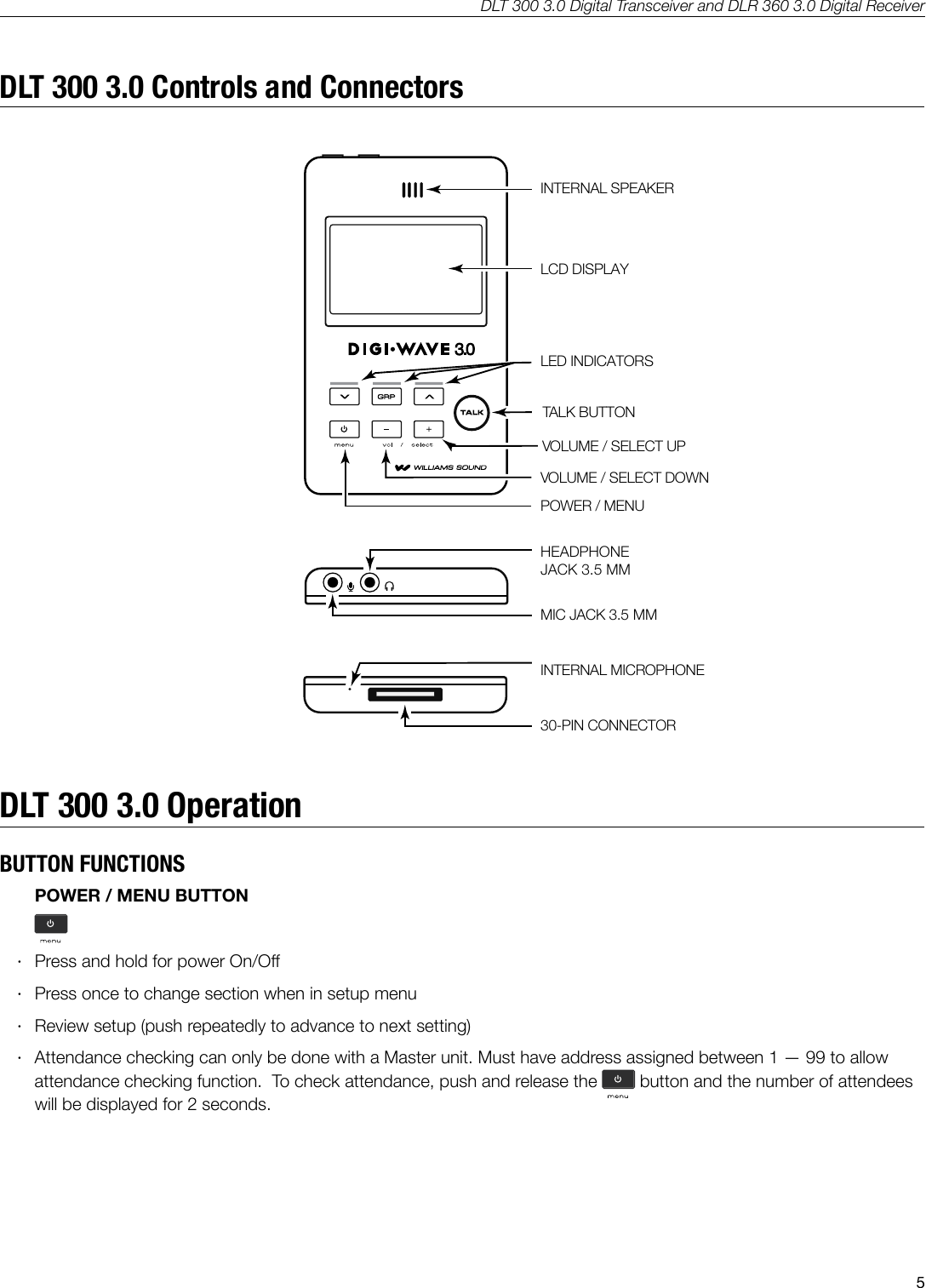
DLT 300 3.0 Digital Transceiver and DLR 360 3.0 Digital Receiver5DLT 300 3.0 Controls and ConnectorsINTERNAL SPEAKERLCD DISPLAYA540LED INDICATORSTALK BUTTONVOLUME / SELECT UPVOLUME / SELECT DOWNPOWER / MENUHEADPHONEJACK 3.5 MM MIC JACK 3.5 MMINTERNAL MICROPHONE30-PIN CONNECTORDLT 300 3.0 OperationBUTTON FUNCTIONSPOWER / MENU BUTTON ·Press and hold for power On/O ·Press once to change section when in setup menu ·Review setup (push repeatedly to advance to next setting) ·Attendance checking can only be done with a Master unit. Must have address assigned between 1 — 99 to allow attendance checking function.  To check attendance, push and release the  button and the number of attendees will be displayed for 2 seconds.
DLT 300 3.0 Digital Transceiver and DLR 360 3.0 Digital Receiver6QUICK GROUP CHANGE / SETUP BUTTONS      ·Press and hold   and   together for 3 seconds to enter or exit setup menu · Press and hold   button for 3 seconds to enter quick group change mode.  The GRP light will ash. Then use  or   to change groups.  To exit, push   again or just wait until the unit times out. · Use these buttons to select channels in simultaneous interpretation mode   MICROPHONE LEVEL ADJUSTMENT · Hold  the     button for two seconds to enter mic level adjustment. For level adjustment use     or  VOLUME CONTROL / SELECT BUTTON ·Control / Volume ·Use to navigate selections in setup menu.  ·Access and adjust tone control (0-53)TALK BUTTON · Press button momentarily once to activate the microphone. Press button once more to turn o the microphone · Press and hold the button for approximately 2 seconds to mute other DLT 300 3.0 Guest units. Only the M1 and M2 have this function.  ([TALK] LED will blink on all units when in mute mode).Battery Charging – DLT 300 3.01.  This Product uses an internal rechargeable Lithium Polymer battery.2.   Use the 30 Pin connector, located on the bottom of DLT 300 3.0 to charge the battery. Full charging time is approximately 5 hours. The Red LED ashes while charging. The Green LED will be on steady when the battery is charged. 3.  Battery Maintenance - Charge the battery at room temperature.
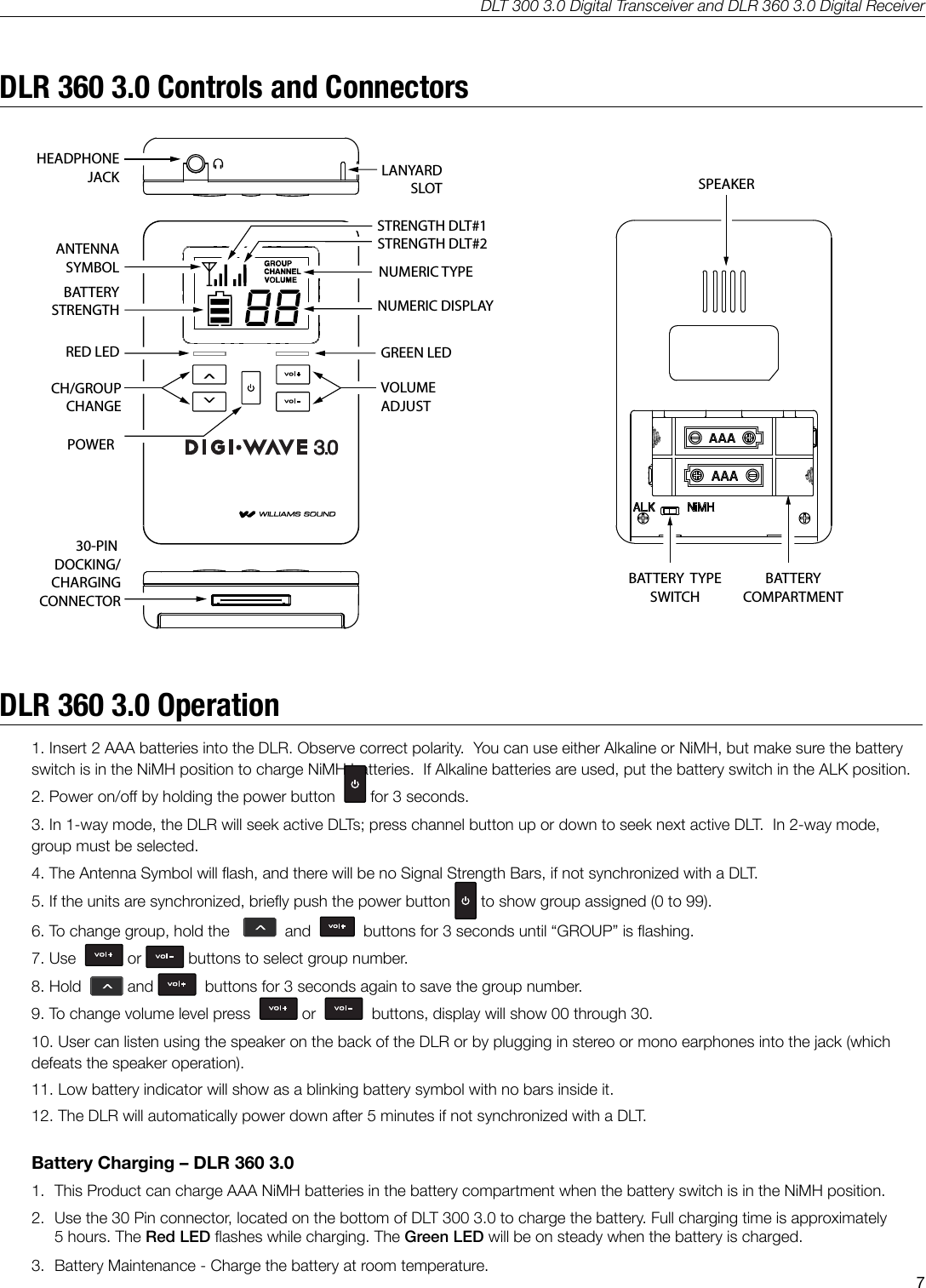
DLT 300 3.0 Digital Transceiver and DLR 360 3.0 Digital Receiver7DLR 360 3.0 Controls and ConnectorsA539RED LED GREEN LEDCH/GROUPCHANGEVOLUMEADJUSTPOWERHEADPHONEJACKSPEAKERBATTERYSTRENGTHBATTERY  TYPESWITCHLANYARD SLOT30-PIN DOCKING/CHARGINGCONNECTORSTRENGTH DLT#1STRENGTH DLT#2NUMERIC DISPLAYNUMERIC TYPEANTENNASYMBOLBATTERY COMPARTMENTA539RED LED GREEN LEDCH/GROUPCHANGEVOLUMEADJUSTPOWERHEADPHONEJACKSPEAKERBATTERYSTRENGTHBATTERY  TYPESWITCHLANYARD SLOT30-PIN DOCKING/CHARGINGCONNECTORSTRENGTH DLT#1STRENGTH DLT#2NUMERIC DISPLAYNUMERIC TYPEANTENNASYMBOLBATTERY COMPARTMENTDLR 360 3.0 Operation1. Insert 2 AAA batteries into the DLR. Observe correct polarity.  You can use either Alkaline or NiMH, but make sure the battery switch is in the NiMH position to charge NiMH batteries.  If Alkaline batteries are used, put the battery switch in the ALK position.2. Power on/o by holding the power button    for 3 seconds.3. In 1-way mode, the DLR will seek active DLTs; press channel button up or down to seek next active DLT.  In 2-way mode, group must be selected.4. The Antenna Symbol will ash, and there will be no Signal Strength Bars, if not synchronized with a DLT.5. If the units are synchronized, briey push the power button  to show group assigned (0 to 99).6. To change group, hold the     and     buttons for 3 seconds until “GROUP” is ashing.7. Use    or   buttons to select group number.8. Hold   and   buttons for 3 seconds again to save the group number.9. To change volume level press    or     buttons, display will show 00 through 30.10. User can listen using the speaker on the back of the DLR or by plugging in stereo or mono earphones into the jack (which defeats the speaker operation).11. Low battery indicator will show as a blinking battery symbol with no bars inside it.12. The DLR will automatically power down after 5 minutes if not synchronized with a DLT.Battery Charging – DLR 360 3.01.  This Product can charge AAA NiMH batteries in the battery compartment when the battery switch is in the NiMH position.2.   Use the 30 Pin connector, located on the bottom of DLT 300 3.0 to charge the battery. Full charging time is approximately 5 hours. The Red LED ashes while charging. The Green LED will be on steady when the battery is charged. 3.  Battery Maintenance - Charge the battery at room temperature.
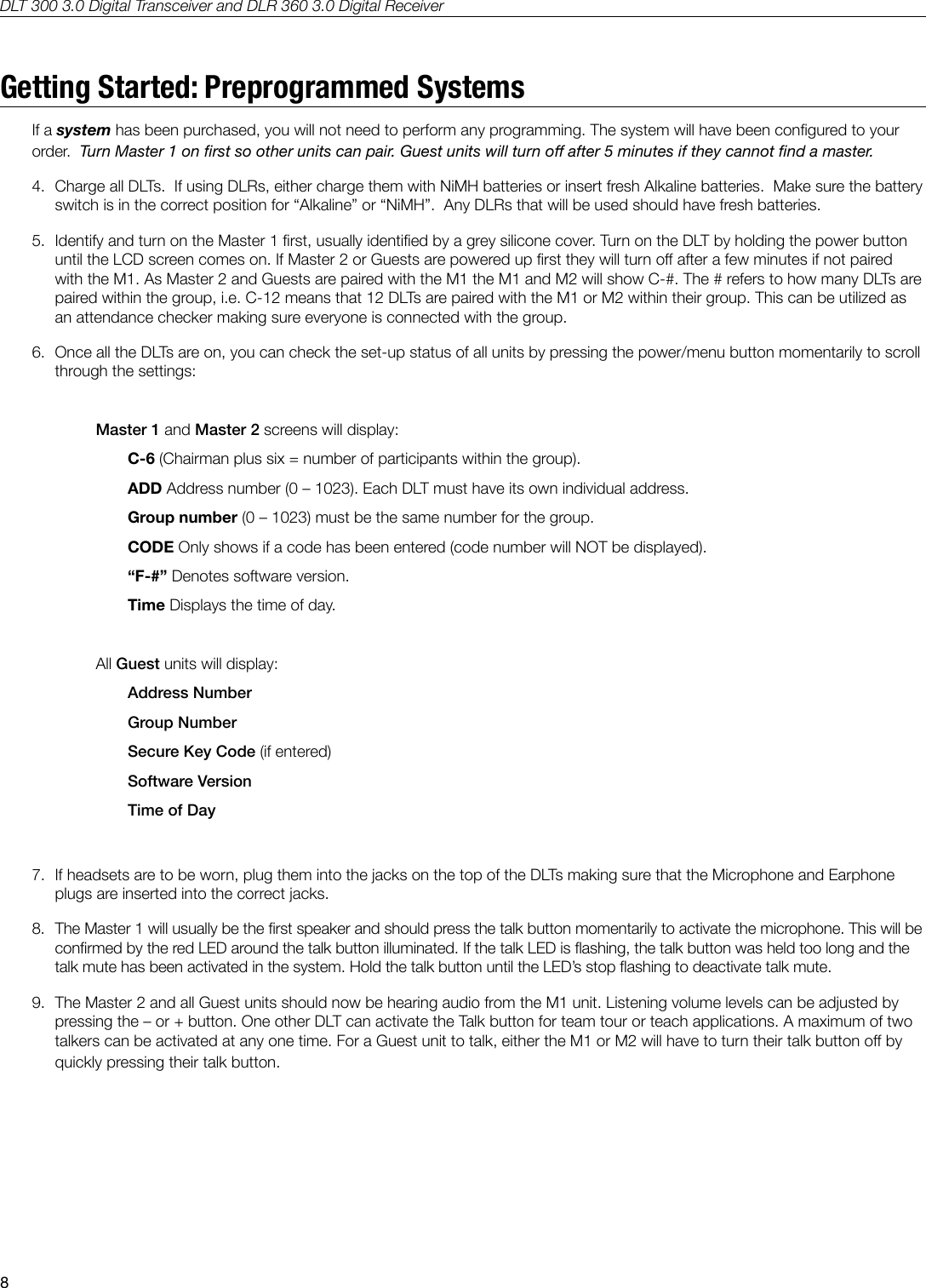
DLT 300 3.0 Digital Transceiver and DLR 360 3.0 Digital Receiver8Getting Started: Preprogrammed SystemsIf a system has been purchased, you will not need to perform any programming. The system will have been congured to your order.  Turn Master 1 on rst so other units can pair. Guest units will turn o after 5 minutes if they cannot nd a master.4.  Charge all DLTs.  If using DLRs, either charge them with NiMH batteries or insert fresh Alkaline batteries.  Make sure the battery switch is in the correct position for “Alkaline” or “NiMH”.  Any DLRs that will be used should have fresh batteries.5.  Identify and turn on the Master 1 rst, usually identied by a grey silicone cover. Turn on the DLT by holding the power button until the LCD screen comes on. If Master 2 or Guests are powered up rst they will turn o after a few minutes if not paired with the M1. As Master 2 and Guests are paired with the M1 the M1 and M2 will show C-#. The # refers to how many DLTs are paired within the group, i.e. C-12 means that 12 DLTs are paired with the M1 or M2 within their group. This can be utilized as an attendance checker making sure everyone is connected with the group.6.  Once all the DLTs are on, you can check the set-up status of all units by pressing the power/menu button momentarily to scroll through the settings:Master 1 and Master 2 screens will display:C-6 (Chairman plus six = number of participants within the group).ADD Address number (0 – 1023). Each DLT must have its own individual address.Group number (0 – 1023) must be the same number for the group.CODE Only shows if a code has been entered (code number will NOT be displayed).“F-#” Denotes software version.Time Displays the time of day. All Guest units will display:Address NumberGroup NumberSecure Key Code (if entered)Software VersionTime of Day7.  If headsets are to be worn, plug them into the jacks on the top of the DLTs making sure that the Microphone and Earphone plugs are inserted into the correct jacks.8.  The Master 1 will usually be the rst speaker and should press the talk button momentarily to activate the microphone. This will be conrmed by the red LED around the talk button illuminated. If the talk LED is ashing, the talk button was held too long and the talk mute has been activated in the system. Hold the talk button until the LED’s stop ashing to deactivate talk mute.9.  The Master 2 and all Guest units should now be hearing audio from the M1 unit. Listening volume levels can be adjusted by pressing the – or + button. One other DLT can activate the Talk button for team tour or teach applications. A maximum of two talkers can be activated at any one time. For a Guest unit to talk, either the M1 or M2 will have to turn their talk button o by quickly pressing their talk button.
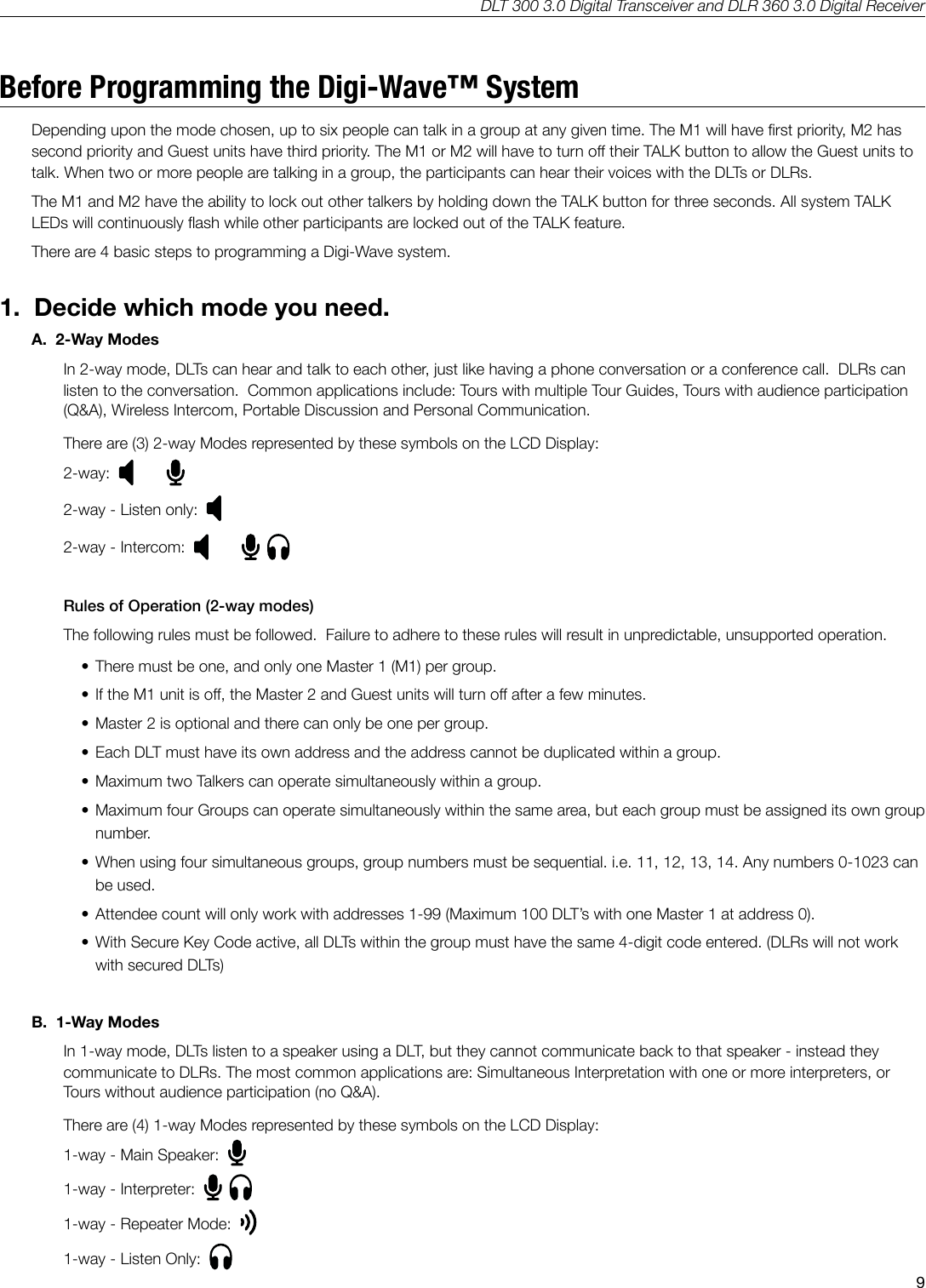
DLT 300 3.0 Digital Transceiver and DLR 360 3.0 Digital Receiver9Before Programming the Digi-Wave™ SystemDepending upon the mode chosen, up to six people can talk in a group at any given time. The M1 will have rst priority, M2 has second priority and Guest units have third priority. The M1 or M2 will have to turn o their TALK button to allow the Guest units to talk. When two or more people are talking in a group, the participants can hear their voices with the DLTs or DLRs.The M1 and M2 have the ability to lock out other talkers by holding down the TALK button for three seconds. All system TALK LEDs will continuously ash while other participants are locked out of the TALK feature.There are 4 basic steps to programming a Digi-Wave system.1.  Decide which mode you need.A.  2-Way Modes In 2-way mode, DLTs can hear and talk to each other, just like having a phone conversation or a conference call.  DLRs can listen to the conversation.  Common applications include: Tours with multiple Tour Guides, Tours with audience participation (Q&A), Wireless Intercom, Portable Discussion and Personal Communication.There are (3) 2-way Modes represented by these symbols on the LCD Display:2-way:  2-way - Listen only:  2-way - Intercom:  Rules of Operation (2-way modes) The following rules must be followed.  Failure to adhere to these rules will result in unpredictable, unsupported operation.  • There must be one, and only one Master 1 (M1) per group.• If the M1 unit is o, the Master 2 and Guest units will turn o after a few minutes.• Master 2 is optional and there can only be one per group.• Each DLT must have its own address and the address cannot be duplicated within a group.• Maximum two Talkers can operate simultaneously within a group.• Maximum four Groups can operate simultaneously within the same area, but each group must be assigned its own group number.• When using four simultaneous groups, group numbers must be sequential. i.e. 11, 12, 13, 14. Any numbers 0-1023 can be used.• Attendee count will only work with addresses 1-99 (Maximum 100 DLT’s with one Master 1 at address 0).• With Secure Key Code active, all DLTs within the group must have the same 4-digit code entered. (DLRs will not work with secured DLTs)B.  1-Way Modes  In 1-way mode, DLTs listen to a speaker using a DLT, but they cannot communicate back to that speaker - instead they communicate to DLRs. The most common applications are: Simultaneous Interpretation with one or more interpreters, or Tours without audience participation (no Q&A).There are (4) 1-way Modes represented by these symbols on the LCD Display:1-way - Main Speaker:  1-way - Interpreter:  1-way - Repeater Mode:  1-way - Listen Only:
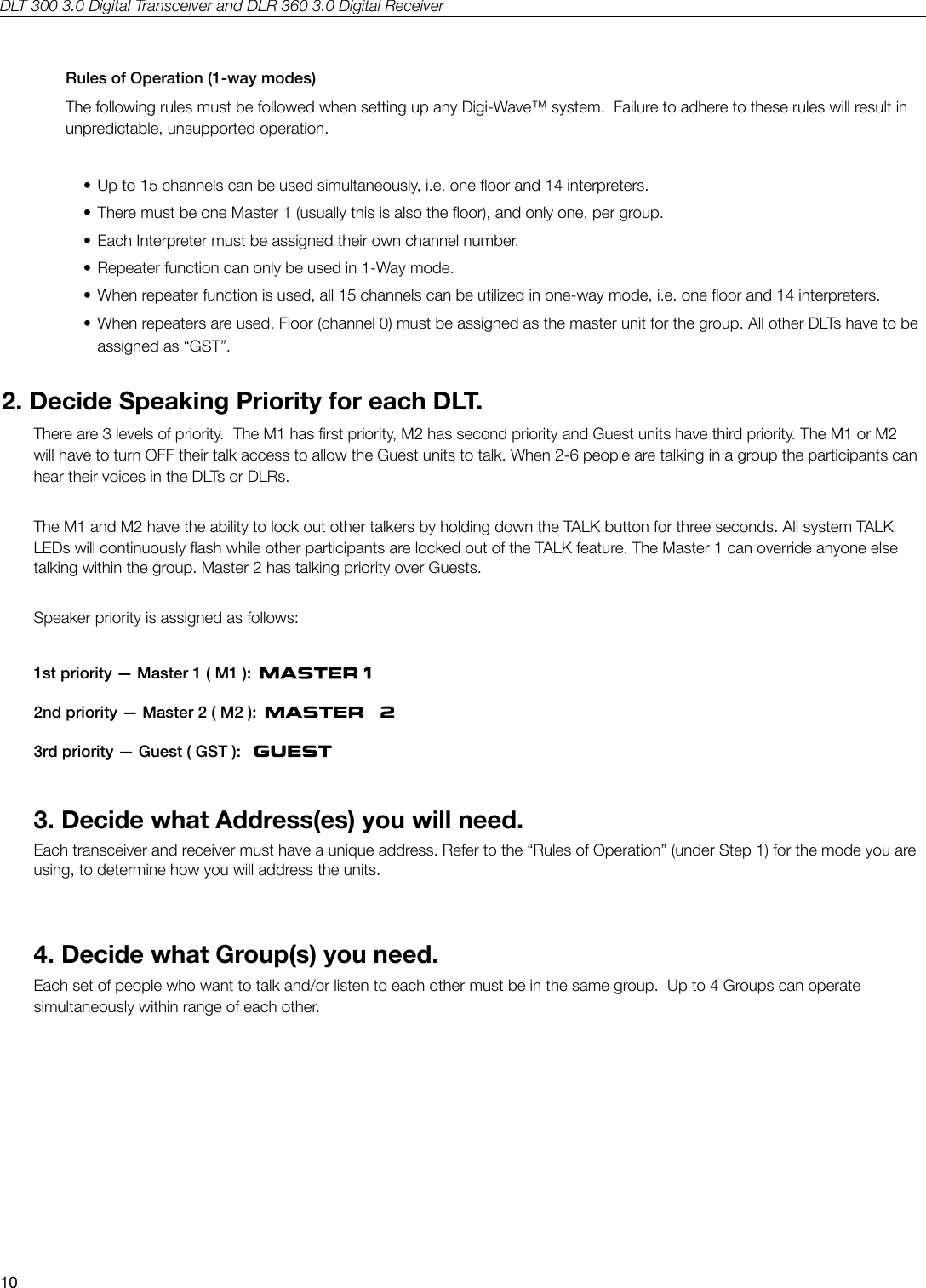
DLT 300 3.0 Digital Transceiver and DLR 360 3.0 Digital Receiver10Rules of Operation (1-way modes)The following rules must be followed when setting up any Digi-Wave™ system.  Failure to adhere to these rules will result in unpredictable, unsupported operation.• Up to 15 channels can be used simultaneously, i.e. one oor and 14 interpreters.• There must be one Master 1 (usually this is also the oor), and only one, per group.• Each Interpreter must be assigned their own channel number.• Repeater function can only be used in 1-Way mode.• When repeater function is used, all 15 channels can be utilized in one-way mode, i.e. one oor and 14 interpreters.• When repeaters are used, Floor (channel 0) must be assigned as the master unit for the group. All other DLTs have to be  assigned as “GST”.2. Decide Speaking Priority for each DLT.There are 3 levels of priority.  The M1 has rst priority, M2 has second priority and Guest units have third priority. The M1 or M2 will have to turn OFF their talk access to allow the Guest units to talk. When 2-6 people are talking in a group the participants can hear their voices in the DLTs or DLRs.The M1 and M2 have the ability to lock out other talkers by holding down the TALK button for three seconds. All system TALK LEDs will continuously ash while other participants are locked out of the TALK feature. The Master 1 can override anyone else talking within the group. Master 2 has talking priority over Guests.Speaker priority is assigned as follows: 1st priority — Master 1 ( M1 ):      2nd priority — Master 2 ( M2 ):      3rd priority — Guest ( GST ):   3. Decide what Address(es) you will need.Each transceiver and receiver must have a unique address. Refer to the “Rules of Operation” (under Step 1) for the mode you are using, to determine how you will address the units.4. Decide what Group(s) you need.Each set of people who want to talk and/or listen to each other must be in the same group.  Up to 4 Groups can operate simultaneously within range of each other.
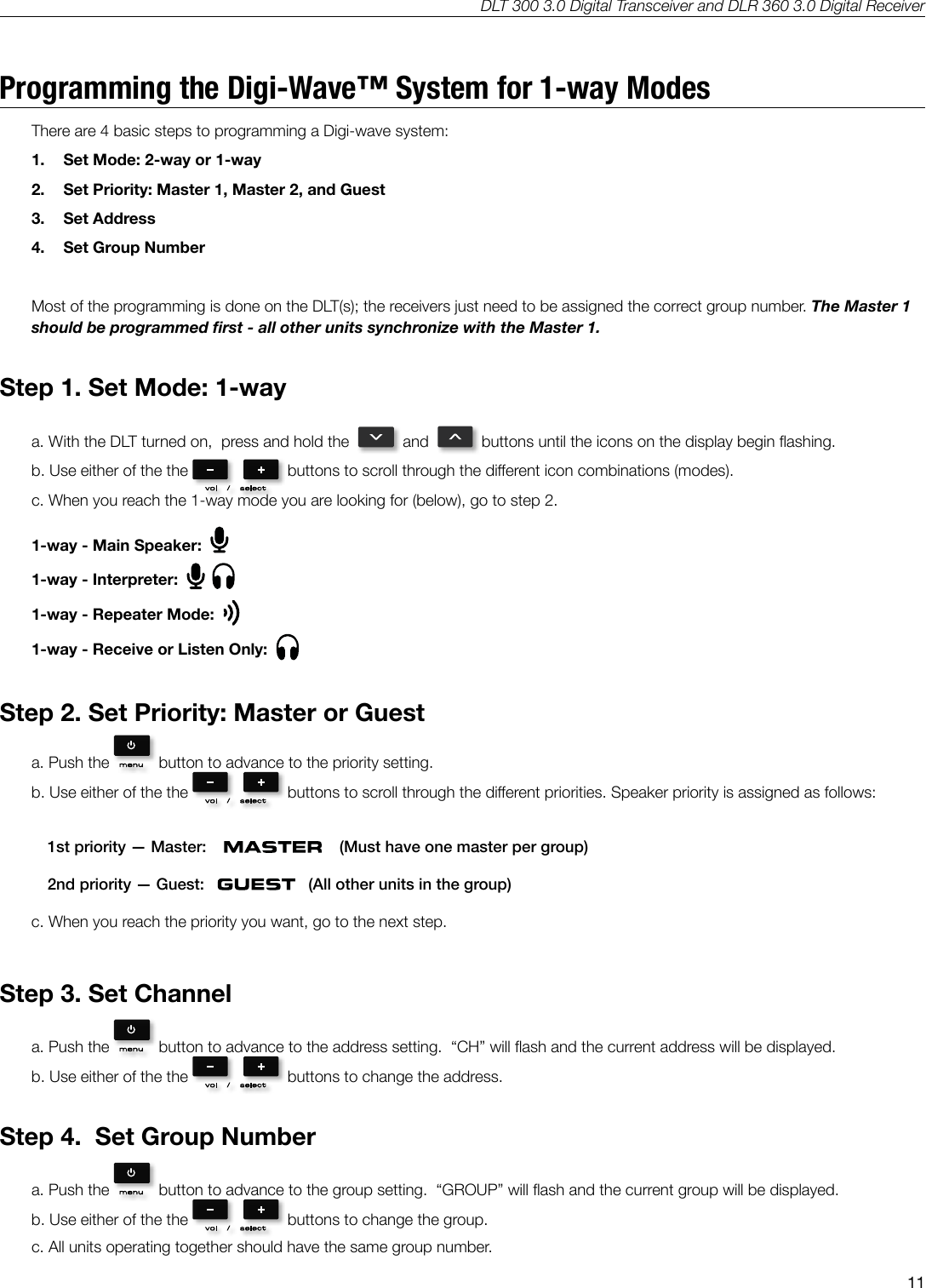
DLT 300 3.0 Digital Transceiver and DLR 360 3.0 Digital Receiver11Programming the Digi-Wave™ System for 1-way ModesThere are 4 basic steps to programming a Digi-wave system:  1.  Set Mode: 2-way or 1-way2.  Set Priority: Master 1, Master 2, and Guest3.  Set Address4.  Set Group NumberMost of the programming is done on the DLT(s); the receivers just need to be assigned the correct group number. The Master 1 should be programmed rst - all other units synchronize with the Master 1.Step 1. Set Mode: 1-waya. With the DLT turned on,  press and hold the     and     buttons until the icons on the display begin ashing.b. Use either of the the    buttons to scroll through the dierent icon combinations (modes).c. When you reach the 1-way mode you are looking for (below), go to step 2.1-way - Main Speaker:  1-way - Interpreter:  1-way - Repeater Mode:  1-way - Receive or Listen Only:  Step 2. Set Priority: Master or Guesta. Push the    button to advance to the priority setting.b. Use either of the the    buttons to scroll through the dierent priorities. Speaker priority is assigned as follows: 1st priority — Master:         (Must have one master per group)2nd priority — Guest:       (All other units in the group)c. When you reach the priority you want, go to the next step.Step 3. Set Channela. Push the    button to advance to the address setting.  “CH” will ash and the current address will be displayed.b. Use either of the the    buttons to change the address. Step 4.  Set Group Numbera. Push the    button to advance to the group setting.  “GROUP” will ash and the current group will be displayed.b. Use either of the the    buttons to change the group. c. All units operating together should have the same group number.
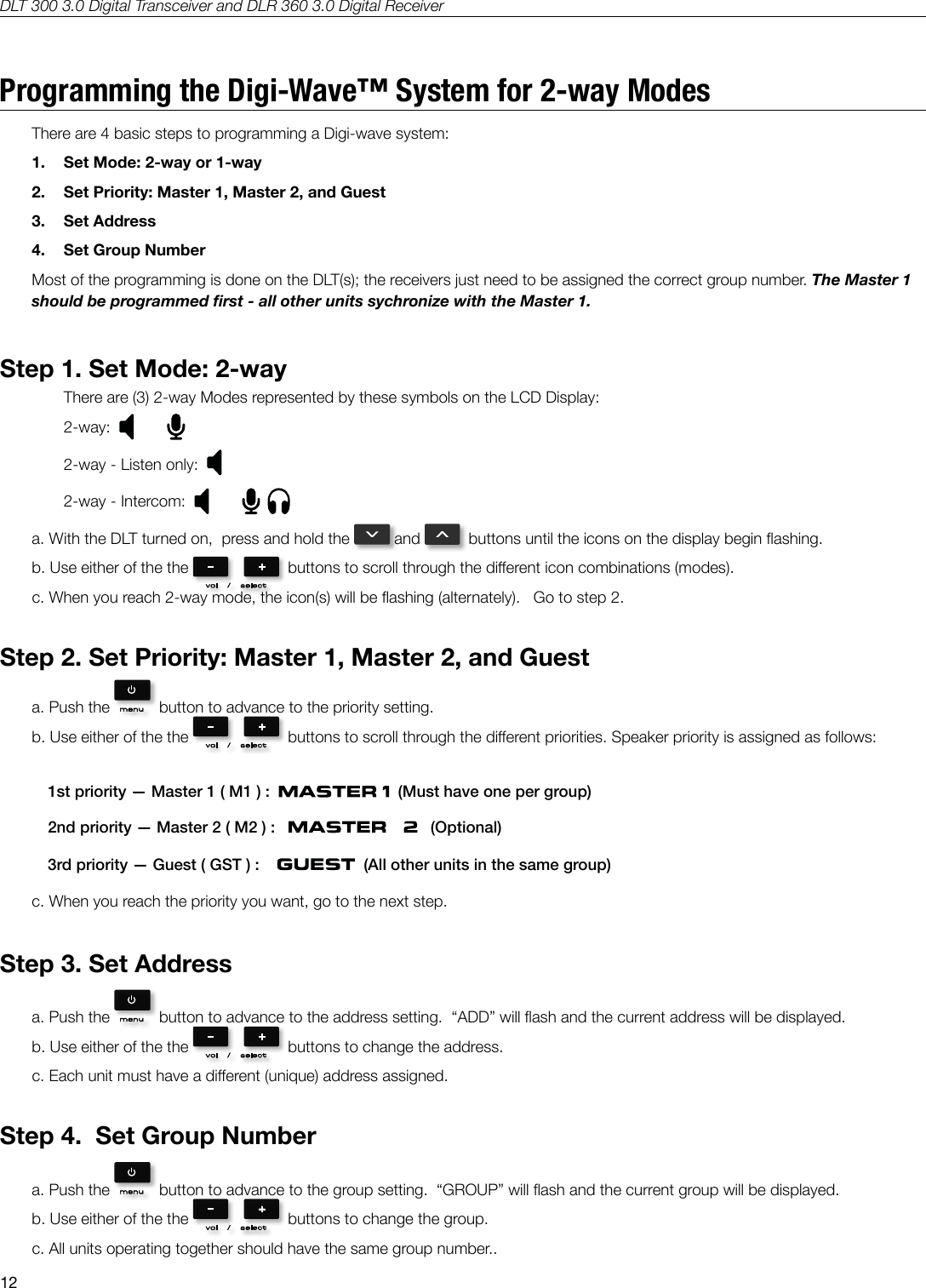
DLT 300 3.0 Digital Transceiver and DLR 360 3.0 Digital Receiver12Programming the Digi-Wave™ System for 2-way ModesThere are 4 basic steps to programming a Digi-wave system:  1.  Set Mode: 2-way or 1-way2.  Set Priority: Master 1, Master 2, and Guest3.  Set Address4.  Set Group NumberMost of the programming is done on the DLT(s); the receivers just need to be assigned the correct group number. The Master 1 should be programmed rst - all other units sychronize with the Master 1.Step 1. Set Mode: 2-wayThere are (3) 2-way Modes represented by these symbols on the LCD Display:2-way:  2-way - Listen only:  2-way - Intercom:  a. With the DLT turned on,  press and hold the   and    buttons until the icons on the display begin ashing.b. Use either of the the    buttons to scroll through the dierent icon combinations (modes).c. When you reach 2-way mode, the icon(s) will be ashing (alternately).   Go to step 2.Step 2. Set Priority: Master 1, Master 2, and Guesta. Push the    button to advance to the priority setting.b. Use either of the the    buttons to scroll through the dierent priorities. Speaker priority is assigned as follows: 1st priority — Master 1 ( M1 ) :     (Must have one per group)2nd priority — Master 2 ( M2 ) :       (Optional)3rd priority — Guest ( GST ) :       (All other units in the same group)c. When you reach the priority you want, go to the next step.Step 3. Set Addressa. Push the    button to advance to the address setting.  “ADD” will ash and the current address will be displayed.b. Use either of the the    buttons to change the address. c. Each unit must have a dierent (unique) address assigned.Step 4.  Set Group Numbera. Push the    button to advance to the group setting.  “GROUP” will ash and the current group will be displayed.b. Use either of the the    buttons to change the group. c. All units operating together should have the same group number..
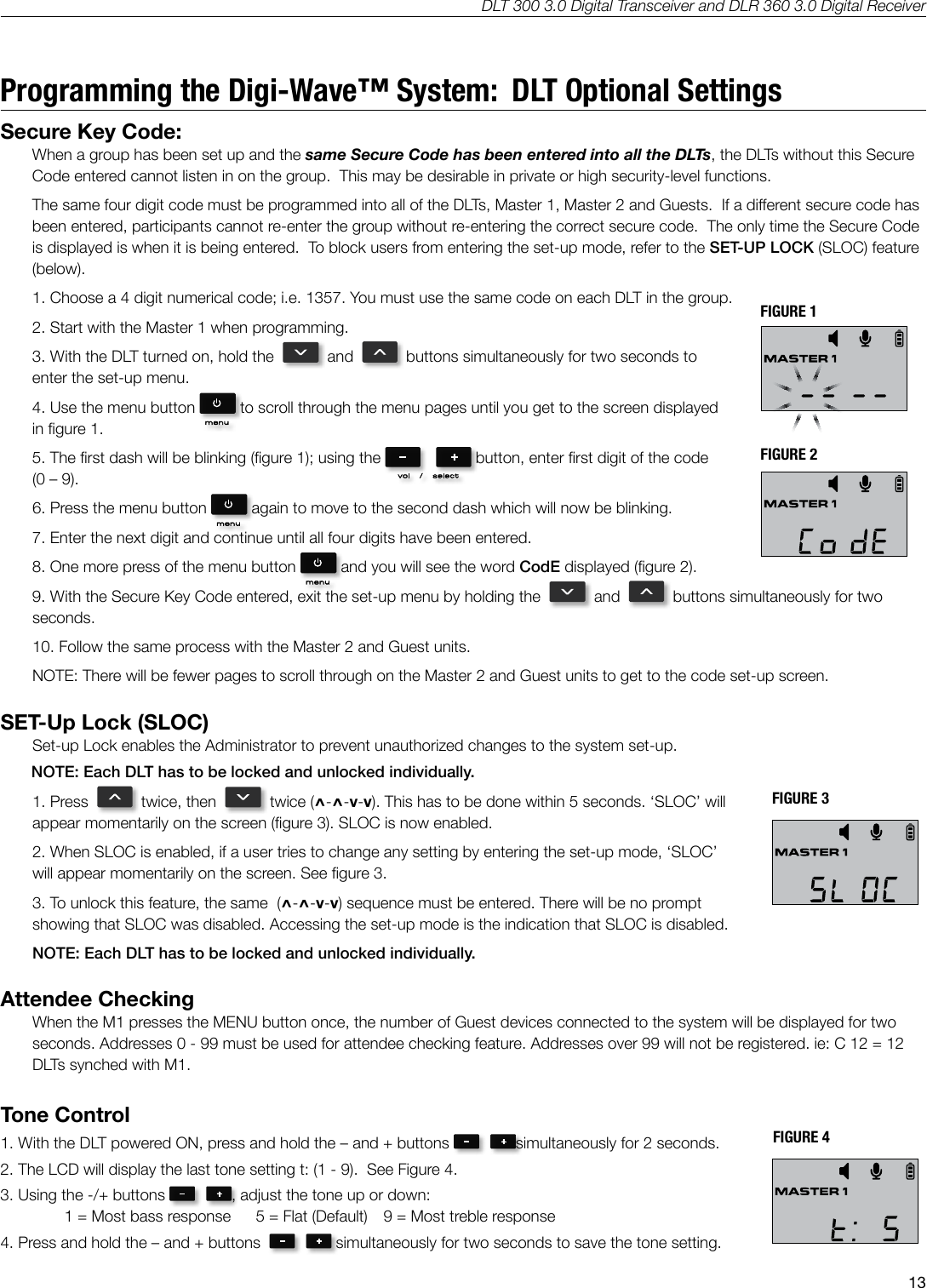
DLT 300 3.0 Digital Transceiver and DLR 360 3.0 Digital Receiver13Programming the Digi-Wave™ System:  DLT Optional SettingsSecure Key Code:  When a group has been set up and the same Secure Code has been entered into all the DLTs, the DLTs without this Secure Code entered cannot listen in on the group.  This may be desirable in private or high security-level functions.The same four digit code must be programmed into all of the DLTs, Master 1, Master 2 and Guests.  If a dierent secure code has been entered, participants cannot re-enter the group without re-entering the correct secure code.  The only time the Secure Code is displayed is when it is being entered.  To block users from entering the set-up mode, refer to the SET-UP LOCK (SLOC) feature (below).1. Choose a 4 digit numerical code; i.e. 1357. You must use the same code on each DLT in the group.2. Start with the Master 1 when programming.3. With the DLT turned on, hold the     and     buttons simultaneously for two seconds to enter the set-up menu.4. Use the menu button   to scroll through the menu pages until you get to the screen displayed in gure 1.  5. The rst dash will be blinking (gure 1); using the   button, enter rst digit of the code (0 – 9).6. Press the menu button   again to move to the second dash which will now be blinking.7. Enter the next digit and continue until all four digits have been entered.8. One more press of the menu button   and you will see the word CodE displayed (gure 2).9. With the Secure Key Code entered, exit the set-up menu by holding the     and     buttons simultaneously for two seconds.10. Follow the same process with the Master 2 and Guest units. NOTE: There will be fewer pages to scroll through on the Master 2 and Guest units to get to the code set-up screen. SET-Up Lock (SLOC)Set-up Lock enables the Administrator to prevent unauthorized changes to the system set-up.       NOTE: Each DLT has to be locked and unlocked individually.1. Press     twice, then     twice (^-^-v-v). This has to be done within 5 seconds. ‘SLOC’ will appear momentarily on the screen (gure 3). SLOC is now enabled.2. When SLOC is enabled, if a user tries to change any setting by entering the set-up mode, ‘SLOC’ will appear momentarily on the screen. See gure 3. 3. To unlock this feature, the same  (^-^-v-v) sequence must be entered. There will be no prompt showing that SLOC was disabled. Accessing the set-up mode is the indication that SLOC is disabled. NOTE: Each DLT has to be locked and unlocked individually.Attendee CheckingWhen the M1 presses the MENU button once, the number of Guest devices connected to the system will be displayed for two seconds. Addresses 0 - 99 must be used for attendee checking feature. Addresses over 99 will not be registered. ie: C 12 = 12 DLTs synched with M1.Tone Control1. With the DLT powered ON, press and hold the – and + buttons  simultaneously for 2 seconds.  2. The LCD will display the last tone setting t: (1 - 9).  See Figure 4.3. Using the -/+ buttons  , adjust the tone up or down:  1 = Most bass response  5 = Flat (Default)  9 = Most treble response4. Press and hold the – and + buttons    simultaneously for two seconds to save the tone setting. FIGURE 1FIGURE 2Secure Key Code fig. 1Original (save)Secure Key Code fig. 2 SLOC fig. 3 Tone Control  fig. 4 Quick Group Change  fig. 5Ptt & PnL  fig. 6 Ptt & PnL  fig. 6 Side Tone fig. 7A530Secure Key Code fig. 1Original (save)Secure Key Code fig. 2 SLOC fig. 3 Tone Control  fig. 4 Quick Group Change  fig. 5Ptt & PnL  fig. 6 Ptt & PnL  fig. 6 Side Tone fig. 7A530FIGURE 3Secure Key Code fig. 1Original (save)Secure Key Code fig. 2 SLOC fig. 3 Tone Control  fig. 4 Quick Group Change  fig. 5Ptt & PnL  fig. 6 Ptt & PnL  fig. 6 Side Tone fig. 7A530FIGURE 4Secure Key Code fig. 1Original (save)Secure Key Code fig. 2 SLOC fig. 3 Tone Control  fig. 4 Quick Group Change  fig. 5Ptt & PnL  fig. 6 Ptt & PnL  fig. 6 Side Tone fig. 7A530
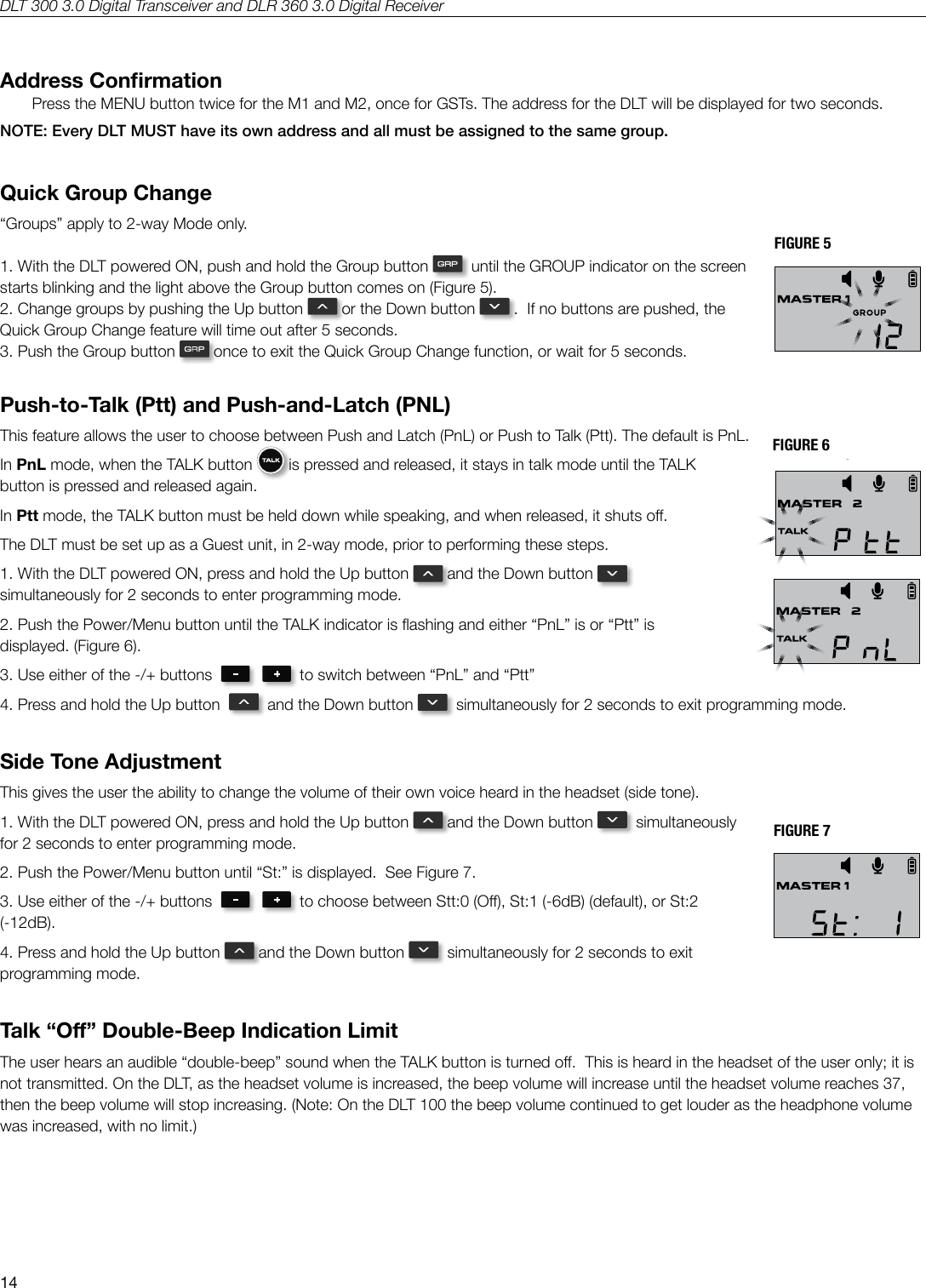
DLT 300 3.0 Digital Transceiver and DLR 360 3.0 Digital Receiver14Address ConrmationPress the MENU button twice for the M1 and M2, once for GSTs. The address for the DLT will be displayed for two seconds. NOTE: Every DLT MUST have its own address and all must be assigned to the same group.Quick Group Change“Groups” apply to 2-way Mode only.1. With the DLT powered ON, push and hold the Group button    until the GROUP indicator on the screen starts blinking and the light above the Group button comes on (Figure 5).2. Change groups by pushing the Up button   or the Down button   .  If no buttons are pushed, the Quick Group Change feature will time out after 5 seconds.3. Push the Group button   once to exit the Quick Group Change function, or wait for 5 seconds.Push-to-Talk (Ptt) and Push-and-Latch (PNL)This feature allows the user to choose between Push and Latch (PnL) or Push to Talk (Ptt). The default is PnL.  In PnL mode, when the TALK button   is pressed and released, it stays in talk mode until the TALK button is pressed and released again.  In Ptt mode, the TALK button must be held down while speaking, and when released, it shuts o.The DLT must be set up as a Guest unit, in 2-way mode, prior to performing these steps.1. With the DLT powered ON, press and hold the Up button   and the Down button    simultaneously for 2 seconds to enter programming mode.  2. Push the Power/Menu button until the TALK indicator is ashing and either “PnL” is or “Ptt” is displayed. (Figure 6).3. Use either of the -/+ buttons     to switch between “PnL” and “Ptt”4. Press and hold the Up button     and the Down button    simultaneously for 2 seconds to exit programming mode. Side Tone AdjustmentThis gives the user the ability to change the volume of their own voice heard in the headset (side tone). 1. With the DLT powered ON, press and hold the Up button   and the Down button    simultaneously for 2 seconds to enter programming mode.  2. Push the Power/Menu button until “St:” is displayed.  See Figure 7.3. Use either of the -/+ buttons     to choose between Stt:0 (O), St:1 (-6dB) (default), or St:2 (-12dB).4. Press and hold the Up button   and the Down button    simultaneously for 2 seconds to exit programming mode. Talk “O” Double-Beep Indication LimitThe user hears an audible “double-beep” sound when the TALK button is turned o.  This is heard in the headset of the user only; it is not transmitted. On the DLT, as the headset volume is increased, the beep volume will increase until the headset volume reaches 37, then the beep volume will stop increasing. (Note: On the DLT 100 the beep volume continued to get louder as the headphone volume was increased, with no limit.)FIGURE 5FIGURE 6FIGURE 7Secure Key Code fig. 1Original (save)Secure Key Code fig. 2 SLOC fig. 3 Tone Control  fig. 4 Quick Group Change  fig. 5Ptt & PnL  fig. 6 Ptt & PnL  fig. 6 Side Tone fig. 7A530Secure Key Code fig. 1Original (save)Secure Key Code fig. 2 SLOC fig. 3 Tone Control  fig. 4 Quick Group Change  fig. 5Ptt & PnL  fig. 6 Ptt & PnL  fig. 6 Side Tone fig. 7A530Secure Key Code fig. 1Original (save)Secure Key Code fig. 2 SLOC fig. 3 Tone Control  fig. 4 Quick Group Change  fig. 5Ptt & PnL  fig. 6 Ptt & PnL  fig. 6 Side Tone fig. 7A530Secure Key Code fig. 1Original (save)Secure Key Code fig. 2 SLOC fig. 3 Tone Control  fig. 4 Quick Group Change  fig. 5Ptt & PnL  fig. 6 Ptt & PnL  fig. 6 Side Tone fig. 7A530
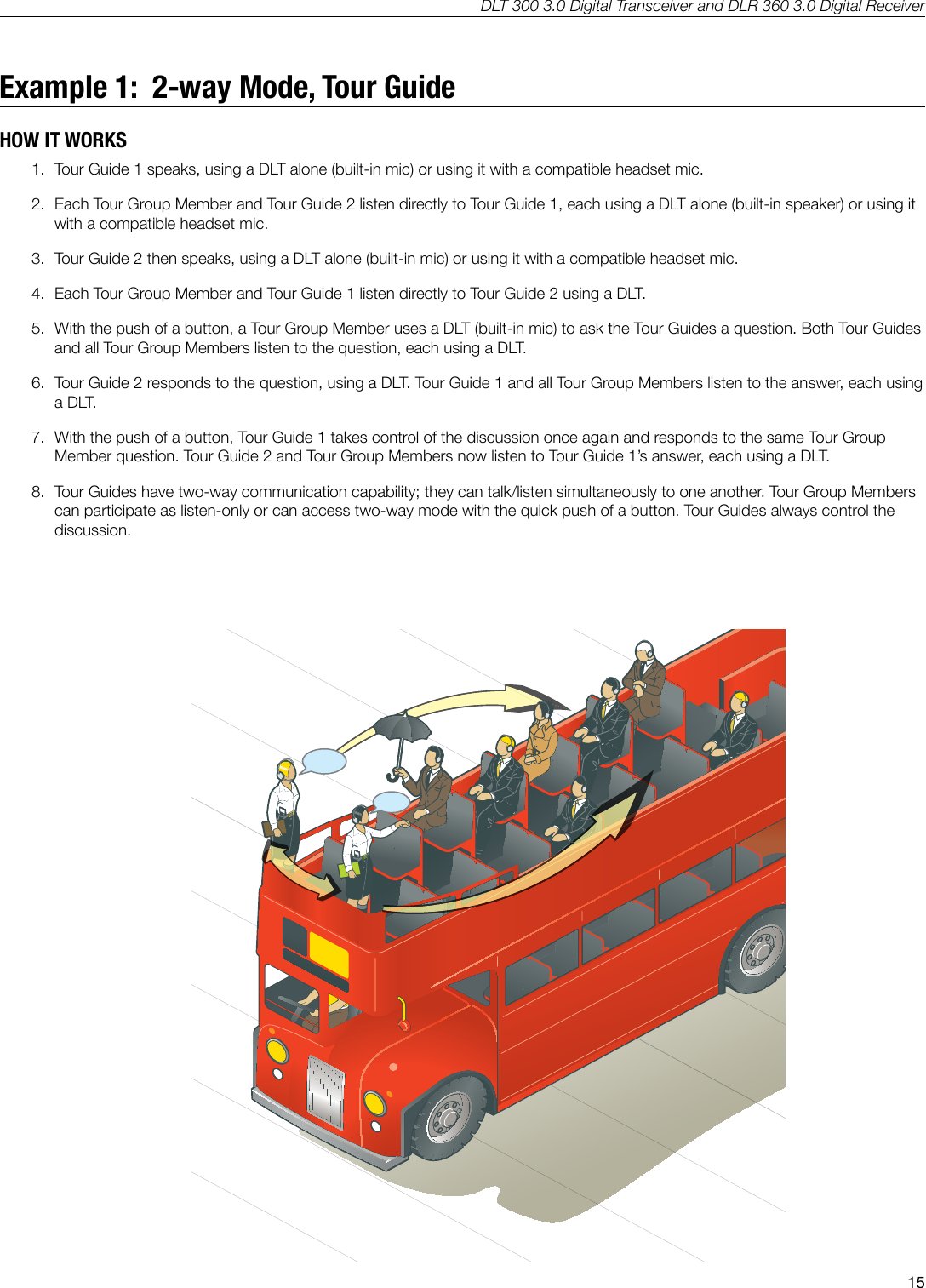
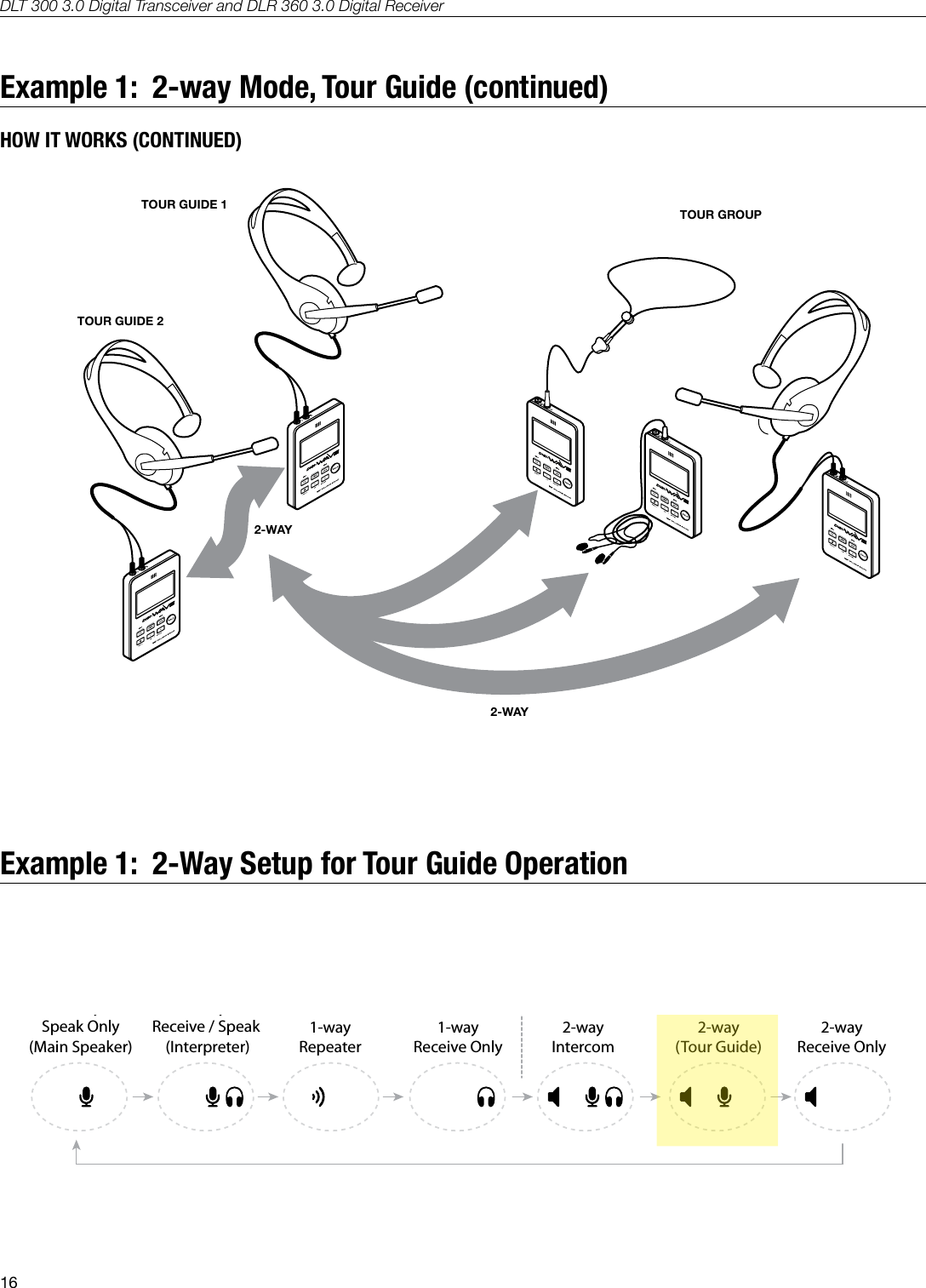
DLT 300 3.0 Digital Transceiver and DLR 360 3.0 Digital Receiver15Example 1:  2-way Mode, Tour GuideHOW IT WORKS1.  Tour Guide 1 speaks, using a DLT alone (built-in mic) or using it with a compatible headset mic.2.  Each Tour Group Member and Tour Guide 2 listen directly to Tour Guide 1, each using a DLT alone (built-in speaker) or using it with a compatible headset mic.3.  Tour Guide 2 then speaks, using a DLT alone (built-in mic) or using it with a compatible headset mic.4.  Each Tour Group Member and Tour Guide 1 listen directly to Tour Guide 2 using a DLT. 5.  With the push of a button, a Tour Group Member uses a DLT (built-in mic) to ask the Tour Guides a question. Both Tour Guides and all Tour Group Members listen to the question, each using a DLT.6.  Tour Guide 2 responds to the question, using a DLT. Tour Guide 1 and all Tour Group Members listen to the answer, each using a DLT.7.  With the push of a button, Tour Guide 1 takes control of the discussion once again and responds to the same Tour Group Member question. Tour Guide 2 and Tour Group Members now listen to Tour Guide 1’s answer, each using a DLT.8.  Tour Guides have two-way communication capability; they can talk/listen simultaneously to one another. Tour Group Members can participate as listen-only or can access two-way mode with the quick push of a button. Tour Guides always control the discussion.
DLT 300 3.0 Digital Transceiver and DLR 360 3.0 Digital Receiver16Example 1:  2-way Mode, Tour Guide (continued)HOW IT WORKS (CONTINUED)A259TOUR GUIDE 1TOUR GUIDE 2TOUR GROUP2-WAY2-WAYExample 1:  2-Way Setup for Tour Guide Operation1-waySpeak Only(Main Speaker)1-wayReceive / Speak (Interpreter)2-wayReceive Only1-wayRepeater1-wayReceive Only2-wayIntercom2-way(Tour Guide)1-way Modes 2-way Modes1-waySpeak Only(Main Speaker)1-wayReceive / Speak (Interpreter)2-wayReceive Only1-wayRepeater1-wayReceive Only2-wayIntercom2-way(Tour Guide)1-way Modes 2-way Modes1-waySpeak Only(Main Speaker)1-wayReceive / Speak (Interpreter)2-wayReceive Only1-wayRepeater1-wayReceive Only2-wayIntercom2-way(Tour Guide)1-way Modes 2-way Modes1-waySpeak Only(Main Speaker)1-wayReceive / Speak (Interpreter)2-wayReceive Only1-wayRepeater1-wayReceive Only2-wayIntercom2-way(Tour Guide)1-way Modes 2-way ModesA536
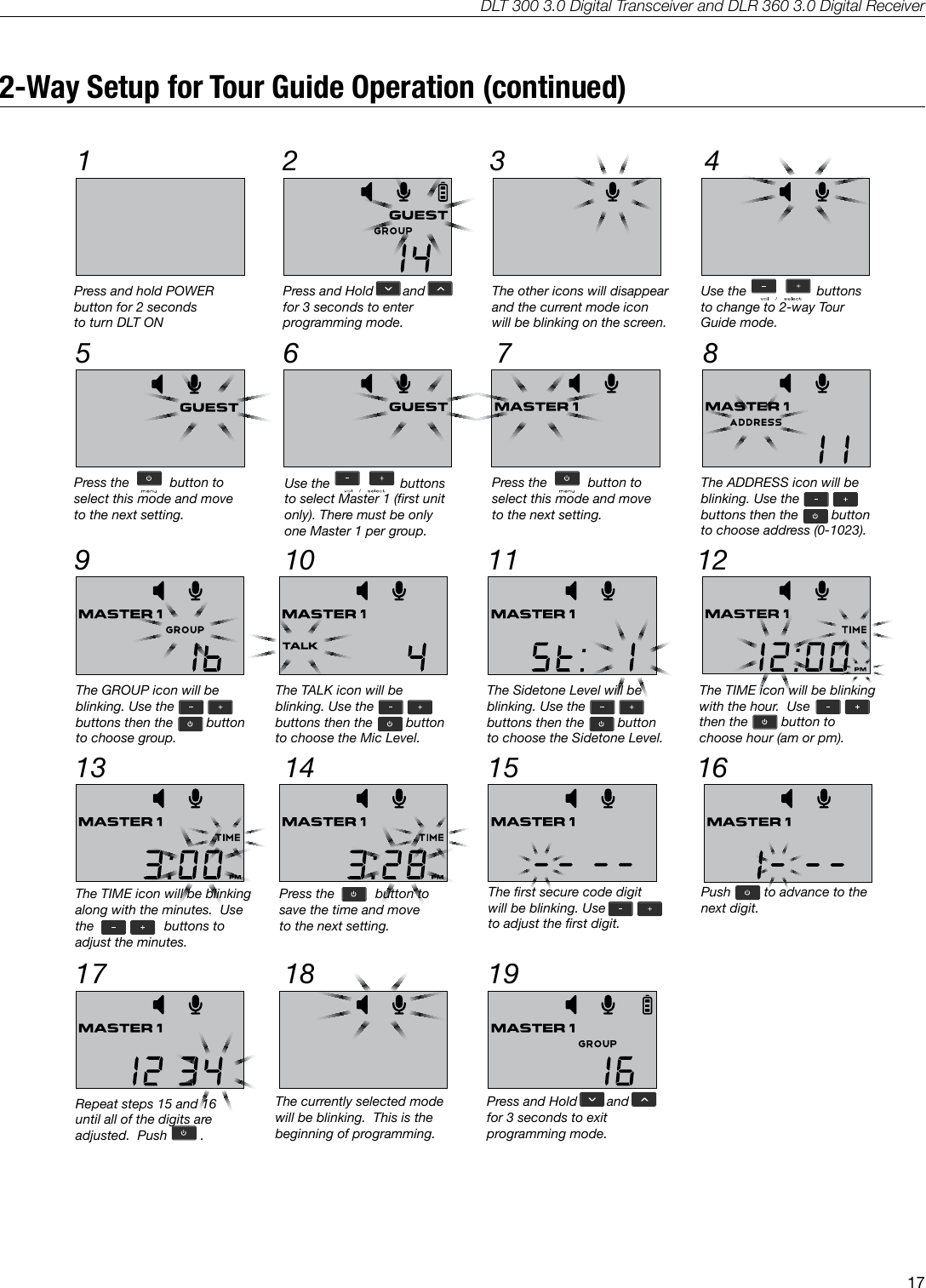
DLT 300 3.0 Digital Transceiver and DLR 360 3.0 Digital Receiver172-Way Setup for Tour Guide Operation (continued)1A53332 45 6 872-way Tour Guide Setup9 10 11 1213 14 15 1617 18 19Press and hold POWERbutton for 2 seconds to turn DLT ONPress and Hold        and      for 3 seconds to enterprogramming mode.The other icons will disappearand the current mode iconwill be blinking on the screen.Use the                   buttonsto change to 2-way TourGuide mode.Press the           button toselect this mode and moveto the next setting.The ADDRESS icon will beblinking. Use thebuttons then the         button           to choose address (0-1023).Use the                   buttonsto select Master 1 (first unitonly). There must be onlyone Master 1 per group.Press the           button toselect this mode and moveto the next setting.The TIME icon will be blinkingwith the hour.  Use              then the         button to choose hour (am or pm).The GROUP icon will beblinking. Use thebuttons then the         button           to choose group.The TALK icon will beblinking. Use thebuttons then the         button           to choose the Mic Level.The Sidetone Level will beblinking. Use thebuttons then the         button           to choose the Sidetone Level.The TIME icon will be blinkingalong with the minutes.  Use the                   buttons to adjust the minutes.Press the           button tosave the time and moveto the next setting.The first secure code digitwill be blinking. Use               to adjust the first digit. Push         to advance to thenext digit.Repeat steps 15 and 16until all of the digits areadjusted.  Push         .The currently selected modewill be blinking.  This is thebeginning of programming.Press and Hold        and      for 3 seconds to exitprogramming mode.
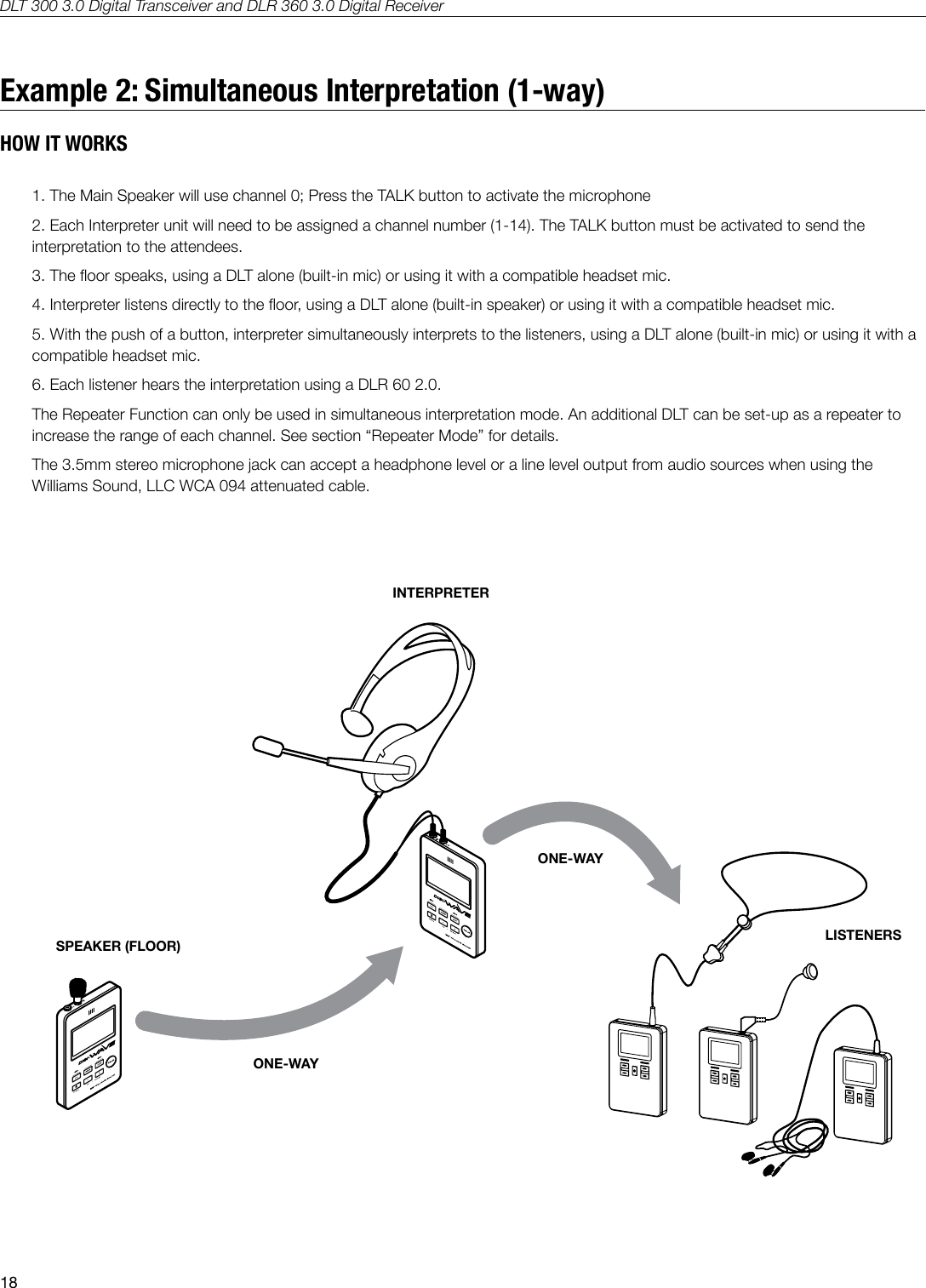
DLT 300 3.0 Digital Transceiver and DLR 360 3.0 Digital Receiver18Example 2: Simultaneous Interpretation (1-way)HOW IT WORKS1. The Main Speaker will use channel 0; Press the TALK button to activate the microphone2. Each Interpreter unit will need to be assigned a channel number (1-14). The TALK button must be activated to send the interpretation to the attendees.3. The oor speaks, using a DLT alone (built-in mic) or using it with a compatible headset mic.4. Interpreter listens directly to the oor, using a DLT alone (built-in speaker) or using it with a compatible headset mic.5. With the push of a button, interpreter simultaneously interprets to the listeners, using a DLT alone (built-in mic) or using it with a compatible headset mic.6. Each listener hears the interpretation using a DLR 60 2.0.The Repeater Function can only be used in simultaneous interpretation mode. An additional DLT can be set-up as a repeater to increase the range of each channel. See section “Repeater Mode” for details.The 3.5mm stereo microphone jack can accept a headphone level or a line level output from audio sources when using the Williams Sound, LLC WCA 094 attenuated cable.A261INTERPRETERSPEAKER (FLOOR)ONE-WAYONE-WAYLISTENERS
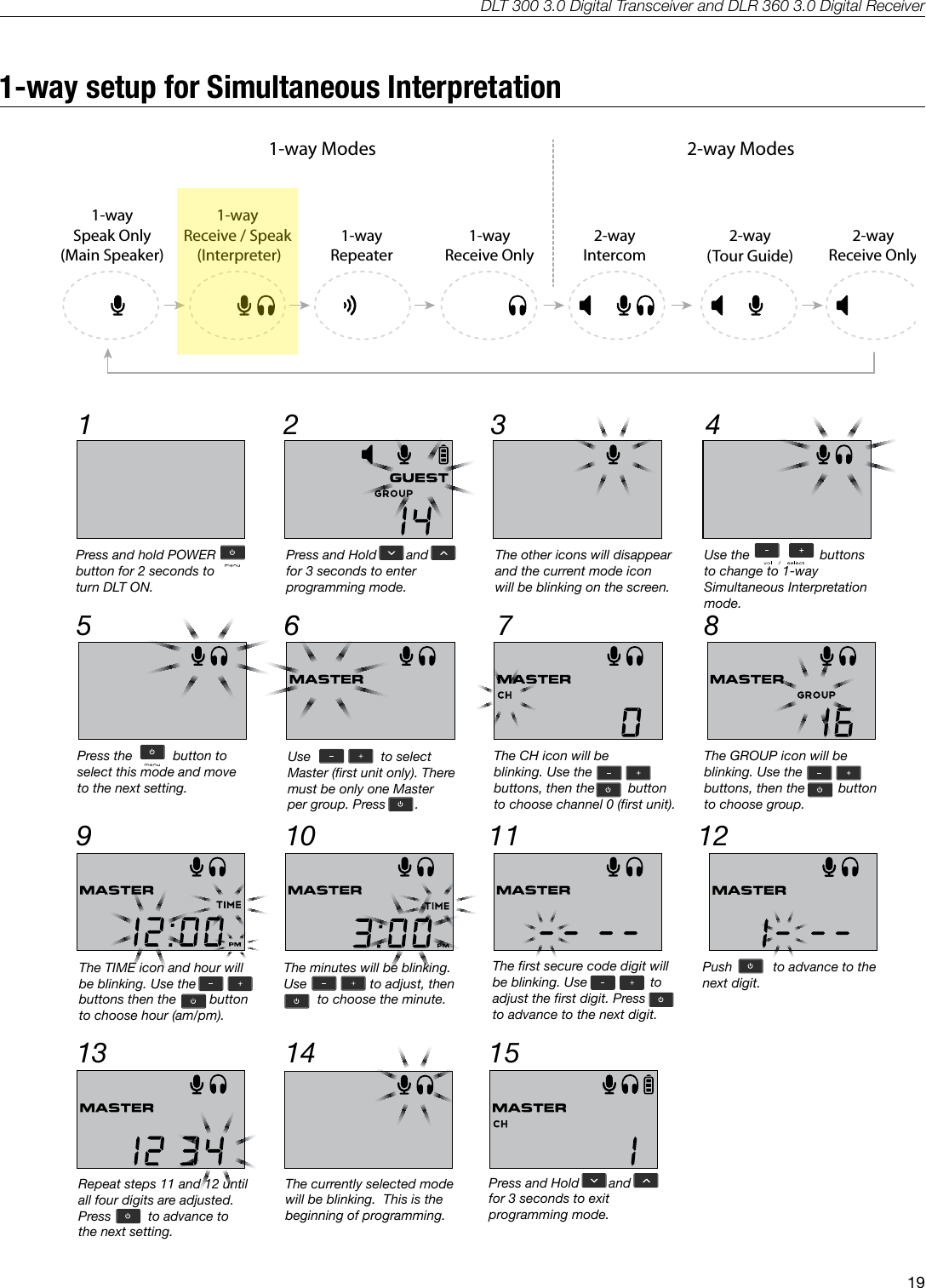
DLT 300 3.0 Digital Transceiver and DLR 360 3.0 Digital Receiver191-way setup for Simultaneous Interpretation1-waySpeak Only(Main Speaker)1-wayReceive / Speak (Interpreter)2-wayReceive Only1-wayRepeater1-wayReceive Only2-wayIntercom2-way(Tour Guide)1-way Modes 2-way Modes1-waySpeak Only(Main Speaker)1-wayReceive / Speak (Interpreter)2-wayReceive Only1-wayRepeater1-wayReceive Only2-wayIntercom2-way(Tour Guide)1-way Modes 2-way Modes1-waySpeak Only(Main Speaker)1-wayReceive / Speak (Interpreter)2-wayReceive Only1-wayRepeater1-wayReceive Only2-wayIntercom2-way(Tour Guide)1-way Modes 2-way Modes1-waySpeak Only(Main Speaker)1-wayReceive / Speak (Interpreter)2-wayReceive Only1-wayRepeater1-wayReceive Only2-wayIntercom2-way(Tour Guide)1-way Modes 2-way ModesA536A5341-way Simultaneous Interpretation Setup1 32 45 6 879 10 11 1213 14 15Press and hold POWERbutton for 2 seconds to turn DLT ON.Press and Hold        and      for 3 seconds to enterprogramming mode.The other icons will disappearand the current mode iconwill be blinking on the screen.Use the                   buttonsto change to 1-way Simultaneous Interpretation mode.Press the           button toselect this mode and moveto the next setting.The GROUP icon will beblinking. Use thebuttons, then the         button           to choose group.Use                   to selectMaster (first unit only). Theremust be only one Master per group. Press  .     .Push           to advance to thenext digit.The TIME icon and hour willbe blinking. Use thebuttons then the         button           to choose hour (am/pm).The minutes will be blinking.Use                 to adjust, then          to choose the minute.Repeat steps 11 and 12 untilall four digits are adjusted.Press          to advance tothe next setting.The first secure code digit willbe blinking. Use                 toadjust the first digit. Pressto advance to the next digit. The currently selected modewill be blinking.  This is thebeginning of programming.Press and Hold        and      for 3 seconds to exitprogramming mode.The CH icon will beblinking. Use thebuttons, then the         button           to choose channel 0 (first unit).
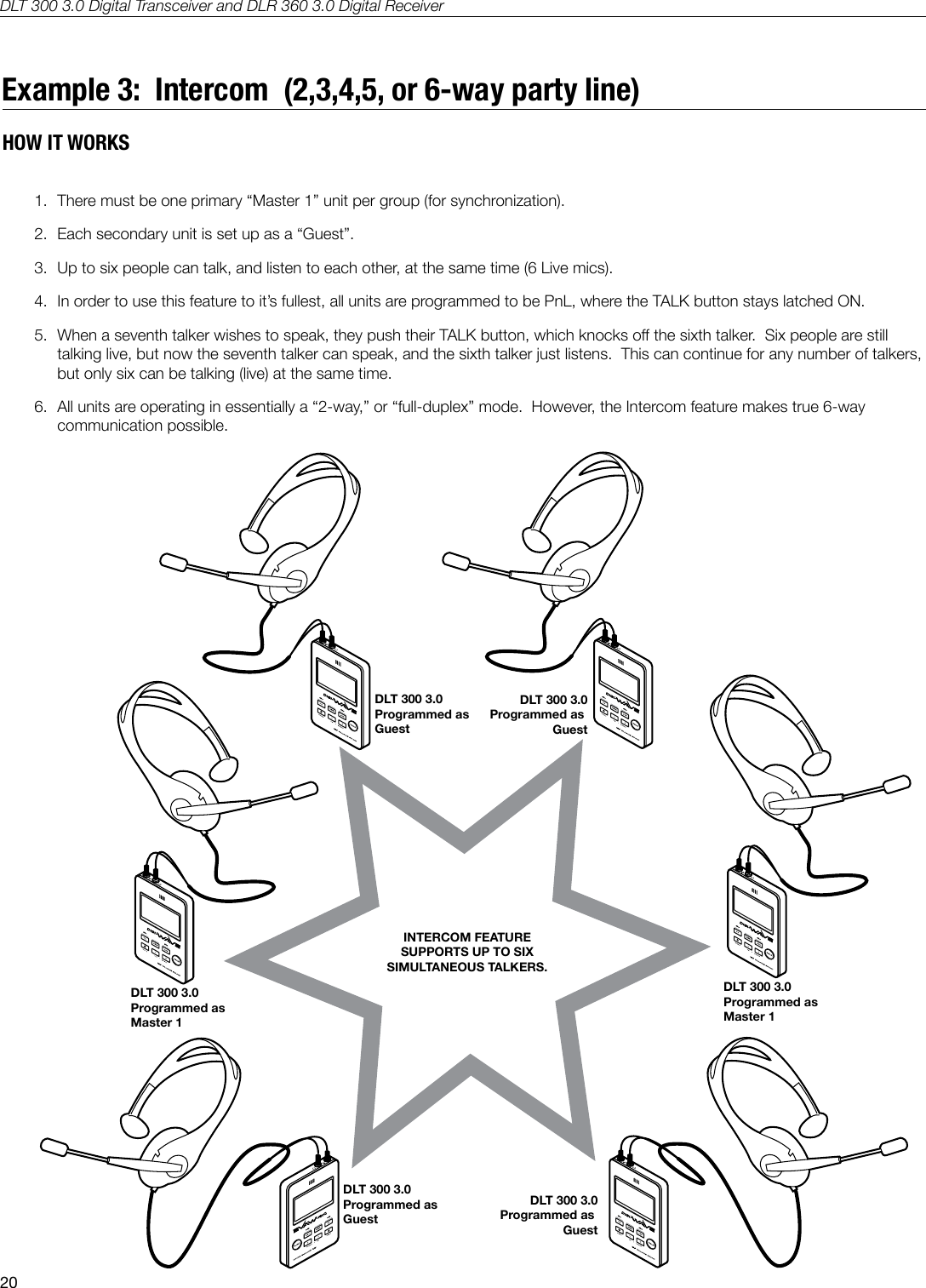
DLT 300 3.0 Digital Transceiver and DLR 360 3.0 Digital Receiver20Example 3:  Intercom  (2,3,4,5, or 6-way party line) HOW IT WORKS1.  There must be one primary “Master 1” unit per group (for synchronization).2.  Each secondary unit is set up as a “Guest”.3.  Up to six people can talk, and listen to each other, at the same time (6 Live mics).4.  In order to use this feature to it’s fullest, all units are programmed to be PnL, where the TALK button stays latched ON.5.  When a seventh talker wishes to speak, they push their TALK button, which knocks o the sixth talker.  Six people are still talking live, but now the seventh talker can speak, and the sixth talker just listens.  This can continue for any number of talkers, but only six can be talking (live) at the same time.6.  All units are operating in essentially a “2-way,” or “full-duplex” mode.  However, the Intercom feature makes true 6-way communication possible.DLT 300 3.0Programmed as GuestDLT 300 3.0Programmed as GuestDLT 300 3.0Programmed as Master 1INTERCOM FEATURESUPPORTS UP TO SIXSIMULTANEOUS TALKERS.DLT 300 3.0Programmed as GuestDLT 300 3.0Programmed as Master 1DLT 300 3.0Programmed as GuestHow it Works:  6-way Intercom
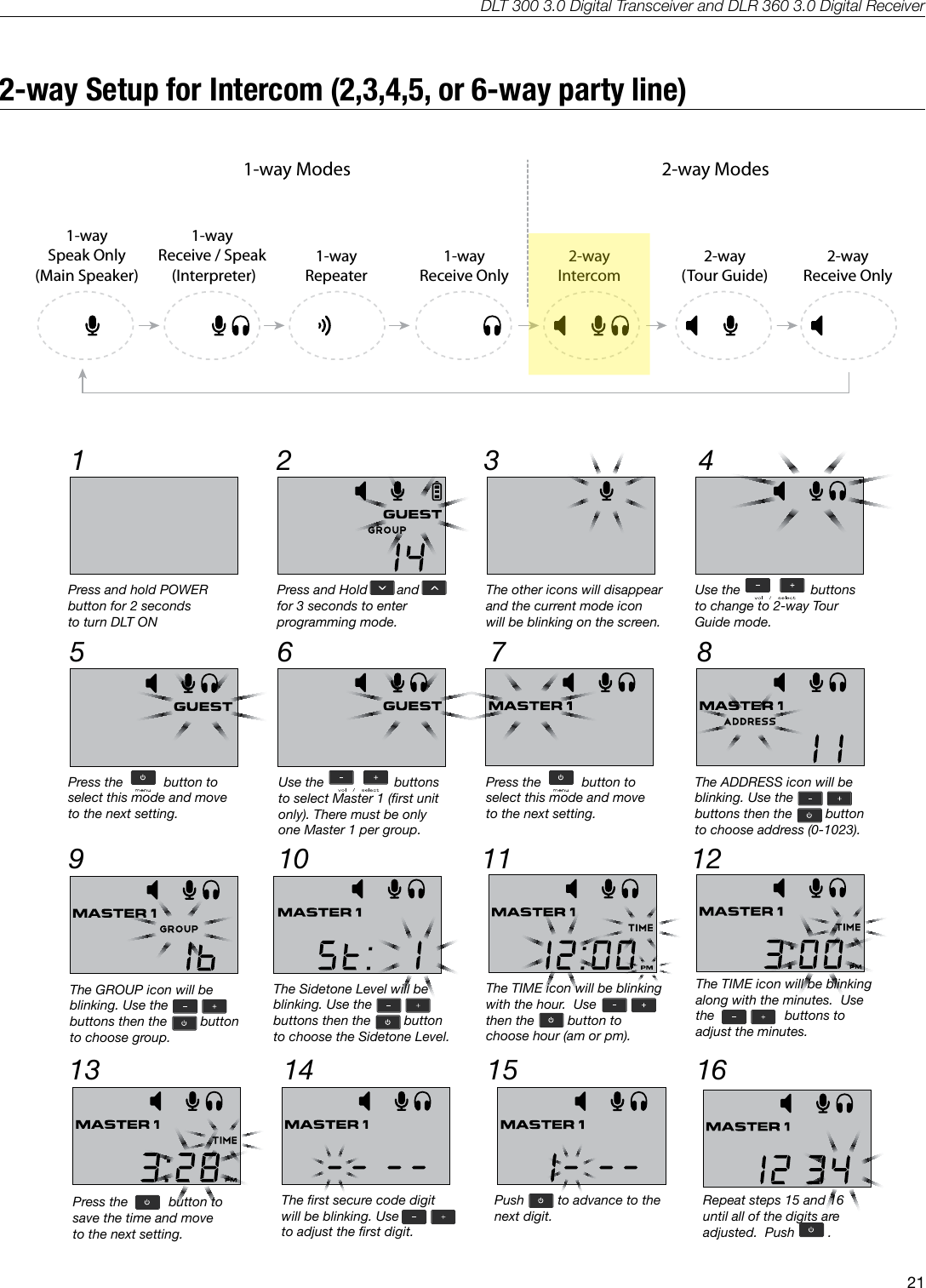
DLT 300 3.0 Digital Transceiver and DLR 360 3.0 Digital Receiver212-way Setup for Intercom (2,3,4,5, or 6-way party line)1-waySpeak Only(Main Speaker)1-wayReceive / Speak (Interpreter)2-wayReceive Only1-wayRepeater1-wayReceive Only2-wayIntercom2-way(Tour Guide)1-way Modes 2-way Modes1-waySpeak Only(Main Speaker)1-wayReceive / Speak (Interpreter)2-wayReceive Only1-wayRepeater1-wayReceive Only2-wayIntercom2-way(Tour Guide)1-way Modes 2-way Modes1-waySpeak Only(Main Speaker)1-wayReceive / Speak (Interpreter)2-wayReceive Only1-wayRepeater1-wayReceive Only2-wayIntercom2-way(Tour Guide)1-way Modes 2-way Modes1-waySpeak Only(Main Speaker)1-wayReceive / Speak (Interpreter)2-wayReceive Only1-wayRepeater1-wayReceive Only2-wayIntercom2-way(Tour Guide)1-way Modes 2-way ModesA536A535Intercom Mode Setup1 32 45 6 879 10 11 1213 14 15 1617 18Press and hold POWERbutton for 2 seconds to turn DLT ONPress and Hold        and      for 3 seconds to enterprogramming mode.The other icons will disappearand the current mode iconwill be blinking on the screen.Use the                   buttonsto change to 2-way TourGuide mode.Press the           button toselect this mode and moveto the next setting.The ADDRESS icon will beblinking. Use thebuttons then the         button           to choose address (0-1023).Use the                   buttonsto select Master 1 (first unitonly). There must be onlyone Master 1 per group.Press the           button toselect this mode and moveto the next setting.The TIME icon will be blinkingwith the hour.  Use              then the         button to choose hour (am or pm).The GROUP icon will beblinking. Use thebuttons then the         button           to choose group.The Sidetone Level will beblinking. Use thebuttons then the         button           to choose the Sidetone Level.The TIME icon will be blinkingalong with the minutes.  Use the                   buttons to adjust the minutes.Press the           button tosave the time and moveto the next setting.The first secure code digitwill be blinking. Use               to adjust the first digit. Push         to advance to thenext digit.Repeat steps 15 and 16until all of the digits areadjusted.  Push         .The currently selected modewill be blinking.  This is thebeginning of programming.Press and Hold        and      for 3 seconds to exitprogramming mode.
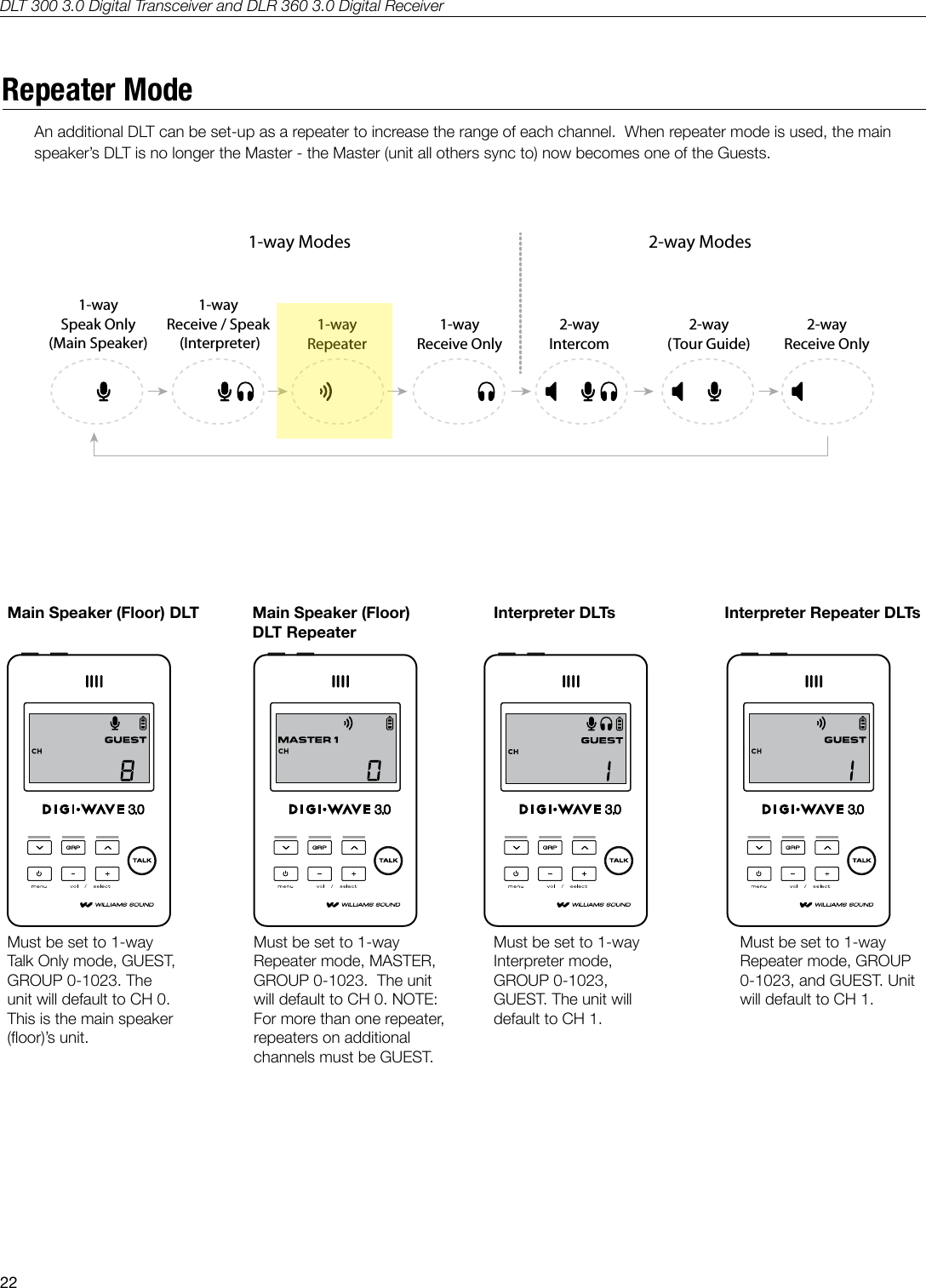
DLT 300 3.0 Digital Transceiver and DLR 360 3.0 Digital Receiver22Repeater ModeAn additional DLT can be set-up as a repeater to increase the range of each channel.  When repeater mode is used, the main speaker’s DLT is no longer the Master - the Master (unit all others sync to) now becomes one of the Guests.1-waySpeak Only(Main Speaker)1-wayReceive / Speak (Interpreter)2-wayReceive Only1-wayRepeater1-wayReceive Only2-wayIntercom2-way(Tour Guide)1-way Modes 2-way Modes1-waySpeak Only(Main Speaker)1-wayReceive / Speak (Interpreter)2-wayReceive Only1-wayRepeater1-wayReceive Only2-wayIntercom2-way(Tour Guide)1-way Modes 2-way Modes1-waySpeak Only(Main Speaker)1-wayReceive / Speak (Interpreter)2-wayReceive Only1-wayRepeater1-wayReceive Only2-wayIntercom2-way(Tour Guide)1-way Modes 2-way Modes1-waySpeak Only(Main Speaker)1-wayReceive / Speak (Interpreter)2-wayReceive Only1-wayRepeater1-wayReceive Only2-wayIntercom2-way(Tour Guide)1-way Modes 2-way ModesA536Must be set to 1-way Talk Only mode, GUEST, GROUP 0-1023. The unit will default to CH 0. This is the main speaker (oor)’s unit.Main Speaker (Floor) DLTMust be set to 1-way Repeater mode, MASTER, GROUP 0-1023.  The unit will default to CH 0. NOTE: For more than one repeater, repeaters on additional channels must be GUEST.Main Speaker (Floor) DLT RepeaterMust be set to 1-way Interpreter mode, GROUP 0-1023, GUEST. The unit will default to CH 1.Interpreter DLTsMust be set to 1-way Repeater mode, GROUP 0-1023, and GUEST. Unit will default to CH 1.Interpreter Repeater DLTsA548
DLT 300 3.0 Digital Transceiver and DLR 360 3.0 Digital Receiver23Repeater Mode (continued)Any DLT’s in 2-way Listen-only Mode, or DLR’s, must be in the same Group.  Each Listener would select a desired channel/language.  See below - when repeater mode is used, the main speaker is not the master unit - the master (that all other units sync to) is a Guest unit.Main speaker (floor)DLT 300 3.0’s FOR FLOOR AND INTERPRETERSCH 0CH 0CH 1 CH 2 CH 3... CH 14CH 1 CH 2 CH 3... CH 14MASTERGUEST REPEATERSGUESTCH 0 CH 1 CH 2 CH 3... CH 14DLT 300 3.0 [ LISTEN ONLY ] OR DLR 360 3.0DLT 300 3.0 [ LISTEN ONLY ] OR DLR 360 3.0 MUST BE ON THE SAME GROUP.  EACH LISTENER WOULD SELECT A DESIRED CHANNEL / LANGUAGE.NOTE: WHEN REPEATERS ARE NOT REQUIRED, THE MAIN SPEAKER ( CH 0 ) WILL BE THE MASTER.A549ORIGINAL (SAVE)Note: When repeaters are not required, the Main Speaker (Ch. 0) will be the Master.
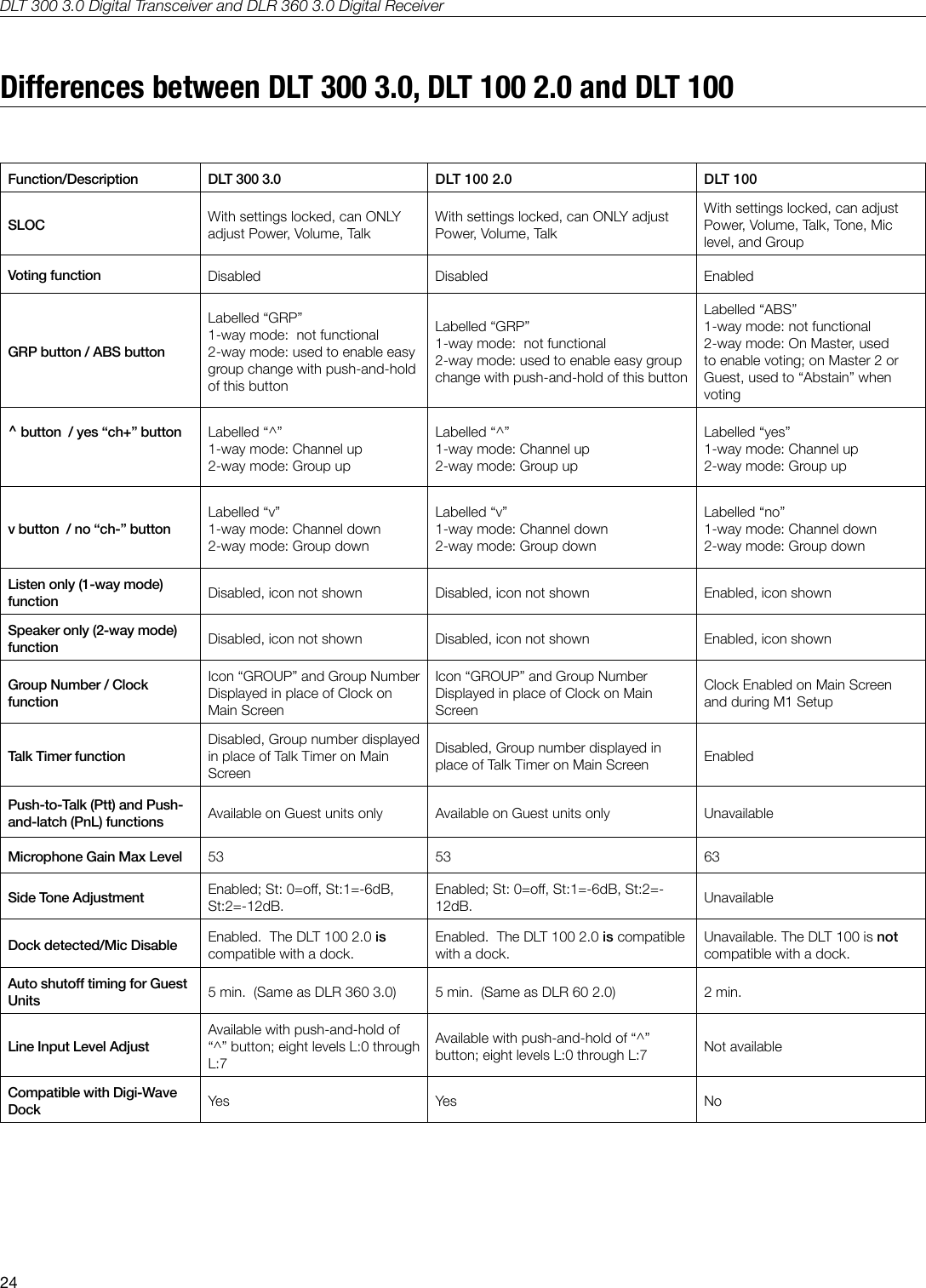
DLT 300 3.0 Digital Transceiver and DLR 360 3.0 Digital Receiver24Differences between DLT 300 3.0, DLT 100 2.0 and DLT 100Function/Description DLT 300 3.0 DLT 100 2.0 DLT 100SLOC With settings locked, can ONLY adjust Power, Volume, TalkWith settings locked, can ONLY adjust Power, Volume, TalkWith settings locked, can adjust Power, Volume, Talk, Tone, Mic level, and GroupVoting function Disabled Disabled EnabledGRP button / ABS buttonLabelled “GRP”1-way mode:  not functional2-way mode: used to enable easy group change with push-and-hold of this buttonLabelled “GRP”1-way mode:  not functional2-way mode: used to enable easy group change with push-and-hold of this buttonLabelled “ABS”1-way mode: not functional2-way mode: On Master, used to enable voting; on Master 2 or Guest, used to “Abstain” when voting^ button  / yes “ch+” button Labelled “^”1-way mode: Channel up2-way mode: Group upLabelled “^”1-way mode: Channel up2-way mode: Group upLabelled “yes”1-way mode: Channel up2-way mode: Group upv button  / no “ch-” button  Labelled “v”1-way mode: Channel down2-way mode: Group downLabelled “v”1-way mode: Channel down2-way mode: Group downLabelled “no”1-way mode: Channel down2-way mode: Group downListen only (1-way mode) function Disabled, icon not shown Disabled, icon not shown Enabled, icon shownSpeaker only (2-way mode) function Disabled, icon not shown Disabled, icon not shown Enabled, icon shownGroup Number / Clock functionIcon “GROUP” and Group Number Displayed in place of Clock on Main ScreenIcon “GROUP” and Group Number Displayed in place of Clock on Main ScreenClock Enabled on Main Screen and during M1 SetupTalk Timer functionDisabled, Group number displayed in place of Talk Timer on Main ScreenDisabled, Group number displayed in place of Talk Timer on Main Screen EnabledPush-to-Talk (Ptt) and Push-and-latch (PnL) functions Available on Guest units only Available on Guest units only UnavailableMicrophone Gain Max Level 53 53 63Side Tone Adjustment Enabled; St: 0=o, St:1=-6dB, St:2=-12dB.Enabled; St: 0=o, St:1=-6dB, St:2=-12dB. UnavailableDock detected/Mic Disable Enabled.  The DLT 100 2.0 is compatible with a dock.Enabled.  The DLT 100 2.0 is compatible with a dock.Unavailable. The DLT 100 is not compatible with a dock.Auto shuto timing for Guest Units 5 min.  (Same as DLR 360 3.0) 5 min.  (Same as DLR 60 2.0) 2 min.Line Input Level AdjustAvailable with push-and-hold of “^” button; eight levels L:0 through L:7Available with push-and-hold of “^” button; eight levels L:0 through L:7 Not availableCompatible with Digi-Wave Dock Yes Yes No
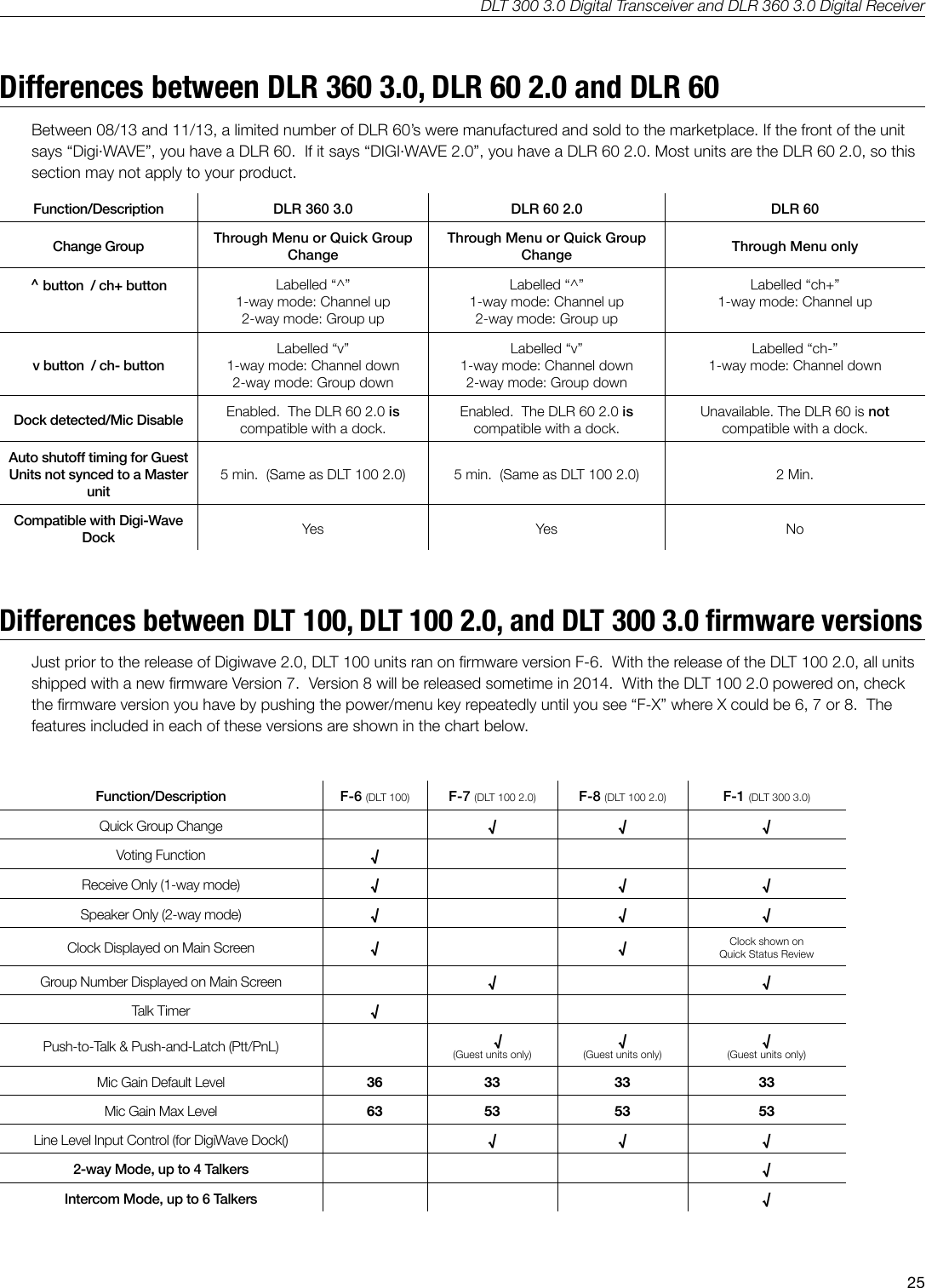
DLT 300 3.0 Digital Transceiver and DLR 360 3.0 Digital Receiver25Differences between DLR 360 3.0, DLR 60 2.0 and DLR 60Between 08/13 and 11/13, a limited number of DLR 60’s were manufactured and sold to the marketplace. If the front of the unit says “Digi·WAVE”, you have a DLR 60.  If it says “DIGI·WAVE 2.0”, you have a DLR 60 2.0. Most units are the DLR 60 2.0, so this section may not apply to your product.Function/Description DLR 360 3.0 DLR 60 2.0 DLR 60Change Group Through Menu or Quick Group ChangeThrough Menu or Quick Group Change Through Menu only^ button  / ch+ button Labelled “^”1-way mode: Channel up2-way mode: Group upLabelled “^”1-way mode: Channel up2-way mode: Group upLabelled “ch+”1-way mode: Channel upv button  / ch- button  Labelled “v”1-way mode: Channel down2-way mode: Group downLabelled “v”1-way mode: Channel down2-way mode: Group downLabelled “ch-”1-way mode: Channel downDock detected/Mic Disable Enabled.  The DLR 60 2.0 is compatible with a dock.Enabled.  The DLR 60 2.0 is compatible with a dock.Unavailable. The DLR 60 is not compatible with a dock.Auto shuto timing for Guest Units not synced to a Master unit5 min.  (Same as DLT 100 2.0) 5 min.  (Same as DLT 100 2.0) 2 Min.Compatible with Digi-Wave Dock Yes Yes No      Differences between DLT 100, DLT 100 2.0, and DLT 300 3.0 rmware versionsJust prior to the release of Digiwave 2.0, DLT 100 units ran on rmware version F-6.  With the release of the DLT 100 2.0, all units shipped with a new rmware Version 7.  Version 8 will be released sometime in 2014.  With the DLT 100 2.0 powered on, check the rmware version you have by pushing the power/menu key repeatedly until you see “F-X” where X could be 6, 7 or 8.  The features included in each of these versions are shown in the chart below.Function/Description F-6 (DLT 100) F-7 (DLT 100 2.0) F-8 (DLT 100 2.0) F-1 (DLT 300 3.0)Quick Group Change √ √ √Voting Function √Receive Only (1-way mode) √ √ √Speaker Only (2-way mode) √ √ √Clock Displayed on Main Screen √ √ Clock shown on Quick Status ReviewGroup Number Displayed on Main Screen √ √Talk Timer √Push-to-Talk & Push-and-Latch (Ptt/PnL)    √(Guest units only)√(Guest units only)√(Guest units only)Mic Gain Default Level 36 33 33 33Mic Gain Max Level 63 53 53 53Line Level Input Control (for DigiWave Dock() √ √ √2-way Mode, up to 4 Talkers √Intercom Mode, up to 6 Talkers √
DLT 300 3.0 Digital Transceiver and DLR 360 3.0 Digital Receiver26SpecicationsDLT 300 3.0 TRANSCEIVERDimensions 103.3 x 61.8 x 11.3 mm  (4.07 x 2.43 x 0.44 inches) (H x W x D)Weight 82 g (2.9 oz)  including batteryColor Black/Silver (Front/Back)Enclosure Shatter resistant PC/ABS plasticBattery type Lithium Polymer with smart charge built into transceiver; 2000 mAHBattery life Up to 14 hrs talk time per chargeCurrent consumption range: 36 mA @ idle to 89 mA w/1 Ch Tx and 3 Ch RxCharge time 5 hrs. TFP 045 with cable and international adaptersOptional Chargers: Two-bay CHG 102, or 12-bay CHG 1012Simultaneous Channels/Groups/TalkersUp to 15 simultaneous channels (Interpretation mode)Up to 4 simultaneous groups (2 way mode)Up to 6 simultaneous talkers (2-way mode)Operating frequencies 2.4 GHz (ISM band);  2402 – 2476 MHz FHSSAudio Frequency response(-3dB Knee Level)Conference Mode, Interpreter Mode:  140 – 11.5 KHzIntercom Mode:  140 – 7.6 KHzSNR 74 dB (A-weighted, Maximum output)THD 0.33 %Microphone input Internal microphone (disabled when MIC jack engaged) and 3.5 mm phone jack (tip/sleeve) with electret microphone bias, adjustable gain with 63dB range.Headphone output 3.5 mm phone jack; 33 Ω loadAudio output Max SSPL 90 111.8dB (EAR 013), 116.8dB (EAR 041) Internal speaker (disabled when ear jack engaged) <20mW @ 10% THD/RL = 33ΩRange Up to 100ft outdoors and 200ft indoors (depending upon environmental conditions)Modulation FSKRF output 14 dBm TypicalSecurity 87 bit encryption, Secure Key Code, Setup Lock (SLOC)Controls Front panel push buttons for volume up/down, group select, menu access and selection, voting, timer, time, MIC on/o, power on/o, tone control SLOC access and Secure Key access. System reset button (rear panel)Outputs 3.5 mm stereo/mono headphone jack;30 pin charging jack with audio out to base stationsSide tone -12 dB below volume, tone variation  [ST:0 = O, ST:1 = -6 dB, ST:2 = -12 dB]Indicators LCD (Group, channel, volume level, battery status, mode, number of people with talk button on)LED’s (charge status) Red LED around talk button when enabled.Docking Connector 30-pin Connector for charging and audio in/outCompatible Receiver DLR 360 3.0 onlyApprovals FCC, Industrie Canada, CE, C-tick, RoHS, WEEEWarranty 2 years parts and labor (90 days on accessories); 6 months on internal battery                                 NOTE: SPECIFICATIONS SUBJECT TO CHANGE WITHOUT NOTICE.
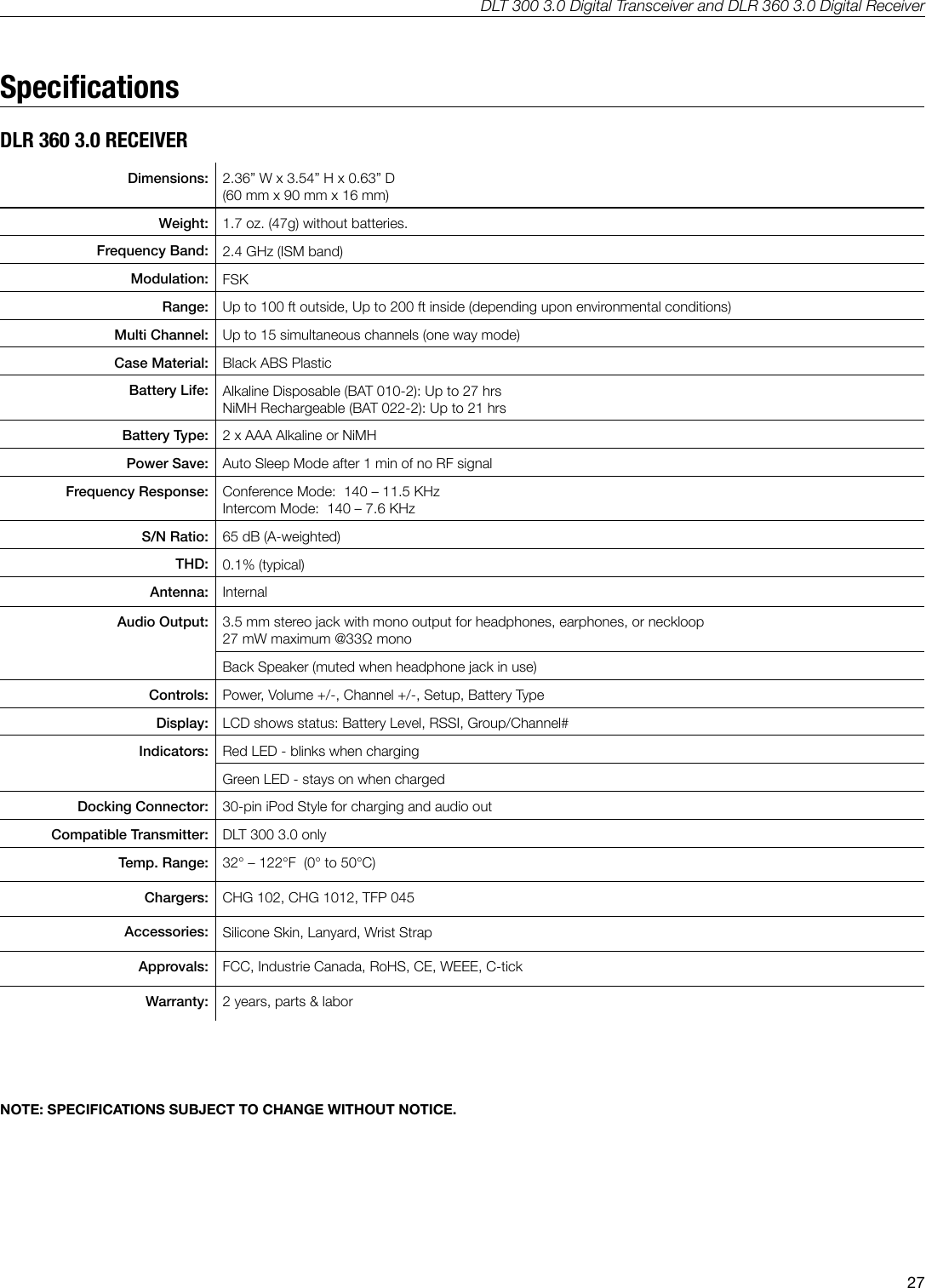
DLT 300 3.0 Digital Transceiver and DLR 360 3.0 Digital Receiver27SpecicationsDLR 360 3.0 RECEIVERDimensions: 2.36” W x 3.54” H x 0.63” D(60 mm x 90 mm x 16 mm) Weight: 1.7 oz. (47g) without batteries.Frequency Band: 2.4 GHz (ISM band)Modulation: FSKRange: Up to 100 ft outside, Up to 200 ft inside (depending upon environmental conditions)Multi Channel: Up to 15 simultaneous channels (one way mode)Case Material: Black ABS PlasticBattery Life: Alkaline Disposable (BAT 010-2): Up to 27 hrsNiMH Rechargeable (BAT 022-2): Up to 21 hrsBattery Type: 2 x AAA Alkaline or NiMHPower Save: Auto Sleep Mode after 1 min of no RF signalFrequency Response: Conference Mode:  140 – 11.5 KHzIntercom Mode:  140 – 7.6 KHzS/N Ratio: 65 dB (A-weighted)THD: 0.1% (typical)Antenna: InternalAudio Output: 3.5 mm stereo jack with mono output for headphones, earphones, or neckloop27 mW maximum @33Ω monoBack Speaker (muted when headphone jack in use)Controls: Power, Volume +/-, Channel +/-, Setup, Battery TypeDisplay: LCD shows status: Battery Level, RSSI, Group/Channel#Indicators: Red LED - blinks when chargingGreen LED - stays on when chargedDocking Connector: 30-pin iPod Style for charging and audio outCompatible Transmitter: DLT 300 3.0 onlyTemp. Range: 32° – 122°F  (0° to 50°C)Chargers: CHG 102, CHG 1012, TFP 045Accessories: Silicone Skin, Lanyard, Wrist StrapApprovals: FCC, Industrie Canada, RoHS, CE, WEEE, C-tickWarranty: 2 years, parts & laborNOTE: SPECIFICATIONS SUBJECT TO CHANGE WITHOUT NOTICE.
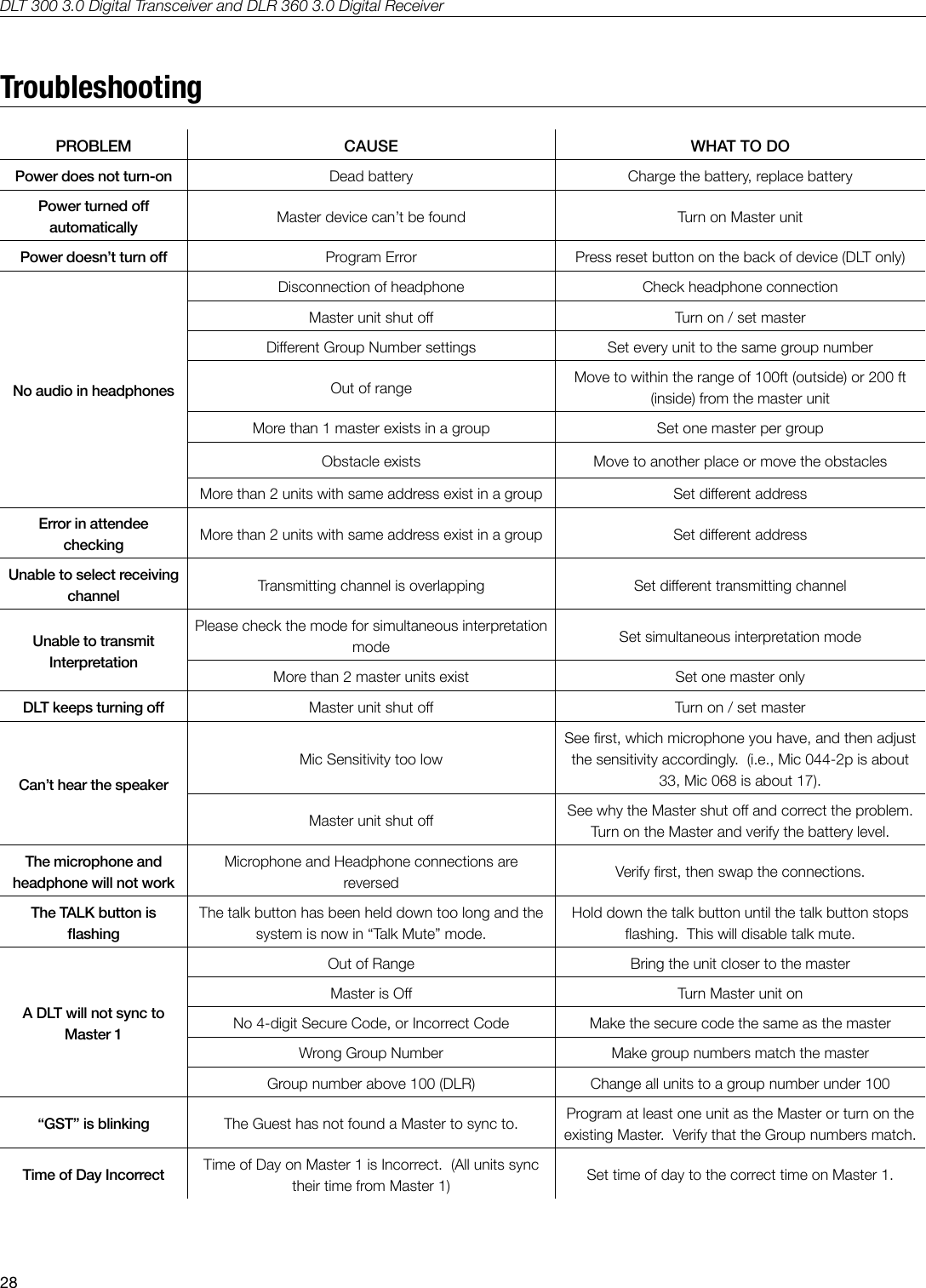
DLT 300 3.0 Digital Transceiver and DLR 360 3.0 Digital Receiver28TroubleshootingPROBLEM CAUSE WHAT TO DOPower does not turn-on Dead battery Charge the battery, replace batteryPower turned o automatically Master device can’t be found Turn on Master unitPower doesn’t turn o Program Error Press reset button on the back of device (DLT only)No audio in headphonesDisconnection of headphone Check headphone connectionMaster unit shut o Turn on / set masterDierent Group Number settings Set every unit to the same group numberOut of range Move to within the range of 100ft (outside) or 200 ft (inside) from the master unitMore than 1 master exists in a group Set one master per groupObstacle exists Move to another place or move the obstaclesMore than 2 units with same address exist in a group Set dierent addressError in attendee checking More than 2 units with same address exist in a group Set dierent addressUnable to select receiving channel Transmitting channel is overlapping Set dierent transmitting channelUnable to transmit InterpretationPlease check the mode for simultaneous interpretation mode Set simultaneous interpretation modeMore than 2 master units exist Set one master onlyDLT keeps turning o Master unit shut o Turn on / set masterCan’t hear the speakerMic Sensitivity too lowSee rst, which microphone you have, and then adjust the sensitivity accordingly.  (i.e., Mic 044-2p is about 33, Mic 068 is about 17).Master unit shut o See why the Master shut o and correct the problem.  Turn on the Master and verify the battery level.The microphone and headphone will not workMicrophone and Headphone connections are reversed Verify rst, then swap the connections.The TALK button is ashingThe talk button has been held down too long and the system is now in “Talk Mute” mode.Hold down the talk button until the talk button stops ashing.  This will disable talk mute.A DLT will not sync to Master 1Out of Range Bring the unit closer to the masterMaster is O Turn Master unit onNo 4-digit Secure Code, or Incorrect Code Make the secure code the same as the masterWrong Group Number Make group numbers match the masterGroup number above 100 (DLR) Change all units to a group number under 100“GST” is blinking The Guest has not found a Master to sync to. Program at least one unit as the Master or turn on the existing Master.  Verify that the Group numbers match.Time of Day Incorrect Time of Day on Master 1 is Incorrect.  (All units sync their time from Master 1) Set time of day to the correct time on Master 1.
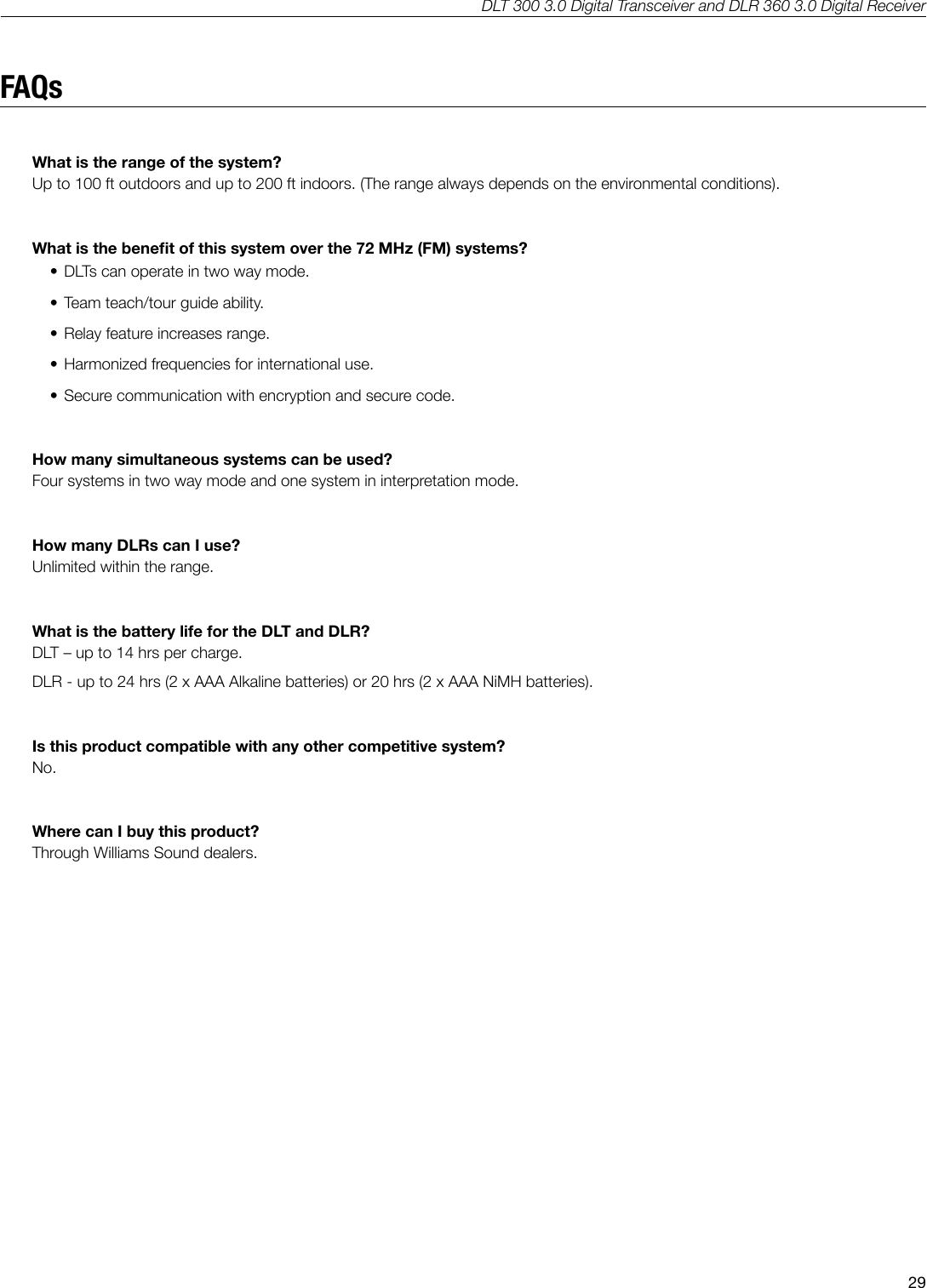
DLT 300 3.0 Digital Transceiver and DLR 360 3.0 Digital Receiver29FAQsWhat is the range of the system?Up to 100 ft outdoors and up to 200 ft indoors. (The range always depends on the environmental conditions).What is the benet of this system over the 72 MHz (FM) systems?• DLTs can operate in two way mode. • Team teach/tour guide ability. • Relay feature increases range.  • Harmonized frequencies for international use.• Secure communication with encryption and secure code.How many simultaneous systems can be used? Four systems in two way mode and one system in interpretation mode.How many DLRs can I use? Unlimited within the range.What is the battery life for the DLT and DLR?DLT – up to 14 hrs per charge. DLR - up to 24 hrs (2 x AAA Alkaline batteries) or 20 hrs (2 x AAA NiMH batteries).Is this product compatible with any other competitive system?No.Where can I buy this product?Through Williams Sound dealers.
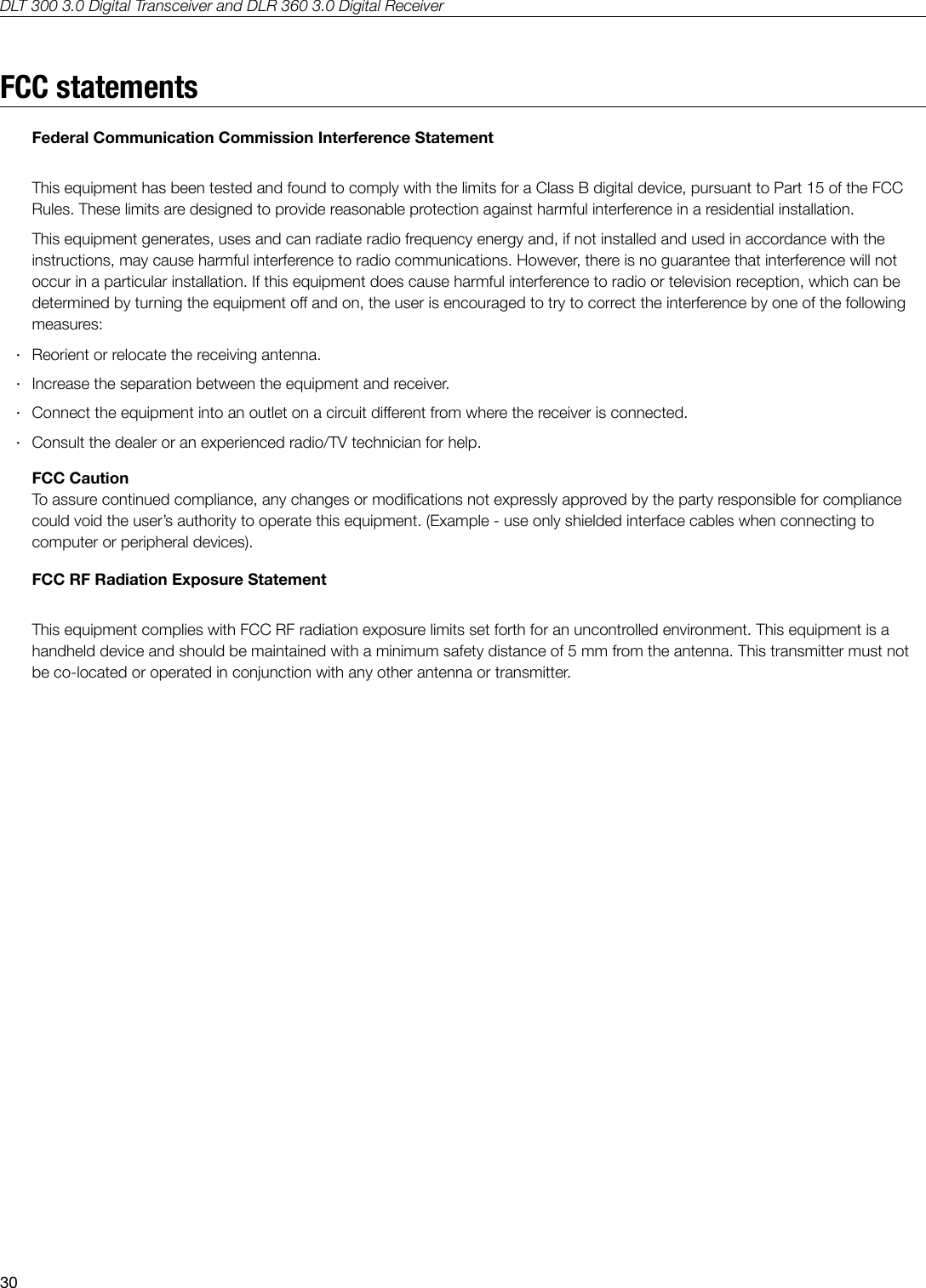
DLT 300 3.0 Digital Transceiver and DLR 360 3.0 Digital Receiver30FCC statementsFederal Communication Commission Interference StatementThis equipment has been tested and found to comply with the limits for a Class B digital device, pursuant to Part 15 of the FCC Rules. These limits are designed to provide reasonable protection against harmful interference in a residential installation.This equipment generates, uses and can radiate radio frequency energy and, if not installed and used in accordance with the instructions, may cause harmful interference to radio communications. However, there is no guarantee that interference will not occur in a particular installation. If this equipment does cause harmful interference to radio or television reception, which can be determined by turning the equipment o and on, the user is encouraged to try to correct the interference by one of the following measures: ·Reorient or relocate the receiving antenna. ·Increase the separation between the equipment and receiver. ·Connect the equipment into an outlet on a circuit dierent from where the receiver is connected. ·Consult the dealer or an experienced radio/TV technician for help.FCC CautionTo assure continued compliance, any changes or modications not expressly approved by the party responsible for compliance could void the user’s authority to operate this equipment. (Example - use only shielded interface cables when connecting to computer or peripheral devices). FCC RF Radiation Exposure Statement This equipment complies with FCC RF radiation exposure limits set forth for an uncontrolled environment. This equipment is a handheld device and should be maintained with a minimum safety distance of 5 mm from the antenna. This transmitter must not be co-located or operated in conjunction with any other antenna or transmitter.
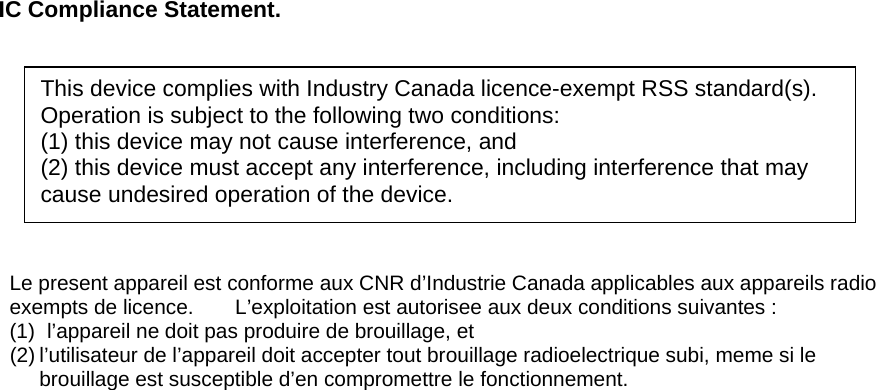
 IC Compliance Statement.          Le present appareil est conforme aux CNR d’Industrie Canada applicables aux appareils radio exempts de licence.    L’exploitation est autorisee aux deux conditions suivantes : (1)  l’appareil ne doit pas produire de brouillage, et (2) l’utilisateur de l’appareil doit accepter tout brouillage radioelectrique subi, meme si le         brouillage est susceptible d’en compromettre le fonctionnement.   This device complies with Industry Canada licence-exempt RSS standard(s). Operation is subject to the following two conditions:   (1) this device may not cause interference, and   (2) this device must accept any interference, including interference that may cause undesired operation of the device.
DLT 300 3.0 Digital Transceiver and DLR 360 3.0 Digital Receiver312-year WarrantyWilliams Sound products are engineered, designed, and manufactured under carefully controlled conditions to provide you with many years of reliable service.Williams Sound warrants the DLT 300 3.0 and DLR 360 3.0 against defects in materials and workmanship under normal use and conditions for 2 years from date of purchase.  This warranty is available to the original end purchaser of the product and CAN BE transferred to subsequent purchasers of the product.Microphones, earphones, headphones, batteries, chargers, cables, carry cases, and most other accessory products carry a 90-day warranty.Williams Sound has no control over the conditions under which this product is used. Williams Sound, therefore, disclaims all warranties not set forth above, both express and implied, with respect to the DLT 300 3.0 and DLR 360 3.0, including but not limited to, any implied warranty of merchantability or tness of use of such equipment including, without limitation, any warranty that the use of such equipment for any purpose will comply with applicable laws and regulations. Williams Sound shall not be liable to any person or entity for any medical expenses or any direct, incidental or consequential damages caused by any use, defect, failure or malfunctioning of the product, whether a claim for such damages is based upon warranty, contract, tort or otherwise, the sole remedy for any defect, failure or malfunction of the products is replacement of the product. No person has any authority to bind Williams Sound to any representation or warranty with respect to the DLT 300 3.0 and DLR 360 3.0. Unauthorized repairs or modications will void the warranty. This warranty is void if damage occurred because of misuse, or if the product has been repaired or modied by anyone other than a factory authorized service technician. Warranty does not cover normal wear and tear on the product or any other physical damage unless the damage was the result of a manufacturing defect. Williams Sound is not liable for consequential damages due to any failure of equipment to perform as intended. Williams Sound shall bear no responsibility or obligation with respect to the manner of use of any equipment sold by it. This warranty does not cover reimbursement for your costs of removing and transporting the product for warranty service evaluation or installation of any replacement product provided under this warranty.The exclusions and limitations set out above are not intended to, and should not be construed so as to contravene mandatory provisions of applicable law. If any part or term of this Disclaimer of Warranty is held to be illegal, unenforceable, or in conict with applicable law by a court of competent jurisdiction, the validity of the remaining portions of this Disclaimer of Warranty shall not be aected, and all rights and obligations shall be construed and enforced as if this Limited Warranty did not contain the particular part or term held to be invalid. The terms of the warranty are governed by the laws of the State of Minnesota.Prices and the specications of the products are subject to change without notice.*For Complete Warranty Statement go to: www.williamssound.com/warranty-statementNOTICE: Williams Sound products are NOT designed for use in extreme temperature, humidity or chemical environments. The introduction of chemicals such as chlorine, salt water or human sweat into the product will cause damage to the circuitry. Damage due to these causes is NOT covered under the Product Warranty.If you experience diculty with your system, call Toll-Free for Customer Assistance  1-800-843-3544 (U.S.A.)  or  +1 952 943 2252 (Outside the U.S.A.)If it is necessary to return the system for service, your Customer Service Representative will give you a Return Authorization Number (RA) and shipping instructions.
  ©2014 Williams Sound • All Rights Reserved10300 Valley View Rd • Eden Prairie, MN 55344800-328-6190 / 952-943-2252 • FAX: 952-943-2174www.williamssound.comMAN 153H

Navigation menu